XPages on IBM Bluemix: The Do‘s and Don‘ts
www.isbg.org 23.+24.05.2016 @LSBG
XPages on IBM Bluemix:
The Dos and Don'ts
Oliver Busse
We4IT GmbH
Germany
XPages on IBM Bluemix: The Do‘s and Don‘ts
www.isbg.org 23.+24.05.2016 @LSBG
About me
• Working for We4IT
–Aveedo® Application Framework
• „Bleeding Yellow“ since R4.5
• IBM Champion for ICS
2015 + 2016
• OpenNTF Member Director
@zeromancer1972
@we4it
XPages on IBM Bluemix: The Do‘s and Don‘ts
www.isbg.org 23.+24.05.2016 @LSBG
2016 Developer Competition
• Team-up and win some great prizes!
– 1 year developerWorks Premium Membership (incl. Bluemix)
– $ 500 cash
– 2x $ 250 cash for the 2nd prizes
May 9, 2016 – Sep 5, 2016
XPages on IBM Bluemix: The Do‘s and Don‘ts
www.isbg.org 23.+24.05.2016 @LSBG
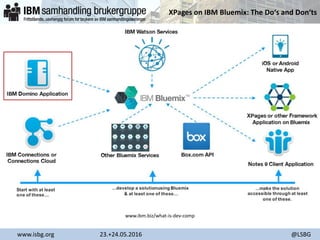
www.ibm.biz/what-is-dev-comp
XPages on IBM Bluemix: The Do‘s and Don‘ts
www.isbg.org 23.+24.05.2016 @LSBG
Agenda
• Prerequisites
• Best practices: design and data separation
• Using the DDE plugin vs. the CF command line
• Understanding the "mysterious" MANIFEST.YML file
• Security considerations
• Plugins and extensions? No problem!
• Tipps & tricks
XPages on IBM Bluemix: The Do‘s and Don‘ts
www.isbg.org 23.+24.05.2016 @LSBG
• Prerequisites
• Best practices: design and data separation
• Using the DDE plugin vs. the CF command line
• Understanding the "mysterious" MANIFEST.YML file
• Security considerations
• Plugins and extensions? No problem!
• Tipps & tricks
XPages on IBM Bluemix: The Do‘s and Don‘ts
www.isbg.org 23.+24.05.2016 @LSBG
Prerequisites
• Create an IBM Bluemix account
• Create an XPages NoSQL database service
(i.e. a Domino Server)
• Get the latest* Extension Library from OpenNTF
• Install Extlib on your local Domino Designer to get the Bluemix
plugin
• Setup Bluemix preferences in DDE
*) 9.0.1v16, Feb 2016
XPages on IBM Bluemix: The Do‘s and Don‘ts
www.isbg.org 23.+24.05.2016 @LSBG
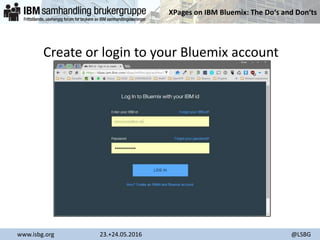
Create or login to your Bluemix account
XPages on IBM Bluemix: The Do‘s and Don‘ts
www.isbg.org 23.+24.05.2016 @LSBG
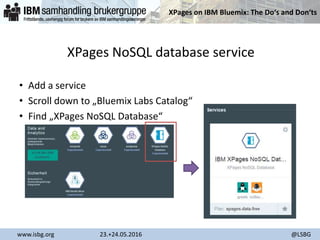
XPages NoSQL database service
• Add a service
• Scroll down to „Bluemix Labs Catalog“
• Find „XPages NoSQL Database“
XPages on IBM Bluemix: The Do‘s and Don‘ts
www.isbg.org 23.+24.05.2016 @LSBG
Additional steps
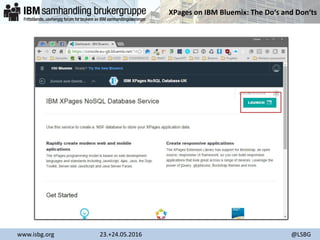
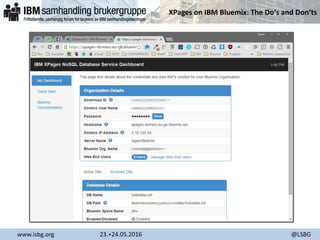
• Open the XPages NoSQL Database service properties page
• Grab the user ID to access the Bluemix Domino instance
– slaney/Bluemix (USA)
– langan/Bluemix (UK)
– coming soon: CAN and AUS
• Optional: setup additional web users
XPages on IBM Bluemix: The Do‘s and Don‘ts
www.isbg.org 23.+24.05.2016 @LSBG
XPages on IBM Bluemix: The Do‘s and Don‘ts
www.isbg.org 23.+24.05.2016 @LSBG
XPages on IBM Bluemix: The Do‘s and Don‘ts
www.isbg.org 23.+24.05.2016 @LSBG
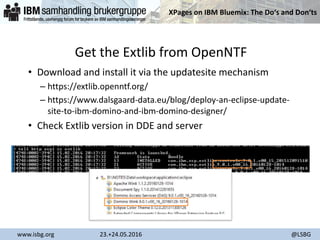
Get the Extlib from OpenNTF
• Download and install it via the updatesite mechanism
– https://extlib.openntf.org/
– https://www.dalsgaard-data.eu/blog/deploy-an-eclipse-update-
site-to-ibm-domino-and-ibm-domino-designer/
• Check Extlib version in DDE and server
XPages on IBM Bluemix: The Do‘s and Don‘ts
www.isbg.org 23.+24.05.2016 @LSBG
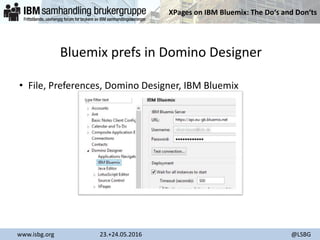
Bluemix prefs in Domino Designer
• File, Preferences, Domino Designer, IBM Bluemix
XPages on IBM Bluemix: The Do‘s and Don‘ts
www.isbg.org 23.+24.05.2016 @LSBG
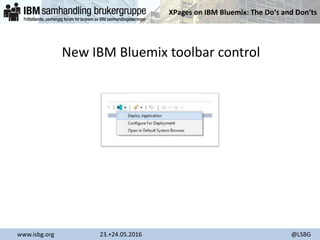
New IBM Bluemix toolbar control
XPages on IBM Bluemix: The Do‘s and Don‘ts
www.isbg.org 23.+24.05.2016 @LSBG
• Prerequisites
• Best practices: design and data separation
• Using the DDE plugin vs. the CF command line
• Understanding the "mysterious" MANIFEST.YML file
• Security considerations
• Plugins and extensions? No problem!
• Tipps & tricks
XPages on IBM Bluemix: The Do‘s and Don‘ts
www.isbg.org 23.+24.05.2016 @LSBG
Design and data separation
• Create the data part on the Bluemix Domino instance
– create a blank database
or
– copy and existing database with data
• Setup ACL etc.
– Keep in mind the additional webusers you may have created before
XPages on IBM Bluemix: The Do‘s and Don‘ts
www.isbg.org 23.+24.05.2016 @LSBG
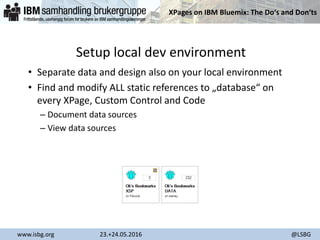
Setup local dev environment
• Separate data and design also on your local environment
• Find and modify ALL static references to „database“ on
every XPage, Custom Control and Code
– Document data sources
– View data sources
XPages on IBM Bluemix: The Do‘s and Don‘ts
www.isbg.org 23.+24.05.2016 @LSBG
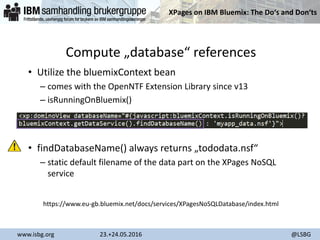
Compute „database“ references
• Utilize the bluemixContext bean
– comes with the OpenNTF Extension Library since v13
– isRunningOnBluemix()
• findDatabaseName() always returns „tododata.nsf“
– static default filename of the data part on the XPages NoSQL
service
https://www.eu-gb.bluemix.net/docs/services/XPagesNoSQLDatabase/index.html
XPages on IBM Bluemix: The Do‘s and Don‘ts
www.isbg.org 23.+24.05.2016 @LSBG
More flexible: use a custom bean
• Compute server and filepath dynamically
– for the local and the Bluemix environment
• Allows a different filename on the XPages NoSQL service (other
than „tododata.nsf“)
• Generic code for „database“ computation for document, view
and repeat data sources
• There is a snippet for you… 
– https://openntf.org/XSnippets.nsf/snippet.xsp?id=daobean-for-xsp-
on-bluemix
XPages on IBM Bluemix: The Do‘s and Don‘ts
www.isbg.org 23.+24.05.2016 @LSBG
Examples: the DAO-Bean
<xp:this.data>
<xp:dominoDocument
var="document1"
databaseName="#{javascript:dao.dbpath}"
formName="greeting">
</xp:dominoDocument>
</xp:this.data>
<xp:repeat
id="greetings"
rows="9999"
var="greeting"
indexVar="index">
<xp:this.value>
<![CDATA[#{javascript:dao.getViewEntries("greetings")}]]>
</xp:this.value>
…
</xp:repeat>
XPages on IBM Bluemix: The Do‘s and Don‘ts
www.isbg.org 23.+24.05.2016 @LSBG
• Prerequisites
• Best practices: design and data separation
• Using the DDE plugin vs. the CF command line
• Understanding the "mysterious" MANIFEST.YML file
• Security considerations
• Plugins and extensions? No problem!
• Caveats and restrictions
• Tipps & tricks
XPages on IBM Bluemix: The Do‘s and Don‘ts
www.isbg.org 23.+24.05.2016 @LSBG
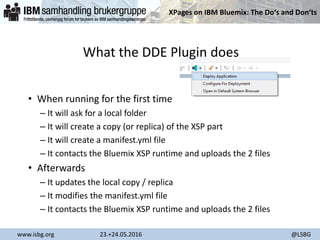
What the DDE Plugin does
• When running for the first time
– It will ask for a local folder
– It will create a copy (or replica) of the XSP part
– It will create a manifest.yml file
– It contacts the Bluemix XSP runtime and uploads the 2 files
• Afterwards
– It updates the local copy / replica
– It modifies the manifest.yml file
– It contacts the Bluemix XSP runtime and uploads the 2 files
XPages on IBM Bluemix: The Do‘s and Don‘ts
www.isbg.org 23.+24.05.2016 @LSBG
What the DDE Plugin also does…
• It won‘t display error messages or log outputs during
deployment
– hard to troubleshoot
• Sometimes it may not work when running a second, third, …
time
– DDE restart will solve this problem
XPages on IBM Bluemix: The Do‘s and Don‘ts
www.isbg.org 23.+24.05.2016 @LSBG
The CF command line
• CF = Cloud Foundry
• Download and install the command line
– https://github.com/cloudfoundry/cli/releases
– http://docs.cloudfoundry.org/devguide/cf-cli/
• You can create a batch file to accellerate deployment
• Verbose output of any action during deployment process
• Access to the XSP runtime file system (e.g. for reading system
logs)
XPages on IBM Bluemix: The Do‘s and Don‘ts
www.isbg.org 23.+24.05.2016 @LSBG
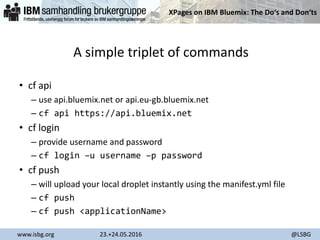
A simple triplet of commands
• cf api
– use api.bluemix.net or api.eu-gb.bluemix.net
– cf api https://api.bluemix.net
• cf login
– provide username and password
– cf login –u username –p password
• cf push
– will upload your local droplet instantly using the manifest.yml file
– cf push
– cf push <applicationName>
XPages on IBM Bluemix: The Do‘s and Don‘ts
www.isbg.org 23.+24.05.2016 @LSBG
Benefits using the CF command line
• Full control of what‘s being done
• Understand how cloud deployment works
• Create new XSP runtimes and instances on the fly
• Deploy plugins and other resources
XPages on IBM Bluemix: The Do‘s and Don‘ts
www.isbg.org 23.+24.05.2016 @LSBG
Disadvantage using the CF command line
• You have to create the local NSF copy / replica manually
– beware of local encryption!
• You have to type in a console… 
– I recommend using CMDER command line replacement for Windows
XPages on IBM Bluemix: The Do‘s and Don‘ts
www.isbg.org 23.+24.05.2016 @LSBG
• Prerequisites
• Best practices: design and data separation
• Using the DDE plugin vs. the CF command line
• Understanding the "mysterious" MANIFEST.YML file
• Security considerations
• Plugins and extensions? No problem!
• Tipps & tricks
XPages on IBM Bluemix: The Do‘s and Don‘ts
www.isbg.org 23.+24.05.2016 @LSBG
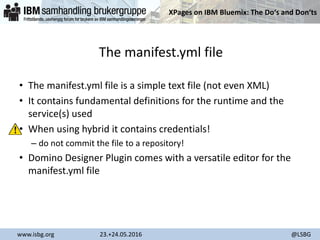
The manifest.yml file
• The manifest.yml file is a simple text file (not even XML)
• It contains fundamental definitions for the runtime and the
service(s) used
• When using hybrid it contains credentials!
– do not commit the file to a repository!
• Domino Designer Plugin comes with a versatile editor for the
manifest.yml file
XPages on IBM Bluemix: The Do‘s and Don‘ts
www.isbg.org 23.+24.05.2016 @LSBG
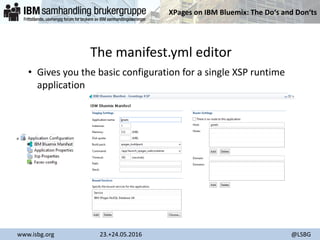
The manifest.yml editor
• Gives you the basic configuration for a single XSP runtime
application
XPages on IBM Bluemix: The Do‘s and Don‘ts
www.isbg.org 23.+24.05.2016 @LSBG
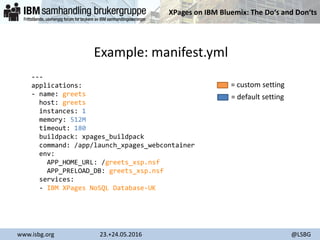
Example: manifest.yml
---
applications:
- name: greets
host: greets
instances: 1
memory: 512M
timeout: 180
buildpack: xpages_buildpack
command: /app/launch_xpages_webcontainer
env:
APP_HOME_URL: /greets_xsp.nsf
APP_PRELOAD_DB: greets_xsp.nsf
services:
- IBM XPages NoSQL Database-UK
= custom setting
= default setting
XPages on IBM Bluemix: The Do‘s and Don‘ts
www.isbg.org 23.+24.05.2016 @LSBG
Did you know?
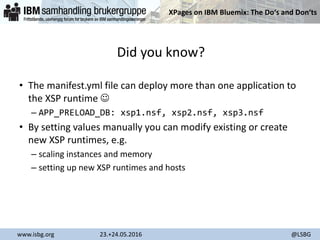
• The manifest.yml file can deploy more than one application to
the XSP runtime 
– APP_PRELOAD_DB: xsp1.nsf, xsp2.nsf, xsp3.nsf
• By setting values manually you can modify existing or create
new XSP runtimes, e.g.
– scaling instances and memory
– setting up new XSP runtimes and hosts
XPages on IBM Bluemix: The Do‘s and Don‘ts
www.isbg.org 23.+24.05.2016 @LSBG
• Prerequisites
• Best practices: design and data separation
• Using the DDE plugin vs. the CF command line
• Understanding the "mysterious" MANIFEST.YML file
• Security considerations
• Plugins and extensions? No problem!
• Tipps & tricks
XPages on IBM Bluemix: The Do‘s and Don‘ts
www.isbg.org 23.+24.05.2016 @LSBG
Security considerations
• You have to manage at least two ACLs
– XSP Runtime (design part)
– XPages NoSQL service (data part)
• Design part
– manage Anonymous access only to force a login page
• Data part
– Manage ACL corresponding to the user ID and web users you may set
up in the XPages NoSQL service
– Other known ACL rules such as user roles apply here
– You can lock yourself out from that ACL – be careful, Full Access
Admin is NOT available to unlock!
XPages on IBM Bluemix: The Do‘s and Don‘ts
www.isbg.org 23.+24.05.2016 @LSBG
Locked out from data NSF?
• Deleting and re-creating the service has no effect, NSFs will
re-appear!
• You have to contact IBM support for unlocking or deleting
the NSF!
• Locked out from design NSF?
• remove the runtime and re-deploy – phew! 
XPages on IBM Bluemix: The Do‘s and Don‘ts
www.isbg.org 23.+24.05.2016 @LSBG
• Prerequisites
• Best practices: design and data separation
• Using the DDE plugin vs. the CF command line
• Understanding the "mysterious" MANIFEST.YML file
• Security considerations
• Plugins and extensions? No problem!
• Tipps & tricks
XPages on IBM Bluemix: The Do‘s and Don‘ts
www.isbg.org 23.+24.05.2016 @LSBG
Imagine…
• to use your favorite extensions even on IBM Bluemix
• to enrich your application with genius software like the
OpenNTF Domino API or the XLogger
• You can do this!
+
XPages on IBM Bluemix: The Do‘s and Don‘ts
www.isbg.org 23.+24.05.2016 @LSBG
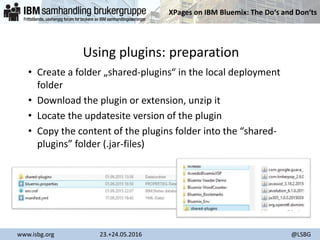
Using plugins: preparation
• Create a folder „shared-plugins“ in the local deployment
folder
• Download the plugin or extension, unzip it
• Locate the updatesite version of the plugin
• Copy the content of the plugins folder into the “shared-
plugins” folder (.jar-files)
XPages on IBM Bluemix: The Do‘s and Don‘ts
www.isbg.org 23.+24.05.2016 @LSBG
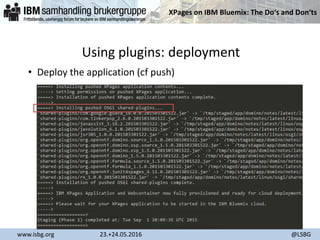
Using plugins: deployment
• Deploy the application (cf push)
XPages on IBM Bluemix: The Do‘s and Don‘ts
www.isbg.org 23.+24.05.2016 @LSBG
• Prerequisites
• Best practices: design and data separation
• Using the DDE plugin vs. the CF command line
• Understanding the "mysterious" MANIFEST.YML file
• Security considerations
• Plugins and extensions? No problem!
• Tipps & tricks
XPages on IBM Bluemix: The Do‘s and Don‘ts
www.isbg.org 23.+24.05.2016 @LSBG
Using the XPages Toolbox
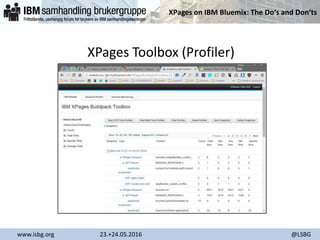
• Versatile profiling tool for performance monitoring
• Available on OpenNTF for on-premises use
– https://www.openntf.org/main.nsf/project.xsp?r=project/XPages%20
Toolbox/
• Setup automatically by modifying the manifest.yml file
• Add this to the env section:
– APP_INCLUDE_XPAGES_TOOLBOX: '1'
XPages on IBM Bluemix: The Do‘s and Don‘ts
www.isbg.org 23.+24.05.2016 @LSBG
XPages Toolbox (Profiler)
XPages on IBM Bluemix: The Do‘s and Don‘ts
www.isbg.org 23.+24.05.2016 @LSBG
Grant restricted access of the JVM
• Like in on-premises environments you may want to enable full
access for the JVM when using e.g. Java reflections.
• Instead of setting the java.pol file you simply add this to the
manifest.yml
– APP_JAVA_POLICY_ALL_PERMISSION: ‘1’
• Keep in mind that this may be a security issue
XPages on IBM Bluemix: The Do‘s and Don‘ts
www.isbg.org 23.+24.05.2016 @LSBG
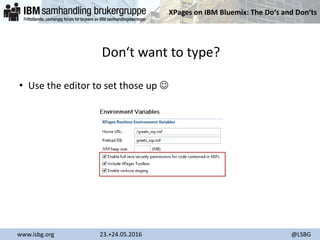
Verbose mode while deploying
• When using the CF command line the following added to the
manifest.yml file will deliver detailed messages during the
deployment
– APP_VERBOSE_STAGING: '1'
XPages on IBM Bluemix: The Do‘s and Don‘ts
www.isbg.org 23.+24.05.2016 @LSBG
Don‘t want to type?
• Use the editor to set those up 
XPages on IBM Bluemix: The Do‘s and Don‘ts
www.isbg.org 23.+24.05.2016 @LSBG
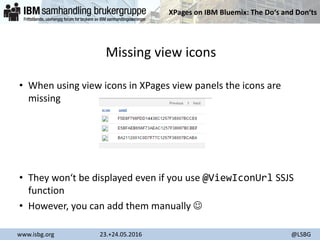
Missing view icons
• When using view icons in XPages view panels the icons are
missing
• They won‘t be displayed even if you use @ViewIconUrl SSJS
function
• However, you can add them manually 
XPages on IBM Bluemix: The Do‘s and Don‘ts
www.isbg.org 23.+24.05.2016 @LSBG
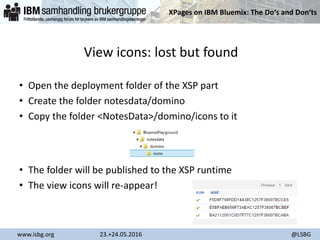
View icons: lost but found
• Open the deployment folder of the XSP part
• Create the folder notesdata/domino
• Copy the folder <NotesData>/domino/icons to it
• The folder will be published to the XSP runtime
• The view icons will re-appear!
XPages on IBM Bluemix: The Do‘s and Don‘ts
www.isbg.org 23.+24.05.2016 @LSBG
Q & A
Get in touch:
xpages.slack.com
#bluemix-dev
XPages on IBM Bluemix: The Do‘s and Don‘ts
www.isbg.org 23.+24.05.2016 @LSBG
Thank you!
Special thanks to:
Tony McGuckin, Martin Donnelly, Brian Gleeson
(IBM Ireland Labs, XPages and Bluemix Dev Team)
Pete Janzen
(IBM, Sr. Product Manager, IBM Enterprise Social Solutions)
XPages on IBM Bluemix: The Do‘s and Don‘ts
www.isbg.org 23.+24.05.2016 @LSBG
Resources
• https://www.ibm.com/developerworks/community/blogs/762e655e-e86c-4624-9662-ee81c6874de1/entry/dev-comp-
2016?lang=en
• https://openntf.org/XSnippets.nsf/snippet.xsp?id=daobean-for-xsp-on-Bluemix
• http://notesx.net:8090/obusse/Greets
• http://greets.eu-gb.mybluemix.net/
• http://cmder.net/
• https://www.openntf.org/main.nsf/project.xsp?r=project/XPages%20Toolbox/
• http://oliverbusse.notesx.net/hp.nsf/blogpost.xsp?documentId=10C2

ISBG 2016 - XPages on IBM Bluemix

  • 1.
    XPages on IBMBluemix: The Do‘s and Don‘ts www.isbg.org 23.+24.05.2016 @LSBG XPages on IBM Bluemix: The Dos and Don'ts Oliver Busse We4IT GmbH Germany
  • 2.
    XPages on IBMBluemix: The Do‘s and Don‘ts www.isbg.org 23.+24.05.2016 @LSBG About me • Working for We4IT –Aveedo® Application Framework • „Bleeding Yellow“ since R4.5 • IBM Champion for ICS 2015 + 2016 • OpenNTF Member Director @zeromancer1972 @we4it
  • 3.
    XPages on IBMBluemix: The Do‘s and Don‘ts www.isbg.org 23.+24.05.2016 @LSBG 2016 Developer Competition • Team-up and win some great prizes! – 1 year developerWorks Premium Membership (incl. Bluemix) – $ 500 cash – 2x $ 250 cash for the 2nd prizes May 9, 2016 – Sep 5, 2016
  • 4.
    XPages on IBMBluemix: The Do‘s and Don‘ts www.isbg.org 23.+24.05.2016 @LSBG www.ibm.biz/what-is-dev-comp
  • 5.
    XPages on IBMBluemix: The Do‘s and Don‘ts www.isbg.org 23.+24.05.2016 @LSBG Agenda • Prerequisites • Best practices: design and data separation • Using the DDE plugin vs. the CF command line • Understanding the "mysterious" MANIFEST.YML file • Security considerations • Plugins and extensions? No problem! • Tipps & tricks
  • 6.
    XPages on IBMBluemix: The Do‘s and Don‘ts www.isbg.org 23.+24.05.2016 @LSBG • Prerequisites • Best practices: design and data separation • Using the DDE plugin vs. the CF command line • Understanding the "mysterious" MANIFEST.YML file • Security considerations • Plugins and extensions? No problem! • Tipps & tricks
  • 7.
    XPages on IBMBluemix: The Do‘s and Don‘ts www.isbg.org 23.+24.05.2016 @LSBG Prerequisites • Create an IBM Bluemix account • Create an XPages NoSQL database service (i.e. a Domino Server) • Get the latest* Extension Library from OpenNTF • Install Extlib on your local Domino Designer to get the Bluemix plugin • Setup Bluemix preferences in DDE *) 9.0.1v16, Feb 2016
  • 8.
    XPages on IBMBluemix: The Do‘s and Don‘ts www.isbg.org 23.+24.05.2016 @LSBG Create or login to your Bluemix account
  • 9.
    XPages on IBMBluemix: The Do‘s and Don‘ts www.isbg.org 23.+24.05.2016 @LSBG XPages NoSQL database service • Add a service • Scroll down to „Bluemix Labs Catalog“ • Find „XPages NoSQL Database“
  • 10.
    XPages on IBMBluemix: The Do‘s and Don‘ts www.isbg.org 23.+24.05.2016 @LSBG Additional steps • Open the XPages NoSQL Database service properties page • Grab the user ID to access the Bluemix Domino instance – slaney/Bluemix (USA) – langan/Bluemix (UK) – coming soon: CAN and AUS • Optional: setup additional web users
  • 11.
    XPages on IBMBluemix: The Do‘s and Don‘ts www.isbg.org 23.+24.05.2016 @LSBG
  • 12.
    XPages on IBMBluemix: The Do‘s and Don‘ts www.isbg.org 23.+24.05.2016 @LSBG
  • 13.
    XPages on IBMBluemix: The Do‘s and Don‘ts www.isbg.org 23.+24.05.2016 @LSBG Get the Extlib from OpenNTF • Download and install it via the updatesite mechanism – https://extlib.openntf.org/ – https://www.dalsgaard-data.eu/blog/deploy-an-eclipse-update- site-to-ibm-domino-and-ibm-domino-designer/ • Check Extlib version in DDE and server
  • 14.
    XPages on IBMBluemix: The Do‘s and Don‘ts www.isbg.org 23.+24.05.2016 @LSBG Bluemix prefs in Domino Designer • File, Preferences, Domino Designer, IBM Bluemix
  • 15.
    XPages on IBMBluemix: The Do‘s and Don‘ts www.isbg.org 23.+24.05.2016 @LSBG New IBM Bluemix toolbar control
  • 16.
    XPages on IBMBluemix: The Do‘s and Don‘ts www.isbg.org 23.+24.05.2016 @LSBG • Prerequisites • Best practices: design and data separation • Using the DDE plugin vs. the CF command line • Understanding the "mysterious" MANIFEST.YML file • Security considerations • Plugins and extensions? No problem! • Tipps & tricks
  • 17.
    XPages on IBMBluemix: The Do‘s and Don‘ts www.isbg.org 23.+24.05.2016 @LSBG Design and data separation • Create the data part on the Bluemix Domino instance – create a blank database or – copy and existing database with data • Setup ACL etc. – Keep in mind the additional webusers you may have created before
  • 18.
    XPages on IBMBluemix: The Do‘s and Don‘ts www.isbg.org 23.+24.05.2016 @LSBG Setup local dev environment • Separate data and design also on your local environment • Find and modify ALL static references to „database“ on every XPage, Custom Control and Code – Document data sources – View data sources
  • 19.
    XPages on IBMBluemix: The Do‘s and Don‘ts www.isbg.org 23.+24.05.2016 @LSBG Compute „database“ references • Utilize the bluemixContext bean – comes with the OpenNTF Extension Library since v13 – isRunningOnBluemix() • findDatabaseName() always returns „tododata.nsf“ – static default filename of the data part on the XPages NoSQL service https://www.eu-gb.bluemix.net/docs/services/XPagesNoSQLDatabase/index.html
  • 20.
    XPages on IBMBluemix: The Do‘s and Don‘ts www.isbg.org 23.+24.05.2016 @LSBG More flexible: use a custom bean • Compute server and filepath dynamically – for the local and the Bluemix environment • Allows a different filename on the XPages NoSQL service (other than „tododata.nsf“) • Generic code for „database“ computation for document, view and repeat data sources • There is a snippet for you…  – https://openntf.org/XSnippets.nsf/snippet.xsp?id=daobean-for-xsp- on-bluemix
  • 21.
    XPages on IBMBluemix: The Do‘s and Don‘ts www.isbg.org 23.+24.05.2016 @LSBG Examples: the DAO-Bean <xp:this.data> <xp:dominoDocument var="document1" databaseName="#{javascript:dao.dbpath}" formName="greeting"> </xp:dominoDocument> </xp:this.data> <xp:repeat id="greetings" rows="9999" var="greeting" indexVar="index"> <xp:this.value> <![CDATA[#{javascript:dao.getViewEntries("greetings")}]]> </xp:this.value> … </xp:repeat>
  • 22.
    XPages on IBMBluemix: The Do‘s and Don‘ts www.isbg.org 23.+24.05.2016 @LSBG • Prerequisites • Best practices: design and data separation • Using the DDE plugin vs. the CF command line • Understanding the "mysterious" MANIFEST.YML file • Security considerations • Plugins and extensions? No problem! • Caveats and restrictions • Tipps & tricks
  • 23.
    XPages on IBMBluemix: The Do‘s and Don‘ts www.isbg.org 23.+24.05.2016 @LSBG What the DDE Plugin does • When running for the first time – It will ask for a local folder – It will create a copy (or replica) of the XSP part – It will create a manifest.yml file – It contacts the Bluemix XSP runtime and uploads the 2 files • Afterwards – It updates the local copy / replica – It modifies the manifest.yml file – It contacts the Bluemix XSP runtime and uploads the 2 files
  • 24.
    XPages on IBMBluemix: The Do‘s and Don‘ts www.isbg.org 23.+24.05.2016 @LSBG What the DDE Plugin also does… • It won‘t display error messages or log outputs during deployment – hard to troubleshoot • Sometimes it may not work when running a second, third, … time – DDE restart will solve this problem
  • 25.
    XPages on IBMBluemix: The Do‘s and Don‘ts www.isbg.org 23.+24.05.2016 @LSBG The CF command line • CF = Cloud Foundry • Download and install the command line – https://github.com/cloudfoundry/cli/releases – http://docs.cloudfoundry.org/devguide/cf-cli/ • You can create a batch file to accellerate deployment • Verbose output of any action during deployment process • Access to the XSP runtime file system (e.g. for reading system logs)
  • 26.
    XPages on IBMBluemix: The Do‘s and Don‘ts www.isbg.org 23.+24.05.2016 @LSBG A simple triplet of commands • cf api – use api.bluemix.net or api.eu-gb.bluemix.net – cf api https://api.bluemix.net • cf login – provide username and password – cf login –u username –p password • cf push – will upload your local droplet instantly using the manifest.yml file – cf push – cf push <applicationName>
  • 27.
    XPages on IBMBluemix: The Do‘s and Don‘ts www.isbg.org 23.+24.05.2016 @LSBG Benefits using the CF command line • Full control of what‘s being done • Understand how cloud deployment works • Create new XSP runtimes and instances on the fly • Deploy plugins and other resources
  • 28.
    XPages on IBMBluemix: The Do‘s and Don‘ts www.isbg.org 23.+24.05.2016 @LSBG Disadvantage using the CF command line • You have to create the local NSF copy / replica manually – beware of local encryption! • You have to type in a console…  – I recommend using CMDER command line replacement for Windows
  • 29.
    XPages on IBMBluemix: The Do‘s and Don‘ts www.isbg.org 23.+24.05.2016 @LSBG • Prerequisites • Best practices: design and data separation • Using the DDE plugin vs. the CF command line • Understanding the "mysterious" MANIFEST.YML file • Security considerations • Plugins and extensions? No problem! • Tipps & tricks
  • 30.
    XPages on IBMBluemix: The Do‘s and Don‘ts www.isbg.org 23.+24.05.2016 @LSBG The manifest.yml file • The manifest.yml file is a simple text file (not even XML) • It contains fundamental definitions for the runtime and the service(s) used • When using hybrid it contains credentials! – do not commit the file to a repository! • Domino Designer Plugin comes with a versatile editor for the manifest.yml file
  • 31.
    XPages on IBMBluemix: The Do‘s and Don‘ts www.isbg.org 23.+24.05.2016 @LSBG The manifest.yml editor • Gives you the basic configuration for a single XSP runtime application
  • 32.
    XPages on IBMBluemix: The Do‘s and Don‘ts www.isbg.org 23.+24.05.2016 @LSBG Example: manifest.yml --- applications: - name: greets host: greets instances: 1 memory: 512M timeout: 180 buildpack: xpages_buildpack command: /app/launch_xpages_webcontainer env: APP_HOME_URL: /greets_xsp.nsf APP_PRELOAD_DB: greets_xsp.nsf services: - IBM XPages NoSQL Database-UK = custom setting = default setting
  • 33.
    XPages on IBMBluemix: The Do‘s and Don‘ts www.isbg.org 23.+24.05.2016 @LSBG Did you know? • The manifest.yml file can deploy more than one application to the XSP runtime  – APP_PRELOAD_DB: xsp1.nsf, xsp2.nsf, xsp3.nsf • By setting values manually you can modify existing or create new XSP runtimes, e.g. – scaling instances and memory – setting up new XSP runtimes and hosts
  • 34.
    XPages on IBMBluemix: The Do‘s and Don‘ts www.isbg.org 23.+24.05.2016 @LSBG • Prerequisites • Best practices: design and data separation • Using the DDE plugin vs. the CF command line • Understanding the "mysterious" MANIFEST.YML file • Security considerations • Plugins and extensions? No problem! • Tipps & tricks
  • 35.
    XPages on IBMBluemix: The Do‘s and Don‘ts www.isbg.org 23.+24.05.2016 @LSBG Security considerations • You have to manage at least two ACLs – XSP Runtime (design part) – XPages NoSQL service (data part) • Design part – manage Anonymous access only to force a login page • Data part – Manage ACL corresponding to the user ID and web users you may set up in the XPages NoSQL service – Other known ACL rules such as user roles apply here – You can lock yourself out from that ACL – be careful, Full Access Admin is NOT available to unlock!
  • 36.
    XPages on IBMBluemix: The Do‘s and Don‘ts www.isbg.org 23.+24.05.2016 @LSBG Locked out from data NSF? • Deleting and re-creating the service has no effect, NSFs will re-appear! • You have to contact IBM support for unlocking or deleting the NSF! • Locked out from design NSF? • remove the runtime and re-deploy – phew! 
  • 37.
    XPages on IBMBluemix: The Do‘s and Don‘ts www.isbg.org 23.+24.05.2016 @LSBG • Prerequisites • Best practices: design and data separation • Using the DDE plugin vs. the CF command line • Understanding the "mysterious" MANIFEST.YML file • Security considerations • Plugins and extensions? No problem! • Tipps & tricks
  • 38.
    XPages on IBMBluemix: The Do‘s and Don‘ts www.isbg.org 23.+24.05.2016 @LSBG Imagine… • to use your favorite extensions even on IBM Bluemix • to enrich your application with genius software like the OpenNTF Domino API or the XLogger • You can do this! +
  • 39.
    XPages on IBMBluemix: The Do‘s and Don‘ts www.isbg.org 23.+24.05.2016 @LSBG Using plugins: preparation • Create a folder „shared-plugins“ in the local deployment folder • Download the plugin or extension, unzip it • Locate the updatesite version of the plugin • Copy the content of the plugins folder into the “shared- plugins” folder (.jar-files)
  • 40.
    XPages on IBMBluemix: The Do‘s and Don‘ts www.isbg.org 23.+24.05.2016 @LSBG Using plugins: deployment • Deploy the application (cf push)
  • 41.
    XPages on IBMBluemix: The Do‘s and Don‘ts www.isbg.org 23.+24.05.2016 @LSBG • Prerequisites • Best practices: design and data separation • Using the DDE plugin vs. the CF command line • Understanding the "mysterious" MANIFEST.YML file • Security considerations • Plugins and extensions? No problem! • Tipps & tricks
  • 42.
    XPages on IBMBluemix: The Do‘s and Don‘ts www.isbg.org 23.+24.05.2016 @LSBG Using the XPages Toolbox • Versatile profiling tool for performance monitoring • Available on OpenNTF for on-premises use – https://www.openntf.org/main.nsf/project.xsp?r=project/XPages%20 Toolbox/ • Setup automatically by modifying the manifest.yml file • Add this to the env section: – APP_INCLUDE_XPAGES_TOOLBOX: '1'
  • 43.
    XPages on IBMBluemix: The Do‘s and Don‘ts www.isbg.org 23.+24.05.2016 @LSBG XPages Toolbox (Profiler)
  • 44.
    XPages on IBMBluemix: The Do‘s and Don‘ts www.isbg.org 23.+24.05.2016 @LSBG Grant restricted access of the JVM • Like in on-premises environments you may want to enable full access for the JVM when using e.g. Java reflections. • Instead of setting the java.pol file you simply add this to the manifest.yml – APP_JAVA_POLICY_ALL_PERMISSION: ‘1’ • Keep in mind that this may be a security issue
  • 45.
    XPages on IBMBluemix: The Do‘s and Don‘ts www.isbg.org 23.+24.05.2016 @LSBG Verbose mode while deploying • When using the CF command line the following added to the manifest.yml file will deliver detailed messages during the deployment – APP_VERBOSE_STAGING: '1'
  • 46.
    XPages on IBMBluemix: The Do‘s and Don‘ts www.isbg.org 23.+24.05.2016 @LSBG Don‘t want to type? • Use the editor to set those up 
  • 47.
    XPages on IBMBluemix: The Do‘s and Don‘ts www.isbg.org 23.+24.05.2016 @LSBG Missing view icons • When using view icons in XPages view panels the icons are missing • They won‘t be displayed even if you use @ViewIconUrl SSJS function • However, you can add them manually 
  • 48.
    XPages on IBMBluemix: The Do‘s and Don‘ts www.isbg.org 23.+24.05.2016 @LSBG View icons: lost but found • Open the deployment folder of the XSP part • Create the folder notesdata/domino • Copy the folder <NotesData>/domino/icons to it • The folder will be published to the XSP runtime • The view icons will re-appear!
  • 49.
    XPages on IBMBluemix: The Do‘s and Don‘ts www.isbg.org 23.+24.05.2016 @LSBG Q & A Get in touch: xpages.slack.com #bluemix-dev
  • 50.
    XPages on IBMBluemix: The Do‘s and Don‘ts www.isbg.org 23.+24.05.2016 @LSBG Thank you! Special thanks to: Tony McGuckin, Martin Donnelly, Brian Gleeson (IBM Ireland Labs, XPages and Bluemix Dev Team) Pete Janzen (IBM, Sr. Product Manager, IBM Enterprise Social Solutions)
  • 51.
    XPages on IBMBluemix: The Do‘s and Don‘ts www.isbg.org 23.+24.05.2016 @LSBG Resources • https://www.ibm.com/developerworks/community/blogs/762e655e-e86c-4624-9662-ee81c6874de1/entry/dev-comp- 2016?lang=en • https://openntf.org/XSnippets.nsf/snippet.xsp?id=daobean-for-xsp-on-Bluemix • http://notesx.net:8090/obusse/Greets • http://greets.eu-gb.mybluemix.net/ • http://cmder.net/ • https://www.openntf.org/main.nsf/project.xsp?r=project/XPages%20Toolbox/ • http://oliverbusse.notesx.net/hp.nsf/blogpost.xsp?documentId=10C2