1Using Swift for All Apple Platforms Mphasis
Mphasis Digital POV
Using Node-RED for building IoT workflows
A PoV by
Aniruddha Chakrabarti
AVP Digital, Mphasis
Executive Overview
Internet of Things or IoT is well positioned as the largest opportunity for software, IT industry, hardware vendors and other
organizations. The worldwide market and economic value of IoT is currently $4 to 8 trillion and this number is supposed to grow to
somewhere between $10 to 25 trillion by 2020. If the sheer number of IoT “Things” and myriad of network protocols are the
challenges on one side, storing the large amount of data generated by “Things” and making a sense from it are the challenges on
other side. “System of Record” and “System of Engagement” type of IT systems and apps have been using Workflow and Business
Process Management tools for long. A new generation of Workflow tools are emerging, which makes wiring up IoT “Things”, APIs
and online services easy and intuitive.
Introduction
Internet of Things or IoT is a key element of Digital along with Cloud, Mobility, Analytics, BigData and Cognitive Computing. IoT, also
called Industrial Internet of Things or Industrial Revolution 2.0, already has a profound effect. It has disrupted, and would continue to
disrupt, many industries including manufacturing, high tech, healthcare and insurance.
Workflow(s) are one of the key components of a successful IoT solution along with IoT Analytics, IoT Security and IoT Device/Things
Management. Node-RED is a visual tool for building workflows for IoT scenario. It allows chaining or wiring IoT devices and services
the way IFTTT does it, mostly for web apps, APIs and services.
2Using Node-RED for building IoT workflows Mphasis
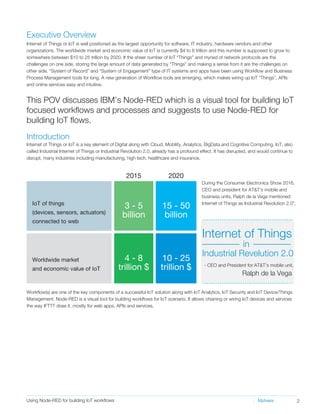
This POV discusses IBM’s Node-RED which is a visual tool for building IoT
focused workflows and processes and suggests to use Node-RED for
building IoT flows.
IoT of things
(devices, sensors, actuators)
connected to web
Worldwide market
and economic value of IoT
2015 2020
3 - 5
billion
15 - 50
billion
10 - 25
trillion $
4 - 8
trillion $
During the Consumer Electronics Show 2016,
CEO and president for AT&T's mobile and
business units, Ralph de la Vega mentioned
Internet of Things as Industrial Revolution 2.0".
Ralph de la Vega
Internet of Things
Industrial Revelution 2.0
in
- CEO and President for AT&T’s mobile unit,
IoT Solution Components
3Using Node-RED for building IoT workflows Mphasis
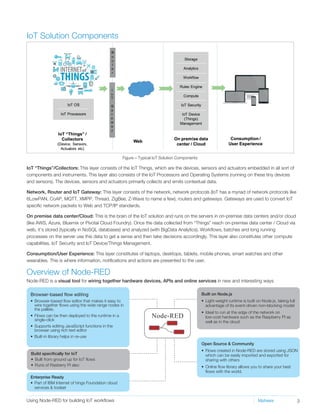
IoT “Things”/Collectors: This layer consists of the IoT Things, which are the devices, sensors and actuators embedded in all sort of
components and instruments. This layer also consists of the IoT Processors and Operating Systems (running on these tiny devices
and sensors). The devices, sensors and actuators primarily collects and emits contextual data.
Network, Router and IoT Gateway: This layer consists of the network, network protocols (IoT has a myriad of network protocols like
6LowPAN, CoAP, MQTT, XMPP, Thread, ZigBee, Z-Wave to name a few), routers and gateways. Gateways are used to convert IoT
specific network packets to Web and TCP/IP standards.
On premise data center/Cloud: This is the brain of the IoT solution and runs on the servers in on-premise data centers and/or cloud
(like AWS, Azure, Bluemix or Pivotal Cloud Foundry). Once the data collected from “Things” reach on-premise data center / Cloud via
web, it’s stored (typically in NoSQL databases) and analyzed (with BigData Analytics). Workflows, batches and long running
processes on the server use this data to get a sense and then take decisions accordingly. This layer also constitutes other compute
capabilities, IoT Security and IoT Device/Things Management.
Consumption/User Experience: This layer constitutes of laptops, desktops, tablets, mobile phones, smart watches and other
wearables. This is where information, notifications and actions are presented to the user.
Overview of Node-RED
Node-RED is a visual tool for wiring together hardware devices, APIs and online services in new and interesting ways
Browser-based flow editing
• Browser-based flow editor that makes it easy to
wire together flows using the wide range nodes in
the pallete.
• Flows can be then deployed to the runtime in a
single-click
• Supports editing JavaScript functions in the
browser using rich text editor
• Built-in library helps in re-use
Built on Node.js
• Light-weight runtime is built on Node.js, taking full
advantage of its event-driven non-blocking model
• Ideal to run at the edge of the network on
low-cost hardware such as the Raspberry PI as
well as in the cloud
Open Source & Community
• Flows created in Node-RED are stored using JSON
which can be easily imported and exported for
sharing with others
• Online flow library allows you to share your best
flows with the world.
Build specifically for IoT
• Built from ground up for IoT flows
• Runs of Rasberry PI also
Enterprise Ready
• Part of IBM Internet of hings Foundation cloud
services & toolset
Figure – Typical IoT Solution Components
4Using Node-RED for building IoT workflows Mphasis
Node-RED is open source – it’s developed as an open-source project on GitHub, under the Apache 2 license. Since it uses Node.js
as runtime, it could be downloaded using npm Node package manager, like any node package.
Browser-based flow/workflow editing
• Provides a browser-based flow editor that makes it easy to wire together flows using the wide range nodes in the palette.
• Flows can be then deployed to the runtime in a single-click.
• JavaScript functions can be created within the editor using a rich text editor.
• Built-in library allows you to save useful functions, templates or flows for re-use.
Built on Node.js
• Light-weight runtime is built on Node.js, taking full advantage of its event-driven, non-blocking model, which makes it ideal to run
at the edge of the network on low-cost hardware such as the Raspberry Pi as well as on the cloud.
Sharing with community
• Flows created in Node-RED are stored using JSON, which can be easily imported and exported for sharing with others.
• Online flow library allows you to share your best flows with the world.
Can run on
• Local laptop/desktop/server
• IBM Bluemix public cloud
• DIY IoT Boards including Rasberry PI, Arduino and BeagleBone Black
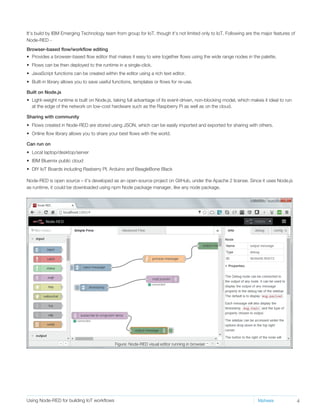
It’s build by IBM Emerging Technology team from group for IoT, though it’s not limited only to IoT. Following are the major features of
Node-RED -
Figure: Node-RED visual editor running in browser
5Using Node-RED for building IoT workflows Mphasis
This is similar to ETL, EAI or BPM designer – messages are received, they get processed and actions are taken afterwards.
Messages have the following properties –
Node-RED provides some out of the box actions (called Nodes) that can act on messages. Nodes or actions receive the message,
process it and then provide the output. Below are the supported out of the box Nodes -
Message Property
topic
_msgid
Description
Main message content or body of the message. The payload could be –
• string
• number
• boolean
• timestamp
• json
Topic of a message - similar to topics is pub/sub or message broker
Unique ID of the message - set by Node - RED
payload
Node Type Description
Inject
Catch
Status
MQTT in / subscribe
HTTP in
Web socket in
TCP in
UDP in
Serial
Injects a message, with a payload
Catches error from other nodes
Sends status messages from other nodes
Connects to a broker and subscribes to the specified topic
Input node for HTTP requests
Input node for web socket requests
Input node for TCP requests
Input node for UDP requests
Reads data from local serial port
Function JavaScript function block
Template
Delay
Trigger
Comment
HTTP Request
TCP Request
Switch
Sets a property based on the provided template.
Introduces a delay into the flow
Creates two output messages separated by a timeout whenever any input msg arrives.
Allows to add comment in the flow (supports markdown format)
Makes HTTP requests.
Makes TCP requests.
Routes messages based on property values. Similar to switch statements in
programming languages
Input Nodes -
Processing Nodes –
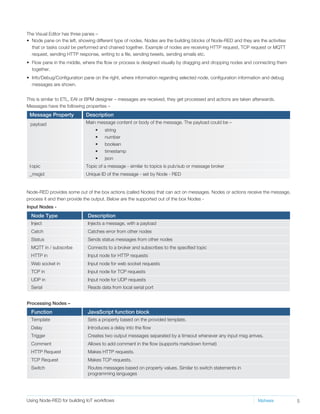
• Node pane on the left, showing different type of nodes. Nodes are the building blocks of Node-RED and they are the activities
that or tasks could be performed and chained together. Example of nodes are receiving HTTP request, TCP request or MQTT
request, sending HTTP response, writing to a file, sending tweets, sending emails etc.
• Flow pane in the middle, where the flow or process is designed visually by dragging and dropping nodes and connecting them
together.
• Info/Debug/Configuration pane on the right, where information regarding selected node, configuration information and debug
messages are shown.
The Visual Editor has three panes –
6Using Node-RED for building IoT workflows Mphasis
Node Type Description
Debug
MQTT out/publish
HTTP out
Web socket out
TCP out
UDP out
Serial out
Outputs message object to debug pane
Connects to a broker and publishes to the specified topic
Sends responses back to HTTP requests received from an HTTP Input node.
Sends responses back to web socket requests
Sends responses back to TCP port
Sends responses back to designated UDP host and port
Sends data to local serial port
Node Type Description
Read Email
Read Twitter
Send Email
Send Twitter
Sentiment Analysis
Reads email from an IMAP server
Reads or searches tweets
Sends email with
Subject – msg.topic
Body – msg.payload
Tweets msg.payload
Performs sentiment analysis of the msg.payload and adds a msg.sentimentobject that contains
the resulting AFINN-111 sentiment score as msg.sentiment.score.
Node Type Description
Read File
Write File
Reads the specified file – content of the file gets populated in msg.payload
Writes msg.payload to the specified file (e.g a log file)
Node Type Description
Watch
Feed parse
Watches a directory or file for change
Monitors RSS/Atom feed for new entry
Exec Executes a OS system command
Output Nodes –
Social Nodes –
Storage Nodes –
Advanced Nodes –
Node-RED: Proof of Concept
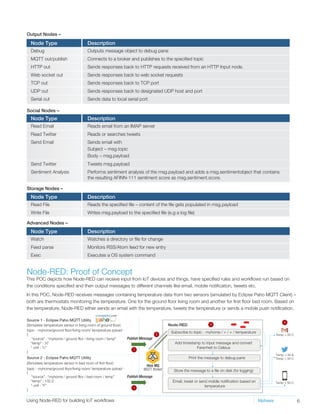
This POC depicts how Node-RED can receive input from IoT devices and things, have specified rules and workflows run based on
the conditions specified and then output messages to different channels like email, mobile notification, tweets etc.
In this POC, Node-RED receives messages containing temperature data from two sensors (simulated by Eclipse Paho MQTT Client) –
both are thermostats monitoring the temperature. One for the ground floor living room and another for first floor bed room. Based on
the temperature, Node-RED either sends an email with the temperature, tweets the temperature or sends a mobile push notification.
topic - myhome/ground floor/living room/ temperature pyload -
Source 1 - Eclipse Paho MQTT Utility
Source 2 - Eclipse Paho MQTT Utility
(Simulates temperature sensor in living room of ground floor)
topic - myhome/ground floor/living room/ temperature pyload -
(Simulates temperature sensor in bed room of first floor)
{
“source” : “myhome / ground fllor / living room / temp”
“temp” : 37
“ unit : ”c”
}
{
“source” : “myhome / ground fllor / bed room / temp”
“temp” : 102.2
“ unit : ”F”
}
Publish Message
1
2
3
4
Publish Message
1
Subscribe to topic - myhome / + / + / temperature
Add timestamp to input message and convert
Farenheit to Celsius
Print the message to debug pane
Store the message to a file on disk (for logging)
Email, tweet or send mobile notification based on
temperature
Hive MQ
MQTT Broker
Node-RED
Temp > 30 &
Temp > 35 C
Temp > 35 C
Temp > 35 C
7Using Node-RED for building IoT workflows Mphasis
Step 1.
In this Proof of Concept, there are two sensors (simulated by Eclipse Paho MQTT Client) – both are thermostats monitoring the
temperature. One for the ground floor living room and another for first floor bed room. These sensors use MQTT to publish messages
containing current temperature recorded by them to a HiveMQ MQTT broker.
MQTT is a publish-subscribe based “light weight” messaging protocol for constrained environments like IoT and M2M (Machine-to-
Machine communication). MQTT uses a broker-based pub-sub architecture in the constrained IoT environment similar to other
messaging protocols that exist in the Web and Client Server world. Here Eclipse Paho MQTT Clients are publishers.
In this PoC, HiveMQ running locally is used as the MQTT broker. HiveMQ is an enterprise grade MQTT broker that is used for EAI and
other scenarios. MQTT provides subject/topic-based, content-based, and type-based filtering. Here we are using topic based
filtering.
There’s a topic pattern that’s established so that messages could be filtered -
myhome / <<floor name>> / <<room name>> / <<sensor type>>
Examples –
myhome / ground floor / living room / temperature
myhome / ground floor / master bed room / temperature
myhome / first floor / guest bed room / temperature
myhome / ground floor / kitchen / temperature
Step 2.
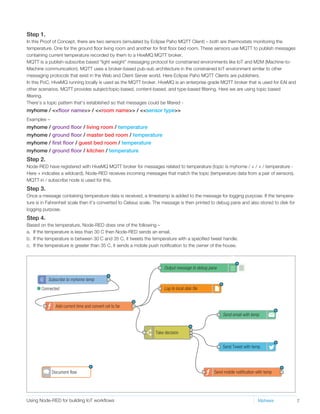
Node-RED have registered with HiveMQ MQTT broker for messages related to temperature (topic is myhome / + / + / temperature -
Here + indicates a wildcard). Node-RED receives incoming messages that match the topic (temperature data from a pair of sensors).
MQTT in / subscribe node is used for this.
Step 3.
Once a message containing temperature data is received, a timestamp is added to the message for logging purpose. If the tempera-
ture is in Fahrenheit scale then it’s converted to Celsius scale. The message is then printed to debug pane and also stored to disk for
logging purpose.
Step 4.
Based on the temperature, Node-RED does one of the following –
a. If the temperature is less than 30 C then Node-RED sends an email.
b. If the temperature is between 30 C and 35 C, it tweets the temperature with a specified tweet handle.
c. If the temperature is greater than 35 C, it sends a mobile push notification to the owner of the house.
Add current time and convert cel to far
Send mobile notification with temp
Output message to debug pane
Log to local disk file
Send email with temp
Send Tweet with temp
Take decision
Subscribe to myhome temp
Document flow
Connected
Aniruddha brings 17 years of IT experience spread across systems integration, technology consulting,
IT outsourcing, and product development. He has extensive experience of delivery leadership, solution
architecture, presales, technology architecture, and program management of large scale distributed
systems.
As AVP, Digital in Mphasis Aniruddha is responsible for Presales, Solution, RFP/RFI and Capability
Development of Digital Practice. Before as Sr. Manager & Sr. Principal Architect in Accenture, he led
architecture & large delivery teams for one of Accenture’s diamond client in Life Science vertical. He had
played delivery leadership and architecture focused roles in Microsoft, Target, Misys and Cognizant. He
has been Lead Architect for many large scale distributed systems.
His interests include digital, cloud, mobility, IoT, cognitive computing, natural language processing,
distributed systems, web, open source, .NET, Java, programming languages and NoSQL. His industry
experience spans Retail, Capital Markets, Insurance, Pharma, Healthcare, Life Science, Travel and
Hospitality.
Conclusion
Workflow and rules engines are the keys components of a successful IoT solution, along with IoT Analytics, IoT Security and IoT
Device/Things Management. Node-RED is a visual tool from IBM that helps in building IoT workflows by chaining IoT devices, APIs
and services. We strongly suggest to use Node-RED for building IoT flows along with other cloud components like storage, compute
and analytics.
Further Reading
About the Author
Gartner Identifies the Top 10 Internet of Things Technologies - http://www.gartner.com/newsroom/id/3221818
Node-RED Home Page – http://nodered.org/
Node-RED Documentation - http://nodered.org/docs/
Node RED IBM page - https://www-304.ibm.com/connections/blogs/et/entry/node-red?lang=en_us
Node-RED developerWorks - https://developer.ibm.com/open/node-red/
Copyright ©: The brand names mentioned in this PoV (Node-RED, IBM Bluemix, MQTT, Thread, ZigBee, Z-Wave, HiveMQ) belong to their respective owners.
Aniruddha Chakrabarti
Associate Vice President, Digital, Mphasis
16Using Swift for All Apple Platforms Mphasis
VAS21/03/16USLETTERMM2016
For more information, contact: marketinginfo@mphasis.com
USA
460 Park Avenue South
Suite #1101
New York, NY 10016, USA
Tel.: +1 212 686 6655
Fax: +1 212 683 1690
Copyright © Mphasis Corporation. All rights reserved.
UK
88 Wood Street
London EC2V 7RS, UK
Tel.: +44 20 8528 1000
Fax: +44 20 8528 1001
INDIA
Bagmane World Technology Center
Marathahalli Ring Road
DoddanakundhiVillage,Mahadevapura
Bangalore 560 048, India
Tel.: +91 80 3352 5000
Fax: +91 80 6695 9942
About Mphasis
Mphasis is a global Technology Services and Solutions company specializing in the areas of Digital and Governance, Risk & Compliance. Our solution
focus and superior human capital propels our partnership with large enterprise customers in their Digital Transformation journeys and with global
financial institutions in the conception and execution of their Governance, Risk and Compliance Strategies. We focus on next generation technologies for
differentiated solutions delivering optimized operations for clients.
www.mphasis.com

Using Node-RED for building IoT workflows

  • 1.
    1Using Swift forAll Apple Platforms Mphasis Mphasis Digital POV Using Node-RED for building IoT workflows A PoV by Aniruddha Chakrabarti AVP Digital, Mphasis
  • 2.
    Executive Overview Internet ofThings or IoT is well positioned as the largest opportunity for software, IT industry, hardware vendors and other organizations. The worldwide market and economic value of IoT is currently $4 to 8 trillion and this number is supposed to grow to somewhere between $10 to 25 trillion by 2020. If the sheer number of IoT “Things” and myriad of network protocols are the challenges on one side, storing the large amount of data generated by “Things” and making a sense from it are the challenges on other side. “System of Record” and “System of Engagement” type of IT systems and apps have been using Workflow and Business Process Management tools for long. A new generation of Workflow tools are emerging, which makes wiring up IoT “Things”, APIs and online services easy and intuitive. Introduction Internet of Things or IoT is a key element of Digital along with Cloud, Mobility, Analytics, BigData and Cognitive Computing. IoT, also called Industrial Internet of Things or Industrial Revolution 2.0, already has a profound effect. It has disrupted, and would continue to disrupt, many industries including manufacturing, high tech, healthcare and insurance. Workflow(s) are one of the key components of a successful IoT solution along with IoT Analytics, IoT Security and IoT Device/Things Management. Node-RED is a visual tool for building workflows for IoT scenario. It allows chaining or wiring IoT devices and services the way IFTTT does it, mostly for web apps, APIs and services. 2Using Node-RED for building IoT workflows Mphasis This POV discusses IBM’s Node-RED which is a visual tool for building IoT focused workflows and processes and suggests to use Node-RED for building IoT flows. IoT of things (devices, sensors, actuators) connected to web Worldwide market and economic value of IoT 2015 2020 3 - 5 billion 15 - 50 billion 10 - 25 trillion $ 4 - 8 trillion $ During the Consumer Electronics Show 2016, CEO and president for AT&T's mobile and business units, Ralph de la Vega mentioned Internet of Things as Industrial Revolution 2.0". Ralph de la Vega Internet of Things Industrial Revelution 2.0 in - CEO and President for AT&T’s mobile unit,
  • 3.
    IoT Solution Components 3UsingNode-RED for building IoT workflows Mphasis IoT “Things”/Collectors: This layer consists of the IoT Things, which are the devices, sensors and actuators embedded in all sort of components and instruments. This layer also consists of the IoT Processors and Operating Systems (running on these tiny devices and sensors). The devices, sensors and actuators primarily collects and emits contextual data. Network, Router and IoT Gateway: This layer consists of the network, network protocols (IoT has a myriad of network protocols like 6LowPAN, CoAP, MQTT, XMPP, Thread, ZigBee, Z-Wave to name a few), routers and gateways. Gateways are used to convert IoT specific network packets to Web and TCP/IP standards. On premise data center/Cloud: This is the brain of the IoT solution and runs on the servers in on-premise data centers and/or cloud (like AWS, Azure, Bluemix or Pivotal Cloud Foundry). Once the data collected from “Things” reach on-premise data center / Cloud via web, it’s stored (typically in NoSQL databases) and analyzed (with BigData Analytics). Workflows, batches and long running processes on the server use this data to get a sense and then take decisions accordingly. This layer also constitutes other compute capabilities, IoT Security and IoT Device/Things Management. Consumption/User Experience: This layer constitutes of laptops, desktops, tablets, mobile phones, smart watches and other wearables. This is where information, notifications and actions are presented to the user. Overview of Node-RED Node-RED is a visual tool for wiring together hardware devices, APIs and online services in new and interesting ways Browser-based flow editing • Browser-based flow editor that makes it easy to wire together flows using the wide range nodes in the pallete. • Flows can be then deployed to the runtime in a single-click • Supports editing JavaScript functions in the browser using rich text editor • Built-in library helps in re-use Built on Node.js • Light-weight runtime is built on Node.js, taking full advantage of its event-driven non-blocking model • Ideal to run at the edge of the network on low-cost hardware such as the Raspberry PI as well as in the cloud Open Source & Community • Flows created in Node-RED are stored using JSON which can be easily imported and exported for sharing with others • Online flow library allows you to share your best flows with the world. Build specifically for IoT • Built from ground up for IoT flows • Runs of Rasberry PI also Enterprise Ready • Part of IBM Internet of hings Foundation cloud services & toolset Figure – Typical IoT Solution Components
  • 4.
    4Using Node-RED forbuilding IoT workflows Mphasis Node-RED is open source – it’s developed as an open-source project on GitHub, under the Apache 2 license. Since it uses Node.js as runtime, it could be downloaded using npm Node package manager, like any node package. Browser-based flow/workflow editing • Provides a browser-based flow editor that makes it easy to wire together flows using the wide range nodes in the palette. • Flows can be then deployed to the runtime in a single-click. • JavaScript functions can be created within the editor using a rich text editor. • Built-in library allows you to save useful functions, templates or flows for re-use. Built on Node.js • Light-weight runtime is built on Node.js, taking full advantage of its event-driven, non-blocking model, which makes it ideal to run at the edge of the network on low-cost hardware such as the Raspberry Pi as well as on the cloud. Sharing with community • Flows created in Node-RED are stored using JSON, which can be easily imported and exported for sharing with others. • Online flow library allows you to share your best flows with the world. Can run on • Local laptop/desktop/server • IBM Bluemix public cloud • DIY IoT Boards including Rasberry PI, Arduino and BeagleBone Black It’s build by IBM Emerging Technology team from group for IoT, though it’s not limited only to IoT. Following are the major features of Node-RED - Figure: Node-RED visual editor running in browser
  • 5.
    5Using Node-RED forbuilding IoT workflows Mphasis This is similar to ETL, EAI or BPM designer – messages are received, they get processed and actions are taken afterwards. Messages have the following properties – Node-RED provides some out of the box actions (called Nodes) that can act on messages. Nodes or actions receive the message, process it and then provide the output. Below are the supported out of the box Nodes - Message Property topic _msgid Description Main message content or body of the message. The payload could be – • string • number • boolean • timestamp • json Topic of a message - similar to topics is pub/sub or message broker Unique ID of the message - set by Node - RED payload Node Type Description Inject Catch Status MQTT in / subscribe HTTP in Web socket in TCP in UDP in Serial Injects a message, with a payload Catches error from other nodes Sends status messages from other nodes Connects to a broker and subscribes to the specified topic Input node for HTTP requests Input node for web socket requests Input node for TCP requests Input node for UDP requests Reads data from local serial port Function JavaScript function block Template Delay Trigger Comment HTTP Request TCP Request Switch Sets a property based on the provided template. Introduces a delay into the flow Creates two output messages separated by a timeout whenever any input msg arrives. Allows to add comment in the flow (supports markdown format) Makes HTTP requests. Makes TCP requests. Routes messages based on property values. Similar to switch statements in programming languages Input Nodes - Processing Nodes – • Node pane on the left, showing different type of nodes. Nodes are the building blocks of Node-RED and they are the activities that or tasks could be performed and chained together. Example of nodes are receiving HTTP request, TCP request or MQTT request, sending HTTP response, writing to a file, sending tweets, sending emails etc. • Flow pane in the middle, where the flow or process is designed visually by dragging and dropping nodes and connecting them together. • Info/Debug/Configuration pane on the right, where information regarding selected node, configuration information and debug messages are shown. The Visual Editor has three panes –
  • 6.
    6Using Node-RED forbuilding IoT workflows Mphasis Node Type Description Debug MQTT out/publish HTTP out Web socket out TCP out UDP out Serial out Outputs message object to debug pane Connects to a broker and publishes to the specified topic Sends responses back to HTTP requests received from an HTTP Input node. Sends responses back to web socket requests Sends responses back to TCP port Sends responses back to designated UDP host and port Sends data to local serial port Node Type Description Read Email Read Twitter Send Email Send Twitter Sentiment Analysis Reads email from an IMAP server Reads or searches tweets Sends email with Subject – msg.topic Body – msg.payload Tweets msg.payload Performs sentiment analysis of the msg.payload and adds a msg.sentimentobject that contains the resulting AFINN-111 sentiment score as msg.sentiment.score. Node Type Description Read File Write File Reads the specified file – content of the file gets populated in msg.payload Writes msg.payload to the specified file (e.g a log file) Node Type Description Watch Feed parse Watches a directory or file for change Monitors RSS/Atom feed for new entry Exec Executes a OS system command Output Nodes – Social Nodes – Storage Nodes – Advanced Nodes – Node-RED: Proof of Concept This POC depicts how Node-RED can receive input from IoT devices and things, have specified rules and workflows run based on the conditions specified and then output messages to different channels like email, mobile notification, tweets etc. In this POC, Node-RED receives messages containing temperature data from two sensors (simulated by Eclipse Paho MQTT Client) – both are thermostats monitoring the temperature. One for the ground floor living room and another for first floor bed room. Based on the temperature, Node-RED either sends an email with the temperature, tweets the temperature or sends a mobile push notification. topic - myhome/ground floor/living room/ temperature pyload - Source 1 - Eclipse Paho MQTT Utility Source 2 - Eclipse Paho MQTT Utility (Simulates temperature sensor in living room of ground floor) topic - myhome/ground floor/living room/ temperature pyload - (Simulates temperature sensor in bed room of first floor) { “source” : “myhome / ground fllor / living room / temp” “temp” : 37 “ unit : ”c” } { “source” : “myhome / ground fllor / bed room / temp” “temp” : 102.2 “ unit : ”F” } Publish Message 1 2 3 4 Publish Message 1 Subscribe to topic - myhome / + / + / temperature Add timestamp to input message and convert Farenheit to Celsius Print the message to debug pane Store the message to a file on disk (for logging) Email, tweet or send mobile notification based on temperature Hive MQ MQTT Broker Node-RED Temp > 30 & Temp > 35 C Temp > 35 C Temp > 35 C
  • 7.
    7Using Node-RED forbuilding IoT workflows Mphasis Step 1. In this Proof of Concept, there are two sensors (simulated by Eclipse Paho MQTT Client) – both are thermostats monitoring the temperature. One for the ground floor living room and another for first floor bed room. These sensors use MQTT to publish messages containing current temperature recorded by them to a HiveMQ MQTT broker. MQTT is a publish-subscribe based “light weight” messaging protocol for constrained environments like IoT and M2M (Machine-to- Machine communication). MQTT uses a broker-based pub-sub architecture in the constrained IoT environment similar to other messaging protocols that exist in the Web and Client Server world. Here Eclipse Paho MQTT Clients are publishers. In this PoC, HiveMQ running locally is used as the MQTT broker. HiveMQ is an enterprise grade MQTT broker that is used for EAI and other scenarios. MQTT provides subject/topic-based, content-based, and type-based filtering. Here we are using topic based filtering. There’s a topic pattern that’s established so that messages could be filtered - myhome / <<floor name>> / <<room name>> / <<sensor type>> Examples – myhome / ground floor / living room / temperature myhome / ground floor / master bed room / temperature myhome / first floor / guest bed room / temperature myhome / ground floor / kitchen / temperature Step 2. Node-RED have registered with HiveMQ MQTT broker for messages related to temperature (topic is myhome / + / + / temperature - Here + indicates a wildcard). Node-RED receives incoming messages that match the topic (temperature data from a pair of sensors). MQTT in / subscribe node is used for this. Step 3. Once a message containing temperature data is received, a timestamp is added to the message for logging purpose. If the tempera- ture is in Fahrenheit scale then it’s converted to Celsius scale. The message is then printed to debug pane and also stored to disk for logging purpose. Step 4. Based on the temperature, Node-RED does one of the following – a. If the temperature is less than 30 C then Node-RED sends an email. b. If the temperature is between 30 C and 35 C, it tweets the temperature with a specified tweet handle. c. If the temperature is greater than 35 C, it sends a mobile push notification to the owner of the house. Add current time and convert cel to far Send mobile notification with temp Output message to debug pane Log to local disk file Send email with temp Send Tweet with temp Take decision Subscribe to myhome temp Document flow Connected
  • 8.
    Aniruddha brings 17years of IT experience spread across systems integration, technology consulting, IT outsourcing, and product development. He has extensive experience of delivery leadership, solution architecture, presales, technology architecture, and program management of large scale distributed systems. As AVP, Digital in Mphasis Aniruddha is responsible for Presales, Solution, RFP/RFI and Capability Development of Digital Practice. Before as Sr. Manager & Sr. Principal Architect in Accenture, he led architecture & large delivery teams for one of Accenture’s diamond client in Life Science vertical. He had played delivery leadership and architecture focused roles in Microsoft, Target, Misys and Cognizant. He has been Lead Architect for many large scale distributed systems. His interests include digital, cloud, mobility, IoT, cognitive computing, natural language processing, distributed systems, web, open source, .NET, Java, programming languages and NoSQL. His industry experience spans Retail, Capital Markets, Insurance, Pharma, Healthcare, Life Science, Travel and Hospitality. Conclusion Workflow and rules engines are the keys components of a successful IoT solution, along with IoT Analytics, IoT Security and IoT Device/Things Management. Node-RED is a visual tool from IBM that helps in building IoT workflows by chaining IoT devices, APIs and services. We strongly suggest to use Node-RED for building IoT flows along with other cloud components like storage, compute and analytics. Further Reading About the Author Gartner Identifies the Top 10 Internet of Things Technologies - http://www.gartner.com/newsroom/id/3221818 Node-RED Home Page – http://nodered.org/ Node-RED Documentation - http://nodered.org/docs/ Node RED IBM page - https://www-304.ibm.com/connections/blogs/et/entry/node-red?lang=en_us Node-RED developerWorks - https://developer.ibm.com/open/node-red/ Copyright ©: The brand names mentioned in this PoV (Node-RED, IBM Bluemix, MQTT, Thread, ZigBee, Z-Wave, HiveMQ) belong to their respective owners. Aniruddha Chakrabarti Associate Vice President, Digital, Mphasis 16Using Swift for All Apple Platforms Mphasis VAS21/03/16USLETTERMM2016 For more information, contact: marketinginfo@mphasis.com USA 460 Park Avenue South Suite #1101 New York, NY 10016, USA Tel.: +1 212 686 6655 Fax: +1 212 683 1690 Copyright © Mphasis Corporation. All rights reserved. UK 88 Wood Street London EC2V 7RS, UK Tel.: +44 20 8528 1000 Fax: +44 20 8528 1001 INDIA Bagmane World Technology Center Marathahalli Ring Road DoddanakundhiVillage,Mahadevapura Bangalore 560 048, India Tel.: +91 80 3352 5000 Fax: +91 80 6695 9942 About Mphasis Mphasis is a global Technology Services and Solutions company specializing in the areas of Digital and Governance, Risk & Compliance. Our solution focus and superior human capital propels our partnership with large enterprise customers in their Digital Transformation journeys and with global financial institutions in the conception and execution of their Governance, Risk and Compliance Strategies. We focus on next generation technologies for differentiated solutions delivering optimized operations for clients. www.mphasis.com