








Sebin Benjamin
sebinbenjamin.github.io
Node-RED & IoT
making the best out of Raspberry Pi
IEDC Hardware Club
Sahrdaya College of Engineering & Technology
http://bit.ly/node-red_sebin
Slides available @
“
If we had computers that knew everything there was to know
about things—using data they gathered without any help from
us -- we would be able to track and count everything, and
greatly reduce waste, loss and cost. We would know when
things needed replacing, repairing or recalling, and whether
they were fresh or past their best. We need to empower
computers with their own means of gathering information, so
they can see, hear and smell the world for themselves, in all its
random glory. RFID and sensor technology enable computers to
observe, identify and understand the world—without the
limitations of human-entered data. ”
1999 article for the RFID Journal by Kevin Ashton, MIT’s AutoID lab
INTRODUCTION
o The IoT links smart objects to the Internet. It can enable
an exchange of data never available before. With the
rapid development of science and technology, the world
is becoming “smart”.
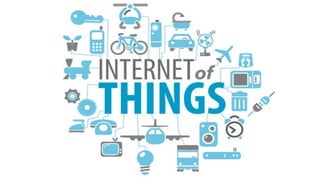
o The Internet of Things (IoT) is the network of physical
objects or "things" embedded with electronics, software,
sensors, and network connectivity, which enables these
objects to collect and exchange data.
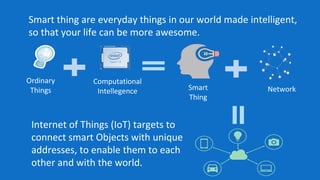
Smart thing are everyday things in our world made intelligent,
so that your life can be more awesome.
Ordinary
Things
Computational
Intellegence Smart
Thing
Network
Internet of Things (IoT) targets to
connect smart Objects with unique
addresses, to enable them to each
other and with the world.
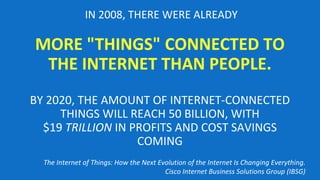
IN 2008, THERE WERE ALREADY
MORE "THINGS" CONNECTED TO
THE INTERNET THAN PEOPLE.
BY 2020, THE AMOUNT OF INTERNET-CONNECTED
THINGS WILL REACH 50 BILLION, WITH
$19 TRILLION IN PROFITS AND COST SAVINGS
COMING
The Internet of Things: How the Next Evolution of the Internet Is Changing Everything.
Cisco Internet Business Solutions Group (IBSG)
● Node-RED is a powerful tool for building Internet of
Things (IoT) applications by wiring together hardware
devices, APIs and online services in new and interesting
ways.
● Focus on simplifying the ‘wiring together’ of code blocks
to carry out tasks. Glue for IoT.
● Visual programming approach - connect predefined code
blocks, known as ‘nodes’. The connected nodes wired
together make up a ‘flows’.
● Developed as an open source project at IBM in late 2013
Introduction to Node-RED
Node-RED
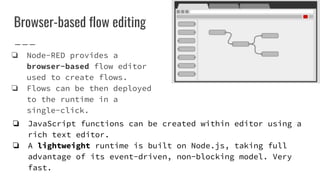
Browser-based flow editing
❏ Node-RED provides a
browser-based flow editor
used to create flows.
❏ Flows can be then deployed
to the runtime in a
single-click.
❏ JavaScript functions can be created within editor using a
rich text editor.
❏ A lightweight runtime is built on Node.js, taking full
advantage of its event-driven, non-blocking model. Very
fast.
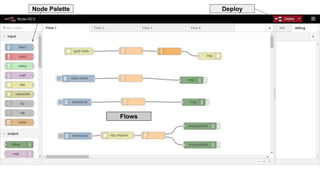
Node Palette
Flows
Deploy
Questions ?
Node-RED requires node.js to work. Node.js is a programming
language.
For Raspberry Pi users, If you have the latest version of the
Raspbian OS (Jessy), you have Node-RED installed by default
with all its requirements.
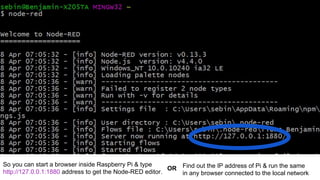
● You can start node-red by typing node-red in the terminal
How do I get Node-RED ?
Refer
http://askubuntu.com/questions/49390/how-do-i-install-the-latest-version-of-node-js
http://nodered.org/docs/hardware/raspberrypi.html
Installing node.js & Node-RED
sudo apt-get install curl
curl --silent --location https://deb.nodesource.com/setup_5.x |
sudo bash - sudo apt-get install nodejs
If you have node.js, you can install node-red it by typing
npm install -g node-red
So you can start a browser inside Raspberry Pi & type
http://127.0.0.1:1880 address to get the Node-RED editor.
OR Find out the IP address of Pi & run the same
in any browser connected to the local network
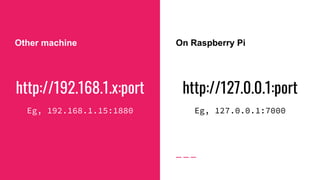
http://192.168.1.x:port
Eg, 192.168.1.15:1880
Other machine On Raspberry Pi
http://127.0.0.1:port
Eg, 127.0.0.1:7000
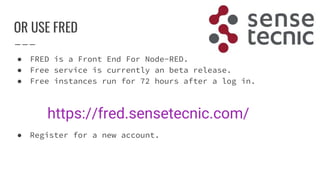
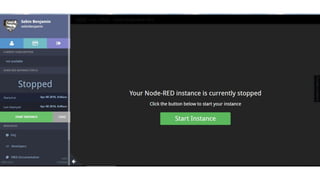
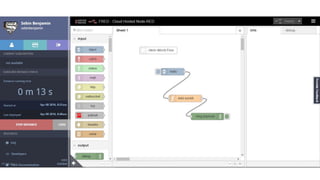
OR USE FRED
● FRED is a Front End For Node-RED.
● Free service is currently an beta release.
● Free instances run for 72 hours after a log in.
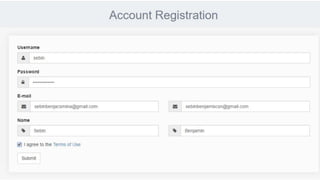
● Register for a new account.
https://fred.sensetecnic.com/
Questions ?
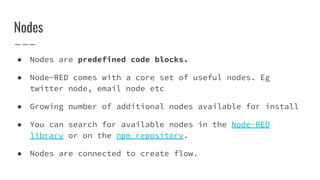
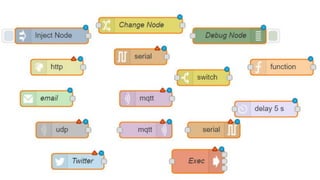
● Nodes are predefined code blocks.
● Node-RED comes with a core set of useful nodes. Eg
twitter node, email node etc
● Growing number of additional nodes available for install
● You can search for available nodes in the Node-RED
library or on the npm repository.
● Nodes are connected to create flow.
Nodes
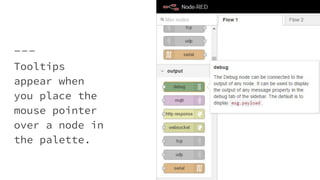
Tooltips
appear when
you place the
mouse pointer
over a node in
the palette.
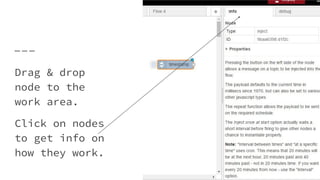
Drag & drop
node to the
work area.
Click on nodes
to get info on
how they work.
Questions ?
Flows
● Nodes are connected to create flow.
● ‘wiring together’ of code blocks
● Flows are created/edited in the browser in Node-RED.
● Flows are stored using JSON which can be easily imported
and exported for sharing with others.
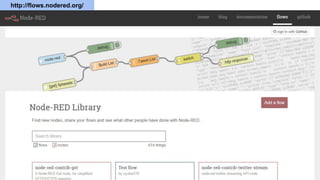
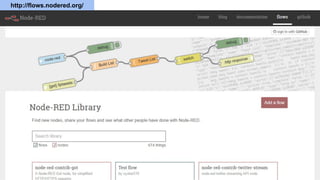
● An online flow library allows you to share your best
flows with the world. (coming up in next slides)
● Node-RED is an example of a flow-based programming model
– messages representing events flow between nodes,
triggering processing that results in output.
● The flow-based programming model maps well to typical IoT
applications which are characterised by real-world events
that trigger some sort of processing which in turn
results in real-world actions.
● Node-RED packages these events as messages which offer a
simple and uniform model for events as they flow between
nodes that make up the flows.
http://flows.nodered.org/
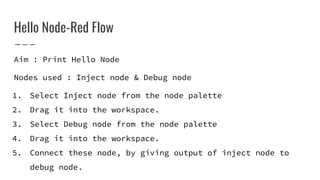
Hello Node-Red Flow
Aim : Print Hello Node
Nodes used : Inject node & Debug node
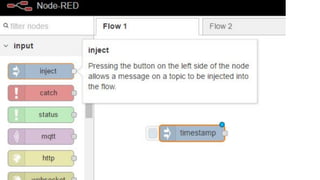
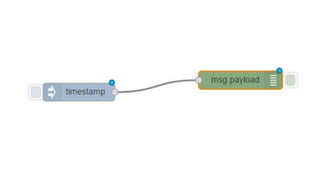
1. Select Inject node from the node palette
2. Drag it into the workspace.
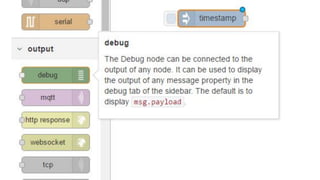
3. Select Debug node from the node palette
4. Drag it into the workspace.
5. Connect these node, by giving output of inject node to
debug node.
Hello Node-Red (continued)
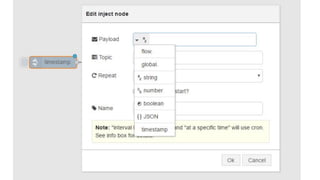
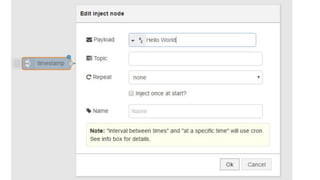
6. Double click on the inject node to edit it.
7. Change the payload type to string, type ‘Hello World’ in
the box.
8. Click Ok to save the changes.
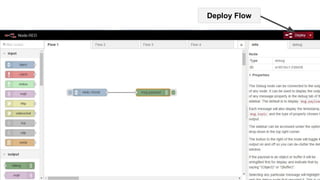
9. Click on the RED deploy button to save the changes made
to the flow and start the flow.
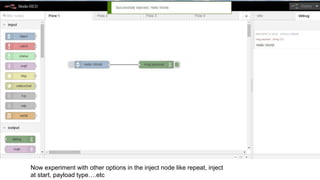
10. Click on the Debug Tab on the right. Then click on the
input side of the debug node.
Deploy Flow
Now experiment with other options in the inject node like repeat, inject
at start, payload type….etc
Questions ?
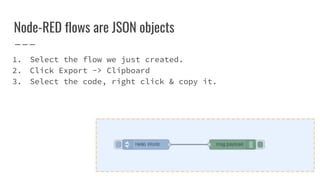
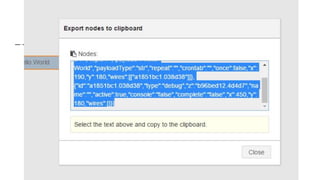
Node-RED flows are JSON objects
1. Select the flow we just created.
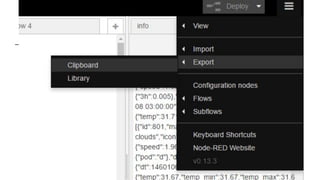
2. Click Export -> Clipboard
3. Select the code, right click & copy it.
[{"id":"9baa6398.d1f2c","type":"inject","z":"b96bed12.
4d4d7","name":"","topic":"","payload":"Hello
World","payloadType":"str","repeat":"","crontab":"","o
nce":false,"x":190,"y":180,"wires":[["a1851bc1.038d38"
]]},{"id":"a1851bc1.038d38","type":"debug","z":"b96bed
12.4d4d7","name":"","active":true,"console":"false","c
omplete":"false","x":450,"y":180,"wires":[]}]
This is an JSON Object. It can be imported to another
Node-RED flow editor.
Hello World code in Node-RED
http://flows.nodered.org/
Importing flow
You can import flows from clipboard (Copy paste)
OR you can import flows from library.
Press Ctrl + I to import from clipboard. Paste the
JSON flow.
Questions ?
Thank you...
Queries to
sebinbenjamin@gmail.com

Node red & IoT - IEDC Hardware Club, April 8th 2016

  • 1.
    Sebin Benjamin sebinbenjamin.github.io Node-RED &IoT making the best out of Raspberry Pi IEDC Hardware Club Sahrdaya College of Engineering & Technology
  • 2.
  • 4.
    “ If we hadcomputers that knew everything there was to know about things—using data they gathered without any help from us -- we would be able to track and count everything, and greatly reduce waste, loss and cost. We would know when things needed replacing, repairing or recalling, and whether they were fresh or past their best. We need to empower computers with their own means of gathering information, so they can see, hear and smell the world for themselves, in all its random glory. RFID and sensor technology enable computers to observe, identify and understand the world—without the limitations of human-entered data. ” 1999 article for the RFID Journal by Kevin Ashton, MIT’s AutoID lab
  • 5.
    INTRODUCTION o The IoTlinks smart objects to the Internet. It can enable an exchange of data never available before. With the rapid development of science and technology, the world is becoming “smart”. o The Internet of Things (IoT) is the network of physical objects or "things" embedded with electronics, software, sensors, and network connectivity, which enables these objects to collect and exchange data.
  • 6.
    Smart thing areeveryday things in our world made intelligent, so that your life can be more awesome. Ordinary Things Computational Intellegence Smart Thing Network Internet of Things (IoT) targets to connect smart Objects with unique addresses, to enable them to each other and with the world.
  • 7.
    IN 2008, THEREWERE ALREADY MORE "THINGS" CONNECTED TO THE INTERNET THAN PEOPLE. BY 2020, THE AMOUNT OF INTERNET-CONNECTED THINGS WILL REACH 50 BILLION, WITH $19 TRILLION IN PROFITS AND COST SAVINGS COMING The Internet of Things: How the Next Evolution of the Internet Is Changing Everything. Cisco Internet Business Solutions Group (IBSG)
  • 11.
    ● Node-RED isa powerful tool for building Internet of Things (IoT) applications by wiring together hardware devices, APIs and online services in new and interesting ways. ● Focus on simplifying the ‘wiring together’ of code blocks to carry out tasks. Glue for IoT. ● Visual programming approach - connect predefined code blocks, known as ‘nodes’. The connected nodes wired together make up a ‘flows’. ● Developed as an open source project at IBM in late 2013 Introduction to Node-RED
  • 12.
  • 13.
    Browser-based flow editing ❏Node-RED provides a browser-based flow editor used to create flows. ❏ Flows can be then deployed to the runtime in a single-click. ❏ JavaScript functions can be created within editor using a rich text editor. ❏ A lightweight runtime is built on Node.js, taking full advantage of its event-driven, non-blocking model. Very fast.
  • 14.
  • 15.
  • 16.
    Node-RED requires node.jsto work. Node.js is a programming language. For Raspberry Pi users, If you have the latest version of the Raspbian OS (Jessy), you have Node-RED installed by default with all its requirements. ● You can start node-red by typing node-red in the terminal How do I get Node-RED ?
  • 17.
    Refer http://askubuntu.com/questions/49390/how-do-i-install-the-latest-version-of-node-js http://nodered.org/docs/hardware/raspberrypi.html Installing node.js &Node-RED sudo apt-get install curl curl --silent --location https://deb.nodesource.com/setup_5.x | sudo bash - sudo apt-get install nodejs If you have node.js, you can install node-red it by typing npm install -g node-red
  • 18.
    So you canstart a browser inside Raspberry Pi & type http://127.0.0.1:1880 address to get the Node-RED editor. OR Find out the IP address of Pi & run the same in any browser connected to the local network
  • 19.
    http://192.168.1.x:port Eg, 192.168.1.15:1880 Other machineOn Raspberry Pi http://127.0.0.1:port Eg, 127.0.0.1:7000
  • 20.
    OR USE FRED ●FRED is a Front End For Node-RED. ● Free service is currently an beta release. ● Free instances run for 72 hours after a log in. ● Register for a new account. https://fred.sensetecnic.com/
  • 21.
  • 26.
  • 27.
    ● Nodes arepredefined code blocks. ● Node-RED comes with a core set of useful nodes. Eg twitter node, email node etc ● Growing number of additional nodes available for install ● You can search for available nodes in the Node-RED library or on the npm repository. ● Nodes are connected to create flow. Nodes
  • 29.
    Tooltips appear when you placethe mouse pointer over a node in the palette.
  • 30.
    Drag & drop nodeto the work area. Click on nodes to get info on how they work.
  • 31.
  • 32.
    Flows ● Nodes areconnected to create flow. ● ‘wiring together’ of code blocks ● Flows are created/edited in the browser in Node-RED. ● Flows are stored using JSON which can be easily imported and exported for sharing with others. ● An online flow library allows you to share your best flows with the world. (coming up in next slides)
  • 33.
    ● Node-RED isan example of a flow-based programming model – messages representing events flow between nodes, triggering processing that results in output. ● The flow-based programming model maps well to typical IoT applications which are characterised by real-world events that trigger some sort of processing which in turn results in real-world actions. ● Node-RED packages these events as messages which offer a simple and uniform model for events as they flow between nodes that make up the flows.
  • 34.
  • 35.
    Hello Node-Red Flow Aim: Print Hello Node Nodes used : Inject node & Debug node 1. Select Inject node from the node palette 2. Drag it into the workspace. 3. Select Debug node from the node palette 4. Drag it into the workspace. 5. Connect these node, by giving output of inject node to debug node.
  • 39.
    Hello Node-Red (continued) 6.Double click on the inject node to edit it. 7. Change the payload type to string, type ‘Hello World’ in the box. 8. Click Ok to save the changes. 9. Click on the RED deploy button to save the changes made to the flow and start the flow. 10. Click on the Debug Tab on the right. Then click on the input side of the debug node.
  • 42.
  • 43.
    Now experiment withother options in the inject node like repeat, inject at start, payload type….etc
  • 44.
  • 45.
    Node-RED flows areJSON objects 1. Select the flow we just created. 2. Click Export -> Clipboard 3. Select the code, right click & copy it.
  • 48.
  • 49.
  • 50.
    Importing flow You canimport flows from clipboard (Copy paste) OR you can import flows from library. Press Ctrl + I to import from clipboard. Paste the JSON flow.
  • 51.
  • 52.