



Using iPads with Students
          & For Your Own
              Productivity
                 Nell Eckersley
2


Using iPads
•   Introductions
•   Navigating the iPad
•   Suggested Apps
•   How to Find Apps as You Need Them
•   Buying iPads for Your Program
3


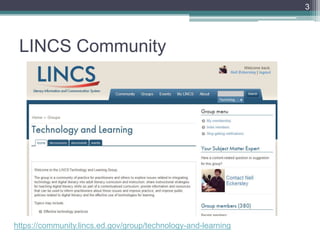
 LINCS Community


https://community.lincs.ed.gov/group/technology-and-learning
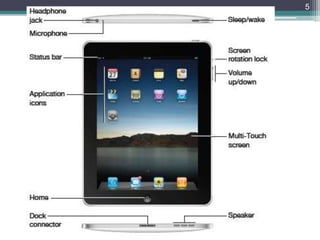
Navigating the iPad
5
6


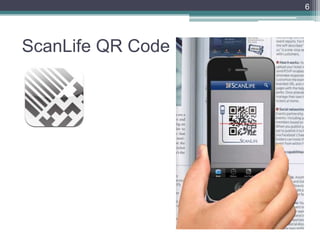
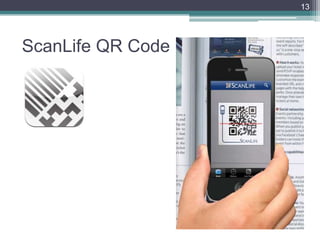
ScanLife QR Code
7


To Access this PowerPoint


http://slidesha.re/RVo0ky
8


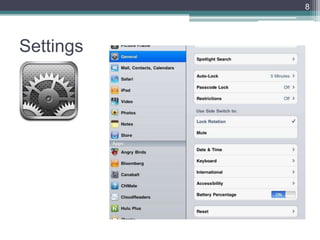
Settings
9


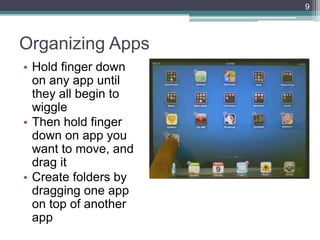
Organizing Apps
• Hold finger down
  on any app until
  they all begin to
  wiggle
• Then hold finger
  down on app you
  want to move, and
  drag it
• Create folders by
  dragging one app
  on top of another
  app
10


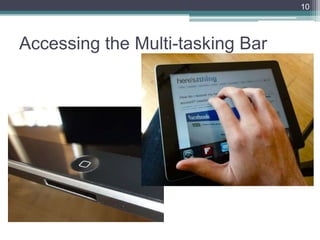
Accessing the Multi-tasking Bar
11


How to…
• How to close open Apps on your iPad, iPhone or
  iPod Touch
• How to change the font in Notes for the iPad,
  iPhone and iPod Touch
• How to accurately relocate the cursor in Notes
  for your iPhone or iPod Touch
• How to create Folders on your iPad, iPhone or
  iPod Touch
• How to take screenshots of your iPhone or iPod
  Touch screen
Apps
13


ScanLife QR Code
14


Apple’s iPad Manual
15


Evernote
16


Using Evernote
• Log in:
    ▫ Username: nelllac
    ▫ Password: ipad20
•   What Notebooks do you see?
•   What Notes do you see?
•   Open ―iPad How to‖
•   Click on one of the links

• http://bit.ly/PnR5kh
17


Dragon Dictation
        Dragon Dictation is an easy-to-use voice recognition
        application powered by Dragon® NaturallySpeaking® that
        allows you to easily speak and instantly see your text or
        email messages. In fact, it’s up to five (5) times faster than
        typing on the keyboard.

        With Dragon Dictation you can also dictate status updates
        directly to your Social Networking applications (Facebook
        and Twitter) or send notes and reminders to yourself….all
        using your voice. So when you’re on-the-go, stop typing
        and start speaking – from short text messages to longer
        email messages, and anything in between.
18


Using Dragon Dictation
• Practice this tongue twister: She sell seashells
  on the seashore
• Open Dragon Dictation
• Click the red button and read the tongue twister.
• Notice that the mic is near the top of the iPad
• Touch the screen to stop recording
• How well did it record your statement?
• How could this be used with students? For your
  own productivity?
19


Kindle and Nook
         • Free or low cost books (as well as
           regular cost books)
         • Highlight passages and share
           material with others
         • Have all your books available to
           you all the time
         • Picture books as well as novels
20


Sight Words Pro
       • Over 1,600+ sight words which
         comprises up to 85% of the text in a
         child's early reading materials
       • Choose a pre-defined flash card word
         list, or build and save custom flash card
         lists
       • Add custom words and record your own
         pronunciations.
       • Share custom word lists via Bump™ or
         email.
       • Mark flash cards with stars or flags.
       • Shake your device to shuffle the words.
       • Beautiful voice-pronunciations for all
         words.
21


iTunes U
           FEATURES:
             • Take free courses created and taught by
             instructors from leading universities and other
             schools
             • See all assignments and updates from the
             instructor
             • Take notes and highlight text in iBooks and see
             them consolidated for easy reviewing in the iTunes
             U app
             • Take course notes in class, or while playing audio
             or video lectures inside of iTunes U
             • Access course materials, including audio, video,
             books, documents & presentations, apps, and new
             iBooks textbooks for iPad
             • Browse collections from education and cultural
             institutions in 26 countries — including Stanford,
             Yale, MIT, Oxford, UC Berkeley, MoMA, the New
             York Public Library, and the Library of Congress
22


Using iTunes U
• Open iTunesU
• In the search box type New York
• Find the Library of Congress ―The Life of a City:
  Early Films of New York, 1898-1906‖
• How could this be used with students?
23


Motion Math HD
        • Follows a star that has fallen from
          space, and must bound back up, up,
          up to its home in the stars.
        • Moving fractions to their correct place
          on the number line is the only way to
          return.
        • A recent controlled experiment
          showed that by playing Motion Math
          HD, learners improve their ability to
          estimate fractions and their attitudes
          toward math. (More info:
          http://bit.ly/motionmathstudy)
24


MathBoard
       • Teaches addition, subtraction,
         multiplication and division problems.
       • Appropriate for all levels from
         kindergarten (with simple addition and
         subtraction problems) to elementary
         school where learning multiplication
         and division can be a challenge.
       • Control the range of numbers you
         want to work with, the amount of
         questions you want to answer and
         even assign a time limit per quiz.
25


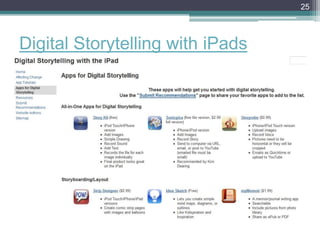
Digital Storytelling with iPads
How to Find the Apps
27


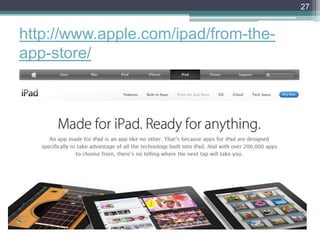
http://www.apple.com/ipad/from-the-
app-store/
28


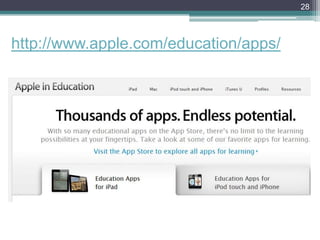
http://www.apple.com/education/apps/
29


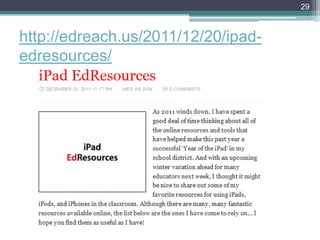
http://edreach.us/2011/12/20/ipad-
edresources/
30


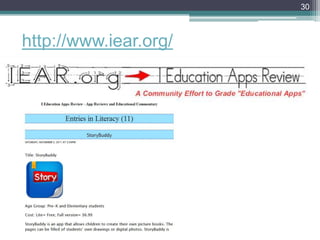
http://www.iear.org/
31


http://appitic.com/
32


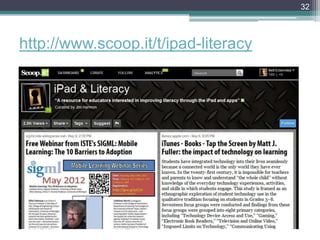
http://www.scoop.it/t/ipad-literacy
33


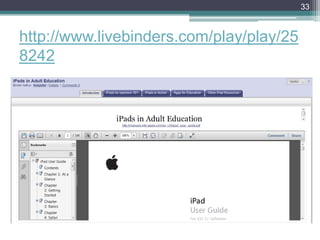
http://www.livebinders.com/play/play/25
8242
Buying iPads
35


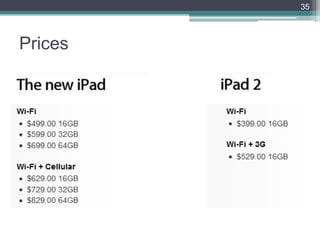
Prices
36


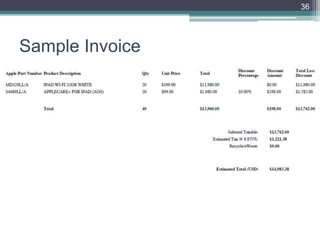
Sample Invoice
37


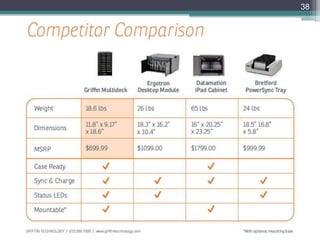
Griffin MultiDock
38
39


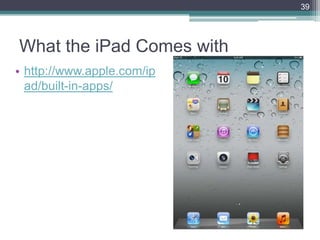
What the iPad Comes with
• http://www.apple.com/ip
  ad/built-in-apps/
40


Adding Apps to iPads
• If you use Mac Computers
 ▫ Apple Configurator makes it easy for anyone to
   mass configure and deploy iPhone, iPad, and
   iPod touch in a school, business, or institution.
   http://itunes.apple.com/us/app/apple-
   configurator/id434433123?mt=12

• If you use PC computers
 ▫ limited to 10 total devices for one Apple ID (iTunes
   account)
41


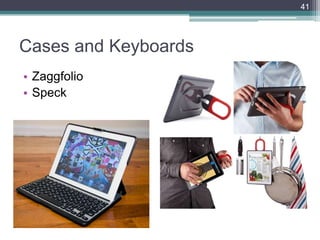
Cases and Keyboards
• Zaggfolio
• Speck
42


Nell Eckersley
• Subject Matter Expert, LINCS Community Technology
  and Learning Group
• https://community.lincs.ed.gov/
• Email: nelle@lacnyc.org
• Twitter: http://twitter.com/LACNYCnell
• Facebook:
  http://www.facebook.com/nell.eckersleylac
• Blog: http://nelightful.wordpress.com/
• Delicious: http://www.delicious.com/nelleckersley

Using iPads with Adult Students

  • 1.
    Using iPads withStudents & For Your Own Productivity Nell Eckersley
  • 2.
    2 Using iPads • Introductions • Navigating the iPad • Suggested Apps • How to Find Apps as You Need Them • Buying iPads for Your Program
  • 3.
  • 4.
  • 5.
  • 6.
  • 7.
    7 To Access thisPowerPoint http://slidesha.re/RVo0ky
  • 8.
  • 9.
    9 Organizing Apps • Holdfinger down on any app until they all begin to wiggle • Then hold finger down on app you want to move, and drag it • Create folders by dragging one app on top of another app
  • 10.
  • 11.
    11 How to… • Howto close open Apps on your iPad, iPhone or iPod Touch • How to change the font in Notes for the iPad, iPhone and iPod Touch • How to accurately relocate the cursor in Notes for your iPhone or iPod Touch • How to create Folders on your iPad, iPhone or iPod Touch • How to take screenshots of your iPhone or iPod Touch screen
  • 12.
  • 13.
  • 14.
  • 15.
  • 16.
    16 Using Evernote • Login: ▫ Username: nelllac ▫ Password: ipad20 • What Notebooks do you see? • What Notes do you see? • Open ―iPad How to‖ • Click on one of the links • http://bit.ly/PnR5kh
  • 17.
    17 Dragon Dictation Dragon Dictation is an easy-to-use voice recognition application powered by Dragon® NaturallySpeaking® that allows you to easily speak and instantly see your text or email messages. In fact, it’s up to five (5) times faster than typing on the keyboard. With Dragon Dictation you can also dictate status updates directly to your Social Networking applications (Facebook and Twitter) or send notes and reminders to yourself….all using your voice. So when you’re on-the-go, stop typing and start speaking – from short text messages to longer email messages, and anything in between.
  • 18.
    18 Using Dragon Dictation •Practice this tongue twister: She sell seashells on the seashore • Open Dragon Dictation • Click the red button and read the tongue twister. • Notice that the mic is near the top of the iPad • Touch the screen to stop recording • How well did it record your statement? • How could this be used with students? For your own productivity?
  • 19.
    19 Kindle and Nook • Free or low cost books (as well as regular cost books) • Highlight passages and share material with others • Have all your books available to you all the time • Picture books as well as novels
  • 20.
    20 Sight Words Pro • Over 1,600+ sight words which comprises up to 85% of the text in a child's early reading materials • Choose a pre-defined flash card word list, or build and save custom flash card lists • Add custom words and record your own pronunciations. • Share custom word lists via Bump™ or email. • Mark flash cards with stars or flags. • Shake your device to shuffle the words. • Beautiful voice-pronunciations for all words.
  • 21.
    21 iTunes U FEATURES: • Take free courses created and taught by instructors from leading universities and other schools • See all assignments and updates from the instructor • Take notes and highlight text in iBooks and see them consolidated for easy reviewing in the iTunes U app • Take course notes in class, or while playing audio or video lectures inside of iTunes U • Access course materials, including audio, video, books, documents & presentations, apps, and new iBooks textbooks for iPad • Browse collections from education and cultural institutions in 26 countries — including Stanford, Yale, MIT, Oxford, UC Berkeley, MoMA, the New York Public Library, and the Library of Congress
  • 22.
    22 Using iTunes U •Open iTunesU • In the search box type New York • Find the Library of Congress ―The Life of a City: Early Films of New York, 1898-1906‖ • How could this be used with students?
  • 23.
    23 Motion Math HD • Follows a star that has fallen from space, and must bound back up, up, up to its home in the stars. • Moving fractions to their correct place on the number line is the only way to return. • A recent controlled experiment showed that by playing Motion Math HD, learners improve their ability to estimate fractions and their attitudes toward math. (More info: http://bit.ly/motionmathstudy)
  • 24.
    24 MathBoard • Teaches addition, subtraction, multiplication and division problems. • Appropriate for all levels from kindergarten (with simple addition and subtraction problems) to elementary school where learning multiplication and division can be a challenge. • Control the range of numbers you want to work with, the amount of questions you want to answer and even assign a time limit per quiz.
  • 25.
  • 26.
    How to Findthe Apps
  • 27.
  • 28.
  • 29.
  • 30.
  • 31.
  • 32.
  • 33.
  • 34.
  • 35.
  • 36.
  • 37.
  • 38.
  • 39.
    39 What the iPadComes with • http://www.apple.com/ip ad/built-in-apps/
  • 40.
    40 Adding Apps toiPads • If you use Mac Computers ▫ Apple Configurator makes it easy for anyone to mass configure and deploy iPhone, iPad, and iPod touch in a school, business, or institution. http://itunes.apple.com/us/app/apple- configurator/id434433123?mt=12 • If you use PC computers ▫ limited to 10 total devices for one Apple ID (iTunes account)
  • 41.
    41 Cases and Keyboards •Zaggfolio • Speck
  • 42.
    42 Nell Eckersley • SubjectMatter Expert, LINCS Community Technology and Learning Group • https://community.lincs.ed.gov/ • Email: nelle@lacnyc.org • Twitter: http://twitter.com/LACNYCnell • Facebook: http://www.facebook.com/nell.eckersleylac • Blog: http://nelightful.wordpress.com/ • Delicious: http://www.delicious.com/nelleckersley