©Ian Sommerville 2004 Software Engineering, 7th edition. Chapter 4 Slide 1Slide 1
Use Case Diagrams
©Ian Sommerville 2004 Software Engineering, 7th edition. Chapter 4 Slide 2Slide 2
Use Cases
 What is a Use Case
 A formal way of representing how a
business system interacts with its
environment
 Illustrates the activities that are
performed by the users of the system
 A scenario-based technique in the UML
 A sequence of actions a system performs that
yields a valuable result for a particular actor.
©Ian Sommerville 2004 Software Engineering, 7th edition. Chapter 4 Slide 3Slide 3
Use Case Analysis
 What is an Actor?
• A user or outside system that interacts
with the system being designed in order
to obtain some value from that
interaction
 Use Cases describe scenarios that describe
the interaction between users of the system
(the actor) and the system itself.
©Ian Sommerville 2004 Software Engineering, 7th edition. Chapter 4 Slide 4Slide 4
Use Cases
 Use case diagrams describe what a system
does from the standpoint of an external
observer. The emphasis is on what a system
does rather than how.
 Use case diagrams are closely connected to
scenarios. A scenario is an example of what
happens when someone interacts with the
system.
©Ian Sommerville 2004 Software Engineering, 7th edition. Chapter 4 Slide 5Slide 5
Use Cases
 Here is a scenario for a medical clinic.
 A patient calls the clinic to make an appointment
for a yearly checkup. The receptionist finds the
nearest empty time slot in the appointment book
and schedules the appointment for that time slot. "
 We want to write a use case for this scenario.
 Remember: A use case is a summary of scenarios
for a single task or goal.
©Ian Sommerville 2004 Software Engineering, 7th edition. Chapter 4 Slide 6Slide 6
Use Cases
 Step 1 Identify the actors
 As we read the scenario, define those people or
systems that are going to interact with the
scenario.
 A patient calls the clinic to make an appointment for a yearly checkup.
The receptionist finds the nearest empty time slot in the appointment
book and schedules the appointment for that time slot. "
©Ian Sommerville 2004 Software Engineering, 7th edition. Chapter 4 Slide 7Slide 7
Use Cases
 Step 1 Identify the actors
 As we read the scenario, define those people or
systems that are going to interact with the
scenario.
 A patient calls the clinic to make an appointment for a yearly checkup.
The receptionist finds the nearest empty time slot in the appointment
book and schedules the appointment for that time slot. "
©Ian Sommerville 2004 Software Engineering, 7th edition. Chapter 4 Slide 8Slide 8
Questions for Identifying People Actors
 Who is interested in the scenario/system?
 Where in the organization is the scenario/system be
used?
 Who will benefit from the use of the
scenario/system?
 Who will supply the scenario/system with this
information, use this information, and remove this
information?
 Does one person play several different roles?
 Do several people play the same role?
©Ian Sommerville 2004 Software Engineering, 7th edition. Chapter 4 Slide 9Slide 9
Questions for Identifying Other Actors
 What other entity is interested in the
scenario/system?
 What other entity will supply the scenario/system
with this information, use this information, and
remove this information?
 Does the system use an external resource?
 Does the system interact with a legacy system?
©Ian Sommerville 2004 Software Engineering, 7th edition. Chapter 4 Slide 10Slide 10
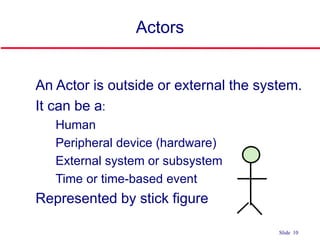
Actors
 An Actor is outside or external the system.
 It can be a:
• Human
• Peripheral device (hardware)
• External system or subsystem
• Time or time-based event
 Represented by stick figure
©Ian Sommerville 2004 Software Engineering, 7th edition. Chapter 4 Slide 11Slide 11
Use Cases
 A use case is a summary of scenarios for a
single task or goal.
 An actor is who or what initiates the events
involved in the task of the use case. Actors are
simply roles that people or objects play.
 So as we read our scenario, what or who is
the actor????
©Ian Sommerville 2004 Software Engineering, 7th edition. Chapter 4 Slide 12Slide 12
Use Cases
 So as we read our scenario, what or who is
the actor????
 A patient calls the clinic to make an appointment for a yearly
checkup. The receptionist finds the nearest empty time slot in the
appointment book and schedules the appointment for that time
slot. "
 The actor is a Patient.
©Ian Sommerville 2004 Software Engineering, 7th edition. Chapter 4 Slide 13Slide 13
Use Cases
 The use case is a summary of scenarios for a
single task or goal.
 So What is the Use Case????
 The Use Case is Make Appointment.
 It is a use case for the medical clinic.
©Ian Sommerville 2004 Software Engineering, 7th edition. Chapter 4 Slide 14Slide 14
Use Cases
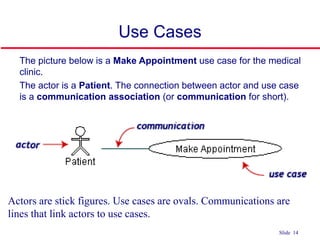
 The picture below is a Make Appointment use case for the medical
clinic.
 The actor is a Patient. The connection between actor and use case
is a communication association (or communication for short).
tick figures. Use cases are ovals. Communications are lines that link actorstick figures. Use cases are ovals. Communications are lines that link actors
Actors are stick figures. Use cases are ovals. Communications are
lines that link actors to use cases.
©Ian Sommerville 2004 Software Engineering, 7th edition. Chapter 4 Slide 15Slide 15
Use Case Componentss
 The use case has three components.
 The use case task referred to as the use case
that represents a feature needed in a software
system.
 The actor(s) who trigger the use case to activate.
 The communication line to show how the actors
communicate with the use case.
©Ian Sommerville 2004 Software Engineering, 7th edition. Chapter 4 Slide 16Slide 16
Use Case Diagram - Use Case
 A major process performed by the
system that benefits an actor(s) in
some way
 Models a dialogue between an actor
and the system
 Represents the functionality provided
by the system
©Ian Sommerville 2004 Software Engineering, 7th edition. Chapter 4 Slide 17Slide 17
Use Case
 Each use case in a use case diagram
describes one and only one function in
which users interact with the system
• May contain several “paths” that a user
can take while interacting with the system
• Each path is referred to as a scenario
©Ian Sommerville 2004 Software Engineering, 7th edition. Chapter 4 Slide 18Slide 18
Use Case
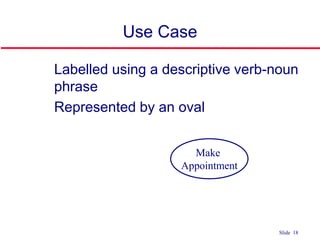
 Labelled using a descriptive verb-noun
phrase
 Represented by an oval
Make
Appointment
©Ian Sommerville 2004 Software Engineering, 7th edition. Chapter 4 Slide 19Slide 19
Use Case - Actor
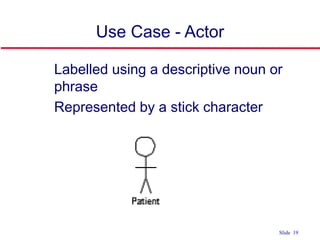
 Labelled using a descriptive noun or
phrase
 Represented by a stick character
©Ian Sommerville 2004 Software Engineering, 7th edition. Chapter 4 Slide 20Slide 20
Use Case - Relationships
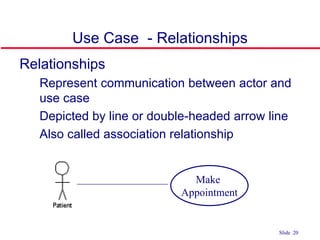
 Relationships
• Represent communication between actor and
use case
• Depicted by line or double-headed arrow line
• Also called association relationship
Make
Appointment
©Ian Sommerville 2004 Software Engineering, 7th edition. Chapter 4 Slide 21Slide 21
Use Case - Relationships
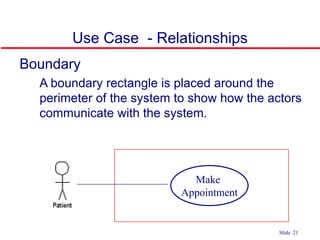
 Boundary
• A boundary rectangle is placed around the
perimeter of the system to show how the actors
communicate with the system.
Make
Appointment
©Ian Sommerville 2004 Software Engineering, 7th edition. Chapter 4 Slide 22Slide 22
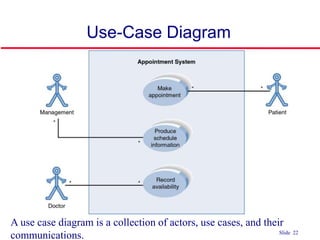
Use-Case Diagram
A use case diagram is a collection of actors, use cases, and their
communications.
©Ian Sommerville 2004 Software Engineering, 7th edition. Chapter 4 Slide 23Slide 23
Use Case Diagram
 Other Types of Relationships for Use
Cases
• Generalization
• Include
• Extend
©Ian Sommerville 2004 Software Engineering, 7th edition. Chapter 4 Slide 24Slide 24
Components of Use Case Diagram
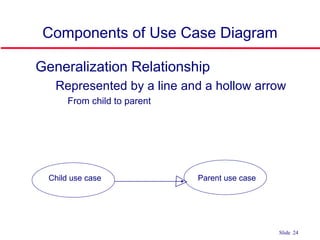
 Generalization Relationship
• Represented by a line and a hollow arrow
• From child to parent
Child use case Parent use case
©Ian Sommerville 2004 Software Engineering, 7th edition. Chapter 4 Slide 25Slide 25
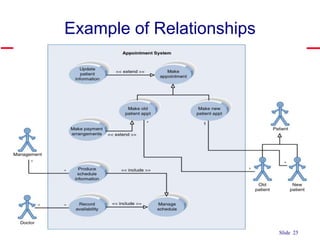
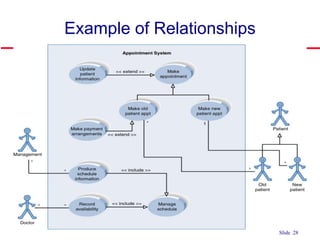
Example of Relationships
©Ian Sommerville 2004 Software Engineering, 7th edition. Chapter 4 Slide 26Slide 26
Use Case Diagram
 Include Relationship
• Represents the inclusion of the functionality
of one use case within another
• Arrow is drawn from the base use case to the
used use case
• Write << include >> above arrowhead line
©Ian Sommerville 2004 Software Engineering, 7th edition. Chapter 4 Slide 27Slide 27
Use Case Diagram
 Extend relationship
• Represents the extension of the use case
to include optional functionality
• Arrow is drawn from the extension use
case to the base use case
• Write << extend >> above arrowhead line
©Ian Sommerville 2004 Software Engineering, 7th edition. Chapter 4 Slide 28Slide 28
Example of Relationships
©Ian Sommerville 2004 Software Engineering, 7th edition. Chapter 4 Slide 29Slide 29
Use Case Relationships
 Pro:
• Reduces redundancy in use cases
• Reduces complexity within a use case
 Con
• May introduce complexity to use case
diagram
©Ian Sommerville 2004 Software Engineering, 7th edition. Chapter 4 Slide 30Slide 30
Benefits of Use Cases
 Use cases are the primary vehicle for requirements capture in
RUP
 Use cases are described using the language of the customer
(language of the domain which is defined in the glossary)
 Use cases provide a contractual delivery process (RUP is Use
Case Driven)
 Use cases provide an easily-understood communication
mechanism
 When requirements are traced, they make it difficult for
requirements to fall through the cracks
 Use cases provide a concise summary of what the system
should do at an abstract (low modification cost) level.
©Ian Sommerville 2004 Software Engineering, 7th edition. Chapter 4 Slide 31Slide 31
Difficulties with Use Cases
 As functional decompositions, it is often difficult to make the
transition from functional description to object description to
class design
 Reuse at the class level can be hindered by each developer
“taking a Use Case and running with it”. Since UCs do not talk
about classes, developers often wind up in a vacuum during
object analysis, and can often wind up doing things their own
way, making reuse difficult
 Use Cases make stating non-functional requirements difficult
(where do you say that X must execute at Y/sec?)
 Testing functionality is straightforward, but unit testing the
particular implementations and non-functional requirements is
not obvious
©Ian Sommerville 2004 Software Engineering, 7th edition. Chapter 4 Slide 32Slide 32
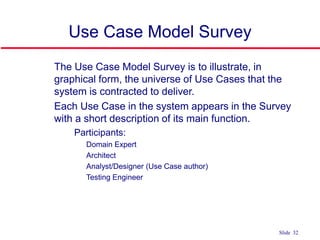
Use Case Model Survey
 The Use Case Model Survey is to illustrate, in
graphical form, the universe of Use Cases that the
system is contracted to deliver.
 Each Use Case in the system appears in the Survey
with a short description of its main function.
• Participants:
• Domain Expert
• Architect
• Analyst/Designer (Use Case author)
• Testing Engineer
©Ian Sommerville 2004 Software Engineering, 7th edition. Chapter 4 Slide 33Slide 33
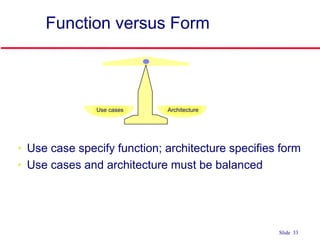
Function versus Form
Use cases Architecture
• Use case specify function; architecture specifies form
• Use cases and architecture must be balanced
©Ian Sommerville 2004 Software Engineering, 7th edition. Chapter 4 Slide 34Slide 34
Use Case Diagram
 We will build use case diagram for a
video rental system in the examples.
 Look and identify potential actors and
use case tasks.

 Nouns and verbs may be helpful.

Use case diagrams

  • 1.
    ©Ian Sommerville 2004Software Engineering, 7th edition. Chapter 4 Slide 1Slide 1 Use Case Diagrams
  • 2.
    ©Ian Sommerville 2004Software Engineering, 7th edition. Chapter 4 Slide 2Slide 2 Use Cases  What is a Use Case  A formal way of representing how a business system interacts with its environment  Illustrates the activities that are performed by the users of the system  A scenario-based technique in the UML  A sequence of actions a system performs that yields a valuable result for a particular actor.
  • 3.
    ©Ian Sommerville 2004Software Engineering, 7th edition. Chapter 4 Slide 3Slide 3 Use Case Analysis  What is an Actor? • A user or outside system that interacts with the system being designed in order to obtain some value from that interaction  Use Cases describe scenarios that describe the interaction between users of the system (the actor) and the system itself.
  • 4.
    ©Ian Sommerville 2004Software Engineering, 7th edition. Chapter 4 Slide 4Slide 4 Use Cases  Use case diagrams describe what a system does from the standpoint of an external observer. The emphasis is on what a system does rather than how.  Use case diagrams are closely connected to scenarios. A scenario is an example of what happens when someone interacts with the system.
  • 5.
    ©Ian Sommerville 2004Software Engineering, 7th edition. Chapter 4 Slide 5Slide 5 Use Cases  Here is a scenario for a medical clinic.  A patient calls the clinic to make an appointment for a yearly checkup. The receptionist finds the nearest empty time slot in the appointment book and schedules the appointment for that time slot. "  We want to write a use case for this scenario.  Remember: A use case is a summary of scenarios for a single task or goal.
  • 6.
    ©Ian Sommerville 2004Software Engineering, 7th edition. Chapter 4 Slide 6Slide 6 Use Cases  Step 1 Identify the actors  As we read the scenario, define those people or systems that are going to interact with the scenario.  A patient calls the clinic to make an appointment for a yearly checkup. The receptionist finds the nearest empty time slot in the appointment book and schedules the appointment for that time slot. "
  • 7.
    ©Ian Sommerville 2004Software Engineering, 7th edition. Chapter 4 Slide 7Slide 7 Use Cases  Step 1 Identify the actors  As we read the scenario, define those people or systems that are going to interact with the scenario.  A patient calls the clinic to make an appointment for a yearly checkup. The receptionist finds the nearest empty time slot in the appointment book and schedules the appointment for that time slot. "
  • 8.
    ©Ian Sommerville 2004Software Engineering, 7th edition. Chapter 4 Slide 8Slide 8 Questions for Identifying People Actors  Who is interested in the scenario/system?  Where in the organization is the scenario/system be used?  Who will benefit from the use of the scenario/system?  Who will supply the scenario/system with this information, use this information, and remove this information?  Does one person play several different roles?  Do several people play the same role?
  • 9.
    ©Ian Sommerville 2004Software Engineering, 7th edition. Chapter 4 Slide 9Slide 9 Questions for Identifying Other Actors  What other entity is interested in the scenario/system?  What other entity will supply the scenario/system with this information, use this information, and remove this information?  Does the system use an external resource?  Does the system interact with a legacy system?
  • 10.
    ©Ian Sommerville 2004Software Engineering, 7th edition. Chapter 4 Slide 10Slide 10 Actors  An Actor is outside or external the system.  It can be a: • Human • Peripheral device (hardware) • External system or subsystem • Time or time-based event  Represented by stick figure
  • 11.
    ©Ian Sommerville 2004Software Engineering, 7th edition. Chapter 4 Slide 11Slide 11 Use Cases  A use case is a summary of scenarios for a single task or goal.  An actor is who or what initiates the events involved in the task of the use case. Actors are simply roles that people or objects play.  So as we read our scenario, what or who is the actor????
  • 12.
    ©Ian Sommerville 2004Software Engineering, 7th edition. Chapter 4 Slide 12Slide 12 Use Cases  So as we read our scenario, what or who is the actor????  A patient calls the clinic to make an appointment for a yearly checkup. The receptionist finds the nearest empty time slot in the appointment book and schedules the appointment for that time slot. "  The actor is a Patient.
  • 13.
    ©Ian Sommerville 2004Software Engineering, 7th edition. Chapter 4 Slide 13Slide 13 Use Cases  The use case is a summary of scenarios for a single task or goal.  So What is the Use Case????  The Use Case is Make Appointment.  It is a use case for the medical clinic.
  • 14.
    ©Ian Sommerville 2004Software Engineering, 7th edition. Chapter 4 Slide 14Slide 14 Use Cases  The picture below is a Make Appointment use case for the medical clinic.  The actor is a Patient. The connection between actor and use case is a communication association (or communication for short). tick figures. Use cases are ovals. Communications are lines that link actorstick figures. Use cases are ovals. Communications are lines that link actors Actors are stick figures. Use cases are ovals. Communications are lines that link actors to use cases.
  • 15.
    ©Ian Sommerville 2004Software Engineering, 7th edition. Chapter 4 Slide 15Slide 15 Use Case Componentss  The use case has three components.  The use case task referred to as the use case that represents a feature needed in a software system.  The actor(s) who trigger the use case to activate.  The communication line to show how the actors communicate with the use case.
  • 16.
    ©Ian Sommerville 2004Software Engineering, 7th edition. Chapter 4 Slide 16Slide 16 Use Case Diagram - Use Case  A major process performed by the system that benefits an actor(s) in some way  Models a dialogue between an actor and the system  Represents the functionality provided by the system
  • 17.
    ©Ian Sommerville 2004Software Engineering, 7th edition. Chapter 4 Slide 17Slide 17 Use Case  Each use case in a use case diagram describes one and only one function in which users interact with the system • May contain several “paths” that a user can take while interacting with the system • Each path is referred to as a scenario
  • 18.
    ©Ian Sommerville 2004Software Engineering, 7th edition. Chapter 4 Slide 18Slide 18 Use Case  Labelled using a descriptive verb-noun phrase  Represented by an oval Make Appointment
  • 19.
    ©Ian Sommerville 2004Software Engineering, 7th edition. Chapter 4 Slide 19Slide 19 Use Case - Actor  Labelled using a descriptive noun or phrase  Represented by a stick character
  • 20.
    ©Ian Sommerville 2004Software Engineering, 7th edition. Chapter 4 Slide 20Slide 20 Use Case - Relationships  Relationships • Represent communication between actor and use case • Depicted by line or double-headed arrow line • Also called association relationship Make Appointment
  • 21.
    ©Ian Sommerville 2004Software Engineering, 7th edition. Chapter 4 Slide 21Slide 21 Use Case - Relationships  Boundary • A boundary rectangle is placed around the perimeter of the system to show how the actors communicate with the system. Make Appointment
  • 22.
    ©Ian Sommerville 2004Software Engineering, 7th edition. Chapter 4 Slide 22Slide 22 Use-Case Diagram A use case diagram is a collection of actors, use cases, and their communications.
  • 23.
    ©Ian Sommerville 2004Software Engineering, 7th edition. Chapter 4 Slide 23Slide 23 Use Case Diagram  Other Types of Relationships for Use Cases • Generalization • Include • Extend
  • 24.
    ©Ian Sommerville 2004Software Engineering, 7th edition. Chapter 4 Slide 24Slide 24 Components of Use Case Diagram  Generalization Relationship • Represented by a line and a hollow arrow • From child to parent Child use case Parent use case
  • 25.
    ©Ian Sommerville 2004Software Engineering, 7th edition. Chapter 4 Slide 25Slide 25 Example of Relationships
  • 26.
    ©Ian Sommerville 2004Software Engineering, 7th edition. Chapter 4 Slide 26Slide 26 Use Case Diagram  Include Relationship • Represents the inclusion of the functionality of one use case within another • Arrow is drawn from the base use case to the used use case • Write << include >> above arrowhead line
  • 27.
    ©Ian Sommerville 2004Software Engineering, 7th edition. Chapter 4 Slide 27Slide 27 Use Case Diagram  Extend relationship • Represents the extension of the use case to include optional functionality • Arrow is drawn from the extension use case to the base use case • Write << extend >> above arrowhead line
  • 28.
    ©Ian Sommerville 2004Software Engineering, 7th edition. Chapter 4 Slide 28Slide 28 Example of Relationships
  • 29.
    ©Ian Sommerville 2004Software Engineering, 7th edition. Chapter 4 Slide 29Slide 29 Use Case Relationships  Pro: • Reduces redundancy in use cases • Reduces complexity within a use case  Con • May introduce complexity to use case diagram
  • 30.
    ©Ian Sommerville 2004Software Engineering, 7th edition. Chapter 4 Slide 30Slide 30 Benefits of Use Cases  Use cases are the primary vehicle for requirements capture in RUP  Use cases are described using the language of the customer (language of the domain which is defined in the glossary)  Use cases provide a contractual delivery process (RUP is Use Case Driven)  Use cases provide an easily-understood communication mechanism  When requirements are traced, they make it difficult for requirements to fall through the cracks  Use cases provide a concise summary of what the system should do at an abstract (low modification cost) level.
  • 31.
    ©Ian Sommerville 2004Software Engineering, 7th edition. Chapter 4 Slide 31Slide 31 Difficulties with Use Cases  As functional decompositions, it is often difficult to make the transition from functional description to object description to class design  Reuse at the class level can be hindered by each developer “taking a Use Case and running with it”. Since UCs do not talk about classes, developers often wind up in a vacuum during object analysis, and can often wind up doing things their own way, making reuse difficult  Use Cases make stating non-functional requirements difficult (where do you say that X must execute at Y/sec?)  Testing functionality is straightforward, but unit testing the particular implementations and non-functional requirements is not obvious
  • 32.
    ©Ian Sommerville 2004Software Engineering, 7th edition. Chapter 4 Slide 32Slide 32 Use Case Model Survey  The Use Case Model Survey is to illustrate, in graphical form, the universe of Use Cases that the system is contracted to deliver.  Each Use Case in the system appears in the Survey with a short description of its main function. • Participants: • Domain Expert • Architect • Analyst/Designer (Use Case author) • Testing Engineer
  • 33.
    ©Ian Sommerville 2004Software Engineering, 7th edition. Chapter 4 Slide 33Slide 33 Function versus Form Use cases Architecture • Use case specify function; architecture specifies form • Use cases and architecture must be balanced
  • 34.
    ©Ian Sommerville 2004Software Engineering, 7th edition. Chapter 4 Slide 34Slide 34 Use Case Diagram  We will build use case diagram for a video rental system in the examples.  Look and identify potential actors and use case tasks.   Nouns and verbs may be helpful.

Editor's Notes

  • #9 Actors 7) Does one person play several different roles? May have an actor for each role 8) Do several people play the same role? Only use one actor per role (no matter how many people play that role) Identifying actors is an iterative process Defining how an actor interacts with the system may clarify whether there are duplicate actors or not
  • #10 Actors 7) Does one person play several different roles? May have an actor for each role 8) Do several people play the same role? Only use one actor per role (no matter how many people play that role) Identifying actors is an iterative process Defining how an actor interacts with the system may clarify whether there are duplicate actors or not
  • #11 Actors Are NOT a part of the system (external to the system) A single actor may represent multiple physical users Whether human or not, represented by stick figure MUST label stick figure with the name of the actor
  • #17 Use Case Represent the user functionality (not system functionality)
  • #18 Use Case In reading a use case, you should not be able to tell if an activity is computerized or manual Used to document the current system (AS-IS system) or the new system being developed (TO-BE system) Communicates at a high level what the system needs to do Captures the typical interaction of the system with the system’s users Logical model Physical details are defined during the design phase
  • #19 Use case: A use case in a use case diagram is a visual representation of a distinct business functionality in a system. The key term here is "distinct business functionality." To choose a business process as a likely candidate for modeling as a use case, you need to ensure that the business process is discrete in nature. As the first step in identifying use cases, you should list the discrete business functions in your problem statement. Each of these business functions can be classified as a potential use case. Remember that identifying use cases is a discovery rather than a creation. As business functionality becomes clearer, the underlying use cases become more easily evident. A use case is shown as an ellipse in a use case diagram Depicted by an oval MUST label the oval with the name of the use case
  • #20 Actors: An actor portrays any entity (or entities) that performs certain roles in a given system. The different roles the actor represents are the actual business roles of users in a given system. An actor in a use case diagram interacts with a use case. For example, for modeling a banking application, a customer entity represents an actor in the application. Similarly, the person who provides service at the counter is also an actor. But it is up to you to consider what actors make an impact on the functionality that you want to model. If an entity does not affect a certain piece of functionality that you are modeling, it makes no sense to represent it as an actor. An actor is shown as a stick figure in a use case diagram depicted "outside" the system boundary, as shown in Make Appointment figure. Depicted by an oval MUST label the oval with the name of the use case To identify an actor, search in the problem statement for business terms that portray roles in the system. For example, in the statement "patients visit the doctor in the clinic for medical tests," "doctor" and "patients" are the business roles and can be easily identified as actors in the system.
  • #21 Use Case Relationship Association relationship May exist between actor and a use case Often referred to as a communicate association Navigable in both directions (actor to use case and use case to actor) Some use just a line Others use a double-headed arrowhead Navigable in only one direction (actor to use case OR use case to actor) Use a arrowhead where arrowhead denotes the direction of communication Navigation direction of an association represents who is initiating the communication Multiplicity Not consistency shown on all use-case diagrams (Some do; some don’t)
  • #22 System boundary: A system boundary defines the scope of what a system will be. A system cannot have infinite functionality. So, it follows that use cases also need to have definitive limits defined. A system boundary of a use case diagram defines the limits of the system. The system boundary is shown as a rectangle spanning all the use cases in the system. Other use cases in this lecture also show the system boundary of the clinic application. The use cases of this system are enclosed in a rectangle. Note that the actors in the system are outside the system boundary. The system boundary is potentially the entire system as defined in the problem statement. But this is not always the case. For large and complex systems, each of the modules may be the system boundary. For example, for an ERP system for an organization, each of the modules such as personnel, payroll, accounting, and so forth, can form the system boundary for use cases specific to each of these business functions. The entire system can span all of these modules depicting the overall system boundary.
  • #23 Example Use Case ACTORS Represented by a stick figure named USE CASE Represented by an oval Named (POORLY NAMED; should be verb phrase) RELATIONSHIP 2-way association
  • #24 Inheritance
  • #25 Inheritance A use case generalization shows that one use case is simply a special kind of another. A clinic may have a use case such as Pay Bill which would be a parent use case and Bill Insurance which is the child. A child can be substituted for its parent whenever necessary. Generalization appears as a line with a triangular arrow head toward the parent use case.
  • #26 System Boundary Use cases are enclosed within a system boundary a box that represents the system and clearly delineates what parts of the diagram are external or internal to it Name of the system can appear inside or on top of the box
  • #27 Include relationship Notice that ONLY between use cases (not between actors) MANDATORY functional Multiple use cases may share pieces of the same functionality Rather than have duplicate functionality in several use cases Put shared functionality in one use case and show relationship between it and other use cases that “uses” its functionality Depicted by arrowhead with word “<<include>>” above it Include relationships factor use cases into additional ones. Includes are especially helpful when the same use case can be factored out of two different use cases. If a clinic had a cases of Make Appointment and Request Medication. Both might include Check Patient Record as a subtask. Both would include a call to the use case Check Patient Record. We don’t want to write it twice we simply want to include in as a call from both. In the diagram, include notation is a dotted line beginning at base use case ending with an arrows pointing to the include use case. The dotted line is labeled <<include>>.
  • #28 Use Case Relationship Extend relationship Used to show optional behavior (behavior that is run only under certain circumstances) Depicted by arrowhead with word “<<extend>>” above it An extend relationship indicates that one use case is a variation of another. This is often used when much of the same code may be in both only one extends the functionality somewhat. A typical example is a add record to the database and modify that record. So an add student is similar to a modify student so I may reuse some of the code. Extend notation is a dotted line, labeled <<extend>>, and with an arrow toward the base case. The extension point, which determines when the extended case is appropriate, is written inside the base case.
  • #29 System Boundary Use cases are enclosed within a system boundary a box that represents the system and clearly delineates what parts of the diagram are external or internal to it Name of the system can appear inside or on top of the box
  • #30 Mainly talking about extend, include, and generalization relationships. 95% of relationships on a use case diagram is association
  • #35 Video Rental System Actors Customer Video distributer Use cases Enroll as member Check out video Return video Order new video