Page 1 of 24
System Analysis and Design
Overview of Systems Analysis and Design
Introduction to system analysis and design
Systems development generally has two major components:
Systems analysis
& Systems design
System design is the process of planning a new business system or to replace or complement an
existing system.
But before this planning can be done, we must thoroughly understand the old system and
determine how computers can best be used to make its operation more effective.
System analysis is the process of gathering and interpreting facts, diagnosing, problems and
using the information to recommend improvements to the system.
This is the job of the system analyst.
For example, the store room operation of an organization. To better control its inventory and
gain access to up-to-date information about stock levels and reordering, the store asks a system
analyst, to “computerize” its store room operation.
Before one can design a system to capture data, update files, and produce reports, one need to
know more about the store operations: what forms are being used to store information manually,
such as requisitions, purchase orders, and invoices and what reports are being produced and how
they are being used.
To proceed, you then seek out information about lists of reorder notices, outstanding purchase
orders, records of stock on hand, and other reports. You also need to find out where this
information originates, whether in the purchasing department, stockroom, or accounting
department. In other words, you must understand how the existing system works and, more
specifically, what the flow of information through the system looks like.
Only after you have collected these facts, can you being to determine how and where a computer
information system can benefit all the users of the system. This accumulation of information,
called a systems study, must precede all other analysis activities.
Working with managers and employees in the organization, systems analysts recommend which
alternative to adopt.
Sometimes the time required to develop one alternative compared with others, is the most
critical issue. Costs and benefits are also important determinants.
Once this decision is made, a plan is developed to implement the recommendation. The plan
includes all systems design features, such as new data capture needs, file specifications,
operating procedures, equipment and personnel needs.
The system design is like the blueprint for a building: it specifies all the features that are to be in
the finished product.
Analysis specifies what the system should do. Design states how to accomplish the objective.
Notice that each of the processes mentioned involves people. Managers and employees have
good ideas about what works and what does not, about what flows smoothly and what causes
problems, about where change is needed and where it is not, and especially about where change
will be accepted and where it will not. Despite technology, people are still the keys that make the
Page 2 of 24
organizations work. Thus, communicating and dealing with people are very important parts of
the systems analyst’s job.
System Analysis and Design refers to the process of examining a business situation with the
intent of improving it through better procedures and methods.
System analysis and design relates to shaping organizations, improving performance and
achieving objectives for profitability and growth.
The emphasis is on systems in action, the relationships among subsystems and their contribution
to meeting a common goal.
System analysis and design focus on systems, processes and technology.
System Concepts
The word system is widely used. It has become fashionable to attach the word system to add a
contemporary flair when referring to things or processes. People speak of communication
system, exercise system, investment system, delivery system, information system, education
system, transportation system, computer system etc.
System may be referred to any set of components, which function in interrelated manner for a
common cause or objective.
The term system is derived from the Greek word systema, which means an organized
relationship among functioning units or components.
A system exists because it is designed to achieve one or more objectives.
Business system of an organization is a system consisting of interrelated departments
(subsystems) such as production, sales, personnel, information system etc.
None of these subsystems is of much use as a single, independent unit. When they are properly
coordinated, then only the firm can function effectively and profitably.
A system is a group of interdependent components linked together according to a plan to achieve
a specific objective.
The word component may refer to physical parts (engines, wings of aircraft, car), managerial
steps (planning, organizing and controlling), or a system in a multi level structure. The
component may be simple or complex, basic or advanced. They may be single computer with a
keyboard, memory, and printer or a series of intelligent terminals linked to a mainframe.
The system has three basic implications:
1. A system must be designed to achieve a predetermined objective.
2. Interrelationships and interdependence must exist among the components.
3. The objectives of the organization as a whole have a higher priority than the objectives of its
subsystems.
Characteristics of a System
Our definition of a system suggests some characteristics that are present in all systems:
organization (order), interaction, interdependence, integration and a central objective.
Organization
Organization implies structure and order. It is the arrangement of components that helps to
achieve objectives.
In the design of a business system, the hierarchical relationships starting with the president on
top and leading downward to the blue – collar workers represents the organization structure.
Such an arrangement portrays a system – subsystem relationship, defines the authority structure,
specifies the formal flow of communication and formalizes the chain of command.
Page 3 of 24
Similarly a computer system is designed with an input device, a central processing unit, an
output device and storage units. When linked together they work as a whole system for
producing information.
Interaction
Interaction refers to the manner in which each component functions with other components of
the system. In an organization, purchasing must interact with production, advertising with sales
and payroll with personnel. In a computer system, the central processing unit must interact with
the input device to solve a problem. In turn, the main memory holds programs and data that the
arithmetic unit uses for computation. The interrelationship between these components enables
the computer to perform.
Interdependence
Interdependence means that parts of the organization or computer system depend on one another.
They are coordinated and linked together according to a plan. One subsystem depends on the
input of another subsystem for proper functioning: that is, the output of one subsystem is the
required input for another subsystem. This interdependence is crucial in systems work.
Integration
Integration refers to the holism of systems. Integration is concerned with how a system is tied
together. The parts of the system work together within the system even though each part
performs a unique function. Successful integration will typically produce a synergistic effect and
greater total impact than if each component works separately.
Central objective
The last characteristic of a system is its central objective. Objectives may be real or stated.
Information System
Definitions:
1. An information system is a collection of hardware, software, data, people and
procedures that are designed to generate information that supports the day-to-day, short-
range, and long-range activities of users in an organization.
2. A combination of hardware, software, infrastructure and trained personnel organized to
facilitate planning, control, coordination, and decision making in an organization.
Types of Information System
Information systems generally are classified into five categories: office information systems,
transaction processing systems, management information systems, decision support systems, and
expert systems.
1. Office Information Systems (OIS)
An office information system is an information system that uses hardware, software and
networks to enhance work flow and facilitate communications among employees. An office
information system is also called as office automation system. In Office Information System,
employees perform tasks electronically using computers and other electronic devices, instead of
manually. With an office information system, a registration department might post the class
schedule on the Internet and e-mail students when the schedule is updated. In a manual system,
the registration department would photocopy the schedule and mail it to each student’s house.
An office information system supports a range of business office activities such as creating and
distributing graphics and/or documents, sending messages, scheduling, and accounting. All
Page 4 of 24
levels of users from executive management to non management employees utilize and benefit
from the features of an Office Information System.
The software an office information system uses to support these activities include word
processing, spreadsheets, databases, presentation graphics, e-mail, Web browsers, Web page
authoring, personal information management, and groupware. Office information systems use
communications technology such as voice mail, facsimile (fax), videoconferencing, and
electronic data interchange (EDI) for the electronic exchange of text, graphics, audio, and
video. An office information system also uses a variety of hardware, including computers
equipped with modems, video cameras, speakers, and microphones; scanners; and fax machines.
2. Transaction Processing Systems
A transaction processing system (TPS) is an information system that captures and processes
data generated during day-to-day transactions of an organization. A transaction is a business
activity such as a deposit, payment, order or reservation.
Clerical staffs typically perform the activities associated with transaction processing, which
include the following:
a. Recording a business activity such as a student’s registration, a customer’s order, an
employee’s timecard or a client’s payment.
b. Confirming an action or triggering a response, such as printing a student’s schedule,
sending a thank-you note to a customer, generating an employee’s paycheck or issuing a
receipt to a client.
c. Maintaining data, which involves adding new data, changing existing data, or removing
unwanted data.
Transaction processing systems were among the first computerized systems developed to process
business data – a function originally called data processing. Usually, the TPS computerized an
existing manual system to allow for faster processing, reduced clerical costs and improved
customer service.
The first transaction processing systems usually used batch processing. With batch processing,
transaction data is collected over a period of time and all transactions are processed later, as a
group. As computers became more powerful, system developers built online transaction
processing systems. With online transaction processing (OLTP) the computer processes
transactions as they are entered. When you register for classes, your school probably uses
OLTP. The registration administrative assistant enters your desired schedule and the computer
immediately prints your statement of classes. The invoices, however, often are printed using
batch processing, meaning all student invoices are printed and mailed at a later date.
Today, most transaction processing systems use online transaction processing.
Page 5 of 24
3. Management Information Systems
A management information system (MIS) is an information system that generates accurate,
timely and organized information so that managers and other users can make decisions, solve
problems, supervise activities, and track progress. It is also called a management reporting
system (MRS) because it generates reports on a regular basis.
Management information systems often are integrated with transaction processing systems. To
process a sales order, for example, the transaction processing system records the sale, updates the
customer’s account balance, and makes a deduction from inventory. Using this information, the
related management information system can produce reports that recap daily sales activities; list
customers with past due account balances; graph slow or fast selling products; and highlight
inventory items that need reordering. A management information system focuses on generating
information that management and other users need to perform their jobs.
4. Decision Support Systems
A decision support system (DSS) is an information system designed to help users reach a
decision when a decision-making situation arises. A variety of DSSs exist to help with a range
of decisions.
A decision support system uses data from internal and/or external sources.
Internal sources of data might include sales, manufacturing, inventory, or financial data from an
organization’s database. Data from external sources could include interest rates, population
trends, and costs of new housing construction or raw material pricing, government policy etc.
Some decision support systems include query language, statistical analysis capabilities,
spreadsheets, and graphics that help you extract data and evaluate the results. Some decision
support systems also include capabilities that allow you to create a model of the factors affecting
a decision. A simple model for determining the best product price, for example, would include
factors for the expected sales volume at each price level. With the model, you can ask what-if
questions by changing one or more of the factors and viewing the projected results. Many
people use application software packages to perform DSS functions. Using spreadsheet
software, for example, you can complete simple modeling tasks or what-if scenarios.
A special type of DSS, called an executive information system (EIS), is designed to support the
information needs of executive management. Information in an EIS is presented in charts and
tables that show trends, ratios, and other managerial statistics.
To store all the necessary decision-making data, DSSs or EISs often use extremely large
databases, called data warehouses. A data warehouse stores and manages the data required to
analyze historical and current business circumstances.
5. Expert Systems
Page 6 of 24
An expert system is an information system that captures and stores the knowledge of human
experts and then imitates human reasoning and decision-making processes for those who have
less expertise. Expert systems are composed of two main components: a knowledge base and
inference rules. A knowledge base is the combined subject knowledge and experiences of the
human experts. The inference rules are a set of logical judgments applied to the knowledge
base each time a user describes a situation to the expert system.
Although expert systems can help decision-making at any level in an organization, non-
management employees are the primary users who utilize them to help with job-related
decisions. Expert systems also successfully have resolved such diverse problems as diagnosing
illnesses, searching for oil and making soup.
Expert systems are one part of an exciting branch of computer science called artificial
intelligence. Artificial intelligence (AI) is the application of human intelligence to
computers. AI technology can sense your actions and, based on logical assumptions and prior
experience, will take the appropriate action to complete the task. AI has a variety of capabilities,
including speech recognition, logical reasoning, and creative responses.
Stakeholders of Information Systems
Any person who has interests in an existing or proposed information system is called
stakeholder. Stakeholders may include both technical and non-technical workers. They also may
be the internal ones or may be the external one.
Whatever their roles in an organization are it doesn’t matter, all the things common in them are
that, they are information workers.
Some stakeholders of IS:
 System Owners
 System Users
 Internal System Users
 Clerical and Service workers
 Technical and professional staffs
 Supervisors, Middle managers and executive managers
 External System User
 Customers
 Suppliers
 Partners
 Employees
 System Designers
 Database Administrators
 Network Architects
 Web Architects
Page 7 of 24
 Graphics Artists
 Security Experts
 Technology specialists
 System Builders
 Application programmers
 System programmers
 Databases Programmers
 Network Administrators
 Security Administrators
 Webmasters
 Software Integrators
 System Analysts
 Project Managers
System Development Life Cycle and life cycle models (Waterfall, Spiral, and Prototype)
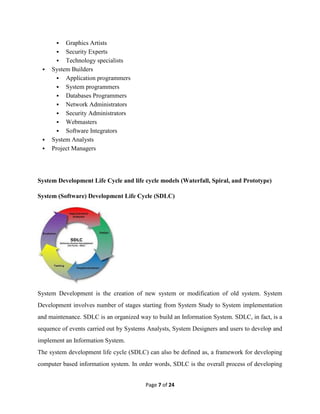
System (Software) Development Life Cycle (SDLC)
System Development is the creation of new system or modification of old system. System
Development involves number of stages starting from System Study to System implementation
and maintenance. SDLC is an organized way to build an Information System. SDLC, in fact, is a
sequence of events carried out by Systems Analysts, System Designers and users to develop and
implement an Information System.
The system development life cycle (SDLC) can also be defined as, a framework for developing
computer based information system. In order words, SDLC is the overall process of developing
Page 8 of 24
information system through a multi-step process from investigation of initial requirements
through analysis, design, implementation and maintenance. These activities are carried out in
different phases, which are mentioned below:
1. Problem Definition
2. System Analysis
3. System Design
4. System Development
5. System Testing
6. System Implementation
7. System Evaluation
8. System Support and Maintenance
All these phases, together, are called a life cycle because they cover the entire life of an
Information System:
Problem Definition:
System definition is the process of defining the current problem, determining why a new system
is needed and identifying the objectives of the proposed system. During Problem Definition
Project team (members responsible for System Study) focus on completing the task,
investigating the problem and deciding whether to proceed. In this phase the main aim is to
answer “Why do we need a new system?” and “What are the objectives of the new system?”
System Analysis:
During System Analysis Project team (members responsible for System Analysis) focus on
completing two tasks:
 Analyzing the current system and developing possible solution to the problem.
 Selecting the best solution and defining its functionality. This phase starts when the
current computerized system is to be modified or current manual system is to be
computerized. System Analysts then begin investigation, talking with the users. The first
challenge is to define the problem accurately. When the problem of the current system is
accurately defined, the users can decide whether to proceed or not.
Page 9 of 24
System Design:
System Design is the process of planning a new business system to replace the old. But before
this planning can be done, we must thoroughly understand the old system. Once the analysis is
complete, the System Analyst has a firm understanding of what is to be done. The next step is
how the problem can be solved. The major objectives of Systems Design are:
1. Identification of reports and outputs the new system should produce.
2. Sketch the input screen and layout of menus options.
3. Description of data to be inputted calculated and stored.
4. Individual data items, database and calculation procedures.
Major activities of System design are carried out by the System Designer. The Project team (
members responsible for System Design), at this phase, finds the answers of problem like- how
application accepts input data and store in database, how many input screens are required, how
the screen looks like? What kind of menus and options must there be? What kind of database
will the system use? Etc.
The Designers and programmers may use a top-down design or bottom-up design or the
combination of both. In top-down design, the team starts with the large picture and moves to the
detail. They look at major functions that the system must provide and break down these into
smaller activities. Each of these activities will then be programmed in the next phase of SDLC.
In bottom-up design, the team starts with the details (for example, the reports to be produced by
the system), then moves out to the big picture (major function or process). This approach is
particularly appropriate when users have very specific requirements for output- for example,
payroll checks, which must contain certain pieces of information.
Page 10 of 24
System Development:
During the development phase, Programming plays a key role. They create and customize the
software for all the parts of the system. The actual coding and writing of the program is done at
this stage.
The overall system is broken up into number of components. Then the programmers on the
project team are assigned to specific components. The programmers write the necessary code.
Technical writers work with the programmers to produce the technical documentation for the
system. The technical documentation includes information about software features and
programming, about the data flow and processing, about the design and layout of the necessary
hardware.
System Testing:
Testing is the process of executing a program with the intent of finding an error. Testing is an
integral part. The testing process moves from the individual component out to the system as a
whole. The project team tests each component separately (unit testing), and then tests the
components of the system with each other.
The major objectives of Systems testing are:
a. White Box Testing:
In this testing, a programmer can test cases that guarantee that every individual part in a program
has been exercised at least once, all logical decisions on their true and false sides are executed,
all loops are executed properly or not and internal data structures to ensure their validity are
exercised. In other words, white box testing is a method of testing software that is based on
knowledge of how the software is intended to function. White box testing is also called as
structural testing or glass-box testing.
b. Black Box Testing:
Black box testing focuses on how the software functions without references to how it is
designed. The primary concern is whether the program works or not, how it is constructed. Black
box testing is also known as functional testing. A programmer attempts to find errors in the
following categories:
Page 11 of 24
1. Incorrect or missing functions.
2. Interface errors.
3. Errors in data structures or external database access
4. Performance errors
5. Initialization and termination errors.
System Implementation:
In this phase, the project team (especially system analysts) installs the new software and
hardware, which has been tested. The users then start using the system to perform their jobs in
user environment. In this phase, the user moves from old system to new system. This is called
conversion.
System Conversion:
The process of moving from old system to new system is called conversion. Conversion, in an
organization, takes places in the Phase System implementation. If the system is replacing an
existing one, implementation becomes critical. In such case, there are four different types of
conversion strategies:
a. Direct Conversion:
All users stop using old system at the same time and then begin using the new. This option is
very fast, less costly but more risky.
b. Parallel Conversion:
Users continue to use old system while an increasing amount of data is processed through the
new system. Both the systems operate at the same time until the new system works smoothly.
This option is costly but safe approach.
c. Phased Conversion:
Users start using the new system component by component. This option works for only system
that can be compartmentalized. This option is safe and conservative approach.
Page 12 of 24
d. Pilot Conversion:
Personnel in a single pilot-site use the new system, and then the entire organization makes the
switch. Although this option may take more time, it is very useful in big organization where a
large number of people make the conversion.
System Evaluation:
The system evaluation is performed to identify its strengths and weakness. The actual evaluation
can occur along any of the following dimensions:
1. Operational Evaluation
2. Organization Impact Evaluation
3. User Manager Assessment Evaluation
4. Development Performance Evaluation
System Maintenance:
Once installed, the software is often used for many years. However, both the organization and
the users change. The environment may also change over a period of time. Therefore, software
has to be maintained time to time. That is, modifications and changes will be made to the
software files or procedures to meet user’s requirement. All these activities fall within system
maintenance.
Some errors in the system are also corrected during this phase. Changes, or upgrades, to the
systems are made regularly during the remaining life span of the system.
SDLC Waterfall Model
The classical waterfall model is intuitively the most obvious way to develop software. Though
the classical waterfall model is elegant and intuitively obvious, it is not a practical model in the
sense that it cannot be used in actual software development projects. Thus, this model can be
considered to be a theoretical way of developing software. But all other life cycle models are
essentially derived from the classical waterfall model. So, in order to be able to appreciate other
life cycle models it is necessary to learn the classical waterfall model.
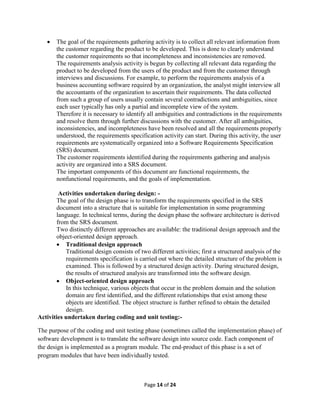
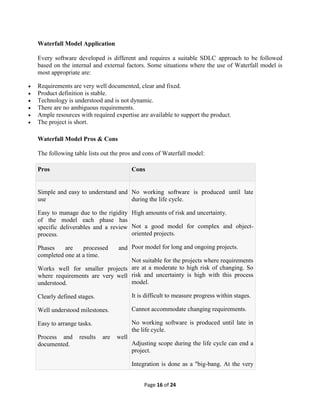
Classical waterfall model divides the life cycle into the following phases as shown in figures.
 Feasibility Study
 Requirements Analysis and Specification
 Design
Page 13 of 24
 Coding and Unit Testing
 Integration and System Testing
 Maintenance
Fig : Classical Waterfall Model
Activities in each phase of the life cycle
Activities undertaken during feasibility study: -
The main aim of feasibility study is to determine whether it would be financially and technically
feasible to develop the product.
 At first project managers or team leaders try to have a rough understanding of what is
required to be done by visiting the client side. They study different input data to the
system and output data to be produced by the system. They study what kind of processing
is needed to be done on these data and they look at the various constraints on the
behavior of the system.
 After they have an overall understanding of the problem they investigate the different
solutions that are possible. Then they examine each of the solutions in terms of what kind
of resources required, what would be the cost of development and what would be the
development time for each solution.
 Based on this analysis they pick the best solution and determine whether the solution is
feasible financially and technically. They check whether the customer budget would meet
the cost of the product and whether they have sufficient technical expertise in the area of
development.
Activities undertaken during requirements analysis and specification: -
 The aim of the requirements analysis and specification phase is to understand the exact
requirements of the customer and to document them properly. This phase consists of two
distinct activities, namely
o Requirements gathering and analysis, and
o Requirements specification
Feasibility
Study
Requirements
Analysis
& Specification
Design
Coding and
Unit Testing
Integration and
System Testing
Maintenance
Page 14 of 24
 The goal of the requirements gathering activity is to collect all relevant information from
the customer regarding the product to be developed. This is done to clearly understand
the customer requirements so that incompleteness and inconsistencies are removed.
The requirements analysis activity is begun by collecting all relevant data regarding the
product to be developed from the users of the product and from the customer through
interviews and discussions. For example, to perform the requirements analysis of a
business accounting software required by an organization, the analyst might interview all
the accountants of the organization to ascertain their requirements. The data collected
from such a group of users usually contain several contradictions and ambiguities, since
each user typically has only a partial and incomplete view of the system.
Therefore it is necessary to identify all ambiguities and contradictions in the requirements
and resolve them through further discussions with the customer. After all ambiguities,
inconsistencies, and incompleteness have been resolved and all the requirements properly
understood, the requirements specification activity can start. During this activity, the user
requirements are systematically organized into a Software Requirements Specification
(SRS) document.
The customer requirements identified during the requirements gathering and analysis
activity are organized into a SRS document.
The important components of this document are functional requirements, the
nonfunctional requirements, and the goals of implementation.
Activities undertaken during design: -
The goal of the design phase is to transform the requirements specified in the SRS
document into a structure that is suitable for implementation in some programming
language. In technical terms, during the design phase the software architecture is derived
from the SRS document.
Two distinctly different approaches are available: the traditional design approach and the
object-oriented design approach.
 Traditional design approach
Traditional design consists of two different activities; first a structured analysis of the
requirements specification is carried out where the detailed structure of the problem is
examined. This is followed by a structured design activity. During structured design,
the results of structured analysis are transformed into the software design.
 Object-oriented design approach
In this technique, various objects that occur in the problem domain and the solution
domain are first identified, and the different relationships that exist among these
objects are identified. The object structure is further refined to obtain the detailed
design.
Activities undertaken during coding and unit testing:-
The purpose of the coding and unit testing phase (sometimes called the implementation phase) of
software development is to translate the software design into source code. Each component of
the design is implemented as a program module. The end-product of this phase is a set of
program modules that have been individually tested.
Page 15 of 24
During this phase, each module is unit tested to determine the correct working of all the
individual modules. It involves testing each module in isolation as this is the most efficient way
to debug the errors identified at this stage.
Activities undertaken during integration and system testing: -
Integration of different modules is undertaken once they have been coded and unit tested. During
the integration and system testing phase, the modules are integrated in a planned manner. The
different modules making up a software product are almost never integrated in one shot.
Integration is normally carried out incrementally over a number of steps.
During each integration step, the partially integrated system is tested and a set of previously
planned modules are added to it. Finally, when all the modules have been successfully integrated
and tested, system testing is carried out. The goal of system testing is to ensure that the
developed system conforms to its requirements laid out in the SRS document.
System testing usually consists of three different kinds of testing activities:
o α – testing: It is the system testing performed by the development team.
o β – Testing: It is the system testing performed by a friendly set of customers.
o Acceptance testing: It is the system testing performed by the customer himself after the
product delivery to determine whether to accept or reject the delivered product.
System testing is normally carried out in a planned manner according to the system test plan
document. The system test plan identifies all testing related activities that must be performed,
specifies the schedule of testing, and allocates resources. It also lists all the test cases and the
expected outputs for each test case.
Activities undertaken during maintenance: -
Maintenance of a typical software product requires much more than the effort necessary to
develop the product itself. Many studies carried out in the past confirm this and indicate that the
relative effort of development of a typical software product to its maintenance effort is roughly
in the 40:60 ratios. Maintenance involves performing any one or more of the following three
kinds of activities:
o Correcting errors that were not discovered during the product development phase. This is
called corrective maintenance.
o Improving the implementation of the system, and enhancing the functionalities of the
system according to the customer’s requirements. This is called perfective maintenance.
o Porting the software to work in a new environment. For example, porting may be
required to get the software to work on a new computer platform or with a new operating
system. This is called adaptive maintenance.
Page 16 of 24
Waterfall Model Application
Every software developed is different and requires a suitable SDLC approach to be followed
based on the internal and external factors. Some situations where the use of Waterfall model is
most appropriate are:
 Requirements are very well documented, clear and fixed.
 Product definition is stable.
 Technology is understood and is not dynamic.
 There are no ambiguous requirements.
 Ample resources with required expertise are available to support the product.
 The project is short.
Waterfall Model Pros & Cons
The following table lists out the pros and cons of Waterfall model:
Pros Cons
 Simple and easy to understand and
use
 Easy to manage due to the rigidity
of the model each phase has
specific deliverables and a review
process.
 Phases are processed and
completed one at a time.
 Works well for smaller projects
where requirements are very well
understood.
 Clearly defined stages.
 Well understood milestones.
 Easy to arrange tasks.
 Process and results are well
documented.
 No working software is produced until late
during the life cycle.
 High amounts of risk and uncertainty.
 Not a good model for complex and object-
oriented projects.
 Poor model for long and ongoing projects.
 Not suitable for the projects where requirements
are at a moderate to high risk of changing. So
risk and uncertainty is high with this process
model.
 It is difficult to measure progress within stages.
 Cannot accommodate changing requirements.
 No working software is produced until late in
the life cycle.
 Adjusting scope during the life cycle can end a
project.
 Integration is done as a "big-bang. At the very
Page 17 of 24
end, which doesn't allow identifying any
technological or business bottleneck or
challenges early.
SDLC Spiral Model
The spiral model combines the idea of iterative development with the systematic, controlled
aspects of the waterfall model.
Spiral model is a combination of iterative development process model and sequential linear
development model i.e. waterfall model with very high emphasis on risk analysis.
Spiral Model design
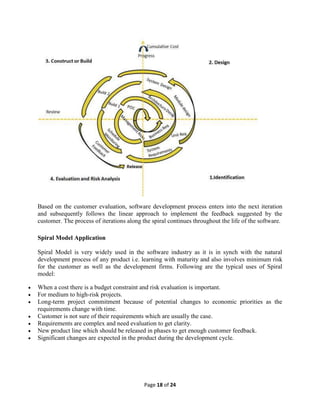
The spiral model has four phases. A software project repeatedly passes through these phases in
iterations called Spirals.
 Identification: This phase starts with gathering the business requirements in the baseline spiral.
In the subsequent spirals as the product matures, identification of system requirements,
subsystem requirements and unit requirements are all done in this phase.
This also includes understanding the system requirements by continuous communication
between the customer and the system analyst. At the end of the spiral the product is deployed in
the identified market.
 Design: Design phase starts with the conceptual design in the baseline spiral and involves
architectural design, logical design of modules, physical product design and final design in the
subsequent spirals.
 Construct or Build: Construct phase refers to production of the actual software product at every
spiral. In the baseline spiral when the product is just thought of and the design is being developed
a POC (Proof of Concept) is developed in this phase to get customer feedback.
Then in the subsequent spirals with higher clarity on requirements and design details a working
model of the software called build is produced with a version number. These builds are sent to
customer for feedback.
 Evaluation and Risk Analysis: Risk Analysis includes identifying, estimating, and monitoring
technical feasibility and management risks, such as schedule slippage and cost overrun. After
testing the build, at the end of first iteration, the customer evaluates the software and provides
feedback.
Following is a diagrammatic representation of spiral model listing the activities in each phase:
Page 18 of 24
Based on the customer evaluation, software development process enters into the next iteration
and subsequently follows the linear approach to implement the feedback suggested by the
customer. The process of iterations along the spiral continues throughout the life of the software.
Spiral Model Application
Spiral Model is very widely used in the software industry as it is in synch with the natural
development process of any product i.e. learning with maturity and also involves minimum risk
for the customer as well as the development firms. Following are the typical uses of Spiral
model:
 When a cost there is a budget constraint and risk evaluation is important.
 For medium to high-risk projects.
 Long-term project commitment because of potential changes to economic priorities as the
requirements change with time.
 Customer is not sure of their requirements which are usually the case.
 Requirements are complex and need evaluation to get clarity.
 New product line which should be released in phases to get enough customer feedback.
 Significant changes are expected in the product during the development cycle.
Page 19 of 24
Spiral Model Pros and Cons
The advantage of spiral lifecycle model is that it allows for elements of the product to be added
in when they become available or known. This assures that there is no conflict with previous
requirements and design.
This method is consistent with approaches that have multiple software builds and releases and
allows for making an orderly transition to a maintenance activity. Another positive aspect is that
the spiral model forces early user involvement in the system development effort.
On the other side, it takes very strict management to complete such products and there is a risk of
running the spiral in indefinite loop. So the discipline of change and the extent of taking change
requests is very important to develop and deploy the product successfully.
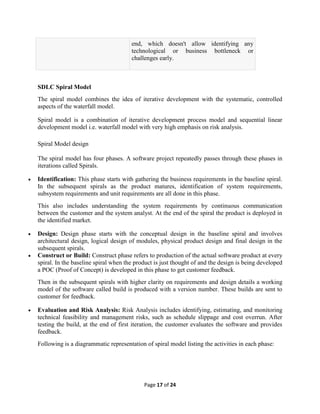
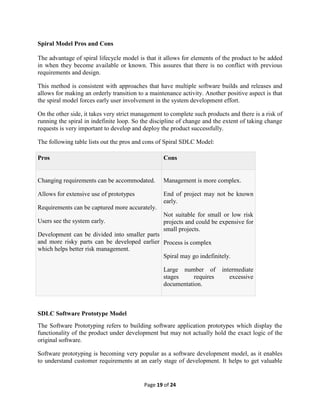
The following table lists out the pros and cons of Spiral SDLC Model:
Pros Cons
 Changing requirements can be accommodated.
 Allows for extensive use of prototypes
 Requirements can be captured more accurately.
 Users see the system early.
 Development can be divided into smaller parts
and more risky parts can be developed earlier
which helps better risk management.
 Management is more complex.
 End of project may not be known
early.
 Not suitable for small or low risk
projects and could be expensive for
small projects.
 Process is complex
 Spiral may go indefinitely.
 Large number of intermediate
stages requires excessive
documentation.
SDLC Software Prototype Model
The Software Prototyping refers to building software application prototypes which display the
functionality of the product under development but may not actually hold the exact logic of the
original software.
Software prototyping is becoming very popular as a software development model, as it enables
to understand customer requirements at an early stage of development. It helps to get valuable
Page 20 of 24
feedback from the customer and helps software designers and developers understand about what
exactly is expected from the product under development.
What is Software Prototyping?
 Prototype is a working model of software with some limited functionality.
 The prototype does not always hold the exact logic used in the actual software application and is
an extra effort to be considered under effort estimation.
 Prototyping is used to allow the users evaluate developer proposals and try them out before
implementation.
 It also helps understand the requirements which are user specific and may not have been
considered by the developer during product design.
Following is the stepwise approach to design a software prototype:
 Basic Requirement Identification: This step involves understanding the very basics product
requirements especially in terms of user interface. The more intricate details of the internal
design and external aspects like performance and security can be ignored at this stage.
 Developing the initial Prototype: The initial Prototype is developed in this stage, where the
very basic requirements are showcased and user interfaces are provided. These features may not
exactly work in the same manner internally in the actual software developed and the
workarounds are used to give the same look and feel to the customer in the prototype developed.
 Review of the Prototype: The prototype developed is then presented to the customer and the
other important stakeholders in the project. The feedback is collected in an organized manner
and used for further enhancements in the product under development.
 Revise and enhance the Prototype: The feedback and the review comments are discussed
during this stage and some negotiations happen with the customer based on factors like , time
and budget constraints and technical feasibility of actual implementation. The changes accepted
are again incorporated in the new Prototype developed and the cycle repeats until customer
expectations are met.
Prototypes can have horizontal or vertical dimensions. Horizontal prototype displays the user
interface for the product and gives a broader view of the entire system, without concentrating on
internal functions. A vertical prototype on the other side is a detailed elaboration of a specific
function or a sub system in the product.
The purpose of both horizontal and vertical prototype is different. Horizontal prototypes are used
to get more information on the user interface level and the business requirements. It can even be
presented in the sales demos to get business in the market. Vertical prototypes are technical in
nature and are used to get details of the exact functioning of the sub systems. For example,
database requirements, interaction and data processing loads in a given sub system.
Software Prototyping Types
There are different types of software prototypes used in the industry. Following are the major
software prototyping types used widely:
Page 21 of 24
 Throwaway/Rapid Prototyping: Throwaway prototyping is also called as rapid or close ended
prototyping. This type of prototyping uses very little efforts with minimum requirement analysis
to build a prototype. Once the actual requirements are understood, the prototype is discarded and
the actual system is developed with a much clear understanding of user requirements.
 Evolutionary Prototyping: Evolutionary prototyping also called as breadboard prototyping is
based on building actual functional prototypes with minimal functionality in the beginning. The
prototype developed forms the heart of the future prototypes on top of which the entire system is
built. Using evolutionary prototyping only well understood requirements are included in the
prototype and the requirements are added as and when they are understood.
 Incremental Prototyping: Incremental prototyping refers to building multiple functional
prototypes of the various sub systems and then integrating all the available prototypes to form a
complete system.
 Extreme Prototyping: Extreme prototyping is used in the web development domain. It consists
of three sequential phases. First, a basic prototype with all the existing pages is presented in the
html format. Then the data processing is simulated using a prototype services layer. Finally the
services are implemented and integrated to the final prototype. This process is called Extreme
Prototyping used to draw attention to the second phase of the process, where a fully functional
UI is developed with very little regard to the actual services.
Software Prototyping Application
Software Prototyping is most useful in development of systems having high level of user
interactions such as online systems. Systems which need users to fill out forms or go through
various screens before data is processed can use prototyping very effectively to give the exact
look and feel even before the actual software is developed.
Software that involves too much of data processing and most of the functionality is internal with
very little user interface does not usually benefit from prototyping. Prototype development could
be an extra overhead in such projects and may need lot of extra efforts.
Software Prototyping Pros and Cons
Software prototyping is used in typical cases and the decision should be taken very carefully so
that the efforts spent in building the prototype add considerable value to the final software
developed. The model has its own pros and cons discussed as below.
Following table lists out the pros and cons of Big Bang Model:
Pros Cons
 Increased user involvement in the
product even before implementation
 Since a working model of the system is
 Risk of insufficient requirement analysis
owing to too much dependency on
prototype
Page 22 of 24
displayed, the users get a better
understanding of the system being
developed.
 Reduces time and cost as the defects
can be detected much earlier.
 Quicker user feedback is available
leading to better solutions.
 Missing functionality can be identified
easily
 Confusing or difficult functions can be
identified
 Users may get confused in the prototypes
and actual systems.
 Practically, this methodology may increase
the complexity of the system as scope of
the system may expand beyond original
plans.
 Developers may try to reuse the existing
prototypes to build the actual system, even
when its not technically feasible
 The effort invested in building prototypes
may be too much if not monitored properly
SystemAnalysisandDesignTools
Feasibility Studies
A feasibility study is a document that describes features and benefits of the product, itemizes
costs, resources and staffing then describes the projects potential profits or value to the
organization. A feasibility study forces the analysis team to turn a nebulous idea into a practical,
useful project with a firm definition and a list of tangible benefits.
Interviews
The details necessary to understand processes or product needs are usually in the heads of
employees and customers. The only way to mine this information is to talk with them. Interviews
should be focused, with a prepared list of questions or concepts to be discussed. Document each
interview by recording it using a small digital recorder or summarize the conversation
immediately after it is completed.
Use Cases
Short narratives describing how a product will be used, limited to a few paragraphs, often helps
analysts and customers refine product features. Refine these narratives throughout the analysis
phase. These use cases can be used throughout the project life cycle, especially during testing.
Requirements Lists
When designing a product, it is helpful to keep a running list of requirements. These should be
presented as a list or in outline form, organized by categories. As the list grows, this list helps the
analyst understand the customer's needs and helps limit what features are necessary and which
are not.
Flowcharts
Flowcharts come in many varieties and under many names, but the basic concept is to take a
process and describe it as a diagram. Whether presented as a process flow chart or an
Entity/Relation diagram, the drawing helps the analyst describe a series of steps or decisions in
visual form in a manner that facilitates communication.
Page 23 of 24
Prototypes
A model or prototype can turn a group of ideas into solid form. Software engineers often hear the
statement "I'll know what I want when I see it" and a model or prototype can facilitate these
issues. By presenting a prototype, the analysts gather features that work and open discussion on
other features and improvements.
Planning
Once the system analysts gather all the data they require, they need to organize it to be able to set
up a product scheme. System analysts can either draw diagrams of the project on paper, or they
can use computer software to plan their project. The most common software used for this step is
the Microsoft Office Suite. Microsoft Word or Microsoft Power Point can be used to set up the
diagrams and sketches that need to be followed to complete the project. Also, presentations using
Flash are also highly used, along with Adobe Photoshop.
Observation
Observation allows analysts to gain information they cannot obtain by any other fact – finding
method. Through observation, analysts can obtain firsthand information about how activities are
carried out. This method is most useful when analysts need to actually observe how documents
are handled, how processes are carried out, observers know what to look for and how to assess
the significance of what they observe.
Software Coding
Even though the coding is done by programmers and coders, the entire process is carefully
supervised by system analysts who make sure every feature is implemented correctly. Different
coding tools and environments might be required, depending on the programming language
chosen for the software. These tools may also be used for testing the program while it's under
development. Examples of coding environments and languages used are Microsoft Visual Basic,
Java or PHP.
Project Tracking
Project tracking can either make use of the same tools used for planning, or can use specialized
tools that keep track of the evolution, costs, and several other aspects. Fanurio is an example of
project tracking software that might be used by a system analyst to supervise the whole project.
Microsoft Excel can also be used for project tracking while Microsoft Power Point can be used to
create a presentation of the finished software or system, highlighting its features.
The Data Flow Diagram (DFD)
A DFD is known as a “bubble chart,” has the purpose of clarifying system requirements and
identifying major transformations that will become programs in system design. So it is the
starting point of the design phase that functionally decomposes the requirements specifications
down to the lowest level of detail.
A DFD consists of a series of bubbles joined by lines. The bubbles represent data
transformations and the lines to represent data flows in the system. The system takes orders from
the customer (bookstore, library, etc.), checks them against an index (file) listing the books
available, verifies customer credit through a credit information file, and authorizes shipment with
an invoice.
Decision Tree
A decision tree is a diagram that presents conditions and actions sequentially and thus shows
which conditions to consider first, which second, and so on. It is also a method of showing the
relationship of each condition and its permissible actions.
Page 24 of 24
DECISION TABLES
A decision table is a table of contingencies for defining a problem and the actions to be taken. It
is single representation of the relationships between conditions and actions.
Normalization
Data structuring is refined through a process called normalization. Data are grouped in the
simplest way possible so that later changes can be made with a minimum of impact on the data
structure. When too many attributes are grouped together to form entities, some attributes are
found to be entities themselves. Further normalization of these entities into attributes linked by
common data elements to form relationships improves the effectiveness of the DBMS.
Data Dictionary
A data dictionary is a structured repository of data. It is a set of rigorous definitions of all DFD
data elements and data structure.
A data dictionary has many advantages. The most obvious is documentation: it is a valuable
reference in any organization. Another advantage is improving analyst/ user communication by
establishing consistent definitions of various elements, terms and procedures.

Unit i

  • 1.
    Page 1 of24 System Analysis and Design Overview of Systems Analysis and Design Introduction to system analysis and design Systems development generally has two major components: Systems analysis & Systems design System design is the process of planning a new business system or to replace or complement an existing system. But before this planning can be done, we must thoroughly understand the old system and determine how computers can best be used to make its operation more effective. System analysis is the process of gathering and interpreting facts, diagnosing, problems and using the information to recommend improvements to the system. This is the job of the system analyst. For example, the store room operation of an organization. To better control its inventory and gain access to up-to-date information about stock levels and reordering, the store asks a system analyst, to “computerize” its store room operation. Before one can design a system to capture data, update files, and produce reports, one need to know more about the store operations: what forms are being used to store information manually, such as requisitions, purchase orders, and invoices and what reports are being produced and how they are being used. To proceed, you then seek out information about lists of reorder notices, outstanding purchase orders, records of stock on hand, and other reports. You also need to find out where this information originates, whether in the purchasing department, stockroom, or accounting department. In other words, you must understand how the existing system works and, more specifically, what the flow of information through the system looks like. Only after you have collected these facts, can you being to determine how and where a computer information system can benefit all the users of the system. This accumulation of information, called a systems study, must precede all other analysis activities. Working with managers and employees in the organization, systems analysts recommend which alternative to adopt. Sometimes the time required to develop one alternative compared with others, is the most critical issue. Costs and benefits are also important determinants. Once this decision is made, a plan is developed to implement the recommendation. The plan includes all systems design features, such as new data capture needs, file specifications, operating procedures, equipment and personnel needs. The system design is like the blueprint for a building: it specifies all the features that are to be in the finished product. Analysis specifies what the system should do. Design states how to accomplish the objective. Notice that each of the processes mentioned involves people. Managers and employees have good ideas about what works and what does not, about what flows smoothly and what causes problems, about where change is needed and where it is not, and especially about where change will be accepted and where it will not. Despite technology, people are still the keys that make the
  • 2.
    Page 2 of24 organizations work. Thus, communicating and dealing with people are very important parts of the systems analyst’s job. System Analysis and Design refers to the process of examining a business situation with the intent of improving it through better procedures and methods. System analysis and design relates to shaping organizations, improving performance and achieving objectives for profitability and growth. The emphasis is on systems in action, the relationships among subsystems and their contribution to meeting a common goal. System analysis and design focus on systems, processes and technology. System Concepts The word system is widely used. It has become fashionable to attach the word system to add a contemporary flair when referring to things or processes. People speak of communication system, exercise system, investment system, delivery system, information system, education system, transportation system, computer system etc. System may be referred to any set of components, which function in interrelated manner for a common cause or objective. The term system is derived from the Greek word systema, which means an organized relationship among functioning units or components. A system exists because it is designed to achieve one or more objectives. Business system of an organization is a system consisting of interrelated departments (subsystems) such as production, sales, personnel, information system etc. None of these subsystems is of much use as a single, independent unit. When they are properly coordinated, then only the firm can function effectively and profitably. A system is a group of interdependent components linked together according to a plan to achieve a specific objective. The word component may refer to physical parts (engines, wings of aircraft, car), managerial steps (planning, organizing and controlling), or a system in a multi level structure. The component may be simple or complex, basic or advanced. They may be single computer with a keyboard, memory, and printer or a series of intelligent terminals linked to a mainframe. The system has three basic implications: 1. A system must be designed to achieve a predetermined objective. 2. Interrelationships and interdependence must exist among the components. 3. The objectives of the organization as a whole have a higher priority than the objectives of its subsystems. Characteristics of a System Our definition of a system suggests some characteristics that are present in all systems: organization (order), interaction, interdependence, integration and a central objective. Organization Organization implies structure and order. It is the arrangement of components that helps to achieve objectives. In the design of a business system, the hierarchical relationships starting with the president on top and leading downward to the blue – collar workers represents the organization structure. Such an arrangement portrays a system – subsystem relationship, defines the authority structure, specifies the formal flow of communication and formalizes the chain of command.
  • 3.
    Page 3 of24 Similarly a computer system is designed with an input device, a central processing unit, an output device and storage units. When linked together they work as a whole system for producing information. Interaction Interaction refers to the manner in which each component functions with other components of the system. In an organization, purchasing must interact with production, advertising with sales and payroll with personnel. In a computer system, the central processing unit must interact with the input device to solve a problem. In turn, the main memory holds programs and data that the arithmetic unit uses for computation. The interrelationship between these components enables the computer to perform. Interdependence Interdependence means that parts of the organization or computer system depend on one another. They are coordinated and linked together according to a plan. One subsystem depends on the input of another subsystem for proper functioning: that is, the output of one subsystem is the required input for another subsystem. This interdependence is crucial in systems work. Integration Integration refers to the holism of systems. Integration is concerned with how a system is tied together. The parts of the system work together within the system even though each part performs a unique function. Successful integration will typically produce a synergistic effect and greater total impact than if each component works separately. Central objective The last characteristic of a system is its central objective. Objectives may be real or stated. Information System Definitions: 1. An information system is a collection of hardware, software, data, people and procedures that are designed to generate information that supports the day-to-day, short- range, and long-range activities of users in an organization. 2. A combination of hardware, software, infrastructure and trained personnel organized to facilitate planning, control, coordination, and decision making in an organization. Types of Information System Information systems generally are classified into five categories: office information systems, transaction processing systems, management information systems, decision support systems, and expert systems. 1. Office Information Systems (OIS) An office information system is an information system that uses hardware, software and networks to enhance work flow and facilitate communications among employees. An office information system is also called as office automation system. In Office Information System, employees perform tasks electronically using computers and other electronic devices, instead of manually. With an office information system, a registration department might post the class schedule on the Internet and e-mail students when the schedule is updated. In a manual system, the registration department would photocopy the schedule and mail it to each student’s house. An office information system supports a range of business office activities such as creating and distributing graphics and/or documents, sending messages, scheduling, and accounting. All
  • 4.
    Page 4 of24 levels of users from executive management to non management employees utilize and benefit from the features of an Office Information System. The software an office information system uses to support these activities include word processing, spreadsheets, databases, presentation graphics, e-mail, Web browsers, Web page authoring, personal information management, and groupware. Office information systems use communications technology such as voice mail, facsimile (fax), videoconferencing, and electronic data interchange (EDI) for the electronic exchange of text, graphics, audio, and video. An office information system also uses a variety of hardware, including computers equipped with modems, video cameras, speakers, and microphones; scanners; and fax machines. 2. Transaction Processing Systems A transaction processing system (TPS) is an information system that captures and processes data generated during day-to-day transactions of an organization. A transaction is a business activity such as a deposit, payment, order or reservation. Clerical staffs typically perform the activities associated with transaction processing, which include the following: a. Recording a business activity such as a student’s registration, a customer’s order, an employee’s timecard or a client’s payment. b. Confirming an action or triggering a response, such as printing a student’s schedule, sending a thank-you note to a customer, generating an employee’s paycheck or issuing a receipt to a client. c. Maintaining data, which involves adding new data, changing existing data, or removing unwanted data. Transaction processing systems were among the first computerized systems developed to process business data – a function originally called data processing. Usually, the TPS computerized an existing manual system to allow for faster processing, reduced clerical costs and improved customer service. The first transaction processing systems usually used batch processing. With batch processing, transaction data is collected over a period of time and all transactions are processed later, as a group. As computers became more powerful, system developers built online transaction processing systems. With online transaction processing (OLTP) the computer processes transactions as they are entered. When you register for classes, your school probably uses OLTP. The registration administrative assistant enters your desired schedule and the computer immediately prints your statement of classes. The invoices, however, often are printed using batch processing, meaning all student invoices are printed and mailed at a later date. Today, most transaction processing systems use online transaction processing.
  • 5.
    Page 5 of24 3. Management Information Systems A management information system (MIS) is an information system that generates accurate, timely and organized information so that managers and other users can make decisions, solve problems, supervise activities, and track progress. It is also called a management reporting system (MRS) because it generates reports on a regular basis. Management information systems often are integrated with transaction processing systems. To process a sales order, for example, the transaction processing system records the sale, updates the customer’s account balance, and makes a deduction from inventory. Using this information, the related management information system can produce reports that recap daily sales activities; list customers with past due account balances; graph slow or fast selling products; and highlight inventory items that need reordering. A management information system focuses on generating information that management and other users need to perform their jobs. 4. Decision Support Systems A decision support system (DSS) is an information system designed to help users reach a decision when a decision-making situation arises. A variety of DSSs exist to help with a range of decisions. A decision support system uses data from internal and/or external sources. Internal sources of data might include sales, manufacturing, inventory, or financial data from an organization’s database. Data from external sources could include interest rates, population trends, and costs of new housing construction or raw material pricing, government policy etc. Some decision support systems include query language, statistical analysis capabilities, spreadsheets, and graphics that help you extract data and evaluate the results. Some decision support systems also include capabilities that allow you to create a model of the factors affecting a decision. A simple model for determining the best product price, for example, would include factors for the expected sales volume at each price level. With the model, you can ask what-if questions by changing one or more of the factors and viewing the projected results. Many people use application software packages to perform DSS functions. Using spreadsheet software, for example, you can complete simple modeling tasks or what-if scenarios. A special type of DSS, called an executive information system (EIS), is designed to support the information needs of executive management. Information in an EIS is presented in charts and tables that show trends, ratios, and other managerial statistics. To store all the necessary decision-making data, DSSs or EISs often use extremely large databases, called data warehouses. A data warehouse stores and manages the data required to analyze historical and current business circumstances. 5. Expert Systems
  • 6.
    Page 6 of24 An expert system is an information system that captures and stores the knowledge of human experts and then imitates human reasoning and decision-making processes for those who have less expertise. Expert systems are composed of two main components: a knowledge base and inference rules. A knowledge base is the combined subject knowledge and experiences of the human experts. The inference rules are a set of logical judgments applied to the knowledge base each time a user describes a situation to the expert system. Although expert systems can help decision-making at any level in an organization, non- management employees are the primary users who utilize them to help with job-related decisions. Expert systems also successfully have resolved such diverse problems as diagnosing illnesses, searching for oil and making soup. Expert systems are one part of an exciting branch of computer science called artificial intelligence. Artificial intelligence (AI) is the application of human intelligence to computers. AI technology can sense your actions and, based on logical assumptions and prior experience, will take the appropriate action to complete the task. AI has a variety of capabilities, including speech recognition, logical reasoning, and creative responses. Stakeholders of Information Systems Any person who has interests in an existing or proposed information system is called stakeholder. Stakeholders may include both technical and non-technical workers. They also may be the internal ones or may be the external one. Whatever their roles in an organization are it doesn’t matter, all the things common in them are that, they are information workers. Some stakeholders of IS:  System Owners  System Users  Internal System Users  Clerical and Service workers  Technical and professional staffs  Supervisors, Middle managers and executive managers  External System User  Customers  Suppliers  Partners  Employees  System Designers  Database Administrators  Network Architects  Web Architects
  • 7.
    Page 7 of24  Graphics Artists  Security Experts  Technology specialists  System Builders  Application programmers  System programmers  Databases Programmers  Network Administrators  Security Administrators  Webmasters  Software Integrators  System Analysts  Project Managers System Development Life Cycle and life cycle models (Waterfall, Spiral, and Prototype) System (Software) Development Life Cycle (SDLC) System Development is the creation of new system or modification of old system. System Development involves number of stages starting from System Study to System implementation and maintenance. SDLC is an organized way to build an Information System. SDLC, in fact, is a sequence of events carried out by Systems Analysts, System Designers and users to develop and implement an Information System. The system development life cycle (SDLC) can also be defined as, a framework for developing computer based information system. In order words, SDLC is the overall process of developing
  • 8.
    Page 8 of24 information system through a multi-step process from investigation of initial requirements through analysis, design, implementation and maintenance. These activities are carried out in different phases, which are mentioned below: 1. Problem Definition 2. System Analysis 3. System Design 4. System Development 5. System Testing 6. System Implementation 7. System Evaluation 8. System Support and Maintenance All these phases, together, are called a life cycle because they cover the entire life of an Information System: Problem Definition: System definition is the process of defining the current problem, determining why a new system is needed and identifying the objectives of the proposed system. During Problem Definition Project team (members responsible for System Study) focus on completing the task, investigating the problem and deciding whether to proceed. In this phase the main aim is to answer “Why do we need a new system?” and “What are the objectives of the new system?” System Analysis: During System Analysis Project team (members responsible for System Analysis) focus on completing two tasks:  Analyzing the current system and developing possible solution to the problem.  Selecting the best solution and defining its functionality. This phase starts when the current computerized system is to be modified or current manual system is to be computerized. System Analysts then begin investigation, talking with the users. The first challenge is to define the problem accurately. When the problem of the current system is accurately defined, the users can decide whether to proceed or not.
  • 9.
    Page 9 of24 System Design: System Design is the process of planning a new business system to replace the old. But before this planning can be done, we must thoroughly understand the old system. Once the analysis is complete, the System Analyst has a firm understanding of what is to be done. The next step is how the problem can be solved. The major objectives of Systems Design are: 1. Identification of reports and outputs the new system should produce. 2. Sketch the input screen and layout of menus options. 3. Description of data to be inputted calculated and stored. 4. Individual data items, database and calculation procedures. Major activities of System design are carried out by the System Designer. The Project team ( members responsible for System Design), at this phase, finds the answers of problem like- how application accepts input data and store in database, how many input screens are required, how the screen looks like? What kind of menus and options must there be? What kind of database will the system use? Etc. The Designers and programmers may use a top-down design or bottom-up design or the combination of both. In top-down design, the team starts with the large picture and moves to the detail. They look at major functions that the system must provide and break down these into smaller activities. Each of these activities will then be programmed in the next phase of SDLC. In bottom-up design, the team starts with the details (for example, the reports to be produced by the system), then moves out to the big picture (major function or process). This approach is particularly appropriate when users have very specific requirements for output- for example, payroll checks, which must contain certain pieces of information.
  • 10.
    Page 10 of24 System Development: During the development phase, Programming plays a key role. They create and customize the software for all the parts of the system. The actual coding and writing of the program is done at this stage. The overall system is broken up into number of components. Then the programmers on the project team are assigned to specific components. The programmers write the necessary code. Technical writers work with the programmers to produce the technical documentation for the system. The technical documentation includes information about software features and programming, about the data flow and processing, about the design and layout of the necessary hardware. System Testing: Testing is the process of executing a program with the intent of finding an error. Testing is an integral part. The testing process moves from the individual component out to the system as a whole. The project team tests each component separately (unit testing), and then tests the components of the system with each other. The major objectives of Systems testing are: a. White Box Testing: In this testing, a programmer can test cases that guarantee that every individual part in a program has been exercised at least once, all logical decisions on their true and false sides are executed, all loops are executed properly or not and internal data structures to ensure their validity are exercised. In other words, white box testing is a method of testing software that is based on knowledge of how the software is intended to function. White box testing is also called as structural testing or glass-box testing. b. Black Box Testing: Black box testing focuses on how the software functions without references to how it is designed. The primary concern is whether the program works or not, how it is constructed. Black box testing is also known as functional testing. A programmer attempts to find errors in the following categories:
  • 11.
    Page 11 of24 1. Incorrect or missing functions. 2. Interface errors. 3. Errors in data structures or external database access 4. Performance errors 5. Initialization and termination errors. System Implementation: In this phase, the project team (especially system analysts) installs the new software and hardware, which has been tested. The users then start using the system to perform their jobs in user environment. In this phase, the user moves from old system to new system. This is called conversion. System Conversion: The process of moving from old system to new system is called conversion. Conversion, in an organization, takes places in the Phase System implementation. If the system is replacing an existing one, implementation becomes critical. In such case, there are four different types of conversion strategies: a. Direct Conversion: All users stop using old system at the same time and then begin using the new. This option is very fast, less costly but more risky. b. Parallel Conversion: Users continue to use old system while an increasing amount of data is processed through the new system. Both the systems operate at the same time until the new system works smoothly. This option is costly but safe approach. c. Phased Conversion: Users start using the new system component by component. This option works for only system that can be compartmentalized. This option is safe and conservative approach.
  • 12.
    Page 12 of24 d. Pilot Conversion: Personnel in a single pilot-site use the new system, and then the entire organization makes the switch. Although this option may take more time, it is very useful in big organization where a large number of people make the conversion. System Evaluation: The system evaluation is performed to identify its strengths and weakness. The actual evaluation can occur along any of the following dimensions: 1. Operational Evaluation 2. Organization Impact Evaluation 3. User Manager Assessment Evaluation 4. Development Performance Evaluation System Maintenance: Once installed, the software is often used for many years. However, both the organization and the users change. The environment may also change over a period of time. Therefore, software has to be maintained time to time. That is, modifications and changes will be made to the software files or procedures to meet user’s requirement. All these activities fall within system maintenance. Some errors in the system are also corrected during this phase. Changes, or upgrades, to the systems are made regularly during the remaining life span of the system. SDLC Waterfall Model The classical waterfall model is intuitively the most obvious way to develop software. Though the classical waterfall model is elegant and intuitively obvious, it is not a practical model in the sense that it cannot be used in actual software development projects. Thus, this model can be considered to be a theoretical way of developing software. But all other life cycle models are essentially derived from the classical waterfall model. So, in order to be able to appreciate other life cycle models it is necessary to learn the classical waterfall model. Classical waterfall model divides the life cycle into the following phases as shown in figures.  Feasibility Study  Requirements Analysis and Specification  Design
  • 13.
    Page 13 of24  Coding and Unit Testing  Integration and System Testing  Maintenance Fig : Classical Waterfall Model Activities in each phase of the life cycle Activities undertaken during feasibility study: - The main aim of feasibility study is to determine whether it would be financially and technically feasible to develop the product.  At first project managers or team leaders try to have a rough understanding of what is required to be done by visiting the client side. They study different input data to the system and output data to be produced by the system. They study what kind of processing is needed to be done on these data and they look at the various constraints on the behavior of the system.  After they have an overall understanding of the problem they investigate the different solutions that are possible. Then they examine each of the solutions in terms of what kind of resources required, what would be the cost of development and what would be the development time for each solution.  Based on this analysis they pick the best solution and determine whether the solution is feasible financially and technically. They check whether the customer budget would meet the cost of the product and whether they have sufficient technical expertise in the area of development. Activities undertaken during requirements analysis and specification: -  The aim of the requirements analysis and specification phase is to understand the exact requirements of the customer and to document them properly. This phase consists of two distinct activities, namely o Requirements gathering and analysis, and o Requirements specification Feasibility Study Requirements Analysis & Specification Design Coding and Unit Testing Integration and System Testing Maintenance
  • 14.
    Page 14 of24  The goal of the requirements gathering activity is to collect all relevant information from the customer regarding the product to be developed. This is done to clearly understand the customer requirements so that incompleteness and inconsistencies are removed. The requirements analysis activity is begun by collecting all relevant data regarding the product to be developed from the users of the product and from the customer through interviews and discussions. For example, to perform the requirements analysis of a business accounting software required by an organization, the analyst might interview all the accountants of the organization to ascertain their requirements. The data collected from such a group of users usually contain several contradictions and ambiguities, since each user typically has only a partial and incomplete view of the system. Therefore it is necessary to identify all ambiguities and contradictions in the requirements and resolve them through further discussions with the customer. After all ambiguities, inconsistencies, and incompleteness have been resolved and all the requirements properly understood, the requirements specification activity can start. During this activity, the user requirements are systematically organized into a Software Requirements Specification (SRS) document. The customer requirements identified during the requirements gathering and analysis activity are organized into a SRS document. The important components of this document are functional requirements, the nonfunctional requirements, and the goals of implementation. Activities undertaken during design: - The goal of the design phase is to transform the requirements specified in the SRS document into a structure that is suitable for implementation in some programming language. In technical terms, during the design phase the software architecture is derived from the SRS document. Two distinctly different approaches are available: the traditional design approach and the object-oriented design approach.  Traditional design approach Traditional design consists of two different activities; first a structured analysis of the requirements specification is carried out where the detailed structure of the problem is examined. This is followed by a structured design activity. During structured design, the results of structured analysis are transformed into the software design.  Object-oriented design approach In this technique, various objects that occur in the problem domain and the solution domain are first identified, and the different relationships that exist among these objects are identified. The object structure is further refined to obtain the detailed design. Activities undertaken during coding and unit testing:- The purpose of the coding and unit testing phase (sometimes called the implementation phase) of software development is to translate the software design into source code. Each component of the design is implemented as a program module. The end-product of this phase is a set of program modules that have been individually tested.
  • 15.
    Page 15 of24 During this phase, each module is unit tested to determine the correct working of all the individual modules. It involves testing each module in isolation as this is the most efficient way to debug the errors identified at this stage. Activities undertaken during integration and system testing: - Integration of different modules is undertaken once they have been coded and unit tested. During the integration and system testing phase, the modules are integrated in a planned manner. The different modules making up a software product are almost never integrated in one shot. Integration is normally carried out incrementally over a number of steps. During each integration step, the partially integrated system is tested and a set of previously planned modules are added to it. Finally, when all the modules have been successfully integrated and tested, system testing is carried out. The goal of system testing is to ensure that the developed system conforms to its requirements laid out in the SRS document. System testing usually consists of three different kinds of testing activities: o α – testing: It is the system testing performed by the development team. o β – Testing: It is the system testing performed by a friendly set of customers. o Acceptance testing: It is the system testing performed by the customer himself after the product delivery to determine whether to accept or reject the delivered product. System testing is normally carried out in a planned manner according to the system test plan document. The system test plan identifies all testing related activities that must be performed, specifies the schedule of testing, and allocates resources. It also lists all the test cases and the expected outputs for each test case. Activities undertaken during maintenance: - Maintenance of a typical software product requires much more than the effort necessary to develop the product itself. Many studies carried out in the past confirm this and indicate that the relative effort of development of a typical software product to its maintenance effort is roughly in the 40:60 ratios. Maintenance involves performing any one or more of the following three kinds of activities: o Correcting errors that were not discovered during the product development phase. This is called corrective maintenance. o Improving the implementation of the system, and enhancing the functionalities of the system according to the customer’s requirements. This is called perfective maintenance. o Porting the software to work in a new environment. For example, porting may be required to get the software to work on a new computer platform or with a new operating system. This is called adaptive maintenance.
  • 16.
    Page 16 of24 Waterfall Model Application Every software developed is different and requires a suitable SDLC approach to be followed based on the internal and external factors. Some situations where the use of Waterfall model is most appropriate are:  Requirements are very well documented, clear and fixed.  Product definition is stable.  Technology is understood and is not dynamic.  There are no ambiguous requirements.  Ample resources with required expertise are available to support the product.  The project is short. Waterfall Model Pros & Cons The following table lists out the pros and cons of Waterfall model: Pros Cons  Simple and easy to understand and use  Easy to manage due to the rigidity of the model each phase has specific deliverables and a review process.  Phases are processed and completed one at a time.  Works well for smaller projects where requirements are very well understood.  Clearly defined stages.  Well understood milestones.  Easy to arrange tasks.  Process and results are well documented.  No working software is produced until late during the life cycle.  High amounts of risk and uncertainty.  Not a good model for complex and object- oriented projects.  Poor model for long and ongoing projects.  Not suitable for the projects where requirements are at a moderate to high risk of changing. So risk and uncertainty is high with this process model.  It is difficult to measure progress within stages.  Cannot accommodate changing requirements.  No working software is produced until late in the life cycle.  Adjusting scope during the life cycle can end a project.  Integration is done as a "big-bang. At the very
  • 17.
    Page 17 of24 end, which doesn't allow identifying any technological or business bottleneck or challenges early. SDLC Spiral Model The spiral model combines the idea of iterative development with the systematic, controlled aspects of the waterfall model. Spiral model is a combination of iterative development process model and sequential linear development model i.e. waterfall model with very high emphasis on risk analysis. Spiral Model design The spiral model has four phases. A software project repeatedly passes through these phases in iterations called Spirals.  Identification: This phase starts with gathering the business requirements in the baseline spiral. In the subsequent spirals as the product matures, identification of system requirements, subsystem requirements and unit requirements are all done in this phase. This also includes understanding the system requirements by continuous communication between the customer and the system analyst. At the end of the spiral the product is deployed in the identified market.  Design: Design phase starts with the conceptual design in the baseline spiral and involves architectural design, logical design of modules, physical product design and final design in the subsequent spirals.  Construct or Build: Construct phase refers to production of the actual software product at every spiral. In the baseline spiral when the product is just thought of and the design is being developed a POC (Proof of Concept) is developed in this phase to get customer feedback. Then in the subsequent spirals with higher clarity on requirements and design details a working model of the software called build is produced with a version number. These builds are sent to customer for feedback.  Evaluation and Risk Analysis: Risk Analysis includes identifying, estimating, and monitoring technical feasibility and management risks, such as schedule slippage and cost overrun. After testing the build, at the end of first iteration, the customer evaluates the software and provides feedback. Following is a diagrammatic representation of spiral model listing the activities in each phase:
  • 18.
    Page 18 of24 Based on the customer evaluation, software development process enters into the next iteration and subsequently follows the linear approach to implement the feedback suggested by the customer. The process of iterations along the spiral continues throughout the life of the software. Spiral Model Application Spiral Model is very widely used in the software industry as it is in synch with the natural development process of any product i.e. learning with maturity and also involves minimum risk for the customer as well as the development firms. Following are the typical uses of Spiral model:  When a cost there is a budget constraint and risk evaluation is important.  For medium to high-risk projects.  Long-term project commitment because of potential changes to economic priorities as the requirements change with time.  Customer is not sure of their requirements which are usually the case.  Requirements are complex and need evaluation to get clarity.  New product line which should be released in phases to get enough customer feedback.  Significant changes are expected in the product during the development cycle.
  • 19.
    Page 19 of24 Spiral Model Pros and Cons The advantage of spiral lifecycle model is that it allows for elements of the product to be added in when they become available or known. This assures that there is no conflict with previous requirements and design. This method is consistent with approaches that have multiple software builds and releases and allows for making an orderly transition to a maintenance activity. Another positive aspect is that the spiral model forces early user involvement in the system development effort. On the other side, it takes very strict management to complete such products and there is a risk of running the spiral in indefinite loop. So the discipline of change and the extent of taking change requests is very important to develop and deploy the product successfully. The following table lists out the pros and cons of Spiral SDLC Model: Pros Cons  Changing requirements can be accommodated.  Allows for extensive use of prototypes  Requirements can be captured more accurately.  Users see the system early.  Development can be divided into smaller parts and more risky parts can be developed earlier which helps better risk management.  Management is more complex.  End of project may not be known early.  Not suitable for small or low risk projects and could be expensive for small projects.  Process is complex  Spiral may go indefinitely.  Large number of intermediate stages requires excessive documentation. SDLC Software Prototype Model The Software Prototyping refers to building software application prototypes which display the functionality of the product under development but may not actually hold the exact logic of the original software. Software prototyping is becoming very popular as a software development model, as it enables to understand customer requirements at an early stage of development. It helps to get valuable
  • 20.
    Page 20 of24 feedback from the customer and helps software designers and developers understand about what exactly is expected from the product under development. What is Software Prototyping?  Prototype is a working model of software with some limited functionality.  The prototype does not always hold the exact logic used in the actual software application and is an extra effort to be considered under effort estimation.  Prototyping is used to allow the users evaluate developer proposals and try them out before implementation.  It also helps understand the requirements which are user specific and may not have been considered by the developer during product design. Following is the stepwise approach to design a software prototype:  Basic Requirement Identification: This step involves understanding the very basics product requirements especially in terms of user interface. The more intricate details of the internal design and external aspects like performance and security can be ignored at this stage.  Developing the initial Prototype: The initial Prototype is developed in this stage, where the very basic requirements are showcased and user interfaces are provided. These features may not exactly work in the same manner internally in the actual software developed and the workarounds are used to give the same look and feel to the customer in the prototype developed.  Review of the Prototype: The prototype developed is then presented to the customer and the other important stakeholders in the project. The feedback is collected in an organized manner and used for further enhancements in the product under development.  Revise and enhance the Prototype: The feedback and the review comments are discussed during this stage and some negotiations happen with the customer based on factors like , time and budget constraints and technical feasibility of actual implementation. The changes accepted are again incorporated in the new Prototype developed and the cycle repeats until customer expectations are met. Prototypes can have horizontal or vertical dimensions. Horizontal prototype displays the user interface for the product and gives a broader view of the entire system, without concentrating on internal functions. A vertical prototype on the other side is a detailed elaboration of a specific function or a sub system in the product. The purpose of both horizontal and vertical prototype is different. Horizontal prototypes are used to get more information on the user interface level and the business requirements. It can even be presented in the sales demos to get business in the market. Vertical prototypes are technical in nature and are used to get details of the exact functioning of the sub systems. For example, database requirements, interaction and data processing loads in a given sub system. Software Prototyping Types There are different types of software prototypes used in the industry. Following are the major software prototyping types used widely:
  • 21.
    Page 21 of24  Throwaway/Rapid Prototyping: Throwaway prototyping is also called as rapid or close ended prototyping. This type of prototyping uses very little efforts with minimum requirement analysis to build a prototype. Once the actual requirements are understood, the prototype is discarded and the actual system is developed with a much clear understanding of user requirements.  Evolutionary Prototyping: Evolutionary prototyping also called as breadboard prototyping is based on building actual functional prototypes with minimal functionality in the beginning. The prototype developed forms the heart of the future prototypes on top of which the entire system is built. Using evolutionary prototyping only well understood requirements are included in the prototype and the requirements are added as and when they are understood.  Incremental Prototyping: Incremental prototyping refers to building multiple functional prototypes of the various sub systems and then integrating all the available prototypes to form a complete system.  Extreme Prototyping: Extreme prototyping is used in the web development domain. It consists of three sequential phases. First, a basic prototype with all the existing pages is presented in the html format. Then the data processing is simulated using a prototype services layer. Finally the services are implemented and integrated to the final prototype. This process is called Extreme Prototyping used to draw attention to the second phase of the process, where a fully functional UI is developed with very little regard to the actual services. Software Prototyping Application Software Prototyping is most useful in development of systems having high level of user interactions such as online systems. Systems which need users to fill out forms or go through various screens before data is processed can use prototyping very effectively to give the exact look and feel even before the actual software is developed. Software that involves too much of data processing and most of the functionality is internal with very little user interface does not usually benefit from prototyping. Prototype development could be an extra overhead in such projects and may need lot of extra efforts. Software Prototyping Pros and Cons Software prototyping is used in typical cases and the decision should be taken very carefully so that the efforts spent in building the prototype add considerable value to the final software developed. The model has its own pros and cons discussed as below. Following table lists out the pros and cons of Big Bang Model: Pros Cons  Increased user involvement in the product even before implementation  Since a working model of the system is  Risk of insufficient requirement analysis owing to too much dependency on prototype
  • 22.
    Page 22 of24 displayed, the users get a better understanding of the system being developed.  Reduces time and cost as the defects can be detected much earlier.  Quicker user feedback is available leading to better solutions.  Missing functionality can be identified easily  Confusing or difficult functions can be identified  Users may get confused in the prototypes and actual systems.  Practically, this methodology may increase the complexity of the system as scope of the system may expand beyond original plans.  Developers may try to reuse the existing prototypes to build the actual system, even when its not technically feasible  The effort invested in building prototypes may be too much if not monitored properly SystemAnalysisandDesignTools Feasibility Studies A feasibility study is a document that describes features and benefits of the product, itemizes costs, resources and staffing then describes the projects potential profits or value to the organization. A feasibility study forces the analysis team to turn a nebulous idea into a practical, useful project with a firm definition and a list of tangible benefits. Interviews The details necessary to understand processes or product needs are usually in the heads of employees and customers. The only way to mine this information is to talk with them. Interviews should be focused, with a prepared list of questions or concepts to be discussed. Document each interview by recording it using a small digital recorder or summarize the conversation immediately after it is completed. Use Cases Short narratives describing how a product will be used, limited to a few paragraphs, often helps analysts and customers refine product features. Refine these narratives throughout the analysis phase. These use cases can be used throughout the project life cycle, especially during testing. Requirements Lists When designing a product, it is helpful to keep a running list of requirements. These should be presented as a list or in outline form, organized by categories. As the list grows, this list helps the analyst understand the customer's needs and helps limit what features are necessary and which are not. Flowcharts Flowcharts come in many varieties and under many names, but the basic concept is to take a process and describe it as a diagram. Whether presented as a process flow chart or an Entity/Relation diagram, the drawing helps the analyst describe a series of steps or decisions in visual form in a manner that facilitates communication.
  • 23.
    Page 23 of24 Prototypes A model or prototype can turn a group of ideas into solid form. Software engineers often hear the statement "I'll know what I want when I see it" and a model or prototype can facilitate these issues. By presenting a prototype, the analysts gather features that work and open discussion on other features and improvements. Planning Once the system analysts gather all the data they require, they need to organize it to be able to set up a product scheme. System analysts can either draw diagrams of the project on paper, or they can use computer software to plan their project. The most common software used for this step is the Microsoft Office Suite. Microsoft Word or Microsoft Power Point can be used to set up the diagrams and sketches that need to be followed to complete the project. Also, presentations using Flash are also highly used, along with Adobe Photoshop. Observation Observation allows analysts to gain information they cannot obtain by any other fact – finding method. Through observation, analysts can obtain firsthand information about how activities are carried out. This method is most useful when analysts need to actually observe how documents are handled, how processes are carried out, observers know what to look for and how to assess the significance of what they observe. Software Coding Even though the coding is done by programmers and coders, the entire process is carefully supervised by system analysts who make sure every feature is implemented correctly. Different coding tools and environments might be required, depending on the programming language chosen for the software. These tools may also be used for testing the program while it's under development. Examples of coding environments and languages used are Microsoft Visual Basic, Java or PHP. Project Tracking Project tracking can either make use of the same tools used for planning, or can use specialized tools that keep track of the evolution, costs, and several other aspects. Fanurio is an example of project tracking software that might be used by a system analyst to supervise the whole project. Microsoft Excel can also be used for project tracking while Microsoft Power Point can be used to create a presentation of the finished software or system, highlighting its features. The Data Flow Diagram (DFD) A DFD is known as a “bubble chart,” has the purpose of clarifying system requirements and identifying major transformations that will become programs in system design. So it is the starting point of the design phase that functionally decomposes the requirements specifications down to the lowest level of detail. A DFD consists of a series of bubbles joined by lines. The bubbles represent data transformations and the lines to represent data flows in the system. The system takes orders from the customer (bookstore, library, etc.), checks them against an index (file) listing the books available, verifies customer credit through a credit information file, and authorizes shipment with an invoice. Decision Tree A decision tree is a diagram that presents conditions and actions sequentially and thus shows which conditions to consider first, which second, and so on. It is also a method of showing the relationship of each condition and its permissible actions.
  • 24.
    Page 24 of24 DECISION TABLES A decision table is a table of contingencies for defining a problem and the actions to be taken. It is single representation of the relationships between conditions and actions. Normalization Data structuring is refined through a process called normalization. Data are grouped in the simplest way possible so that later changes can be made with a minimum of impact on the data structure. When too many attributes are grouped together to form entities, some attributes are found to be entities themselves. Further normalization of these entities into attributes linked by common data elements to form relationships improves the effectiveness of the DBMS. Data Dictionary A data dictionary is a structured repository of data. It is a set of rigorous definitions of all DFD data elements and data structure. A data dictionary has many advantages. The most obvious is documentation: it is a valuable reference in any organization. Another advantage is improving analyst/ user communication by establishing consistent definitions of various elements, terms and procedures.