Pre-Production
Style sheet
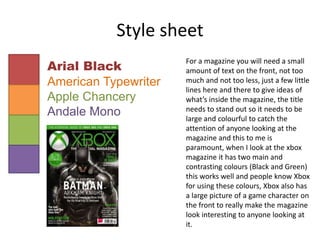
Arial Black
American Typewriter
Apple Chancery
Andale Mono
For a magazine you will need a small
amount of text on the front, not too
much and not too less, just a few little
lines here and there to give ideas of
what’s inside the magazine, the title
needs to stand out so it needs to be
large and colourful to catch the
attention of anyone looking at the
magazine and this to me is
paramount, when I look at the xbox
magazine it has two main and
contrasting colours (Black and Green)
this works well and people know Xbox
for using these colours, Xbox also has
a large picture of a game character on
the front to really make the magazine
look interesting to anyone looking at
it.
Layout 1
£2.50
Halo Wars 2 News!
Activision speaks out
about Call of Duty!
Battlefront 1 DLC!
Announced!
Dark Souls 3 DLC!
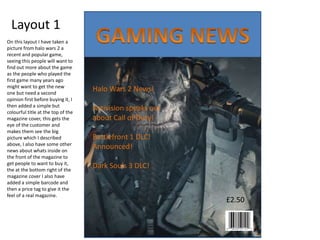
On this layout I have taken a
picture from halo wars 2 a
recent and popular game,
seeing this people will want to
find out more about the game
as the people who played the
first game many years ago
might want to get the new
one but need a second
opinion first before buying it, I
then added a simple but
colourful title at the top of the
magazine cover, this gets the
eye of the customer and
makes them see the big
picture which I described
above, I also have some other
news about whats inside on
the front of the magazine to
get people to want to buy it,
the at the bottom right of the
magazine cover I also have
added a simple barcode and
then a price tag to give it the
feel of a real magazine.
Layout 2
Shadow of War the
anticipated Shadow
of Mordor sequel
announced!
Interview with Peter
Molyneux!
The future of
Gaming!
£2.50
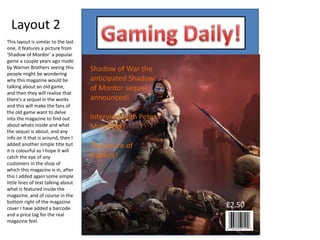
This layout is similar to the last
one, it features a picture from
‘Shadow of Mordor’ a popular
game a couple years ago made
by Warner Brothers seeing this
people might be wondering
why this magazine would be
talking about an old game,
and then they will realise that
there’s a sequel in the works
and this will make the fans of
the old game want to delve
into the magazine to find out
about whats inside and what
the sequel is about, and any
info on it that is around, then I
added another simple title but
it is colourful so I hope it will
catch the eye of any
customers in the shop of
which this magazine is in, after
this I added again some simple
little lines of text talking about
what is featured inside the
magazine, and of course in the
bottom right of the magazine
cover I have added a barcode
and a price tag for the real
magazine feel.
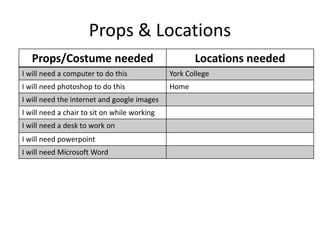
Props & Locations
Props/Costume needed Locations needed
I will need a computer to do this York College
I will need photoshop to do this Home
I will need the internet and google images
I will need a chair to sit on while working
I will need a desk to work on
I will need powerpoint
I will need Microsoft Word
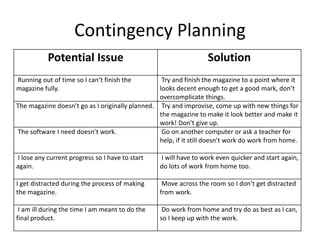
Contingency Planning
Potential Issue Solution
Running out of time so I can’t finish the
magazine fully.
Try and finish the magazine to a point where it
looks decent enough to get a good mark, don’t
overcomplicate things.
The magazine doesn’t go as I originally planned. Try and improvise, come up with new things for
the magazine to make it look better and make it
work! Don’t give up.
The software I need doesn’t work. Go on another computer or ask a teacher for
help, if it still doesn’t work do work from home.
I lose any current progress so I have to start
again.
I will have to work even quicker and start again,
do lots of work from home too.
I get distracted during the process of making
the magazine.
Move across the room so I don’t get distracted
from work.
I am ill during the time I am meant to do the
final product.
Do work from home and try do as best as I can,
so I keep up with the work.
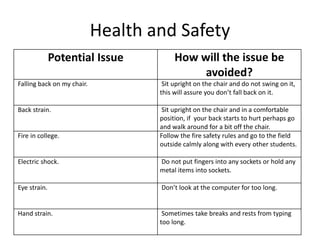
Health and Safety
Potential Issue How will the issue be
avoided?
Falling back on my chair. Sit upright on the chair and do not swing on it,
this will assure you don’t fall back on it.
Back strain. Sit upright on the chair and in a comfortable
position, if your back starts to hurt perhaps go
and walk around for a bit off the chair.
Fire in college. Follow the fire safety rules and go to the field
outside calmly along with every other students.
Electric shock. Do not put fingers into any sockets or hold any
metal items into sockets.
Eye strain. Don’t look at the computer for too long.
Hand strain. Sometimes take breaks and rests from typing
too long.
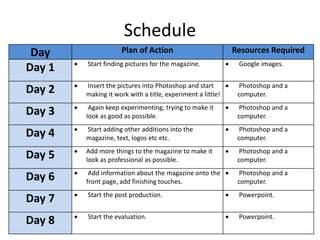
Schedule
Day Plan of Action Resources Required
Day 1  Start finding pictures for the magazine.  Google images.
Day 2  Insert the pictures into Photoshop and start
making it work with a title, experiment a little!
 Photoshop and a
computer.
Day 3  Again keep experimenting, trying to make it
look as good as possible.
 Photoshop and a
computer.
Day 4  Start adding other additions into the
magazine, text, logos etc etc.
 Photoshop and a
computer.
Day 5  Add more things to the magazine to make it
look as professional as possible.
 Photoshop and a
computer.
Day 6  Add information about the magazine onto the
front page, add finishing touches.
 Photoshop and a
computer.
Day 7  Start the post production.  Powerpoint.
Day 8  Start the evaluation.  Powerpoint.

Unit 6: Pre Production.

  • 1.
  • 2.
    Style sheet Arial Black AmericanTypewriter Apple Chancery Andale Mono For a magazine you will need a small amount of text on the front, not too much and not too less, just a few little lines here and there to give ideas of what’s inside the magazine, the title needs to stand out so it needs to be large and colourful to catch the attention of anyone looking at the magazine and this to me is paramount, when I look at the xbox magazine it has two main and contrasting colours (Black and Green) this works well and people know Xbox for using these colours, Xbox also has a large picture of a game character on the front to really make the magazine look interesting to anyone looking at it.
  • 3.
    Layout 1 £2.50 Halo Wars2 News! Activision speaks out about Call of Duty! Battlefront 1 DLC! Announced! Dark Souls 3 DLC! On this layout I have taken a picture from halo wars 2 a recent and popular game, seeing this people will want to find out more about the game as the people who played the first game many years ago might want to get the new one but need a second opinion first before buying it, I then added a simple but colourful title at the top of the magazine cover, this gets the eye of the customer and makes them see the big picture which I described above, I also have some other news about whats inside on the front of the magazine to get people to want to buy it, the at the bottom right of the magazine cover I also have added a simple barcode and then a price tag to give it the feel of a real magazine.
  • 4.
    Layout 2 Shadow ofWar the anticipated Shadow of Mordor sequel announced! Interview with Peter Molyneux! The future of Gaming! £2.50 This layout is similar to the last one, it features a picture from ‘Shadow of Mordor’ a popular game a couple years ago made by Warner Brothers seeing this people might be wondering why this magazine would be talking about an old game, and then they will realise that there’s a sequel in the works and this will make the fans of the old game want to delve into the magazine to find out about whats inside and what the sequel is about, and any info on it that is around, then I added another simple title but it is colourful so I hope it will catch the eye of any customers in the shop of which this magazine is in, after this I added again some simple little lines of text talking about what is featured inside the magazine, and of course in the bottom right of the magazine cover I have added a barcode and a price tag for the real magazine feel.
  • 5.
    Props & Locations Props/Costumeneeded Locations needed I will need a computer to do this York College I will need photoshop to do this Home I will need the internet and google images I will need a chair to sit on while working I will need a desk to work on I will need powerpoint I will need Microsoft Word
  • 6.
    Contingency Planning Potential IssueSolution Running out of time so I can’t finish the magazine fully. Try and finish the magazine to a point where it looks decent enough to get a good mark, don’t overcomplicate things. The magazine doesn’t go as I originally planned. Try and improvise, come up with new things for the magazine to make it look better and make it work! Don’t give up. The software I need doesn’t work. Go on another computer or ask a teacher for help, if it still doesn’t work do work from home. I lose any current progress so I have to start again. I will have to work even quicker and start again, do lots of work from home too. I get distracted during the process of making the magazine. Move across the room so I don’t get distracted from work. I am ill during the time I am meant to do the final product. Do work from home and try do as best as I can, so I keep up with the work.
  • 7.
    Health and Safety PotentialIssue How will the issue be avoided? Falling back on my chair. Sit upright on the chair and do not swing on it, this will assure you don’t fall back on it. Back strain. Sit upright on the chair and in a comfortable position, if your back starts to hurt perhaps go and walk around for a bit off the chair. Fire in college. Follow the fire safety rules and go to the field outside calmly along with every other students. Electric shock. Do not put fingers into any sockets or hold any metal items into sockets. Eye strain. Don’t look at the computer for too long. Hand strain. Sometimes take breaks and rests from typing too long.
  • 8.
    Schedule Day Plan ofAction Resources Required Day 1  Start finding pictures for the magazine.  Google images. Day 2  Insert the pictures into Photoshop and start making it work with a title, experiment a little!  Photoshop and a computer. Day 3  Again keep experimenting, trying to make it look as good as possible.  Photoshop and a computer. Day 4  Start adding other additions into the magazine, text, logos etc etc.  Photoshop and a computer. Day 5  Add more things to the magazine to make it look as professional as possible.  Photoshop and a computer. Day 6  Add information about the magazine onto the front page, add finishing touches.  Photoshop and a computer. Day 7  Start the post production.  Powerpoint. Day 8  Start the evaluation.  Powerpoint.

Editor's Notes

  • #3 Explore colours, fonts and image styles similar to what you want to produce. Discuss all three elements in relation to why you chose them and where you may use them in your project. Go over as many pages as you need to
  • #4 Mock up of a potential design using the colours and fonts established in your style sheet and sourced images
  • #5 Mock up of a potential design using the colours and fonts established in your style sheet and sourced images