Pre-Production
Imogen Minto
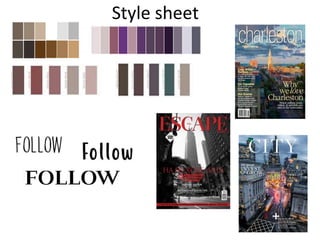
Style sheet
Text style
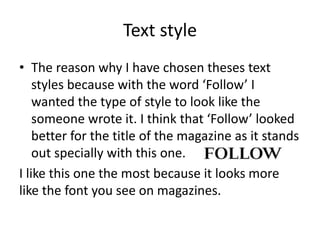
• The reason why I have chosen theses text
styles because with the word ‘Follow’ I
wanted the type of style to look like the
someone wrote it. I think that ‘Follow’ looked
better for the title of the magazine as it stands
out specially with this one.
I like this one the most because it looks more
like the font you see on magazines.
Colours
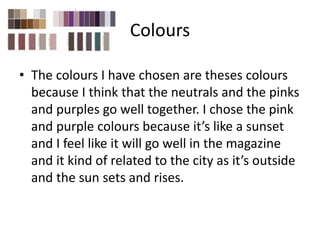
• The colours I have chosen are theses colours
because I think that the neutrals and the pinks
and purples go well together. I chose the pink
and purple colours because it’s like a sunset
and I feel like it will go well in the magazine
and it kind of related to the city as it’s outside
and the sun sets and rises.
Magazines
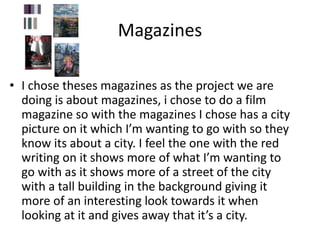
• I chose theses magazines as the project we are
doing is about magazines, i chose to do a film
magazine so with the magazines I chose has a city
picture on it which I’m wanting to go with so they
know its about a city. I feel the one with the red
writing on it shows more of what I’m wanting to
go with as it shows more of a street of the city
with a tall building in the background giving it
more of an interesting look towards it when
looking at it and gives away that it’s a city.
Layout 1
Barcode
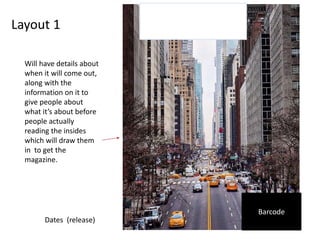
Will have details about
when it will come out,
along with the
information on it to
give people about
what it’s about before
people actually
reading the insides
which will draw them
in to get the
magazine.
Dates (release)
Layout 2
Barcode
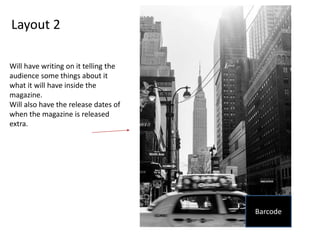
Will have writing on it telling the
audience some things about it
what it will have inside the
magazine.
Will also have the release dates of
when the magazine is released
extra.
Props & Locations
Props/Costume needed Locations needed
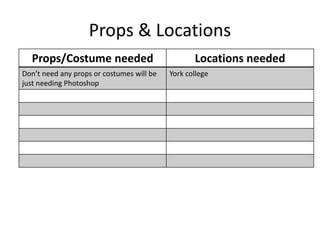
Don’t need any props or costumes will be
just needing Photoshop
York college
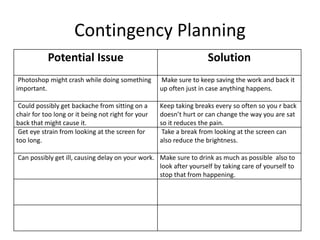
Contingency Planning
Potential Issue Solution
Photoshop might crash while doing something
important.
Make sure to keep saving the work and back it
up often just in case anything happens.
Could possibly get backache from sitting on a
chair for too long or it being not right for your
back that might cause it.
Keep taking breaks every so often so you r back
doesn’t hurt or can change the way you are sat
so it reduces the pain.
Get eye strain from looking at the screen for
too long.
Take a break from looking at the screen can
also reduce the brightness.
Can possibly get ill, causing delay on your work. Make sure to drink as much as possible also to
look after yourself by taking care of yourself to
stop that from happening.
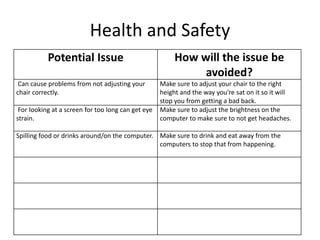
Health and Safety
Potential Issue How will the issue be
avoided?
Can cause problems from not adjusting your
chair correctly.
Make sure to adjust your chair to the right
height and the way you're sat on it so it will
stop you from getting a bad back.
For looking at a screen for too long can get eye
strain.
Make sure to adjust the brightness on the
computer to make sure to not get headaches.
Spilling food or drinks around/on the computer. Make sure to drink and eat away from the
computers to stop that from happening.
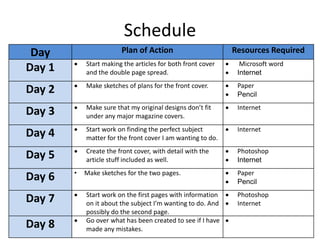
Schedule
Day Plan of Action Resources Required
Day 1  Start making the articles for both front cover
and the double page spread.
 Microsoft word
 Internet
Day 2  Make sketches of plans for the front cover.  Paper
 Pencil
Day 3  Make sure that my original designs don’t fit
under any major magazine covers.
 Internet
Day 4  Start work on finding the perfect subject
matter for the front cover I am wanting to do.
 Internet
Day 5  Create the front cover, with detail with the
article stuff included as well.
 Photoshop
 Internet
Day 6 • Make sketches for the two pages.  Paper
 Pencil
Day 7  Start work on the first pages with information
on it about the subject I’m wanting to do. And
possibly do the second page.
 Photoshop
 Internet
Day 8  Go over what has been created to see if I have
made any mistakes.


5. Pre production

  • 1.
  • 2.
  • 3.
    Text style • Thereason why I have chosen theses text styles because with the word ‘Follow’ I wanted the type of style to look like the someone wrote it. I think that ‘Follow’ looked better for the title of the magazine as it stands out specially with this one. I like this one the most because it looks more like the font you see on magazines.
  • 4.
    Colours • The coloursI have chosen are theses colours because I think that the neutrals and the pinks and purples go well together. I chose the pink and purple colours because it’s like a sunset and I feel like it will go well in the magazine and it kind of related to the city as it’s outside and the sun sets and rises.
  • 5.
    Magazines • I chosetheses magazines as the project we are doing is about magazines, i chose to do a film magazine so with the magazines I chose has a city picture on it which I’m wanting to go with so they know its about a city. I feel the one with the red writing on it shows more of what I’m wanting to go with as it shows more of a street of the city with a tall building in the background giving it more of an interesting look towards it when looking at it and gives away that it’s a city.
  • 6.
    Layout 1 Barcode Will havedetails about when it will come out, along with the information on it to give people about what it’s about before people actually reading the insides which will draw them in to get the magazine. Dates (release)
  • 7.
    Layout 2 Barcode Will havewriting on it telling the audience some things about it what it will have inside the magazine. Will also have the release dates of when the magazine is released extra.
  • 8.
    Props & Locations Props/Costumeneeded Locations needed Don’t need any props or costumes will be just needing Photoshop York college
  • 9.
    Contingency Planning Potential IssueSolution Photoshop might crash while doing something important. Make sure to keep saving the work and back it up often just in case anything happens. Could possibly get backache from sitting on a chair for too long or it being not right for your back that might cause it. Keep taking breaks every so often so you r back doesn’t hurt or can change the way you are sat so it reduces the pain. Get eye strain from looking at the screen for too long. Take a break from looking at the screen can also reduce the brightness. Can possibly get ill, causing delay on your work. Make sure to drink as much as possible also to look after yourself by taking care of yourself to stop that from happening.
  • 10.
    Health and Safety PotentialIssue How will the issue be avoided? Can cause problems from not adjusting your chair correctly. Make sure to adjust your chair to the right height and the way you're sat on it so it will stop you from getting a bad back. For looking at a screen for too long can get eye strain. Make sure to adjust the brightness on the computer to make sure to not get headaches. Spilling food or drinks around/on the computer. Make sure to drink and eat away from the computers to stop that from happening.
  • 11.
    Schedule Day Plan ofAction Resources Required Day 1  Start making the articles for both front cover and the double page spread.  Microsoft word  Internet Day 2  Make sketches of plans for the front cover.  Paper  Pencil Day 3  Make sure that my original designs don’t fit under any major magazine covers.  Internet Day 4  Start work on finding the perfect subject matter for the front cover I am wanting to do.  Internet Day 5  Create the front cover, with detail with the article stuff included as well.  Photoshop  Internet Day 6 • Make sketches for the two pages.  Paper  Pencil Day 7  Start work on the first pages with information on it about the subject I’m wanting to do. And possibly do the second page.  Photoshop  Internet Day 8  Go over what has been created to see if I have made any mistakes. 

Editor's Notes

  • #3 Explore colours, fonts and image styles similar to what you want to produce. Discuss all three elements in relation to why you chose them and where you may use them in your project. Go over as many pages as you need to
  • #7 Mock up of a potential design using the colours and fonts established in your style sheet and sourced images
  • #8 Mock up of a potential design using the colours and fonts established in your style sheet and sourced images