PHP DETERMINES THEDATA TYPE DEPENDING ON THE
ATTRIBUTES OF THE SUPPLIED DATA.
<?php
$my_var = 1;
echo $my_var;
?>
<?php
$my_var = 3.14;
echo $my_var;
?>
<?php
$my_var ="Hypertext Pre Processor";
echo $my_var;
?>
3.
PHP ALSO ALLOWSYOU TO CAST THE DATA TYPE.
THIS IS KNOWN AS EXPLICIT CASTING.
<?php
$a = 1;
$b = 1.5;
$c = $a + $b;
$c = $a + (int) $b;
echo $c;
?>
4.
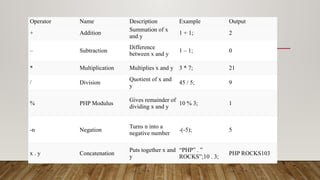
Operator Name DescriptionExample Output
+ Addition
Summation of x
and y
1 + 1; 2
– Subtraction
Difference
between x and y
1 – 1; 0
* Multiplication Multiplies x and y 3 * 7; 21
/ Division
Quotient of x and
y
45 / 5; 9
% PHP Modulus
Gives remainder of
dividing x and y
10 % 3; 1
-n Negation
Turns n into a
negative number
-(-5); 5
x . y Concatenation
Puts together x and
y
“PHP” . ”
ROCKS”;10 . 3;
PHP ROCKS103
5.
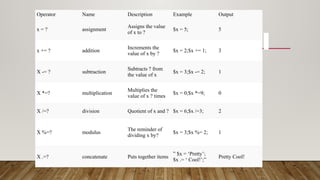
Operator Name DescriptionExample Output
x = ? assignment
Assigns the value
of x to ?
$x = 5; 5
x += ? addition
Increments the
value of x by ?
$x = 2;$x += 1; 3
X -= ? subtraction
Subtracts ? from
the value of x
$x = 3;$x -= 2; 1
X *=? multiplication
Multiplies the
value of x ? times
$x = 0;$x *=9; 0
X /=? division Quotient of x and ? $x = 6;$x /=3; 2
X %=? modulus
The reminder of
dividing x by?
$x = 3;$x %= 2; 1
X .=? concatenate Puts together items
” $x = ‘Pretty’;
$x .= ‘ Cool!’;”
Pretty Cool!
6.
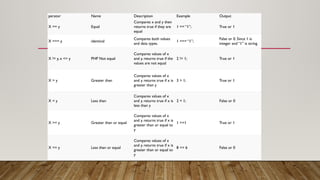
perator Name DescriptionExample Output
X == y Equal
Compares x and y then
returns true if they are
equal
1 == “1”; True or 1
X === y identical
Compares both values
and data types.
1 === “1”;
False or 0. Since 1 is
integer and “1” is string
X != y, x <> y PHP Not equal
Compares values of x
and y. returns true if the
values are not equal
2 != 1; True or 1
X > y Greater than
Compares values of x
and y. returns true if x is
greater than y
3 > 1; True or 1
X < y Less than
Compares values of x
and y. returns true if x is
less than y
2 < 1; False or 0
X >= y Greater than or equal
Compares values of x
and y. returns true if x is
greater than or equal to
y
1 >=1 True or 1
X <= y Less than or equal
Compares values of x
and y. returns true if x is
greater than or equal to
y
8 <= 6 False or 0
7.
Operator Name DescriptionExample Output
X and y, x && y And
Returns true if both x
and y are equal
1 and 4;True&& False; True or 1False or 0
X or y, x || y Or
Returns true if either
x or y is true
6 or 9;0 || 0; True or 1False or 0
X xor y Exclusive or, xor
Returns true if only x
is true or only y is
true
1 xor 1;1 xor 0; False or 0True or 1
!x Not
Returns true if x is
false and false if x is
true
!0; True or 1
8.
<?php
$globalVar = "Iam global";
function testScope() {
global $globalVar;
echo $globalVar . "n";
}
testScope();
?>
9.
<?php
// Student information
$studentName= "Alice"; // String
$marks = [85, 78, 92, 88, 76]; // Array of integers
$passingMarks = 50; // Integer
$totalSubjects = count($marks); // Integer
// Calculate total and average marks
$totalMarks = array_sum($marks); // Integer
$averageMarks = $totalMarks / $totalSubjects; // Float
// Check if the student passed all subjects
$hasPassedAllSubjects = true; // Boolean
foreach ($marks as $mark) {
if ($mark < $passingMarks) {
$hasPassedAllSubjects = false;
break;
}
}
// Display results
echo "Student Name: $studentNamen";
echo "Total Marks: $totalMarksn";
echo "Average Marks: " . number_format($averageMarks, 2) . "n";
// Determine and display pass/fail status
if ($hasPassedAllSubjects) {
echo "Status: Passedn";
} else {
echo "Status: Failedn";
}
// Display detailed results
echo "nSubject-wise Marks:n";
foreach ($marks as $index => $mark) {
echo "Subject " . ($index + 1) . ": $markn";
}
?>






![<?php
// Student information
$studentName = "Alice"; // String
$marks = [85, 78, 92, 88, 76]; // Array of integers
$passingMarks = 50; // Integer
$totalSubjects = count($marks); // Integer
// Calculate total and average marks
$totalMarks = array_sum($marks); // Integer
$averageMarks = $totalMarks / $totalSubjects; // Float
// Check if the student passed all subjects
$hasPassedAllSubjects = true; // Boolean
foreach ($marks as $mark) {
if ($mark < $passingMarks) {
$hasPassedAllSubjects = false;
break;
}
}
// Display results
echo "Student Name: $studentNamen";
echo "Total Marks: $totalMarksn";
echo "Average Marks: " . number_format($averageMarks, 2) . "n";
// Determine and display pass/fail status
if ($hasPassedAllSubjects) {
echo "Status: Passedn";
} else {
echo "Status: Failedn";
}
// Display detailed results
echo "nSubject-wise Marks:n";
foreach ($marks as $index => $mark) {
echo "Subject " . ($index + 1) . ": $markn";
}
?>](https://image.slidesharecdn.com/practical-2-250324081421-0aca7d75/85/Data-types-and-variables-in-php-for-writing-9-320.jpg)


