

List ADT
   List is an ordered collection of items. Items in the
    collection may be integers, Strings, characters or
    any kind of objects.

   Basic operations are
       Adding an item to the collection
       Deleting an item from the collection
       Testing if list is empty
       Testing if list is full
       Getting an item on specified location
       Getting an item with specified key value
Linked List
   Collection of links with reference to the first.

   Each link has
       part to store data
       link that refers to the next link in the list.


   Data part of the link can be an integer, a character, a
    String or an object of any kind.
Linked Lists
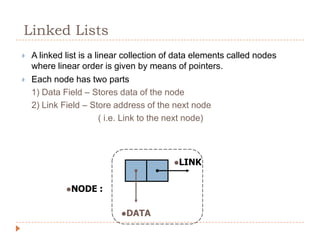
   A linked list is a linear collection of data elements called nodes
    where linear order is given by means of pointers.
   Each node has two parts
    1) Data Field – Stores data of the node
    2) Link Field – Store address of the next node
                         ( i.e. Link to the next node)


                                          LINK


             NODE    :

                            DATA
Linked Lists
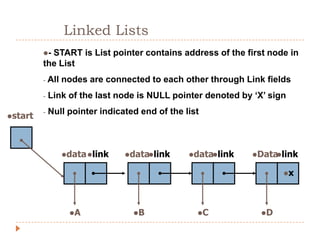
         -START is List pointer contains address of the first node in
         the List
         -   All nodes are connected to each other through Link fields
         -   Link of the last node is NULL pointer denoted by ‘X’ sign
         -   Null pointer indicated end of the list
start


                data link     datalink      datalink   Data link
                                                                  

                                                                     x


                  A              B              C            D
Algorithms


     Lets consider,

•   START is the 1st position in Linked List
•   NewNode is the new node to be created
•   DATA is the element to be inserted in new node
•   POS is the position where the new node to be inserted
•   TEMP and HOLD are temporary pointers to hold the
    node address
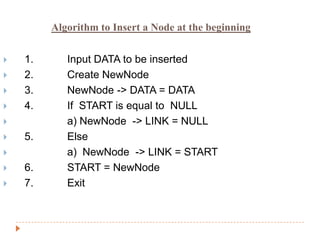
Algorithm to Insert a Node at the beginning


   1.      Input DATA to be inserted
   2.      Create NewNode
   3.      NewNode -> DATA = DATA
   4.      If START is equal to NULL
           a) NewNode -> LINK = NULL
   5.      Else
           a) NewNode -> LINK = START
   6.      START = NewNode
   7.      Exit
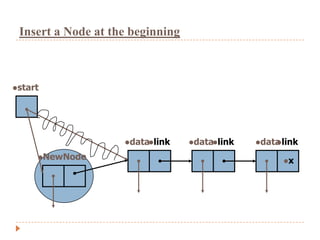
Insert a Node at the beginning


start


                    datalink    datalink   data link
                                                   

     NewNode
                                                     x
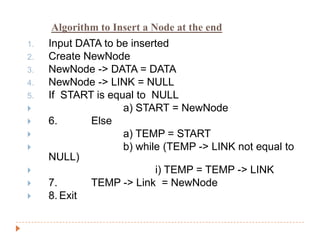
Algorithm to Insert a Node at the end
1.   Input DATA to be inserted
2.   Create NewNode
3.   NewNode -> DATA = DATA
4.   NewNode -> LINK = NULL
5.   If START is equal to NULL
                   a) START = NewNode
    6.      Else
                   a) TEMP = START
                   b) while (TEMP -> LINK not equal to
     NULL)
                          i) TEMP = TEMP -> LINK
    7.      TEMP -> Link = NewNode
    8. Exit
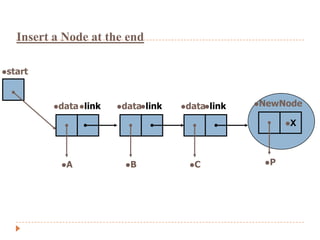
Insert a Node at the end

start


         data link   datalink   datalink   NewNode

                                                       X


           A           B           C           P
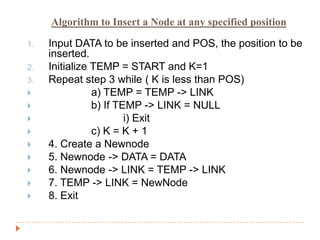
Algorithm to Insert a Node at any specified position

1.   Input DATA to be inserted and POS, the position to be
     inserted.
2.   Initialize TEMP = START and K=1
3.   Repeat step 3 while ( K is less than POS)
               a) TEMP = TEMP -> LINK
               b) If TEMP -> LINK = NULL
                       i) Exit
               c) K = K + 1
    4. Create a Newnode
    5. Newnode -> DATA = DATA
    6. Newnode -> LINK = TEMP -> LINK
    7. TEMP -> LINK = NewNode
    8. Exit
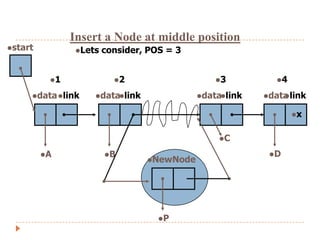
Insert a Node at middle position
start          Lets   consider, POS = 3


          1              2                    3          4

     data link    datalink              datalink   data link
                                                             

                                                                 x


                                                C

         A             B                                D
                                 NewNode


                                    P
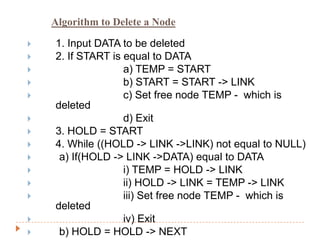
Algorithm to Delete a Node

   1. Input DATA to be deleted
   2. If START is equal to DATA
                  a) TEMP = START
                  b) START = START -> LINK
                  c) Set free node TEMP - which is
    deleted
                  d) Exit
   3. HOLD = START
   4. While ((HOLD -> LINK ->LINK) not equal to NULL)
    a) If(HOLD -> LINK ->DATA) equal to DATA
                  i) TEMP = HOLD -> LINK
                  ii) HOLD -> LINK = TEMP -> LINK
                  iii) Set free node TEMP - which is
    deleted
                  iv) Exit
    b) HOLD = HOLD -> NEXT
Algorithm to Delete a Node

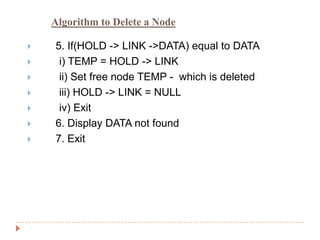
   5. If(HOLD -> LINK ->DATA) equal to DATA
    i) TEMP = HOLD -> LINK
    ii) Set free node TEMP - which is deleted
    iii) HOLD -> LINK = NULL
    iv) Exit
   6. Display DATA not found
   7. Exit
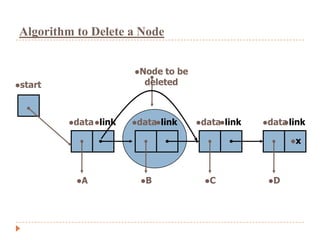
Algorithm to Delete a Node


                       Node  to be
start                   deleted


         data link   datalink     datalink   data link
                                                       

                                                         x


          A            B             C           D
Algorithm for Searching a Node

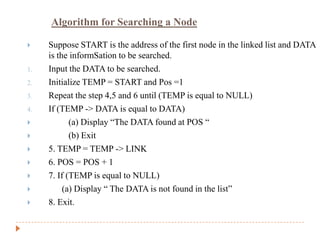
    Suppose START is the address of the first node in the linked list and DATA
     is the informSation to be searched.
1.   Input the DATA to be searched.
2.   Initialize TEMP = START and Pos =1
3.   Repeat the step 4,5 and 6 until (TEMP is equal to NULL)
4.   If (TEMP -> DATA is equal to DATA)
           (a) Display “The DATA found at POS “
           (b) Exit
    5. TEMP = TEMP -> LINK
    6. POS = POS + 1
    7. If (TEMP is equal to NULL)
         (a) Display “ The DATA is not found in the list”
    8. Exit.
Algorithm for Displaying all Nodes

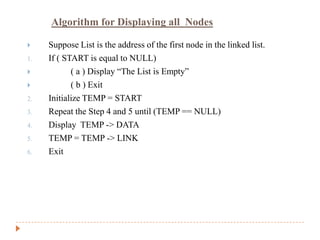
    Suppose List is the address of the first node in the linked list.
1.   If ( START is equal to NULL)
           ( a ) Display “The List is Empty”
           ( b ) Exit
2.   Initialize TEMP = START
3.   Repeat the Step 4 and 5 until (TEMP == NULL)
4.   Display TEMP -> DATA
5.   TEMP = TEMP -> LINK
6.   Exit
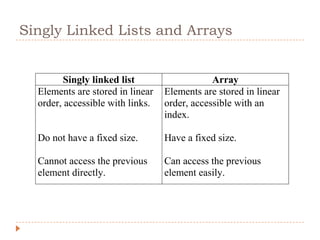
Singly Linked Lists and Arrays


         Singly linked list                   Array
  Elements are stored in linear   Elements are stored in linear
  order, accessible with links.   order, accessible with an
                                  index.

  Do not have a fixed size.       Have a fixed size.

  Cannot access the previous      Can access the previous
  element directly.               element easily.
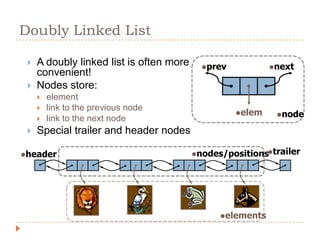
Doubly Linked List

    A doubly linked list is often more     prev           next
     convenient!
    Nodes store:
        element
        link to the previous node
                                                    elem    node
        link to the next node
    Special trailer and header nodes

header                                   nodes/positionstrailer


                                                elements
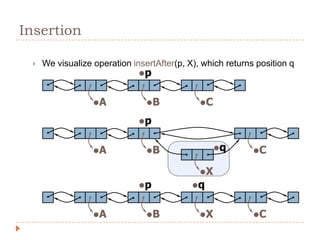
Insertion

    We visualize operation insertAfter(p, X), which returns position q
                              p


                  A            B            C

                              p


                  A            B                 q       C

                                              X
                              p            q


                  A            B            X            C
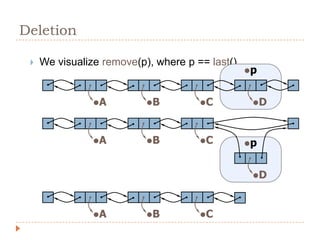
Deletion

    We visualize remove(p), where p == last()
                                                 p


                A         B         C          D


                A         B         C         p


                                                  D


                A         B         C

U2.linked list

  • 2.
    List ADT  List is an ordered collection of items. Items in the collection may be integers, Strings, characters or any kind of objects.  Basic operations are  Adding an item to the collection  Deleting an item from the collection  Testing if list is empty  Testing if list is full  Getting an item on specified location  Getting an item with specified key value
  • 3.
    Linked List  Collection of links with reference to the first.   Each link has  part to store data  link that refers to the next link in the list.  Data part of the link can be an integer, a character, a String or an object of any kind.
  • 4.
    Linked Lists  A linked list is a linear collection of data elements called nodes where linear order is given by means of pointers.  Each node has two parts 1) Data Field – Stores data of the node 2) Link Field – Store address of the next node ( i.e. Link to the next node) LINK NODE : DATA
  • 5.
    Linked Lists -START is List pointer contains address of the first node in the List - All nodes are connected to each other through Link fields - Link of the last node is NULL pointer denoted by ‘X’ sign - Null pointer indicated end of the list start data link datalink datalink Data link  x A B C D
  • 6.
    Algorithms  Lets consider, • START is the 1st position in Linked List • NewNode is the new node to be created • DATA is the element to be inserted in new node • POS is the position where the new node to be inserted • TEMP and HOLD are temporary pointers to hold the node address
  • 7.
    Algorithm to Inserta Node at the beginning  1. Input DATA to be inserted  2. Create NewNode  3. NewNode -> DATA = DATA  4. If START is equal to NULL  a) NewNode -> LINK = NULL  5. Else  a) NewNode -> LINK = START  6. START = NewNode  7. Exit
  • 8.
    Insert a Nodeat the beginning start datalink datalink data link  NewNode x
  • 9.
    Algorithm to Inserta Node at the end 1. Input DATA to be inserted 2. Create NewNode 3. NewNode -> DATA = DATA 4. NewNode -> LINK = NULL 5. If START is equal to NULL  a) START = NewNode  6. Else  a) TEMP = START  b) while (TEMP -> LINK not equal to NULL)  i) TEMP = TEMP -> LINK  7. TEMP -> Link = NewNode  8. Exit
  • 10.
    Insert a Nodeat the end start data link datalink datalink NewNode X A B C P
  • 11.
    Algorithm to Inserta Node at any specified position 1. Input DATA to be inserted and POS, the position to be inserted. 2. Initialize TEMP = START and K=1 3. Repeat step 3 while ( K is less than POS)  a) TEMP = TEMP -> LINK  b) If TEMP -> LINK = NULL  i) Exit  c) K = K + 1  4. Create a Newnode  5. Newnode -> DATA = DATA  6. Newnode -> LINK = TEMP -> LINK  7. TEMP -> LINK = NewNode  8. Exit
  • 12.
    Insert a Nodeat middle position start Lets consider, POS = 3 1 2 3 4 data link datalink datalink data link  x C A B D NewNode P
  • 13.
    Algorithm to Deletea Node  1. Input DATA to be deleted  2. If START is equal to DATA  a) TEMP = START  b) START = START -> LINK  c) Set free node TEMP - which is deleted  d) Exit  3. HOLD = START  4. While ((HOLD -> LINK ->LINK) not equal to NULL)  a) If(HOLD -> LINK ->DATA) equal to DATA  i) TEMP = HOLD -> LINK  ii) HOLD -> LINK = TEMP -> LINK  iii) Set free node TEMP - which is deleted  iv) Exit  b) HOLD = HOLD -> NEXT
  • 14.
    Algorithm to Deletea Node  5. If(HOLD -> LINK ->DATA) equal to DATA  i) TEMP = HOLD -> LINK  ii) Set free node TEMP - which is deleted  iii) HOLD -> LINK = NULL  iv) Exit  6. Display DATA not found  7. Exit
  • 15.
    Algorithm to Deletea Node Node to be start deleted data link datalink datalink data link  x A B C D
  • 16.
    Algorithm for Searchinga Node  Suppose START is the address of the first node in the linked list and DATA is the informSation to be searched. 1. Input the DATA to be searched. 2. Initialize TEMP = START and Pos =1 3. Repeat the step 4,5 and 6 until (TEMP is equal to NULL) 4. If (TEMP -> DATA is equal to DATA)  (a) Display “The DATA found at POS “  (b) Exit  5. TEMP = TEMP -> LINK  6. POS = POS + 1  7. If (TEMP is equal to NULL)  (a) Display “ The DATA is not found in the list”  8. Exit.
  • 17.
    Algorithm for Displayingall Nodes  Suppose List is the address of the first node in the linked list. 1. If ( START is equal to NULL)  ( a ) Display “The List is Empty”  ( b ) Exit 2. Initialize TEMP = START 3. Repeat the Step 4 and 5 until (TEMP == NULL) 4. Display TEMP -> DATA 5. TEMP = TEMP -> LINK 6. Exit
  • 18.
    Singly Linked Listsand Arrays Singly linked list Array Elements are stored in linear Elements are stored in linear order, accessible with links. order, accessible with an index. Do not have a fixed size. Have a fixed size. Cannot access the previous Can access the previous element directly. element easily.
  • 19.
    Doubly Linked List  A doubly linked list is often more prev next convenient!  Nodes store:  element  link to the previous node elem node  link to the next node  Special trailer and header nodes header nodes/positionstrailer elements
  • 20.
    Insertion  We visualize operation insertAfter(p, X), which returns position q p A B C p A B q C X p q A B X C
  • 21.
    Deletion  We visualize remove(p), where p == last() p A B C D A B C p D A B C