Precision Laser Shaft Alignment 
Fluke 830 Laser Alignment tool
2 
Agenda 
 Benefits – Why is precision alignment needed? 
• Asset Uptime / Proactive Maintenance 
• Benefits of Precision Shaft Alignment 
 Alignment Principles and Laser Technology 
• What is shaft alignment? Why laser alignment? 
 Fluke Shaft Alignment Tool Overview – How to Use it 
• Fluke Alignment Tool Hardware overview 
• Quick, Easy, Step by step, Precision alignment (QRG) 
 Overview, Mount Brackets, Setup, Measure, Diagnose, Correction 
• Other: Soft Foot, Save, Report 
 What to look for in a Shaft Alignment Tool? 
 Questions and Answers
Fluke. Keeping your world up and running.® 
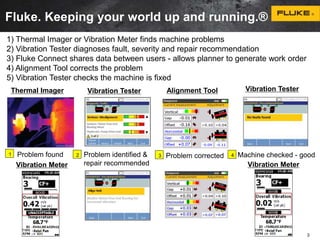
1) Thermal Imager or Vibration Meter finds machine problems 
2) Vibration Tester diagnoses fault, severity and repair recommendation 
3) Fluke Connect shares data between users - allows planner to generate work order 
4) Alignment Tool corrects the problem 
5) Vibration Tester checks the machine is fixed 
Thermal Imager Alignment Tool 
Vibration Tester Vibration Tester 
Problem found Problem identified & 
1 3 Problem corrected 4 
repair recommended 
Machine checked - good 
3 
2 
Vibration Meter Vibration Meter
Benefits of Proactive Maintenance 
• Predictability: give maintenance staff time to schedule required repairs 
and acquire parts. 
• Safety: take faulty equipment offline before a hazardous condition occurs. 
• Revenue: fewer unexpected and serious failures, helping to prevent 
production stoppages that cut into the bottom line. 
• Increased maintenance intervals: life of equipment can be extended 
and maintenance can be scheduled by need. 
• Reliability: fewer unexpected or catastrophic failures - problem areas can 
be anticipated before failure 
• Peace of mind: builds confidence in maintenance schedules, budgeting, 
and productivity estimates. 
4
5 
Asset Uptime begins with shaft alignment 
Why precision alignment? 
• Reduce your energy consumption 
• Fewer failures of seals, couplings and bearings 
• Lower temperatures of bearings and coupling 
• Lower vibration levels – that result in fewer mechanical faults 
• No shaft cracking or failures 
• No lose foundation bolts 
1. Heat from misalignment 
2. Alignment within tolerance 
1. The flexible coupling heats up and the 
machine develops higher temperatures, 
especially at the bearings. 
2. The high reaction forces are drastically 
reduced after precision alignment and so 
are the faults that lead to asset failure and 
production losses.
Benefits of Precision Alignment 
• Up to 50% of 
damage to rotating 
machinery is 
directly related to 
misalignment! 
• Well aligned 
machines reduce 
operating costs! 
10/22/2014 6
Applications/Users/Industries 
Typical Applications: 
• Precision alignment of 
rotating machinery 
Industries: 
• Chemical/Petrochemical 
• Oil and Gas 
• Power 
• Automotive 
• Pulp, Paper and Printing 
• Food processing 
• Marine 
• Steel 
• Mining 
• Machinery manufacturing 
• Cement 
• Service organizations 
Users: 
• Mechanical Maintenance 
Technicians 
• Facilities Engineers 
Value Proposition: 
• Energy savings 
• Prevent Unplanned 
Downtime 
• Reduce Component 
Replacement Costs 
• Reduce Repair Time 
• Easier to Use
What is shaft alignment ? 
at the point of power transfer from one shaft to another, the axes of 
rotation of both shafts should be colinear when the machine is 
running under normal operating conditions
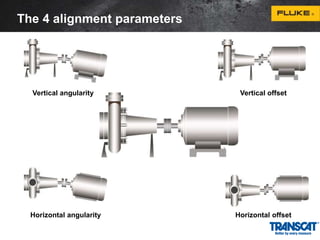
The 4 alignment parameters 
Vertical angularity Vertical offset 
Horizontal angularity Horizontal offset
Alignment condition 
• Alignment condition is always a combination of angularity and offset 
• Machine has to be corrected in both vertical and horizontal planes 
• 4 values are required to fully describe the alignment condition: 
1. Vertical angularity (or gap per diameter) 
2. Vertical offset 
3. Horizontal angularity (or gap per diameter) 
4. Horizontal offset 
• Offset refers to distance between shaft rotation axes at coupling center
Coupling tolerance 
An often quoted comment is “...why bother to align the machine when 
it is fitted with a flexible coupling designed to take misalignment?” 
It is true that flexible couplings are designed to take misalignment, 
typically up to 1-2 mm or more radial offset of the shafts. But the load 
imposed on shafts, and thus the bearings and seals increase 
dramatically due to the reaction forces created within the coupling 
when misaligned.
Symptoms of misalignment 
 Excessive radial and axial vibration. 
 High casing temperatures at or near the bearings or high discharge oil 
temperatures. 
 Excessive amount of oil leakage at the bearing seals. 
 Loose foundation bolts, shim packs or dowel pins. 
 Loose or broken coupling bolts. 
 Some flexible coupling designs run hot under misalignment conditions. If it 
is an elastomeric type, look for rubber powder inside the coupling shroud. 
 Similar pieces of equipment are vibrating less or seem to have a longer 
operating life. 
 Unusually high number of coupling failures or they wear quickly. 
 The shafts are breaking (or cracking) at/or close to the inboard bearings or 
coupling hubs. 
 Excessive amounts of grease (or oil) on the inside of the coupling guard.
Consequences of misalignment 
Coupling damage 
Machine vibration Bearing damage 
Seal wear 
Others
Common alignment methods 
Straightedge/Feeler gauge 
Resolution 1/10 mm 
Dial indicator 
Resolution 1/100 mm 
Laser-optical alignment 
Resolution 1/1000 mm
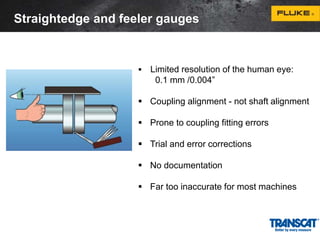
Straightedge and feeler gauges 
 Limited resolution of the human eye: 
0.1 mm /0.004” 
 Coupling alignment - not shaft alignment 
 Prone to coupling fitting errors 
 Trial and error corrections 
 No documentation 
 Far too inaccurate for most machines
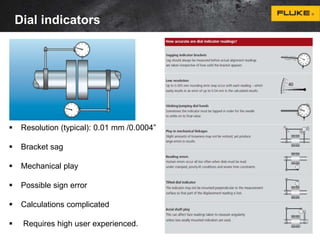
Dial indicators 
 Resolution (typical): 0.01 mm /0.0004” 
 Bracket sag 
 Mechanical play 
 Possible sign error 
 Calculations complicated 
 Requires high user experienced.
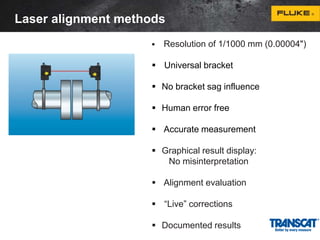
Laser alignment methods 
 Resolution of 1/1000 mm (0.00004") 
 Universal bracket 
 No bracket sag influence 
 Human error free 
 Accurate measurement 
 Graphical result display: 
No misinterpretation 
 Alignment evaluation 
 “Live” corrections 
 Documented results
18 
Laser Alignment Overview and How to Use 
• Fluke Alignment Tool Hardware overview 
 Sensor and Prism 
 Measurement principle 
• Quick, Easy, Step by step, Precision alignment (QRG) 
 Overview of Fluke Alignment Tool 
 Steps of Precision Alignment 
 Other: Soft Foot, Save, Report
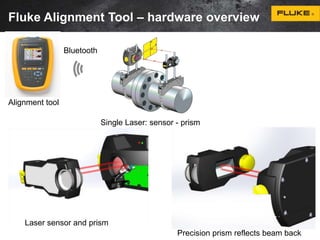
Fluke Alignment Tool – hardware overview 
Alignment tool 
Bluetooth 
Single Laser: sensor - prism 
Laser sensor and prism 
Precision prism reflects beam back
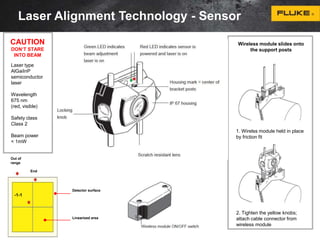
Laser Alignment Technology - Sensor 
Wireless module slides onto 
the support posts 
1. Wirelss module held in place 
by friction fit 
2. Tighten the yellow knobs; 
attach cable connector from 
wireless module 
CAUTION 
DON‘T STARE 
INTO BEAM 
Out of 
range 
-1-1 
End 
Detector surface 
Linearized area 
Laser type 
AlGaiInP 
semiconductor 
laser 
Wavelength 
675 nm 
(red, visible) 
Safety class 
Class 2 
Beam power 
< 1mW
Dust cap 
Type 90° roof prism 
Protection IP 67 
Prism
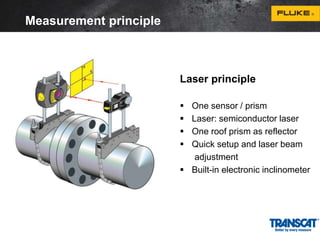
Laser principle 
 One sensor / prism 
 Laser: semiconductor laser 
 One roof prism as reflector 
 Quick setup and laser beam 
adjustment 
 Built-in electronic inclinometer 
Measurement principle
Offset and angularity from 
the calculation ellipse 
Measurement principle
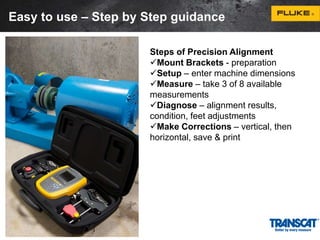
Easy to use – Step by Step guidance 
Steps of Precision Alignment 
Mount Brackets - preparation 
Setup – enter machine dimensions 
Measure – take 3 of 8 available 
measurements 
Diagnose – alignment results, 
condition, feet adjustments 
Make Corrections – vertical, then 
horizontal, save & print
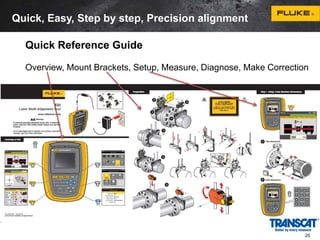
Quick, Easy, Step by step, Precision alignment 
Quick Reference Guide 
Overview, Mount Brackets, Setup, Measure, Diagnose, Make Correction 
25
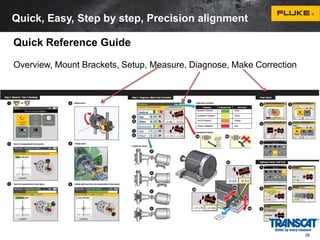
Quick, Easy, Step by step, Precision alignment 
Quick Reference Guide 
Overview, Mount Brackets, Setup, Measure, Diagnose, Make Correction 
26
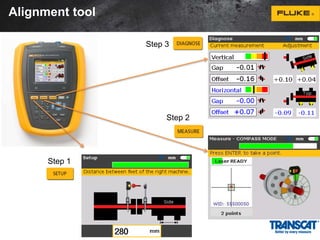
Alignment tool 
Step 1 
Step 3 
Step 2
Mount brackets on shaft in preparation 
1 
2 
1 
3 
Anchor peg 
1. Mount 
brackets on 
both sides of 
the coupling 
tightly on shaft 
X2
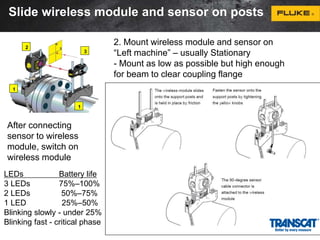
Slide wireless module and sensor on posts 
1 
2 
1 
3 
2. Mount wireless module and sensor on 
“Left machine” – usually Stationary 
- Mount as low as possible but high enough 
for beam to clear coupling flange 
After connecting 
sensor to wireless 
module, switch on 
wireless module 
LEDs Battery life 
3 LEDs 75%–100% 
2 LEDs 50%–75% 
1 LED 25%–50% 
Blinking slowly - under 25% 
Blinking fast - critical phase
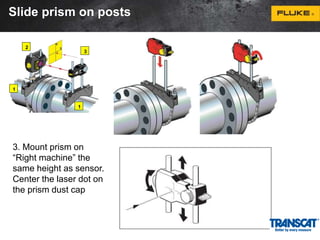
Slide prism on posts 
1 
2 
1 
3 
3. Mount prism on 
“Right machine” the 
same height as sensor. 
Center the laser dot on 
the prism dust cap
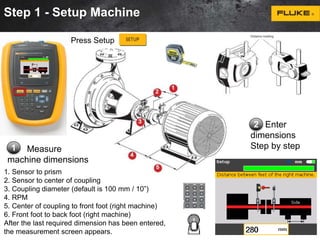
Step 1 - Setup Machine 
Measure 
Press Setup 
machine dimensions 
2 Enter 
dimensions 
1 Step by step 
1. Sensor to prism 
2. Sensor to center of coupling 
3. Coupling diameter (default is 100 mm / 10”) 
4. RPM 
5. Center of coupling to front foot (right machine) 
6. Front foot to back foot (right machine) 
After the last required dimension has been entered, 
the measurement screen appears.
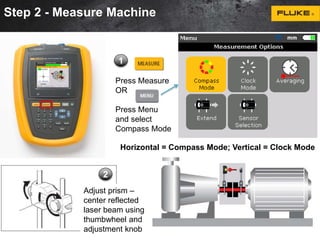
Step 2 - Measure Machine 
1 
Press Measure 
OR 
Press Menu 
and select 
Compass Mode 
2 
Horizontal = Compass Mode; Vertical = Clock Mode 
Adjust prism – 
center reflected 
laser beam using 
thumbwheel and 
adjustment knob
Step 2 - Measure Machine 
3 Rotate shaft to first 
measurement position. 
Take measurement when 
sector turns green. 
Notes: 
• Always turn shafts in 
normal rotation 
direction of machine 
• Don’t touch mounted 
components 
4 
Rotate 
shaft to 
another 
sector 
Inclinometer automatically determines angle on shaft
Step 2 - Measure Machine 
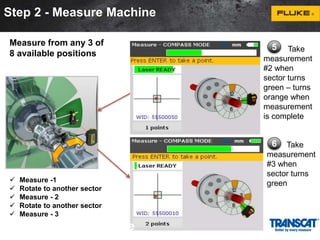
 Measure -1 
 Rotate to another sector 
 Measure - 2 
 Rotate to another sector 
 Measure - 3 
2 - Measure Machine 
5 Take 
measurement 
#2 when 
sector turns 
green – turns 
orange when 
measurement 
is complete 
6 Take 
measurement 
#3 when 
sector turns 
green 
Measure from any 3 of 
8 available positions
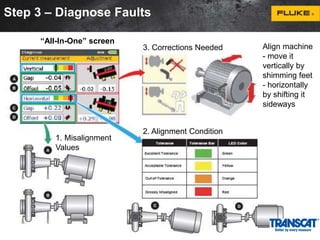
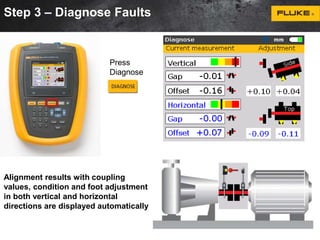
Step 3 – Diagnose Faults 
Press 
Diagnose 
Alignment results with coupling 
values, condition and foot adjustment 
in both vertical and horizontal 
directions are displayed automatically
Step 3 – Diagnose Faults 
1. Misalignment 
Values 
3. Corrections Needed 
2. Alignment Condition 
“All-In-One” screen 
Align machine 
- move it 
vertically by 
shimming feet 
- horizontally 
by shifting it 
sideways
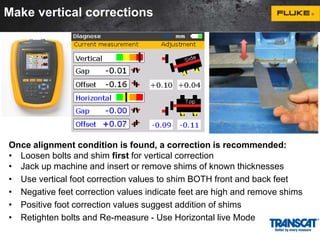
Make vertical corrections 
Once alignment condition is found, a correction is recommended: 
• Loosen bolts and shim first for vertical correction 
• Jack up machine and insert or remove shims of known thicknesses 
• Use vertical foot correction values to shim BOTH front and back feet 
• Negative feet correction values indicate feet are high and remove shims 
• Positive foot correction values suggest addition of shims 
• Retighten bolts and Re-measure - Use Horizontal live Mode
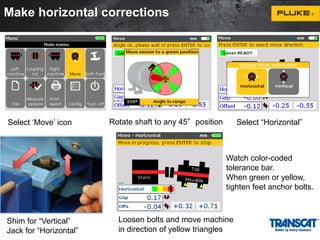
Make horizontal corrections 
Select ‘Move’ icon Rotate shaft to any 45°position 
Shim for “Vertical” 
Jack for “Horizontal” 
Watch color-coded 
tolerance bar. 
When green or yellow, 
tighten feet anchor bolts. 
Loosen bolts and move machine 
in direction of yellow triangles 
Select “Horizontal”
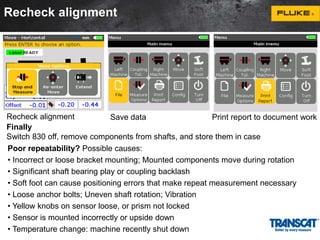
Recheck alignment 
Recheck alignment Save data Print report to document work 
Finally 
Switch 830 off, remove components from shafts, and store them in case 
Poor repeatability? Possible causes: 
• Incorrect or loose bracket mounting; Mounted components move during rotation 
• Significant shaft bearing play or coupling backlash 
• Soft foot can cause positioning errors that make repeat measurement necessary 
• Loose anchor bolts; Uneven shaft rotation; Vibration 
• Yellow knobs on sensor loose, or prism not locked 
• Sensor is mounted incorrectly or upside down 
• Temperature change: machine recently shut down
40 
Fluke Alignment Tool – How to Use 
Other Steps 
 Soft Foot – check before alignment 
 Tolerance Table – know when to stop 
 Save File 
 Report – print “as found” and “as left”
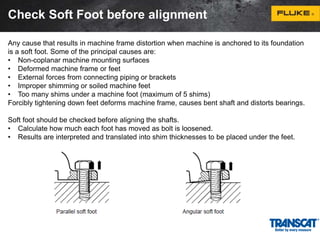
Check Soft Foot before alignment 
Any cause that results in machine frame distortion when machine is anchored to its foundation 
is a soft foot. Some of the principal causes are: 
• Non-coplanar machine mounting surfaces 
• Deformed machine frame or feet 
• External forces from connecting piping or brackets 
• Improper shimming or soiled machine feet 
• Too many shims under a machine foot (maximum of 5 shims) 
Forcibly tightening down feet deforms machine frame, causes bent shaft and distorts bearings. 
Soft foot should be checked before aligning the shafts. 
• Calculate how much each foot has moved as bolt is loosened. 
• Results are interpreted and translated into shim thicknesses to be placed under the feet.
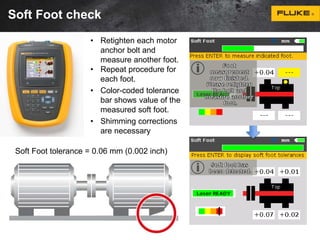
Soft Foot check 
• Retighten each motor 
anchor bolt and 
measure another foot. 
• Repeat procedure for 
each foot. 
• Color-coded tolerance 
bar shows value of the 
measured soft foot. 
• Shimming corrections 
are necessary 
Soft Foot tolerance = 0.06 mm (0.002 inch)
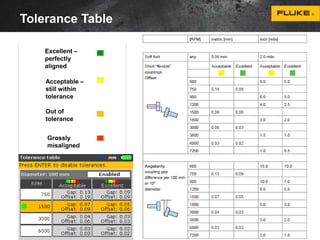
Tolerance Table 
Excellent – 
perfectly 
aligned 
Acceptable – 
still within 
tolerance 
Out of 
tolerance 
Grossly 
misaligned
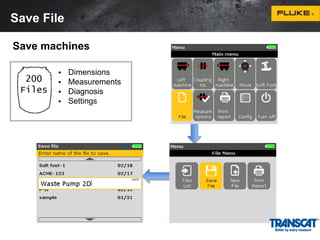
Save File 
Save machines 
 Dimensions 
 Measurements 
 Diagnosis 
 Settings
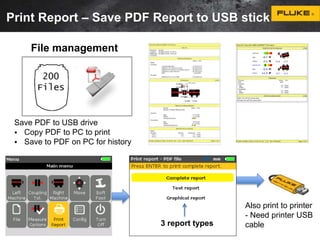
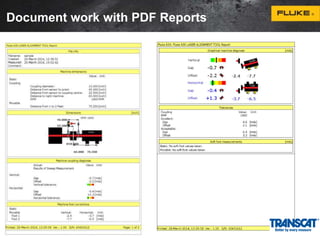
Print Report – Save PDF Report to USB stick 
File management 
Save PDF to USB drive 
 Copy PDF to PC to print 
 Save to PDF on PC for history 
3 report types 
Also print to printer 
- Need printer USB 
cable
Document work with PDF Reports
Summary – What to look for: 
1. Single Laser Beam 
Auto-collimating laser optics system is less susceptible to 
backlash  less error means more accurate and more 
repeatable 
• Rugged design: ergonomic, robust, and protected from 
dust & water 
• Repeatability Matters: patented single laser, precision 
manufactured parts and high quality fasteners coupled with 
extremely accurate lab calibrations give you added 
confidence in your measurement results. 
• Wireless: Bluetooth communication removes cables that 
take longer to use 
• Integrated batteries: Li-Ion rechargeable for long life 
Flexible couplings don’t fix misalignment – high loads on 
shafts still exist  Bearings and seals wear and then fail 
47
1 
2 
3 
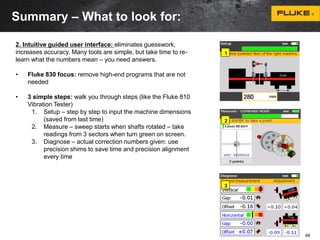
2. Intuitive guided user interface: eliminates guesswork, 
increases accuracy. Many tools are simple, but take time to re-learn 
what the numbers mean – you need answers. 
• Fluke 830 focus: remove high-end programs that are not 
needed 
• 3 simple steps: walk you through steps (like the Fluke 810 
Vibration Tester) 
1. Setup – step by step to input the machine dimensions 
(saved from last time) 
2. Measure – sweep starts when shafts rotated – take 
readings from 3 sectors when turn green on screen. 
3. Diagnose – actual correction numbers given: use 
precision shims to save time and precision alignment 
every time 
48 
Summary – What to look for:
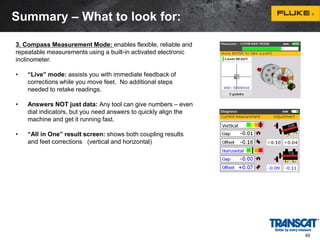
3. Compass Measurement Mode: enables flexible, reliable and 
repeatable measurements using a built-in activated electronic 
inclinometer. 
• “Live” mode: assists you with immediate feedback of 
corrections while you move feet. No additional steps 
needed to retake readings. 
• Answers NOT just data: Any tool can give numbers – even 
dial indicators, but you need answers to quickly align the 
machine and get it running fast. 
• “All in One” result screen: shows both coupling results 
and feet corrections (vertical and horizontal) 
49 
Summary – What to look for:
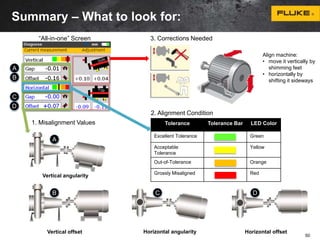
1. Misalignment Values 
Vertical angularity 
3. Corrections Needed 
2. Alignment Condition 
Tolerance Tolerance Bar LED Color 
Excellent Tolerance Green 
Acceptable 
Tolerance 
Yellow 
Out-of-Tolerance Orange 
Grossly Misaligned Red 
Vertical offset Horizontal angularity Horizontal offset 
A 
B 
C 
D 
A 
B C D 
Align machine: 
• move it vertically by 
shimming feet 
• horizontally by 
shifting it sideways 
“All-in-one” Screen 
50 
Summary – What to look for:
4. Dynamic Machine Tolerance Check: provides continuous evaluation of alignment 
adjustments to know when machine in acceptable range. 4-level color severity scale 
indicates when alignment is acceptable – Green = aligned, Yellow = acceptable, Orange = 
out of tolerance, Red = grossly misaligned. 
5. Data Protection ensures your data is there when you need it with auto save and 
resume capability 
Reports: document work done – print report “as found “and “as left” 
6. Unique Extend Mode: offers unlimited measurement ranges to handle gross 
misalignment scenarios with best accuracy. 
How big is the sensor? The real question should be: how big is the misalignment? 
•Don’t waste time with a rough alignment or pay for expensive big, bulky sensors 
•Virtually increases the sensor area when needed 
Clock Mode: align vertical, uncoupled and non-rotatable shafts 
Soft foot: check to make sure misalignment not from foundation problem 
51 
Summary – What to look for:
Questions and Answers 
Fluke 830 Laser Shaft Alignment Tool: 
 Alignment of Horizontal and Vertical machines 
 Alignment of Coupled, Uncoupled and Non-rotatable shafts 
 Unibeam for quick adjustment of the single laser beam 
 Automatic user work-flow Setup  Measurement  Diagnose 
 Active compass measurement mode – Electronic inclinometer 
 Automatic evaluation of alignment condition – color scale 
 Live Move for either Horizontal or Vertical machine corrections 
 Soft foot check and Static measurement mode 
 Extendable detector range to handle gross misalignment 
 Auto save and resume file capability 
 Save up to 200 measurement files 
 Save measurement reports at PDF to USB memory stick 
Thank you for 
your time 
Transcat Fluke Sales Specialist, Melissa Hill 
(800) 828-1470 Ext. 3446 
mhill@transcat.com 
Transcat Sales & Service Team 
(800) 828-1470 
sales@transcat.com

Transcat and Fluke Present: Precision Shaft Alignment Made Easy

  • 1.
    Precision Laser ShaftAlignment Fluke 830 Laser Alignment tool
  • 2.
    2 Agenda Benefits – Why is precision alignment needed? • Asset Uptime / Proactive Maintenance • Benefits of Precision Shaft Alignment  Alignment Principles and Laser Technology • What is shaft alignment? Why laser alignment?  Fluke Shaft Alignment Tool Overview – How to Use it • Fluke Alignment Tool Hardware overview • Quick, Easy, Step by step, Precision alignment (QRG)  Overview, Mount Brackets, Setup, Measure, Diagnose, Correction • Other: Soft Foot, Save, Report  What to look for in a Shaft Alignment Tool?  Questions and Answers
  • 3.
    Fluke. Keeping yourworld up and running.® 1) Thermal Imager or Vibration Meter finds machine problems 2) Vibration Tester diagnoses fault, severity and repair recommendation 3) Fluke Connect shares data between users - allows planner to generate work order 4) Alignment Tool corrects the problem 5) Vibration Tester checks the machine is fixed Thermal Imager Alignment Tool Vibration Tester Vibration Tester Problem found Problem identified & 1 3 Problem corrected 4 repair recommended Machine checked - good 3 2 Vibration Meter Vibration Meter
  • 4.
    Benefits of ProactiveMaintenance • Predictability: give maintenance staff time to schedule required repairs and acquire parts. • Safety: take faulty equipment offline before a hazardous condition occurs. • Revenue: fewer unexpected and serious failures, helping to prevent production stoppages that cut into the bottom line. • Increased maintenance intervals: life of equipment can be extended and maintenance can be scheduled by need. • Reliability: fewer unexpected or catastrophic failures - problem areas can be anticipated before failure • Peace of mind: builds confidence in maintenance schedules, budgeting, and productivity estimates. 4
  • 5.
    5 Asset Uptimebegins with shaft alignment Why precision alignment? • Reduce your energy consumption • Fewer failures of seals, couplings and bearings • Lower temperatures of bearings and coupling • Lower vibration levels – that result in fewer mechanical faults • No shaft cracking or failures • No lose foundation bolts 1. Heat from misalignment 2. Alignment within tolerance 1. The flexible coupling heats up and the machine develops higher temperatures, especially at the bearings. 2. The high reaction forces are drastically reduced after precision alignment and so are the faults that lead to asset failure and production losses.
  • 6.
    Benefits of PrecisionAlignment • Up to 50% of damage to rotating machinery is directly related to misalignment! • Well aligned machines reduce operating costs! 10/22/2014 6
  • 7.
    Applications/Users/Industries Typical Applications: • Precision alignment of rotating machinery Industries: • Chemical/Petrochemical • Oil and Gas • Power • Automotive • Pulp, Paper and Printing • Food processing • Marine • Steel • Mining • Machinery manufacturing • Cement • Service organizations Users: • Mechanical Maintenance Technicians • Facilities Engineers Value Proposition: • Energy savings • Prevent Unplanned Downtime • Reduce Component Replacement Costs • Reduce Repair Time • Easier to Use
  • 8.
    What is shaftalignment ? at the point of power transfer from one shaft to another, the axes of rotation of both shafts should be colinear when the machine is running under normal operating conditions
  • 9.
    The 4 alignmentparameters Vertical angularity Vertical offset Horizontal angularity Horizontal offset
  • 10.
    Alignment condition •Alignment condition is always a combination of angularity and offset • Machine has to be corrected in both vertical and horizontal planes • 4 values are required to fully describe the alignment condition: 1. Vertical angularity (or gap per diameter) 2. Vertical offset 3. Horizontal angularity (or gap per diameter) 4. Horizontal offset • Offset refers to distance between shaft rotation axes at coupling center
  • 11.
    Coupling tolerance Anoften quoted comment is “...why bother to align the machine when it is fitted with a flexible coupling designed to take misalignment?” It is true that flexible couplings are designed to take misalignment, typically up to 1-2 mm or more radial offset of the shafts. But the load imposed on shafts, and thus the bearings and seals increase dramatically due to the reaction forces created within the coupling when misaligned.
  • 12.
    Symptoms of misalignment  Excessive radial and axial vibration.  High casing temperatures at or near the bearings or high discharge oil temperatures.  Excessive amount of oil leakage at the bearing seals.  Loose foundation bolts, shim packs or dowel pins.  Loose or broken coupling bolts.  Some flexible coupling designs run hot under misalignment conditions. If it is an elastomeric type, look for rubber powder inside the coupling shroud.  Similar pieces of equipment are vibrating less or seem to have a longer operating life.  Unusually high number of coupling failures or they wear quickly.  The shafts are breaking (or cracking) at/or close to the inboard bearings or coupling hubs.  Excessive amounts of grease (or oil) on the inside of the coupling guard.
  • 13.
    Consequences of misalignment Coupling damage Machine vibration Bearing damage Seal wear Others
  • 14.
    Common alignment methods Straightedge/Feeler gauge Resolution 1/10 mm Dial indicator Resolution 1/100 mm Laser-optical alignment Resolution 1/1000 mm
  • 15.
    Straightedge and feelergauges  Limited resolution of the human eye: 0.1 mm /0.004”  Coupling alignment - not shaft alignment  Prone to coupling fitting errors  Trial and error corrections  No documentation  Far too inaccurate for most machines
  • 16.
    Dial indicators Resolution (typical): 0.01 mm /0.0004”  Bracket sag  Mechanical play  Possible sign error  Calculations complicated  Requires high user experienced.
  • 17.
    Laser alignment methods  Resolution of 1/1000 mm (0.00004")  Universal bracket  No bracket sag influence  Human error free  Accurate measurement  Graphical result display: No misinterpretation  Alignment evaluation  “Live” corrections  Documented results
  • 18.
    18 Laser AlignmentOverview and How to Use • Fluke Alignment Tool Hardware overview  Sensor and Prism  Measurement principle • Quick, Easy, Step by step, Precision alignment (QRG)  Overview of Fluke Alignment Tool  Steps of Precision Alignment  Other: Soft Foot, Save, Report
  • 19.
    Fluke Alignment Tool– hardware overview Alignment tool Bluetooth Single Laser: sensor - prism Laser sensor and prism Precision prism reflects beam back
  • 20.
    Laser Alignment Technology- Sensor Wireless module slides onto the support posts 1. Wirelss module held in place by friction fit 2. Tighten the yellow knobs; attach cable connector from wireless module CAUTION DON‘T STARE INTO BEAM Out of range -1-1 End Detector surface Linearized area Laser type AlGaiInP semiconductor laser Wavelength 675 nm (red, visible) Safety class Class 2 Beam power < 1mW
  • 21.
    Dust cap Type90° roof prism Protection IP 67 Prism
  • 22.
    Laser principle One sensor / prism  Laser: semiconductor laser  One roof prism as reflector  Quick setup and laser beam adjustment  Built-in electronic inclinometer Measurement principle
  • 23.
    Offset and angularityfrom the calculation ellipse Measurement principle
  • 24.
    Easy to use– Step by Step guidance Steps of Precision Alignment Mount Brackets - preparation Setup – enter machine dimensions Measure – take 3 of 8 available measurements Diagnose – alignment results, condition, feet adjustments Make Corrections – vertical, then horizontal, save & print
  • 25.
    Quick, Easy, Stepby step, Precision alignment Quick Reference Guide Overview, Mount Brackets, Setup, Measure, Diagnose, Make Correction 25
  • 26.
    Quick, Easy, Stepby step, Precision alignment Quick Reference Guide Overview, Mount Brackets, Setup, Measure, Diagnose, Make Correction 26
  • 27.
    Alignment tool Step1 Step 3 Step 2
  • 28.
    Mount brackets onshaft in preparation 1 2 1 3 Anchor peg 1. Mount brackets on both sides of the coupling tightly on shaft X2
  • 29.
    Slide wireless moduleand sensor on posts 1 2 1 3 2. Mount wireless module and sensor on “Left machine” – usually Stationary - Mount as low as possible but high enough for beam to clear coupling flange After connecting sensor to wireless module, switch on wireless module LEDs Battery life 3 LEDs 75%–100% 2 LEDs 50%–75% 1 LED 25%–50% Blinking slowly - under 25% Blinking fast - critical phase
  • 30.
    Slide prism onposts 1 2 1 3 3. Mount prism on “Right machine” the same height as sensor. Center the laser dot on the prism dust cap
  • 31.
    Step 1 -Setup Machine Measure Press Setup machine dimensions 2 Enter dimensions 1 Step by step 1. Sensor to prism 2. Sensor to center of coupling 3. Coupling diameter (default is 100 mm / 10”) 4. RPM 5. Center of coupling to front foot (right machine) 6. Front foot to back foot (right machine) After the last required dimension has been entered, the measurement screen appears.
  • 32.
    Step 2 -Measure Machine 1 Press Measure OR Press Menu and select Compass Mode 2 Horizontal = Compass Mode; Vertical = Clock Mode Adjust prism – center reflected laser beam using thumbwheel and adjustment knob
  • 33.
    Step 2 -Measure Machine 3 Rotate shaft to first measurement position. Take measurement when sector turns green. Notes: • Always turn shafts in normal rotation direction of machine • Don’t touch mounted components 4 Rotate shaft to another sector Inclinometer automatically determines angle on shaft
  • 34.
    Step 2 -Measure Machine  Measure -1  Rotate to another sector  Measure - 2  Rotate to another sector  Measure - 3 2 - Measure Machine 5 Take measurement #2 when sector turns green – turns orange when measurement is complete 6 Take measurement #3 when sector turns green Measure from any 3 of 8 available positions
  • 35.
    Step 3 –Diagnose Faults Press Diagnose Alignment results with coupling values, condition and foot adjustment in both vertical and horizontal directions are displayed automatically
  • 36.
    Step 3 –Diagnose Faults 1. Misalignment Values 3. Corrections Needed 2. Alignment Condition “All-In-One” screen Align machine - move it vertically by shimming feet - horizontally by shifting it sideways
  • 37.
    Make vertical corrections Once alignment condition is found, a correction is recommended: • Loosen bolts and shim first for vertical correction • Jack up machine and insert or remove shims of known thicknesses • Use vertical foot correction values to shim BOTH front and back feet • Negative feet correction values indicate feet are high and remove shims • Positive foot correction values suggest addition of shims • Retighten bolts and Re-measure - Use Horizontal live Mode
  • 38.
    Make horizontal corrections Select ‘Move’ icon Rotate shaft to any 45°position Shim for “Vertical” Jack for “Horizontal” Watch color-coded tolerance bar. When green or yellow, tighten feet anchor bolts. Loosen bolts and move machine in direction of yellow triangles Select “Horizontal”
  • 39.
    Recheck alignment Recheckalignment Save data Print report to document work Finally Switch 830 off, remove components from shafts, and store them in case Poor repeatability? Possible causes: • Incorrect or loose bracket mounting; Mounted components move during rotation • Significant shaft bearing play or coupling backlash • Soft foot can cause positioning errors that make repeat measurement necessary • Loose anchor bolts; Uneven shaft rotation; Vibration • Yellow knobs on sensor loose, or prism not locked • Sensor is mounted incorrectly or upside down • Temperature change: machine recently shut down
  • 40.
    40 Fluke AlignmentTool – How to Use Other Steps  Soft Foot – check before alignment  Tolerance Table – know when to stop  Save File  Report – print “as found” and “as left”
  • 41.
    Check Soft Footbefore alignment Any cause that results in machine frame distortion when machine is anchored to its foundation is a soft foot. Some of the principal causes are: • Non-coplanar machine mounting surfaces • Deformed machine frame or feet • External forces from connecting piping or brackets • Improper shimming or soiled machine feet • Too many shims under a machine foot (maximum of 5 shims) Forcibly tightening down feet deforms machine frame, causes bent shaft and distorts bearings. Soft foot should be checked before aligning the shafts. • Calculate how much each foot has moved as bolt is loosened. • Results are interpreted and translated into shim thicknesses to be placed under the feet.
  • 42.
    Soft Foot check • Retighten each motor anchor bolt and measure another foot. • Repeat procedure for each foot. • Color-coded tolerance bar shows value of the measured soft foot. • Shimming corrections are necessary Soft Foot tolerance = 0.06 mm (0.002 inch)
  • 43.
    Tolerance Table Excellent– perfectly aligned Acceptable – still within tolerance Out of tolerance Grossly misaligned
  • 44.
    Save File Savemachines  Dimensions  Measurements  Diagnosis  Settings
  • 45.
    Print Report –Save PDF Report to USB stick File management Save PDF to USB drive  Copy PDF to PC to print  Save to PDF on PC for history 3 report types Also print to printer - Need printer USB cable
  • 46.
    Document work withPDF Reports
  • 47.
    Summary – Whatto look for: 1. Single Laser Beam Auto-collimating laser optics system is less susceptible to backlash  less error means more accurate and more repeatable • Rugged design: ergonomic, robust, and protected from dust & water • Repeatability Matters: patented single laser, precision manufactured parts and high quality fasteners coupled with extremely accurate lab calibrations give you added confidence in your measurement results. • Wireless: Bluetooth communication removes cables that take longer to use • Integrated batteries: Li-Ion rechargeable for long life Flexible couplings don’t fix misalignment – high loads on shafts still exist  Bearings and seals wear and then fail 47
  • 48.
    1 2 3 2. Intuitive guided user interface: eliminates guesswork, increases accuracy. Many tools are simple, but take time to re-learn what the numbers mean – you need answers. • Fluke 830 focus: remove high-end programs that are not needed • 3 simple steps: walk you through steps (like the Fluke 810 Vibration Tester) 1. Setup – step by step to input the machine dimensions (saved from last time) 2. Measure – sweep starts when shafts rotated – take readings from 3 sectors when turn green on screen. 3. Diagnose – actual correction numbers given: use precision shims to save time and precision alignment every time 48 Summary – What to look for:
  • 49.
    3. Compass MeasurementMode: enables flexible, reliable and repeatable measurements using a built-in activated electronic inclinometer. • “Live” mode: assists you with immediate feedback of corrections while you move feet. No additional steps needed to retake readings. • Answers NOT just data: Any tool can give numbers – even dial indicators, but you need answers to quickly align the machine and get it running fast. • “All in One” result screen: shows both coupling results and feet corrections (vertical and horizontal) 49 Summary – What to look for:
  • 50.
    1. Misalignment Values Vertical angularity 3. Corrections Needed 2. Alignment Condition Tolerance Tolerance Bar LED Color Excellent Tolerance Green Acceptable Tolerance Yellow Out-of-Tolerance Orange Grossly Misaligned Red Vertical offset Horizontal angularity Horizontal offset A B C D A B C D Align machine: • move it vertically by shimming feet • horizontally by shifting it sideways “All-in-one” Screen 50 Summary – What to look for:
  • 51.
    4. Dynamic MachineTolerance Check: provides continuous evaluation of alignment adjustments to know when machine in acceptable range. 4-level color severity scale indicates when alignment is acceptable – Green = aligned, Yellow = acceptable, Orange = out of tolerance, Red = grossly misaligned. 5. Data Protection ensures your data is there when you need it with auto save and resume capability Reports: document work done – print report “as found “and “as left” 6. Unique Extend Mode: offers unlimited measurement ranges to handle gross misalignment scenarios with best accuracy. How big is the sensor? The real question should be: how big is the misalignment? •Don’t waste time with a rough alignment or pay for expensive big, bulky sensors •Virtually increases the sensor area when needed Clock Mode: align vertical, uncoupled and non-rotatable shafts Soft foot: check to make sure misalignment not from foundation problem 51 Summary – What to look for:
  • 52.
    Questions and Answers Fluke 830 Laser Shaft Alignment Tool:  Alignment of Horizontal and Vertical machines  Alignment of Coupled, Uncoupled and Non-rotatable shafts  Unibeam for quick adjustment of the single laser beam  Automatic user work-flow Setup  Measurement  Diagnose  Active compass measurement mode – Electronic inclinometer  Automatic evaluation of alignment condition – color scale  Live Move for either Horizontal or Vertical machine corrections  Soft foot check and Static measurement mode  Extendable detector range to handle gross misalignment  Auto save and resume file capability  Save up to 200 measurement files  Save measurement reports at PDF to USB memory stick Thank you for your time Transcat Fluke Sales Specialist, Melissa Hill (800) 828-1470 Ext. 3446 mhill@transcat.com Transcat Sales & Service Team (800) 828-1470 sales@transcat.com

Editor's Notes

  • #2 Thank you for taking time to for this demo of the Fluke 830 Alignment Tool.
  • #4 Here are some of the Benefits of Proactive Maintenance: Improved reliability means reduced maintenance costs, better repair schedules and fewer parts needed Fewer unexpected production shutdowns means lower loses that cut into the bottom line Ability to know machine condition means better planning, budgets and higher productivity Which of these are important to you?
  • #5 Here are some of the Benefits of Proactive Maintenance: Improved reliability means reduced maintenance costs, better repair schedules and fewer parts needed Fewer unexpected production shutdowns means lower loses that cut into the bottom line Ability to know machine condition means better planning, budgets and higher productivity Which of these are important to you?
  • #8 It’s a known fact—all rotating machinery is susceptible to misalignment. If you’re still using rulers and dial indicators to ensure your rotating machinery is properly aligned, you could be losing thousands of dollars per year in replacement bearing costs, hours of unnecessary repair time, and crippling unplanned downtime, not to mention taking years off your machine’s useful life.
  • #12 11
  • #14 13
  • #20 The Unibeam technology is easier, quicker, and more accurate than two lasers. The laser head is mounted on the left side of the coupling and the prism is mounted on the right. The beam comes out of the transducer eye across the distance of the coupling, strikes the precision prism and is reflected back to through the transducer eye to the sensor.
  • #21 Here we see the laser and sensor head. Mount it on the left side of the coupling with the support posts – blue tooth module sits under sensor. See the sensor grid on the bottom – the sensor reports the laser beam location on the grid.
  • #22 The precision reflector is mounted on the right side of the coupling with the support posts. Adjust the laser beam inside the crosshairs by using the thumbwheels. Then remove the protective cap.
  • #24 By measuring the laser beam as the heads rotate with the shaft, the sensor plots the movement. The calculation is then made by the shape of the ellipse to get misalignment readings for both shaft offset and angularity
  • #32 Let’s overview some screens that you will see. This screen is what you will see when in Setup using the machine design wizard. When selecting an option in a pull down menu, use the Dial to highlight your choice, then press Enter.
  • #33 These are the screens that you will use to take a measurement on the machine. Follow the instructions on the screens to walk through the steps. Use the soft keys at the bottom to select functions.
  • #34 These are the screens that you will use to take a measurement on the machine. Follow the instructions on the screens to walk through the steps. Use the soft keys at the bottom to select functions.
  • #35 These are the screens that you will use to take a measurement on the machine. Follow the instructions on the screens to walk through the steps. Use the soft keys at the bottom to select functions.
  • #36 This is the screen that you will use to diagnose you machine. Use the soft keys at the bottom to select functions.
  • #37 This is the screen that you will use to diagnose you machine. Use the soft keys at the bottom to select functions.
  • #38 This is the screen that you will use to diagnose you machine. Use the soft keys at the bottom to select functions.
  • #39 This is the screen that you will use to diagnose you machine. Use the soft keys at the bottom to select functions.
  • #40 This is the screen that you will use to diagnose you machine. Use the soft keys at the bottom to select functions.
  • #43 This is the screen that you will use to diagnose you machine. Use the soft keys at the bottom to select functions.
  • #48 Misalignment in rotating machinery wastes money, it’s that simple. The new Fluke 830 Laser Shaft Alignment tool eliminates the difficult calculations and guesswork associated with traditional alignment methods so you can stop wasting money on unnecessary replacement parts, repair time and unplanned downtime. The Fluke 830 has been designed to simplify shaft alignment with a guided user interface and step-by-step machine set up process. Simply setup, measure and diagnose. The 4-level severity scale compares your machine to industry accepted machine tolerances and then give you specific, actionable repair recommendations that all you to get your machine up and running quickly.
  • #49 Misalignment in rotating machinery wastes money, it’s that simple. The new Fluke 830 Laser Shaft Alignment tool eliminates the difficult calculations and guesswork associated with traditional alignment methods so you can stop wasting money on unnecessary replacement parts, repair time and unplanned downtime. The Fluke 830 has been designed to simplify shaft alignment with a guided user interface and step-by-step machine set up process. Simply setup, measure and diagnose. The 4-level severity scale compares your machine to industry accepted machine tolerances and then give you specific, actionable repair recommendations that all you to get your machine up and running quickly.
  • #51 50