TRANSACTION PROCESSING SYSTEM
An Overview of the Transactional Processing System


                                                     1
Transaction Processing System (TPS)

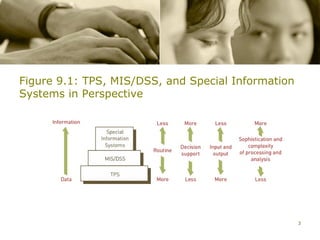
• A transaction processing system (TPS) provides data for other
  business processes


   – Management information system/decision support system
     (MIS/DSS)


   – Special-purpose information systems


                                                                  2
Figure 9.1: TPS, MIS/DSS, and Special Information
Systems in Perspective


                                                    3
Transaction Processing System (Continued)

• TPSs


   – Process the detailed data necessary to update records about
     the fundamental business operations


   – Include order entry, inventory control, payroll, accounts
     payable, accounts receivable, the general ledger, and more


                                                                   4
Traditional Transaction Processing
Methods and Objectives

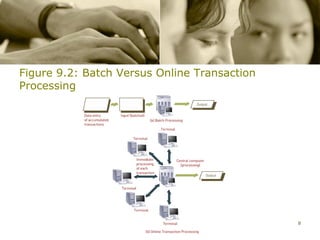
• Batch processing system: method of computerized processing in
  which business transactions are accumulated over a period of time
  and prepared for processing as a single unit or batch


• Online transaction processing (OLTP): computerized
  processing in which each transaction is processed immediately,
  without the delay of accumulating transactions into a batch


                                                                   5
Traditional Transaction Processing
Methods and Objectives Performance Reviews
(Continued)
• Online entry with delayed processing: transactions are entered
  into the computer system when they occur, but they are not
  processed immediately

• Organizations expect their TPSs to:

   – Process data generated for and about transactions

   – Maintain a high degree of accuracy and integrity
                                                              6
   – Produce timely documents and reports
Traditional Transaction Processing
Methods and Objectives Performance Reviews
(Continued)
• Organizations expect their TPSs to (continued):


   – Increase labor efficiency


   – Help provide increased service


   – Help build and maintain customer loyalty


   – Achieve competitive advantage
                                                    7
Figure 9.2: Batch Versus Online Transaction
Processing


                                              8
Transaction Processing Activities

• TPSs

   – Capture and process data that describes fundamental business
     transactions

   – Update databases

   – Produce a variety of reports

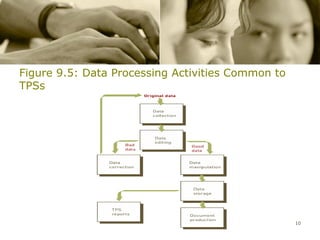
• Transaction processing cycle: the process of data collection,
  data editing, data correction, data manipulation, data storage, and
  document production
                                                                    9
Figure 9.5: Data Processing Activities Common to
TPSs


                                                   10
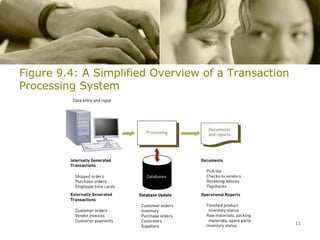
Figure 9.4: A Simplified Overview of a Transaction
Processing System


                                                     11
Transaction Processing Activities (Continued)
• Data collection

   – The process of capturing and gathering all data necessary to
     complete transactions

• Data editing

   – The process of checking data for validity and completeness.

• Data correction

   – The process of reentering miskeyed or misscanned data that
     was found during data editing.
                                                                    12
Transaction Processing Activities (Continued)
• Data manipulation

   – The process of performing calculations and other data
     transformation related to business transaction.

• Data storage

   – The process of updating one or more databases with new
     transactions.

• Document Production

   – The process of generating output records and reports.
                                                              13
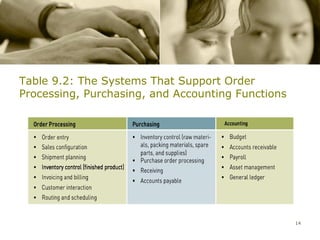
Table 9.2: The Systems That Support Order
Processing, Purchasing, and Accounting Functions


                                                   14
Order Processing Systems

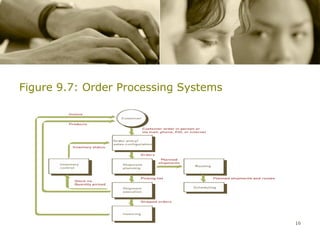
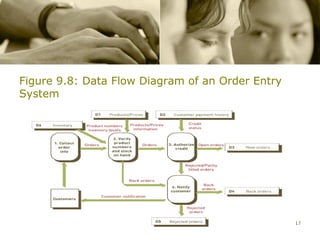
• Order entry system: captures the basic data needed to process a
  customer order


• Sales configuration system: ensures that the products and
  services ordered are sufficient to accomplish the customer’s
  objectives and will work well together


• Shipment planning system: determines which open orders will
  be filled and from which location they will
  be shipped
                                                                 15
Figure 9.7: Order Processing Systems


                                       16
Figure 9.8: Data Flow Diagram of an Order Entry
System


                                                  17
Order Processing Systems (Continued)

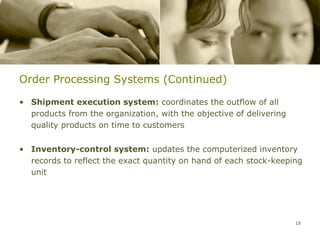
• Shipment execution system: coordinates the outflow of all
  products from the organization, with the objective of delivering
  quality products on time to customers


• Inventory-control system: updates the computerized inventory
  records to reflect the exact quantity on hand of each stock-keeping
  unit


                                                                     18
Order Processing Systems (Continued)

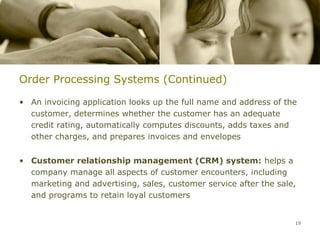
• An invoicing application looks up the full name and address of the
  customer, determines whether the customer has an adequate
  credit rating, automatically computes discounts, adds taxes and
  other charges, and prepares invoices and envelopes


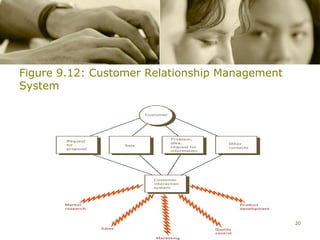
• Customer relationship management (CRM) system: helps a
  company manage all aspects of customer encounters, including
  marketing and advertising, sales, customer service after the sale,
  and programs to retain loyal customers


                                                                   19
Figure 9.12: Customer Relationship Management
System


                                                20
Order Processing Systems (Continued)

• Routing system: determines the best way to get products from
  one location to another


• Scheduling system: determines the best time to pick up or
  deliver goods and services


                                                                 21
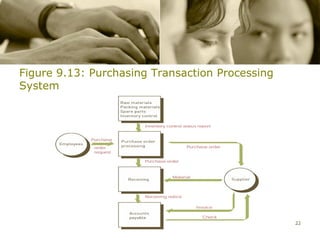
Figure 9.13: Purchasing Transaction Processing
System


                                                 22
Purchasing Systems

• Inventory control


• Purchase order processing system: helps purchasing
  departments complete their transactions quickly and efficiently


                                                                    23
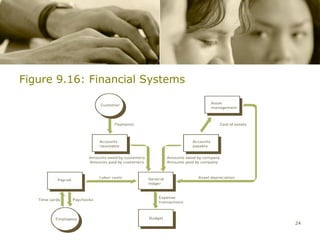
Figure 9.16: Financial Systems


                                 24
Purchasing Systems (Continued)

• Receiving system: creates a record of expected receipts


• Accounts payable system: increases an organization’s control
  over purchasing, improves cash flow, increases profitability, and
  provides more effective management of current liabilities


                                                                      25
Accounting Systems

• Budget transaction processing system: automates many of the
  tasks required to amass budget data, distribute it to users, and
  consolidate the prepared budgets


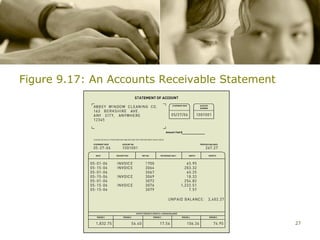
• Accounts receivable system: manages the cash flow of the
  company by keeping track of the money owed the company on
  charges for goods sold and services performed


                                                                26
Figure 9.17: An Accounts Receivable Statement


                                                27
Accounting Systems (Continued)

• Payroll system prepares:


   – Payroll check and stub


   – Payroll register


   – W-2 statements


• Asset management transaction processing system: controls
  investments in capital equipment and manages depreciation for
  maximum tax benefits                                          28
Accounting Systems (Continued)

• General ledger system: designed to automate financial reporting
  and data entry


                                                               29
Control and Management Issues

• Business continuity planning: identification of the business
  processes that must be restored first in the event of a disaster and
  specification of what actions should be taken and who should take
  them to restore operations


• Disaster recovery: actions that must be taken to restore
  computer operations and services in event of disaster


                                                                    30
Transaction Processing System Audit

• Does the system meet the business need for which it was
  implemented?


• What procedures and controls have been established?


• Are these procedures and controls being used properly?


• Are the information systems and procedures producing accurate
  and honest reports?


                                                                  31
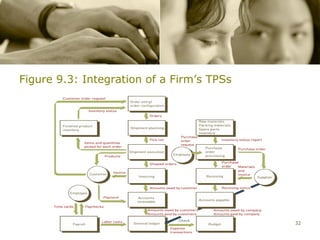
Figure 9.3: Integration of a Firm’s TPSs


                                           32
Transaction Processing System Audit

• Does the system meet the business need for which it was
  implemented?


• What procedures and controls have been established?


• Are these procedures and controls being used properly?


• Are the information systems and procedures producing accurate
  and honest reports?


                                                                  33
International Issues

• Issues that multinational corporations face in planning, building,
  and operating their TPSs


    – Different languages and cultures


    – Disparities in information system infrastructure


    – Varying laws and customs rules


    – Multiple currencies
                                                                       34
“Life is full of uncertainty, just go and deal with it.”

                                            JAYSON C. JUECO
                                       BS Electrical Engineering
                                                        Reporter


                                                             35

Transaction processing system

  • 1.
    TRANSACTION PROCESSING SYSTEM AnOverview of the Transactional Processing System 1
  • 2.
    Transaction Processing System(TPS) • A transaction processing system (TPS) provides data for other business processes – Management information system/decision support system (MIS/DSS) – Special-purpose information systems 2
  • 3.
    Figure 9.1: TPS,MIS/DSS, and Special Information Systems in Perspective 3
  • 4.
    Transaction Processing System(Continued) • TPSs – Process the detailed data necessary to update records about the fundamental business operations – Include order entry, inventory control, payroll, accounts payable, accounts receivable, the general ledger, and more 4
  • 5.
    Traditional Transaction Processing Methodsand Objectives • Batch processing system: method of computerized processing in which business transactions are accumulated over a period of time and prepared for processing as a single unit or batch • Online transaction processing (OLTP): computerized processing in which each transaction is processed immediately, without the delay of accumulating transactions into a batch 5
  • 6.
    Traditional Transaction Processing Methodsand Objectives Performance Reviews (Continued) • Online entry with delayed processing: transactions are entered into the computer system when they occur, but they are not processed immediately • Organizations expect their TPSs to: – Process data generated for and about transactions – Maintain a high degree of accuracy and integrity 6 – Produce timely documents and reports
  • 7.
    Traditional Transaction Processing Methodsand Objectives Performance Reviews (Continued) • Organizations expect their TPSs to (continued): – Increase labor efficiency – Help provide increased service – Help build and maintain customer loyalty – Achieve competitive advantage 7
  • 8.
    Figure 9.2: BatchVersus Online Transaction Processing 8
  • 9.
    Transaction Processing Activities •TPSs – Capture and process data that describes fundamental business transactions – Update databases – Produce a variety of reports • Transaction processing cycle: the process of data collection, data editing, data correction, data manipulation, data storage, and document production 9
  • 10.
    Figure 9.5: DataProcessing Activities Common to TPSs 10
  • 11.
    Figure 9.4: ASimplified Overview of a Transaction Processing System 11
  • 12.
    Transaction Processing Activities(Continued) • Data collection – The process of capturing and gathering all data necessary to complete transactions • Data editing – The process of checking data for validity and completeness. • Data correction – The process of reentering miskeyed or misscanned data that was found during data editing. 12
  • 13.
    Transaction Processing Activities(Continued) • Data manipulation – The process of performing calculations and other data transformation related to business transaction. • Data storage – The process of updating one or more databases with new transactions. • Document Production – The process of generating output records and reports. 13
  • 14.
    Table 9.2: TheSystems That Support Order Processing, Purchasing, and Accounting Functions 14
  • 15.
    Order Processing Systems •Order entry system: captures the basic data needed to process a customer order • Sales configuration system: ensures that the products and services ordered are sufficient to accomplish the customer’s objectives and will work well together • Shipment planning system: determines which open orders will be filled and from which location they will be shipped 15
  • 16.
    Figure 9.7: OrderProcessing Systems 16
  • 17.
    Figure 9.8: DataFlow Diagram of an Order Entry System 17
  • 18.
    Order Processing Systems(Continued) • Shipment execution system: coordinates the outflow of all products from the organization, with the objective of delivering quality products on time to customers • Inventory-control system: updates the computerized inventory records to reflect the exact quantity on hand of each stock-keeping unit 18
  • 19.
    Order Processing Systems(Continued) • An invoicing application looks up the full name and address of the customer, determines whether the customer has an adequate credit rating, automatically computes discounts, adds taxes and other charges, and prepares invoices and envelopes • Customer relationship management (CRM) system: helps a company manage all aspects of customer encounters, including marketing and advertising, sales, customer service after the sale, and programs to retain loyal customers 19
  • 20.
    Figure 9.12: CustomerRelationship Management System 20
  • 21.
    Order Processing Systems(Continued) • Routing system: determines the best way to get products from one location to another • Scheduling system: determines the best time to pick up or deliver goods and services 21
  • 22.
    Figure 9.13: PurchasingTransaction Processing System 22
  • 23.
    Purchasing Systems • Inventorycontrol • Purchase order processing system: helps purchasing departments complete their transactions quickly and efficiently 23
  • 24.
  • 25.
    Purchasing Systems (Continued) •Receiving system: creates a record of expected receipts • Accounts payable system: increases an organization’s control over purchasing, improves cash flow, increases profitability, and provides more effective management of current liabilities 25
  • 26.
    Accounting Systems • Budgettransaction processing system: automates many of the tasks required to amass budget data, distribute it to users, and consolidate the prepared budgets • Accounts receivable system: manages the cash flow of the company by keeping track of the money owed the company on charges for goods sold and services performed 26
  • 27.
    Figure 9.17: AnAccounts Receivable Statement 27
  • 28.
    Accounting Systems (Continued) •Payroll system prepares: – Payroll check and stub – Payroll register – W-2 statements • Asset management transaction processing system: controls investments in capital equipment and manages depreciation for maximum tax benefits 28
  • 29.
    Accounting Systems (Continued) •General ledger system: designed to automate financial reporting and data entry 29
  • 30.
    Control and ManagementIssues • Business continuity planning: identification of the business processes that must be restored first in the event of a disaster and specification of what actions should be taken and who should take them to restore operations • Disaster recovery: actions that must be taken to restore computer operations and services in event of disaster 30
  • 31.
    Transaction Processing SystemAudit • Does the system meet the business need for which it was implemented? • What procedures and controls have been established? • Are these procedures and controls being used properly? • Are the information systems and procedures producing accurate and honest reports? 31
  • 32.
    Figure 9.3: Integrationof a Firm’s TPSs 32
  • 33.
    Transaction Processing SystemAudit • Does the system meet the business need for which it was implemented? • What procedures and controls have been established? • Are these procedures and controls being used properly? • Are the information systems and procedures producing accurate and honest reports? 33
  • 34.
    International Issues • Issuesthat multinational corporations face in planning, building, and operating their TPSs – Different languages and cultures – Disparities in information system infrastructure – Varying laws and customs rules – Multiple currencies 34
  • 35.
    “Life is fullof uncertainty, just go and deal with it.” JAYSON C. JUECO BS Electrical Engineering Reporter 35