TP32MTT.03
TP32MTT.03.1
[ GB ] Probes for
soil thermal profile
measurement
[ GB ][ GB ] Description
•	Temperature	measurement	at	7	levels	(TP32MTT.03)	or	6	levels		(TP32MTT.03.1)
•	In	accordance	with	the	requirements	of	the	World	Meteorological	Organization
•	RS485	digital	output	with	MODBUS‑RTU	protocol
•	Accurate	and	stable	measure	over	time
•	Degree	of	protection	IP	68
•	Minimal	invasiveness	in	the	soil
APPLICATION
•	Agriculture	
•	Geothermic	studies
Description
The	temperature	probe	TP32MTT.03	is	equipped	with	seven	Pt100	1/3	DIN	sensors	for	
the	measurement	of	temperature	at	depth:	+5	cm,	0,	‑5	cm,	‑10	cm,	‑20	cm,	‑50	cm,	
‑1	m	with	respect	to	the	soil	level,	according	to	the	indications	of	the	World	Meteoro‑
logical	Organization	(WMO).
The	probe	TP32MTT.03.1	is	equipped	with	six	Pt100	1/3	DIN	sensors	for	the	measure‑
ment	of	temperature	at	depth:	+5	cm,	0,	‑5	cm,	‑10	cm,	‑20	cm,	‑50	cm	with	respect	
to	the	soil	level.
The	fi	breglass	tube	ensures	a	perfect	impermeability	and	a	high	thermal	insolation	
along	the	vertical	axis.
The	RS485 digital	output	with	MODBUS RTU	protocol	allows	the	use	of	even	very	
long	 connection	 cables.	 It	 can	 be	 connected	 to	 the	 datalogger	 HD32MT.1	 and	
HD32MT.3,	or	to	any	other	datalogger	with	RS485	MODBUS	RTU	input.
The	M12	connector	present	on	the	hand	grip	of	the	probe	allows	an	easy	connection	
of	the	cable.	Cable	length	(optional)	2,	5	or	10	m,	with	open	wires	at	the	end.
Power	supply	6…30	Vdc.
Technical specifications
Sensors Pt100	1/3	DIN
Resolution 0.01	°C
Accuracy ±	0.1	°C	@	0	°C
Working temperature ‑40…+85	°C
Temperature drift 0.003	%/°C	@	20	°C
Power supply 6…30	Vdc
Consumption 5	mA	@	12	Vdc
Output RS485	with	MODBUS‑RTU	protocol
Connection 8‑pole	M12	male	connector	
Cable Optional,	with	8	poles	with	length	of	2,	5	or	10 m	(to	be	de‑
fi	ned	at	the	order)	with	open	wires	at	the	end.
Protection Degree IP	68
Fig. 2: installation
Indicate	the	presence	of	the	probe	during	the	maintenance	operations	of	the	soil	
(e.g.	lawn	mowing,	ploughing,	mechanized	harvesting,	etc.).
To	remove	the	probe	from	the	soil,	insert	a	pin	into	the	Ø	8mm	hole	at	the	top	of	the	
handle	and	pull	it	upwards.	Remove the probe vertically, avoiding its inclination
during extraction to avoid damaging the stem.
Connect	the	M12	connector	as	shown	in	Fig	3	and	4.	On request, 5 or 10 m stand-
ard cables with 8-pole M12 female connector are available (other lengths
available on request).
	
Connector
numbering
Function Colour
1 Negative	power	supply Black
2 Positive	power	supply Red
3 Not	connected
4 RS485	A/‑ Brown
5 RS485	B/+ White
6 Not	connected
7 Not	connected
8 Not	connected
Fig. 3: connections
Fig. 4: RS485 connection
Fig. 1: dimensions of the probe TP32MTT.03 (mm)
Installation
By	means	of	an	accessory,	perform	a	hole	into	the	soil	deep	enough	to	accommodate	
the	stem	of	the	probe.	Never	use	the	probe	to	make	the	hole	in	the	soil,	to	avoid	me‑
chanical	damage	to	the	probe	itself.
Once	the	hole	has	been	performed			in	the	soil,	insert	the	stem	of	the	probe	so	that	the	
indicator	of	the	zero	level	is	in	correspondence	with	the	surface	of	the	soil.	The	probe	
must	be	stable	in	a	vertical	position.
After	the	introduction	of	the	probe	into	the	hole,	fi	ll	in	the	empty	spaces	between	
the	soil	and	the	stem	of	the	probe	with	some	soil	made	powder.	To	obtain	accurate	
measurements,	the	soil	should	be	in	contact	with	the	stem.
Soil level
Groove	to	apply	the	fl	ag
indicating	placememt	position
Hole	Ø	8mm	for	the	introduction	of	a
pin	for	the	extraction	of	the	probe
Soil	level	indication	on	the
stem	of	the	probe
Soil	level
Probe M12 male
connector
Cable CPM12-8P...
Termination Termination
Other sensors with
RS485 output
PLC, datalogger or
converter RS485/USB
or RS485/RS232 for PC
Probe M12
male connector Cavo CPM12-8P...
Shield
White
Brown
Black
Power supply
6...30 Vdc
Red
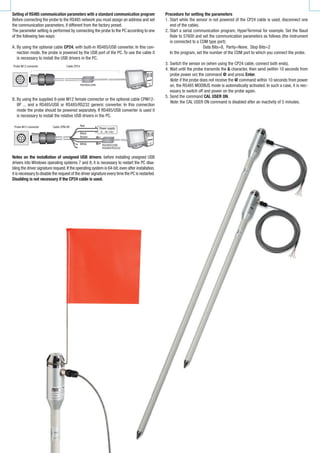
Setting of RS485 communication parameters with a standard communication program
Before	connecting	the	probe	to	the	RS485	network	you	must	assign	an	address	and	set	
the	communication	parameters,	if	different	from	the	factory	preset.
The	parameter	setting	is	performed	by	connecting	the	probe	to	the	PC	according	to	one	
of	the	following	two	ways:
A.	By	using	the	optional	cable	CP24,	with	built‑in	RS485/USB	converter.	In	this	con‑
nection	mode,	the	probe	is	powered	by	the	USB	port	of	the	PC.	To	use	the	cable	it	
is	necessary	to	install	the	USB	drivers	in	the	PC.
B.	By	using	the	supplied	8‑pole	M12	female	connector	or	the	optional	cable	CPM12‑
8P	...	and	a	RS485/USB	or	RS485/RS232	generic	converter.	In	this	connection	
mode	the	probe	should	be	powered	separately.	If	RS485/USB	converter	is	used	it	
is	necessary	to	install	the	relative	USB	drivers	in	the	PC.
Notes on the installation of unsigned USB drivers:	before	installing	unsigned	USB	
drivers	into	Windows	operating	systems	7	and	8,	it	is	necessary	to	restart	the	PC	disa‑
bling	the	driver	signature	request.	If	the	operating	system	is	64‑bit,	even	after	installation,	
it	is	necessary	to	disable	the	request	of	the	driver	signature	every	time	the	PC	is	restarted.	
Disabling is not necessary if the CP24 cable is used.
Procedure for setting the parameters
1.	Start	while	the	sensor	is	not	powered	(if	the	CP24	cable	is	used,	disconnect	one	
end	of	the	cable).
2.	Start	a	serial	communication	program,	HyperTerminal	for	example.	Set	the	Baud	
Rate	to	57600	and	set	the	communication	parameters	as	follows	(the	instrument	
is	connected	to	a	COM	type	port):
Data	Bits=8,		Parity=None,		Stop	Bits=2
	 In	the	program,	set	the	number	of	the	COM	port	to	which	you	connect	the	probe.
3.	Switch	the	sensor	on	(when	using	the	CP24	cable,	connect	both	ends).
4.	Wait	until	the	probe	transmits	the	&	character,	then	send	(within	10	seconds	from	
probe	power	on)	the	command @ and	press	Enter.
Note:	if	the	probe	does	not	receive	the	@	command	within	10	seconds	from	power	
on,	the	RS485	MODBUS	mode	is	automatically	activated.	In	such	a	case,	it	is	nec‑
essary	to	switch	off	and	power	on	the	probe	again.
5.	Send	the	command	CAL USER ON.
Note:	the	CAL USER ON	command	is	disabled	after	an	inactivity	of	5	minutes.	
Probe M12 connector Cable CP24
Probe M12 connector Cable CPM-8P... Power supply
Red
Black
Brown
White
6.	Send the following serial commands to set the RS485 MODBUS parameters:
Command Reply Description
CMAnnn &| Set address RS485 to nnn
Ranging from 1 to 247. Preset on 1
CMBn &| Set RS485 Baud Rate: n=0 ⇒ 9600, n=1 ⇒ 19200
Preset on 1 ⇒ 19200
CMPn &| Set RS485 transmission mode (data bits, parity, stop bits):
n=0 ⇒ 8N1, n=1 ⇒ 8N2, n=2 ⇒ 8E1	
n=3 ⇒ 8E2, n=4 ⇒ 8O1, n=5 ⇒ 8O2
Preset on 2 ⇒ 8E1
CMWn &| Set receiving mode after RS485 transmission:
n=0 ⇒	 Violate protocol and go in Tx mode right after Tx
n=1 ⇒	 Respect protocol and wait 3.5 characters after Tx
Preset on 1 ⇒ Respect the protocol
7.	It is possible to check the settings of the parameters by sending the following
commands:
Command Reply Description
RMA Address Read RS485 address
RMB
Baud Rate
(0,1)
Read RS485 Baud Rate: 0 ⇒ 9600, 1 ⇒ 19200
RMP
Tx Mode
(0,1,2,3,4,5)
Read RS485 transmission mode:
0 ⇒ 8N1, 1 ⇒ 8N2, 2 ⇒ 8E1, 3 ⇒ 8E2, 4 ⇒ 8O1, 5 ⇒ 8O2
RMW
Rx Mode
(0,1)
Read reception mode after RS485 transmission:
0 ⇒	 Violate the protocol and go in Tx mode right after Tx
1 ⇒	 Respect the protocol and wait 3.5 characters after Tx
Note: the command CAL USER ON is not required for reading the settings.
OPERATING MODE
The probe enters  RS485 MODBUS‑RTU mode after 10 seconds from power on.During the
first 10 seconds from power on,the probe does not respond to any request from the MOD‑
BUS master unit.After 10 seconds, it is possible to send MODBUS requests to the probe.
Reading the measurements
In MODBUS mode, it is possible to read, through the function code 04h  (Read Input Reg‑
isters), the measured values ​​and the status of the probe. The following table lists the
available MODBUS Input Registers:
MODBUS Input Registers
Register
Number
Register
Address
Datum Format
1 0
Temperature in °C at -1 m from the soil [x100]
Note: the value has no meaning for the probe
TP32MTT.03.1
16-bit integer
2 1 Temperature in °C at -50 cm from the soil [x100] 16-bit integer
3 2 Temperature in °C at -20 cm from the soil [x100] 16-bit integer
4 3 Temperature in °C at -10 cm from the soil [x100] 16-bit integer
5 4 Temperature in °C at -5 cm from the soil [x100] 16-bit integer
6 5 Temperature in °C at the soil level [x100] 16-bit integer
7 6 Temperature in °C at +5 cm from the soil [x100] 16-bit Integer
8 7
Temperature in °F at -1 m from the soil [x100]
Note: the value has no meaning for the probe
TP32MTT.03.1
16-bit Integer
9 8 Temperature in °F at -50 cm from the soil [x100] 16-bit Integer
10 9 Temperature in °F at -20 cm from the soil [x100] 16-bit Integer
11 10 Temperature in °F at -10 cm from the soil [x100] 16-bit Integer
12 11 Temperature in °F at -5 cm from the soil [x100] 16-bit Integer
13 12 Temperature in °F at the soil level [x100] 16-bit Integer
14 13 Temperature in °F at +5 cm from the soil [x100] 16-bit Integer
Note: in case of measurement error -9999 is returned.
Reading the error conditions
The function code 03h (Read Holding Registers) allows to read the r16-bit egister
number 3 (address 2) containing information on any error status of the probe.
The bits of the register indicate the error condition according to the following corre‑
spondence:
Bit Description
0…8 Functional error with the circuit board or error in the calibration data.
9 Sensor measurement error at -1 m
10 Sensor measurement error at -50 cm
11 Sensor measurement error at -20 cm
12 Sensor measurement error at -10 cm
13 Sensor measurement error at -5 cm
14 Sensor measurement error at 0 cm
15 Sensor measurement error at +5 cm
The register is cleared after reading. If the error condition persists, then the error
code is restored.
ORDERING CODES
TP32MTT.03: Temperature probe equipped with seven Pt100 1/3 DIN sensors for
the measurement of temperature at depth: +5 cm, 0, -5 cm, -10 cm, -20 cm,
‑50 cm, -1 m with respect to the ground level, according to the indications of
the WMO. RS485 digital output with MODBUS-RTU protocol. 8-pole M12 male
connector. Power supply 6…30 Vdc. The CPM12-8P… cable must be ordered
separately.
TP32MTT.03.1: Temperature probe equipped with six Pt100 1/3 DIN sensors for the
measurement of temperature at depth: +5 cm, 0, -5 cm, -10 cm, -20 cm, ‑50
cm with respect to the ground level, according to the indications of the WMO.
RS485 digital output with MODBUS-RTU protocol. 8-pole M12 male connector.
Power supply 6…30 Vdc. The CPM12-8P… cable must be ordered sepa-
rately.
CP24: PC connecting cable for the configuration of the MODBUS parameters. With
built-in RS485/USB converter. 8-pole M12 connector on probe side and USB
A-type connector on the PC side.
CPM12-8P.2: 8-pole cable. Length 2 m. 8‑pole M12 connector at one side, open
wires on the other side.
CPM12-8P.5: 8-pole cable. Length 5 m. 8‑pole M12 connector at one side, open
wires on the other side.
CPM12-8P.10: 8-pole cable. Length 10 m. 8‑poles M12 connector at one side, open
wires on the other side.
TP32MTT.03.A: Accessory to perform the hole in the soil to insert the probe.
TP32MTT.03.B: Accessory for signaling the presence of the probe.
Delta Ohm srl - Via G. Marconi, 5 - 35030 Caselle di Selvazzano (Pd) - Italy
Tel. 0039 0498977150 r.a. Fax 0039 049635596 - E-mail: info@deltaohm.com Web Site: www.deltaohm.com
RoHS
2002/95/EC
03
24.14
CE CONFORMITY
• Safety: EN61000-4-2, EN61010-1 Level 3
• Electrostatic discharge: EN61000-4-2 Level 3
• Electric fast transients: EN61000-4-4 Level 3, EN61000-4-5 Level 3
• Voltage variations: EN61000-4-11
• Electromagnetic interference susceptibility: IEC1000-4-3
• Electromagnetic interference emission: EN55022 class B
LAT N° 124 Signatory of EA, IAF and ILAC Mutual Recognition Agreements
Temperature - Humidity - Pressure - Air speed
Photometry/Radiometry - Acoustics
Manufacture of portable, bench top and process scientific instruments
Current and voltage loop transmitters and regulators
Temperature - Humidity, Dew point - Pressure - CO, CO2
Air speed - Light - Optical Radiation
Acoustics - Vibration
Data logger - Data logger wireless
Microclimate
pH - Conductivity - Dissolved Oxygen - Turbidity
Elements for weather stations

TP32MTT03D Soil temperature Profile DELTAOHM

  • 1.
    TP32MTT.03 TP32MTT.03.1 [ GB ]Probes for soil thermal profile measurement
  • 2.
    [ GB ][GB ] Description • Temperature measurement at 7 levels (TP32MTT.03) or 6 levels (TP32MTT.03.1) • In accordance with the requirements of the World Meteorological Organization • RS485 digital output with MODBUS‑RTU protocol • Accurate and stable measure over time • Degree of protection IP 68 • Minimal invasiveness in the soil APPLICATION • Agriculture • Geothermic studies Description The temperature probe TP32MTT.03 is equipped with seven Pt100 1/3 DIN sensors for the measurement of temperature at depth: +5 cm, 0, ‑5 cm, ‑10 cm, ‑20 cm, ‑50 cm, ‑1 m with respect to the soil level, according to the indications of the World Meteoro‑ logical Organization (WMO). The probe TP32MTT.03.1 is equipped with six Pt100 1/3 DIN sensors for the measure‑ ment of temperature at depth: +5 cm, 0, ‑5 cm, ‑10 cm, ‑20 cm, ‑50 cm with respect to the soil level. The fi breglass tube ensures a perfect impermeability and a high thermal insolation along the vertical axis. The RS485 digital output with MODBUS RTU protocol allows the use of even very long connection cables. It can be connected to the datalogger HD32MT.1 and HD32MT.3, or to any other datalogger with RS485 MODBUS RTU input. The M12 connector present on the hand grip of the probe allows an easy connection of the cable. Cable length (optional) 2, 5 or 10 m, with open wires at the end. Power supply 6…30 Vdc. Technical specifications Sensors Pt100 1/3 DIN Resolution 0.01 °C Accuracy ± 0.1 °C @ 0 °C Working temperature ‑40…+85 °C Temperature drift 0.003 %/°C @ 20 °C Power supply 6…30 Vdc Consumption 5 mA @ 12 Vdc Output RS485 with MODBUS‑RTU protocol Connection 8‑pole M12 male connector Cable Optional, with 8 poles with length of 2, 5 or 10 m (to be de‑ fi ned at the order) with open wires at the end. Protection Degree IP 68 Fig. 2: installation Indicate the presence of the probe during the maintenance operations of the soil (e.g. lawn mowing, ploughing, mechanized harvesting, etc.). To remove the probe from the soil, insert a pin into the Ø 8mm hole at the top of the handle and pull it upwards. Remove the probe vertically, avoiding its inclination during extraction to avoid damaging the stem. Connect the M12 connector as shown in Fig 3 and 4. On request, 5 or 10 m stand- ard cables with 8-pole M12 female connector are available (other lengths available on request). Connector numbering Function Colour 1 Negative power supply Black 2 Positive power supply Red 3 Not connected 4 RS485 A/‑ Brown 5 RS485 B/+ White 6 Not connected 7 Not connected 8 Not connected Fig. 3: connections Fig. 4: RS485 connection Fig. 1: dimensions of the probe TP32MTT.03 (mm) Installation By means of an accessory, perform a hole into the soil deep enough to accommodate the stem of the probe. Never use the probe to make the hole in the soil, to avoid me‑ chanical damage to the probe itself. Once the hole has been performed in the soil, insert the stem of the probe so that the indicator of the zero level is in correspondence with the surface of the soil. The probe must be stable in a vertical position. After the introduction of the probe into the hole, fi ll in the empty spaces between the soil and the stem of the probe with some soil made powder. To obtain accurate measurements, the soil should be in contact with the stem. Soil level Groove to apply the fl ag indicating placememt position Hole Ø 8mm for the introduction of a pin for the extraction of the probe Soil level indication on the stem of the probe Soil level Probe M12 male connector Cable CPM12-8P... Termination Termination Other sensors with RS485 output PLC, datalogger or converter RS485/USB or RS485/RS232 for PC Probe M12 male connector Cavo CPM12-8P... Shield White Brown Black Power supply 6...30 Vdc Red
  • 3.
    Setting of RS485communication parameters with a standard communication program Before connecting the probe to the RS485 network you must assign an address and set the communication parameters, if different from the factory preset. The parameter setting is performed by connecting the probe to the PC according to one of the following two ways: A. By using the optional cable CP24, with built‑in RS485/USB converter. In this con‑ nection mode, the probe is powered by the USB port of the PC. To use the cable it is necessary to install the USB drivers in the PC. B. By using the supplied 8‑pole M12 female connector or the optional cable CPM12‑ 8P ... and a RS485/USB or RS485/RS232 generic converter. In this connection mode the probe should be powered separately. If RS485/USB converter is used it is necessary to install the relative USB drivers in the PC. Notes on the installation of unsigned USB drivers: before installing unsigned USB drivers into Windows operating systems 7 and 8, it is necessary to restart the PC disa‑ bling the driver signature request. If the operating system is 64‑bit, even after installation, it is necessary to disable the request of the driver signature every time the PC is restarted. Disabling is not necessary if the CP24 cable is used. Procedure for setting the parameters 1. Start while the sensor is not powered (if the CP24 cable is used, disconnect one end of the cable). 2. Start a serial communication program, HyperTerminal for example. Set the Baud Rate to 57600 and set the communication parameters as follows (the instrument is connected to a COM type port): Data Bits=8, Parity=None, Stop Bits=2 In the program, set the number of the COM port to which you connect the probe. 3. Switch the sensor on (when using the CP24 cable, connect both ends). 4. Wait until the probe transmits the & character, then send (within 10 seconds from probe power on) the command @ and press Enter. Note: if the probe does not receive the @ command within 10 seconds from power on, the RS485 MODBUS mode is automatically activated. In such a case, it is nec‑ essary to switch off and power on the probe again. 5. Send the command CAL USER ON. Note: the CAL USER ON command is disabled after an inactivity of 5 minutes. Probe M12 connector Cable CP24 Probe M12 connector Cable CPM-8P... Power supply Red Black Brown White
  • 4.
    6. Send the followingserial commands to set the RS485 MODBUS parameters: Command Reply Description CMAnnn &| Set address RS485 to nnn Ranging from 1 to 247. Preset on 1 CMBn &| Set RS485 Baud Rate: n=0 ⇒ 9600, n=1 ⇒ 19200 Preset on 1 ⇒ 19200 CMPn &| Set RS485 transmission mode (data bits, parity, stop bits): n=0 ⇒ 8N1, n=1 ⇒ 8N2, n=2 ⇒ 8E1 n=3 ⇒ 8E2, n=4 ⇒ 8O1, n=5 ⇒ 8O2 Preset on 2 ⇒ 8E1 CMWn &| Set receiving mode after RS485 transmission: n=0 ⇒ Violate protocol and go in Tx mode right after Tx n=1 ⇒ Respect protocol and wait 3.5 characters after Tx Preset on 1 ⇒ Respect the protocol 7. It is possible to check the settings of the parameters by sending the following commands: Command Reply Description RMA Address Read RS485 address RMB Baud Rate (0,1) Read RS485 Baud Rate: 0 ⇒ 9600, 1 ⇒ 19200 RMP Tx Mode (0,1,2,3,4,5) Read RS485 transmission mode: 0 ⇒ 8N1, 1 ⇒ 8N2, 2 ⇒ 8E1, 3 ⇒ 8E2, 4 ⇒ 8O1, 5 ⇒ 8O2 RMW Rx Mode (0,1) Read reception mode after RS485 transmission: 0 ⇒ Violate the protocol and go in Tx mode right after Tx 1 ⇒ Respect the protocol and wait 3.5 characters after Tx Note: the command CAL USER ON is not required for reading the settings. OPERATING MODE The probe enters RS485 MODBUS‑RTU mode after 10 seconds from power on.During the first 10 seconds from power on,the probe does not respond to any request from the MOD‑ BUS master unit.After 10 seconds, it is possible to send MODBUS requests to the probe. Reading the measurements In MODBUS mode, it is possible to read, through the function code 04h (Read Input Reg‑ isters), the measured values ​​and the status of the probe. The following table lists the available MODBUS Input Registers: MODBUS Input Registers Register Number Register Address Datum Format 1 0 Temperature in °C at -1 m from the soil [x100] Note: the value has no meaning for the probe TP32MTT.03.1 16-bit integer 2 1 Temperature in °C at -50 cm from the soil [x100] 16-bit integer 3 2 Temperature in °C at -20 cm from the soil [x100] 16-bit integer 4 3 Temperature in °C at -10 cm from the soil [x100] 16-bit integer 5 4 Temperature in °C at -5 cm from the soil [x100] 16-bit integer 6 5 Temperature in °C at the soil level [x100] 16-bit integer 7 6 Temperature in °C at +5 cm from the soil [x100] 16-bit Integer 8 7 Temperature in °F at -1 m from the soil [x100] Note: the value has no meaning for the probe TP32MTT.03.1 16-bit Integer 9 8 Temperature in °F at -50 cm from the soil [x100] 16-bit Integer 10 9 Temperature in °F at -20 cm from the soil [x100] 16-bit Integer 11 10 Temperature in °F at -10 cm from the soil [x100] 16-bit Integer 12 11 Temperature in °F at -5 cm from the soil [x100] 16-bit Integer 13 12 Temperature in °F at the soil level [x100] 16-bit Integer 14 13 Temperature in °F at +5 cm from the soil [x100] 16-bit Integer Note: in case of measurement error -9999 is returned. Reading the error conditions The function code 03h (Read Holding Registers) allows to read the r16-bit egister number 3 (address 2) containing information on any error status of the probe. The bits of the register indicate the error condition according to the following corre‑ spondence: Bit Description 0…8 Functional error with the circuit board or error in the calibration data. 9 Sensor measurement error at -1 m 10 Sensor measurement error at -50 cm 11 Sensor measurement error at -20 cm 12 Sensor measurement error at -10 cm 13 Sensor measurement error at -5 cm 14 Sensor measurement error at 0 cm 15 Sensor measurement error at +5 cm The register is cleared after reading. If the error condition persists, then the error code is restored. ORDERING CODES TP32MTT.03: Temperature probe equipped with seven Pt100 1/3 DIN sensors for the measurement of temperature at depth: +5 cm, 0, -5 cm, -10 cm, -20 cm, ‑50 cm, -1 m with respect to the ground level, according to the indications of the WMO. RS485 digital output with MODBUS-RTU protocol. 8-pole M12 male connector. Power supply 6…30 Vdc. The CPM12-8P… cable must be ordered separately. TP32MTT.03.1: Temperature probe equipped with six Pt100 1/3 DIN sensors for the measurement of temperature at depth: +5 cm, 0, -5 cm, -10 cm, -20 cm, ‑50 cm with respect to the ground level, according to the indications of the WMO. RS485 digital output with MODBUS-RTU protocol. 8-pole M12 male connector. Power supply 6…30 Vdc. The CPM12-8P… cable must be ordered sepa- rately. CP24: PC connecting cable for the configuration of the MODBUS parameters. With built-in RS485/USB converter. 8-pole M12 connector on probe side and USB A-type connector on the PC side. CPM12-8P.2: 8-pole cable. Length 2 m. 8‑pole M12 connector at one side, open wires on the other side. CPM12-8P.5: 8-pole cable. Length 5 m. 8‑pole M12 connector at one side, open wires on the other side. CPM12-8P.10: 8-pole cable. Length 10 m. 8‑poles M12 connector at one side, open wires on the other side. TP32MTT.03.A: Accessory to perform the hole in the soil to insert the probe. TP32MTT.03.B: Accessory for signaling the presence of the probe.
  • 5.
    Delta Ohm srl- Via G. Marconi, 5 - 35030 Caselle di Selvazzano (Pd) - Italy Tel. 0039 0498977150 r.a. Fax 0039 049635596 - E-mail: info@deltaohm.com Web Site: www.deltaohm.com RoHS 2002/95/EC 03 24.14 CE CONFORMITY • Safety: EN61000-4-2, EN61010-1 Level 3 • Electrostatic discharge: EN61000-4-2 Level 3 • Electric fast transients: EN61000-4-4 Level 3, EN61000-4-5 Level 3 • Voltage variations: EN61000-4-11 • Electromagnetic interference susceptibility: IEC1000-4-3 • Electromagnetic interference emission: EN55022 class B LAT N° 124 Signatory of EA, IAF and ILAC Mutual Recognition Agreements Temperature - Humidity - Pressure - Air speed Photometry/Radiometry - Acoustics Manufacture of portable, bench top and process scientific instruments Current and voltage loop transmitters and regulators Temperature - Humidity, Dew point - Pressure - CO, CO2 Air speed - Light - Optical Radiation Acoustics - Vibration Data logger - Data logger wireless Microclimate pH - Conductivity - Dissolved Oxygen - Turbidity Elements for weather stations