1 / 6
Description of intelligent temperature transmitter module
Abstract
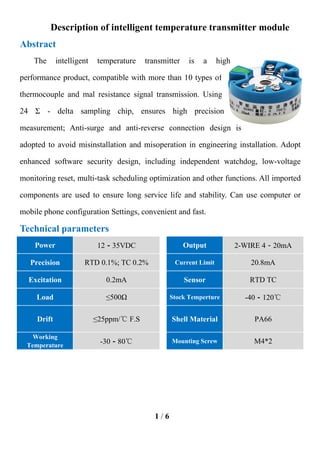
The intelligent temperature transmitter is a high
performance product, compatible with more than 10 types of
thermocouple and mal resistance signal transmission. Using
24 Σ - delta sampling chip, ensures high precision
measurement; Anti-surge and anti-reverse connection design is
adopted to avoid misinstallation and misoperation in engineering installation. Adopt
enhanced software security design, including independent watchdog, low-voltage
monitoring reset, multi-task scheduling optimization and other functions. All imported
components are used to ensure long service life and stability. Can use computer or
mobile phone configuration Settings, convenient and fast.
Technical parameters
Power 12-35VDC Output 2-WIRE 4-20mA
Precision RTD 0.1%; TC 0.2% Current Limit 20.8mA
Excitation 0.2mA Sensor RTD TC
Load ≤500Ω Stock Temperture -40-120℃
Drift ≤25ppm/℃ F.S Shell Material PA66
Working
Temperature
-30-80℃ Mounting Screw M4*2
2 / 6
Connection mode
a)
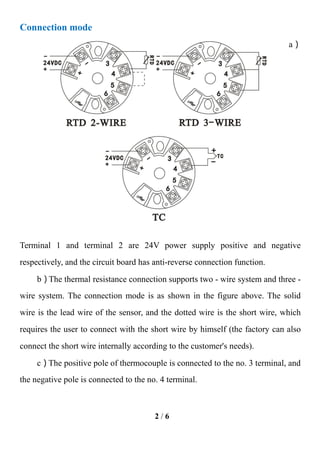
Terminal 1 and terminal 2 are 24V power supply positive and negative
respectively, and the circuit board has anti-reverse connection function.
b)The thermal resistance connection supports two - wire system and three -
wire system. The connection mode is as shown in the figure above. The solid
wire is the lead wire of the sensor, and the dotted wire is the short wire, which
requires the user to connect with the short wire by himself (the factory can also
connect the short wire internally according to the customer's needs).
c)The positive pole of thermocouple is connected to the no. 3 terminal, and
the negative pole is connected to the no. 4 terminal.
3 / 6
Application method of upper computer
software
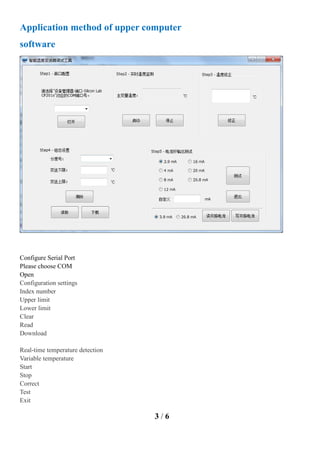
Configure Serial Port
Please choose COM
Open
Configuration settings
Index number
Upper limit
Lower limit
Clear
Read
Download
Real-time temperature detection
Variable temperature
Start
Stop
Correct
Test
Exit
4 / 6
Current loop output setting
Read loop
Write loop
Custom
a ) Install USB communication line driver and program running
environment;
b)One end of the communication line is connected to the computer USB
port, and the other end is connected to the intelligent module, which does not
need 24V power supply;
c)Double-click the lqt202.exe file to enter the setup software;
d ) Click the serial port number drop-down list to select the serial port
number corresponding to the connection line, and click ok;
e ) Click the configuration Settings in the upper left corner to set the
configuration.
5 / 6
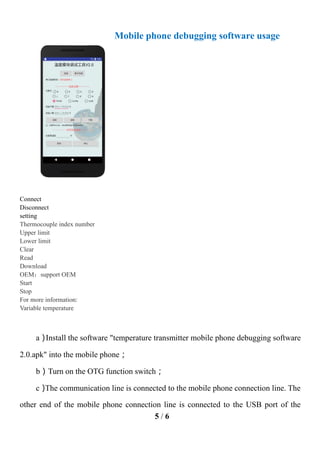
Mobile phone debugging software usage
Connect
Disconnect
setting
Thermocouple index number
Upper limit
Lower limit
Clear
Read
Download
OEM:support OEM
Start
Stop
For more information:
Variable temperature
a)
Install the software "temperature transmitter mobile phone debugging software
2.0.apk" into the mobile phone;
b)Turn on the OTG function switch;
c)
The communication line is connected to the mobile phone connection line. The
other end of the mobile phone connection line is connected to the USB port of the
6 / 6
mobile phone. The other end of the communication line is connected to the smart
module;
d)Click the "connect" button in the software interface;
e)Select the dividing number, input the upper and lower limits of temperature,
and click "download" to set the configuration;
Instructions and warranty
a ) The instrument is suitable for storage and use in the environment where the
temperature is -30℃-80℃ and the humidity is less than 80%;
b)The USB communication line used by the upper computer is specially customized
for our company. Please do not use other communication lines to connect with the module;
c)When the meter is connected to the power supply, it should operate according to the
wiring method in section 3. After confirming the operation is correct, the meter can be
connected to the power supply for operation。
d)
Under the condition that the user complies with the usage specification, from the date
of delivery, we provide the user with a one-year warranty and lifelong technical support
service. Welcome customers to inquire, we attach importance to your any valuable advice.
Mr. Michael Sun
Sales Manager
Dalian Zero Instrument Technology Co., Ltd China
p: +86-411-88586750 m: +86 17640305359
f: +86-411-88586751
a: Room 4605 No.9-1 Haifu Road Dalian Bonded Area Pilot Free Trade Zone Liaoning China 116001
w:www.zeroinstrument.com e: info@zeroinstrument.com

Intelligent temperature transmitter module

  • 1.
    1 / 6 Descriptionof intelligent temperature transmitter module Abstract The intelligent temperature transmitter is a high performance product, compatible with more than 10 types of thermocouple and mal resistance signal transmission. Using 24 Σ - delta sampling chip, ensures high precision measurement; Anti-surge and anti-reverse connection design is adopted to avoid misinstallation and misoperation in engineering installation. Adopt enhanced software security design, including independent watchdog, low-voltage monitoring reset, multi-task scheduling optimization and other functions. All imported components are used to ensure long service life and stability. Can use computer or mobile phone configuration Settings, convenient and fast. Technical parameters Power 12-35VDC Output 2-WIRE 4-20mA Precision RTD 0.1%; TC 0.2% Current Limit 20.8mA Excitation 0.2mA Sensor RTD TC Load ≤500Ω Stock Temperture -40-120℃ Drift ≤25ppm/℃ F.S Shell Material PA66 Working Temperature -30-80℃ Mounting Screw M4*2
  • 2.
    2 / 6 Connectionmode a) Terminal 1 and terminal 2 are 24V power supply positive and negative respectively, and the circuit board has anti-reverse connection function. b)The thermal resistance connection supports two - wire system and three - wire system. The connection mode is as shown in the figure above. The solid wire is the lead wire of the sensor, and the dotted wire is the short wire, which requires the user to connect with the short wire by himself (the factory can also connect the short wire internally according to the customer's needs). c)The positive pole of thermocouple is connected to the no. 3 terminal, and the negative pole is connected to the no. 4 terminal.
  • 3.
    3 / 6 Applicationmethod of upper computer software Configure Serial Port Please choose COM Open Configuration settings Index number Upper limit Lower limit Clear Read Download Real-time temperature detection Variable temperature Start Stop Correct Test Exit
  • 4.
    4 / 6 Currentloop output setting Read loop Write loop Custom a ) Install USB communication line driver and program running environment; b)One end of the communication line is connected to the computer USB port, and the other end is connected to the intelligent module, which does not need 24V power supply; c)Double-click the lqt202.exe file to enter the setup software; d ) Click the serial port number drop-down list to select the serial port number corresponding to the connection line, and click ok; e ) Click the configuration Settings in the upper left corner to set the configuration.
  • 5.
    5 / 6 Mobilephone debugging software usage Connect Disconnect setting Thermocouple index number Upper limit Lower limit Clear Read Download OEM:support OEM Start Stop For more information: Variable temperature a) Install the software "temperature transmitter mobile phone debugging software 2.0.apk" into the mobile phone; b)Turn on the OTG function switch; c) The communication line is connected to the mobile phone connection line. The other end of the mobile phone connection line is connected to the USB port of the
  • 6.
    6 / 6 mobilephone. The other end of the communication line is connected to the smart module; d)Click the "connect" button in the software interface; e)Select the dividing number, input the upper and lower limits of temperature, and click "download" to set the configuration; Instructions and warranty a ) The instrument is suitable for storage and use in the environment where the temperature is -30℃-80℃ and the humidity is less than 80%; b)The USB communication line used by the upper computer is specially customized for our company. Please do not use other communication lines to connect with the module; c)When the meter is connected to the power supply, it should operate according to the wiring method in section 3. After confirming the operation is correct, the meter can be connected to the power supply for operation。 d) Under the condition that the user complies with the usage specification, from the date of delivery, we provide the user with a one-year warranty and lifelong technical support service. Welcome customers to inquire, we attach importance to your any valuable advice. Mr. Michael Sun Sales Manager Dalian Zero Instrument Technology Co., Ltd China p: +86-411-88586750 m: +86 17640305359 f: +86-411-88586751 a: Room 4605 No.9-1 Haifu Road Dalian Bonded Area Pilot Free Trade Zone Liaoning China 116001 w:www.zeroinstrument.com e: info@zeroinstrument.com