MPEG-4 vs. H.264
09BCE009 – Utsav Dholakia
Guided By- Prof. Purvi Kansara
 Introduction
 What is video compression?
 Quality factors for video compression
 Intro of MPEG-4 and overview
 Profiling and coding of MPEG-4
 Intro of H.264 and overview
 Profiles and levels
 Future scopes and Usage
 References
Introduction
• What is the format of video file and how does
it affect the video quality?
• What is .mp4, .mov file extension?
• Is video recorded in the same format that we
see?
Video Compression
• Why video compression is needed?
• Memory and bandwidth is very expensive.
• So video compression is useful as it
decreases file size and maintains almost
same quality.
• Video compression is of 2 types:
• Lossless compression
• Lossy compression
Video Compression
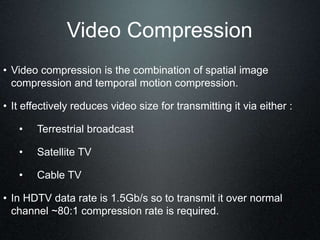
• Video compression is the combination of spatial image
compression and temporal motion compression.
• It effectively reduces video size for transmitting it via either :
• Terrestrial broadcast
• Satellite TV
• Cable TV
• In HDTV data rate is 1.5Gb/s so to transmit it over normal
channel ~80:1 compression rate is required.
How video compression
works?
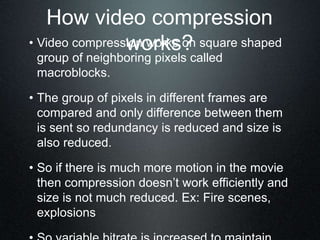
• Video compression works on square shaped
group of neighboring pixels called
macroblocks.
• The group of pixels in different frames are
compared and only difference between them
is sent so redundancy is reduced and size is
also reduced.
• So if there is much more motion in the movie
then compression doesn’t work efficiently and
size is not much reduced. Ex: Fire scenes,
explosions
Size of uncompressed video
and bandwidth of carriers
Video Source Output data rate[Kbits/sec]
Quarter VGA (320X240)
@20 frames/sec
36 864
CIF camera (352X288)
@30 frames/sec
72 990
VGA (640X480) @30 frames/sec 221 184
Transmission Medium Data Rate [Kbits/sec]
Wireline modem 56
GPRS (estimated average rate) 30
3G/WCDMA (theoretical maximum) 384
Terminology
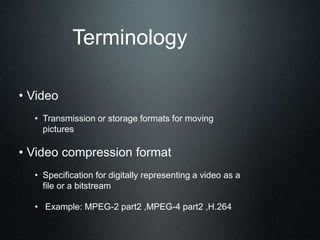
• Video
• Transmission or storage formats for moving
pictures
• Video compression format
• Specification for digitally representing a video as a
file or a bitstream
• Example: MPEG-2 part2 ,MPEG-4 part2 ,H.264
Terminology
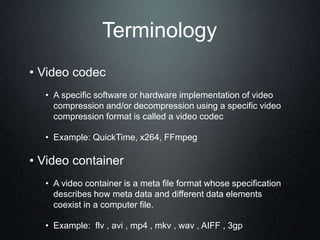
• Video codec
• A specific software or hardware implementation of video
compression and/or decompression using a specific video
compression format is called a video codec
• Example: QuickTime, x264, FFmpeg
• Video container
• A video container is a meta file format whose specification
describes how meta data and different data elements
coexist in a computer file.
• Example: flv , avi , mp4 , mkv , wav , AIFF , 3gp
Video Compression Factors
• Digital video is a representation of natural scene
sampled temporally and spatially.
• Characteristics of a typical natural video scene that
are relevant for video processing and compression
include:
1. Spatial characteristics (texture variation within
scene, number and shape of objects, color etc.)
2. Temporal characteristics (object motion,
changes in illumination, movement of the
camera or viewpoint and so on).
Video Compression Factors
• Spatial Sampling:
Sampling occurs at each of the intersection
points on the grid and the sampled image
may be reconstructed by representing each
sample as a square picture element (pixel).
The visual quality of the image is influenced
by the number of sampling points.
Video Compression Factors
• Temporal Sampling
A moving video image is captured by taking a
rectangular snapshot of the signal at periodic
time intervals. Playing back the series of
frames produces the appearance of motion. A
higher temporal sampling rate (frame rate)
gives apparently smoother motion in the
video scene but requires more samples to be
captured and stored.
Video Compression Factors
• Frames & Fields
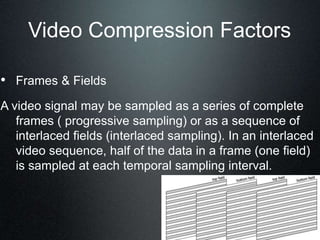
A video signal may be sampled as a series of complete
frames ( progressive sampling) or as a sequence of
interlaced fields (interlaced sampling). In an interlaced
video sequence, half of the data in a frame (one field)
is sampled at each temporal sampling interval.
Video Compression Factors
• Color Spaces
• Most digital video applications rely on the display of color video
and so need a mechanism to capture and represent color
information.
• The method chosen to represent brightness (luminance or
luma) and color is described as a color space.
• The two color spaces are explained in following slides.
Video Compression
Factors(Color Spaces)
• RGB
• In the RGB color space, a color image sample is represented with
three numbers that indicate the relative proportions of Red, Green
and Blue
• The RGB color space is well-suited to capture and display of color
images. Capturing an RGB image involves filtering out the red,
green and blue components of the scene and capturing each with a
separate sensor array.
Video Compression
Factors(Color Spaces)
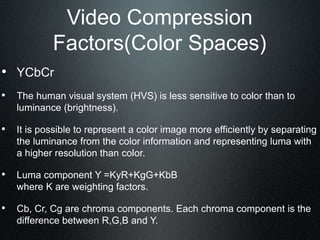
• YCbCr
• The human visual system (HVS) is less sensitive to color than to
luminance (brightness).
• It is possible to represent a color image more efficiently by separating
the luminance from the color information and representing luma with
a higher resolution than color.
• Luma component Y =KyR+KgG+KbB
where K are weighting factors.
• Cb, Cr, Cg are chroma components. Each chroma component is the
difference between R,G,B and Y.
Video Compression
Factors(Color Spaces)
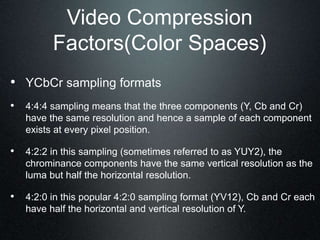
• YCbCr sampling formats
• 4:4:4 sampling means that the three components (Y, Cb and Cr)
have the same resolution and hence a sample of each component
exists at every pixel position.
• 4:2:2 in this sampling (sometimes referred to as YUY2), the
chrominance components have the same vertical resolution as the
luma but half the horizontal resolution.
• 4:2:0 in this popular 4:2:0 sampling format (YV12), Cb and Cr each
have half the horizontal and vertical resolution of Y.
MPEG-4
• MPEG-4 (Moving Pictures Experts Group) is an ISO/IEC 14496
standard for a coded representation of audio and video data for
transmission.
• Does not give implementation.
• First version: October 1998
• MPEG-4 (coding of audio-visual objects) is the latest standard
that deals specifically with audio-visual coding.
MPEG-4
• Object based system: using natural and/or synthetic objects.
• Makes use of local processing power to recreate sounds and
images
• This makes it one of the most efficient compression systems.
Basic object types
• Photos - JPEG, GIF, PNG,
• Video - MPEG-2, DivX, AVI, H.264,QuickTime
• Speech - CELP, HVXC, Text to Speech
• Music - AAC, MP3
• Synthetic music
• Graphics - Java code
• Text
• Animated objects, e.g., talking heads
Method of object based
compression
• The selected objects are put together in a 2D or 3D scenes.
• In 3D the viewer can change the shape of the image and view it
from other positions in the 3D space.
• Each object is compressed using the best and optimum method
for that type of data.
MPEG-4(Profiles and
levels)
• Features are left on to individual developers for deciding whether
to implement them.
• So there are no complete implementation of MPEG4 set of
standards.
• Thus came the concept of “Profiles” & “Levels”
• This gave the opportunity to implement specific set of properties
necessary for application.
Profiles & Levels
• Subsets of MPEG-4 tools are provided for specific application
implementation.
• This subsets are “profiles” which decrease size of the tool set a
decoder is required to implement.
• In order to reduce computational complexity , one or more levels
are set for each profiles. The combination of both levels &
profiles allows:
• A codec builder to implement only a subset of standard
needed for maintaining internetworking with other MPEG-4
devices that implement same combination.
• Checking whether MPEG-4 devices comply with the
standard referred to as conformance testing.
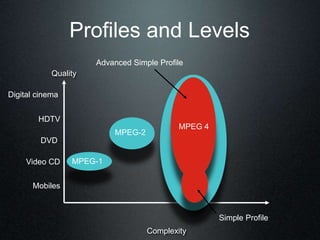
Profiles and Levels
Quality
Complexity
DVD
Video CD
Mobiles
MPEG-1
MPEG-2
HDTV
Digital cinema
Advanced Simple Profile
Simple Profile
MPEG 4
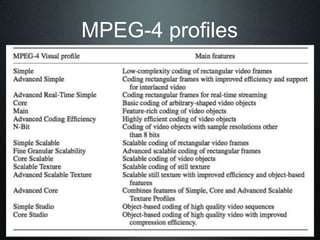
MPEG-4 profiles
Temporal Redundancy Reduction
• For temporal redundancy reduction the compression frames are
group of pictures(GOP). It consists of series of I,B,P frames.
• I frames are independently encoded.
• P frames are based on previous I,P frames.
• B frames are based on previous and following I,P frames.
• The typical series of encoding frames are:
1. I B B P B B P B B I
2. I B B P B B P B B P B B I
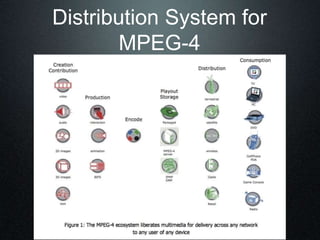
Distribution System for
MPEG-4
Uses of MPEG-4
• 3G mobile phones
• Portable devices, PDAs, iPod videos
• Interactive television / IPTV
• New interactive multimedia formats
• Web pages
• Interactive music format
• Security systems
H.264
• H.264/ MPEG-4 Part 10 or AVC(Advanced Video Coding) is
currently one of the most used format for recording ,
compression and distribution of HD videos.
• Final drafting of the version was completed on May,2003.
• H.264/MPEG-4 AVC is a block-oriented, motion-
compensation-based codec standard developed by the ITU-
T ,Video Coding Experts Group (VCEG) together with the
International Organization for
Standardization(ISO)/International Electro technical
Commission(IEC) MPEG.
H.264
• The intent of the H.264/AVC project was to create a
standard capable of providing good video quality at
lower bit rates than previous standards (like MPEG-2,
H.263, or MPEG-4 Part 2), but not increasing the
complexity of design so much that it would be
impractical or excessively expensive to implement.
• With the use of H.264 50% of bit rate saving is
reported.
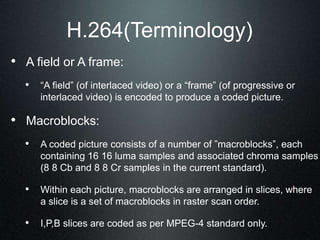
H.264(Terminology)
• A field or A frame:
• “A field” (of interlaced video) or a “frame” (of progressive or
interlaced video) is encoded to produce a coded picture.
• Macroblocks:
• A coded picture consists of a number of ”macroblocks”, each
containing 16 16 luma samples and associated chroma samples
(8 8 Cb and 8 8 Cr samples in the current standard).
• Within each picture, macroblocks are arranged in slices, where
a slice is a set of macroblocks in raster scan order.
• I,P,B slices are coded as per MPEG-4 standard only.
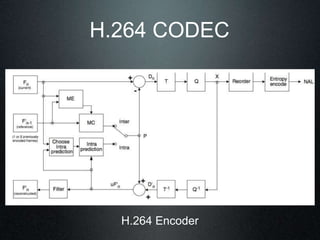
H.264 CODEC
H.264 Encoder
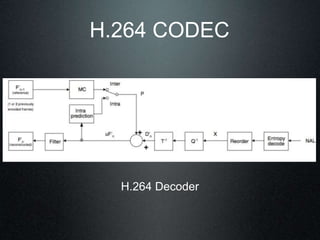
H.264 CODEC
H.264 Decoder
Profiles and Levels
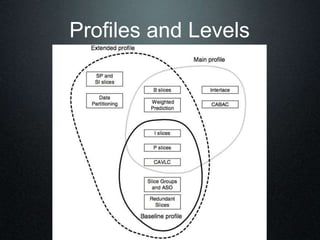
• The Baseline Profile:
It supports intra and inter-coding (using I-slices and P-slices) and entropy coding
with context-adaptive variable-length codes (CAVLC).
Potential applications of the Baseline Profile include videotelephony,
videoconferencing and wireless communications.
• The Mainline Profile:
It includes support for interlaced video, inter-coding using B-slices, inter coding
us- ing weighted prediction and entropy coding using context-based
arithmetic coding (CABAC).
Potential applications of the Main Profile include television broadcasting and
video storage.
Profiles and Levels
• The Extended Profile:
It does not support interlaced video or CABAC but adds modes to enable
efficient switching between coded bitstreams (SP- and SI-slices) and
improved error resilience (Data Partition- ing).
Potential application of extended Profile may be particularly useful for streaming
me- dia applications.
Profiles and Levels
Uses of H.264
• Very broad application range from low bit rate internet
streaming to HDTV broadcast and digital cinema
broadcasting.
• Blu-ray Disc
• AVCHD a HD recording format designed by Sony &
Panasonic uses H.264.
• Common DSLRs use QuickTime .mov as a native
recording.
Text
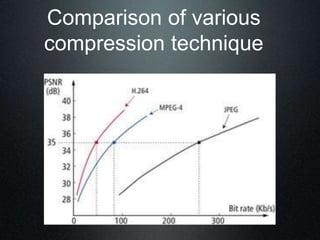
Comparison of various
compression technique
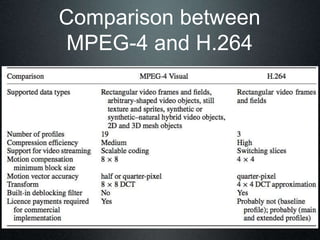
Comparison between
MPEG-4 and H.264
Future options
• MPEG-4 is still being developed and all new parts will work with
the old formats.
• Studio quality versions for HDTVs
• Digital cinema 45-240 Mbit/s H.264
• Home video cameras with MPEG-4 output straight to the web
form the hard drive.
• Integrated Service Digital Broadcast(ISDB)
• Newspaper + TV + data
• Integration with MPRG7 databases
• Games with 3D texture mapping
References
• http://en.wikipedia.org/wiki/Video_compression#Video
• http://en.wikipedia.org/wiki/H.264/MPEG-4_AVC
• http://en.wikipedia.org/wiki/MPEG-4
• http://en.wikipedia.org/wiki/Video_compression_format
• MPEG-4 and H.264 video compression (by Iain
E.G.Richardson)

mpeg4copy-120428133000-phpapp01.ppt

  • 1.
    MPEG-4 vs. H.264 09BCE009– Utsav Dholakia Guided By- Prof. Purvi Kansara
  • 2.
     Introduction  Whatis video compression?  Quality factors for video compression  Intro of MPEG-4 and overview  Profiling and coding of MPEG-4  Intro of H.264 and overview  Profiles and levels  Future scopes and Usage  References
  • 3.
    Introduction • What isthe format of video file and how does it affect the video quality? • What is .mp4, .mov file extension? • Is video recorded in the same format that we see?
  • 4.
    Video Compression • Whyvideo compression is needed? • Memory and bandwidth is very expensive. • So video compression is useful as it decreases file size and maintains almost same quality. • Video compression is of 2 types: • Lossless compression • Lossy compression
  • 5.
    Video Compression • Videocompression is the combination of spatial image compression and temporal motion compression. • It effectively reduces video size for transmitting it via either : • Terrestrial broadcast • Satellite TV • Cable TV • In HDTV data rate is 1.5Gb/s so to transmit it over normal channel ~80:1 compression rate is required.
  • 6.
    How video compression works? •Video compression works on square shaped group of neighboring pixels called macroblocks. • The group of pixels in different frames are compared and only difference between them is sent so redundancy is reduced and size is also reduced. • So if there is much more motion in the movie then compression doesn’t work efficiently and size is not much reduced. Ex: Fire scenes, explosions
  • 7.
    Size of uncompressedvideo and bandwidth of carriers Video Source Output data rate[Kbits/sec] Quarter VGA (320X240) @20 frames/sec 36 864 CIF camera (352X288) @30 frames/sec 72 990 VGA (640X480) @30 frames/sec 221 184 Transmission Medium Data Rate [Kbits/sec] Wireline modem 56 GPRS (estimated average rate) 30 3G/WCDMA (theoretical maximum) 384
  • 8.
    Terminology • Video • Transmissionor storage formats for moving pictures • Video compression format • Specification for digitally representing a video as a file or a bitstream • Example: MPEG-2 part2 ,MPEG-4 part2 ,H.264
  • 9.
    Terminology • Video codec •A specific software or hardware implementation of video compression and/or decompression using a specific video compression format is called a video codec • Example: QuickTime, x264, FFmpeg • Video container • A video container is a meta file format whose specification describes how meta data and different data elements coexist in a computer file. • Example: flv , avi , mp4 , mkv , wav , AIFF , 3gp
  • 10.
    Video Compression Factors •Digital video is a representation of natural scene sampled temporally and spatially. • Characteristics of a typical natural video scene that are relevant for video processing and compression include: 1. Spatial characteristics (texture variation within scene, number and shape of objects, color etc.) 2. Temporal characteristics (object motion, changes in illumination, movement of the camera or viewpoint and so on).
  • 11.
    Video Compression Factors •Spatial Sampling: Sampling occurs at each of the intersection points on the grid and the sampled image may be reconstructed by representing each sample as a square picture element (pixel). The visual quality of the image is influenced by the number of sampling points.
  • 12.
    Video Compression Factors •Temporal Sampling A moving video image is captured by taking a rectangular snapshot of the signal at periodic time intervals. Playing back the series of frames produces the appearance of motion. A higher temporal sampling rate (frame rate) gives apparently smoother motion in the video scene but requires more samples to be captured and stored.
  • 13.
    Video Compression Factors •Frames & Fields A video signal may be sampled as a series of complete frames ( progressive sampling) or as a sequence of interlaced fields (interlaced sampling). In an interlaced video sequence, half of the data in a frame (one field) is sampled at each temporal sampling interval.
  • 14.
    Video Compression Factors •Color Spaces • Most digital video applications rely on the display of color video and so need a mechanism to capture and represent color information. • The method chosen to represent brightness (luminance or luma) and color is described as a color space. • The two color spaces are explained in following slides.
  • 15.
    Video Compression Factors(Color Spaces) •RGB • In the RGB color space, a color image sample is represented with three numbers that indicate the relative proportions of Red, Green and Blue • The RGB color space is well-suited to capture and display of color images. Capturing an RGB image involves filtering out the red, green and blue components of the scene and capturing each with a separate sensor array.
  • 16.
    Video Compression Factors(Color Spaces) •YCbCr • The human visual system (HVS) is less sensitive to color than to luminance (brightness). • It is possible to represent a color image more efficiently by separating the luminance from the color information and representing luma with a higher resolution than color. • Luma component Y =KyR+KgG+KbB where K are weighting factors. • Cb, Cr, Cg are chroma components. Each chroma component is the difference between R,G,B and Y.
  • 17.
    Video Compression Factors(Color Spaces) •YCbCr sampling formats • 4:4:4 sampling means that the three components (Y, Cb and Cr) have the same resolution and hence a sample of each component exists at every pixel position. • 4:2:2 in this sampling (sometimes referred to as YUY2), the chrominance components have the same vertical resolution as the luma but half the horizontal resolution. • 4:2:0 in this popular 4:2:0 sampling format (YV12), Cb and Cr each have half the horizontal and vertical resolution of Y.
  • 18.
    MPEG-4 • MPEG-4 (MovingPictures Experts Group) is an ISO/IEC 14496 standard for a coded representation of audio and video data for transmission. • Does not give implementation. • First version: October 1998 • MPEG-4 (coding of audio-visual objects) is the latest standard that deals specifically with audio-visual coding.
  • 19.
    MPEG-4 • Object basedsystem: using natural and/or synthetic objects. • Makes use of local processing power to recreate sounds and images • This makes it one of the most efficient compression systems.
  • 20.
    Basic object types •Photos - JPEG, GIF, PNG, • Video - MPEG-2, DivX, AVI, H.264,QuickTime • Speech - CELP, HVXC, Text to Speech • Music - AAC, MP3 • Synthetic music • Graphics - Java code • Text • Animated objects, e.g., talking heads
  • 21.
    Method of objectbased compression • The selected objects are put together in a 2D or 3D scenes. • In 3D the viewer can change the shape of the image and view it from other positions in the 3D space. • Each object is compressed using the best and optimum method for that type of data.
  • 22.
    MPEG-4(Profiles and levels) • Featuresare left on to individual developers for deciding whether to implement them. • So there are no complete implementation of MPEG4 set of standards. • Thus came the concept of “Profiles” & “Levels” • This gave the opportunity to implement specific set of properties necessary for application.
  • 23.
    Profiles & Levels •Subsets of MPEG-4 tools are provided for specific application implementation. • This subsets are “profiles” which decrease size of the tool set a decoder is required to implement. • In order to reduce computational complexity , one or more levels are set for each profiles. The combination of both levels & profiles allows: • A codec builder to implement only a subset of standard needed for maintaining internetworking with other MPEG-4 devices that implement same combination. • Checking whether MPEG-4 devices comply with the standard referred to as conformance testing.
  • 24.
    Profiles and Levels Quality Complexity DVD VideoCD Mobiles MPEG-1 MPEG-2 HDTV Digital cinema Advanced Simple Profile Simple Profile MPEG 4
  • 25.
  • 26.
    Temporal Redundancy Reduction •For temporal redundancy reduction the compression frames are group of pictures(GOP). It consists of series of I,B,P frames. • I frames are independently encoded. • P frames are based on previous I,P frames. • B frames are based on previous and following I,P frames. • The typical series of encoding frames are: 1. I B B P B B P B B I 2. I B B P B B P B B P B B I
  • 27.
  • 28.
    Uses of MPEG-4 •3G mobile phones • Portable devices, PDAs, iPod videos • Interactive television / IPTV • New interactive multimedia formats • Web pages • Interactive music format • Security systems
  • 29.
    H.264 • H.264/ MPEG-4Part 10 or AVC(Advanced Video Coding) is currently one of the most used format for recording , compression and distribution of HD videos. • Final drafting of the version was completed on May,2003. • H.264/MPEG-4 AVC is a block-oriented, motion- compensation-based codec standard developed by the ITU- T ,Video Coding Experts Group (VCEG) together with the International Organization for Standardization(ISO)/International Electro technical Commission(IEC) MPEG.
  • 30.
    H.264 • The intentof the H.264/AVC project was to create a standard capable of providing good video quality at lower bit rates than previous standards (like MPEG-2, H.263, or MPEG-4 Part 2), but not increasing the complexity of design so much that it would be impractical or excessively expensive to implement. • With the use of H.264 50% of bit rate saving is reported.
  • 31.
    H.264(Terminology) • A fieldor A frame: • “A field” (of interlaced video) or a “frame” (of progressive or interlaced video) is encoded to produce a coded picture. • Macroblocks: • A coded picture consists of a number of ”macroblocks”, each containing 16 16 luma samples and associated chroma samples (8 8 Cb and 8 8 Cr samples in the current standard). • Within each picture, macroblocks are arranged in slices, where a slice is a set of macroblocks in raster scan order. • I,P,B slices are coded as per MPEG-4 standard only.
  • 32.
  • 33.
  • 34.
    Profiles and Levels •The Baseline Profile: It supports intra and inter-coding (using I-slices and P-slices) and entropy coding with context-adaptive variable-length codes (CAVLC). Potential applications of the Baseline Profile include videotelephony, videoconferencing and wireless communications. • The Mainline Profile: It includes support for interlaced video, inter-coding using B-slices, inter coding us- ing weighted prediction and entropy coding using context-based arithmetic coding (CABAC). Potential applications of the Main Profile include television broadcasting and video storage.
  • 35.
    Profiles and Levels •The Extended Profile: It does not support interlaced video or CABAC but adds modes to enable efficient switching between coded bitstreams (SP- and SI-slices) and improved error resilience (Data Partition- ing). Potential application of extended Profile may be particularly useful for streaming me- dia applications.
  • 36.
  • 37.
    Uses of H.264 •Very broad application range from low bit rate internet streaming to HDTV broadcast and digital cinema broadcasting. • Blu-ray Disc • AVCHD a HD recording format designed by Sony & Panasonic uses H.264. • Common DSLRs use QuickTime .mov as a native recording.
  • 38.
  • 40.
  • 41.
    Future options • MPEG-4is still being developed and all new parts will work with the old formats. • Studio quality versions for HDTVs • Digital cinema 45-240 Mbit/s H.264 • Home video cameras with MPEG-4 output straight to the web form the hard drive. • Integrated Service Digital Broadcast(ISDB) • Newspaper + TV + data • Integration with MPRG7 databases • Games with 3D texture mapping
  • 42.
    References • http://en.wikipedia.org/wiki/Video_compression#Video • http://en.wikipedia.org/wiki/H.264/MPEG-4_AVC •http://en.wikipedia.org/wiki/MPEG-4 • http://en.wikipedia.org/wiki/Video_compression_format • MPEG-4 and H.264 video compression (by Iain E.G.Richardson)