Time Management
Why don’t we manage time well? Interruptions We weren’t taught how too There is no  right  way Individuals work differently Time Management is  habit  not  discipline
What is time? Parkinson’s Law "work expands to fill the time available."   As an individual's income rises, their costs of living and lifestyle increase to meet their income level “… the challenge is not to manage time, but to manage ourselves.”  S. Covey: 7 Habits of Highly Effective People
Busy-ness vs. Effectiveness Being busy does not automatically imply productive and effective work habits We can be busy doing the wrong things!
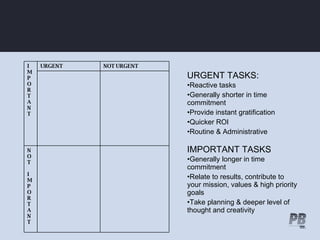
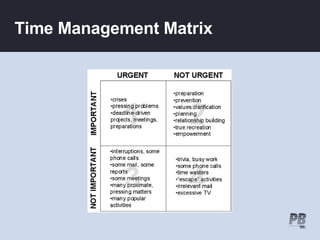
URGENT TASKS: Reactive tasks Generally shorter in time commitment Provide instant gratification Quicker ROI Routine & Administrative IMPORTANT TASKS Generally longer in time commitment Relate to results, contribute to your mission, values & high priority goals Take planning & deeper level of thought and creativity NOT I MPORTANT NOT URGENT URGENT I MPORTANT
Time Management Matrix
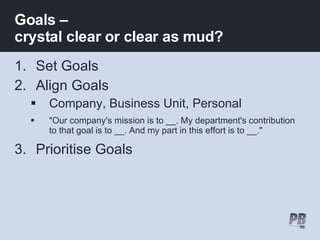
Goals –  crystal clear or clear as mud? Set Goals Align Goals Company, Business Unit, Personal "Our company's mission is to __. My department's contribution to that goal is to __. And my part in this effort is to __." Prioritise Goals
Communicating expectations Effective communicators = effective time managers Misaligned task expectation/s leads to re-doing tasks Get clear directions on your Mgr’s preferences Respect your supervisor's time constraints
Setting Tasks AIMS Action Centred –  objectives begin with a verb Incremental Measurable Scheduled
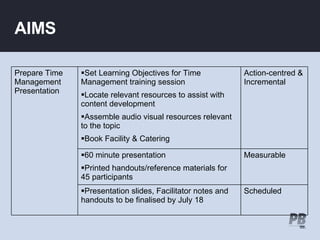
AIMS Scheduled Presentation slides, Facilitator notes and  handouts to be finalised by July 18 Measurable 60 minute presentation Printed handouts/reference materials for 45 participants Action-centred & Incremental Set Learning Objectives for Time Management training session Locate relevant resources to assist with content development Assemble audio visual resources relevant to the topic Book Facility & Catering Prepare Time Management Presentation
Multitasking / Task Switching Multitasking –  Research suggests human brain can't switch b/w tasks quickly without a ''warm-up period'' in-between performing tasks simultaneously such as  reading  &  listening  leads to cognitive overload and loss of focus  Task-switching  flitting  b/w functions & tasks brain is pushing pause and play buttons Combine like activities to increase productivity
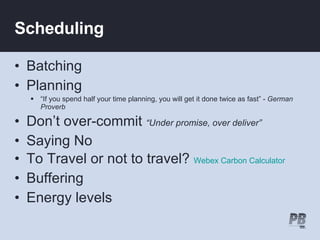
Scheduling Batching Planning  “ If you spend half your time planning, you will get it done twice as fast” -  German Proverb Don’t over-commit  “Under promise, over deliver” Saying No To Travel or not to travel?  Webex Carbon Calculator Buffering Energy levels
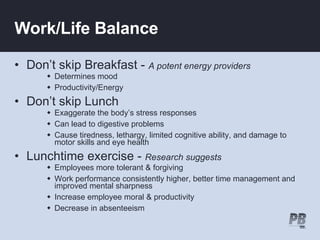
Work/Life Balance Don’t skip Breakfast -   A potent energy providers Determines mood Productivity/Energy Don’t skip Lunch Exaggerate the body’s stress responses Can lead to digestive problems Cause tiredness, lethargy, limited cognitive ability, and damage to motor skills and eye health  Lunchtime exercise -  Research suggests   Employees more tolerant & forgiving  Work performance consistently higher, better time management and improved mental sharpness Increase employee moral & productivity Decrease in absenteeism
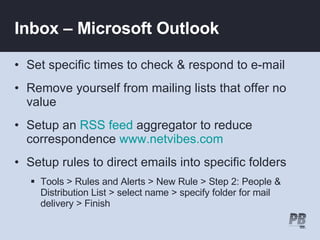
Inbox – Microsoft Outlook Set specific times to check & respond to e-mail Remove yourself from mailing lists that offer no value Setup an  RSS feed  aggregator to reduce correspondence  www.netvibes.com Setup rules to direct emails into specific folders Tools > Rules and Alerts > New Rule > Step 2: People & Distribution List > select name > specify folder for mail delivery > Finish
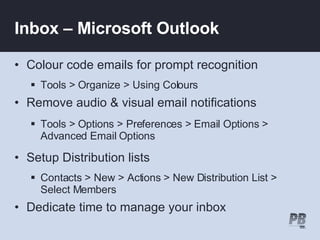
Inbox – Microsoft Outlook Colour code emails for prompt recognition Tools > Organize > Using Colours Remove audio & visual email notifications Tools > Options > Preferences > Email Options > Advanced Email Options Setup Distribution lists  Contacts > New > Actions > New Distribution List > Select Members Dedicate time to manage your inbox
Calendar & Task List Running an Outlook calendar & paper diary  Synchronise PDA/Mobile to Outlook Plan ahead: Year-in-a-view calendars Drag & Drop email into Outlook Calendar/Tasks Maintains clutter free Inbox Use Outlook Tasks as your To-Do List tool Setup categories
Other Time Savers Saving files to the desktop Save files to the server Create shortcuts on desktop START > DOCUMENTS  Social Bookmarking:  www.delicious.com Bookmarks/Favourites can be accessed from any internet ready computer
Further Development PB University  Learning Portal Time Management – Harvard Mgt. Techniques for better Time Mgt. It’s about time  Further Reading Self-Assessment Time Log

Time Management - PGN Workshop

  • 1.
  • 2.
    Why don’t wemanage time well? Interruptions We weren’t taught how too There is no right way Individuals work differently Time Management is habit not discipline
  • 3.
    What is time?Parkinson’s Law "work expands to fill the time available." As an individual's income rises, their costs of living and lifestyle increase to meet their income level “… the challenge is not to manage time, but to manage ourselves.” S. Covey: 7 Habits of Highly Effective People
  • 4.
    Busy-ness vs. EffectivenessBeing busy does not automatically imply productive and effective work habits We can be busy doing the wrong things!
  • 5.
    URGENT TASKS: Reactivetasks Generally shorter in time commitment Provide instant gratification Quicker ROI Routine & Administrative IMPORTANT TASKS Generally longer in time commitment Relate to results, contribute to your mission, values & high priority goals Take planning & deeper level of thought and creativity NOT I MPORTANT NOT URGENT URGENT I MPORTANT
  • 6.
  • 7.
    Goals – crystal clear or clear as mud? Set Goals Align Goals Company, Business Unit, Personal "Our company's mission is to __. My department's contribution to that goal is to __. And my part in this effort is to __." Prioritise Goals
  • 8.
    Communicating expectations Effectivecommunicators = effective time managers Misaligned task expectation/s leads to re-doing tasks Get clear directions on your Mgr’s preferences Respect your supervisor's time constraints
  • 9.
    Setting Tasks AIMSAction Centred – objectives begin with a verb Incremental Measurable Scheduled
  • 10.
    AIMS Scheduled Presentationslides, Facilitator notes and handouts to be finalised by July 18 Measurable 60 minute presentation Printed handouts/reference materials for 45 participants Action-centred & Incremental Set Learning Objectives for Time Management training session Locate relevant resources to assist with content development Assemble audio visual resources relevant to the topic Book Facility & Catering Prepare Time Management Presentation
  • 11.
    Multitasking / TaskSwitching Multitasking – Research suggests human brain can't switch b/w tasks quickly without a ''warm-up period'' in-between performing tasks simultaneously such as reading & listening leads to cognitive overload and loss of focus Task-switching flitting b/w functions & tasks brain is pushing pause and play buttons Combine like activities to increase productivity
  • 12.
    Scheduling Batching Planning “ If you spend half your time planning, you will get it done twice as fast” - German Proverb Don’t over-commit “Under promise, over deliver” Saying No To Travel or not to travel? Webex Carbon Calculator Buffering Energy levels
  • 13.
    Work/Life Balance Don’tskip Breakfast - A potent energy providers Determines mood Productivity/Energy Don’t skip Lunch Exaggerate the body’s stress responses Can lead to digestive problems Cause tiredness, lethargy, limited cognitive ability, and damage to motor skills and eye health Lunchtime exercise - Research suggests Employees more tolerant & forgiving Work performance consistently higher, better time management and improved mental sharpness Increase employee moral & productivity Decrease in absenteeism
  • 14.
    Inbox – MicrosoftOutlook Set specific times to check & respond to e-mail Remove yourself from mailing lists that offer no value Setup an RSS feed aggregator to reduce correspondence www.netvibes.com Setup rules to direct emails into specific folders Tools > Rules and Alerts > New Rule > Step 2: People & Distribution List > select name > specify folder for mail delivery > Finish
  • 15.
    Inbox – MicrosoftOutlook Colour code emails for prompt recognition Tools > Organize > Using Colours Remove audio & visual email notifications Tools > Options > Preferences > Email Options > Advanced Email Options Setup Distribution lists Contacts > New > Actions > New Distribution List > Select Members Dedicate time to manage your inbox
  • 16.
    Calendar & TaskList Running an Outlook calendar & paper diary Synchronise PDA/Mobile to Outlook Plan ahead: Year-in-a-view calendars Drag & Drop email into Outlook Calendar/Tasks Maintains clutter free Inbox Use Outlook Tasks as your To-Do List tool Setup categories
  • 17.
    Other Time SaversSaving files to the desktop Save files to the server Create shortcuts on desktop START > DOCUMENTS Social Bookmarking: www.delicious.com Bookmarks/Favourites can be accessed from any internet ready computer
  • 18.
    Further Development PBUniversity Learning Portal Time Management – Harvard Mgt. Techniques for better Time Mgt. It’s about time Further Reading Self-Assessment Time Log

Editor's Notes

  • #2 Provide some CONTENT OVERVIEW The session is largely aimed at those with a basic understanding of effective time management tools and techniques. The first step is to reflect on your own time management habits. Do you tend to “Put out fires” and specialise in managing crises rather than look to the long-term and plan for the future? Time Management is largely a state of mind – there is no quick fix or secret recipe. Time Management is about common-sense, but with the phone ringing, emails backing up, the Blackberry relentless after hours, and people dropping by for a chat, its easy to lose sight of the real goals. Each person’s commitments and responsibilities are different so some of the time management techniques discussed today will work for you, whilst others will not. There is no secret bag of tricks. Strategies work for different people Question : What are some of the Time Eaters common in the work place? Response: meetings, phone/mobiles, email, crises, f2f drop ins, procrastination, unclear starting point