Safety, Security and legislations
24/11/2015
Where do threats come from?
 Viruses
 Trojans
 Worms
 Spyware
 Adware
 Spam
 Abuse by staff accidental or deliberate
 Hacking
 Fire
 Theft
 Denial of service attacks
 Problems with power loss
 Naural disaster – earthquakes, tidal waves, volcanoes, floods, gales,
 Faulty hardware or software
24/11/2015
Identity theft/fraud
 There has recently been a lot on the news about problems with fraud
 Everyone knows the dangers of losing their cards or getting them stolen
 But if someone has your account details they can start siphoning
money out of your account
 If they do it gradually and not in one go many people do not notice it in
fact many cases of identity theft can take up to 14 months to work out
what is happening
 Be very suspicious of any emails sent to you the internet email system
can be very insecure and you should never divulge personal
information in an email or follow a link to a site from an email
 Always view official looking emails with skepticism despite having the
right logos and official language it can possibly by a scam.
24/11/2015
Encryption
 If information needs to be sent over the internet or another network it
needs to be kept secure. Then then encryption should be used. This is
basically codes the data whilst it is being sent and only the true
recipient will be able to decode it. Should the data be intercepted by a
hacker, then the data will be in code and totally meaningless
 The process of coding data sending it over the internet and deciphering
it when it reaches the true recipient is called encryption.
 Encryption should be used for: sending credit card details such as card
numbers, expiry dates etc over the internet
 Online banking
 Sending payment details such as banking details such as sort codes and
account numbers
 Confidential emails
 Sending data between terminals where confidentiality is essential
24/11/2015
Problems with encryption
 Security forces such as the police and MI5 do not like
people using codes they cannot crack themselves
because they cannot read the emails
 Encryption can be sued for secret conversations
between criminals and terrorists
24/11/2015
Reasons for security breaches
 Some of the reasons that individuals give for breaching
security are:
 For the satisfaction of doing it – to try to show off to others
and prove that they are skilled enough to breach security
almost as an intellectual game
 Personal gain – for example a student wanting to change
their grades in an exam to achieve university entry
 Financial gain this might be the case if an individual were
to change the bank accounts of a large number of
customers buy small amounts and add them to their own
account
 Sabotage to damage the reputation of a competitors
organization by proving their security is weak.
24/11/2015
Types of threats
 Data access threats mean that the data is accessed while
being communicated across a network illegally and is
changed by individuals or organizations who should not
have access
 Service threats are designed to stop the data being used by
the organization it belongs to by disrupting the normal
running of the software being used
 Viruses and worms are two examples of software attacks
that can be introduced via corrupted media or via the
internet or attachments downloaded from an email. The
service threats can be contained in otherwise useful
software.
24/11/2015
Internal and external threats
 Threats which come form inside the organisation are
called internal threats and those coming from outside
the organisation are called external threats.
 For example hacking would normally be considered an
external threat because hacking involves obtaining
access to a computer system using communication
links usually the internet]
 However if a person employed by the organsiation
wanted to gain access to part of the ICT system they
were not normally allowed to access then this is also
hacking and would be considered an internal threat;.
24/11/2015
Malpractice and threat
 There are lots of different types of activities which human uses might
or might not do which causes a threat to ICT systems. Malpractice
means improper or careless use or misconduct. Crime obviously means
all those acts which are against the law. There is a bit of blurring with
the word malpractice, as this can also involve illegal acts according to
the strict dictionary definition however for the exam you need to make
the distinction that malpractice is not against the law, whereas crime is.
 Examples of malpractice: accidently deleting data
 Not taking backup copies
 Not scanning for viruses regular
 Copying an old version of data over the latest version
 Allowing your password to be used by others
 Not logging off the network after use.
24/11/2015
Examples of crime include
 Hacking
 Deliberately disturbing viruses
 Illegally copying data or software
 Stealing hardware
24/11/2015
Internal threats would include:
 Employees introducing viruses deliberately or accidentally
 Staff stealing hardware, software or data
 Disgruntled staff deliberately damaging hardware, software
or data
 Staff accidentally damaging or losing data
 Staff compromising the privacy of personal data by leaving
computers logged on
 Staff compromising the security of ICT systems by letting
others know their usernames and passwords
 Staff hacking into ICT systems that they are not allowed
access to
24/11/2015
External threats would include:
 People from outside the organisation stealing
hardware, software or data
 People from outside the organisation hacking into the
ICT system to view or change information stored
 Natural disasters such as flood earthquakes etc
 Loss of telecommunications services.
 Viruses introduced from file attachments.
24/11/2015
Discuss
 What threats are there when it comes to
computers and networks?
24/11/2015
You Will:
 Organisations need to protect data and resources from
disclosure to unauthorised bodies. The authenticity of
data and messages must now be guaranteed to protect
systems.
 Computers are now used for data processing and
therefore needs tools for protecting data stored on
computers.
24/11/2015
Task
 Use an example of an organisation where its
intellectual property is its main asset. This could
involve software production, films or books, music or
any other organisation you know that needs to protect
its data.
 Think about what data needs to be secure and why it is
important that the data does not become available to
unauthorised people or organisations.
 Make a short presentation to emphasise why the
protection of data is important.
24/11/2015
What are the Threats?
 Explain how each of these could be a potential threat?
 Employees
 Human Error
 Viruses
 Spyware
 Create a PowerPoint and discuss each one, with
examples and preventions.
24/11/2015
Task
 Why do you think people may want to break into an ICT
System?
 Complete the following table with the possible reasons:
24/11/2015
Security Breach Possible Reason
Unauthorised access to data To violate secrecy or privacy, such
as….
Impersonating another user To withdraw money from someone
else's internet banking account.
Changing functionality of software
Link to someone else’s
communication link
Claim to have either sent data or not
sent
24/11/2015
24/11/2015
You Will:
 Explain what the Copyright, Designs and Patents Act
is.
 Identify what the act covers and the types of licenses
available.
24/11/2015
Legislations
 With the development of ICT systems new laws have
to be passed by parliament in order to protect
individuals against misuses of personal data held
about them. New laws also needed to be passed to
cover other misuses such as writing and spreading
viruses, illegally accessing compute resources such as
hacking.
 Discuss the different laws you know about that
protects companies and people!
24/11/2015
Data protection Act 1998
 The use of ICT has made the processing and transfer of data much
easier to protect the individual against the misuse of data a law was
passed called the Data Protection Act 1998.
 Another reason for the Act was the fact that all member states in the
European Economic Area EEA has data protection laws, so the UK had
to have them as well
 This would allow the free passage of personal data from one member
state to another which is essential when conducting business.
 The data protection Act 1998 also covers the misuse of personal data,
whether by the use of ICT systems or not.
 The act gives the right to the individual to find the information stored
about them and to check whether it is correct. If the information is
wrong they can have it altered and may be able to claim damages if
they have suffered loss resulting in this wrong information.
24/11/2015
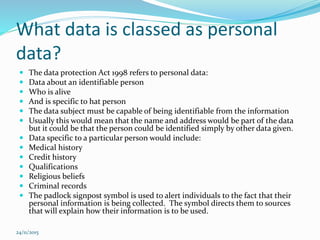
What data is classed as personal
data?
 The data protection Act 1998 refers to personal data:
 Data about an identifiable person
 Who is alive
 And is specific to hat person
 The data subject must be capable of being identifiable from the information
 Usually this would mean that the name and address would be part of the data
but it could be that the person could be identified simply by other data given.
 Data specific to a particular person would include:
 Medical history
 Credit history
 Qualifications
 Religious beliefs
 Criminal records
 The padlock signpost symbol is used to alert individuals to the fact that their
personal information is being collected. The symbol directs them to sources
that will explain how their information is to be used.
24/11/2015
Personal data held about you
 Personal data is particularly important to people who
are trying to sell you something.
 Generally this marketing data can be put into the
following data types, demographic data (where you
live)
 And lifestyle data (what your interests are what you
spend your money on etc)
 Marketing people need to know more about our
personal lives to target us for advertising and
promotional material.
24/11/2015
Eight principles Data Protection Act
1998
 The Data protection Act 1998 contains the following 8
principles:
1. Personal data shall be processed fairly and lawfully
2. Personal data shall be obtained only for one purpose
or more specified and lawful purposes and shall not
be further processed in any manner incompatible
with that purpose or those purposes
3. Personal data shall be adequate relevant and not
excessive in relation to the purpose or purposes for
which they are processed.
24/11/2015
Eight principles Data Protection Act
1998
4) Personal data shall be accurate and where necessary kept up to
date
5) Personal data processed for any purpose or purposes shall not be
kept for longer than is necessary for that purpose or those
purposes.
6) Personal data shall be processed in accordance with the rights of
data and subjects under this act
7)Appropriate technical and organizational measures shall be
taken against accidental loss or destruction of or damage to
personal data.
8) Personal data shall not be transferred to a country or territory
outside the EEA unless that country or territory ensures an
adequate level of protection for the rights and freedom of data
subjects in relation to the processing of personal data.
24/11/2015
Summary of 8 principles
The 8 data protection principles require that data shall be:
1) Fairly and lawfully processed
2) Processed for limited purposes
3) Adequate, relevant and not excessive
4) Accurate
5) Not kept longer than necessary
6) Processed in accordance with the data subjects’ rights
7) Secure
8) Not transferred to countries outside the EU without
adequate protection.
24/11/2015
Processing personal data
 The data protection act refers to the processing of
personal data. Processing can mean:
 Obtaining data ie collecting data
 Recording data
 Carrying out any operation or set of operations on data
24/11/2015
Computer misuse act 1990
 The computer misuse act 1990 was passed to deal with
a number of misuses as the use of computers became
widespread. The act makes it illegal to:
 Deliberately plant or transfer viruses to a computer
system to cause damage to its programs and data
 Use an organizations computer to carry out
unauthorized work
 Hack into someone else's computer system with a view
to seeing the information or altering it
 Use computers to commit various frauds
24/11/2015
Problems with gaining
prosecutions under the computer
misuse act 1990
 In order to prosecute someone under the computer misuse act
1990 the police would need to prove that they did the misuse
deliberately.
 In other words the person committing the crime knew that they
were doing wrong and knew about it
 Proving the intent is very difficult
 For example if you had a virus on your flash drive form home and
took it to work and put it into a computer and it transferred a
virus, this is an easy thing to do unknowingly. It would be
difficult to prove whether or not this has been done deliberately
 Some organizations would not want others especially media to
know that their security has been compromised
 So many cases go unpunished.
24/11/2015
Offences under the computer
misuse act 1990 – Section 1
 A person guilty of an offence if:
 He/she causes a computer to perform any function
with intent to secure access to any program or data
held in any computer
 The access he/.she intends to secure is unauthorised
and
 He/she knows a the time that it is unauthorsed.
 The maximum sentence for an offence of this nature is
6 months imprisonment
24/11/2015
CMA – Section 2
 A person would be guilty of an offence under section 2
of the act if he/she commits an offence under section 1
of the act and with the intent of committing a further
offence such as blackmail, theft or any other offence
which has a penalty of at least 5 years imprisonment.
They will also be guilty if they get someone else to do
this further offence.
 The maximum sentence for an offence under this
section of the act is 5 years imprisonment.
24/11/2015
CMA section 3
 A person is guilty of an offence under this section of the act
if she does any act which causes an unauthorized
modification of the contents of any computer and the time
that he knows that the modification is unauthorized and
has the requisite intent. The requisite intent is intent to
cause a modification and by doing so to:
 Impair the operation of any computer
 To prevent or hinder access to any program or data
 To impair the operation of any program or reliability of any
data.
 The maximum sentence of an offence under this section of
the act is 5 tears imprisonment.
24/11/2015
Copyright, Design and Patents Act
1998
 Many people make a living out of writing software and
manuals etc for others to use. These people are
protected from having their work copied in the same
way as the writer of a best selling novel is protected.
24/11/2015
Copyright and licensing
 There are the following problems with computer software:
 It is very easy to copy
 It is very easy to transfer files over the internet
 People don’t view copying software as like stealing goods
from a supermarket.
 There are the following problems with copied software:
 Not entitled to technical support
 Do not qualify for upgrades
 Software may be incomplete
 It may contain viruses
 The process of illegally copying software is called software
piracy.
24/11/2015
The copyright, designs and patents
act 1998
 This act makes it a criminal offence to copy or steal software. In addition if you
copy software illegally then you are depriving the owner of the software of some
of their income/profits and they will be able to sue you.
 The copyright design and patents act 1998 allows the software owner to copy
the software and also allows someone else to copy the software provided they
have the owners permission. It is not just programs that are protected by this
act, databases of data, computer files and manuals would also be covered
 You can however legally copy software if you have permission of the owner/
This is necessary in order to take backup copies of software for security
purposes.
 Under the act it is a criminal offence to:
 Copy or distribute software or manuals without the permission or license from
the copyright owner
 Run purchased software covered by copyright on two or more machines at the
same time unless there is a software license that allows it
 Compel/force employees to make or distribute illegal software for the use by
the company
24/11/2015
Consequences of breaking this law
 Offences under this act are considered serious and the
consequences could include:
 Unlimited fines and up to 10 years in prison
 You could lose your reputation, promotion prospects
and even your job
 You could be sued for damages by the software owner
24/11/2015
Software piracy
 Software piracy is the illegal copying of software and data. Just like software
data has a value and many companies would love to get their hands on their
competitors data.
 It has been estimated by the Federation Against Software Theft that around
27% of the software used in Britain is illegal.
 Software piracy means unauthorised copying of software. In many cases this
copying will be fore personal use but in some cases the people making the
copies will sell them at car boot sales, computer fairs etc
 Such copying is illegal since it deprives the software company of the revenue
that they would have received had they sold the software.
 There are other infringements of the law that is less blatant for example a
company may have a site license for 20 computers to use the software when the
actual numbers are more than this
 Nevertheless this is still illegal and if caught doing this the company cam face
being used by the software company for loss of sales and revenues which could
result in fines and imprisonment for the employees.
24/11/2015
24/11/2015
24/11/2015
24/11/2015
24/11/2015
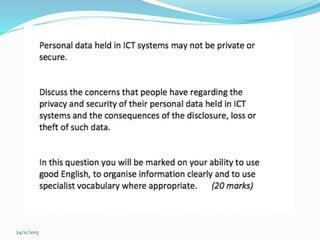
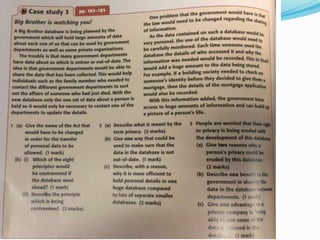
Exam Questions June 2011 7
The things that people use ICT for are changing all the
time. Legislation and regulations requires you to have to
keep up with these changes.
 Discuss, using examples, how ICT legislation and/or
regulations affect your life and suggest, with reasons,
future improvements to legislation and/or regulations
that could be needed to protect you further.
 In this question you will be marked on your ability to
use good English, to organise information clearly and
to use specialist vocabulary where appropriate.
(20 marks)
24/11/2015
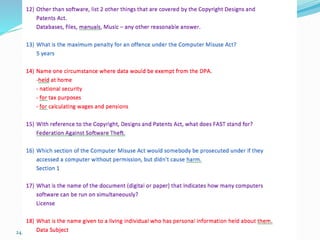
Exam Questions June 2011 2
24/11/2015
Task
 Research Case studies and consequences - Hacking,
own experiences of hacking, identity fraud, online
crime, cyber espionage.
24/11/2015
Task
 Research how threats to security of a computer,
network and data are controlled.
24/11/2015
How to Control a Threat
 Usernames and Passwords
 Firewalls – restrict access to intruders by securing data access
ports.
 Secure Socket Layer (SSL) - encrypt sensitive data, increases
customer trust when using websites.
 Digital Signatures – verifies a document is genuine and has been
sent from a particular individual or organisation.
 Protecting data from loss by fire, flood and theft
 Access restrictions – use of keypads, biometric testing such as
face recognition. Required to access computer rooms
 Access rights - limited user profile rather than administrator.
Making some data read only rather than read/write
24/11/2015
Data Encryption
 Can protect data by scrambling the data so that it
cannot be understood if its interpreted.
 An encryption key is used with the transformation to
scramble the message before transmitting and
unscramble it when it arrives at the destination.
 Research some different types of encryption methods.
24/11/2015
Conventional Encryption
 Plain text or original message is fed into an algorithms
input.
 A secret key is input to the algorithm and all
transformations and substitutions depend on that key.
 The encryption algorithm performs various substitutions
and transformations on plain text.
 A cipher text scrambled message is produced as output.
 To decipherer the message, the decryption algorithm is
run. It takes the cipher text and the same secret key and
produces the original plain text message.
24/11/2015
How are ICT System Protected?
 Research the following ways to protect an ICT System.
 Hardware Measures
 Software Measures
 Procedures
24/11/2015
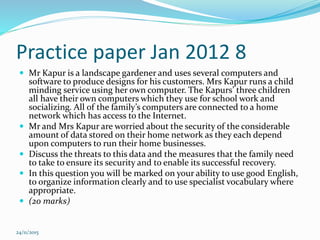
Practice Questions June 10, 1
 Describe, using an example for each, what is meant by
an internal threat and an external threat to an ICT
system. (4 Marks)
24/11/2015
Practice paper Jan 2012 8
 Mr Kapur is a landscape gardener and uses several computers and
software to produce designs for his customers. Mrs Kapur runs a child
minding service using her own computer. The Kapurs’ three children
all have their own computers which they use for school work and
socializing. All of the family’s computers are connected to a home
network which has access to the Internet.
 Mr and Mrs Kapur are worried about the security of the considerable
amount of data stored on their home network as they each depend
upon computers to run their home businesses.
 Discuss the threats to this data and the measures that the family need
to take to ensure its security and to enable its successful recovery.
 In this question you will be marked on your ability to use good English,
to organize information clearly and to use specialist vocabulary where
appropriate.
 (20 marks)
24/11/2015
24/11/2015
24/11/2015
24/11/2015
24/11/2015

Threats

  • 1.
    Safety, Security andlegislations 24/11/2015
  • 2.
    Where do threatscome from?  Viruses  Trojans  Worms  Spyware  Adware  Spam  Abuse by staff accidental or deliberate  Hacking  Fire  Theft  Denial of service attacks  Problems with power loss  Naural disaster – earthquakes, tidal waves, volcanoes, floods, gales,  Faulty hardware or software 24/11/2015
  • 3.
    Identity theft/fraud  Therehas recently been a lot on the news about problems with fraud  Everyone knows the dangers of losing their cards or getting them stolen  But if someone has your account details they can start siphoning money out of your account  If they do it gradually and not in one go many people do not notice it in fact many cases of identity theft can take up to 14 months to work out what is happening  Be very suspicious of any emails sent to you the internet email system can be very insecure and you should never divulge personal information in an email or follow a link to a site from an email  Always view official looking emails with skepticism despite having the right logos and official language it can possibly by a scam. 24/11/2015
  • 4.
    Encryption  If informationneeds to be sent over the internet or another network it needs to be kept secure. Then then encryption should be used. This is basically codes the data whilst it is being sent and only the true recipient will be able to decode it. Should the data be intercepted by a hacker, then the data will be in code and totally meaningless  The process of coding data sending it over the internet and deciphering it when it reaches the true recipient is called encryption.  Encryption should be used for: sending credit card details such as card numbers, expiry dates etc over the internet  Online banking  Sending payment details such as banking details such as sort codes and account numbers  Confidential emails  Sending data between terminals where confidentiality is essential 24/11/2015
  • 5.
    Problems with encryption Security forces such as the police and MI5 do not like people using codes they cannot crack themselves because they cannot read the emails  Encryption can be sued for secret conversations between criminals and terrorists 24/11/2015
  • 6.
    Reasons for securitybreaches  Some of the reasons that individuals give for breaching security are:  For the satisfaction of doing it – to try to show off to others and prove that they are skilled enough to breach security almost as an intellectual game  Personal gain – for example a student wanting to change their grades in an exam to achieve university entry  Financial gain this might be the case if an individual were to change the bank accounts of a large number of customers buy small amounts and add them to their own account  Sabotage to damage the reputation of a competitors organization by proving their security is weak. 24/11/2015
  • 7.
    Types of threats Data access threats mean that the data is accessed while being communicated across a network illegally and is changed by individuals or organizations who should not have access  Service threats are designed to stop the data being used by the organization it belongs to by disrupting the normal running of the software being used  Viruses and worms are two examples of software attacks that can be introduced via corrupted media or via the internet or attachments downloaded from an email. The service threats can be contained in otherwise useful software. 24/11/2015
  • 8.
    Internal and externalthreats  Threats which come form inside the organisation are called internal threats and those coming from outside the organisation are called external threats.  For example hacking would normally be considered an external threat because hacking involves obtaining access to a computer system using communication links usually the internet]  However if a person employed by the organsiation wanted to gain access to part of the ICT system they were not normally allowed to access then this is also hacking and would be considered an internal threat;. 24/11/2015
  • 9.
    Malpractice and threat There are lots of different types of activities which human uses might or might not do which causes a threat to ICT systems. Malpractice means improper or careless use or misconduct. Crime obviously means all those acts which are against the law. There is a bit of blurring with the word malpractice, as this can also involve illegal acts according to the strict dictionary definition however for the exam you need to make the distinction that malpractice is not against the law, whereas crime is.  Examples of malpractice: accidently deleting data  Not taking backup copies  Not scanning for viruses regular  Copying an old version of data over the latest version  Allowing your password to be used by others  Not logging off the network after use. 24/11/2015
  • 10.
    Examples of crimeinclude  Hacking  Deliberately disturbing viruses  Illegally copying data or software  Stealing hardware 24/11/2015
  • 11.
    Internal threats wouldinclude:  Employees introducing viruses deliberately or accidentally  Staff stealing hardware, software or data  Disgruntled staff deliberately damaging hardware, software or data  Staff accidentally damaging or losing data  Staff compromising the privacy of personal data by leaving computers logged on  Staff compromising the security of ICT systems by letting others know their usernames and passwords  Staff hacking into ICT systems that they are not allowed access to 24/11/2015
  • 12.
    External threats wouldinclude:  People from outside the organisation stealing hardware, software or data  People from outside the organisation hacking into the ICT system to view or change information stored  Natural disasters such as flood earthquakes etc  Loss of telecommunications services.  Viruses introduced from file attachments. 24/11/2015
  • 13.
    Discuss  What threatsare there when it comes to computers and networks? 24/11/2015
  • 14.
    You Will:  Organisationsneed to protect data and resources from disclosure to unauthorised bodies. The authenticity of data and messages must now be guaranteed to protect systems.  Computers are now used for data processing and therefore needs tools for protecting data stored on computers. 24/11/2015
  • 15.
    Task  Use anexample of an organisation where its intellectual property is its main asset. This could involve software production, films or books, music or any other organisation you know that needs to protect its data.  Think about what data needs to be secure and why it is important that the data does not become available to unauthorised people or organisations.  Make a short presentation to emphasise why the protection of data is important. 24/11/2015
  • 16.
    What are theThreats?  Explain how each of these could be a potential threat?  Employees  Human Error  Viruses  Spyware  Create a PowerPoint and discuss each one, with examples and preventions. 24/11/2015
  • 17.
    Task  Why doyou think people may want to break into an ICT System?  Complete the following table with the possible reasons: 24/11/2015 Security Breach Possible Reason Unauthorised access to data To violate secrecy or privacy, such as…. Impersonating another user To withdraw money from someone else's internet banking account. Changing functionality of software Link to someone else’s communication link Claim to have either sent data or not sent
  • 18.
  • 19.
  • 20.
    You Will:  Explainwhat the Copyright, Designs and Patents Act is.  Identify what the act covers and the types of licenses available. 24/11/2015
  • 21.
    Legislations  With thedevelopment of ICT systems new laws have to be passed by parliament in order to protect individuals against misuses of personal data held about them. New laws also needed to be passed to cover other misuses such as writing and spreading viruses, illegally accessing compute resources such as hacking.  Discuss the different laws you know about that protects companies and people! 24/11/2015
  • 22.
    Data protection Act1998  The use of ICT has made the processing and transfer of data much easier to protect the individual against the misuse of data a law was passed called the Data Protection Act 1998.  Another reason for the Act was the fact that all member states in the European Economic Area EEA has data protection laws, so the UK had to have them as well  This would allow the free passage of personal data from one member state to another which is essential when conducting business.  The data protection Act 1998 also covers the misuse of personal data, whether by the use of ICT systems or not.  The act gives the right to the individual to find the information stored about them and to check whether it is correct. If the information is wrong they can have it altered and may be able to claim damages if they have suffered loss resulting in this wrong information. 24/11/2015
  • 23.
    What data isclassed as personal data?  The data protection Act 1998 refers to personal data:  Data about an identifiable person  Who is alive  And is specific to hat person  The data subject must be capable of being identifiable from the information  Usually this would mean that the name and address would be part of the data but it could be that the person could be identified simply by other data given.  Data specific to a particular person would include:  Medical history  Credit history  Qualifications  Religious beliefs  Criminal records  The padlock signpost symbol is used to alert individuals to the fact that their personal information is being collected. The symbol directs them to sources that will explain how their information is to be used. 24/11/2015
  • 24.
    Personal data heldabout you  Personal data is particularly important to people who are trying to sell you something.  Generally this marketing data can be put into the following data types, demographic data (where you live)  And lifestyle data (what your interests are what you spend your money on etc)  Marketing people need to know more about our personal lives to target us for advertising and promotional material. 24/11/2015
  • 25.
    Eight principles DataProtection Act 1998  The Data protection Act 1998 contains the following 8 principles: 1. Personal data shall be processed fairly and lawfully 2. Personal data shall be obtained only for one purpose or more specified and lawful purposes and shall not be further processed in any manner incompatible with that purpose or those purposes 3. Personal data shall be adequate relevant and not excessive in relation to the purpose or purposes for which they are processed. 24/11/2015
  • 26.
    Eight principles DataProtection Act 1998 4) Personal data shall be accurate and where necessary kept up to date 5) Personal data processed for any purpose or purposes shall not be kept for longer than is necessary for that purpose or those purposes. 6) Personal data shall be processed in accordance with the rights of data and subjects under this act 7)Appropriate technical and organizational measures shall be taken against accidental loss or destruction of or damage to personal data. 8) Personal data shall not be transferred to a country or territory outside the EEA unless that country or territory ensures an adequate level of protection for the rights and freedom of data subjects in relation to the processing of personal data. 24/11/2015
  • 27.
    Summary of 8principles The 8 data protection principles require that data shall be: 1) Fairly and lawfully processed 2) Processed for limited purposes 3) Adequate, relevant and not excessive 4) Accurate 5) Not kept longer than necessary 6) Processed in accordance with the data subjects’ rights 7) Secure 8) Not transferred to countries outside the EU without adequate protection. 24/11/2015
  • 28.
    Processing personal data The data protection act refers to the processing of personal data. Processing can mean:  Obtaining data ie collecting data  Recording data  Carrying out any operation or set of operations on data 24/11/2015
  • 29.
    Computer misuse act1990  The computer misuse act 1990 was passed to deal with a number of misuses as the use of computers became widespread. The act makes it illegal to:  Deliberately plant or transfer viruses to a computer system to cause damage to its programs and data  Use an organizations computer to carry out unauthorized work  Hack into someone else's computer system with a view to seeing the information or altering it  Use computers to commit various frauds 24/11/2015
  • 30.
    Problems with gaining prosecutionsunder the computer misuse act 1990  In order to prosecute someone under the computer misuse act 1990 the police would need to prove that they did the misuse deliberately.  In other words the person committing the crime knew that they were doing wrong and knew about it  Proving the intent is very difficult  For example if you had a virus on your flash drive form home and took it to work and put it into a computer and it transferred a virus, this is an easy thing to do unknowingly. It would be difficult to prove whether or not this has been done deliberately  Some organizations would not want others especially media to know that their security has been compromised  So many cases go unpunished. 24/11/2015
  • 31.
    Offences under thecomputer misuse act 1990 – Section 1  A person guilty of an offence if:  He/she causes a computer to perform any function with intent to secure access to any program or data held in any computer  The access he/.she intends to secure is unauthorised and  He/she knows a the time that it is unauthorsed.  The maximum sentence for an offence of this nature is 6 months imprisonment 24/11/2015
  • 32.
    CMA – Section2  A person would be guilty of an offence under section 2 of the act if he/she commits an offence under section 1 of the act and with the intent of committing a further offence such as blackmail, theft or any other offence which has a penalty of at least 5 years imprisonment. They will also be guilty if they get someone else to do this further offence.  The maximum sentence for an offence under this section of the act is 5 years imprisonment. 24/11/2015
  • 33.
    CMA section 3 A person is guilty of an offence under this section of the act if she does any act which causes an unauthorized modification of the contents of any computer and the time that he knows that the modification is unauthorized and has the requisite intent. The requisite intent is intent to cause a modification and by doing so to:  Impair the operation of any computer  To prevent or hinder access to any program or data  To impair the operation of any program or reliability of any data.  The maximum sentence of an offence under this section of the act is 5 tears imprisonment. 24/11/2015
  • 34.
    Copyright, Design andPatents Act 1998  Many people make a living out of writing software and manuals etc for others to use. These people are protected from having their work copied in the same way as the writer of a best selling novel is protected. 24/11/2015
  • 35.
    Copyright and licensing There are the following problems with computer software:  It is very easy to copy  It is very easy to transfer files over the internet  People don’t view copying software as like stealing goods from a supermarket.  There are the following problems with copied software:  Not entitled to technical support  Do not qualify for upgrades  Software may be incomplete  It may contain viruses  The process of illegally copying software is called software piracy. 24/11/2015
  • 36.
    The copyright, designsand patents act 1998  This act makes it a criminal offence to copy or steal software. In addition if you copy software illegally then you are depriving the owner of the software of some of their income/profits and they will be able to sue you.  The copyright design and patents act 1998 allows the software owner to copy the software and also allows someone else to copy the software provided they have the owners permission. It is not just programs that are protected by this act, databases of data, computer files and manuals would also be covered  You can however legally copy software if you have permission of the owner/ This is necessary in order to take backup copies of software for security purposes.  Under the act it is a criminal offence to:  Copy or distribute software or manuals without the permission or license from the copyright owner  Run purchased software covered by copyright on two or more machines at the same time unless there is a software license that allows it  Compel/force employees to make or distribute illegal software for the use by the company 24/11/2015
  • 37.
    Consequences of breakingthis law  Offences under this act are considered serious and the consequences could include:  Unlimited fines and up to 10 years in prison  You could lose your reputation, promotion prospects and even your job  You could be sued for damages by the software owner 24/11/2015
  • 38.
    Software piracy  Softwarepiracy is the illegal copying of software and data. Just like software data has a value and many companies would love to get their hands on their competitors data.  It has been estimated by the Federation Against Software Theft that around 27% of the software used in Britain is illegal.  Software piracy means unauthorised copying of software. In many cases this copying will be fore personal use but in some cases the people making the copies will sell them at car boot sales, computer fairs etc  Such copying is illegal since it deprives the software company of the revenue that they would have received had they sold the software.  There are other infringements of the law that is less blatant for example a company may have a site license for 20 computers to use the software when the actual numbers are more than this  Nevertheless this is still illegal and if caught doing this the company cam face being used by the software company for loss of sales and revenues which could result in fines and imprisonment for the employees. 24/11/2015
  • 39.
  • 40.
  • 41.
  • 42.
  • 43.
    Exam Questions June2011 7 The things that people use ICT for are changing all the time. Legislation and regulations requires you to have to keep up with these changes.  Discuss, using examples, how ICT legislation and/or regulations affect your life and suggest, with reasons, future improvements to legislation and/or regulations that could be needed to protect you further.  In this question you will be marked on your ability to use good English, to organise information clearly and to use specialist vocabulary where appropriate. (20 marks) 24/11/2015
  • 44.
    Exam Questions June2011 2 24/11/2015
  • 45.
    Task  Research Casestudies and consequences - Hacking, own experiences of hacking, identity fraud, online crime, cyber espionage. 24/11/2015
  • 46.
    Task  Research howthreats to security of a computer, network and data are controlled. 24/11/2015
  • 47.
    How to Controla Threat  Usernames and Passwords  Firewalls – restrict access to intruders by securing data access ports.  Secure Socket Layer (SSL) - encrypt sensitive data, increases customer trust when using websites.  Digital Signatures – verifies a document is genuine and has been sent from a particular individual or organisation.  Protecting data from loss by fire, flood and theft  Access restrictions – use of keypads, biometric testing such as face recognition. Required to access computer rooms  Access rights - limited user profile rather than administrator. Making some data read only rather than read/write 24/11/2015
  • 48.
    Data Encryption  Canprotect data by scrambling the data so that it cannot be understood if its interpreted.  An encryption key is used with the transformation to scramble the message before transmitting and unscramble it when it arrives at the destination.  Research some different types of encryption methods. 24/11/2015
  • 49.
    Conventional Encryption  Plaintext or original message is fed into an algorithms input.  A secret key is input to the algorithm and all transformations and substitutions depend on that key.  The encryption algorithm performs various substitutions and transformations on plain text.  A cipher text scrambled message is produced as output.  To decipherer the message, the decryption algorithm is run. It takes the cipher text and the same secret key and produces the original plain text message. 24/11/2015
  • 50.
    How are ICTSystem Protected?  Research the following ways to protect an ICT System.  Hardware Measures  Software Measures  Procedures 24/11/2015
  • 51.
    Practice Questions June10, 1  Describe, using an example for each, what is meant by an internal threat and an external threat to an ICT system. (4 Marks) 24/11/2015
  • 52.
    Practice paper Jan2012 8  Mr Kapur is a landscape gardener and uses several computers and software to produce designs for his customers. Mrs Kapur runs a child minding service using her own computer. The Kapurs’ three children all have their own computers which they use for school work and socializing. All of the family’s computers are connected to a home network which has access to the Internet.  Mr and Mrs Kapur are worried about the security of the considerable amount of data stored on their home network as they each depend upon computers to run their home businesses.  Discuss the threats to this data and the measures that the family need to take to ensure its security and to enable its successful recovery.  In this question you will be marked on your ability to use good English, to organize information clearly and to use specialist vocabulary where appropriate.  (20 marks) 24/11/2015
  • 53.
  • 54.
  • 55.
  • 56.