Unit 1
Introduction to Computer Security
COSC 4035
1.1 Evolution of Computer Security and Privacy Issues and Ethics
• Computer security, meaning safeguarding hardware, software
and their physical locations,
• 1960s- Larry Roberts, hailed as the internet’s founder, designed
the ARPANET (Advanced Research Projects Agency Network),
which is called the internet’s predecessor.
• "worldwide system of interconnected networks and computers“-
Internet by Larry
Evolution Contd…
• 1960s - 70s
 New paradigms of Multiuser and Multiprogramming were
introduced
 Data storage systems like concepts of database and RDBMS
were introduced
New Concerns arise –
 The issue of computer security first arose in the 1970s as
individuals began to break into telephone systems.
 People and companies started focusing on database
processing
 What is being done to their privately stored data in large
databases
Evolution Contd…
• 1980s & 90s
 Local Area Network introduced
 Internet entered in the world
 PCs were popularized
 Net based business models like E-commerce, E-government and
E-health services started to develop new computerized systems
 Malwares like Viruses become majors threats
New Concerns –
 People and Companies start thinking about their security of
computers and stored data
 Trust on emails and websites were primarily suspected.
 They were worried about their information privacy in networked
environment / world
Salient Security Cases
• Salient Security Cases.
 Internet Worm (Morris worm )
 November 2, 1988 a worm attacked more than 60,000
computers around the USA
 The worm attacks computers, and when it has installed itself,
it multiplies itself, freezing the computer
 It exploited UNIX security holes in Sendmail
 A nation wide effort enabled to solve the problem within 12
hours
 Robert Morris [ A Professor at the MIT] became the first
person to be indicted under the Computer Fraud and Abuse
Act.
 He was sentenced to three years of probation, 400 hours of
community service and a fine of $10,050
Salient Security Cases Contd…
• Salient security harms …
 NASA shutdown
 In 1990, an Australian computer science student was charged for
shutting down NASA’s computer system for 24 hours
 Digital Equipment Corp. and MCI Communications Corp, Attack
 a 25-year-old hacker named Kevin Mitnick began tapping into the e-mail
system used by computer security managers. As a result, Mitnick was
arrested and sentenced to one year in jail.
 Airline computers
 In 1998, a major travel agency discovered that someone penetrated
its ticketing system and has printed airline tickets illegally
 Bank theft
 In 1984, a bank manager was able to steal $25 million through un-
audited computer transactions
Salient Security Cases Contd…
During 1995, computers at the U.S. Department of
Defense were attacked roughly 250,000 times.
In 1998, the U.S. Department of Justice created the
National Infrastructure Protection Center, charging
it with task of safeguarding domestic technology,
telecommunications, and transportation systems
from unethical hackers.
Salient Security Cases Contd…
 Cyber crime and Ethiopia
 Employees of a company managed to change their salaries by
fraudulently modifying the company’s database
 In 1990s Internet password theft
Hundreds of dial-up passwords were stolen and sold to
other users
Many of the owners lost tens of thousands of Birr each
 In Africa: Cote d’Ivoire
 An employee who has been fired by his company deleted all the
data in his company’s computer
Salient Security Cases Contd…
Early Efforts
• 1960s: Marked as the beginning of true computer
security
• 1970s: Research and modeling
 Identifying security requirements
 Formulating security policy models
 Defining recommended guidelines and controls
 Development of secure systems
• European Council adopted a convention on Cyber-
crime in 2001.
• The World Summit for Information Society
considered computer security and privacy as a subject
of discussion in 2003 and 2005.
• The Ethiopian Penal Code [EPC] of 2005 has articles
on data and computer related crimes.
1.2 Computer Security
• It is Information security as applied to computers and networks.
• The objectives- Protection of information from
 Theft,
 Corruption,
 Damage from disaster,
Definition
Security: The prevention and protection of computer assets from
unauthorized access, use, alteration, degradation, destruction, and
other threats.
“ The term computer system security means the collective processes
and mechanisms by which sensitive and valuable information and
services are protected from publication, alter or collapse by
unauthorized activities or untrustworthy individuals and
unplanned events respectively.
Privacy
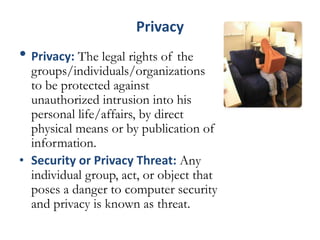
• Privacy: The legal rights of the
groups/individuals/organizations
to be protected against
unauthorized intrusion into his
personal life/affairs, by direct
physical means or by publication of
information.
• Security or Privacy Threat: Any
individual group, act, or object that
poses a danger to computer security
and privacy is known as threat.
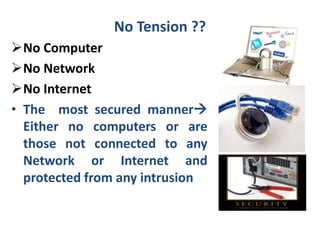
No Tension ??
No Computer
No Network
No Internet
• The most secured manner
Either no computers or are
those not connected to any
Network or Internet and
protected from any intrusion
Defining- Computer Security
• Computer or Information Technology can be
used for productive or destructive purposes
• Computer Security  refers to techniques for
ensuring that data stored in a computer
cannot be read or compromised by any
individuals without authorization.
• Security policies  The provisions and
policies adopted to protect information and
property from theft, corruption, or natural
disaster while allowing the information and
property to remain accessible and productive
to its intended users.
Common Computer Security Measures
• Most computer security measures involve data
encryption and passwords.
• Data encryption is the translation of data into a
form that can not be read without a
deciphering mechanism.
• A password is a secret word or phrase that
gives a user access to a particular program or
system.
1.3 Goals of Computer Security
• To maintain information Confidentiality
• To ensure the Integrity and Reliability of data
resources
• To ensure the Uninterrupted Availability of
data resources and online operations
• To prevent Non-repudiation of information
sent in reference to security and privacy laws
and guidelines
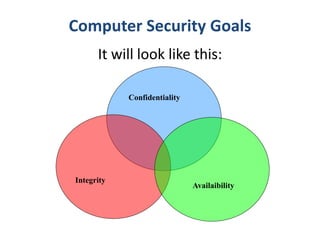
Computer Security Goals
It will look like this:
Integrity
Confidentiality
Availaibility
1.4 Aspects of Security
– security attack
– security service
– security mechanism
Security Attack
• any action that compromises the security of
information owned by an organization
• information security is about how to prevent attacks,
or failing that, to detect attacks on information-
based systems
• often threat and attack used to mean same thing
• have a wide range of attacks
• can focus of generic types of attacks
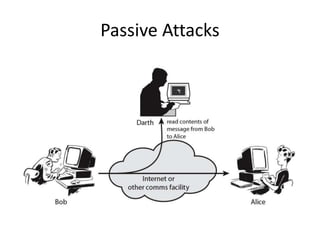
– passive
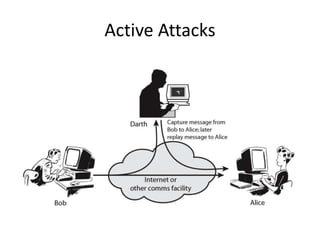
– active
Passive Attacks
Active Attacks
Security Service
–enhance security of data processing
systems and information transfers of an
organization
–intended to counter security attacks
–using one or more security mechanisms
–often replicates functions normally
associated with physical documents
have signatures, dates; need protection from disclosure
Security Services
• Authentication - assurance that the communicating
entity is the one claimed: Fabrication
• Access Control - prevention of the unauthorized use
of a resource
• Data Confidentiality –protection of data from
unauthorized disclosure: Interception
• Data Integrity - assurance that data received is as
sent by an authorized entity: Modification
• Non-Repudiation - protection against denial by one
of the parties in a communication
• Availability - ensure info delivery : Interruption
Security Mechanism
• feature designed to detect, prevent, or
recover from a security attack
• no single mechanism will support all services
required
• however one particular element underlies
many of the security mechanisms in use:
– cryptographic techniques
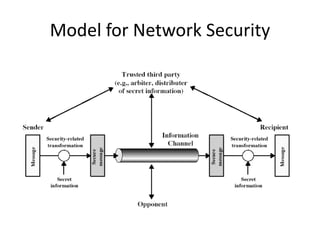
Model for Network Security
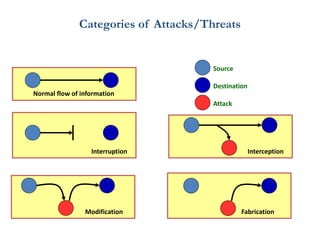
Categories of Attacks/Threats
Normal flow of information
Interruption Interception
Modification Fabrication
Source
Destination
Attack
Some Types of Attacks
• What are some common attacks?
– Network Attacks
• Packet sniffing, man-in-the-middle, 5G based attack,
SQL injection attacks, Ransomware
– Web attacks
• Phishing, Cross Site Scripting
– OS, applications and software attacks
• Virus, Trojan, Worms, Rootkits, Buffer Overflow
• Not all hackers are evil wrongdoers trying to steal your info
26
Network Attacks
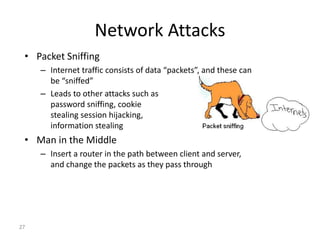
• Packet Sniffing
– Internet traffic consists of data “packets”, and these can
be “sniffed”
– Leads to other attacks such as
password sniffing, cookie
stealing session hijacking,
information stealing
• Man in the Middle
– Insert a router in the path between client and server,
and change the packets as they pass through
27
How Man-in-the-Middle Attack work
Mallory can attack public-key key exchange
protocol in the following manner.
• Alice sends her public key to Bob .Mallory
intercepts this key and sends Bob his public
key
• Bob sends Alice his public key. Mallory
intercepts this key and sends Alice his own
public key
Man-in-the-Middle Attack
• When Alice sends a message to Bob, encrypted in “Bob’s”
public key, Mallory intercepts it. Since the message is really
encrypted with his own public key, he decrypts it with his
private key, re-encrypts it with Bob’s public key, and sends
it on to Bob
• When Bob sends a message to Alice, encrypted in “Alice’s”
public key, Mallory intercepts it. Since the message is really
encrypted with his own public key, he decrypts it with his
private key, re-encrypts it with Alice’s public key, and sends
it on to Alice
• This man-in-the-middle attack works because Alice and Bob
have no way to verify that they are talking to each other.
Web Attacks
• Phishing
– An evil website imagines to be a trusted website
– Example:
• You type, by mistake, “mibank.com” instead of “mybank.com”
• mibank.com designs the site to look like mybank.com so the user
types in their info as usual
• BAD! Now an evil person has your info!
• Cross Site Scripting
– Writing a complex JavaScript program that steals data left by other
sites that you have visited in same browsing session
30
1.5 Computer Security Components
• Vulnerability Is a point where a system Is
susceptible to attack.
• A threat Is a possible danger to the system.
The danger might be a Person (a system
cracker), a thing (a faulty piece of Equipment),
or an event (a fire or a flood) that might
exploit a Vulnerability of the system.
• Countermeasures are techniques for
protecting your system.
Types of Vulnerabilities
• Physical vulnerabilities (Ex. Buildings)
• Natural vulnerabilities (Ex. Earthquake)
• Hardware and Software vulnerabilities (Ex. Failures)
• Media vulnerabilities (Ex. Disks can be stolen)
• Communication vulnerabilities (Ex. Wires can be
tapped)
• Human vulnerabilities (Ex. Insiders)
Classification of Vulnerabilities
1.Hardware
• Weakness to humidity
• Weakness to dust
• weakness to soiling
• weakness to unprotected storage
2.Software
• insufficient testing
• lack of audit trail
3.Network
• unprotected communication lines
• insecure network architecture
Contd..
4. Personnel
• inadequate engaging process
• inadequate security awareness
5. Site
• area subject to flood
• unreliable power source
6. Organizational
• lack of regular reviews
• lack of continuity plans
• lack of security
Causes of Vulnerabilities
• Complexity: Large, complex systems increase
the probability of errors and unintentional
access points
• Familiarity: Using common, well-known code,
software, operating systems, and/or hardware
increases the probability an attacker has or can
find the knowledge and tools to exploit the
flaw
Cont..
Connectivity: More physical connections, privileges,
ports, protocols, and services and time each of
those are accessible increase vulnerability
• Password management flaws: The computer
user uses weak passwords that could be
discovered by brute force. The computer user
stores the password on the computer where a
program can access it. Users re-use passwords
between many programs and websites.
Contd…
• Internet Website Browsing: Some internet
websites may contain harmful Spyware or
Adware that can be installed automatically
on the computer systems. After visiting
those websites, the computer systems
become infected and personal information
will be collected and passed on to third
party individuals.
• Software bugs: The programmer leaves an
exploitable bug in a software program. The
software bug may allow an attacker to
misuse an application.
Cont..
Not learning from past mistakes: for example most
vulnerabilities discovered in IPv4 protocol
software were discovered in the new IPv6
implementations
• The research has shown that the most
vulnerable point in most information systems is
the human user, operator, designer, or other
human: so humans should be considered in their
different roles as asset, threat, information
resources. Social engineering is an increasing
security concern.
Countermeasures
• Countermeasures can take the form of
software, hardware and modes of behavior.
Software countermeasures include:
• personal firewalls
• anti-virus software
• pop-up blockers
• Spyware detection/removal programs……..
Contd…
• The most common hardware countermeasure is
a router that can prevent the IP address of an
individual computer from being directly visible on
the Internet.
• Other hardware countermeasures include:
• Biometric authentication systems
• Physical restriction of access to computers and
peripherals
• Intrusion detectors
• Alarms.
Behavioral countermeasures include:
• Frequent deletion of stored cookies and temporary files
from Web browsers
• Regular scanning for viruses and other malware
• Regular installation of updates and patches for operating
systems
• Refusing to click on links that appear within e-mail
messages
• Refraining from opening e-mail messages and attachments
from unknown senders
• Staying away from questionable Web sites
• Regularly backing up data on external media.
1.6 Computer security controls
Authentication (Password, Cards, Biometrics)
(What we know, have, are!)
Encryption
Auditing
Administrative procedures
Standards
Physical Security
Laws
principles of Physical Security
1.Keep people away
• Most large corporations maintain very strict
control over who can enter their datacenters.
They use card key or keypad systems, log books
and human security to limit unauthorized
access.
• If at all possible, sensitive servers should be
kept behind a locked door, not just a door with
a lock, and access should be limited to a select
set of trustworthy administrators
2. Keep backup away from the datacenter
3. Keep them out
• you can't keep everyone away from them. The next
layer of a good physical security plan is to limit
what can be done with the computers.
• Lock the CPU case. Most desktop and tower cases
have locking lugs that you can use to keep an
intruder from opening the case.
• Use a cable-type security lock to keep someone
from stealing the whole computer.
• This is particularly good advice for laptops or small
desktops that can easily be hidden inside a
backpack or coat.
Cont..
• Configure the BIOS not to boot from the floppy
drive.
• This makes it harder for an intruder to remove
passwords and account data from your system's
disks.
• Consider whether it's worth the expense of using
a motion-sensor alarm in the room where the
computers located. (Remember, for home offices,
security systems that cover the office area are
generally deductible business expenses!)
Contd…
4 Protect your plumbing.
• Network cabling, hubs and even the external network
interface are extremely vulnerable points in a network.
• An attacker who can attach to your network can steal data
in transit or mount attacks against computers on your
network or on other networks! If at all possible, keep hubs
and switches behind looked doors or in locked cabinets,
run cabling through walls and ceilings to make it harder
to tap, and ensure that your external data connection
points are kept locked.
sc.pptx

sc.pptx

  • 1.
    Unit 1 Introduction toComputer Security COSC 4035
  • 2.
    1.1 Evolution ofComputer Security and Privacy Issues and Ethics • Computer security, meaning safeguarding hardware, software and their physical locations, • 1960s- Larry Roberts, hailed as the internet’s founder, designed the ARPANET (Advanced Research Projects Agency Network), which is called the internet’s predecessor. • "worldwide system of interconnected networks and computers“- Internet by Larry
  • 3.
    Evolution Contd… • 1960s- 70s  New paradigms of Multiuser and Multiprogramming were introduced  Data storage systems like concepts of database and RDBMS were introduced New Concerns arise –  The issue of computer security first arose in the 1970s as individuals began to break into telephone systems.  People and companies started focusing on database processing  What is being done to their privately stored data in large databases
  • 4.
    Evolution Contd… • 1980s& 90s  Local Area Network introduced  Internet entered in the world  PCs were popularized  Net based business models like E-commerce, E-government and E-health services started to develop new computerized systems  Malwares like Viruses become majors threats New Concerns –  People and Companies start thinking about their security of computers and stored data  Trust on emails and websites were primarily suspected.  They were worried about their information privacy in networked environment / world
  • 5.
    Salient Security Cases •Salient Security Cases.  Internet Worm (Morris worm )  November 2, 1988 a worm attacked more than 60,000 computers around the USA  The worm attacks computers, and when it has installed itself, it multiplies itself, freezing the computer  It exploited UNIX security holes in Sendmail  A nation wide effort enabled to solve the problem within 12 hours  Robert Morris [ A Professor at the MIT] became the first person to be indicted under the Computer Fraud and Abuse Act.  He was sentenced to three years of probation, 400 hours of community service and a fine of $10,050
  • 6.
    Salient Security CasesContd… • Salient security harms …  NASA shutdown  In 1990, an Australian computer science student was charged for shutting down NASA’s computer system for 24 hours  Digital Equipment Corp. and MCI Communications Corp, Attack  a 25-year-old hacker named Kevin Mitnick began tapping into the e-mail system used by computer security managers. As a result, Mitnick was arrested and sentenced to one year in jail.  Airline computers  In 1998, a major travel agency discovered that someone penetrated its ticketing system and has printed airline tickets illegally  Bank theft  In 1984, a bank manager was able to steal $25 million through un- audited computer transactions
  • 7.
    Salient Security CasesContd… During 1995, computers at the U.S. Department of Defense were attacked roughly 250,000 times. In 1998, the U.S. Department of Justice created the National Infrastructure Protection Center, charging it with task of safeguarding domestic technology, telecommunications, and transportation systems from unethical hackers.
  • 8.
    Salient Security CasesContd…  Cyber crime and Ethiopia  Employees of a company managed to change their salaries by fraudulently modifying the company’s database  In 1990s Internet password theft Hundreds of dial-up passwords were stolen and sold to other users Many of the owners lost tens of thousands of Birr each  In Africa: Cote d’Ivoire  An employee who has been fired by his company deleted all the data in his company’s computer
  • 9.
    Salient Security CasesContd… Early Efforts • 1960s: Marked as the beginning of true computer security • 1970s: Research and modeling  Identifying security requirements  Formulating security policy models  Defining recommended guidelines and controls  Development of secure systems • European Council adopted a convention on Cyber- crime in 2001. • The World Summit for Information Society considered computer security and privacy as a subject of discussion in 2003 and 2005. • The Ethiopian Penal Code [EPC] of 2005 has articles on data and computer related crimes.
  • 10.
    1.2 Computer Security •It is Information security as applied to computers and networks. • The objectives- Protection of information from  Theft,  Corruption,  Damage from disaster, Definition Security: The prevention and protection of computer assets from unauthorized access, use, alteration, degradation, destruction, and other threats. “ The term computer system security means the collective processes and mechanisms by which sensitive and valuable information and services are protected from publication, alter or collapse by unauthorized activities or untrustworthy individuals and unplanned events respectively.
  • 11.
    Privacy • Privacy: Thelegal rights of the groups/individuals/organizations to be protected against unauthorized intrusion into his personal life/affairs, by direct physical means or by publication of information. • Security or Privacy Threat: Any individual group, act, or object that poses a danger to computer security and privacy is known as threat.
  • 12.
    No Tension ?? NoComputer No Network No Internet • The most secured manner Either no computers or are those not connected to any Network or Internet and protected from any intrusion
  • 13.
    Defining- Computer Security •Computer or Information Technology can be used for productive or destructive purposes • Computer Security  refers to techniques for ensuring that data stored in a computer cannot be read or compromised by any individuals without authorization. • Security policies  The provisions and policies adopted to protect information and property from theft, corruption, or natural disaster while allowing the information and property to remain accessible and productive to its intended users.
  • 14.
    Common Computer SecurityMeasures • Most computer security measures involve data encryption and passwords. • Data encryption is the translation of data into a form that can not be read without a deciphering mechanism. • A password is a secret word or phrase that gives a user access to a particular program or system.
  • 15.
    1.3 Goals ofComputer Security • To maintain information Confidentiality • To ensure the Integrity and Reliability of data resources • To ensure the Uninterrupted Availability of data resources and online operations • To prevent Non-repudiation of information sent in reference to security and privacy laws and guidelines
  • 16.
    Computer Security Goals Itwill look like this: Integrity Confidentiality Availaibility
  • 17.
    1.4 Aspects ofSecurity – security attack – security service – security mechanism
  • 18.
    Security Attack • anyaction that compromises the security of information owned by an organization • information security is about how to prevent attacks, or failing that, to detect attacks on information- based systems • often threat and attack used to mean same thing • have a wide range of attacks • can focus of generic types of attacks – passive – active
  • 19.
  • 20.
  • 21.
    Security Service –enhance securityof data processing systems and information transfers of an organization –intended to counter security attacks –using one or more security mechanisms –often replicates functions normally associated with physical documents have signatures, dates; need protection from disclosure
  • 22.
    Security Services • Authentication- assurance that the communicating entity is the one claimed: Fabrication • Access Control - prevention of the unauthorized use of a resource • Data Confidentiality –protection of data from unauthorized disclosure: Interception • Data Integrity - assurance that data received is as sent by an authorized entity: Modification • Non-Repudiation - protection against denial by one of the parties in a communication • Availability - ensure info delivery : Interruption
  • 23.
    Security Mechanism • featuredesigned to detect, prevent, or recover from a security attack • no single mechanism will support all services required • however one particular element underlies many of the security mechanisms in use: – cryptographic techniques
  • 24.
  • 25.
    Categories of Attacks/Threats Normalflow of information Interruption Interception Modification Fabrication Source Destination Attack
  • 26.
    Some Types ofAttacks • What are some common attacks? – Network Attacks • Packet sniffing, man-in-the-middle, 5G based attack, SQL injection attacks, Ransomware – Web attacks • Phishing, Cross Site Scripting – OS, applications and software attacks • Virus, Trojan, Worms, Rootkits, Buffer Overflow • Not all hackers are evil wrongdoers trying to steal your info 26
  • 27.
    Network Attacks • PacketSniffing – Internet traffic consists of data “packets”, and these can be “sniffed” – Leads to other attacks such as password sniffing, cookie stealing session hijacking, information stealing • Man in the Middle – Insert a router in the path between client and server, and change the packets as they pass through 27
  • 28.
    How Man-in-the-Middle Attackwork Mallory can attack public-key key exchange protocol in the following manner. • Alice sends her public key to Bob .Mallory intercepts this key and sends Bob his public key • Bob sends Alice his public key. Mallory intercepts this key and sends Alice his own public key
  • 29.
    Man-in-the-Middle Attack • WhenAlice sends a message to Bob, encrypted in “Bob’s” public key, Mallory intercepts it. Since the message is really encrypted with his own public key, he decrypts it with his private key, re-encrypts it with Bob’s public key, and sends it on to Bob • When Bob sends a message to Alice, encrypted in “Alice’s” public key, Mallory intercepts it. Since the message is really encrypted with his own public key, he decrypts it with his private key, re-encrypts it with Alice’s public key, and sends it on to Alice • This man-in-the-middle attack works because Alice and Bob have no way to verify that they are talking to each other.
  • 30.
    Web Attacks • Phishing –An evil website imagines to be a trusted website – Example: • You type, by mistake, “mibank.com” instead of “mybank.com” • mibank.com designs the site to look like mybank.com so the user types in their info as usual • BAD! Now an evil person has your info! • Cross Site Scripting – Writing a complex JavaScript program that steals data left by other sites that you have visited in same browsing session 30
  • 31.
    1.5 Computer SecurityComponents • Vulnerability Is a point where a system Is susceptible to attack. • A threat Is a possible danger to the system. The danger might be a Person (a system cracker), a thing (a faulty piece of Equipment), or an event (a fire or a flood) that might exploit a Vulnerability of the system. • Countermeasures are techniques for protecting your system.
  • 32.
    Types of Vulnerabilities •Physical vulnerabilities (Ex. Buildings) • Natural vulnerabilities (Ex. Earthquake) • Hardware and Software vulnerabilities (Ex. Failures) • Media vulnerabilities (Ex. Disks can be stolen) • Communication vulnerabilities (Ex. Wires can be tapped) • Human vulnerabilities (Ex. Insiders)
  • 33.
    Classification of Vulnerabilities 1.Hardware •Weakness to humidity • Weakness to dust • weakness to soiling • weakness to unprotected storage 2.Software • insufficient testing • lack of audit trail 3.Network • unprotected communication lines • insecure network architecture
  • 34.
    Contd.. 4. Personnel • inadequateengaging process • inadequate security awareness 5. Site • area subject to flood • unreliable power source 6. Organizational • lack of regular reviews • lack of continuity plans • lack of security
  • 35.
    Causes of Vulnerabilities •Complexity: Large, complex systems increase the probability of errors and unintentional access points • Familiarity: Using common, well-known code, software, operating systems, and/or hardware increases the probability an attacker has or can find the knowledge and tools to exploit the flaw
  • 36.
    Cont.. Connectivity: More physicalconnections, privileges, ports, protocols, and services and time each of those are accessible increase vulnerability • Password management flaws: The computer user uses weak passwords that could be discovered by brute force. The computer user stores the password on the computer where a program can access it. Users re-use passwords between many programs and websites.
  • 37.
    Contd… • Internet WebsiteBrowsing: Some internet websites may contain harmful Spyware or Adware that can be installed automatically on the computer systems. After visiting those websites, the computer systems become infected and personal information will be collected and passed on to third party individuals. • Software bugs: The programmer leaves an exploitable bug in a software program. The software bug may allow an attacker to misuse an application.
  • 38.
    Cont.. Not learning frompast mistakes: for example most vulnerabilities discovered in IPv4 protocol software were discovered in the new IPv6 implementations • The research has shown that the most vulnerable point in most information systems is the human user, operator, designer, or other human: so humans should be considered in their different roles as asset, threat, information resources. Social engineering is an increasing security concern.
  • 39.
    Countermeasures • Countermeasures cantake the form of software, hardware and modes of behavior. Software countermeasures include: • personal firewalls • anti-virus software • pop-up blockers • Spyware detection/removal programs……..
  • 40.
    Contd… • The mostcommon hardware countermeasure is a router that can prevent the IP address of an individual computer from being directly visible on the Internet. • Other hardware countermeasures include: • Biometric authentication systems • Physical restriction of access to computers and peripherals • Intrusion detectors • Alarms.
  • 41.
    Behavioral countermeasures include: •Frequent deletion of stored cookies and temporary files from Web browsers • Regular scanning for viruses and other malware • Regular installation of updates and patches for operating systems • Refusing to click on links that appear within e-mail messages • Refraining from opening e-mail messages and attachments from unknown senders • Staying away from questionable Web sites • Regularly backing up data on external media.
  • 42.
    1.6 Computer securitycontrols Authentication (Password, Cards, Biometrics) (What we know, have, are!) Encryption Auditing Administrative procedures Standards Physical Security Laws
  • 43.
    principles of PhysicalSecurity 1.Keep people away • Most large corporations maintain very strict control over who can enter their datacenters. They use card key or keypad systems, log books and human security to limit unauthorized access. • If at all possible, sensitive servers should be kept behind a locked door, not just a door with a lock, and access should be limited to a select set of trustworthy administrators 2. Keep backup away from the datacenter
  • 44.
    3. Keep themout • you can't keep everyone away from them. The next layer of a good physical security plan is to limit what can be done with the computers. • Lock the CPU case. Most desktop and tower cases have locking lugs that you can use to keep an intruder from opening the case. • Use a cable-type security lock to keep someone from stealing the whole computer. • This is particularly good advice for laptops or small desktops that can easily be hidden inside a backpack or coat.
  • 45.
    Cont.. • Configure theBIOS not to boot from the floppy drive. • This makes it harder for an intruder to remove passwords and account data from your system's disks. • Consider whether it's worth the expense of using a motion-sensor alarm in the room where the computers located. (Remember, for home offices, security systems that cover the office area are generally deductible business expenses!)
  • 46.
    Contd… 4 Protect yourplumbing. • Network cabling, hubs and even the external network interface are extremely vulnerable points in a network. • An attacker who can attach to your network can steal data in transit or mount attacks against computers on your network or on other networks! If at all possible, keep hubs and switches behind looked doors or in locked cabinets, run cabling through walls and ceilings to make it harder to tap, and ensure that your external data connection points are kept locked.