
Theming the Modern
Toolkit
Phil Guerrant
Senior Software Engineer, Sencha
Getting Started
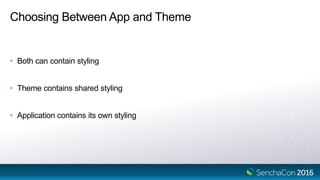
Choosing Between App and Theme
• Both can contain styling
• Theme contains shared styling
• Application contains its own styling
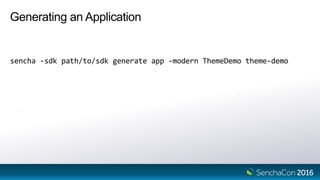
Generating an Application
sencha -sdk path/to/sdk generate app -modern ThemeDemo theme-demo
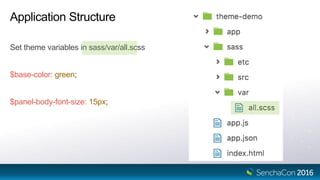
Application Structure
Set theme variables in sass/var/all.scss
$base-color: green;
$panel-body-font-size: 15px;
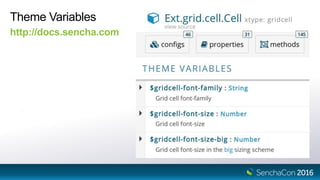
Theme Variables
http://docs.sencha.com
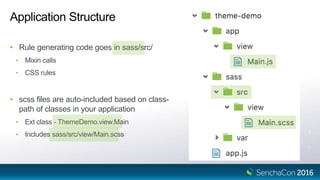
Application Structure
• Rule generating code goes in sass/src/
• Mixin calls
• CSS rules
• scss files are auto-included based on class-
path of classes in your application
• Ext class - ThemeDemo.view.Main
• Includes sass/src/view/Main.scss
Rapid Development Using Fashion
sencha app watch --fashion
[INF] Server started at port : 1841
[INF] Application available at http://localhost:1841
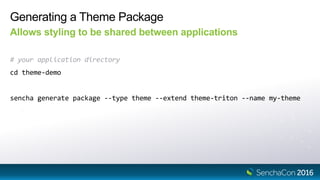
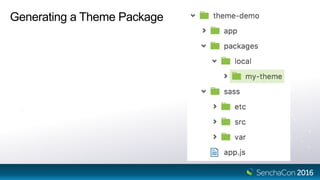
Generating a Theme Package
Allows styling to be shared between applications
# your application directory
cd theme-demo
sencha generate package --type theme --extend theme-triton --name my-theme
Generating a Theme Package
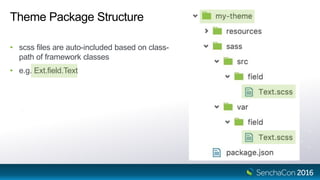
Theme Package Structure
• scss files are auto-included based on class-
path of framework classes
• e.g. Ext.field.Text
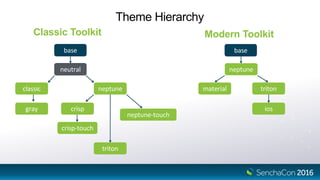
Theme Hierarchy
Classic Toolkit Modern Toolkit
base
neutral
classic
gray
neptune
crisp
crisp-touch
neptune-touch
triton
base
neptune
triton
ios
material
Variables
Variables
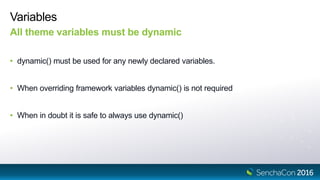
All theme variables must be dynamic
• dynamic() must be used for any newly declared variables.
• When overriding framework variables dynamic() is not required
• When in doubt it is safe to always use dynamic()
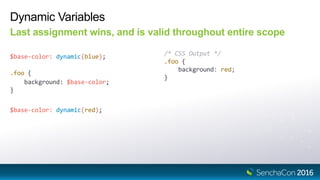
Dynamic Variables
Last assignment wins, and is valid throughout entire scope
$base-color: dynamic(blue); /* CSS Output */
.foo {
background: red;
}
$base-color: dynamic(red);
.foo {
background: $base-color;
}
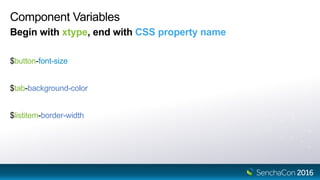
Component Variables
Begin with xtype, end with CSS property name
$button-font-size
$tab-background-color
$listitem-border-width
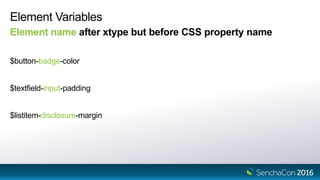
Element Variables
Element name after xtype but before CSS property name
$button-badge-color
$textfield-input-padding
$listitem-disclosure-margin
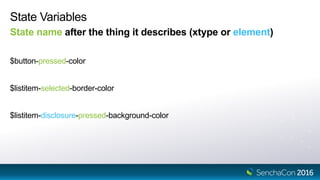
State Variables
State name after the thing it describes (xtype or element)
$button-pressed-color
$listitem-selected-border-color
$listitem-disclosure-pressed-background-color
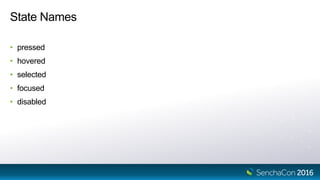
State Names
• pressed
• hovered
• selected
• focused
• disabled
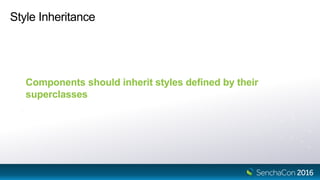
Style Inheritance
Style Inheritance
Components should inherit styles defined by their
superclasses
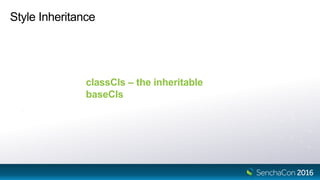
Style Inheritance
classCls – the inheritable
baseCls
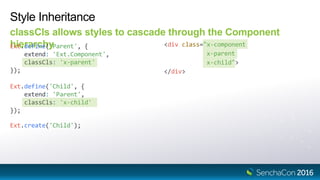
Ext.define('Child', {
extend: 'Parent',
classCls: 'x-child'
});
Style Inheritance
classCls allows styles to cascade through the Component
hierarchyExt.define('Parent', {
extend: 'Ext.Component',
classCls: 'x-parent'
});
<div class="x-component
x-parent
x-child">
</div>
Ext.create('Child');
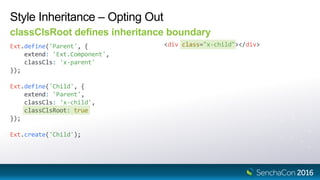
Ext.define('Child', {
extend: 'Parent',
classCls: 'x-child',
classClsRoot: true
});
Style Inheritance – Opting Out
classClsRoot defines inheritance boundary
Ext.define('Parent', {
extend: 'Ext.Component',
classCls: 'x-parent'
});
<div class="x-child"></div>
Ext.create('Child');
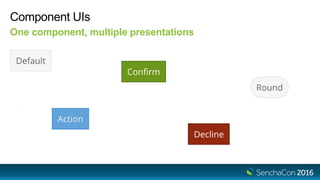
Component UIs
Component UIs
One component, multiple presentations
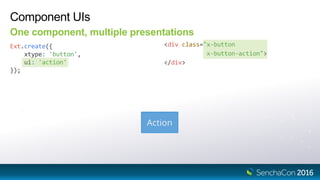
Component UIs
One component, multiple presentations
Ext.create({
xtype: 'button',
ui: 'action'
});
<div class="x-button
x-button-action">
</div>
Ext.define('Child', {
extend: 'Parent',
classCls: 'x-child'
});
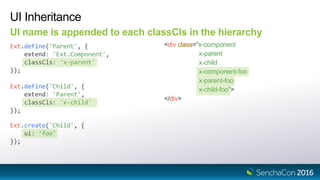
UI Inheritance
UI name is appended to each classCls in the hierarchy
Ext.define('Parent', {
extend: 'Ext.Component',
classCls: 'x-parent'
});
<div class="x-component
x-parent
x-child
x-component-foo
x-parent-foo
x-child-foo">
</div>
Ext.create('Child', {
ui: 'foo'
});
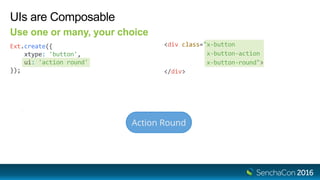
UIs are Composable
Use one or many, your choice
Ext.create({
xtype: 'button',
ui: 'action round'
});
<div class="x-button
x-button-action
x-button-round">
</div>
UI Mixins
The structure of a UI mixin
// theme-neptune/sass/var/Button.scss
@mixin button-ui(
$ui: null,
$color: null,
$border-color: null
) {
$ui-suffix: ui-suffix($ui); // -#{$ui} OR empty string
.x-button#{$ui-suffix} { // .x-button[-ui]
color: $color;
border-color: $border-color;
}
}
UI Mixins
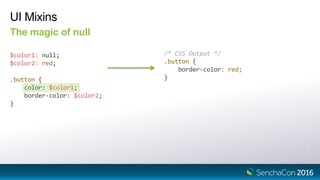
The magic of null
$color1: null;
$color2: red;
/* CSS Output */
.button {
border-color: red;
}.button {
color: $color1;
border-color: $color2;
}
UI Mixins
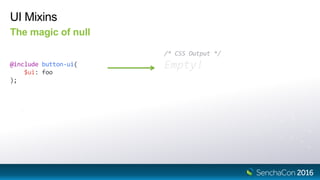
The magic of null
@include button-ui(
$ui: foo
);
/* CSS Output */
Empty!
UI Mixins
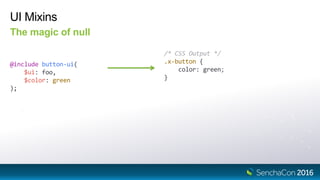
The magic of null
@include button-ui(
$ui: foo,
$color: green
);
/* CSS Output */
.x-button {
color: green;
}
UIs Mixins
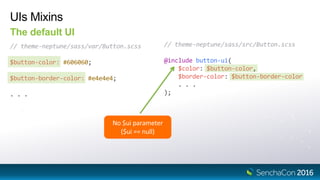
The default UI
// theme-neptune/sass/var/Button.scss
$button-color: #606060;
$button-border-color: #e4e4e4;
. . .
// theme-neptune/sass/src/Button.scss
@include button-ui(
$color: $button-color,
$border-color: $button-border-color
. . .
);
No $ui parameter
($ui == null)
UIs Mixins
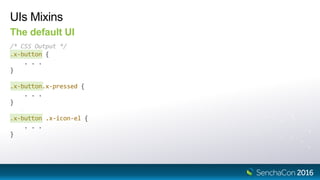
The default UI
/* CSS Output */
.x-button {
. . .
}
.x-button.x-pressed {
. . .
}
.x-button .x-icon-el {
. . .
}
UIs Mixins
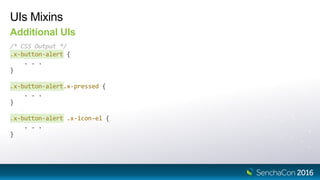
Additional UIs
/* CSS Output */
.x-button-alert {
. . .
}
.x-button-alert.x-pressed {
. . .
}
.x-button-alert .x-icon-el {
. . .
}
Theming Lists and Grids
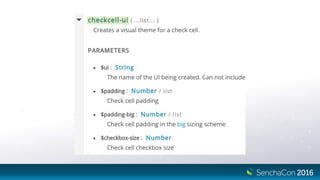
Can Grids have UIs?
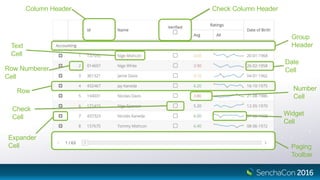
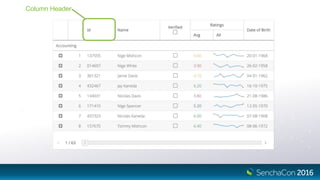
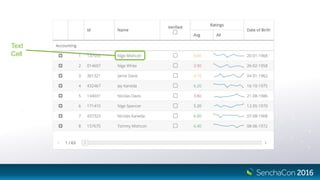
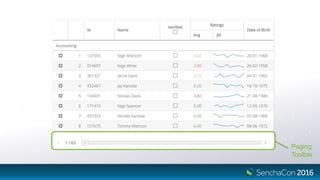
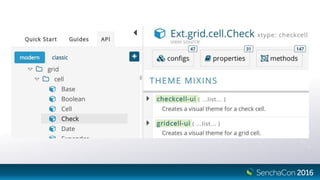
Column Header Check Column Header
Group
Header
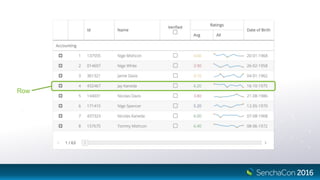
Row
Check
Cell
Expander
Cell Paging
Toolbar
Text
Cell
Row Numberer
Cell
Number
Cell
Widget
Cell
Date
Cell
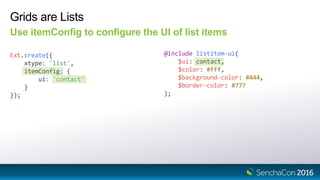
Grids are Lists
Use itemConfig to configure the UI of list items
Ext.create({
xtype: 'list',
itemConfig: {
ui: 'contact'
}
});
@include listitem-ui(
$ui: contact,
$color: #fff,
$background-color: #444,
$border-color: #777
);
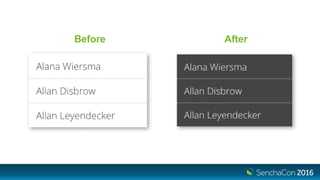
Before After
Row
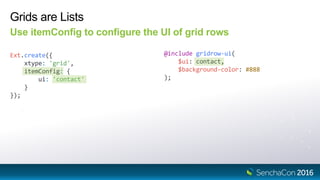
Grids are Lists
Use itemConfig to configure the UI of grid rows
Ext.create({
xtype: 'grid',
itemConfig: {
ui: 'contact'
}
});
@include gridrow-ui(
$ui: contact,
$background-color: #888
);
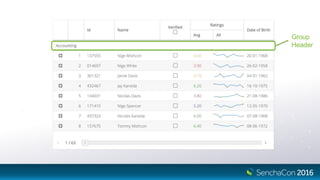
Group
Header
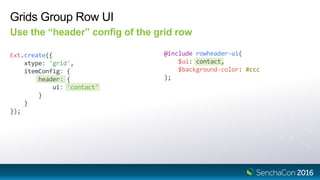
Grids Group Row UI
Use the “header” config of the grid row
Ext.create({
xtype: 'grid',
itemConfig: {
header: {
ui: 'contact'
}
}
});
@include rowheader-ui(
$ui: contact,
$background-color: #ccc
);
Column Header
Grid Column Header UI
Set the UI on the column config
Ext.create({
xtype: 'grid',
columns: [{
text: 'Name',
ui: 'contact'
}]
});
@include gridcolumn-ui(
$ui: contact,
$color: white,
$background-color: gray
);
Text
Cell
Grid Cell UI
Use the “cell” config of the column
Ext.create({
xtype: 'grid',
columns: [{
text: 'Name',
cell: {
ui: 'contact'
}
}]
});
@include gridcell-ui(
$ui: contact,
$font-weight: bold
);
Paging
Toolbar
Grid Paging Toolbar UI
Use the “toolbar” config of the Paging Toolbar plugin
Ext.create({
xtype: 'grid',
plugins: [{
type: 'pagingtoolbar',
toolbar: {
ui: 'contact'
}
}]
});
@include pagingtoolbar-ui(
$ui: contact,
$padding: 30px,
$background-color: #ddd
);
Compound Components are the Sum of Their Parts
This pattern is repeated throughout the framework
Other Examples:
• Slider/Thumb
• TextField/Trigger
Exceptions:
Panel/Panel Header/Tools (on roadmap for improvement)
Big Mode
Big Mode
Larger sizing and spacing for touch screens
• Classic toolkit used separate themes (neptune vs. neptune-touch)
• Modern toolkit – single theme
Big Mode
Larger sizing and spacing for touch screens
<html class="x-big">
Big Mode
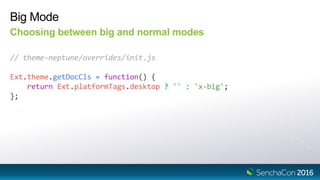
Choosing between big and normal modes
// theme-neptune/overrides/init.js
Ext.theme.getDocCls = function() {
return Ext.platformTags.desktop ? '' : 'x-big';
};
Big Mode
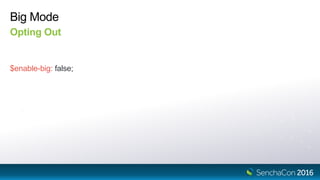
Opting Out
$enable-big: false;
Big Mode
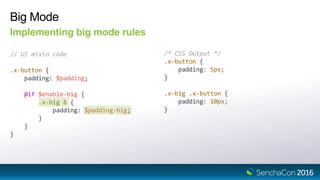
Implementing big mode rules
// UI mixin code
.x-button {
padding: $padding;
@if $enable-big {
.x-big & {
padding: $padding-big;
}
}
}
/* CSS Output */
.x-button {
padding: 5px;
}
.x-big .x-button {
padding: 10px;
}
Breaking the Rules
Before Breaking the Rules
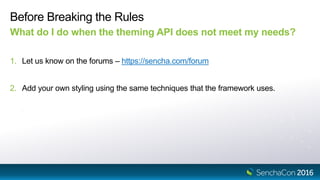
What do I do when the theming API does not meet my needs?
1. Let us know on the forums – https://sencha.com/forum
2. Add your own styling using the same techniques that the framework uses.
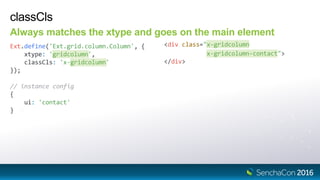
classCls
Always matches the xtype and goes on the main element
Ext.define('Ext.grid.column.Column', {
xtype: 'gridcolumn',
classCls: 'x-gridcolumn'
});
<div class="x-gridcolumn
x-gridcolumn-contact">
</div>
// instance config
{
ui: 'contact'
}
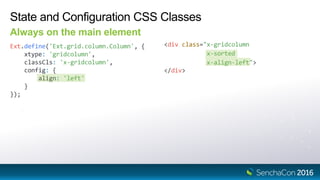
State and Configuration CSS Classes
Always on the main element
Ext.define('Ext.grid.column.Column', {
xtype: 'gridcolumn',
classCls: 'x-gridcolumn',
config: {
align: 'left'
}
});
<div class="x-gridcolumn
x-sorted
x-align-left">
</div>
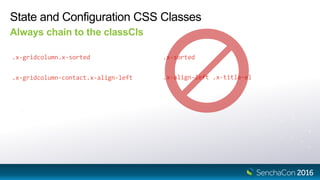
State and Configuration CSS Classes
Always chain to the classCls
.x-align-left .x-title-el
.x-gridcolumn.x-sorted .x-sorted
.x-gridcolumn-contact.x-align-left
Reference Elements
Should be named x-[name]-el
Ext.define('Ext.grid.column.Column', {
template: [{
reference: 'titleElement',
className: 'x-title-el'
}]
});
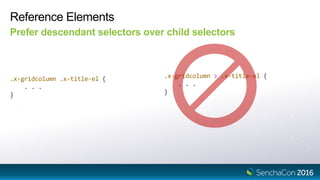
Reference Elements
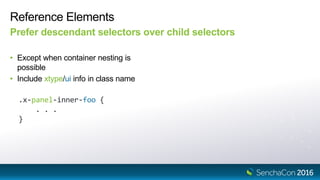
Prefer descendant selectors over child selectors
.x-gridcolumn .x-title-el {
. . .
}
.x-gridcolumn > .x-title-el {
. . .
}
Reference Elements
Prefer descendant selectors over child selectors
• Except when container nesting is
possible
• Include xtype/ui info in class name
.x-panel-inner-foo {
. . .
}
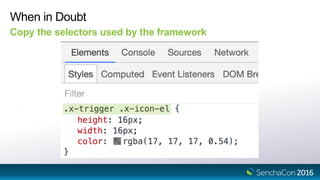
When in Doubt
Copy the selectors used by the framework
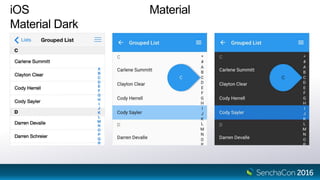
Material and iOS
iOS Material
Material Dark
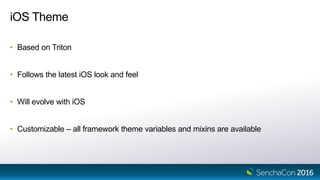
iOS Theme
• Based on Triton
• Follows the latest iOS look and feel
• Will evolve with iOS
• Customizable – all framework theme variables and mixins are available
Material Theme
• Based on Neptune
• Follows the material design guidelines https://material.google.com
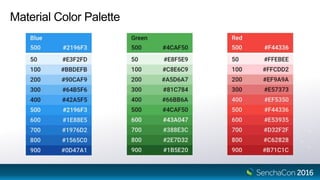
• Material Color Palette
• Supports CSS Variables
Material Color Palette
Deep Purple
#673AB7
Red
#F44336
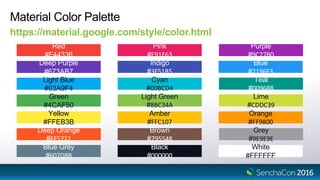
Material Color Palette
https://material.google.com/style/color.html
Light Blue
#03A9F4
Green
#4CAF50
Yellow
#FFEB3B
Deep Orange
#FF5722
Blue Grey
#607D8B
Pink
#E91E63
Purple
#9C27B0
Indigo
#3F51B5
Blue
#2196F3
Cyan
#00BCD4
Teal
#009688
Light Green
#8BC34A
Lime
#CDDC39
Amber
#FFC107
Orange
#FF9800
Brown
#795548
Grey
#9E9E9E
Black
#000000
White
#FFFFFF
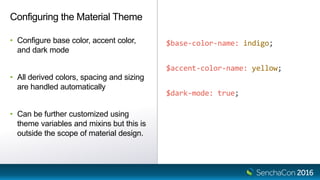
$base-color-name: indigo;
$accent-color-name: yellow;
$dark-mode: true;
Configuring the Material Theme
• Configure base color, accent color,
and dark mode
• All derived colors, spacing and sizing
are handled automatically
• Can be further customized using
theme variables and mixins but this is
outside the scope of material design.
Selecting Themes by Platform
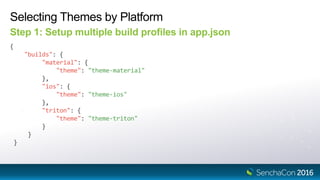
Step 1: Setup multiple build profiles in app.json
{
"builds": {
"material": {
"theme": "theme-material"
},
"ios": {
"theme": "theme-ios"
},
"triton": {
"theme": "theme-triton"
}
}
}
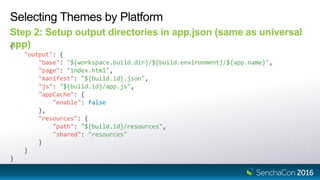
Selecting Themes by Platform
Step 2: Setup output directories in app.json (same as universal
app){
"output": {
"base": "${workspace.build.dir}/${build.environment}/${app.name}",
"page": "index.html",
"manifest": "${build.id}.json",
"js": "${build.id}/app.js",
"appCache": {
"enable": false
},
"resources": {
"path": "${build.id}/resources",
"shared": "resources"
}
}
}
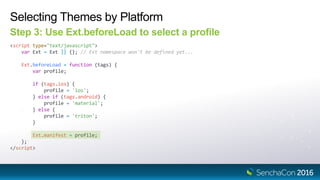
Selecting Themes by Platform
Step 3: Use Ext.beforeLoad to select a profile
<script type="text/javascript">
var Ext = Ext || {}; // Ext namespace won't be defined yet...
Ext.beforeLoad = function (tags) {
var profile;
if (tags.ios) {
profile = 'ios';
} else if (tags.android) {
profile = 'material';
} else {
profile = 'triton';
}
Ext.manifest = profile;
};
</script>
Demo
Please Take the Survey in the Mobile App
• Navigate to this session in the mobile app
• Click on “Evaluate Session”
• Respondents will be entered into a drawing to win one of five $50 Amazon gift cards
SenchaCon 2016: Theming the Modern Toolkit - Phil Guerrant

SenchaCon 2016: Theming the Modern Toolkit - Phil Guerrant

  • 1.
    Theming the Modern Toolkit PhilGuerrant Senior Software Engineer, Sencha
  • 2.
  • 3.
    Choosing Between Appand Theme • Both can contain styling • Theme contains shared styling • Application contains its own styling
  • 4.
    Generating an Application sencha-sdk path/to/sdk generate app -modern ThemeDemo theme-demo
  • 5.
    Application Structure Set themevariables in sass/var/all.scss $base-color: green; $panel-body-font-size: 15px;
  • 6.
  • 7.
    Application Structure • Rulegenerating code goes in sass/src/ • Mixin calls • CSS rules • scss files are auto-included based on class- path of classes in your application • Ext class - ThemeDemo.view.Main • Includes sass/src/view/Main.scss
  • 8.
    Rapid Development UsingFashion sencha app watch --fashion [INF] Server started at port : 1841 [INF] Application available at http://localhost:1841
  • 9.
    Generating a ThemePackage Allows styling to be shared between applications # your application directory cd theme-demo sencha generate package --type theme --extend theme-triton --name my-theme
  • 10.
  • 11.
    Theme Package Structure •scss files are auto-included based on class- path of framework classes • e.g. Ext.field.Text
  • 12.
    Theme Hierarchy Classic ToolkitModern Toolkit base neutral classic gray neptune crisp crisp-touch neptune-touch triton base neptune triton ios material
  • 13.
  • 14.
    Variables All theme variablesmust be dynamic • dynamic() must be used for any newly declared variables. • When overriding framework variables dynamic() is not required • When in doubt it is safe to always use dynamic()
  • 15.
    Dynamic Variables Last assignmentwins, and is valid throughout entire scope $base-color: dynamic(blue); /* CSS Output */ .foo { background: red; } $base-color: dynamic(red); .foo { background: $base-color; }
  • 16.
    Component Variables Begin withxtype, end with CSS property name $button-font-size $tab-background-color $listitem-border-width
  • 17.
    Element Variables Element nameafter xtype but before CSS property name $button-badge-color $textfield-input-padding $listitem-disclosure-margin
  • 18.
    State Variables State nameafter the thing it describes (xtype or element) $button-pressed-color $listitem-selected-border-color $listitem-disclosure-pressed-background-color
  • 19.
    State Names • pressed •hovered • selected • focused • disabled
  • 20.
  • 21.
    Style Inheritance Components shouldinherit styles defined by their superclasses
  • 22.
    Style Inheritance classCls –the inheritable baseCls
  • 23.
    Ext.define('Child', { extend: 'Parent', classCls:'x-child' }); Style Inheritance classCls allows styles to cascade through the Component hierarchyExt.define('Parent', { extend: 'Ext.Component', classCls: 'x-parent' }); <div class="x-component x-parent x-child"> </div> Ext.create('Child');
  • 24.
    Ext.define('Child', { extend: 'Parent', classCls:'x-child', classClsRoot: true }); Style Inheritance – Opting Out classClsRoot defines inheritance boundary Ext.define('Parent', { extend: 'Ext.Component', classCls: 'x-parent' }); <div class="x-child"></div> Ext.create('Child');
  • 25.
  • 26.
    Component UIs One component,multiple presentations
  • 27.
    Component UIs One component,multiple presentations Ext.create({ xtype: 'button', ui: 'action' }); <div class="x-button x-button-action"> </div>
  • 28.
    Ext.define('Child', { extend: 'Parent', classCls:'x-child' }); UI Inheritance UI name is appended to each classCls in the hierarchy Ext.define('Parent', { extend: 'Ext.Component', classCls: 'x-parent' }); <div class="x-component x-parent x-child x-component-foo x-parent-foo x-child-foo"> </div> Ext.create('Child', { ui: 'foo' });
  • 29.
    UIs are Composable Useone or many, your choice Ext.create({ xtype: 'button', ui: 'action round' }); <div class="x-button x-button-action x-button-round"> </div>
  • 30.
    UI Mixins The structureof a UI mixin // theme-neptune/sass/var/Button.scss @mixin button-ui( $ui: null, $color: null, $border-color: null ) { $ui-suffix: ui-suffix($ui); // -#{$ui} OR empty string .x-button#{$ui-suffix} { // .x-button[-ui] color: $color; border-color: $border-color; } }
  • 31.
    UI Mixins The magicof null $color1: null; $color2: red; /* CSS Output */ .button { border-color: red; }.button { color: $color1; border-color: $color2; }
  • 32.
    UI Mixins The magicof null @include button-ui( $ui: foo ); /* CSS Output */ Empty!
  • 33.
    UI Mixins The magicof null @include button-ui( $ui: foo, $color: green ); /* CSS Output */ .x-button { color: green; }
  • 34.
    UIs Mixins The defaultUI // theme-neptune/sass/var/Button.scss $button-color: #606060; $button-border-color: #e4e4e4; . . . // theme-neptune/sass/src/Button.scss @include button-ui( $color: $button-color, $border-color: $button-border-color . . . ); No $ui parameter ($ui == null)
  • 35.
    UIs Mixins The defaultUI /* CSS Output */ .x-button { . . . } .x-button.x-pressed { . . . } .x-button .x-icon-el { . . . }
  • 36.
    UIs Mixins Additional UIs /*CSS Output */ .x-button-alert { . . . } .x-button-alert.x-pressed { . . . } .x-button-alert .x-icon-el { . . . }
  • 37.
  • 38.
  • 39.
    Column Header CheckColumn Header Group Header Row Check Cell Expander Cell Paging Toolbar Text Cell Row Numberer Cell Number Cell Widget Cell Date Cell
  • 40.
    Grids are Lists UseitemConfig to configure the UI of list items Ext.create({ xtype: 'list', itemConfig: { ui: 'contact' } }); @include listitem-ui( $ui: contact, $color: #fff, $background-color: #444, $border-color: #777 );
  • 41.
  • 42.
  • 43.
    Grids are Lists UseitemConfig to configure the UI of grid rows Ext.create({ xtype: 'grid', itemConfig: { ui: 'contact' } }); @include gridrow-ui( $ui: contact, $background-color: #888 );
  • 44.
  • 45.
    Grids Group RowUI Use the “header” config of the grid row Ext.create({ xtype: 'grid', itemConfig: { header: { ui: 'contact' } } }); @include rowheader-ui( $ui: contact, $background-color: #ccc );
  • 46.
  • 47.
    Grid Column HeaderUI Set the UI on the column config Ext.create({ xtype: 'grid', columns: [{ text: 'Name', ui: 'contact' }] }); @include gridcolumn-ui( $ui: contact, $color: white, $background-color: gray );
  • 48.
  • 49.
    Grid Cell UI Usethe “cell” config of the column Ext.create({ xtype: 'grid', columns: [{ text: 'Name', cell: { ui: 'contact' } }] }); @include gridcell-ui( $ui: contact, $font-weight: bold );
  • 50.
  • 51.
    Grid Paging ToolbarUI Use the “toolbar” config of the Paging Toolbar plugin Ext.create({ xtype: 'grid', plugins: [{ type: 'pagingtoolbar', toolbar: { ui: 'contact' } }] }); @include pagingtoolbar-ui( $ui: contact, $padding: 30px, $background-color: #ddd );
  • 54.
    Compound Components arethe Sum of Their Parts This pattern is repeated throughout the framework Other Examples: • Slider/Thumb • TextField/Trigger Exceptions: Panel/Panel Header/Tools (on roadmap for improvement)
  • 55.
  • 56.
    Big Mode Larger sizingand spacing for touch screens • Classic toolkit used separate themes (neptune vs. neptune-touch) • Modern toolkit – single theme
  • 57.
    Big Mode Larger sizingand spacing for touch screens <html class="x-big">
  • 58.
    Big Mode Choosing betweenbig and normal modes // theme-neptune/overrides/init.js Ext.theme.getDocCls = function() { return Ext.platformTags.desktop ? '' : 'x-big'; };
  • 59.
  • 60.
    Big Mode Implementing bigmode rules // UI mixin code .x-button { padding: $padding; @if $enable-big { .x-big & { padding: $padding-big; } } } /* CSS Output */ .x-button { padding: 5px; } .x-big .x-button { padding: 10px; }
  • 61.
  • 62.
    Before Breaking theRules What do I do when the theming API does not meet my needs? 1. Let us know on the forums – https://sencha.com/forum 2. Add your own styling using the same techniques that the framework uses.
  • 63.
    classCls Always matches thextype and goes on the main element Ext.define('Ext.grid.column.Column', { xtype: 'gridcolumn', classCls: 'x-gridcolumn' }); <div class="x-gridcolumn x-gridcolumn-contact"> </div> // instance config { ui: 'contact' }
  • 64.
    State and ConfigurationCSS Classes Always on the main element Ext.define('Ext.grid.column.Column', { xtype: 'gridcolumn', classCls: 'x-gridcolumn', config: { align: 'left' } }); <div class="x-gridcolumn x-sorted x-align-left"> </div>
  • 65.
    State and ConfigurationCSS Classes Always chain to the classCls .x-align-left .x-title-el .x-gridcolumn.x-sorted .x-sorted .x-gridcolumn-contact.x-align-left
  • 66.
    Reference Elements Should benamed x-[name]-el Ext.define('Ext.grid.column.Column', { template: [{ reference: 'titleElement', className: 'x-title-el' }] });
  • 67.
    Reference Elements Prefer descendantselectors over child selectors .x-gridcolumn .x-title-el { . . . } .x-gridcolumn > .x-title-el { . . . }
  • 68.
    Reference Elements Prefer descendantselectors over child selectors • Except when container nesting is possible • Include xtype/ui info in class name .x-panel-inner-foo { . . . }
  • 69.
    When in Doubt Copythe selectors used by the framework
  • 70.
  • 71.
  • 72.
    iOS Theme • Basedon Triton • Follows the latest iOS look and feel • Will evolve with iOS • Customizable – all framework theme variables and mixins are available
  • 73.
    Material Theme • Basedon Neptune • Follows the material design guidelines https://material.google.com • Material Color Palette • Supports CSS Variables
  • 74.
  • 75.
    Deep Purple #673AB7 Red #F44336 Material ColorPalette https://material.google.com/style/color.html Light Blue #03A9F4 Green #4CAF50 Yellow #FFEB3B Deep Orange #FF5722 Blue Grey #607D8B Pink #E91E63 Purple #9C27B0 Indigo #3F51B5 Blue #2196F3 Cyan #00BCD4 Teal #009688 Light Green #8BC34A Lime #CDDC39 Amber #FFC107 Orange #FF9800 Brown #795548 Grey #9E9E9E Black #000000 White #FFFFFF
  • 76.
    $base-color-name: indigo; $accent-color-name: yellow; $dark-mode:true; Configuring the Material Theme • Configure base color, accent color, and dark mode • All derived colors, spacing and sizing are handled automatically • Can be further customized using theme variables and mixins but this is outside the scope of material design.
  • 77.
    Selecting Themes byPlatform Step 1: Setup multiple build profiles in app.json { "builds": { "material": { "theme": "theme-material" }, "ios": { "theme": "theme-ios" }, "triton": { "theme": "theme-triton" } } }
  • 78.
    Selecting Themes byPlatform Step 2: Setup output directories in app.json (same as universal app){ "output": { "base": "${workspace.build.dir}/${build.environment}/${app.name}", "page": "index.html", "manifest": "${build.id}.json", "js": "${build.id}/app.js", "appCache": { "enable": false }, "resources": { "path": "${build.id}/resources", "shared": "resources" } } }
  • 79.
    Selecting Themes byPlatform Step 3: Use Ext.beforeLoad to select a profile <script type="text/javascript"> var Ext = Ext || {}; // Ext namespace won't be defined yet... Ext.beforeLoad = function (tags) { var profile; if (tags.ios) { profile = 'ios'; } else if (tags.android) { profile = 'material'; } else { profile = 'triton'; } Ext.manifest = profile; }; </script>
  • 80.
  • 81.
    Please Take theSurvey in the Mobile App • Navigate to this session in the mobile app • Click on “Evaluate Session” • Respondents will be entered into a drawing to win one of five $50 Amazon gift cards