SLICKSLICK
2.0.12.0.1
INTRODUCTION
●
Slick is Typesafe‘s modern database query and
access library for Scala.
●
It allows you to work with stored data almost as
if you were using Scala collections while at the
same time giving you full control over when a
database access happens and which data is
transferred.
●
You can also use SQL directly.
sql"select COF_NAME from COFFEES where PRICE < $limit".as[String].list
FEATURESFEATURES
●
Easy :-
Access stored data just like Scala collections.
Unified session management based on JDBC Connections.
Supports SQL if you need it.
Simple setup.
●
Concise:-
Scala syntax
Fetch results without pain
●
Scales naturally :-
Stateless.
Explicit control of execution time and transferred data.
●
Safe :-
No SQL-injections.
Compile-time safety (types, names, no typos, etc.).
Type-safe support of stored procedures.
●
Composable :-
It‘s Scala code: abstract and re-use with ease
Slick requires scala 2.10.
Scala 2.9 use ScalaQuery, the predecessor of Slick
Supported Database
1.DB2 (via slick-extensions)
2.Derby/JavaDB
3.H2
4.HSQLDB/HyperSQL
5.Microsoft SQL Server
6.MySQL
7.PostgreSQL etc.
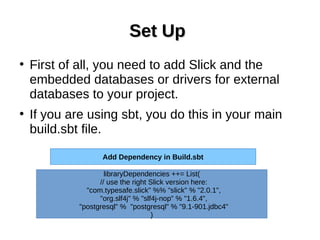
Set UpSet Up
●
First of all, you need to add Slick and the
embedded databases or drivers for external
databases to your project.
●
If you are using sbt, you do this in your main
build.sbt file.
libraryDependencies ++= List(
// use the right Slick version here:
"com.typesafe.slick" %% "slick" % "2.0.1",
"org.slf4j" % "slf4j-nop" % "1.6.4",
"postgresql" % "postgresql" % "9.1-901.jdbc4"
)
Add Dependency in Build.sbt
SLF4JSLF4J
●
Slick uses SLF4J for its own debug logging
so you also need to add an SLF4J
implementation.
●
Here we are using slf4j-nop to disable
logging.
●
You have to replace this with a real logging
framework like Logback if you want to see
log output.
ImportsImports
●
Since we are using Postgresql as our database
system, we need to import features from Slick’s
PostgresDriver.
●
A driver’s simple object contains all commonly
needed imports from the driver and other parts
of Slick such as session handling.
import scala.slick.driver.PostgresDriver.simple._
Lifted Embedding
●
The name Lifted Embedding refers to the fact
that you are not working with standard Scala
types (as in the direct embedding) but with
types that are lifted into a Rep type constructor.
●
This becomes clear when you compare the
types of a simple Scala collections example
with the types of similar code using the lifted
embedding
●
Direct Embedding
●
Lifted Embedding
case class Coffee(name: String, price: Double)
val coffees: List[Coffee] = //...
val l = coffees.filter(_.price > 8.0).map(_.name)
class Coffees(tag: Tag) extends Table[(String, Double)](tag, "COFFEES") {
def name = column[String]("COF_NAME")
def price = column[Double]("PRICE")
def * = (name, price)
}
val coffees = TableQuery[Coffees]
val q = coffees.filter(_.price > 8.0).map(_.name)
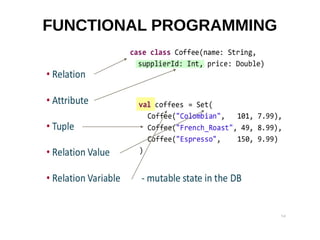
FUNCTIONAL PROGRAMMING
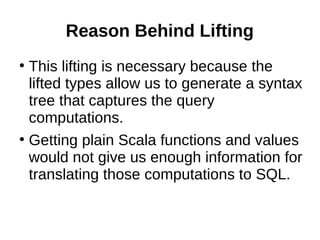
Reason Behind Lifting
●
This lifting is necessary because the
lifted types allow us to generate a syntax
tree that captures the query
computations.
●
Getting plain Scala functions and values
would not give us enough information for
translating those computations to SQL.
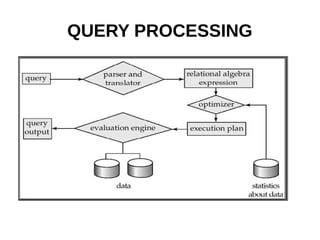
QUERY PROCESSING
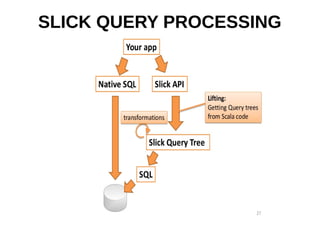
SLICK QUERY PROCESSING
QUERIES IN SLICK
●
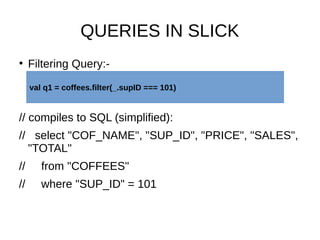
Filtering Query:-
// compiles to SQL (simplified):
// select "COF_NAME", "SUP_ID", "PRICE", "SALES",
"TOTAL"
// from "COFFEES"
// where "SUP_ID" = 101
val q1 = coffees.filter(_.supID === 101)
●
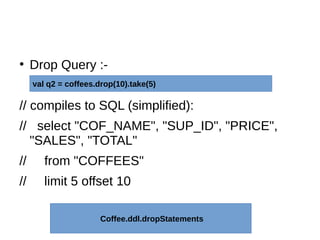
Drop Query :-
// compiles to SQL (simplified):
// select "COF_NAME", "SUP_ID", "PRICE",
"SALES", "TOTAL"
// from "COFFEES"
// limit 5 offset 10
val q2 = coffees.drop(10).take(5)
Coffee.ddl.dropStatements
●
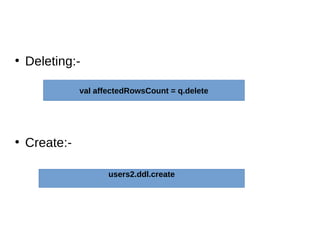
Deleting:-
●
Create:-
val affectedRowsCount = q.delete
users2.ddl.create
References
●
References :-
●
http://slick.typesafe.com/talks/scalax2012/Sli
ck_ScalaExchange_2012.pdf
●
http://slick.typesafe.com/doc/2.0.1/migration.htm
l
●
Database System Concepts(Abraham
Silberschatz ,Henry f. Korth, S. Sudarshan)
THANK YOU :)

Brief introduction of Slick

  • 1.
  • 2.
    INTRODUCTION ● Slick is Typesafe‘smodern database query and access library for Scala. ● It allows you to work with stored data almost as if you were using Scala collections while at the same time giving you full control over when a database access happens and which data is transferred. ● You can also use SQL directly. sql"select COF_NAME from COFFEES where PRICE < $limit".as[String].list
  • 3.
    FEATURESFEATURES ● Easy :- Access storeddata just like Scala collections. Unified session management based on JDBC Connections. Supports SQL if you need it. Simple setup. ● Concise:- Scala syntax Fetch results without pain
  • 4.
    ● Scales naturally :- Stateless. Explicitcontrol of execution time and transferred data. ● Safe :- No SQL-injections. Compile-time safety (types, names, no typos, etc.). Type-safe support of stored procedures. ● Composable :- It‘s Scala code: abstract and re-use with ease Slick requires scala 2.10. Scala 2.9 use ScalaQuery, the predecessor of Slick
  • 5.
    Supported Database 1.DB2 (viaslick-extensions) 2.Derby/JavaDB 3.H2 4.HSQLDB/HyperSQL 5.Microsoft SQL Server 6.MySQL 7.PostgreSQL etc.
  • 6.
    Set UpSet Up ● Firstof all, you need to add Slick and the embedded databases or drivers for external databases to your project. ● If you are using sbt, you do this in your main build.sbt file. libraryDependencies ++= List( // use the right Slick version here: "com.typesafe.slick" %% "slick" % "2.0.1", "org.slf4j" % "slf4j-nop" % "1.6.4", "postgresql" % "postgresql" % "9.1-901.jdbc4" ) Add Dependency in Build.sbt
  • 7.
    SLF4JSLF4J ● Slick uses SLF4Jfor its own debug logging so you also need to add an SLF4J implementation. ● Here we are using slf4j-nop to disable logging. ● You have to replace this with a real logging framework like Logback if you want to see log output.
  • 8.
    ImportsImports ● Since we areusing Postgresql as our database system, we need to import features from Slick’s PostgresDriver. ● A driver’s simple object contains all commonly needed imports from the driver and other parts of Slick such as session handling. import scala.slick.driver.PostgresDriver.simple._
  • 9.
    Lifted Embedding ● The nameLifted Embedding refers to the fact that you are not working with standard Scala types (as in the direct embedding) but with types that are lifted into a Rep type constructor. ● This becomes clear when you compare the types of a simple Scala collections example with the types of similar code using the lifted embedding
  • 10.
    ● Direct Embedding ● Lifted Embedding caseclass Coffee(name: String, price: Double) val coffees: List[Coffee] = //... val l = coffees.filter(_.price > 8.0).map(_.name) class Coffees(tag: Tag) extends Table[(String, Double)](tag, "COFFEES") { def name = column[String]("COF_NAME") def price = column[Double]("PRICE") def * = (name, price) } val coffees = TableQuery[Coffees] val q = coffees.filter(_.price > 8.0).map(_.name)
  • 11.
  • 12.
    Reason Behind Lifting ● Thislifting is necessary because the lifted types allow us to generate a syntax tree that captures the query computations. ● Getting plain Scala functions and values would not give us enough information for translating those computations to SQL.
  • 13.
  • 14.
  • 15.
    QUERIES IN SLICK ● FilteringQuery:- // compiles to SQL (simplified): // select "COF_NAME", "SUP_ID", "PRICE", "SALES", "TOTAL" // from "COFFEES" // where "SUP_ID" = 101 val q1 = coffees.filter(_.supID === 101)
  • 16.
    ● Drop Query :- //compiles to SQL (simplified): // select "COF_NAME", "SUP_ID", "PRICE", "SALES", "TOTAL" // from "COFFEES" // limit 5 offset 10 val q2 = coffees.drop(10).take(5) Coffee.ddl.dropStatements
  • 17.
  • 18.
  • 19.