Build Progressive Web Apps
with Ext JS and Cmd
Olga Petrova
Agenda
PWA definition•
PWA vs Hybrid vs Native•
PWA architecture•
Web Application Manifest-
Caching using Service Worker-
Web Push Notifications-
Access to Native Hardware-
3
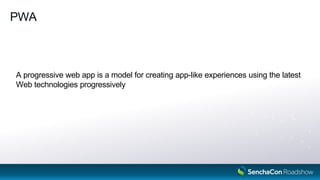
PWA
A progressive web app is a model for creating app-like experiences using the latest
Web technologies progressively
4
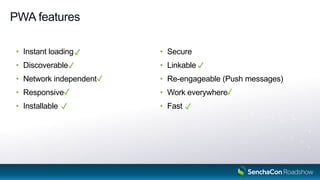
PWA features
• Instant loading
• Discoverable
• Network independent
• Responsive
• Installable
• Secure
• Linkable
• Re-engageable (Push messages)
• Work everywhere
• Fast
5
✔️
✔️
✔️
✔️
✔️
✔️
✔️
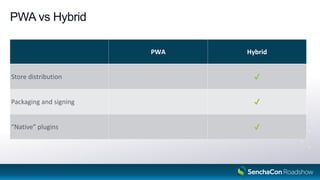
PWA vs Hybrid
6
PWA Hybrid
Store distribution
Packaging and signing
“Native” plugins
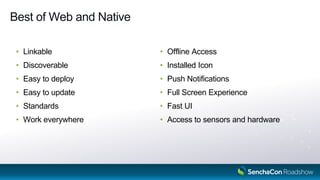
Best of Web and Native
Linkable•
Discoverable•
Easy to deploy•
Easy to update•
Standards•
Work everywhere•
Offline Access•
Installed Icon•
Push Notifications•
Full Screen Experience•
Fast UI•
Access to sensors and hardware•
7
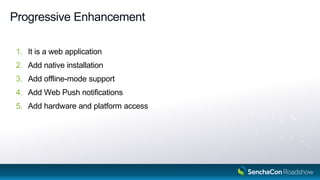
Progressive Enhancement
It is a web application1.
Add native installation2.
Add offline3. -mode support
Add Web Push notifications4.
Add hardware and platform access5.
8
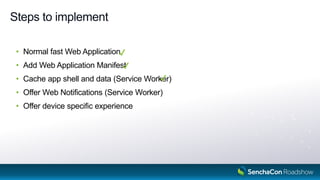
Steps to implement
• Normal fast Web Application
• Add Web Application Manifest
• Cache app shell and data (Service Worker)
• Offer Web Notifications (Service Worker)
• Offer device specific experience
9
“progressive” config in app.json
• Add Web Application Manifest
• Register Service Worker
10
Web Application Manifest
Web App Manifest
JSON file•
Meta Data for PWA•
"Add to Home Screen" banner•
12
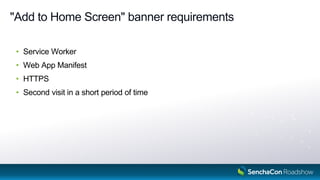
"Add to Home Screen" banner requirements
Service Worker•
Web App Manifest•
HTTPS•
Second visit in a short period of time•
13
Web App Manifest configurations
"progressive": {
"manifest": {
"name": "My Application",
"short_name": "My App",
"icons": [{
"src": "resources/icon-small.png",
"sizes": "96x96"
}, …],
"theme_color": "#054059",
"background_color": "#054059",
"display": "standalone",
"orientation": "portrait",
"start_url": "/index.html"
}
}
app.json
Service Worker
Service Worker
Javascript thread that is working outside of the browser window
16
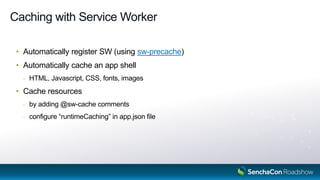
Caching with Service Worker
• Automatically register SW (using sw-precache)
• Automatically cache an app shell
- HTML, Javascript, CSS, fonts, images
• Cache resources
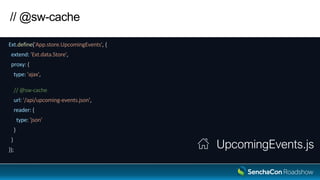
- by adding @sw-cache comments
- configure “runtimeCaching” in app.json file
17
// @sw-cache
Ext.define('App.store.UpcomingEvents', {
extend: 'Ext.data.Store',
proxy: {
type: 'ajax',
// @sw-cache
url: '/api/upcoming-events.json',
reader: {
type: 'json'
}
}
});
UpcomingEvents.js
// @sw-cache
Ext.define('App.model.Event', {
extend: 'Ext.data.Model',
fields: ['id', 'name', 'date'],
proxy: {
type: 'rest',
// @sw-cache { urlPattern: "/api/events/d+" }
url : '/events'
}
}); Event.js
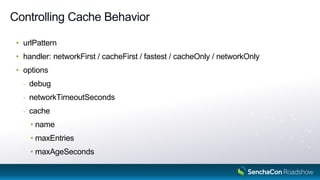
Controlling Cache Behavior
urlPattern•
handler:• networkFirst / cacheFirst / fastest / cacheOnly / networkOnly
options•
debug-
networkTimeoutSeconds-
cache-
name•
maxEntries•
maxAgeSeconds•
20
Controlling Cache Behavior
Ext.define('App.model.Event', {
extend: 'Ext.data.Model',
fields: ['id', 'name', 'date'],
proxy: {
type: 'rest',
// @sw-cache { urlPattern: "/api/events/d+", options: { cache: { name: 'events', maxEntries: 10 } } }
url : '/events'
}
});
Event.js
serviceWorker config in app.json
"serviceWorker": {
"runtimeCaching": [
{
"urlPattern": "/api/events/d+",
"options": {
"cache": {
"name": "events",
"maxEntries": 10
}
}
}, …
]
}
app.json
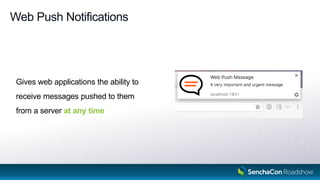
Web Push Notifications
Gives web applications the ability to
receive messages pushed to them
from a server at any time
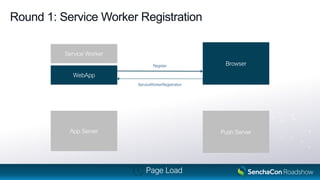
Round 1: Service Worker Registration
WebApp
Service Worker
Browser
Push ServerApp Server
Register
ServiceWorkerRegistration
Page Load
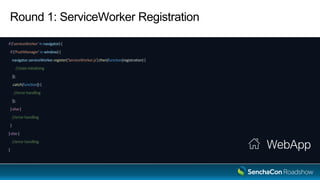
Round 1: ServiceWorker Registration
if ('serviceWorker' in navigator) {
if ('PushManager' in window) {
navigator.serviceWorker.register('ServiceWorker.js').then(function(registration) {
//state initializing
});
.catch(function() {
//error handling
});
} else {
//error handling
}
} else {
//error handling
}
WebApp
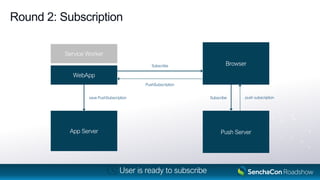
Round 2: Subscription
WebApp
Service Worker
Browser
Push ServerApp Server
Subscribe
PushSubscription
Subscribe push subscriptionsave PushSubscription
User is ready to subscribe
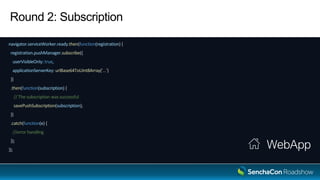
Round 2: Subscription
navigator.serviceWorker.ready.then(function(registration) {
registration.pushManager.subscribe({
userVisibleOnly: true,
applicationServerKey: urlBase64ToUint8Array('...')
})
.then(function(subscription) {
// The subscription was successful
savePushSubscription(subscription);
})
.catch(function(e) {
//error handling
});
});
WebApp
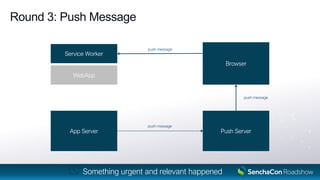
Round 3: Push Message
WebApp
Service Worker
Browser
Push ServerApp Server
push message
push message
push message
Something urgent and relevant happened
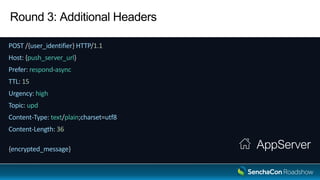
Round 3: Additional Headers
POST /{user_identifier} HTTP/1.1
Host: {push_server_url}
Prefer: respond-async
TTL: 15
Urgency: high
Topic: upd
Content-Type: text/plain;charset=utf8
Content-Length: 36
{encrypted_message} AppServer
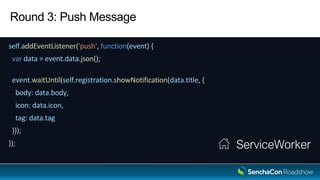
Round 3: Push Message
self.addEventListener('push', function(event) {
var data = event.data.json();
event.waitUntil(self.registration.showNotification(data.title, {
body: data.body,
icon: data.icon,
tag: data.tag
}));
}); ServiceWorker
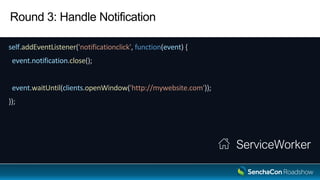
Round 3: Handle Notification
self.addEventListener('notificationclick', function(event) {
event.notification.close();
event.waitUntil(clients.openWindow('http://mywebsite.com'));
});
ServiceWorker
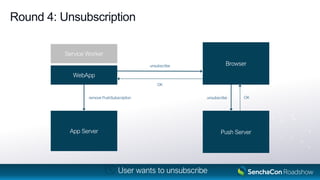
Round 4: Unsubscription
WebApp
Service Worker
Browser
Push ServerApp Server
unsubscribe
OK
unsubscribe OKremove PushSubscription
User wants to unsubscribe
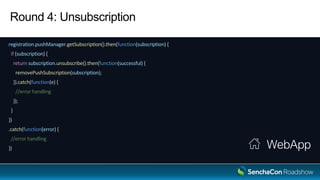
Round 4: Unsubscription
registration.pushManager.getSubscription().then(function(subscription) {
if (subscription) {
return subscription.unsubscribe().then(function(successful) {
removePushSubscription(subscription);
}).catch(function(e) {
//error handling
});
}
})
.catch(function(error) {
//error handling
}) WebApp
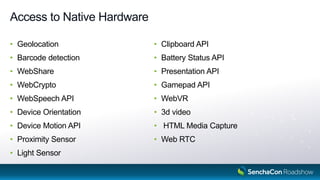
Access to Hardware
Access to Native Hardware
• Geolocation
• Barcode detection
• WebShare
• WebCrypto
• WebSpeech API
• Device Orientation
• Device Motion API
• Proximity Sensor
• Light Sensor
• Clipboard API
• Battery Status API
• Presentation API
• Gamepad API
• WebVR
• 3d video
• HTML Media Capture
• Web RTC
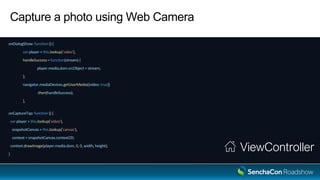
Capture a photo using Web Camera
View
{
xtype : 'video',
reference: 'video'
},
{
xtype: 'button',
text: 'Capture',
handler: 'onCaptureTap'
},
{
xtype: 'd3-canvas',
reference: 'canvas'
}
Capture a photo using Web Camera
onDialogShow: function () {
var player = this.lookup('video'),
handleSuccess = function(stream) {
player.media.dom.srcObject = stream;
};
navigator.mediaDevices.getUserMedia({video: true})
.then(handleSuccess);
},
onCaptureTap: function () {
var player = this.lookup('video'),
snapshotCanvas = this.lookup('canvas'),
context = snapshotCanvas.context2D;
context.drawImage(player.media.dom, 0, 0, width, height);
}
ViewController
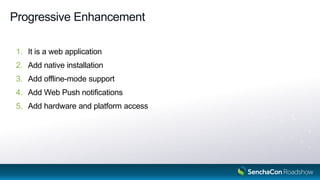
Progressive Enhancement
1. It is a web application
2. Add native installation
3. Add offline-mode support
4. Add Web Push notifications
5. Add hardware and platform access
39
Sample Application
https://github.com/olga-petrova/PWA
40
Sencha Roadshow 2017: Build Progressive Web Apps with Ext JS and Cmd

Sencha Roadshow 2017: Build Progressive Web Apps with Ext JS and Cmd

  • 2.
    Build Progressive WebApps with Ext JS and Cmd Olga Petrova
  • 3.
    Agenda PWA definition• PWA vsHybrid vs Native• PWA architecture• Web Application Manifest- Caching using Service Worker- Web Push Notifications- Access to Native Hardware- 3
  • 4.
    PWA A progressive webapp is a model for creating app-like experiences using the latest Web technologies progressively 4
  • 5.
    PWA features • Instantloading • Discoverable • Network independent • Responsive • Installable • Secure • Linkable • Re-engageable (Push messages) • Work everywhere • Fast 5 ✔️ ✔️ ✔️ ✔️ ✔️ ✔️ ✔️
  • 6.
    PWA vs Hybrid 6 PWAHybrid Store distribution Packaging and signing “Native” plugins
  • 7.
    Best of Weband Native Linkable• Discoverable• Easy to deploy• Easy to update• Standards• Work everywhere• Offline Access• Installed Icon• Push Notifications• Full Screen Experience• Fast UI• Access to sensors and hardware• 7
  • 8.
    Progressive Enhancement It isa web application1. Add native installation2. Add offline3. -mode support Add Web Push notifications4. Add hardware and platform access5. 8
  • 9.
    Steps to implement •Normal fast Web Application • Add Web Application Manifest • Cache app shell and data (Service Worker) • Offer Web Notifications (Service Worker) • Offer device specific experience 9
  • 10.
    “progressive” config inapp.json • Add Web Application Manifest • Register Service Worker 10
  • 11.
  • 12.
    Web App Manifest JSONfile• Meta Data for PWA• "Add to Home Screen" banner• 12
  • 13.
    "Add to HomeScreen" banner requirements Service Worker• Web App Manifest• HTTPS• Second visit in a short period of time• 13
  • 14.
    Web App Manifestconfigurations "progressive": { "manifest": { "name": "My Application", "short_name": "My App", "icons": [{ "src": "resources/icon-small.png", "sizes": "96x96" }, …], "theme_color": "#054059", "background_color": "#054059", "display": "standalone", "orientation": "portrait", "start_url": "/index.html" } } app.json
  • 15.
  • 16.
    Service Worker Javascript threadthat is working outside of the browser window 16
  • 17.
    Caching with ServiceWorker • Automatically register SW (using sw-precache) • Automatically cache an app shell - HTML, Javascript, CSS, fonts, images • Cache resources - by adding @sw-cache comments - configure “runtimeCaching” in app.json file 17
  • 18.
    // @sw-cache Ext.define('App.store.UpcomingEvents', { extend:'Ext.data.Store', proxy: { type: 'ajax', // @sw-cache url: '/api/upcoming-events.json', reader: { type: 'json' } } }); UpcomingEvents.js
  • 19.
    // @sw-cache Ext.define('App.model.Event', { extend:'Ext.data.Model', fields: ['id', 'name', 'date'], proxy: { type: 'rest', // @sw-cache { urlPattern: "/api/events/d+" } url : '/events' } }); Event.js
  • 20.
    Controlling Cache Behavior urlPattern• handler:•networkFirst / cacheFirst / fastest / cacheOnly / networkOnly options• debug- networkTimeoutSeconds- cache- name• maxEntries• maxAgeSeconds• 20
  • 21.
    Controlling Cache Behavior Ext.define('App.model.Event',{ extend: 'Ext.data.Model', fields: ['id', 'name', 'date'], proxy: { type: 'rest', // @sw-cache { urlPattern: "/api/events/d+", options: { cache: { name: 'events', maxEntries: 10 } } } url : '/events' } }); Event.js
  • 22.
    serviceWorker config inapp.json "serviceWorker": { "runtimeCaching": [ { "urlPattern": "/api/events/d+", "options": { "cache": { "name": "events", "maxEntries": 10 } } }, … ] } app.json
  • 23.
  • 24.
    Web Push Notifications Givesweb applications the ability to receive messages pushed to them from a server at any time
  • 25.
    Round 1: ServiceWorker Registration WebApp Service Worker Browser Push ServerApp Server Register ServiceWorkerRegistration Page Load
  • 26.
    Round 1: ServiceWorkerRegistration if ('serviceWorker' in navigator) { if ('PushManager' in window) { navigator.serviceWorker.register('ServiceWorker.js').then(function(registration) { //state initializing }); .catch(function() { //error handling }); } else { //error handling } } else { //error handling } WebApp
  • 27.
    Round 2: Subscription WebApp ServiceWorker Browser Push ServerApp Server Subscribe PushSubscription Subscribe push subscriptionsave PushSubscription User is ready to subscribe
  • 28.
    Round 2: Subscription navigator.serviceWorker.ready.then(function(registration){ registration.pushManager.subscribe({ userVisibleOnly: true, applicationServerKey: urlBase64ToUint8Array('...') }) .then(function(subscription) { // The subscription was successful savePushSubscription(subscription); }) .catch(function(e) { //error handling }); }); WebApp
  • 29.
    Round 3: PushMessage WebApp Service Worker Browser Push ServerApp Server push message push message push message Something urgent and relevant happened
  • 30.
    Round 3: AdditionalHeaders POST /{user_identifier} HTTP/1.1 Host: {push_server_url} Prefer: respond-async TTL: 15 Urgency: high Topic: upd Content-Type: text/plain;charset=utf8 Content-Length: 36 {encrypted_message} AppServer
  • 31.
    Round 3: PushMessage self.addEventListener('push', function(event) { var data = event.data.json(); event.waitUntil(self.registration.showNotification(data.title, { body: data.body, icon: data.icon, tag: data.tag })); }); ServiceWorker
  • 32.
    Round 3: HandleNotification self.addEventListener('notificationclick', function(event) { event.notification.close(); event.waitUntil(clients.openWindow('http://mywebsite.com')); }); ServiceWorker
  • 33.
    Round 4: Unsubscription WebApp ServiceWorker Browser Push ServerApp Server unsubscribe OK unsubscribe OKremove PushSubscription User wants to unsubscribe
  • 34.
    Round 4: Unsubscription registration.pushManager.getSubscription().then(function(subscription){ if (subscription) { return subscription.unsubscribe().then(function(successful) { removePushSubscription(subscription); }).catch(function(e) { //error handling }); } }) .catch(function(error) { //error handling }) WebApp
  • 35.
  • 36.
    Access to NativeHardware • Geolocation • Barcode detection • WebShare • WebCrypto • WebSpeech API • Device Orientation • Device Motion API • Proximity Sensor • Light Sensor • Clipboard API • Battery Status API • Presentation API • Gamepad API • WebVR • 3d video • HTML Media Capture • Web RTC
  • 37.
    Capture a photousing Web Camera View { xtype : 'video', reference: 'video' }, { xtype: 'button', text: 'Capture', handler: 'onCaptureTap' }, { xtype: 'd3-canvas', reference: 'canvas' }
  • 38.
    Capture a photousing Web Camera onDialogShow: function () { var player = this.lookup('video'), handleSuccess = function(stream) { player.media.dom.srcObject = stream; }; navigator.mediaDevices.getUserMedia({video: true}) .then(handleSuccess); }, onCaptureTap: function () { var player = this.lookup('video'), snapshotCanvas = this.lookup('canvas'), context = snapshotCanvas.context2D; context.drawImage(player.media.dom, 0, 0, width, height); } ViewController
  • 39.
    Progressive Enhancement 1. Itis a web application 2. Add native installation 3. Add offline-mode support 4. Add Web Push notifications 5. Add hardware and platform access 39
  • 40.