The Top 10 for
             ArcGIS 10.1 for Desktop
As the foundation for deploying GIS across an organization and on the web, ArcGIS
for Desktop continues to play an important role in the ArcGIS system. With ArcGIS for
Desktop, GIS professionals build high-quality cartographic maps, manage data, and
perform analyses. These are the top 10 improvements for ArcGIS 10.1 for Desktop.


Number 10: Locating                              Number 7: Loading GPS Data                        Number 5: Making Multiscale
Projections                                      The GPX To Features tool for 10.1 makes it        Maps
Using Search, quickly locate any of the          easier to take GPS data from the field and load   Additional geoprocessing tools and func-
4,634 projections in ArcGIS 10.1 for Desktop.    it directly into ArcGIS by converting the point   tionality for working with large datasets help
Search enhancements include searching for        information inside a GPX file into features for   create great maps at different scales. Two
a spatial reference by name, well-known ID,      display on a map. GPX is a de facto standard      new generalization tools in the Cartography
and spatial extent. For example, to find a co-   for saving GPS waypoints, tracks, and routes.     toolbox, Collapse Road Detail and Delineate
ordinate system for Sacramento, California,                                                        Built-up Areas, provide the right level of
typing “NAD 1983 California” will return         Number 6: Converting KML                          detail for roads and buildings as the map
only projections that meet these criteria.       Files                                             scale changes.
                                                 ArcGIS 10.1 for Desktop has tools for con-
Number 9: Tracking Feature                       verting Keyhole Markup Language (KML) to          Number 4: Simplifying
Editing                                          an ArcGIS data format that can be viewed,         Geodatabase Administration
In a multieditor geodatabase editing en-         edited, and analyzed. The KML To Layers           A new user interface for administering
vironment, it is important to know who           tool for 10.1 supports the inclusion of the       enterprise geodatabases shows connec-
created or modified a feature and when it        symbols, labels, and HTML pop-ups coming          tions and locks. A simplified Database
was modified, particularly when users are        from KML files.                                   Connections dialog box requires less input
making edits through a feature service.
Enable editor tracking from a table or fea-
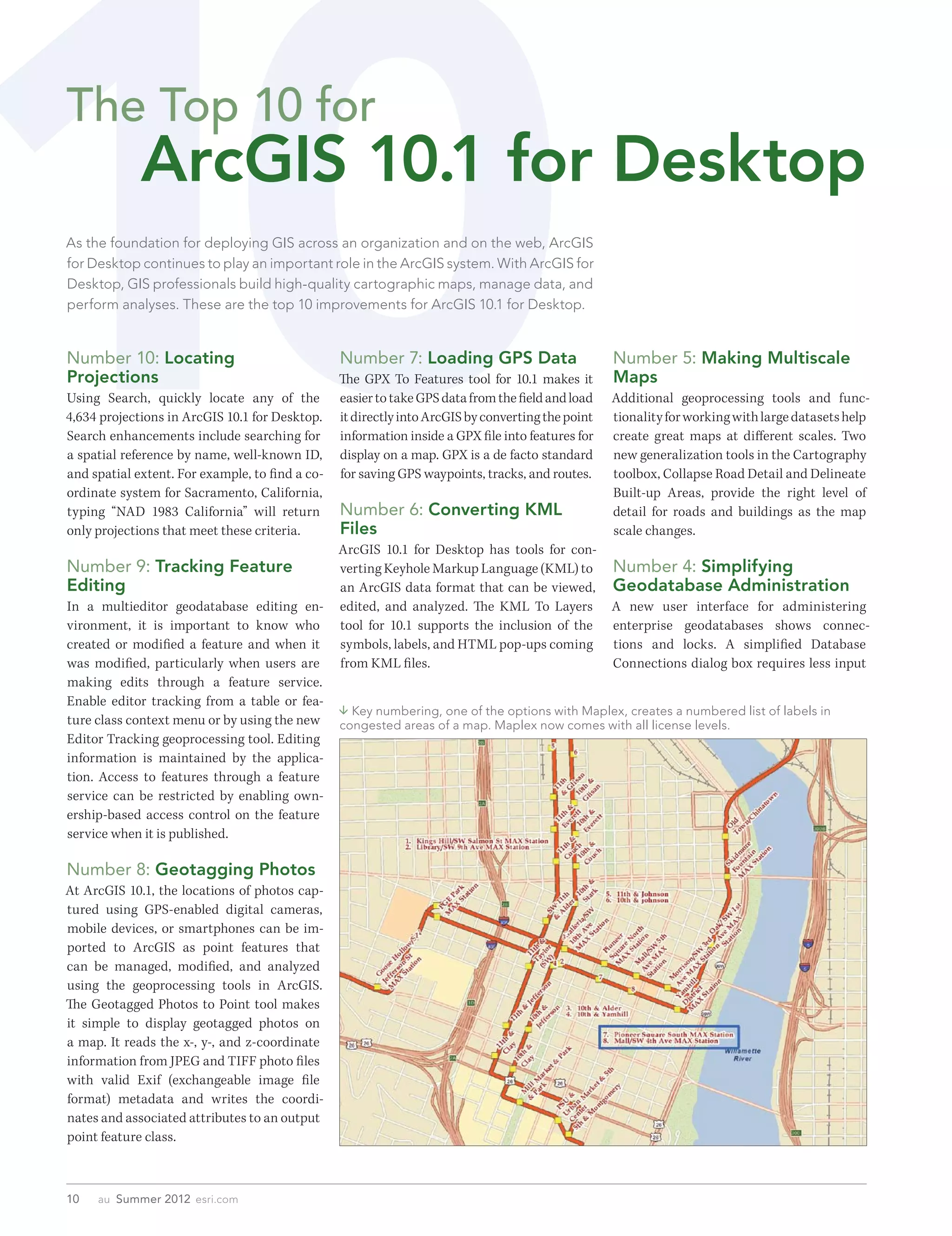
                                                  Key numbering, one of the options with Maplex, creates a numbered list of labels in
ture class context menu or by using the new      congested areas of a map. Maplex now comes with all license levels.
Editor Tracking geoprocessing tool. Editing
information is maintained by the applica-
tion. Access to features through a feature
service can be restricted by enabling own-
ership-based access control on the feature
service when it is published.

Number 8: Geotagging Photos
At ArcGIS 10.1, the locations of photos cap-
tured using GPS-enabled digital cameras,
mobile devices, or smartphones can be im-
ported to ArcGIS as point features that
can be managed, modified, and analyzed
using the geoprocessing tools in ArcGIS.
The Geotagged Photos to Point tool makes
it simple to display geotagged photos on
a map. It reads the x-, y-, and z-coordinate
information from JPEG and TIFF photo files
with valid Exif (exchangeable image file
format) metadata and writes the coordi-
nates and associated attributes to an output
point feature class.


10   au  Summer 2012  esri.com
Software and Data


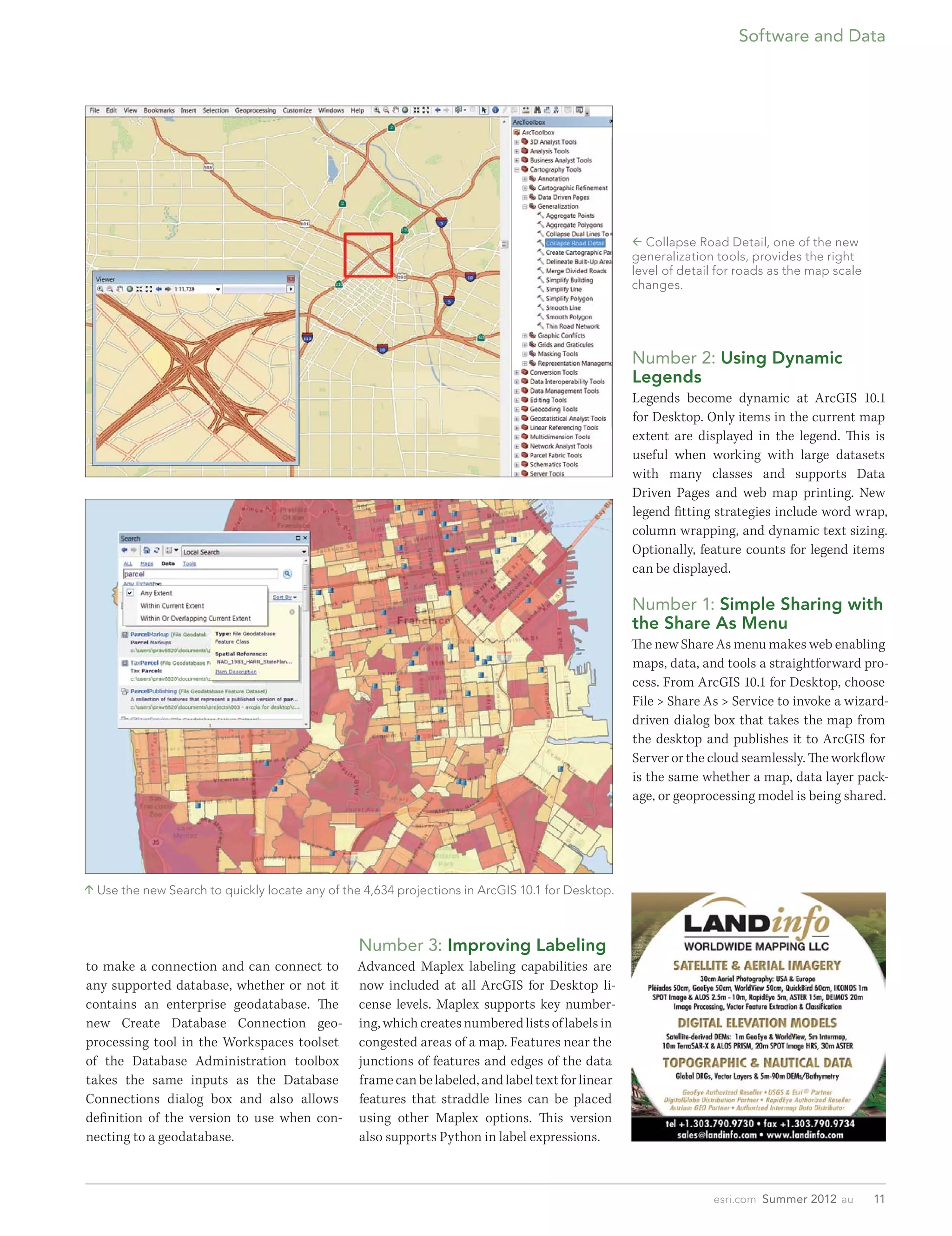
                                                                                                   Collapse Road Detail, one of the new
                                                                                                  generalization tools, provides the right
                                                                                                  level of detail for roads as the map scale
                                                                                                  changes.


                                                                                                  Number 2: Using Dynamic
                                                                                                  Legends
                                                                                                  Legends become dynamic at ArcGIS 10.1
                                                                                                  for Desktop. Only items in the current map
                                                                                                  extent are displayed in the legend. This is
                                                                                                  useful when working with large datasets
                                                                                                  with many classes and supports Data
                                                                                                  Driven Pages and web map printing. New
                                                                                                  legend fitting strategies include word wrap,
                                                                                                  column wrapping, and dynamic text sizing.
                                                                                                  Optionally, feature counts for legend items
                                                                                                  can be displayed.

                                                                                                  Number 1: Simple Sharing with
                                                                                                  the Share As Menu
                                                                                                  The new Share As menu makes web enabling
                                                                                                  maps, data, and tools a straightforward pro-
                                                                                                  cess. From ArcGIS 10.1 for Desktop, choose
                                                                                                  File > Share As > Service to invoke a wizard-
                                                                                                  driven dialog box that takes the map from
                                                                                                  the desktop and publishes it to ArcGIS for
                                                                                                  Server or the cloud seamlessly. The workflow
                                                                                                  is the same whether a map, data layer pack-
                                                                                                  age, or geoprocessing model is being shared.


 Use the new Search to quickly locate any of the 4,634 projections in ArcGIS 10.1 for Desktop.


                                                 Number 3: Improving Labeling
to make a connection and can connect to         Advanced Maplex labeling capabilities are
any supported database, whether or not it       now included at all ArcGIS for Desktop li-
contains an enterprise geodatabase. The         cense levels. Maplex supports key number-
new Create Database Connection geo-             ing, which creates numbered lists of labels in
processing tool in the Workspaces toolset       congested areas of a map. Features near the
of the Database Administration toolbox          junctions of features and edges of the data
takes the same inputs as the Database           frame can be labeled, and label text for linear
Connections dialog box and also allows          features that straddle lines can be placed
definition of the version to use when con-      using other Maplex options. This version
necting to a geodatabase.                       also supports Python in label expressions.


                                                                                                                esri.com  Summer 2012  au      11

The Top 10 for ArcGIS 10.1 for Desktop

  • 1.
    The Top 10for ArcGIS 10.1 for Desktop As the foundation for deploying GIS across an organization and on the web, ArcGIS for Desktop continues to play an important role in the ArcGIS system. With ArcGIS for Desktop, GIS professionals build high-quality cartographic maps, manage data, and perform analyses. These are the top 10 improvements for ArcGIS 10.1 for Desktop. Number 10: Locating Number 7: Loading GPS Data Number 5: Making Multiscale Projections The GPX To Features tool for 10.1 makes it Maps Using Search, quickly locate any of the easier to take GPS data from the field and load Additional geoprocessing tools and func- 4,634 projections in ArcGIS 10.1 for Desktop. it directly into ArcGIS by converting the point tionality for working with large datasets help Search enhancements include searching for information inside a GPX file into features for create great maps at different scales. Two a spatial reference by name, well-known ID, display on a map. GPX is a de facto standard new generalization tools in the Cartography and spatial extent. For example, to find a co- for saving GPS waypoints, tracks, and routes. toolbox, Collapse Road Detail and Delineate ordinate system for Sacramento, California, Built-up Areas, provide the right level of typing “NAD 1983 California” will return Number 6: Converting KML detail for roads and buildings as the map only projections that meet these criteria. Files scale changes. ArcGIS 10.1 for Desktop has tools for con- Number 9: Tracking Feature verting Keyhole Markup Language (KML) to Number 4: Simplifying Editing an ArcGIS data format that can be viewed, Geodatabase Administration In a multieditor geodatabase editing en- edited, and analyzed. The KML To Layers A new user interface for administering vironment, it is important to know who tool for 10.1 supports the inclusion of the enterprise geodatabases shows connec- created or modified a feature and when it symbols, labels, and HTML pop-ups coming tions and locks. A simplified Database was modified, particularly when users are from KML files. Connections dialog box requires less input making edits through a feature service. Enable editor tracking from a table or fea-  Key numbering, one of the options with Maplex, creates a numbered list of labels in ture class context menu or by using the new congested areas of a map. Maplex now comes with all license levels. Editor Tracking geoprocessing tool. Editing information is maintained by the applica- tion. Access to features through a feature service can be restricted by enabling own- ership-based access control on the feature service when it is published. Number 8: Geotagging Photos At ArcGIS 10.1, the locations of photos cap- tured using GPS-enabled digital cameras, mobile devices, or smartphones can be im- ported to ArcGIS as point features that can be managed, modified, and analyzed using the geoprocessing tools in ArcGIS. The Geotagged Photos to Point tool makes it simple to display geotagged photos on a map. It reads the x-, y-, and z-coordinate information from JPEG and TIFF photo files with valid Exif (exchangeable image file format) metadata and writes the coordi- nates and associated attributes to an output point feature class. 10 au  Summer 2012  esri.com
  • 2.
    Software and Data  Collapse Road Detail, one of the new generalization tools, provides the right level of detail for roads as the map scale changes. Number 2: Using Dynamic Legends Legends become dynamic at ArcGIS 10.1 for Desktop. Only items in the current map extent are displayed in the legend. This is useful when working with large datasets with many classes and supports Data Driven Pages and web map printing. New legend fitting strategies include word wrap, column wrapping, and dynamic text sizing. Optionally, feature counts for legend items can be displayed. Number 1: Simple Sharing with the Share As Menu The new Share As menu makes web enabling maps, data, and tools a straightforward pro- cess. From ArcGIS 10.1 for Desktop, choose File > Share As > Service to invoke a wizard- driven dialog box that takes the map from the desktop and publishes it to ArcGIS for Server or the cloud seamlessly. The workflow is the same whether a map, data layer pack- age, or geoprocessing model is being shared.  Use the new Search to quickly locate any of the 4,634 projections in ArcGIS 10.1 for Desktop. Number 3: Improving Labeling to make a connection and can connect to Advanced Maplex labeling capabilities are any supported database, whether or not it now included at all ArcGIS for Desktop li- contains an enterprise geodatabase. The cense levels. Maplex supports key number- new Create Database Connection geo- ing, which creates numbered lists of labels in processing tool in the Workspaces toolset congested areas of a map. Features near the of the Database Administration toolbox junctions of features and edges of the data takes the same inputs as the Database frame can be labeled, and label text for linear Connections dialog box and also allows features that straddle lines can be placed definition of the version to use when con- using other Maplex options. This version necting to a geodatabase. also supports Python in label expressions. esri.com  Summer 2012  au 11