


e Peeragogy Handbook
with contributions from
Bryan Alexander, Paul Allison, Régis Barondeau,
Doug Breitbart, Suz Burroughs, Joseph Corneli,
Jay Cross, Charles Jeffrey Danoff, Julian Elve,
María Fernanda, James Folkestad, Kathy Gill,
Gigi Johnson, Anna Keune, Roland Legrand,
Amanda Lyons, Christopher Neal, Ted Newcomb,
Stephanie Parker, Charloe Pierce, David Preston,
Howard Rheingold, Paola Ricaurte, Stephanie Schipper,
Fabrizio Terzi, and Geoff Walker
Tuesday 1st January, 2013 (version 1.0)
All content here is Public Domain unless noted.
Text in   corresponds to links in the
online version of the book, which is at
http://peeragogy.org.
CONTENTS
I I 1
1 W! 3
2 H     5
II P L 7
3 O 9
III C A G 29
4 C 31
5 K12 P 39
6 R P 47
IV O  L C 51
7 O CL 53
8 A  63
9 T    69
10 H  O  MOOC 77
11 P 85
12 T W 89
V CF  CW 93
ii CONTENTS
13 C 95
14 D   101
15 P  107
VI A 113
16 P A 115
17 F   123
VII P, U C,  E 125
18 T   127
19 P  H 131
20 P 133
21 A 141
22 U C 149
VIII T, S,  P 171
23 P T 173
24 W 187
25 R M 195
IX R 201
26 H    203
27 P  A 211
28 S G 219
29 M  A 223
Part I
Introduction
 1
WELCOME TO THE PEERAGOGY HANDBOOK, A
RESOURCE FOR SELF-ORGANIZING
SELF-LEARNERS∗
Welcome to the Peeragogy Handbook!
is book, and accompanying website, is a resource for self-
organizing self-learners.
With YouTube, Wikipedia, search engines, free chatrooms,
blogs, wikis, and video communication, today’s 
have power never dreamed-of before. What does any group
of self-learners need to know in order to self-organize learn-
ing about any topic? e Peeragogy Handbook is a volunteer-
created and maintained resource for bootstrapping peer learn-
ing.
is project seeks to empower the worldwide population of
self-motivated learners who use digital media to connect with
each other, to co-construct knowledge of how to co-learn. Co-
learning is ancient; the capacity for learning by imitation and
more, to teach others what we know, is the essence of hu-
man culture. We are human because we learn together. Today,
however, the advent of digital production media and distribu-
tion/communication networks has raised the power and poten-
tial of co-learning to a new level.
If you want to learn how to fix a pipe, solve a partial dif-
ferential equation, write soware, you are seconds away from
know-how via YouTube, Wikipedia and search engines. Access
to technology and access to knowledge, however, isn’t enough.
Learning is a social, active, and ongoing process.
What does a motivated group of self-learners need to
know to agree on a subje or skill, find and qual-
ify the best learning resources about that topic, sele
and use appropriate communication media to co-learn
3
4 CHAPTER 1. WELCOME!
it? In particular, what do they need to know about
peer learning?
is handbook is intended to answer these questions, and in
the process, build a toolbox for co-learning.
Our experience within this project has been that flaened
hierarchies do not necessarily mean decisions go by consen-
sus. e handbook is in part a collaboration? and in part a
collection of single-author works. Oen the lines and voices
are blurred. One constant throughout the book is our interest
in making something useful. To this end, the book comes with
numerous activities, and is available under non-restrictive legal
terms (you can reuse portions of it however you see fit it has
been given a CC Z 1.0 U P D D
). For those who seek more evidence-based, scholarly scaf-
folding for learning practices, we also maintain a 
 of learning theories that pertain to self-organized peer
learning.
Finally, we also include instructions on     
   .
Sincerely, T P T
 2
HOW TO USE THIS HANDBOOK
Author: Howard Rheingold
is document is a practical guide to online co-learning, a
living document that invites comment and invites readers to join
the community of editors; the document does not have to be read
in linear order from beginning to end.
If you and a group of other people want to use digital media
and networks to co-learn together, this handbook is a practi-
cal tool for learning how to self-organize peer learning – what
we call “peeragogy.” Material about conceptualizing and con-
vening co-learning – the stuff about geing started – is located
toward the top of the table of contents. Material about assess-
ment, resources, use cases is located toward the boom of the
TOC. But you don’t have to read it in sequential order. Hop
around if you’d like. We think – and some research seems to
support – that understanding how co-learning works will help
you do co-learning more effectively. So we’ve included material
about learning theories that support peer learning or that reveal
useful characteristics of successful peer learning. For those who
want to delve more deeply into the empirical research and schol-
arship, we’ve linked to a sister document – a literature review
of learning theory related to peeragogy. For those who want to
study more deeply about the aspects of peer learning we sum-
marize in our articles, we provide a list of links to related hand-
book articles, and a set of resources for further study. ink of
our pages as both places to start and as jumping off points.
e short videos, most of them under one minute long, at the
very beginning of many articles are meant to convey a sense of
what the article and its supporting material is meant to convey.
is is a living document. If you want to join our community
of editors, contact howard@rheingold.com (If you want to see
how we go about creating a handbook entry, see our guide for
newcomers.) If you don’t want to go as far as joining the com-
5
6 CHAPTER 2. HOW TO USE THIS HANDBOOK
munity of editors, please feel free to use the comment thread
aached to each page to suggest changes and/or additions.
See also
• G   
• T T  C
• O   
• O  
Part II
Peer Learning
 3
OVERVIEW
is part of the book offers our most important insights into
peer learning. A number of earlier theories and experiments
have focused on various aspects of collaborative, connective,
and shared, non-didactic learning systems. ere’s a rumbling
among several well-known thinkers that when combined with
new technologies, peer learning strategies could have a big im-
pact on the way educational institutions work in the future. Our
aim here is just to make the basic ideas concretely understand-
able and immediately applicable. e best course is to try it out
and see how it works for you.
Peeragogy is about peers learning together and helping each
other learn. e idea is that each person contributes to the group
in their own way. e contribution of each peeragogue depends
on a healthy sense of self-awareness. You ask yourself, “What
do I have to offer?” and “What do I get out of it?” We think
you’ll come up with some exciting answers to those questions!
Our first strategy for peer learning invites you to engage in a
self-assessment of your motivations. Here you take into account
things like the learning context, timing and sequence of learning
activities, social reinforcements, and visible reward. Our view
is that learning is most effective when it contains some form of
9
10 CHAPTER 3. OVERVIEW
enjoyment or satisfaction, or when it leads to a concrete accom-
plishment.
Indeed, this is the kind of learning that you choose to do,
whether you’re being “trained” or not. You’re in charge! Fur-
thermore, this kind of learning is usually fun. Indeed, as we’ll
describe below, there are deep links between play and learn-
ing. We believe we can improve the co-learning experience by
adopting a playful mindset. Certainly some of our best learn-
ing moments in the Peeragogy project have been peppered with
humor and banter.
Apart from self-assessment and playfulness, here are two
key factors to keep in mind:
“Personal” supports “peer”: We can consciously cultivate
living, growing, responsive webs of information, support, and
inspiration that help us be more effective learners. is is a “per-
sonal learning network”. We’ll offer tips on how to build these
networks – and we’ll also explain how strong personal learning
networks can evolve into even stronger peer learning networks.
“Peer” supports “personal”: As we work together to de-
velop shared plans or “roadmaps” for our collective efforts in
group projects, we usually can find places where we have some-
thing to offer, and places where we have something to learn.
Furthermore, if we are willing to ask for some help and offer our
help to others, then we can really learn a lot! is is why build-
ing effective interpersonal learning strategies should be part of
your personal learning plan.
In the following sections, you can read some more about
these strategies, or you can skip ahead to P III to start look-
ing at techniques you can use to build your own peer learning
group.
Peer learning through the ages
e new term, “peeragogy,” that we use in this book is a riff
on the word pedagogy — the art, science, or profession of teach-
ing. Pedagogy has a somewhat problematic story of origin: it
comes from the ancient Greek tradition of having a child (pai-
dos) be supervised (agogos) by a slave. Greek philosophers dis-
11
agreed with each other as to the best way for individuals to gain
knowledge (and even more so, wisdom). Socrates, who insisted
that he was not wise, also insisted that his interlocutors join
him in investigating truth claims, as peers. e most famous
of these interlocutors, Plato, on a more pedagogical bent, spoke
of an enlightened few, whose responsibility it was to show oth-
ers the light of knowledge (illustrated by his famous allegory of
“e Cave”).
In more recent centuries, various education theorists and re-
formers have challenged the effectiveness of what had become
the traditional teacher-led model. Most famous of the early edu-
cation reformers in the United States was John Dewey, who ad-
vocated new experiential learning techniques. In his 1916 book,
Democracy and Education[1], Dewey wrote, “Education is not
an affair of ‘telling’ and being told, but an active and construc-
tive process.” Soviet psychologist Lev Vygotsky, who developed
the concept of the Zone of Proximal Development, was another
proponent of “constructivist” learning. His book, ought and
Language, also gives evidence to support collaborative, socially
meaningful, problem-solving activities over solo exercises [2].
Within the last few decades, things have begun to change
very rapidly. In Conneivism: A Learning eory for the Digital
Age, George Siemens argues that technology has changed the
way we learn, explaining how it tends to complicate or expose
the limitations of the learning theories of the past [3]. e cru-
cial point of connectivism is that the connections that make it
possible for us to learn in the future are more relevant than the
sets of knowledge we know individually, in the present. Fur-
thermore, technology can to some degree and in certain con-
texts, replace know-how with know-where-to-look.
If you want more details on the history, theories, and recent
experiments related to peer learning, we have a more exten-
sive   available. We’ve also adapted it into
W , which you can edit as well as read.
12 CHAPTER 3. OVERVIEW
Figure 3.1: P C S (1604). By Jan Saenredam
[Public domain], via Wikimedia Commons
What makes learning fun? (Or boring, as the
case may be!)
Individuals learn by doing in a continuous process. is is
most effective when it contains some form of enjoyment, satis-
faction, or accomplishment. So for each peer-learning partici-
pant, there’s a simple question: ”What makes learning fun for
me?”
Two learning stories
1. A study group for a tough class in neuropsychology con-
venes at at the library late one night, resolving to do
well on the next day’s exam. e students manage to de-
flect their purpose for a while by gossiping about college
hook-ups and parties, studying for other classes, and shar-
ing photos. en, first one member, then another, takes
the initiative and as a group, the students eventually pull
13
their aention back to the task at hand. ey endure the
monotony of studying for several hours, and the next day,
the exam is theirs.
2. A young skateboarder spends hours tweaking the me-
chanics of how to make a skateboard float in the air for
a split second, enduring physical pain of repeated wipe-
outs. With repetition and success comes a deep under-
standing of the physics of the trick. at same student
cannot string together more than five minutes of continu-
ous aention during chemistry class and spends even less
time on homework for the class before giving up.
Which is more fun, skateboarding or
chemistry?
Peer-learning participants succeed when they are motivated
to learn. Skateboarding is primarily intrinsically motivated,
with some extrinsic motivation coming from the respect that
kids receive from peers when they master a trick. In most cases,
the primary motivation for learning chemistry is extrinsic, com-
ing from parents and society’s expectations that the student ex-
cel and assure his or her future by geing into a top college.
e student very well could be intrinsically motivated to
have a glowing report card, but not for the joy of learning chem-
istry, but because of the motivaton to earn a high grade as part
of her overall portfolio. Taken a different way, what is it about
chemistry that’s fun for a student who does love the science?
Perhaps she anitcipates the respect, power and prestige that
comes from announcing a new breakthrough; or Or, she may
feel her work is important for the greater good, or prosperity,
of humanity; or she may simply thrill to see atoms bonding to
form new compounds.
Learning situations frequently bore the learner when extrin-
sic motivation is involved. Whether by parents or society, be-
ing forced to do something, as opposed to choosing to, ends up
making the individual less likely to succeed. In some cases it’s
clear, but trying to figure out what makes learning fun for a a
14 CHAPTER 3. OVERVIEW
Figure 3.2: Photo of Dmitri Mendeleev (1834-1907). Found on
e Guardian’s N  T . Public domain.
group of individual humans can be very difficult. Oen there is
no clear-cut answer that can be directly applied in the learning
environment. Either way, identifying the factors that can make
learning boring or fun is a good start. Perhaps learning certain
skills or topics is intrinsically boring, no maer what, and we
have to accept that.
Learning paerns
One way to think about fun learning is that it’s fun to learn
new paerns. Jürgen Schmidhuber wrote: “A separate rein-
forcement learner maximizes expected fun by finding or creat-
ing data that is beer compressible in some yet unknown but
learnable way, such as jokes, songs, paintings, or scientific ob-
servations obeying novel, unpublished laws” [4]. So the skate-
boarder enjoyed coming across new paerns (novel tricks) that
he was able to learn; tricks that challenged his current skill level.
Learner, know thyself: A self-evaluation
technique
When joining the Peeragogy project, I did a brief self-
evaluation about what makes me turn on to learning:
15
• Context. I resist being groomed for some unforseeable fu-
ture rather than for a purpose.
• Timing and sequence.I find learning fun when I’m studying
something as a way to procrastinate on another pressing
assignment.
• Social reinforcement.Geing tips from peers on how to
navigate a snowboard around moguls was more fun for
me than my Dad showing me the proper way to buff the
car’s leather seats on chore day.
• Visible reward. In high school, it was not fun in the mo-
ment to sit and compose a 30-page reading journal for
Frankenstein. But owing in part to those types of prior
experiences, writing is now fun and it’s a pleasure to learn
how to write beer.
The role of metacognition in peer learning
e profile of each individual participant, both from the per-
spective of self-awareness, as well as from the perspective of
maximal value of contribution to the group endeavor, becomes
a metacognitive inquiry into each peeragogue’s skills, talents,
subject maer expertise, socialization and suitability for the ar-
ray of roles and positions required to achieve a communally de-
fined and framed goal or output. “Metacognitive” means that the
peeragogue is practicing awareness of how he or she is think-
ing and aending. e short form is ”Deliberate self-awareness
of one’s thinking processes.”
Since in principle there is no authority figure or leader to
exercise judgment or discretion regarding the above, it becomes
a necessary self-evaluative examination and declaration in re-
gard to the group, enabling participating individuals to maxi-
mize their engagement and contribution to the undertaking.
Possible Roles
• Leader, Manager, Team Member, Worker
16 CHAPTER 3. OVERVIEW
• Content Creator, Author, Content Processor, Reviewer,
Editor
• Presentation Creator, Designer, Graphics, Applications
• Planner, Project Manager, Coordinator, Aendee, Partici-
pant
• Mediator, Moderator, Facilitator, Proponent, Advocate,
Representative, Contributor
Possible Contributions
• Create, Originate, Research, Aggregate
• Develop, Design, Integrate, Refine, Convert
• Write, Edit, Layout
We find it useful to build in a brief pause at the commence-
ment of the project for each peeragogue to honestly self-define
and declare to the group what he thinks he can bring to the ta-
ble as a function of his knowledge, skills, capacities, and prefer-
ences. is process primes the group for cohesion and success.
Personal Learning Networks and Peer Learning
Networks
Personal Learning Networks are the collections of people
and information resources (and relationships with them) that
people cultivate in order to form their own learning networks
— living, growing, responsive sources of information, support,
and inspiration that support self-learners.
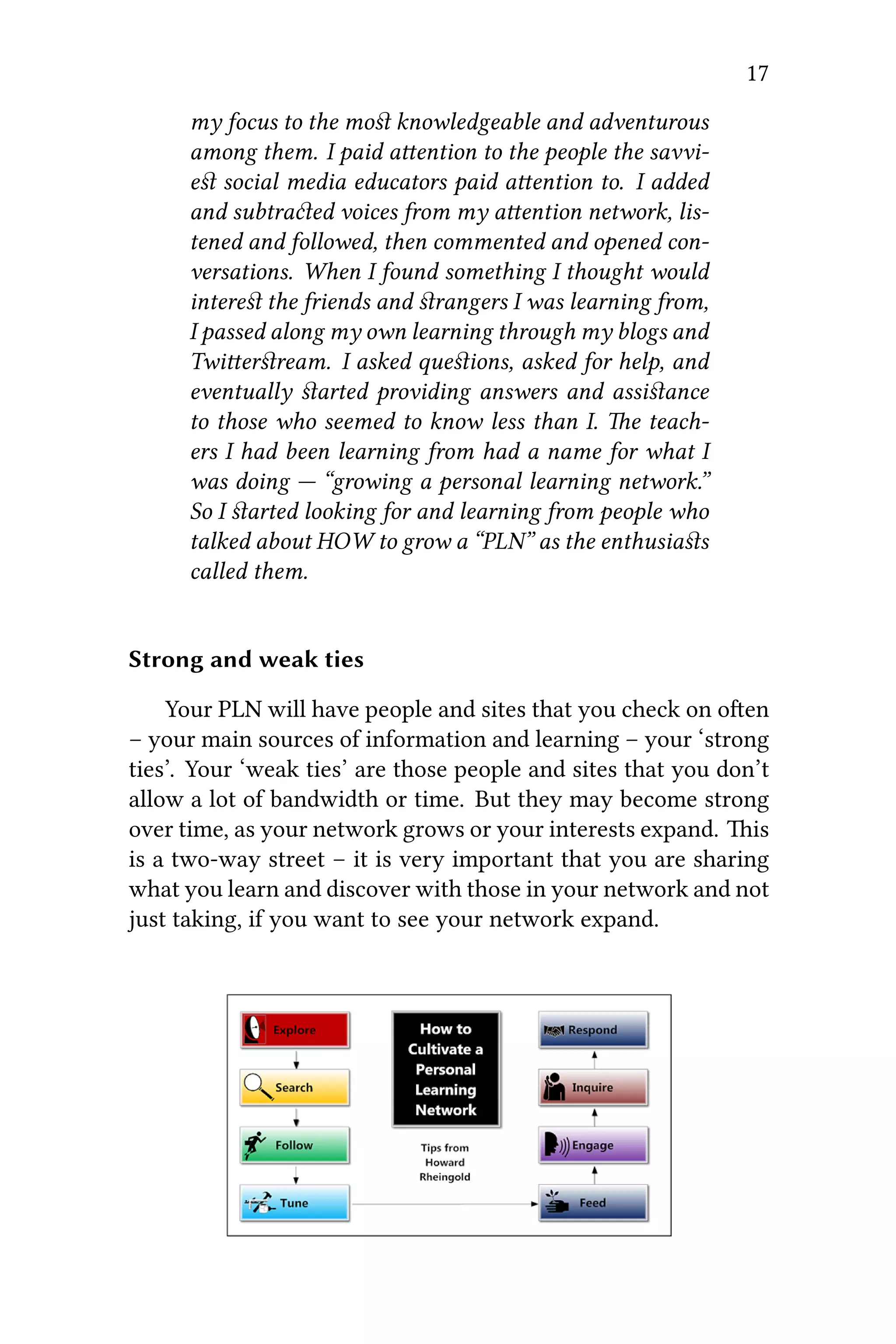
Howard Rheingold:When I started using social me-
dia in the classroom, I looked for and began to learn
from more experienced educators. First, I read and
then tried to comment usefully on their blog posts and
tweets. When I began to understand who knew what
in the world of social media in education, I narrowed
17
my focus to the most knowledgeable and adventurous
among them. I paid aention to the people the savvi-
est social media educators paid aention to. I added
and subtraed voices from my aention network, lis-
tened and followed, then commented and opened con-
versations. When I found something I thought would
interest the friends and strangers I was learning from,
I passed along my own learning through my blogs and
Twierstream. I asked questions, asked for help, and
eventually started providing answers and assistance
to those who seemed to know less than I. e teach-
ers I had been learning from had a name for what I
was doing — “growing a personal learning network.”
So I started looking for and learning from people who
talked about HOW to grow a “PLN” as the enthusiasts
called them.
Strong and weak ties
Your PLN will have people and sites that you check on oen
– your main sources of information and learning – your ‘strong
ties’. Your ‘weak ties’ are those people and sites that you don’t
allow a lot of bandwidth or time. But they may become strong
over time, as your network grows or your interests expand. is
is a two-way street – it is very important that you are sharing
what you learn and discover with those in your network and not
just taking, if you want to see your network expand.
18 CHAPTER 3. OVERVIEW
Peer Learning Networks
Later in the handbook we’ll talk more about how to develop
and share “ ” – in other words how to ad-
vertise what you want to learn, and what you’d be interested in
helping teach others. A network of people who share their pro-
files and work together to learn/teach/heal/communicate/etc. is
a “Peer Learning Network”. You’ll also find more information
about building a PLN in our article on P  K12 E
 (the article is also useful even if you’re not formally
employed a teacher).
Personal Learning Plans and Peer Learning
Plans
A PLP is designed to develop a learner’s learning and teach-
ing capabilities. Learners learn how to develop, implement, re-
view, and adjust personal learning goals. e PLP supports
learners in developing knowledge and skills that will enable
them to:
1. Identify appropriate future options;
2. Review their strengths and areas for development;
3. Identify goals and plans for improvement;
4. Monitor their actions and review and adjust plans as
needed to achieve their goals.
Steps in making the PLP
1. Learning needs:What do you most need to learn about in
the time ahead?
2. Learning aivities: What are the best ways you learn,
what learning activities will meet your learning needs,
what help will you need and how long will it take?
19
Figure 3.3: “I think because of the tremendous changes we see
in education and at work, the sets (aitudes) are beginning to
overlap more and more,” said Joachim Stroh of the Google+ com-
munity, Visual Metaphors. (Used with permission)
3. Evidence of learning:What will you put into your per-
sonal portfolio to demonstrate your learning progress and
achievements?
Peer Learning Plans
On the same page where we talk about “peeragogical pro-
files”, we also talk about how to build a ” ” for
your peer learning project. Indeed, the idea of a “roadmap” is
really a central paern that comes up in this book again and
again.
From training to learning
e idea we develop here relates back to the question “what
makes learning fun for me.” In short, if it’s not something that
you choose, it’s not as likely to stick. However, dozen years ago,
the words training and learning were interchangeable, but today
learning is revered and training is in the dog house. What’s the
20 CHAPTER 3. OVERVIEW
difference? Training is something that’s pushed on you; some-
one else is in charge. Learning is something you choose to do,
whether you’re being trained or not. You’re in charge.
And think of all the people we learn from who aren’t nec-
essarily trainers! Parents, grandparents, aunts, uncles, broth-
ers, sisters, playmates, cousins, Lile Leaguers, Scouts, school
chums, roommates, teammates, classmates, study groups,
coaches, bosses, mentors, colleagues, gossips, co-workers,
neighbors, and our kids…
is has ramifications for the way people manage. To ex-
tract optimal performance from workers, managers must inspire
them rather than command them. Antoine de Saint-Exupéry put
it nicely: “If you want to build a boat, do not instruct the men
to saw wood, stitch the sails, prepare the tools and organize the
work, but make them long for seing sail and travel to distant
lands.” Knowledge workers of the future will have instant, ubiq-
uitous access to the Net. e measure of their learning is an
open-book exam. “What do you know?” is replaced with “What
can you do?”.
Jay Cross: If I were an instructional designer in
a moribund training department, I’d polish up my
resume and head over to marketing. Co-learning
can differentiate services, increase product usage,
strengthen customer relationships, and reduce the
cost of hand-holding. It’s cheaper and more use-
ful than advertising. But instead of just making a
copy of today’s boring educational practices, build
something based on interaction and camaraderie,
perhaps with some healthy competition thrown in.
Again, the emphasis should always be on learning
in order to do something!
Play and learning
Once more we’re back to the question, “What makes learn-
ing fun?” ere are deep links between play and learning. Con-
sider, for instance, the way we learn the rules of a game through
21
playing it. e first times we play a card game, or a physical
sport, or a computer simulation we test out rule boundaries as
well as our understanding. Actors and role-players learn their
roles through the dynamic process of performance. e result-
ing learning isn’t absorbed all at once, but accretes over time
through an emergent process, one unfolding further through it-
erations. In other words, the more we play a game, the more we
learn it.
In addition to the rules of play, we learn about the subject
which play represents, be it a strategy game (chess, for exam-
ple) or simulation of economic conflict. Good games echo good
teaching practice, too, in that they structure a single player’s
experience to fit their regime of competence (cf. Vygotsky’s
zone of proximal learning, a la Gee [5]). at is to say a game
challenges players at a level suited to their skill and knowledge:
comfortable enough that play is possible, but so challenging as
to avoid boredom, eliciting player growth. Role-playing in the-
ater lets performers explore and test out concepts; see Boal [6].
Further, adopting a playful aitude helps individuals meet new
challenges with curiousity, along with a readiness to mobilize
ideas and practical knowledge. Indeed, the energy activated by
play can take a person beyond an event’s formal limitations, as
players can assume that play can go on and on [7].
Douglas Thomas and John Seely Brown: “All
systems of play are, at base, learning systems.” [8]
Games have always had a major social component, and
learning plays a key role in that interpersonal function. Us-
ing games to build group cohesion is an old practice, actually
a triusm in team sports.
It is important to locate our peeragogical moment in a world
where gaming is undergoing a renaissance. Not only has digital
gaming become a large industry, but gaming has begun to infil-
trate non-gaming aspects of the world, sometimes referred to as
“gamification.” Puing all three of these levels together, we see
that we can possibly improve co-learning by adopting a playful
22 CHAPTER 3. OVERVIEW
mindset. Such a playful aitude can then mobilize any or all of
the above advantages. For example,
• Two friends are learning the Russian language together.
ey invent a vocabulary game: one identifies an object
in the world, and the other must name it in Russian. ey
take turns, each challenging the other, building up their
common knowledge.
• A middle-aged man decides to take up hiking. e
prospect is somewhat daunting, since he’s a very proud
person and is easily stymied by learning something from
scratch. So he adopts a “trail name”, a playful pseudonym.
is new identity lets him set-aside his self-importance
and risk making mistakes. Gradually he grows comfort-
able with what his new persona learns.
• We can also consider the design field as a useful kind
of playful peeragogy. e person playing the role of the
designer can select the contextual frame within which
the design is performed. is frame can be seen as the
rules governing the design, the artifact and the process.
ese rules, as with some games, may change over time.
erefore the possibility to adapt, to tailor one’s activities
to changing context is important when designing playful
learning activities. (And we’ll look at some ways to design
peer learning experiences next!)
From Peer Learning to “Peeragogy”
e idea that we needed a new theory (which we called par-
agogy) arose out of the challenges we faced doing peer learn-
ing. Specifically, we were particularly interested in the condi-
tions that were required for volunteer contributors to drive an
learning-focused organization’s agenda, and improve things for
participating learners and teachers. How could the organization
itself “learn” and grow, while participants were also learning and
becoming beer contributors?
23
As this idea took form, we reflected more on how learning
and organizations work. Just like it would be rare for a business
to be successful if it does not take into account the needs and
interests of its clients, it is unlikely for a learning project to be
successful if the act of learning is not somehow relevant for the
people doing it.
So, paragogy became a set of proposed principles for under-
standing learning (and working) together. In particular, we fo-
cused on the way in which co-learners shape their learning con-
text together. Paragogy is not a recipe: its ideas can grow and
change to suit the needs of the moment; as it has matured, it
has become more of an “approach” than it is a set of set-in-stone
principles. It’s also riff on the word “andragogy”, which comes
from Malcolm Knowles. He wrote:
[A]ndragogy is simply another model of assumptions
about adult learners to be used alongside the peda-
gogical model of assumptions, thereby providing two
alternative models for testing out the assumptions as
to their ‘fit’ with particular situations. Furthermore,
the models are probably most useful when seen not
as dichotomous but rather as two ends of a sperum ,
with a realistic assumption (about learners) in a given
situation falling in between the two ends [9] (p. 43).
We also tried, at least at first, to be similarly non-
oppositional with respect to andragogy:
[T]he most important initial condition in andragogy
seems to be that an adult educator or facilitator is
part of the piure. In a peer-based seing, that may
not be the case: we can easily find examples of learn-
ing environments where there is no “teacher” in the
“classroom”; where, for example, the task of facilita-
tion is shared among all participants or even encoded
in the learning materials or supportive technologies.
Not that one way is more desirable than another: we
simply mean to highlight the fa that the most basic
24 CHAPTER 3. OVERVIEW
features of a given learning environment will influ-
ence everything else. [10]
“Paragogy” is intended to be a broad, inclusive, and pur-
posefully ambiguous term. “Peeragogy” by contrast aempts to
make the idea more concrete and immediately understandable:
peeragogy is about peers learning together, and teaching each
other. In the end, the two words are actually synonyms. If you
prefer to go merrily into theory-building mode, feel free to spell
it “paragogy”. If you want to be a bit more down to earth, use
“peeragogy.”
Different ways to analyze the learning process
Since we are interested in how students (and others) can
collaborate in learning, bringing to their own particular expe-
riences, strengths, and weaknesses to bear, we ask: “How can
each participant contribute to a group in their own way? Which
kind of activities can we design to foster “multi-modal” collab-
orative learning, and how do we assess the outcomes?” One
approach is to look at the “multiple different social roles” which
people take on in educational contexts:
[W]e use [Ken] Wilber’s terms to describe a given so-
cial role in terms of its constituent aions. So for ex-
ample, the role of “being a student” might be described
as follows: “Igo to class, wedo a class proje, the ob-
jes of concern (“Its”) are things I can add to my port-
folio or work-record; and fundamentally, itis all about
gaining a skill.” is simple background story gives
us a notion of role, persona, or identity: a role that is
defined by its constituent aions, relative a given so-
cial context. And here, context is conceived of, aer
Nishida, as a “shared context in motion.” [11]
Aer doing some personal reflection on the roles you want to
take on and the contributions you want to make (as we discussed
above), you may also want to work together with your learning
group to analyze the learning process in more detail. ere are
25
Figure 3.4: C . S. By w:User:Oliverbeatson
(w:File:Challenge vs skill.jpg) [Public domain]
many different phases, stages, and dimensions that you can use
to help structure and understand the learning experience: we
list some of these below.
• Guidance & Support, Communication & Collaboration,
Refleion & Demonstration, Content & Aivities (from
Gráinne Conole)
• Forming, Norming, Storming, Performing from Bruce Tuck-
man.
• e “five-stage e-moderating model” from GIlly Salmon
• Assimilative, Information Processing, Communicative, Pro-
duive, Experiential, Adaptive(from Oliver and Conole)
• Multiple intelligences (aer Howard Gardner).
• e associated “mental state”(aer Csíkszentmihályi; see
picture)
• Considered in terms of “Learning Power” (Deakin-Crick,
Broadfoot, and Claxton).
26 CHAPTER 3. OVERVIEW
Further reading
A word list for your inner edu-geek
• Constructivism
• Social constructivism
• Radical constructivism
• Enactivism
• Constructionism
• Connectivism
On fun and boredom
• e Contribution of Judo to Education by Kano Jigoro
• Pale King, unfinished novel by David Foster Wallace,
On Paragogy
• Joe Corneli’s “I P” lesson plan, on
Wikiversity
• Joe Corneli and Charlie Dano’s “Paragogy Papers”, on
.
on Learning vs Training
• Hart, Jane. I     BYOL (B Y O
L)    ?
on PLNs
• S T: G N, C, PLN
B, blog post, with video
• Will Richardson and Rob Mancabelli, P L
 N: U  P  C 
T E
27
• H R’ PLN   D
Exercises to help cultivate a playful aitude
• Use the O S card deck (Brian Eno and
Peter Schmidt, 1st edition 1975, now available in its fih
edition) to spur playful creativity. Each card advises play-
ers to change their creative process, oen in surprising
directions.
• Take turns making and sharing videos. is online collab-
orative continuous video storytelling involves a group of
people creating short videos, uploading them to YouTube,
then making playlists of results. Similar to C K,
only online.
• Engage in theater play using Google+ Hangout. e.g. com-
ing together with a group of people online and perform-
ing theatrical performances on a shared topic that are
recorded.
References
1. Dewey, J. (2004). Democracy and education. Dover Publi-
cations.
2. Vygotsky, L. S. (1986). ought and language. MIT press.
3. Siemens, G. (2005). Connectivism: A learning theory for
the digital age. International Journal of Instruional Tech-
nology and Distance Learning, 2(1), 3-10.
4. Schmidhuber, J. (2010). Formal theory of creativity, fun,
and intrinsic motivation. Autonomous Mental Develop-
ment (IEEE), 2(3), 230-247.
5. Gee, J. P. (1992). e social mind: Language, ideology, and
social praice. Series in language and ideology. New York:
Bergin & Garvey.
28 CHAPTER 3. OVERVIEW
6. Boal, A. (1979). eatre of the oppressed. 3rd ed. London:
Pluto Press.
7. Bereiter, C. and Scadamalia, M. (1993). Surpassing our-
selves, an inquiry into the nature and implications of ex-
pertise. Peru, Illinois: Open Court.
8. Douglas omas and John Seely Brown (2011), A New Cul-
ture of Learning: Cultivating the Imagination for a World of
Constant Change. CreateSpace.
9. Knowles, M. S. (1980). e modern practice of adult edu-
cation: From pedagogy to andragogy. Chicago: Folle.
10. Corneli, J. and Danoff, C.J. (2011), Paragogy: Synergiz-
ing individual and organizational learning. (Published 
W.)
11. Corneli, J., & Mikroyannidis, A. (2012). Crowdsourc-
ing education on the Web: a role-based analysis of on-
line learning communities, in Alexandra Okada, Teresa
Conolly, and Peter Sco (eds.), Collaborative Learning 2.0:
Open Educational Resources, IGI Global.
Part III
Convening A Group
 4
BUILDING YOUR CO-LEARNING GROUP
Authors: Gigi Johnson and Joe Corneli
So you want to try peer learning? Maybe you’ve already
found a few people who will support you in this effort? Congrat-
ulations! It’s time now to focus your thinking – how will you
convene others to form a suitable group? How will you design
a learner experience which will make your project thrive? In
this chapter we suggest a variety of questions that will help you
to make your project more concrete for potential new members.
ere are no good or bad answers - it depends on the nature of
your project and the context. Trying to answer the questions is
not something you do just once - at various stages of the project,
some or all of those questions will get new meanings - and prob-
ably new answers.
F T: “ere is a force of araion that
allows aggregation into groups based on the degree of
personal interest; the ability to enhance and improve
the share of each participant; the expeation of suc-
cess and potential benefit.”
Who are “we”?
Note that there are many groups that may not need to be
“convened”, since they already exist. ere is a good story
from A. T. A in his   in which he
does “convene” a natural group (namely, a village) - but in
any case, keep in mind at the outset that the degree of group-
consciousness that is necessary for peer learning to take place
is not fixed. Here we suppose you (whoever you are!) are just at
the point of kicking off a project. What steps should you take?
We suggest you take a moment to ponder the following ques-
tions first!
31
32 CHAPTER 4. CONVENING
Five W’s and a How, and six clusters of Very
Good estions
ose taking the initiative should ask themselves a quick tra-
ditional who, what, where, when, why, and how. (S S
suggests to begin with Why, and we touched on “Who” above!).
In doing so, preliminary assumptions for design and structure
are established. However, in peer learning it is particularly im-
portant to maintain a healthy degree of openness, so that future
group members can also form their answers on those questions.
In particular, this suggests that the design and structure of the
project (and the group) may change over time. Here, we riff on
the traditional 5W’s+H with six clusters ofVery Good estions
–which will help you focus your thinking about the project.
Expectations for participants
Do you see an initial “division of labor” that would sug-
gest the formation of teams or task groups?
1. What are some of the roles that people are likely to fall
into (e.g. Newcomer, Wrapper, Lurker, Aggregator, etc.)?
2. How likely is it that participants will stick with the
project? If you expect many participants to leave, how
will this effect the group and the outcome?
3. Do you envision new people joining the group as time
goes by? If so, what features are you designing that will
support their integration into an existing flow?
4. Will the project work if people “dip in and out?” If so,
what features support that? If not, how will people stay
focused?
Nature of the project
1. What skills are required? What skills are you trying to
build?
33
Figure 4.1: Engraving of Rudyard Kipling (1865-1936). “I keep
six honest serving-men (ey taught me all I knew)”
2. What kinds of change will participants undergo? Will
they be heading into new ground? Changing their minds
about something? Learning about learning?
3. What “social” or “productive” (etc.) objective, if any, is the
project aiming to achieve?
Time management
1. What do you expect the group to do, from the moment it
convenes, to the end of its life-span, to create the specific
34 CHAPTER 4. CONVENING
outcome that will exist at the conclusion of its last meet-
ing? (C. Gersick.) Note that what people ACTUALLY do
may be different from what you envision at the outset, so
you may want to revisit this question (and your answer)
again as the project progresses.
2. Keeping in mind that at least one period of is inertia is very
likely (C. Gersick), what event(s) do you anticipate hap-
pening in the group that will bring things back together,
set a new direction, or generally get things on track? More
generally, what kinds of contingencies does your group
face? How does it interface to the “outside world”?
3. What pre-existing narratives or workflows could you copy
in your group?
4. How much of a time commitment do you expect from par-
ticipants? Is this kind of commitment realistic for mem-
bers of your group?
5. What, if anything, can you do to make participation “easy”
in the sense that it happens in the natural flow of life for
group members?
6. Does everyone need to participate equally? How might
non-equal participation play out for participants down the
line?
Thinking backwards
1. What structures will support participants in their journey
to the end result(s) you (or they) have envisioned? What
content can you use to flesh out this structure?
2. Where can the structure “flex” to accomodate unknown
factors as things progress?
Parameters of tool/platform choice
35
1. What tools are particularly suited to this group? Con-
sider features like past experience, the need for centraliza-
tion (or de-centralization), cultural expectations related to
group work, sharing, and leadership, etc.
2. Is there an inherent “draw” to this project for a given pop-
ulation, or are you going to have to do a lot of work to
keep people involved? How might your answer influence
your choice of tools?
3. How do you prioritize “easy entry”, “diverse uses”, and
“high ceilings for sophisticated expansion”?
4. Unless you are working with an existing group, or re-
using an existing modalitiy, participation is not a habit
for anyone here. What’s the “hook”?
(Non-) Linearity vs Messiness
1. How will your group manage feedback in a constructive
way?
2. Why might participants feel motivated to GIVE feedback?
3. How firm are the “social contracts” for this group? How
extensively do they apply? (Do they apply to everyone
equally, or are some “more equal than others”?)
4. What do people need to know at the start? What can you
work out as you go along? Who decides?
5. How welcome are “meta-discussions”? What kinds of dis-
cussions are not likely to be welcome? Do you have facil-
ities in place for “breakout groups” or other peer-to-peer
interactions? (Alternatively, if the project is mostly dis-
tributed, do you have any facilities in place for coming
together as a group?)
36 CHAPTER 4. CONVENING
Cycles of group development
e above questions remain important thoughout the life of
the project. People may come and go, particpants may propose
fundamentally new approaches, people may evolve from lurk-
ers to major content creators or vice versa. e questions we
suggest can be most effective if your group discusses them over
time, as part of its workflow, using synchronous online meet-
ings (e.g., B B B, A C, B
C), forums, Google docs, wikis, and/or email lists.
Regular meetings are one way to establish a “Heartbeat” for the
group.
In thinking about other ways of structuring things, note that
the “body” of the peeragogy handbook follows a T
  (Convening a Group is our “forming”, Organiz-
ing a Learning Context is our “storming and norming”, Co-
working/Facilitation is our “performing”, and Assessment is our
“adjourning”). But we agree with Gersick (and Engeström) that
groups do not always follow a linear or cyclical paern with
their activities!
Nevertheless, there may be some particular stages or phases
that you want your group to go through! Do you need some
“milestones”, for example? How will you know when you’ve
achieved “success”? Etc.
Dealing with chaos or conflict
In closing, it is worth reminding you that it is natural for
groups to experience conflict, especially as they grow or cross
other threshold points or milestones - or perhaps more likely,
when they don’t cross important milestones in a timely fash-
ion (ah, so you remember those milestones from the previous
section!). Nevertheless, there are some strategies can be used
to make this conflict productive, rather than merely destructive
(see Ozturk and Simsek).
37
Recommended Reading
1. Engeström, Y. (1999). Innovative learning in work teams:
Analyzing cycles of knowledge creation in practice. In Y.
Engeström, R. Mieinen & R.-L-. Punamäki (Eds.), Per-
speives on aivity theory, (pp. 377-404). Cambridge, UK:
Cambridge University Press
2. Gersick, C. (1988). Time and transition in work teams:
Toward a new model of group development. Academy of
Management Journal 31 (Oct.): 9-41.
3. Mimi Ito’s observations about    
 J
4. Rheingold U, MA 
5. Shneiderman, B. (2007). C 
:    .
Commun. ACM 50, 12 (December 2007), 20-32.
doi:10.1145/1323688.1323689,
6. Tomlinson, B., Ross, J., André, P., Baumer, E.P.S., Paer-
son, D.J., Corneli, J., Mahaux, M., Nobarany, S., Lazzari,
M., Penzenstadler, B., Torrance, A.W., Callele, D.J., Olson,
G.M., Silberman, M.S., Ständer, M., Palamedi, F.R., Salah,
A., Morrill, E., Franch, X., Mueller, F., Kaye, J., Black,
R.W., Cohn, M.L., Shih, P.C., Brewer, J., Goyal, N., Näkki,
P., Huang, J., Baghaei, N., and Saper, C., M D
 A  A P, Proceedings
of Alt.Chi, Austin Texas, May 5–10 2012 (10 page extended
abstract), ACM, 2012,
7. David de Ugarte, Phyles. (S) (B)
8. Scheidel, T. M., & Crowell, L. (1964). Idea development in
small discussion groups. arterly Journal of Speech, 50,
140-145.
9. Scheidel, T. M., & Crowell, L. (1979), Discussing and Decid-
ing - A Desk Book for Group Leaders and Members, Macmil-
lan Publishing
38 CHAPTER 4. CONVENING
10. Ozturk and Simsek, “Of Conflict in Virtual Learning Com-
muniities in the Context of a Democratic Pedagogy: A
paradox or sophism?,” in Proceedings of the Networked
Learning Conference, 2012, Maastricht.
11. Paragogy Handbook, H  O  MOOC.
 5
K-12 PEERAGOGY
Author: Verena Roberts @verenanz Editor: Alison Seaman
@alisonseaman
Summary
Teachers have a reputation of working in isolation, of keep-
ing their learning to themselves and on their own islands. ey
are also known for generously sharing resources with one an-
other. It is this laer trait that is becoming increasingly impor-
tant as the role of the educator continues to expand. As ed-
ucational technology research specialist Stephen Downes 
, the expectations on teachers have grown from “being
expert in the discipline of teaching and pedagogy…[to need-
ing to have] up-to-date and relevant knowledge and experience
in it. Even a teacher of basic disciplines such as science, his-
tory or mathematics must remain grounded, as no discipline
has remained stable for very long, and all disciplines require a
deeper insight in order to be taught effectively.” It is no longer
possible for an educator to work alone to fulfil each of these
roles: the solution is to work and learn in collaboration with
others. is is where peer-based sharing and learning online,
connected/networked learning, or peeragogy, can play an im-
portant role in helping educators.
Becoming a connected/networked learner
e following steps are set out in ‘phases’ in order to suggest
possible experiences one may encounter when becoming con-
nected. It is acknowledged that every learner is different and
these ‘phases’ only serve as a guide.
39
40 CHAPTER 5. K-12 PEERAGOGY
Phase 1: Taking the plunge
To help educators begin to connect, the C E
’ S K was created during Connected Educator’s
Month in August 2012. In the kit, educators will learn the dis-
tinction between connected ‘educator’ and connecter ‘learner.’
e kit also outlines wide range of Web 2.0 tools like, Twier,
Facebook, wikis, blogs and social networking to help support
the educator-learner through the phases of connected learning.
e key to becoming a successful ‘connected educator-
learner’ involves spending the time needed to learn how to learn
and share in an open, connected environment. Each stage, tool
and community has a learning curve and nuances of its own. In
order to successfully complete each phase, connected educator-
learners will need to reach out and ask for support from other
learners they encounter. In turn, these new connected educator-
learners will need to reciprocate by sharing learning openly. Not
only will it support others’ learning but it helps to foster the con-
ditions necessary for a healthy online learning community.
Phase 2: Lurking
We all begin as lurkers. A learner can be considered a true
‘lurker’ aer reviewing the starter kit, establishing a digital pres-
ence (through a blog or a wiki) or signing up for Twier and
creating a basic profile containing a photo. In this phase, lurk-
ers will begin to ‘’    T and ob-
serve  T ‘’. Lurkers will also begin
to seek out other resources through , F, E
and LI groups.
Phase 3: Entering the fray
e lurker begins to develop into a connected educator-
learner once he or she makes the decision to enter into a dia-
logue with another user. is could take the form of a personal
blog post, participation on an education-related  or  or
a an exchange with another Twier user. Once this exchange
41
takes place, relationships may begin to form and the work to-
wards building a Personal Learning Network (PLN) begins.
One such site where such relationships can be built is C
 2.0, which was founded by S H. rough
Classroom 2.0, Steve facilitates a number of free online learning
opportunities including weekly B C ses-
sions, conferences, book projects and grassroots cross-country
educational-transformation tours. Classroom 2.0 also offers a
supportive Social Ning—a free, social learning space that pro-
vides online conferences and synchronous and recorded in-
terviews with inspirational educators—for connected educator-
learners around the world.
Phase 4: Building and shaping your PLN
Just as not every person one meets becomes a friend, it is
important to remember that not every exchange will lead to a
co-learning peeragogy arrangement. It may be sufficient to fol-
low another who provides useful content without expecting any
reciprocation. It is dependent on each educator-learner to deter-
mine who to pay aention to and what learning purpose that in-
dividual or group will serve. It is also up to the learner-educator
to demonstrate to others that he or she will actively participate.
ere are a number of  one can use when shaping
the PLN to learn. However, one of the best ways educators can
aract a core of peeragogues is by sharing actively and demon-
strating active and open learning for others.
ere are a number of sites where a new educator-learner
can actively and openly learn. In addition to personal blog-
ging and wikis, other professional development opportunities
include open, online courses and weekly synchronous online
meetings through video, podcasts or other forms of media. Ex-
amples of these opportunities are: C L TV,
TTT, VN, SK12, K12 O
, CEET, and ETT. Alternatively, courses are of-
fered with P2PU’ School of Education or a wide variety of other
opportunities collected by TT and Educator’s CPD
online. Peggy George, the co-faciliator of the weekly Classroom
42 CHAPTER 5. K-12 PEERAGOGY
2.0 LIVE Sessions, created a livebinder package of free ‘PD O
D’ connected professional development online options
for peeragogy enthusiasts.
Stage 5: Extending the digital PLN and
connecting face-to-face
Over time, once the connected educator-learner has estab-
lished a refined PLN, these peeragogues may choose to shi their
learning into physical learning spaces. Some options available
for these educator-learners would include the new ‘grassRoots
unconferences’, which include examples such as: EC, E
C, THAT and CCA. ese conferences are
free or extremely low-cost and focus on learning from and with
others. ese ‘unconferences’ are typically publicized through
Twier, Google Apps, and Facebook. Connecting face-to-face
with other peeragogues can strengthen bonds to learning net-
works and help to promote their sustainability.
Building personal capacity for Education 2.0
Given the large number of roles now expected of connected
educators, through peeragogy, K–12 educators can now each
distribute the load of the learning among networks. Although
learning to connect takes time and practice, a support network
is a natural accompaniment of relationship-building and open
learning. Numerous online sites and social platforms exist for
K–12 educators to connect and learn together as peeragogues;
though the ways in which connections develop are unique. It
is up to each educator to discover a passion and share it with
others!
Postscript
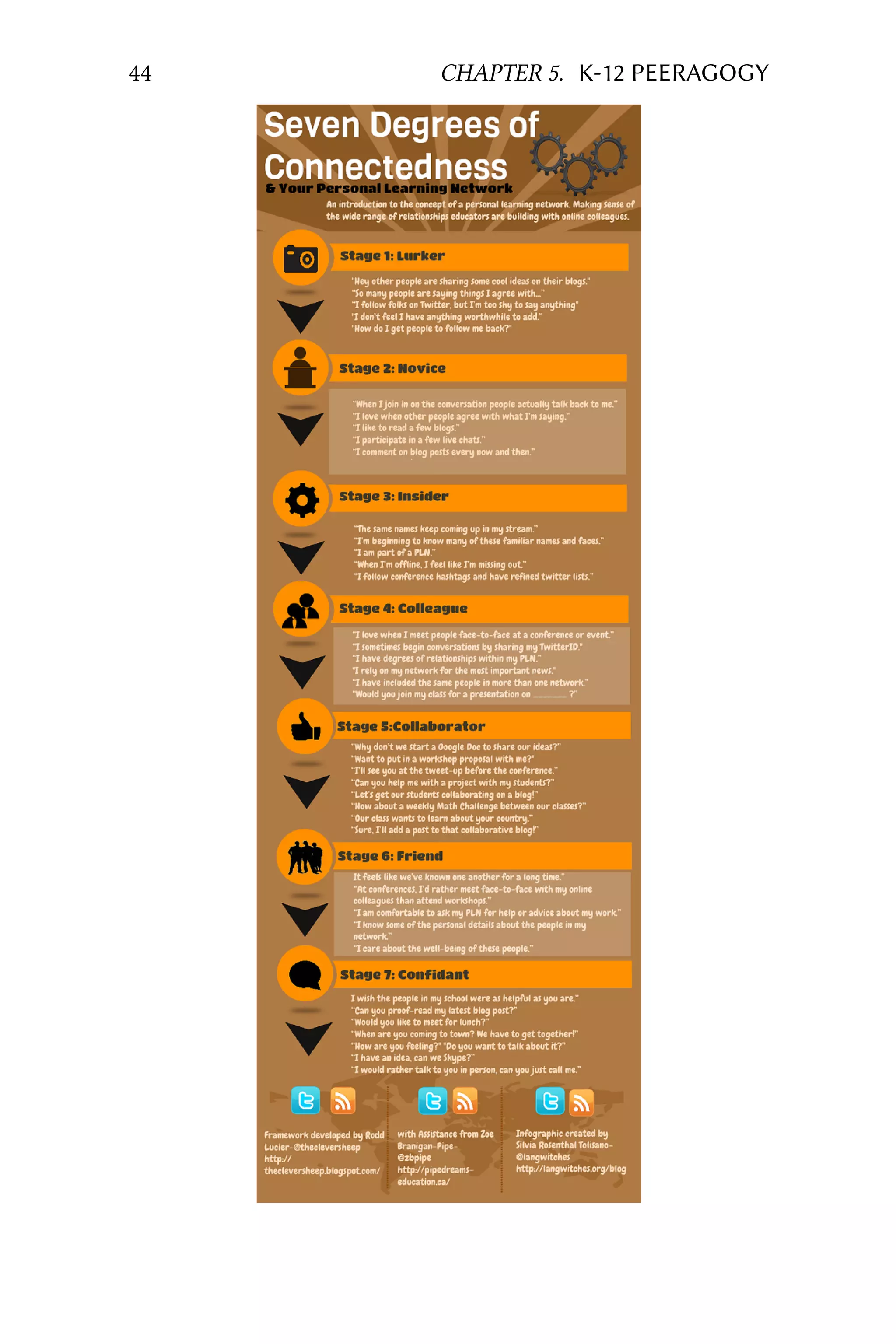
Sylvia Tolisano, Rodd Lucier and Zoe Branigan-Pipen co-
created the infographic below, which explores experiences in-
dividuals may encounter in the journey to become connected
43
learners. It is not only a helpful entry point for new learner-
educators seeking to become peeragogues, but it also serves as
a wonderful example of peeragogy at work.
44 CHAPTER 5. K-12 PEERAGOGY
45
(e image is licensed as CC By-NC-SA, from F)
Consider taking the plunge into the different stages of a Net-
worked/Connected Educator today.
Additional resources
amazing technology tools for your classroom:
• R B
• S T
• C T
• V D
How to develop your PLN:
• D  C T by Rodd Lucier
• TT
Theory & philosophy of connnected learning for
classroom transformation:
• D T
• S D
• W R
 6
RESEARCHING PEERAGOGY
is section addresses  . At a high
level, the questions are:
• How can we understand peer learning beer?
• How can we do research “the peeragogical way”?
• How do we bring research into our peer learning activi-
ties?
We’ll outline three different lines of detailed questioning that
expand on these points. ese could be studied in many differ-
ent ways.
estion A. Which activities have the biggest
payoff for learners, in terms of our learning
model?
e preliminary question is, what is the learning model? For
example, our   provides one model of “peeragogy”
as a subject, but to make this into a “learning model”, we would
have to do some further work. What will we accept as evidence
of learning or progress?
is is to do with whether we think of learning as something
that can happen conceptually, or only “in practice”. In the peer-
agogy project, we follow the laer view, which is in line with
what Peter Sloterdijk says about learning through direct partic-
ipation:
e consequences of Foucault’s suggestions will only
be appreciated if there is one day a fully worked-out
form of General Disciplinics – which would probably
47
48 CHAPTER 6. RESEARCHING PEERAGOGY
take a century to develop. Its implantation would re-
quire a suitably contemporary transformation of uni-
versities and colleges, both in the struuring of the
so called ‘subjes’ or ‘courses’ and in the basic as-
sumptions of academic pedagogy – which, against its
beer judgement, still clings to the briefcase-and-box
theory, where teaching and learning is nothing but
transferring knowledge from the professor’s briefcase
to the students’ file boxes, even though it has long
been known that learning can only take place through
a dire participation in the disciplines. Establish-
ing an academic system with discipline-based content
and methods would at once be the only realistic way
to countera the atrophy of the educational system,
founded on a reformed idea of the subjes and tasks
of a Great House of Knowledge.[1]
In general, a discipline will “come with” its own learning
model and its own sense of “progress”. Given that we can get
ahold of the learning model in our discipline of choice, then we
can start to address this first question.
An hypothesis
A study plan that puts learners into contact with new con-
cepts and techniques in such a way that they are not over-
whelmed, and yet are continually challenged will be the best.
For example, this could be done by solving progressively harder
problems (and going back to easier ones when you get stuck).
An experiment
Look at different interaction histories and “add up” the con-
cepts learned and the heuristics used. ere are some features
of social interaction (like asking questions) that we could use to
guess how much people knew in advance.
49
estion B. Does our instrumentation of the
learning model have reasonable fidelity?
In the best possible scenario, we have a detailed model of
learning that indicates clearly what people know, and how
they got there, where they can go next, and what steps are re-
quired. In practice, the model will probably be a bit more sloppy.
An hypothesis
e quality of the learning model will be determined by the
quality of our underlying representation of “domain” or “disci-
plinary” knowledge.
An experiment
If we have a computer-based peeragogy platform that can
support “standard” coursework, and a teacher who is willing
to run a course using this platform, then we can see whether
our instrumentation predicts “traditional” measures of success
in the course.
estion C. Which interventions have the
biggest payoff?
An hypothesis
We should be able to use models of learning effects to test
out a wide range of possible interventions.
An experiment
Make the given intervention, and measure the total impact
on learning across the population. (is requires a fairly so-
phisticated learning model and research apparatus!)
50 CHAPTER 6. RESEARCHING PEERAGOGY
Some further reflections
How you decide to learn, and how you decide to do research,
will have some significant influence on the sort of group you
convene! If you plan to follow a clearly delineated pre-existing
course, maybe you don’t “need” peeragogy. On the other hand,
if you’re aiming to build peer support that works, you will defi-
nitely want to put some thought into your learning model!
Reference
1. Sloterdijk, P. (2013). You Must Change Your Life, Polity
Press. (Tr. Wieland Hoban)
Part IV
Organizing a Learning
Context
 7
INTRODUCTION TO ORGANIZING
CO-LEARNING
is section about organizing Co-Learning rests on the as-
sumption that learning always happens in a context, whether
this context is a structured “course” or a (potentially) less struc-
tured “learning space”. For the moment we consider the follow-
ing division:
• Organizing Co-learning Contexts
– Courses (= “learning linked to a timeline or syllabus”)
– Spaces (= “learning not necessarily linked to a time-
line or syllabus”)
is section focuses on existing learning contexts and ex-
amines in detail how they have been “organized” by their (co-
)creators. (See also:     
.)
At a “meta-level” of media, we can talk about this parallel
structure:
• Building Co-learning Platforms
– Development trajectories (e.g. “design, implement,
test, repeat”)
– Platform features (e.g. forums, wikis, ownership
models, etc.)
A given learning environment with have both time-like and
space-like features as well as both designed-for and un-planned
features. A given learning platform will encourage certain types
of engagement and impose certain constraints. e question for
53
54 CHAPTER 7. ORGANIZING CO-LEARNING
both “teachers” and “system designers” – as well as for learners
– should be: what features best support learning?
e answer will depend on the learning task and available
resources.
For example, nearly everyone agrees that the best way to
learn a foreign language is through immersion. But not every-
one who wants to learn, say, French, can afford to drop ev-
erything to go live in a French-speaking country. us, the
space-like full immersion “treatment” is frequently sacrificed for
course-like treatments (either via books, CDs, videos, or ongo-
ing participation in semi-immersive discussion groups).
System designers are also faced with scarce resources: pro-
grammer time, soware licensing concerns, availability of peer
support, and so forth. While the ideal platform would (magi-
cally) come with solutions pre-built, a more realistic approach
recognizes that problem solving always takes time and energy.
e problem solving approach and associated “learning orien-
tation” will also depend on the task and resources at hand. e
following sections will develop this issue further through some
specific case studies.
Case study 1 (pilot, completed): “Paragogy” and
the Aer Action Review.
In our analysis of our experiences as course organizers at
P2PU, we (Joe Corneli and Charlie Dano) used the US Army’s
technique of Aer Action Review (AAR). To quote from  
 [2]:
As the name indicates, the AAR is used to review
training exercises. It is important to note that while
one person typically plays the role of evaluator in
such a review […] the review itself happens among
peers, and examines the operations of the unit as a
whole.
e four steps in an AAR are:
55
1. Review what was supposed to happen (train-
ing plans).
2. Establish what happened.
3. Determine what was right or wrong with what
happened.
4. Determine how the task should be done differ-
ently the next time.
e stated purpose of the AAR is to “identify
strengths and shortcomings in unit planning, prepa-
ration, and execution, and guide leaders to accept
responsibility for shortcomings and produce a fix.”
We combined the AAR with several principles (see Discus-
sion section below), which we felt described effective peer learn-
ing, and went through steps 1-4 for each principle to look at how
well it was implemented at P2PU. is process helped generate
a range of advice that could be applied at P2PU or similar in-
stitutions. By presenteding our paper at the O K
C (OKC), we were able to meet P2PU’s executive
director, Philipp Schmidt, as well as other highly-involved P2PU
participants; our feedback may have contributed to shaping the
development trajectory for P2PU.
In addition, we developed a strong prototype for construc-
tive engagement with peer learning that we and others could
deploy again. In other words, variants on the AAR and
the paragogical principles could be incorporated into future
learning contexts as platform features [3] or re-used in a de-
sign/administration/moderation approach [4]. For example, we
also used the AAR to help structure our writing and subsequent
work on ..
Case Study 2 (in progress): “Peeragogy”.
Our particular focus in the interviews was on drawing out
and emphasizing the relational dimension of students, learning
experiences within their environment and, consequently, on in-
ferring from their accounts a sense of how they perceived and
56 CHAPTER 7. ORGANIZING CO-LEARNING
indeed constituted their environment. We asked them who they
learned with and from and how. A further question specifically
focused on whom they regarded as their peers and how they
understood their peers as a source and a site for learning.” [1]
In this section, we will interview and/or survey members of
the Peeragogy community with questions similar to those used
by Boud and Lee [1] and then identify strengths and shortcom-
ings as we did with the AAR above. ese questions are derived
from the AAR.
estions (discussed on an ; revisions to the orig-
inal set of questions are marked in italics):
1. Who have you learned with or from in the Peeragogy
project? What are you doing to contribute to your peers’
learning?
2. How have you been learning during the project?
3. Who are your peers in this community, and why?
4. What were your expectations of participation in this
project? And, specifically, what did you (or do you) hope
to learn through participation in this proje?
5. What actually happened during your participation in this
project (so far)? Have you been making progress on your
learning goals (if any; see prev. question) – or learned any-
thing unexpeed, but interesting?
6. What is right or wrong with what happened (Alterna-
tively: how would you assess the project to date?)
7. How might the task be done differently next time?
(What’s “missing” here that would create a “next time”,
“sequel”, or “continuation”?)
8. How would you like to use the Peeragogy handbook?
9. Finally, how might we change the questions, above, if we
wanted to apply them in your peeragogical context?
57
Reflections on participants’ answers
e questions were intended to help participants reflect on,
and change, their practice (i.e. their style of participation). ere
is a tension, however, between changing midstream and learn-
ing what we might do differently next time. ere is a related
tension between initial structure and figuring things out as we
go. Arguably, if we knew, 100%, how to do peeragogy, then
we would not learn very much in writing this handbook. Diffi-
culties and tensions would be resolved “in advance” (see earlier
comments about “magical” technologies for peer production).
And yet, despite our considerable collected expertise on col-
laboration, learning, and teaching, there have been a variety of
tensions here! Perhaps we should judge our “success” partly on
how well we deal with those. Some of the tensions highlighted
in the answers are as follows:
1. Slow formation of “peer” relationships. ere is a certain
irony here: we are studying “peeragogy” and yet many
respondents did not feel they were really geing to know
one another “as peers”, at least not yet. ose who did
have a “team” or who knew one another from previous ex-
periences, felt more peer-like in those relationships. Sev-
eral remarked that they learned less from other individual
participants and more from “the collective” or “from ev-
eryone”. At the same time, some respondents had ambigu-
ous feelings about naming individuals in the first question:
“I felt like I was going to leave people out and that that
means they would get a bad grade - ha!” One criterion
for being a peer was to have built something together, so
by this criterion, it stands to reason that we would only
slowly become peers through this project.
2. “Co-learning”, “co-teaching”, “co-producing”? One respon-
dent wrote: “I am learning about peeragogy, but I think
I’m failing [to be] a good peeragog. I remember that
Howard [once] told us that the most important thing is
that you should be responsible not only for your own
learning but for your peers’ learning. […] So the question
58 CHAPTER 7. ORGANIZING CO-LEARNING
is, are we learning from others by ourselves or are we […]
helping others to learn?” Another wrote: “To my surprise
I realized I could contribute organizationally with reviews,
etc. And that I could provide some content around PLNs
and group process. Trying to be a catalyst to a sense of
forward movement and esprit de corps.”
3. Weak struure at the outset, versus a more “flexible” ap-
proach. One respondent wrote: “I definitely think I
do beer when presented with a framework or scaffold
to use for participation or content development. […]
(But perhaps it is just that I’m used to the old way
of doing things).” Yet, the same person wrote: “I am
interested in [the] applicability [of pæragogy] to new
models for entrepreneurship enabling less structured ag-
gregation of participants in new undertakings, freed of
the requirement or need for an entrepreneurial vision-
ary/source/point person/proprietor.” ere is a sense that
some confusion, particularly at the beginning, may be typ-
ical for peeragogy. With hindsight, one proposed “solu-
tion” would be to “have had a small group of people as a
cadre that had met and brainstormed before the first live
session […] tasked [with] roles [and] on the same page”.
4. Technological concerns. ere were quite a variety, per-
haps mainly to do with the question: how might a (dif-
ferent) platform handle the tension between “conversa-
tions” and “content production”? For example, will Word-
press help us “bring in” new contributors, or would it be
beer to use an open wiki? Another respondent noted
the utility for many readers of a take-away PDF version.
e site (peeragogy.org) should be “[a] place for people to
share, comment, mentor and co-learn together in an on-
going fashion.”
5. Sample size. Note that answers are still trickling in. How
should we interpret the response rate? Perhaps what mat-
ters is that we are geing “enough” responses to make an
analysis. One respondent proposed asking questions in a
59
more ongoing fashion, e.g., asking people who are leaving:
“What made you want to quit the project?”
With regard to Points 1 and 2, we might use some “icebreak-
ing” techniques or a “buddy system” to pair people up to work on
specific projects. e project’s “teams” may have been intended
to do this, but commitment or buy-in at the team level was not
always high (and in many cases, a “team” ended up being com-
prised of just one person). It does seem that as the progress
has progressed, we have begun to build tools that could address
Point 3: for example, the Concept Map could be developed into a
process diagram that would used to “triage” a project at its out-
set, help project participants decide about their roles and goals.
Point 4 seems to devolve to the traditional tension between the
“good enough” and the “best”: we have used an existing plat-
form to move forward in an “adequate” way. And yet, some
technological improvements may be needed for future projects
in pæragogy. (Furthermore, note that our choice to use a CC0
license means that if other people find the content useful, they
are welcome to deploy it on their own platform, if they prefer.)
Finally, Point 5 is still up in the air (more answers more be com-
ing in shortly - I think I have sent around enough reminders).
Hopefully the questionnaire will be useful to the group even
with a not-100% response rate! Points 4 and 5 are related, in
that an ongoing questionnaire for people leaving (or joining)
the project could be implemented as a fairly simple technology,
which would provide feedback for site maintainers. Gathering a
lile information as a condition of subscribing or unsubscribing
seems like a safe, light-weight, way to learn about the users (tho
there is always the possibility that rather than unsubscribing,
non-participating users will just filter messages from the site).
An underlying tension (or synergy?) – between learning and
producing – was highlighted in our earlier work on paragogy. If
we learn by producing, that is good. However, I have argued in
[4] that paragogical praxis is based less on producing and more
on reusing. If downstream users of this handbook find it to, in-
deed, be useful, we may have done enough. For all we know,
we are the “cadre” (see above) charged with determining how best
60 CHAPTER 7. ORGANIZING CO-LEARNING
to do things in “subsequent rounds”!And, with this, we turn to a
third case study, where our work so far is reapplied in an offline
educational context.
Discussion
We reconsider the appropriateness of the AAR and the par-
agogy principles in contexts beyond P2PU, using Lisewski and
Joyce as a guide to our (meta-)critique and analysis.
In recent years, the tools, knowledge base and dis-
course of the learning technology profession has been
bolstered by the appearance of conceptual paradigms
such as the ‘five stage e-moderating model’ (Salmon,
2000) and the new mantra of ‘communities of praice’
(Wenger, 1998). is paper will argue that, although
these frameworks are useful in informing and guid-
ing learning technology praice, there are inherent
dangers in them becoming too dominant a discourse.
e main focus will be on the ‘five stage e-moderating
model’ as providing an exemplar of a discourse which
is in danger of forming a ‘grand narrative’ (Lyotard,
1984) or totalizing explanation of how to design and
deliver online training programmes. – Lisewski and
Joyce
In a sense, the more reified a paern, the less we learn by
deploying it (  ). If we were trying to vali-
date the paragogy model simply by fiing feedback to it (Case
Study 2), that would be an act of intellectual dishonesty. Never-
theless, the act of fiing data to this model, as a constructive and
creative act, is in fact useful – and a sign that we are still learn-
ing about what makes paragogy work. Not only on a theoretical
level (summed up below), but also on a technological level (see
 ).
is table seems to suggests that paragogy is less of a grand
narrative and more of a patchwork collection of tricks or heuris-
tics for group work. Rather than narrativizing peer learning,
61
paragogy itself provides a non-linear interface that we can plug
into and adapt where appropriate (like we adapted our question-
naire’s questions in Case Study 2). Instead of one grand nar-
rative, we see a growing collection of ” “. e more
we share our practice and experience having to do with co-
organizing learning or building platforms for the same, the more
robust and useful paragogy will become. It may never become
a”rigorous discipline”! But if not, that is OK.
References
1. Boud, D. and Lee, A. (2005). ‘P ’  
    . Studies in
Higher Education, 30(5):501–516.
2. Joseph Corneli and Charles Jeffrey Danoff, P, in
Sebastian Hellmann, Philipp Frischmuth, Sören Auer, and
Daniel Dietrich (eds.), Proceedings of the 6th Open Knowl-
edge Conference, Berlin, Germany, June 30 & July 1, 2011,
3. Joseph Corneli and Alexander Mikroyannidis (2011). P
  PS L: T P
P L E (P2PLE), Digital Edu-
cation Review, 20.
4. Joseph Corneli, P P, to appear in E-
Learning and Digital Media (ISSN 2042-7530), Volume 9,
Number 3, 2012
5. Lisewski, B., and P. Joyce (2003). Examining the Five
Stage e-Moderating Model: Designed and Emergent Prac-
tice in the Learning Technology Profession, Association for
Learning Technology Journal, 11, 55-66.
62 CHAPTER 7. ORGANIZING CO-LEARNING
Paragogical Principles… Reflections on practice and expe-
rience suggest…
1. Changing context as a decentered
center. We interact by changing the
space.
1. Develop empirical studies and a
critical apparatus.It seems we begin
with weak ties, and then experience a
slow formation of “peer” relationships,
as we form and re-form our social con-
text, and come to beer understand our
goals.
2. Meta-learning as a font of knowl-
edge. We interact by changing what
we know about ourselves.
2. Find companions for the jour-
ney. We learn a lot about ourselves
by interaing with others. But par-
ticipants struggle to find the right way
to engage: “co-learning”, “co-teaching”,
or “co-producing”? Moreover, “People
come–they stay for a while, they flour-
ish, they build–and they go.”
3. Peers provide feedback that wouldn’t
be there otherwise. We interact by
changing our perspective on things.
3. Work with real users. We be-
gin with a weak struure at the out-
set but this may afford a more “flexi-
ble” approach as time goes on (see also
this   which offers
advice on designing aivities that help
create a “flexible struure”).
4. Learning is distributed and nonlin-
ear. We interact by changing the way
things connect.
4. Study and build nonlinear inter-
faces. ere are a number of technolog-
ical concerns, which in a large part have
to do with tensions between “content
produion” and “conversation”, and to
a lesser extent critique the platforms
we’re using.
5. Realize the dream if you can, then
wake up! We interact by changing our
objectives.
5. Limit philosophizing. Even with
a small group, we can extra meaning-
ful ideas about peer learning and form
a strong colleive effort, which moves
things forward for those involved: this
means work. We would not get the same
results through “pure contemplation”.
 8
ADDING STRUCTURE WITH ACTIVITIES
In the introduction to ”O  L C“,
we remarked that a”learning space” is only potentially less struc-
tured than a “course”. For example, a library tends to be highly
structured, with quiet rooms for reading, protocols for checking
out books, a cataloging and shelving system that allows people
to find what they are looking for, as well as rules that deter van-
dalism and the. (Digital libraries don’t need to play by all the
same rules, but are still structured.)
But more structure does not always lead to beer learning.
In a 2010 Forbes article titled, “e Classroom in 2020,” George
Kembel describes a future in which “Tidy lectures will be sup-
planted by messy real-world challenges.” e Stanford School of
Design, (or “d.school” – which Kemble co-founded and currently
directs) is already well-known for its open collaborative spaces,
abundant supply of post-it notes and markers, and improvisa-
tional brainstorm activities – almost the opposite of traditional
lecture-based learning.
One “unexpected benefit” of dealing with real-world chal-
lenges is that we can change our approach as we go. is
is how it works in peer learning: peers can decide on differ-
ent structures not just once (say, at the beginning of a course),
but throughout the duration of their time together. is way,
they are never “stuck” with existing structures, whether they be
messy or clean. At least… that’s the ideal.
In practice, “bolenecks” frequently arise. For example, in
a digital library context, there may be bolenecks having to do
with soware development, organizational resources, commu-
nity good will, or access to funding – and probably all of the
above. In a didactic context, it may be as simple as one person
knowing something that others do not.
While we can’t eliminate scarcity in one stroke, we can de-
sign activities for peer learning that are “scarcity aware” and that
63
64 CHAPTER 8. ADDING STRUCTURE
help us move in the direction of adaptive learning structures.
Planning Peer Learning Activities
We begin with two simple questions:
• How do we select an appropriate learning activity?
• How do we go about creating a learning activity if we
don’t find an existing one?
“Planning a learning activity” should mean planning an ef-
feive learning activity, and in particular that means something
that people can and will engage with. In short, an appropri-
ate learning activity may be one that you already do! At the
very least, current activities can provide a “seed” for even more
effective ones.
Here’s a lile trick to help you keep focused on things
you’re trying to do. Get a bunch of index cards and
do this every day: 1. Sit down and write down all
the things you think you need to do right then. […]
Write them as short lile notes like a “to do list”. 2.
en, take the first thing that you can do right now
and do it. Get it done then cross it off the card. 3.
Keep doing this, and if you think of something else
you need to do, put it on a card. Just keep filling them
up. 4. At the end of the day, go back through your
card and find any unfinished things and remove any
that you’ll honestly never do. 5. e next day, take
all the things you didn’t do from the day before and
copy them onto a new card, then start with #1 again.
– Zed Shaw, in the L P  H W

But when entering unfamiliar territory, it can be difficult to
know where to begin. And remember the bolenecks men-
tioned above? When you run into difficulty, ask yourself: 
  ? You might try adapting Zed Shaw’s exercise, and
65
make a list of limiting factors, obstacles, etc., then cross off those
which you can find a strategy to deal with (add an annotation
as to why). For example, you might decide to overcome your
lack of knowledge in some area by hiring a tutor or expert con-
sultant, or by puing in the hours learning things the hard way
(Zed would particularly approve of the laer choice). If you
can’t find a strategy to deal with some issue, presumably you
can table it, at least for a while.
Strategic thinking like this works well for one person. What
about when you’re planning activities for someone else? Here
you have to be careful: remember, this is peer learning, not
traditional “teaching” or “curriculum design”. e first rule of
thumb for peer learning is: don’t plan activities for others unless
you plan to to take part as a fully engaged participant. Other-
wise, it might be a peer learning activity, but it’s not yours. (Per-
haps your engagement is just as “designer” – that’s OK. But if
you don’t plan to “get” as well as “give”, you’re not really a peer
– which is perfectly OK, but you might find other reading mate-
rial that will serve you beer than this handbook in that case!)
In short, it would be useful to walk through the “what do
you need to do” and “why is it hard” exercises from the point of
view of all of the participants, keeping in mind that they will, in
general, assume different roles. To the extent that you can do
so, spell out what these roles are and what activities comprise
them.
For example, in a mathematics learning context, you would
be likely to find people…
• solving textbook-style problems
• finding and sharing new problems
• asking questions when something seems too difficult
• fixing expository material to respond to critique
• offering critique and review of proposed solutions
• offering constructive feedback to questions (e.g. hints)
66 CHAPTER 8. ADDING STRUCTURE
• organizing material into structured collections
• working on applications to real-world problems
• doing “meta” research activities that analyse “what works”
for any and all of the above
Each one of those activities may be “hard” for one reason or
another. In particular, as a system the different activities tend
to depend on one another. If you have people working in a
“student role” but no one who can take on a “TA role”, things
will be more difficult for the students. As a (co-)organizer, part
of your job is to try to make sure all of the relevant roles are
covered by someone (who may in the end wear many hats).
You can further decompose each role into specific con-
crete activities. ey might come in the form of instructions
to follow: ”How to write a good critique” or ”How to write a
proof “. ey might come in the form of accessible exercises
(where”accessible” depends on the person“):”Your first geome-
try problem” or ”NN LISP ”, etc. Depend-
ing on the features of the learning context, you may be able to
support the wrien instructions or exercises with live/in-person
feedback (e.g. meta-critique to coach and guide novice critics, a
demonstration, etc.).
Our immediate scenario: building activities for
the Peeragogy Handbook
Adding a bunch of activities to the handbook won’t solve all
of our usability issues, but we’ve agreed that they will help a lot.
So at this point, we are revisiting the    and
thinking about each article or section from this perspective:
1. When looking at this piece of text, what type of knowl-
edge are we (and the reader) trying to gain? Technical
skills (like learning how to edit Final Cut Pro), or abstract
skills (like learning how to make sense of data)? What’s
the takeaway? I.e., what’s the point?
67
2. What’s difficult here? What might be difficult for some-
one else?
3. What learning activity recipes might be appropriate? (See
below.)
4. What customizations do we need for this particular appli-
cation?
As a quick example: designing a learning activity for
the current page
1. We want to be able to come up with effective learning ac-
tivities to accompany a “how to” article for peer learners.
ese activities will extend the “how to” aspect from the
wrien word to the world of action.
2. It might be difficult for some of us to “unplug” from all
the reading and writing that we’re now habituated to do-
ing. But peer learning isn’t just about the exchange of
text: there are lots and lots of ways to learn.
3. Like N (in one of our use cases), it could be useful to
“become more aware of the peer learning we do every
day”. And to think about “How do you learn best?”
4. So, the proposed handbook activity is to step away from
the handbook for a while. In fact, why not take a 
 for a given period of time and look at peer learning
as a basic human activity. (Hey, it just sounds to me like
you might need to unplug, man!)
Resources for identifying a dozen or so
“Learning Activity Recipes”:
• KS TK
• D E  I S (See the
section on “Teaching Strategies for Actively Engaging Stu-
dents in the Classroom”)
68 CHAPTER 8. ADDING STRUCTURE
• Each of our    suggest various ac-
tivities, like “practicing the heuristics”, “finding examples
of the paerns”, etc.
• Our U C provide many hypothetical examples of
“peeragogy in action”.
Recommended Reading
T . B B (CC-By-NC-SA) includes
lots of fun activities to try. Can you crack the code and define
new ones that are equally cool?
 9
THE STUDENT AUTHORED SYLLABUS
Authored By S B
In either formal learning, informal learning or models which
transition between the two, there are many opportunities for
learners to co-create the syllabus and/or outline their own
course of action. e sage on the stage of formal instruction
must become at the most a guide on the side who acts as a coach
appearing only when needed rather than as a lecturer who de-
termines the content that the learners need to master. In the
following inspirational but certainly not prescriptive examples,
we will focus on co-learning methods drawn from a Social Con-
structivist perspective, which fits nicely here.
We offer a few examples below to show a range of learner
centered approaches. ey all are based on co-learners hosting
each other for one of a number of digestible topics in the larger
subject area or domain that the group formed in order to explore.
is can take place across a number of media and timelines.
e following methods will result in each co-learner gain-
ing deep knowledge in a specific topic and moderate knowledge
across several topics. e unique joy of this approach is that no
two cohorts will ever be the same. e content will always be
fresh, relevant, and changing. A group can even reconvene with
slightly or dramatically different topics over and over using the
same underlying process.
e appropriateness of the learner-created syllabus tech-
nique depends on two factors: 1) the involvement of experts in
the group and 2) the level of proficiency of the group. In general,
novices who may or may not have a deep interest in the subject
maer benefit from more structure and experts who point to key
concepts and texts. An example of this is the university survey
course for first or second year students who, we assume, need
more guidance as they enter the subject maer. Graduate sem-
inars are generally much more fluid, open dialogues between
69
70 CHAPTER 9. THE STUDENT AUTHORED SYLLABUS
motivated experts require lile structure or guidance.
We also need effective methods for groups which contain
novices, experts, and everyone in between. In groups with a
wide range of expertise, it is important that each co-learner
chooses to focus their deep inquiry on a topic that they are less
familiar with. is will even out the expertise level across the
cohort as well as ensure that a co-learner is neither bored nor
dominating the dialogue.
3 example designs to structure the learning
Weekly topics structure
One way to structure the course is to have each co-learner
host a topic each week. Perhaps multiple students host their
topics in the same week. is progression provides a rotation
of presentations and activities to support the entire group in en-
gaging with the topics and challenges to the thinking of the pre-
senters in a constructive and respectful manner.
Pro: co-learners have discrete timelines and manageable
chunks of responsibility.
Con: the format may become disjointed, and the depth of
inquiry will likely be somewhat shallow.
Milestone based structure
In this structure, each co-learner host their topics in paral-
lel with similar activities and milestones that the whole group
moves through together. Milestones can be set for a certain date,
or the group can unlock their next milestone whenever all par-
ticipants have completed the previous milestone. is second
milestone timeline can be great for informal groups where par-
ticipation levels may vary from week to week due to external
factors, and the sense of responsibility and game-like levels can
be motivating for many co-learners.
Each co-learner may start with a post of less than 500 words
introducing the topic on a superficial level. When everyone has
done this, the group might move on to posting questions to the
71
post authors. en, there may be a summary post of the activity
so far with critical recommendations or insights.
Pro: co- learners have more time to digest a topic, formulate
a complex schema, and generate deeper questions.
Con: it will be a few weeks before the topic level schema
can form into a broader understanding of the subject maer or
domain (seeing the big picture takes longer).
Relay learning structure.
is is similar to the milestone structure. However, co-
learners rotate topics. If one learner posts an introductory write-
up on a topic the first cycle, they may be researching questions
on another topic in the next cycle, posting a summary in a third,
and then posting a summary on their original topic in the fourth.
Pro: co-learners can experience responsibility for several
topics.
Con: co-learners may receive a topic that is poorly re-
searched or otherwise neglected.
Content
A vast number of topics
Within a subject of mutual interest to a group, there are a
considerable number of topics or questions. What is important
is that each co-learner can take responsibility for a reasonably
narrow area given the duration of the course or the timeline of
the group. Areas that are too broad will result in a very superfi-
cial understanding, and areas that are too narrow will result in
a dull experience. For example, in marine biology, topics such
as “the inter-tidal zone” may be too broad for a course cycle of
a few weeks. Narrowing to one species may be too specific for
a course over a few months.
Learner generated topics
Most cohorts will have some knowledge of the shared area
of interest or an adjacent area. It is a good idea to respect the
72 CHAPTER 9. THE STUDENT AUTHORED SYLLABUS
knowledge and experience that each member of the group brings
to the table. A facilitator or coordinator may generate a list of
potential topic areas, seing an example of the scale of a topic.
We suggest that the participants in the group are also polled for
additions to the list. In large courses, sending out a Google Form
via email can be an effective way to get a quick list with a high
response rate.
Expert informed topics
If there is no expert facilitator in the group, we suggest that
the cohort begin their journey with a few interviews of experts
to uncover what the main buzz words and areas of focus might
be. One way to locate this type of expert help is through contact-
ing authors in the subject maer on social networks, reviewing
their posts for relevance, and reaching out with the request.
We recommend two people interview the expert over video
chat, for example in a Hangout. One person conducts the in-
terview, and one person takes notes and watches the time. We
strongly suggest that the interview be outlined ahead of time:
Warm up: Who are you, what are your goals, and why do
you think this interview will help?
Foundational questions: Ask a few questions that might elicit
shor answers to build rapport and get your interviewee talking.
Inquiry: What people say and what they do can oen be very
different. Ask about topics required for mastery of the subject
maer (e.g. What are the areas someone would need to know
about to be considered proficient in this subject?). Also, ask
   . Avoid 
or  .
Wrap up: ank the interviewee for their time, and be sure
to follow up by leing them know both what you learned and
what you accomplished because they helped you.
73
Shared goals and group norms
Choosing useful outputs
Geing together for the sake of sharing what you know in
an informal way can be fairly straightforward and somewhat
useful. Most groups find that a common purpose and output
that are explicitly defined and documented help to engage, mo-
tivate, and drive the group. For the examples above, the group
may decide to create a blog with posts on the various topics or
create a wiki where they can share their insights. Other out-
puts can include community service projects, business propos-
als, recommendations to senior management or administration,
new products, and more. e key is to go beyond sharing for
sharing sake and move toward an output that will be of use be-
yond the co-learning group. is activity is best described in
C theory as the special case of networked learning
where we find evidence of learning in collective action and/or
behavioral change in groups rather than a psychological or neu-
rological process in individuals.
Group cohesion (a.k.a. the rules of the road)
One challenge of this kind of collaboration is that each group
will need to decide on norms, acceptable practices and behav-
iors. Culturally diverse groups in particular may run into com-
munication or other issues unless there is a way to create shared
expectations and communicate preferences.
One way to do this is with a team charter. is is a living doc-
ument where the initial rules of engagement can live for refer-
ence. e group may add or edit this document over time based
on experience, and that is a welcome thing! is documentation
is a huge asset for new members joining the group who want to
contribute quickly and effectively. Any co-editing word pro-
cessing program will work, but we strongly recommend some-
thing that can be edited simultaneously and that lives in the
cloud. (Google Docs is convenient because you can also embed
your Charter into another site.)
74 CHAPTER 9. THE STUDENT AUTHORED SYLLABUS
Try starting with the following three sections, and allow
some time for the group to co-edit and negotiate the document
between icebreakers and kicking off the official learning process.
Mission: Why are you forming the group? What do you want
to accomplish together?
Norms: Use ? No ? Post your vacation
days to a  ? Cultural norms?
Members:It is useful to include a photo and a link to a public
profile such as Twier, Google+ or Facebook.
Assessments and feedback loops
Co-authored assessment rubrics
Tests. izzes. Exams. How can the co-learning group as-
sess their performance?
ese types of courses benefit from an approach similar to
coaching. Set goals as individuals and a group in the beginning,
define what success looks like, outline steps that are needed to
achieve the goal, check in on the goal progress periodically, and
assess the results at the end of the course against the goal crite-
ria. Goals may include domain expertise, a business outcome, a
paper demonstrating mastery, a co-created resource, or even the
quality of collaboration and adherence to shared group norms.
Learner created assessments
Another effective way to create an assessment is to decide
on an individual or group output and create a peer assessment
rubric based on the goals of the individual or group.
One way to create a rubric is to spend some time defining the
qualities you want your output to have based on positive exam-
ples. Perhaps a group wants to create a blog. Each person on
the team may identify the qualities of a great blog post based on
examples that they admire. ey can use that example to create
a criteria for assessment of co-learner authored blog posts. We
recommend that the criteria have a 0 to 5 point scale with 0 be-
75
ing non-existent and 5 being superb. Writing a few indicators
in the 1, 3, and 5 columns helps to calibrate reviewers.
Create a  , perhaps starting with a list of
criteria. Collapse similar criteria into one item, and create the
indicators or definitions of 1, 3, and 5 point performance. Agree
on the rubric, and decide on how the co-learners will be assigned
assessment duties. WIll everyone review at least two others?
Will each co-learner product need at least 3 reviewers before it
goes live? Will you use a  or a  to collect the
assessments?
In a university seing, the instructor of record may wish to
approve a peer assessment rubric, and it is sometimes a good
idea to have a few outside experts give feedback on criteria that
the group may have missed.
Outside assessments
It is possible that an instructor of record or similar authority
will create the assessment for performance. In these cases, it
is crucial that the co-learners have access to the grading rubric
ahead of time so that they can ensure their activities and timeline
will meet any requirements. In this case, it may be possible to
require that the co-learners self-organize entirely, or there may
be intermediary assignments such as the charter, project plan or
literary review.
Cyclical use of these models
So much more to learn
As mentioned above, the joy of this type of learning is that
no two groups will ever do it the same. eir process, goals,
and outcomes can all be unique. As designers and facilitators of
this type of learning environment, we can say it is a wild ride!
Each class is exciting, refreshing, and on trend. e co-learners
become our teachers.
If a group generates more topics than it is possible to cover
at one time given the number of group members or if a group
76 CHAPTER 9. THE STUDENT AUTHORED SYLLABUS
has plans to continue indefinitely, it is always possible to set up
a system where potential topics are collected at all times. ese
unexplored topics can be harvested for use in another learning
cycle, continuing until the group achieves comprehensive mas-
tery.
Risks
is format is not without its own unique pitfalls: some chal-
lenges are learner disorientation or frustration in a new learning
structure with ambiguous expectations and uneven participa-
tion. Some groups simply never gel, and we do not know why
they have failed to achieve the cohesion required to move for-
ward. Other groups are the exact opposite. Here are a few risks
to consider if you would like to try the methods suggested here
and how to mitigate them.
Uneven expertise: Ask co-learners to be responsible for topics
that are new to them.
Uneven participation and cohesion: Ask co-learners what
they want to do to motivate the group rather than imposing your
own ideas.
Experts/facilitators that kill the conversation: In the charter
or other documentation, explicitly state that the purpose of the
discussion is to further the conversation, and encourage experts
to allow others to explore their own thinking by asking probing
(not leading) questions.
Ambiguous goals: Encourage the group to document their
mission and what they will do as a team. is can change over
time, but it is best to start out with a clear purpose.
Conclusion
Make mistakes. Correct course. Invite new perspectives.
Create a structure that everyone can work with. Change it when
it breaks. Most of all, have fun!
 10
CONNECTIVISM IN PRACTICE — HOW TO
ORGANIZE A MOOC
Summary
Massive Open Online Courses (MOOCs) are online learning
events that can take place synchronously and asynchronously
for months. Participants assemble to hear, see, and participate in
backchannel communication during live lectures. ey read the
same texts at the same time, according to a calendar. Learning
takes place through self-organized networks of participants, and
is almost completely decentralized: individuals and groups cre-
ate blogs or wikis around their own interpretations of the texts
and lectures, and comment on each other’s work; each individ-
ual and group publicises their RSS feed, which are automatically
aggregated by a special (freely available) tool, gRSShopper. Ev-
ery day, an email goes out to all participants, aggregating activ-
ity streams from all the blogs and wikis that engage that week’s
material. MOOCs are a practical application of a learning theory
known as “connectivism” that situates learning in the networks
of connections made between individuals and between texts.
Introduction
Traditionally, scholars distinguish between three main 
   : behaviorism, cognitivism and
constructivism. Some would add a fourth one: ,
but this is . One interesting application of connec-
tivism, a learning theory and practice for the digital era, is the
Massive Open Online Course.
77
78 CHAPTER 10. HOW TO ORGANIZE A MOOC
A learning theory for the digital age
e connectivist theory describes learning as a process of
creating connections and developing networks. It is based on
the premise that knowledge exists out in the world, rather than
inside an individual’s mind. Connectivism sees the network as a
central metaphor for learning, with a node in the network being
a concept (data, feelings, images, etc.) that can be meaningfully
related to other nodes. Not all connections are of equal strength
in this metaphor; in fact, many connections may be quite weak.
On a practical level, this approach recommends that learning
should focus on where to find information (streams), and how to
evaluate and mash up those streams, rather than trying to enter
lots of (perishable) information into one’s skull. Knowing the
pipes is more important than knowing what exactly each pipe
contains at a given moment.
S D and G S promote the idea of
connectivism. ey also practice it, by organizing Massive Open
Online Courses (MOOCs): for instance, C11. People are
free to participate at will. Each week a subject is discussed dur-
ing synchronous sessions, which are recorded and uploaded for
reference on the Change11 website. e site also includes an
archive of daily newsleers and RSS-feeds of blog posts and
tweets from participants.
MOOCs tend to be very learner-centered. People are en-
couraged to pursue their own interests and link up with others
who might help them. But the distributed and free nature of
the projects also leads to complaints; participants oen find it
confusing when they aempt to follow up on all the discussions
(the facilitators say one should not try to follow up on all the
content).
Stephen Downes explains in W C I: “is
implies a pedagogy that (a) seeks to describe ‘successful’ net-
works (as identified by their properties, which I have character-
ized as diversity, autonomy, openness, and connectivity); and
(b) seeks to describe the practices that lead to such networks,
both in the individual and in society (which I have character-
ized as modeling and demonstration (on the part of a teacher)
79
and practice and reflection (on the part of a learner).”
George Siemens says connectivism is a ” 
   .”
Connectivism in practice
One example of a MOOC that claims to embody the connec-
tivist theory is ..a. e ”  ” section
of the site explains what connectivism means in practice.
e MOOC organizers developed a number of ways to com-
bine the distributed nature of the discussions with the need for
a constantly updated overview and for a federated structure. So,
if your team wants to organize an open online course, these are
five points to take into consideration:
ere is no body of content the participants have to memo-
rize, but the learning results from activities they undertake. e
activities are different for each person. A course schedule
with suggested reading, assignments for synchronous or asyn-
chronous sessions is provided (using Google Docs spreadsheets
internally, Google Calendar externally - one could also use a
wiki), but participants are free to pick and choose. Normally
there is a topic, activities, reading resources and oen a guest
speaker for each week. One should even reflect upon the ques-
tion whether a start- and end date are actually needed. It is cru-
cial to explain the particular philosophy of this kind of MOOC,
and this right from the outset, because chances are learners
will come with expectations informed by their more traditional
learning experiences.
1. It is important to discuss the “internal” aspects, such as
self-motivation: what do the participants want to achieve,
what is their larger goal? And what are their inten-
tions when they select certain activities (rather than other
possibilities)? Everyone has her own intended outcome.
Suggest that participants meditate on all this and jot
down their objectives. And how can they avoid becom-
ing stressed out and geing depressed because they feel
they cannot “keep up with all this?” e facilitators should
80 CHAPTER 10. HOW TO ORGANIZE A MOOC
have a good look at these motivations, even if it’s impossi-
ble to assist every participant individually (for large-scale
MOOCs).
2. Ideally, participants should prepare for this course by ac-
quiring the necessary digital skills. Which skills are “nec-
essary” can be decided by the group itself in advance. It’s
all about selecting, choosing, remixing - also called “cu-
rating”. ere are lots of tools which you can use for this:
blogs, social bookmarks, wikis, mindmaps, forums, social
dashboards, networks such as Twier with their possibili-
ties such as hashtags and lists. Maybe these tools are self-
evident for some, but not necessarily for all the partici-
pants.
3. e course is not located in one place but is distributed
across the web: on various blogs and blogging platforms,
on various groups and online networks, on photo- and
video-sharing platforms, on mindmaps and other visual-
ization platforms, on various tools for synchronous ses-
sions. is wide variety is in itself an important learning
element.
4. ere are weekly synchronous sessions (using Blackboard
collaborate, or similar group chaing tool). During these
sessions, experts and participants give presentations and
enter into discussions. Groups of participants also have
synchronous meetings at other venues (such as Second
Life). Try to plan this well in advance!
5. Many participants highly appreciate efforts to give an
overview of the proceedings. Specifically, the D
N is a kind of hub, a community newspaper.
In that Daily there is also a list of the blog posts men-
tioning the course-specific tag (e.g. “Change11”), also the
tweets with hashtag #change11 are listed in the Daily. Of
course, the MOOC has a  where sessions, newsleers
and other resources are archived and discussion threads
can be read.
81
From the very beginning of the course, it’s necessary to ex-
plain the importance of tagging the various contributions, to
suggest a hashtag.
For harvesting all this distributed content, Stephen Downes
advocates the use of RSS, which is a personal web envi-
ronment that combines resource aggregation, a personal datas-
pace, and personal publishing (Downes developed it and would
like to build a hosted version - eventually financed via Kick-
starter). e gRSShopper can be found on a registration page,
which is useful primarily for sending the newsleer. It allows
you to organize your online content any way you want, to im-
port content - your own or others’ - from remote sites, to remix
and repurpose it, and to distribute it as RSS, web pages, JSON
data, or RSS feeds. D: “For example, the gRSShopper har-
vester will harvest a link from a given feed. A person, if he or
she has admin privileges, can transform this link into a post,
adding his or her own comments. e post will contain infor-
mation about the original link’s author and journal. Content in
gRSShopper is created and manipulated through the use of sys-
tem code that allows administrators to harvest, map, and display
data, as well as to link to and create their own content. gRSShop-
per is also intended to act as a fully-fledged publishing tool.” (for
alternatives, see the technologies section further on).
Alternatives for registrations: Google Groups for instance.
But specific rules about privacy should be dealt with: what will
be the status of the contributions? In this MOOC the status is
public and open by default, for Downes this is an important el-
ement of the course.
Technologies
Some MOOCs use Moodle, but Downes dislikes the central-
ization aspect and it’s not as open as it could be, saying “peo-
ple feel beer writing in their own space.” Other possibilities:
Google Groups, Wordpress, Diigo, Twier, Facebook page, Sec-
ond Life; but each course uses different mixtures of the many
tools out there. People choose their environment - whether it is
82 CHAPTER 10. HOW TO ORGANIZE A MOOC
WoW or Minecra. Students use Blogger, WordPress, Tumblr,
Posterous as blogging tools.
Key element is RSS harvesting
Give participants a means to contribute their blogfeed. In
”A  N F,” Downes explains how to get this structure
and additional explanations (via videos) in order to contribute
their blog feed. e administrator in this case uses gRSShop-
per to process the content and put it in a database, process it
and send it to other people. Alternatively one can use Google
Reader (the list of feeds is available as an OPML file - which
can be imported to other platforms). ere is also a plug-in for
Wordpress that lets you use a Google Doc spreadsheet for the
feeds, then Wordpress for the aggregation). Many other con-
tent management systems have RSS harvesting features.
Each individual could run her own aggregator, but Downes
offers it as a service. But aggregators are needed, whether indi-
vidual, centralized or both.
Specialized harvesting
Using Twier, Diigo, Delicious, Google Groups, If is en
at (IFTTT) and F43 (take ordinary web page and turn it
into an RSS feed).
Synchronous environments
Synchronous platforms include Blackboard Collaborate
(used now for Change11); Adobe Connect; Big Blue Buon;
WizIQ; Fuze; WebX; webcasting; web radio; videoconferencing
with Skype or Google Hangout in conjunction with Livestream
or ustream.tv. Or take the Skype/Hangout audiostream and
broadcast is as webradio. Set up and test ahead of time, but don’t
hesitate to experiment.
83
Newsleer or Feeds
Feeds are very important (see earlier remarks about the Daily
newsleer). You can use Twier or a Facebook page, Downes
uses email, also creates an RSS version through gRSShopper and
sends it through I.com back to Facebook and Twier. For the
rest of us there is Wordpress, which you can use to  
  . Downs also suggests this handy guide
on         
  !
Consider using a content management system and databases
to put out specialized pages and the newsleer in an elegant
way, but it requires a learning curve. Otherwise, use blogs /
wikis.
Comments
Participants are strongly encouraged to comment on each
others’ blogs and to launch discussion threads. By doing so
they practice a fundamental social media skill - developing net-
works by commenting on various places and engaging in con-
versations. It is important to have activities and get people to be
involved rather than sit back.
For an in-depth presentation, please have a look at F
  M O O C by Stephen Downes,
in which he focuses on research and survey issues, preparing
events, and other essentials.
Resources
basics
• H  C W
• W   MOOC
• S   MOOC
• K   MOOC
• I  
84 CHAPTER 10. HOW TO ORGANIZE A MOOC
Further reading
• Downes & Siemens MOOC 
• W C I by Stephen Downes
• A I  C K by
Stephen Downes
• F  M O O C, by
Stephen Downes
• RSS
• C: A L T   D
A by George Siemens
• A C G
• R  N by George Siemens
• R E: C  C by
Dave Cormier
• K K, a book by George Siemens
• N S, Howard Rheingold (about internal and exter-
nal literacies for coping with the ‘always on’ digital era)
• M O O C: Seing Up (StartTo-
MOOC, Part 1)
• L 
Relevant Handbook pages
P L N
 11
PARTICIPATION
Summary
All collaborative work is managed in some way. Methods
of managing projects, including learning projects, are ranking
from the more formal and structured to the less formal and un-
structured.
Participation in business-oriented projects
When we think about project management in an organi-
zation, we oen relate to well-established tools and processes.
For example, we will use the P M B 
K (PMBOK) as a standard. For the Project Manage-
ment Institute (PMI) and most workers, those standards are the
key to project success. In classical project management, tasks
and deadlines are clearly defined. We will, for example, use P
 E  R T (PERT) to analyze and
represent tasks. We oen represent the project schedule using
a G . ose are just two of the project management
tools that illustrate how project management rests firmly on its
engineering background. In those very structured projects, each
actor is expected to work exactly as planned and to deliver his
part of the work on time; every individual delay potentially lead-
ing to a collective delay.
Participation in educational projects
If we look for analogies between project management and
education, we can find some similarities in models pedagogy of.
In a paper called ”M  P  A” by
Hiemstra and Sisco, we see how students hold a passive role (on
a cognitive level) in the pedagogy model. ey are following
85
86 CHAPTER 11. PARTICIPATION
a plan or syllabus that has been designed by the instructor and
that won’t change during the session. Students will have to com-
plete all their tasks on time; in other words, return their exerci-
ces to the teacher before the due date. In a peeragogy project,
whose roots lie closer to andragogy than in pedagogy, partici-
pation to the project is less regulated (see F  
 )
As peeragogy projects members expect to break the 90/9/1
 and bring on board more than 1% of creators and 9% of edi-
tors, they also keep in mind the L T rule. “e term Long
Tail has gained popularity in recent times as describing the re-
tailing strategy of selling a large number of unique items with
relatively small quantities sold of each.” In other words, people
working in peeragogy should accept that some participants only
contribute few ideas (or may be even just one!). Going further,
people may even be allowed to just watch a peeragogy project
going on without creating or editing, in order to understand its
culture before feeling ready to jump in and contribute more ac-
tively.
In general, a peeragogy community will constantly adjust
as it seeks an equilibrium between order and chaos, allowing
everyone to collaborate at their own pace without loosing focus,
and in such a manner that the collective can deliver - whether
that’s a product or a learning experience!.
How to deal with participation in a peeragogy
project
• Accept that some people want to watch what is going on
before jumping in. is doesn’t mean you have to keep
them forever. Aer a while you may un-enroll people who
don’t add any value to the community. In our Peeragogy
project, we’ve asked people to re-sign up several times (at
any given juncture, some proprotion prefer to leave).
• Accept that people may only contribute a lile: if this con-
tribution is good it will add value to the whole
87
• Understand that you can not impose strict deadlines to
volunteers
• Let your work be “open” in a sense inspired by
Wikipedia’s N P  V policy
• Give roles to participants and define some “energy cen-
ters” who will take the lead on specific items in the project
• Organize regular face to face or online meetings to
talk about progress and what’s needed in upcoming
days/weeks
• Ask participants to be clear about when they will be ready
to deliver their contributions
• Have clear deadlines, but allow contributions that come in
aer the deadline – in general, be flexible
• Add a newcomer section on your online platform to help
newbies to get started
 12
THE WORKSCAPE, A LEARNING PLATFORM FOR
CORPORATIONS
Summary
Cultivating a results-oriented peer-learning program in a
corporate learning ecosystem involves a few tweaks of the ap-
proach and tools we discussed in relation to more open, diverse
networks.
J C talks about W on V.
The Workscape, a platform for learning
Formal learning takes place in classrooms; informal learn-
ing happens in workscapes. A workscape is a learning ecol-
ogy. As the environment of learning, a workscape includes
the workplace. In fact, a workscape has no boundaries. No
two workscapes are alike. Your workscape may include being
coached on giving effective presentations, calling the help desk
for an explanation, and researching an industry on the Net. My
workscape could include participating in a community of field
technicians, looking things up on a search engine, and living
in France for three months. Developing a platform to support
informal learning is analogous to landscaping a garden. A ma-
jor component of informal learning is natural learning, the no-
tion of treating people as organisms in nature. e people are
free-range learners. Our role is to protect their environment,
provide nutrients for growth, and let nature take its course. A
landscape designer’s goal is to conceptualize a harmonious, uni-
fied, pleasing garden that makes the most of the site at hand. A
workscape designer’s goal is to create a learning environment
that increases the organization’s longevity and health and the
individual’s happiness and well-being. Gardeners don’t control
plants; managers don’t control people. Gardeners and managers
89
90 CHAPTER 12. THE WORKSCAPE
have influence but not absolute authority. ey can’t makea
plant fit into the landscape or a person fit into a team. In an ideal
Workscape, workers can easily find the people and information
they need, learning is fluid and new ideas flow freely, corporate
citizens live and work by the organization’s values, people know
the best way to get things done, workers spend more time cre-
ating value than handling exceptions, and everyone finds their
work challenging and fulfilling.
The technical infrastructure of the Workscape
When an organization is improving its Workscape, looking
at consumer applications is a good way to think about what’s
required. Ask net-savvy younger workers how they would like
to learn new skills, and they bring up the features they enjoy in
other services:
• Personalize my experience and make recommendations,
like Amazon
• Make it easy for me to connect with friends, like Facebook
• Keep me in touch with colleagues and associates in other
companies, as on LinkedIn
• Persistent reputations, as at eBay, so you can trust who
you’re collaborating with
• Multiple access options, like a bank that offers access by
ATM, the Web, phone, or human tellers
• Don’t overload me. Let me learn from YouTube, an FAQ,
or linking to an expert
• Show me what’s hot, like Reddit, Digg, MetaFilter, or Fark
do
• Give me single sign-on, like using my Facebook profile to
access multiple applications
91
• Let me choose and subscribe to streams of information I’m
interested in, like BoingBoing, LifeHacker or Huffpost.
• Provide a single, simple, all-in-one interface, like that pro-
vided by Google for search
• Help me learn from a community of kindred spirits, like
SlashDot, Reddit, and MetaFilter
• Give me a way to voice my opinions and show my per-
sonality, as on my blog
• Show me what others are interested in, as with social
bookmarks like Diigo and Delicious
• Make it easy to share photos and video, as on Flickr and
YouTube
• Leverage “the wisdom of crowds,” as when I pose a ques-
tion to my followers on Twier or Facebook
• Enable users to rate content, like “Favoriting” an item on
Facebook or +!ing is on Google or YouTube
Some of those consumer applications are simple to replicate
in-house. Others are not. You can’t afford to replicate Facebook
or Google behind your firewall. at said, there are lots of ap-
plications you can implement at reasonable cost. Be skeptical if
your collaborative infrastructure that doesn’t include these min-
imal functions:
Profiles - for locating and contacting people with the right
skills and background. Profile should contain photo, position,
location, email address, expertise (tagged so it’s searchable).
IBM’s Blue Pages profiles include how to reach you (noting
whether you’re online now), reporting chain (boss, boss’s boss,
etc.), link to your blog and bookmarks, people in your network,
links to documents you frequently share, members of your net-
work.
Activity stream - for monitoring the organization pulse in
real time, sharing what you’re doing, being referred to useful
92 CHAPTER 12. THE WORKSCAPE
information, asking for help, accelerating the flow of news and
information, and keeping up with change
Wikis - for writing collaboratively, eliminating multiple
versions of documents, keeping information out in the open,
eliminating unnecessary email, and sharing responsibility for
updates and error correction
Virtual meetings - to make it easy to meet online. Mini-
mum feature set: shared screen, shared white board, text chat,
video of participants. Bonus features: persistent meeting room
(your office online), avatars.
Blogs - for narrating your work, maintaining your digi-
tal reputation, recording accomplishments, documenting expert
knowledge, showing people what you’re up to so they can help
out
Bookmarks - to facilitate searching for links to information,
discover what sources other people are following, locate experts
Mobile access - Half of America’s workforce sometimes
works away from the office. Smart phones are surpassing PCs
for connecting to networks for access and participation. Phones
post most Tweets than computers. Google designs its apps for
mobile before porting them to PCs.
Social network - for online conversation, connecting with
people, and all of the above functions.
Conclusion
Learning used to focus on what was in an individual’s head.
e individual took the test, got the degree, or earned the cer-
tificate. e new learning focuses on what it takes to do the
job right. e workplace is an open-book exam. What worker
doesn’t have a cell phone and an Internet connection? Using
personal information pipelines to get help from colleagues and
the Internet to access the world’s information is encouraged. Be-
sides, it’s probably the team that must perform, not a single indi-
vidual. irty years ago, three-quarters of what a worker need
to do the job was stored in her head; now it’s less than 10%.
Part V
Co-Facilitation and
Co-Working
 13
CO-FACILITATION
Author: Maria Arenas, with contributions by Charlie Danoff
Summary
Co-facilitating emerges when people have to work to-
gether in order to complete a task, in environments like
schools, universities, shelters, churches, workplaces.
Co-facilitating in peer-to-peer learning
Facilitation is the process of enabling groups to work cooper-
atively and effectively. Peers co-facilitate by taking and sharing
leadership roles to move the peer learning process along faster
and/or more efficiently. e main purpose of co-facilitation is to
offer and receive support from a cohort who is invested in the
project. Co-facilitation commonly can be found in specific col-
laborations between two or more people who need each other to
complete a task, for example, learn about a given subject, author
a technical report, resolve a problem, or conduct research Dr.
Fink writes in Creating Significant Learning Experiences (Jossey
Bass, 2003) that “in this process, there has to be some kind
of change in the learner. No change, no learning”. Significant
learning requires that there be some kind of lasting change that
is important in terms of the learner’s life; therefore a way to
measure the effectiveness of co-facilitation is if there’s been a
change in the peer group.
Which roles, competences and skills do we
need to co-facilitate?
Co-facilitation roles can be found in groups/teams like bas-
ketball, health, Alcoholics Anonymous, spiritual groups, etc.
95
96 CHAPTER 13. CO-FACILITATION
For example, self-help groups are composed of people who
gather to share common problems and experiences associated
with a particular problem, condition, illness, or personal cir-
cumstance. “Freedom to Learn” is among the learning theo-
ries Carl Rogers was known for. Commenting on Rogers’ re-
lated work, Barre-Lennard remarked: “…he offered several hy-
pothesized general principles. ese included: We cannot teach
another person directly; we can only facilitate his learning. e
structure and organization of the self appears to become more
rigid under threat; to relax its boundaries when completely free
from threat…. e educational situation which most effectively
promotes significant learning is one in which 1) threat to the
self of the learner is reduced a minimum, and 2) differentiated
perception of the field of experience is facilitated.” Part of the fa-
cilitator’s role is creating a safe place for learning to take place;
but they should also challenge the participants. As John Wooden
said of coaching: “Be quick, but don’t hurry.” J H ar-
ticulated this nature of facilitation well:
‘’Too much hierarchical control, and participants
become passive and dependent or hostile and re-
sistant. ey wane in self-direction, which is the
core of all learning. Too much cooperative guidance
may degenerate into a subtle kind of nurturing op-
pression, and may deny the group the benefits of
totally autonomous learning. Too much autonomy
for participants and laissez-faire on your part, and
they may wallow in ignorance, misconception, and
chaos.”
Co-facilitating discussion forums
If peers are preparing a forum discussion, here are some
ideas from “e tool box”, that can be helpful as guidelines for
running this type of meetings:
• Explain the importance of collaborative group work and
make it a requirement.
97
• Establish how you will communicate in the forum
• Be aware of mutual blind spots in facilitating and observ-
ing others
• Watch out for different rhythms of intervention”.
Co-facilitating wiki workflows
A good place to begin for any co-facilitators working with a
wiki is Wikipedia’s famous “5 Pillars.”
• Wikipedia is an encyclopedia
• Wikipedia writes articles from a neutral point-of-view
• Wikipedia is free content that anyone can edit, use, mod-
ify, and distribute.
• Editors should interact with each other in a respectful and
civil manner.
• Wikipedia does not have firm rules.
Co-facilitating live sessions
Learning experiences in Live Sessions which include Social
Media and co facilitating exercise is described in the article”
Learning Re-imagined: Participatory, Peer, Global, Online“ by
Howard Rheingold, we have taken inspiration from his points
and re-mixed them slightly.
• Establish roles for co facilitators and participants (moder-
ator, technical recorder, writer to take notes, etc..).
• Provide a reading list – indicating what is really important
and what is more “nice to know”.
• Ideally before, or when the session begins, take some time
to allow participants to familiarize themselves with the
tools.
98 CHAPTER 13. CO-FACILITATION
• Introduce yourself and your peers (co-facilitators) and ask
the members to make a brief introduction of themselves.
• Review the agenda for the session, both to make sure there
is an agenda (at the start) and to make sure everything was
covered (at the end).
• Online tools like: Mumble, Diigo, Etherpad and chat can
be used to communicate and interact in the session. How-
ever, consider whether participants are interested in ex-
perimenting with lots of tools. Oen more tools (and some
content) can end up making tasks harder.
• Keep it Simple Stupid, or KISS: Remember you came to-
gether with your peers to accomplish something not to
discuss an agenda or play with online tools; keep every-
thing as easily accessible as possible to ensure you realize
your peer goals.
Paragogical Action Review
Following any co-facilitating session it is essential that the
co-facilitators come together and review what happened. A use-
ful framework is the P A R (PAR), based
on the U.S. Army’s Aer Action Review, which has four compo-
nents, to which we have added a fih. A further difference in the
Paragogical Action Review is that it need not take place “aer”
the action, but can be integrated into the action (accordingly, we
use a present tense phrasing).
• Review what was supposed to happen (training plans)
• Establish what is happening
• Determine what’s right or wrong with what’s happening
• Determine how the task should be done differently in the
future
• Share your notes with your other peers for feedback and
to improve things going forward
99
Experiences and experiments in co-facilitating
• L R: P, P, G,
O, by Howard Rheingold
• R G is a network dedicated to science and re-
search, in which members connect, collaborate and dis-
cover scientific publications, jobs and conferences.
• C  F P S G, by
e Community Tool Box
• F T, by Villanova University
• H P C: T R  F 
 P L, by Pippa Buchanan
• R P F: C C
 SA, by Dale Vidmar, Southern Oregon
University Library
• E CF, by Everywoman´s Center,
University of Massachusses
Resources
1. P E: T  T M; UN
Interagency Group on Young Peoples Health
2. C F: Advantages & Potential Disadvantages.
J. Willam Pfeifer and John E Johnes
3. A  of John Heron’s model on role of facilitators
4. C R, C C  E, Ency-
clopedia of Informal Education
5. P M, Study Guides and Strategies
6. CF: T A  C,
Canadian Union of Public Employees
7. B I C W G
100 CHAPTER 13. CO-FACILITATION
8. Barre-Lennard, G. T. (1998) C R’ H S
. J  S, London: Sage
9. 5 P  W, from Wikipedia
10. T  F, (2002) US Army Field Manual #FM
7-0 (FM 25-100)
 14
PARAGOGICAL DESIGNS FOR CO-WORKING
-
-
- -
Here our aim is to develop the pro-
ductive “paragogical” side of peer-
agogy through a discussion of the
strategies, joys, and sorrows of co-
working. It complements the 
 page.
ese questions could apply to
our working group(s) here, and to
prey much any working group in
existence:
• How do you pass the ball?
• How do you keep the energy
going?
• How do you diagnose where
the group is going and make
things “intentional” instead
of assumed?
And how do we do all of this
in a way that takes learning into
account? (ee proposed “allowed
list” comes from Simon Sinek, by
way of Fabrizo Terzi and the FTG.)
Co-working as the flip
side of convening
Linus Torvalds, interviewed by Steven Vaughan-Nichols for
a Hewle-Packard publication, had this to say about soware
101
102 CHAPTER 14. DESIGNS FOR CO-WORKING
development:
e first mistake is thinking that you can throw things
out there and ask people to help. at’s not how it
works. You make it public, and then you assume that
you’ll have to do all the work, and ask people to come
up with suggestions of what you should do, not what
they should do. Maybe they’ll start helping eventu-
ally, but you should start off with the assumption that
you’re going to be the one maintaining it and ready
to do all the work. e other thing–and it’s kind of
related–that people seem to get wrong is to think that
the code they write is what maers. No, even if you
wrote 100% of the code, and even if you are the best
programmer in the world and will never need any help
with the proje at all, the thing that really maers is
the users of the code. e code itself is unimportant;
the proje is only as useful as people aually find it.
It is important to understand your users – and remember that
contributors are a special class of “user” with a real time invest-
ment in the way the project works. We typically cannot “Tom
Sawyer” ourselves into leisure or ease just because we manage
to work collaboratively, or just because we have found people
with some common interests.
e truth is probably somewhere in between Torvalds and
Twain. Many people actively want to contribute! For example,
on “Wikipedia, the encyclopedia anyone can edit” (as of 2011) 
  80,000 visitors make 5 or more edits per month. is is
interesting to compare with the  that (as of 2006) “over 50%
of all the edits are done by just .7% of the users… 24 people…and
in fact the most active 2%, which is 1400 people, have done 73.4%
of all the edits.” Similar numbers apply to other peer production
communities.
103
A lile theory
In many natural systems, things are not distributed equally,
and it is not atypical for e.g. 20% of the population to control
80% of the wealth (or, as we saw, for 2% of the users to do nearly
80% of the edits). Many, many systems work like this, so maybe
there’s a good reason for it.
Let’s think about it in terms of “coordination” as thought of
by the late Elinor Ostrom. She talked about “local solutions for
104 CHAPTER 14. DESIGNS FOR CO-WORKING
local problems”. By definition, such geographically-based coor-
dination requires close proximity. What does “close” mean? If
we think about homogeneous space, it just means that we draw a
circle (or sphere) around where we are, and the radius of this cir-
cle (resp. sphere) is small. An interesting  
is that as the dimension grows, the volume of the sphere gets
“thinner”, so the radius must increase to capture the same d-
dimensional volume when d grows! Based on this, we might
guess that the more dimensions a problem has, the more re-
sources we will need to solve it. From another perspective, the
more different factors impact a given issue, in some sense, the
less likely there are to be small scale, self-contained, “local prob-
lems” in the first place.
If we think about networks instead of homogeneous space,
and notice that some nodes in the network have more connec-
tions than others, then we see the same issue applies to these
nodes: they have more complexity in their immediate region
than the others. is might suggest that such “central nodes”
(e.g. popular films, popular words, popular websites, popular
people) would, by definition, be less discriminating in terms of
who/what they couple with. On a certain level (weak ties) this is
probably true. But on another level (strong ties) I think it must
not be true – you can’t really have it both ways.
Asking for organizations to work on the “local” level of
strong ties when they are “really” all about many low-bandwidth
weak ties isn’t likely to work well. Google is happy to serve ev-
eryone’s web requests – but they can’t have just anyone walking
in off the street and connecting devices their network in Moun-
tain View. (Aside: the 2006 article on Wikipedia quoted above
was wrien by Aaron Swartz, who achieved some 
for doing essentially just that, though in his case, it was MIT’s
network, not Google’s.) We might guess that the more institu-
tionally commied someone is, the less likely they are to be able
to form deep connections with anyone who is not an integral
part of their institution.
Of course, we don’t “give up”. We aspire to create systems
that have both aspects, systems where a “dedicated individual
can rise to the top through dint of effort”, etc. ese systems
105
are well articulated, almost like natural languages, which are so
expressive and adaptive that “most sentences have never been
said before”. In other words, a well-articulated system does lend
itself to “local solutions to local problems” – but only because
all words are NOT created equal.
My brothers read a lile bit. Lile words like ‘I’ and
‘It.’ My father can read big words, too, Like CON-
STANTINOPLE and TIMBUKTU.
Co-working: what is an institution?
We could talk in this section about Coase’s theory of the firm,
and Benkler’s theory of “Coase’s Penguin”. We might continue
 from Aaron Swartz. But we will not get so deep into
that here: you can explore it on your own!
 15
DESIGNING A PLATFORM FOR PEER LEARNING
Author: Joe Corneli
PM isa virtual community which aims to help make
mathematical knowledge more accessible. I’ve described my in-
volvement with the project briefly in my “Learn Math(s) the
Hard(er) Way”  , and at considerably greater
depth in my thesis! is article summarizes the main design
ideas. It gets a lile technical, but don’t worry, there’s not too
much math…
In short: I lumped the different activities that people could
do on PlanetMath.org into 5 categories (see the table be-
low). More or less this table just means that on PlanetMath,
people write articles and link these articles to other articles, add
comments, ask questions, make corrections, and connect prob-
lems and solutions to expository material. ey also deploy
 for solving problems – and they   
.
Context Feedback ality Structure Heuristic
A ← A
A
ℓ
←
Ð A
X ← T
X ← Q
A ← C
A ← P ← S ← R
L ← A, P
M ← A
G ↩ U
S ↩ H
Q → C, W, P
A article
ℓ link
X object
T post
Q question
C corr.
P problem
S solution
R review
L collection
M classific.
G group
U user
W request
H heuristic
Table 15.1: A tentative decomposition of PlanetMath’s activities
e five categories (Context, Engagement, ality, Struc-
ture, and Heuristic) come from reflecting on the 5 
, and comparing them with the Martin Nowak’s 5
     , then clustering the
actual activities that people can do on PlanetMath (as well as
107
108 CHAPTER 15. PLATFORM DESIGN
some new planned activities) into these categories. I also drew
inspiration from the paern and heuristic “language” we devel-
oped in the peeragogy project. I started by clustering our 
   into 5 segments, like this:
wrapper
pattern
language
carrying
capacity
roles
roadmap
heartbeat
moderation
polling
for ideas
discerning
a pattern
creating a guide
praxis
vs poeisis
simplify
what do
experts
do?
find an analogy why is it hard?
do you
know the
answer?
change
focus
ask for
help
give it a rest
change
description
divide
newcomer
e “key” that shows how things fit together is as follows:
• Context ~ Changing context as a decentered center. ~ Kin
selection
• Engagement ~ Meta-learning as a font of knowledge. ~
Direct reciprocity
• ality ~ Peers provide feedback that wouldn’t be there
otherwise. ~ Indirect reciprocity
• Structure ~ Learning is distributed and nonlinear. ~ Spa-
tial selection
• Heuristic ~ Realize the dream if you can, then wake up!
~ Group selection
e analogies are not perfect, and are meant to help inspire,
rather than to constrain, thoughts on the learning/platform de-
sign. It’s important to remember that Nowak’s formalism is
meant to be general enough to describe all different kinds of
collaboration –
109
In a “kin seleion” regime, we are working in a “gen-
erational” modality; we are looking at what is “re-
lated”, and this helps to define that which is “unre-
lated” – the other.
On PlanetMath, the most important senses of “relatedness”
apply to elements of the subject domain. Topics that are linked
to one another in the encyclopedia are related. ese links can
either be implicit term references (which are spoed by Planet-
Math’s autolinker), or more explicit connections added by au-
thors, readers, or editors. Such links can build an implicit con-
text for a “newcomer” who approaches a given topic.
In a “dire reciprocity” regime, we “learning about
ourselves” in praice, usually in a social context.
One of the key legacy features of PlanetMath is that every
object in the system is “discussable”. You can ask a question
about an encyclopedia article, for example, and this will go into
a common pool of questions. One of the driving ideas behind the
site’s (re)design is that every question should help us improve
the site, for example, by pointing out a place where the origi-
nal expository article could be improved. Of course, at the most
basic level, we hope that the questions receive good one-off an-
swers (providing a benefit to the initial question-asker). Even
the most simple question is a “constructively critical” question.
On the level of site semantics, it would be good to keep track
of which questions have been answered, and which have not.
estions can be “mutated” into corrections, requests, or math-
ematical problems to solve.
In an “indire reciprocity” regime, we are building
something that may be useful later on.
Another important legacy feature of PlanetMath is that, un-
like Wikipedia, articles are not generally open to the public to
edit (though some are). Rather, the typical process of “crowd-
sourcing” takes place through a corrections mechanism. From
an analytical perspective, we might expect corrections to be one
110 CHAPTER 15. PLATFORM DESIGN
of the key ways in which site authors learn from one another.
In a sense, the opportunity to get corrections or suggestions
pointed out later might be one of the biggest incentives for writ-
ing an article in the first place! Offering a correction to someone
else is, of course, a way to point out one’s own knowledgability
(as such, a sort of flip-side of asking questions). Certain behav-
iors can help one develop a good reputation (though PlanetMath
does not model this very explicitly)… and perhaps even more
importantly, a high-quality resource “emerges” from such one-
to-one interactions.
In a “spatial seleion” regime, we are again defin-
ing an “inside” and “outside”, and looking for ways
in which the struures that we have identified can fit
together.
One of the features that the legacy version of PlanetMath
lacked was any sort of support for “problem solving behavior”
– which, in mathematics, is actually a prey essential thing.
Rather, the site was set up as a “reference” tool for people who
solved problems elsewhere. By moving support for problems,
solutions, and reviews onto the PlanetMath site itself, we ex-
pect not only to open the “marketplace” up to new kinds of
learners (i.e. people working at a more basic level than ency-
lopedia authoring OR people working at a fairly advanced level
who are more interested in applications than in theory), but also
to get significant improvements to the core knowledge resource
itself (the encyclopedia). is is because “an article without an
aached problem” is not a very practical article from a learn-
ing or application standpoint. Similarly, “a problem without a
solution” is lacking something, as is “a solution without a re-
view”. Building support for this, and support for people to struc-
ture/stage problems with problem sets should help make the site
a much more practically useful learning tool.
In a “group seleion” regime, we are building “sets”
of aivities and paerns (milestones, roles) which can
then a as “seleors” for behavior. (is is why I’ve
combined it with the catch-all “heuristic” category.)
111
Another historical weak point of the legacy site was support
for “teams.” us, for example, one effort to improve Planet-
Math’s coverage of topics in Real Analysis foundered - because
there was no way to gather a critical mass to this project. ere
are social, technical, and knowledge aspects to this problem. Co-
working requires people to be able to join groups, and it requires
the groups to be able to structure their workflow. In some sense
this is similar to an individual’s work being structured by the use
of heuristics. A person’s choice to apply this strategy instead of
that one, or to join this group instead of that one, is in the end a
somewhat similar choice.
ese notes have shown how the paragogical principles, sup-
plimented with very general theories of collaboration, and some
practical observations as examined in the Peeragogy Handbook,
can help design a space for learning, which is itself a “learning
space” in the sense of knowledge building. Although the case
study has focused on mathematics learning, similar reflections
would apply to designing other sorts of learning spaces (e.g. to
the continued development of the Peeragogy project itself!).
Part VI
Assessment
 16
INTRODUCTION TO PEERAGOGICAL
ASSESSMENT
Authors: Joe Corneli and David Preston
Summary
is article will be about both (a) assessment in peer learning
and (b) an exercise in assessment, as we will try to put our strat-
egy for assessment into practice by evaluating the P
H itself.
Thinking about “contribution”
It is intuitive to say: “learning is adaptation.” What else
would it be?
Further, since adaptation happens not just on the individual
level, but also on the socio-cultural level – anthropologists use
the phrase “adaptive strategy” as a synonym for “culture” – we
can say that contributions to social adaptation are “paragogical.”
Adapting strategies for learning assessment to
the peer-learning context
In ”E G: A T  L  A
,” Barbara E. Walvoord and Virginia Johnson Ander-
son have outlined an approach to grading. ey address three
questions:
1. Who needs to know, and why?
2. Which data are collected?
3. How does the assessment body analyze data and present
findings?
115
116 CHAPTER 16. PEERAGOGICAL ASSESSMENT
e authors suggest that institutions, departments, and as-
sessment commiees should begin with these simple questions
and work from them towards anything more complex. ese
simple questions provide a way to understand - and assess - any
strategy for assessment! For example, consider ”formative as-
sessment:
“…which involves constantly monitoring student
understanding through a combination of formal and
informal measures. Teachers ask searching ques-
tions, listen over the shoulders of students working
together on a problem, help students assess their
own work, and carefully uncover students’ think-
ing [and] react to what they learn by adjusting their
teaching, thereby leading students to greater under-
standing.” (ote from the website for the book
“New Frontiers in Formative Assessment”.)
In this context, our answers to the questions above would
be:
1. Teachers need to know about the way students are think-
ing about their work, so they can deliver beer teaching.
2. Teachers gather lots of details on learning activities by
“listening over the shoulders” of students.
3. Teachers apply (hopefully well-informed) analysis tech-
niques that come from their training or experience – and
they do not necessarily present their assessments to stu-
dents directly, but rather, feed it back in the form of im-
proved teaching.
is is very much a “teacher knows best” model! In order to
do something like formative assessment among peers, we would
have to make quite a few adjustments.
1. At least some of the project participants would have to
know how participants are thinking about their work. We
117
might not be able to “deliver beer teaching,” but perhaps
we could work together to problem-solve when difficulties
arise.
2. It may be most convenient for each participant to take on a
share of the work, e.g. by maintaining a “learning journal”
(which could be shared with other participants). is im-
poses a certain overhead, but as we remarked elsewhere,
“meta-learning is a font of knowledge”! Outside of self-
reflection, details about others’ learning can sometimes be
abstracted from their contributions to the project (“learn-
ing analytics” is a whole topic unto itsel).
3. If a participant in a “learning project” is bored, frustrated,
feeling closed-minded, or for whatever other reason “not
learning”, then there is definitely a question. But for
whom? For the person who isn’t learning? For the collec-
tive as a whole? We may not have to ponder this conun-
drum for long: if we go back to the idea that “learning is
adaptation”, someone who is not learning in a given con-
text will likely leave, and find another context where they
can learn more.
is is but one example of an assessment strategy: in ad-
dition to “formative assessment”, “diagnostic” and “summative”
strategies are also quite popular in mainstream education. e
main purpose of this section has been to show that when the fa-
miliar roles from formal education devolve “to the people”, the
way assessment looks can change a lot. In the following sec-
tion, we offer and begin to implement an assessment strategy
for evaluating the peeragogy project as a whole.
Case study in peeragogical evaluation: the
Peeragogy project itself
We can evaluate this project partly in terms of its main “de-
liverable,” the Peeragogy Handbook (which you are now read-
ing). In particular, we can ask: Is this handbook useful for its
118 CHAPTER 16. PEERAGOGICAL ASSESSMENT
intended audience? e “intended audience” could potentially
include anyone who is participating in a peer learning project,
or who is thinking about starting one. We can also evaluate
the learning experience that the co-creators of this handbook
have had. Has working on this book been a useful experience
for those involved? ese are two very different questions,
with two different targets for analysis – though the book’s co-
creators are also part of the “intended audience”. Indeed, we
might start by asking “has working on this book been useful for
us?”
For me (Joe) personally, it has been useful:
to see some more abstra, conceptual, and theoretical ideas
(paragogy.net) extended into praical advice (which I’m sure I can
personally use), with references to literature I would not have come
up with in library or internet searches, and with a bunch of ideas
and insights that I wouldn’t have come up with on my own. I
definitely intend to use this handbook further in my work.
It’s true; I do see myself as one of the more involved partic-
ipants to date, which stands to reason since I’m actually paid to
research peer learning, and this project is (in my opinion) one
of the most cuing-edge places to talk about that topic! If “you
get out of it what you put into it” is true, then, again, as a ma-
jor contributor, I think I “deserve” a lot. And I’m certainly not
the only one: quite a large number of person-hours have been
poured into this project by quite a number of volunteers. is
should say something!
Nevertheless, one does not need to be a “handbook contrib-
utor” at all to get value from the project: if it were otherwise,
we might as well just get rid of the book aer writing it. Ac-
tually, our thought is that this work will indeed have “value”
for downstream users, and our choice of legal terms around the
book reflects that idea. Anyone downstream is free to use the
contents of this book for any purpose whatsoever. For all we
know, there will be future users who will add much more to the
study and practice of paragogy/peeragogy than any of us have
so far. is could happen by puing the ideas to the test, feeding
back information on the results to the project ( ! - the
ultimate assessment of the Peeragogy Handbook will be based
119
on what people actually do with it): perhaps further developing
the book, developing additional case studies or recipes, and so
forth.
In fact, questions about “usefulness” are what we aim to
study in our “alpha testing” phase (which is beginning now!).
Conclusion
We can estimate individual learning by examining the real
problems solved by the individual. Sometimes those are solved
in collaboration with others. If someone only consumes infor-
mation, they may well be “learning”, but there is no way for us
to measure that. On the other hand, if they only solve “text-
book problems”, again, they may be learning and gaining intu-
ition (which is good), but it is still not 100% clear that they are
actually learning anything “useful” until they start solving prob-
lems that they really care about! So, to assess learning, we do
not just measure “contribution” (in terms of quantity of posts or
what have you) but instead we measure “contribution to solv-
ing real problems”. Sometimes that happens very slowly, with
lots of practice along the way. Furthermore, at any given point
in time, some of the “problems” are actually quite fun and are
“solved” by playing! Indeed (as people like Piaget and Vygotsky
recognized), if we’re interested to know real experts on learn-
ing, we should talk with kids, since they learn tons and tons of
things.
Recommended reading
• Chris Morgan, Meg O’Reilly, A O  
  (1999), O U
• Jan Philipp Schmidt, Christine Geith, Stian Håklev, and
Joel ierstein, PTP R  L
 O E
• L.S. Vygotsky: M  S: D 
H P P
120 CHAPTER 16. PEERAGOGICAL ASSESSMENT
• R M and J V, E O
, A  O C, Orga-
nization, May 2005 ,12: 437-456.
Supplement: An overview of assessment topics
• Diagnostic, formative and summative evaluation
• Competency-based learning
• Experiential learning
UNIT OF ANALYSIS
• individual
• group/team
• class
• course
• program
• organization
Purpose
• diagnostic
• formative
• summative
Feedback source
• peer
• pedadogical authority
• content expert
• group
• public
121
Models
• Peer assessment
• Self-assessment
• Norm-referenced testing
• Criterion-referenced testing
• Information-referenced testing
• Writing
• Transmedia/e-portfolios
Other considerations
• Suitability to task
• Suitability to learner’s desired/expected outcomes
(e.g., “If I want to master a skill, I need more ex-
pert/critical/constructive feedback than someone clicking
a ‘like’ buon.”)
• Capital: time, money, energy, ROI
• Future documentary usage
• professional guidelines
Further reading
• P   (from National Capital Lan-
guage Resource Center)
• Steven Jay Gould’s e Mismeasure of Man
• W     
• A        
 
• S, ,     
122 CHAPTER 16. PEERAGOGICAL ASSESSMENT
• N F  F A
 17
FOLLOWING THE MONEY, ASSESSING
PROFITABLITY
Summary
e metrics for learning in corporations are busi-
ness metrics based on financial data. Managers
want to know: “Has the learning experience en-
hanced the workers’ productivity?”
Follow the money
When people ask about the ROI of informal learning, ask
them how they measure the ROI of formal learning. Test scores,
grades, self-evaluations, aendance, and certifications prove
nothing. e ROI of any form of learning is the value of changes
in behavior divided by the cost of inducing the change. Like the
tree falling over in the forest with no one to hear it, if there’s no
change in behavior over the long haul, no learning took place.
ROI is in the mind of the beholder, in this case, the sponsor of the
learning who is going to decide whether or not to continue in-
vesting. Because the figure involves judgment, it’s never going
to be accurate to the first decimal place. Fortunately, it doesn’t
have to be. Ballpark numbers are solid enough for making deci-
sions.
A W L from J C on V.
e process begins before the investment is made. What de-
gree of change will the sponsor accept as worthy of reinvest-
ment? How are we going to measure that? What’s an adequate
level of change? What’s so low we’ll have to adopt a different
approach? How much of the change can we aribute to learn-
ing? You need to gain agreement on these things beforehand.
Monday morning quarterbacking is not credible. It’s crazy to
assess learning immediately aer it occurs. You can see if peo-
123
124 CHAPTER 17. FOLLOWING THE MONEY
ple are taking part or if they’re complaining about geing lost,
but you cannot assess what sticks until the forgeing curve has
ravaged the learners’ memories for a few months. Without rein-
forcement, people forget most of what they learn in short order.
It’s beguiling to try to correlate the impact of learning with exist-
ing financial metrics like increased revenues or beer customer
service scores. Done on its own, this approach rarely works be-
cause learning is but one of many factors that influence results.
Was today’s success due to learning or the ad campaign or weak
competition or the sales contest or something else? e way to
assess how people learn is to ask them. How did you figure out
how to do this? Who did you learn this from? How did that
change your behavior? How can we make it beer? Too time
consuming? Not if you interview a representative sample. For
example, interviewing less than 100 people out of 2000 yields an
answer within 10% nineteen times out of twenty, a higher con-
fidence level than most estimates in business. Interviewing 150
people will give you the right estimate 99% of the time.
Part VII
Paerns, Use Cases, and
Examples
 18
THINKING ABOUT PATTERNS
Authors: T P T
What is a paern?
A paern is anything that happens over and over again. In
the context of peeragogy, we mean repeating things that we like,
or that we think are useful for some purpose. ing that happen
a lot but are not desirable are called anti-paerns!
What is a use case?
A use case describes someone (or something) who uses a
given system or tool to achieve a goal. When writing a use case,
it is presented with a title (which serves as a brief summary), a
main actor, and a success scenario. Additional features can be
added, such as alternate interaction paths leading to a variation
on the result.
What do you get when you put these together?
Combine paerns and use cases and you start to get some-
thing called a paern language. See the section on ”P
 H” for one such representation. at page draws
on the relationships between the paerns we’ve found for or-
ganizing peer learning, and some known problem-solving tech-
niques. See the page “R ” for additional
related discussion.
Paerns of peeragogy
Here is our index of the paerns we’ve found so far (de-
scribed in more detail aer the jump):
127
128 CHAPTER 18. THINKING ABOUT PATTERNS
• H
• C C
• C  G
• D  P
• M
• N
• P L
• P  I
• P  P
• R
• R
• W
Use cases for Peeragogy
We also present a variety of hypothetical and not-so-
hypothetical use cases:
• A
• C’  
• D P M
• I 
• I     
• J   W G
• J
• L  OER 
129
• M   
• P L   T E
• P    
• P  A F M L E

• P    
• S  C
• S T B
• S  
• W   1 
• Y      
Anti-paerns for Peeragogy
And some “anti-paerns” (things to avoid):
• I
• M 
• M  L
• M P
• N G
• S
• S      
130 CHAPTER 18. THINKING ABOUT PATTERNS
Examples
e above use cases and paerns make the “story” abstract –
but how about some concrete examples of peeragogy in action?
Consider:
• OH., “an open source community aiming
to help newcomers find their way into free soware
projects.”
• e F T G is a younger project with
aspirations similar in some ways to those of OpenHatch,
but in this case, oriented not just to pairing newcomers
with mentors, but pairing clients with service providers.
“e idea is that we as a group will do useful projects for
our members or external parties, and on-the-job we men-
tor and learn and get beer.” (Since this is a new project,
the    is itself a nacent example of
paragogy.)
• Many more examples on our  page!
Further reading
• T T W  B, by Christopher Alexan-
der. An elegant work, like most of Alexander’s writing.
If you want to start out with something smaller, there’s
a pithy essay by Christopher Alexander called A C 
N  T, available online
• P  S, by Richard Gabriel, who ap-
plies the “paern” idea to soware and programming lan-
guages.
 19
PATTERNS AND HEURISTICS
is section draws some parallels between certain “Minskian
heuristics for problem solving”, and the P for peeragogy
that we came up with. e heuristics (which Marvin Minsky
discusses in a series of  for the One Laptop Per Child
project) can be summed up with the following diagram:
Figure 19.1: Minskian heuristics for problem solving
We can see some relationships to the peeragogy paerns
we’ve identified, first summed up with a picture here, and in
text below (some of the nodes in the diagram are clickable, and
clicking will take you to the page describing that paern!):
To elaborate in words:
- We simplify things for a Newcomer. (In particular, this
means that we don’t expect the newcomer to use a high pro-
cessing level.)
- We change focus by using a Roadmap to guide us from one
step to another. In addition, the project’s Heartbeat leads us to
131
132 CHAPTER 19. PATTERNS AND HEURISTICS
let go of our focus at one moment, and resume with another
point of view later.
- We change description first of all by having a Wrapper
who describes the new state of the project. For the Peeragogy
project, that oen meant summing up the high points that we
saw over a given period of time. It seems possible that with a
rich enough Paern Language, the description would itself be
made in terms of paerns.
- We divide work up not only “horizontally” among different
Roles, but also “temporally” by using the Roadmap. Someone
who is moving ahead with the Roadmap is likely to be “working
at the cuing edge”.
- When we find an analogy, we are basically Creating a
Guide of some sort. is can be used as a form of “exploration”,
as we look at how one form of engagement may or may not map
onto other forms of engagement.
- When we ask for help, we may avail ourselves of some
Moderation service that will decide how to deal with our re-
quest. One simple way to ask for help is Polling for Ideas.
Obviously once we start to get help, we’re working in a regime
of “collaborative effort”.
- If you know the answer, then you may be able to reuse it
(which is the basic idea described in Praxis vs Poesis, though
the title is a lile bit obscure). Someone who knows the an-
swer and who is good at self-explanation may also have a good
idea about how to get from the current state to the goal state;
alternatively, this may be broken down into steps in some sub-
Roadmap, and moving from step to step would then illustrate
“progressive problem solving”.
- It is important to give it a rest so as not to over-exhaust one-
self, busting one’s own Carrying Capacity, or, alternatively,
overwhelming the group.
- It seems that one of the things that experts do is Discerning
a Paern. is allows them to simplify their processing.
- Finally, again, if we know why it is hard, then we may be
able to Create a Guide that will help get around, or at least
beer cope with, the difficulty.
 20
PATTERNS
Heartbeat
In the “Collaborative Lesson Planning” course led by Char-
lie Danoff at P2PU (which I joined twice, and where we first
talked through the ideas about paragogy), Charlie wrote indi-
vidual emails to people who were signed up for the course and
who didn’t participate. is kept some of us (including me!) on
track. Without someone or something acting as the “heartbeat”
for the group, energy may dissipate.
Carrying Capacity
e carrying capacity of a biological species in an
environment is the maximum population size of the
species that the environment can sustain indefinitely,
given the food, habitat, water and other necessities
available in the environment. – Wikipedia’s article
on C C
If overstimulation at the sensory level increases the
distortion with which we perceive reality, cognitive
overstimulation interferes with our ability to “think.”
While some human responses to novelty are involun-
tary, others are preceded by conscious thought, and
this depends upon our ability to absorb, manipulate,
evaluate and retain information. – “Future Shock”,
by Alvin Toffler
I have been concerned that I might over-contribute and
“drown out” other voices here. When I feel like that, I think I
should take a step back. at’s double true if I start to feel the
133
134 CHAPTER 20. PATTERNS
symptoms of “burn-out”. However, I categorize this as a “pat-
tern”, not an antipaern. It is good to know your limits, and
the limits of the community you work with. Find the level of
engagement that works. Lead by example – but make sure it’s
someplace people actually want to go!
Creating a Guide
Meaning-carrying tools, like handbooks or maps, can help
people use an idea. In particular, when the idea or system is
only “newly discovered”, the associated meanings may not be
well understood (indeed they may not have been created). In
such a case, the process of creating the guide can go hand-in-
hand with figuring out how the system works. us, techniques
of   and   are useful
for would-be guide creators. Even so, it is worth noting that “the
map is not the territory,” and map-making is only one facet of
shared human activity.
I’ve tried to incorporate comments from Bob and Howard
into this paern. I hope it comes across clearly. Many of the
paerns suggested here should be refined collaboratively in the
wiki. Collaboratively refining a paern is itself an example of
“Creating a Guide” - that is, a paern description can be thought
of as a “micro-map” of a specific activity.
Discerning a Paern
[W]e saw that language use is typically what we have
to go on, from an analytical perspeive. Generally, if
we are not starting with language, we arrive at it soon
enough. Language becomes something to pay aen-
tion to, in much the same way in which Buddhist prac-
titioners have for centuries spent time watching their
breath. – ”P P” by Joe Corneli
e challenge of discerning a pæragogical paern typically
comes down to the question “What are we doing with lan-
135
guage?” For example, in building a peer learning profile some-
one might identify an interest (e.g. gardening, puns). We no-
tice this is a paern when it keeps happening (most participants
have included some interests in their self-introductions). e
classic example of a paern from architecture is A Place to
Wait – something that comes up in a lot of architectural con-
texts. Once a (suspected) paern is found, we give it a title and
write down how using the paern works in a peer learning con-
text. In the current case, Discerning a Paern helps us build our
peer learning “vocabulary” or “repertoire” for peer learners.
Moderation
“Why is a fishbowl more productive than debate?
e small group conversations in the fishbowl tend
to de-personalize the issue and reduce the stress
level, making people’s statements more cogent.
Since people are talking with their fellow parti-
sans, they get less caught up in wasteful adversarial
games.” - the CI I
P in online forums tends to follow a ”
,” with unequal engagement. One remedy for this is simply
for the most active participants to step back, and moderate how
much they speak (see C C). OWS uses a similar
technique in their ” .”
Newcomer
Unless there is a new person to talk to, a lot of the “education
stu” we do could get kind of stale. Many of the paerns and
use cases for peeragogy assume that there will be an audience or
a new generation of learners - hence things like creating a guide.
Note that the newcomer and the wrapper may work together to
make the project accessible.
Even in the absence of actual newcomers, we’re oen asked
to try and look at things with a “beginner’s mind.” Note: Regis
136 CHAPTER 20. PATTERNS
has wrien   for things we can do on behalf of
newcomers in this project.
Paern Language
I use the idea of a paern language as a shorthand for what
Christopher Alexander talks about in his   for
the IEEE in 1996.
In short, once we have come up with enough paerns (in-
cluding the paern of a paern language that I discussing here,
and its generalizations per Christopher Alexander), then we will
be beer able to do both the socio-technical design work asso-
ciated with planning pæragogical experiences, and, quite likely,
enjoy the “actual work” more too.
In this quote from the linked article, C. A. talks about com-
puter programming, but I think the same could go for any other
sort of design-and-implementation work:
It is a view of programming as the natural genetic in-
frastruure of a living world which you/we are ca-
pable of creating, managing, making available, and
which could then have the result that a living struure
in our towns, houses, work places, cities, becomes an
aainable thing. at would be remarkable. It would
turn the world around, and make living struure the
norm once again, throughout society, and make the
world worth living in again.is is an extraordinary
vision of the future, in which computers play a fun-
damental role in making the world - and above all the
built struure of the world - alive, humane, ecologi-
cally profound, and with a deep living struure.
Polling for Ideas
… and then Howard said “At the beginning, until we all know
the ropes well enough to understand when to create a new discus-
sion forum topic and when to add to an existing one, let’s talk in
137
this topic thread about what else we want to discuss and I will start
new topic threads when necessary.”
Polling for Ideas can happen at many junctures in a peer
learning experience, e.g. we could poll for ideas about “who
would we like to join our group?”, and “what would be good
resources for us to use?”
Praxis vs Poeisis
“Praxis, a noble activity, is always one of use, as
distinct from poesis which designates fabrication.
Only the former, which plays and acts, but does not
produce, is noble.” [1] (p. 101)
ere is a tension between “making stu” and “using stu”.
Peer produion, as the name indicates, is about “making stuff,”
or . And stuff is, at least in theory, kinda cool. Further-
more, some of the most familiar examples of peeragogy in prac-
tice come from the cra and maker movements. However, we
can also try to be aware of just how much “learning” is really
“remix” – re-use and recycling of other people’s ideas and tech-
niques. Understanding and negotiating the tension between
reuse and creativity is key to the art of remix.
Reference
1. Baudrillard, J. (1975). e mirror of produion. Telos Press
Roadmap
It is very useful to have an up-to-date public roadmap for
the project, someplace where it can be discussed and main-
tained. is helps newcomers know where they can jump
in. It also gives a sense of the accomplishments to date, and
any major challenges that lie ahead. Remember, the Roadmap
exists as an artifact with which to share current, but never com-
plete, understanding of the space. Never stop learning!
138 CHAPTER 20. PATTERNS
Examples
In the Peeragogy project, now that the outline is fairly ma-
ture, we can use it as a roadmap, by marking the sections that are
“finished” (at least in dra), marking the sections where editing
is currently taking place, and marking the stubs (possible start-
ing points for future contributors). While this does not provide
a complete roadmap for all aspects of the project, it does give
editors a sense of what is going on. e Free Technology Guild
provides one .
And also
Note that a shared roadmap is very similar to a P
L P, or “paragogical profile”. We’ve made some
 of these as we got started working on the Free Tech-
nology Guild.
Roles
is may seem like an obvious one, but educational interac-
tions tend to have a number of different roles associated with
them. Consider that everything could bifurcate from the “auto-
didact”:
1. Autodidact 2. Tutor-Tutee 3. Tutor-Tutee-Parent 5.
Tutor-Tutee #1-Tutee #2-Parent-Principal etc., until we have
bursars, librarians, technicians, janitors, editors of peer re-
viewed research journals, government policy makers, spin-off
industrial ventures and partnerships, etc., all involved in Educa-
tion. Even the autodidact may assume different roles at differ-
ent points in time - sometimes making a library run, sometimes
constructing a model, sometimes checking a proof. e decom-
position of “learning” into different phases or polarities could
be an endless theoretical task. For the moment, we just note
that roles are oen present “by default” at the start of a learning
process, and that they may change as the process develops.
139
Wrapper
Charlie Danoff  that someone to take on the “wrap-
per role”, in other words: do a pre/post wrap (e.g. weekly),
so that new users know where the state of the project is at
any given point in time. e project’s   also serves
as a “wrapper”, and it should be checked from time to time to
make sure that it accurately represents the basic facts about the
project.
Note that the “wrapper role” is similar to the integrative
function that is needed for commons-based peer production to
work (i.e. according to the theory proposed by Yochai Benkler, it
is vital to have both (1) the ability to contribute small pieces; (2)
some “integrative function” that stitches those pieces together).
 21
ANTIPATTERNS
Isolation
(is is in some ways related to P D 
N G.) An effort that isolates itself - e.g. through lack
of humility - will not have the occasion to draw on other re-
sources. In popular discourse, idiosyncratic or asocial behavior
is oen casually referred to as ””, which may indeed be
a servicable metaphor (tho not without some caveats). As with
the symptoms of autism, social isolation (of various forms) may
have its roots inuncomfortably-intense experiences of sensation.
At the other end of the spectrum: it can of course be fun (and
useful) to run into the same people or ideas in different contexts,
to make connections in a creative way, to help others succeed.
With a too-narrow focus (cf. the notion of ””),
people will bump into each other uncomfortably, or remain iso-
lated; with a too-wide focus, everything is chaotic in other ways
(see CL: M  L), motivating a nar-
rowing of focus. From a design point of view: we should be
consious of interfaces that are “too loud”, and think about how
that is compensated for by isolation (of various forms).
Magical thinking
Introduction
While the ideal platform would (magically) come with solu-
tions pre-built, a more realistic approach recognizes that prob-
lem solving always takes time and energy. e problem solv-
ing approach and associated “learning orientation” will also de-
pend on the task and resources at hand. […] Arguably, if we
“knew”, 100%, how to do peeragogy, then we would not stand
141
142 CHAPTER 21. ANTIPATTERNS
to learn very much by writing this handbook. Difficulties and
tensions would be resolved “in advance” (see earlier comments
about “magical” technologies for peer production).
Magical Thinking is the thief of process
Magical thinking of the kind described above robs a context
of its “process” (Nishida might say, its “motion”). It seems pos-
sible that the more structure we have “in advance”, and the more
we can fall back on “traditional” modes of doing things, the less
we stand to learn. I quote at length:
”Optimization of decision-making processes confers
an important advantage in response to a constantly
changing environment. e ability to sele the ap-
propriate aions on the basis of their consequences
and on our needs at the time of the decision allows
us to respond in an efficient way to changing situa-
tions. However, the continuous control and aention
that this process demands can result in an unneces-
sary expenditure of resources and can be inefficient
in many situations. For instance, when behavior is
repeated regularly for extensive periods without ma-
jor changes in outcome value or contingency, or un-
der uncertain situations where we cannot manipulate
the probability of obtaining an outcome, general rules
and habits can be advantageous. us, the more rapid
shi to habits aer chronic stress could be a coping
mechanism to improve performance of well-trained
behaviors, while increasing the bioavailability to ac-
quire and process new information, which seems es-
sential for adaptation to complex environments. How-
ever, when objeives need to be re-updated in order
to make the most appropriate choice, the inability of
stressed subjes to shi from habitual strategies to
goal-direed behavior might be highly detrimental.
Such impairment might be of relevance to understand
the high comorbidity between stress-related disorders
143
and addiive behavior or compulsivity, but certainly
has a broader impa spanning aivities from every-
day life decisions to economics.” – S M

is also has interesting implications when it comes to “de-
tecting learning” (see ” ”). How do
emotions, stress, learning, habit, and adaptation relate?
Messy with Lurkers
Gigi Johnson: (1) Co-learning is Messy. It needs
time, patience, confusion, re-forming, re-norming, re-
storming, etc. ings go awry and part of norms needs
to be how to realign. (2) Co-learning is a VERY dif-
ferent experience from traditional teacher-led learn-
ing in terms of time and completion. It is frustrating,
so many people will lurk or just step in and out, the
laer of which is very different from what is accept-
able in traditonal learning. Online learning programs
are painted with the brush now of an “unacceptable”
50% average non-completion rate. Stanford’s MOOC
AI class, which started out with +100,000 people, had
12% finish. If only 12% or 50% of my traditional class
finished, I’d have a hard time geing next quarter’s
classes approved!
e second point is similar to the earlier Anti-paern “M
 P (L)“. People have to join in order to
try, and when joining is low-cost, and completion low-benefit, it
is not surprising that many people will”dissipate” as the course
progresses. e “messiness” of co-learning is interesting be-
cause it points to a sort of “internal dissipation”, as contributors
bring their multiple different backgrounds, interests, and com-
munication styles to bear. In T  ., we observed:
More authors means more content, but also more
words thrown away. Many of the words wrien
144 CHAPTER 21. ANTIPATTERNS
by authors were deleted during the ongoing edit-
ing process. e sheer mass of deleted words might
raise the question of whether authoring a paper in
such a massively distributed fashion is efficient.
If we were to describe this situation in traditional sub-
ject/object terms, we would say that peer production has a “low
signal to noise ratio”. However, it may be more appropriate
(and constructive) to think of meanings as co-constructed as the
process runs, and of messiness (or meaninglessness) as symp-
tomatic, not of peer production itself, but of deficiencies or infe-
licities in shared meaning-making and “integrating” features.
Misunderstanding Power
Zip’s law states that given some corpus of natural
language uerances, the frequency of any word is in-
versely proportional to its rank in the frequency table.
us the most frequent word will occur approximately
twice as oen as the second most frequent word, three
times as oen as the third most frequent word, etc.
Zip’s law (or other formulations of the same thing) gov-
ern the   , and related formulations describe 
 : roughly speaking, an elephant has a lower metabolism
than a mouse and is more “energy efficient”. At that same
link, we see the suggestion that creativity in large-scale environ-
mentsspeeds up! e anti-paern: how many times have we been
at a conference or workshop and heard someone say (or said our-
selves) “wouldn’t it be great if this energy could be sustained all
year ’round?” Or in a classroom or peer production seing,
wondered why it is that everyone does not participate equally.
“Wouldn’t it be great if we could increase participation?” If you
believe the result above, large-scale participation would indeed
tend to increase creativity! - But nevertheless, participation does
tend to fall off according to some power law (see Introduction to
Power Laws in T U P, V II, I
145
3), and it would be a grand illusion to assume that everyone is
coming from a similar place with regard to the various litera-
cies and motivations that are conducive to participation. Fur-
thermore, a “provisionist” aitude (“If we change our system we
will equalize participation and access”) simply will not work in
general, since power laws are inherently an epiphenomenon of net-
works. Note that participation in a given activity oen (but not
always) falls off over time as well. is effect seems related but
is also not well understood (many people would like to write a
hit song / best selling novel / start a religion / etc., but few ac-
tually do). See the anti-paern ”M T” for more
on that. About the title: Note that those agents who do post the
most in a given collaboration (respectively, the words or ideas
that are most common in a given language) will tend to influ-
ence the space the most. In this way, we can see some parallels
between the SW H and Bourdieu’s notion
of ” “. Much as Paul Graham wrote about
programming languages – programmers are typically”satisfied
with whatever language they happen to use, because it dictates
the way they think about programs” – so too are people oen
“satisfied” with their social environments, because these tend to
dictate the way they think and act in life.
Navel Gazing
e difficulty I am referring to breaks down like this:
1. Certainly we cannot get things done just by talking about
them.
2. And yet, feedback can be useful, i.e., if there are mecha-
nisms for responding to it in a useful fashion.
3. e associated anti-paern is a special case of the proto-
typical Bateson  , “the father who says to his
son, go ahead and criticize me - with the strong hint that
all effective criticism will be very unwelcome.”
146 CHAPTER 21. ANTIPATTERNS
Indeed – criticism is not always useful. Sometimes it is just
“noise”. e art of paragogical praxis is to make something useful
out of what would otherwise just be noise.
Stasis
Actually, of course, living beings are never really in stasis. It
just sometimes feels that way. Different anti-paerns like I
 or NG have described different aspects of
the experience of feeling like one is in stasis. Typically, what
is happening in such a case is that one or more dimensions of
life are moving very slowly.
For instance, it seems we are not able to get programming
support to improve this version of the Social Media Classroom,
for love or money, since all developer energy is going into the
next version. is isn’t true stasis, but it can feel frustrating
when a specific small feature is desired, but unavailable. e so-
lution? Don’t get hung up on small things, and find the dimen-
sions where movement is possible. In a sense this is analogous
to eating a balanced diet. You probably shouldn’t only eat grilled
cheese sandwiches, even if you like them a lot. You should go
for something different once in a while. is is also related to the
paern that talks about ”C C”. ere is always
some dimension on which you can make progress – it just might
not be the same dimension you’ve recently over-harvested!
Stuck at the level of weak ties
Remember this from our article on   
?
ere is a certain irony here: we are studying
“peeragogy”, and yet many respondents did not feel
they were really geing to know one another “as
peers”. Several remarked that they learned less from
other individual participants, and more from “the col-
leive”. ose who did have a “team”, or who knew
147
one another from previous experiences, felt more peer-
like in those relationships.
Are weak ties “strong”?
“Weak ties” are oen deemed a strength: see for exam-
ple   in Psychology Today, which says:
”[S]trong and weak ties tend to serve different func-
tions in our lives. When we need a big favor or social
or instrumental support, we ask our friends. We call
them when we need to move a washing machine. But
if we need information that we don’t have, the peo-
ple to ask are our weak ties. ey have more diverse
knowledge and more diverse ties than our close friends
do. We ask them when we want to know who to hire
to install our washing machine.”
e quote suggests that there is a certain trade-off between
use of weak ties and use of strong ties. e anti-paern in ques-
tion then is less to do with whether we are forming weak ties or
strong ties, and more to do with whether we are being honest
with ourselves and with each other about the nature of the ties we
are forming – and their potential uses. We can be “peers” in
either a weak or a strong sense. e question to ask is whether
our needs match our expectations!
In the peeragogy context, this has to do with how we inter-
act. One of the participants in this project wrote:
”I am learning about peeragogy, but I think I’m failing
[to be] a good peeragog[ue]. I remember that Howard
[once] told us that the most important thing is that
you should be responsible not only for your own learn-
ing but for your peers’ learning. […] So the question
is, are we learning from others by ourselves or are we
[…] helping others to learn?”
If we are “only” co-consumers of information (which hap-
pens to “produced” live, by some of the participants), then this
148 CHAPTER 21. ANTIPATTERNS
seems like a classic example of a weak tie. We are part of the
same “audience” – or anyway, in the same “theater” (even if
separated from each other by continuous “4th walls”). On the
other hand, actively engaging with other people (whether with
“my” learning, with “their” learning, or with the co-production
of knowledge) seems to be the foundation for strong ties. In
this case our aims (or needs) are more instrumental, and less
informational.
People who do not put in the time and effort will remain
stuck at the level of “weak ties”, and will not be able to draw on
the benefits that “strong ties” offer.
 22
USE CASES
From peer production to peer learning
Main actor
Julian, an enthusiastic convert to the power of peer-learning.
Main success scenario
1. Reflecting on the success of S  L, Ju-
lian notes that other housing associations might benefit
from this process. He also notes that as most housing as-
sociation boards are made up of volunteers like himself,
there is a very wide variation in background, knowledge
and skills, and therefore not only a need for low cost (free)
learning opportunities, but a range of skills available to
enable them.
2. Julian sets up a peer learning resource on the web, draw-
ing on the experiences in implementing S 
L, and promotes it through industry-specific web
forums. He draws aention from an online journalist
writing in the housing field who writes a positive article,
and as a result a growing number of collaborators come
forward.
3. Over a period of a year or so, the core team of active
users collaborate to create standards and exemplars in re-
lation to different aspects of housing association gover-
nance that become a de facto standard in the sector.
149
150 CHAPTER 22. USE CASES
Thoughts
1. Obviously a very specific use case that could easily be gen-
eralised
2. Possible paerns to extract? Seeding Peer Communities,
Emergent Standards, Emergent Assessment ⁇?
C’est la vie
Main Actors
Pierre and Marie - recently married.
Main Success Scenario
1. ey furnished off an apartment from a Sears & Roebuck
sale. eir coolerator was crammed with TV dinners and
ginger ale. (She couldn’t cook.)
2. But when Pierre found work, the lile money coming in
worked out well. ey got a hi-fi phono, and boy, did they
let it blast – Seven hundred lile EPs, all rock, rhythm and
jazz.
3. When the sun went down, the rapid tempo of the music
sort of fell (for various reasons).
4. ey bought a souped up Mercedes – a cherry red ’53 –
and drove it down to New Orleans to celebrate their an-
niversary.
5. “C’est la vie,” say the old folks, “It goes to show you never
can tell!”
(Après Chuck Berry.)
151
Thoughts
I tried to use the familiar song to suggest that pæragogy
works in personal relationships, too. Compare the above story
with this quote from Leopold von Sacher-Massoch…:
”at woman, as nature has created her and as man
is at present educating her, is his enemy. She can
only be his slave or his despot, but never his com-
panion. is she can become only when she has the
same rights as he, and is his equal in education and
work.”
I don’t know if Sacher-Massoch is particularly reliable as a
feminist. But it is interesting to look at “companionship” (along
with membership in the same age cohort) as a criterion for a
peer-like and working relationship in the story. It’s unclear as
to whether Pierre & Marie have “equal” roles (he found work,
but it’s not in any way implied that she was working… so how
did she spend her time? Etc.).
Distributed Project Management
Main Actor
Kim, a Ph. D. student in Geography.
Main success scenario
1. Kim has 5 different people on her supervision team: some
in her field, others from geology. ey all have somewhat
different ideas about what she should be doing with her
thesis work. None of them are co-located. is situation
can be quite frustrating.
2. Kim decides to go spend a few weeks working in close
proximity to the one member of the team who she has the
most rapport with. is will also give her a chance to be
in touch with other students in her field.
152 CHAPTER 22. USE CASES
3. In the mean time, she establishes contact with yet another
researcher whose work is quite closely related to hers. Al-
though he does not have any formal responsibilities or ties
to her project, they are already colleagues in an academic
sense, and they have more congruent views on what her
project is about. Aer she visits her favorite supervisor,
she may plan to spend a month or so visiting this other
researcher in his home country.
Note
I think this sort of networking to create an informal supervi-
sion team happens fairly frequently for postgrad students in the
UK system. Certainly there are other examples of distributed
project management - e.g. W3C working groups come to mind.
Improved adaptivity
Main Actor
Madeleine, a student who is trying to learn real analysis.
Main success scenario
1. Madeleine has been using a peer-learning website for
mathematics for a while now. When she gets stuck, she
asks for help in context, and her request is brought to the
aention of the appropriate community member, who im-
proves the pedagogic quality of the material. is help
enables her to solve math problems very effectively.
2. Now, however, the system’s soware is being updated.
Instead of being solely a “Web 2.0” system for commu-
nicating about the subject, the system can keep track of
new concepts that Madeleine is using in the problems she
solves and the questions she asks. It can suggest heuris-
tics that have been used by other students solving sim-
ilar problems. (It knows about these things through a
153
combination of textual analysis and “tagging” of text by
Madeleine and other users, e.g. Natalie, who sometimes
gives comments on problems that Madeleine solves.)
3. As the system grows and improves (through efforts of stu-
dents and mentors), learning mathematics becomes in-
creasingly easy. e material has been gone over by
100s of students and learning pathways are optimized.
Madeleine sometimes can get a quick tutoring gig help-
ing out another younger student, and make some money,
but mostly she’s thinking about what other subjects she
will need to add to her portfolio in order to become an
architect… by the time she’s 23!
Improving the efficacy of research
funding
Main actor
Javier, who works for the European Commission.
Main success scenario
1. Javier is interested in research topics like “data analytics”
and “emerging topics in ICT” – things that will influence
learning technology in the next 5 years. He is also con-
cerned about how best to fund work on new learning and
teaching environments.
2. He wonders what the barriers and incentives are in this
niche. For example, why does research work frequently
not have the broad-scale societal impact that the EC hopes
it might?
3. Javier is invited to a pæragogy event, in which some un-
expected experts on “broad scale impact” help him under-
stand that intensive funding for research is oen not go-
ing to have the desired effect, since, for various reasons,
154 CHAPTER 22. USE CASES
even well-funded research projects are frequently not well
connected to actual practice.
4. He starts to build pæragogy into funding calls: smaller
pots of money going to projects that connect with what
people actually do, working with partners like the Wiki-
media Foundation and the Free Soware Foundation to
multiply effort by involving volunteers. It’s time for him
to take a well-earned vacation.
Journalist enters the Whispering
Gallery
Main actor
Jorge Luis is a journalist for a London business paper.
Main success scenario
1. Jorge Luis writes on a daily and even hourly basis about
the eurozone crisis. He uses social dashboards and curat-
ing tools and produces lots of curated stories about the
causes of the problems, the stupidity of the continental
europeans and how it will all end soon in complete and ut-
ter disaster. His sources are other journalists, well-known
economists and famous bloggers.
2. On his way to the newsroom he usually passes St Pauls
cathedral, where Occupy London people protest. He
thinks they rather look like losers, except for one very
interesting young lady. She tells him where he can find
the center of the universe: at the Whispering Gallery of
the cathedral. He thinks she is nuts, but also very beauti-
ful and interesting, so he walks the 259 steps from ground
level to the Gallery. Once he gets there, he realizes that
the girl was right. It IS the center of the universe. ere
are murmurs to be heard there - it seems they come from
everywhere. He hears about guilds and the crasmen who
155
built the cathedral. He learns about how proud they were
and how they formed communities of practice, educating
the uninitiated, teaching each other to create.
3. He returns to ground level. e girl is gone, but yet he
feels happy. He realizes he can do more then repackage
the social media streams, that there is more than Twier-
the-new broadcast medium. He starts a new journey:
finding a guild, a community of practice, but restyled in
a 21st century fashion. It will be more open, more con-
nected to others then the old guilds. He will still use a so-
cial dashboard and curaring tools, but also he uses wikis,
and synchronous communication. And most importantly,
he starts building, together with others. For instance, to-
gether with the people formerly known as his readers.
ey will co-create the analysis, the search for solutions
and sense-making, rather than helplessly listening to “ex-
perts”, passively consuming the knowledge and informa-
tion. Instead, they’ll start building their own destiny as
a community, and the newsroom will be part of the plat-
form.
Living the OER dream
Main Actor
Charlie, who does tutoring and educational consulting, and
who has been doing research on paragogy.
Main success scenario
1. Charlie usually tutors one-on-one but has been puing
work into understanding and exploring peer learning and
peer production, puing it into practice on P2PU and in
courses and projects with Howard Rheingold.
2. X-Y-Z peer learning theory (paragogy?) helps him design
learning activities that work well for groups of students
156 CHAPTER 22. USE CASES
3. He deploys the new model on . as an educa-
tional startup, and realizes the “OER dream”!
Making our own tools
Main Actor
Howard runs R U and teaches courses at
UCB and Stanford.
1. Howard created the peeragogy project, as a place to ex-
periment and learn: “I want to experiment as much as
possible with peeragogy, with the group of contributors
here, with the co-learners in Rheingold U, and with other
groups in the future. I want to personally use the tools
we’re building. I know something about how to do it, and
can make substantial contributions. But I also am learn-
ing a lot about how to do it from others, and expect that
to continue.”
2. Although “bringing a volunteer project to completion […]
isn’t a guaranteed slam-dunk”, Howard learns by doing: “If
I had it to do over again, I would have thought out the
work flow and delineated it before we started talking
about how to do the project.”
3. With both frequent, and other less frequent, but thought-
ful, contributors, the project continues to develop, and
will indeed complete somehow (even if no one knew quite
what to expect in advance). Howard and other contrib-
utors have learned a lot in the process - and this will be
useful both for the duration of the peeragogy project, and
in future projects. As hoped!
157
Peer Learning on the Technical Edge
Main Actor
Jess, a hacker and engineer who develops new libraries and
programs quickly and on the bleeding edge of new technologies.
Main success scenario
1. Jess develops something new and totally cool and drops
the source code in GitHub. ese tools are developed
rapidly and are a much lighter “learning li” than learning
say an entirely new programming language.
2. She creates documentation for her new library and puts it
up on a web site for other developers to read.
3. She is trying to find a beer way for other developers to
learn how to use the new tools and libraries she creates
and starts thinking about peer learning.
4. How can she use what tools and processes or methods that
are already out there to engage other developers to learn
from and with each other digitally? (Jess has no back-
ground in learning theory and is not in the educational
field.) She finds the peeragogy handbook and a lot of this
stuff starts to click.
Prolegomena to Any Future Math
Learning Environment
Main Actor
A student, Madeleine, who is trying to learn multivariable
calculus.
Main Success Scenario
1. Madeleine is enrolled in an advanced calculus course at
university. She learns about PlanetMath from her instruc-
158 CHAPTER 22. USE CASES
tor who recommends it as a place for extra practice with
homework problems. Madeleine creates an account, fills
in basic profile information, and starts solving problems
that the system supplies based on the information she sup-
plied in her profile.
2. e problems that the system supplies are automatically
linked to reference resources in PlanetMath’s encyclopae-
dia. is expository material gives Madeleine easy ac-
cess to the relevant mathematical concepts, examples, and
hints needed for solving the increasingly difficult practice
problems. However, she eventually runs into a problem
where neither the automatically supplied information, nor
her current knowledge of the subject, is sufficient. She’s
completely stuck on a problem having to do with water
flow in a pipe! Madeleine aaches a help request to the
problem: “I understand that I have to use the two variables
x and y to solve for water flow, but I don’t understand
what the boundary limits of the equations would be: do I
have to convert it to polar coordinates?”
3. is request is noticed by Natalie, a mathematics graduate
student who regularly looks at the feed showing “recent
requests for help with advanced calculus.” She sees that
the reference resources linked to Madeleine’s problem are
probably not sufficient, and that Madeleine’s idea about
using polar coordinates would work. Natalie makes some
changes to the encyclopaedia indicating that converting to
converting to polar coordinates can be necessary in pipe
flow problems, and sketches an example. Natalie then
checks that this information links to Madeleine’s problem
correctly, and alerts Madeleine to the changes. With this
new information, Madeleine is not only able to solve her
problem, but can proceed with confidence: she had the
right idea aer all!
159
Peeragogy helps solve complex
problems
Main Actor
Neo, who is a hacker by night, and an office worker by day
(and who reads Baudrillard in his spare time).
Main Success Scenario
1. Neo lives in New York City, and works as a programmer
in an office near Wall Street. His day-job involves finding
paerns in market data (see Kevin Slavin’s TED ).
2. He has been walking past Z P on his way home
and more or less he finds this protest stuff annoying (he
has other stuff on his mind). But one of these evenings,
one of the protestors catches his aention (she’s dressed
rather strikingly…). ey talk a bit, and he comes away
thinking about what she said: “A   
.” What if all the solutions are intercon-
nected too?
3. Night time: Neo becomes increasingly obsessed with this
idea. He’s pulling down lots of web pages from OWS
activists, from companies, from government websites –
again, looking for paerns. What would it take for OWS
folks to solve the problems they worry so much about?
4. He eventually stumbles across the idea of pæragogy and
it works like the “red pill”: it’s possible to solve the prob-
lems but only by working together. It would be hard to
engineer a social media platform that will actually help
with this (OWS folks mostly use Tumblr and aren’t nec-
essarily all that technologically minded). But he starts
working on a  that’s geared towards learning and
sharing skills, while working on real projects. At first,
it’s just hackers who are using the tool, but over time they
160 CHAPTER 22. USE CASES
adapt it for popular use. en things start to get interest-
ing…
Starting a Company
Introduction
I think that Peeragogy has flavors – learning for learning
sake for personal ends in a progression toward learning about
the world to take action as a group. e laer gets heavily into
Action Research (Stringer, 2007), which I love and work heavily
in. It is research in cycles, or loops with feedback to try some-
thing, measure it, see how it worked with the real world, then
plan the next question and set of actions. In each cycle, the
group is Learning. I look with that lens at company start-ups
as a perpectual action research cycle. I heard Eric Reis at SXSW
talk about the Lean Startup in this mode, including this direction
in how he even wrote the book. Hypothesis, experiment, feed-
back, learn, pivot, next hypothesis… Is the group in this peer-
agogy learning set knowledge or creating new knowledge? Or
through new knowledge making a change in the world? A great
spectrum of alternatives! Here, my scenario about a company I
was on the board on early on:
Main actors
• Cycle 1: Nick, an MBA student, plus a Computer Sci-
ence PhD, John, at a major university. John had created
a unique technology for identifying video clips and had
no idea what to do with it. Nick was an ex-engineer learn-
ing about how to launch new businesses.
• Cycle 2: Additional “learners” and co-teachers as board
members, each adding new learning elements and exper-
tise.
• Cycle 3+: New learners as investors and clients.
161
Main success scenario
1. Nick and John used a new business plan competition as
the catalyst and structure to experiment with what ideas
might be possible to grow this idea. ey named it Find-
able (not the real name; the company did launch with
some interesting success, but we’ll come to that later).
ey brought three other MBAs into the initial group,
and within the confines of a business plan structure, re-
searched the stereotypical elements of a business plan
– addressable market, competition, expense and revenue
projections, etc. ey knew nothing of the area, and each
person did independent research work to provide some
primary (interview-based) and secondary (existing text)
information about their hypothesis of what the technol-
ogy could do for what audience in what environment.
ey worked hard up until the competition deadline, and
won the business plan competition, gaining $15,000 in the
process plus the aention of some VCs on the judging
panel. Each person had learned a lot about the technol-
ogy, the creative process of writing the business plan, the
rituals involved of asking for money, and the flaws in their
own plan that they found on its creation. ey used fairly
traditional technology tools: email, shared Word and Ex-
cel files, telephone, search, and a shared file system to
store everything that they worked on.
2. Nick and Fred wanted to move forward with this project.
eir next hypothesis was that they could launch this in
a specific market. ey first came to the idea, from the
learning from the business plan and lots of feedback from
the VCs, that they could start with the advertising market,
as they could now identify and “tag” any ad that they could
find on cable or the internet. ey got seed capital from
three interested parties, who become part of their Action
Research learning team. ey realized to launch that they
needed more voices on their learning team, so they added
their first 3 employees to design and sell the product. ey
162 CHAPTER 22. USE CASES
also added an advisory board, including yours truly, as-
suming they would be working in the advertising mar-
ket. Technologies? Traditional, though they now included
all sorts of tech development resources. New information
into the mix? ey had not put together great resources
to optimize their time learning, and spent a lot of energy
keeping up with things, information, and opportunities.
Learning? Some initial users loved their product, but the
market size was smaller than they thought…plus was very
entrenched. e companies did not see a real pain point
that was being solved.
3. Cycle 3 – what the heck do Nick and Fred do with this?
is became the true learning phase. Different companies
and advisors saw different needs for their intriguing prod-
uct set. ey spent 4 years (‼!) geing pulled this way
and that, using the VC money and needing more. (is
is VERY much the learning path I see in many small tech
companies.) Technologies? Same stuff. Learning team?
Ebbed and flowed with new opportunities and people’s
patience. My expertise was in the “old” model, so peace-
ably le the team (but got options!).
4. Cycle 4+ – a major public company “found” them through
their learning cycles, and found that they solved a pain
point. ey invested a sizeable sum into a chunk of the
company, and launched their product into that solution.
is opened a whole other set of learning doors.
5. Final cycle – Happily, I cashed out my options. Two ma-
jor media technology companies ended up buying two ar-
eas of key technologies in 2011, much to my own pocket-
book’s happiness. Nick and Fred had moved on earlier,
turning the company learning over to specialized man-
agers. I need to see what Nick is up to next….
163
Thoughts
1. Many great paerns were tucked into many cycles of
this use case, oen unspoken assumptions in a new busi-
ness start-up, including environment scanning, codifying
specialist knowledge, themes, modeling, etc. Consensus
building – an interesting element.
2. For me, the additional elements are (a) the scaffolding of
the “norms” of cycles (e.g., business plan creation, a com-
petition, a launch of a product) help provide “norming”
frameworks that can help groups achieve as well as limit
their looking at the structural norms as anything but “re-
quired” and (b) the lens of Action Research Cycles from
my own POV. Are we seing a hard limit of providing
a hypothesis in our co-creation, so we know when we
are “done” and what we have to study? en once that
chunk is done (and CELEBRATED) that another hypothe-
sis can be investigated, explored, proven, and co-created?
I believe that having pre-structured points of learning
achievement, reflection, and celebration can really help in
moving forward.
3. My own brain is rethinking these issues around content
creation aer hearing Eric Reis speak on how he tested
his content creation for his New York Times best-selling
book.
4. How are we testing this Handbook, other than living
through it? :)
Steal This Book
”Obviously such a project as Steal is Book could not have
been carried out alone. Izak Haber shared the vision from the
beginning. He did months of valuable research and contributed
many of the survival techniques. Carole Ramer and Gus Reich-
bach of the New York Law Commune guided the book through
164 CHAPTER 22. USE CASES
its many stages. Anna Kaufman Moon did almost all the pho-
tographs. e cartoonists who have made contributions include
Ski Williamson and Gilbert Sheldon. Tom Forcade, of the UPS,
patiently did the editing. Bert Cohen of Concert Hall did the
book’s graphic design. Amber and John Wilcox set the type.
Anita Hoffman and Lynn Borman helped me rewrite a number
of sections. ere are others who participated in the testing of
many of the techniques demonstrated in the following pages and
for obvious reasons have to remain anonymous. ere were
perhaps over 50 brothers and sisters who played particularly
vital roles in the grand conspiracy. Some of the many others
are listed on the following page. We hope to keep the informa-
tion up to date. If you have comments, law suits, suggestions
or death threats, please send them to: Dear Abbie P.0. Box 213,
Cooper Station, New York, NY 10003. Many of the tips might not
work in your area, some might be obsolete by the time you get
to try them out, and many addresses and phone numbers might
be changed. If the reader becomes a participating researcher then
we will have achieved our purpose.” – Abbie Hoffman (emphasis
added)
Strategy as learning
Main actors
e non-executive (Jim, Pamela, Julian) and executive (Clare,
Malcolm, Colin & Jenny) directors of a housing association (a
not-for-profit organisation building and leing “social” housing
for families in housing need) Main success scenario
1. e board of the housing association need to set a strategy
that takes account of significant changes in legislation, the
UK [welfare] benefits system and the availability of long
term construction loans.
2. Julian, eager to make use of his new-found peeragogical
insights suggests an approach where individuals research
specific factors and the team work together to draw out
themes and strategic options. As a start he proposes that
165
each board member researches an area of specific knowl-
edge or interest.
3. Jim, the Chairman, identifies questions he wants to ask the
Chairs of other Housing Associations. Pamela (a lawyer)
agrees to do an analysis of the relevant legislation. Clare,
the CEO, plans out a series of meetings with the local
councils in the boroughs of interest to understand their
reactions to the changes from central government. Jenny,
the operations director, starts modelling the impact on oc-
cupancy from new benefits rules. Colin, the development
director, re-purposes existing work on options for devel-
opment sites to reflect different housing mixes on each
site. Malcolm, the finance director, prepares a briefing on
the new treasury landscape and the changing positions of
major lenders.
4. Each member of the board documents their research in
a private wiki. Julian facilitates some synchronous and
asynchronous discussion to draw out themes in each area
and map across the areas of interest. Malcolm, the FD,
adapts his financial models to take differet options as pa-
rameters.
5. Clare refines the themes into a set of strategic options for
the association, with associated financial modelling pro-
vided by Malcolm.
6. Individual board members explore the options asyn-
chronously before convening for an all-day meeting to
confirm the strategy.
Thoughts
1. is may be a lile close to the “peer production” end of
peeragogy, but on the other hand, where (if anywhere) do
we draw the line?
2. is probably needs to be made a lile more abstract to
be a useful use case, and in doing so I suspect will start to
overlap with P    
166 CHAPTER 22. USE CASES
3. It looks to me as if there may be some candidate pat-
terns buried in this use case, e.g. Environment Scan-
ning, Codifying Specialist Knowledge, Extracting emes,
Modelling Outcomes, Consensus Building
We are the 1 percent
Main Actor
Trinity, the daughter of a Texas oil magnate.
Soundtrack
Y M M L C by e Knife
Main success scenario
1. Trinity has spent the last year traveling around the world
to join in various #Occupy protests. Her aim is to get
people in the movement thinking about how they can em-
power themselves.
2. It’s tricky though, because as much as she knows she has
an impact on individuals, she still sees a lot of problems in
the world, which, given her manic-depressive tendencies,
she tends to find very disturbing.
3. She reaches out to other folks who are privileged in one
way or another – and a bunch of “normal folks” – trying
not only to bring about political change, but trying to es-
tablish a degree of personal friendship and camaraderie,
and a feeling of “belonging in the world”. For her, this
is a constant struggle. She finds that working with other
people on concrete tasks keeps her from spiraling into a
state of gloom. In the mean time, she’s also building a
tremendous amount of knowledge about the way social
movements and political processes work.
167
Footnote
“e Knife is now recording a new album to be released in
2012. Lately we have read a lot about the ongoing discrimina-
tion of Romani people in Europe which is totally unacceptable.
e forced evictions must stop and adequate alternative housing
must be arranged. Now!” – T K
Young aspiring blogger wants to avoid
starvation
Main actor: Simone
Simone is a young media department graduate, who fol-
lowed the adventures of the journalist Jorge Luis. Jorge Luis
was transforming the newspaper operation into a kind of col-
lective learning project, turning the newsroom into a platform
for discussion and learning, and inciting the developers to pro-
vide an API for external coders. Simone wrote a paper about
all this in her last year at the media department. She also runs a
blog about tools which empower people to participate in politics
(local, nation-wide and international).
Main success scenario
1. Simone loves her blog. She believes verticals and special-
ization are the future in blogging. However, she needs
money to live, and to pay back the debts she made to
finance her studies. Her media department was moder-
ately interesting, but nobody ever thought of organizing
a course “entrepreneurial blogging/journalism”.
2. Posting every day about collaborative online tools such
as wikis, forums, blogs, mindmaps, synchronous sessions,
social bookmarks, visualization tools, Simone decides to
reach out and look online for others who are experiencing
the same challenges.
168 CHAPTER 22. USE CASES
3. As she encounters various other people, they start curat-
ing stuff about blogging business models and best prac-
tices. ey find lots of useful stuff for free at Robin Good’s
website, and they manage to get access to online resources
at a strange group which seems to specialize in “mind
amplifying tools” and “literacies of cooperation”. ey
also discover that “entrepreneurial journalism” is taught
at various colleges, and invariably the professors and most
of the students there indulge in blogging and publishing
about their insights and experiments. All that material
is being discussed on the collaborative platform Simone
built.
4. Simone uses the discussions to blog about her experience.
Aer all, issues about financing media who empower peo-
ple in order to broaden and deepen the democracy is some-
thing which is rather on topic for her own blogging prac-
tice. Also, because of her reaching out, her contacts in-
creased considerably. She works together with someone
to share a virtual co-working space, and people start notic-
ing her. Some ask her for customized expert advice about
collaborative tools and collaboration methodologies. e
city council expresses some vague interest and considers
hiring her as a consultant.
5. Even though she gets several gigs, Simone realizes it’s not
easy to earn a living as a blogger. But it seems to open
other doors… however, she continues her investigation
about business models for collaborative media. As yet we
don’t know whether Simone’s blog will be profitable in
itself, but we do see a network around her projects, ex-
changing insights but also valuable business information
and opening more doors.
Thoughts
I had the opportunity to give some seminars at media depart-
ments here in Belgium. In my experience, the students were not
familiar with curation practices or infotention strategies. ey
169
also lack courses in entrepreneurial journalism. In other words,
they’re still educated for the big media companies, but they’re
not prepared to start the next TechCrunch or Huffington Post.
Oen the students asked me, aer the seminar, “how can we
learn all this? they won’t teach us these things here”. I think
there is a need for P2P learning about not only curation, infoten-
tion, social dashboards, communities and governance of com-
mon pool recourses, but also about publishing strategies, social
media workflows and business models.
Part VIII
Technologies, Services,
and Platforms
 23
INTRODUCTION TO TECHNOLOGIES FOR
PEERAGOGY
It is tempting to bring a list of technologies out as a
glorious cookbook. We need a 1/2 cup of group writing tools,
2 tsp. of social network elements, a thick slice of social book-
marking, and some sugar, then put it in the oven for 1 hour for
350 degrees.
We have created a broad features/functions list for Hand-
book readers to reflect upon and consider. e joy of this list is
that you can consider alternatives for the way you communicate
and work while you are planning the project, or can add in new
elements to solve communications gaps or create new tools.
However, too many tools spoil the broth. In the writing of
this Handbook, we found that out firsthand. We spent a lot of
marvelous energy exploring different tools to collaborate, curate
information, do research, tag resources, and adjudicate among
all of our points of view. In looking at groups working with the
various MOOCs, as another example, different groups of stu-
dents oen camp in different social media technologies to work.
In large courses, students oen have to be pushed into various
social media tools to “co-create” with great protest and lots of
inertia. And finally, co-learning groups oen come from very
different backgrounds, ages, and stages of life, with very differ-
ent tools embedded in their current lives. Do we have time for
three more tools in our busy days? Do more tools help or inter-
fere in our work?
In this section, we’ll share with you a few issues:
• What technologies are most useful in peer learning? What
do we use them for? What features or functions help our
co-learning process?
• How do we decide (a) as a group and (b) for the group on
173
174 CHAPTER 23. PEERAGOGY TECHNOLOGY
what tools we can use? Do we decide upfront, or grow as
we go?
• How do we coach and scaffold each other on use of tools?
• How much do the tool choices impact the actual outcome
of our learning project?
• What are the different roles that co-learners can take
in co-teaching and co-coaching the technology affor-
dances/assumptions in the project to make others’ lives
easier?
Features and Considerations
We will begin below with a discussions of “features” and ini-
tial considerations, and then move to a broader “Choose Your
Own Adventure”-style matrix of features leading to a wide va-
riety of collaboration-based technology tools online.
Technologies and Features
As we will share in the extensive list below, there are abun-
dant tools now available – both for free and for pay – to bring
great features to our co-learning endeavors. It is tempting to
grab a group of fancy tools and bring the group into a fairly
complex tool environment to find the perfect combination of re-
sources. e challenge: as Adult Learners, we seek both comfort
and context in our lives (Schein, 1997, 2004). In choosing tools
as Brands and technologies, we can ignore the features them-
selves and what we need as parts of the puzzle for learning. We
also can have anxiety about our self-beliefs around computers
and technology, which in turn can limit our abilities (C
 H, 1995).
Before we get to Brands and choices, it helps to ask a few
questions about the learning goals and environments:
• What do we need as features, and at what stage of the
learning process?
175
• What are we already comfortable with, individually and
as a group?
• Do we want to stay with comfortable existing tools, or do
we want to stretch, or both?
• What types of learners do we have in this group? Tech-
nologically advanced? Comfortable with basics?
• Do we want to invest the time to bring the whole group
up to speed on tools? Do all the group members agree on
this? Do we want to risk alienating members by making
them invest time in new resources?
• We know that our use will migrate and adapt. Do we want
to plan for adaptation? Observe it? Learn from it? Make
that change intentional as we go?
Researchers over the years have heavily examined these
questions of human, technology, and task fit in many arenas.
HC I researchers have looked at
“fit” and “adaptive behavior,” as well as how the tools can affect
how the problem is presented in the work (T’, 2006). Cre-
ativity support tools (S, 2002) have a whole line of
design research, as has the field of CS C
 W S (CSCW). For co-learners and de-
signers interested in the abundance in this space, we’ve added
some additional links below.
We here will make this a bit easier. For your co-learning
environment, you may want to do one or two exercises in your
decision planning:
• What features do you need? Do you need collabora-
tion? Graphic models? Places to work at the same time
(synchronous)? Between meetings (asynchroous)?
• What are the group members already using as their per-
sonal learning platforms? It also makes sense to do an
inventory about what the group already has as their learn-
ing platforms. I’m doing that with another learning group
176 CHAPTER 23. PEERAGOGY TECHNOLOGY
right now. People are much more comfortable – as we also
have found in our co-creation of this Handbook – creat-
ing and co-learning in tools with which they already are
comfortable. Members can be co-teachers to each other –
as we have have – in new platforms.
• What type of tools, based on the features that we need,
shall we start out with? R  . (2005)looked at
technology tools having
– Low thresholds (easy to get people started)
– Wide walls (able to bring in lots of different situa-
tions and uses) and
– High ceilings (able to do complex tasks as the users
and uses adapt and grow).
What are important features needed for co-creation and
working together? In other pages above, we talk abundantly
about roles and co-learning challenges. ese issues also are not
new; D  B   1992 for example, shared
long-standing issues in computer-supportive collaborative work
online about how we are aware of the information from others,
passive vs. active generation of information about collaborators,
etc. ese challenges used to be “solved” by soware design-
ers in individual tools. Now that tools are open, abundant, and
diverse, groups embrace these same challenges when choosing
between online resources for co-learning.
Which of these will be important to your group work? Keep
in mind – your needs for tools, plus how the group uses them,
will change as the co-learning project moves along. Are you
willing to change tools during the project as your needs and
users change, or do you want to plan on tools that are great
in all these dimensions at the start?
Useful Uses and fancy Features of Technological Tools
From here, we will help you think about what might be pos-
sible, linking to features and solution ideas.
177
We start with ways to ask the key questions: What do you
want to do and why? We will start with features organized
around several different axes:
• T/P
• S  A  T
• S B/B’ T
• U C, and
• L F.
Each will link to pages that will prompt you with features,
functionality, and technology tool ideas.
Time/Place
We can further break down tools into whether they cre-
ate or distribute, or whether we can work simultaneously (syn-
chronous) or at our own times (ascynchronous). To make ele-
ments of time and place more visual, B (1995) created a
CSCW Matrix, bringing together time and place functions and
needs:
Some tools are synchronous, such as Google+ Hangouts,
Blackboard Collaborate, and Adobe Connect, while others let us
work asynchronously, such as wikis, forums, and Google Docs.
We seem to be considering here mostly tools good for group
work, but not for solo, while many others are much easier solo
or in smaller groups.
Stages of Activities and Tasks
D S (2002) has simplified the abundant mod-
els in this area (e.g., Couger and Cave) with a clear model of 4
general activities and 8 tasks in creation for individuals, which
we can lean on as another framework for co-creation in co-
learning.
178 CHAPTER 23. PEERAGOGY TECHNOLOGY
Activities
Tasks
Collect
• Searching
• Visualizing
Relate
• Consulting Others
Create
• inking (Free Association)
• Exploring
• Composing
• Reviewing
Distribute
• Disseminating
Tools and functions won’t be clear cut between areas. For ex-
ample, some tools are more focused on being generative, or for
creating content. Wikis, Etherpad, Google docs, and others usu-
ally have a commenting/talk page element, yet generating con-
tent is the primary goal and discursive/consultative functions
are in service of that. Some tools are discursive, or focused on
working together for the creative element of “relating” above –
Blackboard Collaborate, the social media class room forums, etc.
179
Skill Building (Cognitive, a la Bloom’s Taxonomy, see
below)
Given that we are exploring learning, we can look to Bloom’s
Taxonomy (revised, A  K, 2001) for guid-
ance as to how we can look at knowledge support. Starting at
the boom, we have:
• Remembering, as a base;
• Understanding,
• Applying,
• Analyzing,
• Evaluating, and then, at the top,
• Creating.
We could put “search” in the Remembering category above.
Others [need to re-find and cite] contest that Search, done well,
embraces most of the Bloom’s elements above. Samantha Pen-
ney has created a Bloom´s Digital Taxonomy Pyramid of tools
for learning (cc 3.0 – ://..//.).
Use Cases (I want to….)
Technologies can be outlined according to the need they
serve or use case they fulfill. Examples: If we need to ‘curate’,
Pearl Trees is an option. To ‘publish’ or ‘create’, we can look to
a wiki or wordpress. Other choices might be great in order to
‘collaborate’, etc.
One challenge is that tools are not that simple. As we look
more closely at the technologies today, we need to reach more
broadly to add multiple tags to them. For example Twier can
be used for “Convening a group,” for “micro-blogging,” for “re-
search,” etc.
• Collaborate with a Group
180 CHAPTER 23. PEERAGOGY TECHNOLOGY
• Create Community
• Curate Information (select content, contextualize, and
share it)
• Research
• Publish Information
• Create Learning Activities
• Make Something
ese plans get more complex, as you are making a group of
decisions about tool functionality in order to choose what com-
bination works for use cases. It may be most useful to use a
concept map (a tech tool) to think about the needs and combi-
nations that you would bring together to achieve each Use Case
or Learning Module.
Technology Features/Functions
We have not made this easy! ere are lots of moving ele-
ments and options here, none of them right for everything, and
some of them fabulous for specific functions and needs. Some
have the low thresholds but may not be broad in scope. Some
are broad for many uses; others are specific task-oriented tools.
at is some of the charm and frustration.
Weaving all of the above together, we have brought together
a shared taxonomy for us to discuss and think about co-learning
technology features and functions, which we present as an ap-
pendix below. is connects various technology features within
an expanded version of Ben Shneiderman’s creativity support
tools framework. We’ve created this linked toolset with multi-
ple tags, hopefully making it easier for you to evaluate which
tool suits best the necessities of the group. Please consider this
a starting point for your own connected exploration.
181
Appendix: Features and Functions
Weaving all of these frameworks together, we have brought
together a shared taxonomy for us to discuss and think about co-
learning technology features and functions. We have connected
various technology features with an expanded version of Ben
Shneiderman’s creativity support tools framework for the linked
resource guide.
Note: please add tools as posts that follow the following
 format.
Click the links below to take you to samples of each of these
features and functions in groups of tools. Please consider this a
starting point for your own connected exploration.
Activities
Tasks
Features/Functions
Planning/Designing (a cycle of Learning before
the Co-Learning)
• Communicating
• Deciding and Creating Alternatives
• C  
• P  /
– Assembling a syllabus
– Designing a learning activity
• D  (group and individual)
• S    
• B
• V
182 CHAPTER 23. PEERAGOGY TECHNOLOGY
Collect/Share Inbound
• Searching
• Visualizing
• S
• S B
• C/F T (shared keywords,
domain-based keywords)
• P T
• C 
• C 
• C T
• G  (e.g., capturing audio, video,
text)
• S  
Relate
• Consulting Others from the Outside
•  
•  
Communication
• Connecting with Others in the Group
• P P  S
• V/V C S
• G E / F M S
183
• F S S (C B)
• S C  S C
• P  D S
Co-Create
• inking (Free Association)
• Exploring
• Composing
• Reviewing
• L M S
• D C and Editing
• V I(for analysis and synthesis)
– C M
– Data visualization (of “Big Data” or larger sets for
decision-making
Distribute/Action
• Disseminating
• Publishing Platforms
– T 
– S / 
• V (for presentation)
Feedback
• S M/L
184 CHAPTER 23. PEERAGOGY TECHNOLOGY
A Key Resource
• O “T M”  G D
References
• Anderson, L. W., & Krathwohl, D. R. (Eds.). (2001). A tax-
onomy for learning, teaching and assessing: A revision of
Bloom’s Taxonomy of educational objeives: Complete edi-
tion. New York, NY: Longman.
• Baecker, R., G, J., B, W., & G, &
(eds.) (1995): Readings in Human-Computer Interaion:
Toward the Year 2000. New York, NY: Morgan Kaufmann
Publishers
• Compeau, D.R., & Higgins, C.A. (1995, June). Computer
Self-Efficacy: Development of a Measure and Initial Test.
MIS arterly, 19, (2), 189-211.
• Dourish, P. & Belloi, V. (1992). Awareness and
coordination in shared workspaces. In Proceedings
of the 1992 ACM conference on Computer-supported
cooperative work (CSCW ’92). ACM, New York,
NY, USA, 107-114. DOI=10.1145/143457.143468
hp://doi.acm.org/10.1145/143457.143468
• Resnick, M, Myers, B, Nakakoji, K, Shneiderman, B,
Pausch, R, Selker, T. & Eisenberg, M (2005). De-
sign principles for tools to support creative think-
ing. Institute for Soware Research. Paper 816.
hp://repository.cmu.edu/isr/816
• Schein, E. H. (1997). Organizational learning as cognitive
re-definition: Coercive persuasion revisited. Cambridge,
MA: Society for Organizational Learning.
• Schein, E. H. (2004). Organizational culture and leadership.
San Francisco, CA: Jossey-Bass.
185
• Shneiderman, B. (2002). Creativity sup-
port tools. Commun. ACM 45, 10 (Octo-
ber 2002), 116-120. DOI=10.1145/570907.570945
hp://doi.acm.org/10.1145/570907.570945
• Te’eni, D. (2006). Designs that fit: An overview of fit
conceptualizations in HCI. In Human-Computer Interac-
tion and Management Information Systems: Foundations,
edited by P. Zhang and D. Gallea, pp. 205-221, Armonk,
NY: M.E. Sharpe.
Additional Research for Interested Co-Learners
• Irene Greif and Sunil Sarin (1987): Data Sharing in Group
Work, ACM Transactions on Office Information Systems,
vol. 5, no. 2, April 1987, pp. 187-211.
• Irene Greif (ed.) (1988): Computer-Supported Coopera-
tive Work: A Book of Readings, San Mateo, CA: Morgan
Kaufman.
• Irene Greif (1988): Remarks in panel discussion on
“CSCW: What does it mean?”, CSCW ‘88. Proceedings
of the Conference on Computer-Supported Cooperative
Work, September 26-28, 1988, Portland, Oregon, ACM,
New York, NY.
• Kamnersgaard, 1988
• Vessey & Gallea, 1991
• Norman, 2001, 2003
• DeSanctis & Pool, 2004
186 CHAPTER 23. PEERAGOGY TECHNOLOGY
Same Time (Synchronous) Different Time (Ascyn-
ronous)
Same Place
(Co-located)
Face-to Face: Display-
focused (e.g., Smartboards)
Continuous Task: Group-
ware, project management
Different
Place (Re-
mote)
Remote Interaction: Video-
conference, IM, Chat, Virtual
Worlds
Communication & Coor-
dination: Email, bulletin
boards, Wikis, blog, workflow
tools
 24
WIKI
In the context of P2P-learning, a wiki platform can be a use-
ful and powerful collaboration tool. is section will help you
understand what a wiki is and what it is not, why you should
use it, how to choose a wiki engine and finally how you could
use it in a P2P context. Some examples of P2P-learning projects
run on wikis will help you see the potential of the tool.
What is a wiki?
For W C father of the wiki, “a wiki is a
freely expandable collection of interlinked Web ‘pages’, a hyper-
text system for storing and modifying information - a database,
where each page is easily editable by any user with a forms-
capable Web browser client” [1]
According to Wikipedia : “a wiki is a website whose users
can add, modify, or delete its content via a web browser using a
simplified markup language or a rich-text editor” [2]
You can watch this CommonCra video    
 to beer understand what a wiki is.
What differentiates the wiki from other
co-editing tools?
e previous definitions show that a wiki is a “website,” in
other words it is composed of pages that are connected together
by hyperlinks.In additiont every authorized person (not all wikis
are totally open like Wikipedia) can edit the pages from a web
browser, reducing time and space constrains. In case one saves
a mistake or for any other reason would like to go back to a
previous version, a feature called “history” allows users to see
previous versions and to roll back any of them. is version
187
188 CHAPTER 24. WIKI
history allows also to compare versions avoiding the cluered
of the “commentaries rainbow” we are used too in popular Word
processors. For example if you work on a wiki page, and come
back later on, you will be able to catch up by comparing your
last version with the lastest version of someone else.
Tools like G D or E are design to enable
co-editing on a single document. is can be seen as a “wiki
way” of working on a document as it is web based and includes
versioning. But it is not a wiki because a single document is
not a website. ose tools offer realtime collaboration which
wikis do not and are so far easier to use for beginners as they
work in WYSIWYG mode, which many wikis do not support.
However, the advanced features    make
it a more powerful tool. In summary, tools like Googles Docs or
Etherpad are a great way to quickly collaborate (synchronously,
asynchronously, or a mixture of both) on a single document for
free, with a low barrier to entry and no technical support. (Note
that Etherpad does have a “wiki-links” plugin that can allow it to
be used in a more wiki-like way; H is another real-time
editing tool that prominently features linking – and it claims to
be “the best wiki ever”.)
Using a real wiki engine is more interesting for bigger
projects and allows a huge number of users to collaborate on
the same platform. A wiki reduces the coordination complica-
tion as e-mails exchanges are no more needed to coordinate a
project. On the other hand it can help us deal with complexity
[3][4] especially if you put basic simple rules in place like the
Wikipedia’s     to allow every participant
to share her or his ideas.
Going back to the continuum we talked about before, some
tools like Moodle, SharePoint, WordPress, Drupal or others
have build in wiki features. ose features can be good but
will typically not be as good for wiki-building purposes as a
well-developed special-purpose wiki engine. In other words,
those tools main focus is not the wiki, which is only a sec-
ondary feature. When you choose a real wiki engine like M
, T, F, etc., the wiki will be your platform, not a
feature of it. For example if you start a wiki activity in a Moodle
189
course, this wiki will be only visible to a specific group of stu-
dents and searchable only to those students. On the other hand
if your learning platform is a wiki, the whole platform will be
searchable to all members regarding their permissions. We are
not saying here that a wiki is beer than other tools but if you
need a wiki engine to address your needs you may consider go-
ing with a strong wiki engine rather than a “micro-wiki” engine
embedded in an other tool.
Why use a wiki?
ose are the main reasons you should consider a wiki for
your peer learning projects :
• to reduce coordination complication by having a central
and always up to date place to store your content. You
will reduce e-mail usage drasticly, and have access to your
content from everywhere using any operating system
• to keep track of the evolution of your project and be able
to view or roll back any previous version of a wiki page
using the history feature
• to make links between wiki pages to connect ideas and
people but also make links to external URL’s. is last
possibility is very handy to cite your sources
• to deal with complexity. As a wiki allows anyone to con-
tribute, if you set some easy rules like Wikipedia’s NPOV
(Neutral Point of View), you will be able to catch more
complexity as you will allow everyone to express his or
her opinion. Wikis also integrate a forum or comment
feature that will help you solve editing conflicts
• to deal with work in progress. A wiki is a great tool to
capture an on going work
• to support transparency by leing every members of the
community see what others are doing
190 CHAPTER 24. WIKI
• to support a network structure as a wiki is by essence an
horizontal tool. Using a hyperlinks you will be able to :
“jump by a single clic from a network node to the other,
from a computer to an other, from one information to the
other, from one univers to the other, from one brain to the
other.” Translated from [5]
How to choose a wiki engine?
You will find more than a hundred different wiki engines.
e first main distinction is between open source ones that are
free to download and commercial ones you will have to pay for.
You will find powerful engines on both sides open source and
commercial. Sometimes the open source ones look less polished
at first sight but are backed by a strong community and offer a
lot of customization possibilities. e commercial are sold like
a package, they are nicely presented but oen they offer less
customization on the user side and additional feature or custom
made tools will cost you an extra fee. e second distinction
that we can make is between wiki farms and self-hosted wikis.
e   is a hosting service you can find for both open
source or commercial wikis. e goal of those farms is to sim-
plify the hosting of individual wikis. If you don’t want to choose
a wiki farm hosting, you will have to host the wiki on your own
server. is will give you more latitude and data privacy but will
require more technical skills and cost you maintenance fees.
e W web site will help you choose the best wiki
for your needs. It allows you to compare the features of more
than a hundred wiki engines. H is the top ten list of the best
wiki engines by Ward Cunningham.
How can a wiki be useful in a peeragogy
project?
A wiki is a good tool collaborative projects and a specially
suited for work in progress as you can easily track changes using
the history, compare those version and if necessary roll back a
previous versions. In other words, nothing gets lost.
191
Here are some ideas about how to use a wiki in a peeragogy
project :
• Use a wiki as your learning platform. It can also sup-
port M O O C (MOOC). A wiki
will help you organize your  . You can
choose to give access to your wiki only to the project par-
ticipants or open it to the public like W. Using hy-
perlinking, you will operationalize the theory of 
 by connecting nodes together. As a learning plat-
form wikis are powerful because you can easily see what
others are doing, share with them, get inspired, merge
ideas or link to ideas. In other words, it creates emulation
between learners. For additional ressources about wiki in
education follow this Diigo .
• Manage your peeragogy project. A wiki is an excellent
tool for project collaboration. Above all, the wiki can be a
central place for peer learners to write or link to content.
Even if you use several technologies to run your project as
we did to write this handbook, at the end of the day, all the
content can be centralized on a wiki using direct writing
on wiki pages or hyperlinks. is way members can ac-
cess the content from anywhere and from any device con-
nected to the internet using any platform or application
and they will always see the most recent version while
being able to browse through the versions history to un-
derstand what has changed since their last visit.
• Publish your project. As a wiki is a website you can
easily use it to show your work to the world. Regarding
web design, don’t forget that a wiki can look way beer
than a Wikipedia page if you customize it
Examples of peeragogy projects run on wikis
A is a wiki site for collaborative solutions in 
,  reduction and  
 through the use of sound  and 
192 CHAPTER 24. WIKI
 and the sharing of wisdom and  informa-
tion. e site is open to stakeholders to find, create and improve
scalable and adaptable solutions.
T is a peeragogy project run on a wiki that gives
newcomers a place to learn about Wikipedia culture and get
feedback from experienced Wikipedians.
What are the best practices when using a wiki?
• Cofacilitation – help each other learn, help each other
administer
• Self-election – enable people to choose what they want
to work on, at their own pace, in their own way
• Communication – use comment threads and talk pages
to discuss wiki changes
• Documenting changes – most wikis enable editors to
write very brief descriptions of their edits
• Rules – keep rules at a minimum level to avoid chaos
without constraining creativity
• Fun – make it fun for people to contribute
Sources
1. Leuf, Bo, et Ward, Cunningham. 2001. e Wiki way :
quick collaboration on the Web. Boston: Addison-Wesley,
xxiii, 435 p. p.14
2. W on Wikipedia
3. Andrus, Calvin D. 2005. T   
   T    .
Studies in Intelligence. vol. 49, no 3. Online :
4. Barondeau, Régis. 2010. L    
 . École des Sciences de la Gestion, Université du
ébec à Montréal, 180 pp.
193
5. Ayache, Gérard. 2008. Homo sapiens 2.0 : introduction à
une histoire naturelle de l’hyperinformation. Paris: Milo,
284 p. p.179
 25
REAL-TIME MEETINGS
Author: H R
Summary
Web services that enable broadband-connected learners to
communicate in real time via audio, video, slides, whiteboards,
chat, and screen-sharing enable learning groups to add some of
the audio-visual dimensions familiar from synchronous face-to-
face communication to otherwise asynchronous platforms such
as forums, blogs, and wikis. is article includes resources for
finding and evaluating appropriate for-free or for-fee platforms,
tips on participative activities for real-time meetings, and sug-
gestions for blending real-time and asynchronous media.
Real-time meeting media
is Peeragogy Handbook was conceived and constructed
by a group of people on four continents who had not met and
had not known about each other before we began meeting on-
line. e process involves asynchronous media, including fo-
rums, wikis, social bookmarking groups, and Wordpress, but it
probably would never have cohered into a group capable of col-
lective action if it had not been for the real-time meetings where
we were able to see each other’s faces, hear each other’s voices,
use a whiteboard as an anonymous agenda-generator, exchange
links in chat, show each other examples through screen-sharing.
Together, the asynchronous and real-time media enabled us to
begin to see ourselves as an effective group. We used both real-
time and asynchronous tools to work out processes for creat-
ing, refining, and publishing the Handbook, to divide labor, de-
cide on platforms and processes, to collaboratively compose and
edit articles, and to design and add graphical and video ele-
195
196 CHAPTER 25. REAL-TIME MEETINGS
ments. In particular, we used the B C
platform, a web-service that enables up to 50 people at a time
to meet in a multimedia, recordable, meeting room for around
$500/year. We’ve experimented with other paid platforms, such
as A C (about the same price as Collaborate), and
when we meet in groups of ten or less, we oen use the free and
recordable G+ H service. Smaller groups also use
S. We’re watching the development of B B B,
a free and open-source real-time meeting platform, as it devel-
ops the full suite of tools that are currently only available for
a fee. Dozens of other free, ad-supported and/or freemium we-
bconferencing systems such as B M and DD can
be found in lists like H R’ and R G’s.
Free phone conferencing services provide another technological
“lowest common denominator”: some provide a few extras like
downloadable recordings.
Features of real-time meeting platforms
ere are many free services for chat, screen-sharing, white-
boards, and video conferencing, but combining all these compo-
nents in separate panes of the same screen (preferably) or as
separate tabs of a browser can have a powerful synchronizing
197
and harmonizing effect on the group. e features to look for in
meeting platforms include:
Audio and video: Choose platforms that enable voice-over-
internet-protocol (VOIP) and easy ways for participants to con-
figure their microphones and speakers. Today’s webcams, to-
gether with adequate lighting and a broadband connection, en-
able a number of people to be visible at the same time. In Black-
board Collaborate, the person who is speaking at a given mo-
ment is visible in the largest video pane, while other participants
are available in smaller video windows. Audio and video convey
much more of a human dimension than text communications
alone. A group of people who have seen and heard each other
online are able to work together via asynchronous media such as
forums and wikis more effectively. Online face-to-face meetings
are oen the best way for a group to argue constructively and
decide on critical issues. Forums and email are comparatively
bad choices for distributed decison-making.
Slide pushing: e best platforms will convert .ppt or .pdf
files for sequential display. With the addition of text chat, anno-
tations to slides, and the ability to “raise your hand” or interrupt
with your voice, an online lecture can be a more multidimen-
sional experience than even a highly discursive in-person lec-
ture.
Text chat: As a backchannel, a means of quickly exchang-
ing links to relevant resources, a channel for collaborative note-
taking, a way of communicating with the lecturer and with
other participants, text chat adds a particularly useful dimen-
sion to real-time peeragogical meetings – especially when the
division of labor is explicitly agreed upon in advance. We’ve
found that even in meetings that use the real-time collaborative
editor E for collaborative note taking, participants may
gravitate toward the built-in chat box for discussion.
Screen sharing: e ability of participants to show each
other what is on their screens becomes especially important in
peer learning, where we all have some things to show each other.
Web tours: An alternative to screen-sharing is the ability
to display the same web page(s) to all participants by entering
URLs.
198 CHAPTER 25. REAL-TIME MEETINGS
Interactive whiteboards: A shared space that enables par-
ticipants to enter text, drawings, shapes, colors, to move and
resize media, and to import graphic content – especially if it al-
lows anonymous actions – can foster the feeling of participat-
ing in a collective intelligence. Collaborative anonymous mind-
mapping of the discussion is one technique to try with white-
boards. e whiteboard can also be used to generate an emer-
gent agenda for an “un-meeting”.
Configuring Google+ Hangout - a free
alternative for up to 10 people
For up to 10 people, each equipped with a webcam, micro-
phone, and broadband connection, G+ H can pro-
vide high-quality audio-video conferencing. By enabling the
text-chat feature and adding Google Docs, screensharing, and
SketchUp (whiteboard), it is possible to emulate most of what
the commercial services offer. Adobe Connect and Blackboard
Collaborate currently have the user-interface advantage of dis-
playing chat, video, whiteboard/slides as resizable panes on one
screen; at present, the free Google services can provide a power-
ful extension of the basic audio-video platform, but participants
have to shi between different tabs or windows in the browser.
Note that it is possible to   H   
 YT, again at no cost to the user.
Suggestions for real-time meetings
In the nine online courses I have facilitated, the emphasis on
co-learning encouraged participants to suggest and shape ac-
tive roles during real-time meetings. By creating and taking on
roles, and shiing from role to role, participants engage in a kind
of collective learning about collective learning which can be as
pleasurable as well as useful. Typically we first brainstorm, then
analyze, then organize and present the knowledge that we dis-
cover, construct, and ultimately convey together.
199
Roles for participants in real-time meetings
• Searchers: search the web for references mentioned dur-
ing the session and other resources relevant to the discus-
sion, and publish the URLs in the text chat
• Contextualizers: add two or three sentences of contex-
tual description for each URL
• Summarizers: note main points made through text chat.
• Lexicographers: identify and collaboratively define
words and phrases on a wiki page.
• Mappers: keep track of top level and secondary level cat-
egories and help the group mindmapping exercise at the
end of the session.
• Curators: compile the summaries, links to the lexicon
and mindmaps, contextualized resources, on a single wiki
page.
• Emergent Agendas: using the whiteboard for anony-
mous nomination and preference polling for agenda items,
with voice, video, and text-chat channels for discussing
nominations, a group can quickly set its own agenda for
the real-time session.
The Paragogical Action Review
Charlie Danoff and Joe Corneli remixed the US Army’s “Aer
Action Review” to make a technique for evaluating peer learning
as it happens. e five steps in the PAR are:
1. Review what was supposed to happen
2. Establish what is happening/happened
3. Determine what’s right and wrong with what we are do-
ing/have done
4. What did we learn or change?
200 CHAPTER 25. REAL-TIME MEETINGS
5. What else should we change going forward?
Participants can run through these steps during live meet-
ings to reassess the medium, the readings, the group dynamics,
or any other choices that have learning relevance. e focus in
the PAR is on change: as such, it provides a simple way to imple-
ment the “double loop learning” of Chris Argris (see references).
References
1. Argyris, Chris. ”T     .”
Harvard Business Review, 69.3, 1991.
2. Charles Jeffrey Danoff, Joseph Corneli, and Dr.
Muhammed Bello Umar, T P A
R, submied to e African Journal of Information
Systems.
Resources
• Howard Rheingold’s webconferencing 
• B B B
• B C
• G H
• B M
Part IX
Resources
 26
HOW TO GET INVOLVED IN THE PEERAGOGY
PROJECT
is page is for people who want to help develop/improve this
handbook.
If you want to get involved, write to H R
at @..
Illustrations by A L.
Hello and welcome!
e peeragogy project was kicked off around the time of
H R’ January 23, 2012 R L at
UC Berkeley. We now have a complete first dra of a handbook
e-book for peer learning (the website you’re reading!). ere’s
still more work to be done — and this page assumes you’re inter-
ested in geing involved. In that case: we’re happy to have you
aboard, and what you do here is largely up to you. Go through
the orientation material on our W. Poke around. Ask ques-
tions — we’re eager to answer them. Find an area where you
feel knowledgeable (or are willing to learn) and have a passion
to contribute.
203
204 CHAPTER 26. HOW TO GET INVOLVED
e goal of this e-book is to be a USEFUL guide to peer learn-
ing (have a look at  )! To achieve that goal we have
multiple opportunities for peers to contribute:
• add relevant links to pages.
• write the text for a sub-section (like this one you’re cur-
rently reading),
• organize a team to tackle a larger section,
• make a video (like these on our YT C),
• take notes of live meetings or   ,
• organize a newsleer for your group or the whole team,
• add general purpose bookmarks to  D , or
post comments and editorial notes about peeragogy.org in
 ; and
• discuss peer learning maers and this handbook infor-
mally via our forums.
It’s up to you. We do have norms and standards that’ve
emerged from back-and-forth discussion and resist ready codifi-
cation. Instead of reading a list of rules, join our conversations,
take advantage of the digital memory of a forum to rewind the
conversation back closer to the beginning, figure out what the
community is like, and jump in. We won’t know you’ve jumped
in, though, until you communicate with us about what you’d
like to do, who and how you’d like to help, how you think we
ought to do it. You can have a look at the outstanding tasks and
teams that are listed on  G D.
205
Where to go, what to do when you get there, to
learn about how we work
We use the forums to communicate asynchronously and con-
tinuously. We also meet irregularly for synchronous audio-
video sessions. Information and answers about both methods
of communication can be found in the forums.
Click on   . Each forum is a container for
conversation threads that can continue for months. e How-to
tab can show you how to navigate the forums. Please 
 ! Aer that, the first place you’ll want to go is
the   , where you can get useful infor-
mation and ask questions about how things work around here,
how to get started. In   you’ll find a weekly recap
of activity in the forums, wiki, live meetings.
206 CHAPTER 26. HOW TO GET INVOLVED
Workflow: How to Create Content for the
Handbook
1. Sign up for a project team in the forum or create one by
proposing it in a new comment thread in the P
T .
2. Communicate with other team members through what-
ever media works best for you – forum, wiki comments,
G+Hangouts, Skype, face to face. Do share what you dis-
cuss/decide in the forum.
3. Create content on the H , or in any place
you’d like that is linked from   .
4. T    that you are ready for an edi-
torial once-over. Make sure you’ve signed the CC0 C
 W (“License”) so that we have permission to
redistribute your work without restrictions.
5. Editorial team looks at material, communicates with orig-
inal content creators if necessary, edits content.
6. Editorial team and content creation team sign off on the
content. When the content is ready to be moved over it
will be labled “RFWP” next to the content on  
.
7. e WordPress Team is creating the Table of Contents, and
Menu for the site. When your content is ready, we will
create empty posts for you to copy over your content into
on the Wordpress site, and add them to the table of con-
tents.
8. One member of your Project Team (or more if needed)
should volunteer themselves to move over your con-
tent. e WordPress Team will create a username and
login for that WP Project Team Editor. If you are a WP
Editor for your Team, please post to let us know in the
207
WP S F and we will add you as an edi-
tor. We will need your email address in order to email
you your password.
9. Once the content has been moved over, mark it in the
wiki outline as “moved to WP” and content should then be
edited there. Make sure to mark your article in the wiki as
“moved to wordpress - view/edit here <insert your link>”.
10. Formaing your post: We will (this is not done yet) use
these sample posts for formaing consistency: H 
G I page and the H  O  MOOC
page. You will be able to use these as examples of how to
format your post.
How to join or start your own project team
• T       
  . It’s not a contract, but it’s a public
commitment to say “I’ll do that” or “I can help with that.”
• T          
 , how to organize the outline.
• e P T  – Take a look at the Project
Teams and jump in wherever you find a task that interests
you.
208 CHAPTER 26. HOW TO GET INVOLVED
Details About the Wiki
• WIKI BASICS - Get a look at what people have created
using this R Cpage.
– CREATING A PAGE - To create a new wiki page,
linked from an existing page: Edit the existing wiki
page, type or choosen anchor text to link to your new
page, enclose the anchor text in in double brackets,
submit the page, click on the new link, create a wiki
page, edit its contents, submit. is process is de-
scribed under  H  as ”C  N
W P”.
– TEMPLATE FOR ENTRIES - Make sure that this is a
how-to-do-it-oriented resources. Scaffold with just
enough theory, explained without special jargon, to
make the how-to-do-it clear. Link to the literature
review (and add to the lit review if necessary) for
more detailed discussion of empirical, scholarly, the-
oretical underpinnings of the how-to-do-it. Each
page should have:
* Set of tags: Specify a set of tags you would like
used to refer to material related to this entry.
* A “Status” line at the very top, indicating
whether it is a stub, an outline for a completed
article, a dra in progress, a dra ready for edit-
ing, or a dra edited and ready to move to Word-
press.
* A list of content creators and editors aer
the Status line.
* Short summary under the creators/editors
list : Start and maintain a summary (under ap-
proximately 300 words) above the body of your
entry, either a category or sub-category.
* Source citations and Resources: Make sure
direct quotations of material that are not the
content creators’ own words are clearly iden-
209
tified with quotation marks, immediately fol-
lowed with enough information for readers to
find bibliographic information and/or URLs for
all cites in the Resources section; cited sources
should be listed with all bibliographic informa-
tion and URL in the overall list of resources.
When you have draed or substantially changed
an entry, the owner should notify the owner of
the Resources entry.
* Links to related pages. If another part of the
Handbook is particularly relevant, link to it.
* Link back to main page of the outline: Each
page should include at the boom a large link
back to the main page of the outline.
* A good example of a page that has all these ele-
ments, well composed, is C  A
: H  O  MOOC.
* COMMENT THREADS ATTACHED TO WIKI
PAGES - Adding a comment to a wiki page
will start a comment thread or append the new
comment to the existing thread in chronologi-
cal order. Comment threads on wiki pages can
focus on discussions of the specific additions
and changes proposed to this wiki team by the
project team members for this entry. You can
toggle between a wiki page and a page of com-
ments by means of the “Talk” tab, next to the
View, Edit, Outline, Revisions, and Access con-
trol tabs.
210 CHAPTER 26. HOW TO GET INVOLVED
How we Communicate
FORUMS - e asynchronous (participate whenever you’d
like) conversations in the forums are how the community of
peeragogy handbook creators formed. It’s where we engage in
exended discussions of issues and decisions raised in live ses-
sions. It’s where we keep track of which different teams are
working on which material. It’s where the small teams can en-
gage with the community as a whole. It’s a place to ask ques-
tions, propose changes, volunteer to help, hand off work to the
next team.
LIVE SESSIONS - We meet synchronously at agreed-upon
times, using audio, video, text chat, slides, screen-sharing. For
groups of ten or more, we use Blackboard Collaborate, for
which Howard has a 50-seat-at-a-time license. ese sessions
are recorded. For information about scheduling, and record-
ings, see   . Participation requires a fairly fast
(broadband) Internet connection, a microphone or headset, and
(if you wish), a webcam. For groups of ten or smaller (usually
for project teams), we use Google+ Hangouts. Individual teams
do their own scheduling.
TWITTER LIST - Follow @P & to get added to
the Peeragogy Twier list please post your Twier name .
Stephanie Schipper will then add you.
TWITTER HASHTAG: # FACEBOOK PAGE
estions?
If you have questions, use the forums, post a comment on
the Talk page for this wiki entry, email the team energy center,
or email @.
 27
PEERAGOGY IN ACTION
We have been writing the missing manual for peer-produced
peer learning: the “Peeragogy Handbook” (.).
roughout this work we have asked and aimed to address ques-
tions like these:
What would a motivated group of self-learners need to know
to agree on a subje or skill to learn, find and qualify the best
learning resources about that topic, then sele and use appropri-
ate communication media to learn it together? What would these
people need to know about learning to put together a successful
learning programme?
It is clear to us that the techniques of ‘peer production’ that
have built and continue to improve Wikipedia and GNU/Linux
have yet to fully demonstrate their power in education. We
believe that the Peeragogy Handbook can help change that by
building a distributed community of peer learners/educators,
and a strongly veed collection of best practices. Our project
complements others’ work on sites like Wikiversity and P2PU,
and builds upon understandings that have developed informally
in distributed communities of hobbyists and professionals, as
well as in (and beyond) the classrooms of generations of pas-
sionate educators.
Here, we present Peeragogy in Action, a project guide in 4
parts. Each part relates to one or more sections of our hand-
book, and suggests activities to try while you explore peer learn-
ing. ese activities are designed for flexible use by distributed
groups, collaborating via a light-weight infrastructure. Par-
ticipants may be educators, community organisers, designers,
hackers, students, seasoned peeragogues, or first timers. e
guide should be useful for groups who want to build a strong
collaboration, as well as to facilitators or theorists who want to
hone their approach. Together, we will use our various talents
to build effective methods and models for peer produced peer
211
212 CHAPTER 27. PEERAGOGY IN ACTION
learning. Let’s get started!
Seing the initial challenge and building a framework
for accountability among participants is an important
starting point.
Aivity – Come up with a plan for your work and a ‘con-
tract’ for your group. You can use the suggestions in this guide
as a starting point, but your first task is to revise the plan to suit
your needs. Helpful questions can be: what are you interested
in learning? What will your main outcome be? What prob-
lem do you hope to solve? What steps do you need to take to
accomplish this? How collaborative does your project need to
be? What sort of support do you anticipate needing personally?
What problems won’t you solve?
Technology – Familiarise yourself with the collaboration
tools you intend to use (e.g. Wordpress, Git and LaTeX,
YouTube, GIMP, a public wiki, a private forum, or something
else) and create a first post, edit, or video introducing yourself
and your project(s) to others in the worldwide peeragogy com-
munity.
Suggested resources – e Peeragogy Handbook, parts I (‘I
’) and II (‘P L’). You may also want to
work through a short lesson called ‘I P’,
from the early days before the Peeragogy project was convened.
For a succinct theoretical treatment, please refer to our literature
review, which we have adapted into a W .
213
Further reading – Boud, D. and Lee, A. (2005). ‘Peer learning’
as pedagogic discourse for research education. Studies in Higher
Education, 30(5):501–516.
Observations from the Peeragogy proje – We had a fairly
weak structure at the outset, which yielded mixed results. One
participant said: “I definitely think I do beer when presented
with a framework or scaffold to use for participation or con-
tent development.” Yet the same person wrote with enthusiasm
about models of entrepreneurship: “freed of the requirement or
need for an entrepreneurial visionary.” In short, there are trade-
offs to be made – hopefully in an informed fashion.
Other people can support you in achieving your goal
and make the work more fun too.
Aivity – Write an invitation to someone who can help with
your project. Clarify what you hope to learn from them and
what your project has to offer. Helpful questions to consider:
What resources are available or missing? What do you already
have that you can build on? How will you find the necessary
resources? Who else is interested in these kinds of challenges?
Technology – Pick a tool that’s new to you and could poten-
tially be useful during the project. Start learning how to use it.
Locate some people around the world who share similar inter-
ests.
Suggested resources – e Peeragogy Handbook, parts III
(‘C  G’) and IV (‘O  L C
’).
214 CHAPTER 27. PEERAGOGY IN ACTION
Recommended reading – Schmidt, J. Philipp. (2009).
Commons-Based Peer Production and education. Free Culture
Research Workshop Harvard University, 23 October 2009.
Observations from the Peeragogy proje – We used a strat-
egy of ‘open enrolment’: new people were welcome to join the
project at any time. We also encouraged people to either stay in-
volved or leave – several times over the past year, we required
people to explicitly reaffirm interest in order to stay registered
in the forum and mailing list. is choice cut down on ‘dead
weight’. Nevertheless, the project continued to accumulate con-
tent, which gave newcomers the discouraging feeling that there
was a lot to catch up on. We’ve aimed to sum up the high points
in the handbook!
Solidifying your work plan and learning strategy to-
gether with concrete measures for ‘success’ can move the
project forward significantly. Working in teams and shar-
ing information with others will help you to develop your
project.
Aivity – Concretise your ideas by, for example, writing
an essay, making visual sketches, or creating a short video to
communicate the unique plans for organisation and evaluation
that your group will use. en, edit the pages of the Peeragogy
Handbook boldly: by this time you should have identified at
least one section that needs to be improved. Make the neces-
sary revisions.
215
Technology – Take time to mentor others or be mentored by
someone, meeting up in person or online. Pair up with someone
else and share knowledge together about one or more tools. You
can discuss some of the difficulties that you’ve encountered, or
teach a beginner some tricks.
Suggested resources – e Peeragogy Handbook, parts V
(‘CF  CW’), VI (‘A’), and
part VII (‘P, U ,  E’).
Recommended reading – Argyris, Chris. “Teaching smart
people how to learn.” Harvard Business Review 69.3 (1991); and,
Gersick, Connie J.G. “Time and transition in work teams: To-
ward a new model of group development.” Academy of Man-
agement Journal 31.1 (1988): 9-41.
Observations from the Peeragogy proje – Perhaps one of the
most important roles in the Peeragogy project was the role of
the ‘Wrapper’, who prepared and circulated weekly summaries
of forum activity. is helped people stay informed about what
was happening in the project even if they didn’t have time to
read the forums. We’ve also found that small groups of people
who arrange their own meetings are oen the most productive.
Wrap up the project with a critical assessment of
progress and directions for future work. Share any
changes to this syllabus that you think would be useful
for future peeragogues!
Aivity – Identify the main obstacles you encountered.
What are some goals you were not able to accomplish yet? Did
216 CHAPTER 27. PEERAGOGY IN ACTION
you foresee these challenges at the outset? How did this project
resemble or differ from others you’ve worked on? How would
you do things differently in future projects? What would you
like to tackle next?
Writing – Communicate your reflection case. Prepare a short
wrien (or video, or photo, …) essay, dealing with your experi-
ences in this course. Share the results by posting it where others
in the broader Peeragogy project can find it.
‘Extra credit’ – Contribute back to one of the other organisa-
tions or projects that helped you on this peeragogical journey.
ink about what you have to offer. Is it a bug fix, a constructive
critique, pictures, translation help, PR, wiki-gnoming or making
a cake? Make it something special, and people will remember
you and thank you for it.
Suggested resources – e Peeragogy Handbook, parts VIII
(‘T, S,  P’) and IX (‘R
’).
Recommended reading – Stallman, Richard. ”W 
  ” (1992).
Observations from the Peeragogy proje – When we were
deciding how to license our work, various Creative Commons
licences were proposed (CC Zero, CC By-SA and CC By-SA-
NC). Aer a brief discussion, no one was in favour of restricting
downstream users, so we decided to use CC0. In connection
with this discussion, we agreed that we would work on ways to
explicitly build ‘reusability’ into the handbook content.
Micro-Case Study: The Peeragogy Project, Year
1
Since its conception in early 2012, the Peeragogy Project has
collected over 3700 comments in our discussion forum, and over
200 pages of expository text in the handbook. It has given con-
tributors a new way of thinking about things together. How-
ever, the project has not had the levels of engagement that
should be possible, given the technology available and the global
interest in improving education. We hope that the handbook
217
and this accompanying syllabus will provide a seed for a new
phase of learning, with many new contributors and new ideas
drawn from real-life applications.
 28
STYLE GUIDE
Format your HTML nicely
We need to be able to process the content from this Word-
press site and turn it into various formats like LaTeX and EPUB.
Our automated tools work much beer if pages are formaed
with simple and uniform HTML markup. Some key points:
• Mark up your links: use T P H in-
stead of ://.. It’s best if the link text
is somewhat descriptive.
• Use a numbered list to format your references (see C
  G for one example of an article that gets
this right!)
• Wordpress does not automatically add paragraph tags to
your paragraphs.If you want your text to appear justi-
fied and if you want the paragraphs to transfer to down-
stream formats, switch to HTML editing mode and wrap
individual paragraphs with <p style="text-align:
justify;">...</p>
• Use Heading 2 and Heading 3 tags to mark up sections, not
bold text. If you use bold or italics in your paragraphs,
you should check that the markup is aually corre. It
should exactly surround the words that you’re marking
up – <em>like this</em> – and it should not include
extra spaces around marked up words – <em> NOT like
this </em>.
Keep it short
e easiest sections to read are those that are shorter and in-
clude some kind of visual (video or image) and have some per-
219
220 CHAPTER 28. STYLE GUIDE
sonal connection (i.e. they tell a story). For anything longer,
break it up into sub-pages, add visuals, make sure each sub-page
is accessible to someone (who is it?). ink clearly of this reader,
talk to them.
Use of bullet points
Maybe this is just a “pet peeve”, but I find text very hard
to read when there are more than a few bullet points included.
For me, it works beer when the bullet points are replaced with
numbered lists (which should still be used sparingly). It also
seems that when many disjointed bullet points appear, some-
times the author is really just indexing the main points that are
presented beer in someone else’s narrative. erefor, consider
replacing an entire bulleted list with a reference to someone
else’s book/webpage/chapter. In today’s hyperlinked world, it’s
easy enough for the reader to go elsewhere to get good content
(and indeed, we should make it easy for them to find the best
treatments around!). In particular, it is not entirely pleasant to
read a taxonomy. Maybe that sort of thing can be moved into
an appendix if we need to have it.
Including activities
In today’s live meeting, we agreed that activities would not
magically solve all possible usability/readability problems, but
they are good to have anyway. And, according to our page lay-
out, each chapter should have at least one activity (linked to
from the sidebar). So, when reading the book, please make note
of any activity that can be included. (Also make note of prob-
lems that won’t be solved by adding activities!)
Simple, not conversational
In our efforts to escape from academia-speak and simplify
the text in the handbook, it’s important to make sure we are not
heading towards the other extreme – being too conversational.
When we’re having a conversation with someone, we tend to
221
pepper our ideas with transitional or pivotal phrases (“In any
event,” “With that said,” “As I mentioned elsewhere,” etc.) that
help to keep the talk flowing. We also go off on brief tangents
before making our way back to the main topic, and sometimes
express ourselves in run-on sentences. While this is perfectly
natural in speech, it can be confusing and complex when being
read (in our handbook or elsewhere). Let’s stay conscious of
our audience and try to meet that perfect balance of simple, yet
professional in our writing.
Additional style bonus points
• Avoid double spaces aer paragraphs; this is a leover
from the age of typewriters and can create “rivers” of
white space.
• Capitalize first word of bulleted list, especially if items in-
clude a verb form (this list and the one above are exam-
ples!).
• Capitalize first word of headings and subheadings; lower
case all others.
 29
MEET THE AUTHORS
Bryan Alexander — USA, VT
(Author) I research the ways
new technologies change edu-
cation, teaching, learning, and
scholarship. I’m passionate about
storytelling, gaming, pedagogy,
and understanding the future. My
family homesteads on top of a lile
mountain, raising food. B
 T | B’ 

Paul Allison — USA, NY (Au-
thor) Currently, I teach English at
the B A S H.
Another community that I’m a part
of is the N Y C W
P. I’m the NYC Technology
Liaison for the N W
P. I help to manage Y
V and I co-produce T
 T T. P 
G+ | P’  

223
224 CHAPTER 29. MEET THE AUTHORS
María F. Arenas — República Ar-
gentina (Author, Editor) Inde-
pendent consultant researcher on
TICS applied to Learning, Digital
Communication, Institutional, Cor-
porate. On line facilitator tutorship.
Professor on Semiotics, Social Com-
munication, Networking. M
 G+ | M’ 

Régis Barondeau — Canada (Au-
thor) I build bridges between re-
search, praxeology and technol-
ogy and I become creative “by
finding a likeness between things
which were not thought alike be-
fore” (Bronowski, 1958). I’m in-
terested in complexity, culture, so-
cial media especially wikis, educa-
tion, open government and more.
Reach R  T | R’
 
Doug Breitbart — USA, NJ (Au-
thor, Meeting Support) I a cata-
lyst and provocateur who has worn
the hats of aorney, consultant, fa-
cilitator, coach, entrepreneur, fa-
ther, husband, student, teacher.
D  LI | D’ 
 
225
Suz Burroughs - USA, CA (Au-
thor, Designer) I enable the con-
nections between the teacher and
learner in all of us by designing
robust, measurable learning envi-
ronments where people share their
knowledge and experience with
each other. Learning Designer, De-
sign inking facilitator, Visiting
Professor of Innovation. S’ 
 
Joe Corneli — U.K. (Author, Ed-
itor) Joe Corneli does research on
the anthropology of modern math-
ematics. He is a member of the
board of directors of the US-based
nonprofit, PlanetMath.org, and a re-
search student at the Knowledge
Media Institute of e Open Univer-
sity, UK. Reach J  I. |
J’  
Jay Cross — USA, CA (Author)
Jay is the Johnny Appleseed of
informal learning. e I
 T A, which he
chairs, helps corporations and gov-
ernments use networks to acceler-
ate performance. J   |
J’  
226 CHAPTER 29. MEET THE AUTHORS
Charles Jeffrey Danoff — USA,
IL (Author) Charles is the Owner
of Mr. Dano’s Teaching Labo-
ratory, an Educational Publishing
and Services firm he established in
2009. He started co-publishing re-
search on Paragogy, Peeragogy’s
inspiration, in late 2010. C
 I. | C’ 

James Folkestad - USA, CO (Au-
thor, Editor, Designer, Devel-
oper) My approach to education
has shied from an emphasis on my
teaching, to a more central focus on
student learning, and finally to an
activity-systems approach as I have
come to realize that the two (teacher
and learner) are inseparable parts
of the learning ecosystem. Reach
J  G+ | J’ 
 
Gigi Johnson, EdD — USA, CA
(Author, Developer) I mix formal
learning programs with programs
to help learners begin to work, live,
and create everywhere. My own ad-
ventures include writing, singing,
video, teaching, and parenting 3
teens. G  T | G’
 
227
Anna Keune — Ger-
many/Finland (Co-author,
Designer) I design technology for
learning and I like it. I’m affiliated
with the Media Lab Helsinki,
Aalto University School of Arts,
Design and Architecture. A
 T | A’ 

Roland Legrand — Belgium (Au-
thor) I’m a financial journalist,
heavily involved in experimenting
with social media and new forms
for reporting and community con-
versation. R  T |
R’  
Amanda Lyons — USA, NY De-
signerI am a Visual Practitioner,
Organization Development Consul-
tant & Experiential Educator. I
love helping people communicate
via visual tools that generally in-
clude markers and paper. I think
our education system could benefit
from using visual communication
tools as well as text based meth-
ods. Reach A  T |
A’  
228 CHAPTER 29. MEET THE AUTHORS
Christopher Neal — USA, WA
(Communications and Media) I
am driven by technology and its
ability to modify virtual communi-
ties and social media, and a passion
for Social:Learn, Social:iA, Situated
Cognition, Social Learning eory,
Connectivism, etc. C
 G+ | C’ 
 
Ted Newcomb — USA, AZ (Au-
thor, Project Management) Hap-
pily retired grandpa, curating on
digital culture, sociology of the web;
interested in collaboration and co-
operation in digital networks that
result in positive change. T 
A. | T’  

Howard Rheingold — USA,
CA (Author, Editor) Inspired by
Charles Danoff and Joe Corneli’s
work on paragogy, I instigated the
Peeragogy project in order to pro-
vide a resource for self-organizing
self-learners. Learning is my pas-
sion. Reach H  T |
H’  
229
Paola Ricaurte — Mexico (Au-
thor) My believe: education and
technology are essential tools for
social change. My challenges: ac-
tivist, teacher, mother, immigrant.
My philosophy: I am what I am be-
cause of who we all are. P 
T | P’  

Fabrizio Terzi — Italy (Inven-
tor, Designer, Translator) I am
involved in social and educational
projects related to public access to
knowledge and cultural diversity. I
am an active member of FSF and
the FTG – working on Free Culture.
F  I | F’
 
Geoff Walker — U.K. (Author) A Further
and Higher Education Lecturer and Tutor,
social networker, e-learning advocate. G
  T | G’  

ese materials are made available under the terms
of C C 0   instead
of a “traditional” copyle license. We the undersigned
agree to the following, wherein “this work” refers to
“e Peeragogy Handbook” and all other content posted
on . or the original collaboratory site,
://.//.
I hereby waive all copyright and related or neighbor-
ing rights together with all associated claims and causes
of action with respect to this work to the extent possible
under the law.
– Bryan Alexander, Paul Allison, Régis Barondeau, Doug Bre-
itbart, Suz Burroughs, Joseph Corneli, Jay Cross, Charles Jef-
frey Danoff, Julian Elve, María Fernanda, James Folkestad, Kathy
Gill, Gigi Johnson, Anna Keune, Roland Legrand, Amanda Lyons,
Christopher Tillman Neal, Ted Newcomb, Stephanie Parker, Char-
loe Pierce, David Preston, Howard Rheingold, Paola Ricaurte, Ver-
ena Roberts, Stephanie Schipper, Fabrizio Terzi, Geoff Walker
Note that this waiver does not apply to other works by
the above authors, including works linked to from 
.. It also does not apply to embedded content drawn
from other sites and included for the reader’s convenience.
Future contributors: Note also that we will require a similar
copyright waiver agreement. at said, the waiver also means
that you are free to do essentially whatever you like with the
content in your own work! Have fun!
How we came to this decision
ree Creative Commons licensing options were proposed
by various members of the community. Aer a brief discussion,
no one was in favor of restricting downstream users, so we de-
cided to go with CC0. We agreed that we would get enough
“credit” by having our names on .. In connection
with this discussion, we agreed that we would work on ways to
explicitly build “reusability” into the handbook content.

The Peeragogy Handbook

  • 1.
    e Peeragogy Handbook withcontributions from Bryan Alexander, Paul Allison, Régis Barondeau, Doug Breitbart, Suz Burroughs, Joseph Corneli, Jay Cross, Charles Jeffrey Danoff, Julian Elve, María Fernanda, James Folkestad, Kathy Gill, Gigi Johnson, Anna Keune, Roland Legrand, Amanda Lyons, Christopher Neal, Ted Newcomb, Stephanie Parker, Charloe Pierce, David Preston, Howard Rheingold, Paola Ricaurte, Stephanie Schipper, Fabrizio Terzi, and Geoff Walker Tuesday 1st January, 2013 (version 1.0)
  • 2.
    All content hereis Public Domain unless noted. Text in   corresponds to links in the online version of the book, which is at http://peeragogy.org.
  • 3.
    CONTENTS I I 1 1W! 3 2 H     5 II P L 7 3 O 9 III C A G 29 4 C 31 5 K12 P 39 6 R P 47 IV O  L C 51 7 O CL 53 8 A  63 9 T    69 10 H  O  MOOC 77 11 P 85 12 T W 89 V CF  CW 93
  • 4.
    ii CONTENTS 13 C95 14 D   101 15 P  107 VI A 113 16 P A 115 17 F   123 VII P, U C,  E 125 18 T   127 19 P  H 131 20 P 133 21 A 141 22 U C 149 VIII T, S,  P 171 23 P T 173 24 W 187 25 R M 195 IX R 201 26 H    203 27 P  A 211 28 S G 219 29 M  A 223
  • 5.
  • 7.
     1 WELCOME TOTHE PEERAGOGY HANDBOOK, A RESOURCE FOR SELF-ORGANIZING SELF-LEARNERS∗ Welcome to the Peeragogy Handbook! is book, and accompanying website, is a resource for self- organizing self-learners. With YouTube, Wikipedia, search engines, free chatrooms, blogs, wikis, and video communication, today’s  have power never dreamed-of before. What does any group of self-learners need to know in order to self-organize learn- ing about any topic? e Peeragogy Handbook is a volunteer- created and maintained resource for bootstrapping peer learn- ing. is project seeks to empower the worldwide population of self-motivated learners who use digital media to connect with each other, to co-construct knowledge of how to co-learn. Co- learning is ancient; the capacity for learning by imitation and more, to teach others what we know, is the essence of hu- man culture. We are human because we learn together. Today, however, the advent of digital production media and distribu- tion/communication networks has raised the power and poten- tial of co-learning to a new level. If you want to learn how to fix a pipe, solve a partial dif- ferential equation, write soware, you are seconds away from know-how via YouTube, Wikipedia and search engines. Access to technology and access to knowledge, however, isn’t enough. Learning is a social, active, and ongoing process. What does a motivated group of self-learners need to know to agree on a subje or skill, find and qual- ify the best learning resources about that topic, sele and use appropriate communication media to co-learn 3
  • 8.
    4 CHAPTER 1.WELCOME! it? In particular, what do they need to know about peer learning? is handbook is intended to answer these questions, and in the process, build a toolbox for co-learning. Our experience within this project has been that flaened hierarchies do not necessarily mean decisions go by consen- sus. e handbook is in part a collaboration? and in part a collection of single-author works. Oen the lines and voices are blurred. One constant throughout the book is our interest in making something useful. To this end, the book comes with numerous activities, and is available under non-restrictive legal terms (you can reuse portions of it however you see fit it has been given a CC Z 1.0 U P D D ). For those who seek more evidence-based, scholarly scaf- folding for learning practices, we also maintain a   of learning theories that pertain to self-organized peer learning. Finally, we also include instructions on         . Sincerely, T P T
  • 9.
     2 HOW TOUSE THIS HANDBOOK Author: Howard Rheingold is document is a practical guide to online co-learning, a living document that invites comment and invites readers to join the community of editors; the document does not have to be read in linear order from beginning to end. If you and a group of other people want to use digital media and networks to co-learn together, this handbook is a practi- cal tool for learning how to self-organize peer learning – what we call “peeragogy.” Material about conceptualizing and con- vening co-learning – the stuff about geing started – is located toward the top of the table of contents. Material about assess- ment, resources, use cases is located toward the boom of the TOC. But you don’t have to read it in sequential order. Hop around if you’d like. We think – and some research seems to support – that understanding how co-learning works will help you do co-learning more effectively. So we’ve included material about learning theories that support peer learning or that reveal useful characteristics of successful peer learning. For those who want to delve more deeply into the empirical research and schol- arship, we’ve linked to a sister document – a literature review of learning theory related to peeragogy. For those who want to study more deeply about the aspects of peer learning we sum- marize in our articles, we provide a list of links to related hand- book articles, and a set of resources for further study. ink of our pages as both places to start and as jumping off points. e short videos, most of them under one minute long, at the very beginning of many articles are meant to convey a sense of what the article and its supporting material is meant to convey. is is a living document. If you want to join our community of editors, contact howard@rheingold.com (If you want to see how we go about creating a handbook entry, see our guide for newcomers.) If you don’t want to go as far as joining the com- 5
  • 10.
    6 CHAPTER 2.HOW TO USE THIS HANDBOOK munity of editors, please feel free to use the comment thread aached to each page to suggest changes and/or additions. See also • G    • T T  C • O    • O  
  • 11.
  • 13.
     3 OVERVIEW is partof the book offers our most important insights into peer learning. A number of earlier theories and experiments have focused on various aspects of collaborative, connective, and shared, non-didactic learning systems. ere’s a rumbling among several well-known thinkers that when combined with new technologies, peer learning strategies could have a big im- pact on the way educational institutions work in the future. Our aim here is just to make the basic ideas concretely understand- able and immediately applicable. e best course is to try it out and see how it works for you. Peeragogy is about peers learning together and helping each other learn. e idea is that each person contributes to the group in their own way. e contribution of each peeragogue depends on a healthy sense of self-awareness. You ask yourself, “What do I have to offer?” and “What do I get out of it?” We think you’ll come up with some exciting answers to those questions! Our first strategy for peer learning invites you to engage in a self-assessment of your motivations. Here you take into account things like the learning context, timing and sequence of learning activities, social reinforcements, and visible reward. Our view is that learning is most effective when it contains some form of 9
  • 14.
    10 CHAPTER 3.OVERVIEW enjoyment or satisfaction, or when it leads to a concrete accom- plishment. Indeed, this is the kind of learning that you choose to do, whether you’re being “trained” or not. You’re in charge! Fur- thermore, this kind of learning is usually fun. Indeed, as we’ll describe below, there are deep links between play and learn- ing. We believe we can improve the co-learning experience by adopting a playful mindset. Certainly some of our best learn- ing moments in the Peeragogy project have been peppered with humor and banter. Apart from self-assessment and playfulness, here are two key factors to keep in mind: “Personal” supports “peer”: We can consciously cultivate living, growing, responsive webs of information, support, and inspiration that help us be more effective learners. is is a “per- sonal learning network”. We’ll offer tips on how to build these networks – and we’ll also explain how strong personal learning networks can evolve into even stronger peer learning networks. “Peer” supports “personal”: As we work together to de- velop shared plans or “roadmaps” for our collective efforts in group projects, we usually can find places where we have some- thing to offer, and places where we have something to learn. Furthermore, if we are willing to ask for some help and offer our help to others, then we can really learn a lot! is is why build- ing effective interpersonal learning strategies should be part of your personal learning plan. In the following sections, you can read some more about these strategies, or you can skip ahead to P III to start look- ing at techniques you can use to build your own peer learning group. Peer learning through the ages e new term, “peeragogy,” that we use in this book is a riff on the word pedagogy — the art, science, or profession of teach- ing. Pedagogy has a somewhat problematic story of origin: it comes from the ancient Greek tradition of having a child (pai- dos) be supervised (agogos) by a slave. Greek philosophers dis-
  • 15.
    11 agreed with eachother as to the best way for individuals to gain knowledge (and even more so, wisdom). Socrates, who insisted that he was not wise, also insisted that his interlocutors join him in investigating truth claims, as peers. e most famous of these interlocutors, Plato, on a more pedagogical bent, spoke of an enlightened few, whose responsibility it was to show oth- ers the light of knowledge (illustrated by his famous allegory of “e Cave”). In more recent centuries, various education theorists and re- formers have challenged the effectiveness of what had become the traditional teacher-led model. Most famous of the early edu- cation reformers in the United States was John Dewey, who ad- vocated new experiential learning techniques. In his 1916 book, Democracy and Education[1], Dewey wrote, “Education is not an affair of ‘telling’ and being told, but an active and construc- tive process.” Soviet psychologist Lev Vygotsky, who developed the concept of the Zone of Proximal Development, was another proponent of “constructivist” learning. His book, ought and Language, also gives evidence to support collaborative, socially meaningful, problem-solving activities over solo exercises [2]. Within the last few decades, things have begun to change very rapidly. In Conneivism: A Learning eory for the Digital Age, George Siemens argues that technology has changed the way we learn, explaining how it tends to complicate or expose the limitations of the learning theories of the past [3]. e cru- cial point of connectivism is that the connections that make it possible for us to learn in the future are more relevant than the sets of knowledge we know individually, in the present. Fur- thermore, technology can to some degree and in certain con- texts, replace know-how with know-where-to-look. If you want more details on the history, theories, and recent experiments related to peer learning, we have a more exten- sive   available. We’ve also adapted it into W , which you can edit as well as read.
  • 16.
    12 CHAPTER 3.OVERVIEW Figure 3.1: P C S (1604). By Jan Saenredam [Public domain], via Wikimedia Commons What makes learning fun? (Or boring, as the case may be!) Individuals learn by doing in a continuous process. is is most effective when it contains some form of enjoyment, satis- faction, or accomplishment. So for each peer-learning partici- pant, there’s a simple question: ”What makes learning fun for me?” Two learning stories 1. A study group for a tough class in neuropsychology con- venes at at the library late one night, resolving to do well on the next day’s exam. e students manage to de- flect their purpose for a while by gossiping about college hook-ups and parties, studying for other classes, and shar- ing photos. en, first one member, then another, takes the initiative and as a group, the students eventually pull
  • 17.
    13 their aention backto the task at hand. ey endure the monotony of studying for several hours, and the next day, the exam is theirs. 2. A young skateboarder spends hours tweaking the me- chanics of how to make a skateboard float in the air for a split second, enduring physical pain of repeated wipe- outs. With repetition and success comes a deep under- standing of the physics of the trick. at same student cannot string together more than five minutes of continu- ous aention during chemistry class and spends even less time on homework for the class before giving up. Which is more fun, skateboarding or chemistry? Peer-learning participants succeed when they are motivated to learn. Skateboarding is primarily intrinsically motivated, with some extrinsic motivation coming from the respect that kids receive from peers when they master a trick. In most cases, the primary motivation for learning chemistry is extrinsic, com- ing from parents and society’s expectations that the student ex- cel and assure his or her future by geing into a top college. e student very well could be intrinsically motivated to have a glowing report card, but not for the joy of learning chem- istry, but because of the motivaton to earn a high grade as part of her overall portfolio. Taken a different way, what is it about chemistry that’s fun for a student who does love the science? Perhaps she anitcipates the respect, power and prestige that comes from announcing a new breakthrough; or Or, she may feel her work is important for the greater good, or prosperity, of humanity; or she may simply thrill to see atoms bonding to form new compounds. Learning situations frequently bore the learner when extrin- sic motivation is involved. Whether by parents or society, be- ing forced to do something, as opposed to choosing to, ends up making the individual less likely to succeed. In some cases it’s clear, but trying to figure out what makes learning fun for a a
  • 18.
    14 CHAPTER 3.OVERVIEW Figure 3.2: Photo of Dmitri Mendeleev (1834-1907). Found on e Guardian’s N  T . Public domain. group of individual humans can be very difficult. Oen there is no clear-cut answer that can be directly applied in the learning environment. Either way, identifying the factors that can make learning boring or fun is a good start. Perhaps learning certain skills or topics is intrinsically boring, no maer what, and we have to accept that. Learning paerns One way to think about fun learning is that it’s fun to learn new paerns. Jürgen Schmidhuber wrote: “A separate rein- forcement learner maximizes expected fun by finding or creat- ing data that is beer compressible in some yet unknown but learnable way, such as jokes, songs, paintings, or scientific ob- servations obeying novel, unpublished laws” [4]. So the skate- boarder enjoyed coming across new paerns (novel tricks) that he was able to learn; tricks that challenged his current skill level. Learner, know thyself: A self-evaluation technique When joining the Peeragogy project, I did a brief self- evaluation about what makes me turn on to learning:
  • 19.
    15 • Context. Iresist being groomed for some unforseeable fu- ture rather than for a purpose. • Timing and sequence.I find learning fun when I’m studying something as a way to procrastinate on another pressing assignment. • Social reinforcement.Geing tips from peers on how to navigate a snowboard around moguls was more fun for me than my Dad showing me the proper way to buff the car’s leather seats on chore day. • Visible reward. In high school, it was not fun in the mo- ment to sit and compose a 30-page reading journal for Frankenstein. But owing in part to those types of prior experiences, writing is now fun and it’s a pleasure to learn how to write beer. The role of metacognition in peer learning e profile of each individual participant, both from the per- spective of self-awareness, as well as from the perspective of maximal value of contribution to the group endeavor, becomes a metacognitive inquiry into each peeragogue’s skills, talents, subject maer expertise, socialization and suitability for the ar- ray of roles and positions required to achieve a communally de- fined and framed goal or output. “Metacognitive” means that the peeragogue is practicing awareness of how he or she is think- ing and aending. e short form is ”Deliberate self-awareness of one’s thinking processes.” Since in principle there is no authority figure or leader to exercise judgment or discretion regarding the above, it becomes a necessary self-evaluative examination and declaration in re- gard to the group, enabling participating individuals to maxi- mize their engagement and contribution to the undertaking. Possible Roles • Leader, Manager, Team Member, Worker
  • 20.
    16 CHAPTER 3.OVERVIEW • Content Creator, Author, Content Processor, Reviewer, Editor • Presentation Creator, Designer, Graphics, Applications • Planner, Project Manager, Coordinator, Aendee, Partici- pant • Mediator, Moderator, Facilitator, Proponent, Advocate, Representative, Contributor Possible Contributions • Create, Originate, Research, Aggregate • Develop, Design, Integrate, Refine, Convert • Write, Edit, Layout We find it useful to build in a brief pause at the commence- ment of the project for each peeragogue to honestly self-define and declare to the group what he thinks he can bring to the ta- ble as a function of his knowledge, skills, capacities, and prefer- ences. is process primes the group for cohesion and success. Personal Learning Networks and Peer Learning Networks Personal Learning Networks are the collections of people and information resources (and relationships with them) that people cultivate in order to form their own learning networks — living, growing, responsive sources of information, support, and inspiration that support self-learners. Howard Rheingold:When I started using social me- dia in the classroom, I looked for and began to learn from more experienced educators. First, I read and then tried to comment usefully on their blog posts and tweets. When I began to understand who knew what in the world of social media in education, I narrowed
  • 21.
    17 my focus tothe most knowledgeable and adventurous among them. I paid aention to the people the savvi- est social media educators paid aention to. I added and subtraed voices from my aention network, lis- tened and followed, then commented and opened con- versations. When I found something I thought would interest the friends and strangers I was learning from, I passed along my own learning through my blogs and Twierstream. I asked questions, asked for help, and eventually started providing answers and assistance to those who seemed to know less than I. e teach- ers I had been learning from had a name for what I was doing — “growing a personal learning network.” So I started looking for and learning from people who talked about HOW to grow a “PLN” as the enthusiasts called them. Strong and weak ties Your PLN will have people and sites that you check on oen – your main sources of information and learning – your ‘strong ties’. Your ‘weak ties’ are those people and sites that you don’t allow a lot of bandwidth or time. But they may become strong over time, as your network grows or your interests expand. is is a two-way street – it is very important that you are sharing what you learn and discover with those in your network and not just taking, if you want to see your network expand.
  • 22.
    18 CHAPTER 3.OVERVIEW Peer Learning Networks Later in the handbook we’ll talk more about how to develop and share “ ” – in other words how to ad- vertise what you want to learn, and what you’d be interested in helping teach others. A network of people who share their pro- files and work together to learn/teach/heal/communicate/etc. is a “Peer Learning Network”. You’ll also find more information about building a PLN in our article on P  K12 E  (the article is also useful even if you’re not formally employed a teacher). Personal Learning Plans and Peer Learning Plans A PLP is designed to develop a learner’s learning and teach- ing capabilities. Learners learn how to develop, implement, re- view, and adjust personal learning goals. e PLP supports learners in developing knowledge and skills that will enable them to: 1. Identify appropriate future options; 2. Review their strengths and areas for development; 3. Identify goals and plans for improvement; 4. Monitor their actions and review and adjust plans as needed to achieve their goals. Steps in making the PLP 1. Learning needs:What do you most need to learn about in the time ahead? 2. Learning aivities: What are the best ways you learn, what learning activities will meet your learning needs, what help will you need and how long will it take?
  • 23.
    19 Figure 3.3: “Ithink because of the tremendous changes we see in education and at work, the sets (aitudes) are beginning to overlap more and more,” said Joachim Stroh of the Google+ com- munity, Visual Metaphors. (Used with permission) 3. Evidence of learning:What will you put into your per- sonal portfolio to demonstrate your learning progress and achievements? Peer Learning Plans On the same page where we talk about “peeragogical pro- files”, we also talk about how to build a ” ” for your peer learning project. Indeed, the idea of a “roadmap” is really a central paern that comes up in this book again and again. From training to learning e idea we develop here relates back to the question “what makes learning fun for me.” In short, if it’s not something that you choose, it’s not as likely to stick. However, dozen years ago, the words training and learning were interchangeable, but today learning is revered and training is in the dog house. What’s the
  • 24.
    20 CHAPTER 3.OVERVIEW difference? Training is something that’s pushed on you; some- one else is in charge. Learning is something you choose to do, whether you’re being trained or not. You’re in charge. And think of all the people we learn from who aren’t nec- essarily trainers! Parents, grandparents, aunts, uncles, broth- ers, sisters, playmates, cousins, Lile Leaguers, Scouts, school chums, roommates, teammates, classmates, study groups, coaches, bosses, mentors, colleagues, gossips, co-workers, neighbors, and our kids… is has ramifications for the way people manage. To ex- tract optimal performance from workers, managers must inspire them rather than command them. Antoine de Saint-Exupéry put it nicely: “If you want to build a boat, do not instruct the men to saw wood, stitch the sails, prepare the tools and organize the work, but make them long for seing sail and travel to distant lands.” Knowledge workers of the future will have instant, ubiq- uitous access to the Net. e measure of their learning is an open-book exam. “What do you know?” is replaced with “What can you do?”. Jay Cross: If I were an instructional designer in a moribund training department, I’d polish up my resume and head over to marketing. Co-learning can differentiate services, increase product usage, strengthen customer relationships, and reduce the cost of hand-holding. It’s cheaper and more use- ful than advertising. But instead of just making a copy of today’s boring educational practices, build something based on interaction and camaraderie, perhaps with some healthy competition thrown in. Again, the emphasis should always be on learning in order to do something! Play and learning Once more we’re back to the question, “What makes learn- ing fun?” ere are deep links between play and learning. Con- sider, for instance, the way we learn the rules of a game through
  • 25.
    21 playing it. efirst times we play a card game, or a physical sport, or a computer simulation we test out rule boundaries as well as our understanding. Actors and role-players learn their roles through the dynamic process of performance. e result- ing learning isn’t absorbed all at once, but accretes over time through an emergent process, one unfolding further through it- erations. In other words, the more we play a game, the more we learn it. In addition to the rules of play, we learn about the subject which play represents, be it a strategy game (chess, for exam- ple) or simulation of economic conflict. Good games echo good teaching practice, too, in that they structure a single player’s experience to fit their regime of competence (cf. Vygotsky’s zone of proximal learning, a la Gee [5]). at is to say a game challenges players at a level suited to their skill and knowledge: comfortable enough that play is possible, but so challenging as to avoid boredom, eliciting player growth. Role-playing in the- ater lets performers explore and test out concepts; see Boal [6]. Further, adopting a playful aitude helps individuals meet new challenges with curiousity, along with a readiness to mobilize ideas and practical knowledge. Indeed, the energy activated by play can take a person beyond an event’s formal limitations, as players can assume that play can go on and on [7]. Douglas Thomas and John Seely Brown: “All systems of play are, at base, learning systems.” [8] Games have always had a major social component, and learning plays a key role in that interpersonal function. Us- ing games to build group cohesion is an old practice, actually a triusm in team sports. It is important to locate our peeragogical moment in a world where gaming is undergoing a renaissance. Not only has digital gaming become a large industry, but gaming has begun to infil- trate non-gaming aspects of the world, sometimes referred to as “gamification.” Puing all three of these levels together, we see that we can possibly improve co-learning by adopting a playful
  • 26.
    22 CHAPTER 3.OVERVIEW mindset. Such a playful aitude can then mobilize any or all of the above advantages. For example, • Two friends are learning the Russian language together. ey invent a vocabulary game: one identifies an object in the world, and the other must name it in Russian. ey take turns, each challenging the other, building up their common knowledge. • A middle-aged man decides to take up hiking. e prospect is somewhat daunting, since he’s a very proud person and is easily stymied by learning something from scratch. So he adopts a “trail name”, a playful pseudonym. is new identity lets him set-aside his self-importance and risk making mistakes. Gradually he grows comfort- able with what his new persona learns. • We can also consider the design field as a useful kind of playful peeragogy. e person playing the role of the designer can select the contextual frame within which the design is performed. is frame can be seen as the rules governing the design, the artifact and the process. ese rules, as with some games, may change over time. erefore the possibility to adapt, to tailor one’s activities to changing context is important when designing playful learning activities. (And we’ll look at some ways to design peer learning experiences next!) From Peer Learning to “Peeragogy” e idea that we needed a new theory (which we called par- agogy) arose out of the challenges we faced doing peer learn- ing. Specifically, we were particularly interested in the condi- tions that were required for volunteer contributors to drive an learning-focused organization’s agenda, and improve things for participating learners and teachers. How could the organization itself “learn” and grow, while participants were also learning and becoming beer contributors?
  • 27.
    23 As this ideatook form, we reflected more on how learning and organizations work. Just like it would be rare for a business to be successful if it does not take into account the needs and interests of its clients, it is unlikely for a learning project to be successful if the act of learning is not somehow relevant for the people doing it. So, paragogy became a set of proposed principles for under- standing learning (and working) together. In particular, we fo- cused on the way in which co-learners shape their learning con- text together. Paragogy is not a recipe: its ideas can grow and change to suit the needs of the moment; as it has matured, it has become more of an “approach” than it is a set of set-in-stone principles. It’s also riff on the word “andragogy”, which comes from Malcolm Knowles. He wrote: [A]ndragogy is simply another model of assumptions about adult learners to be used alongside the peda- gogical model of assumptions, thereby providing two alternative models for testing out the assumptions as to their ‘fit’ with particular situations. Furthermore, the models are probably most useful when seen not as dichotomous but rather as two ends of a sperum , with a realistic assumption (about learners) in a given situation falling in between the two ends [9] (p. 43). We also tried, at least at first, to be similarly non- oppositional with respect to andragogy: [T]he most important initial condition in andragogy seems to be that an adult educator or facilitator is part of the piure. In a peer-based seing, that may not be the case: we can easily find examples of learn- ing environments where there is no “teacher” in the “classroom”; where, for example, the task of facilita- tion is shared among all participants or even encoded in the learning materials or supportive technologies. Not that one way is more desirable than another: we simply mean to highlight the fa that the most basic
  • 28.
    24 CHAPTER 3.OVERVIEW features of a given learning environment will influ- ence everything else. [10] “Paragogy” is intended to be a broad, inclusive, and pur- posefully ambiguous term. “Peeragogy” by contrast aempts to make the idea more concrete and immediately understandable: peeragogy is about peers learning together, and teaching each other. In the end, the two words are actually synonyms. If you prefer to go merrily into theory-building mode, feel free to spell it “paragogy”. If you want to be a bit more down to earth, use “peeragogy.” Different ways to analyze the learning process Since we are interested in how students (and others) can collaborate in learning, bringing to their own particular expe- riences, strengths, and weaknesses to bear, we ask: “How can each participant contribute to a group in their own way? Which kind of activities can we design to foster “multi-modal” collab- orative learning, and how do we assess the outcomes?” One approach is to look at the “multiple different social roles” which people take on in educational contexts: [W]e use [Ken] Wilber’s terms to describe a given so- cial role in terms of its constituent aions. So for ex- ample, the role of “being a student” might be described as follows: “Igo to class, wedo a class proje, the ob- jes of concern (“Its”) are things I can add to my port- folio or work-record; and fundamentally, itis all about gaining a skill.” is simple background story gives us a notion of role, persona, or identity: a role that is defined by its constituent aions, relative a given so- cial context. And here, context is conceived of, aer Nishida, as a “shared context in motion.” [11] Aer doing some personal reflection on the roles you want to take on and the contributions you want to make (as we discussed above), you may also want to work together with your learning group to analyze the learning process in more detail. ere are
  • 29.
    25 Figure 3.4: C. S. By w:User:Oliverbeatson (w:File:Challenge vs skill.jpg) [Public domain] many different phases, stages, and dimensions that you can use to help structure and understand the learning experience: we list some of these below. • Guidance & Support, Communication & Collaboration, Refleion & Demonstration, Content & Aivities (from Gráinne Conole) • Forming, Norming, Storming, Performing from Bruce Tuck- man. • e “five-stage e-moderating model” from GIlly Salmon • Assimilative, Information Processing, Communicative, Pro- duive, Experiential, Adaptive(from Oliver and Conole) • Multiple intelligences (aer Howard Gardner). • e associated “mental state”(aer Csíkszentmihályi; see picture) • Considered in terms of “Learning Power” (Deakin-Crick, Broadfoot, and Claxton).
  • 30.
    26 CHAPTER 3.OVERVIEW Further reading A word list for your inner edu-geek • Constructivism • Social constructivism • Radical constructivism • Enactivism • Constructionism • Connectivism On fun and boredom • e Contribution of Judo to Education by Kano Jigoro • Pale King, unfinished novel by David Foster Wallace, On Paragogy • Joe Corneli’s “I P” lesson plan, on Wikiversity • Joe Corneli and Charlie Dano’s “Paragogy Papers”, on . on Learning vs Training • Hart, Jane. I     BYOL (B Y O L)    ? on PLNs • S T: G N, C, PLN B, blog post, with video • Will Richardson and Rob Mancabelli, P L  N: U  P  C  T E
  • 31.
    27 • H R’PLN   D Exercises to help cultivate a playful aitude • Use the O S card deck (Brian Eno and Peter Schmidt, 1st edition 1975, now available in its fih edition) to spur playful creativity. Each card advises play- ers to change their creative process, oen in surprising directions. • Take turns making and sharing videos. is online collab- orative continuous video storytelling involves a group of people creating short videos, uploading them to YouTube, then making playlists of results. Similar to C K, only online. • Engage in theater play using Google+ Hangout. e.g. com- ing together with a group of people online and perform- ing theatrical performances on a shared topic that are recorded. References 1. Dewey, J. (2004). Democracy and education. Dover Publi- cations. 2. Vygotsky, L. S. (1986). ought and language. MIT press. 3. Siemens, G. (2005). Connectivism: A learning theory for the digital age. International Journal of Instruional Tech- nology and Distance Learning, 2(1), 3-10. 4. Schmidhuber, J. (2010). Formal theory of creativity, fun, and intrinsic motivation. Autonomous Mental Develop- ment (IEEE), 2(3), 230-247. 5. Gee, J. P. (1992). e social mind: Language, ideology, and social praice. Series in language and ideology. New York: Bergin & Garvey.
  • 32.
    28 CHAPTER 3.OVERVIEW 6. Boal, A. (1979). eatre of the oppressed. 3rd ed. London: Pluto Press. 7. Bereiter, C. and Scadamalia, M. (1993). Surpassing our- selves, an inquiry into the nature and implications of ex- pertise. Peru, Illinois: Open Court. 8. Douglas omas and John Seely Brown (2011), A New Cul- ture of Learning: Cultivating the Imagination for a World of Constant Change. CreateSpace. 9. Knowles, M. S. (1980). e modern practice of adult edu- cation: From pedagogy to andragogy. Chicago: Folle. 10. Corneli, J. and Danoff, C.J. (2011), Paragogy: Synergiz- ing individual and organizational learning. (Published  W.) 11. Corneli, J., & Mikroyannidis, A. (2012). Crowdsourc- ing education on the Web: a role-based analysis of on- line learning communities, in Alexandra Okada, Teresa Conolly, and Peter Sco (eds.), Collaborative Learning 2.0: Open Educational Resources, IGI Global.
  • 33.
  • 35.
     4 BUILDING YOURCO-LEARNING GROUP Authors: Gigi Johnson and Joe Corneli So you want to try peer learning? Maybe you’ve already found a few people who will support you in this effort? Congrat- ulations! It’s time now to focus your thinking – how will you convene others to form a suitable group? How will you design a learner experience which will make your project thrive? In this chapter we suggest a variety of questions that will help you to make your project more concrete for potential new members. ere are no good or bad answers - it depends on the nature of your project and the context. Trying to answer the questions is not something you do just once - at various stages of the project, some or all of those questions will get new meanings - and prob- ably new answers. F T: “ere is a force of araion that allows aggregation into groups based on the degree of personal interest; the ability to enhance and improve the share of each participant; the expeation of suc- cess and potential benefit.” Who are “we”? Note that there are many groups that may not need to be “convened”, since they already exist. ere is a good story from A. T. A in his   in which he does “convene” a natural group (namely, a village) - but in any case, keep in mind at the outset that the degree of group- consciousness that is necessary for peer learning to take place is not fixed. Here we suppose you (whoever you are!) are just at the point of kicking off a project. What steps should you take? We suggest you take a moment to ponder the following ques- tions first! 31
  • 36.
    32 CHAPTER 4.CONVENING Five W’s and a How, and six clusters of Very Good estions ose taking the initiative should ask themselves a quick tra- ditional who, what, where, when, why, and how. (S S suggests to begin with Why, and we touched on “Who” above!). In doing so, preliminary assumptions for design and structure are established. However, in peer learning it is particularly im- portant to maintain a healthy degree of openness, so that future group members can also form their answers on those questions. In particular, this suggests that the design and structure of the project (and the group) may change over time. Here, we riff on the traditional 5W’s+H with six clusters ofVery Good estions –which will help you focus your thinking about the project. Expectations for participants Do you see an initial “division of labor” that would sug- gest the formation of teams or task groups? 1. What are some of the roles that people are likely to fall into (e.g. Newcomer, Wrapper, Lurker, Aggregator, etc.)? 2. How likely is it that participants will stick with the project? If you expect many participants to leave, how will this effect the group and the outcome? 3. Do you envision new people joining the group as time goes by? If so, what features are you designing that will support their integration into an existing flow? 4. Will the project work if people “dip in and out?” If so, what features support that? If not, how will people stay focused? Nature of the project 1. What skills are required? What skills are you trying to build?
  • 37.
    33 Figure 4.1: Engravingof Rudyard Kipling (1865-1936). “I keep six honest serving-men (ey taught me all I knew)” 2. What kinds of change will participants undergo? Will they be heading into new ground? Changing their minds about something? Learning about learning? 3. What “social” or “productive” (etc.) objective, if any, is the project aiming to achieve? Time management 1. What do you expect the group to do, from the moment it convenes, to the end of its life-span, to create the specific
  • 38.
    34 CHAPTER 4.CONVENING outcome that will exist at the conclusion of its last meet- ing? (C. Gersick.) Note that what people ACTUALLY do may be different from what you envision at the outset, so you may want to revisit this question (and your answer) again as the project progresses. 2. Keeping in mind that at least one period of is inertia is very likely (C. Gersick), what event(s) do you anticipate hap- pening in the group that will bring things back together, set a new direction, or generally get things on track? More generally, what kinds of contingencies does your group face? How does it interface to the “outside world”? 3. What pre-existing narratives or workflows could you copy in your group? 4. How much of a time commitment do you expect from par- ticipants? Is this kind of commitment realistic for mem- bers of your group? 5. What, if anything, can you do to make participation “easy” in the sense that it happens in the natural flow of life for group members? 6. Does everyone need to participate equally? How might non-equal participation play out for participants down the line? Thinking backwards 1. What structures will support participants in their journey to the end result(s) you (or they) have envisioned? What content can you use to flesh out this structure? 2. Where can the structure “flex” to accomodate unknown factors as things progress? Parameters of tool/platform choice
  • 39.
    35 1. What toolsare particularly suited to this group? Con- sider features like past experience, the need for centraliza- tion (or de-centralization), cultural expectations related to group work, sharing, and leadership, etc. 2. Is there an inherent “draw” to this project for a given pop- ulation, or are you going to have to do a lot of work to keep people involved? How might your answer influence your choice of tools? 3. How do you prioritize “easy entry”, “diverse uses”, and “high ceilings for sophisticated expansion”? 4. Unless you are working with an existing group, or re- using an existing modalitiy, participation is not a habit for anyone here. What’s the “hook”? (Non-) Linearity vs Messiness 1. How will your group manage feedback in a constructive way? 2. Why might participants feel motivated to GIVE feedback? 3. How firm are the “social contracts” for this group? How extensively do they apply? (Do they apply to everyone equally, or are some “more equal than others”?) 4. What do people need to know at the start? What can you work out as you go along? Who decides? 5. How welcome are “meta-discussions”? What kinds of dis- cussions are not likely to be welcome? Do you have facil- ities in place for “breakout groups” or other peer-to-peer interactions? (Alternatively, if the project is mostly dis- tributed, do you have any facilities in place for coming together as a group?)
  • 40.
    36 CHAPTER 4.CONVENING Cycles of group development e above questions remain important thoughout the life of the project. People may come and go, particpants may propose fundamentally new approaches, people may evolve from lurk- ers to major content creators or vice versa. e questions we suggest can be most effective if your group discusses them over time, as part of its workflow, using synchronous online meet- ings (e.g., B B B, A C, B C), forums, Google docs, wikis, and/or email lists. Regular meetings are one way to establish a “Heartbeat” for the group. In thinking about other ways of structuring things, note that the “body” of the peeragogy handbook follows a T   (Convening a Group is our “forming”, Organiz- ing a Learning Context is our “storming and norming”, Co- working/Facilitation is our “performing”, and Assessment is our “adjourning”). But we agree with Gersick (and Engeström) that groups do not always follow a linear or cyclical paern with their activities! Nevertheless, there may be some particular stages or phases that you want your group to go through! Do you need some “milestones”, for example? How will you know when you’ve achieved “success”? Etc. Dealing with chaos or conflict In closing, it is worth reminding you that it is natural for groups to experience conflict, especially as they grow or cross other threshold points or milestones - or perhaps more likely, when they don’t cross important milestones in a timely fash- ion (ah, so you remember those milestones from the previous section!). Nevertheless, there are some strategies can be used to make this conflict productive, rather than merely destructive (see Ozturk and Simsek).
  • 41.
    37 Recommended Reading 1. Engeström,Y. (1999). Innovative learning in work teams: Analyzing cycles of knowledge creation in practice. In Y. Engeström, R. Mieinen & R.-L-. Punamäki (Eds.), Per- speives on aivity theory, (pp. 377-404). Cambridge, UK: Cambridge University Press 2. Gersick, C. (1988). Time and transition in work teams: Toward a new model of group development. Academy of Management Journal 31 (Oct.): 9-41. 3. Mimi Ito’s observations about      J 4. Rheingold U, MA  5. Shneiderman, B. (2007). C  :    . Commun. ACM 50, 12 (December 2007), 20-32. doi:10.1145/1323688.1323689, 6. Tomlinson, B., Ross, J., André, P., Baumer, E.P.S., Paer- son, D.J., Corneli, J., Mahaux, M., Nobarany, S., Lazzari, M., Penzenstadler, B., Torrance, A.W., Callele, D.J., Olson, G.M., Silberman, M.S., Ständer, M., Palamedi, F.R., Salah, A., Morrill, E., Franch, X., Mueller, F., Kaye, J., Black, R.W., Cohn, M.L., Shih, P.C., Brewer, J., Goyal, N., Näkki, P., Huang, J., Baghaei, N., and Saper, C., M D  A  A P, Proceedings of Alt.Chi, Austin Texas, May 5–10 2012 (10 page extended abstract), ACM, 2012, 7. David de Ugarte, Phyles. (S) (B) 8. Scheidel, T. M., & Crowell, L. (1964). Idea development in small discussion groups. arterly Journal of Speech, 50, 140-145. 9. Scheidel, T. M., & Crowell, L. (1979), Discussing and Decid- ing - A Desk Book for Group Leaders and Members, Macmil- lan Publishing
  • 42.
    38 CHAPTER 4.CONVENING 10. Ozturk and Simsek, “Of Conflict in Virtual Learning Com- muniities in the Context of a Democratic Pedagogy: A paradox or sophism?,” in Proceedings of the Networked Learning Conference, 2012, Maastricht. 11. Paragogy Handbook, H  O  MOOC.
  • 43.
     5 K-12 PEERAGOGY Author:Verena Roberts @verenanz Editor: Alison Seaman @alisonseaman Summary Teachers have a reputation of working in isolation, of keep- ing their learning to themselves and on their own islands. ey are also known for generously sharing resources with one an- other. It is this laer trait that is becoming increasingly impor- tant as the role of the educator continues to expand. As ed- ucational technology research specialist Stephen Downes  , the expectations on teachers have grown from “being expert in the discipline of teaching and pedagogy…[to need- ing to have] up-to-date and relevant knowledge and experience in it. Even a teacher of basic disciplines such as science, his- tory or mathematics must remain grounded, as no discipline has remained stable for very long, and all disciplines require a deeper insight in order to be taught effectively.” It is no longer possible for an educator to work alone to fulfil each of these roles: the solution is to work and learn in collaboration with others. is is where peer-based sharing and learning online, connected/networked learning, or peeragogy, can play an im- portant role in helping educators. Becoming a connected/networked learner e following steps are set out in ‘phases’ in order to suggest possible experiences one may encounter when becoming con- nected. It is acknowledged that every learner is different and these ‘phases’ only serve as a guide. 39
  • 44.
    40 CHAPTER 5.K-12 PEERAGOGY Phase 1: Taking the plunge To help educators begin to connect, the C E ’ S K was created during Connected Educator’s Month in August 2012. In the kit, educators will learn the dis- tinction between connected ‘educator’ and connecter ‘learner.’ e kit also outlines wide range of Web 2.0 tools like, Twier, Facebook, wikis, blogs and social networking to help support the educator-learner through the phases of connected learning. e key to becoming a successful ‘connected educator- learner’ involves spending the time needed to learn how to learn and share in an open, connected environment. Each stage, tool and community has a learning curve and nuances of its own. In order to successfully complete each phase, connected educator- learners will need to reach out and ask for support from other learners they encounter. In turn, these new connected educator- learners will need to reciprocate by sharing learning openly. Not only will it support others’ learning but it helps to foster the con- ditions necessary for a healthy online learning community. Phase 2: Lurking We all begin as lurkers. A learner can be considered a true ‘lurker’ aer reviewing the starter kit, establishing a digital pres- ence (through a blog or a wiki) or signing up for Twier and creating a basic profile containing a photo. In this phase, lurk- ers will begin to ‘’    T and ob- serve  T ‘’. Lurkers will also begin to seek out other resources through , F, E and LI groups. Phase 3: Entering the fray e lurker begins to develop into a connected educator- learner once he or she makes the decision to enter into a dia- logue with another user. is could take the form of a personal blog post, participation on an education-related  or  or a an exchange with another Twier user. Once this exchange
  • 45.
    41 takes place, relationshipsmay begin to form and the work to- wards building a Personal Learning Network (PLN) begins. One such site where such relationships can be built is C  2.0, which was founded by S H. rough Classroom 2.0, Steve facilitates a number of free online learning opportunities including weekly B C ses- sions, conferences, book projects and grassroots cross-country educational-transformation tours. Classroom 2.0 also offers a supportive Social Ning—a free, social learning space that pro- vides online conferences and synchronous and recorded in- terviews with inspirational educators—for connected educator- learners around the world. Phase 4: Building and shaping your PLN Just as not every person one meets becomes a friend, it is important to remember that not every exchange will lead to a co-learning peeragogy arrangement. It may be sufficient to fol- low another who provides useful content without expecting any reciprocation. It is dependent on each educator-learner to deter- mine who to pay aention to and what learning purpose that in- dividual or group will serve. It is also up to the learner-educator to demonstrate to others that he or she will actively participate. ere are a number of  one can use when shaping the PLN to learn. However, one of the best ways educators can aract a core of peeragogues is by sharing actively and demon- strating active and open learning for others. ere are a number of sites where a new educator-learner can actively and openly learn. In addition to personal blog- ging and wikis, other professional development opportunities include open, online courses and weekly synchronous online meetings through video, podcasts or other forms of media. Ex- amples of these opportunities are: C L TV, TTT, VN, SK12, K12 O , CEET, and ETT. Alternatively, courses are of- fered with P2PU’ School of Education or a wide variety of other opportunities collected by TT and Educator’s CPD online. Peggy George, the co-faciliator of the weekly Classroom
  • 46.
    42 CHAPTER 5.K-12 PEERAGOGY 2.0 LIVE Sessions, created a livebinder package of free ‘PD O D’ connected professional development online options for peeragogy enthusiasts. Stage 5: Extending the digital PLN and connecting face-to-face Over time, once the connected educator-learner has estab- lished a refined PLN, these peeragogues may choose to shi their learning into physical learning spaces. Some options available for these educator-learners would include the new ‘grassRoots unconferences’, which include examples such as: EC, E C, THAT and CCA. ese conferences are free or extremely low-cost and focus on learning from and with others. ese ‘unconferences’ are typically publicized through Twier, Google Apps, and Facebook. Connecting face-to-face with other peeragogues can strengthen bonds to learning net- works and help to promote their sustainability. Building personal capacity for Education 2.0 Given the large number of roles now expected of connected educators, through peeragogy, K–12 educators can now each distribute the load of the learning among networks. Although learning to connect takes time and practice, a support network is a natural accompaniment of relationship-building and open learning. Numerous online sites and social platforms exist for K–12 educators to connect and learn together as peeragogues; though the ways in which connections develop are unique. It is up to each educator to discover a passion and share it with others! Postscript Sylvia Tolisano, Rodd Lucier and Zoe Branigan-Pipen co- created the infographic below, which explores experiences in- dividuals may encounter in the journey to become connected
  • 47.
    43 learners. It isnot only a helpful entry point for new learner- educators seeking to become peeragogues, but it also serves as a wonderful example of peeragogy at work.
  • 48.
    44 CHAPTER 5.K-12 PEERAGOGY
  • 49.
    45 (e image islicensed as CC By-NC-SA, from F) Consider taking the plunge into the different stages of a Net- worked/Connected Educator today. Additional resources amazing technology tools for your classroom: • R B • S T • C T • V D How to develop your PLN: • D  C T by Rodd Lucier • TT Theory & philosophy of connnected learning for classroom transformation: • D T • S D • W R
  • 51.
     6 RESEARCHING PEERAGOGY issection addresses  . At a high level, the questions are: • How can we understand peer learning beer? • How can we do research “the peeragogical way”? • How do we bring research into our peer learning activi- ties? We’ll outline three different lines of detailed questioning that expand on these points. ese could be studied in many differ- ent ways. estion A. Which activities have the biggest payoff for learners, in terms of our learning model? e preliminary question is, what is the learning model? For example, our   provides one model of “peeragogy” as a subject, but to make this into a “learning model”, we would have to do some further work. What will we accept as evidence of learning or progress? is is to do with whether we think of learning as something that can happen conceptually, or only “in practice”. In the peer- agogy project, we follow the laer view, which is in line with what Peter Sloterdijk says about learning through direct partic- ipation: e consequences of Foucault’s suggestions will only be appreciated if there is one day a fully worked-out form of General Disciplinics – which would probably 47
  • 52.
    48 CHAPTER 6.RESEARCHING PEERAGOGY take a century to develop. Its implantation would re- quire a suitably contemporary transformation of uni- versities and colleges, both in the struuring of the so called ‘subjes’ or ‘courses’ and in the basic as- sumptions of academic pedagogy – which, against its beer judgement, still clings to the briefcase-and-box theory, where teaching and learning is nothing but transferring knowledge from the professor’s briefcase to the students’ file boxes, even though it has long been known that learning can only take place through a dire participation in the disciplines. Establish- ing an academic system with discipline-based content and methods would at once be the only realistic way to countera the atrophy of the educational system, founded on a reformed idea of the subjes and tasks of a Great House of Knowledge.[1] In general, a discipline will “come with” its own learning model and its own sense of “progress”. Given that we can get ahold of the learning model in our discipline of choice, then we can start to address this first question. An hypothesis A study plan that puts learners into contact with new con- cepts and techniques in such a way that they are not over- whelmed, and yet are continually challenged will be the best. For example, this could be done by solving progressively harder problems (and going back to easier ones when you get stuck). An experiment Look at different interaction histories and “add up” the con- cepts learned and the heuristics used. ere are some features of social interaction (like asking questions) that we could use to guess how much people knew in advance.
  • 53.
    49 estion B. Doesour instrumentation of the learning model have reasonable fidelity? In the best possible scenario, we have a detailed model of learning that indicates clearly what people know, and how they got there, where they can go next, and what steps are re- quired. In practice, the model will probably be a bit more sloppy. An hypothesis e quality of the learning model will be determined by the quality of our underlying representation of “domain” or “disci- plinary” knowledge. An experiment If we have a computer-based peeragogy platform that can support “standard” coursework, and a teacher who is willing to run a course using this platform, then we can see whether our instrumentation predicts “traditional” measures of success in the course. estion C. Which interventions have the biggest payoff? An hypothesis We should be able to use models of learning effects to test out a wide range of possible interventions. An experiment Make the given intervention, and measure the total impact on learning across the population. (is requires a fairly so- phisticated learning model and research apparatus!)
  • 54.
    50 CHAPTER 6.RESEARCHING PEERAGOGY Some further reflections How you decide to learn, and how you decide to do research, will have some significant influence on the sort of group you convene! If you plan to follow a clearly delineated pre-existing course, maybe you don’t “need” peeragogy. On the other hand, if you’re aiming to build peer support that works, you will defi- nitely want to put some thought into your learning model! Reference 1. Sloterdijk, P. (2013). You Must Change Your Life, Polity Press. (Tr. Wieland Hoban)
  • 55.
    Part IV Organizing aLearning Context
  • 57.
     7 INTRODUCTION TOORGANIZING CO-LEARNING is section about organizing Co-Learning rests on the as- sumption that learning always happens in a context, whether this context is a structured “course” or a (potentially) less struc- tured “learning space”. For the moment we consider the follow- ing division: • Organizing Co-learning Contexts – Courses (= “learning linked to a timeline or syllabus”) – Spaces (= “learning not necessarily linked to a time- line or syllabus”) is section focuses on existing learning contexts and ex- amines in detail how they have been “organized” by their (co- )creators. (See also:      .) At a “meta-level” of media, we can talk about this parallel structure: • Building Co-learning Platforms – Development trajectories (e.g. “design, implement, test, repeat”) – Platform features (e.g. forums, wikis, ownership models, etc.) A given learning environment with have both time-like and space-like features as well as both designed-for and un-planned features. A given learning platform will encourage certain types of engagement and impose certain constraints. e question for 53
  • 58.
    54 CHAPTER 7.ORGANIZING CO-LEARNING both “teachers” and “system designers” – as well as for learners – should be: what features best support learning? e answer will depend on the learning task and available resources. For example, nearly everyone agrees that the best way to learn a foreign language is through immersion. But not every- one who wants to learn, say, French, can afford to drop ev- erything to go live in a French-speaking country. us, the space-like full immersion “treatment” is frequently sacrificed for course-like treatments (either via books, CDs, videos, or ongo- ing participation in semi-immersive discussion groups). System designers are also faced with scarce resources: pro- grammer time, soware licensing concerns, availability of peer support, and so forth. While the ideal platform would (magi- cally) come with solutions pre-built, a more realistic approach recognizes that problem solving always takes time and energy. e problem solving approach and associated “learning orien- tation” will also depend on the task and resources at hand. e following sections will develop this issue further through some specific case studies. Case study 1 (pilot, completed): “Paragogy” and the Aer Action Review. In our analysis of our experiences as course organizers at P2PU, we (Joe Corneli and Charlie Dano) used the US Army’s technique of Aer Action Review (AAR). To quote from    [2]: As the name indicates, the AAR is used to review training exercises. It is important to note that while one person typically plays the role of evaluator in such a review […] the review itself happens among peers, and examines the operations of the unit as a whole. e four steps in an AAR are:
  • 59.
    55 1. Review whatwas supposed to happen (train- ing plans). 2. Establish what happened. 3. Determine what was right or wrong with what happened. 4. Determine how the task should be done differ- ently the next time. e stated purpose of the AAR is to “identify strengths and shortcomings in unit planning, prepa- ration, and execution, and guide leaders to accept responsibility for shortcomings and produce a fix.” We combined the AAR with several principles (see Discus- sion section below), which we felt described effective peer learn- ing, and went through steps 1-4 for each principle to look at how well it was implemented at P2PU. is process helped generate a range of advice that could be applied at P2PU or similar in- stitutions. By presenteding our paper at the O K C (OKC), we were able to meet P2PU’s executive director, Philipp Schmidt, as well as other highly-involved P2PU participants; our feedback may have contributed to shaping the development trajectory for P2PU. In addition, we developed a strong prototype for construc- tive engagement with peer learning that we and others could deploy again. In other words, variants on the AAR and the paragogical principles could be incorporated into future learning contexts as platform features [3] or re-used in a de- sign/administration/moderation approach [4]. For example, we also used the AAR to help structure our writing and subsequent work on .. Case Study 2 (in progress): “Peeragogy”. Our particular focus in the interviews was on drawing out and emphasizing the relational dimension of students, learning experiences within their environment and, consequently, on in- ferring from their accounts a sense of how they perceived and
  • 60.
    56 CHAPTER 7.ORGANIZING CO-LEARNING indeed constituted their environment. We asked them who they learned with and from and how. A further question specifically focused on whom they regarded as their peers and how they understood their peers as a source and a site for learning.” [1] In this section, we will interview and/or survey members of the Peeragogy community with questions similar to those used by Boud and Lee [1] and then identify strengths and shortcom- ings as we did with the AAR above. ese questions are derived from the AAR. estions (discussed on an ; revisions to the orig- inal set of questions are marked in italics): 1. Who have you learned with or from in the Peeragogy project? What are you doing to contribute to your peers’ learning? 2. How have you been learning during the project? 3. Who are your peers in this community, and why? 4. What were your expectations of participation in this project? And, specifically, what did you (or do you) hope to learn through participation in this proje? 5. What actually happened during your participation in this project (so far)? Have you been making progress on your learning goals (if any; see prev. question) – or learned any- thing unexpeed, but interesting? 6. What is right or wrong with what happened (Alterna- tively: how would you assess the project to date?) 7. How might the task be done differently next time? (What’s “missing” here that would create a “next time”, “sequel”, or “continuation”?) 8. How would you like to use the Peeragogy handbook? 9. Finally, how might we change the questions, above, if we wanted to apply them in your peeragogical context?
  • 61.
    57 Reflections on participants’answers e questions were intended to help participants reflect on, and change, their practice (i.e. their style of participation). ere is a tension, however, between changing midstream and learn- ing what we might do differently next time. ere is a related tension between initial structure and figuring things out as we go. Arguably, if we knew, 100%, how to do peeragogy, then we would not learn very much in writing this handbook. Diffi- culties and tensions would be resolved “in advance” (see earlier comments about “magical” technologies for peer production). And yet, despite our considerable collected expertise on col- laboration, learning, and teaching, there have been a variety of tensions here! Perhaps we should judge our “success” partly on how well we deal with those. Some of the tensions highlighted in the answers are as follows: 1. Slow formation of “peer” relationships. ere is a certain irony here: we are studying “peeragogy” and yet many respondents did not feel they were really geing to know one another “as peers”, at least not yet. ose who did have a “team” or who knew one another from previous ex- periences, felt more peer-like in those relationships. Sev- eral remarked that they learned less from other individual participants and more from “the collective” or “from ev- eryone”. At the same time, some respondents had ambigu- ous feelings about naming individuals in the first question: “I felt like I was going to leave people out and that that means they would get a bad grade - ha!” One criterion for being a peer was to have built something together, so by this criterion, it stands to reason that we would only slowly become peers through this project. 2. “Co-learning”, “co-teaching”, “co-producing”? One respon- dent wrote: “I am learning about peeragogy, but I think I’m failing [to be] a good peeragog. I remember that Howard [once] told us that the most important thing is that you should be responsible not only for your own learning but for your peers’ learning. […] So the question
  • 62.
    58 CHAPTER 7.ORGANIZING CO-LEARNING is, are we learning from others by ourselves or are we […] helping others to learn?” Another wrote: “To my surprise I realized I could contribute organizationally with reviews, etc. And that I could provide some content around PLNs and group process. Trying to be a catalyst to a sense of forward movement and esprit de corps.” 3. Weak struure at the outset, versus a more “flexible” ap- proach. One respondent wrote: “I definitely think I do beer when presented with a framework or scaffold to use for participation or content development. […] (But perhaps it is just that I’m used to the old way of doing things).” Yet, the same person wrote: “I am interested in [the] applicability [of pæragogy] to new models for entrepreneurship enabling less structured ag- gregation of participants in new undertakings, freed of the requirement or need for an entrepreneurial vision- ary/source/point person/proprietor.” ere is a sense that some confusion, particularly at the beginning, may be typ- ical for peeragogy. With hindsight, one proposed “solu- tion” would be to “have had a small group of people as a cadre that had met and brainstormed before the first live session […] tasked [with] roles [and] on the same page”. 4. Technological concerns. ere were quite a variety, per- haps mainly to do with the question: how might a (dif- ferent) platform handle the tension between “conversa- tions” and “content production”? For example, will Word- press help us “bring in” new contributors, or would it be beer to use an open wiki? Another respondent noted the utility for many readers of a take-away PDF version. e site (peeragogy.org) should be “[a] place for people to share, comment, mentor and co-learn together in an on- going fashion.” 5. Sample size. Note that answers are still trickling in. How should we interpret the response rate? Perhaps what mat- ters is that we are geing “enough” responses to make an analysis. One respondent proposed asking questions in a
  • 63.
    59 more ongoing fashion,e.g., asking people who are leaving: “What made you want to quit the project?” With regard to Points 1 and 2, we might use some “icebreak- ing” techniques or a “buddy system” to pair people up to work on specific projects. e project’s “teams” may have been intended to do this, but commitment or buy-in at the team level was not always high (and in many cases, a “team” ended up being com- prised of just one person). It does seem that as the progress has progressed, we have begun to build tools that could address Point 3: for example, the Concept Map could be developed into a process diagram that would used to “triage” a project at its out- set, help project participants decide about their roles and goals. Point 4 seems to devolve to the traditional tension between the “good enough” and the “best”: we have used an existing plat- form to move forward in an “adequate” way. And yet, some technological improvements may be needed for future projects in pæragogy. (Furthermore, note that our choice to use a CC0 license means that if other people find the content useful, they are welcome to deploy it on their own platform, if they prefer.) Finally, Point 5 is still up in the air (more answers more be com- ing in shortly - I think I have sent around enough reminders). Hopefully the questionnaire will be useful to the group even with a not-100% response rate! Points 4 and 5 are related, in that an ongoing questionnaire for people leaving (or joining) the project could be implemented as a fairly simple technology, which would provide feedback for site maintainers. Gathering a lile information as a condition of subscribing or unsubscribing seems like a safe, light-weight, way to learn about the users (tho there is always the possibility that rather than unsubscribing, non-participating users will just filter messages from the site). An underlying tension (or synergy?) – between learning and producing – was highlighted in our earlier work on paragogy. If we learn by producing, that is good. However, I have argued in [4] that paragogical praxis is based less on producing and more on reusing. If downstream users of this handbook find it to, in- deed, be useful, we may have done enough. For all we know, we are the “cadre” (see above) charged with determining how best
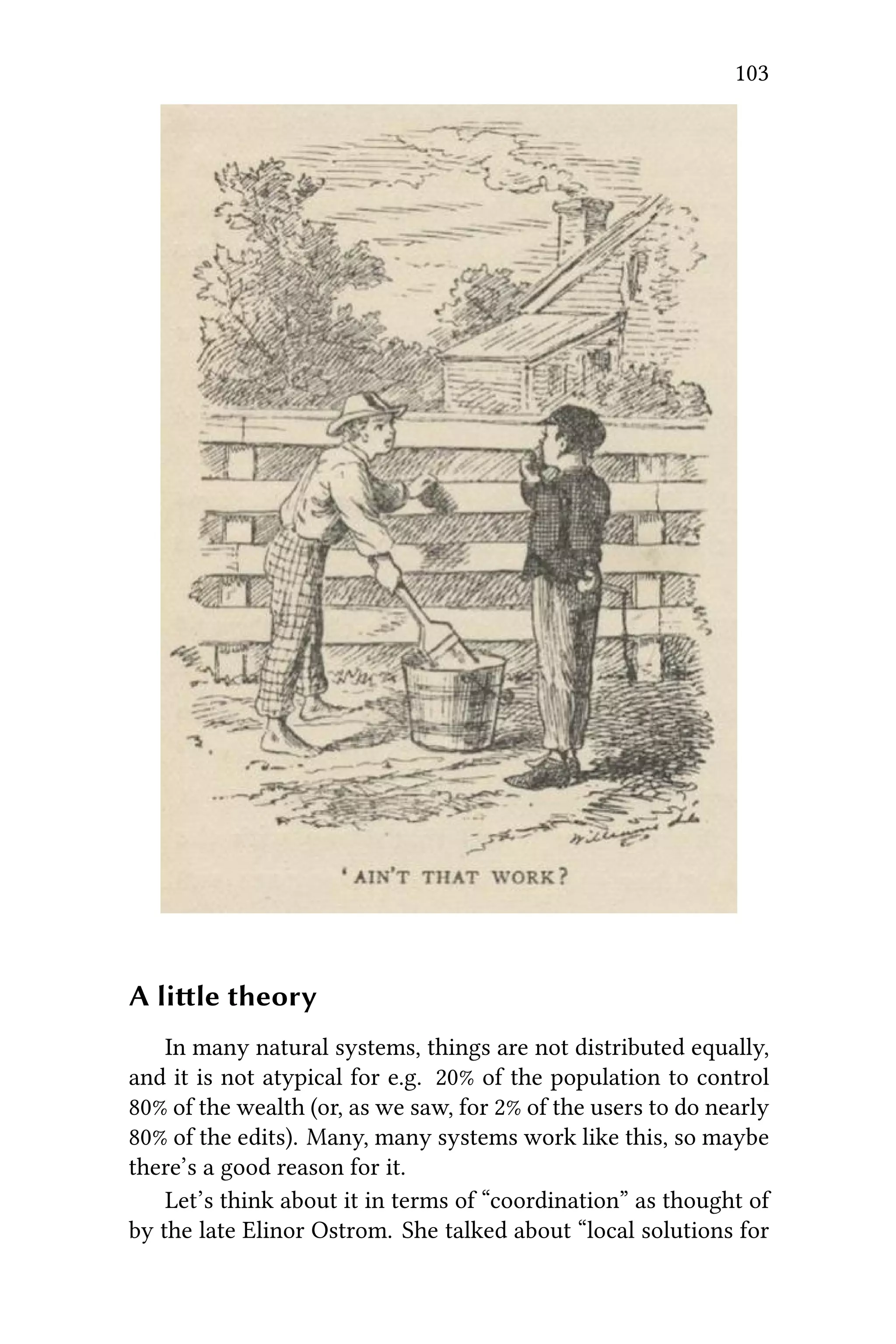
  • 64.
    60 CHAPTER 7.ORGANIZING CO-LEARNING to do things in “subsequent rounds”!And, with this, we turn to a third case study, where our work so far is reapplied in an offline educational context. Discussion We reconsider the appropriateness of the AAR and the par- agogy principles in contexts beyond P2PU, using Lisewski and Joyce as a guide to our (meta-)critique and analysis. In recent years, the tools, knowledge base and dis- course of the learning technology profession has been bolstered by the appearance of conceptual paradigms such as the ‘five stage e-moderating model’ (Salmon, 2000) and the new mantra of ‘communities of praice’ (Wenger, 1998). is paper will argue that, although these frameworks are useful in informing and guid- ing learning technology praice, there are inherent dangers in them becoming too dominant a discourse. e main focus will be on the ‘five stage e-moderating model’ as providing an exemplar of a discourse which is in danger of forming a ‘grand narrative’ (Lyotard, 1984) or totalizing explanation of how to design and deliver online training programmes. – Lisewski and Joyce In a sense, the more reified a paern, the less we learn by deploying it (  ). If we were trying to vali- date the paragogy model simply by fiing feedback to it (Case Study 2), that would be an act of intellectual dishonesty. Never- theless, the act of fiing data to this model, as a constructive and creative act, is in fact useful – and a sign that we are still learn- ing about what makes paragogy work. Not only on a theoretical level (summed up below), but also on a technological level (see  ). is table seems to suggests that paragogy is less of a grand narrative and more of a patchwork collection of tricks or heuris- tics for group work. Rather than narrativizing peer learning,
  • 65.
    61 paragogy itself providesa non-linear interface that we can plug into and adapt where appropriate (like we adapted our question- naire’s questions in Case Study 2). Instead of one grand nar- rative, we see a growing collection of ” “. e more we share our practice and experience having to do with co- organizing learning or building platforms for the same, the more robust and useful paragogy will become. It may never become a”rigorous discipline”! But if not, that is OK. References 1. Boud, D. and Lee, A. (2005). ‘P ’       . Studies in Higher Education, 30(5):501–516. 2. Joseph Corneli and Charles Jeffrey Danoff, P, in Sebastian Hellmann, Philipp Frischmuth, Sören Auer, and Daniel Dietrich (eds.), Proceedings of the 6th Open Knowl- edge Conference, Berlin, Germany, June 30 & July 1, 2011, 3. Joseph Corneli and Alexander Mikroyannidis (2011). P   PS L: T P P L E (P2PLE), Digital Edu- cation Review, 20. 4. Joseph Corneli, P P, to appear in E- Learning and Digital Media (ISSN 2042-7530), Volume 9, Number 3, 2012 5. Lisewski, B., and P. Joyce (2003). Examining the Five Stage e-Moderating Model: Designed and Emergent Prac- tice in the Learning Technology Profession, Association for Learning Technology Journal, 11, 55-66.
  • 66.
    62 CHAPTER 7.ORGANIZING CO-LEARNING Paragogical Principles… Reflections on practice and expe- rience suggest… 1. Changing context as a decentered center. We interact by changing the space. 1. Develop empirical studies and a critical apparatus.It seems we begin with weak ties, and then experience a slow formation of “peer” relationships, as we form and re-form our social con- text, and come to beer understand our goals. 2. Meta-learning as a font of knowl- edge. We interact by changing what we know about ourselves. 2. Find companions for the jour- ney. We learn a lot about ourselves by interaing with others. But par- ticipants struggle to find the right way to engage: “co-learning”, “co-teaching”, or “co-producing”? Moreover, “People come–they stay for a while, they flour- ish, they build–and they go.” 3. Peers provide feedback that wouldn’t be there otherwise. We interact by changing our perspective on things. 3. Work with real users. We be- gin with a weak struure at the out- set but this may afford a more “flexi- ble” approach as time goes on (see also this   which offers advice on designing aivities that help create a “flexible struure”). 4. Learning is distributed and nonlin- ear. We interact by changing the way things connect. 4. Study and build nonlinear inter- faces. ere are a number of technolog- ical concerns, which in a large part have to do with tensions between “content produion” and “conversation”, and to a lesser extent critique the platforms we’re using. 5. Realize the dream if you can, then wake up! We interact by changing our objectives. 5. Limit philosophizing. Even with a small group, we can extra meaning- ful ideas about peer learning and form a strong colleive effort, which moves things forward for those involved: this means work. We would not get the same results through “pure contemplation”.
  • 67.
     8 ADDING STRUCTUREWITH ACTIVITIES In the introduction to ”O  L C“, we remarked that a”learning space” is only potentially less struc- tured than a “course”. For example, a library tends to be highly structured, with quiet rooms for reading, protocols for checking out books, a cataloging and shelving system that allows people to find what they are looking for, as well as rules that deter van- dalism and the. (Digital libraries don’t need to play by all the same rules, but are still structured.) But more structure does not always lead to beer learning. In a 2010 Forbes article titled, “e Classroom in 2020,” George Kembel describes a future in which “Tidy lectures will be sup- planted by messy real-world challenges.” e Stanford School of Design, (or “d.school” – which Kemble co-founded and currently directs) is already well-known for its open collaborative spaces, abundant supply of post-it notes and markers, and improvisa- tional brainstorm activities – almost the opposite of traditional lecture-based learning. One “unexpected benefit” of dealing with real-world chal- lenges is that we can change our approach as we go. is is how it works in peer learning: peers can decide on differ- ent structures not just once (say, at the beginning of a course), but throughout the duration of their time together. is way, they are never “stuck” with existing structures, whether they be messy or clean. At least… that’s the ideal. In practice, “bolenecks” frequently arise. For example, in a digital library context, there may be bolenecks having to do with soware development, organizational resources, commu- nity good will, or access to funding – and probably all of the above. In a didactic context, it may be as simple as one person knowing something that others do not. While we can’t eliminate scarcity in one stroke, we can de- sign activities for peer learning that are “scarcity aware” and that 63
  • 68.
    64 CHAPTER 8.ADDING STRUCTURE help us move in the direction of adaptive learning structures. Planning Peer Learning Activities We begin with two simple questions: • How do we select an appropriate learning activity? • How do we go about creating a learning activity if we don’t find an existing one? “Planning a learning activity” should mean planning an ef- feive learning activity, and in particular that means something that people can and will engage with. In short, an appropri- ate learning activity may be one that you already do! At the very least, current activities can provide a “seed” for even more effective ones. Here’s a lile trick to help you keep focused on things you’re trying to do. Get a bunch of index cards and do this every day: 1. Sit down and write down all the things you think you need to do right then. […] Write them as short lile notes like a “to do list”. 2. en, take the first thing that you can do right now and do it. Get it done then cross it off the card. 3. Keep doing this, and if you think of something else you need to do, put it on a card. Just keep filling them up. 4. At the end of the day, go back through your card and find any unfinished things and remove any that you’ll honestly never do. 5. e next day, take all the things you didn’t do from the day before and copy them onto a new card, then start with #1 again. – Zed Shaw, in the L P  H W  But when entering unfamiliar territory, it can be difficult to know where to begin. And remember the bolenecks men- tioned above? When you run into difficulty, ask yourself:    ? You might try adapting Zed Shaw’s exercise, and
  • 69.
    65 make a listof limiting factors, obstacles, etc., then cross off those which you can find a strategy to deal with (add an annotation as to why). For example, you might decide to overcome your lack of knowledge in some area by hiring a tutor or expert con- sultant, or by puing in the hours learning things the hard way (Zed would particularly approve of the laer choice). If you can’t find a strategy to deal with some issue, presumably you can table it, at least for a while. Strategic thinking like this works well for one person. What about when you’re planning activities for someone else? Here you have to be careful: remember, this is peer learning, not traditional “teaching” or “curriculum design”. e first rule of thumb for peer learning is: don’t plan activities for others unless you plan to to take part as a fully engaged participant. Other- wise, it might be a peer learning activity, but it’s not yours. (Per- haps your engagement is just as “designer” – that’s OK. But if you don’t plan to “get” as well as “give”, you’re not really a peer – which is perfectly OK, but you might find other reading mate- rial that will serve you beer than this handbook in that case!) In short, it would be useful to walk through the “what do you need to do” and “why is it hard” exercises from the point of view of all of the participants, keeping in mind that they will, in general, assume different roles. To the extent that you can do so, spell out what these roles are and what activities comprise them. For example, in a mathematics learning context, you would be likely to find people… • solving textbook-style problems • finding and sharing new problems • asking questions when something seems too difficult • fixing expository material to respond to critique • offering critique and review of proposed solutions • offering constructive feedback to questions (e.g. hints)
  • 70.
    66 CHAPTER 8.ADDING STRUCTURE • organizing material into structured collections • working on applications to real-world problems • doing “meta” research activities that analyse “what works” for any and all of the above Each one of those activities may be “hard” for one reason or another. In particular, as a system the different activities tend to depend on one another. If you have people working in a “student role” but no one who can take on a “TA role”, things will be more difficult for the students. As a (co-)organizer, part of your job is to try to make sure all of the relevant roles are covered by someone (who may in the end wear many hats). You can further decompose each role into specific con- crete activities. ey might come in the form of instructions to follow: ”How to write a good critique” or ”How to write a proof “. ey might come in the form of accessible exercises (where”accessible” depends on the person“):”Your first geome- try problem” or ”NN LISP ”, etc. Depend- ing on the features of the learning context, you may be able to support the wrien instructions or exercises with live/in-person feedback (e.g. meta-critique to coach and guide novice critics, a demonstration, etc.). Our immediate scenario: building activities for the Peeragogy Handbook Adding a bunch of activities to the handbook won’t solve all of our usability issues, but we’ve agreed that they will help a lot. So at this point, we are revisiting the    and thinking about each article or section from this perspective: 1. When looking at this piece of text, what type of knowl- edge are we (and the reader) trying to gain? Technical skills (like learning how to edit Final Cut Pro), or abstract skills (like learning how to make sense of data)? What’s the takeaway? I.e., what’s the point?
  • 71.
    67 2. What’s difficulthere? What might be difficult for some- one else? 3. What learning activity recipes might be appropriate? (See below.) 4. What customizations do we need for this particular appli- cation? As a quick example: designing a learning activity for the current page 1. We want to be able to come up with effective learning ac- tivities to accompany a “how to” article for peer learners. ese activities will extend the “how to” aspect from the wrien word to the world of action. 2. It might be difficult for some of us to “unplug” from all the reading and writing that we’re now habituated to do- ing. But peer learning isn’t just about the exchange of text: there are lots and lots of ways to learn. 3. Like N (in one of our use cases), it could be useful to “become more aware of the peer learning we do every day”. And to think about “How do you learn best?” 4. So, the proposed handbook activity is to step away from the handbook for a while. In fact, why not take a   for a given period of time and look at peer learning as a basic human activity. (Hey, it just sounds to me like you might need to unplug, man!) Resources for identifying a dozen or so “Learning Activity Recipes”: • KS TK • D E  I S (See the section on “Teaching Strategies for Actively Engaging Stu- dents in the Classroom”)
  • 72.
    68 CHAPTER 8.ADDING STRUCTURE • Each of our    suggest various ac- tivities, like “practicing the heuristics”, “finding examples of the paerns”, etc. • Our U C provide many hypothetical examples of “peeragogy in action”. Recommended Reading T . B B (CC-By-NC-SA) includes lots of fun activities to try. Can you crack the code and define new ones that are equally cool?
  • 73.
     9 THE STUDENTAUTHORED SYLLABUS Authored By S B In either formal learning, informal learning or models which transition between the two, there are many opportunities for learners to co-create the syllabus and/or outline their own course of action. e sage on the stage of formal instruction must become at the most a guide on the side who acts as a coach appearing only when needed rather than as a lecturer who de- termines the content that the learners need to master. In the following inspirational but certainly not prescriptive examples, we will focus on co-learning methods drawn from a Social Con- structivist perspective, which fits nicely here. We offer a few examples below to show a range of learner centered approaches. ey all are based on co-learners hosting each other for one of a number of digestible topics in the larger subject area or domain that the group formed in order to explore. is can take place across a number of media and timelines. e following methods will result in each co-learner gain- ing deep knowledge in a specific topic and moderate knowledge across several topics. e unique joy of this approach is that no two cohorts will ever be the same. e content will always be fresh, relevant, and changing. A group can even reconvene with slightly or dramatically different topics over and over using the same underlying process. e appropriateness of the learner-created syllabus tech- nique depends on two factors: 1) the involvement of experts in the group and 2) the level of proficiency of the group. In general, novices who may or may not have a deep interest in the subject maer benefit from more structure and experts who point to key concepts and texts. An example of this is the university survey course for first or second year students who, we assume, need more guidance as they enter the subject maer. Graduate sem- inars are generally much more fluid, open dialogues between 69
  • 74.
    70 CHAPTER 9.THE STUDENT AUTHORED SYLLABUS motivated experts require lile structure or guidance. We also need effective methods for groups which contain novices, experts, and everyone in between. In groups with a wide range of expertise, it is important that each co-learner chooses to focus their deep inquiry on a topic that they are less familiar with. is will even out the expertise level across the cohort as well as ensure that a co-learner is neither bored nor dominating the dialogue. 3 example designs to structure the learning Weekly topics structure One way to structure the course is to have each co-learner host a topic each week. Perhaps multiple students host their topics in the same week. is progression provides a rotation of presentations and activities to support the entire group in en- gaging with the topics and challenges to the thinking of the pre- senters in a constructive and respectful manner. Pro: co-learners have discrete timelines and manageable chunks of responsibility. Con: the format may become disjointed, and the depth of inquiry will likely be somewhat shallow. Milestone based structure In this structure, each co-learner host their topics in paral- lel with similar activities and milestones that the whole group moves through together. Milestones can be set for a certain date, or the group can unlock their next milestone whenever all par- ticipants have completed the previous milestone. is second milestone timeline can be great for informal groups where par- ticipation levels may vary from week to week due to external factors, and the sense of responsibility and game-like levels can be motivating for many co-learners. Each co-learner may start with a post of less than 500 words introducing the topic on a superficial level. When everyone has done this, the group might move on to posting questions to the
  • 75.
    71 post authors. en,there may be a summary post of the activity so far with critical recommendations or insights. Pro: co- learners have more time to digest a topic, formulate a complex schema, and generate deeper questions. Con: it will be a few weeks before the topic level schema can form into a broader understanding of the subject maer or domain (seeing the big picture takes longer). Relay learning structure. is is similar to the milestone structure. However, co- learners rotate topics. If one learner posts an introductory write- up on a topic the first cycle, they may be researching questions on another topic in the next cycle, posting a summary in a third, and then posting a summary on their original topic in the fourth. Pro: co-learners can experience responsibility for several topics. Con: co-learners may receive a topic that is poorly re- searched or otherwise neglected. Content A vast number of topics Within a subject of mutual interest to a group, there are a considerable number of topics or questions. What is important is that each co-learner can take responsibility for a reasonably narrow area given the duration of the course or the timeline of the group. Areas that are too broad will result in a very superfi- cial understanding, and areas that are too narrow will result in a dull experience. For example, in marine biology, topics such as “the inter-tidal zone” may be too broad for a course cycle of a few weeks. Narrowing to one species may be too specific for a course over a few months. Learner generated topics Most cohorts will have some knowledge of the shared area of interest or an adjacent area. It is a good idea to respect the
  • 76.
    72 CHAPTER 9.THE STUDENT AUTHORED SYLLABUS knowledge and experience that each member of the group brings to the table. A facilitator or coordinator may generate a list of potential topic areas, seing an example of the scale of a topic. We suggest that the participants in the group are also polled for additions to the list. In large courses, sending out a Google Form via email can be an effective way to get a quick list with a high response rate. Expert informed topics If there is no expert facilitator in the group, we suggest that the cohort begin their journey with a few interviews of experts to uncover what the main buzz words and areas of focus might be. One way to locate this type of expert help is through contact- ing authors in the subject maer on social networks, reviewing their posts for relevance, and reaching out with the request. We recommend two people interview the expert over video chat, for example in a Hangout. One person conducts the in- terview, and one person takes notes and watches the time. We strongly suggest that the interview be outlined ahead of time: Warm up: Who are you, what are your goals, and why do you think this interview will help? Foundational questions: Ask a few questions that might elicit shor answers to build rapport and get your interviewee talking. Inquiry: What people say and what they do can oen be very different. Ask about topics required for mastery of the subject maer (e.g. What are the areas someone would need to know about to be considered proficient in this subject?). Also, ask    . Avoid  or  . Wrap up: ank the interviewee for their time, and be sure to follow up by leing them know both what you learned and what you accomplished because they helped you.
  • 77.
    73 Shared goals andgroup norms Choosing useful outputs Geing together for the sake of sharing what you know in an informal way can be fairly straightforward and somewhat useful. Most groups find that a common purpose and output that are explicitly defined and documented help to engage, mo- tivate, and drive the group. For the examples above, the group may decide to create a blog with posts on the various topics or create a wiki where they can share their insights. Other out- puts can include community service projects, business propos- als, recommendations to senior management or administration, new products, and more. e key is to go beyond sharing for sharing sake and move toward an output that will be of use be- yond the co-learning group. is activity is best described in C theory as the special case of networked learning where we find evidence of learning in collective action and/or behavioral change in groups rather than a psychological or neu- rological process in individuals. Group cohesion (a.k.a. the rules of the road) One challenge of this kind of collaboration is that each group will need to decide on norms, acceptable practices and behav- iors. Culturally diverse groups in particular may run into com- munication or other issues unless there is a way to create shared expectations and communicate preferences. One way to do this is with a team charter. is is a living doc- ument where the initial rules of engagement can live for refer- ence. e group may add or edit this document over time based on experience, and that is a welcome thing! is documentation is a huge asset for new members joining the group who want to contribute quickly and effectively. Any co-editing word pro- cessing program will work, but we strongly recommend some- thing that can be edited simultaneously and that lives in the cloud. (Google Docs is convenient because you can also embed your Charter into another site.)
  • 78.
    74 CHAPTER 9.THE STUDENT AUTHORED SYLLABUS Try starting with the following three sections, and allow some time for the group to co-edit and negotiate the document between icebreakers and kicking off the official learning process. Mission: Why are you forming the group? What do you want to accomplish together? Norms: Use ? No ? Post your vacation days to a  ? Cultural norms? Members:It is useful to include a photo and a link to a public profile such as Twier, Google+ or Facebook. Assessments and feedback loops Co-authored assessment rubrics Tests. izzes. Exams. How can the co-learning group as- sess their performance? ese types of courses benefit from an approach similar to coaching. Set goals as individuals and a group in the beginning, define what success looks like, outline steps that are needed to achieve the goal, check in on the goal progress periodically, and assess the results at the end of the course against the goal crite- ria. Goals may include domain expertise, a business outcome, a paper demonstrating mastery, a co-created resource, or even the quality of collaboration and adherence to shared group norms. Learner created assessments Another effective way to create an assessment is to decide on an individual or group output and create a peer assessment rubric based on the goals of the individual or group. One way to create a rubric is to spend some time defining the qualities you want your output to have based on positive exam- ples. Perhaps a group wants to create a blog. Each person on the team may identify the qualities of a great blog post based on examples that they admire. ey can use that example to create a criteria for assessment of co-learner authored blog posts. We recommend that the criteria have a 0 to 5 point scale with 0 be-
  • 79.
    75 ing non-existent and5 being superb. Writing a few indicators in the 1, 3, and 5 columns helps to calibrate reviewers. Create a  , perhaps starting with a list of criteria. Collapse similar criteria into one item, and create the indicators or definitions of 1, 3, and 5 point performance. Agree on the rubric, and decide on how the co-learners will be assigned assessment duties. WIll everyone review at least two others? Will each co-learner product need at least 3 reviewers before it goes live? Will you use a  or a  to collect the assessments? In a university seing, the instructor of record may wish to approve a peer assessment rubric, and it is sometimes a good idea to have a few outside experts give feedback on criteria that the group may have missed. Outside assessments It is possible that an instructor of record or similar authority will create the assessment for performance. In these cases, it is crucial that the co-learners have access to the grading rubric ahead of time so that they can ensure their activities and timeline will meet any requirements. In this case, it may be possible to require that the co-learners self-organize entirely, or there may be intermediary assignments such as the charter, project plan or literary review. Cyclical use of these models So much more to learn As mentioned above, the joy of this type of learning is that no two groups will ever do it the same. eir process, goals, and outcomes can all be unique. As designers and facilitators of this type of learning environment, we can say it is a wild ride! Each class is exciting, refreshing, and on trend. e co-learners become our teachers. If a group generates more topics than it is possible to cover at one time given the number of group members or if a group
  • 80.
    76 CHAPTER 9.THE STUDENT AUTHORED SYLLABUS has plans to continue indefinitely, it is always possible to set up a system where potential topics are collected at all times. ese unexplored topics can be harvested for use in another learning cycle, continuing until the group achieves comprehensive mas- tery. Risks is format is not without its own unique pitfalls: some chal- lenges are learner disorientation or frustration in a new learning structure with ambiguous expectations and uneven participa- tion. Some groups simply never gel, and we do not know why they have failed to achieve the cohesion required to move for- ward. Other groups are the exact opposite. Here are a few risks to consider if you would like to try the methods suggested here and how to mitigate them. Uneven expertise: Ask co-learners to be responsible for topics that are new to them. Uneven participation and cohesion: Ask co-learners what they want to do to motivate the group rather than imposing your own ideas. Experts/facilitators that kill the conversation: In the charter or other documentation, explicitly state that the purpose of the discussion is to further the conversation, and encourage experts to allow others to explore their own thinking by asking probing (not leading) questions. Ambiguous goals: Encourage the group to document their mission and what they will do as a team. is can change over time, but it is best to start out with a clear purpose. Conclusion Make mistakes. Correct course. Invite new perspectives. Create a structure that everyone can work with. Change it when it breaks. Most of all, have fun!
  • 81.
     10 CONNECTIVISM INPRACTICE — HOW TO ORGANIZE A MOOC Summary Massive Open Online Courses (MOOCs) are online learning events that can take place synchronously and asynchronously for months. Participants assemble to hear, see, and participate in backchannel communication during live lectures. ey read the same texts at the same time, according to a calendar. Learning takes place through self-organized networks of participants, and is almost completely decentralized: individuals and groups cre- ate blogs or wikis around their own interpretations of the texts and lectures, and comment on each other’s work; each individ- ual and group publicises their RSS feed, which are automatically aggregated by a special (freely available) tool, gRSShopper. Ev- ery day, an email goes out to all participants, aggregating activ- ity streams from all the blogs and wikis that engage that week’s material. MOOCs are a practical application of a learning theory known as “connectivism” that situates learning in the networks of connections made between individuals and between texts. Introduction Traditionally, scholars distinguish between three main     : behaviorism, cognitivism and constructivism. Some would add a fourth one: , but this is . One interesting application of connec- tivism, a learning theory and practice for the digital era, is the Massive Open Online Course. 77
  • 82.
    78 CHAPTER 10.HOW TO ORGANIZE A MOOC A learning theory for the digital age e connectivist theory describes learning as a process of creating connections and developing networks. It is based on the premise that knowledge exists out in the world, rather than inside an individual’s mind. Connectivism sees the network as a central metaphor for learning, with a node in the network being a concept (data, feelings, images, etc.) that can be meaningfully related to other nodes. Not all connections are of equal strength in this metaphor; in fact, many connections may be quite weak. On a practical level, this approach recommends that learning should focus on where to find information (streams), and how to evaluate and mash up those streams, rather than trying to enter lots of (perishable) information into one’s skull. Knowing the pipes is more important than knowing what exactly each pipe contains at a given moment. S D and G S promote the idea of connectivism. ey also practice it, by organizing Massive Open Online Courses (MOOCs): for instance, C11. People are free to participate at will. Each week a subject is discussed dur- ing synchronous sessions, which are recorded and uploaded for reference on the Change11 website. e site also includes an archive of daily newsleers and RSS-feeds of blog posts and tweets from participants. MOOCs tend to be very learner-centered. People are en- couraged to pursue their own interests and link up with others who might help them. But the distributed and free nature of the projects also leads to complaints; participants oen find it confusing when they aempt to follow up on all the discussions (the facilitators say one should not try to follow up on all the content). Stephen Downes explains in W C I: “is implies a pedagogy that (a) seeks to describe ‘successful’ net- works (as identified by their properties, which I have character- ized as diversity, autonomy, openness, and connectivity); and (b) seeks to describe the practices that lead to such networks, both in the individual and in society (which I have character- ized as modeling and demonstration (on the part of a teacher)
  • 83.
    79 and practice andreflection (on the part of a learner).” George Siemens says connectivism is a ”     .” Connectivism in practice One example of a MOOC that claims to embody the connec- tivist theory is ..a. e ”  ” section of the site explains what connectivism means in practice. e MOOC organizers developed a number of ways to com- bine the distributed nature of the discussions with the need for a constantly updated overview and for a federated structure. So, if your team wants to organize an open online course, these are five points to take into consideration: ere is no body of content the participants have to memo- rize, but the learning results from activities they undertake. e activities are different for each person. A course schedule with suggested reading, assignments for synchronous or asyn- chronous sessions is provided (using Google Docs spreadsheets internally, Google Calendar externally - one could also use a wiki), but participants are free to pick and choose. Normally there is a topic, activities, reading resources and oen a guest speaker for each week. One should even reflect upon the ques- tion whether a start- and end date are actually needed. It is cru- cial to explain the particular philosophy of this kind of MOOC, and this right from the outset, because chances are learners will come with expectations informed by their more traditional learning experiences. 1. It is important to discuss the “internal” aspects, such as self-motivation: what do the participants want to achieve, what is their larger goal? And what are their inten- tions when they select certain activities (rather than other possibilities)? Everyone has her own intended outcome. Suggest that participants meditate on all this and jot down their objectives. And how can they avoid becom- ing stressed out and geing depressed because they feel they cannot “keep up with all this?” e facilitators should
  • 84.
    80 CHAPTER 10.HOW TO ORGANIZE A MOOC have a good look at these motivations, even if it’s impossi- ble to assist every participant individually (for large-scale MOOCs). 2. Ideally, participants should prepare for this course by ac- quiring the necessary digital skills. Which skills are “nec- essary” can be decided by the group itself in advance. It’s all about selecting, choosing, remixing - also called “cu- rating”. ere are lots of tools which you can use for this: blogs, social bookmarks, wikis, mindmaps, forums, social dashboards, networks such as Twier with their possibili- ties such as hashtags and lists. Maybe these tools are self- evident for some, but not necessarily for all the partici- pants. 3. e course is not located in one place but is distributed across the web: on various blogs and blogging platforms, on various groups and online networks, on photo- and video-sharing platforms, on mindmaps and other visual- ization platforms, on various tools for synchronous ses- sions. is wide variety is in itself an important learning element. 4. ere are weekly synchronous sessions (using Blackboard collaborate, or similar group chaing tool). During these sessions, experts and participants give presentations and enter into discussions. Groups of participants also have synchronous meetings at other venues (such as Second Life). Try to plan this well in advance! 5. Many participants highly appreciate efforts to give an overview of the proceedings. Specifically, the D N is a kind of hub, a community newspaper. In that Daily there is also a list of the blog posts men- tioning the course-specific tag (e.g. “Change11”), also the tweets with hashtag #change11 are listed in the Daily. Of course, the MOOC has a  where sessions, newsleers and other resources are archived and discussion threads can be read.
  • 85.
    81 From the verybeginning of the course, it’s necessary to ex- plain the importance of tagging the various contributions, to suggest a hashtag. For harvesting all this distributed content, Stephen Downes advocates the use of RSS, which is a personal web envi- ronment that combines resource aggregation, a personal datas- pace, and personal publishing (Downes developed it and would like to build a hosted version - eventually financed via Kick- starter). e gRSShopper can be found on a registration page, which is useful primarily for sending the newsleer. It allows you to organize your online content any way you want, to im- port content - your own or others’ - from remote sites, to remix and repurpose it, and to distribute it as RSS, web pages, JSON data, or RSS feeds. D: “For example, the gRSShopper har- vester will harvest a link from a given feed. A person, if he or she has admin privileges, can transform this link into a post, adding his or her own comments. e post will contain infor- mation about the original link’s author and journal. Content in gRSShopper is created and manipulated through the use of sys- tem code that allows administrators to harvest, map, and display data, as well as to link to and create their own content. gRSShop- per is also intended to act as a fully-fledged publishing tool.” (for alternatives, see the technologies section further on). Alternatives for registrations: Google Groups for instance. But specific rules about privacy should be dealt with: what will be the status of the contributions? In this MOOC the status is public and open by default, for Downes this is an important el- ement of the course. Technologies Some MOOCs use Moodle, but Downes dislikes the central- ization aspect and it’s not as open as it could be, saying “peo- ple feel beer writing in their own space.” Other possibilities: Google Groups, Wordpress, Diigo, Twier, Facebook page, Sec- ond Life; but each course uses different mixtures of the many tools out there. People choose their environment - whether it is
  • 86.
    82 CHAPTER 10.HOW TO ORGANIZE A MOOC WoW or Minecra. Students use Blogger, WordPress, Tumblr, Posterous as blogging tools. Key element is RSS harvesting Give participants a means to contribute their blogfeed. In ”A  N F,” Downes explains how to get this structure and additional explanations (via videos) in order to contribute their blog feed. e administrator in this case uses gRSShop- per to process the content and put it in a database, process it and send it to other people. Alternatively one can use Google Reader (the list of feeds is available as an OPML file - which can be imported to other platforms). ere is also a plug-in for Wordpress that lets you use a Google Doc spreadsheet for the feeds, then Wordpress for the aggregation). Many other con- tent management systems have RSS harvesting features. Each individual could run her own aggregator, but Downes offers it as a service. But aggregators are needed, whether indi- vidual, centralized or both. Specialized harvesting Using Twier, Diigo, Delicious, Google Groups, If is en at (IFTTT) and F43 (take ordinary web page and turn it into an RSS feed). Synchronous environments Synchronous platforms include Blackboard Collaborate (used now for Change11); Adobe Connect; Big Blue Buon; WizIQ; Fuze; WebX; webcasting; web radio; videoconferencing with Skype or Google Hangout in conjunction with Livestream or ustream.tv. Or take the Skype/Hangout audiostream and broadcast is as webradio. Set up and test ahead of time, but don’t hesitate to experiment.
  • 87.
    83 Newsleer or Feeds Feedsare very important (see earlier remarks about the Daily newsleer). You can use Twier or a Facebook page, Downes uses email, also creates an RSS version through gRSShopper and sends it through I.com back to Facebook and Twier. For the rest of us there is Wordpress, which you can use to     . Downs also suggests this handy guide on            ! Consider using a content management system and databases to put out specialized pages and the newsleer in an elegant way, but it requires a learning curve. Otherwise, use blogs / wikis. Comments Participants are strongly encouraged to comment on each others’ blogs and to launch discussion threads. By doing so they practice a fundamental social media skill - developing net- works by commenting on various places and engaging in con- versations. It is important to have activities and get people to be involved rather than sit back. For an in-depth presentation, please have a look at F   M O O C by Stephen Downes, in which he focuses on research and survey issues, preparing events, and other essentials. Resources basics • H  C W • W   MOOC • S   MOOC • K   MOOC • I  
  • 88.
    84 CHAPTER 10.HOW TO ORGANIZE A MOOC Further reading • Downes & Siemens MOOC  • W C I by Stephen Downes • A I  C K by Stephen Downes • F  M O O C, by Stephen Downes • RSS • C: A L T   D A by George Siemens • A C G • R  N by George Siemens • R E: C  C by Dave Cormier • K K, a book by George Siemens • N S, Howard Rheingold (about internal and exter- nal literacies for coping with the ‘always on’ digital era) • M O O C: Seing Up (StartTo- MOOC, Part 1) • L  Relevant Handbook pages P L N
  • 89.
     11 PARTICIPATION Summary All collaborativework is managed in some way. Methods of managing projects, including learning projects, are ranking from the more formal and structured to the less formal and un- structured. Participation in business-oriented projects When we think about project management in an organi- zation, we oen relate to well-established tools and processes. For example, we will use the P M B  K (PMBOK) as a standard. For the Project Manage- ment Institute (PMI) and most workers, those standards are the key to project success. In classical project management, tasks and deadlines are clearly defined. We will, for example, use P  E  R T (PERT) to analyze and represent tasks. We oen represent the project schedule using a G . ose are just two of the project management tools that illustrate how project management rests firmly on its engineering background. In those very structured projects, each actor is expected to work exactly as planned and to deliver his part of the work on time; every individual delay potentially lead- ing to a collective delay. Participation in educational projects If we look for analogies between project management and education, we can find some similarities in models pedagogy of. In a paper called ”M  P  A” by Hiemstra and Sisco, we see how students hold a passive role (on a cognitive level) in the pedagogy model. ey are following 85
  • 90.
    86 CHAPTER 11.PARTICIPATION a plan or syllabus that has been designed by the instructor and that won’t change during the session. Students will have to com- plete all their tasks on time; in other words, return their exerci- ces to the teacher before the due date. In a peeragogy project, whose roots lie closer to andragogy than in pedagogy, partici- pation to the project is less regulated (see F    ) As peeragogy projects members expect to break the 90/9/1  and bring on board more than 1% of creators and 9% of edi- tors, they also keep in mind the L T rule. “e term Long Tail has gained popularity in recent times as describing the re- tailing strategy of selling a large number of unique items with relatively small quantities sold of each.” In other words, people working in peeragogy should accept that some participants only contribute few ideas (or may be even just one!). Going further, people may even be allowed to just watch a peeragogy project going on without creating or editing, in order to understand its culture before feeling ready to jump in and contribute more ac- tively. In general, a peeragogy community will constantly adjust as it seeks an equilibrium between order and chaos, allowing everyone to collaborate at their own pace without loosing focus, and in such a manner that the collective can deliver - whether that’s a product or a learning experience!. How to deal with participation in a peeragogy project • Accept that some people want to watch what is going on before jumping in. is doesn’t mean you have to keep them forever. Aer a while you may un-enroll people who don’t add any value to the community. In our Peeragogy project, we’ve asked people to re-sign up several times (at any given juncture, some proprotion prefer to leave). • Accept that people may only contribute a lile: if this con- tribution is good it will add value to the whole
  • 91.
    87 • Understand thatyou can not impose strict deadlines to volunteers • Let your work be “open” in a sense inspired by Wikipedia’s N P  V policy • Give roles to participants and define some “energy cen- ters” who will take the lead on specific items in the project • Organize regular face to face or online meetings to talk about progress and what’s needed in upcoming days/weeks • Ask participants to be clear about when they will be ready to deliver their contributions • Have clear deadlines, but allow contributions that come in aer the deadline – in general, be flexible • Add a newcomer section on your online platform to help newbies to get started
  • 93.
     12 THE WORKSCAPE,A LEARNING PLATFORM FOR CORPORATIONS Summary Cultivating a results-oriented peer-learning program in a corporate learning ecosystem involves a few tweaks of the ap- proach and tools we discussed in relation to more open, diverse networks. J C talks about W on V. The Workscape, a platform for learning Formal learning takes place in classrooms; informal learn- ing happens in workscapes. A workscape is a learning ecol- ogy. As the environment of learning, a workscape includes the workplace. In fact, a workscape has no boundaries. No two workscapes are alike. Your workscape may include being coached on giving effective presentations, calling the help desk for an explanation, and researching an industry on the Net. My workscape could include participating in a community of field technicians, looking things up on a search engine, and living in France for three months. Developing a platform to support informal learning is analogous to landscaping a garden. A ma- jor component of informal learning is natural learning, the no- tion of treating people as organisms in nature. e people are free-range learners. Our role is to protect their environment, provide nutrients for growth, and let nature take its course. A landscape designer’s goal is to conceptualize a harmonious, uni- fied, pleasing garden that makes the most of the site at hand. A workscape designer’s goal is to create a learning environment that increases the organization’s longevity and health and the individual’s happiness and well-being. Gardeners don’t control plants; managers don’t control people. Gardeners and managers 89
  • 94.
    90 CHAPTER 12.THE WORKSCAPE have influence but not absolute authority. ey can’t makea plant fit into the landscape or a person fit into a team. In an ideal Workscape, workers can easily find the people and information they need, learning is fluid and new ideas flow freely, corporate citizens live and work by the organization’s values, people know the best way to get things done, workers spend more time cre- ating value than handling exceptions, and everyone finds their work challenging and fulfilling. The technical infrastructure of the Workscape When an organization is improving its Workscape, looking at consumer applications is a good way to think about what’s required. Ask net-savvy younger workers how they would like to learn new skills, and they bring up the features they enjoy in other services: • Personalize my experience and make recommendations, like Amazon • Make it easy for me to connect with friends, like Facebook • Keep me in touch with colleagues and associates in other companies, as on LinkedIn • Persistent reputations, as at eBay, so you can trust who you’re collaborating with • Multiple access options, like a bank that offers access by ATM, the Web, phone, or human tellers • Don’t overload me. Let me learn from YouTube, an FAQ, or linking to an expert • Show me what’s hot, like Reddit, Digg, MetaFilter, or Fark do • Give me single sign-on, like using my Facebook profile to access multiple applications
  • 95.
    91 • Let mechoose and subscribe to streams of information I’m interested in, like BoingBoing, LifeHacker or Huffpost. • Provide a single, simple, all-in-one interface, like that pro- vided by Google for search • Help me learn from a community of kindred spirits, like SlashDot, Reddit, and MetaFilter • Give me a way to voice my opinions and show my per- sonality, as on my blog • Show me what others are interested in, as with social bookmarks like Diigo and Delicious • Make it easy to share photos and video, as on Flickr and YouTube • Leverage “the wisdom of crowds,” as when I pose a ques- tion to my followers on Twier or Facebook • Enable users to rate content, like “Favoriting” an item on Facebook or +!ing is on Google or YouTube Some of those consumer applications are simple to replicate in-house. Others are not. You can’t afford to replicate Facebook or Google behind your firewall. at said, there are lots of ap- plications you can implement at reasonable cost. Be skeptical if your collaborative infrastructure that doesn’t include these min- imal functions: Profiles - for locating and contacting people with the right skills and background. Profile should contain photo, position, location, email address, expertise (tagged so it’s searchable). IBM’s Blue Pages profiles include how to reach you (noting whether you’re online now), reporting chain (boss, boss’s boss, etc.), link to your blog and bookmarks, people in your network, links to documents you frequently share, members of your net- work. Activity stream - for monitoring the organization pulse in real time, sharing what you’re doing, being referred to useful
  • 96.
    92 CHAPTER 12.THE WORKSCAPE information, asking for help, accelerating the flow of news and information, and keeping up with change Wikis - for writing collaboratively, eliminating multiple versions of documents, keeping information out in the open, eliminating unnecessary email, and sharing responsibility for updates and error correction Virtual meetings - to make it easy to meet online. Mini- mum feature set: shared screen, shared white board, text chat, video of participants. Bonus features: persistent meeting room (your office online), avatars. Blogs - for narrating your work, maintaining your digi- tal reputation, recording accomplishments, documenting expert knowledge, showing people what you’re up to so they can help out Bookmarks - to facilitate searching for links to information, discover what sources other people are following, locate experts Mobile access - Half of America’s workforce sometimes works away from the office. Smart phones are surpassing PCs for connecting to networks for access and participation. Phones post most Tweets than computers. Google designs its apps for mobile before porting them to PCs. Social network - for online conversation, connecting with people, and all of the above functions. Conclusion Learning used to focus on what was in an individual’s head. e individual took the test, got the degree, or earned the cer- tificate. e new learning focuses on what it takes to do the job right. e workplace is an open-book exam. What worker doesn’t have a cell phone and an Internet connection? Using personal information pipelines to get help from colleagues and the Internet to access the world’s information is encouraged. Be- sides, it’s probably the team that must perform, not a single indi- vidual. irty years ago, three-quarters of what a worker need to do the job was stored in her head; now it’s less than 10%.
  • 97.
  • 99.
     13 CO-FACILITATION Author: MariaArenas, with contributions by Charlie Danoff Summary Co-facilitating emerges when people have to work to- gether in order to complete a task, in environments like schools, universities, shelters, churches, workplaces. Co-facilitating in peer-to-peer learning Facilitation is the process of enabling groups to work cooper- atively and effectively. Peers co-facilitate by taking and sharing leadership roles to move the peer learning process along faster and/or more efficiently. e main purpose of co-facilitation is to offer and receive support from a cohort who is invested in the project. Co-facilitation commonly can be found in specific col- laborations between two or more people who need each other to complete a task, for example, learn about a given subject, author a technical report, resolve a problem, or conduct research Dr. Fink writes in Creating Significant Learning Experiences (Jossey Bass, 2003) that “in this process, there has to be some kind of change in the learner. No change, no learning”. Significant learning requires that there be some kind of lasting change that is important in terms of the learner’s life; therefore a way to measure the effectiveness of co-facilitation is if there’s been a change in the peer group. Which roles, competences and skills do we need to co-facilitate? Co-facilitation roles can be found in groups/teams like bas- ketball, health, Alcoholics Anonymous, spiritual groups, etc. 95
  • 100.
    96 CHAPTER 13.CO-FACILITATION For example, self-help groups are composed of people who gather to share common problems and experiences associated with a particular problem, condition, illness, or personal cir- cumstance. “Freedom to Learn” is among the learning theo- ries Carl Rogers was known for. Commenting on Rogers’ re- lated work, Barre-Lennard remarked: “…he offered several hy- pothesized general principles. ese included: We cannot teach another person directly; we can only facilitate his learning. e structure and organization of the self appears to become more rigid under threat; to relax its boundaries when completely free from threat…. e educational situation which most effectively promotes significant learning is one in which 1) threat to the self of the learner is reduced a minimum, and 2) differentiated perception of the field of experience is facilitated.” Part of the fa- cilitator’s role is creating a safe place for learning to take place; but they should also challenge the participants. As John Wooden said of coaching: “Be quick, but don’t hurry.” J H ar- ticulated this nature of facilitation well: ‘’Too much hierarchical control, and participants become passive and dependent or hostile and re- sistant. ey wane in self-direction, which is the core of all learning. Too much cooperative guidance may degenerate into a subtle kind of nurturing op- pression, and may deny the group the benefits of totally autonomous learning. Too much autonomy for participants and laissez-faire on your part, and they may wallow in ignorance, misconception, and chaos.” Co-facilitating discussion forums If peers are preparing a forum discussion, here are some ideas from “e tool box”, that can be helpful as guidelines for running this type of meetings: • Explain the importance of collaborative group work and make it a requirement.
  • 101.
    97 • Establish howyou will communicate in the forum • Be aware of mutual blind spots in facilitating and observ- ing others • Watch out for different rhythms of intervention”. Co-facilitating wiki workflows A good place to begin for any co-facilitators working with a wiki is Wikipedia’s famous “5 Pillars.” • Wikipedia is an encyclopedia • Wikipedia writes articles from a neutral point-of-view • Wikipedia is free content that anyone can edit, use, mod- ify, and distribute. • Editors should interact with each other in a respectful and civil manner. • Wikipedia does not have firm rules. Co-facilitating live sessions Learning experiences in Live Sessions which include Social Media and co facilitating exercise is described in the article” Learning Re-imagined: Participatory, Peer, Global, Online“ by Howard Rheingold, we have taken inspiration from his points and re-mixed them slightly. • Establish roles for co facilitators and participants (moder- ator, technical recorder, writer to take notes, etc..). • Provide a reading list – indicating what is really important and what is more “nice to know”. • Ideally before, or when the session begins, take some time to allow participants to familiarize themselves with the tools.
  • 102.
    98 CHAPTER 13.CO-FACILITATION • Introduce yourself and your peers (co-facilitators) and ask the members to make a brief introduction of themselves. • Review the agenda for the session, both to make sure there is an agenda (at the start) and to make sure everything was covered (at the end). • Online tools like: Mumble, Diigo, Etherpad and chat can be used to communicate and interact in the session. How- ever, consider whether participants are interested in ex- perimenting with lots of tools. Oen more tools (and some content) can end up making tasks harder. • Keep it Simple Stupid, or KISS: Remember you came to- gether with your peers to accomplish something not to discuss an agenda or play with online tools; keep every- thing as easily accessible as possible to ensure you realize your peer goals. Paragogical Action Review Following any co-facilitating session it is essential that the co-facilitators come together and review what happened. A use- ful framework is the P A R (PAR), based on the U.S. Army’s Aer Action Review, which has four compo- nents, to which we have added a fih. A further difference in the Paragogical Action Review is that it need not take place “aer” the action, but can be integrated into the action (accordingly, we use a present tense phrasing). • Review what was supposed to happen (training plans) • Establish what is happening • Determine what’s right or wrong with what’s happening • Determine how the task should be done differently in the future • Share your notes with your other peers for feedback and to improve things going forward
  • 103.
    99 Experiences and experimentsin co-facilitating • L R: P, P, G, O, by Howard Rheingold • R G is a network dedicated to science and re- search, in which members connect, collaborate and dis- cover scientific publications, jobs and conferences. • C  F P S G, by e Community Tool Box • F T, by Villanova University • H P C: T R  F   P L, by Pippa Buchanan • R P F: C C  SA, by Dale Vidmar, Southern Oregon University Library • E CF, by Everywoman´s Center, University of Massachusses Resources 1. P E: T  T M; UN Interagency Group on Young Peoples Health 2. C F: Advantages & Potential Disadvantages. J. Willam Pfeifer and John E Johnes 3. A  of John Heron’s model on role of facilitators 4. C R, C C  E, Ency- clopedia of Informal Education 5. P M, Study Guides and Strategies 6. CF: T A  C, Canadian Union of Public Employees 7. B I C W G
  • 104.
    100 CHAPTER 13.CO-FACILITATION 8. Barre-Lennard, G. T. (1998) C R’ H S . J  S, London: Sage 9. 5 P  W, from Wikipedia 10. T  F, (2002) US Army Field Manual #FM 7-0 (FM 25-100)
  • 105.
     14 PARAGOGICAL DESIGNSFOR CO-WORKING - - - - Here our aim is to develop the pro- ductive “paragogical” side of peer- agogy through a discussion of the strategies, joys, and sorrows of co- working. It complements the   page. ese questions could apply to our working group(s) here, and to prey much any working group in existence: • How do you pass the ball? • How do you keep the energy going? • How do you diagnose where the group is going and make things “intentional” instead of assumed? And how do we do all of this in a way that takes learning into account? (ee proposed “allowed list” comes from Simon Sinek, by way of Fabrizo Terzi and the FTG.) Co-working as the flip side of convening Linus Torvalds, interviewed by Steven Vaughan-Nichols for a Hewle-Packard publication, had this to say about soware 101
  • 106.
    102 CHAPTER 14.DESIGNS FOR CO-WORKING development: e first mistake is thinking that you can throw things out there and ask people to help. at’s not how it works. You make it public, and then you assume that you’ll have to do all the work, and ask people to come up with suggestions of what you should do, not what they should do. Maybe they’ll start helping eventu- ally, but you should start off with the assumption that you’re going to be the one maintaining it and ready to do all the work. e other thing–and it’s kind of related–that people seem to get wrong is to think that the code they write is what maers. No, even if you wrote 100% of the code, and even if you are the best programmer in the world and will never need any help with the proje at all, the thing that really maers is the users of the code. e code itself is unimportant; the proje is only as useful as people aually find it. It is important to understand your users – and remember that contributors are a special class of “user” with a real time invest- ment in the way the project works. We typically cannot “Tom Sawyer” ourselves into leisure or ease just because we manage to work collaboratively, or just because we have found people with some common interests. e truth is probably somewhere in between Torvalds and Twain. Many people actively want to contribute! For example, on “Wikipedia, the encyclopedia anyone can edit” (as of 2011)    80,000 visitors make 5 or more edits per month. is is interesting to compare with the  that (as of 2006) “over 50% of all the edits are done by just .7% of the users… 24 people…and in fact the most active 2%, which is 1400 people, have done 73.4% of all the edits.” Similar numbers apply to other peer production communities.
  • 107.
    103 A lile theory Inmany natural systems, things are not distributed equally, and it is not atypical for e.g. 20% of the population to control 80% of the wealth (or, as we saw, for 2% of the users to do nearly 80% of the edits). Many, many systems work like this, so maybe there’s a good reason for it. Let’s think about it in terms of “coordination” as thought of by the late Elinor Ostrom. She talked about “local solutions for
  • 108.
    104 CHAPTER 14.DESIGNS FOR CO-WORKING local problems”. By definition, such geographically-based coor- dination requires close proximity. What does “close” mean? If we think about homogeneous space, it just means that we draw a circle (or sphere) around where we are, and the radius of this cir- cle (resp. sphere) is small. An interesting   is that as the dimension grows, the volume of the sphere gets “thinner”, so the radius must increase to capture the same d- dimensional volume when d grows! Based on this, we might guess that the more dimensions a problem has, the more re- sources we will need to solve it. From another perspective, the more different factors impact a given issue, in some sense, the less likely there are to be small scale, self-contained, “local prob- lems” in the first place. If we think about networks instead of homogeneous space, and notice that some nodes in the network have more connec- tions than others, then we see the same issue applies to these nodes: they have more complexity in their immediate region than the others. is might suggest that such “central nodes” (e.g. popular films, popular words, popular websites, popular people) would, by definition, be less discriminating in terms of who/what they couple with. On a certain level (weak ties) this is probably true. But on another level (strong ties) I think it must not be true – you can’t really have it both ways. Asking for organizations to work on the “local” level of strong ties when they are “really” all about many low-bandwidth weak ties isn’t likely to work well. Google is happy to serve ev- eryone’s web requests – but they can’t have just anyone walking in off the street and connecting devices their network in Moun- tain View. (Aside: the 2006 article on Wikipedia quoted above was wrien by Aaron Swartz, who achieved some  for doing essentially just that, though in his case, it was MIT’s network, not Google’s.) We might guess that the more institu- tionally commied someone is, the less likely they are to be able to form deep connections with anyone who is not an integral part of their institution. Of course, we don’t “give up”. We aspire to create systems that have both aspects, systems where a “dedicated individual can rise to the top through dint of effort”, etc. ese systems
  • 109.
    105 are well articulated,almost like natural languages, which are so expressive and adaptive that “most sentences have never been said before”. In other words, a well-articulated system does lend itself to “local solutions to local problems” – but only because all words are NOT created equal. My brothers read a lile bit. Lile words like ‘I’ and ‘It.’ My father can read big words, too, Like CON- STANTINOPLE and TIMBUKTU. Co-working: what is an institution? We could talk in this section about Coase’s theory of the firm, and Benkler’s theory of “Coase’s Penguin”. We might continue  from Aaron Swartz. But we will not get so deep into that here: you can explore it on your own!
  • 111.
     15 DESIGNING APLATFORM FOR PEER LEARNING Author: Joe Corneli PM isa virtual community which aims to help make mathematical knowledge more accessible. I’ve described my in- volvement with the project briefly in my “Learn Math(s) the Hard(er) Way”  , and at considerably greater depth in my thesis! is article summarizes the main design ideas. It gets a lile technical, but don’t worry, there’s not too much math… In short: I lumped the different activities that people could do on PlanetMath.org into 5 categories (see the table be- low). More or less this table just means that on PlanetMath, people write articles and link these articles to other articles, add comments, ask questions, make corrections, and connect prob- lems and solutions to expository material. ey also deploy  for solving problems – and they    . Context Feedback ality Structure Heuristic A ← A A ℓ ← Ð A X ← T X ← Q A ← C A ← P ← S ← R L ← A, P M ← A G ↩ U S ↩ H Q → C, W, P A article ℓ link X object T post Q question C corr. P problem S solution R review L collection M classific. G group U user W request H heuristic Table 15.1: A tentative decomposition of PlanetMath’s activities e five categories (Context, Engagement, ality, Struc- ture, and Heuristic) come from reflecting on the 5  , and comparing them with the Martin Nowak’s 5      , then clustering the actual activities that people can do on PlanetMath (as well as 107
  • 112.
    108 CHAPTER 15.PLATFORM DESIGN some new planned activities) into these categories. I also drew inspiration from the paern and heuristic “language” we devel- oped in the peeragogy project. I started by clustering our     into 5 segments, like this: wrapper pattern language carrying capacity roles roadmap heartbeat moderation polling for ideas discerning a pattern creating a guide praxis vs poeisis simplify what do experts do? find an analogy why is it hard? do you know the answer? change focus ask for help give it a rest change description divide newcomer e “key” that shows how things fit together is as follows: • Context ~ Changing context as a decentered center. ~ Kin selection • Engagement ~ Meta-learning as a font of knowledge. ~ Direct reciprocity • ality ~ Peers provide feedback that wouldn’t be there otherwise. ~ Indirect reciprocity • Structure ~ Learning is distributed and nonlinear. ~ Spa- tial selection • Heuristic ~ Realize the dream if you can, then wake up! ~ Group selection e analogies are not perfect, and are meant to help inspire, rather than to constrain, thoughts on the learning/platform de- sign. It’s important to remember that Nowak’s formalism is meant to be general enough to describe all different kinds of collaboration –
  • 113.
    109 In a “kinseleion” regime, we are working in a “gen- erational” modality; we are looking at what is “re- lated”, and this helps to define that which is “unre- lated” – the other. On PlanetMath, the most important senses of “relatedness” apply to elements of the subject domain. Topics that are linked to one another in the encyclopedia are related. ese links can either be implicit term references (which are spoed by Planet- Math’s autolinker), or more explicit connections added by au- thors, readers, or editors. Such links can build an implicit con- text for a “newcomer” who approaches a given topic. In a “dire reciprocity” regime, we “learning about ourselves” in praice, usually in a social context. One of the key legacy features of PlanetMath is that every object in the system is “discussable”. You can ask a question about an encyclopedia article, for example, and this will go into a common pool of questions. One of the driving ideas behind the site’s (re)design is that every question should help us improve the site, for example, by pointing out a place where the origi- nal expository article could be improved. Of course, at the most basic level, we hope that the questions receive good one-off an- swers (providing a benefit to the initial question-asker). Even the most simple question is a “constructively critical” question. On the level of site semantics, it would be good to keep track of which questions have been answered, and which have not. estions can be “mutated” into corrections, requests, or math- ematical problems to solve. In an “indire reciprocity” regime, we are building something that may be useful later on. Another important legacy feature of PlanetMath is that, un- like Wikipedia, articles are not generally open to the public to edit (though some are). Rather, the typical process of “crowd- sourcing” takes place through a corrections mechanism. From an analytical perspective, we might expect corrections to be one
  • 114.
    110 CHAPTER 15.PLATFORM DESIGN of the key ways in which site authors learn from one another. In a sense, the opportunity to get corrections or suggestions pointed out later might be one of the biggest incentives for writ- ing an article in the first place! Offering a correction to someone else is, of course, a way to point out one’s own knowledgability (as such, a sort of flip-side of asking questions). Certain behav- iors can help one develop a good reputation (though PlanetMath does not model this very explicitly)… and perhaps even more importantly, a high-quality resource “emerges” from such one- to-one interactions. In a “spatial seleion” regime, we are again defin- ing an “inside” and “outside”, and looking for ways in which the struures that we have identified can fit together. One of the features that the legacy version of PlanetMath lacked was any sort of support for “problem solving behavior” – which, in mathematics, is actually a prey essential thing. Rather, the site was set up as a “reference” tool for people who solved problems elsewhere. By moving support for problems, solutions, and reviews onto the PlanetMath site itself, we ex- pect not only to open the “marketplace” up to new kinds of learners (i.e. people working at a more basic level than ency- lopedia authoring OR people working at a fairly advanced level who are more interested in applications than in theory), but also to get significant improvements to the core knowledge resource itself (the encyclopedia). is is because “an article without an aached problem” is not a very practical article from a learn- ing or application standpoint. Similarly, “a problem without a solution” is lacking something, as is “a solution without a re- view”. Building support for this, and support for people to struc- ture/stage problems with problem sets should help make the site a much more practically useful learning tool. In a “group seleion” regime, we are building “sets” of aivities and paerns (milestones, roles) which can then a as “seleors” for behavior. (is is why I’ve combined it with the catch-all “heuristic” category.)
  • 115.
    111 Another historical weakpoint of the legacy site was support for “teams.” us, for example, one effort to improve Planet- Math’s coverage of topics in Real Analysis foundered - because there was no way to gather a critical mass to this project. ere are social, technical, and knowledge aspects to this problem. Co- working requires people to be able to join groups, and it requires the groups to be able to structure their workflow. In some sense this is similar to an individual’s work being structured by the use of heuristics. A person’s choice to apply this strategy instead of that one, or to join this group instead of that one, is in the end a somewhat similar choice. ese notes have shown how the paragogical principles, sup- plimented with very general theories of collaboration, and some practical observations as examined in the Peeragogy Handbook, can help design a space for learning, which is itself a “learning space” in the sense of knowledge building. Although the case study has focused on mathematics learning, similar reflections would apply to designing other sorts of learning spaces (e.g. to the continued development of the Peeragogy project itself!).
  • 117.
  • 119.
     16 INTRODUCTION TOPEERAGOGICAL ASSESSMENT Authors: Joe Corneli and David Preston Summary is article will be about both (a) assessment in peer learning and (b) an exercise in assessment, as we will try to put our strat- egy for assessment into practice by evaluating the P H itself. Thinking about “contribution” It is intuitive to say: “learning is adaptation.” What else would it be? Further, since adaptation happens not just on the individual level, but also on the socio-cultural level – anthropologists use the phrase “adaptive strategy” as a synonym for “culture” – we can say that contributions to social adaptation are “paragogical.” Adapting strategies for learning assessment to the peer-learning context In ”E G: A T  L  A ,” Barbara E. Walvoord and Virginia Johnson Ander- son have outlined an approach to grading. ey address three questions: 1. Who needs to know, and why? 2. Which data are collected? 3. How does the assessment body analyze data and present findings? 115
  • 120.
    116 CHAPTER 16.PEERAGOGICAL ASSESSMENT e authors suggest that institutions, departments, and as- sessment commiees should begin with these simple questions and work from them towards anything more complex. ese simple questions provide a way to understand - and assess - any strategy for assessment! For example, consider ”formative as- sessment: “…which involves constantly monitoring student understanding through a combination of formal and informal measures. Teachers ask searching ques- tions, listen over the shoulders of students working together on a problem, help students assess their own work, and carefully uncover students’ think- ing [and] react to what they learn by adjusting their teaching, thereby leading students to greater under- standing.” (ote from the website for the book “New Frontiers in Formative Assessment”.) In this context, our answers to the questions above would be: 1. Teachers need to know about the way students are think- ing about their work, so they can deliver beer teaching. 2. Teachers gather lots of details on learning activities by “listening over the shoulders” of students. 3. Teachers apply (hopefully well-informed) analysis tech- niques that come from their training or experience – and they do not necessarily present their assessments to stu- dents directly, but rather, feed it back in the form of im- proved teaching. is is very much a “teacher knows best” model! In order to do something like formative assessment among peers, we would have to make quite a few adjustments. 1. At least some of the project participants would have to know how participants are thinking about their work. We
  • 121.
    117 might not beable to “deliver beer teaching,” but perhaps we could work together to problem-solve when difficulties arise. 2. It may be most convenient for each participant to take on a share of the work, e.g. by maintaining a “learning journal” (which could be shared with other participants). is im- poses a certain overhead, but as we remarked elsewhere, “meta-learning is a font of knowledge”! Outside of self- reflection, details about others’ learning can sometimes be abstracted from their contributions to the project (“learn- ing analytics” is a whole topic unto itsel). 3. If a participant in a “learning project” is bored, frustrated, feeling closed-minded, or for whatever other reason “not learning”, then there is definitely a question. But for whom? For the person who isn’t learning? For the collec- tive as a whole? We may not have to ponder this conun- drum for long: if we go back to the idea that “learning is adaptation”, someone who is not learning in a given con- text will likely leave, and find another context where they can learn more. is is but one example of an assessment strategy: in ad- dition to “formative assessment”, “diagnostic” and “summative” strategies are also quite popular in mainstream education. e main purpose of this section has been to show that when the fa- miliar roles from formal education devolve “to the people”, the way assessment looks can change a lot. In the following sec- tion, we offer and begin to implement an assessment strategy for evaluating the peeragogy project as a whole. Case study in peeragogical evaluation: the Peeragogy project itself We can evaluate this project partly in terms of its main “de- liverable,” the Peeragogy Handbook (which you are now read- ing). In particular, we can ask: Is this handbook useful for its
  • 122.
    118 CHAPTER 16.PEERAGOGICAL ASSESSMENT intended audience? e “intended audience” could potentially include anyone who is participating in a peer learning project, or who is thinking about starting one. We can also evaluate the learning experience that the co-creators of this handbook have had. Has working on this book been a useful experience for those involved? ese are two very different questions, with two different targets for analysis – though the book’s co- creators are also part of the “intended audience”. Indeed, we might start by asking “has working on this book been useful for us?” For me (Joe) personally, it has been useful: to see some more abstra, conceptual, and theoretical ideas (paragogy.net) extended into praical advice (which I’m sure I can personally use), with references to literature I would not have come up with in library or internet searches, and with a bunch of ideas and insights that I wouldn’t have come up with on my own. I definitely intend to use this handbook further in my work. It’s true; I do see myself as one of the more involved partic- ipants to date, which stands to reason since I’m actually paid to research peer learning, and this project is (in my opinion) one of the most cuing-edge places to talk about that topic! If “you get out of it what you put into it” is true, then, again, as a ma- jor contributor, I think I “deserve” a lot. And I’m certainly not the only one: quite a large number of person-hours have been poured into this project by quite a number of volunteers. is should say something! Nevertheless, one does not need to be a “handbook contrib- utor” at all to get value from the project: if it were otherwise, we might as well just get rid of the book aer writing it. Ac- tually, our thought is that this work will indeed have “value” for downstream users, and our choice of legal terms around the book reflects that idea. Anyone downstream is free to use the contents of this book for any purpose whatsoever. For all we know, there will be future users who will add much more to the study and practice of paragogy/peeragogy than any of us have so far. is could happen by puing the ideas to the test, feeding back information on the results to the project ( ! - the ultimate assessment of the Peeragogy Handbook will be based
  • 123.
    119 on what peopleactually do with it): perhaps further developing the book, developing additional case studies or recipes, and so forth. In fact, questions about “usefulness” are what we aim to study in our “alpha testing” phase (which is beginning now!). Conclusion We can estimate individual learning by examining the real problems solved by the individual. Sometimes those are solved in collaboration with others. If someone only consumes infor- mation, they may well be “learning”, but there is no way for us to measure that. On the other hand, if they only solve “text- book problems”, again, they may be learning and gaining intu- ition (which is good), but it is still not 100% clear that they are actually learning anything “useful” until they start solving prob- lems that they really care about! So, to assess learning, we do not just measure “contribution” (in terms of quantity of posts or what have you) but instead we measure “contribution to solv- ing real problems”. Sometimes that happens very slowly, with lots of practice along the way. Furthermore, at any given point in time, some of the “problems” are actually quite fun and are “solved” by playing! Indeed (as people like Piaget and Vygotsky recognized), if we’re interested to know real experts on learn- ing, we should talk with kids, since they learn tons and tons of things. Recommended reading • Chris Morgan, Meg O’Reilly, A O     (1999), O U • Jan Philipp Schmidt, Christine Geith, Stian Håklev, and Joel ierstein, PTP R  L  O E • L.S. Vygotsky: M  S: D  H P P
  • 124.
    120 CHAPTER 16.PEERAGOGICAL ASSESSMENT • R M and J V, E O , A  O C, Orga- nization, May 2005 ,12: 437-456. Supplement: An overview of assessment topics • Diagnostic, formative and summative evaluation • Competency-based learning • Experiential learning UNIT OF ANALYSIS • individual • group/team • class • course • program • organization Purpose • diagnostic • formative • summative Feedback source • peer • pedadogical authority • content expert • group • public
  • 125.
    121 Models • Peer assessment •Self-assessment • Norm-referenced testing • Criterion-referenced testing • Information-referenced testing • Writing • Transmedia/e-portfolios Other considerations • Suitability to task • Suitability to learner’s desired/expected outcomes (e.g., “If I want to master a skill, I need more ex- pert/critical/constructive feedback than someone clicking a ‘like’ buon.”) • Capital: time, money, energy, ROI • Future documentary usage • professional guidelines Further reading • P   (from National Capital Lan- guage Resource Center) • Steven Jay Gould’s e Mismeasure of Man • W      • A           • S, ,     
  • 126.
    122 CHAPTER 16.PEERAGOGICAL ASSESSMENT • N F  F A
  • 127.
     17 FOLLOWING THEMONEY, ASSESSING PROFITABLITY Summary e metrics for learning in corporations are busi- ness metrics based on financial data. Managers want to know: “Has the learning experience en- hanced the workers’ productivity?” Follow the money When people ask about the ROI of informal learning, ask them how they measure the ROI of formal learning. Test scores, grades, self-evaluations, aendance, and certifications prove nothing. e ROI of any form of learning is the value of changes in behavior divided by the cost of inducing the change. Like the tree falling over in the forest with no one to hear it, if there’s no change in behavior over the long haul, no learning took place. ROI is in the mind of the beholder, in this case, the sponsor of the learning who is going to decide whether or not to continue in- vesting. Because the figure involves judgment, it’s never going to be accurate to the first decimal place. Fortunately, it doesn’t have to be. Ballpark numbers are solid enough for making deci- sions. A W L from J C on V. e process begins before the investment is made. What de- gree of change will the sponsor accept as worthy of reinvest- ment? How are we going to measure that? What’s an adequate level of change? What’s so low we’ll have to adopt a different approach? How much of the change can we aribute to learn- ing? You need to gain agreement on these things beforehand. Monday morning quarterbacking is not credible. It’s crazy to assess learning immediately aer it occurs. You can see if peo- 123
  • 128.
    124 CHAPTER 17.FOLLOWING THE MONEY ple are taking part or if they’re complaining about geing lost, but you cannot assess what sticks until the forgeing curve has ravaged the learners’ memories for a few months. Without rein- forcement, people forget most of what they learn in short order. It’s beguiling to try to correlate the impact of learning with exist- ing financial metrics like increased revenues or beer customer service scores. Done on its own, this approach rarely works be- cause learning is but one of many factors that influence results. Was today’s success due to learning or the ad campaign or weak competition or the sales contest or something else? e way to assess how people learn is to ask them. How did you figure out how to do this? Who did you learn this from? How did that change your behavior? How can we make it beer? Too time consuming? Not if you interview a representative sample. For example, interviewing less than 100 people out of 2000 yields an answer within 10% nineteen times out of twenty, a higher con- fidence level than most estimates in business. Interviewing 150 people will give you the right estimate 99% of the time.
  • 129.
    Part VII Paerns, UseCases, and Examples
  • 131.
     18 THINKING ABOUTPATTERNS Authors: T P T What is a paern? A paern is anything that happens over and over again. In the context of peeragogy, we mean repeating things that we like, or that we think are useful for some purpose. ing that happen a lot but are not desirable are called anti-paerns! What is a use case? A use case describes someone (or something) who uses a given system or tool to achieve a goal. When writing a use case, it is presented with a title (which serves as a brief summary), a main actor, and a success scenario. Additional features can be added, such as alternate interaction paths leading to a variation on the result. What do you get when you put these together? Combine paerns and use cases and you start to get some- thing called a paern language. See the section on ”P  H” for one such representation. at page draws on the relationships between the paerns we’ve found for or- ganizing peer learning, and some known problem-solving tech- niques. See the page “R ” for additional related discussion. Paerns of peeragogy Here is our index of the paerns we’ve found so far (de- scribed in more detail aer the jump): 127
  • 132.
    128 CHAPTER 18.THINKING ABOUT PATTERNS • H • C C • C  G • D  P • M • N • P L • P  I • P  P • R • R • W Use cases for Peeragogy We also present a variety of hypothetical and not-so- hypothetical use cases: • A • C’   • D P M • I  • I      • J   W G • J • L  OER 
  • 133.
    129 • M   • P L   T E • P     • P  A F M L E  • P     • S  C • S T B • S   • W   1  • Y       Anti-paerns for Peeragogy And some “anti-paerns” (things to avoid): • I • M  • M  L • M P • N G • S • S      
  • 134.
    130 CHAPTER 18.THINKING ABOUT PATTERNS Examples e above use cases and paerns make the “story” abstract – but how about some concrete examples of peeragogy in action? Consider: • OH., “an open source community aiming to help newcomers find their way into free soware projects.” • e F T G is a younger project with aspirations similar in some ways to those of OpenHatch, but in this case, oriented not just to pairing newcomers with mentors, but pairing clients with service providers. “e idea is that we as a group will do useful projects for our members or external parties, and on-the-job we men- tor and learn and get beer.” (Since this is a new project, the    is itself a nacent example of paragogy.) • Many more examples on our  page! Further reading • T T W  B, by Christopher Alexan- der. An elegant work, like most of Alexander’s writing. If you want to start out with something smaller, there’s a pithy essay by Christopher Alexander called A C  N  T, available online • P  S, by Richard Gabriel, who ap- plies the “paern” idea to soware and programming lan- guages.
  • 135.
     19 PATTERNS ANDHEURISTICS is section draws some parallels between certain “Minskian heuristics for problem solving”, and the P for peeragogy that we came up with. e heuristics (which Marvin Minsky discusses in a series of  for the One Laptop Per Child project) can be summed up with the following diagram: Figure 19.1: Minskian heuristics for problem solving We can see some relationships to the peeragogy paerns we’ve identified, first summed up with a picture here, and in text below (some of the nodes in the diagram are clickable, and clicking will take you to the page describing that paern!): To elaborate in words: - We simplify things for a Newcomer. (In particular, this means that we don’t expect the newcomer to use a high pro- cessing level.) - We change focus by using a Roadmap to guide us from one step to another. In addition, the project’s Heartbeat leads us to 131
  • 136.
    132 CHAPTER 19.PATTERNS AND HEURISTICS let go of our focus at one moment, and resume with another point of view later. - We change description first of all by having a Wrapper who describes the new state of the project. For the Peeragogy project, that oen meant summing up the high points that we saw over a given period of time. It seems possible that with a rich enough Paern Language, the description would itself be made in terms of paerns. - We divide work up not only “horizontally” among different Roles, but also “temporally” by using the Roadmap. Someone who is moving ahead with the Roadmap is likely to be “working at the cuing edge”. - When we find an analogy, we are basically Creating a Guide of some sort. is can be used as a form of “exploration”, as we look at how one form of engagement may or may not map onto other forms of engagement. - When we ask for help, we may avail ourselves of some Moderation service that will decide how to deal with our re- quest. One simple way to ask for help is Polling for Ideas. Obviously once we start to get help, we’re working in a regime of “collaborative effort”. - If you know the answer, then you may be able to reuse it (which is the basic idea described in Praxis vs Poesis, though the title is a lile bit obscure). Someone who knows the an- swer and who is good at self-explanation may also have a good idea about how to get from the current state to the goal state; alternatively, this may be broken down into steps in some sub- Roadmap, and moving from step to step would then illustrate “progressive problem solving”. - It is important to give it a rest so as not to over-exhaust one- self, busting one’s own Carrying Capacity, or, alternatively, overwhelming the group. - It seems that one of the things that experts do is Discerning a Paern. is allows them to simplify their processing. - Finally, again, if we know why it is hard, then we may be able to Create a Guide that will help get around, or at least beer cope with, the difficulty.
  • 137.
     20 PATTERNS Heartbeat In the“Collaborative Lesson Planning” course led by Char- lie Danoff at P2PU (which I joined twice, and where we first talked through the ideas about paragogy), Charlie wrote indi- vidual emails to people who were signed up for the course and who didn’t participate. is kept some of us (including me!) on track. Without someone or something acting as the “heartbeat” for the group, energy may dissipate. Carrying Capacity e carrying capacity of a biological species in an environment is the maximum population size of the species that the environment can sustain indefinitely, given the food, habitat, water and other necessities available in the environment. – Wikipedia’s article on C C If overstimulation at the sensory level increases the distortion with which we perceive reality, cognitive overstimulation interferes with our ability to “think.” While some human responses to novelty are involun- tary, others are preceded by conscious thought, and this depends upon our ability to absorb, manipulate, evaluate and retain information. – “Future Shock”, by Alvin Toffler I have been concerned that I might over-contribute and “drown out” other voices here. When I feel like that, I think I should take a step back. at’s double true if I start to feel the 133
  • 138.
    134 CHAPTER 20.PATTERNS symptoms of “burn-out”. However, I categorize this as a “pat- tern”, not an antipaern. It is good to know your limits, and the limits of the community you work with. Find the level of engagement that works. Lead by example – but make sure it’s someplace people actually want to go! Creating a Guide Meaning-carrying tools, like handbooks or maps, can help people use an idea. In particular, when the idea or system is only “newly discovered”, the associated meanings may not be well understood (indeed they may not have been created). In such a case, the process of creating the guide can go hand-in- hand with figuring out how the system works. us, techniques of   and   are useful for would-be guide creators. Even so, it is worth noting that “the map is not the territory,” and map-making is only one facet of shared human activity. I’ve tried to incorporate comments from Bob and Howard into this paern. I hope it comes across clearly. Many of the paerns suggested here should be refined collaboratively in the wiki. Collaboratively refining a paern is itself an example of “Creating a Guide” - that is, a paern description can be thought of as a “micro-map” of a specific activity. Discerning a Paern [W]e saw that language use is typically what we have to go on, from an analytical perspeive. Generally, if we are not starting with language, we arrive at it soon enough. Language becomes something to pay aen- tion to, in much the same way in which Buddhist prac- titioners have for centuries spent time watching their breath. – ”P P” by Joe Corneli e challenge of discerning a pæragogical paern typically comes down to the question “What are we doing with lan-
  • 139.
    135 guage?” For example,in building a peer learning profile some- one might identify an interest (e.g. gardening, puns). We no- tice this is a paern when it keeps happening (most participants have included some interests in their self-introductions). e classic example of a paern from architecture is A Place to Wait – something that comes up in a lot of architectural con- texts. Once a (suspected) paern is found, we give it a title and write down how using the paern works in a peer learning con- text. In the current case, Discerning a Paern helps us build our peer learning “vocabulary” or “repertoire” for peer learners. Moderation “Why is a fishbowl more productive than debate? e small group conversations in the fishbowl tend to de-personalize the issue and reduce the stress level, making people’s statements more cogent. Since people are talking with their fellow parti- sans, they get less caught up in wasteful adversarial games.” - the CI I P in online forums tends to follow a ” ,” with unequal engagement. One remedy for this is simply for the most active participants to step back, and moderate how much they speak (see C C). OWS uses a similar technique in their ” .” Newcomer Unless there is a new person to talk to, a lot of the “education stu” we do could get kind of stale. Many of the paerns and use cases for peeragogy assume that there will be an audience or a new generation of learners - hence things like creating a guide. Note that the newcomer and the wrapper may work together to make the project accessible. Even in the absence of actual newcomers, we’re oen asked to try and look at things with a “beginner’s mind.” Note: Regis
  • 140.
    136 CHAPTER 20.PATTERNS has wrien   for things we can do on behalf of newcomers in this project. Paern Language I use the idea of a paern language as a shorthand for what Christopher Alexander talks about in his   for the IEEE in 1996. In short, once we have come up with enough paerns (in- cluding the paern of a paern language that I discussing here, and its generalizations per Christopher Alexander), then we will be beer able to do both the socio-technical design work asso- ciated with planning pæragogical experiences, and, quite likely, enjoy the “actual work” more too. In this quote from the linked article, C. A. talks about com- puter programming, but I think the same could go for any other sort of design-and-implementation work: It is a view of programming as the natural genetic in- frastruure of a living world which you/we are ca- pable of creating, managing, making available, and which could then have the result that a living struure in our towns, houses, work places, cities, becomes an aainable thing. at would be remarkable. It would turn the world around, and make living struure the norm once again, throughout society, and make the world worth living in again.is is an extraordinary vision of the future, in which computers play a fun- damental role in making the world - and above all the built struure of the world - alive, humane, ecologi- cally profound, and with a deep living struure. Polling for Ideas … and then Howard said “At the beginning, until we all know the ropes well enough to understand when to create a new discus- sion forum topic and when to add to an existing one, let’s talk in
  • 141.
    137 this topic threadabout what else we want to discuss and I will start new topic threads when necessary.” Polling for Ideas can happen at many junctures in a peer learning experience, e.g. we could poll for ideas about “who would we like to join our group?”, and “what would be good resources for us to use?” Praxis vs Poeisis “Praxis, a noble activity, is always one of use, as distinct from poesis which designates fabrication. Only the former, which plays and acts, but does not produce, is noble.” [1] (p. 101) ere is a tension between “making stu” and “using stu”. Peer produion, as the name indicates, is about “making stuff,” or . And stuff is, at least in theory, kinda cool. Further- more, some of the most familiar examples of peeragogy in prac- tice come from the cra and maker movements. However, we can also try to be aware of just how much “learning” is really “remix” – re-use and recycling of other people’s ideas and tech- niques. Understanding and negotiating the tension between reuse and creativity is key to the art of remix. Reference 1. Baudrillard, J. (1975). e mirror of produion. Telos Press Roadmap It is very useful to have an up-to-date public roadmap for the project, someplace where it can be discussed and main- tained. is helps newcomers know where they can jump in. It also gives a sense of the accomplishments to date, and any major challenges that lie ahead. Remember, the Roadmap exists as an artifact with which to share current, but never com- plete, understanding of the space. Never stop learning!
  • 142.
    138 CHAPTER 20.PATTERNS Examples In the Peeragogy project, now that the outline is fairly ma- ture, we can use it as a roadmap, by marking the sections that are “finished” (at least in dra), marking the sections where editing is currently taking place, and marking the stubs (possible start- ing points for future contributors). While this does not provide a complete roadmap for all aspects of the project, it does give editors a sense of what is going on. e Free Technology Guild provides one . And also Note that a shared roadmap is very similar to a P L P, or “paragogical profile”. We’ve made some  of these as we got started working on the Free Tech- nology Guild. Roles is may seem like an obvious one, but educational interac- tions tend to have a number of different roles associated with them. Consider that everything could bifurcate from the “auto- didact”: 1. Autodidact 2. Tutor-Tutee 3. Tutor-Tutee-Parent 5. Tutor-Tutee #1-Tutee #2-Parent-Principal etc., until we have bursars, librarians, technicians, janitors, editors of peer re- viewed research journals, government policy makers, spin-off industrial ventures and partnerships, etc., all involved in Educa- tion. Even the autodidact may assume different roles at differ- ent points in time - sometimes making a library run, sometimes constructing a model, sometimes checking a proof. e decom- position of “learning” into different phases or polarities could be an endless theoretical task. For the moment, we just note that roles are oen present “by default” at the start of a learning process, and that they may change as the process develops.
  • 143.
    139 Wrapper Charlie Danoff that someone to take on the “wrap- per role”, in other words: do a pre/post wrap (e.g. weekly), so that new users know where the state of the project is at any given point in time. e project’s   also serves as a “wrapper”, and it should be checked from time to time to make sure that it accurately represents the basic facts about the project. Note that the “wrapper role” is similar to the integrative function that is needed for commons-based peer production to work (i.e. according to the theory proposed by Yochai Benkler, it is vital to have both (1) the ability to contribute small pieces; (2) some “integrative function” that stitches those pieces together).
  • 145.
     21 ANTIPATTERNS Isolation (is isin some ways related to P D  N G.) An effort that isolates itself - e.g. through lack of humility - will not have the occasion to draw on other re- sources. In popular discourse, idiosyncratic or asocial behavior is oen casually referred to as ””, which may indeed be a servicable metaphor (tho not without some caveats). As with the symptoms of autism, social isolation (of various forms) may have its roots inuncomfortably-intense experiences of sensation. At the other end of the spectrum: it can of course be fun (and useful) to run into the same people or ideas in different contexts, to make connections in a creative way, to help others succeed. With a too-narrow focus (cf. the notion of ””), people will bump into each other uncomfortably, or remain iso- lated; with a too-wide focus, everything is chaotic in other ways (see CL: M  L), motivating a nar- rowing of focus. From a design point of view: we should be consious of interfaces that are “too loud”, and think about how that is compensated for by isolation (of various forms). Magical thinking Introduction While the ideal platform would (magically) come with solu- tions pre-built, a more realistic approach recognizes that prob- lem solving always takes time and energy. e problem solv- ing approach and associated “learning orientation” will also de- pend on the task and resources at hand. […] Arguably, if we “knew”, 100%, how to do peeragogy, then we would not stand 141
  • 146.
    142 CHAPTER 21.ANTIPATTERNS to learn very much by writing this handbook. Difficulties and tensions would be resolved “in advance” (see earlier comments about “magical” technologies for peer production). Magical Thinking is the thief of process Magical thinking of the kind described above robs a context of its “process” (Nishida might say, its “motion”). It seems pos- sible that the more structure we have “in advance”, and the more we can fall back on “traditional” modes of doing things, the less we stand to learn. I quote at length: ”Optimization of decision-making processes confers an important advantage in response to a constantly changing environment. e ability to sele the ap- propriate aions on the basis of their consequences and on our needs at the time of the decision allows us to respond in an efficient way to changing situa- tions. However, the continuous control and aention that this process demands can result in an unneces- sary expenditure of resources and can be inefficient in many situations. For instance, when behavior is repeated regularly for extensive periods without ma- jor changes in outcome value or contingency, or un- der uncertain situations where we cannot manipulate the probability of obtaining an outcome, general rules and habits can be advantageous. us, the more rapid shi to habits aer chronic stress could be a coping mechanism to improve performance of well-trained behaviors, while increasing the bioavailability to ac- quire and process new information, which seems es- sential for adaptation to complex environments. How- ever, when objeives need to be re-updated in order to make the most appropriate choice, the inability of stressed subjes to shi from habitual strategies to goal-direed behavior might be highly detrimental. Such impairment might be of relevance to understand the high comorbidity between stress-related disorders
  • 147.
    143 and addiive behavioror compulsivity, but certainly has a broader impa spanning aivities from every- day life decisions to economics.” – S M  is also has interesting implications when it comes to “de- tecting learning” (see ” ”). How do emotions, stress, learning, habit, and adaptation relate? Messy with Lurkers Gigi Johnson: (1) Co-learning is Messy. It needs time, patience, confusion, re-forming, re-norming, re- storming, etc. ings go awry and part of norms needs to be how to realign. (2) Co-learning is a VERY dif- ferent experience from traditional teacher-led learn- ing in terms of time and completion. It is frustrating, so many people will lurk or just step in and out, the laer of which is very different from what is accept- able in traditonal learning. Online learning programs are painted with the brush now of an “unacceptable” 50% average non-completion rate. Stanford’s MOOC AI class, which started out with +100,000 people, had 12% finish. If only 12% or 50% of my traditional class finished, I’d have a hard time geing next quarter’s classes approved! e second point is similar to the earlier Anti-paern “M  P (L)“. People have to join in order to try, and when joining is low-cost, and completion low-benefit, it is not surprising that many people will”dissipate” as the course progresses. e “messiness” of co-learning is interesting be- cause it points to a sort of “internal dissipation”, as contributors bring their multiple different backgrounds, interests, and com- munication styles to bear. In T  ., we observed: More authors means more content, but also more words thrown away. Many of the words wrien
  • 148.
    144 CHAPTER 21.ANTIPATTERNS by authors were deleted during the ongoing edit- ing process. e sheer mass of deleted words might raise the question of whether authoring a paper in such a massively distributed fashion is efficient. If we were to describe this situation in traditional sub- ject/object terms, we would say that peer production has a “low signal to noise ratio”. However, it may be more appropriate (and constructive) to think of meanings as co-constructed as the process runs, and of messiness (or meaninglessness) as symp- tomatic, not of peer production itself, but of deficiencies or infe- licities in shared meaning-making and “integrating” features. Misunderstanding Power Zip’s law states that given some corpus of natural language uerances, the frequency of any word is in- versely proportional to its rank in the frequency table. us the most frequent word will occur approximately twice as oen as the second most frequent word, three times as oen as the third most frequent word, etc. Zip’s law (or other formulations of the same thing) gov- ern the   , and related formulations describe   : roughly speaking, an elephant has a lower metabolism than a mouse and is more “energy efficient”. At that same link, we see the suggestion that creativity in large-scale environ- mentsspeeds up! e anti-paern: how many times have we been at a conference or workshop and heard someone say (or said our- selves) “wouldn’t it be great if this energy could be sustained all year ’round?” Or in a classroom or peer production seing, wondered why it is that everyone does not participate equally. “Wouldn’t it be great if we could increase participation?” If you believe the result above, large-scale participation would indeed tend to increase creativity! - But nevertheless, participation does tend to fall off according to some power law (see Introduction to Power Laws in T U P, V II, I
  • 149.
    145 3), and itwould be a grand illusion to assume that everyone is coming from a similar place with regard to the various litera- cies and motivations that are conducive to participation. Fur- thermore, a “provisionist” aitude (“If we change our system we will equalize participation and access”) simply will not work in general, since power laws are inherently an epiphenomenon of net- works. Note that participation in a given activity oen (but not always) falls off over time as well. is effect seems related but is also not well understood (many people would like to write a hit song / best selling novel / start a religion / etc., but few ac- tually do). See the anti-paern ”M T” for more on that. About the title: Note that those agents who do post the most in a given collaboration (respectively, the words or ideas that are most common in a given language) will tend to influ- ence the space the most. In this way, we can see some parallels between the SW H and Bourdieu’s notion of ” “. Much as Paul Graham wrote about programming languages – programmers are typically”satisfied with whatever language they happen to use, because it dictates the way they think about programs” – so too are people oen “satisfied” with their social environments, because these tend to dictate the way they think and act in life. Navel Gazing e difficulty I am referring to breaks down like this: 1. Certainly we cannot get things done just by talking about them. 2. And yet, feedback can be useful, i.e., if there are mecha- nisms for responding to it in a useful fashion. 3. e associated anti-paern is a special case of the proto- typical Bateson  , “the father who says to his son, go ahead and criticize me - with the strong hint that all effective criticism will be very unwelcome.”
  • 150.
    146 CHAPTER 21.ANTIPATTERNS Indeed – criticism is not always useful. Sometimes it is just “noise”. e art of paragogical praxis is to make something useful out of what would otherwise just be noise. Stasis Actually, of course, living beings are never really in stasis. It just sometimes feels that way. Different anti-paerns like I  or NG have described different aspects of the experience of feeling like one is in stasis. Typically, what is happening in such a case is that one or more dimensions of life are moving very slowly. For instance, it seems we are not able to get programming support to improve this version of the Social Media Classroom, for love or money, since all developer energy is going into the next version. is isn’t true stasis, but it can feel frustrating when a specific small feature is desired, but unavailable. e so- lution? Don’t get hung up on small things, and find the dimen- sions where movement is possible. In a sense this is analogous to eating a balanced diet. You probably shouldn’t only eat grilled cheese sandwiches, even if you like them a lot. You should go for something different once in a while. is is also related to the paern that talks about ”C C”. ere is always some dimension on which you can make progress – it just might not be the same dimension you’ve recently over-harvested! Stuck at the level of weak ties Remember this from our article on    ? ere is a certain irony here: we are studying “peeragogy”, and yet many respondents did not feel they were really geing to know one another “as peers”. Several remarked that they learned less from other individual participants, and more from “the col- leive”. ose who did have a “team”, or who knew
  • 151.
    147 one another fromprevious experiences, felt more peer- like in those relationships. Are weak ties “strong”? “Weak ties” are oen deemed a strength: see for exam- ple   in Psychology Today, which says: ”[S]trong and weak ties tend to serve different func- tions in our lives. When we need a big favor or social or instrumental support, we ask our friends. We call them when we need to move a washing machine. But if we need information that we don’t have, the peo- ple to ask are our weak ties. ey have more diverse knowledge and more diverse ties than our close friends do. We ask them when we want to know who to hire to install our washing machine.” e quote suggests that there is a certain trade-off between use of weak ties and use of strong ties. e anti-paern in ques- tion then is less to do with whether we are forming weak ties or strong ties, and more to do with whether we are being honest with ourselves and with each other about the nature of the ties we are forming – and their potential uses. We can be “peers” in either a weak or a strong sense. e question to ask is whether our needs match our expectations! In the peeragogy context, this has to do with how we inter- act. One of the participants in this project wrote: ”I am learning about peeragogy, but I think I’m failing [to be] a good peeragog[ue]. I remember that Howard [once] told us that the most important thing is that you should be responsible not only for your own learn- ing but for your peers’ learning. […] So the question is, are we learning from others by ourselves or are we […] helping others to learn?” If we are “only” co-consumers of information (which hap- pens to “produced” live, by some of the participants), then this
  • 152.
    148 CHAPTER 21.ANTIPATTERNS seems like a classic example of a weak tie. We are part of the same “audience” – or anyway, in the same “theater” (even if separated from each other by continuous “4th walls”). On the other hand, actively engaging with other people (whether with “my” learning, with “their” learning, or with the co-production of knowledge) seems to be the foundation for strong ties. In this case our aims (or needs) are more instrumental, and less informational. People who do not put in the time and effort will remain stuck at the level of “weak ties”, and will not be able to draw on the benefits that “strong ties” offer.
  • 153.
     22 USE CASES Frompeer production to peer learning Main actor Julian, an enthusiastic convert to the power of peer-learning. Main success scenario 1. Reflecting on the success of S  L, Ju- lian notes that other housing associations might benefit from this process. He also notes that as most housing as- sociation boards are made up of volunteers like himself, there is a very wide variation in background, knowledge and skills, and therefore not only a need for low cost (free) learning opportunities, but a range of skills available to enable them. 2. Julian sets up a peer learning resource on the web, draw- ing on the experiences in implementing S  L, and promotes it through industry-specific web forums. He draws aention from an online journalist writing in the housing field who writes a positive article, and as a result a growing number of collaborators come forward. 3. Over a period of a year or so, the core team of active users collaborate to create standards and exemplars in re- lation to different aspects of housing association gover- nance that become a de facto standard in the sector. 149
  • 154.
    150 CHAPTER 22.USE CASES Thoughts 1. Obviously a very specific use case that could easily be gen- eralised 2. Possible paerns to extract? Seeding Peer Communities, Emergent Standards, Emergent Assessment ⁇? C’est la vie Main Actors Pierre and Marie - recently married. Main Success Scenario 1. ey furnished off an apartment from a Sears & Roebuck sale. eir coolerator was crammed with TV dinners and ginger ale. (She couldn’t cook.) 2. But when Pierre found work, the lile money coming in worked out well. ey got a hi-fi phono, and boy, did they let it blast – Seven hundred lile EPs, all rock, rhythm and jazz. 3. When the sun went down, the rapid tempo of the music sort of fell (for various reasons). 4. ey bought a souped up Mercedes – a cherry red ’53 – and drove it down to New Orleans to celebrate their an- niversary. 5. “C’est la vie,” say the old folks, “It goes to show you never can tell!” (Après Chuck Berry.)
  • 155.
    151 Thoughts I tried touse the familiar song to suggest that pæragogy works in personal relationships, too. Compare the above story with this quote from Leopold von Sacher-Massoch…: ”at woman, as nature has created her and as man is at present educating her, is his enemy. She can only be his slave or his despot, but never his com- panion. is she can become only when she has the same rights as he, and is his equal in education and work.” I don’t know if Sacher-Massoch is particularly reliable as a feminist. But it is interesting to look at “companionship” (along with membership in the same age cohort) as a criterion for a peer-like and working relationship in the story. It’s unclear as to whether Pierre & Marie have “equal” roles (he found work, but it’s not in any way implied that she was working… so how did she spend her time? Etc.). Distributed Project Management Main Actor Kim, a Ph. D. student in Geography. Main success scenario 1. Kim has 5 different people on her supervision team: some in her field, others from geology. ey all have somewhat different ideas about what she should be doing with her thesis work. None of them are co-located. is situation can be quite frustrating. 2. Kim decides to go spend a few weeks working in close proximity to the one member of the team who she has the most rapport with. is will also give her a chance to be in touch with other students in her field.
  • 156.
    152 CHAPTER 22.USE CASES 3. In the mean time, she establishes contact with yet another researcher whose work is quite closely related to hers. Al- though he does not have any formal responsibilities or ties to her project, they are already colleagues in an academic sense, and they have more congruent views on what her project is about. Aer she visits her favorite supervisor, she may plan to spend a month or so visiting this other researcher in his home country. Note I think this sort of networking to create an informal supervi- sion team happens fairly frequently for postgrad students in the UK system. Certainly there are other examples of distributed project management - e.g. W3C working groups come to mind. Improved adaptivity Main Actor Madeleine, a student who is trying to learn real analysis. Main success scenario 1. Madeleine has been using a peer-learning website for mathematics for a while now. When she gets stuck, she asks for help in context, and her request is brought to the aention of the appropriate community member, who im- proves the pedagogic quality of the material. is help enables her to solve math problems very effectively. 2. Now, however, the system’s soware is being updated. Instead of being solely a “Web 2.0” system for commu- nicating about the subject, the system can keep track of new concepts that Madeleine is using in the problems she solves and the questions she asks. It can suggest heuris- tics that have been used by other students solving sim- ilar problems. (It knows about these things through a
  • 157.
    153 combination of textualanalysis and “tagging” of text by Madeleine and other users, e.g. Natalie, who sometimes gives comments on problems that Madeleine solves.) 3. As the system grows and improves (through efforts of stu- dents and mentors), learning mathematics becomes in- creasingly easy. e material has been gone over by 100s of students and learning pathways are optimized. Madeleine sometimes can get a quick tutoring gig help- ing out another younger student, and make some money, but mostly she’s thinking about what other subjects she will need to add to her portfolio in order to become an architect… by the time she’s 23! Improving the efficacy of research funding Main actor Javier, who works for the European Commission. Main success scenario 1. Javier is interested in research topics like “data analytics” and “emerging topics in ICT” – things that will influence learning technology in the next 5 years. He is also con- cerned about how best to fund work on new learning and teaching environments. 2. He wonders what the barriers and incentives are in this niche. For example, why does research work frequently not have the broad-scale societal impact that the EC hopes it might? 3. Javier is invited to a pæragogy event, in which some un- expected experts on “broad scale impact” help him under- stand that intensive funding for research is oen not go- ing to have the desired effect, since, for various reasons,
  • 158.
    154 CHAPTER 22.USE CASES even well-funded research projects are frequently not well connected to actual practice. 4. He starts to build pæragogy into funding calls: smaller pots of money going to projects that connect with what people actually do, working with partners like the Wiki- media Foundation and the Free Soware Foundation to multiply effort by involving volunteers. It’s time for him to take a well-earned vacation. Journalist enters the Whispering Gallery Main actor Jorge Luis is a journalist for a London business paper. Main success scenario 1. Jorge Luis writes on a daily and even hourly basis about the eurozone crisis. He uses social dashboards and curat- ing tools and produces lots of curated stories about the causes of the problems, the stupidity of the continental europeans and how it will all end soon in complete and ut- ter disaster. His sources are other journalists, well-known economists and famous bloggers. 2. On his way to the newsroom he usually passes St Pauls cathedral, where Occupy London people protest. He thinks they rather look like losers, except for one very interesting young lady. She tells him where he can find the center of the universe: at the Whispering Gallery of the cathedral. He thinks she is nuts, but also very beauti- ful and interesting, so he walks the 259 steps from ground level to the Gallery. Once he gets there, he realizes that the girl was right. It IS the center of the universe. ere are murmurs to be heard there - it seems they come from everywhere. He hears about guilds and the crasmen who
  • 159.
    155 built the cathedral.He learns about how proud they were and how they formed communities of practice, educating the uninitiated, teaching each other to create. 3. He returns to ground level. e girl is gone, but yet he feels happy. He realizes he can do more then repackage the social media streams, that there is more than Twier- the-new broadcast medium. He starts a new journey: finding a guild, a community of practice, but restyled in a 21st century fashion. It will be more open, more con- nected to others then the old guilds. He will still use a so- cial dashboard and curaring tools, but also he uses wikis, and synchronous communication. And most importantly, he starts building, together with others. For instance, to- gether with the people formerly known as his readers. ey will co-create the analysis, the search for solutions and sense-making, rather than helplessly listening to “ex- perts”, passively consuming the knowledge and informa- tion. Instead, they’ll start building their own destiny as a community, and the newsroom will be part of the plat- form. Living the OER dream Main Actor Charlie, who does tutoring and educational consulting, and who has been doing research on paragogy. Main success scenario 1. Charlie usually tutors one-on-one but has been puing work into understanding and exploring peer learning and peer production, puing it into practice on P2PU and in courses and projects with Howard Rheingold. 2. X-Y-Z peer learning theory (paragogy?) helps him design learning activities that work well for groups of students
  • 160.
    156 CHAPTER 22.USE CASES 3. He deploys the new model on . as an educa- tional startup, and realizes the “OER dream”! Making our own tools Main Actor Howard runs R U and teaches courses at UCB and Stanford. 1. Howard created the peeragogy project, as a place to ex- periment and learn: “I want to experiment as much as possible with peeragogy, with the group of contributors here, with the co-learners in Rheingold U, and with other groups in the future. I want to personally use the tools we’re building. I know something about how to do it, and can make substantial contributions. But I also am learn- ing a lot about how to do it from others, and expect that to continue.” 2. Although “bringing a volunteer project to completion […] isn’t a guaranteed slam-dunk”, Howard learns by doing: “If I had it to do over again, I would have thought out the work flow and delineated it before we started talking about how to do the project.” 3. With both frequent, and other less frequent, but thought- ful, contributors, the project continues to develop, and will indeed complete somehow (even if no one knew quite what to expect in advance). Howard and other contrib- utors have learned a lot in the process - and this will be useful both for the duration of the peeragogy project, and in future projects. As hoped!
  • 161.
    157 Peer Learning onthe Technical Edge Main Actor Jess, a hacker and engineer who develops new libraries and programs quickly and on the bleeding edge of new technologies. Main success scenario 1. Jess develops something new and totally cool and drops the source code in GitHub. ese tools are developed rapidly and are a much lighter “learning li” than learning say an entirely new programming language. 2. She creates documentation for her new library and puts it up on a web site for other developers to read. 3. She is trying to find a beer way for other developers to learn how to use the new tools and libraries she creates and starts thinking about peer learning. 4. How can she use what tools and processes or methods that are already out there to engage other developers to learn from and with each other digitally? (Jess has no back- ground in learning theory and is not in the educational field.) She finds the peeragogy handbook and a lot of this stuff starts to click. Prolegomena to Any Future Math Learning Environment Main Actor A student, Madeleine, who is trying to learn multivariable calculus. Main Success Scenario 1. Madeleine is enrolled in an advanced calculus course at university. She learns about PlanetMath from her instruc-
  • 162.
    158 CHAPTER 22.USE CASES tor who recommends it as a place for extra practice with homework problems. Madeleine creates an account, fills in basic profile information, and starts solving problems that the system supplies based on the information she sup- plied in her profile. 2. e problems that the system supplies are automatically linked to reference resources in PlanetMath’s encyclopae- dia. is expository material gives Madeleine easy ac- cess to the relevant mathematical concepts, examples, and hints needed for solving the increasingly difficult practice problems. However, she eventually runs into a problem where neither the automatically supplied information, nor her current knowledge of the subject, is sufficient. She’s completely stuck on a problem having to do with water flow in a pipe! Madeleine aaches a help request to the problem: “I understand that I have to use the two variables x and y to solve for water flow, but I don’t understand what the boundary limits of the equations would be: do I have to convert it to polar coordinates?” 3. is request is noticed by Natalie, a mathematics graduate student who regularly looks at the feed showing “recent requests for help with advanced calculus.” She sees that the reference resources linked to Madeleine’s problem are probably not sufficient, and that Madeleine’s idea about using polar coordinates would work. Natalie makes some changes to the encyclopaedia indicating that converting to converting to polar coordinates can be necessary in pipe flow problems, and sketches an example. Natalie then checks that this information links to Madeleine’s problem correctly, and alerts Madeleine to the changes. With this new information, Madeleine is not only able to solve her problem, but can proceed with confidence: she had the right idea aer all!
  • 163.
    159 Peeragogy helps solvecomplex problems Main Actor Neo, who is a hacker by night, and an office worker by day (and who reads Baudrillard in his spare time). Main Success Scenario 1. Neo lives in New York City, and works as a programmer in an office near Wall Street. His day-job involves finding paerns in market data (see Kevin Slavin’s TED ). 2. He has been walking past Z P on his way home and more or less he finds this protest stuff annoying (he has other stuff on his mind). But one of these evenings, one of the protestors catches his aention (she’s dressed rather strikingly…). ey talk a bit, and he comes away thinking about what she said: “A    .” What if all the solutions are intercon- nected too? 3. Night time: Neo becomes increasingly obsessed with this idea. He’s pulling down lots of web pages from OWS activists, from companies, from government websites – again, looking for paerns. What would it take for OWS folks to solve the problems they worry so much about? 4. He eventually stumbles across the idea of pæragogy and it works like the “red pill”: it’s possible to solve the prob- lems but only by working together. It would be hard to engineer a social media platform that will actually help with this (OWS folks mostly use Tumblr and aren’t nec- essarily all that technologically minded). But he starts working on a  that’s geared towards learning and sharing skills, while working on real projects. At first, it’s just hackers who are using the tool, but over time they
  • 164.
    160 CHAPTER 22.USE CASES adapt it for popular use. en things start to get interest- ing… Starting a Company Introduction I think that Peeragogy has flavors – learning for learning sake for personal ends in a progression toward learning about the world to take action as a group. e laer gets heavily into Action Research (Stringer, 2007), which I love and work heavily in. It is research in cycles, or loops with feedback to try some- thing, measure it, see how it worked with the real world, then plan the next question and set of actions. In each cycle, the group is Learning. I look with that lens at company start-ups as a perpectual action research cycle. I heard Eric Reis at SXSW talk about the Lean Startup in this mode, including this direction in how he even wrote the book. Hypothesis, experiment, feed- back, learn, pivot, next hypothesis… Is the group in this peer- agogy learning set knowledge or creating new knowledge? Or through new knowledge making a change in the world? A great spectrum of alternatives! Here, my scenario about a company I was on the board on early on: Main actors • Cycle 1: Nick, an MBA student, plus a Computer Sci- ence PhD, John, at a major university. John had created a unique technology for identifying video clips and had no idea what to do with it. Nick was an ex-engineer learn- ing about how to launch new businesses. • Cycle 2: Additional “learners” and co-teachers as board members, each adding new learning elements and exper- tise. • Cycle 3+: New learners as investors and clients.
  • 165.
    161 Main success scenario 1.Nick and John used a new business plan competition as the catalyst and structure to experiment with what ideas might be possible to grow this idea. ey named it Find- able (not the real name; the company did launch with some interesting success, but we’ll come to that later). ey brought three other MBAs into the initial group, and within the confines of a business plan structure, re- searched the stereotypical elements of a business plan – addressable market, competition, expense and revenue projections, etc. ey knew nothing of the area, and each person did independent research work to provide some primary (interview-based) and secondary (existing text) information about their hypothesis of what the technol- ogy could do for what audience in what environment. ey worked hard up until the competition deadline, and won the business plan competition, gaining $15,000 in the process plus the aention of some VCs on the judging panel. Each person had learned a lot about the technol- ogy, the creative process of writing the business plan, the rituals involved of asking for money, and the flaws in their own plan that they found on its creation. ey used fairly traditional technology tools: email, shared Word and Ex- cel files, telephone, search, and a shared file system to store everything that they worked on. 2. Nick and Fred wanted to move forward with this project. eir next hypothesis was that they could launch this in a specific market. ey first came to the idea, from the learning from the business plan and lots of feedback from the VCs, that they could start with the advertising market, as they could now identify and “tag” any ad that they could find on cable or the internet. ey got seed capital from three interested parties, who become part of their Action Research learning team. ey realized to launch that they needed more voices on their learning team, so they added their first 3 employees to design and sell the product. ey
  • 166.
    162 CHAPTER 22.USE CASES also added an advisory board, including yours truly, as- suming they would be working in the advertising mar- ket. Technologies? Traditional, though they now included all sorts of tech development resources. New information into the mix? ey had not put together great resources to optimize their time learning, and spent a lot of energy keeping up with things, information, and opportunities. Learning? Some initial users loved their product, but the market size was smaller than they thought…plus was very entrenched. e companies did not see a real pain point that was being solved. 3. Cycle 3 – what the heck do Nick and Fred do with this? is became the true learning phase. Different companies and advisors saw different needs for their intriguing prod- uct set. ey spent 4 years (‼!) geing pulled this way and that, using the VC money and needing more. (is is VERY much the learning path I see in many small tech companies.) Technologies? Same stuff. Learning team? Ebbed and flowed with new opportunities and people’s patience. My expertise was in the “old” model, so peace- ably le the team (but got options!). 4. Cycle 4+ – a major public company “found” them through their learning cycles, and found that they solved a pain point. ey invested a sizeable sum into a chunk of the company, and launched their product into that solution. is opened a whole other set of learning doors. 5. Final cycle – Happily, I cashed out my options. Two ma- jor media technology companies ended up buying two ar- eas of key technologies in 2011, much to my own pocket- book’s happiness. Nick and Fred had moved on earlier, turning the company learning over to specialized man- agers. I need to see what Nick is up to next….
  • 167.
    163 Thoughts 1. Many greatpaerns were tucked into many cycles of this use case, oen unspoken assumptions in a new busi- ness start-up, including environment scanning, codifying specialist knowledge, themes, modeling, etc. Consensus building – an interesting element. 2. For me, the additional elements are (a) the scaffolding of the “norms” of cycles (e.g., business plan creation, a com- petition, a launch of a product) help provide “norming” frameworks that can help groups achieve as well as limit their looking at the structural norms as anything but “re- quired” and (b) the lens of Action Research Cycles from my own POV. Are we seing a hard limit of providing a hypothesis in our co-creation, so we know when we are “done” and what we have to study? en once that chunk is done (and CELEBRATED) that another hypothe- sis can be investigated, explored, proven, and co-created? I believe that having pre-structured points of learning achievement, reflection, and celebration can really help in moving forward. 3. My own brain is rethinking these issues around content creation aer hearing Eric Reis speak on how he tested his content creation for his New York Times best-selling book. 4. How are we testing this Handbook, other than living through it? :) Steal This Book ”Obviously such a project as Steal is Book could not have been carried out alone. Izak Haber shared the vision from the beginning. He did months of valuable research and contributed many of the survival techniques. Carole Ramer and Gus Reich- bach of the New York Law Commune guided the book through
  • 168.
    164 CHAPTER 22.USE CASES its many stages. Anna Kaufman Moon did almost all the pho- tographs. e cartoonists who have made contributions include Ski Williamson and Gilbert Sheldon. Tom Forcade, of the UPS, patiently did the editing. Bert Cohen of Concert Hall did the book’s graphic design. Amber and John Wilcox set the type. Anita Hoffman and Lynn Borman helped me rewrite a number of sections. ere are others who participated in the testing of many of the techniques demonstrated in the following pages and for obvious reasons have to remain anonymous. ere were perhaps over 50 brothers and sisters who played particularly vital roles in the grand conspiracy. Some of the many others are listed on the following page. We hope to keep the informa- tion up to date. If you have comments, law suits, suggestions or death threats, please send them to: Dear Abbie P.0. Box 213, Cooper Station, New York, NY 10003. Many of the tips might not work in your area, some might be obsolete by the time you get to try them out, and many addresses and phone numbers might be changed. If the reader becomes a participating researcher then we will have achieved our purpose.” – Abbie Hoffman (emphasis added) Strategy as learning Main actors e non-executive (Jim, Pamela, Julian) and executive (Clare, Malcolm, Colin & Jenny) directors of a housing association (a not-for-profit organisation building and leing “social” housing for families in housing need) Main success scenario 1. e board of the housing association need to set a strategy that takes account of significant changes in legislation, the UK [welfare] benefits system and the availability of long term construction loans. 2. Julian, eager to make use of his new-found peeragogical insights suggests an approach where individuals research specific factors and the team work together to draw out themes and strategic options. As a start he proposes that
  • 169.
    165 each board memberresearches an area of specific knowl- edge or interest. 3. Jim, the Chairman, identifies questions he wants to ask the Chairs of other Housing Associations. Pamela (a lawyer) agrees to do an analysis of the relevant legislation. Clare, the CEO, plans out a series of meetings with the local councils in the boroughs of interest to understand their reactions to the changes from central government. Jenny, the operations director, starts modelling the impact on oc- cupancy from new benefits rules. Colin, the development director, re-purposes existing work on options for devel- opment sites to reflect different housing mixes on each site. Malcolm, the finance director, prepares a briefing on the new treasury landscape and the changing positions of major lenders. 4. Each member of the board documents their research in a private wiki. Julian facilitates some synchronous and asynchronous discussion to draw out themes in each area and map across the areas of interest. Malcolm, the FD, adapts his financial models to take differet options as pa- rameters. 5. Clare refines the themes into a set of strategic options for the association, with associated financial modelling pro- vided by Malcolm. 6. Individual board members explore the options asyn- chronously before convening for an all-day meeting to confirm the strategy. Thoughts 1. is may be a lile close to the “peer production” end of peeragogy, but on the other hand, where (if anywhere) do we draw the line? 2. is probably needs to be made a lile more abstract to be a useful use case, and in doing so I suspect will start to overlap with P    
  • 170.
    166 CHAPTER 22.USE CASES 3. It looks to me as if there may be some candidate pat- terns buried in this use case, e.g. Environment Scan- ning, Codifying Specialist Knowledge, Extracting emes, Modelling Outcomes, Consensus Building We are the 1 percent Main Actor Trinity, the daughter of a Texas oil magnate. Soundtrack Y M M L C by e Knife Main success scenario 1. Trinity has spent the last year traveling around the world to join in various #Occupy protests. Her aim is to get people in the movement thinking about how they can em- power themselves. 2. It’s tricky though, because as much as she knows she has an impact on individuals, she still sees a lot of problems in the world, which, given her manic-depressive tendencies, she tends to find very disturbing. 3. She reaches out to other folks who are privileged in one way or another – and a bunch of “normal folks” – trying not only to bring about political change, but trying to es- tablish a degree of personal friendship and camaraderie, and a feeling of “belonging in the world”. For her, this is a constant struggle. She finds that working with other people on concrete tasks keeps her from spiraling into a state of gloom. In the mean time, she’s also building a tremendous amount of knowledge about the way social movements and political processes work.
  • 171.
    167 Footnote “e Knife isnow recording a new album to be released in 2012. Lately we have read a lot about the ongoing discrimina- tion of Romani people in Europe which is totally unacceptable. e forced evictions must stop and adequate alternative housing must be arranged. Now!” – T K Young aspiring blogger wants to avoid starvation Main actor: Simone Simone is a young media department graduate, who fol- lowed the adventures of the journalist Jorge Luis. Jorge Luis was transforming the newspaper operation into a kind of col- lective learning project, turning the newsroom into a platform for discussion and learning, and inciting the developers to pro- vide an API for external coders. Simone wrote a paper about all this in her last year at the media department. She also runs a blog about tools which empower people to participate in politics (local, nation-wide and international). Main success scenario 1. Simone loves her blog. She believes verticals and special- ization are the future in blogging. However, she needs money to live, and to pay back the debts she made to finance her studies. Her media department was moder- ately interesting, but nobody ever thought of organizing a course “entrepreneurial blogging/journalism”. 2. Posting every day about collaborative online tools such as wikis, forums, blogs, mindmaps, synchronous sessions, social bookmarks, visualization tools, Simone decides to reach out and look online for others who are experiencing the same challenges.
  • 172.
    168 CHAPTER 22.USE CASES 3. As she encounters various other people, they start curat- ing stuff about blogging business models and best prac- tices. ey find lots of useful stuff for free at Robin Good’s website, and they manage to get access to online resources at a strange group which seems to specialize in “mind amplifying tools” and “literacies of cooperation”. ey also discover that “entrepreneurial journalism” is taught at various colleges, and invariably the professors and most of the students there indulge in blogging and publishing about their insights and experiments. All that material is being discussed on the collaborative platform Simone built. 4. Simone uses the discussions to blog about her experience. Aer all, issues about financing media who empower peo- ple in order to broaden and deepen the democracy is some- thing which is rather on topic for her own blogging prac- tice. Also, because of her reaching out, her contacts in- creased considerably. She works together with someone to share a virtual co-working space, and people start notic- ing her. Some ask her for customized expert advice about collaborative tools and collaboration methodologies. e city council expresses some vague interest and considers hiring her as a consultant. 5. Even though she gets several gigs, Simone realizes it’s not easy to earn a living as a blogger. But it seems to open other doors… however, she continues her investigation about business models for collaborative media. As yet we don’t know whether Simone’s blog will be profitable in itself, but we do see a network around her projects, ex- changing insights but also valuable business information and opening more doors. Thoughts I had the opportunity to give some seminars at media depart- ments here in Belgium. In my experience, the students were not familiar with curation practices or infotention strategies. ey
  • 173.
    169 also lack coursesin entrepreneurial journalism. In other words, they’re still educated for the big media companies, but they’re not prepared to start the next TechCrunch or Huffington Post. Oen the students asked me, aer the seminar, “how can we learn all this? they won’t teach us these things here”. I think there is a need for P2P learning about not only curation, infoten- tion, social dashboards, communities and governance of com- mon pool recourses, but also about publishing strategies, social media workflows and business models.
  • 175.
  • 177.
     23 INTRODUCTION TOTECHNOLOGIES FOR PEERAGOGY It is tempting to bring a list of technologies out as a glorious cookbook. We need a 1/2 cup of group writing tools, 2 tsp. of social network elements, a thick slice of social book- marking, and some sugar, then put it in the oven for 1 hour for 350 degrees. We have created a broad features/functions list for Hand- book readers to reflect upon and consider. e joy of this list is that you can consider alternatives for the way you communicate and work while you are planning the project, or can add in new elements to solve communications gaps or create new tools. However, too many tools spoil the broth. In the writing of this Handbook, we found that out firsthand. We spent a lot of marvelous energy exploring different tools to collaborate, curate information, do research, tag resources, and adjudicate among all of our points of view. In looking at groups working with the various MOOCs, as another example, different groups of stu- dents oen camp in different social media technologies to work. In large courses, students oen have to be pushed into various social media tools to “co-create” with great protest and lots of inertia. And finally, co-learning groups oen come from very different backgrounds, ages, and stages of life, with very differ- ent tools embedded in their current lives. Do we have time for three more tools in our busy days? Do more tools help or inter- fere in our work? In this section, we’ll share with you a few issues: • What technologies are most useful in peer learning? What do we use them for? What features or functions help our co-learning process? • How do we decide (a) as a group and (b) for the group on 173
  • 178.
    174 CHAPTER 23.PEERAGOGY TECHNOLOGY what tools we can use? Do we decide upfront, or grow as we go? • How do we coach and scaffold each other on use of tools? • How much do the tool choices impact the actual outcome of our learning project? • What are the different roles that co-learners can take in co-teaching and co-coaching the technology affor- dances/assumptions in the project to make others’ lives easier? Features and Considerations We will begin below with a discussions of “features” and ini- tial considerations, and then move to a broader “Choose Your Own Adventure”-style matrix of features leading to a wide va- riety of collaboration-based technology tools online. Technologies and Features As we will share in the extensive list below, there are abun- dant tools now available – both for free and for pay – to bring great features to our co-learning endeavors. It is tempting to grab a group of fancy tools and bring the group into a fairly complex tool environment to find the perfect combination of re- sources. e challenge: as Adult Learners, we seek both comfort and context in our lives (Schein, 1997, 2004). In choosing tools as Brands and technologies, we can ignore the features them- selves and what we need as parts of the puzzle for learning. We also can have anxiety about our self-beliefs around computers and technology, which in turn can limit our abilities (C  H, 1995). Before we get to Brands and choices, it helps to ask a few questions about the learning goals and environments: • What do we need as features, and at what stage of the learning process?
  • 179.
    175 • What arewe already comfortable with, individually and as a group? • Do we want to stay with comfortable existing tools, or do we want to stretch, or both? • What types of learners do we have in this group? Tech- nologically advanced? Comfortable with basics? • Do we want to invest the time to bring the whole group up to speed on tools? Do all the group members agree on this? Do we want to risk alienating members by making them invest time in new resources? • We know that our use will migrate and adapt. Do we want to plan for adaptation? Observe it? Learn from it? Make that change intentional as we go? Researchers over the years have heavily examined these questions of human, technology, and task fit in many arenas. HC I researchers have looked at “fit” and “adaptive behavior,” as well as how the tools can affect how the problem is presented in the work (T’, 2006). Cre- ativity support tools (S, 2002) have a whole line of design research, as has the field of CS C  W S (CSCW). For co-learners and de- signers interested in the abundance in this space, we’ve added some additional links below. We here will make this a bit easier. For your co-learning environment, you may want to do one or two exercises in your decision planning: • What features do you need? Do you need collabora- tion? Graphic models? Places to work at the same time (synchronous)? Between meetings (asynchroous)? • What are the group members already using as their per- sonal learning platforms? It also makes sense to do an inventory about what the group already has as their learn- ing platforms. I’m doing that with another learning group
  • 180.
    176 CHAPTER 23.PEERAGOGY TECHNOLOGY right now. People are much more comfortable – as we also have found in our co-creation of this Handbook – creat- ing and co-learning in tools with which they already are comfortable. Members can be co-teachers to each other – as we have have – in new platforms. • What type of tools, based on the features that we need, shall we start out with? R  . (2005)looked at technology tools having – Low thresholds (easy to get people started) – Wide walls (able to bring in lots of different situa- tions and uses) and – High ceilings (able to do complex tasks as the users and uses adapt and grow). What are important features needed for co-creation and working together? In other pages above, we talk abundantly about roles and co-learning challenges. ese issues also are not new; D  B   1992 for example, shared long-standing issues in computer-supportive collaborative work online about how we are aware of the information from others, passive vs. active generation of information about collaborators, etc. ese challenges used to be “solved” by soware design- ers in individual tools. Now that tools are open, abundant, and diverse, groups embrace these same challenges when choosing between online resources for co-learning. Which of these will be important to your group work? Keep in mind – your needs for tools, plus how the group uses them, will change as the co-learning project moves along. Are you willing to change tools during the project as your needs and users change, or do you want to plan on tools that are great in all these dimensions at the start? Useful Uses and fancy Features of Technological Tools From here, we will help you think about what might be pos- sible, linking to features and solution ideas.
  • 181.
    177 We start withways to ask the key questions: What do you want to do and why? We will start with features organized around several different axes: • T/P • S  A  T • S B/B’ T • U C, and • L F. Each will link to pages that will prompt you with features, functionality, and technology tool ideas. Time/Place We can further break down tools into whether they cre- ate or distribute, or whether we can work simultaneously (syn- chronous) or at our own times (ascynchronous). To make ele- ments of time and place more visual, B (1995) created a CSCW Matrix, bringing together time and place functions and needs: Some tools are synchronous, such as Google+ Hangouts, Blackboard Collaborate, and Adobe Connect, while others let us work asynchronously, such as wikis, forums, and Google Docs. We seem to be considering here mostly tools good for group work, but not for solo, while many others are much easier solo or in smaller groups. Stages of Activities and Tasks D S (2002) has simplified the abundant mod- els in this area (e.g., Couger and Cave) with a clear model of 4 general activities and 8 tasks in creation for individuals, which we can lean on as another framework for co-creation in co- learning.
  • 182.
    178 CHAPTER 23.PEERAGOGY TECHNOLOGY Activities Tasks Collect • Searching • Visualizing Relate • Consulting Others Create • inking (Free Association) • Exploring • Composing • Reviewing Distribute • Disseminating Tools and functions won’t be clear cut between areas. For ex- ample, some tools are more focused on being generative, or for creating content. Wikis, Etherpad, Google docs, and others usu- ally have a commenting/talk page element, yet generating con- tent is the primary goal and discursive/consultative functions are in service of that. Some tools are discursive, or focused on working together for the creative element of “relating” above – Blackboard Collaborate, the social media class room forums, etc.
  • 183.
    179 Skill Building (Cognitive,a la Bloom’s Taxonomy, see below) Given that we are exploring learning, we can look to Bloom’s Taxonomy (revised, A  K, 2001) for guid- ance as to how we can look at knowledge support. Starting at the boom, we have: • Remembering, as a base; • Understanding, • Applying, • Analyzing, • Evaluating, and then, at the top, • Creating. We could put “search” in the Remembering category above. Others [need to re-find and cite] contest that Search, done well, embraces most of the Bloom’s elements above. Samantha Pen- ney has created a Bloom´s Digital Taxonomy Pyramid of tools for learning (cc 3.0 – ://..//.). Use Cases (I want to….) Technologies can be outlined according to the need they serve or use case they fulfill. Examples: If we need to ‘curate’, Pearl Trees is an option. To ‘publish’ or ‘create’, we can look to a wiki or wordpress. Other choices might be great in order to ‘collaborate’, etc. One challenge is that tools are not that simple. As we look more closely at the technologies today, we need to reach more broadly to add multiple tags to them. For example Twier can be used for “Convening a group,” for “micro-blogging,” for “re- search,” etc. • Collaborate with a Group
  • 184.
    180 CHAPTER 23.PEERAGOGY TECHNOLOGY • Create Community • Curate Information (select content, contextualize, and share it) • Research • Publish Information • Create Learning Activities • Make Something ese plans get more complex, as you are making a group of decisions about tool functionality in order to choose what com- bination works for use cases. It may be most useful to use a concept map (a tech tool) to think about the needs and combi- nations that you would bring together to achieve each Use Case or Learning Module. Technology Features/Functions We have not made this easy! ere are lots of moving ele- ments and options here, none of them right for everything, and some of them fabulous for specific functions and needs. Some have the low thresholds but may not be broad in scope. Some are broad for many uses; others are specific task-oriented tools. at is some of the charm and frustration. Weaving all of the above together, we have brought together a shared taxonomy for us to discuss and think about co-learning technology features and functions, which we present as an ap- pendix below. is connects various technology features within an expanded version of Ben Shneiderman’s creativity support tools framework. We’ve created this linked toolset with multi- ple tags, hopefully making it easier for you to evaluate which tool suits best the necessities of the group. Please consider this a starting point for your own connected exploration.
  • 185.
    181 Appendix: Features andFunctions Weaving all of these frameworks together, we have brought together a shared taxonomy for us to discuss and think about co- learning technology features and functions. We have connected various technology features with an expanded version of Ben Shneiderman’s creativity support tools framework for the linked resource guide. Note: please add tools as posts that follow the following  format. Click the links below to take you to samples of each of these features and functions in groups of tools. Please consider this a starting point for your own connected exploration. Activities Tasks Features/Functions Planning/Designing (a cycle of Learning before the Co-Learning) • Communicating • Deciding and Creating Alternatives • C   • P  / – Assembling a syllabus – Designing a learning activity • D  (group and individual) • S     • B • V
  • 186.
    182 CHAPTER 23.PEERAGOGY TECHNOLOGY Collect/Share Inbound • Searching • Visualizing • S • S B • C/F T (shared keywords, domain-based keywords) • P T • C  • C  • C T • G  (e.g., capturing audio, video, text) • S   Relate • Consulting Others from the Outside •   •   Communication • Connecting with Others in the Group • P P  S • V/V C S • G E / F M S
  • 187.
    183 • F SS (C B) • S C  S C • P  D S Co-Create • inking (Free Association) • Exploring • Composing • Reviewing • L M S • D C and Editing • V I(for analysis and synthesis) – C M – Data visualization (of “Big Data” or larger sets for decision-making Distribute/Action • Disseminating • Publishing Platforms – T  – S /  • V (for presentation) Feedback • S M/L
  • 188.
    184 CHAPTER 23.PEERAGOGY TECHNOLOGY A Key Resource • O “T M”  G D References • Anderson, L. W., & Krathwohl, D. R. (Eds.). (2001). A tax- onomy for learning, teaching and assessing: A revision of Bloom’s Taxonomy of educational objeives: Complete edi- tion. New York, NY: Longman. • Baecker, R., G, J., B, W., & G, & (eds.) (1995): Readings in Human-Computer Interaion: Toward the Year 2000. New York, NY: Morgan Kaufmann Publishers • Compeau, D.R., & Higgins, C.A. (1995, June). Computer Self-Efficacy: Development of a Measure and Initial Test. MIS arterly, 19, (2), 189-211. • Dourish, P. & Belloi, V. (1992). Awareness and coordination in shared workspaces. In Proceedings of the 1992 ACM conference on Computer-supported cooperative work (CSCW ’92). ACM, New York, NY, USA, 107-114. DOI=10.1145/143457.143468 hp://doi.acm.org/10.1145/143457.143468 • Resnick, M, Myers, B, Nakakoji, K, Shneiderman, B, Pausch, R, Selker, T. & Eisenberg, M (2005). De- sign principles for tools to support creative think- ing. Institute for Soware Research. Paper 816. hp://repository.cmu.edu/isr/816 • Schein, E. H. (1997). Organizational learning as cognitive re-definition: Coercive persuasion revisited. Cambridge, MA: Society for Organizational Learning. • Schein, E. H. (2004). Organizational culture and leadership. San Francisco, CA: Jossey-Bass.
  • 189.
    185 • Shneiderman, B.(2002). Creativity sup- port tools. Commun. ACM 45, 10 (Octo- ber 2002), 116-120. DOI=10.1145/570907.570945 hp://doi.acm.org/10.1145/570907.570945 • Te’eni, D. (2006). Designs that fit: An overview of fit conceptualizations in HCI. In Human-Computer Interac- tion and Management Information Systems: Foundations, edited by P. Zhang and D. Gallea, pp. 205-221, Armonk, NY: M.E. Sharpe. Additional Research for Interested Co-Learners • Irene Greif and Sunil Sarin (1987): Data Sharing in Group Work, ACM Transactions on Office Information Systems, vol. 5, no. 2, April 1987, pp. 187-211. • Irene Greif (ed.) (1988): Computer-Supported Coopera- tive Work: A Book of Readings, San Mateo, CA: Morgan Kaufman. • Irene Greif (1988): Remarks in panel discussion on “CSCW: What does it mean?”, CSCW ‘88. Proceedings of the Conference on Computer-Supported Cooperative Work, September 26-28, 1988, Portland, Oregon, ACM, New York, NY. • Kamnersgaard, 1988 • Vessey & Gallea, 1991 • Norman, 2001, 2003 • DeSanctis & Pool, 2004
  • 190.
    186 CHAPTER 23.PEERAGOGY TECHNOLOGY Same Time (Synchronous) Different Time (Ascyn- ronous) Same Place (Co-located) Face-to Face: Display- focused (e.g., Smartboards) Continuous Task: Group- ware, project management Different Place (Re- mote) Remote Interaction: Video- conference, IM, Chat, Virtual Worlds Communication & Coor- dination: Email, bulletin boards, Wikis, blog, workflow tools
  • 191.
     24 WIKI In thecontext of P2P-learning, a wiki platform can be a use- ful and powerful collaboration tool. is section will help you understand what a wiki is and what it is not, why you should use it, how to choose a wiki engine and finally how you could use it in a P2P context. Some examples of P2P-learning projects run on wikis will help you see the potential of the tool. What is a wiki? For W C father of the wiki, “a wiki is a freely expandable collection of interlinked Web ‘pages’, a hyper- text system for storing and modifying information - a database, where each page is easily editable by any user with a forms- capable Web browser client” [1] According to Wikipedia : “a wiki is a website whose users can add, modify, or delete its content via a web browser using a simplified markup language or a rich-text editor” [2] You can watch this CommonCra video      to beer understand what a wiki is. What differentiates the wiki from other co-editing tools? e previous definitions show that a wiki is a “website,” in other words it is composed of pages that are connected together by hyperlinks.In additiont every authorized person (not all wikis are totally open like Wikipedia) can edit the pages from a web browser, reducing time and space constrains. In case one saves a mistake or for any other reason would like to go back to a previous version, a feature called “history” allows users to see previous versions and to roll back any of them. is version 187
  • 192.
    188 CHAPTER 24.WIKI history allows also to compare versions avoiding the cluered of the “commentaries rainbow” we are used too in popular Word processors. For example if you work on a wiki page, and come back later on, you will be able to catch up by comparing your last version with the lastest version of someone else. Tools like G D or E are design to enable co-editing on a single document. is can be seen as a “wiki way” of working on a document as it is web based and includes versioning. But it is not a wiki because a single document is not a website. ose tools offer realtime collaboration which wikis do not and are so far easier to use for beginners as they work in WYSIWYG mode, which many wikis do not support. However, the advanced features    make it a more powerful tool. In summary, tools like Googles Docs or Etherpad are a great way to quickly collaborate (synchronously, asynchronously, or a mixture of both) on a single document for free, with a low barrier to entry and no technical support. (Note that Etherpad does have a “wiki-links” plugin that can allow it to be used in a more wiki-like way; H is another real-time editing tool that prominently features linking – and it claims to be “the best wiki ever”.) Using a real wiki engine is more interesting for bigger projects and allows a huge number of users to collaborate on the same platform. A wiki reduces the coordination complica- tion as e-mails exchanges are no more needed to coordinate a project. On the other hand it can help us deal with complexity [3][4] especially if you put basic simple rules in place like the Wikipedia’s     to allow every participant to share her or his ideas. Going back to the continuum we talked about before, some tools like Moodle, SharePoint, WordPress, Drupal or others have build in wiki features. ose features can be good but will typically not be as good for wiki-building purposes as a well-developed special-purpose wiki engine. In other words, those tools main focus is not the wiki, which is only a sec- ondary feature. When you choose a real wiki engine like M , T, F, etc., the wiki will be your platform, not a feature of it. For example if you start a wiki activity in a Moodle
  • 193.
    189 course, this wikiwill be only visible to a specific group of stu- dents and searchable only to those students. On the other hand if your learning platform is a wiki, the whole platform will be searchable to all members regarding their permissions. We are not saying here that a wiki is beer than other tools but if you need a wiki engine to address your needs you may consider go- ing with a strong wiki engine rather than a “micro-wiki” engine embedded in an other tool. Why use a wiki? ose are the main reasons you should consider a wiki for your peer learning projects : • to reduce coordination complication by having a central and always up to date place to store your content. You will reduce e-mail usage drasticly, and have access to your content from everywhere using any operating system • to keep track of the evolution of your project and be able to view or roll back any previous version of a wiki page using the history feature • to make links between wiki pages to connect ideas and people but also make links to external URL’s. is last possibility is very handy to cite your sources • to deal with complexity. As a wiki allows anyone to con- tribute, if you set some easy rules like Wikipedia’s NPOV (Neutral Point of View), you will be able to catch more complexity as you will allow everyone to express his or her opinion. Wikis also integrate a forum or comment feature that will help you solve editing conflicts • to deal with work in progress. A wiki is a great tool to capture an on going work • to support transparency by leing every members of the community see what others are doing
  • 194.
    190 CHAPTER 24.WIKI • to support a network structure as a wiki is by essence an horizontal tool. Using a hyperlinks you will be able to : “jump by a single clic from a network node to the other, from a computer to an other, from one information to the other, from one univers to the other, from one brain to the other.” Translated from [5] How to choose a wiki engine? You will find more than a hundred different wiki engines. e first main distinction is between open source ones that are free to download and commercial ones you will have to pay for. You will find powerful engines on both sides open source and commercial. Sometimes the open source ones look less polished at first sight but are backed by a strong community and offer a lot of customization possibilities. e commercial are sold like a package, they are nicely presented but oen they offer less customization on the user side and additional feature or custom made tools will cost you an extra fee. e second distinction that we can make is between wiki farms and self-hosted wikis. e   is a hosting service you can find for both open source or commercial wikis. e goal of those farms is to sim- plify the hosting of individual wikis. If you don’t want to choose a wiki farm hosting, you will have to host the wiki on your own server. is will give you more latitude and data privacy but will require more technical skills and cost you maintenance fees. e W web site will help you choose the best wiki for your needs. It allows you to compare the features of more than a hundred wiki engines. H is the top ten list of the best wiki engines by Ward Cunningham. How can a wiki be useful in a peeragogy project? A wiki is a good tool collaborative projects and a specially suited for work in progress as you can easily track changes using the history, compare those version and if necessary roll back a previous versions. In other words, nothing gets lost.
  • 195.
    191 Here are someideas about how to use a wiki in a peeragogy project : • Use a wiki as your learning platform. It can also sup- port M O O C (MOOC). A wiki will help you organize your  . You can choose to give access to your wiki only to the project par- ticipants or open it to the public like W. Using hy- perlinking, you will operationalize the theory of   by connecting nodes together. As a learning plat- form wikis are powerful because you can easily see what others are doing, share with them, get inspired, merge ideas or link to ideas. In other words, it creates emulation between learners. For additional ressources about wiki in education follow this Diigo . • Manage your peeragogy project. A wiki is an excellent tool for project collaboration. Above all, the wiki can be a central place for peer learners to write or link to content. Even if you use several technologies to run your project as we did to write this handbook, at the end of the day, all the content can be centralized on a wiki using direct writing on wiki pages or hyperlinks. is way members can ac- cess the content from anywhere and from any device con- nected to the internet using any platform or application and they will always see the most recent version while being able to browse through the versions history to un- derstand what has changed since their last visit. • Publish your project. As a wiki is a website you can easily use it to show your work to the world. Regarding web design, don’t forget that a wiki can look way beer than a Wikipedia page if you customize it Examples of peeragogy projects run on wikis A is a wiki site for collaborative solutions in  ,  reduction and    through the use of sound  and 
  • 196.
    192 CHAPTER 24.WIKI  and the sharing of wisdom and  informa- tion. e site is open to stakeholders to find, create and improve scalable and adaptable solutions. T is a peeragogy project run on a wiki that gives newcomers a place to learn about Wikipedia culture and get feedback from experienced Wikipedians. What are the best practices when using a wiki? • Cofacilitation – help each other learn, help each other administer • Self-election – enable people to choose what they want to work on, at their own pace, in their own way • Communication – use comment threads and talk pages to discuss wiki changes • Documenting changes – most wikis enable editors to write very brief descriptions of their edits • Rules – keep rules at a minimum level to avoid chaos without constraining creativity • Fun – make it fun for people to contribute Sources 1. Leuf, Bo, et Ward, Cunningham. 2001. e Wiki way : quick collaboration on the Web. Boston: Addison-Wesley, xxiii, 435 p. p.14 2. W on Wikipedia 3. Andrus, Calvin D. 2005. T       T    . Studies in Intelligence. vol. 49, no 3. Online : 4. Barondeau, Régis. 2010. L      . École des Sciences de la Gestion, Université du ébec à Montréal, 180 pp.
  • 197.
    193 5. Ayache, Gérard.2008. Homo sapiens 2.0 : introduction à une histoire naturelle de l’hyperinformation. Paris: Milo, 284 p. p.179
  • 199.
     25 REAL-TIME MEETINGS Author:H R Summary Web services that enable broadband-connected learners to communicate in real time via audio, video, slides, whiteboards, chat, and screen-sharing enable learning groups to add some of the audio-visual dimensions familiar from synchronous face-to- face communication to otherwise asynchronous platforms such as forums, blogs, and wikis. is article includes resources for finding and evaluating appropriate for-free or for-fee platforms, tips on participative activities for real-time meetings, and sug- gestions for blending real-time and asynchronous media. Real-time meeting media is Peeragogy Handbook was conceived and constructed by a group of people on four continents who had not met and had not known about each other before we began meeting on- line. e process involves asynchronous media, including fo- rums, wikis, social bookmarking groups, and Wordpress, but it probably would never have cohered into a group capable of col- lective action if it had not been for the real-time meetings where we were able to see each other’s faces, hear each other’s voices, use a whiteboard as an anonymous agenda-generator, exchange links in chat, show each other examples through screen-sharing. Together, the asynchronous and real-time media enabled us to begin to see ourselves as an effective group. We used both real- time and asynchronous tools to work out processes for creat- ing, refining, and publishing the Handbook, to divide labor, de- cide on platforms and processes, to collaboratively compose and edit articles, and to design and add graphical and video ele- 195
  • 200.
    196 CHAPTER 25.REAL-TIME MEETINGS ments. In particular, we used the B C platform, a web-service that enables up to 50 people at a time to meet in a multimedia, recordable, meeting room for around $500/year. We’ve experimented with other paid platforms, such as A C (about the same price as Collaborate), and when we meet in groups of ten or less, we oen use the free and recordable G+ H service. Smaller groups also use S. We’re watching the development of B B B, a free and open-source real-time meeting platform, as it devel- ops the full suite of tools that are currently only available for a fee. Dozens of other free, ad-supported and/or freemium we- bconferencing systems such as B M and DD can be found in lists like H R’ and R G’s. Free phone conferencing services provide another technological “lowest common denominator”: some provide a few extras like downloadable recordings. Features of real-time meeting platforms ere are many free services for chat, screen-sharing, white- boards, and video conferencing, but combining all these compo- nents in separate panes of the same screen (preferably) or as separate tabs of a browser can have a powerful synchronizing
  • 201.
    197 and harmonizing effecton the group. e features to look for in meeting platforms include: Audio and video: Choose platforms that enable voice-over- internet-protocol (VOIP) and easy ways for participants to con- figure their microphones and speakers. Today’s webcams, to- gether with adequate lighting and a broadband connection, en- able a number of people to be visible at the same time. In Black- board Collaborate, the person who is speaking at a given mo- ment is visible in the largest video pane, while other participants are available in smaller video windows. Audio and video convey much more of a human dimension than text communications alone. A group of people who have seen and heard each other online are able to work together via asynchronous media such as forums and wikis more effectively. Online face-to-face meetings are oen the best way for a group to argue constructively and decide on critical issues. Forums and email are comparatively bad choices for distributed decison-making. Slide pushing: e best platforms will convert .ppt or .pdf files for sequential display. With the addition of text chat, anno- tations to slides, and the ability to “raise your hand” or interrupt with your voice, an online lecture can be a more multidimen- sional experience than even a highly discursive in-person lec- ture. Text chat: As a backchannel, a means of quickly exchang- ing links to relevant resources, a channel for collaborative note- taking, a way of communicating with the lecturer and with other participants, text chat adds a particularly useful dimen- sion to real-time peeragogical meetings – especially when the division of labor is explicitly agreed upon in advance. We’ve found that even in meetings that use the real-time collaborative editor E for collaborative note taking, participants may gravitate toward the built-in chat box for discussion. Screen sharing: e ability of participants to show each other what is on their screens becomes especially important in peer learning, where we all have some things to show each other. Web tours: An alternative to screen-sharing is the ability to display the same web page(s) to all participants by entering URLs.
  • 202.
    198 CHAPTER 25.REAL-TIME MEETINGS Interactive whiteboards: A shared space that enables par- ticipants to enter text, drawings, shapes, colors, to move and resize media, and to import graphic content – especially if it al- lows anonymous actions – can foster the feeling of participat- ing in a collective intelligence. Collaborative anonymous mind- mapping of the discussion is one technique to try with white- boards. e whiteboard can also be used to generate an emer- gent agenda for an “un-meeting”. Configuring Google+ Hangout - a free alternative for up to 10 people For up to 10 people, each equipped with a webcam, micro- phone, and broadband connection, G+ H can pro- vide high-quality audio-video conferencing. By enabling the text-chat feature and adding Google Docs, screensharing, and SketchUp (whiteboard), it is possible to emulate most of what the commercial services offer. Adobe Connect and Blackboard Collaborate currently have the user-interface advantage of dis- playing chat, video, whiteboard/slides as resizable panes on one screen; at present, the free Google services can provide a power- ful extension of the basic audio-video platform, but participants have to shi between different tabs or windows in the browser. Note that it is possible to   H     YT, again at no cost to the user. Suggestions for real-time meetings In the nine online courses I have facilitated, the emphasis on co-learning encouraged participants to suggest and shape ac- tive roles during real-time meetings. By creating and taking on roles, and shiing from role to role, participants engage in a kind of collective learning about collective learning which can be as pleasurable as well as useful. Typically we first brainstorm, then analyze, then organize and present the knowledge that we dis- cover, construct, and ultimately convey together.
  • 203.
    199 Roles for participantsin real-time meetings • Searchers: search the web for references mentioned dur- ing the session and other resources relevant to the discus- sion, and publish the URLs in the text chat • Contextualizers: add two or three sentences of contex- tual description for each URL • Summarizers: note main points made through text chat. • Lexicographers: identify and collaboratively define words and phrases on a wiki page. • Mappers: keep track of top level and secondary level cat- egories and help the group mindmapping exercise at the end of the session. • Curators: compile the summaries, links to the lexicon and mindmaps, contextualized resources, on a single wiki page. • Emergent Agendas: using the whiteboard for anony- mous nomination and preference polling for agenda items, with voice, video, and text-chat channels for discussing nominations, a group can quickly set its own agenda for the real-time session. The Paragogical Action Review Charlie Danoff and Joe Corneli remixed the US Army’s “Aer Action Review” to make a technique for evaluating peer learning as it happens. e five steps in the PAR are: 1. Review what was supposed to happen 2. Establish what is happening/happened 3. Determine what’s right and wrong with what we are do- ing/have done 4. What did we learn or change?
  • 204.
    200 CHAPTER 25.REAL-TIME MEETINGS 5. What else should we change going forward? Participants can run through these steps during live meet- ings to reassess the medium, the readings, the group dynamics, or any other choices that have learning relevance. e focus in the PAR is on change: as such, it provides a simple way to imple- ment the “double loop learning” of Chris Argris (see references). References 1. Argyris, Chris. ”T     .” Harvard Business Review, 69.3, 1991. 2. Charles Jeffrey Danoff, Joseph Corneli, and Dr. Muhammed Bello Umar, T P A R, submied to e African Journal of Information Systems. Resources • Howard Rheingold’s webconferencing  • B B B • B C • G H • B M
  • 205.
  • 207.
     26 HOW TOGET INVOLVED IN THE PEERAGOGY PROJECT is page is for people who want to help develop/improve this handbook. If you want to get involved, write to H R at @.. Illustrations by A L. Hello and welcome! e peeragogy project was kicked off around the time of H R’ January 23, 2012 R L at UC Berkeley. We now have a complete first dra of a handbook e-book for peer learning (the website you’re reading!). ere’s still more work to be done — and this page assumes you’re inter- ested in geing involved. In that case: we’re happy to have you aboard, and what you do here is largely up to you. Go through the orientation material on our W. Poke around. Ask ques- tions — we’re eager to answer them. Find an area where you feel knowledgeable (or are willing to learn) and have a passion to contribute. 203
  • 208.
    204 CHAPTER 26.HOW TO GET INVOLVED e goal of this e-book is to be a USEFUL guide to peer learn- ing (have a look at  )! To achieve that goal we have multiple opportunities for peers to contribute: • add relevant links to pages. • write the text for a sub-section (like this one you’re cur- rently reading), • organize a team to tackle a larger section, • make a video (like these on our YT C), • take notes of live meetings or   , • organize a newsleer for your group or the whole team, • add general purpose bookmarks to  D , or post comments and editorial notes about peeragogy.org in  ; and • discuss peer learning maers and this handbook infor- mally via our forums. It’s up to you. We do have norms and standards that’ve emerged from back-and-forth discussion and resist ready codifi- cation. Instead of reading a list of rules, join our conversations, take advantage of the digital memory of a forum to rewind the conversation back closer to the beginning, figure out what the community is like, and jump in. We won’t know you’ve jumped in, though, until you communicate with us about what you’d like to do, who and how you’d like to help, how you think we ought to do it. You can have a look at the outstanding tasks and teams that are listed on  G D.
  • 209.
    205 Where to go,what to do when you get there, to learn about how we work We use the forums to communicate asynchronously and con- tinuously. We also meet irregularly for synchronous audio- video sessions. Information and answers about both methods of communication can be found in the forums. Click on   . Each forum is a container for conversation threads that can continue for months. e How-to tab can show you how to navigate the forums. Please   ! Aer that, the first place you’ll want to go is the   , where you can get useful infor- mation and ask questions about how things work around here, how to get started. In   you’ll find a weekly recap of activity in the forums, wiki, live meetings.
  • 210.
    206 CHAPTER 26.HOW TO GET INVOLVED Workflow: How to Create Content for the Handbook 1. Sign up for a project team in the forum or create one by proposing it in a new comment thread in the P T . 2. Communicate with other team members through what- ever media works best for you – forum, wiki comments, G+Hangouts, Skype, face to face. Do share what you dis- cuss/decide in the forum. 3. Create content on the H , or in any place you’d like that is linked from   . 4. T    that you are ready for an edi- torial once-over. Make sure you’ve signed the CC0 C  W (“License”) so that we have permission to redistribute your work without restrictions. 5. Editorial team looks at material, communicates with orig- inal content creators if necessary, edits content. 6. Editorial team and content creation team sign off on the content. When the content is ready to be moved over it will be labled “RFWP” next to the content on   . 7. e WordPress Team is creating the Table of Contents, and Menu for the site. When your content is ready, we will create empty posts for you to copy over your content into on the Wordpress site, and add them to the table of con- tents. 8. One member of your Project Team (or more if needed) should volunteer themselves to move over your con- tent. e WordPress Team will create a username and login for that WP Project Team Editor. If you are a WP Editor for your Team, please post to let us know in the
  • 211.
    207 WP S Fand we will add you as an edi- tor. We will need your email address in order to email you your password. 9. Once the content has been moved over, mark it in the wiki outline as “moved to WP” and content should then be edited there. Make sure to mark your article in the wiki as “moved to wordpress - view/edit here <insert your link>”. 10. Formaing your post: We will (this is not done yet) use these sample posts for formaing consistency: H  G I page and the H  O  MOOC page. You will be able to use these as examples of how to format your post. How to join or start your own project team • T          . It’s not a contract, but it’s a public commitment to say “I’ll do that” or “I can help with that.” • T            , how to organize the outline. • e P T  – Take a look at the Project Teams and jump in wherever you find a task that interests you.
  • 212.
    208 CHAPTER 26.HOW TO GET INVOLVED Details About the Wiki • WIKI BASICS - Get a look at what people have created using this R Cpage. – CREATING A PAGE - To create a new wiki page, linked from an existing page: Edit the existing wiki page, type or choosen anchor text to link to your new page, enclose the anchor text in in double brackets, submit the page, click on the new link, create a wiki page, edit its contents, submit. is process is de- scribed under  H  as ”C  N W P”. – TEMPLATE FOR ENTRIES - Make sure that this is a how-to-do-it-oriented resources. Scaffold with just enough theory, explained without special jargon, to make the how-to-do-it clear. Link to the literature review (and add to the lit review if necessary) for more detailed discussion of empirical, scholarly, the- oretical underpinnings of the how-to-do-it. Each page should have: * Set of tags: Specify a set of tags you would like used to refer to material related to this entry. * A “Status” line at the very top, indicating whether it is a stub, an outline for a completed article, a dra in progress, a dra ready for edit- ing, or a dra edited and ready to move to Word- press. * A list of content creators and editors aer the Status line. * Short summary under the creators/editors list : Start and maintain a summary (under ap- proximately 300 words) above the body of your entry, either a category or sub-category. * Source citations and Resources: Make sure direct quotations of material that are not the content creators’ own words are clearly iden-
  • 213.
    209 tified with quotationmarks, immediately fol- lowed with enough information for readers to find bibliographic information and/or URLs for all cites in the Resources section; cited sources should be listed with all bibliographic informa- tion and URL in the overall list of resources. When you have draed or substantially changed an entry, the owner should notify the owner of the Resources entry. * Links to related pages. If another part of the Handbook is particularly relevant, link to it. * Link back to main page of the outline: Each page should include at the boom a large link back to the main page of the outline. * A good example of a page that has all these ele- ments, well composed, is C  A : H  O  MOOC. * COMMENT THREADS ATTACHED TO WIKI PAGES - Adding a comment to a wiki page will start a comment thread or append the new comment to the existing thread in chronologi- cal order. Comment threads on wiki pages can focus on discussions of the specific additions and changes proposed to this wiki team by the project team members for this entry. You can toggle between a wiki page and a page of com- ments by means of the “Talk” tab, next to the View, Edit, Outline, Revisions, and Access con- trol tabs.
  • 214.
    210 CHAPTER 26.HOW TO GET INVOLVED How we Communicate FORUMS - e asynchronous (participate whenever you’d like) conversations in the forums are how the community of peeragogy handbook creators formed. It’s where we engage in exended discussions of issues and decisions raised in live ses- sions. It’s where we keep track of which different teams are working on which material. It’s where the small teams can en- gage with the community as a whole. It’s a place to ask ques- tions, propose changes, volunteer to help, hand off work to the next team. LIVE SESSIONS - We meet synchronously at agreed-upon times, using audio, video, text chat, slides, screen-sharing. For groups of ten or more, we use Blackboard Collaborate, for which Howard has a 50-seat-at-a-time license. ese sessions are recorded. For information about scheduling, and record- ings, see   . Participation requires a fairly fast (broadband) Internet connection, a microphone or headset, and (if you wish), a webcam. For groups of ten or smaller (usually for project teams), we use Google+ Hangouts. Individual teams do their own scheduling. TWITTER LIST - Follow @P & to get added to the Peeragogy Twier list please post your Twier name . Stephanie Schipper will then add you. TWITTER HASHTAG: # FACEBOOK PAGE estions? If you have questions, use the forums, post a comment on the Talk page for this wiki entry, email the team energy center, or email @.
  • 215.
     27 PEERAGOGY INACTION We have been writing the missing manual for peer-produced peer learning: the “Peeragogy Handbook” (.). roughout this work we have asked and aimed to address ques- tions like these: What would a motivated group of self-learners need to know to agree on a subje or skill to learn, find and qualify the best learning resources about that topic, then sele and use appropri- ate communication media to learn it together? What would these people need to know about learning to put together a successful learning programme? It is clear to us that the techniques of ‘peer production’ that have built and continue to improve Wikipedia and GNU/Linux have yet to fully demonstrate their power in education. We believe that the Peeragogy Handbook can help change that by building a distributed community of peer learners/educators, and a strongly veed collection of best practices. Our project complements others’ work on sites like Wikiversity and P2PU, and builds upon understandings that have developed informally in distributed communities of hobbyists and professionals, as well as in (and beyond) the classrooms of generations of pas- sionate educators. Here, we present Peeragogy in Action, a project guide in 4 parts. Each part relates to one or more sections of our hand- book, and suggests activities to try while you explore peer learn- ing. ese activities are designed for flexible use by distributed groups, collaborating via a light-weight infrastructure. Par- ticipants may be educators, community organisers, designers, hackers, students, seasoned peeragogues, or first timers. e guide should be useful for groups who want to build a strong collaboration, as well as to facilitators or theorists who want to hone their approach. Together, we will use our various talents to build effective methods and models for peer produced peer 211
  • 216.
    212 CHAPTER 27.PEERAGOGY IN ACTION learning. Let’s get started! Seing the initial challenge and building a framework for accountability among participants is an important starting point. Aivity – Come up with a plan for your work and a ‘con- tract’ for your group. You can use the suggestions in this guide as a starting point, but your first task is to revise the plan to suit your needs. Helpful questions can be: what are you interested in learning? What will your main outcome be? What prob- lem do you hope to solve? What steps do you need to take to accomplish this? How collaborative does your project need to be? What sort of support do you anticipate needing personally? What problems won’t you solve? Technology – Familiarise yourself with the collaboration tools you intend to use (e.g. Wordpress, Git and LaTeX, YouTube, GIMP, a public wiki, a private forum, or something else) and create a first post, edit, or video introducing yourself and your project(s) to others in the worldwide peeragogy com- munity. Suggested resources – e Peeragogy Handbook, parts I (‘I ’) and II (‘P L’). You may also want to work through a short lesson called ‘I P’, from the early days before the Peeragogy project was convened. For a succinct theoretical treatment, please refer to our literature review, which we have adapted into a W .
  • 217.
    213 Further reading –Boud, D. and Lee, A. (2005). ‘Peer learning’ as pedagogic discourse for research education. Studies in Higher Education, 30(5):501–516. Observations from the Peeragogy proje – We had a fairly weak structure at the outset, which yielded mixed results. One participant said: “I definitely think I do beer when presented with a framework or scaffold to use for participation or con- tent development.” Yet the same person wrote with enthusiasm about models of entrepreneurship: “freed of the requirement or need for an entrepreneurial visionary.” In short, there are trade- offs to be made – hopefully in an informed fashion. Other people can support you in achieving your goal and make the work more fun too. Aivity – Write an invitation to someone who can help with your project. Clarify what you hope to learn from them and what your project has to offer. Helpful questions to consider: What resources are available or missing? What do you already have that you can build on? How will you find the necessary resources? Who else is interested in these kinds of challenges? Technology – Pick a tool that’s new to you and could poten- tially be useful during the project. Start learning how to use it. Locate some people around the world who share similar inter- ests. Suggested resources – e Peeragogy Handbook, parts III (‘C  G’) and IV (‘O  L C ’).
  • 218.
    214 CHAPTER 27.PEERAGOGY IN ACTION Recommended reading – Schmidt, J. Philipp. (2009). Commons-Based Peer Production and education. Free Culture Research Workshop Harvard University, 23 October 2009. Observations from the Peeragogy proje – We used a strat- egy of ‘open enrolment’: new people were welcome to join the project at any time. We also encouraged people to either stay in- volved or leave – several times over the past year, we required people to explicitly reaffirm interest in order to stay registered in the forum and mailing list. is choice cut down on ‘dead weight’. Nevertheless, the project continued to accumulate con- tent, which gave newcomers the discouraging feeling that there was a lot to catch up on. We’ve aimed to sum up the high points in the handbook! Solidifying your work plan and learning strategy to- gether with concrete measures for ‘success’ can move the project forward significantly. Working in teams and shar- ing information with others will help you to develop your project. Aivity – Concretise your ideas by, for example, writing an essay, making visual sketches, or creating a short video to communicate the unique plans for organisation and evaluation that your group will use. en, edit the pages of the Peeragogy Handbook boldly: by this time you should have identified at least one section that needs to be improved. Make the neces- sary revisions.
  • 219.
    215 Technology – Taketime to mentor others or be mentored by someone, meeting up in person or online. Pair up with someone else and share knowledge together about one or more tools. You can discuss some of the difficulties that you’ve encountered, or teach a beginner some tricks. Suggested resources – e Peeragogy Handbook, parts V (‘CF  CW’), VI (‘A’), and part VII (‘P, U ,  E’). Recommended reading – Argyris, Chris. “Teaching smart people how to learn.” Harvard Business Review 69.3 (1991); and, Gersick, Connie J.G. “Time and transition in work teams: To- ward a new model of group development.” Academy of Man- agement Journal 31.1 (1988): 9-41. Observations from the Peeragogy proje – Perhaps one of the most important roles in the Peeragogy project was the role of the ‘Wrapper’, who prepared and circulated weekly summaries of forum activity. is helped people stay informed about what was happening in the project even if they didn’t have time to read the forums. We’ve also found that small groups of people who arrange their own meetings are oen the most productive. Wrap up the project with a critical assessment of progress and directions for future work. Share any changes to this syllabus that you think would be useful for future peeragogues! Aivity – Identify the main obstacles you encountered. What are some goals you were not able to accomplish yet? Did
  • 220.
    216 CHAPTER 27.PEERAGOGY IN ACTION you foresee these challenges at the outset? How did this project resemble or differ from others you’ve worked on? How would you do things differently in future projects? What would you like to tackle next? Writing – Communicate your reflection case. Prepare a short wrien (or video, or photo, …) essay, dealing with your experi- ences in this course. Share the results by posting it where others in the broader Peeragogy project can find it. ‘Extra credit’ – Contribute back to one of the other organisa- tions or projects that helped you on this peeragogical journey. ink about what you have to offer. Is it a bug fix, a constructive critique, pictures, translation help, PR, wiki-gnoming or making a cake? Make it something special, and people will remember you and thank you for it. Suggested resources – e Peeragogy Handbook, parts VIII (‘T, S,  P’) and IX (‘R ’). Recommended reading – Stallman, Richard. ”W    ” (1992). Observations from the Peeragogy proje – When we were deciding how to license our work, various Creative Commons licences were proposed (CC Zero, CC By-SA and CC By-SA- NC). Aer a brief discussion, no one was in favour of restricting downstream users, so we decided to use CC0. In connection with this discussion, we agreed that we would work on ways to explicitly build ‘reusability’ into the handbook content. Micro-Case Study: The Peeragogy Project, Year 1 Since its conception in early 2012, the Peeragogy Project has collected over 3700 comments in our discussion forum, and over 200 pages of expository text in the handbook. It has given con- tributors a new way of thinking about things together. How- ever, the project has not had the levels of engagement that should be possible, given the technology available and the global interest in improving education. We hope that the handbook
  • 221.
    217 and this accompanyingsyllabus will provide a seed for a new phase of learning, with many new contributors and new ideas drawn from real-life applications.
  • 223.
     28 STYLE GUIDE Formatyour HTML nicely We need to be able to process the content from this Word- press site and turn it into various formats like LaTeX and EPUB. Our automated tools work much beer if pages are formaed with simple and uniform HTML markup. Some key points: • Mark up your links: use T P H in- stead of ://.. It’s best if the link text is somewhat descriptive. • Use a numbered list to format your references (see C   G for one example of an article that gets this right!) • Wordpress does not automatically add paragraph tags to your paragraphs.If you want your text to appear justi- fied and if you want the paragraphs to transfer to down- stream formats, switch to HTML editing mode and wrap individual paragraphs with <p style="text-align: justify;">...</p> • Use Heading 2 and Heading 3 tags to mark up sections, not bold text. If you use bold or italics in your paragraphs, you should check that the markup is aually corre. It should exactly surround the words that you’re marking up – <em>like this</em> – and it should not include extra spaces around marked up words – <em> NOT like this </em>. Keep it short e easiest sections to read are those that are shorter and in- clude some kind of visual (video or image) and have some per- 219
  • 224.
    220 CHAPTER 28.STYLE GUIDE sonal connection (i.e. they tell a story). For anything longer, break it up into sub-pages, add visuals, make sure each sub-page is accessible to someone (who is it?). ink clearly of this reader, talk to them. Use of bullet points Maybe this is just a “pet peeve”, but I find text very hard to read when there are more than a few bullet points included. For me, it works beer when the bullet points are replaced with numbered lists (which should still be used sparingly). It also seems that when many disjointed bullet points appear, some- times the author is really just indexing the main points that are presented beer in someone else’s narrative. erefor, consider replacing an entire bulleted list with a reference to someone else’s book/webpage/chapter. In today’s hyperlinked world, it’s easy enough for the reader to go elsewhere to get good content (and indeed, we should make it easy for them to find the best treatments around!). In particular, it is not entirely pleasant to read a taxonomy. Maybe that sort of thing can be moved into an appendix if we need to have it. Including activities In today’s live meeting, we agreed that activities would not magically solve all possible usability/readability problems, but they are good to have anyway. And, according to our page lay- out, each chapter should have at least one activity (linked to from the sidebar). So, when reading the book, please make note of any activity that can be included. (Also make note of prob- lems that won’t be solved by adding activities!) Simple, not conversational In our efforts to escape from academia-speak and simplify the text in the handbook, it’s important to make sure we are not heading towards the other extreme – being too conversational. When we’re having a conversation with someone, we tend to
  • 225.
    221 pepper our ideaswith transitional or pivotal phrases (“In any event,” “With that said,” “As I mentioned elsewhere,” etc.) that help to keep the talk flowing. We also go off on brief tangents before making our way back to the main topic, and sometimes express ourselves in run-on sentences. While this is perfectly natural in speech, it can be confusing and complex when being read (in our handbook or elsewhere). Let’s stay conscious of our audience and try to meet that perfect balance of simple, yet professional in our writing. Additional style bonus points • Avoid double spaces aer paragraphs; this is a leover from the age of typewriters and can create “rivers” of white space. • Capitalize first word of bulleted list, especially if items in- clude a verb form (this list and the one above are exam- ples!). • Capitalize first word of headings and subheadings; lower case all others.
  • 227.
     29 MEET THEAUTHORS Bryan Alexander — USA, VT (Author) I research the ways new technologies change edu- cation, teaching, learning, and scholarship. I’m passionate about storytelling, gaming, pedagogy, and understanding the future. My family homesteads on top of a lile mountain, raising food. B  T | B’   Paul Allison — USA, NY (Au- thor) Currently, I teach English at the B A S H. Another community that I’m a part of is the N Y C W P. I’m the NYC Technology Liaison for the N W P. I help to manage Y V and I co-produce T  T T. P  G+ | P’    223
  • 228.
    224 CHAPTER 29.MEET THE AUTHORS María F. Arenas — República Ar- gentina (Author, Editor) Inde- pendent consultant researcher on TICS applied to Learning, Digital Communication, Institutional, Cor- porate. On line facilitator tutorship. Professor on Semiotics, Social Com- munication, Networking. M  G+ | M’   Régis Barondeau — Canada (Au- thor) I build bridges between re- search, praxeology and technol- ogy and I become creative “by finding a likeness between things which were not thought alike be- fore” (Bronowski, 1958). I’m in- terested in complexity, culture, so- cial media especially wikis, educa- tion, open government and more. Reach R  T | R’   Doug Breitbart — USA, NJ (Au- thor, Meeting Support) I a cata- lyst and provocateur who has worn the hats of aorney, consultant, fa- cilitator, coach, entrepreneur, fa- ther, husband, student, teacher. D  LI | D’   
  • 229.
    225 Suz Burroughs -USA, CA (Au- thor, Designer) I enable the con- nections between the teacher and learner in all of us by designing robust, measurable learning envi- ronments where people share their knowledge and experience with each other. Learning Designer, De- sign inking facilitator, Visiting Professor of Innovation. S’    Joe Corneli — U.K. (Author, Ed- itor) Joe Corneli does research on the anthropology of modern math- ematics. He is a member of the board of directors of the US-based nonprofit, PlanetMath.org, and a re- search student at the Knowledge Media Institute of e Open Univer- sity, UK. Reach J  I. | J’   Jay Cross — USA, CA (Author) Jay is the Johnny Appleseed of informal learning. e I  T A, which he chairs, helps corporations and gov- ernments use networks to acceler- ate performance. J   | J’  
  • 230.
    226 CHAPTER 29.MEET THE AUTHORS Charles Jeffrey Danoff — USA, IL (Author) Charles is the Owner of Mr. Dano’s Teaching Labo- ratory, an Educational Publishing and Services firm he established in 2009. He started co-publishing re- search on Paragogy, Peeragogy’s inspiration, in late 2010. C  I. | C’   James Folkestad - USA, CO (Au- thor, Editor, Designer, Devel- oper) My approach to education has shied from an emphasis on my teaching, to a more central focus on student learning, and finally to an activity-systems approach as I have come to realize that the two (teacher and learner) are inseparable parts of the learning ecosystem. Reach J  G+ | J’    Gigi Johnson, EdD — USA, CA (Author, Developer) I mix formal learning programs with programs to help learners begin to work, live, and create everywhere. My own ad- ventures include writing, singing, video, teaching, and parenting 3 teens. G  T | G’  
  • 231.
    227 Anna Keune —Ger- many/Finland (Co-author, Designer) I design technology for learning and I like it. I’m affiliated with the Media Lab Helsinki, Aalto University School of Arts, Design and Architecture. A  T | A’   Roland Legrand — Belgium (Au- thor) I’m a financial journalist, heavily involved in experimenting with social media and new forms for reporting and community con- versation. R  T | R’   Amanda Lyons — USA, NY De- signerI am a Visual Practitioner, Organization Development Consul- tant & Experiential Educator. I love helping people communicate via visual tools that generally in- clude markers and paper. I think our education system could benefit from using visual communication tools as well as text based meth- ods. Reach A  T | A’  
  • 232.
    228 CHAPTER 29.MEET THE AUTHORS Christopher Neal — USA, WA (Communications and Media) I am driven by technology and its ability to modify virtual communi- ties and social media, and a passion for Social:Learn, Social:iA, Situated Cognition, Social Learning eory, Connectivism, etc. C  G+ | C’    Ted Newcomb — USA, AZ (Au- thor, Project Management) Hap- pily retired grandpa, curating on digital culture, sociology of the web; interested in collaboration and co- operation in digital networks that result in positive change. T  A. | T’    Howard Rheingold — USA, CA (Author, Editor) Inspired by Charles Danoff and Joe Corneli’s work on paragogy, I instigated the Peeragogy project in order to pro- vide a resource for self-organizing self-learners. Learning is my pas- sion. Reach H  T | H’  
  • 233.
    229 Paola Ricaurte —Mexico (Au- thor) My believe: education and technology are essential tools for social change. My challenges: ac- tivist, teacher, mother, immigrant. My philosophy: I am what I am be- cause of who we all are. P  T | P’    Fabrizio Terzi — Italy (Inven- tor, Designer, Translator) I am involved in social and educational projects related to public access to knowledge and cultural diversity. I am an active member of FSF and the FTG – working on Free Culture. F  I | F’   Geoff Walker — U.K. (Author) A Further and Higher Education Lecturer and Tutor, social networker, e-learning advocate. G   T | G’   
  • 234.
    ese materials aremade available under the terms of C C 0   instead of a “traditional” copyle license. We the undersigned agree to the following, wherein “this work” refers to “e Peeragogy Handbook” and all other content posted on . or the original collaboratory site, ://.//. I hereby waive all copyright and related or neighbor- ing rights together with all associated claims and causes of action with respect to this work to the extent possible under the law. – Bryan Alexander, Paul Allison, Régis Barondeau, Doug Bre- itbart, Suz Burroughs, Joseph Corneli, Jay Cross, Charles Jef- frey Danoff, Julian Elve, María Fernanda, James Folkestad, Kathy Gill, Gigi Johnson, Anna Keune, Roland Legrand, Amanda Lyons, Christopher Tillman Neal, Ted Newcomb, Stephanie Parker, Char- loe Pierce, David Preston, Howard Rheingold, Paola Ricaurte, Ver- ena Roberts, Stephanie Schipper, Fabrizio Terzi, Geoff Walker Note that this waiver does not apply to other works by the above authors, including works linked to from  .. It also does not apply to embedded content drawn from other sites and included for the reader’s convenience. Future contributors: Note also that we will require a similar copyright waiver agreement. at said, the waiver also means that you are free to do essentially whatever you like with the content in your own work! Have fun! How we came to this decision ree Creative Commons licensing options were proposed by various members of the community. Aer a brief discussion, no one was in favor of restricting downstream users, so we de- cided to go with CC0. We agreed that we would get enough “credit” by having our names on .. In connection with this discussion, we agreed that we would work on ways to explicitly build “reusability” into the handbook content.