The 5 Essential Steps
to Building a Data Product
Webinar notes
Please send questions using the
online interface
Attendees muted upon entry
Presenter
ksmith@birst.com
@kevinmsmith
kevinmichaelsmith
Kevin Smith
VP, Embedded Solutions
ksmith@birst.com
‹#›
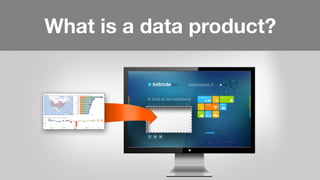
What is a data product?
‹#›
Building a data
product is different.
6
It’s a scary proposition.
It’s the first time for most people
‹#›
The stakes can be very high.
‹#›
You have to treat it
like a journey, not a switch.
‹#›
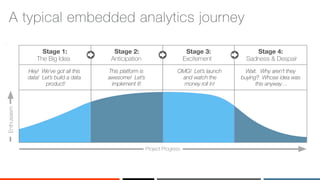
A typical embedded analytics journey
Stage 3:
Excitement
Project Progress
Enthusiasm
Hey! We’ve got all this
data! Let’s build a data
product!
This platform is
awesome! Let’s
implement it!
OMG! Let’s launch
and watch the
money roll in!
Wait. Why aren’t they
buying? Whose idea was
this anyway…
Stage 1:
The Big Idea
Stage 4:
Sadness & Despair
Stage 2:
Anticipation
‹#›
What?My journey to building
analytical products
‹#›
I made one good decision…
‹#›
5 Essential
Steps to
Building a
Data Product
‹#›
Get the team
aligned
Step One
1
‹#›
400+ wins don’t
happen by chance
Credit: Natursport / shutterstock.com
‹#›
You have
to plan for
them.
Credit: Gines Romero / shutterstock.com
16
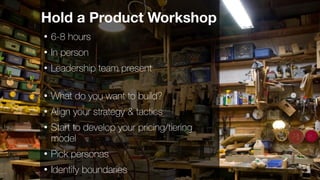
Hold a Product Workshop
• 6-8 hours
• In person
• Leadership team present
• What do you want to build?
• Align your strategy & tactics
• Start to develop your pricing/tiering
model
• Pick personas
• Identify boundaries
‹#›
Create your elevator pitch.
‹#›
Step Two
Know your users
& their needs
2
‹#›Concepts from Nir Eyal “Hooked, How to Build Habit-Forming Products,”
If this is your goal
Goal: an enticing, engaging product
that keeps you coming back
‹#›
You get there by
linking users’ goals to
resolution via
analytics
‹#›Concepts from Nir Eyal “Hooked, How to Build Habit-Forming Products,”
You need to
know:
• Who are you?
• What are you
trying to achieve?
• Why can’t you do
it today?
‹#›
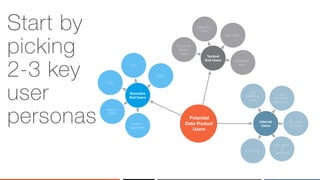
Start by
picking
2-3 key
user
personas Potential
Data Product
Users
CMO
CTO
CPO
Head of
Sales
Head of
Operations
Executive
End Users
Internal
Users
Tactical
End Users Installation
team
Sale Reps
Marketing
team
Customer
Service
reps
Your CPO
Your Head
of
Operations
Your Head
of Sales
Your
Finance/
Billing team
Your
Marketing
team
‹#›
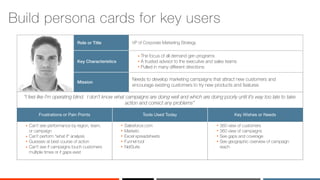
“I feel like I’m operating blind. I don’t know what campaigns are doing well and which are doing poorly until it’s way too late to take
action and correct any problems”
Salesforce.com
Marketo
Excel spreadsheets
Funnel tool
NetSuite
360 view of customers
360 view of campaigns
See gaps and coverage
See geographic overview of campaign
reach
Can’t see performance by region, team,
or campaign
Can’t perform “what if” analysis
Guesses at best course of action
Can’t see if campaigns touch customers
multiple times or if gaps exist
Key Wishes or NeedsTools Used TodayFrustrations or Pain Points
Needs to develop marketing campaigns that attract new customers and
encourage existing customers to try new products and features
Mission
Key Characteristics
The focus of all demand gen programs
A trusted advisor to the executive and sales teams
Pulled in many different directions
VP of Corporate Marketing StrategyRole or Title
Build persona cards for key users
‹#›
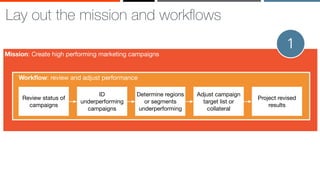
Lay out the mission and workflows
Mission: Create high performing marketing campaigns
Workflow: review and adjust performance
Review status of
campaigns
ID
underperforming
campaigns
Determine regions
or segments
underperforming
Adjust campaign
target list or
collateral
Project revised
results
1
‹#›
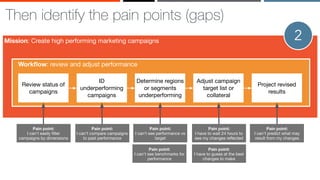
Then identify the pain points (gaps)
Mission: Create high performing marketing campaigns
Workflow: review and adjust performance
Review status of
campaigns
ID
underperforming
campaigns
Determine regions
or segments
underperforming
Adjust campaign
target list or
collateral
Project revised
results
Pain point:
I can't compare campaigns
to past performance
Pain point:
I can't see performance vs
target
Pain point:
I can't see benchmarks for
performance
Pain point:
I can't predict what may
result from my changes
Pain point:
I have to wait 24 hours to
see my changes reflected
Pain point:
I can't easily filter
campaigns by dimensions
Pain point:
I have to guess at the best
changes to make
2
‹#›
And determine the analytics to close the gaps
Table with
filter
Clustered
bar chart
Predictive
analytics
Analytics
for this
persona
Bar/line
chart
Mission: Create high performing marketing campaigns
Workflow: review and adjust performance
Review status of
campaigns
ID
underperforming
campaigns
Determine regions
or segments
underperforming
Adjust campaign
target list or
collateral
Project revised
results
Pain point:
I can't compare campaigns
to past performance
Pain point:
I can't see performance vs
target
Pain point:
I can't see benchmarks for
performance
Pain point:
I can't predict what may
result from my changes
Pain point:
I have to wait 24 hours to
see my changes reflected
Pain point:
I can't easily filter
campaigns by dimensions
Pain point:
I have to guess at the best
changes to make
3
‹#›
Repeat for all personas, missions, & workflows
Mission: Create high performing marketing campaigns
Workflow: create campaign
Workflow: review and adjust performance
Review status of
campaigns
ID
underperforming
campaigns
Determine regions
or segments
underperforming
Adjust campaign
target list or
collateral
Project revised
results
Identify target
markets
Build target list
Select collateral
to serve
View potential
results from
campaign
Launch campaign1
2
Workflow: identify new audiences
Review audience
list coverage
ID underserved
audience
segments
Adjust list to
increase coverage
Project revised
results
3
4
‹#›
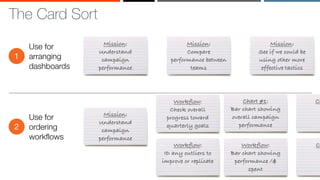
The Card Sort
‹#›
The Card Sort
Mission:
Understand
campaign
performance
Mission:
Compare
performance between
teams
Mission:
See if we could be
using other more
effective tactics
Use for
arranging
dashboards
1
Use for
ordering
workflows
2
Mission:
Understand
campaign
performance
Workflow:
Check overall
progress toward
quarterly goals
Workflow:
ID any outliers to
improve or replicate
Chart #1:
Bar chart showing
overall campaign
performance
Ch
Workflow:
Bar chart showing
performance /$
spent
Ch
‹#›
Decide what
you’re offering
3
‹#›
What
makes you
unique?
‹#›
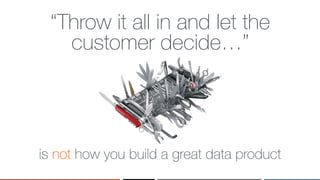
Don’t use the shotgun
approach to dashboard design
‹#›
“Throw it all in and let the
customer decide…”
is not how you build a great data product
‹#›
Creating a great data product is about
having an opinion and making decisions.
‹#›
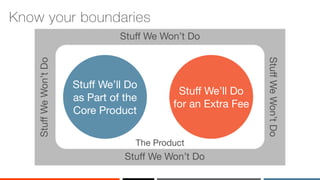
Know your boundaries
Stuff We Won’t Do
StuffWeWon’tDo
The Product
Stuff We’ll Do
as Part of the
Core Product
Stuff We’ll Do
for an Extra Fee
StuffWeWon’tDo
Stuff We Won’t Do
‹#›
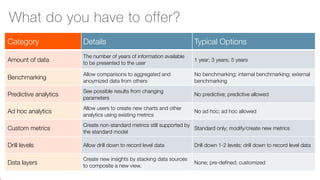
Category Details Typical Options
Amount of data
The number of years of information available
to be presented to the user
1 year; 3 years; 5 years
Benchmarking
Allow comparisons to aggregated and
anoymized data from others
No benchmarking; internal benchmarking; external
benchmarking
Predictive analytics
See possible results from changing
parameters
No predictive; predictive allowed
Ad hoc analytics
Allow users to create new charts and other
analytics using existing metrics
No ad hoc; ad hoc allowed
Custom metrics
Create non-standard metrics still supported by
the standard model
Standard only; modify/create new metrics
Drill levels Allow drill down to record level data Drill down 1-2 levels; drill down to record level data
Data layers
Create new insights by stacking data sources
to composite a new view.
None; pre-defined; customized
What do you have to offer?
‹#›
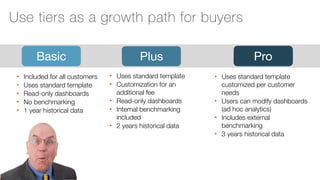
Basic
• Included for all customers
• Uses standard template
• Read-only dashboards
• No benchmarking
• 1 year historical data
Plus Pro
• Uses standard template
• Customization for an
additional fee
• Read-only dashboards
• Internal benchmarking
included
• 2 years historical data
• Uses standard template
customized per customer
needs
• Users can modify dashboards
(ad hoc analytics)
• Includes external
benchmarking
• 3 years historical data
Use tiers as a growth path for buyers
‹#›
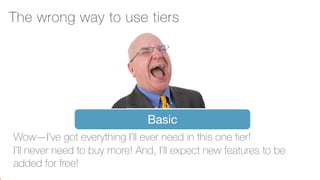
Basic
Wow—I’ve got everything I’ll ever need in this one tier!
I’ll never need to buy more! And, I’ll expect new features to be
added for free!
The wrong way to use tiers
‹#›
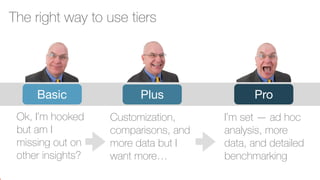
Basic
Ok, I’m hooked
but am I
missing out on
other insights?
Plus Pro
The right way to use tiers
Customization,
comparisons, and
more data but I
want more…
I’m set — ad hoc
analysis, more
data, and detailed
benchmarking
‹#›
Decide how to
price your
analytics
4
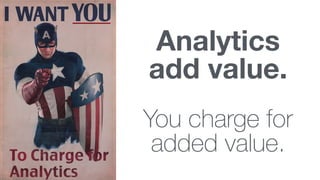
Analytics
add value.
You charge for
added value.
‹#›
The four numbers you need to understand
1
2
3
4
The cost to build your product WITHOUT analytics
The cost of the analytics (platform, services, etc.)
The current price you charge for your product
The price your best competitor with analytics
charges
‹#›
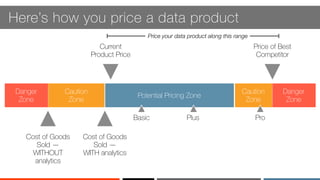
Here’s how you price a data product
Potential Pricing Zone
Caution
Zone
Danger
Zone
Caution
Zone
Danger
Zone
Price your data product along this range
Cost of Goods
Sold —
WITHOUT
analytics
Cost of Goods
Sold —
WITH analytics
Current
Product Price
Price of Best
Competitor
Basic Plus Pro
‹#›
Build your
support system
5
45
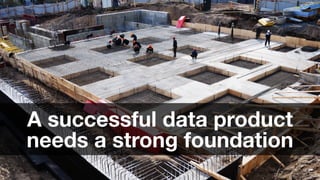
A successful data product
needs a strong foundation
‹#›
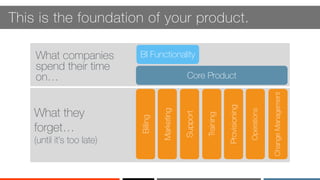
This is the foundation of your product.
Core Product
BI FunctionalityWhat companies
spend their time
on…
Operations
Provisioning
Training
Support
Marketing
Billing
ChangeManagement
What they
forget…
(until it’s too late)
‹#›
Don’t do
this when
building
your
support
processes
48
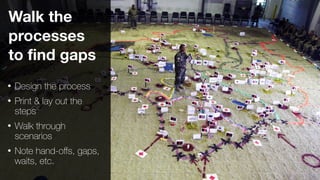
Walk the
processes
to find gaps
• Design the process
• Print & lay out the
steps
• Walk through
scenarios
• Note hand-offs, gaps,
waits, etc.
49
Set trip
wires
• Use key launch
metrics
• Set “do not cross”
thresholds
• Know what to do if
crossed
• Do it beforehand
• Monitor
50
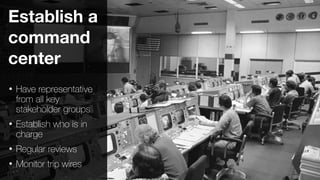
Establish a
command
center
• Have representative
from all key
stakeholder groups
• Establish who is in
charge
• Regular reviews
• Monitor trip wires
‹#›
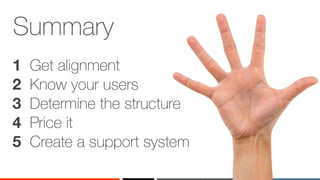
Summary
1 Get alignment
2 Know your users
3 Determine the structure
4 Price it
5 Create a support system
‹#›
‹#›Concepts from Nir Eyal “Hooked, How to Build Habit-Forming Products,”
If this is your goal
Yes
‹#›Concepts from Nir Eyal “Hooked, How to Build Habit-Forming Products,”
No
‹#›
Thank you!

The five essential steps to building a data product

  • 1.
    The 5 EssentialSteps to Building a Data Product
  • 2.
    Webinar notes Please sendquestions using the online interface Attendees muted upon entry
  • 3.
  • 4.
    ‹#› What is adata product?
  • 5.
  • 6.
    6 It’s a scaryproposition. It’s the first time for most people
  • 7.
  • 8.
    ‹#› You have totreat it like a journey, not a switch.
  • 9.
    ‹#› A typical embeddedanalytics journey Stage 3: Excitement Project Progress Enthusiasm Hey! We’ve got all this data! Let’s build a data product! This platform is awesome! Let’s implement it! OMG! Let’s launch and watch the money roll in! Wait. Why aren’t they buying? Whose idea was this anyway… Stage 1: The Big Idea Stage 4: Sadness & Despair Stage 2: Anticipation
  • 10.
    ‹#› What?My journey tobuilding analytical products
  • 11.
    ‹#› I made onegood decision…
  • 12.
  • 13.
  • 14.
    ‹#› 400+ wins don’t happenby chance Credit: Natursport / shutterstock.com
  • 15.
    ‹#› You have to planfor them. Credit: Gines Romero / shutterstock.com
  • 16.
    16 Hold a ProductWorkshop • 6-8 hours • In person • Leadership team present • What do you want to build? • Align your strategy & tactics • Start to develop your pricing/tiering model • Pick personas • Identify boundaries
  • 17.
  • 18.
    ‹#› Step Two Know yourusers & their needs 2
  • 19.
    ‹#›Concepts from NirEyal “Hooked, How to Build Habit-Forming Products,” If this is your goal Goal: an enticing, engaging product that keeps you coming back
  • 20.
    ‹#› You get thereby linking users’ goals to resolution via analytics
  • 21.
    ‹#›Concepts from NirEyal “Hooked, How to Build Habit-Forming Products,” You need to know: • Who are you? • What are you trying to achieve? • Why can’t you do it today?
  • 22.
    ‹#› Start by picking 2-3 key user personasPotential Data Product Users CMO CTO CPO Head of Sales Head of Operations Executive End Users Internal Users Tactical End Users Installation team Sale Reps Marketing team Customer Service reps Your CPO Your Head of Operations Your Head of Sales Your Finance/ Billing team Your Marketing team
  • 23.
    ‹#› “I feel likeI’m operating blind. I don’t know what campaigns are doing well and which are doing poorly until it’s way too late to take action and correct any problems” Salesforce.com Marketo Excel spreadsheets Funnel tool NetSuite 360 view of customers 360 view of campaigns See gaps and coverage See geographic overview of campaign reach Can’t see performance by region, team, or campaign Can’t perform “what if” analysis Guesses at best course of action Can’t see if campaigns touch customers multiple times or if gaps exist Key Wishes or NeedsTools Used TodayFrustrations or Pain Points Needs to develop marketing campaigns that attract new customers and encourage existing customers to try new products and features Mission Key Characteristics The focus of all demand gen programs A trusted advisor to the executive and sales teams Pulled in many different directions VP of Corporate Marketing StrategyRole or Title Build persona cards for key users
  • 24.
    ‹#› Lay out themission and workflows Mission: Create high performing marketing campaigns Workflow: review and adjust performance Review status of campaigns ID underperforming campaigns Determine regions or segments underperforming Adjust campaign target list or collateral Project revised results 1
  • 25.
    ‹#› Then identify thepain points (gaps) Mission: Create high performing marketing campaigns Workflow: review and adjust performance Review status of campaigns ID underperforming campaigns Determine regions or segments underperforming Adjust campaign target list or collateral Project revised results Pain point: I can't compare campaigns to past performance Pain point: I can't see performance vs target Pain point: I can't see benchmarks for performance Pain point: I can't predict what may result from my changes Pain point: I have to wait 24 hours to see my changes reflected Pain point: I can't easily filter campaigns by dimensions Pain point: I have to guess at the best changes to make 2
  • 26.
    ‹#› And determine theanalytics to close the gaps Table with filter Clustered bar chart Predictive analytics Analytics for this persona Bar/line chart Mission: Create high performing marketing campaigns Workflow: review and adjust performance Review status of campaigns ID underperforming campaigns Determine regions or segments underperforming Adjust campaign target list or collateral Project revised results Pain point: I can't compare campaigns to past performance Pain point: I can't see performance vs target Pain point: I can't see benchmarks for performance Pain point: I can't predict what may result from my changes Pain point: I have to wait 24 hours to see my changes reflected Pain point: I can't easily filter campaigns by dimensions Pain point: I have to guess at the best changes to make 3
  • 27.
    ‹#› Repeat for allpersonas, missions, & workflows Mission: Create high performing marketing campaigns Workflow: create campaign Workflow: review and adjust performance Review status of campaigns ID underperforming campaigns Determine regions or segments underperforming Adjust campaign target list or collateral Project revised results Identify target markets Build target list Select collateral to serve View potential results from campaign Launch campaign1 2 Workflow: identify new audiences Review audience list coverage ID underserved audience segments Adjust list to increase coverage Project revised results 3 4
  • 28.
  • 29.
    ‹#› The Card Sort Mission: Understand campaign performance Mission: Compare performancebetween teams Mission: See if we could be using other more effective tactics Use for arranging dashboards 1 Use for ordering workflows 2 Mission: Understand campaign performance Workflow: Check overall progress toward quarterly goals Workflow: ID any outliers to improve or replicate Chart #1: Bar chart showing overall campaign performance Ch Workflow: Bar chart showing performance /$ spent Ch
  • 30.
  • 31.
  • 32.
    ‹#› Don’t use theshotgun approach to dashboard design
  • 33.
    ‹#› “Throw it allin and let the customer decide…” is not how you build a great data product
  • 34.
    ‹#› Creating a greatdata product is about having an opinion and making decisions.
  • 35.
    ‹#› Know your boundaries StuffWe Won’t Do StuffWeWon’tDo The Product Stuff We’ll Do as Part of the Core Product Stuff We’ll Do for an Extra Fee StuffWeWon’tDo Stuff We Won’t Do
  • 36.
    ‹#› Category Details TypicalOptions Amount of data The number of years of information available to be presented to the user 1 year; 3 years; 5 years Benchmarking Allow comparisons to aggregated and anoymized data from others No benchmarking; internal benchmarking; external benchmarking Predictive analytics See possible results from changing parameters No predictive; predictive allowed Ad hoc analytics Allow users to create new charts and other analytics using existing metrics No ad hoc; ad hoc allowed Custom metrics Create non-standard metrics still supported by the standard model Standard only; modify/create new metrics Drill levels Allow drill down to record level data Drill down 1-2 levels; drill down to record level data Data layers Create new insights by stacking data sources to composite a new view. None; pre-defined; customized What do you have to offer?
  • 37.
    ‹#› Basic • Included forall customers • Uses standard template • Read-only dashboards • No benchmarking • 1 year historical data Plus Pro • Uses standard template • Customization for an additional fee • Read-only dashboards • Internal benchmarking included • 2 years historical data • Uses standard template customized per customer needs • Users can modify dashboards (ad hoc analytics) • Includes external benchmarking • 3 years historical data Use tiers as a growth path for buyers
  • 38.
    ‹#› Basic Wow—I’ve got everythingI’ll ever need in this one tier! I’ll never need to buy more! And, I’ll expect new features to be added for free! The wrong way to use tiers
  • 39.
    ‹#› Basic Ok, I’m hooked butam I missing out on other insights? Plus Pro The right way to use tiers Customization, comparisons, and more data but I want more… I’m set — ad hoc analysis, more data, and detailed benchmarking
  • 40.
  • 41.
  • 42.
    ‹#› The four numbersyou need to understand 1 2 3 4 The cost to build your product WITHOUT analytics The cost of the analytics (platform, services, etc.) The current price you charge for your product The price your best competitor with analytics charges
  • 43.
    ‹#› Here’s how youprice a data product Potential Pricing Zone Caution Zone Danger Zone Caution Zone Danger Zone Price your data product along this range Cost of Goods Sold — WITHOUT analytics Cost of Goods Sold — WITH analytics Current Product Price Price of Best Competitor Basic Plus Pro
  • 44.
  • 45.
    45 A successful dataproduct needs a strong foundation
  • 46.
    ‹#› This is thefoundation of your product. Core Product BI FunctionalityWhat companies spend their time on… Operations Provisioning Training Support Marketing Billing ChangeManagement What they forget… (until it’s too late)
  • 47.
  • 48.
    48 Walk the processes to findgaps • Design the process • Print & lay out the steps • Walk through scenarios • Note hand-offs, gaps, waits, etc.
  • 49.
    49 Set trip wires • Usekey launch metrics • Set “do not cross” thresholds • Know what to do if crossed • Do it beforehand • Monitor
  • 50.
    50 Establish a command center • Haverepresentative from all key stakeholder groups • Establish who is in charge • Regular reviews • Monitor trip wires
  • 51.
    ‹#› Summary 1 Get alignment 2Know your users 3 Determine the structure 4 Price it 5 Create a support system
  • 52.
  • 53.
    ‹#›Concepts from NirEyal “Hooked, How to Build Habit-Forming Products,” If this is your goal Yes
  • 54.
    ‹#›Concepts from NirEyal “Hooked, How to Build Habit-Forming Products,” No
  • 55.