ETERNS: WHAT EVERY CAMPUS
NEEDS TO PULL OFF A TECHNOLOGY
          REVOLUTION


Beth Gordon Klingner, Samantha Egan, Megan Burke | 3/12/2013
Copyright [Beth Gordon Klingner
(Ph.D.), Samantha Egan, and Megan Burke]
[2013]. This work is the intellectual property of the
authors. Permission is granted for this material to
be shared for non-commercial, educational
purposes, provided that this copyright statement
appears on the reproduced materials and notice is
given that the copying is by permission of the
author. To disseminate otherwise or to republish
requires written permission from the author.
OVERVIEW
I.       Academic Technology History
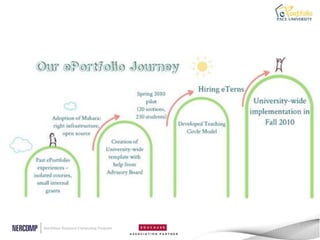
II.      How our ePortfolio Program led to eTerns
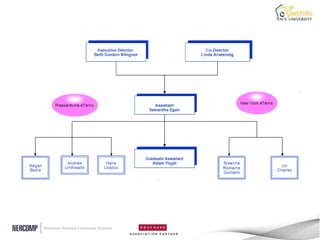
III.     Our Student “Army”
       i.   Funding
                                        Tweet about this session!
       ii. KPIs                         #NERCOMP2013
       iii. Responsibilities
       iv. Impact
       v. Future goals
IV.      Take-aways for your student team
V.       Resources and Contact Info.
VI.      Questions
ABOUT ACADEMIC TECHNOLOGY
 •   Established in 2011 as the newest branch of ITS
 •   Connects the IT department and the academic
     community
 •   Explores, evaluates, and implements various
     instructional technologies
 •   Educates faculty and students about the
     effective use of these technologies through
     workshops, teaching circles, user groups, and
     tutorials
 •   Focuses on: learning management systems,
     web conferencing, lecture capture software,
     electronic portfolios and more
ETERN SUPPORT

 ď‚§ eTernsupport was critical in educating
  the Pace community about this new tool
  ď‚§ eTern   team grew each semester
 ď‚§ Led workshops/demos and provided
   one-on-one assistance
 ď‚§ Immerse themselves in the ins and outs
   of Mahara and provide feedback and
   guidance for development
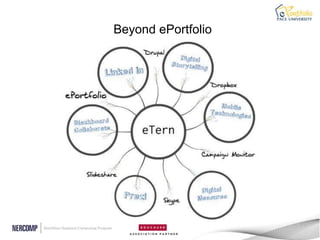
Beyond ePortfolio
FUNDING ETERNS
 ď‚§   Combination of internal and external grants help
     us support our growing eTern team
     ď‚§   Making Connections (Laguardia Community College)
     ď‚§   Thinkfinity: 2010-present
     ď‚§   Connect to Learn (national, three-year FIPSE)
 ď‚§   ITS support
SUCCESS RATES
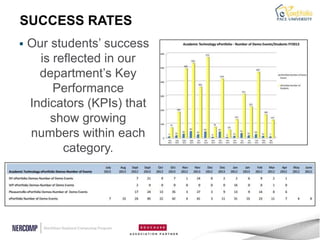
   Our students‟ success
      is reflected in our
      department‟s Key
         Performance
    Indicators (KPIs) that
        show growing
    numbers within each
           category.
Growth
ETERN INNOVATIONS
 ď‚§ Designed template
 ď‚§ Play an essential role in bi-annual teaching circle
   seminars
 ď‚§ Presented at leadership conferences
 ď‚§ Conduct on-site research
 ď‚§ Co-presented at Board of Trustees meetings
 ď‚§ Published in Mahara Newsletter
 ď‚§ Use their role as a basis in their academic work
 ď‚§ Use their role to network in their field
 ď‚§ Design and publish internal communication
ETERN TESTIMONIALS
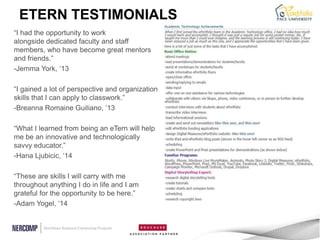
“I had the opportunity to work
alongside dedicated faculty and staff
members, who have become great mentors
and friends.”
-Jemma York, „13

“I gained a lot of perspective and organization
skills that I can apply to classwork.”
-Breanna Romaine Guiliano, „13

“What I learned from being an eTern will help
me be an innovative and technologically
savvy educator.”
-Hana Ljubicic, „14

“These are skills I will carry with me
throughout anything I do in life and I am
grateful for the opportunity to be here.”
-Adam Yogel, „14
ETERNS AT WORK: MEETING THE
    NEEDS OF FACULTY
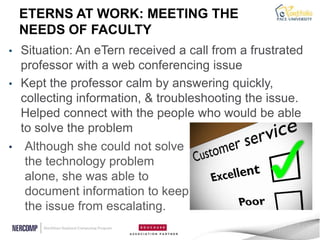
• Situation: An eTern received a call from a frustrated
  professor with a web conferencing issue
• Kept the professor calm by answering quickly,
  collecting information, & troubleshooting the issue.
  Helped connect with the people who would be able
  to solve the problem
• Although she could not solve
   the technology problem
   alone, she was able to
   document information to keep
   the issue from escalating.
LOOKING FORWARD

   •   Exit survey

   •   Develop department eTerns

   •   Increase eTern decision making

   •   Refine Reports

   •   Continue to increase transferable skills
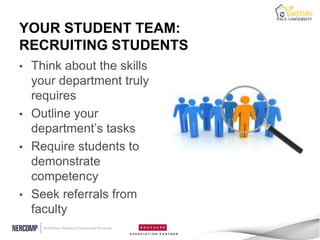
YOUR STUDENT TEAM:
RECRUITING STUDENTS
• Think about the skills
  your department truly
  requires
• Outline your
  department‟s tasks
• Require students to
  demonstrate
  competency
• Seek referrals from
  faculty
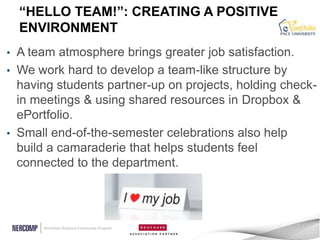
“HELLO TEAM!”: CREATING A POSITIVE
    ENVIRONMENT
• A team atmosphere brings greater job satisfaction.
• We work hard to develop a team-like structure by
  having students partner-up on projects, holding check-
  in meetings & using shared resources in Dropbox &
  ePortfolio.
• Small end-of-the-semester celebrations also help
  build a camaraderie that helps students feel
  connected to the department.
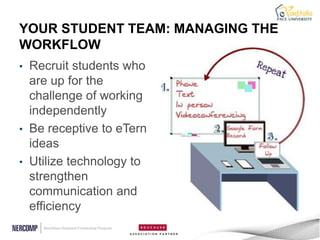
YOUR STUDENT TEAM: MANAGING THE
WORKFLOW
• Recruit students who
  are up for the
  challenge of working
  independently
• Be receptive to eTern
  ideas
• Utilize technology to
  strengthen
  communication and
  efficiency
LINKS

  •   Academic Technology page
  •   ePortfolio
  •   Tutorials
  •   eTern Video
  •   ePortfolio Blog
CONTACT US

 • Beth Gordon Klingner: bklingner@pace.edu
 • Samantha Egan: segan@pace.edu
 • Megan Burke: mb91342p@pace.edu
Thank you for attending!
           Please remember to fill out this
session‟s evaluation by going to the daily agenda on
              the conference website.

    Your feedback directly affects future events.

Nercomp-march2013

  • 1.
    ETERNS: WHAT EVERYCAMPUS NEEDS TO PULL OFF A TECHNOLOGY REVOLUTION Beth Gordon Klingner, Samantha Egan, Megan Burke | 3/12/2013
  • 2.
    Copyright [Beth GordonKlingner (Ph.D.), Samantha Egan, and Megan Burke] [2013]. This work is the intellectual property of the authors. Permission is granted for this material to be shared for non-commercial, educational purposes, provided that this copyright statement appears on the reproduced materials and notice is given that the copying is by permission of the author. To disseminate otherwise or to republish requires written permission from the author.
  • 3.
    OVERVIEW I. Academic Technology History II. How our ePortfolio Program led to eTerns III. Our Student “Army” i. Funding Tweet about this session! ii. KPIs #NERCOMP2013 iii. Responsibilities iv. Impact v. Future goals IV. Take-aways for your student team V. Resources and Contact Info. VI. Questions
  • 4.
    ABOUT ACADEMIC TECHNOLOGY • Established in 2011 as the newest branch of ITS • Connects the IT department and the academic community • Explores, evaluates, and implements various instructional technologies • Educates faculty and students about the effective use of these technologies through workshops, teaching circles, user groups, and tutorials • Focuses on: learning management systems, web conferencing, lecture capture software, electronic portfolios and more
  • 7.
    ETERN SUPPORT ď‚§eTernsupport was critical in educating the Pace community about this new tool ď‚§ eTern team grew each semester ď‚§ Led workshops/demos and provided one-on-one assistance ď‚§ Immerse themselves in the ins and outs of Mahara and provide feedback and guidance for development
  • 8.
  • 9.
    FUNDING ETERNS ď‚§ Combination of internal and external grants help us support our growing eTern team ď‚§ Making Connections (Laguardia Community College) ď‚§ Thinkfinity: 2010-present ď‚§ Connect to Learn (national, three-year FIPSE) ď‚§ ITS support
  • 10.
    SUCCESS RATES  Our students‟ success is reflected in our department‟s Key Performance Indicators (KPIs) that show growing numbers within each category.
  • 11.
  • 12.
    ETERN INNOVATIONS ď‚§Designed template ď‚§ Play an essential role in bi-annual teaching circle seminars ď‚§ Presented at leadership conferences ď‚§ Conduct on-site research ď‚§ Co-presented at Board of Trustees meetings ď‚§ Published in Mahara Newsletter ď‚§ Use their role as a basis in their academic work ď‚§ Use their role to network in their field ď‚§ Design and publish internal communication
  • 13.
    ETERN TESTIMONIALS “I hadthe opportunity to work alongside dedicated faculty and staff members, who have become great mentors and friends.” -Jemma York, „13 “I gained a lot of perspective and organization skills that I can apply to classwork.” -Breanna Romaine Guiliano, „13 “What I learned from being an eTern will help me be an innovative and technologically savvy educator.” -Hana Ljubicic, „14 “These are skills I will carry with me throughout anything I do in life and I am grateful for the opportunity to be here.” -Adam Yogel, „14
  • 14.
    ETERNS AT WORK:MEETING THE NEEDS OF FACULTY • Situation: An eTern received a call from a frustrated professor with a web conferencing issue • Kept the professor calm by answering quickly, collecting information, & troubleshooting the issue. Helped connect with the people who would be able to solve the problem • Although she could not solve the technology problem alone, she was able to document information to keep the issue from escalating.
  • 16.
    LOOKING FORWARD • Exit survey • Develop department eTerns • Increase eTern decision making • Refine Reports • Continue to increase transferable skills
  • 17.
    YOUR STUDENT TEAM: RECRUITINGSTUDENTS • Think about the skills your department truly requires • Outline your department‟s tasks • Require students to demonstrate competency • Seek referrals from faculty
  • 18.
    “HELLO TEAM!”: CREATINGA POSITIVE ENVIRONMENT • A team atmosphere brings greater job satisfaction. • We work hard to develop a team-like structure by having students partner-up on projects, holding check- in meetings & using shared resources in Dropbox & ePortfolio. • Small end-of-the-semester celebrations also help build a camaraderie that helps students feel connected to the department.
  • 19.
    YOUR STUDENT TEAM:MANAGING THE WORKFLOW • Recruit students who are up for the challenge of working independently • Be receptive to eTern ideas • Utilize technology to strengthen communication and efficiency
  • 20.
    LINKS • Academic Technology page • ePortfolio • Tutorials • eTern Video • ePortfolio Blog
  • 21.
    CONTACT US •Beth Gordon Klingner: bklingner@pace.edu • Samantha Egan: segan@pace.edu • Megan Burke: mb91342p@pace.edu
  • 22.
    Thank you forattending! Please remember to fill out this session‟s evaluation by going to the daily agenda on the conference website. Your feedback directly affects future events.

Editor's Notes

  • #2 AllHow many of you use students to support your technology projects? Beyond hardware support? IN a more collaborative, innovative, eduational way?
  • #4 BGK
  • #5 BGK
  • #6 BGK
  • #7 BGK
  • #8 BGK
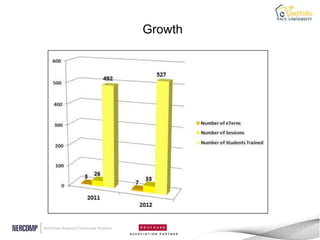
  • #9 MEGAs academic technology grows so does the work of our eternsGraphic to show growth and tools
  • #10 Sam
  • #11 SAM
  • #12 SAM – add percent increase
  • #13 SAM
  • #14 MEG
  • #15 BGK
  • #16 MEG
  • #17 SAM-
  • #18 BGK
  • #19 MEG
  • #20 SAM Our multi-campus structure gave us the unique challenge of managing half of our students from a distance-no investment in additional software
  • #21 MEG
  • #22 MEG
  • #23 BGKWhat are the questions?Does this give you any ideas about using students to advance your technology initiatives?