WEEK 8   Using ICT skills to enhance student engagement and literacy

            Key ideas

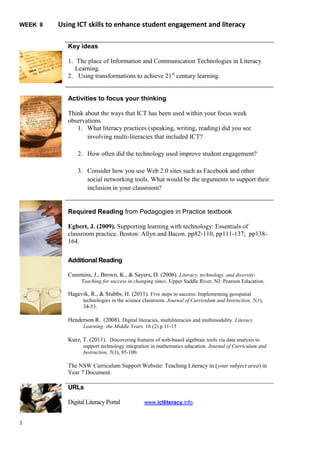
            1. The place of Information and Communication Technologies in Literacy
               Learning.
            2. Using transformations to achieve 21st century learning.


            Activities to focus your thinking

            Think about the ways that ICT has been used within your focus week
            observations.
               1. What literacy practices (speaking, writing, reading) did you see
                   involving multi-literacies that included ICT?

                2. How often did the technology used improve student engagement?

                3. Consider how you use Web 2.0 sites such as Facebook and other
                   social networking tools. What would be the arguments to support their
                   inclusion in your classroom?


            Required Reading from Pedagogies in Practice textbook

            Egbert, J. (2009). Supporting learning with technology: Essentials of
            classroom practice. Boston: Allyn and Bacon. pp82-110, pp111-137; pp138-
            164.

            Additional Reading

            Cummins, J., Brown, K., & Sayers, D. (2006). Literacy, technology, and diversity:
                  Teaching for success in changing times. Upper Saddle River, NJ: Pearson Education.

            Hagevik, R., & Stubbs, H. (2011). Five steps to success: Implementing geospatial
                  technologies in the science classroom. Journal of Curriculum and Instruction, 5(1),
                  34-53.

            Henderson R. (2008). Digital literacies, multiliteracies and multimodality. Literacy
                  Learning: the Middle Years. 16 (2) p.11-15

            Kurz, T. (2011). Discovering features of web-based algebraic tools via data analysis to
                  support technology integration in mathematics education. Journal of Curriculum and
                  Instruction, 5(1), 85-100.

            The NSW Curriculum Support Website: Teaching Literacy in (your subject area) in
            Year 7 Document.

            URLs

            Digital Literacy Portal           www.ictliteracy.info


1
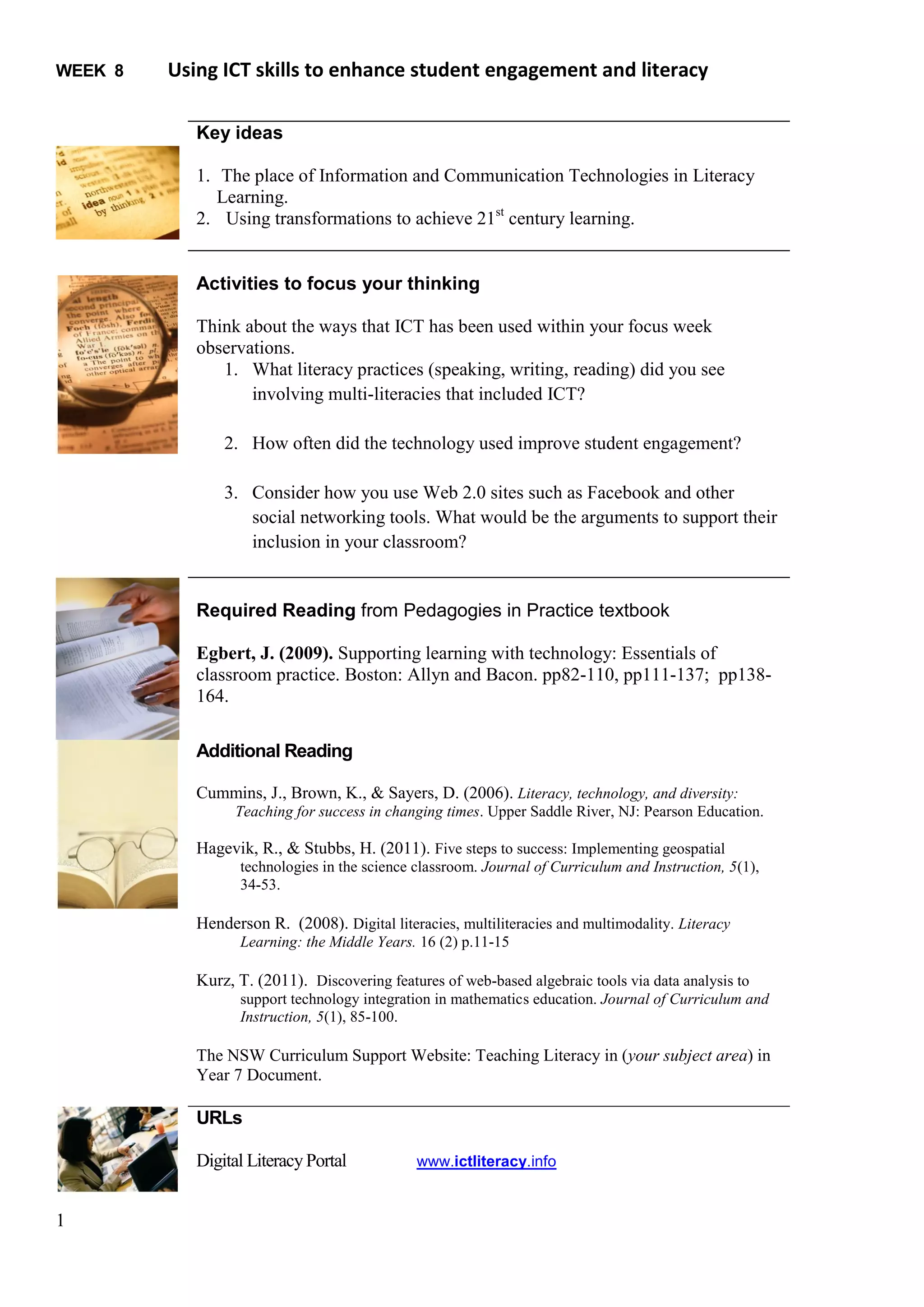
Week 8 TUTORIAL ACTIVITIES: Using ICT skills to enhance student engagement and literacy


Activity One (10 minutes)
  (a) Read the following instructions for the activity so that you know what is expected
      of the students
Follow the instructions very carefully
    1. Individually read the following sections of the document LOCATING A SETTLEMENT
           a. Presentation of the problem
           b. Background

    2. Construct a group of three or four with each member having different skills that will support
       achieving the best decision making for the group. List your groups members in the following space:


    3. Collect an A3 copy of the map from the teacher’s desk.

    4. Read Step One under the heading DIRECTIONS then
                  i. Identify the factions on board the ship
                 ii. Collect a copy of the advantages and disadvantages table from the front desk ( 1 per
                     group)
                iii. Complete the table for all the sites labelled A to G that allows you to look at the
                     advantages and disadvantages of each site.

    5. Make your decision and prepare a 3 minute presentation to present to the whole ship’s company.

    6. Be prepared to be part of a larger group decision.

           a. What issues are you willing to compromise?
           b. What issues are you not willing to compromise on?
           c. Have you developed the best arguments that you can for your choice of location?

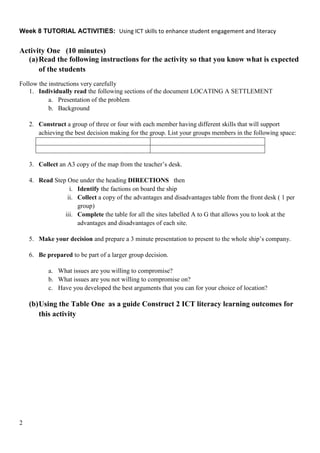
    (b) Using the Table One as a guide Construct 2 ICT literacy learning outcomes for
        this activity


2
(c)

     Table 1: Components of ICT Literacy
       Proficiency                                         Definition
     Define               Using digital tools to identify and represent an information need
     Access               Collecting and/or retrieving information in digital environments
     Manage               Using digital tools to apply an existing organizational or classification
                          scheme for information
     Integrate            Interpreting and representing information, such as by using digital tools
                          to synthesize, summarize, compare, and contrast information from
                          multiple sources
     Evaluate             Judging the degree to which digital information satisfies the needs of an
                          information problem, including determining authority, bias, and
                          timeliness of materials
     Create               Adapting, applying, designing, or constructing information in digital
                          environments
     Communicate          Disseminating information relevant to a particular audience in an
                          effective digital format
     Source: Katz, I. R. & Macklin, A. S. (2011) Information and Communication Technology (ICT) Literacy:


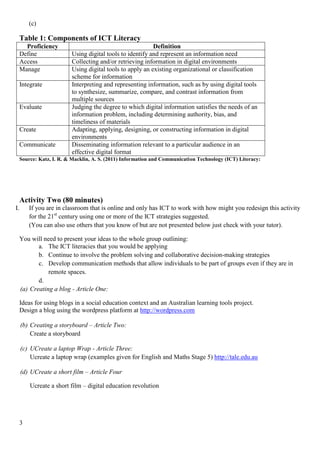
     Activity Two (80 minutes)
I.       If you are in classroom that is online and only has ICT to work with how might you redesign this activity
         for the 21st century using one or more of the ICT strategies suggested.
         (You can also use others that you know of but are not presented below just check with your tutor).

     You will need to present your ideas to the whole group outlining:
            a. The ICT literacies that you would be applying
            b. Continue to involve the problem solving and collaborative decision-making strategies
            c. Develop communication methods that allow individuals to be part of groups even if they are in
                remote spaces.
            d.
     (a) Creating a blog - Article One:

     Ideas for using blogs in a social education context and an Australian learning tools project.
     Design a blog using the wordpress platform at http://wordpress.com

     (b) Creating a storyboard – Article Two:
         Create a storyboard

     (c) UCreate a laptop Wrap - Article Three:
         Ucreate a laptop wrap (examples given for English and Maths Stage 5) http://tale.edu.au

     (d) UCreate a short film – Article Four

         Ucreate a short film – digital education revolution


     3
Additional Activities for when the lights got out, the electricity shuts down and the
technology just won’t work.


Options


Activity Three
Carry out the task in Activity One allowing students to go through the problem-solving and decision-making
processes.

Activity Four
Discuss the following articles and issues arising from the lecture in terms of:
                    i. Pedagogy
                   ii. Technology
                  iii. Content
       a. Article Five
           Hunter, J. (2011) Connected learning in an Australian Technology program: a case study.
           International Journal of Virtual and Personal Learning Environments, 2(1) 66-73.
       b. Article Six
           Stories from a Digital Space

Activity Five: Article Seven
How could you use the schoolatoz, and www.tale.edu.au in dealing with
               a. Digital citizenship
               b. Facebook
               c. Being Manipulated


4

Week%208 1.%20 tutorial%20activities

  • 1.
    WEEK 8 Using ICT skills to enhance student engagement and literacy Key ideas 1. The place of Information and Communication Technologies in Literacy Learning. 2. Using transformations to achieve 21st century learning. Activities to focus your thinking Think about the ways that ICT has been used within your focus week observations. 1. What literacy practices (speaking, writing, reading) did you see involving multi-literacies that included ICT? 2. How often did the technology used improve student engagement? 3. Consider how you use Web 2.0 sites such as Facebook and other social networking tools. What would be the arguments to support their inclusion in your classroom? Required Reading from Pedagogies in Practice textbook Egbert, J. (2009). Supporting learning with technology: Essentials of classroom practice. Boston: Allyn and Bacon. pp82-110, pp111-137; pp138- 164. Additional Reading Cummins, J., Brown, K., & Sayers, D. (2006). Literacy, technology, and diversity: Teaching for success in changing times. Upper Saddle River, NJ: Pearson Education. Hagevik, R., & Stubbs, H. (2011). Five steps to success: Implementing geospatial technologies in the science classroom. Journal of Curriculum and Instruction, 5(1), 34-53. Henderson R. (2008). Digital literacies, multiliteracies and multimodality. Literacy Learning: the Middle Years. 16 (2) p.11-15 Kurz, T. (2011). Discovering features of web-based algebraic tools via data analysis to support technology integration in mathematics education. Journal of Curriculum and Instruction, 5(1), 85-100. The NSW Curriculum Support Website: Teaching Literacy in (your subject area) in Year 7 Document. URLs Digital Literacy Portal www.ictliteracy.info 1
  • 2.
    Week 8 TUTORIALACTIVITIES: Using ICT skills to enhance student engagement and literacy Activity One (10 minutes) (a) Read the following instructions for the activity so that you know what is expected of the students Follow the instructions very carefully 1. Individually read the following sections of the document LOCATING A SETTLEMENT a. Presentation of the problem b. Background 2. Construct a group of three or four with each member having different skills that will support achieving the best decision making for the group. List your groups members in the following space: 3. Collect an A3 copy of the map from the teacher’s desk. 4. Read Step One under the heading DIRECTIONS then i. Identify the factions on board the ship ii. Collect a copy of the advantages and disadvantages table from the front desk ( 1 per group) iii. Complete the table for all the sites labelled A to G that allows you to look at the advantages and disadvantages of each site. 5. Make your decision and prepare a 3 minute presentation to present to the whole ship’s company. 6. Be prepared to be part of a larger group decision. a. What issues are you willing to compromise? b. What issues are you not willing to compromise on? c. Have you developed the best arguments that you can for your choice of location? (b) Using the Table One as a guide Construct 2 ICT literacy learning outcomes for this activity 2
  • 3.
    (c) Table 1: Components of ICT Literacy Proficiency Definition Define Using digital tools to identify and represent an information need Access Collecting and/or retrieving information in digital environments Manage Using digital tools to apply an existing organizational or classification scheme for information Integrate Interpreting and representing information, such as by using digital tools to synthesize, summarize, compare, and contrast information from multiple sources Evaluate Judging the degree to which digital information satisfies the needs of an information problem, including determining authority, bias, and timeliness of materials Create Adapting, applying, designing, or constructing information in digital environments Communicate Disseminating information relevant to a particular audience in an effective digital format Source: Katz, I. R. & Macklin, A. S. (2011) Information and Communication Technology (ICT) Literacy: Activity Two (80 minutes) I. If you are in classroom that is online and only has ICT to work with how might you redesign this activity for the 21st century using one or more of the ICT strategies suggested. (You can also use others that you know of but are not presented below just check with your tutor). You will need to present your ideas to the whole group outlining: a. The ICT literacies that you would be applying b. Continue to involve the problem solving and collaborative decision-making strategies c. Develop communication methods that allow individuals to be part of groups even if they are in remote spaces. d. (a) Creating a blog - Article One: Ideas for using blogs in a social education context and an Australian learning tools project. Design a blog using the wordpress platform at http://wordpress.com (b) Creating a storyboard – Article Two: Create a storyboard (c) UCreate a laptop Wrap - Article Three: Ucreate a laptop wrap (examples given for English and Maths Stage 5) http://tale.edu.au (d) UCreate a short film – Article Four Ucreate a short film – digital education revolution 3
  • 4.
    Additional Activities forwhen the lights got out, the electricity shuts down and the technology just won’t work. Options Activity Three Carry out the task in Activity One allowing students to go through the problem-solving and decision-making processes. Activity Four Discuss the following articles and issues arising from the lecture in terms of: i. Pedagogy ii. Technology iii. Content a. Article Five Hunter, J. (2011) Connected learning in an Australian Technology program: a case study. International Journal of Virtual and Personal Learning Environments, 2(1) 66-73. b. Article Six Stories from a Digital Space Activity Five: Article Seven How could you use the schoolatoz, and www.tale.edu.au in dealing with a. Digital citizenship b. Facebook c. Being Manipulated 4