Tensor Flow from Google
A closer look
– Nikhil Krishna
Hi!
My name is Nikhil and I am not a data scientist or a computer
scientist or any kind of scientist!
Agenda
What is Tensor Flow?
Tensor Flow computational model
Tensor Flow capabilities
What is not supported
Visualizing your model with Tensor Board
Building a simple image classifier with Tensor Flow
Installation and setup
Running the Image Classifier example
Tensor Flow Performance and Parallelism
3
What is Tensor Flow?
Tensor Flow is a powerful library for
doing large-scale numerical
computation using data flow graphs
Nodes in the graph represent
mathematical operations while the
edges represent multidimensional data
arrays (tensors)
Built by the Google Brain team for ML
and deep neural networks research
The computational model used in
Tensor Flow
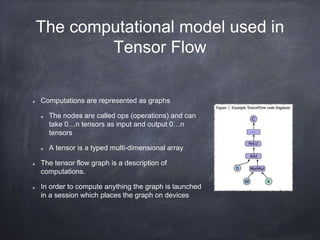
Computations are represented as graphs
The nodes are called ops (operations) and can
take 0…n tensors as input and output 0…n
tensors
A tensor is a typed multi-dimensional array
The tensor flow graph is a description of
computations.
In order to compute anything the graph is launched
in a session which places the graph on devices
Tensor Flow Capabilities
It’s written in C/C++ but has strong python support. It integrates well with
iPython so it’s easy to use interactively
Tensor Flow can run CPU or GPU and on Desktop, Server and Mobile
(Android, iOS and even Raspberry Pi)
Flexibly assign compute elements of your graph to devices (CPU, GPU) and
let Tensor Flow handle the distribution of the copies
Easily setup a distributed cluster and distribute your graph across it.
Installing Tensor Flow
Multiple ways to do it – Docker, Anaconda, PIP and source code.
Anaconda seems to be a consistent way to do it that has the added
advantage of bundling other data manipulation and machine learning
packages like SciKit Learn, Numpy, etc
If you machine has NVidia GPU then you can leverage Tensor Flow on
GPU by installing the CUDA toolkit.
Recommend installing iPython as well. It’s a great way to explore the
Tensor Flow Library.
Let’s look at iPython
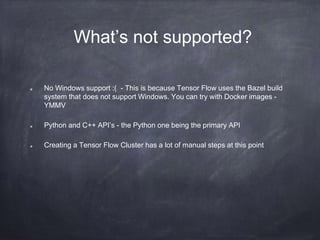
What’s not supported?
No Windows support :( - This is because Tensor Flow uses the Bazel build
system that does not support Windows. You can try with Docker images -
YMMV
Python and C++ API’s - the Python one being the primary API
Creating a Tensor Flow Cluster has a lot of manual steps at this point
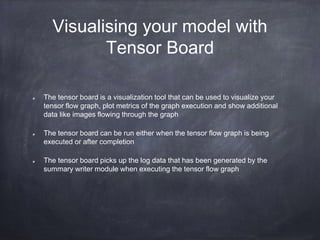
Visualising your model with
Tensor Board
The tensor board is a visualization tool that can be used to visualize your
tensor flow graph, plot metrics of the graph execution and show additional
data like images flowing through the graph
The tensor board can be run either when the tensor flow graph is being
executed or after completion
The tensor board picks up the log data that has been generated by the
summary writer module when executing the tensor flow graph
Building an image classifier
How are we going to do image
classification?
The process of categorising a group of images while only using some basic
features that describe them.
Logistic regression, Support Vector Machines, Naive Bayes and Neural
Networks are common classification algorithms
We are going to use the Inception Convolutional Neural Network from
Google in our image classifier
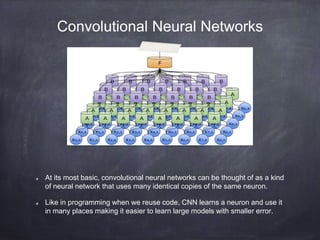
Convolutional Neural Networks
At its most basic, convolutional neural networks can be thought of as a kind
of neural network that uses many identical copies of the same neuron.
Like in programming when we reuse code, CNN learns a neuron and use it
in many places making it easier to learn large models with smaller error.
Inception V3 Model
This is a CNN model that has been trained by Google on
1000 categories supplied by the ImageNet competition to
near human accuracy.
We will retrain the model (transfer learning) to help us classify
arbitrary image classifications
We are going to retrain the final layer of the classification.
This is possible because the CNN uses multiple layers to fine
tune classification.
Re-training Inception
Download the creative commons images of flowers and create
a directory structure with class names as sub-directories.
Run the retraining script. We can tweak the parameters to
reduce the time taken or increase the accuracy of the classifier
This script loads the pre-trained Inception v3 model, removes
the old final layer, and trains a new one on the flower photos.
Let’s look at some code
Distributed Tensor Flow
A Tensor Flow ‘cluster’ is a set of ‘tasks’ that participate in the
distributed execution of a Tensor Flow graph.
Each task is associated to a Tensor Flow ‘server’ which contains a
‘master’ that can be used to create sessions and a ‘worker’ that
executes operations in the graph.
Each task typically runs on a separate machine but you can run
multiple tasks on the same machine.
Questions
The training accuracy shows the percentage of the images
used in the current training batch that were labeled with the
correct class.
Validation accuracy: The validation accuracy is the
precision (percentage of correctly-labelled images) on a
randomly-selected group of images from a different set.
Cross entropy is a loss function that gives a glimpse into
how well the learning process is progressing. (Lower
numbers are better here.)
Bottleneck' is an informal term for the layer just before the final
output layer that actually does the classification. This penultimate
layer has been trained to output a set of values that's good enough
for the classifier to use to distinguish between all the classes it's
been asked to recognize.
Because every image is reused multiple times during training and
calculating each bottleneck takes a significant amount of time, it
speeds things up to cache these bottleneck values on disk so they
don't have to be repeatedly recalculated. By default they're stored in
the /tmp/bottleneck directory, and if you rerun the script they'll be
reused so you don't have to wait for this part again.
So whats a classifier?
A classifier is a function that takes some data as input and assigns a label to
it as output
Supervised learning lets you write a classifier automatically
Getting good data and identifying features
It’s all about the data
There are certain publicly available datasets that are used for learning
TF Learn module has an API to download MNIST, IRIS, Boston Housing
datasets
Very useful for learning and understanding the concepts and quickly
bootstrap yourself.
We are going to look at MNIST and the IRIS datasets

Tensor flow

  • 1.
    Tensor Flow fromGoogle A closer look
  • 2.
    – Nikhil Krishna Hi! Myname is Nikhil and I am not a data scientist or a computer scientist or any kind of scientist!
  • 3.
    Agenda What is TensorFlow? Tensor Flow computational model Tensor Flow capabilities What is not supported Visualizing your model with Tensor Board Building a simple image classifier with Tensor Flow Installation and setup Running the Image Classifier example Tensor Flow Performance and Parallelism 3
  • 4.
    What is TensorFlow? Tensor Flow is a powerful library for doing large-scale numerical computation using data flow graphs Nodes in the graph represent mathematical operations while the edges represent multidimensional data arrays (tensors) Built by the Google Brain team for ML and deep neural networks research
  • 5.
    The computational modelused in Tensor Flow Computations are represented as graphs The nodes are called ops (operations) and can take 0…n tensors as input and output 0…n tensors A tensor is a typed multi-dimensional array The tensor flow graph is a description of computations. In order to compute anything the graph is launched in a session which places the graph on devices
  • 6.
    Tensor Flow Capabilities It’swritten in C/C++ but has strong python support. It integrates well with iPython so it’s easy to use interactively Tensor Flow can run CPU or GPU and on Desktop, Server and Mobile (Android, iOS and even Raspberry Pi) Flexibly assign compute elements of your graph to devices (CPU, GPU) and let Tensor Flow handle the distribution of the copies Easily setup a distributed cluster and distribute your graph across it.
  • 7.
    Installing Tensor Flow Multipleways to do it – Docker, Anaconda, PIP and source code. Anaconda seems to be a consistent way to do it that has the added advantage of bundling other data manipulation and machine learning packages like SciKit Learn, Numpy, etc If you machine has NVidia GPU then you can leverage Tensor Flow on GPU by installing the CUDA toolkit. Recommend installing iPython as well. It’s a great way to explore the Tensor Flow Library.
  • 8.
  • 9.
    What’s not supported? NoWindows support :( - This is because Tensor Flow uses the Bazel build system that does not support Windows. You can try with Docker images - YMMV Python and C++ API’s - the Python one being the primary API Creating a Tensor Flow Cluster has a lot of manual steps at this point
  • 10.
    Visualising your modelwith Tensor Board The tensor board is a visualization tool that can be used to visualize your tensor flow graph, plot metrics of the graph execution and show additional data like images flowing through the graph The tensor board can be run either when the tensor flow graph is being executed or after completion The tensor board picks up the log data that has been generated by the summary writer module when executing the tensor flow graph
  • 11.
  • 12.
    How are wegoing to do image classification? The process of categorising a group of images while only using some basic features that describe them. Logistic regression, Support Vector Machines, Naive Bayes and Neural Networks are common classification algorithms We are going to use the Inception Convolutional Neural Network from Google in our image classifier
  • 13.
    Convolutional Neural Networks Atits most basic, convolutional neural networks can be thought of as a kind of neural network that uses many identical copies of the same neuron. Like in programming when we reuse code, CNN learns a neuron and use it in many places making it easier to learn large models with smaller error.
  • 14.
    Inception V3 Model Thisis a CNN model that has been trained by Google on 1000 categories supplied by the ImageNet competition to near human accuracy. We will retrain the model (transfer learning) to help us classify arbitrary image classifications We are going to retrain the final layer of the classification. This is possible because the CNN uses multiple layers to fine tune classification.
  • 15.
    Re-training Inception Download thecreative commons images of flowers and create a directory structure with class names as sub-directories. Run the retraining script. We can tweak the parameters to reduce the time taken or increase the accuracy of the classifier This script loads the pre-trained Inception v3 model, removes the old final layer, and trains a new one on the flower photos.
  • 16.
    Let’s look atsome code
  • 17.
    Distributed Tensor Flow ATensor Flow ‘cluster’ is a set of ‘tasks’ that participate in the distributed execution of a Tensor Flow graph. Each task is associated to a Tensor Flow ‘server’ which contains a ‘master’ that can be used to create sessions and a ‘worker’ that executes operations in the graph. Each task typically runs on a separate machine but you can run multiple tasks on the same machine.
  • 18.
  • 19.
    The training accuracyshows the percentage of the images used in the current training batch that were labeled with the correct class. Validation accuracy: The validation accuracy is the precision (percentage of correctly-labelled images) on a randomly-selected group of images from a different set. Cross entropy is a loss function that gives a glimpse into how well the learning process is progressing. (Lower numbers are better here.)
  • 20.
    Bottleneck' is aninformal term for the layer just before the final output layer that actually does the classification. This penultimate layer has been trained to output a set of values that's good enough for the classifier to use to distinguish between all the classes it's been asked to recognize. Because every image is reused multiple times during training and calculating each bottleneck takes a significant amount of time, it speeds things up to cache these bottleneck values on disk so they don't have to be repeatedly recalculated. By default they're stored in the /tmp/bottleneck directory, and if you rerun the script they'll be reused so you don't have to wait for this part again.
  • 21.
    So whats aclassifier? A classifier is a function that takes some data as input and assigns a label to it as output Supervised learning lets you write a classifier automatically Getting good data and identifying features
  • 22.
    It’s all aboutthe data There are certain publicly available datasets that are used for learning TF Learn module has an API to download MNIST, IRIS, Boston Housing datasets Very useful for learning and understanding the concepts and quickly bootstrap yourself. We are going to look at MNIST and the IRIS datasets