By:- BhawanaSrivastava
 TELNET stands for TErminaL NETwork. It is a type
of protocol that enables one computer to connect to
local computer.
 It is a used as a standard TCP/IP protocol for virtual
terminal service which is given by ISO. Computer
which starts connection known as the local
computer.
 Computer which is being connected to i.e. which
accepts the connection known as remote computer.
When the connection is established between local
and remote computer.
 During telnet operation whatever that is performing
on the remote computer will be displayed by local
computer.
 Telnet operates on client/server principle. Local
computer uses telnet client program and the remote
computers uses telnet server program.
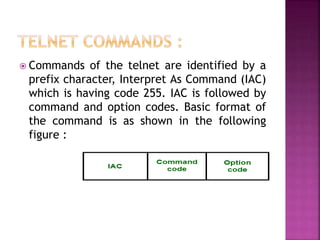
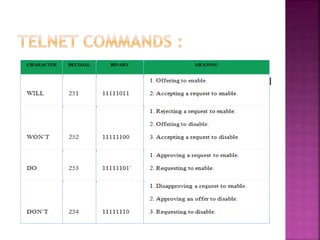
 Commands of the telnet are identified by a
prefix character, Interpret As Command (IAC)
which is having code 255. IAC is followed by
command and option codes. Basic format of
the command is as shown in the following
figure :
Figure – Telnet command format
 Most telnet implementation operates in one
of the following three modes :
1. Default mode
2. Character mode
3. Line mode
 If there is no other modes are invoked then
this mode is used.
 Echoing is performed in this mode by client.
 In this mode, user types a character and client
enchoes the character on the screen but it
does not send it until whole line is completed.
 Each character typed in this mode is sent by
client to server.
 Server in this type of mode is normally
enchoes character back to be displayed on
the client’s screen.
 Line editing like echoing, character erasing
etc is done from the client side.
 Client will send the whole line to the server.
 TELNET (TELecommunication
NETwork) and FTP (File Transfer
Protocol) both are the application layer
protocol. They are connection oriented
protocols as they create a connection
between remote host and a server.
 AS name File Transfer Protocol, FTP is used
for transferring the files from one system to
another system. and TELNET is used for
remote login for a system.
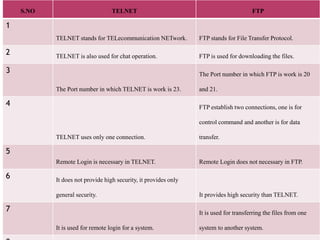
 There are some differences between TELNET
and FTP which are given below:
S.NO TELNET FTP
1
TELNET stands for TELecommunication NETwork. FTP stands for File Transfer Protocol.
2 TELNET is also used for chat operation. FTP is used for downloading the files.
3
The Port number in which TELNET is work is 23.
The Port number in which FTP is work is 20
and 21.
4
TELNET uses only one connection.
FTP establish two connections, one is for
control command and another is for data
transfer.
5
Remote Login is necessary in TELNET. Remote Login does not necessary in FTP.
6 It does not provide high security, it provides only
general security. It provides high security than TELNET.
7
It is used for remote login for a system.
It is used for transferring the files from one
system to another system.
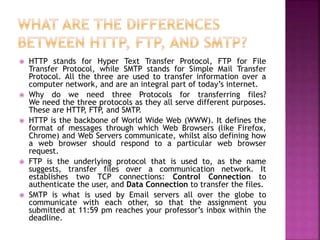
 HTTP stands for Hyper Text Transfer Protocol, FTP for File
Transfer Protocol, while SMTP stands for Simple Mail Transfer
Protocol. All the three are used to transfer information over a
computer network, and are an integral part of today’s internet.
 Why do we need three Protocols for transferring files?
We need the three protocols as they all serve different purposes.
These are HTTP, FTP, and SMTP.
 HTTP is the backbone of World Wide Web (WWW). It defines the
format of messages through which Web Browsers (like Firefox,
Chrome) and Web Servers communicate, whilst also defining how
a web browser should respond to a particular web browser
request.
 FTP is the underlying protocol that is used to, as the name
suggests, transfer files over a communication network. It
establishes two TCP connections: Control Connection to
authenticate the user, and Data Connection to transfer the files.
 SMTP is what is used by Email servers all over the globe to
communicate with each other, so that the assignment you
submitted at 11:59 pm reaches your professor’s inbox within the
deadline.
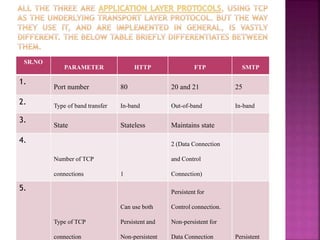
SR.NO
PARAMETER HTTP FTP SMTP
1.
Port number 80 20 and 21 25
2. Type of band transfer In-band Out-of-band In-band
3.
State Stateless Maintains state
4.
Number of TCP
connections 1
2 (Data Connection
and Control
Connection)
5.
Type of TCP
connection
Can use both
Persistent and
Non-persistent
Persistent for
Control connection.
Non-persistent for
Data Connection Persistent
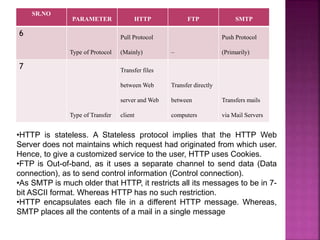
SR.NO
PARAMETER HTTP FTP SMTP
6
Type of Protocol
Pull Protocol
(Mainly) –
Push Protocol
(Primarily)
7
Type of Transfer
Transfer files
between Web
server and Web
client
Transfer directly
between
computers
Transfers mails
via Mail Servers
•HTTP is stateless. A Stateless protocol implies that the HTTP Web
Server does not maintains which request had originated from which user.
Hence, to give a customized service to the user, HTTP uses Cookies.
•FTP is Out-of-band, as it uses a separate channel to send data (Data
connection), as to send control information (Control connection).
•As SMTP is much older that HTTP, it restricts all its messages to be in 7-
bit ASCII format. Whereas HTTP has no such restriction.
•HTTP encapsulates each file in a different HTTP message. Whereas,
SMTP places all the contents of a mail in a single message

Introduction to telnet

  • 1.
  • 2.
     TELNET standsfor TErminaL NETwork. It is a type of protocol that enables one computer to connect to local computer.  It is a used as a standard TCP/IP protocol for virtual terminal service which is given by ISO. Computer which starts connection known as the local computer.  Computer which is being connected to i.e. which accepts the connection known as remote computer. When the connection is established between local and remote computer.  During telnet operation whatever that is performing on the remote computer will be displayed by local computer.  Telnet operates on client/server principle. Local computer uses telnet client program and the remote computers uses telnet server program.
  • 3.
     Commands ofthe telnet are identified by a prefix character, Interpret As Command (IAC) which is having code 255. IAC is followed by command and option codes. Basic format of the command is as shown in the following figure : Figure – Telnet command format
  • 5.
     Most telnetimplementation operates in one of the following three modes : 1. Default mode 2. Character mode 3. Line mode
  • 6.
     If thereis no other modes are invoked then this mode is used.  Echoing is performed in this mode by client.  In this mode, user types a character and client enchoes the character on the screen but it does not send it until whole line is completed.
  • 7.
     Each charactertyped in this mode is sent by client to server.  Server in this type of mode is normally enchoes character back to be displayed on the client’s screen.
  • 8.
     Line editinglike echoing, character erasing etc is done from the client side.  Client will send the whole line to the server.
  • 9.
     TELNET (TELecommunication NETwork)and FTP (File Transfer Protocol) both are the application layer protocol. They are connection oriented protocols as they create a connection between remote host and a server.  AS name File Transfer Protocol, FTP is used for transferring the files from one system to another system. and TELNET is used for remote login for a system.  There are some differences between TELNET and FTP which are given below:
  • 10.
    S.NO TELNET FTP 1 TELNETstands for TELecommunication NETwork. FTP stands for File Transfer Protocol. 2 TELNET is also used for chat operation. FTP is used for downloading the files. 3 The Port number in which TELNET is work is 23. The Port number in which FTP is work is 20 and 21. 4 TELNET uses only one connection. FTP establish two connections, one is for control command and another is for data transfer. 5 Remote Login is necessary in TELNET. Remote Login does not necessary in FTP. 6 It does not provide high security, it provides only general security. It provides high security than TELNET. 7 It is used for remote login for a system. It is used for transferring the files from one system to another system.
  • 11.
     HTTP standsfor Hyper Text Transfer Protocol, FTP for File Transfer Protocol, while SMTP stands for Simple Mail Transfer Protocol. All the three are used to transfer information over a computer network, and are an integral part of today’s internet.  Why do we need three Protocols for transferring files? We need the three protocols as they all serve different purposes. These are HTTP, FTP, and SMTP.  HTTP is the backbone of World Wide Web (WWW). It defines the format of messages through which Web Browsers (like Firefox, Chrome) and Web Servers communicate, whilst also defining how a web browser should respond to a particular web browser request.  FTP is the underlying protocol that is used to, as the name suggests, transfer files over a communication network. It establishes two TCP connections: Control Connection to authenticate the user, and Data Connection to transfer the files.  SMTP is what is used by Email servers all over the globe to communicate with each other, so that the assignment you submitted at 11:59 pm reaches your professor’s inbox within the deadline.
  • 12.
    SR.NO PARAMETER HTTP FTPSMTP 1. Port number 80 20 and 21 25 2. Type of band transfer In-band Out-of-band In-band 3. State Stateless Maintains state 4. Number of TCP connections 1 2 (Data Connection and Control Connection) 5. Type of TCP connection Can use both Persistent and Non-persistent Persistent for Control connection. Non-persistent for Data Connection Persistent
  • 13.
    SR.NO PARAMETER HTTP FTPSMTP 6 Type of Protocol Pull Protocol (Mainly) – Push Protocol (Primarily) 7 Type of Transfer Transfer files between Web server and Web client Transfer directly between computers Transfers mails via Mail Servers •HTTP is stateless. A Stateless protocol implies that the HTTP Web Server does not maintains which request had originated from which user. Hence, to give a customized service to the user, HTTP uses Cookies. •FTP is Out-of-band, as it uses a separate channel to send data (Data connection), as to send control information (Control connection). •As SMTP is much older that HTTP, it restricts all its messages to be in 7- bit ASCII format. Whereas HTTP has no such restriction. •HTTP encapsulates each file in a different HTTP message. Whereas, SMTP places all the contents of a mail in a single message