Understanding Telnet
                    ●   How to use Telnet
●   The Telnet protocol and NVT(Network Virtual
                     Terminal)
         ●   The details of a Telnet session
                ●   How receive Telnet?
How to use Telnet
●   If I know the Internet address of
    the host whose resources I want
    to use, I will use Telnet.
●   When I contact the host, other
    computer and my computer
    negotiate how they will
    communicate with each other.
●    They decide which terminal
    emulation will be used. Terminal
    emulation will be displayed on
    my screen.
The Telnet protocol and
       NVT(Network Virtual Terminal)
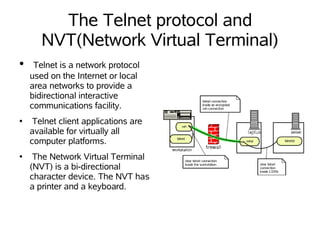
●    Telnet is a network protocol
    used on the Internet or local
    area networks to provide a
    bidirectional interactive
    communications facility.
●    Telnet client applications are
    available for virtually all
    computer platforms.
●    The Network Virtual Terminal
    (NVT) is a bi-directional
    character device. The NVT has
    a printer and a keyboard.
The details of a Telnet session
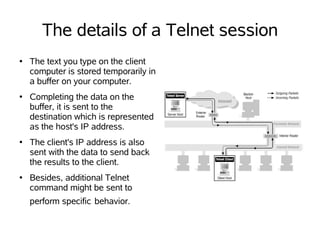
●   The text you type on the client
    computer is stored temporarily in
    a buffer on your computer.
●   Completing the data on the
    buffer, it is sent to the
    destination which is represented
    as the host's IP address.
●   The client's IP address is also
    sent with the data to send back
    the results to the client.
●   Besides, additional Telnet
    command might be sent to
    perform specific behavior.
How receive Telnet?
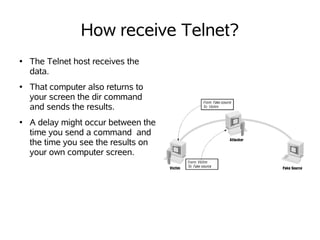
●   The Telnet host receives the
    data.
●   That computer also returns to
    your screen the dir command
    and sends the results.
●   A delay might occur between the
    time you send a command and
    the time you see the results on
    your own computer screen.
References
●   http://security.web.cern.ch/security/ssh/Encrypting_Connections/encry

    http://docstore.mik.ua/orelly/networking_2ndEd/fire/figs/fire2.180
    1.gif
●   http://docstore.mik.ua/orelly/networking_2ndEd/fire/figs/fire2.040
    6.gif

Webpre2

  • 1.
    Understanding Telnet ● How to use Telnet ● The Telnet protocol and NVT(Network Virtual Terminal) ● The details of a Telnet session ● How receive Telnet?
  • 2.
    How to useTelnet ● If I know the Internet address of the host whose resources I want to use, I will use Telnet. ● When I contact the host, other computer and my computer negotiate how they will communicate with each other. ● They decide which terminal emulation will be used. Terminal emulation will be displayed on my screen.
  • 3.
    The Telnet protocoland NVT(Network Virtual Terminal) ● Telnet is a network protocol used on the Internet or local area networks to provide a bidirectional interactive communications facility. ● Telnet client applications are available for virtually all computer platforms. ● The Network Virtual Terminal (NVT) is a bi-directional character device. The NVT has a printer and a keyboard.
  • 4.
    The details ofa Telnet session ● The text you type on the client computer is stored temporarily in a buffer on your computer. ● Completing the data on the buffer, it is sent to the destination which is represented as the host's IP address. ● The client's IP address is also sent with the data to send back the results to the client. ● Besides, additional Telnet command might be sent to perform specific behavior.
  • 5.
    How receive Telnet? ● The Telnet host receives the data. ● That computer also returns to your screen the dir command and sends the results. ● A delay might occur between the time you send a command and the time you see the results on your own computer screen.
  • 6.
    References ● http://security.web.cern.ch/security/ssh/Encrypting_Connections/encry http://docstore.mik.ua/orelly/networking_2ndEd/fire/figs/fire2.180 1.gif ● http://docstore.mik.ua/orelly/networking_2ndEd/fire/figs/fire2.040 6.gif