Technip Subsea Case Study
using Acumen
11-Sept-13
Presenters: Cesar Ramos & Pat Smith
1 Acumen Technip SS Case Studies - 11-Sept-13
Agenda
 Presenters intro
 Technip at a Glance
 Technip & Acumen
 Presentation of Case Study
 Live Demonstration of Acumen software (open floor
for questions & comments)
Acumen Technip SS Case Studies - 11-Sept-132
Presenters
 Cesar Ramos
 Technip’s North American Subject Matter Expert for Planning/Scheduling &
Earned Value. He has a dual role as the Technip North American Onshore
Business Unit Leader. Has experience in Offshore & Subsea as well.
 Pat Smith
 Technip’s North American P6 Administrator. Also has a dual role as the
Technip North American Subsea Business Unit Leader. Has Onshore &
Offshore experience as well.
Acumen Technip SS Case Studies - 11-Sept-133
Technip at a Glance
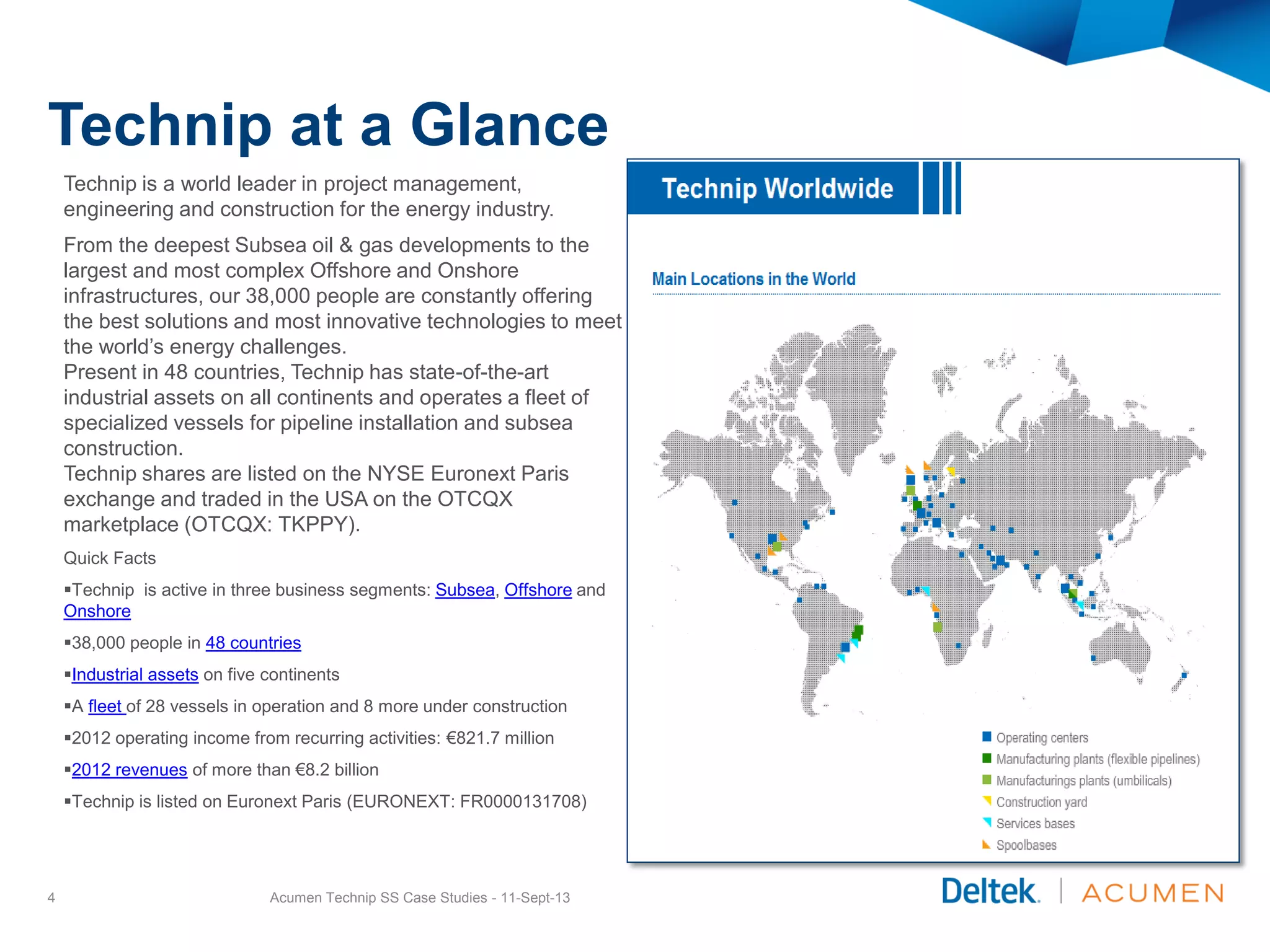
Technip is a world leader in project management,
engineering and construction for the energy industry.
From the deepest Subsea oil & gas developments to the
largest and most complex Offshore and Onshore
infrastructures, our 38,000 people are constantly offering
the best solutions and most innovative technologies to meet
the world’s energy challenges.
Present in 48 countries, Technip has state-of-the-art
industrial assets on all continents and operates a fleet of
specialized vessels for pipeline installation and subsea
construction.
Technip shares are listed on the NYSE Euronext Paris
exchange and traded in the USA on the OTCQX
marketplace (OTCQX: TKPPY).
Quick Facts
Technip is active in three business segments: Subsea, Offshore and
Onshore
38,000 people in 48 countries
Industrial assets on five continents
A fleet of 28 vessels in operation and 8 more under construction
2012 operating income from recurring activities: €821.7 million
2012 revenues of more than €8.2 billion
Technip is listed on Euronext Paris (EURONEXT: FR0000131708)
Acumen Technip SS Case Studies - 11-Sept-134
Technip & Acumen History
 Technip started using Acumen Fuse in 2009.
 Acumen was officially incorporated into Technip
North America’s Schedule Review Procedure in
2010.
 Technip Schedule Review Procedure consists of
the following:
o Compliance with Technip standards of EPC schedule
development
o Compliance with PMBOK & AACE.
o Technip follows Acumen Metrics [250] which include; PMI,
AACE, DCMA, & others
 Technip has acquired the full Acumen Suite
which has Acumen Risk.
 After a Technip/Acumen presentation in a
conference in Brazil 2013, Technip Corporation
has acquired over 25+ Acumen Licenses
Globally.
Acumen Technip SS Case Studies - 11-Sept-135
TECHNIP SUBSEA EPCI
SCHEDULE ANALYSIS
An innovated way of analyzing using
Acumen was needed. Acumen Analyzed
11-Oct-12; 4:14pm (total 2hrs 20min)
6 Acumen Technip SS Case Studies - 11-Sept-13
Recognizing the Need for Analysis
A full Subsea EPCI contract was awarded. As the project progressed,
delays started occurring to the project which delayed Engineering
Deliverables & began to impact Offshore Mobilization Date & Critical
Equipment Delivery.
 Engineering Delays required forensic analysis of all possible impacts to these delays.
 Initial analysis provided belief that the client had impact to these delays.
 Upon further research the evidence was clear.
 In order to support a change order, to prove the impact, the business unit required
supporting details and analysis.
 The initial attempt was to review the depletion of float, that was caused by the client.
Acumen Technip SS Case Studies - 11-Sept-137
Analyzing with Acumen
Once the need was recognized, a small peer group to explore the
limitations of Acumen. Gathering all files, the business unit had to
compare all project files to see how we could prove this.
 Acumen Phase Analyzer does not produce overlapping graphs over a timeline. This was
confirmed by Acumen.
 Acumen recommendation was to export to Excel for further graph modifications
 The planner had saved all monthly updates as baselines. So as it was suggested that we
take every baseline and compare as snapshots.
 With this we were able to emulate the graph functions out of Acumen as a timeline.
 See example below Float Ribbon Analyzer [count per time]
Acumen Technip SS Case Studies - 11-Sept-138
Implementing the Concept of Analysis
A concept of loading each updated schedule as a snapshot seemed to be a
feasible solution. The difference from a normal snapshot comparison is
we knew the snapshots represented an updated cycle. By renaming the
file name as a time stamp, the graph looked like time analyzed graph.
In order to emulate this function we had to do the following:
 Imported 14 XER files to Acumen
 To our benefit, Pat Smith [assigned planner] had backed up every month XER.
 This allowed us to “act” as if each XER is a time stamp
 We renamed each XER to reflect the month
 Then produced a comparison of multi files named as months.
 Acumen naturally compares projects but in this instance each project
represented a month, allowing a graph that looks like a time scale.
 For future notice; if other projects follow similar scrutiny and do not backup or
copy files periodically (monthly? Wkly?), this emulation of a timeline can not be
reproduced within Acumen. Of course using Excel will allow modifications.
Acumen Technip SS Case Studies - 11-Sept-139
TECHNIP SUBSEA EPCI
FLOAT ANALYSIS
Phase I of Analysis
Utilizing the graphical impacts in
Acumen we were able to begin
researching detail impacts.
10 Acumen Technip SS Case Studies - 11-Sept-13
Critical Float [count of activities]
Our immediate place to compare was the Float depletion & behavior.
 As you can see in the example, there was a substantial jump in critical float count.
 This allowed us to further investigate.
Acumen Technip SS Case Studies - 11-Sept-1311
0 to 20 Days Float
[count of activities]
Acumen Technip SS Case Studies - 11-Sept-1312
Our next place to compare was further Float depletion & behavior.
We looked at Non-Critical and didn’t find alarming behaviors so we moved on to 0 to 20 Days Float [count
of activities]. This also pulled up anomalies.
Ribbon & Trace Logic
Acumen Technip SS Case Studies - 11-Sept-1313
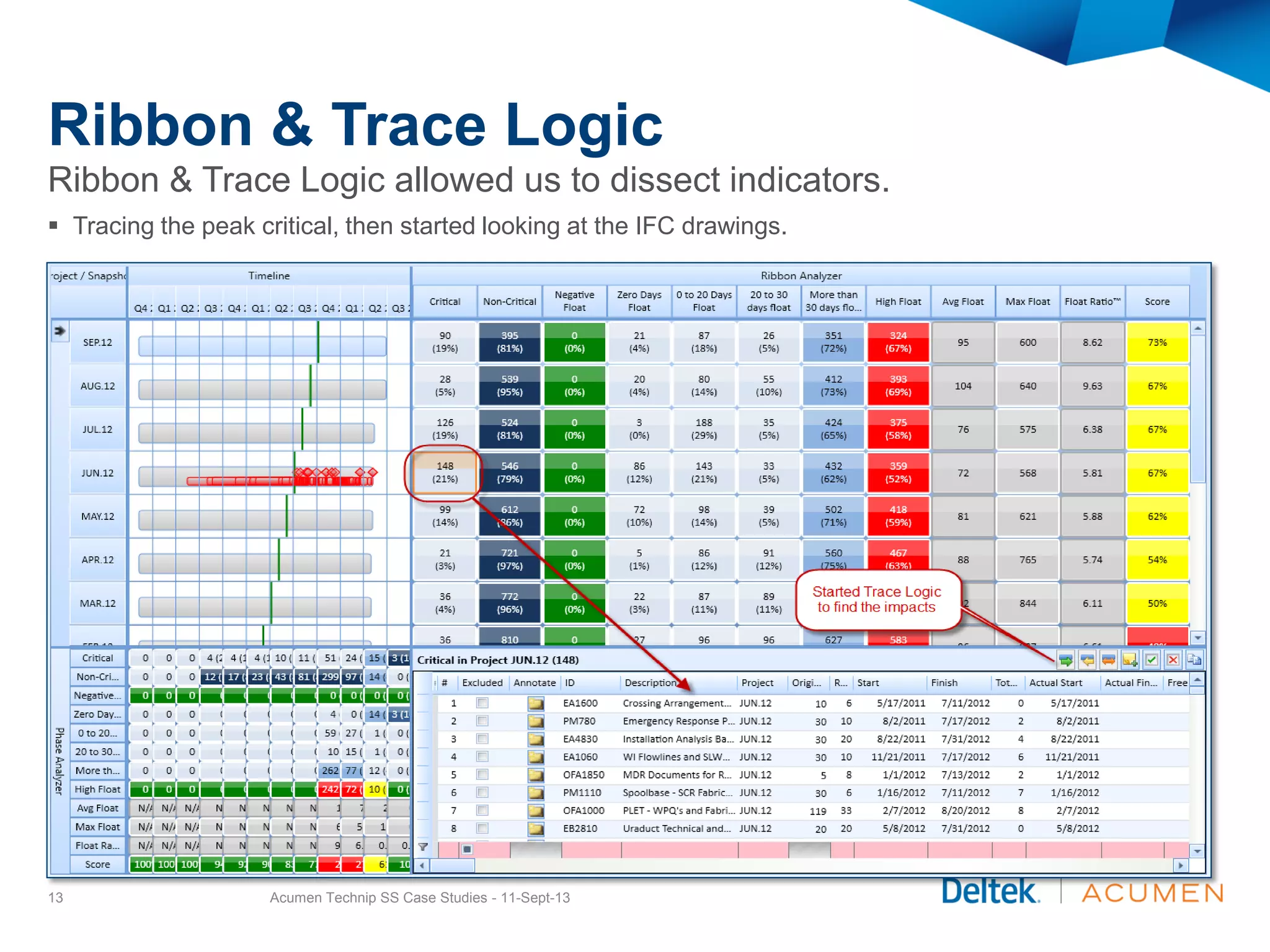
Ribbon & Trace Logic allowed us to dissect indicators.
 Tracing the peak critical, then started looking at the IFC drawings.
Trace Logic Backwards Analysis
Acumen Technip SS Case Studies - 11-Sept-1314
Trace Logic allowed us to dissect indicators.
 Here is where the indicator of Client Review cycles extended beyond contractual agreements.
Trace Logic Export to Excel
Acumen Technip SS Case Studies - 11-Sept-1315
Trace Logic export to Excel allows for further analysis.
 Using Excel with combinations of Filters, Sorts, & Conditional Formatting allows us to find exact details.
TECHNIP SUBSEA EPCI
EARNED VALUE WORK
ANALYSIS
Phase II of Analysis
Utilizing the graphical impacts in
Acumen we were able to begin
researching detail impacts.
16 Acumen Technip SS Case Studies - 11-Sept-13
Earned Value Work
Schedule Variance [EV-PV]
17 Acumen Technip SS Case Studies - 11-Sept-13
Schedule Variance provides a comparison of “where we planned to be” vs “where we really are”.
Schedule Variance is using P6 values and is calculated as Earned minus Planned.
This variance shows a disparity of slipping on planned dates and is used to calculate a recovery index.
Earned Value Work
Estimate at Complete [EAC]
18 Acumen Technip SS Case Studies - 11-Sept-13
Estimate at Completion provides necessary forecasting.
Estimate at Completion has 5 different calculations. However the most common is using the “Remaining
to Earn + Actual Costs”. Acumen brings in the P6 calculation of EAC.
Since the project is still in progression and has almost halfway remaining to complete, it is important to use
current performance to provide a valid means of forecasting.
This EAC can be used to forecast cost impacts where engineering delays, manufacturer delays due to held
up specs & data sheets as well as the impact of delaying the Pipe Lay Vessel and what that equates to
dollars.
Conclusion
As the results of the Float Analysis, Trace Logic Analysis, & Earned
Value Work, we were able to determine a cost impact to these delays.
These cost impacts to support the change order was submitted up to
contracts management for approval & submit to the client.
The analysis proven to be extremely useful & favorable.
The results still pending & confidential.
Acumen Technip SS Case Studies - 11-Sept-1319
QUESTIONS?
FEEL FREE TO ASK QUESTIONS
OR COMMENTS
20 Acumen Technip SS Case Studies - 11-Sept-13
Pat Smith
Technip USA
P6 Administrator &
Subsea Business Unit Leader
josmith@technip.com
Cesar Ramos
Technip USA
SME/ Earned Value Specialist &
Onshore Business Unit Leader
cesramos@technip.com

Technip case study

  • 1.
    Technip Subsea CaseStudy using Acumen 11-Sept-13 Presenters: Cesar Ramos & Pat Smith 1 Acumen Technip SS Case Studies - 11-Sept-13
  • 2.
    Agenda  Presenters intro Technip at a Glance  Technip & Acumen  Presentation of Case Study  Live Demonstration of Acumen software (open floor for questions & comments) Acumen Technip SS Case Studies - 11-Sept-132
  • 3.
    Presenters  Cesar Ramos Technip’s North American Subject Matter Expert for Planning/Scheduling & Earned Value. He has a dual role as the Technip North American Onshore Business Unit Leader. Has experience in Offshore & Subsea as well.  Pat Smith  Technip’s North American P6 Administrator. Also has a dual role as the Technip North American Subsea Business Unit Leader. Has Onshore & Offshore experience as well. Acumen Technip SS Case Studies - 11-Sept-133
  • 4.
    Technip at aGlance Technip is a world leader in project management, engineering and construction for the energy industry. From the deepest Subsea oil & gas developments to the largest and most complex Offshore and Onshore infrastructures, our 38,000 people are constantly offering the best solutions and most innovative technologies to meet the world’s energy challenges. Present in 48 countries, Technip has state-of-the-art industrial assets on all continents and operates a fleet of specialized vessels for pipeline installation and subsea construction. Technip shares are listed on the NYSE Euronext Paris exchange and traded in the USA on the OTCQX marketplace (OTCQX: TKPPY). Quick Facts Technip is active in three business segments: Subsea, Offshore and Onshore 38,000 people in 48 countries Industrial assets on five continents A fleet of 28 vessels in operation and 8 more under construction 2012 operating income from recurring activities: €821.7 million 2012 revenues of more than €8.2 billion Technip is listed on Euronext Paris (EURONEXT: FR0000131708) Acumen Technip SS Case Studies - 11-Sept-134
  • 5.
    Technip & AcumenHistory  Technip started using Acumen Fuse in 2009.  Acumen was officially incorporated into Technip North America’s Schedule Review Procedure in 2010.  Technip Schedule Review Procedure consists of the following: o Compliance with Technip standards of EPC schedule development o Compliance with PMBOK & AACE. o Technip follows Acumen Metrics [250] which include; PMI, AACE, DCMA, & others  Technip has acquired the full Acumen Suite which has Acumen Risk.  After a Technip/Acumen presentation in a conference in Brazil 2013, Technip Corporation has acquired over 25+ Acumen Licenses Globally. Acumen Technip SS Case Studies - 11-Sept-135
  • 6.
    TECHNIP SUBSEA EPCI SCHEDULEANALYSIS An innovated way of analyzing using Acumen was needed. Acumen Analyzed 11-Oct-12; 4:14pm (total 2hrs 20min) 6 Acumen Technip SS Case Studies - 11-Sept-13
  • 7.
    Recognizing the Needfor Analysis A full Subsea EPCI contract was awarded. As the project progressed, delays started occurring to the project which delayed Engineering Deliverables & began to impact Offshore Mobilization Date & Critical Equipment Delivery.  Engineering Delays required forensic analysis of all possible impacts to these delays.  Initial analysis provided belief that the client had impact to these delays.  Upon further research the evidence was clear.  In order to support a change order, to prove the impact, the business unit required supporting details and analysis.  The initial attempt was to review the depletion of float, that was caused by the client. Acumen Technip SS Case Studies - 11-Sept-137
  • 8.
    Analyzing with Acumen Oncethe need was recognized, a small peer group to explore the limitations of Acumen. Gathering all files, the business unit had to compare all project files to see how we could prove this.  Acumen Phase Analyzer does not produce overlapping graphs over a timeline. This was confirmed by Acumen.  Acumen recommendation was to export to Excel for further graph modifications  The planner had saved all monthly updates as baselines. So as it was suggested that we take every baseline and compare as snapshots.  With this we were able to emulate the graph functions out of Acumen as a timeline.  See example below Float Ribbon Analyzer [count per time] Acumen Technip SS Case Studies - 11-Sept-138
  • 9.
    Implementing the Conceptof Analysis A concept of loading each updated schedule as a snapshot seemed to be a feasible solution. The difference from a normal snapshot comparison is we knew the snapshots represented an updated cycle. By renaming the file name as a time stamp, the graph looked like time analyzed graph. In order to emulate this function we had to do the following:  Imported 14 XER files to Acumen  To our benefit, Pat Smith [assigned planner] had backed up every month XER.  This allowed us to “act” as if each XER is a time stamp  We renamed each XER to reflect the month  Then produced a comparison of multi files named as months.  Acumen naturally compares projects but in this instance each project represented a month, allowing a graph that looks like a time scale.  For future notice; if other projects follow similar scrutiny and do not backup or copy files periodically (monthly? Wkly?), this emulation of a timeline can not be reproduced within Acumen. Of course using Excel will allow modifications. Acumen Technip SS Case Studies - 11-Sept-139
  • 10.
    TECHNIP SUBSEA EPCI FLOATANALYSIS Phase I of Analysis Utilizing the graphical impacts in Acumen we were able to begin researching detail impacts. 10 Acumen Technip SS Case Studies - 11-Sept-13
  • 11.
    Critical Float [countof activities] Our immediate place to compare was the Float depletion & behavior.  As you can see in the example, there was a substantial jump in critical float count.  This allowed us to further investigate. Acumen Technip SS Case Studies - 11-Sept-1311
  • 12.
    0 to 20Days Float [count of activities] Acumen Technip SS Case Studies - 11-Sept-1312 Our next place to compare was further Float depletion & behavior. We looked at Non-Critical and didn’t find alarming behaviors so we moved on to 0 to 20 Days Float [count of activities]. This also pulled up anomalies.
  • 13.
    Ribbon & TraceLogic Acumen Technip SS Case Studies - 11-Sept-1313 Ribbon & Trace Logic allowed us to dissect indicators.  Tracing the peak critical, then started looking at the IFC drawings.
  • 14.
    Trace Logic BackwardsAnalysis Acumen Technip SS Case Studies - 11-Sept-1314 Trace Logic allowed us to dissect indicators.  Here is where the indicator of Client Review cycles extended beyond contractual agreements.
  • 15.
    Trace Logic Exportto Excel Acumen Technip SS Case Studies - 11-Sept-1315 Trace Logic export to Excel allows for further analysis.  Using Excel with combinations of Filters, Sorts, & Conditional Formatting allows us to find exact details.
  • 16.
    TECHNIP SUBSEA EPCI EARNEDVALUE WORK ANALYSIS Phase II of Analysis Utilizing the graphical impacts in Acumen we were able to begin researching detail impacts. 16 Acumen Technip SS Case Studies - 11-Sept-13
  • 17.
    Earned Value Work ScheduleVariance [EV-PV] 17 Acumen Technip SS Case Studies - 11-Sept-13 Schedule Variance provides a comparison of “where we planned to be” vs “where we really are”. Schedule Variance is using P6 values and is calculated as Earned minus Planned. This variance shows a disparity of slipping on planned dates and is used to calculate a recovery index.
  • 18.
    Earned Value Work Estimateat Complete [EAC] 18 Acumen Technip SS Case Studies - 11-Sept-13 Estimate at Completion provides necessary forecasting. Estimate at Completion has 5 different calculations. However the most common is using the “Remaining to Earn + Actual Costs”. Acumen brings in the P6 calculation of EAC. Since the project is still in progression and has almost halfway remaining to complete, it is important to use current performance to provide a valid means of forecasting. This EAC can be used to forecast cost impacts where engineering delays, manufacturer delays due to held up specs & data sheets as well as the impact of delaying the Pipe Lay Vessel and what that equates to dollars.
  • 19.
    Conclusion As the resultsof the Float Analysis, Trace Logic Analysis, & Earned Value Work, we were able to determine a cost impact to these delays. These cost impacts to support the change order was submitted up to contracts management for approval & submit to the client. The analysis proven to be extremely useful & favorable. The results still pending & confidential. Acumen Technip SS Case Studies - 11-Sept-1319
  • 20.
    QUESTIONS? FEEL FREE TOASK QUESTIONS OR COMMENTS 20 Acumen Technip SS Case Studies - 11-Sept-13 Pat Smith Technip USA P6 Administrator & Subsea Business Unit Leader josmith@technip.com Cesar Ramos Technip USA SME/ Earned Value Specialist & Onshore Business Unit Leader cesramos@technip.com