Application layer
1. Introduction
2.WWW
3. HTTP
4. FTP
5. EMAIL (SMTP, MIME, IMAP, POP)
6. TELNET
7. SSH
8. DNS
9. SNMP
1) The application layer is the highest layer in the protocol suite.
2) The application layer provides services to the user.
3) The protocols in this layer do not provide services to any other
protocol in the suite; they only receive services from the protocols
in the transport layer.
4) Two application layers assume that there is an imaginary direct
connection through which they can send and receive messages.
5) The application layer is the only layer that provides services to the
Internet user
6) The flexibility of the application layer allows new application
protocols to be easily added to the Internet.
7) Applications need their own protocols.
8) These applications are part of network protocol.
Application protocols
Standard
protocols
(eg,. SMTP, HTTP)
Non-standard
protocols
Standard Application-Layer Protocols
1. There are several application-layer protocols that have been
standardized and documented by the Internet authority.
2. Each standard protocol is a pair of computer programs that interact
with the user and the transport layer to provide a specific service to
the user.
3. Two very widely-used standardized application protocols:
4. SMTP : Simple Mail Transfer Protocol is used to exchange
electronic mail.
5. HTTP : Hyper Text Transport Protocol is used to communicate
between Web browsers and Web servers.
Nonstandard Application-Layer Protocols
1. A programmer can create a nonstandard application-layer program
if they can write two programs that provide service to the user by
interacting with the transport layer.
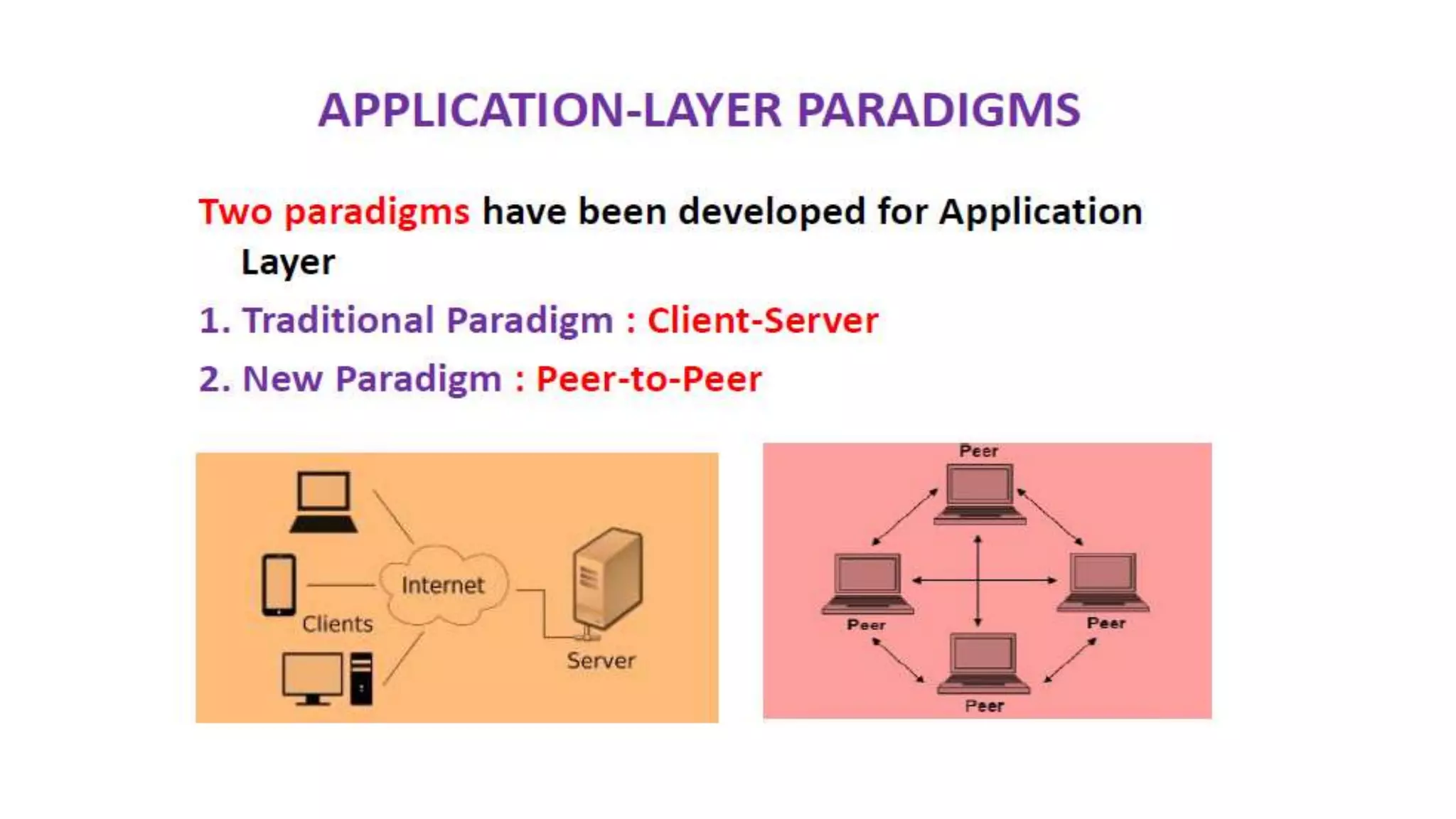
Client-Server Paradigm
In this paradigm, the service provider is
an application program, called the server
process; it runs continuously, waiting for
another application program, called the
client process, to make a connection
through the Internet and ask for service.
Client-Server Paradigm
1. The traditional paradigm is called the client-server paradigm.
2. It was the most popular Paradigm.
3. The server process must be running all the time; the client process
is started when the client needs to receive service.
4. There are normally some server processes that can provide a
specific type of service, but there are many clients that request
service from any of these server processes.
Peer-to-Peer(P2P) Paradigm
1. A new paradigm, called the peer-to-peer paradigm has emerged to
respond to the needs of some new applications.
2. In this paradigm, there is no need for a server process to be running
all the time and waiting for the client processes to connect.
3. The responsibility is shared between peers.
4. A computer connected to the Internet can provide service at one time
and receive service at another time.
5. A computer can even provide and receive services at the same time.
Mixed Paradigm
1. An application may choose to use a mixture of the two paradigms
by combining the advantages of both.
2. For example, a light-load client-server communication can be used
to find the address of the peer that can offer a service.
3. When the address of the peer is found, the actual service can be
received from the peer by using the peer-to-peer paradigm.
• WWW was constructed originally by a small group of people led by
Tim Berners Lee at CERN, in 1989 and in 1991 this was released to
the world.
1. WWW is a distributed client/server service, in which a client
(Browsers such as IE, Firefox, etc.) can access services at a server
(Web server such as IIS, Apache).
1. The service provided is distributed
over many locations called sites.
2. A new protocol for the Internet and a
system of document access to use it
was proposed and named as WWW.
3. Web is a vast collection of data,
information, software and protocols ,
spread across the world in web
servers, which are accessed by client
machines by browsers through the
Internet.
WWW –World Wide Web
This system allows document search and retrieval from any part of
the Internet.
The documents were having Hypertext as the content
The units of information on the web can be referred to as pages,
documents or resources.
A document can contain text, images, sound and video, together
called Hypermedia.
Hypermedia
COMPONENTS OF THE WEB (WWW)
Structural Components
1. Web Clients/Web Browsers
2. Web Servers – run on sophisticated hardware
3. Internet – the global infrastructure which facilitates data transfer.
Semantic Components
1. Hyper Text Transfer Protocol (HTTP)
2. Hyper Text Markup Language (HTML)
3. eXtensible Markup Language (XML)
4. Uniform Resource Identifiers (URIs)
WEB CLIENTS (BROWSERS)
1. A browser is a software on the client on the web
which initiates the communication with the server.
2. Each browser usually consists of three parts: a
controller, client protocols, and interpreters.
3. The controller receives input from the keyboard or
the mouse and uses the client programs to access
the document. After the document has been
accessed, the controller uses one of the
interpreters to display the document on the screen.
4. Examples are Internet Explorer, Mozilla FireFox,
Netscape Navigator, Safari etc.
Browser
Controller
Client
protocols
Interpreters
WEB SERVERS
1. All the communication between the web client and a web server use the
standard protocol called as HTTP.
2. Web server informs its operating system to accept incoming network
connections using a specific port on the machine.
3. The server also runs as a background process.
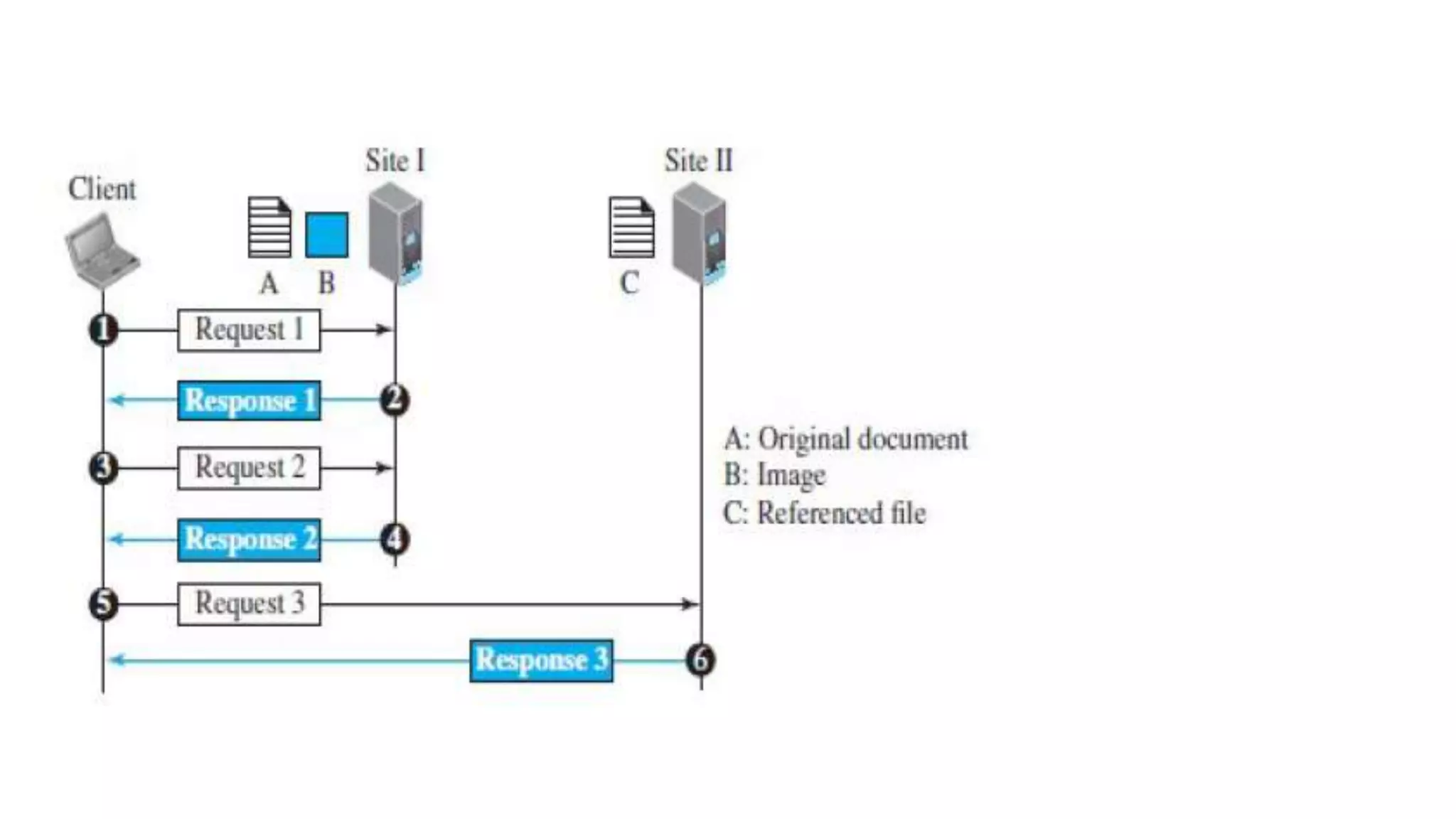
4. A client (browser) opens a connection to the server, sends a request,
receives information from server and closes the connection.
5. Web server monitors a communications port on its host machine, accepts
the http commands through it and performs specified operations.
6. HTTP commands include a URL specifying the host machine.
7. The URL received is translated into either a filename or a program name,
accordingly the requested file or the output of the program execution is
sent back to the browser.
Proxy Server
• A Proxy server is a computer that keeps copies of responses to recent
requests.
1. The web client sends a request to the proxy server.
2. The proxy server checks its cache.
3. If the response is not stored in the cache, the proxy server sends
the request to the corresponding server.
1. Incoming responses are sent to the proxy server and stored for
future requests from other clients.
2. The proxy server reduces the load on the original server, decreases
traffic, and improves latency.
3. However, to use the proxy server, the client must be configured to
access the proxy instead of the target server.
4. The proxy server acts as both server and client.
5. When it receives a request from a client for which it has a response,
it acts as a server and sends the response to the client.
6. When it receives a request from a client for which it does not have
a response, it first acts as a client and sends a request to the target
server.
7. When the response has been received, it acts again as a server and
sends the response to the client.
URL - Uniform Resource Locator
1. Uniform Resource Locator (URL), uniquely identify resources on the Internet
2. URL provides information about its location on the Web
3. When a user enters URL, browser forms a request message and sends it to the
server.
4. Web server retrieves the requested URL and sends back a response message.
5. Web browser renders the response in HTML or appropriate format.
6. Format : http://www.domain_name/filename
7. Example : http://www.cs.hello.org/index.html
8. The URL defines four parts – Method(Protocol), Host computer, Port, and Path.
1. Method: The method is the protocol used to retrieve the document from
a server. For example, HTTP.
2. Host: The host is the computer where the information is stored, and the
computer is given an alias name. Web pages are mainly stored in the
computers and the computers are given an alias name that begins with
the characters "www". This field is not mandatory.
3. Port: The URL can also contain the port number of the server, but it's an
optional field. If the port number is included, then it must come between
the host and path and it should be separated from the host by a colon.
4. Path: Path is the pathname of the file where the information is stored.
The path itself contain slashes that separate the directories from the
subdirectories and files.
URL Paths
1. The path of the document for a http protocol is same as that for a
document or file or a directory in a client.
2. In Unix the path components are separated by forward slashes (/)
and in windows backward slashes ().
3. But an URL need not include all the directories in the path.
4. A path which includes all the directories is a complete path, else it
is a partial path.
URI - Uniform Resource Identifiers
1. URI is a string that identifies resources such as document, image,
service, etc.
2. It is of the form scheme:scheme-specific
3. Scheme identifies a resource type, such as mailto for mail address,
file for file name, etc. and scheme-specific is a resource identifier.
4. Example is mailto: abc123@gmail.com
5. URI identifies a resource, whereas URL is used to locate a resource.
Static Documents
1. Static documents are fixed-content documents that are created and stored in a server.
2. The client can get a copy of the document only.
3. In other words, the contents of the file are determined when the file is created, not
when it is used.
4. Of course, the contents in the server can be changed, but the user cannot change
them.
5. When a client accesses the document, a copy of the document is sent.
6. The user can then use a browser to see the document.
Dynamic Documents
1. A dynamic document is created by a web server whenever a browser requests the document.
2. When a request arrives, the web server runs an application program or a script that creates the
dynamic document.
3. The server returns the result of the program or script as a response to the browser that
requested the document
4. Because a fresh document is created for each request, the contents of a dynamic document
may vary from one request to another.
5. A very simple example of a dynamic document is the retrieval of the time and date from a
server.
6. Time and date are kinds of information that are dynamic in that they change from moment to
moment.
Active Documents
1. For many applications, we need a program or a script to be run at the client site.
2. These are called active documents.
3. For example, suppose we want to run a program that creates animated graphics on
the screen or a program that interacts with the user.
4. The program definitely needs to be run at the client site where the animation or
interaction takes place.
5. When a browser requests an active document, the server sends a copy of the
document or a script.
6. The document is then run at the client (browser) site.
1. Java Applet – A program written in Java on the server. It is compiled and ready to be
run. The document is in bytecode format.
2. Java Script - Download and run the script at the client site.
HTTP CONNECTIONS
1. HTTP Clients and Servers exchange multiple messages over the
same TCP connection.
2. If some of the objects are located on the same server, we have two
choices: to retrieve each object using a new TCP connection or to
make a TCP connection and retrieve them all.
Two types of HTTP Connections :
NON-PERSISTENT CONNECTIONS :
to retrieve each object using a new TCP connection
PERSISTENT CONNECTIONS :
to make one TCP connection and retrieve them all.
HTTP 1.0 uses non-persistent connections and HTTP 1.1 uses
persistent connections .
NON-PERSISTENT CONNECTIONS PERSISTENT CONNECTIONS
1.It requires 2RTT (Round Trip Time) for per object 1.Server leaves connection open after sending
response.
1RTT for all referenced objects.
2. More overhead 2. Less overhead
NON-PERSISTENT CONNECTIONS :
1. In a non-persistent connection, one TCP connection is made for
each request/response.
2. Only one object can be sent over a single TCP connection
3. The client opens a TCP connection and sends a request.
4. The server sends the response and closes the connection.
5. The client reads the data until it encounters an end-of-file marker.
6. It then closes the connection.
PERSISTENT CONNECTIONS :
1. HTTP version 1.1 specifies a persistent connection by default.
2. Multiple objects can be sent over a single TCP connection.
3. In a persistent connection, the server leaves the connection open
for more requests after sending a response.
4. The server can close the connection at the request of a client or if a
time-out has been reached.
5. Time and resources are saved using persistent connections. Only
one set of buffers and variables needs to be set for the connection
at each site.
6. The round trip time for connection establishment and connection
termination is saved.
Do you know ?
• Most of the web browsers use persistent connection.
1.FTP stands for File
transfer protocol.
2.FTP is a standard internet
protocol provided by TCP/IP
used for transmitting the
files from one host to
another.
•Although we can transfer files using HTTP, FTP is a better choice
to transfer large files or to transfer files using different formats.
1. It is mainly used for transferring the web page files from their
creator to the computer that acts as a server for other computers
on the internet.
2. It is also used for downloading the files to computer from other
servers.
FTP OBJECTIVES
1. It provides the sharing of files.
2. It is used to encourage the use of remote computers.
3. It transfers the data more reliably and efficiently.
1. The two connections in FTP have
different lifetimes.
2. The control connection remains
connected during the entire
interactive FTP session.
3. The data connection is opened and
then closed for each file transfer
activity.
4. When a user starts an FTP session,
the control connection opens.
5. While the control connection is
open, the data connection can be
opened and closed multiple times if
several files are transferred.
FTP uses two well-known TCP ports:
1. Port 21 is used for the control connection
2. Port 20 is used for the data connection.
Control Connection:
1. The control connection uses very simple rules for communication.
2. Through control connection, we can transfer a line of command or
line of response at a time.
3. The control connection is made between the control processes.
4. The control connection remains connected during the entire
interactive FTP session.
Data Connection:
1. The Data Connection uses very complex rules as data types may
vary.
2. The data connection is made between data transfer processes.
3. The data connection opens when a command comes for
transferring the files and closes when the file is transferred.
FTP DATA STRUCTURE
1. The file structure format is the default one and has no structure. It
is a continuous stream of bytes.
2. In the record structure, the file is divided into records. This can be
used only with text files.
3. In the page structure, the file is divided into pages, with each page
having a page number and a page header. The pages can be stored
and accessed randomly or sequentially.
FTP TRANSMISSION MODE
1. The stream mode is the default mode; data are delivered from FTP
to TCP as a continuous stream of bytes.
2. In the block mode, data can be delivered from FTP to TCP in blocks.
3. In the compressed mode, data can be compressed and delivered
from FTP to TCP.
FTP FILE TRANSFER
• File transfer occurs over the data connection under the control of the
commands sent over the control connection.
• File transfer in FTP means one of three things:
1. retrieving a file (server to client)
2. storing a file (client to server)
3. directory listing (server to client).
FTP COMMUNICATION
1. FTP Communication is achieved through commands and responses.
2. FTP Commands are sent from the client to the server
3. FTP responses are sent from the server to the client.
4. FTP Commands are in the form of ASCII uppercase, which may or
may not be followed by an argument.
1. Every FTP command generates at least one response.
2. A response has two parts: a three-digit number followed by text.
3. The numeric part defines the code; the text part defines needed parameter
FTP SECURITY
1. FTP requires a password, the password is sent in plaintext which is
unencrypted. This means it can be intercepted and used by an
attacker.
2. The data transfer connection also transfers data in plaintext, which
is insecure.
3. To be secure, one can add a Secure Socket Layer between the FTP
application layer and the TCP layer.
4. In this case FTP is called SSL-FTP.
Secure Socket layer
EMAIL (SMTP, MIME,
IMAP, POP)
1. One of the most popular Internet
services is electronic mail (E-mail).
2. Email is one of the oldest network
applications.
3. When the sender and the receiver
of an e-mail are on the same
system, we need only two User
Agents and no Message Transfer
Agent
4. When the sender and the receiver
of an e-mail are on different
system, we need two UA, two pairs
of MTA (client and server), and two
MAA (client and server).
EMAIL (SMTP, MIME, IMAP, POP)
The three main components of an Email are
1. User Agent (UA)
2. Message Transfer Agent (MTA) – SMTP
3. Message Access Agent (MAA) - IMAP , POP
Alice Bob
1. When Alice needs to send a message to Bob, she runs a UA program to
prepare the message and send it to her mail server.
2. The mail server at her site uses a queue (spool) to store messages
waiting to be sent.
3. The message, however, needs to be sent through the Internet from
Alice’s site to Bob’s site using an MTA.
4. Here two message transfer agents are needed: one client and one server.
5. The server needs to run all the time because it does not know when a
client will ask for a connection.
6. The client can be triggered by the system when there is a message in the
queue to be sent.
7. The user agent at the Bob site allows Bob to read the received message.
8. Bob later uses an MAA client to retrieve the message from an MAA
server running on the second server.
A user agent is a software package
that composes, reads, replies to, and
forwards messages. It also handles
local mailboxes on the user
computers.
Command driven
1. Command driven user
agents belong to the early
days of electronic mail.
2. A command-driven user
agent normally accepts a
one character command
from the keyboard to
perform its task.
3. Some examples of
command driven user agents
are mail, pine, and elm.
GUI-based
1. Modern user agents are GUI-
based.
2. They allow the user to interact
with the software by using
both the keyboard and the
mouse.
3. They have graphical
components such as icons,
menu bars, and windows that
make the services easy to
access.
4. Some examples of GUI-based
user agents are Eudora and
Outlook.
1. Clients are totally dependent on server. 1. It requires minimum use of server
resources.
2. Multiple mailboxes can be created on the
server.
2. Only one mailbox can be created on
the server.
3. Designed to handle multiple clients. 3. Generally used to support single
client.
4. IMAP offers ability to search emails. 4. POP does not allow search facility.
5. It allows selective transfer of messages to
the client.
5. All the messages have to be
downloaded.
6. Users can view the headings and sender
of e-mails and then decide to download.
6. The e-mails are not downloaded
automatically.
7. Messages are accessed online
although it also supports offline mode.
7.Messages are accessed offline.
8.IMAP requires more internet usage time. 8.POP requires less internet usage time.
9. Suitable for accessing non-mail data i.e.
attachment.
9.Not suitable for accessing non-mail
data.
10. Allows mails to be accessed from
multiple locations.
10.Mails once downloaded cannot be
accessed from some other location.
11. IMAP commands are not abbreviated,
they are full. Eg. STATUS
11.POP commands are generally
abbreviated into codes of three or four
letters. Eg. STAT
TELNET (TERMINAL NETWORK)
1. TELNET is the original remote logging protocol, based on client-server
program.
2. Telnet provides a connection to the remote computer in such a way that
a local terminal appears to be at the remote side.
3. TELNET allows us to explain the issues and challenges related to the
concept of remote logging.
4. Network administrators often use TELNET for diagnostic and debugging
purposes.
1. TELNET requires a logging name and password.
2. It is vulnerable to hacking because it sends all data including the
password in plaintext (not encrypted).
3. A hacker can eavesdrop and obtain the logging name and password.
4. Because of this security issue, the use of TELNET has diminished.
NETWORK VIRTUAL TERMINAL (NVT)
1. The mechanism to access a remote computer is complex.
2. We are dealing with heterogeneous systems.
3. This is because every computer and its operating system accepts a special combination of characters as
tokens.
4. For example, the end-of-file token in a computer running the DOS operating system is Ctrl+z, while the UNIX
operating system recognizes Ctrl+d.
5. If we want to access any remote computer in the world, we must first know what type of computer we will
be connected to, and we must also install the specific terminal emulator used by that computer.
6. TELNET solves this problem by defining a universal interface called the Network Virtual Terminal (NVT)
character set.
7. Via this interface, the client TELNET translates characters (data or commands) that come from the local
terminal into NVT form and delivers them to the network.
8. The server TELNET, on the other hand, translates data and commands from NVT form into the form
acceptable by the remote computer.
NVT Character Format
1. NVT uses two sets of characters, one for data and
one for control.
2. For data, NVT normally uses what is called NVT
ASCII. This is an 8-bit character set in which the
seven lowest order bits are the same as ASCII and
the highest order bit is 0.
3. To send control characters between computers ,
NVT uses an 8-bit character set in which the highest
order bit is set to 1.
Character set
(8 bit )
Data
(0-highest bit)
Control
(1-highest bit)
1. Domain Name System was designed in 1984.
2. DNS is used for name-to-address mapping.
3. The DNS provides the protocol which allows clients and servers to
communicate with each other.
4. Eg: Host name like www.yahoo.com is translated into numerical IP
addresses like 207.174.77.131
• Domain Name System
(DNS) is a distributed
database used by TCP/IP
applications to map
between hostnames and IP
addresses and to provide
electronic mail routing
information.
• Each site maintains its own
database of information
and runs a server program
that other systems across
the Internet can query.
1. The Simple Network Management Protocol
(SNMP) is a framework for managing devices in
an internet using the TCP/IP protocol suite.
2. SNMP is an application layer protocol that
monitors and manages routers, distributed over
a network.
3. It provides a set of operations for monitoring and
managing the internet.
4. SNMP uses the concept of manager and agent.
5. SNMP uses services on two well-known ports:
161 (Agent) and 162 (manager).
Application layer
Application layer
Application layer
Application layer
Application layer
Application layer

Application layer

  • 1.
    Application layer 1. Introduction 2.WWW 3.HTTP 4. FTP 5. EMAIL (SMTP, MIME, IMAP, POP) 6. TELNET 7. SSH 8. DNS 9. SNMP
  • 2.
    1) The applicationlayer is the highest layer in the protocol suite. 2) The application layer provides services to the user. 3) The protocols in this layer do not provide services to any other protocol in the suite; they only receive services from the protocols in the transport layer. 4) Two application layers assume that there is an imaginary direct connection through which they can send and receive messages. 5) The application layer is the only layer that provides services to the Internet user 6) The flexibility of the application layer allows new application protocols to be easily added to the Internet. 7) Applications need their own protocols. 8) These applications are part of network protocol.
  • 3.
  • 4.
    Standard Application-Layer Protocols 1.There are several application-layer protocols that have been standardized and documented by the Internet authority. 2. Each standard protocol is a pair of computer programs that interact with the user and the transport layer to provide a specific service to the user. 3. Two very widely-used standardized application protocols: 4. SMTP : Simple Mail Transfer Protocol is used to exchange electronic mail. 5. HTTP : Hyper Text Transport Protocol is used to communicate between Web browsers and Web servers.
  • 5.
    Nonstandard Application-Layer Protocols 1.A programmer can create a nonstandard application-layer program if they can write two programs that provide service to the user by interacting with the transport layer.
  • 7.
    Client-Server Paradigm In thisparadigm, the service provider is an application program, called the server process; it runs continuously, waiting for another application program, called the client process, to make a connection through the Internet and ask for service.
  • 8.
    Client-Server Paradigm 1. Thetraditional paradigm is called the client-server paradigm. 2. It was the most popular Paradigm. 3. The server process must be running all the time; the client process is started when the client needs to receive service. 4. There are normally some server processes that can provide a specific type of service, but there are many clients that request service from any of these server processes.
  • 9.
    Peer-to-Peer(P2P) Paradigm 1. Anew paradigm, called the peer-to-peer paradigm has emerged to respond to the needs of some new applications. 2. In this paradigm, there is no need for a server process to be running all the time and waiting for the client processes to connect. 3. The responsibility is shared between peers. 4. A computer connected to the Internet can provide service at one time and receive service at another time. 5. A computer can even provide and receive services at the same time.
  • 10.
    Mixed Paradigm 1. Anapplication may choose to use a mixture of the two paradigms by combining the advantages of both. 2. For example, a light-load client-server communication can be used to find the address of the peer that can offer a service. 3. When the address of the peer is found, the actual service can be received from the peer by using the peer-to-peer paradigm.
  • 11.
    • WWW wasconstructed originally by a small group of people led by Tim Berners Lee at CERN, in 1989 and in 1991 this was released to the world.
  • 13.
    1. WWW isa distributed client/server service, in which a client (Browsers such as IE, Firefox, etc.) can access services at a server (Web server such as IIS, Apache).
  • 14.
    1. The serviceprovided is distributed over many locations called sites. 2. A new protocol for the Internet and a system of document access to use it was proposed and named as WWW. 3. Web is a vast collection of data, information, software and protocols , spread across the world in web servers, which are accessed by client machines by browsers through the Internet. WWW –World Wide Web
  • 16.
    This system allowsdocument search and retrieval from any part of the Internet. The documents were having Hypertext as the content The units of information on the web can be referred to as pages, documents or resources. A document can contain text, images, sound and video, together called Hypermedia. Hypermedia
  • 17.
    COMPONENTS OF THEWEB (WWW) Structural Components 1. Web Clients/Web Browsers 2. Web Servers – run on sophisticated hardware 3. Internet – the global infrastructure which facilitates data transfer. Semantic Components 1. Hyper Text Transfer Protocol (HTTP) 2. Hyper Text Markup Language (HTML) 3. eXtensible Markup Language (XML) 4. Uniform Resource Identifiers (URIs)
  • 18.
    WEB CLIENTS (BROWSERS) 1.A browser is a software on the client on the web which initiates the communication with the server. 2. Each browser usually consists of three parts: a controller, client protocols, and interpreters. 3. The controller receives input from the keyboard or the mouse and uses the client programs to access the document. After the document has been accessed, the controller uses one of the interpreters to display the document on the screen. 4. Examples are Internet Explorer, Mozilla FireFox, Netscape Navigator, Safari etc. Browser Controller Client protocols Interpreters
  • 19.
    WEB SERVERS 1. Allthe communication between the web client and a web server use the standard protocol called as HTTP. 2. Web server informs its operating system to accept incoming network connections using a specific port on the machine. 3. The server also runs as a background process. 4. A client (browser) opens a connection to the server, sends a request, receives information from server and closes the connection. 5. Web server monitors a communications port on its host machine, accepts the http commands through it and performs specified operations. 6. HTTP commands include a URL specifying the host machine. 7. The URL received is translated into either a filename or a program name, accordingly the requested file or the output of the program execution is sent back to the browser.
  • 20.
    Proxy Server • AProxy server is a computer that keeps copies of responses to recent requests.
  • 21.
    1. The webclient sends a request to the proxy server. 2. The proxy server checks its cache. 3. If the response is not stored in the cache, the proxy server sends the request to the corresponding server.
  • 22.
    1. Incoming responsesare sent to the proxy server and stored for future requests from other clients. 2. The proxy server reduces the load on the original server, decreases traffic, and improves latency. 3. However, to use the proxy server, the client must be configured to access the proxy instead of the target server. 4. The proxy server acts as both server and client. 5. When it receives a request from a client for which it has a response, it acts as a server and sends the response to the client. 6. When it receives a request from a client for which it does not have a response, it first acts as a client and sends a request to the target server. 7. When the response has been received, it acts again as a server and sends the response to the client.
  • 24.
    URL - UniformResource Locator 1. Uniform Resource Locator (URL), uniquely identify resources on the Internet 2. URL provides information about its location on the Web 3. When a user enters URL, browser forms a request message and sends it to the server. 4. Web server retrieves the requested URL and sends back a response message. 5. Web browser renders the response in HTML or appropriate format. 6. Format : http://www.domain_name/filename 7. Example : http://www.cs.hello.org/index.html 8. The URL defines four parts – Method(Protocol), Host computer, Port, and Path.
  • 25.
    1. Method: Themethod is the protocol used to retrieve the document from a server. For example, HTTP. 2. Host: The host is the computer where the information is stored, and the computer is given an alias name. Web pages are mainly stored in the computers and the computers are given an alias name that begins with the characters "www". This field is not mandatory. 3. Port: The URL can also contain the port number of the server, but it's an optional field. If the port number is included, then it must come between the host and path and it should be separated from the host by a colon. 4. Path: Path is the pathname of the file where the information is stored. The path itself contain slashes that separate the directories from the subdirectories and files.
  • 26.
    URL Paths 1. Thepath of the document for a http protocol is same as that for a document or file or a directory in a client. 2. In Unix the path components are separated by forward slashes (/) and in windows backward slashes (). 3. But an URL need not include all the directories in the path. 4. A path which includes all the directories is a complete path, else it is a partial path.
  • 27.
    URI - UniformResource Identifiers 1. URI is a string that identifies resources such as document, image, service, etc. 2. It is of the form scheme:scheme-specific 3. Scheme identifies a resource type, such as mailto for mail address, file for file name, etc. and scheme-specific is a resource identifier. 4. Example is mailto: abc123@gmail.com 5. URI identifies a resource, whereas URL is used to locate a resource.
  • 29.
    Static Documents 1. Staticdocuments are fixed-content documents that are created and stored in a server. 2. The client can get a copy of the document only. 3. In other words, the contents of the file are determined when the file is created, not when it is used. 4. Of course, the contents in the server can be changed, but the user cannot change them. 5. When a client accesses the document, a copy of the document is sent. 6. The user can then use a browser to see the document.
  • 30.
    Dynamic Documents 1. Adynamic document is created by a web server whenever a browser requests the document. 2. When a request arrives, the web server runs an application program or a script that creates the dynamic document. 3. The server returns the result of the program or script as a response to the browser that requested the document 4. Because a fresh document is created for each request, the contents of a dynamic document may vary from one request to another. 5. A very simple example of a dynamic document is the retrieval of the time and date from a server. 6. Time and date are kinds of information that are dynamic in that they change from moment to moment.
  • 31.
    Active Documents 1. Formany applications, we need a program or a script to be run at the client site. 2. These are called active documents. 3. For example, suppose we want to run a program that creates animated graphics on the screen or a program that interacts with the user. 4. The program definitely needs to be run at the client site where the animation or interaction takes place. 5. When a browser requests an active document, the server sends a copy of the document or a script. 6. The document is then run at the client (browser) site. 1. Java Applet – A program written in Java on the server. It is compiled and ready to be run. The document is in bytecode format. 2. Java Script - Download and run the script at the client site.
  • 32.
  • 33.
    1. HTTP Clientsand Servers exchange multiple messages over the same TCP connection. 2. If some of the objects are located on the same server, we have two choices: to retrieve each object using a new TCP connection or to make a TCP connection and retrieve them all.
  • 34.
    Two types ofHTTP Connections : NON-PERSISTENT CONNECTIONS : to retrieve each object using a new TCP connection PERSISTENT CONNECTIONS : to make one TCP connection and retrieve them all. HTTP 1.0 uses non-persistent connections and HTTP 1.1 uses persistent connections .
  • 36.
    NON-PERSISTENT CONNECTIONS PERSISTENTCONNECTIONS 1.It requires 2RTT (Round Trip Time) for per object 1.Server leaves connection open after sending response. 1RTT for all referenced objects. 2. More overhead 2. Less overhead
  • 37.
    NON-PERSISTENT CONNECTIONS : 1.In a non-persistent connection, one TCP connection is made for each request/response. 2. Only one object can be sent over a single TCP connection 3. The client opens a TCP connection and sends a request. 4. The server sends the response and closes the connection. 5. The client reads the data until it encounters an end-of-file marker. 6. It then closes the connection.
  • 38.
    PERSISTENT CONNECTIONS : 1.HTTP version 1.1 specifies a persistent connection by default. 2. Multiple objects can be sent over a single TCP connection. 3. In a persistent connection, the server leaves the connection open for more requests after sending a response. 4. The server can close the connection at the request of a client or if a time-out has been reached. 5. Time and resources are saved using persistent connections. Only one set of buffers and variables needs to be set for the connection at each site. 6. The round trip time for connection establishment and connection termination is saved.
  • 39.
    Do you know? • Most of the web browsers use persistent connection.
  • 40.
    1.FTP stands forFile transfer protocol. 2.FTP is a standard internet protocol provided by TCP/IP used for transmitting the files from one host to another.
  • 41.
    •Although we cantransfer files using HTTP, FTP is a better choice to transfer large files or to transfer files using different formats.
  • 42.
    1. It ismainly used for transferring the web page files from their creator to the computer that acts as a server for other computers on the internet. 2. It is also used for downloading the files to computer from other servers. FTP OBJECTIVES 1. It provides the sharing of files. 2. It is used to encourage the use of remote computers. 3. It transfers the data more reliably and efficiently.
  • 44.
    1. The twoconnections in FTP have different lifetimes. 2. The control connection remains connected during the entire interactive FTP session. 3. The data connection is opened and then closed for each file transfer activity. 4. When a user starts an FTP session, the control connection opens. 5. While the control connection is open, the data connection can be opened and closed multiple times if several files are transferred.
  • 45.
    FTP uses twowell-known TCP ports: 1. Port 21 is used for the control connection 2. Port 20 is used for the data connection.
  • 46.
    Control Connection: 1. Thecontrol connection uses very simple rules for communication. 2. Through control connection, we can transfer a line of command or line of response at a time. 3. The control connection is made between the control processes. 4. The control connection remains connected during the entire interactive FTP session.
  • 47.
    Data Connection: 1. TheData Connection uses very complex rules as data types may vary. 2. The data connection is made between data transfer processes. 3. The data connection opens when a command comes for transferring the files and closes when the file is transferred.
  • 49.
    FTP DATA STRUCTURE 1.The file structure format is the default one and has no structure. It is a continuous stream of bytes. 2. In the record structure, the file is divided into records. This can be used only with text files. 3. In the page structure, the file is divided into pages, with each page having a page number and a page header. The pages can be stored and accessed randomly or sequentially.
  • 50.
    FTP TRANSMISSION MODE 1.The stream mode is the default mode; data are delivered from FTP to TCP as a continuous stream of bytes. 2. In the block mode, data can be delivered from FTP to TCP in blocks. 3. In the compressed mode, data can be compressed and delivered from FTP to TCP.
  • 51.
    FTP FILE TRANSFER •File transfer occurs over the data connection under the control of the commands sent over the control connection. • File transfer in FTP means one of three things: 1. retrieving a file (server to client) 2. storing a file (client to server) 3. directory listing (server to client).
  • 52.
    FTP COMMUNICATION 1. FTPCommunication is achieved through commands and responses. 2. FTP Commands are sent from the client to the server 3. FTP responses are sent from the server to the client. 4. FTP Commands are in the form of ASCII uppercase, which may or may not be followed by an argument.
  • 54.
    1. Every FTPcommand generates at least one response. 2. A response has two parts: a three-digit number followed by text. 3. The numeric part defines the code; the text part defines needed parameter
  • 56.
    FTP SECURITY 1. FTPrequires a password, the password is sent in plaintext which is unencrypted. This means it can be intercepted and used by an attacker. 2. The data transfer connection also transfers data in plaintext, which is insecure. 3. To be secure, one can add a Secure Socket Layer between the FTP application layer and the TCP layer. 4. In this case FTP is called SSL-FTP.
  • 57.
  • 58.
  • 59.
    1. One ofthe most popular Internet services is electronic mail (E-mail). 2. Email is one of the oldest network applications. 3. When the sender and the receiver of an e-mail are on the same system, we need only two User Agents and no Message Transfer Agent 4. When the sender and the receiver of an e-mail are on different system, we need two UA, two pairs of MTA (client and server), and two MAA (client and server).
  • 60.
    EMAIL (SMTP, MIME,IMAP, POP) The three main components of an Email are 1. User Agent (UA) 2. Message Transfer Agent (MTA) – SMTP 3. Message Access Agent (MAA) - IMAP , POP
  • 61.
  • 62.
    1. When Aliceneeds to send a message to Bob, she runs a UA program to prepare the message and send it to her mail server. 2. The mail server at her site uses a queue (spool) to store messages waiting to be sent. 3. The message, however, needs to be sent through the Internet from Alice’s site to Bob’s site using an MTA. 4. Here two message transfer agents are needed: one client and one server. 5. The server needs to run all the time because it does not know when a client will ask for a connection. 6. The client can be triggered by the system when there is a message in the queue to be sent. 7. The user agent at the Bob site allows Bob to read the received message. 8. Bob later uses an MAA client to retrieve the message from an MAA server running on the second server.
  • 64.
    A user agentis a software package that composes, reads, replies to, and forwards messages. It also handles local mailboxes on the user computers.
  • 65.
    Command driven 1. Commanddriven user agents belong to the early days of electronic mail. 2. A command-driven user agent normally accepts a one character command from the keyboard to perform its task. 3. Some examples of command driven user agents are mail, pine, and elm.
  • 66.
    GUI-based 1. Modern useragents are GUI- based. 2. They allow the user to interact with the software by using both the keyboard and the mouse. 3. They have graphical components such as icons, menu bars, and windows that make the services easy to access. 4. Some examples of GUI-based user agents are Eudora and Outlook.
  • 85.
    1. Clients aretotally dependent on server. 1. It requires minimum use of server resources. 2. Multiple mailboxes can be created on the server. 2. Only one mailbox can be created on the server. 3. Designed to handle multiple clients. 3. Generally used to support single client. 4. IMAP offers ability to search emails. 4. POP does not allow search facility. 5. It allows selective transfer of messages to the client. 5. All the messages have to be downloaded. 6. Users can view the headings and sender of e-mails and then decide to download. 6. The e-mails are not downloaded automatically.
  • 86.
    7. Messages areaccessed online although it also supports offline mode. 7.Messages are accessed offline. 8.IMAP requires more internet usage time. 8.POP requires less internet usage time. 9. Suitable for accessing non-mail data i.e. attachment. 9.Not suitable for accessing non-mail data. 10. Allows mails to be accessed from multiple locations. 10.Mails once downloaded cannot be accessed from some other location. 11. IMAP commands are not abbreviated, they are full. Eg. STATUS 11.POP commands are generally abbreviated into codes of three or four letters. Eg. STAT
  • 88.
    TELNET (TERMINAL NETWORK) 1.TELNET is the original remote logging protocol, based on client-server program. 2. Telnet provides a connection to the remote computer in such a way that a local terminal appears to be at the remote side. 3. TELNET allows us to explain the issues and challenges related to the concept of remote logging. 4. Network administrators often use TELNET for diagnostic and debugging purposes.
  • 89.
    1. TELNET requiresa logging name and password. 2. It is vulnerable to hacking because it sends all data including the password in plaintext (not encrypted). 3. A hacker can eavesdrop and obtain the logging name and password. 4. Because of this security issue, the use of TELNET has diminished.
  • 94.
    NETWORK VIRTUAL TERMINAL(NVT) 1. The mechanism to access a remote computer is complex. 2. We are dealing with heterogeneous systems. 3. This is because every computer and its operating system accepts a special combination of characters as tokens. 4. For example, the end-of-file token in a computer running the DOS operating system is Ctrl+z, while the UNIX operating system recognizes Ctrl+d. 5. If we want to access any remote computer in the world, we must first know what type of computer we will be connected to, and we must also install the specific terminal emulator used by that computer. 6. TELNET solves this problem by defining a universal interface called the Network Virtual Terminal (NVT) character set. 7. Via this interface, the client TELNET translates characters (data or commands) that come from the local terminal into NVT form and delivers them to the network. 8. The server TELNET, on the other hand, translates data and commands from NVT form into the form acceptable by the remote computer.
  • 96.
    NVT Character Format 1.NVT uses two sets of characters, one for data and one for control. 2. For data, NVT normally uses what is called NVT ASCII. This is an 8-bit character set in which the seven lowest order bits are the same as ASCII and the highest order bit is 0. 3. To send control characters between computers , NVT uses an 8-bit character set in which the highest order bit is set to 1. Character set (8 bit ) Data (0-highest bit) Control (1-highest bit)
  • 100.
    1. Domain NameSystem was designed in 1984. 2. DNS is used for name-to-address mapping. 3. The DNS provides the protocol which allows clients and servers to communicate with each other. 4. Eg: Host name like www.yahoo.com is translated into numerical IP addresses like 207.174.77.131
  • 101.
    • Domain NameSystem (DNS) is a distributed database used by TCP/IP applications to map between hostnames and IP addresses and to provide electronic mail routing information. • Each site maintains its own database of information and runs a server program that other systems across the Internet can query.
  • 103.
    1. The SimpleNetwork Management Protocol (SNMP) is a framework for managing devices in an internet using the TCP/IP protocol suite. 2. SNMP is an application layer protocol that monitors and manages routers, distributed over a network. 3. It provides a set of operations for monitoring and managing the internet. 4. SNMP uses the concept of manager and agent. 5. SNMP uses services on two well-known ports: 161 (Agent) and 162 (manager).