OSI vs TCP/IP Model
 OSI Reference Model - internationally
standardised network architecture.
 OSI = Open Systems Interconnection: deals
with open systems, i.e. systems open for
communications with other systems.
1
Computer Network
Components
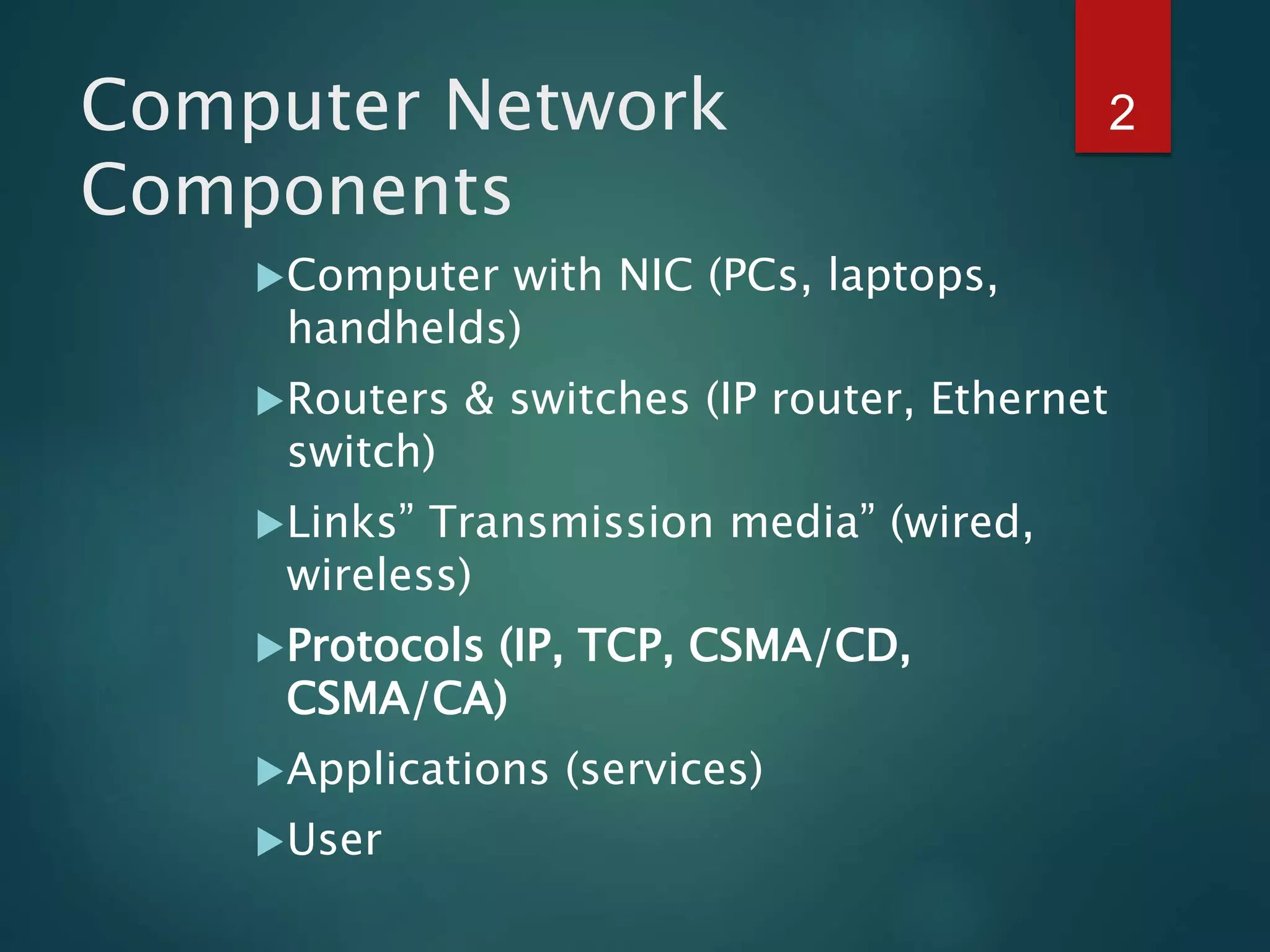
Computer with NIC (PCs, laptops,
handhelds)
Routers & switches (IP router, Ethernet
switch)
Links” Transmission media” (wired,
wireless)
Protocols (IP, TCP, CSMA/CD,
CSMA/CA)
Applications (services)
User
2
 A protocol is required when two entities need to
communicate.
 When communication is not simple, we may divide the
complex task of communication into several layers.
 The sending computer must:
 Recognize the data.
 Divide the data into manageable chunks.
 Add information to each chunk of data to determine the
location of the data and to identify the receiver.
 Add timing and error-checking information.
 Put the data on the network and send it on its way.
3
PROTOCOL LAYERS
• Established in 1947, the International Standards Organization (ISO) is a
multinational body dedicated to worldwide agreement on international
standards.
• Almost three-fourths of countries in the world are represented in the
ISO.
• An ISO standard that covers all aspects of network communications is
the Open Systems Interconnection (OSI) model.
• It was first introduced in the late 1970s.
4
THE OSI MODEL
OSI Model
Applicatio
n
7th
Layer
User Prepare message
Presentation
6th
Layer
Message is translated, encrypted and
minimized
Session
5th
Layer
Security checks message, adds checkpoints to
ensure that receiver receives whole message
Transport
4th
Layer
Message is analysed, combined if necessary
and broken into smaller pieces
Network
3rd
Layer
check the message, determine the address,
indicate fastest route to desination
Data Link
2nd
Layer
Message placed in special packet contains
message, sender and destination ID
Physical
1st
Layer
Data transferred
6
OSI layers
7
An exchange using the OSI model ( Encapsulation)
8
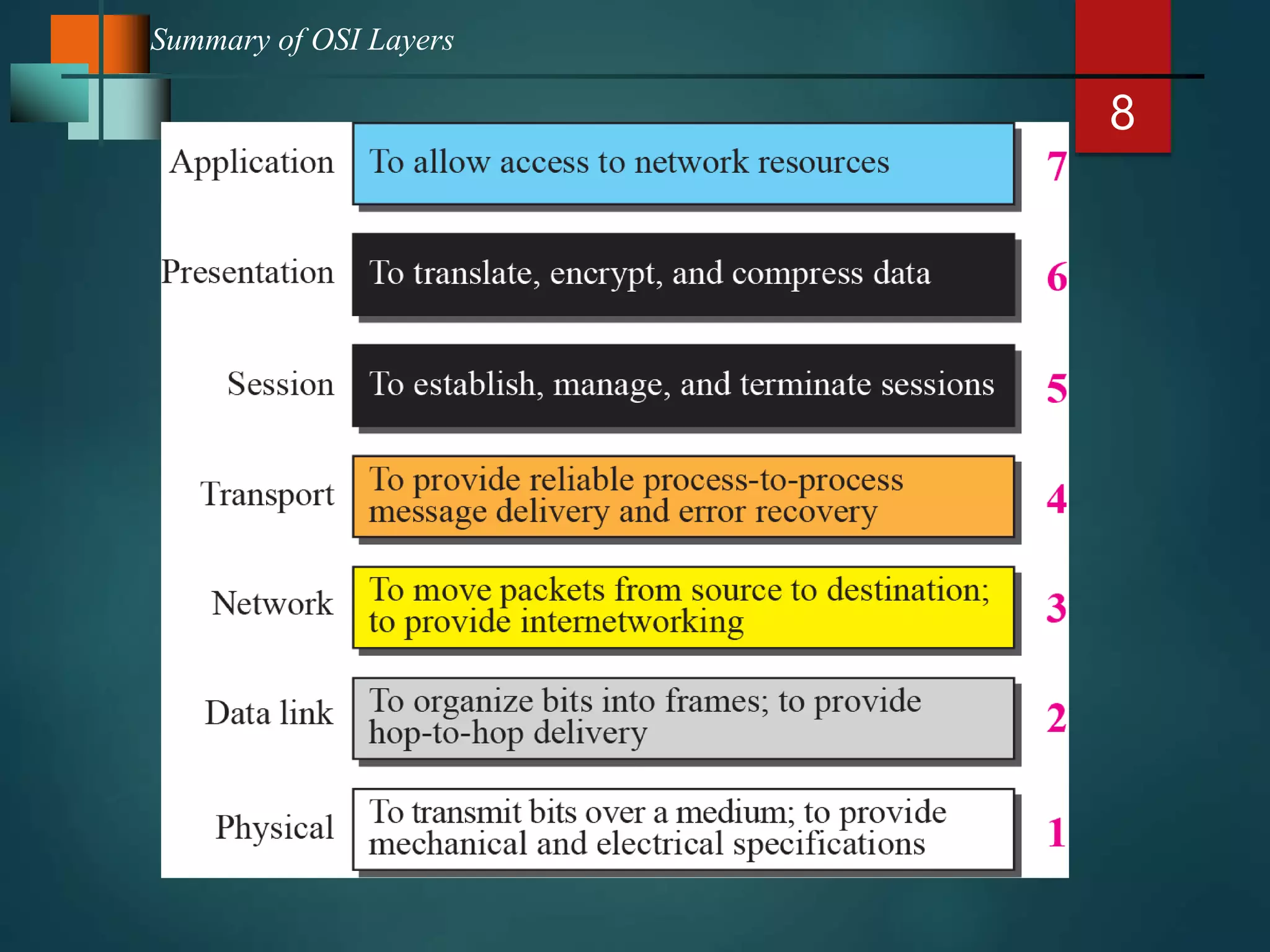
Summary of OSI Layers
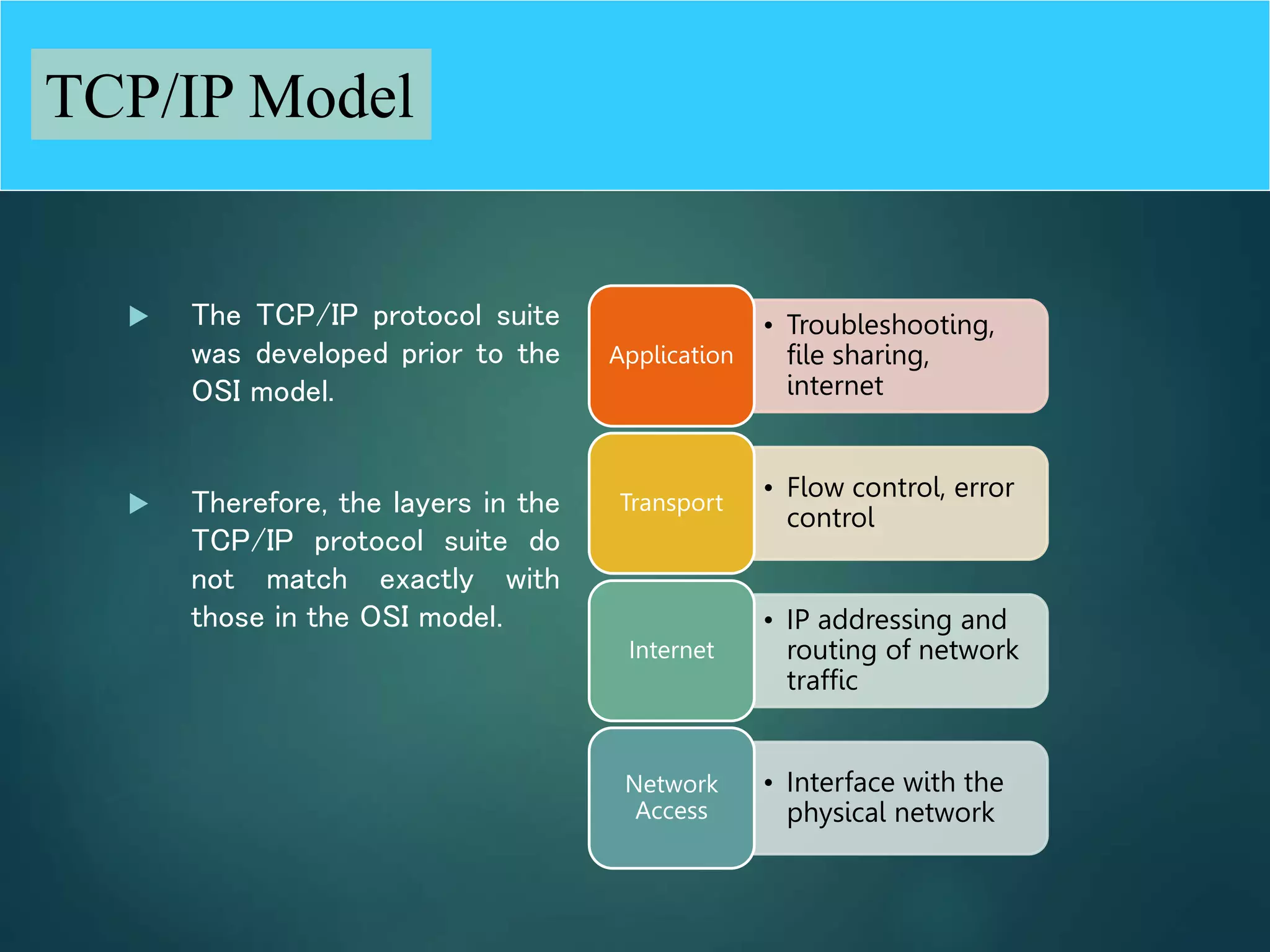
 The TCP/IP protocol suite
was developed prior to the
OSI model.
 Therefore, the layers in the
TCP/IP protocol suite do
not match exactly with
those in the OSI model.
• Troubleshooting,
file sharing,
internet
Application
• Flow control, error
control
Transport
• IP addressing and
routing of network
traffic
Internet
• Interface with the
physical network
Network
Access
9
TCP/IP Model
Comparison between OSI and
TCP/IP
IOS Model
Application
Presentation
Session
Transport
Network
Data Link
Physical
TCP/IP Model
Application
Transport
Internet
Network
Access
11
A private internet
LAYERS IN THE OSI MODEL
Physical layer
 defines the procedures and functions that physical
devices and interfaces have to perform for
transmission occur.
 The physical layer is concerned with the following:
 Physical characteristics of interfaces and media:
 Representation of the bits
 Data rate, the number of bits sent each second.
 Line configuration, Point to point or multipoint
configuration.
 Physical topology
 Transmission Mode : Simplex, half duplex or full duplex
13
Communication at the physical layer
A
Physical
layer
Physical
layer
R1 R3 R4 B
Source Destination
Legend
011 ... 101
0
1
1
.
.
.
1
0
1
011 ... 101 011 ... 101
Link 3 Link 5 Link 6
Link 1
14
The unit of communication at the physical
layer is a bit.
Data Link Layer
 The data link layer transforms the physical layer, a raw
transmission facility, to a reliable link and is
responsible for node-to-node delivery.
 The Data Link layer is concerned with the following:
 Framing.
 Physical addressing, each node has its unique
address.
 Flow Control.
 Access Control.
 Error control, normally achieved through a trailer to the end
of the frame.
16
Communication at the data link layer
A
Physical Physical
Data link
Data link
R1 R3 R4 B
Source Destination Data
D Header
H
Legend
Link 1 Link 3 Link 5 Link 6
Frame
D2 H2
F
r
a
m
e
D
2
H
2
Frame
D2 H2
Frame
D2 H2
17
The unit of communication at the data link
layer is a frame.
Note
Network Layer
• Is responsible for the source-to-destination delivery of
a packet possible across multiple networks.
 Functions:
• Logical addressing.
• Routing, It determines which path the data should take
based on network conditions, priority of service, and
other factors.
19
The unit of communication at the network
layer is a datagram (Packet).
Transport Layer
 The transport layer is responsible for process-to-process delivery
of the entire message.
 Makes sure that the data arrives without errors, in the proper
sequence and in a reliable condition.
 Functions:
 Port addressing, The network layer gets each packet to the correct computer;
the transport layer gets the entire message to the correct process on that
computer.
 Segmentation and reassembly: a message is divided into transmittable
segments, each having a sequence number
 Connection control: The transport layer can be either connectionless or
connection-oriented.
 Flow control
 Error control
21
Communication at transport layer
A
Physical Physical
Data link
Data link
R1 R3 R4
B
Network
Network
Transport Transport
Source Destination Data
D Header
H
Legend
Segment
D4 H4
Segment
D4 H4
22
The unit of communication at the transport
layer is a segment, user datagram, or a
packet, depending on the specific protocol
used in this layer.
Session Layer
 the session layer, allows two applications on different computers to open, use, and
close a connection called a session.
 (A session is a highly structured dialog between two workstations.)
 Functions:
 Dialog control
 It also makes sure the session is orderly, establishing which node transmits first, how long it can
transmit, and what to do in case of an error.
 It performs name-recognition and other functions, such as security, that are needed to allow
two applications to communicate over the network.
 Synchronization
 The session layer synchronizes user tasks by placing checkpoints in the data stream.
 The checkpoints break the data into smaller groups for error detection. It allows information of
different streams, perhaps originating from different sources, to be properly combined or
synchronized.
 An example application is web conferencing, in which the streams of audio and video must be
synchronous to avoid so-called lip synch problems. It ensures that the person displayed on
screen is the current speaker.
presentation layer
 The presentation layer is responsible for translation,
compression, and encryption.
 Deals with the actual formatting of the data.
 For example, data might be converted from EBCDIC to
ASCII formatting so that the receiving node can
understand it.
Application Layer
 This layer relates to the services that directly provide
user interfaces support user applications or services,
such as software for file transfers, database access, and
e-mail.
 In other words, it serves as a window through which
application processes can access network services.
 The application layer enables the user to access the
network.
 This would be the layer that a programmer uses to
allow his application to access a network service, such
as linking into a database.
26
Communication at application layer
A
Physical Physical
Data link
Data link
R1 R3 R4
B
Network
Network
Transport Transport
Application
Application Source Destination Data
D Header
H
Legend
Message
D5 D5
D5 D5
Message
27
The unit of communication at the
application layer is a message.
 Four levels of addresses are used in an internet
employing the TCP/IP protocols:
 physical address
 logical address
 port address
 application-specific address.
28
ADDRESSING
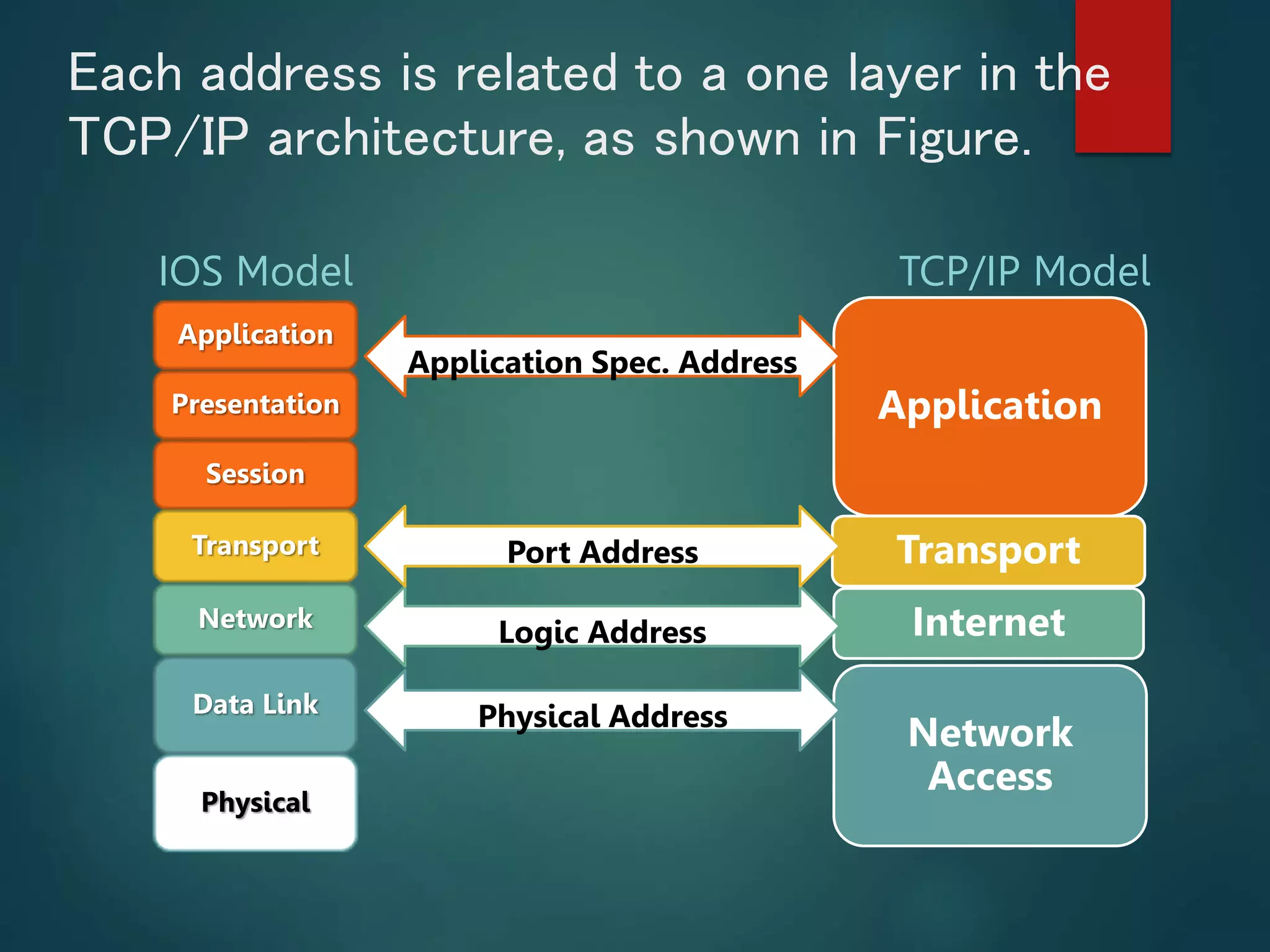
Each address is related to a one layer in the
TCP/IP architecture, as shown in Figure.
IOS Model
Application
Presentation
Session
Transport
Network
Data Link
Physical
TCP/IP Model
Application
Transport
Internet
Network
Access
Logic Address
Port Address
Application Spec. Address
Physical Address
30
Example 1: physical addresses
Data
87 10
1 packet
accepted
Data
87 10
4
31
As we will see later, most local area networks represent the
physical address in two ways:
• IPv4
• use a 32-bit (4-byte) physical address written as decimal
digits; every byte (2 hexadecimal digits) is separated by a
dot, as shown below
• IPv6 ( new version)
• use a 48-bit (6-byte) physical address written as 12
hexadecimal digits; every byte (2 hexadecimal digits) is
separated by a colon, as shown below:
Example 1
07:01:02:01:2C:4B
A 6-byte (12 hexadecimal digits) physical address
128.7.0.0
A 4-byte (a byte represent 8 bits called octet ) physical address
32
Example 2: logical addresses
Data
A P
20 10 Data
A P
20 10
Physical
addresses
changed
Data
A P
33 99
Data
A P
33 99
Physical
addresses
changed
Data
A P
95 66 Data
A P
95 66
33
The physical addresses will change from
hop to hop, but the logical addresses
remain the same.
Note
34
A Sender Receiver P
Internet
Example 3: port numbers
a Data
j
A P
H2
a Data
j
A P
a Data
j
Data
a Data
j
A P
H2
a Data
j
A P
a Data
j
Data
35
The physical addresses change from hop to
hop, but the logical and port addresses
usually remain the same.
Note
36
a port address is a 16-bit address represented by one decimal
number as shown.
Example 3
753
A 16-bit port address represented as one single number

OSI model.pptx

  • 1.
    OSI vs TCP/IPModel  OSI Reference Model - internationally standardised network architecture.  OSI = Open Systems Interconnection: deals with open systems, i.e. systems open for communications with other systems. 1
  • 2.
    Computer Network Components Computer withNIC (PCs, laptops, handhelds) Routers & switches (IP router, Ethernet switch) Links” Transmission media” (wired, wireless) Protocols (IP, TCP, CSMA/CD, CSMA/CA) Applications (services) User 2
  • 3.
     A protocolis required when two entities need to communicate.  When communication is not simple, we may divide the complex task of communication into several layers.  The sending computer must:  Recognize the data.  Divide the data into manageable chunks.  Add information to each chunk of data to determine the location of the data and to identify the receiver.  Add timing and error-checking information.  Put the data on the network and send it on its way. 3 PROTOCOL LAYERS
  • 4.
    • Established in1947, the International Standards Organization (ISO) is a multinational body dedicated to worldwide agreement on international standards. • Almost three-fourths of countries in the world are represented in the ISO. • An ISO standard that covers all aspects of network communications is the Open Systems Interconnection (OSI) model. • It was first introduced in the late 1970s. 4 THE OSI MODEL
  • 5.
    OSI Model Applicatio n 7th Layer User Preparemessage Presentation 6th Layer Message is translated, encrypted and minimized Session 5th Layer Security checks message, adds checkpoints to ensure that receiver receives whole message Transport 4th Layer Message is analysed, combined if necessary and broken into smaller pieces Network 3rd Layer check the message, determine the address, indicate fastest route to desination Data Link 2nd Layer Message placed in special packet contains message, sender and destination ID Physical 1st Layer Data transferred
  • 6.
  • 7.
    7 An exchange usingthe OSI model ( Encapsulation)
  • 8.
  • 9.
     The TCP/IPprotocol suite was developed prior to the OSI model.  Therefore, the layers in the TCP/IP protocol suite do not match exactly with those in the OSI model. • Troubleshooting, file sharing, internet Application • Flow control, error control Transport • IP addressing and routing of network traffic Internet • Interface with the physical network Network Access 9 TCP/IP Model
  • 10.
    Comparison between OSIand TCP/IP IOS Model Application Presentation Session Transport Network Data Link Physical TCP/IP Model Application Transport Internet Network Access
  • 11.
  • 12.
    LAYERS IN THEOSI MODEL Physical layer  defines the procedures and functions that physical devices and interfaces have to perform for transmission occur.  The physical layer is concerned with the following:  Physical characteristics of interfaces and media:  Representation of the bits  Data rate, the number of bits sent each second.  Line configuration, Point to point or multipoint configuration.  Physical topology  Transmission Mode : Simplex, half duplex or full duplex
  • 13.
    13 Communication at thephysical layer A Physical layer Physical layer R1 R3 R4 B Source Destination Legend 011 ... 101 0 1 1 . . . 1 0 1 011 ... 101 011 ... 101 Link 3 Link 5 Link 6 Link 1
  • 14.
    14 The unit ofcommunication at the physical layer is a bit.
  • 15.
    Data Link Layer The data link layer transforms the physical layer, a raw transmission facility, to a reliable link and is responsible for node-to-node delivery.  The Data Link layer is concerned with the following:  Framing.  Physical addressing, each node has its unique address.  Flow Control.  Access Control.  Error control, normally achieved through a trailer to the end of the frame.
  • 16.
    16 Communication at thedata link layer A Physical Physical Data link Data link R1 R3 R4 B Source Destination Data D Header H Legend Link 1 Link 3 Link 5 Link 6 Frame D2 H2 F r a m e D 2 H 2 Frame D2 H2 Frame D2 H2
  • 17.
    17 The unit ofcommunication at the data link layer is a frame. Note
  • 18.
    Network Layer • Isresponsible for the source-to-destination delivery of a packet possible across multiple networks.  Functions: • Logical addressing. • Routing, It determines which path the data should take based on network conditions, priority of service, and other factors.
  • 19.
    19 The unit ofcommunication at the network layer is a datagram (Packet).
  • 20.
    Transport Layer  Thetransport layer is responsible for process-to-process delivery of the entire message.  Makes sure that the data arrives without errors, in the proper sequence and in a reliable condition.  Functions:  Port addressing, The network layer gets each packet to the correct computer; the transport layer gets the entire message to the correct process on that computer.  Segmentation and reassembly: a message is divided into transmittable segments, each having a sequence number  Connection control: The transport layer can be either connectionless or connection-oriented.  Flow control  Error control
  • 21.
    21 Communication at transportlayer A Physical Physical Data link Data link R1 R3 R4 B Network Network Transport Transport Source Destination Data D Header H Legend Segment D4 H4 Segment D4 H4
  • 22.
    22 The unit ofcommunication at the transport layer is a segment, user datagram, or a packet, depending on the specific protocol used in this layer.
  • 23.
    Session Layer  thesession layer, allows two applications on different computers to open, use, and close a connection called a session.  (A session is a highly structured dialog between two workstations.)  Functions:  Dialog control  It also makes sure the session is orderly, establishing which node transmits first, how long it can transmit, and what to do in case of an error.  It performs name-recognition and other functions, such as security, that are needed to allow two applications to communicate over the network.  Synchronization  The session layer synchronizes user tasks by placing checkpoints in the data stream.  The checkpoints break the data into smaller groups for error detection. It allows information of different streams, perhaps originating from different sources, to be properly combined or synchronized.  An example application is web conferencing, in which the streams of audio and video must be synchronous to avoid so-called lip synch problems. It ensures that the person displayed on screen is the current speaker.
  • 24.
    presentation layer  Thepresentation layer is responsible for translation, compression, and encryption.  Deals with the actual formatting of the data.  For example, data might be converted from EBCDIC to ASCII formatting so that the receiving node can understand it.
  • 25.
    Application Layer  Thislayer relates to the services that directly provide user interfaces support user applications or services, such as software for file transfers, database access, and e-mail.  In other words, it serves as a window through which application processes can access network services.  The application layer enables the user to access the network.  This would be the layer that a programmer uses to allow his application to access a network service, such as linking into a database.
  • 26.
    26 Communication at applicationlayer A Physical Physical Data link Data link R1 R3 R4 B Network Network Transport Transport Application Application Source Destination Data D Header H Legend Message D5 D5 D5 D5 Message
  • 27.
    27 The unit ofcommunication at the application layer is a message.
  • 28.
     Four levelsof addresses are used in an internet employing the TCP/IP protocols:  physical address  logical address  port address  application-specific address. 28 ADDRESSING
  • 29.
    Each address isrelated to a one layer in the TCP/IP architecture, as shown in Figure. IOS Model Application Presentation Session Transport Network Data Link Physical TCP/IP Model Application Transport Internet Network Access Logic Address Port Address Application Spec. Address Physical Address
  • 30.
    30 Example 1: physicaladdresses Data 87 10 1 packet accepted Data 87 10 4
  • 31.
    31 As we willsee later, most local area networks represent the physical address in two ways: • IPv4 • use a 32-bit (4-byte) physical address written as decimal digits; every byte (2 hexadecimal digits) is separated by a dot, as shown below • IPv6 ( new version) • use a 48-bit (6-byte) physical address written as 12 hexadecimal digits; every byte (2 hexadecimal digits) is separated by a colon, as shown below: Example 1 07:01:02:01:2C:4B A 6-byte (12 hexadecimal digits) physical address 128.7.0.0 A 4-byte (a byte represent 8 bits called octet ) physical address
  • 32.
    32 Example 2: logicaladdresses Data A P 20 10 Data A P 20 10 Physical addresses changed Data A P 33 99 Data A P 33 99 Physical addresses changed Data A P 95 66 Data A P 95 66
  • 33.
    33 The physical addresseswill change from hop to hop, but the logical addresses remain the same. Note
  • 34.
    34 A Sender ReceiverP Internet Example 3: port numbers a Data j A P H2 a Data j A P a Data j Data a Data j A P H2 a Data j A P a Data j Data
  • 35.
    35 The physical addresseschange from hop to hop, but the logical and port addresses usually remain the same. Note
  • 36.
    36 a port addressis a 16-bit address represented by one decimal number as shown. Example 3 753 A 16-bit port address represented as one single number