Performance Evaluation using
TAU Performance System® and E4S
April 23, 2020, 10am ET
Panel Discussion, IBM Workshop
Sameer Shende
Performance Research Laboratory, OACISS, University of Oregon
http://tau.uoregon.edu/TAU_IBM_UW20.pdf
2
Challenges
•  With growing hardware complexity, it is getting harder to
accurately measure and optimize the performance of our
HPC and AI/ML workloads.
•  As our software gets more complex, it is getting harder to
install tools and libraries correctly in an integrated and
interoperable software stack.
3
Motivation: Improving Productivity
•  TAU Performance System®:
–  Deliver a scalable, portable, performance evaluation toolkit for HPC and AI/
ML workloads
•  Extreme-scale Scientific Software Stack (E4S):
–  Delivering a modular, interoperable, and deployable software stack
–  Deliver expanded and vertically integrated software stacks to achieve full
potential of extreme-scale computing
–  Lower barrier to using software technology (ST) products from ECP
–  Enable uniform APIs where possible
4
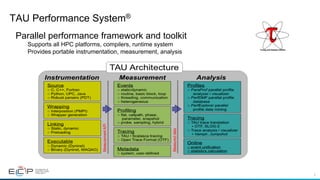
TAU Performance System®
Parallel performance framework and toolkit
Supports all HPC platforms, compilers, runtime system
Provides portable instrumentation, measurement, analysis
5
TAU Performance System
Instrumentation
•  Fortran, C++, C, UPC, Java, Python, Chapel, Spark
•  Automatic instrumentation
Measurement and analysis support
•  MPI, OpenSHMEM, ARMCI, PGAS, DMAPP
•  pthreads, OpenMP, OMPT interface, hybrid, other thread models
•  GPU, ROCm, CUDA, OpenCL, OpenACC
•  Parallel profiling and tracing
Analysis
•  Parallel profile analysis (ParaProf), data mining (PerfExplorer)
•  Performance database technology (TAUdb)
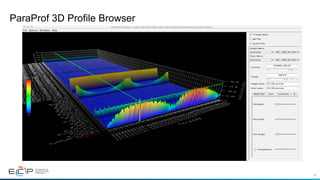
•  3D profile browser
6
•  How much time is spent in each application routine and outer loops? Within loops, what is the
contribution of each statement? What is the time spent in OpenMP loops? In kernels on
GPUs. How long did it take to transfer data between host and device (GPU)?
•  How many instructions are executed in these code regions?
Floating point, Level 1 and 2 data cache misses, hits, branches taken? What is the extent of
vectorization for loops?
•  What is the memory usage of the code? When and where is memory allocated/de-allocated?
Are there any memory leaks? What is the memory footprint of the application? What is the
memory high water mark?
•  How much energy does the application use in Joules? What is the peak power usage?
•  What are the I/O characteristics of the code? What is the peak read and write bandwidth of
individual calls, total volume?
•  How does the application scale? What is the efficiency, runtime breakdown of performance
across different core counts?
Application Performance Engineering
using TAU
7
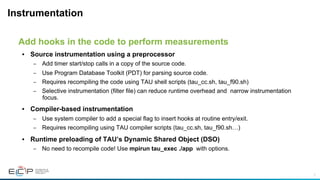
Instrumentation
•  Source instrumentation using a preprocessor
–  Add timer start/stop calls in a copy of the source code.
–  Use Program Database Toolkit (PDT) for parsing source code.
–  Requires recompiling the code using TAU shell scripts (tau_cc.sh, tau_f90.sh)
–  Selective instrumentation (filter file) can reduce runtime overhead and narrow instrumentation
focus.
•  Compiler-based instrumentation
–  Use system compiler to add a special flag to insert hooks at routine entry/exit.
–  Requires recompiling using TAU compiler scripts (tau_cc.sh, tau_f90.sh…)
•  Runtime preloading of TAU’s Dynamic Shared Object (DSO)
–  No need to recompile code! Use mpirun tau_exec ./app with options.
Add hooks in the code to perform measurements
8
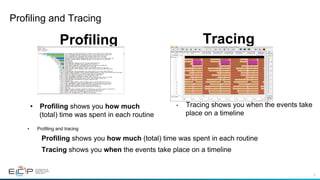
Profiling and Tracing
•  Tracing shows you when the events take
place on a timeline
Profiling Tracing
•  Profiling shows you how much
(total) time was spent in each routine
•  Profiling and tracing
Profiling shows you how much (total) time was spent in each routine
Tracing shows you when the events take place on a timeline
9
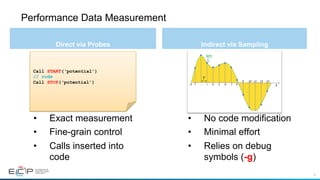
Performance Data Measurement
Direct via Probes Indirect via Sampling
•  Exact measurement
•  Fine-grain control
•  Calls inserted into
code
•  No code modification
•  Minimal effort
•  Relies on debug
symbols (-g)
Call START(‘potential’)
// code
Call STOP(‘potential’)
10
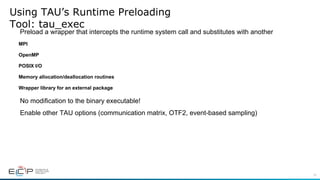
Using TAU’s Runtime Preloading
Tool: tau_exec
Preload a wrapper that intercepts the runtime system call and substitutes with another
MPI
OpenMP
POSIX I/O
Memory allocation/deallocation routines
Wrapper library for an external package
No modification to the binary executable!
Enable other TAU options (communication matrix, OTF2, event-based sampling)
11
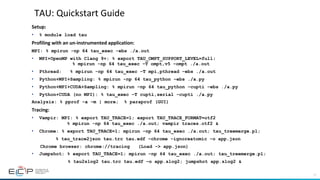
TAU:	Quickstart	Guide	
Setup:		
•  % module load tau
Profiling	with	an	un-instrumented	application:	
MPI: % mpirun -np 64 tau_exec -ebs ./a.out
•  MPI+OpenMP with Clang 9+: % export TAU_OMPT_SUPPORT_LEVEL=full;
% mpirun -np 64 tau_exec –T ompt,v5 –ompt ./a.out
•  Pthread: % mpirun -np 64 tau_exec –T mpi,pthread –ebs ./a.out
•  Python+MPI+Sampling: % mpirun -np 64 tau_python –ebs ./a.py
•  Python+MPI+CUDA+Sampling: % mpirun –np 64 tau_python –cupti –ebs ./a.py
•  Python+CUDA (no MPI): % tau_exec –T cupti,serial –cupti ./a.py
Analysis: % pprof –a –m | more; % paraprof (GUI)
Tracing:	
•  Vampir: MPI: % export TAU_TRACE=1; export TAU_TRACE_FORMAT=otf2
% mpirun -np 64 tau_exec ./a.out; vampir traces.otf2 &
•  Chrome: % export TAU_TRACE=1; mpirun –np 64 tau_exec ./a.out; tau_treemerge.pl;
% tau_trace2json tau.trc tau.edf –chrome –ignoreatomic –o app.json
Chrome browser: chrome://tracing (Load -> app.json)
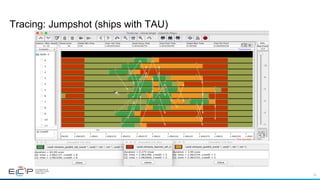
•  Jumpshot: % export TAU_TRACE=1; mpirun –np 64 tau_exec ./a.out; tau_treemerge.pl;
% tau2slog2 tau.trc tau.edf –o app.slog2; jumpshot app.slog2 &
12
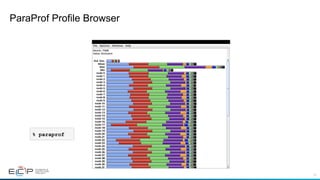
ParaProf Profile Browser
% paraprof
13
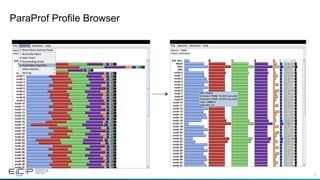
ParaProf Profile Browser
14
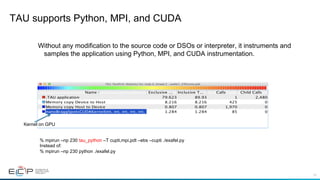
TAU supports Python, MPI, and CUDA
Without any modification to the source code or DSOs or interpreter, it instruments and
samples the application using Python, MPI, and CUDA instrumentation.
% mpirun –np 230 tau_python –T cupti,mpi,pdt –ebs –cupti ./exafel.py
Instead of:
% mpirun –np 230 python ./exafel.py
Kernel on GPU
15
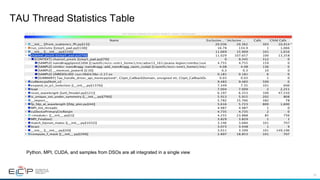
TAU Thread Statistics Table
Python, MPI, CUDA, and samples from DSOs are all integrated in a single view
16
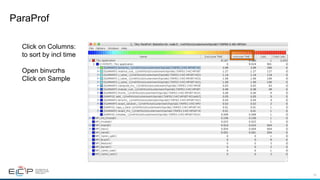
ParaProf
Click on Columns:
to sort by incl time
Open binvcrhs
Click on Sample
17
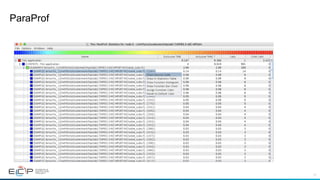
ParaProf
18
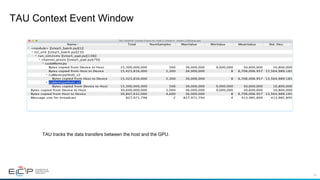
TAU Context Event Window
TAU tracks the data transfers between the host and the GPU.
19
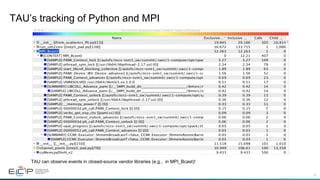
TAU’s tracking of Python and MPI
TAU can observe events in closed-source vendor libraries (e.g., in MPI_Bcast)!
20
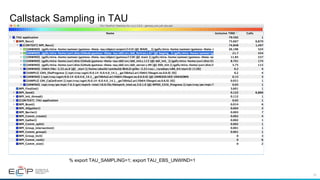
Callstack Sampling in TAU
% export TAU_SAMPLING=1; export TAU_EBS_UNWIND=1
21
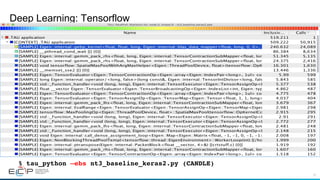
Deep Learning: Tensorflow
% tau_python –ebs nt3_baseline_keras2.py (CANDLE)
22
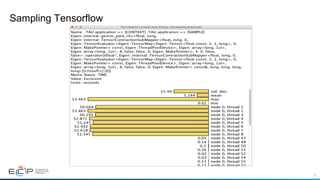
Sampling Tensorflow
23
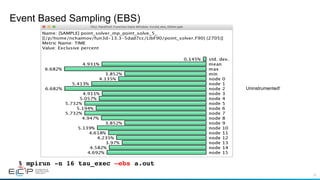
Event Based Sampling (EBS)
% mpirun -n 16 tau_exec –ebs a.out
Uninstrumented!
24
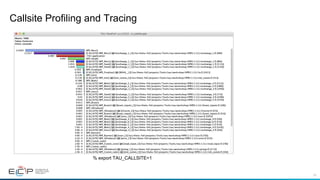
Callsite Profiling and Tracing
% export TAU_CALLSITE=1
25
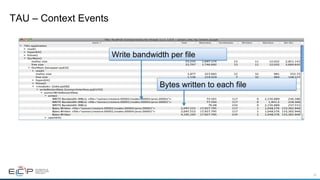
TAU – Context Events
Bytes written to each file
Write bandwidth per file
26
ParaProf 3D Profile Browser
27
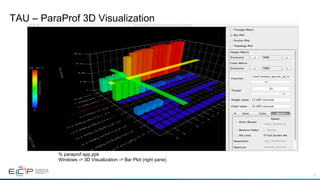
TAU – ParaProf 3D Visualization
% paraprof app.ppk
Windows -> 3D Visualization -> Bar Plot (right pane)
28
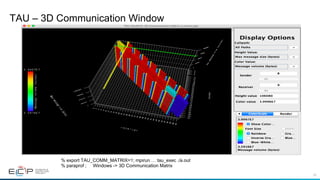
TAU – 3D Communication Window
% export TAU_COMM_MATRIX=1; mpirun … tau_exec ./a.out
% paraprof ; Windows -> 3D Communication Matrix
29
Tracing: Jumpshot (ships with TAU)
30
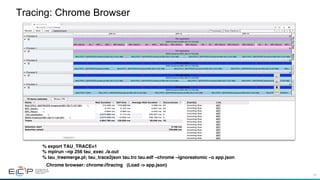
Tracing: Chrome Browser
% export TAU_TRACE=1
% mpirun –np 256 tau_exec ./a.out
% tau_treemerge.pl; tau_trace2json tau.trc tau.edf –chrome –ignoreatomic –o app.json
Chrome browser: chrome://tracing (Load -> app.json)
31
Vampir [TU Dresden] Timeline: Kokkos
% export TAU_TRACE=1; export TAU_TRACE_FORMAT=otf2
% tau_exec –ompt ./a.out
% vampir traces.otf2 &
32
Kokkos
•  Provides abstractions for node level parallelism (X in MPI+X)
•  Productive, portable, and performant shared-memory programming model
•  Helps you create single source performance portable codes
•  Provides data abstractions
•  C++ API for expressing parallelism in your program
•  Aggressive compiler transformations using C++ templates
•  Low level code targets backends such as OpenMP, Pthread, CUDA
•  Creates a problem for performance evaluation tools
•  Gap: performance data and higher-level abstractions
•  Solution: Kokkos profiling API for mapping performance data
32
33
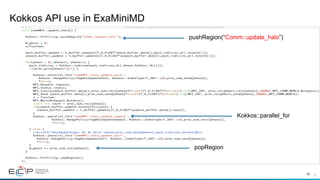
Kokkos API use in ExaMiniMD
33	
pushRegion(“Comm::update_halo”)
popRegion
Kokkos::parallel_for
34
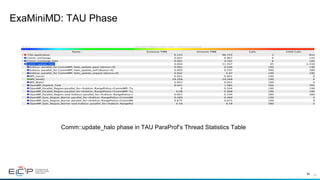
ExaMiniMD: TAU Phase
34	
Comm::update_halo phase in TAU ParaProf’s Thread Statistics Table
35
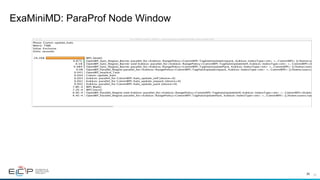
ExaMiniMD: ParaProf Node Window
35
36
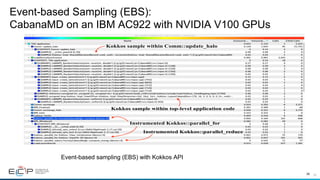
Event-based Sampling (EBS):
CabanaMD on an IBM AC922 with NVIDIA V100 GPUs
36	
Event-based sampling (EBS) with Kokkos API
37
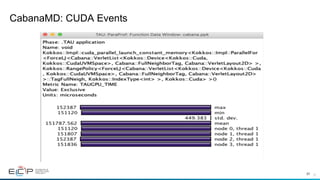
CabanaMD: CUDA Events
37
38
TAU’s Support for Runtime Systems
MPI
PMPI profiling interface
MPI_T tools interface using performance and control variables
Pthread
Captures time spent in routines per thread of execution
OpenMP
OMPT tools interface to track salient OpenMP runtime events
Opari source rewriter
Preloading wrapper OpenMP runtime library when OMPT is not supported
OpenACC
OpenACC instrumentation API
Track data transfers between host and device (per-variable)
Track time spent in kernels
39
TAU’s Support for Runtime Systems (contd.)
OpenCL
OpenCL profiling interface
Track timings of kernels
CUDA
Cuda Profiling Tools Interface (CUPTI)
Track data transfers between host and GPU
Track access to uniform shared memory between host and GPU
ROCm
Rocprofiler and Roctracer instrumentation interfaces
Track data transfers and kernel execution between host and GPU
Kokkos
Kokkos profiling API
Push/pop interface for region, kernel execution interface
Python
Python interpreter instrumentation API
Tracks Python routine transitions as well as Python to C transitions
40
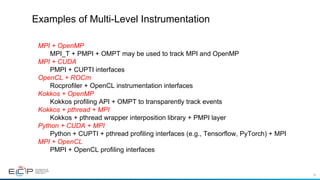
Examples of Multi-Level Instrumentation
MPI + OpenMP
MPI_T + PMPI + OMPT may be used to track MPI and OpenMP
MPI + CUDA
PMPI + CUPTI interfaces
OpenCL + ROCm
Rocprofiler + OpenCL instrumentation interfaces
Kokkos + OpenMP
Kokkos profiling API + OMPT to transparently track events
Kokkos + pthread + MPI
Kokkos + pthread wrapper interposition library + PMPI layer
Python + CUDA + MPI
Python + CUPTI + pthread profiling interfaces (e.g., Tensorflow, PyTorch) + MPI
MPI + OpenCL
PMPI + OpenCL profiling interfaces
41
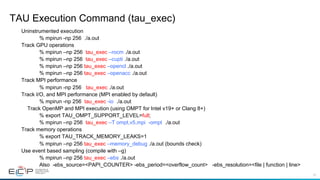
TAU Execution Command (tau_exec)
Uninstrumented execution
% mpirun -np 256 ./a.out
Track GPU operations
% mpirun –np 256 tau_exec –rocm ./a.out
% mpirun –np 256 tau_exec –cupti ./a.out
% mpirun –np 256 tau_exec –opencl ./a.out
% mpirun –np 256 tau_exec –openacc ./a.out
Track MPI performance
% mpirun -np 256 tau_exec ./a.out
Track I/O, and MPI performance (MPI enabled by default)
% mpirun -np 256 tau_exec -io ./a.out
Track OpenMP and MPI execution (using OMPT for Intel v19+ or Clang 8+)
% export TAU_OMPT_SUPPORT_LEVEL=full;
% mpirun –np 256 tau_exec –T ompt,v5,mpi -ompt ./a.out
Track memory operations
% export TAU_TRACK_MEMORY_LEAKS=1
% mpirun –np 256 tau_exec –memory_debug ./a.out (bounds check)
Use event based sampling (compile with –g)
% mpirun –np 256 tau_exec –ebs ./a.out
Also -ebs_source=<PAPI_COUNTER> -ebs_period=<overflow_count> -ebs_resolution=<file | function | line>
Extreme-scale Scientific Software
Stack (E4S)
https://e4s.io
43
Extreme-scale Scientific Software Stack (E4S)
https://e4s.io
§  E4S is a community effort to provide open source software packages for
developing, deploying, and running scientific applications on HPC platforms.
§  E4S provides both source builds and containers of a broad collection of HPC
software packages.
§  E4S exists to accelerate the development, deployment and use of HPC
software, lowering the barriers for HPC users.
§  E4S provides containers and turn-key, from-source builds of 80+ popular
HPC software packages:
§  MPI: MPICH and OpenMPI
§  Development tools: TAU, HPCToolkit, and PAPI
§  Math libraries: PETSc and Trilinos
§  Data and Viz tools: Adios, HDF5, and Paraview
44
ECP is working towards a periodic, hierarchical release process
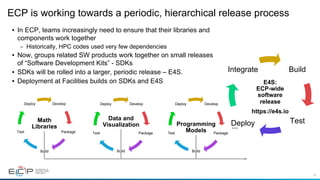
•  In ECP, teams increasingly need to ensure that their libraries and
components work together
–  Historically, HPC codes used very few dependencies
•  Now, groups related SW products work together on small releases
of “Software Development Kits” - SDKs
•  SDKs will be rolled into a larger, periodic release – E4S.
•  Deployment at Facilities builds on SDKs and E4S
Develop
Package
Build
Test
Deploy
Math
Libraries
Develop
Package
Build
Test
Deploy
Data and
Visualization
Develop
Package
Build
Test
Deploy
Programming
Models
…
Build
TestDeploy
Integrate
E4S:
ECP-wide
software
release
https://e4s.io
45
E4S: Extreme-scale Scientific Software Stack
•  Curated release of ECP ST products based on Spack [http://spack.io] package manager
•  Spack binary build caches for bare-metal installs
–  x86_64, ppc64le (IBM Power 9), and aarch64 (ARM64)
•  Container images on DockerHub and E4S website of pre-built binaries of ECP ST products
•  Base images and full featured containers (GPU support)
•  GitHub recipes for creating custom images from base images
•  GitLab integration for building E4S images
•  E4S validation test suite on GitHub
•  E4S VirtualBox image with support for container runtimes
•  Docker
•  Singularity
•  Shifter
•  Charliecloud
•  AWS image to deploy E4S on EC2
https://e4s.io
46
Integration and Interoperability: E4S
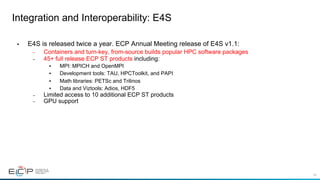
•  E4S is released twice a year. ECP Annual Meeting release of E4S v1.1:
–  Containers and turn-key, from-source builds popular HPC software packages
–  45+ full release ECP ST products including:
•  MPI: MPICH and OpenMPI
•  Development tools: TAU, HPCToolkit, and PAPI
•  Math libraries: PETSc and Trilinos
•  Data and Viztools: Adios, HDF5
–  Limited access to 10 additional ECP ST products
–  GPU support
47
E4S v1.1 Release: GPU
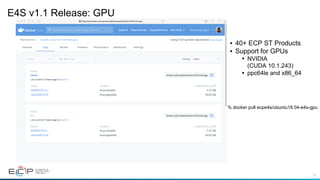
•  40+ ECP ST Products
•  Support for GPUs
•  NVIDIA
(CUDA 10.1.243)
•  ppc64le and x86_64
% docker pull ecpe4s/ubuntu18.04-e4s-gpu
48
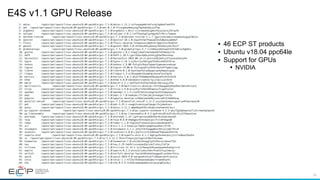
E4S v1.1 GPU Release
•  46 ECP ST products
•  Ubuntu v18.04 ppc64le
•  Support for GPUs
•  NVIDIA
49
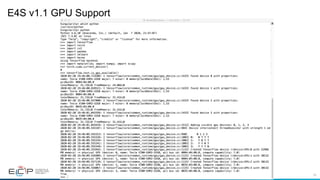
E4S v1.1 GPU Support
% docker pull ecpe4s/ubuntu18.04-e4s-gpu
50
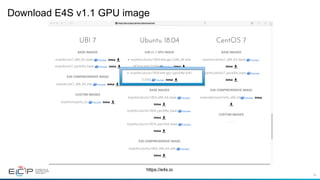
Download E4S v1.1 GPU image
https://e4s.io
Spack
52
Spack
•  E4S uses the Spack package manager for software delivery
•  Spack provides the ability to specify versions of software packages that are and are not
interoperable.
•  Spack is a build layer for not only E4S software, but also a large collection of software
tools and libraries outside of ECP ST.
•  Spack supports achieving and maintaining interoperability between ST software packages.
53
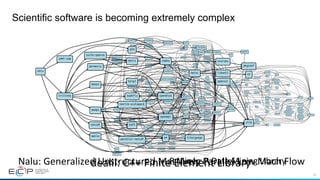
Scientific software is becoming extremely complex
r-rminer
r
r-adabag
r-mass
r-lattice
r-nnet
r-rpart
r-cubist
r-e1071
r-glmnet
r-kernlab
r-kknn
r-mda
r-party
r-plotrix
r-pls
r-randomforest
r-xgboost
bzip2
cairo
freetype
zlib
glib
ncurses
pcre
readline
curl
icu4c
jdk
libjpeg-turbo
libtiff
pango
tcltk
fontconfig
pkgconf
libpng
pixman
font-util
gperf
libxml2
util-macros
xz
gettext
libffi
perl
python
tar
gdbm
openssl
sqlite
cmake
nasm
gobject-introspection
harfbuzz
bison
flex
sed
m4 libsigsegv
help2man
libx11 inputproto
kbproto
libxcb
xproto
xextproto
xtrans
libpthread-stubs
libxau
libxdmcp
xcb-proto
r-caret
r-mlbench
r-car
r-nlme
r-foreach
r-ggplot2
r-plyr
r-reshape2
r-modelmetrics
r-mgcv
r-pbkrtest
r-quantreg
r-matrix
r-lme4
r-minqa
r-rcpp
r-nloptr
r-rcppeigen
r-testthat
r-crayon
r-digest
r-magrittr
r-praise
r-r6
r-matrixmodels
r-sparsem
r-codetools
r-iterators
r-gtable
r-lazyeval
r-scales
r-tibble
r-stringr
r-stringi
r-dichromat
r-labeling
r-munsell
r-rcolorbrewer
r-viridislite
r-colorspace
r-assertthat
r-rlang
r-class
r-igraph
gmp
r-irlba
r-pkgconfig
autoconf
automake
libtool
r-coin
r-modeltools
r-mvtnorm
r-sandwich
r-zoo
r-survival
r-strucchange
r-multcomp r-th-data
r-data-table
R	Miner:	R	Data	Mining	Library	
dealii
adol-c
arpack-ng
cmake
zlib
openblas
openmpi
assimp
boost
gmsh oce
intel-tbb
gsl
hdf5
metis
muparser
nanoflann
netcdfnetcdf-cxx
netlib-scalapack
p4est
petsc
slepc
suite-sparse
sundials
trilinos
autoconf
m4
automake
libtool
perl
libsigsegv
gdbm
readline
ncurses
pkgconf
openssl
hwloc libxml2
xz
bzip2
gmp
netgen
tetgen
hypre
parmetis
python
superlu-dist
sqlite
glm
matio
mumps
dealii:	C++	Finite	Element	Library	
nalu
cmake
openmpi
trilinos
yaml-cpp
ncurses
openssl
pkgconf
zlib
hwloc libxml2
xz
boost
glm
hdf5
matio
metis
mumps
netlib-scalapack
openblas
netcdf
parallel-netcdf
parmetis
suite-sparse
superlu
bzip2
m4 libsigsegv
Nalu:	Generalized	Unstructured	Massively	Parallel	Low	Mach	Flow
54
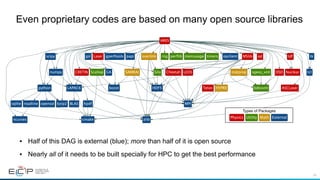
•  Half of this DAG is external (blue); more than half of it is open source
•  Nearly all of it needs to be built specially for HPC to get the best performance
Even proprietary codes are based on many open source libraries
ARES
tcl
tkscipy
python
cmake
hpdf
opclient
boost
zlib
numpy
bzip2
LAPACK
gsl
HDF5
gperftools papi
GA
bdivxml
sgeos_xmlScallop
rng perflib memusage timers
SiloSAMRAI
HYPRE
matprop
overlink qd
LEOS
MSlibLaser
CRETIN
tdf
Cheetah DSD
Teton
Nuclear
ASCLaser
MPI
ncurses
sqlite readline openssl BLAS
Physics Utility Math External
Types of Packages
55
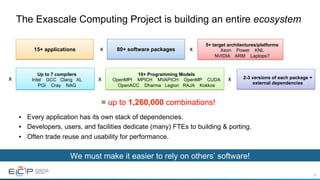
The Exascale Computing Project is building an entire ecosystem
•  Every application has its own stack of dependencies.
•  Developers, users, and facilities dedicate (many) FTEs to building & porting.
•  Often trade reuse and usability for performance.
80+ software packagesx
5+ target architectures/platforms
Xeon Power KNL
NVIDIA ARM Laptops?
x
Up to 7 compilers
Intel GCC Clang XL
PGI Cray NAG
x
= up to 1,260,000 combinations!
15+ applications
x
10+ Programming Models
OpenMPI MPICH MVAPICH OpenMP CUDA
OpenACC Dharma Legion RAJA Kokkos
2-3 versions of each package +
external dependencies
x
We must make it easier to rely on others’ software!
56
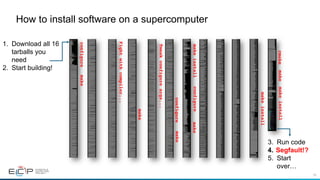
How to install software on a supercomputer
configuremake
Fightwithcompiler...
make
Tweakconfigureargs...
makeinstall
makeconfigure
configuremake
makeinstall
cmakemakemakeinstall
1.  Download all 16
tarballs you
need
2.  Start building!
3.  Run code
4.  Segfault!?
5.  Start
over…
57
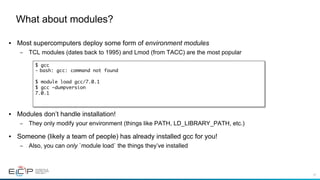
•  Most supercomputers deploy some form of environment modules
–  TCL modules (dates back to 1995) and Lmod (from TACC) are the most popular
•  Modules don’t handle installation!
–  They only modify your environment (things like PATH, LD_LIBRARY_PATH, etc.)
•  Someone (likely a team of people) has already installed gcc for you!
–  Also, you can only `module load` the things they’ve installed
What about modules?
$ gcc
-  bash: gcc: command not found
$ module load gcc/7.0.1
$ gcc –dumpversion
7.0.1
58
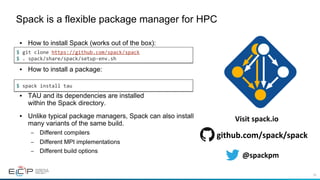
•  How to install Spack (works out of the box):
•  How to install a package:
•  TAU and its dependencies are installed
within the Spack directory.
•  Unlike typical package managers, Spack can also install
many variants of the same build.
–  Different compilers
–  Different MPI implementations
–  Different build options
Spack is a flexible package manager for HPC
$	git	clone	https://github.com/spack/spack	
$	.	spack/share/spack/setup-env.sh	
$	spack	install	tau	
@spackpm	
github.com/spack/spack	
Visit	spack.io
59
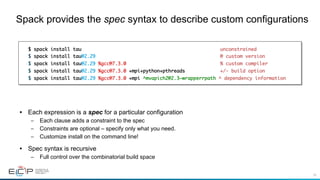
•  Each expression is a spec for a particular configuration
–  Each clause adds a constraint to the spec
–  Constraints are optional – specify only what you need.
–  Customize install on the command line!
•  Spec syntax is recursive
–  Full control over the combinatorial build space
Spack provides the spec syntax to describe custom configurations
$ spack install tau unconstrained
$ spack install tau@2.29 @ custom version
$ spack install tau@2.29 %gcc@7.3.0 % custom compiler
$ spack install tau@2.29 %gcc@7.3.0 +mpi+python+pthreads +/- build option
$ spack install tau@2.29 %gcc@7.3.0 +mpi ^mvapich2@2.3~wrapperrpath ^ dependency information
60
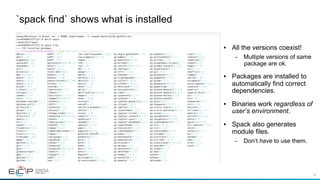
`spack find` shows what is installed
•  All the versions coexist!
–  Multiple versions of same
package are ok.
•  Packages are installed to
automatically find correct
dependencies.
•  Binaries work regardless of
user’s environment.
•  Spack also generates
module files.
–  Don’t have to use them.
61
•  Spack simplifies HPC software for:
–  Users
–  Developers
–  Cluster installations
–  The largest HPC facilities
•  Spack is central to ECP’s software strategy
–  Enable software reuse for developers and users
–  Allow the facilities to consume the entire ECP stack
•  The roadmap is packed with new features:
–  Building the ECP software distribution
–  Better workflows for building containers
–  Stacks for facilities
–  Chains for rapid dev workflow
–  Optimized binaries
–  Better dependency resolution
The Spack community is growing rapidly
@spackpm	
github.com/spack/spack	
Visit	spack.io
E4S Spack Build Cache and
Container Build Pipeline
63
Reproducible, Customizable Container Builds & Spack Mirrors
•  E4S provides base images and recipes for building Docker containers based on SDKs
–  Git: https://github.com/UO-OACISS/e4s
–  E4S provides build caches for Spack for native bare-metal as well as container builds based
installation of ST products
–  Build caches: https://oaciss.uoregon.edu/e4s/inventory.html
•  The build cache model can be extended to target platforms, and can be managed by facilities staff when
appropriate.
64
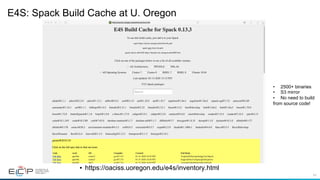
E4S: Spack Build Cache at U. Oregon
•  https://oaciss.uoregon.edu/e4s/inventory.html
•  2500+ binaries
•  S3 mirror
•  No need to build
from source code!
65
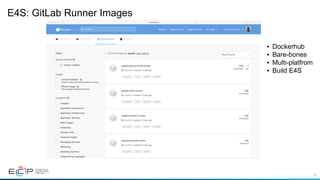
E4S: GitLab Runner Images
•  Dockerhub
•  Bare-bones
•  Multi-platfrom
•  Build E4S
66
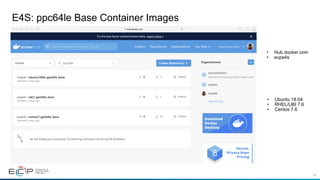
E4S: ppc64le Base Container Images
•  Ubuntu 18.04
•  RHEL/UBI 7.6
•  Centos 7.6
•  Hub.docker.com
•  ecpe4s
67
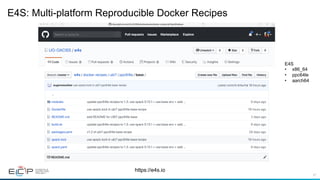
E4S: Multi-platform Reproducible Docker Recipes
https://e4s.io
E4S
•  x86_64
•  ppc64le
•  aarch64
68
E4S Support for Singularity Container Runtime [Sylabs.io]
●  wget http://oaciss.uoregon.edu/e4s/images/e4s_ubuntu1804_gpu_ppc64le_1.1.simg
●  singularity exec --nv e4s_ubuntu1804_gpu_ppc64le_1.1.simg /bin/bash --rcfile /etc/bashrc
●  spack find
69
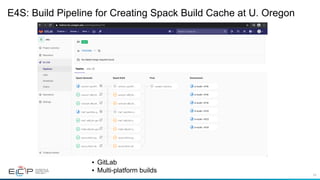
E4S: Build Pipeline for Creating Spack Build Cache at U. Oregon
•  GitLab
•  Multi-platform builds
70
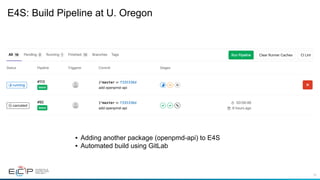
E4S: Build Pipeline at U. Oregon
•  Adding another package (openpmd-api) to E4S
•  Automated build using GitLab
71
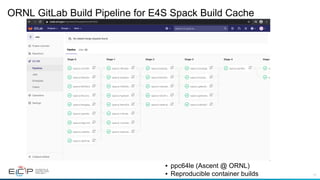
ORNL GitLab Build Pipeline for E4S Spack Build Cache
•  ppc64le (Ascent @ ORNL)
•  Reproducible container builds
72
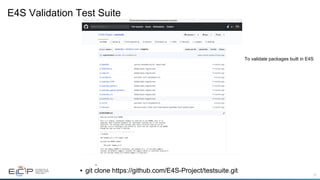
E4S Validation Test Suite
•  git clone https://github.com/E4S-Project/testsuite.git
To validate packages built in E4S
73
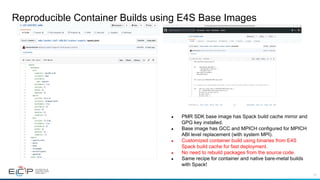
Reproducible Container Builds using E4S Base Images
●  PMR SDK base image has Spack build cache mirror and
GPG key installed.
●  Base image has GCC and MPICH configured for MPICH
ABI level replacement (with system MPI).
●  Customized container build using binaries from E4S
Spack build cache for fast deployment.
●  No need to rebuild packages from the source code.
●  Same recipe for container and native bare-metal builds
with Spack!
74
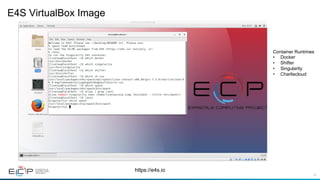
E4S VirtualBox Image
https://e4s.io
Container Runtimes
•  Docker
•  Shifter
•  Singularity
•  Charliecloud
75
Future work, issues…
●  Improved support for GPUs and visualization tools
●  DOE LLVM
●  Addition of CI testing
●  Facility deployment
●  Scalable startup with full-featured “Supercontainers”
●  Improving the launch of MPI applications
76
Conclusions
●  TAU provides a versatile tool to measure performance of HPC and AI/ML workloads
●  TAU is part of the bigger ECP E4S project
●  E4S provides a well integrated software stack for AI/ML and HPC for IBM ppc64le
●  From-source builds assisted by a binary build cache or containers
●  Docker and Singularity images are available for download
●  https://e4s.io
77
Download	TAU	from	U.	Oregon	
	
	
http://tau.uoregon.edu		
for	more	information	
Free	download,	open	source,	BSD	license
78
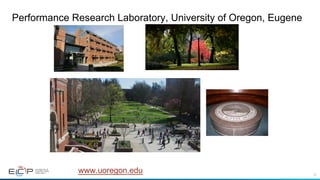
Performance Research Laboratory, University of Oregon, Eugene
www.uoregon.edu
79
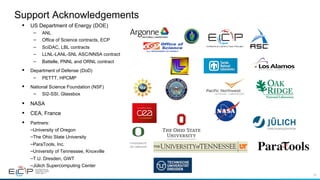
•  US Department of Energy (DOE)
–  ANL
–  Office of Science contracts, ECP
–  SciDAC, LBL contracts
–  LLNL-LANL-SNL ASC/NNSA contract
–  Battelle, PNNL and ORNL contract
•  Department of Defense (DoD)
–  PETTT, HPCMP
•  National Science Foundation (NSF)
–  SI2-SSI, Glassbox
•  NASA
•  CEA, France
•  Partners:
– University of Oregon
– The Ohio State University
– ParaTools, Inc.
– University of Tennessee, Knoxville
– T.U. Dresden, GWT
– Jülich Supercomputing Center
Support Acknowledgements
80
Acknowledgment
“This	research	was	supported	by	the	Exascale	Computing	Project	(17-SC-20-SC),	a	collaborative	effort	of	
two	U.S.	Department	of	Energy	organizations	(Office	of	Science	and	the	National	Nuclear	Security	
Administration)	responsible	for	the	planning	and	preparation	of	a	capable	exascale	ecosystem,	including	
software,	applications,	hardware,	advanced	system	engineering,	and	early	testbed	platforms,	in	support	
of	the	nation’s	exascale	computing	imperative.”
81

TAU E4S ON OpenPOWER /POWER9 platform

  • 1.
    Performance Evaluation using TAUPerformance System® and E4S April 23, 2020, 10am ET Panel Discussion, IBM Workshop Sameer Shende Performance Research Laboratory, OACISS, University of Oregon http://tau.uoregon.edu/TAU_IBM_UW20.pdf
  • 2.
    2 Challenges •  With growinghardware complexity, it is getting harder to accurately measure and optimize the performance of our HPC and AI/ML workloads. •  As our software gets more complex, it is getting harder to install tools and libraries correctly in an integrated and interoperable software stack.
  • 3.
    3 Motivation: Improving Productivity • TAU Performance System®: –  Deliver a scalable, portable, performance evaluation toolkit for HPC and AI/ ML workloads •  Extreme-scale Scientific Software Stack (E4S): –  Delivering a modular, interoperable, and deployable software stack –  Deliver expanded and vertically integrated software stacks to achieve full potential of extreme-scale computing –  Lower barrier to using software technology (ST) products from ECP –  Enable uniform APIs where possible
  • 4.
    4 TAU Performance System® Parallelperformance framework and toolkit Supports all HPC platforms, compilers, runtime system Provides portable instrumentation, measurement, analysis
  • 5.
    5 TAU Performance System Instrumentation • Fortran, C++, C, UPC, Java, Python, Chapel, Spark •  Automatic instrumentation Measurement and analysis support •  MPI, OpenSHMEM, ARMCI, PGAS, DMAPP •  pthreads, OpenMP, OMPT interface, hybrid, other thread models •  GPU, ROCm, CUDA, OpenCL, OpenACC •  Parallel profiling and tracing Analysis •  Parallel profile analysis (ParaProf), data mining (PerfExplorer) •  Performance database technology (TAUdb) •  3D profile browser
  • 6.
    6 •  How muchtime is spent in each application routine and outer loops? Within loops, what is the contribution of each statement? What is the time spent in OpenMP loops? In kernels on GPUs. How long did it take to transfer data between host and device (GPU)? •  How many instructions are executed in these code regions? Floating point, Level 1 and 2 data cache misses, hits, branches taken? What is the extent of vectorization for loops? •  What is the memory usage of the code? When and where is memory allocated/de-allocated? Are there any memory leaks? What is the memory footprint of the application? What is the memory high water mark? •  How much energy does the application use in Joules? What is the peak power usage? •  What are the I/O characteristics of the code? What is the peak read and write bandwidth of individual calls, total volume? •  How does the application scale? What is the efficiency, runtime breakdown of performance across different core counts? Application Performance Engineering using TAU
  • 7.
    7 Instrumentation •  Source instrumentationusing a preprocessor –  Add timer start/stop calls in a copy of the source code. –  Use Program Database Toolkit (PDT) for parsing source code. –  Requires recompiling the code using TAU shell scripts (tau_cc.sh, tau_f90.sh) –  Selective instrumentation (filter file) can reduce runtime overhead and narrow instrumentation focus. •  Compiler-based instrumentation –  Use system compiler to add a special flag to insert hooks at routine entry/exit. –  Requires recompiling using TAU compiler scripts (tau_cc.sh, tau_f90.sh…) •  Runtime preloading of TAU’s Dynamic Shared Object (DSO) –  No need to recompile code! Use mpirun tau_exec ./app with options. Add hooks in the code to perform measurements
  • 8.
    8 Profiling and Tracing • Tracing shows you when the events take place on a timeline Profiling Tracing •  Profiling shows you how much (total) time was spent in each routine •  Profiling and tracing Profiling shows you how much (total) time was spent in each routine Tracing shows you when the events take place on a timeline
  • 9.
    9 Performance Data Measurement Directvia Probes Indirect via Sampling •  Exact measurement •  Fine-grain control •  Calls inserted into code •  No code modification •  Minimal effort •  Relies on debug symbols (-g) Call START(‘potential’) // code Call STOP(‘potential’)
  • 10.
    10 Using TAU’s RuntimePreloading Tool: tau_exec Preload a wrapper that intercepts the runtime system call and substitutes with another MPI OpenMP POSIX I/O Memory allocation/deallocation routines Wrapper library for an external package No modification to the binary executable! Enable other TAU options (communication matrix, OTF2, event-based sampling)
  • 11.
    11 TAU: Quickstart Guide Setup: •  % moduleload tau Profiling with an un-instrumented application: MPI: % mpirun -np 64 tau_exec -ebs ./a.out •  MPI+OpenMP with Clang 9+: % export TAU_OMPT_SUPPORT_LEVEL=full; % mpirun -np 64 tau_exec –T ompt,v5 –ompt ./a.out •  Pthread: % mpirun -np 64 tau_exec –T mpi,pthread –ebs ./a.out •  Python+MPI+Sampling: % mpirun -np 64 tau_python –ebs ./a.py •  Python+MPI+CUDA+Sampling: % mpirun –np 64 tau_python –cupti –ebs ./a.py •  Python+CUDA (no MPI): % tau_exec –T cupti,serial –cupti ./a.py Analysis: % pprof –a –m | more; % paraprof (GUI) Tracing: •  Vampir: MPI: % export TAU_TRACE=1; export TAU_TRACE_FORMAT=otf2 % mpirun -np 64 tau_exec ./a.out; vampir traces.otf2 & •  Chrome: % export TAU_TRACE=1; mpirun –np 64 tau_exec ./a.out; tau_treemerge.pl; % tau_trace2json tau.trc tau.edf –chrome –ignoreatomic –o app.json Chrome browser: chrome://tracing (Load -> app.json) •  Jumpshot: % export TAU_TRACE=1; mpirun –np 64 tau_exec ./a.out; tau_treemerge.pl; % tau2slog2 tau.trc tau.edf –o app.slog2; jumpshot app.slog2 &
  • 12.
  • 13.
  • 14.
    14 TAU supports Python,MPI, and CUDA Without any modification to the source code or DSOs or interpreter, it instruments and samples the application using Python, MPI, and CUDA instrumentation. % mpirun –np 230 tau_python –T cupti,mpi,pdt –ebs –cupti ./exafel.py Instead of: % mpirun –np 230 python ./exafel.py Kernel on GPU
  • 15.
    15 TAU Thread StatisticsTable Python, MPI, CUDA, and samples from DSOs are all integrated in a single view
  • 16.
    16 ParaProf Click on Columns: tosort by incl time Open binvcrhs Click on Sample
  • 17.
  • 18.
    18 TAU Context EventWindow TAU tracks the data transfers between the host and the GPU.
  • 19.
    19 TAU’s tracking ofPython and MPI TAU can observe events in closed-source vendor libraries (e.g., in MPI_Bcast)!
  • 20.
    20 Callstack Sampling inTAU % export TAU_SAMPLING=1; export TAU_EBS_UNWIND=1
  • 21.
    21 Deep Learning: Tensorflow %tau_python –ebs nt3_baseline_keras2.py (CANDLE)
  • 22.
  • 23.
    23 Event Based Sampling(EBS) % mpirun -n 16 tau_exec –ebs a.out Uninstrumented!
  • 24.
    24 Callsite Profiling andTracing % export TAU_CALLSITE=1
  • 25.
    25 TAU – ContextEvents Bytes written to each file Write bandwidth per file
  • 26.
  • 27.
    27 TAU – ParaProf3D Visualization % paraprof app.ppk Windows -> 3D Visualization -> Bar Plot (right pane)
  • 28.
    28 TAU – 3DCommunication Window % export TAU_COMM_MATRIX=1; mpirun … tau_exec ./a.out % paraprof ; Windows -> 3D Communication Matrix
  • 29.
  • 30.
    30 Tracing: Chrome Browser %export TAU_TRACE=1 % mpirun –np 256 tau_exec ./a.out % tau_treemerge.pl; tau_trace2json tau.trc tau.edf –chrome –ignoreatomic –o app.json Chrome browser: chrome://tracing (Load -> app.json)
  • 31.
    31 Vampir [TU Dresden]Timeline: Kokkos % export TAU_TRACE=1; export TAU_TRACE_FORMAT=otf2 % tau_exec –ompt ./a.out % vampir traces.otf2 &
  • 32.
    32 Kokkos •  Provides abstractionsfor node level parallelism (X in MPI+X) •  Productive, portable, and performant shared-memory programming model •  Helps you create single source performance portable codes •  Provides data abstractions •  C++ API for expressing parallelism in your program •  Aggressive compiler transformations using C++ templates •  Low level code targets backends such as OpenMP, Pthread, CUDA •  Creates a problem for performance evaluation tools •  Gap: performance data and higher-level abstractions •  Solution: Kokkos profiling API for mapping performance data 32
  • 33.
    33 Kokkos API usein ExaMiniMD 33 pushRegion(“Comm::update_halo”) popRegion Kokkos::parallel_for
  • 34.
    34 ExaMiniMD: TAU Phase 34 Comm::update_halophase in TAU ParaProf’s Thread Statistics Table
  • 35.
  • 36.
    36 Event-based Sampling (EBS): CabanaMDon an IBM AC922 with NVIDIA V100 GPUs 36 Event-based sampling (EBS) with Kokkos API
  • 37.
  • 38.
    38 TAU’s Support forRuntime Systems MPI PMPI profiling interface MPI_T tools interface using performance and control variables Pthread Captures time spent in routines per thread of execution OpenMP OMPT tools interface to track salient OpenMP runtime events Opari source rewriter Preloading wrapper OpenMP runtime library when OMPT is not supported OpenACC OpenACC instrumentation API Track data transfers between host and device (per-variable) Track time spent in kernels
  • 39.
    39 TAU’s Support forRuntime Systems (contd.) OpenCL OpenCL profiling interface Track timings of kernels CUDA Cuda Profiling Tools Interface (CUPTI) Track data transfers between host and GPU Track access to uniform shared memory between host and GPU ROCm Rocprofiler and Roctracer instrumentation interfaces Track data transfers and kernel execution between host and GPU Kokkos Kokkos profiling API Push/pop interface for region, kernel execution interface Python Python interpreter instrumentation API Tracks Python routine transitions as well as Python to C transitions
  • 40.
    40 Examples of Multi-LevelInstrumentation MPI + OpenMP MPI_T + PMPI + OMPT may be used to track MPI and OpenMP MPI + CUDA PMPI + CUPTI interfaces OpenCL + ROCm Rocprofiler + OpenCL instrumentation interfaces Kokkos + OpenMP Kokkos profiling API + OMPT to transparently track events Kokkos + pthread + MPI Kokkos + pthread wrapper interposition library + PMPI layer Python + CUDA + MPI Python + CUPTI + pthread profiling interfaces (e.g., Tensorflow, PyTorch) + MPI MPI + OpenCL PMPI + OpenCL profiling interfaces
  • 41.
    41 TAU Execution Command(tau_exec) Uninstrumented execution % mpirun -np 256 ./a.out Track GPU operations % mpirun –np 256 tau_exec –rocm ./a.out % mpirun –np 256 tau_exec –cupti ./a.out % mpirun –np 256 tau_exec –opencl ./a.out % mpirun –np 256 tau_exec –openacc ./a.out Track MPI performance % mpirun -np 256 tau_exec ./a.out Track I/O, and MPI performance (MPI enabled by default) % mpirun -np 256 tau_exec -io ./a.out Track OpenMP and MPI execution (using OMPT for Intel v19+ or Clang 8+) % export TAU_OMPT_SUPPORT_LEVEL=full; % mpirun –np 256 tau_exec –T ompt,v5,mpi -ompt ./a.out Track memory operations % export TAU_TRACK_MEMORY_LEAKS=1 % mpirun –np 256 tau_exec –memory_debug ./a.out (bounds check) Use event based sampling (compile with –g) % mpirun –np 256 tau_exec –ebs ./a.out Also -ebs_source=<PAPI_COUNTER> -ebs_period=<overflow_count> -ebs_resolution=<file | function | line>
  • 42.
  • 43.
    43 Extreme-scale Scientific SoftwareStack (E4S) https://e4s.io §  E4S is a community effort to provide open source software packages for developing, deploying, and running scientific applications on HPC platforms. §  E4S provides both source builds and containers of a broad collection of HPC software packages. §  E4S exists to accelerate the development, deployment and use of HPC software, lowering the barriers for HPC users. §  E4S provides containers and turn-key, from-source builds of 80+ popular HPC software packages: §  MPI: MPICH and OpenMPI §  Development tools: TAU, HPCToolkit, and PAPI §  Math libraries: PETSc and Trilinos §  Data and Viz tools: Adios, HDF5, and Paraview
  • 44.
    44 ECP is workingtowards a periodic, hierarchical release process •  In ECP, teams increasingly need to ensure that their libraries and components work together –  Historically, HPC codes used very few dependencies •  Now, groups related SW products work together on small releases of “Software Development Kits” - SDKs •  SDKs will be rolled into a larger, periodic release – E4S. •  Deployment at Facilities builds on SDKs and E4S Develop Package Build Test Deploy Math Libraries Develop Package Build Test Deploy Data and Visualization Develop Package Build Test Deploy Programming Models … Build TestDeploy Integrate E4S: ECP-wide software release https://e4s.io
  • 45.
    45 E4S: Extreme-scale ScientificSoftware Stack •  Curated release of ECP ST products based on Spack [http://spack.io] package manager •  Spack binary build caches for bare-metal installs –  x86_64, ppc64le (IBM Power 9), and aarch64 (ARM64) •  Container images on DockerHub and E4S website of pre-built binaries of ECP ST products •  Base images and full featured containers (GPU support) •  GitHub recipes for creating custom images from base images •  GitLab integration for building E4S images •  E4S validation test suite on GitHub •  E4S VirtualBox image with support for container runtimes •  Docker •  Singularity •  Shifter •  Charliecloud •  AWS image to deploy E4S on EC2 https://e4s.io
  • 46.
    46 Integration and Interoperability:E4S •  E4S is released twice a year. ECP Annual Meeting release of E4S v1.1: –  Containers and turn-key, from-source builds popular HPC software packages –  45+ full release ECP ST products including: •  MPI: MPICH and OpenMPI •  Development tools: TAU, HPCToolkit, and PAPI •  Math libraries: PETSc and Trilinos •  Data and Viztools: Adios, HDF5 –  Limited access to 10 additional ECP ST products –  GPU support
  • 47.
    47 E4S v1.1 Release:GPU •  40+ ECP ST Products •  Support for GPUs •  NVIDIA (CUDA 10.1.243) •  ppc64le and x86_64 % docker pull ecpe4s/ubuntu18.04-e4s-gpu
  • 48.
    48 E4S v1.1 GPURelease •  46 ECP ST products •  Ubuntu v18.04 ppc64le •  Support for GPUs •  NVIDIA
  • 49.
    49 E4S v1.1 GPUSupport % docker pull ecpe4s/ubuntu18.04-e4s-gpu
  • 50.
    50 Download E4S v1.1GPU image https://e4s.io
  • 51.
  • 52.
    52 Spack •  E4S usesthe Spack package manager for software delivery •  Spack provides the ability to specify versions of software packages that are and are not interoperable. •  Spack is a build layer for not only E4S software, but also a large collection of software tools and libraries outside of ECP ST. •  Spack supports achieving and maintaining interoperability between ST software packages.
  • 53.
    53 Scientific software isbecoming extremely complex r-rminer r r-adabag r-mass r-lattice r-nnet r-rpart r-cubist r-e1071 r-glmnet r-kernlab r-kknn r-mda r-party r-plotrix r-pls r-randomforest r-xgboost bzip2 cairo freetype zlib glib ncurses pcre readline curl icu4c jdk libjpeg-turbo libtiff pango tcltk fontconfig pkgconf libpng pixman font-util gperf libxml2 util-macros xz gettext libffi perl python tar gdbm openssl sqlite cmake nasm gobject-introspection harfbuzz bison flex sed m4 libsigsegv help2man libx11 inputproto kbproto libxcb xproto xextproto xtrans libpthread-stubs libxau libxdmcp xcb-proto r-caret r-mlbench r-car r-nlme r-foreach r-ggplot2 r-plyr r-reshape2 r-modelmetrics r-mgcv r-pbkrtest r-quantreg r-matrix r-lme4 r-minqa r-rcpp r-nloptr r-rcppeigen r-testthat r-crayon r-digest r-magrittr r-praise r-r6 r-matrixmodels r-sparsem r-codetools r-iterators r-gtable r-lazyeval r-scales r-tibble r-stringr r-stringi r-dichromat r-labeling r-munsell r-rcolorbrewer r-viridislite r-colorspace r-assertthat r-rlang r-class r-igraph gmp r-irlba r-pkgconfig autoconf automake libtool r-coin r-modeltools r-mvtnorm r-sandwich r-zoo r-survival r-strucchange r-multcomp r-th-data r-data-table R Miner: R Data Mining Library dealii adol-c arpack-ng cmake zlib openblas openmpi assimp boost gmsh oce intel-tbb gsl hdf5 metis muparser nanoflann netcdfnetcdf-cxx netlib-scalapack p4est petsc slepc suite-sparse sundials trilinos autoconf m4 automake libtool perl libsigsegv gdbm readline ncurses pkgconf openssl hwloc libxml2 xz bzip2 gmp netgen tetgen hypre parmetis python superlu-dist sqlite glm matio mumps dealii: C++ Finite Element Library nalu cmake openmpi trilinos yaml-cpp ncurses openssl pkgconf zlib hwloc libxml2 xz boost glm hdf5 matio metis mumps netlib-scalapack openblas netcdf parallel-netcdf parmetis suite-sparse superlu bzip2 m4 libsigsegv Nalu: Generalized Unstructured Massively Parallel Low Mach Flow
  • 54.
    54 •  Half ofthis DAG is external (blue); more than half of it is open source •  Nearly all of it needs to be built specially for HPC to get the best performance Even proprietary codes are based on many open source libraries ARES tcl tkscipy python cmake hpdf opclient boost zlib numpy bzip2 LAPACK gsl HDF5 gperftools papi GA bdivxml sgeos_xmlScallop rng perflib memusage timers SiloSAMRAI HYPRE matprop overlink qd LEOS MSlibLaser CRETIN tdf Cheetah DSD Teton Nuclear ASCLaser MPI ncurses sqlite readline openssl BLAS Physics Utility Math External Types of Packages
  • 55.
    55 The Exascale ComputingProject is building an entire ecosystem •  Every application has its own stack of dependencies. •  Developers, users, and facilities dedicate (many) FTEs to building & porting. •  Often trade reuse and usability for performance. 80+ software packagesx 5+ target architectures/platforms Xeon Power KNL NVIDIA ARM Laptops? x Up to 7 compilers Intel GCC Clang XL PGI Cray NAG x = up to 1,260,000 combinations! 15+ applications x 10+ Programming Models OpenMPI MPICH MVAPICH OpenMP CUDA OpenACC Dharma Legion RAJA Kokkos 2-3 versions of each package + external dependencies x We must make it easier to rely on others’ software!
  • 56.
    56 How to installsoftware on a supercomputer configuremake Fightwithcompiler... make Tweakconfigureargs... makeinstall makeconfigure configuremake makeinstall cmakemakemakeinstall 1.  Download all 16 tarballs you need 2.  Start building! 3.  Run code 4.  Segfault!? 5.  Start over…
  • 57.
    57 •  Most supercomputersdeploy some form of environment modules –  TCL modules (dates back to 1995) and Lmod (from TACC) are the most popular •  Modules don’t handle installation! –  They only modify your environment (things like PATH, LD_LIBRARY_PATH, etc.) •  Someone (likely a team of people) has already installed gcc for you! –  Also, you can only `module load` the things they’ve installed What about modules? $ gcc -  bash: gcc: command not found $ module load gcc/7.0.1 $ gcc –dumpversion 7.0.1
  • 58.
    58 •  How toinstall Spack (works out of the box): •  How to install a package: •  TAU and its dependencies are installed within the Spack directory. •  Unlike typical package managers, Spack can also install many variants of the same build. –  Different compilers –  Different MPI implementations –  Different build options Spack is a flexible package manager for HPC $ git clone https://github.com/spack/spack $ . spack/share/spack/setup-env.sh $ spack install tau @spackpm github.com/spack/spack Visit spack.io
  • 59.
    59 •  Each expressionis a spec for a particular configuration –  Each clause adds a constraint to the spec –  Constraints are optional – specify only what you need. –  Customize install on the command line! •  Spec syntax is recursive –  Full control over the combinatorial build space Spack provides the spec syntax to describe custom configurations $ spack install tau unconstrained $ spack install tau@2.29 @ custom version $ spack install tau@2.29 %gcc@7.3.0 % custom compiler $ spack install tau@2.29 %gcc@7.3.0 +mpi+python+pthreads +/- build option $ spack install tau@2.29 %gcc@7.3.0 +mpi ^mvapich2@2.3~wrapperrpath ^ dependency information
  • 60.
    60 `spack find` showswhat is installed •  All the versions coexist! –  Multiple versions of same package are ok. •  Packages are installed to automatically find correct dependencies. •  Binaries work regardless of user’s environment. •  Spack also generates module files. –  Don’t have to use them.
  • 61.
    61 •  Spack simplifiesHPC software for: –  Users –  Developers –  Cluster installations –  The largest HPC facilities •  Spack is central to ECP’s software strategy –  Enable software reuse for developers and users –  Allow the facilities to consume the entire ECP stack •  The roadmap is packed with new features: –  Building the ECP software distribution –  Better workflows for building containers –  Stacks for facilities –  Chains for rapid dev workflow –  Optimized binaries –  Better dependency resolution The Spack community is growing rapidly @spackpm github.com/spack/spack Visit spack.io
  • 62.
    E4S Spack BuildCache and Container Build Pipeline
  • 63.
    63 Reproducible, Customizable ContainerBuilds & Spack Mirrors •  E4S provides base images and recipes for building Docker containers based on SDKs –  Git: https://github.com/UO-OACISS/e4s –  E4S provides build caches for Spack for native bare-metal as well as container builds based installation of ST products –  Build caches: https://oaciss.uoregon.edu/e4s/inventory.html •  The build cache model can be extended to target platforms, and can be managed by facilities staff when appropriate.
  • 64.
    64 E4S: Spack BuildCache at U. Oregon •  https://oaciss.uoregon.edu/e4s/inventory.html •  2500+ binaries •  S3 mirror •  No need to build from source code!
  • 65.
    65 E4S: GitLab RunnerImages •  Dockerhub •  Bare-bones •  Multi-platfrom •  Build E4S
  • 66.
    66 E4S: ppc64le BaseContainer Images •  Ubuntu 18.04 •  RHEL/UBI 7.6 •  Centos 7.6 •  Hub.docker.com •  ecpe4s
  • 67.
    67 E4S: Multi-platform ReproducibleDocker Recipes https://e4s.io E4S •  x86_64 •  ppc64le •  aarch64
  • 68.
    68 E4S Support forSingularity Container Runtime [Sylabs.io] ●  wget http://oaciss.uoregon.edu/e4s/images/e4s_ubuntu1804_gpu_ppc64le_1.1.simg ●  singularity exec --nv e4s_ubuntu1804_gpu_ppc64le_1.1.simg /bin/bash --rcfile /etc/bashrc ●  spack find
  • 69.
    69 E4S: Build Pipelinefor Creating Spack Build Cache at U. Oregon •  GitLab •  Multi-platform builds
  • 70.
    70 E4S: Build Pipelineat U. Oregon •  Adding another package (openpmd-api) to E4S •  Automated build using GitLab
  • 71.
    71 ORNL GitLab BuildPipeline for E4S Spack Build Cache •  ppc64le (Ascent @ ORNL) •  Reproducible container builds
  • 72.
    72 E4S Validation TestSuite •  git clone https://github.com/E4S-Project/testsuite.git To validate packages built in E4S
  • 73.
    73 Reproducible Container Buildsusing E4S Base Images ●  PMR SDK base image has Spack build cache mirror and GPG key installed. ●  Base image has GCC and MPICH configured for MPICH ABI level replacement (with system MPI). ●  Customized container build using binaries from E4S Spack build cache for fast deployment. ●  No need to rebuild packages from the source code. ●  Same recipe for container and native bare-metal builds with Spack!
  • 74.
    74 E4S VirtualBox Image https://e4s.io ContainerRuntimes •  Docker •  Shifter •  Singularity •  Charliecloud
  • 75.
    75 Future work, issues… ● Improved support for GPUs and visualization tools ●  DOE LLVM ●  Addition of CI testing ●  Facility deployment ●  Scalable startup with full-featured “Supercontainers” ●  Improving the launch of MPI applications
  • 76.
    76 Conclusions ●  TAU providesa versatile tool to measure performance of HPC and AI/ML workloads ●  TAU is part of the bigger ECP E4S project ●  E4S provides a well integrated software stack for AI/ML and HPC for IBM ppc64le ●  From-source builds assisted by a binary build cache or containers ●  Docker and Singularity images are available for download ●  https://e4s.io
  • 77.
  • 78.
    78 Performance Research Laboratory,University of Oregon, Eugene www.uoregon.edu
  • 79.
    79 •  US Departmentof Energy (DOE) –  ANL –  Office of Science contracts, ECP –  SciDAC, LBL contracts –  LLNL-LANL-SNL ASC/NNSA contract –  Battelle, PNNL and ORNL contract •  Department of Defense (DoD) –  PETTT, HPCMP •  National Science Foundation (NSF) –  SI2-SSI, Glassbox •  NASA •  CEA, France •  Partners: – University of Oregon – The Ohio State University – ParaTools, Inc. – University of Tennessee, Knoxville – T.U. Dresden, GWT – Jülich Supercomputing Center Support Acknowledgements
  • 80.
  • 81.