BUILDING SOURCE CODE LEVEL
PROFILER FOR C++ APPLICATION
Quentin Tsai
Sciwork Conference 2023
Hello!
• Graduate from NYCU
• Software QA automation Engineer @ Nvidia (RDSS)
• Software Automation Testing, Performance Testing
2
I amQuentin Tsai
quentin.tsai.tw@gmail.com
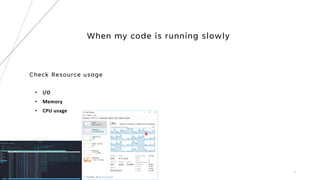
When my code is running slowly
Check Resource usage
• I/O
• Memory
• CPU usage
3
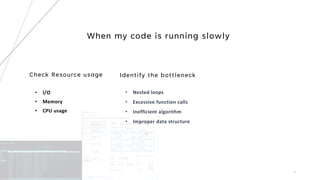
When my code is running slowly
Check Resource usage
• I/O
• Memory
• CPU usage
4
When my code is running slowly
Check Resource usage
• I/O
• Memory
• CPU usage
Identify the bottleneck
5
• Nested loops
• Excessive function calls
• Inefficient algorithm
• Improper data structure
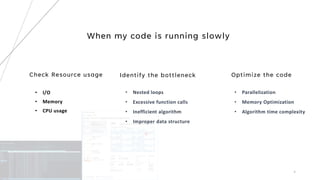
When my code is running slowly
Check Resource usage
• I/O
• Memory
• CPU usage
Identify the bottleneck
6
Optimize the code
• Parallelization
• Memory Optimization
• Algorithm time complexity
• Nested loops
• Excessive function calls
• Inefficient algorithm
• Improper data structure
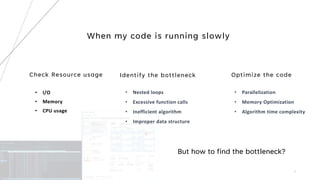
When my code is running slowly
Check Resource usage
• I/O
• Memory
• CPU usage
Identify the bottleneck
7
Optimize the code
• Parallelization
• Memory Optimization
• Algorithm time complexity
• Nested loops
• Excessive function calls
• Inefficient algorithm
• Improper data structure
But how to find the bottleneck?
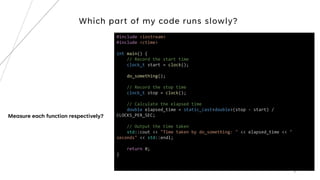
Which part of my code runs slowly?
8
#include <iostream>
#include <ctime>
int main() {
// Record the start time
clock_t start = clock();
do_something();
// Record the stop time
clock_t stop = clock();
// Calculate the elapsed time
double elapsed_time = static_cast<double>(stop - start) /
CLOCKS_PER_SEC;
// Output the time taken
std::cout << "Time taken by do_something: " << elapsed_time << "
seconds" << std::endl;
return 0;
}
Measure each function respectively?
Profilers
Tools to help programmers measure and reason about performance
9
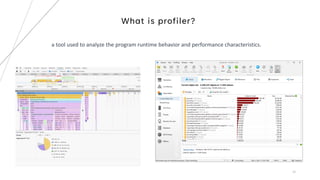
What is profiler?
10
a tool used to analyze the program runtime behavior and performance characteristics.
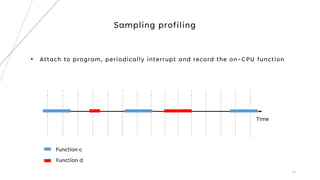
Sampling profiling
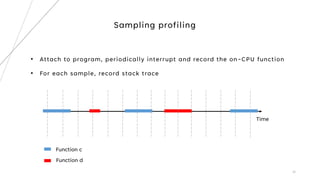
• Attach to program, periodically interrupt and record the on-CPU function
11
Sampling profiling
• Attach to program, periodically interrupt and record the on-CPU function
12
Time
Function c
Function d
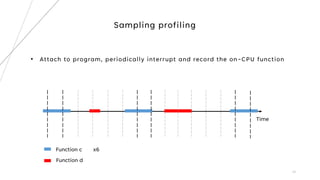
Sampling profiling
• Attach to program, periodically interrupt and record the on-CPU function
13
Time
Function c x6
Function d
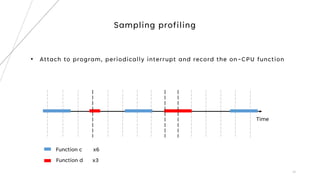
Sampling profiling
• Attach to program, periodically interrupt and record the on-CPU function
14
Time
Function c x6
Function d x3
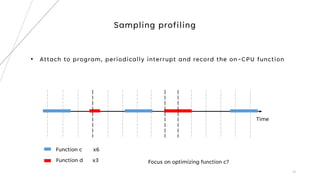
Sampling profiling
• Attach to program, periodically interrupt and record the on-CPU function
15
Time
Function c x6
Function d x3 Focus on optimizing function c?
Sampling profiling
• Attach to program, periodically interrupt and record the on-CPU function
16
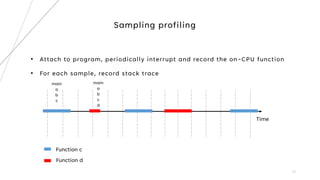
• For each sample, record stack trace
Time
Function c
Function d
Sampling profiling
• Attach to program, periodically interrupt and record the on-CPU function
17
• For each sample, record stack trace
Time
Function c
Function d
main
a
b
c
main
a
b
c
d
Instrumentation profiling
• Insert code to the program to record performance metric
• Manually inserted by programmers
• Automatically inserted via some tools
18
Sampling VS Instrumentation
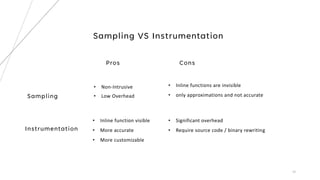
Sampling
• Non-Intrusive
• Low Overhead
Instrumentation
• Inline functions are invisible
• only approximations and not accurate​​​
19
Pros Cons
• Inline function visible
• More accurate
• More customizable
• Significant overhead
• Require source code / binary rewriting
# Overhead Samples Command Shared Object Symbol
# ........ ............ ....... ................. ...................................
#
20.42% 605 bash [kernel.kallsyms] [k] xen_hypercall_xen_version
|
--- xen_hypercall_xen_version
check_events
|
|--44.13%-- syscall_trace_enter
| tracesys
| |
| |--35.58%-- __GI___libc_fcntl
| | |
| | |--65.26%-- do_redirection_internal
| | | do_redirections
| | | execute_builtin_or_function
| | | execute_simple_command
| | | execute_command_internal
| | | execute_command
| | | execute_while_or_until
| | | execute_while_command
| | | execute_command_internal
| | | execute_command
| | | reader_loop
| | | main
| | | __libc_start_main
| | |
| | --34.74%-- do_redirections
| | |
| | |--54.55%-- execute_builtin_or_function
| | | execute_simple_command
| | | execute_command_internal
| | | execute_command
| | | execute_while_or_until
| | | execute_while_command
| | | execute_command_internal
| | | execute_command
| | | reader_loop
| | | main
| | | __libc_start_main
| | |
Linux Perf
Linux built in sampling-based profiler
20
Build a simple source code level profiler
21
22
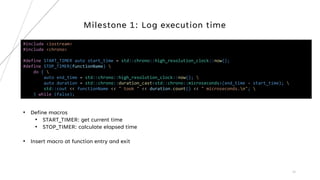
Milestone 1: Log execution time
#include <iostream>
#include <chrono>
#define START_TIMER auto start_time = std::chrono::high_resolution_clock::now();
#define STOP_TIMER(functionName) 
do { 
auto end_time = std::chrono::high_resolution_clock::now(); 
auto duration = std::chrono::duration_cast<std::chrono::microseconds>(end_time - start_time); 
std::cout << functionName << " took " << duration.count() << " microseconds.n"; 
} while (false);
• Define macros
• START_TIMER: get current time
• STOP_TIMER: calculate elapsed time
• Insert macro at function entry and exit
23
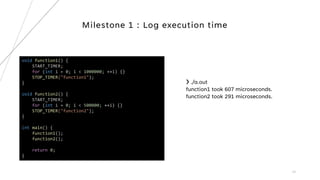
Milestone 1 : Log execution time
void function1() {
START_TIMER;
for (int i = 0; i < 1000000; ++i) {}
STOP_TIMER("function1");
}
void function2() {
START_TIMER;
for (int i = 0; i < 500000; ++i) {}
STOP_TIMER("function2");
}
int main() {
function1();
function2();
return 0;
}
❯ ./a.out
function1 took 607 microseconds.
function2 took 291 microseconds.
24
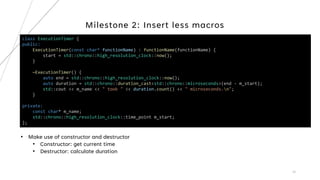
Milestone 2: Insert less macros
class ExecutionTimer {
public:
ExecutionTimer(const char* functionName) : functionName(functionName) {
start = std::chrono::high_resolution_clock::now();
}
~ExecutionTimer() {
auto end = std::chrono::high_resolution_clock::now();
auto duration = std::chrono::duration_cast<std::chrono::microseconds>(end - m_start);
std::cout << m_name << " took " << duration.count() << " microseconds.n";
}
private:
const char* m_name;
std::chrono::high_resolution_clock::time_point m_start;
};
• Make use of constructor and destructor
• Constructor: get current time
• Destructor: calculate duration
25
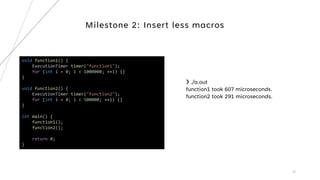
Milestone 2: Insert less macros
void function1() {
ExecutionTimer timer("function1");
for (int i = 0; i < 1000000; ++i) {}
}
void function2() {
ExecutionTimer timer("function2");
for (int i = 0; i < 500000; ++i) {}
}
int main() {
function1();
function2();
return 0;
}
❯ ./a.out
function1 took 607 microseconds.
function2 took 291 microseconds.
26
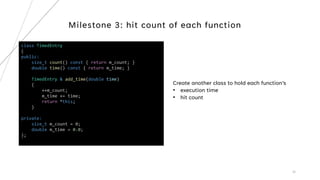
Milestone 3: hit count of each function
class TimedEntry
{
public:
size_t count() const { return m_count; }
double time() const { return m_time; }
TimedEntry & add_time(double time)
{
++m_count;
m_time += time;
return *this;
}
private:
size_t m_count = 0;
double m_time = 0.0;
};
Create another class to hold each function’s
• execution time
• hit count
27
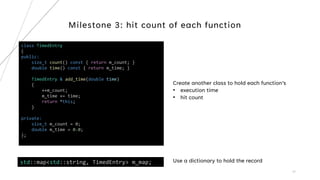
Milestone 3: hit count of each function
class TimedEntry
{
public:
size_t count() const { return m_count; }
double time() const { return m_time; }
TimedEntry & add_time(double time)
{
++m_count;
m_time += time;
return *this;
}
private:
size_t m_count = 0;
double m_time = 0.0;
};
Create another class to hold each function’s
• execution time
• hit count
std::map<std::string, TimedEntry> m_map; Use a dictionary to hold the record
28
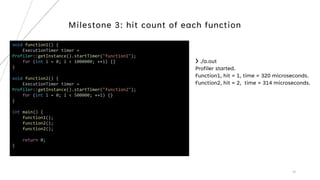
Milestone 3: hit count of each function
void function1() {
ExecutionTimer timer =
Profiler::getInstance().startTimer("function1");
for (int i = 0; i < 1000000; ++i) {}
}
void function2() {
ExecutionTimer timer =
Profiler::getInstance().startTimer("function2");
for (int i = 0; i < 500000; ++i) {}
}
int main() {
function1();
function2();
function2();
return 0;
}
❯ ./a.out
Profiler started.
Function1, hit = 1, time = 320 microseconds.
Function2, hit = 2, time = 314 microseconds.
29
Milestone 4: Call Path Profiling
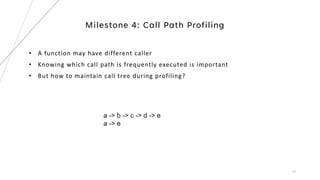
• A function may have different caller
• Knowing which call path is frequently executed is important
• But how to maintain call tree during profiling?
a -> b -> c -> d -> e
a -> e
30
Milestone 4: Call Path Profiling – Radix Tree
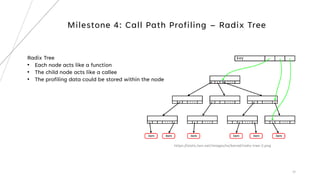
Radix Tree
• Each node acts like a function
• The child node acts like a callee
• The profiling data could be stored within the node
https://static.lwn.net/images/ns/kernel/radix-tree-2.png
31
Milestone 4: Call Path Profiling - Radix Tree
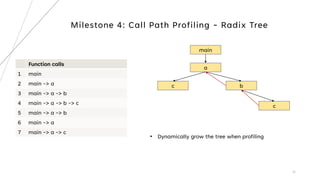
Function calls
1 main
2 main -> a
3 main -> a -> b
4 main -> a -> b -> c
5 main -> a -> b
6 main -> a
7 main -> a -> c
main
a
b
c
c
• Dynamically grow the tree when profiling
32
Milestone 4: Call Path Profiling - RadixTreeNode
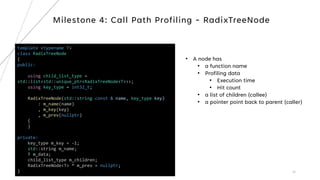
template <typename T>
class RadixTreeNode
{
public:
using child_list_type =
std::list<std::unique_ptr<RadixTreeNode<T>>>;
using key_type = int32_t;
RadixTreeNode(std::string const & name, key_type key)
: m_name(name)
, m_key(key)
, m_prev(nullptr)
{
}
private:
key_type m_key = -1;
std::string m_name;
T m_data;
child_list_type m_children;
RadixTreeNode<T> * m_prev = nullptr;
}
• A node has
• a function name
• Profiling data
• Execution time
• Hit count
• a list of children (callee)
• a pointer point back to parent (caller)
33
template <typename T>
class RadixTree
{
public:
using key_type = typename RadixTreeNode<T>::key_type;
RadixTree()
: m_root(std::make_unique<RadixTreeNode<T>>())
, m_current_node(m_root.get())
{
}
private:
key_type get_id(const std::string & name)
{
auto [it, inserted] = m_id_map.try_emplace(name,
m_unique_id++);
return it->second;
}
std::unique_ptr<RadixTreeNode<T>> m_root;
RadixTreeNode<T> * m_current_node;
std::unordered_map<std::string, key_type> m_id_map;
key_type m_unique_id = 0;
};
A tree has
• a root pointer
• a current pointer (on CPU function)
Milestone 4: Call Path Profiling - RadixTree
34
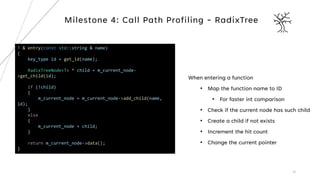
T & entry(const std::string & name)
{
key_type id = get_id(name);
RadixTreeNode<T> * child = m_current_node-
>get_child(id);
if (!child)
{
m_current_node = m_current_node->add_child(name,
id);
}
else
{
m_current_node = child;
}
return m_current_node->data();
}
Milestone 4: Call Path Profiling - RadixTree
When entering a function
• Map the function name to ID
• For faster int comparison
• Check if the current node has such child
• Create a child if not exists
• Increment the hit count
• Change the current pointer
35
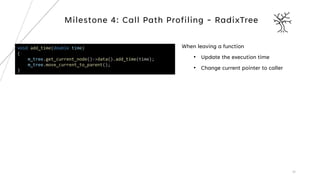
void add_time(double time)
{
m_tree.get_current_node()->data().add_time(time);
m_tree.move_current_to_parent();
}
Milestone 4: Call Path Profiling - RadixTree
When leaving a function
• Update the execution time
• Change current pointer to caller
36
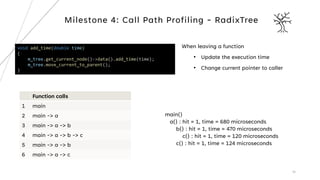
void add_time(double time)
{
m_tree.get_current_node()->data().add_time(time);
m_tree.move_current_to_parent();
}
Milestone 4: Call Path Profiling - RadixTree
Function calls
1 main
2 main -> a
3 main -> a -> b
4 main -> a -> b -> c
5 main -> a -> b
6 main -> a -> c
main()
a() : hit = 1, time = 680 microseconds
b() : hit = 1, time = 470 microseconds
c() : hit = 1, time = 120 microseconds
c() : hit = 1, time = 124 microseconds
When leaving a function
• Update the execution time
• Change current pointer to caller
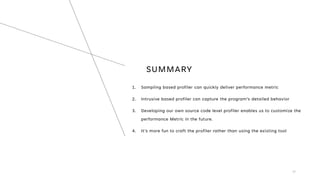
SUMMARY
1. Sampling based profiler can quickly deliver performance metric
2. Intrusive based profiler can capture the program’s detailed behavior
3. Developing our own source code level profiler enables us to customize the
performance Metric in the future.
4. It’s more fun to craft the profiler rather than using the existing tool
37
THANK YOU
38

Building source code level profiler for C++.pdf

  • 1.
    BUILDING SOURCE CODELEVEL PROFILER FOR C++ APPLICATION Quentin Tsai Sciwork Conference 2023
  • 2.
    Hello! • Graduate fromNYCU • Software QA automation Engineer @ Nvidia (RDSS) • Software Automation Testing, Performance Testing 2 I amQuentin Tsai quentin.tsai.tw@gmail.com
  • 3.
    When my codeis running slowly Check Resource usage • I/O • Memory • CPU usage 3
  • 4.
    When my codeis running slowly Check Resource usage • I/O • Memory • CPU usage 4
  • 5.
    When my codeis running slowly Check Resource usage • I/O • Memory • CPU usage Identify the bottleneck 5 • Nested loops • Excessive function calls • Inefficient algorithm • Improper data structure
  • 6.
    When my codeis running slowly Check Resource usage • I/O • Memory • CPU usage Identify the bottleneck 6 Optimize the code • Parallelization • Memory Optimization • Algorithm time complexity • Nested loops • Excessive function calls • Inefficient algorithm • Improper data structure
  • 7.
    When my codeis running slowly Check Resource usage • I/O • Memory • CPU usage Identify the bottleneck 7 Optimize the code • Parallelization • Memory Optimization • Algorithm time complexity • Nested loops • Excessive function calls • Inefficient algorithm • Improper data structure But how to find the bottleneck?
  • 8.
    Which part ofmy code runs slowly? 8 #include <iostream> #include <ctime> int main() { // Record the start time clock_t start = clock(); do_something(); // Record the stop time clock_t stop = clock(); // Calculate the elapsed time double elapsed_time = static_cast<double>(stop - start) / CLOCKS_PER_SEC; // Output the time taken std::cout << "Time taken by do_something: " << elapsed_time << " seconds" << std::endl; return 0; } Measure each function respectively?
  • 9.
    Profilers Tools to helpprogrammers measure and reason about performance 9
  • 10.
    What is profiler? 10 atool used to analyze the program runtime behavior and performance characteristics.
  • 11.
    Sampling profiling • Attachto program, periodically interrupt and record the on-CPU function 11
  • 12.
    Sampling profiling • Attachto program, periodically interrupt and record the on-CPU function 12 Time Function c Function d
  • 13.
    Sampling profiling • Attachto program, periodically interrupt and record the on-CPU function 13 Time Function c x6 Function d
  • 14.
    Sampling profiling • Attachto program, periodically interrupt and record the on-CPU function 14 Time Function c x6 Function d x3
  • 15.
    Sampling profiling • Attachto program, periodically interrupt and record the on-CPU function 15 Time Function c x6 Function d x3 Focus on optimizing function c?
  • 16.
    Sampling profiling • Attachto program, periodically interrupt and record the on-CPU function 16 • For each sample, record stack trace Time Function c Function d
  • 17.
    Sampling profiling • Attachto program, periodically interrupt and record the on-CPU function 17 • For each sample, record stack trace Time Function c Function d main a b c main a b c d
  • 18.
    Instrumentation profiling • Insertcode to the program to record performance metric • Manually inserted by programmers • Automatically inserted via some tools 18
  • 19.
    Sampling VS Instrumentation Sampling •Non-Intrusive • Low Overhead Instrumentation • Inline functions are invisible • only approximations and not accurate​​​ 19 Pros Cons • Inline function visible • More accurate • More customizable • Significant overhead • Require source code / binary rewriting
  • 20.
    # Overhead SamplesCommand Shared Object Symbol # ........ ............ ....... ................. ................................... # 20.42% 605 bash [kernel.kallsyms] [k] xen_hypercall_xen_version | --- xen_hypercall_xen_version check_events | |--44.13%-- syscall_trace_enter | tracesys | | | |--35.58%-- __GI___libc_fcntl | | | | | |--65.26%-- do_redirection_internal | | | do_redirections | | | execute_builtin_or_function | | | execute_simple_command | | | execute_command_internal | | | execute_command | | | execute_while_or_until | | | execute_while_command | | | execute_command_internal | | | execute_command | | | reader_loop | | | main | | | __libc_start_main | | | | | --34.74%-- do_redirections | | | | | |--54.55%-- execute_builtin_or_function | | | execute_simple_command | | | execute_command_internal | | | execute_command | | | execute_while_or_until | | | execute_while_command | | | execute_command_internal | | | execute_command | | | reader_loop | | | main | | | __libc_start_main | | | Linux Perf Linux built in sampling-based profiler 20
  • 21.
    Build a simplesource code level profiler 21
  • 22.
    22 Milestone 1: Logexecution time #include <iostream> #include <chrono> #define START_TIMER auto start_time = std::chrono::high_resolution_clock::now(); #define STOP_TIMER(functionName) do { auto end_time = std::chrono::high_resolution_clock::now(); auto duration = std::chrono::duration_cast<std::chrono::microseconds>(end_time - start_time); std::cout << functionName << " took " << duration.count() << " microseconds.n"; } while (false); • Define macros • START_TIMER: get current time • STOP_TIMER: calculate elapsed time • Insert macro at function entry and exit
  • 23.
    23 Milestone 1 :Log execution time void function1() { START_TIMER; for (int i = 0; i < 1000000; ++i) {} STOP_TIMER("function1"); } void function2() { START_TIMER; for (int i = 0; i < 500000; ++i) {} STOP_TIMER("function2"); } int main() { function1(); function2(); return 0; } ❯ ./a.out function1 took 607 microseconds. function2 took 291 microseconds.
  • 24.
    24 Milestone 2: Insertless macros class ExecutionTimer { public: ExecutionTimer(const char* functionName) : functionName(functionName) { start = std::chrono::high_resolution_clock::now(); } ~ExecutionTimer() { auto end = std::chrono::high_resolution_clock::now(); auto duration = std::chrono::duration_cast<std::chrono::microseconds>(end - m_start); std::cout << m_name << " took " << duration.count() << " microseconds.n"; } private: const char* m_name; std::chrono::high_resolution_clock::time_point m_start; }; • Make use of constructor and destructor • Constructor: get current time • Destructor: calculate duration
  • 25.
    25 Milestone 2: Insertless macros void function1() { ExecutionTimer timer("function1"); for (int i = 0; i < 1000000; ++i) {} } void function2() { ExecutionTimer timer("function2"); for (int i = 0; i < 500000; ++i) {} } int main() { function1(); function2(); return 0; } ❯ ./a.out function1 took 607 microseconds. function2 took 291 microseconds.
  • 26.
    26 Milestone 3: hitcount of each function class TimedEntry { public: size_t count() const { return m_count; } double time() const { return m_time; } TimedEntry & add_time(double time) { ++m_count; m_time += time; return *this; } private: size_t m_count = 0; double m_time = 0.0; }; Create another class to hold each function’s • execution time • hit count
  • 27.
    27 Milestone 3: hitcount of each function class TimedEntry { public: size_t count() const { return m_count; } double time() const { return m_time; } TimedEntry & add_time(double time) { ++m_count; m_time += time; return *this; } private: size_t m_count = 0; double m_time = 0.0; }; Create another class to hold each function’s • execution time • hit count std::map<std::string, TimedEntry> m_map; Use a dictionary to hold the record
  • 28.
    28 Milestone 3: hitcount of each function void function1() { ExecutionTimer timer = Profiler::getInstance().startTimer("function1"); for (int i = 0; i < 1000000; ++i) {} } void function2() { ExecutionTimer timer = Profiler::getInstance().startTimer("function2"); for (int i = 0; i < 500000; ++i) {} } int main() { function1(); function2(); function2(); return 0; } ❯ ./a.out Profiler started. Function1, hit = 1, time = 320 microseconds. Function2, hit = 2, time = 314 microseconds.
  • 29.
    29 Milestone 4: CallPath Profiling • A function may have different caller • Knowing which call path is frequently executed is important • But how to maintain call tree during profiling? a -> b -> c -> d -> e a -> e
  • 30.
    30 Milestone 4: CallPath Profiling – Radix Tree Radix Tree • Each node acts like a function • The child node acts like a callee • The profiling data could be stored within the node https://static.lwn.net/images/ns/kernel/radix-tree-2.png
  • 31.
    31 Milestone 4: CallPath Profiling - Radix Tree Function calls 1 main 2 main -> a 3 main -> a -> b 4 main -> a -> b -> c 5 main -> a -> b 6 main -> a 7 main -> a -> c main a b c c • Dynamically grow the tree when profiling
  • 32.
    32 Milestone 4: CallPath Profiling - RadixTreeNode template <typename T> class RadixTreeNode { public: using child_list_type = std::list<std::unique_ptr<RadixTreeNode<T>>>; using key_type = int32_t; RadixTreeNode(std::string const & name, key_type key) : m_name(name) , m_key(key) , m_prev(nullptr) { } private: key_type m_key = -1; std::string m_name; T m_data; child_list_type m_children; RadixTreeNode<T> * m_prev = nullptr; } • A node has • a function name • Profiling data • Execution time • Hit count • a list of children (callee) • a pointer point back to parent (caller)
  • 33.
    33 template <typename T> classRadixTree { public: using key_type = typename RadixTreeNode<T>::key_type; RadixTree() : m_root(std::make_unique<RadixTreeNode<T>>()) , m_current_node(m_root.get()) { } private: key_type get_id(const std::string & name) { auto [it, inserted] = m_id_map.try_emplace(name, m_unique_id++); return it->second; } std::unique_ptr<RadixTreeNode<T>> m_root; RadixTreeNode<T> * m_current_node; std::unordered_map<std::string, key_type> m_id_map; key_type m_unique_id = 0; }; A tree has • a root pointer • a current pointer (on CPU function) Milestone 4: Call Path Profiling - RadixTree
  • 34.
    34 T & entry(conststd::string & name) { key_type id = get_id(name); RadixTreeNode<T> * child = m_current_node- >get_child(id); if (!child) { m_current_node = m_current_node->add_child(name, id); } else { m_current_node = child; } return m_current_node->data(); } Milestone 4: Call Path Profiling - RadixTree When entering a function • Map the function name to ID • For faster int comparison • Check if the current node has such child • Create a child if not exists • Increment the hit count • Change the current pointer
  • 35.
    35 void add_time(double time) { m_tree.get_current_node()->data().add_time(time); m_tree.move_current_to_parent(); } Milestone4: Call Path Profiling - RadixTree When leaving a function • Update the execution time • Change current pointer to caller
  • 36.
    36 void add_time(double time) { m_tree.get_current_node()->data().add_time(time); m_tree.move_current_to_parent(); } Milestone4: Call Path Profiling - RadixTree Function calls 1 main 2 main -> a 3 main -> a -> b 4 main -> a -> b -> c 5 main -> a -> b 6 main -> a -> c main() a() : hit = 1, time = 680 microseconds b() : hit = 1, time = 470 microseconds c() : hit = 1, time = 120 microseconds c() : hit = 1, time = 124 microseconds When leaving a function • Update the execution time • Change current pointer to caller
  • 37.
    SUMMARY 1. Sampling basedprofiler can quickly deliver performance metric 2. Intrusive based profiler can capture the program’s detailed behavior 3. Developing our own source code level profiler enables us to customize the performance Metric in the future. 4. It’s more fun to craft the profiler rather than using the existing tool 37
  • 38.