TallyPrime cheat sheet
General
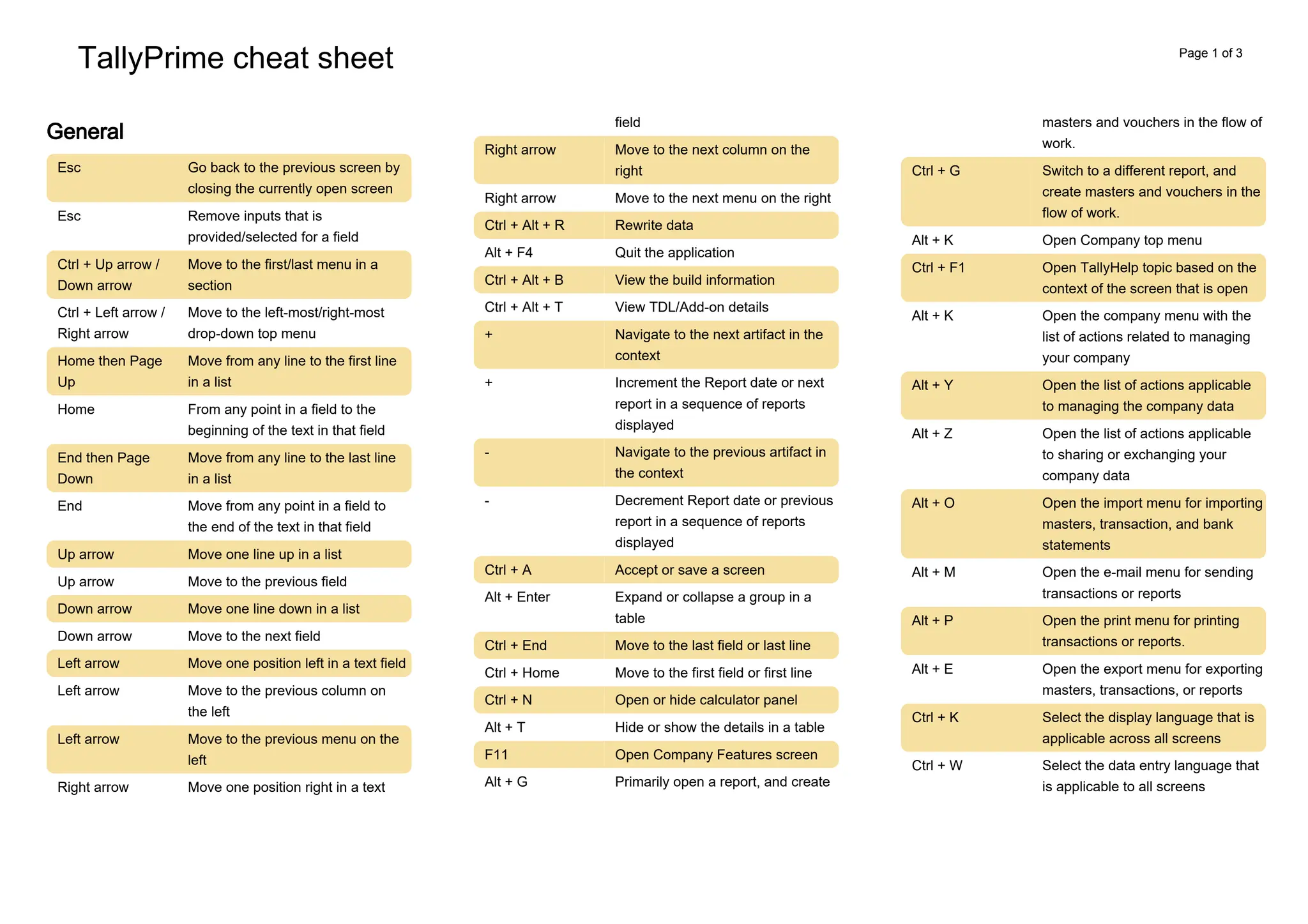
Esc Go back to the previous screen by
closing the currently open screen
Esc Remove inputs that is
provided/selected for a field
Ctrl + Up arrow /
Down arrow
Move to the first/last menu in a
section
Ctrl + Left arrow /
Right arrow
Move to the left-most/right-most
drop-down top menu
Home then Page
Up
Move from any line to the first line
in a list
Home From any point in a field to the
beginning of the text in that field
End then Page
Down
Move from any line to the last line
in a list
End Move from any point in a field to
the end of the text in that field
Up arrow Move one line up in a list
Up arrow Move to the previous field
Down arrow Move one line down in a list
Down arrow Move to the next field
Left arrow Move one position left in a text field
Left arrow Move to the previous column on
the left
Left arrow Move to the previous menu on the
left
Move one position right in a text
Right arrow
field
Right arrow Move to the next column on the
right
Right arrow Move to the next menu on the right
Ctrl + Alt + R Rewrite data
Alt + F4 Quit the application
Ctrl + Alt + B View the build information
Ctrl + Alt + T View TDL/Add-on details
+ Navigate to the next artifact in the
context
+ Increment the Report date or next
report in a sequence of reports
displayed
- Navigate to the previous artifact in
the context
- Decrement Report date or previous
report in a sequence of reports
displayed
Ctrl + A Accept or save a screen
Alt + Enter Expand or collapse a group in a
table
Ctrl + End Move to the last field or last line
Ctrl + Home Move to the first field or first line
Ctrl + N Open or hide calculator panel
Alt + T Hide or show the details in a table
F11 Open Company Features screen
Primarily open a report, and create
Alt + G
masters and vouchers in the flow of
work.
Ctrl + G Switch to a different report, and
create masters and vouchers in the
flow of work.
Alt + K Open Company top menu
Ctrl + F1 Open TallyHelp topic based on the
context of the screen that is open
Alt + K Open the company menu with the
list of actions related to managing
your company
Alt + Y Open the list of actions applicable
to managing the company data
Alt + Z Open the list of actions applicable
to sharing or exchanging your
company data
Alt + O Open the import menu for importing
masters, transaction, and bank
statements
Alt + M Open the e-mail menu for sending
transactions or reports
Alt + P Open the print menu for printing
transactions or reports.
Alt + E Open the export menu for exporting
masters, transactions, or reports
Ctrl + K Select the display language that is
applicable across all screens
Ctrl + W Select the data entry language that
is applicable to all screens
Page 1 of 3
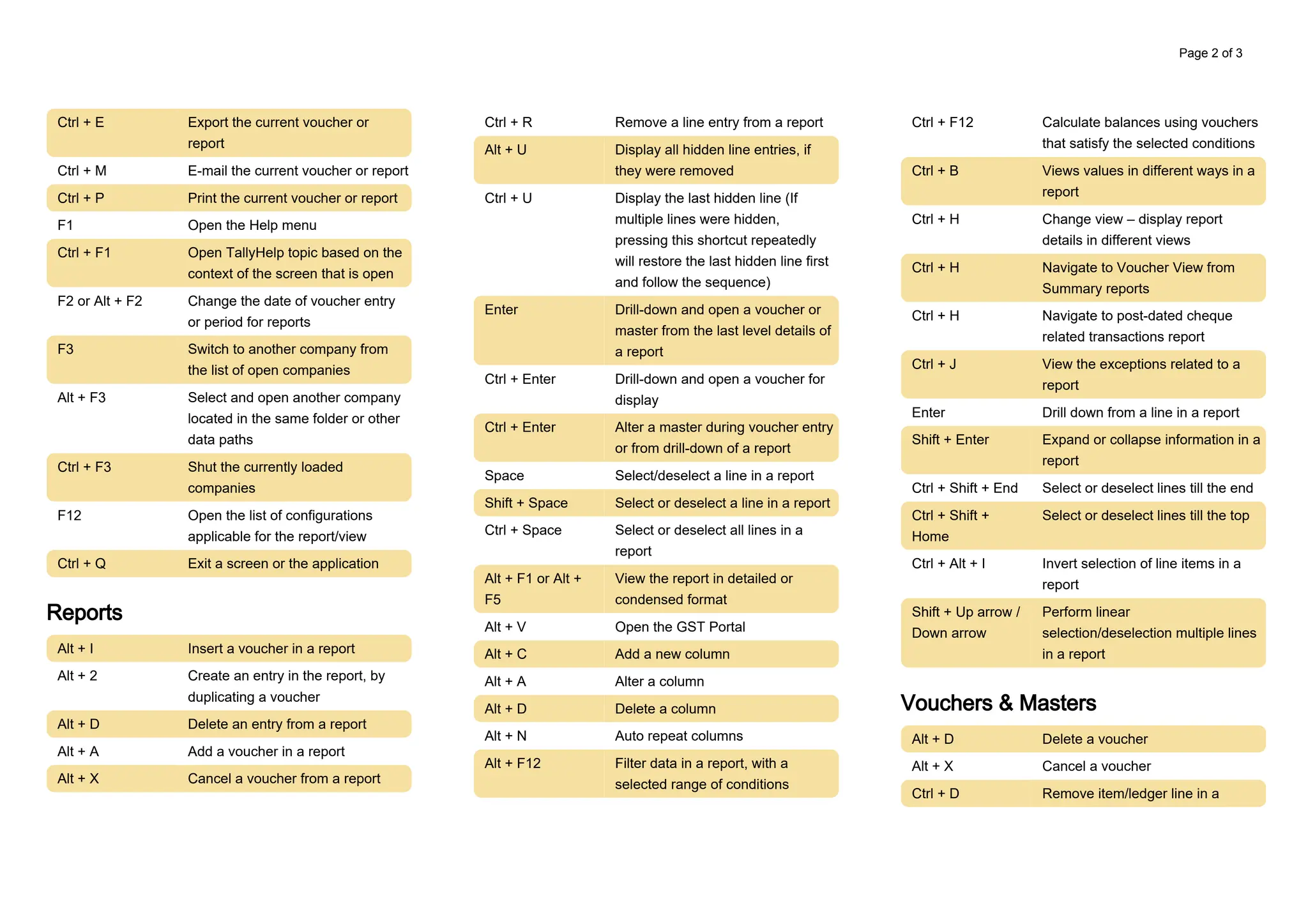
Ctrl + E Export the current voucher or
report
Ctrl + M E-mail the current voucher or report
Ctrl + P Print the current voucher or report
F1 Open the Help menu
Ctrl + F1 Open TallyHelp topic based on the
context of the screen that is open
F2 or Alt + F2 Change the date of voucher entry
or period for reports
F3 Switch to another company from
the list of open companies
Alt + F3 Select and open another company
located in the same folder or other
data paths
Ctrl + F3 Shut the currently loaded
companies
F12 Open the list of configurations
applicable for the report/view
Ctrl + Q Exit a screen or the application
Reports
Alt + I Insert a voucher in a report
Alt + 2 Create an entry in the report, by
duplicating a voucher
Alt + D Delete an entry from a report
Alt + A Add a voucher in a report
Alt + X Cancel a voucher from a report
Ctrl + R Remove a line entry from a report
Alt + U Display all hidden line entries, if
they were removed
Ctrl + U Display the last hidden line (If
multiple lines were hidden,
pressing this shortcut repeatedly
will restore the last hidden line first
and follow the sequence)
Enter Drill-down and open a voucher or
master from the last level details of
a report
Ctrl + Enter Drill-down and open a voucher for
display
Ctrl + Enter Alter a master during voucher entry
or from drill-down of a report
Space Select/deselect a line in a report
Shift + Space Select or deselect a line in a report
Ctrl + Space Select or deselect all lines in a
report
Alt + F1 or Alt +
F5
View the report in detailed or
condensed format
Alt + V Open the GST Portal
Alt + C Add a new column
Alt + A Alter a column
Alt + D Delete a column
Alt + N Auto repeat columns
Alt + F12 Filter data in a report, with a
selected range of conditions
Ctrl + F12 Calculate balances using vouchers
that satisfy the selected conditions
Ctrl + B Views values in different ways in a
report
Ctrl + H Change view – display report
details in different views
Ctrl + H Navigate to Voucher View from
Summary reports
Ctrl + H Navigate to post-dated cheque
related transactions report
Ctrl + J View the exceptions related to a
report
Enter Drill down from a line in a report
Shift + Enter Expand or collapse information in a
report
Ctrl + Shift + End Select or deselect lines till the end
Ctrl + Shift +
Home
Select or deselect lines till the top
Ctrl + Alt + I Invert selection of line items in a
report
Shift + Up arrow /
Down arrow
Perform linear
selection/deselection multiple lines
in a report
Vouchers & Masters
Alt + D Delete a voucher
Alt + X Cancel a voucher
Remove item/ledger line in a
Ctrl + D
Page 2 of 3
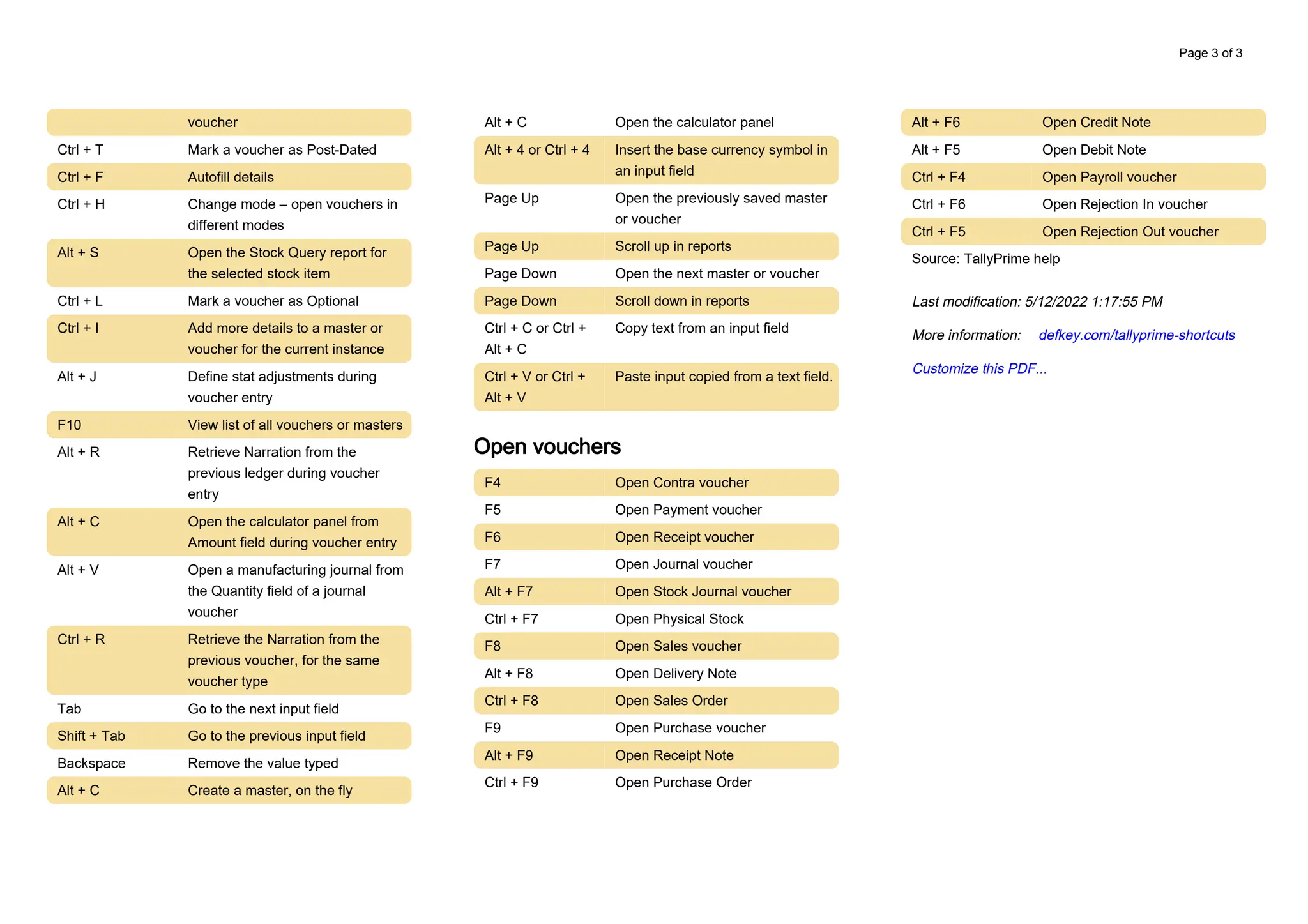
voucher
Ctrl + T Mark a voucher as Post-Dated
Ctrl + F Autofill details
Ctrl + H Change mode – open vouchers in
different modes
Alt + S Open the Stock Query report for
the selected stock item
Ctrl + L Mark a voucher as Optional
Ctrl + I Add more details to a master or
voucher for the current instance
Alt + J Define stat adjustments during
voucher entry
F10 View list of all vouchers or masters
Alt + R Retrieve Narration from the
previous ledger during voucher
entry
Alt + C Open the calculator panel from
Amount field during voucher entry
Alt + V Open a manufacturing journal from
the Quantity field of a journal
voucher
Ctrl + R Retrieve the Narration from the
previous voucher, for the same
voucher type
Tab Go to the next input field
Shift + Tab Go to the previous input field
Backspace Remove the value typed
Alt + C Create a master, on the fly
Alt + C Open the calculator panel
Alt + 4 or Ctrl + 4 Insert the base currency symbol in
an input field
Page Up Open the previously saved master
or voucher
Page Up Scroll up in reports
Page Down Open the next master or voucher
Page Down Scroll down in reports
Ctrl + C or Ctrl +
Alt + C
Copy text from an input field
Ctrl + V or Ctrl +
Alt + V
Paste input copied from a text field.
Open vouchers
F4 Open Contra voucher
F5 Open Payment voucher
F6 Open Receipt voucher
F7 Open Journal voucher
Alt + F7 Open Stock Journal voucher
Ctrl + F7 Open Physical Stock
F8 Open Sales voucher
Alt + F8 Open Delivery Note
Ctrl + F8 Open Sales Order
F9 Open Purchase voucher
Alt + F9 Open Receipt Note
Ctrl + F9 Open Purchase Order
Alt + F6 Open Credit Note
Alt + F5 Open Debit Note
Ctrl + F4 Open Payroll voucher
Ctrl + F6 Open Rejection In voucher
Ctrl + F5 Open Rejection Out voucher
Source: TallyPrime help
Last modification: 5/12/2022 1:17:55 PM
More information: defkey.com/tallyprime-shortcuts
Customize this PDF...
Page 3 of 3

tallyprime-shortcuts (1).pdf

  • 1.
    TallyPrime cheat sheet General EscGo back to the previous screen by closing the currently open screen Esc Remove inputs that is provided/selected for a field Ctrl + Up arrow / Down arrow Move to the first/last menu in a section Ctrl + Left arrow / Right arrow Move to the left-most/right-most drop-down top menu Home then Page Up Move from any line to the first line in a list Home From any point in a field to the beginning of the text in that field End then Page Down Move from any line to the last line in a list End Move from any point in a field to the end of the text in that field Up arrow Move one line up in a list Up arrow Move to the previous field Down arrow Move one line down in a list Down arrow Move to the next field Left arrow Move one position left in a text field Left arrow Move to the previous column on the left Left arrow Move to the previous menu on the left Move one position right in a text Right arrow field Right arrow Move to the next column on the right Right arrow Move to the next menu on the right Ctrl + Alt + R Rewrite data Alt + F4 Quit the application Ctrl + Alt + B View the build information Ctrl + Alt + T View TDL/Add-on details + Navigate to the next artifact in the context + Increment the Report date or next report in a sequence of reports displayed - Navigate to the previous artifact in the context - Decrement Report date or previous report in a sequence of reports displayed Ctrl + A Accept or save a screen Alt + Enter Expand or collapse a group in a table Ctrl + End Move to the last field or last line Ctrl + Home Move to the first field or first line Ctrl + N Open or hide calculator panel Alt + T Hide or show the details in a table F11 Open Company Features screen Primarily open a report, and create Alt + G masters and vouchers in the flow of work. Ctrl + G Switch to a different report, and create masters and vouchers in the flow of work. Alt + K Open Company top menu Ctrl + F1 Open TallyHelp topic based on the context of the screen that is open Alt + K Open the company menu with the list of actions related to managing your company Alt + Y Open the list of actions applicable to managing the company data Alt + Z Open the list of actions applicable to sharing or exchanging your company data Alt + O Open the import menu for importing masters, transaction, and bank statements Alt + M Open the e-mail menu for sending transactions or reports Alt + P Open the print menu for printing transactions or reports. Alt + E Open the export menu for exporting masters, transactions, or reports Ctrl + K Select the display language that is applicable across all screens Ctrl + W Select the data entry language that is applicable to all screens Page 1 of 3
  • 2.
    Ctrl + EExport the current voucher or report Ctrl + M E-mail the current voucher or report Ctrl + P Print the current voucher or report F1 Open the Help menu Ctrl + F1 Open TallyHelp topic based on the context of the screen that is open F2 or Alt + F2 Change the date of voucher entry or period for reports F3 Switch to another company from the list of open companies Alt + F3 Select and open another company located in the same folder or other data paths Ctrl + F3 Shut the currently loaded companies F12 Open the list of configurations applicable for the report/view Ctrl + Q Exit a screen or the application Reports Alt + I Insert a voucher in a report Alt + 2 Create an entry in the report, by duplicating a voucher Alt + D Delete an entry from a report Alt + A Add a voucher in a report Alt + X Cancel a voucher from a report Ctrl + R Remove a line entry from a report Alt + U Display all hidden line entries, if they were removed Ctrl + U Display the last hidden line (If multiple lines were hidden, pressing this shortcut repeatedly will restore the last hidden line first and follow the sequence) Enter Drill-down and open a voucher or master from the last level details of a report Ctrl + Enter Drill-down and open a voucher for display Ctrl + Enter Alter a master during voucher entry or from drill-down of a report Space Select/deselect a line in a report Shift + Space Select or deselect a line in a report Ctrl + Space Select or deselect all lines in a report Alt + F1 or Alt + F5 View the report in detailed or condensed format Alt + V Open the GST Portal Alt + C Add a new column Alt + A Alter a column Alt + D Delete a column Alt + N Auto repeat columns Alt + F12 Filter data in a report, with a selected range of conditions Ctrl + F12 Calculate balances using vouchers that satisfy the selected conditions Ctrl + B Views values in different ways in a report Ctrl + H Change view – display report details in different views Ctrl + H Navigate to Voucher View from Summary reports Ctrl + H Navigate to post-dated cheque related transactions report Ctrl + J View the exceptions related to a report Enter Drill down from a line in a report Shift + Enter Expand or collapse information in a report Ctrl + Shift + End Select or deselect lines till the end Ctrl + Shift + Home Select or deselect lines till the top Ctrl + Alt + I Invert selection of line items in a report Shift + Up arrow / Down arrow Perform linear selection/deselection multiple lines in a report Vouchers & Masters Alt + D Delete a voucher Alt + X Cancel a voucher Remove item/ledger line in a Ctrl + D Page 2 of 3
  • 3.
    voucher Ctrl + TMark a voucher as Post-Dated Ctrl + F Autofill details Ctrl + H Change mode – open vouchers in different modes Alt + S Open the Stock Query report for the selected stock item Ctrl + L Mark a voucher as Optional Ctrl + I Add more details to a master or voucher for the current instance Alt + J Define stat adjustments during voucher entry F10 View list of all vouchers or masters Alt + R Retrieve Narration from the previous ledger during voucher entry Alt + C Open the calculator panel from Amount field during voucher entry Alt + V Open a manufacturing journal from the Quantity field of a journal voucher Ctrl + R Retrieve the Narration from the previous voucher, for the same voucher type Tab Go to the next input field Shift + Tab Go to the previous input field Backspace Remove the value typed Alt + C Create a master, on the fly Alt + C Open the calculator panel Alt + 4 or Ctrl + 4 Insert the base currency symbol in an input field Page Up Open the previously saved master or voucher Page Up Scroll up in reports Page Down Open the next master or voucher Page Down Scroll down in reports Ctrl + C or Ctrl + Alt + C Copy text from an input field Ctrl + V or Ctrl + Alt + V Paste input copied from a text field. Open vouchers F4 Open Contra voucher F5 Open Payment voucher F6 Open Receipt voucher F7 Open Journal voucher Alt + F7 Open Stock Journal voucher Ctrl + F7 Open Physical Stock F8 Open Sales voucher Alt + F8 Open Delivery Note Ctrl + F8 Open Sales Order F9 Open Purchase voucher Alt + F9 Open Receipt Note Ctrl + F9 Open Purchase Order Alt + F6 Open Credit Note Alt + F5 Open Debit Note Ctrl + F4 Open Payroll voucher Ctrl + F6 Open Rejection In voucher Ctrl + F5 Open Rejection Out voucher Source: TallyPrime help Last modification: 5/12/2022 1:17:55 PM More information: defkey.com/tallyprime-shortcuts Customize this PDF... Page 3 of 3