C H A PT ER              5


       Configuring TACACS+
       This chapter describes the Terminal Access Controller Access Control System Plus
       (TACACS+), a Cisco proprietary version of TACACS.


       Note STP UplinkFast has also been added for this release, and it is documented in the
       “Enabling STP UplinkFast” section on page 3-18.


       TACACS+ provides the means to manage network security (authentication, authorization,
       and accounting [AAA]) from a server. This section describes how TACACS+ works and
       how you can configure it. For complete syntax and usage information for the commands
       described in this chapter, refer to the Cisco IOS Desktop Switching Command Reference or
       to the “Security” chapter of the Cisco IOS 11.3 Command Summary.
       These sections describe how to configure TACACS+:
       •   “How TACACS+ Works” section on page 5-1
       •   “Configuring TACACS+” section on page 5-2


How TACACS+ Works
       In large enterprise networks, the task of administering passwords on each device can be
       simplified by doing the user authentication centrally on a server. TACACS+ is an
       access-control protocol that allows a switch to authenticate all login attempts through a
       central authentication server. The network administrator configures the switch with the
       address of the TACACS+ server, and the switch and the server exchange messages to
       authenticate each user before allowing access to the management console.


                                                                      Configuring TACACS+ 5-1
Configuring TACACS+


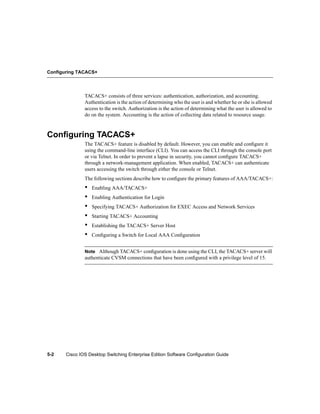
               TACACS+ consists of three services: authentication, authorization, and accounting.
               Authentication is the action of determining who the user is and whether he or she is allowed
               access to the switch. Authorization is the action of determining what the user is allowed to
               do on the system. Accounting is the action of collecting data related to resource usage.


Configuring TACACS+
               The TACACS+ feature is disabled by default. However, you can enable and configure it
               using the command-line interface (CLI). You can access the CLI through the console port
               or via Telnet. In order to prevent a lapse in security, you cannot configure TACACS+
               through a network-management application. When enabled, TACACS+ can authenticate
               users accessing the switch through either the console or Telnet.
               The following sections describe how to configure the primary features of AAA/TACACS+:
               •   Enabling AAA/TACACS+
               •   Enabling Authentication for Login
               •   Specifying TACACS+ Authorization for EXEC Access and Network Services
               •   Starting TACACS+ Accounting
               •   Establishing the TACACS+ Server Host
               •   Configuring a Switch for Local AAA Configuration


               Note Although TACACS+ configuration is done using the CLI, the TACACS+ server will
               authenticate CVSM connections that have been configured with a privilege level of 15.


5-2    Cisco IOS Desktop Switching Enterprise Edition Software Configuration Guide
Configuring TACACS+


Enabling AAA/TACACS+
              Use the aaa new-model command to enable AAA/TACACS+. Enter the following
              commands in global configuration mode:

              Task                                                Command
              Enable AAA/TACACS+.                                 aaa new-model


Enabling Authentication for Login
              Using the aaa authentication login command and the following keywords, you create one
              or more lists of authentication methods that are tried at login. The lists are used with the
              login authentication line configuration command.
              Enter the following command in global configuration mode to enable authentication for
              login:
                 Switch# aaa authentication login {default | list-name} method1
                 [...[method3]]

              The keyword list-name is any character string used to name the list you are creating. The
              method keyword refers to the actual method the authentication algorithm tries, in the
              sequence entered. You can enter up to three methods:

              Keyword         Description

              line            Uses the line password for authentication.

              local           Uses the local username database for authentication.

              tacacs+         Uses TACACS+ authentication.

              To create a default list that is used if no list is specified in the login authentication
              command, use the default argument followed by the methods you want used in default
              situations.
              The additional methods of authentication are used only if the previous method returns an
              error, not if it fails. To specify that the authentication succeed even if all methods return an
              error, specify none as the final method in the command line.


                                                                                 Configuring TACACS+ 5-3
Configuring TACACS+


Specifying TACACS+ Authorization for EXEC Access and Network Services
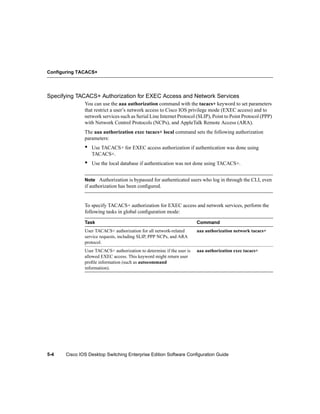
               You can use the aaa authorization command with the tacacs+ keyword to set parameters
               that restrict a user’s network access to Cisco IOS privilege mode (EXEC access) and to
               network services such as Serial Line Internet Protocol (SLIP), Point to Point Protocol (PPP)
               with Network Control Protocols (NCPs), and AppleTalk Remote Access (ARA).
               The aaa authorization exec tacacs+ local command sets the following authorization
               parameters:
               •   Use TACACS+ for EXEC access authorization if authentication was done using
                   TACACS+.
               •   Use the local database if authentication was not done using TACACS+.


               Note Authorization is bypassed for authenticated users who log in through the CLI, even
               if authorization has been configured.


               To specify TACACS+ authorization for EXEC access and network services, perform the
               following tasks in global configuration mode:

               Task                                                     Command
               User TACACS+ authorization for all network-related       aaa authorization network tacacs+
               service requests, including SLIP, PPP NCPs, and ARA
               protocol.
               User TACACS+ authorization to determine if the user is   aaa authorization exec tacacs+
               allowed EXEC access. This keyword might return user
               profile information (such as autocommand
               information).


5-4    Cisco IOS Desktop Switching Enterprise Edition Software Configuration Guide
Configuring TACACS+


Starting TACACS+ Accounting
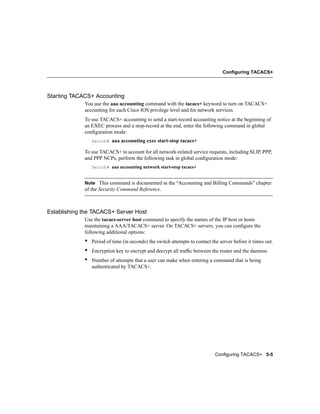
             You use the aaa accounting command with the tacacs+ keyword to turn on TACACS+
             accounting for each Cisco IOS privilege level and for network services.
             To use TACACS+ accounting to send a start-record accounting notice at the beginning of
             an EXEC process and a stop-record at the end, enter the following command in global
             configuration mode:
                 Switch#   aaa accounting exec start-stop tacacs+

             To use TACACS+ to account for all network-related service requests, including SLIP, PPP,
             and PPP NCPs, perform the following task in global configuration mode:
                 Switch# aaa accounting network start-stop tacacs+


             Note This command is documented in the “Accounting and Billing Commands” chapter
             of the Security Command Reference.


Establishing the TACACS+ Server Host
             Use the tacacs-server host command to specify the names of the IP host or hosts
             maintaining a AAA/TACACS+ server. On TACACS+ servers, you can configure the
             following additional options:
             •   Period of time (in seconds) the switch attempts to contact the server before it times out.
             •   Encryption key to encrypt and decrypt all traffic between the router and the daemon.
             •   Number of attempts that a user can make when entering a command that is being
                 authenticated by TACACS+.


                                                                              Configuring TACACS+ 5-5
Configuring TACACS+


               You can use the tacacs-server retransmit command to change the number of times the
               system software searches the list of TACACS servers (the default is two) and the interval it
               waits for a reply (the default is 5 seconds).
               Perform the following tasks in global configuration mode:

               Task                                                         Command
               Step 1   Define a TACACS+ host. Entering the timeout and      tacacs-server host name [timeout
                        key parameters with this command overrides the      integer] [key string]
                        global values that you can enter with the
                        tacacs-server timeout (Step 3) and the
                        tacacs-server key commands (Step 5).
               Step 2   Enter the number of times the server searches the   tacacs-server retransmit retries
                        list of TACACS+ servers before stopping.
               Step 3   Set the interval the server waits for a TACACS+     tacacs-server timeout seconds
                        server host to reply.
               Step 4   Set the number of login attempts that can be made   tacacs-server attempts count
                        on the line.
               Step 5   Define a set of encryption keys for all TACACS+      tacacs-server key key
                        and communication between the access server and
                        the TACACS daemon. (Repeat the command for
                        each encryption key.)
               Step 6   Return to privileged EXEC mode.                     exit
               Step 7   Confirm the TACACS+ server information and           show tacacs
                        display statistics in privileged EXEC mode.


5-6    Cisco IOS Desktop Switching Enterprise Edition Software Configuration Guide
Configuring TACACS+


Configuring a Switch for Local AAA Configuration
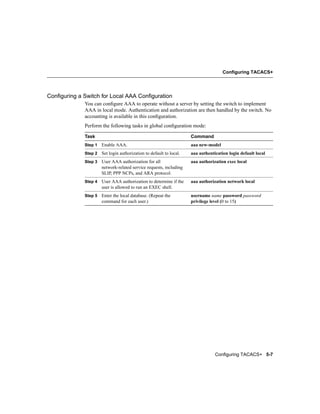
             You can configure AAA to operate without a server by setting the switch to implement
             AAA in local mode. Authentication and authorization are then handled by the switch. No
             accounting is available in this configuration.
             Perform the following tasks in global configuration mode:

             Task                                                    Command
             Step 1   Enable AAA.                                    aaa new-model
             Step 2   Set login authorization to default to local.   aaa authentication login default local
             Step 3   User AAA authorization for all                 aaa authorization exec local
                      network-related service requests, including
                      SLIP, PPP NCPs, and ARA protocol.
             Step 4   User AAA authorization to determine if the     aaa authorization network local
                      user is allowed to run an EXEC shell.
             Step 5   Enter the local database. (Repeat the          username name password password
                      command for each user.)                        privilege level (0 to 15)


                                                                                 Configuring TACACS+ 5-7
Configuring TACACS+


5-8    Cisco IOS Desktop Switching Enterprise Edition Software Configuration Guide

Tacacs

  • 1.
    C H APT ER 5 Configuring TACACS+ This chapter describes the Terminal Access Controller Access Control System Plus (TACACS+), a Cisco proprietary version of TACACS. Note STP UplinkFast has also been added for this release, and it is documented in the “Enabling STP UplinkFast” section on page 3-18. TACACS+ provides the means to manage network security (authentication, authorization, and accounting [AAA]) from a server. This section describes how TACACS+ works and how you can configure it. For complete syntax and usage information for the commands described in this chapter, refer to the Cisco IOS Desktop Switching Command Reference or to the “Security” chapter of the Cisco IOS 11.3 Command Summary. These sections describe how to configure TACACS+: • “How TACACS+ Works” section on page 5-1 • “Configuring TACACS+” section on page 5-2 How TACACS+ Works In large enterprise networks, the task of administering passwords on each device can be simplified by doing the user authentication centrally on a server. TACACS+ is an access-control protocol that allows a switch to authenticate all login attempts through a central authentication server. The network administrator configures the switch with the address of the TACACS+ server, and the switch and the server exchange messages to authenticate each user before allowing access to the management console. Configuring TACACS+ 5-1
  • 2.
    Configuring TACACS+ TACACS+ consists of three services: authentication, authorization, and accounting. Authentication is the action of determining who the user is and whether he or she is allowed access to the switch. Authorization is the action of determining what the user is allowed to do on the system. Accounting is the action of collecting data related to resource usage. Configuring TACACS+ The TACACS+ feature is disabled by default. However, you can enable and configure it using the command-line interface (CLI). You can access the CLI through the console port or via Telnet. In order to prevent a lapse in security, you cannot configure TACACS+ through a network-management application. When enabled, TACACS+ can authenticate users accessing the switch through either the console or Telnet. The following sections describe how to configure the primary features of AAA/TACACS+: • Enabling AAA/TACACS+ • Enabling Authentication for Login • Specifying TACACS+ Authorization for EXEC Access and Network Services • Starting TACACS+ Accounting • Establishing the TACACS+ Server Host • Configuring a Switch for Local AAA Configuration Note Although TACACS+ configuration is done using the CLI, the TACACS+ server will authenticate CVSM connections that have been configured with a privilege level of 15. 5-2 Cisco IOS Desktop Switching Enterprise Edition Software Configuration Guide
  • 3.
    Configuring TACACS+ Enabling AAA/TACACS+ Use the aaa new-model command to enable AAA/TACACS+. Enter the following commands in global configuration mode: Task Command Enable AAA/TACACS+. aaa new-model Enabling Authentication for Login Using the aaa authentication login command and the following keywords, you create one or more lists of authentication methods that are tried at login. The lists are used with the login authentication line configuration command. Enter the following command in global configuration mode to enable authentication for login: Switch# aaa authentication login {default | list-name} method1 [...[method3]] The keyword list-name is any character string used to name the list you are creating. The method keyword refers to the actual method the authentication algorithm tries, in the sequence entered. You can enter up to three methods: Keyword Description line Uses the line password for authentication. local Uses the local username database for authentication. tacacs+ Uses TACACS+ authentication. To create a default list that is used if no list is specified in the login authentication command, use the default argument followed by the methods you want used in default situations. The additional methods of authentication are used only if the previous method returns an error, not if it fails. To specify that the authentication succeed even if all methods return an error, specify none as the final method in the command line. Configuring TACACS+ 5-3
  • 4.
    Configuring TACACS+ Specifying TACACS+Authorization for EXEC Access and Network Services You can use the aaa authorization command with the tacacs+ keyword to set parameters that restrict a user’s network access to Cisco IOS privilege mode (EXEC access) and to network services such as Serial Line Internet Protocol (SLIP), Point to Point Protocol (PPP) with Network Control Protocols (NCPs), and AppleTalk Remote Access (ARA). The aaa authorization exec tacacs+ local command sets the following authorization parameters: • Use TACACS+ for EXEC access authorization if authentication was done using TACACS+. • Use the local database if authentication was not done using TACACS+. Note Authorization is bypassed for authenticated users who log in through the CLI, even if authorization has been configured. To specify TACACS+ authorization for EXEC access and network services, perform the following tasks in global configuration mode: Task Command User TACACS+ authorization for all network-related aaa authorization network tacacs+ service requests, including SLIP, PPP NCPs, and ARA protocol. User TACACS+ authorization to determine if the user is aaa authorization exec tacacs+ allowed EXEC access. This keyword might return user profile information (such as autocommand information). 5-4 Cisco IOS Desktop Switching Enterprise Edition Software Configuration Guide
  • 5.
    Configuring TACACS+ Starting TACACS+Accounting You use the aaa accounting command with the tacacs+ keyword to turn on TACACS+ accounting for each Cisco IOS privilege level and for network services. To use TACACS+ accounting to send a start-record accounting notice at the beginning of an EXEC process and a stop-record at the end, enter the following command in global configuration mode: Switch# aaa accounting exec start-stop tacacs+ To use TACACS+ to account for all network-related service requests, including SLIP, PPP, and PPP NCPs, perform the following task in global configuration mode: Switch# aaa accounting network start-stop tacacs+ Note This command is documented in the “Accounting and Billing Commands” chapter of the Security Command Reference. Establishing the TACACS+ Server Host Use the tacacs-server host command to specify the names of the IP host or hosts maintaining a AAA/TACACS+ server. On TACACS+ servers, you can configure the following additional options: • Period of time (in seconds) the switch attempts to contact the server before it times out. • Encryption key to encrypt and decrypt all traffic between the router and the daemon. • Number of attempts that a user can make when entering a command that is being authenticated by TACACS+. Configuring TACACS+ 5-5
  • 6.
    Configuring TACACS+ You can use the tacacs-server retransmit command to change the number of times the system software searches the list of TACACS servers (the default is two) and the interval it waits for a reply (the default is 5 seconds). Perform the following tasks in global configuration mode: Task Command Step 1 Define a TACACS+ host. Entering the timeout and tacacs-server host name [timeout key parameters with this command overrides the integer] [key string] global values that you can enter with the tacacs-server timeout (Step 3) and the tacacs-server key commands (Step 5). Step 2 Enter the number of times the server searches the tacacs-server retransmit retries list of TACACS+ servers before stopping. Step 3 Set the interval the server waits for a TACACS+ tacacs-server timeout seconds server host to reply. Step 4 Set the number of login attempts that can be made tacacs-server attempts count on the line. Step 5 Define a set of encryption keys for all TACACS+ tacacs-server key key and communication between the access server and the TACACS daemon. (Repeat the command for each encryption key.) Step 6 Return to privileged EXEC mode. exit Step 7 Confirm the TACACS+ server information and show tacacs display statistics in privileged EXEC mode. 5-6 Cisco IOS Desktop Switching Enterprise Edition Software Configuration Guide
  • 7.
    Configuring TACACS+ Configuring aSwitch for Local AAA Configuration You can configure AAA to operate without a server by setting the switch to implement AAA in local mode. Authentication and authorization are then handled by the switch. No accounting is available in this configuration. Perform the following tasks in global configuration mode: Task Command Step 1 Enable AAA. aaa new-model Step 2 Set login authorization to default to local. aaa authentication login default local Step 3 User AAA authorization for all aaa authorization exec local network-related service requests, including SLIP, PPP NCPs, and ARA protocol. Step 4 User AAA authorization to determine if the aaa authorization network local user is allowed to run an EXEC shell. Step 5 Enter the local database. (Repeat the username name password password command for each user.) privilege level (0 to 15) Configuring TACACS+ 5-7
  • 8.
    Configuring TACACS+ 5-8 Cisco IOS Desktop Switching Enterprise Edition Software Configuration Guide