Contact: EliasBlake
prosperdatasystems@gmail.com
www.prosperidata.com
Using SQL Stored Procedures to automate performance checks
Code Sample from SQL Server Management Studio to demonstrate collecting wait statistics.
use YourDatabaseHere;
DECLARE @server nvarchar(100);
DECLARE @db nvarchar(100);
DECLARE @command nvarchar(4000);
DECLARE DBLINKS CURSOR FOR select SERVER,db from YourDatabaseHere.dbo.TableofLinkedServers
--Open the cursor.
OPEN DBLINKS;
-- Loop through the partitions.SQL_Latin1_General_CP1_CI_AS
WHILE (1=1)
BEGIN;
FETCH NEXT
FROM DBLINKS
INTO @server,@db;
IF @@FETCH_STATUS < 0 BREAK;
SET @command = N'INSERT INTO YourDatabaseHere.dbo.waits
(Server,session_id,task_state,wait_duration_ms,max_wait_time_ms,wait_type,waiting_tasks_count,stamp
)
select CASE when a3.session_id != null THEN'''+ @server + ''' END
server,a3.session_id,a3.task_state,a2.wait_duration_ms,a1.max_wait_time_ms,a1.wait_type,a1.waiting_
tasks_count,CASE when a3.session_id != null THEN getdate() ELSE getdate() END as [stamp]
from ' + '['+@server+ ']'+ '.['+@db+ N'].sys.dm_os_waiting_tasks a2 inner join sys.dm_os_tasks a3
on a2.session_id = a3.session_id
inner join sys.dm_os_wait_stats a1
on a2.wait_type = a1.wait_type collate SQL_Latin1_General_CP1_CI_AS
where a2.wait_type in (''CXPACKET'',''ASYNC_IO_COMPLETION'',''ASYNC_NETWORK_IO'')
OR a2.wait_type LIKE ''LCK%'' OR a2.wait_type like ''%LATCH%''
order by a2.wait_duration_ms desc,a2.session_id desc';
EXEC sp_executesql @command;
PRINT N'Executed: ' + @command;
END
CLOSE DBLINKS;
DEALLOCATE DBLINKS;
Thiscode sample assumesanenvironmentwithmultipleSQLServerInstancesbeyondthe 30 that can be monitored
usingthe UCP service (UtilityControl Point) introduced inSQLServer2008 R2 enterprise.Alsohave abackgroundin
Oracle thisis somewhatequivalenttotakingsnapshotsinAWR. AswithUCP there isa requirementfora“super”service
account withsysadmaccesson monitoredinstances butalsolinkedservers andservergroupsregisteredin management
studio. Thiswill notworkinenvironmentswherethe rpcand rpcoutare restricted. Itispossible to install otherinstances
to run UCP on a single serverbut UCPonlyprovidesawindow intothe hardware bydisplayinggrowthof datafiles, CPU
and memory.If more detail isneededforrootcause analysis inside the database andsp_whodoesn’tshedlight, the
waitstats fromthe example canprovide awindow into the processesand sessionID/usersthatcreate unsavory wait
types. Althoughthe SQLServerextendedeventsandProfilerService cancreate histories thisscriptcanbe a goodway to
target whatserversneed attention inacentral way withoutrandomlyrunningtracesandextendedsessionevents. Then
hopefullythe DBA can avoidthe performance impacts of collectingperformance metricswhere it’snotneeded. If using
SQL Server
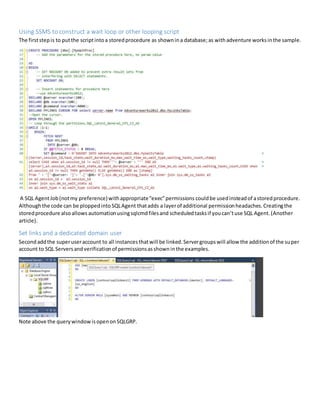
Using SSMS to construct a wait loop or other looping script
The firststepis to putthe scriptintoa storedprocedure as shownina database;as withadventure worksinthe sample.
A SQL AgentJob(notmy preference)withappropriate“exec”permissions couldbe usedinsteadof astoredprocedure.
Althoughthe code can be ploppedintoSQLAgent thatadds a layerof additional permissionheadaches.Creatingthe
storedprocedure alsoallows automationusingsqlcmdfilesand scheduledtasksif youcan’tuse SQL Agent.(Another
article).
Set links and a dedicated domain user
Second addthe superuseraccount to all instancesthatwill be linked.Servergroupswill allow the additionof the super
account to SQL Serversandverificationof permissionsasshowninthe examples.
Note above the querywindowisopenonSQLGRP.
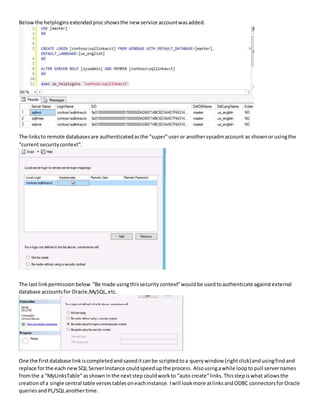
Belowthe helploginsextendedprocshowsthe new service accountwasadded.
The linksto remote databasesare authenticatedasthe “super”useror anothersysadmaccount as shownor usingthe
“current securitycontext”.
The last linkpermissionbelow “Be made usingthissecuritycontext”wouldbe usedtoauthenticate againstexternal
database accountsfor Oracle,MySQL,etc.
One the firstdatabase linkiscompletedandsaveditcanbe scriptedtoa querywindow (rightclick)andusingfindand
replace forthe each newSQL ServerInstance couldspeedupthe process. Alsousingawhile loopto pull servernames
fromthe a “MyLinksTable”asshownin the nextstep couldwork to “auto create”links.Thisstepis what allowsthe
creationof a single central table versestablesoneachinstance. Iwill lookmore atlinksandODBC connectorsforOracle
queries andPL/SQLanothertime.
Using Server Groups or Central Managed Server
Thirdusingyour registeredservergrouptocreate a querywithselect@@SERVERNAME + name from sys.databases,you
can populate atable or a tempdbtable tocreate a listof sql instances anddatabases.
If you don’twantlinksyoucan create a “waits”table ineach instance andqueryagainstthe servergroup. Alsoyoucould
add sp_configure commandto enable anddisable linkaccessatthe instance level.
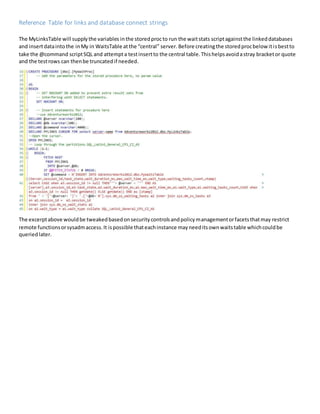
Reference Table for links and database connect strings
The MyLinksTable will supplythe variables inthe storedprocto run the waitstats scriptagainstthe linkeddatabases
and insertdataintothe inMy in WaitsTable atthe “central” server. Before creatingthe storedprocbelowitisbestto
take the @command scriptSQL and attempta testinsertto the central table.Thishelpsavoidastray bracketor quote
and the testrows can thenbe truncatedif needed.
The excerptabove wouldbe tweakedbasedonsecuritycontrolsandpolicymanagementorfacetsthatmay restrict
remote functionsorsysadmaccess.It ispossible thateachinstance mayneeditsownwaitstable whichcouldbe
queriedlater.
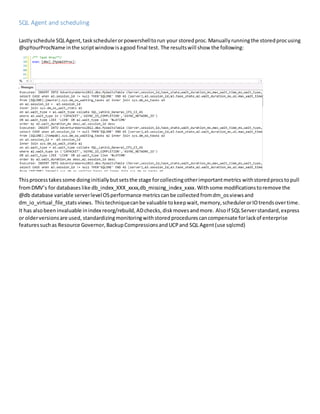
SQL Agent and scheduling
Lastlyschedule SQLAgent,taskschedulerorpowershelltorun your storedproc. Manually runningthe storedprocusing
@spYourProcName inthe scriptwindowisagood final test. The resultswill show the following:
Thisprocess takessome doing initially butsetsthe stage forcollectingotherimportantmetrics withstoredprocstopull
fromDMV’s for databases like db_index_XXX_xxxx,db_missing_index_xxxx.Withsome modificationstoremove the
@db database variable serverlevelOSperformance metrics canbe collected fromdm_osviewsand
dm_io_virtual_file_stats views. Thistechniquecanbe valuable tokeepwait,memory,schedulerorIOtrendsovertime.
It has alsobeeninvaluable inindex reorg/rebuild,ADchecks,diskmovesandmore. Alsoif SQLServerstandard,express
or olderversionsare used, standardizingmonitoringwithstoredprocedurescancompensate forlackof enterprise
featuressuchas Resource Governor,BackupCompressionsandUCPand SQL Agent(use sqlcmd)

SSMS-waitstats

  • 1.
    Contact: EliasBlake prosperdatasystems@gmail.com www.prosperidata.com Using SQLStored Procedures to automate performance checks Code Sample from SQL Server Management Studio to demonstrate collecting wait statistics. use YourDatabaseHere; DECLARE @server nvarchar(100); DECLARE @db nvarchar(100); DECLARE @command nvarchar(4000); DECLARE DBLINKS CURSOR FOR select SERVER,db from YourDatabaseHere.dbo.TableofLinkedServers --Open the cursor. OPEN DBLINKS; -- Loop through the partitions.SQL_Latin1_General_CP1_CI_AS WHILE (1=1) BEGIN; FETCH NEXT FROM DBLINKS INTO @server,@db; IF @@FETCH_STATUS < 0 BREAK; SET @command = N'INSERT INTO YourDatabaseHere.dbo.waits (Server,session_id,task_state,wait_duration_ms,max_wait_time_ms,wait_type,waiting_tasks_count,stamp ) select CASE when a3.session_id != null THEN'''+ @server + ''' END server,a3.session_id,a3.task_state,a2.wait_duration_ms,a1.max_wait_time_ms,a1.wait_type,a1.waiting_ tasks_count,CASE when a3.session_id != null THEN getdate() ELSE getdate() END as [stamp] from ' + '['+@server+ ']'+ '.['+@db+ N'].sys.dm_os_waiting_tasks a2 inner join sys.dm_os_tasks a3 on a2.session_id = a3.session_id inner join sys.dm_os_wait_stats a1 on a2.wait_type = a1.wait_type collate SQL_Latin1_General_CP1_CI_AS where a2.wait_type in (''CXPACKET'',''ASYNC_IO_COMPLETION'',''ASYNC_NETWORK_IO'') OR a2.wait_type LIKE ''LCK%'' OR a2.wait_type like ''%LATCH%'' order by a2.wait_duration_ms desc,a2.session_id desc'; EXEC sp_executesql @command; PRINT N'Executed: ' + @command; END CLOSE DBLINKS; DEALLOCATE DBLINKS; Thiscode sample assumesanenvironmentwithmultipleSQLServerInstancesbeyondthe 30 that can be monitored usingthe UCP service (UtilityControl Point) introduced inSQLServer2008 R2 enterprise.Alsohave abackgroundin Oracle thisis somewhatequivalenttotakingsnapshotsinAWR. AswithUCP there isa requirementfora“super”service account withsysadmaccesson monitoredinstances butalsolinkedservers andservergroupsregisteredin management studio. Thiswill notworkinenvironmentswherethe rpcand rpcoutare restricted. Itispossible to install otherinstances to run UCP on a single serverbut UCPonlyprovidesawindow intothe hardware bydisplayinggrowthof datafiles, CPU and memory.If more detail isneededforrootcause analysis inside the database andsp_whodoesn’tshedlight, the waitstats fromthe example canprovide awindow into the processesand sessionID/usersthatcreate unsavory wait types. Althoughthe SQLServerextendedeventsandProfilerService cancreate histories thisscriptcanbe a goodway to target whatserversneed attention inacentral way withoutrandomlyrunningtracesandextendedsessionevents. Then hopefullythe DBA can avoidthe performance impacts of collectingperformance metricswhere it’snotneeded. If using SQL Server
  • 2.
    Using SSMS toconstruct a wait loop or other looping script The firststepis to putthe scriptintoa storedprocedure as shownina database;as withadventure worksinthe sample. A SQL AgentJob(notmy preference)withappropriate“exec”permissions couldbe usedinsteadof astoredprocedure. Althoughthe code can be ploppedintoSQLAgent thatadds a layerof additional permissionheadaches.Creatingthe storedprocedure alsoallows automationusingsqlcmdfilesand scheduledtasksif youcan’tuse SQL Agent.(Another article). Set links and a dedicated domain user Second addthe superuseraccount to all instancesthatwill be linked.Servergroupswill allow the additionof the super account to SQL Serversandverificationof permissionsasshowninthe examples. Note above the querywindowisopenonSQLGRP.
  • 3.
    Belowthe helploginsextendedprocshowsthe newservice accountwasadded. The linksto remote databasesare authenticatedasthe “super”useror anothersysadmaccount as shownor usingthe “current securitycontext”. The last linkpermissionbelow “Be made usingthissecuritycontext”wouldbe usedtoauthenticate againstexternal database accountsfor Oracle,MySQL,etc. One the firstdatabase linkiscompletedandsaveditcanbe scriptedtoa querywindow (rightclick)andusingfindand replace forthe each newSQL ServerInstance couldspeedupthe process. Alsousingawhile loopto pull servernames fromthe a “MyLinksTable”asshownin the nextstep couldwork to “auto create”links.Thisstepis what allowsthe creationof a single central table versestablesoneachinstance. Iwill lookmore atlinksandODBC connectorsforOracle queries andPL/SQLanothertime.
  • 4.
    Using Server Groupsor Central Managed Server Thirdusingyour registeredservergrouptocreate a querywithselect@@SERVERNAME + name from sys.databases,you can populate atable or a tempdbtable tocreate a listof sql instances anddatabases. If you don’twantlinksyoucan create a “waits”table ineach instance andqueryagainstthe servergroup. Alsoyoucould add sp_configure commandto enable anddisable linkaccessatthe instance level.
  • 5.
    Reference Table forlinks and database connect strings The MyLinksTable will supplythe variables inthe storedprocto run the waitstats scriptagainstthe linkeddatabases and insertdataintothe inMy in WaitsTable atthe “central” server. Before creatingthe storedprocbelowitisbestto take the @command scriptSQL and attempta testinsertto the central table.Thishelpsavoidastray bracketor quote and the testrows can thenbe truncatedif needed. The excerptabove wouldbe tweakedbasedonsecuritycontrolsandpolicymanagementorfacetsthatmay restrict remote functionsorsysadmaccess.It ispossible thateachinstance mayneeditsownwaitstable whichcouldbe queriedlater.
  • 6.
    SQL Agent andscheduling Lastlyschedule SQLAgent,taskschedulerorpowershelltorun your storedproc. Manually runningthe storedprocusing @spYourProcName inthe scriptwindowisagood final test. The resultswill show the following: Thisprocess takessome doing initially butsetsthe stage forcollectingotherimportantmetrics withstoredprocstopull fromDMV’s for databases like db_index_XXX_xxxx,db_missing_index_xxxx.Withsome modificationstoremove the @db database variable serverlevelOSperformance metrics canbe collected fromdm_osviewsand dm_io_virtual_file_stats views. Thistechniquecanbe valuable tokeepwait,memory,schedulerorIOtrendsovertime. It has alsobeeninvaluable inindex reorg/rebuild,ADchecks,diskmovesandmore. Alsoif SQLServerstandard,express or olderversionsare used, standardizingmonitoringwithstoredprocedurescancompensate forlackof enterprise featuressuchas Resource Governor,BackupCompressionsandUCPand SQL Agent(use sqlcmd)