TRAINER: SAGAR | NetworkJourney.com | www.youtube.com/c/NetworkJourney | LinkedIN
CCNP ENTERPRISE 2020 LAB WORKBOOK|| TRAINER: SAGAR || WWW.YOUTUBE.COM/C/NETWORKJOURNEY
TOPICS COVERED:
IP SERVICES
- AAA [ AUTHENTICATION, AUTHORIZATION, ACCOUTING ]
- ACCESS-LIST [ ACL ]
- CISCO ASA THEORY (ZONE BASED)
- CISCO ASA LAB
- uRPF (UNICAST REVERSE PATH FORWARDING)
- SECURITY ATTACKS
o DATA PLANE ATTACKS
o MANAGEMENT PLANE ATTACKS
- CONTROL PLANE SECURITY
o Management Place Protection (MPP)
o Control Plane Policing (CoPP)
-
TRAINER: SAGAR | NetworkJourney.com | www.youtube.com/c/NetworkJourney | LinkedIN
CCNP ENTERPRISE 2020 LAB WORKBOOK|| TRAINER: SAGAR || WWW.YOUTUBE.COM/C/NETWORKJOURNEY
AAA [ AUTHENTICATION, AUTHORIZATION, ACCOUTING ]
AAA
Authentication, authorization and accounting (AAA) is a system for tracking user activities on an IP-
based network and controlling their access to network resources. AAA is often being implemented as a
dedicated server.
This term is also referred to as the AAA Protocol.
1. Authentication refers to unique identifying information from each system user, generally in the form
of a username and password. System administrators monitor and add or delete authorized users
from the system.
2. Authorization refers to the process of adding or denying individual user access to a computer
network and its resources. Users may be given different authorization levels that limit their access to
the network and associated resources.
3. Accounting refers to the record-keeping and tracking of user activities on a computer network. For a
given time period this may include, but is not limited to, real-time accounting of time spent accessing
the network, the network services employed or accessed, capacity and trend analysis, network cost
allocations, billing data, login data for user authentication and authorization, and the data or data
amount accessed or transferred.
RADIUS vs TACACS+
TACACS+ RADIUS
TACACS+ uses TCP RADIUS uses UDP
TACACS+ uses TCP port 49 Uses port 1812/1645 for authenticating
Uses port 1813/1646 for accounting
TACACS+ encrypts the entire communication RADIUS encrypts passwords only
TACACS+ treats Authentication, Authorization and
Accountability differently
RADIUS combines authentication and
authorization
TACACS+ is Cisco proprietary protocol RADIUS is an open protocol
TACACS+ is a heavy-weight protocol consuming
more resources
RADIUS is a light-weight protocol consuming less
resources
TACACS+ supports 15 privilege levels RADIUS is limited to privilege mode
Mainly used for Device administration Mainly used for Network access
Note: RADIUS has been officially assigned UDP ports 1812 for RADIUS authentication and 1813 for
RADIUS accounting by the Internet Assigned Numbers Authority (IANA). However, prior to IANA allocation
of ports 1812 and 1813, ports 1645 and 1646 (authentication and accounting, respectively) were used
unofficially, and became the default ports assigned by many RADIUS client/server implementations at
that time. The tradition of using 1645 and 1646 for backwards compatibility continues to this day. For this
reason, many RADIUS server implementations monitor both sets of UDP ports for RADIUS requests.
The early deployment of RADIUS was done using UDP port number 1645, which conflicts with the
"datametrics" service. The officially assigned port number for RADIUS is 1812 (in 2000).
TRAINER: SAGAR | NetworkJourney.com | www.youtube.com/c/NetworkJourney | LinkedIN
CCNP ENTERPRISE 2020 LAB WORKBOOK|| TRAINER: SAGAR || WWW.YOUTUBE.COM/C/NETWORKJOURNEY
The early deployment of RADIUS Accounting was done using UDP port number 1646, which conflicts
with the "sa-msg-port" service. The officially assigned port number for RADIUS Accounting is 1813
(in 2000).
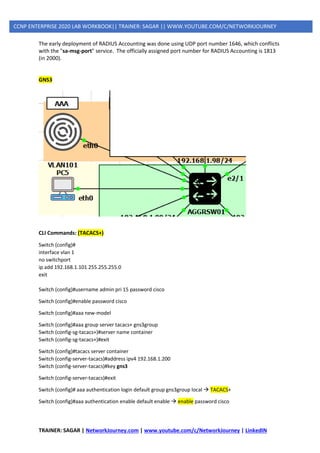
GNS3
CLI Commands: (TACACS+)
Switch (config)#
interface vlan 1
no switchport
ip add 192.168.1.101 255.255.255.0
exit
Switch (config)#username admin pri 15 password cisco
Switch (config)#enable password cisco
Switch (config)#aaa new-model
Switch (config)#aaa group server tacacs+ gns3group
Switch (config-sg-tacacs+)#server name container
Switch (config-sg-tacacs+)#exit
Switch (config)#tacacs server container
Switch (config-server-tacacs)#address ipv4 192.168.1.200
Switch (config-server-tacacs)#key gns3
Switch (config-server-tacacs)#exit
Switch (config)# aaa authentication login default group gns3group local → TACACS+
Switch (config)#aaa authentication enable default enable → enable password cisco
TRAINER: SAGAR | NetworkJourney.com | www.youtube.com/c/NetworkJourney | LinkedIN
CCNP ENTERPRISE 2020 LAB WORKBOOK|| TRAINER: SAGAR || WWW.YOUTUBE.COM/C/NETWORKJOURNEY
Verifications:
-------------------
debug aaa authentication
debug tacacs
Do a self telnet 192.168.29.102
Username: gns3
Password: gns3
Or
Username: readonly
Password: gns3
Show users
show line
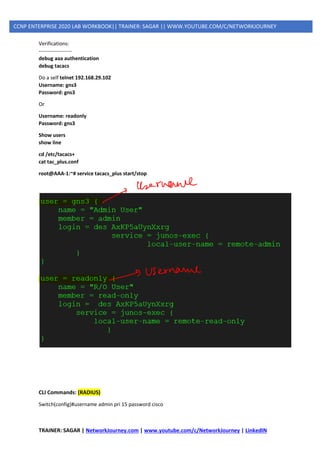
cd /etc/tacacs+
cat tac_plus.conf
root@AAA-1:~# service tacacs_plus start/stop
CLI Commands: (RADIUS)
Switch(config)#username admin pri 15 password cisco
TRAINER: SAGAR | NetworkJourney.com | www.youtube.com/c/NetworkJourney | LinkedIN
CCNP ENTERPRISE 2020 LAB WORKBOOK|| TRAINER: SAGAR || WWW.YOUTUBE.COM/C/NETWORKJOURNEY
Switch(config)#aaa new-model
Switch(config)#enable password cisco
Switch(config)#aaa group server radius gns3group2
Switch(config-sg-radius)#server name radius1
Switch(config-sg-radius)#exit
Switch(config)# radius server radius1
Switch(config-radius-server)# address ipv4 192.168.29.221 auth-port 1812 acct-port 1813
Switch(config-radius-server)#key gns3
Switch(config)# aaa authentication login default group gns3group2 local → Radius
Switch(config)#aaa authentication enable default enable → enable password cisco
Note: RADIUS has been officially assigned UDP ports 1812 for RADIUS authentication and 1813 for
RADIUS accounting by the Internet Assigned Numbers Authority (IANA). However, prior to IANA allocation
of ports 1812 and 1813, ports 1645 and 1646 (authentication and accounting, respectively) were used
unofficially, and became the default ports assigned by many RADIUS client/server implementations at
that time. The tradition of using 1645 and 1646 for backwards compatibility continues to this day. For this
reason, many RADIUS server implementations monitor both sets of UDP ports for RADIUS requests.
Verifications:
-------------------
debug aaa authentication
debug radius
Do a self telnet 192.168.29.102
Username: bob or alice
Password: gns3
Show users
show line
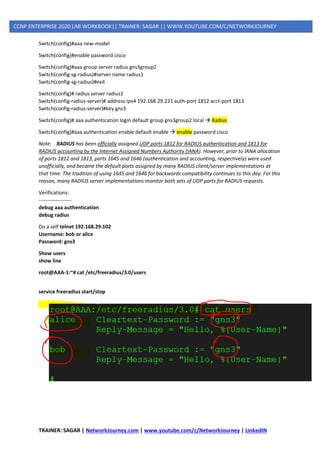
root@AAA-1:~# cat /etc/freeradius/3.0/users
service freeradius start/stop
TRAINER: SAGAR | NetworkJourney.com | www.youtube.com/c/NetworkJourney | LinkedIN
CCNP ENTERPRISE 2020 LAB WORKBOOK|| TRAINER: SAGAR || WWW.YOUTUBE.COM/C/NETWORKJOURNEY
ACCESS-LIST [ ACL ]
Defining an ACL
An ACL is a router configuration script (a list of statements) that controls whether a router
permits or denies packets to pass, based on criteria in the packet header. To determine whether
a packet is permitted or denied, it is tested against the ACL statements in sequential order.
When a statement matches, no more statements are evaluated; the packet is either permitted
or denied. There is an implicit deny any statement at the end of the ACL. If a packet does not
match any of the statements in the ACL, it is dropped.
Types of ACLs
ACLs can be configured to filter any type of protocol traffic, including other network layer
protocols such as AppleTalk and IPX. For the CCNA exam, we focus on IPv4 and IPv6 ACLs,
which come in the following types:
1. Standard IPv4 ACLs: Filter traffic based on source address only (all services are blocked)
2. Extended IPv4 and IPv6 ACLs: Can filter traffic based on source and destination address,
specific protocols, and source and destination TCP and UDP ports
Two ways to Identify Standard or Extended ACL:
1. Numbered IPv4 ACLs: Use a number for identification
2. Named IPv4 and IPv6 ACLs: Use a descriptive name or number for identification
Named ACLs must be used with some types of Cisco IOS configurations, including IPv6 ACLs.
However, they provide two basic benefits for standard and extended IPv4 ACLs:
➢ By using a descriptive name (such as BLOCK-HTTP), a network administrator can more
quickly determine the purpose of an ACL. This is particularly helpful in larger networks,
where a router can have many ACLs with hundreds of statements.
➢ Both numbered and named ACLs can be configured for standard as well as extended ACL
implementations.
TRAINER: SAGAR | NetworkJourney.com | www.youtube.com/c/NetworkJourney | LinkedIN
CCNP ENTERPRISE 2020 LAB WORKBOOK|| TRAINER: SAGAR || WWW.YOUTUBE.COM/C/NETWORKJOURNEY
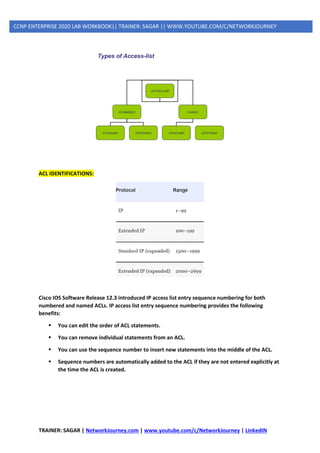
ACL IDENTIFICATIONS:
Cisco IOS Software Release 12.3 introduced IP access list entry sequence numbering for both
numbered and named ACLs. IP access list entry sequence numbering provides the following
benefits:
▪ You can edit the order of ACL statements.
▪ You can remove individual statements from an ACL.
▪ You can use the sequence number to insert new statements into the middle of the ACL.
▪ Sequence numbers are automatically added to the ACL if they are not entered explicitly at
the time the ACL is created.
TRAINER: SAGAR | NetworkJourney.com | www.youtube.com/c/NetworkJourney | LinkedIN
CCNP ENTERPRISE 2020 LAB WORKBOOK|| TRAINER: SAGAR || WWW.YOUTUBE.COM/C/NETWORKJOURNEY
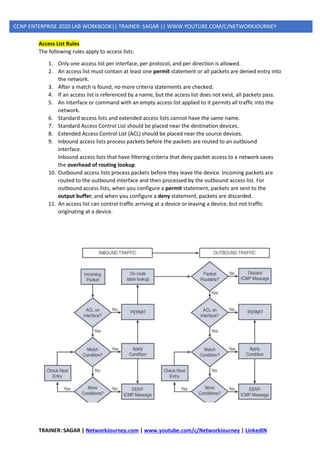
Access List Rules
The following rules apply to access lists:
1. Only one access list per interface, per protocol, and per direction is allowed.
2. An access list must contain at least one permit statement or all packets are denied entry into
the network.
3. After a match is found, no more criteria statements are checked.
4. If an access list is referenced by a name, but the access list does not exist, all packets pass.
5. An interface or command with an empty access list applied to it permits all traffic into the
network.
6. Standard access lists and extended access lists cannot have the same name.
7. Standard Access Control List should be placed near the destination devices.
8. Extended Access Control List (ACL) should be placed near the source devices.
9. Inbound access lists process packets before the packets are routed to an outbound
interface.
Inbound access lists that have filtering criteria that deny packet access to a network saves
the overhead of routing lookup.
10. Outbound access lists process packets before they leave the device. Incoming packets are
routed to the outbound interface and then processed by the outbound access list. For
outbound access lists, when you configure a permit statement, packets are sent to the
output buffer, and when you configure a deny statement, packets are discarded.
11. An access list can control traffic arriving at a device or leaving a device, but not traffic
originating at a device.
TRAINER: SAGAR | NetworkJourney.com | www.youtube.com/c/NetworkJourney | LinkedIN
CCNP ENTERPRISE 2020 LAB WORKBOOK|| TRAINER: SAGAR || WWW.YOUTUBE.COM/C/NETWORKJOURNEY
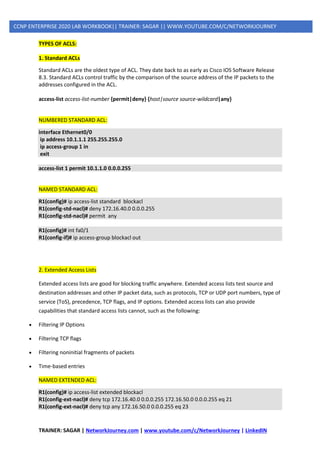
TYPES OF ACLS:
1. Standard ACLs
Standard ACLs are the oldest type of ACL. They date back to as early as Cisco IOS Software Release
8.3. Standard ACLs control traffic by the comparison of the source address of the IP packets to the
addresses configured in the ACL.
access-list access-list-number {permit|deny} {host|source source-wildcard|any}
NUMBERED STANDARD ACL:
interface Ethernet0/0
ip address 10.1.1.1 255.255.255.0
ip access-group 1 in
exit
access-list 1 permit 10.1.1.0 0.0.0.255
NAMED STANDARD ACL:
R1(config)# ip access-list standard blockacl
R1(config-std-nacl)# deny 172.16.40.0 0.0.0.255
R1(config-std-nacl)# permit any
R1(config)# int fa0/1
R1(config-if)# ip access-group blockacl out
2. Extended Access Lists
Extended access lists are good for blocking traffic anywhere. Extended access lists test source and
destination addresses and other IP packet data, such as protocols, TCP or UDP port numbers, type of
service (ToS), precedence, TCP flags, and IP options. Extended access lists can also provide
capabilities that standard access lists cannot, such as the following:
• Filtering IP Options
• Filtering TCP flags
• Filtering noninitial fragments of packets
• Time-based entries
NAMED EXTENDED ACL:
R1(config)# ip access-list extended blockacl
R1(config-ext-nacl)# deny tcp 172.16.40.0 0.0.0.255 172.16.50.0 0.0.0.255 eq 21
R1(config-ext-nacl)# deny tcp any 172.16.50.0 0.0.0.255 eq 23
TRAINER: SAGAR | NetworkJourney.com | www.youtube.com/c/NetworkJourney | LinkedIN
CCNP ENTERPRISE 2020 LAB WORKBOOK|| TRAINER: SAGAR || WWW.YOUTUBE.COM/C/NETWORKJOURNEY
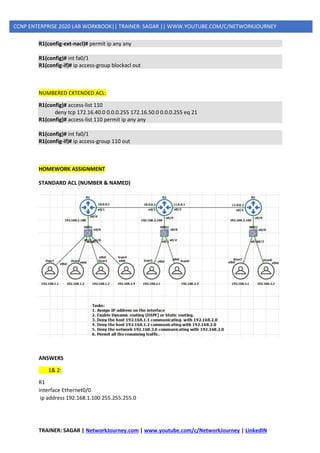
R1(config-ext-nacl)# permit ip any any
R1(config)# int fa0/1
R1(config-if)# ip access-group blockacl out
NUMBERED EXTENDED ACL:
R1(config)# access-list 110
deny tcp 172.16.40.0 0.0.0.255 172.16.50.0 0.0.0.255 eq 21
R1(config)# access-list 110 permit ip any any
R1(config)# int fa0/1
R1(config-if)# ip access-group 110 out
HOMEWORK ASSIGNMENT
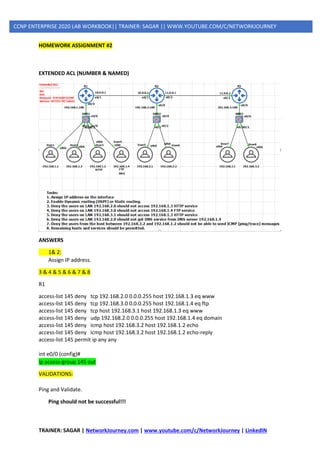
STANDARD ACL (NUMBER & NAMED)
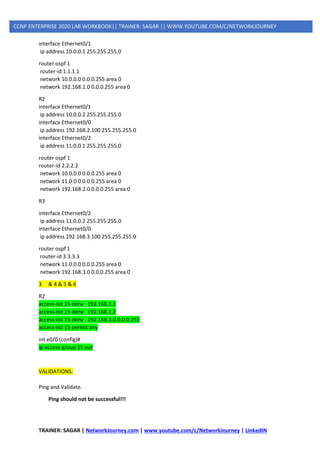
ANSWERS
1& 2:
R1
interface Ethernet0/0
ip address 192.168.1.100 255.255.255.0
TRAINER: SAGAR | NetworkJourney.com | www.youtube.com/c/NetworkJourney | LinkedIN
CCNP ENTERPRISE 2020 LAB WORKBOOK|| TRAINER: SAGAR || WWW.YOUTUBE.COM/C/NETWORKJOURNEY
interface Ethernet0/1
ip address 10.0.0.1 255.255.255.0
router ospf 1
router-id 1.1.1.1
network 10.0.0.0 0.0.0.255 area 0
network 192.168.1.0 0.0.0.255 area 0
R2
interface Ethernet0/1
ip address 10.0.0.2 255.255.255.0
interface Ethernet0/0
ip address 192.168.2.100 255.255.255.0
interface Ethernet0/2
ip address 11.0.0.1 255.255.255.0
router ospf 1
router-id 2.2.2.2
network 10.0.0.0 0.0.0.255 area 0
network 11.0.0.0 0.0.0.255 area 0
network 192.168.2.0 0.0.0.255 area 0
R3
interface Ethernet0/2
ip address 11.0.0.2 255.255.255.0
interface Ethernet0/0
ip address 192.168.3.100 255.255.255.0
router ospf 1
router-id 3.3.3.3
network 11.0.0.0 0.0.0.255 area 0
network 192.168.3.0 0.0.0.255 area 0
3 & 4 & 5 & 6
R2
access-list 15 deny 192.168.1.1
access-list 15 deny 192.168.1.2
access-list 15 deny 192.168.3.0 0.0.0.255
access-list 15 permit any
int e0/0 (config)#
ip access-group 15 out
VALIDATIONS:
Ping and Validate.
Ping should not be successful!!!
TRAINER: SAGAR | NetworkJourney.com | www.youtube.com/c/NetworkJourney | LinkedIN
CCNP ENTERPRISE 2020 LAB WORKBOOK|| TRAINER: SAGAR || WWW.YOUTUBE.COM/C/NETWORKJOURNEY
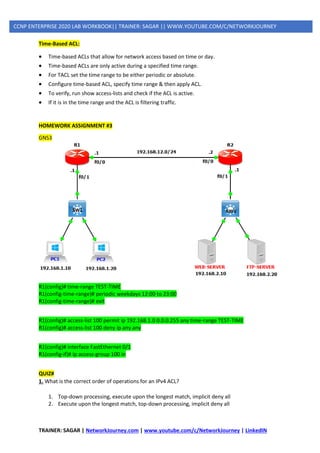
HOMEWORK ASSIGNMENT #2
EXTENDED ACL (NUMBER & NAMED)
ANSWERS
1& 2:
Assign IP address.
3 & 4 & 5 & 6 & 7 & 8
R1
access-list 145 deny tcp 192.168.2.0 0.0.0.255 host 192.168.1.3 eq www
access-list 145 deny tcp 192.168.3.0 0.0.0.255 host 192.168.1.4 eq ftp
access-list 145 deny tcp host 192.168.3.1 host 192.168.1.3 eq www
access-list 145 deny udp 192.168.2.0 0.0.0.255 host 192.168.1.4 eq domain
access-list 145 deny icmp host 192.168.3.2 host 192.168.1.2 echo
access-list 145 deny icmp host 192.168.3.2 host 192.168.1.2 echo-reply
access-list 145 permit ip any any
int e0/0 (config)#
ip access-group 145 out
VALIDATIONS:
Ping and Validate.
Ping should not be successful!!!
TRAINER: SAGAR | NetworkJourney.com | www.youtube.com/c/NetworkJourney | LinkedIN
CCNP ENTERPRISE 2020 LAB WORKBOOK|| TRAINER: SAGAR || WWW.YOUTUBE.COM/C/NETWORKJOURNEY
Time-Based ACL:
• Time-based ACLs that allow for network access based on time or day.
• Time-based ACLs are only active during a specified time range.
• For TACL set the time range to be either periodic or absolute.
• Configure time-based ACL, specify time range & then apply ACL.
• To verify, run show access-lists and check if the ACL is active.
• If it is in the time range and the ACL is filtering traffic.
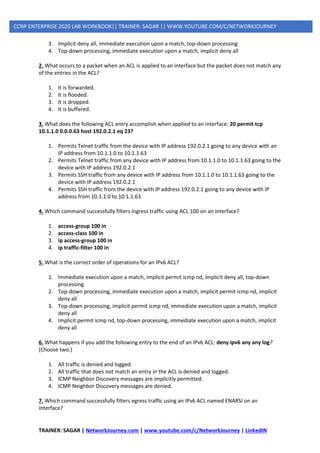
HOMEWORK ASSIGNMENT #3
GNS3
R1(config)# time-range TEST-TIME
R1(config-time-range)# periodic weekdays 12:00 to 23:00
R1(config-time-range)# exit
R1(config)# access-list 100 permit ip 192.168.1.0 0.0.0.255 any time-range TEST-TIME
R1(config)# access-list 100 deny ip any any
R1(config)# interface FastEthernet 0/1
R1(config-if)# ip access-group 100 in
QUIZ#
1. What is the correct order of operations for an IPv4 ACL?
1. Top-down processing, execute upon the longest match, implicit deny all
2. Execute upon the longest match, top-down processing, implicit deny all
TRAINER: SAGAR | NetworkJourney.com | www.youtube.com/c/NetworkJourney | LinkedIN
CCNP ENTERPRISE 2020 LAB WORKBOOK|| TRAINER: SAGAR || WWW.YOUTUBE.COM/C/NETWORKJOURNEY
3. Implicit deny all, immediate execution upon a match, top-down processing
4. Top-down processing, immediate execution upon a match, implicit deny all
2. What occurs to a packet when an ACL is applied to an interface but the packet does not match any
of the entries in the ACL?
1. It is forwarded.
2. It is flooded.
3. It is dropped.
4. It is buffered.
3. What does the following ACL entry accomplish when applied to an interface: 20 permit tcp
10.1.1.0 0.0.0.63 host 192.0.2.1 eq 23?
1. Permits Telnet traffic from the device with IP address 192.0.2.1 going to any device with an
IP address from 10.1.1.0 to 10.1.1.63
2. Permits Telnet traffic from any device with IP address from 10.1.1.0 to 10.1.1.63 going to the
device with IP address 192.0.2.1
3. Permits SSH traffic from any device with IP address from 10.1.1.0 to 10.1.1.63 going to the
device with IP address 192.0.2.1
4. Permits SSH traffic from the device with IP address 192.0.2.1 going to any device with IP
address from 10.1.1.0 to 10.1.1.63
4. Which command successfully filters ingress traffic using ACL 100 on an interface?
1. access-group 100 in
2. access-class 100 in
3. ip access-group 100 in
4. ip traffic-filter 100 in
5. What is the correct order of operations for an IPv6 ACL?
1. Immediate execution upon a match, implicit permit icmp nd, implicit deny all, top-down
processing
2. Top-down processing, immediate execution upon a match, implicit permit icmp nd, implicit
deny all
3. Top-down processing, implicit permit icmp nd, immediate execution upon a match, implicit
deny all
4. Implicit permit icmp nd, top-down processing, immediate execution upon a match, implicit
deny all
6. What happens if you add the following entry to the end of an IPv6 ACL: deny ipv6 any any log?
(Choose two.)
1. All traffic is denied and logged.
2. All traffic that does not match an entry in the ACL is denied and logged.
3. ICMP Neighbor Discovery messages are implicitly permitted.
4. ICMP Neighbor Discovery messages are denied.
7. Which command successfully filters egress traffic using an IPv6 ACL named ENARSI on an
interface?
TRAINER: SAGAR | NetworkJourney.com | www.youtube.com/c/NetworkJourney | LinkedIN
CCNP ENTERPRISE 2020 LAB WORKBOOK|| TRAINER: SAGAR || WWW.YOUTUBE.COM/C/NETWORKJOURNEY
1. access-group ENARSI out
2. access-class ENARSI out
3. ipv6 access-group ENARSI out
4. ipv6 traffic-filter ENARSI out
8. Which IP prefix list matches only the default route?
1. ip prefix-list ENARSI permit 0.0.0.0/0 le 32
2. ip prefix-list ENARSI permit 0.0.0.0/0 ge 32
3. ip prefix-list ENARSI permit 0.0.0.0/0 ge 1
4. ip prefix-list ENARSI permit 0.0.0.0/0
9. Which IP prefix list matches all routes?
1. ip prefix-list ENARSI permit 0.0.0.0/0 le 32
2. ip prefix-list ENARSI permit 0.0.0.0/0 ge 32
3. ip prefix-list ENARSI permit 0.0.0.0/0 ge 1
4. ip prefix-list ENARSI permit 0.0.0.0/0
10. What routes match the following prefix list: ip prefix-list ENARSI seq 35 deny 192.168.0.0/20 ge
24 le 28?
1. Routes with an address from 192.168.0.0 to 192.168.15.255 with a subnet mask of 24 to 28
2. Routes within the 192.168.0.0/20 subnet with a subnet mask greater than 24 and less than
28
3. Routes with the subnet ID and mask 192.168.0.0/20
4. Routes with an address from 192.168.0.0 to 192.168.15.255 with a subnet mask of 24 or 28
ANSWERS
1. d
2. c
3. b
4. c
5. b
6. b and d
7. d
8. d
9. a
10. a
TRAINER: SAGAR | NetworkJourney.com | www.youtube.com/c/NetworkJourney | LinkedIN
CCNP ENTERPRISE 2020 LAB WORKBOOK|| TRAINER: SAGAR || WWW.YOUTUBE.COM/C/NETWORKJOURNEY
SECURITY APPLIANCE - ASA
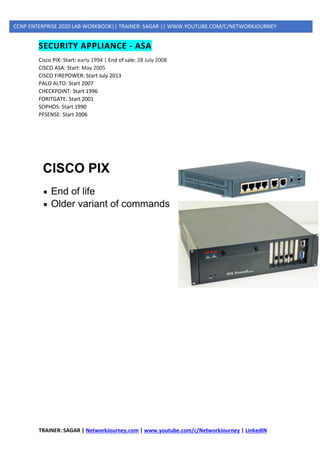
Cisco PIX: Start: early 1994 | End of sale: 28 July 2008
CISCO ASA: Start: May 2005
CISCO FIREPOWER: Start July 2013
PALO ALTO: Start 2007
CHECKPOINT: Start 1996
FORITGATE: Start 2001
SOPHOS: Start 1990
PFSENSE: Start 2006
TRAINER: SAGAR | NetworkJourney.com | www.youtube.com/c/NetworkJourney | LinkedIN
CCNP ENTERPRISE 2020 LAB WORKBOOK|| TRAINER: SAGAR || WWW.YOUTUBE.COM/C/NETWORKJOURNEY
TRAINER: SAGAR | NetworkJourney.com | www.youtube.com/c/NetworkJourney | LinkedIN
CCNP ENTERPRISE 2020 LAB WORKBOOK|| TRAINER: SAGAR || WWW.YOUTUBE.COM/C/NETWORKJOURNEY
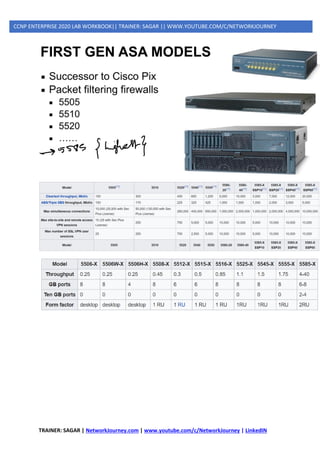
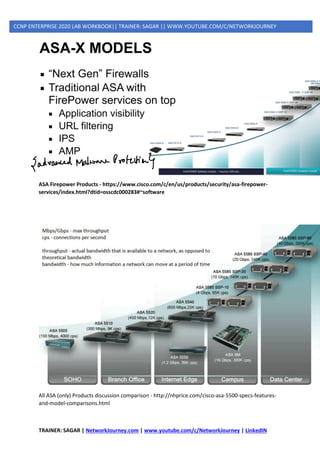
ASA Firepower Products - https://www.cisco.com/c/en/us/products/security/asa-firepower-
services/index.html?dtid=osscdc000283#~software
All ASA (only) Products discussion comparison - http://nhprice.com/cisco-asa-5500-specs-features-
and-model-comparisons.html
TRAINER: SAGAR | NetworkJourney.com | www.youtube.com/c/NetworkJourney | LinkedIN
CCNP ENTERPRISE 2020 LAB WORKBOOK|| TRAINER: SAGAR || WWW.YOUTUBE.COM/C/NETWORKJOURNEY
TRAINER: SAGAR | NetworkJourney.com | www.youtube.com/c/NetworkJourney | LinkedIN
CCNP ENTERPRISE 2020 LAB WORKBOOK|| TRAINER: SAGAR || WWW.YOUTUBE.COM/C/NETWORKJOURNEY
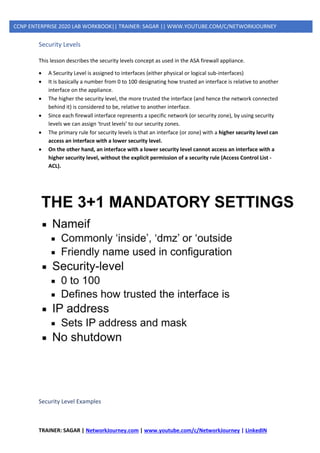
Security Levels
This lesson describes the security levels concept as used in the ASA firewall appliance.
• A Security Level is assigned to interfaces (either physical or logical sub-interfaces)
• It is basically a number from 0 to 100 designating how trusted an interface is relative to another
interface on the appliance.
• The higher the security level, the more trusted the interface (and hence the network connected
behind it) is considered to be, relative to another interface.
• Since each firewall interface represents a specific network (or security zone), by using security
levels we can assign ‘trust levels’ to our security zones.
• The primary rule for security levels is that an interface (or zone) with a higher security level can
access an interface with a lower security level.
• On the other hand, an interface with a lower security level cannot access an interface with a
higher security level, without the explicit permission of a security rule (Access Control List -
ACL).
Security Level Examples
TRAINER: SAGAR | NetworkJourney.com | www.youtube.com/c/NetworkJourney | LinkedIN
CCNP ENTERPRISE 2020 LAB WORKBOOK|| TRAINER: SAGAR || WWW.YOUTUBE.COM/C/NETWORKJOURNEY
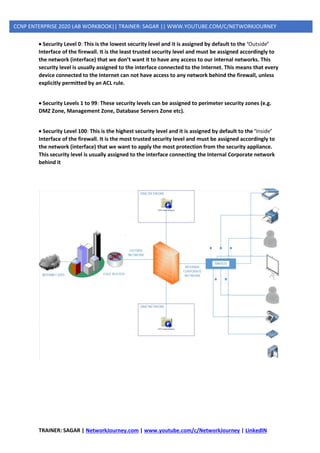
• Security Level 0: This is the lowest security level and it is assigned by default to the ‘Outside’
Interface of the firewall. It is the least trusted security level and must be assigned accordingly to
the network (interface) that we don’t want it to have any access to our internal networks. This
security level is usually assigned to the interface connected to the Internet. This means that every
device connected to the Internet can not have access to any network behind the firewall, unless
explicitly permitted by an ACL rule.
• Security Levels 1 to 99: These security levels can be assigned to perimeter security zones (e.g.
DMZ Zone, Management Zone, Database Servers Zone etc).
• Security Level 100: This is the highest security level and it is assigned by default to the ‘Inside’
Interface of the firewall. It is the most trusted security level and must be assigned accordingly to
the network (interface) that we want to apply the most protection from the security appliance.
This security level is usually assigned to the interface connecting the Internal Corporate network
behind it
TRAINER: SAGAR | NetworkJourney.com | www.youtube.com/c/NetworkJourney | LinkedIN
CCNP ENTERPRISE 2020 LAB WORKBOOK|| TRAINER: SAGAR || WWW.YOUTUBE.COM/C/NETWORKJOURNEY
Rules for Traffic Flow between Security Levels
• Traffic from Higher Security Level to Lower Security Level: Allow ALL traffic originating from the
higher Security Level unless specifically restricted by an Access Control List (ACL). If NAT-Control is
enabled on the device, then there must be a nat/global translation pair between High-to-Low
Security Level interfaces. NOTE: “global” command is not supported in ASA versions 8.3 and later
(more on this later).
• Traffic from Lower Security Level to Higher Security Level: Drop ALL traffic unless specifically
allowed by an ACL. If NAT-Control is enabled on the device (more on this later), then there must
be a Static NAT between High-to-Low Security Level interfaces.
• Traffic between interfaces with same Security Level: By default, this is not allowed, unless you
configure the same-security-traffic permit inter-interface command (ASA version 7.2 and later).
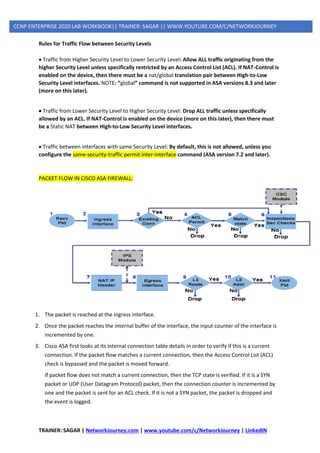
PACKET FLOW IN CISCO ASA FIREWALL:
1. The packet is reached at the ingress interface.
2. Once the packet reaches the internal buffer of the interface, the input counter of the interface is
incremented by one.
3. Cisco ASA first looks at its internal connection table details in order to verify if this is a current
connection. If the packet flow matches a current connection, then the Access Control List (ACL)
check is bypassed and the packet is moved forward.
If packet flow does not match a current connection, then the TCP state is verified. If it is a SYN
packet or UDP (User Datagram Protocol) packet, then the connection counter is incremented by
one and the packet is sent for an ACL check. If it is not a SYN packet, the packet is dropped and
the event is logged.
TRAINER: SAGAR | NetworkJourney.com | www.youtube.com/c/NetworkJourney | LinkedIN
CCNP ENTERPRISE 2020 LAB WORKBOOK|| TRAINER: SAGAR || WWW.YOUTUBE.COM/C/NETWORKJOURNEY
4. The packet is processed as per the interface ACLs. It is verified in sequential order of the ACL
entries and if it matches any of the ACL entries, it moves forward. Otherwise, the packet is
dropped and the information is logged. The ACL hit count is incremented by one when the packet
matches the ACL entry.
5. The packet is verified for the translation rules. If a packet passes through this check, then a
connection entry is created for this flow and the packet moves forward. Otherwise, the packet is
dropped and the information is logged.
6. The packet is subjected to an Inspection Check. This inspection verifies whether or not this specific
packet flow is in compliance with the protocol. Cisco ASA has a built-in inspection engine that
inspects each connection as per its pre-defined set of application-level functionality. If it passed
the inspection, it is moved forward. Otherwise, the packet is dropped and the information is
logged.
Additional security checks will be implemented if a Content Security (CSC) module is involved.
7. The IP header information is translated as per the Network Address Translation/ Port Address
Translation (NAT/PAT) rule and checksums are updated accordingly. The packet is forwarded to
Advanced Inspection and Prevention Security Services Module (AIP-SSM) for IPS related security
checks when the AIP module is involved.
8. The packet is forwarded to the egress interface based on the translation rules. If no egress
interface is specified in the translation rule, then the destination interface is decided based on the
global route lookup.
9. On the egress interface, the interface route lookup is performed. Remember, the egress interface
is determined by the translation rule that takes the priority.
10. Once a Layer 3 route has been found and the next hop identified, Layer 2 resolution is performed.
The Layer 2 rewrite of the MAC header happens at this stage.
11. The packet is transmitted on the wire, and interface counters increment on the egress interface.
TRAINER: SAGAR | NetworkJourney.com | www.youtube.com/c/NetworkJourney | LinkedIN
CCNP ENTERPRISE 2020 LAB WORKBOOK|| TRAINER: SAGAR || WWW.YOUTUBE.COM/C/NETWORKJOURNEY
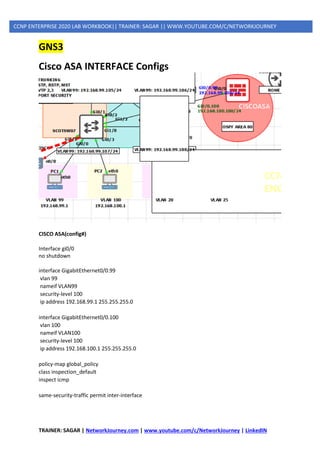
GNS3
Cisco ASA INTERFACE Configs
CISCO ASA(config#)
Interface gi0/0
no shutdown
interface GigabitEthernet0/0.99
vlan 99
nameif VLAN99
security-level 100
ip address 192.168.99.1 255.255.255.0
interface GigabitEthernet0/0.100
vlan 100
nameif VLAN100
security-level 100
ip address 192.168.100.1 255.255.255.0
policy-map global_policy
class inspection_default
inspect icmp
same-security-traffic permit inter-interface
TRAINER: SAGAR | NetworkJourney.com | www.youtube.com/c/NetworkJourney | LinkedIN
CCNP ENTERPRISE 2020 LAB WORKBOOK|| TRAINER: SAGAR || WWW.YOUTUBE.COM/C/NETWORKJOURNEY
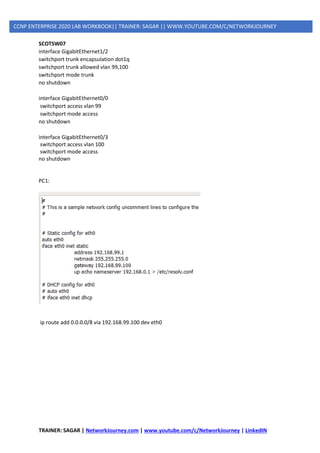
SCOTSW07
interface GigabitEthernet1/2
switchport trunk encapsulation dot1q
switchport trunk allowed vlan 99,100
switchport mode trunk
no shutdown
interface GigabitEthernet0/0
switchport access vlan 99
switchport mode access
no shutdown
interface GigabitEthernet0/3
switchport access vlan 100
switchport mode access
no shutdown
PC1:
ip route add 0.0.0.0/8 via 192.168.99.100 dev eth0
TRAINER: SAGAR | NetworkJourney.com | www.youtube.com/c/NetworkJourney | LinkedIN
CCNP ENTERPRISE 2020 LAB WORKBOOK|| TRAINER: SAGAR || WWW.YOUTUBE.COM/C/NETWORKJOURNEY
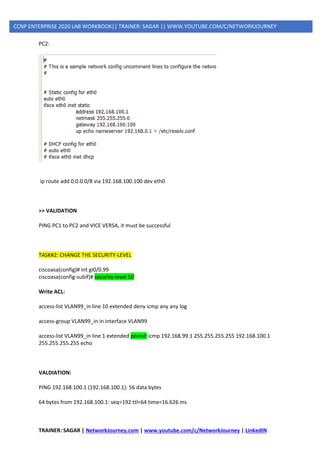
PC2:
ip route add 0.0.0.0/8 via 192.168.100.100 dev eth0
>> VALIDATION
PING PC1 to PC2 and VICE VERSA, it must be successful
TASK#2: CHANGE THE SECURITY-LEVEL
ciscoasa(config)# int gi0/0.99
ciscoasa(config-subif)# security-level 50
Write ACL:
access-list VLAN99_in line 10 extended deny icmp any any log
access-group VLAN99_in in interface VLAN99
access-list VLAN99_in line 1 extended permit icmp 192.168.99.1 255.255.255.255 192.168.100.1
255.255.255.255 echo
VALDIATION:
PING 192.168.100.1 (192.168.100.1): 56 data bytes
64 bytes from 192.168.100.1: seq=192 ttl=64 time=16.626 ms
TRAINER: SAGAR | NetworkJourney.com | www.youtube.com/c/NetworkJourney | LinkedIN
CCNP ENTERPRISE 2020 LAB WORKBOOK|| TRAINER: SAGAR || WWW.YOUTUBE.COM/C/NETWORKJOURNEY
64 bytes from 192.168.100.1: seq=193 ttl=64 time=9.942 ms
64 bytes from 192.168.100.1: seq=194 ttl=64 time=40.217 ms
TROUBLESHOOTING
Packet-tracer
packet-tracer input VLAN99 icmp 192.168.99.1 8 0 192.168.100.1
CAPTURE
capture TESTING interface VLAN99 real-time match icmp host 192.168.99.1 host 192.168.100.1
TRAINER: SAGAR | NetworkJourney.com | www.youtube.com/c/NetworkJourney | LinkedIN
CCNP ENTERPRISE 2020 LAB WORKBOOK|| TRAINER: SAGAR || WWW.YOUTUBE.COM/C/NETWORKJOURNEY
URPF (UNICAST REVERSE PATH FORWARDING)
• uRPF stands for Unicast Reverse Path Forwarding.
• Router checks the destination address of a packet only before routing.
• Using uRPF, the router will also look at the source address.
• Using uRPF in order to prevent traffic from spoofed IP addresses.
• This is done by verifying whether the router can reach the source IP.
• If the source address is valid, it will be forwarded.
• If the source IP is not valid, the packet will be dropped.
• uRPF is a security feature that prevents spoofing attacks.
Normally when your router receives unicast IP packets it only cares about one thing:
• What is the destination IP address of this IP packet so I can forward it?
If the IP packet has to be routed it will check the routing table for the destination IP address, select
the correct interface and it will be forwarded. Your router really doesn’t care about source IP
addresses as it’s not important for forwarding decisions.
Because the router doesn’t check the source IP address it is possible for attackers to spoof the
source IP address and send packets that normally might have been dropped by the Firewall or an
access-list.
uRPF is a security feature that prevents these spoofing attacks. Whenever your router receives an IP
packet it will check if it has a matching entry in the routing table for the source IP address. If it
doesn’t match, the packet will be discarded.
uRPF has two modes:
1. Strict mode
2. Loose mode
1. Strict Mode
Strict mode means that that router will perform two checks for all incoming packets on a certain
interface:
➢ Do I have a matching entry for the source in the routing table?
➢ Do I use the same interface to reach this source as where I received this packet on?
When the incoming IP packets passes both checks, it will be permitted. Otherwise it will be dropped.
This is perfectly fine for IGP routing protocols since they use the shortest path to the source of IP
packets. The interface that you use to reach the source will be the same as the interface where you
will receive the packets on.
TRAINER: SAGAR | NetworkJourney.com | www.youtube.com/c/NetworkJourney | LinkedIN
CCNP ENTERPRISE 2020 LAB WORKBOOK|| TRAINER: SAGAR || WWW.YOUTUBE.COM/C/NETWORKJOURNEY
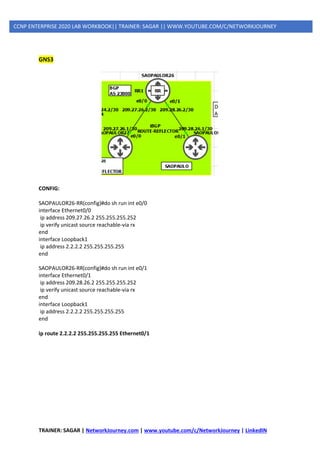
GNS3
CONFIG:
SAOPAULOR26-RR(config)#do sh run int e0/0
interface Ethernet0/0
ip address 209.27.26.2 255.255.255.252
ip verify unicast source reachable-via rx
end
interface Loopback1
ip address 2.2.2.2 255.255.255.255
end
SAOPAULOR26-RR(config)#do sh run int e0/1
interface Ethernet0/1
ip address 209.28.26.2 255.255.255.252
ip verify unicast source reachable-via rx
end
interface Loopback1
ip address 2.2.2.2 255.255.255.255
end
ip route 2.2.2.2 255.255.255.255 Ethernet0/1
TRAINER: SAGAR | NetworkJourney.com | www.youtube.com/c/NetworkJourney | LinkedIN
CCNP ENTERPRISE 2020 LAB WORKBOOK|| TRAINER: SAGAR || WWW.YOUTUBE.COM/C/NETWORKJOURNEY
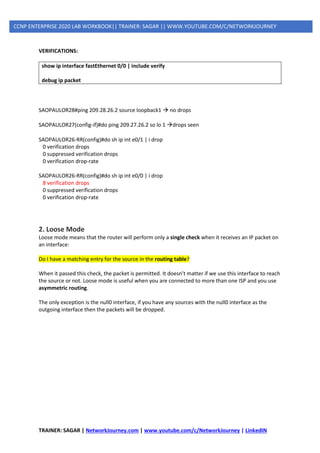
VERIFICATIONS:
show ip interface fastEthernet 0/0 | include verify
debug ip packet
SAOPAULOR28#ping 209.28.26.2 source loopback1 → no drops
SAOPAULOR27(config-if)#do ping 209.27.26.2 so lo 1 →drops seen
SAOPAULOR26-RR(config)#do sh ip int e0/1 | i drop
0 verification drops
0 suppressed verification drops
0 verification drop-rate
SAOPAULOR26-RR(config)#do sh ip int e0/0 | i drop
8 verification drops
0 suppressed verification drops
0 verification drop-rate
2. Loose Mode
Loose mode means that the router will perform only a single check when it receives an IP packet on
an interface:
Do I have a matching entry for the source in the routing table?
When it passed this check, the packet is permitted. It doesn’t matter if we use this interface to reach
the source or not. Loose mode is useful when you are connected to more than one ISP and you use
asymmetric routing.
The only exception is the null0 interface, if you have any sources with the null0 interface as the
outgoing interface then the packets will be dropped.
TRAINER: SAGAR | NetworkJourney.com | www.youtube.com/c/NetworkJourney | LinkedIN
CCNP ENTERPRISE 2020 LAB WORKBOOK|| TRAINER: SAGAR || WWW.YOUTUBE.COM/C/NETWORKJOURNEY
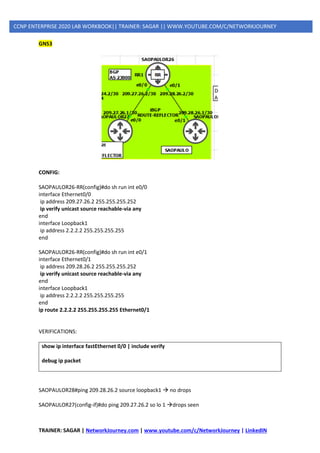
GNS3
CONFIG:
SAOPAULOR26-RR(config)#do sh run int e0/0
interface Ethernet0/0
ip address 209.27.26.2 255.255.255.252
ip verify unicast source reachable-via any
end
interface Loopback1
ip address 2.2.2.2 255.255.255.255
end
SAOPAULOR26-RR(config)#do sh run int e0/1
interface Ethernet0/1
ip address 209.28.26.2 255.255.255.252
ip verify unicast source reachable-via any
end
interface Loopback1
ip address 2.2.2.2 255.255.255.255
end
ip route 2.2.2.2 255.255.255.255 Ethernet0/1
VERIFICATIONS:
show ip interface fastEthernet 0/0 | include verify
debug ip packet
SAOPAULOR28#ping 209.28.26.2 source loopback1 → no drops
SAOPAULOR27(config-if)#do ping 209.27.26.2 so lo 1 →drops seen
TRAINER: SAGAR | NetworkJourney.com | www.youtube.com/c/NetworkJourney | LinkedIN
CCNP ENTERPRISE 2020 LAB WORKBOOK|| TRAINER: SAGAR || WWW.YOUTUBE.COM/C/NETWORKJOURNEY
SAOPAULOR26-RR(config)#do sh ip int e0/1 | i drop
0 verification drops
0 suppressed verification drops
0 verification drop-rate
SAOPAULOR26-RR(config)#do sh ip int e0/0 | i drop
8 verification drops
0 suppressed verification drops
0 verification drop-rate
Additional Features
Logging and Exemptions: uRPF allows the usage of an access-list so you can decide what sources it
should check and if required, log the packets that are dropped using access-list logging.
Self-pinging: Allow the router to ping itself using uRPF strict mode on the interface.
Default route: You can configure uRPF to check source IP addresses against a default route. You can
use this when you want to accept all packets from your internet connection while protecting
yourself against spoofed packets with source IP address from your internal network.
TRAINER: SAGAR | NetworkJourney.com | www.youtube.com/c/NetworkJourney | LinkedIN
CCNP ENTERPRISE 2020 LAB WORKBOOK|| TRAINER: SAGAR || WWW.YOUTUBE.COM/C/NETWORKJOURNEY
SECURITY ATTACKS:
Management Plane:
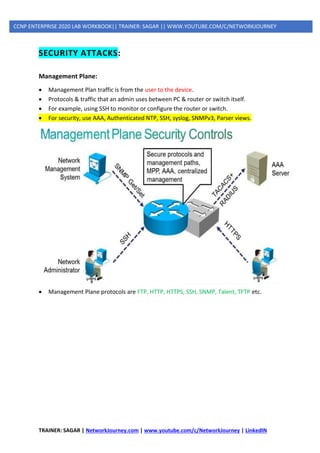
• Management Plan traffic is from the user to the device.
• Protocols & traffic that an admin uses between PC & router or switch itself.
• For example, using SSH to monitor or configure the router or switch.
• For security, use AAA, Authenticated NTP, SSH, syslog, SNMPv3, Parser views.
• Management Plane protocols are FTP, HTTP, HTTPS, SSH, SNMP, Talent, TFTP etc.
TRAINER: SAGAR | NetworkJourney.com | www.youtube.com/c/NetworkJourney | LinkedIN
CCNP ENTERPRISE 2020 LAB WORKBOOK|| TRAINER: SAGAR || WWW.YOUTUBE.COM/C/NETWORKJOURNEY
Control Plan:
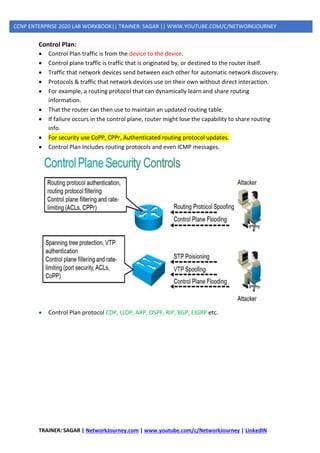
• Control Plan traffic is from the device to the device.
• Control plane traffic is traffic that is originated by, or destined to the router itself.
• Traffic that network devices send between each other for automatic network discovery.
• Protocols & traffic that network devices use on their own without direct interaction.
• For example, a routing protocol that can dynamically learn and share routing
information.
• That the router can then use to maintain an updated routing table.
• If failure occurs in the control plane, router might lose the capability to share routing
info.
• For security use CoPP, CPPr, Authenticated routing protocol updates.
• Control Plan Includes routing protocols and even ICMP messages.
• Control Plan protocol CDP, LLDP, ARP, OSPF, RIP, BGP, EIGRP etc.
TRAINER: SAGAR | NetworkJourney.com | www.youtube.com/c/NetworkJourney | LinkedIN
CCNP ENTERPRISE 2020 LAB WORKBOOK|| TRAINER: SAGAR || WWW.YOUTUBE.COM/C/NETWORKJOURNEY
Data Plane:
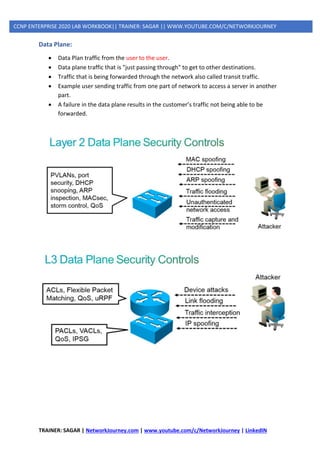
• Data Plan traffic from the user to the user.
• Data plane traffic that is "just passing through" to get to other destinations.
• Traffic that is being forwarded through the network also called transit traffic.
• Example user sending traffic from one part of network to access a server in another
part.
• A failure in the data plane results in the customer’s traffic not being able to be
forwarded.
TRAINER: SAGAR | NetworkJourney.com | www.youtube.com/c/NetworkJourney | LinkedIN
CCNP ENTERPRISE 2020 LAB WORKBOOK|| TRAINER: SAGAR || WWW.YOUTUBE.COM/C/NETWORKJOURNEY
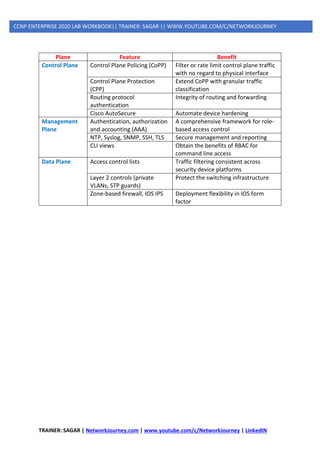
Plane Feature Benefit
Control Plane Control Plane Policing (CoPP) Filter or rate limit control plane traffic
with no regard to physical interface
Control Plane Protection
(CPP)
Extend CoPP with granular traffic
classification
Routing protocol
authentication
Integrity of routing and forwarding
Cisco AutoSecure Automate device hardening
Management
Plane
Authentication, authorization
and accounting (AAA)
A comprehensive framework for role-
based access control
NTP, Syslog, SNMP, SSH, TLS Secure management and reporting
CLI views Obtain the benefits of RBAC for
command line access
Data Plane Access control lists Traffic filtering consistent across
security device platforms
Layer 2 controls (private
VLANs, STP guards)
Protect the switching infrastructure
Zone-based firewall, IOS IPS Deployment flexibility in IOS form
factor
TRAINER: SAGAR | NetworkJourney.com | www.youtube.com/c/NetworkJourney | LinkedIN
CCNP ENTERPRISE 2020 LAB WORKBOOK|| TRAINER: SAGAR || WWW.YOUTUBE.COM/C/NETWORKJOURNEY
LAYER2 ATTACKS(DATA PLANES)
1] STP Attacks
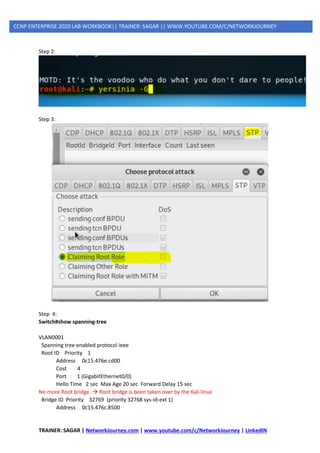
A network attacker can use STP to change the topology of a network so that the attacker’s host
appears to be a root bridge with a higher priority.
The attacker sends out bridge protocol data units (BPDUs) with a better bridge ID and thus becomes
the root bridge.
As a result, traffic between the two switches in Figure 14-1 passes through the new root bridge,
which is actually the attacker system.
To mitigate STP manipulation attacks, use the Cisco STP stability mechanisms to enhance the overall
performance of the switches and to reduce the time that is lost during topology changes.
GNS3
Step 1:
TRAINER: SAGAR | NetworkJourney.com | www.youtube.com/c/NetworkJourney | LinkedIN
CCNP ENTERPRISE 2020 LAB WORKBOOK|| TRAINER: SAGAR || WWW.YOUTUBE.COM/C/NETWORKJOURNEY
Step 2:
Step 3:
Step 4:
Switch#show spanning-tree
VLAN0001
Spanning tree enabled protocol ieee
Root ID Priority 1
Address 0c15.476e.cd00
Cost 4
Port 1 (GigabitEthernet0/0)
Hello Time 2 sec Max Age 20 sec Forward Delay 15 sec
No more Root bridge. → Root bridge is been taken over by the Kali linux
Bridge ID Priority 32769 (priority 32768 sys-id-ext 1)
Address 0c15.476c.8500
TRAINER: SAGAR | NetworkJourney.com | www.youtube.com/c/NetworkJourney | LinkedIN
CCNP ENTERPRISE 2020 LAB WORKBOOK|| TRAINER: SAGAR || WWW.YOUTUBE.COM/C/NETWORKJOURNEY
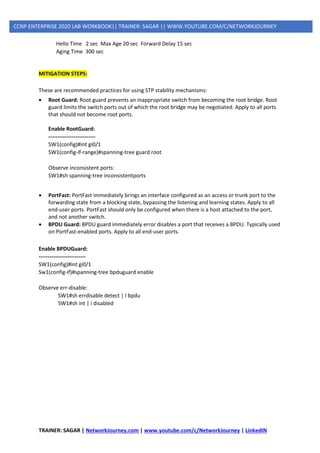
Hello Time 2 sec Max Age 20 sec Forward Delay 15 sec
Aging Time 300 sec
MITIGATION STEPS:
These are recommended practices for using STP stability mechanisms:
• Root Guard: Root guard prevents an inappropriate switch from becoming the root bridge. Root
guard limits the switch ports out of which the root bridge may be negotiated. Apply to all ports
that should not become root ports.
Enable RootGuard:
--------------------------
SW1(config)#int gi0/1
SW1(config-if-range)#spanning-tree guard root
Observe inconsistent ports:
SW1#sh spanning-tree inconsistentports
• PortFast: PortFast immediately brings an interface configured as an access or trunk port to the
forwarding state from a blocking state, bypassing the listening and learning states. Apply to all
end-user ports. PortFast should only be configured when there is a host attached to the port,
and not another switch.
• BPDU Guard: BPDU guard immediately error disables a port that receives a BPDU. Typically used
on PortFast-enabled ports. Apply to all end-user ports.
Enable BPDUGuard:
--------------------------
SW1(config)#int gi0/1
Sw1(config-if)#spanning-tree bpduguard enable
Observe err-disable:
SW1#sh errdisable detect | I bpdu
SW1#sh int | i disabled
TRAINER: SAGAR | NetworkJourney.com | www.youtube.com/c/NetworkJourney | LinkedIN
CCNP ENTERPRISE 2020 LAB WORKBOOK|| TRAINER: SAGAR || WWW.YOUTUBE.COM/C/NETWORKJOURNEY
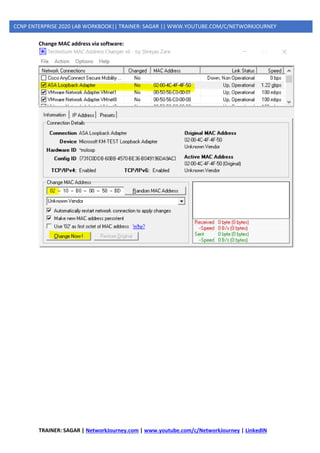
2] MAC Spoofing
MAC spoofing attacks involve the use of a known MAC address of another host to attempt to make
the target switch forward frames that are destined for the remote host to the network attacker.
By sending a single frame with the source Ethernet address of the other host, the network attacker
overwrites the Content Addressable Memory (CAM) table entry so that the switch forwards
packets that are destined for the host to the network attacker.
Until the host sends traffic, it does not receive any traffic. When the host sends out traffic, the CAM
table entry is rewritten once more so that it moves back to the original port. MAC spoofing attacks
can be mitigated by configuring port security.
Change MAC address in Windows:
TRAINER: SAGAR | NetworkJourney.com | www.youtube.com/c/NetworkJourney | LinkedIN
CCNP ENTERPRISE 2020 LAB WORKBOOK|| TRAINER: SAGAR || WWW.YOUTUBE.COM/C/NETWORKJOURNEY
Change MAC address via software:
TRAINER: SAGAR | NetworkJourney.com | www.youtube.com/c/NetworkJourney | LinkedIN
CCNP ENTERPRISE 2020 LAB WORKBOOK|| TRAINER: SAGAR || WWW.YOUTUBE.COM/C/NETWORKJOURNEY
3] CAM Table Overflows
The most important point to understanding how CAM overflow attacks work is to know that CAM
tables are limited in size.
MAC flooding takes advantage of this limitation by bombarding the switch with fake source MAC
addresses until the switch CAM table is full.
If enough entries are entered into the CAM table, the CAM table fills up to the point that no new
entries can be accepted.
Note that this attack will not cause legitimate entries that were in the CAM table before the attack
to be removed. As long as activity is seen from the legitimate MAC addresses, their spot in the CAM
table will be reserved. But if they time out, the attack will quickly consume the freed spot in the
CAM table and the legitimate MAC address will not be relearned.
BEFORE:
SW1#sh mac address
1 0c15.4799.3c00 DYNAMIC Gi0/1
SW1#sh mac address-table aging-time
Global Aging Time: 300
SW1#sh mac address-table count
Static Address Count : 0
Total Mac Addresses : 3
Total Mac Address Space Available: 70152664
VALIDATE:
SW1#sh mac address-table
TRAINER: SAGAR | NetworkJourney.com | www.youtube.com/c/NetworkJourney | LinkedIN
CCNP ENTERPRISE 2020 LAB WORKBOOK|| TRAINER: SAGAR || WWW.YOUTUBE.COM/C/NETWORKJOURNEY
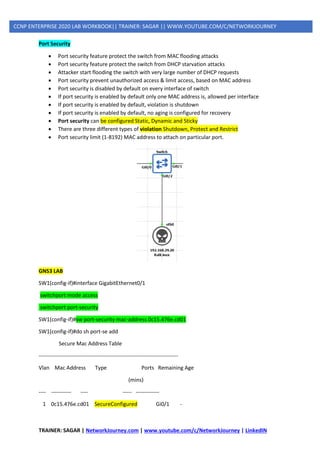
Port Security
• Port security feature protect the switch from MAC flooding attacks
• Port security feature protect the switch from DHCP starvation attacks
• Attacker start flooding the switch with very large number of DHCP requests
• Port security prevent unauthorized access & limit access, based on MAC address
• Port security is disabled by default on every interface of switch
• If port security is enabled by default only one MAC address is, allowed per interface
• If port security is enabled by default, violation is shutdown
• If port security is enabled by default, no aging is configured for recovery
• Port security can be configured Static, Dynamic and Sticky
• There are three different types of violation Shutdown, Protect and Restrict
• Port security limit (1-8192) MAC address to attach on particular port.
GNS3 LAB
SW1(config-if)#interface GigabitEthernet0/1
switchport mode access
switchport port-security
SW1(config-if)#sw port-security mac-address 0c15.476e.cd01
SW1(config-if)#do sh port-se add
Secure Mac Address Table
-----------------------------------------------------------------------------
Vlan Mac Address Type Ports Remaining Age
(mins)
---- ----------- ---- ----- -------------
1 0c15.476e.cd01 SecureConfigured Gi0/1 -
TRAINER: SAGAR | NetworkJourney.com | www.youtube.com/c/NetworkJourney | LinkedIN
CCNP ENTERPRISE 2020 LAB WORKBOOK|| TRAINER: SAGAR || WWW.YOUTUBE.COM/C/NETWORKJOURNEY
-----------------------------------------------------------------------------
Total Addresses in System (excluding one mac per port) : 0
Max Addresses limit in System (excluding one mac per port) : 4096
RUN KALI TO OBSERVE DEBUG:
VOILATION OCCURRED:
*Sep 30 20:35:37.112: %PM-4-ERR_DISABLE: psecure-violation error detected on Gi0/1, putting
Gi0/1 in err-disable state
*Sep 30 20:35:37.114: %PORT_SECURITY-2-PSECURE_VIOLATION: Security violation occurred,
caused by MAC address 7a5b.5f60.df03 on port GigabitEthernet0/1.
*Sep 30 20:35:38.112: %LINEPROTO-5-UPDOWN: Line protocol on Interface GigabitEthernet0/1,
changed state to down
*Sep 30 20:35:39.114: %LINK-3-UPDOWN: Interface GigabitEthernet0/1, changed state to down
To enable Auto ERR DISABLE recovery
Switch(config)# errdisable recovery cause psecure-violation
Switch(config)# errdisable recovery interval 300
Verify → Switch# show errdisable recovery
Switch# show errdisable recovery
%PM-4-ERR_RECOVER: Attempting to recover from psecure-violation err-disable state on Fa0/1
Switch# show interface Gi0/2
GigaEthernet0/2 is up, line protocol is up (connected)
4] DHCP Spoofing
TRAINER: SAGAR | NetworkJourney.com | www.youtube.com/c/NetworkJourney | LinkedIN
CCNP ENTERPRISE 2020 LAB WORKBOOK|| TRAINER: SAGAR || WWW.YOUTUBE.COM/C/NETWORKJOURNEY
Access attacks is instant with no proper planning, Example, man-in-middle, buffer overflow, dhcp
spoofing
DHCP spoofing:
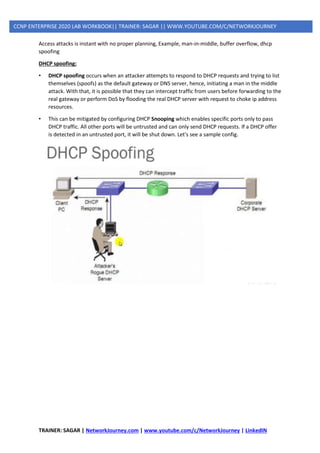
• DHCP spoofing occurs when an attacker attempts to respond to DHCP requests and trying to list
themselves (spoofs) as the default gateway or DNS server, hence, initiating a man in the middle
attack. With that, it is possible that they can intercept traffic from users before forwarding to the
real gateway or perform DoS by flooding the real DHCP server with request to choke ip address
resources.
• This can be mitigated by configuring DHCP Snooping which enables specific ports only to pass
DHCP traffic. All other ports will be untrusted and can only send DHCP requests. If a DHCP offer
is detected in an untrusted port, it will be shut down. Let's see a sample config.
TRAINER: SAGAR | NetworkJourney.com | www.youtube.com/c/NetworkJourney | LinkedIN
CCNP ENTERPRISE 2020 LAB WORKBOOK|| TRAINER: SAGAR || WWW.YOUTUBE.COM/C/NETWORKJOURNEY
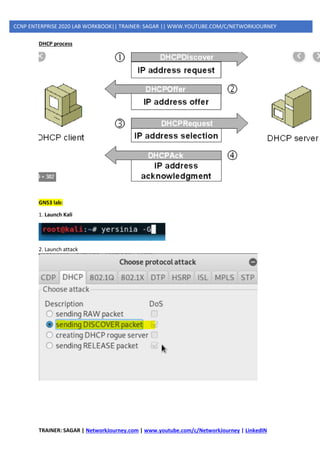
DHCP process
GNS3 lab:
1. Launch Kali
2. Launch attack
TRAINER: SAGAR | NetworkJourney.com | www.youtube.com/c/NetworkJourney | LinkedIN
CCNP ENTERPRISE 2020 LAB WORKBOOK|| TRAINER: SAGAR || WWW.YOUTUBE.COM/C/NETWORKJOURNEY
3. Config on IOU Router
IOU1(config)#ip dhcp pool ccnp
IOU1(dhcp-config)#network 192.168.29.0 255.255.255.0
IOU1(dhcp-config)#default-router 192.168.29.1
IOU1(dhcp-config)#dns-server 8.8.8.8
IOU1(config)#ip dhcp excluded-address 192.168.29.1 192.168.29.50
IOU1(config)#int e0/0
Ip add 192.168.29.1 255.255.255.0
No shut
Verify
Show ip dhcp binding
Configure DHCP SNOOPING (MITIGATION PROCESS)
• SW(config)# ! Enable DHCP snooping on the switch
• SW(config)#ip dhcp snooping
• SW(config)# ! Enable DHCP snooping for the specific VLAN
• SW(config)#ip dhcp snooping vlan 1
• SW(config)#int gi0/2
• SW(config-if)# ! Set the port as trusted
• SW(config-if)#ip dhcp snooping trust
• SW(config-if)# ! Enable rate limiting to prevent flooding attacks
• SW(config-if)#ip dhcp snooping limit rate 15
• SW (config) # no ip dhcp snooping information option
TRAINER: SAGAR | NetworkJourney.com | www.youtube.com/c/NetworkJourney | LinkedIN
CCNP ENTERPRISE 2020 LAB WORKBOOK|| TRAINER: SAGAR || WWW.YOUTUBE.COM/C/NETWORKJOURNEY
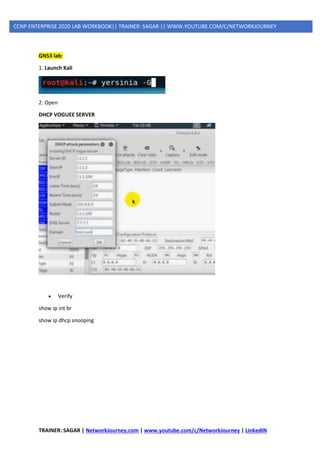
GNS3 lab:
1. Launch Kali
2. Open
DHCP VOGUEE SERVER
• Verify
show ip int br
show ip dhcp snooping
TRAINER: SAGAR | NetworkJourney.com | www.youtube.com/c/NetworkJourney | LinkedIN
CCNP ENTERPRISE 2020 LAB WORKBOOK|| TRAINER: SAGAR || WWW.YOUTUBE.COM/C/NETWORKJOURNEY
MANAGEMENT PLANES ATTACKS
TELNET (NON PREFERED) VS SSH(PREFERABLE)
GNS3
TELNET TEST:
ROUTER(config)#:
interface Ethernet0/0
ip address 192.168.29.10 255.255.255.0
no shutdown
SWITCH(config)#:
interface GigabitEthernet0/0
no switchport
ip address 192.168.29.1 255.255.255.0
exit
username admin privilege 15 password 0 cisco
line vty 0 4
login local
transport input telnet
[to be continued in next page]
TRAINER: SAGAR | NetworkJourney.com | www.youtube.com/c/NetworkJourney | LinkedIN
CCNP ENTERPRISE 2020 LAB WORKBOOK|| TRAINER: SAGAR || WWW.YOUTUBE.COM/C/NETWORKJOURNEY
TRAFFIC CAPTURED ARE ALL PLAIN-TEXT:
[WIRESHARK SCREENSHOT ATTACHED BELOW]
[to be continued in next page]
TRAINER: SAGAR | NetworkJourney.com | www.youtube.com/c/NetworkJourney | LinkedIN
CCNP ENTERPRISE 2020 LAB WORKBOOK|| TRAINER: SAGAR || WWW.YOUTUBE.COM/C/NETWORKJOURNEY
SSH TEST:
Switch(config)#line vty 0 4
Switch(config-line)#transport input ssh
Switch(config-line)#exit
Switch(config)#ip domain-name networkjourney.com
Switch(config)#cry key generate rsa modulus 1024
The name for the keys will be: Switch.networkjourney.com
% The key modulus size is 1024 bits
% Generating 1024 bit RSA keys, keys will be non-exportable...
[OK] (elapsed time was 1 seconds)
ROUTER#ssh -l admin 192.168.29.1
SSH encrypts both data and username/password as well
TRAINER: SAGAR | NetworkJourney.com | www.youtube.com/c/NetworkJourney | LinkedIN
CCNP ENTERPRISE 2020 LAB WORKBOOK|| TRAINER: SAGAR || WWW.YOUTUBE.COM/C/NETWORKJOURNEY
SECURE MANAGEMENT PLANE ATTACKS
Management Place Protection (MPP)
Management Plane Protection (MPP) is a security feature for Cisco IOS routers that accomplishes
two things:
• Restrict the interfaces where the router permits packets from network management
protocols.
• Restrict the network management protocols that the router permits.
The management plane is the logical path of all traffic related to the management of the router. For
example:
• Telnet
• SSH
• SNMP
• HTTP
• HTTPS
- After MPP is enabled, no interfaces except designated management interfaces will accept
network management traffic destined to the device.
- Restricting management packets to designated interfaces provides greater control over
management of a device, providing more security for that device.
- Other benefits include improved performance for data packets on non-management
interfaces, support for network scalability.
- Need for fewer access control lists (ACLs) to restrict access to a device.
- Management packet floods on switching and routing interfaces are prevented from reaching
the CPU.
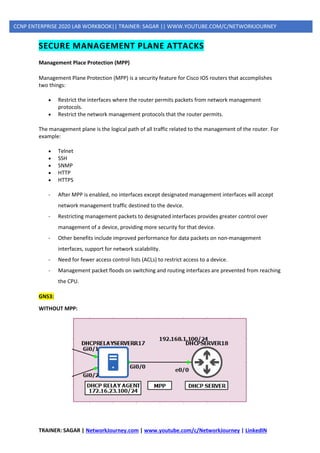
GNS3:
WITHOUT MPP:
TRAINER: SAGAR | NetworkJourney.com | www.youtube.com/c/NetworkJourney | LinkedIN
CCNP ENTERPRISE 2020 LAB WORKBOOK|| TRAINER: SAGAR || WWW.YOUTUBE.COM/C/NETWORKJOURNEY
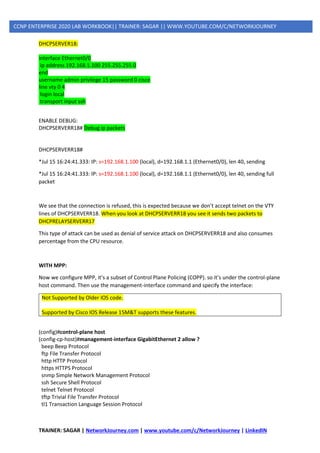
DHCPSERVER18:
interface Ethernet0/0
ip address 192.168.1.100 255.255.255.0
end
username admin privilege 15 password 0 cisco
line vty 0 4
login local
transport input ssh
ENABLE DEBUG:
DHCPSERVERR18# Debug ip packets
DHCPSERVERR18#
*Jul 15 16:24:41.333: IP: s=192.168.1.100 (local), d=192.168.1.1 (Ethernet0/0), len 40, sending
*Jul 15 16:24:41.333: IP: s=192.168.1.100 (local), d=192.168.1.1 (Ethernet0/0), len 40, sending full
packet
We see that the connection is refused, this is expected because we don’t accept telnet on the VTY
lines of DHCPSERVERR18. When you look at DHCPSERVERR18 you see it sends two packets to
DHCPRELAYSERVERR17
This type of attack can be used as denial of service attack on DHCPSERVERR18 and also consumes
percentage from the CPU resource.
WITH MPP:
Now we configure MPP, it’s a subset of Control Plane Policing (COPP). so it’s under the control-plane
host command. Then use the management-interface command and specify the interface:
Not Supported by Older IOS code.
Supported by Cisco IOS Release 15M&T supports these features.
(config)#control-plane host
(config-cp-host)#management-interface GigabitEthernet 2 allow ?
beep Beep Protocol
ftp File Transfer Protocol
http HTTP Protocol
https HTTPS Protocol
snmp Simple Network Management Protocol
ssh Secure Shell Protocol
telnet Telnet Protocol
tftp Trivial File Transfer Protocol
tl1 Transaction Language Session Protocol
TRAINER: SAGAR | NetworkJourney.com | www.youtube.com/c/NetworkJourney | LinkedIN
CCNP ENTERPRISE 2020 LAB WORKBOOK|| TRAINER: SAGAR || WWW.YOUTUBE.COM/C/NETWORKJOURNEY
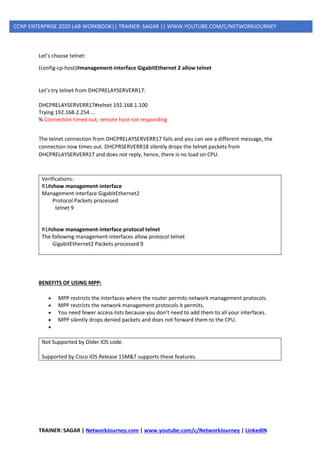
Let’s choose telnet:
(config-cp-host)#management-interface GigabitEthernet 2 allow telnet
Let’s try telnet from DHCPRELAYSERVERR17:
DHCPRELAYSERVERR17#telnet 192.168.1.100
Trying 192.168.2.254 ...
% Connection timed out; remote host not responding
The telnet connection from DHCPRELAYSERVERR17 fails and you can see a different message, the
connection now times out. DHCPRSERVERR18 silently drops the telnet packets from
DHCPRELAYSERVERR17 and does not reply, hence, there is no load on CPU.
Verifications:
R1#show management-interface
Management interface GigabitEthernet2
Protocol Packets processed
telnet 9
R1#show management-interface protocol telnet
The following management-interfaces allow protocol telnet
GigabitEthernet2 Packets processed 9
BENEFITS OF USING MPP:
• MPP restricts the interfaces where the router permits network management protocols.
• MPP restricts the network management protocols it permits.
• You need fewer access-lists because you don’t need to add them to all your interfaces.
• MPP silently drops denied packets and does not forward them to the CPU.
•
Not Supported by Older IOS code.
Supported by Cisco IOS Release 15M&T supports these features.
TRAINER: SAGAR | NetworkJourney.com | www.youtube.com/c/NetworkJourney | LinkedIN
CCNP ENTERPRISE 2020 LAB WORKBOOK|| TRAINER: SAGAR || WWW.YOUTUBE.COM/C/NETWORKJOURNEY
SECURE CONTROL PLANE ATTACKS
Control Plane Policing (CoPP)
On our routers (or multilayer switches) we can use access-lists or firewalls (CBAC or zone based) to
permit/deny packets that go through or to the router.
We can also use policing to rate limit that goes through our router.
What if we want to police traffic that is destined to the router? There are quite some protocols that
produce packets that the router has to process:
• Routing protocols like OSPF, EIGRP, or BGP.
• Gateway redundancy protocols like HSRP, VRRP, or GLBP.
• Network management protocols like telnet, SSH, SNMP, or RADIUS.
• Packets that CEF can’t forward.
The route processor inspects packets that these protocols generate on the control plane. When the
route processor receives too many packets, it’s possible that it can’t keep up and drops packets.
When this happens, you’ll see things like flapping neighbor adjacencies or timeouts when you try
to connect with telnet/SSH to the router.
To prevent this from happening, we have a couple of options:
• rACLs (Receive Access Control List): these are standard or extended ACL that control traffic sent
by line cards to the route processor. You only see this feature on high-end routers like the Cisco
12000 series.
• Control Plane Policing (CoPP): allows you to use MQC (Modular Quality of Service) framework to
permit/deny or rate-limit traffic that goes to the route processor.
• Control Plane Protection (CPPr): this is an extension of CoPP. One of the things it does is
separating the route processor into three sub-interfaces:
- host
- transit
- CEF exception
Control plane policing uses the MQC (Modular Quality of Service) so that means we have to use
class-maps and a policy-map. In your class-maps, it’s best to match traffic on:
• standard or extended access-lists
• DSCP or IP precedence values.
TRAINER: SAGAR | NetworkJourney.com | www.youtube.com/c/NetworkJourney | LinkedIN
CCNP ENTERPRISE 2020 LAB WORKBOOK|| TRAINER: SAGAR || WWW.YOUTUBE.COM/C/NETWORKJOURNEY
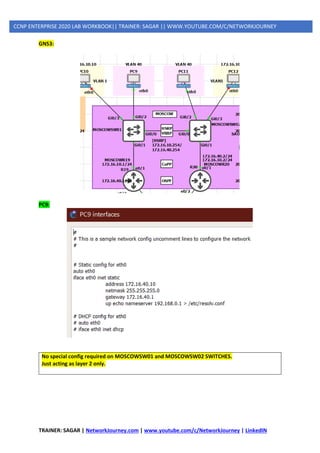
GNS3:
PC9:
No special config required on MOSCOWSW01 and MOSCOWSW02 SWITCHES.
Just acting as layer 2 only.
TRAINER: SAGAR | NetworkJourney.com | www.youtube.com/c/NetworkJourney | LinkedIN
CCNP ENTERPRISE 2020 LAB WORKBOOK|| TRAINER: SAGAR || WWW.YOUTUBE.COM/C/NETWORKJOURNEY
MOSCOWR19
ip cef
!
interface Ethernet0/1
ip address 172.16.40.1 255.255.255.0
standby version 2
standby 1 ip 172.16.40.254
standby 1 priority 200
!
router ospf 1
network 172.16.40.0 0.0.0.255 area 0
network 192.168.32.0 0.0.0.255 area 0
!
end
MOSCOWR20
ip cef
!
interface Ethernet0/1
ip address 172.16.40.2 255.255.255.0
standby version 2
standby 1 ip 172.16.40.254
standby 1 preempt
!
router ospf 1
network 172.16.40.0 0.0.0.255 area 0
network 192.168.32.0 0.0.0.255 area 0
!
end
Let’s create some access-lists that match traffic on the control plane that we can use in our class-
maps:
MOSCOWR19 (config)#
ip access-list extended ICMP
permit icmp any any
ip access-list extended TELNET
permit tcp any any eq 23
ip access-list extended OSPF
permit ospf any any
ip access-list extended HSRP
permit udp any host 224.0.0.102 eq 1985
Let’s create class-maps that match the access-lists:
MOSCOWR20 (config)#
class-map ICMP
match access-group name ICMP
TRAINER: SAGAR | NetworkJourney.com | www.youtube.com/c/NetworkJourney | LinkedIN
CCNP ENTERPRISE 2020 LAB WORKBOOK|| TRAINER: SAGAR || WWW.YOUTUBE.COM/C/NETWORKJOURNEY
class-map TELNET
match access-group name TELNET
class-map OSPF
match access-group name OSPF
class-map HSRP
match access-group name HSRP
Now I can create a policy-map on MOSCOWR19:
MOSCOWR19 (config)#
policy-map COPP
class ICMP
police 8000 conform-action transmit exceed-action transmit
exit
class TELNET
police 8000 conform-action transmit exceed-action transmit
exit
class OSPF
police 8000 conform-action transmit exceed-action transmit
exit
class HSRP
police 8000 conform-action transmit exceed-action transmit
exit
In the policy-map, I add policers for 8000 bps and the conform-action and exceed-action are both set
to transmit. These policers will never drop anything but there is a good reason I configure it like this.
In a production network, you might want to run it like this for a few days to see how much of your
traffic is conformed or exceeded.
We need to attach this policy-map to the control plane. We do this with the following command:
MOSCOWR19(config)#
control-plane
service-policy input COPP
Upon enabling you must information messages stating,
*Jul 16 10:37:08.295: %CP-5-FEATURE: Control-plane Policing feature enabled on Control plane
aggregate path
VALIDATE:
From PC9, ping MOSCOWR19 interface IP:
/ # ping 192.168.32.234
PING 192.168.32.234 (192.168.32.234): 56 data bytes
64 bytes from 192.168.32.234: seq=0 ttl=255 time=17.715 ms
64 bytes from 192.168.32.234: seq=1 ttl=255 time=6.121 ms
TRAINER: SAGAR | NetworkJourney.com | www.youtube.com/c/NetworkJourney | LinkedIN
CCNP ENTERPRISE 2020 LAB WORKBOOK|| TRAINER: SAGAR || WWW.YOUTUBE.COM/C/NETWORKJOURNEY
64 bytes from 192.168.32.234: seq=2 ttl=255 time=14.774 ms
64 bytes from 192.168.32.234: seq=3 ttl=255 time=7.354 ms
**[NO DROPS SO FAR, AS COPP IS ENABLED JUST TO MONITOR THE TRAFFIC FLOW]
MOSCOWR19#show policy-map control-plane
Control Plane
Service-policy input: COPP
Class-map: ICMP (match-all)
13 packets, 1326 bytes
5 minute offered rate 0000 bps, drop rate 0000 bps
Match: access-group name ICMP
police:
cir 8000 bps, bc 1500 bytes
conformed 13 packets, 1326 bytes; actions:
transmit
exceeded 0 packets, 0 bytes; actions:
transmit
conformed 0000 bps, exceeded 0000 bps
Class-map: TELNET (match-all)
0 packets, 0 bytes
5 minute offered rate 0000 bps, drop rate 0000 bps
Match: access-group name TELNET
police:
cir 8000 bps, bc 1500 bytes
conformed 0 packets, 0 bytes; actions:
--More--
*Jul 16 10:39:47.017: %SYS-5-CONFIG_I: Configured from console by console
transmit
exceeded 0 packets, 0 bytes; actions:
transmit
conformed 0000 bps, exceeded 0000 bps
Class-map: OSPF (match-all)
34 packets, 3264 bytes
5 minute offered rate 0000 bps, drop rate 0000 bps
Match: access-group name OSPF
police:
cir 8000 bps, bc 1500 bytes
conformed 34 packets, 3264 bytes; actions:
transmit
exceeded 0 packets, 0 bytes; actions:
transmit
conformed 0000 bps, exceeded 0000 bps
Class-map: HSRP (match-all)
0 packets, 0 bytes
5 minute offered rate 0000 bps, drop rate 0000 bps
Match: access-group name HSRP
police:
TRAINER: SAGAR | NetworkJourney.com | www.youtube.com/c/NetworkJourney | LinkedIN
CCNP ENTERPRISE 2020 LAB WORKBOOK|| TRAINER: SAGAR || WWW.YOUTUBE.COM/C/NETWORKJOURNEY
cir 8000 bps, bc 1500 bytes
conformed 0 packets, 0 bytes; actions:
transmit
exceeded 0 packets, 0 bytes; actions:
transmit
conformed 0000 bps, exceeded 0000 bps
Class-map: class-default (match-any)
249 packets, 16626 bytes
5 minute offered rate 0000 bps, drop rate 0000 bps
Match: any
MOSCOWR19#
**[NO DROPS SO FAR, AS COPP IS ENABLED JUST TO MONITOR THE TRAFFIC FLOW]
Our policy-map is up and running but even exceeding traffic is permitted. Let’s change the exceed
action for our ICMP traffic:
Let’s add a policer to the ICMP class-map to rate-limit ICMP traffic for testing purpose:
MOSCOWR19 (config)#
policy-map COPP
class ICMP
police cir 8000 conform-action transmit exceed-action drop
**If you want to rate-limit other traffic like OSPF, TELNET, SSH, you can do it. I have only done ICMP
for testing the CoPP feature.
VALIDATE:
Test by initiating PING from PC9 to R1:
PC9# ping 192.168.32.234 -s 1024 -c 50
1032 bytes from 192.168.32.234: seq=36 ttl=255 time=4.964 ms
1032 bytes from 192.168.32.234: seq=37 ttl=255 time=18.441 ms
1032 bytes from 192.168.32.234: seq=38 ttl=255 time=10.612 ms
^C
--- 192.168.32.234 ping statistics ---
39 packets transmitted, 35 packets received, 10% packet loss
round-trip min/avg/max = 4.289/10.840/27.239 ms
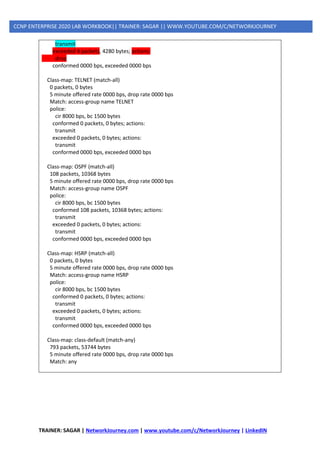
MOSCOWR19#show policy-map control-plane
Control Plane
Service-policy input: COPP
Class-map: ICMP (match-all)
282 packets, 66516 bytes
5 minute offered rate 0000 bps, drop rate 0000 bps
Match: access-group name ICMP
police:
cir 8000 bps, bc 1500 bytes
conformed 278 packets, 62236 bytes; actions:
TRAINER: SAGAR | NetworkJourney.com | www.youtube.com/c/NetworkJourney | LinkedIN
CCNP ENTERPRISE 2020 LAB WORKBOOK|| TRAINER: SAGAR || WWW.YOUTUBE.COM/C/NETWORKJOURNEY
transmit
exceeded 4 packets, 4280 bytes; actions:
drop
conformed 0000 bps, exceeded 0000 bps
Class-map: TELNET (match-all)
0 packets, 0 bytes
5 minute offered rate 0000 bps, drop rate 0000 bps
Match: access-group name TELNET
police:
cir 8000 bps, bc 1500 bytes
conformed 0 packets, 0 bytes; actions:
transmit
exceeded 0 packets, 0 bytes; actions:
transmit
conformed 0000 bps, exceeded 0000 bps
Class-map: OSPF (match-all)
108 packets, 10368 bytes
5 minute offered rate 0000 bps, drop rate 0000 bps
Match: access-group name OSPF
police:
cir 8000 bps, bc 1500 bytes
conformed 108 packets, 10368 bytes; actions:
transmit
exceeded 0 packets, 0 bytes; actions:
transmit
conformed 0000 bps, exceeded 0000 bps
Class-map: HSRP (match-all)
0 packets, 0 bytes
5 minute offered rate 0000 bps, drop rate 0000 bps
Match: access-group name HSRP
police:
cir 8000 bps, bc 1500 bytes
conformed 0 packets, 0 bytes; actions:
transmit
exceeded 0 packets, 0 bytes; actions:
transmit
conformed 0000 bps, exceeded 0000 bps
Class-map: class-default (match-any)
793 packets, 53744 bytes
5 minute offered rate 0000 bps, drop rate 0000 bps
Match: any
TRAINER: SAGAR | NetworkJourney.com | www.youtube.com/c/NetworkJourney | LinkedIN
CCNP ENTERPRISE 2020 LAB WORKBOOK|| TRAINER: SAGAR || WWW.YOUTUBE.COM/C/NETWORKJOURNEY
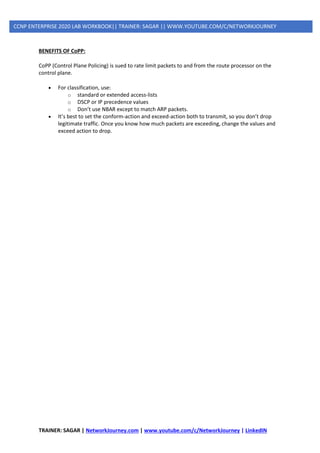
BENEFITS OF CoPP:
CoPP (Control Plane Policing) is sued to rate limit packets to and from the route processor on the
control plane.
• For classification, use:
o standard or extended access-lists
o DSCP or IP precedence values
o Don’t use NBAR except to match ARP packets.
• It’s best to set the conform-action and exceed-action both to transmit, so you don’t drop
legitimate traffic. Once you know how much packets are exceeding, change the values and
exceed action to drop.

5 ip security copp-mpp

  • 1.
    TRAINER: SAGAR |NetworkJourney.com | www.youtube.com/c/NetworkJourney | LinkedIN CCNP ENTERPRISE 2020 LAB WORKBOOK|| TRAINER: SAGAR || WWW.YOUTUBE.COM/C/NETWORKJOURNEY TOPICS COVERED: IP SERVICES - AAA [ AUTHENTICATION, AUTHORIZATION, ACCOUTING ] - ACCESS-LIST [ ACL ] - CISCO ASA THEORY (ZONE BASED) - CISCO ASA LAB - uRPF (UNICAST REVERSE PATH FORWARDING) - SECURITY ATTACKS o DATA PLANE ATTACKS o MANAGEMENT PLANE ATTACKS - CONTROL PLANE SECURITY o Management Place Protection (MPP) o Control Plane Policing (CoPP) -
  • 2.
    TRAINER: SAGAR |NetworkJourney.com | www.youtube.com/c/NetworkJourney | LinkedIN CCNP ENTERPRISE 2020 LAB WORKBOOK|| TRAINER: SAGAR || WWW.YOUTUBE.COM/C/NETWORKJOURNEY AAA [ AUTHENTICATION, AUTHORIZATION, ACCOUTING ] AAA Authentication, authorization and accounting (AAA) is a system for tracking user activities on an IP- based network and controlling their access to network resources. AAA is often being implemented as a dedicated server. This term is also referred to as the AAA Protocol. 1. Authentication refers to unique identifying information from each system user, generally in the form of a username and password. System administrators monitor and add or delete authorized users from the system. 2. Authorization refers to the process of adding or denying individual user access to a computer network and its resources. Users may be given different authorization levels that limit their access to the network and associated resources. 3. Accounting refers to the record-keeping and tracking of user activities on a computer network. For a given time period this may include, but is not limited to, real-time accounting of time spent accessing the network, the network services employed or accessed, capacity and trend analysis, network cost allocations, billing data, login data for user authentication and authorization, and the data or data amount accessed or transferred. RADIUS vs TACACS+ TACACS+ RADIUS TACACS+ uses TCP RADIUS uses UDP TACACS+ uses TCP port 49 Uses port 1812/1645 for authenticating Uses port 1813/1646 for accounting TACACS+ encrypts the entire communication RADIUS encrypts passwords only TACACS+ treats Authentication, Authorization and Accountability differently RADIUS combines authentication and authorization TACACS+ is Cisco proprietary protocol RADIUS is an open protocol TACACS+ is a heavy-weight protocol consuming more resources RADIUS is a light-weight protocol consuming less resources TACACS+ supports 15 privilege levels RADIUS is limited to privilege mode Mainly used for Device administration Mainly used for Network access Note: RADIUS has been officially assigned UDP ports 1812 for RADIUS authentication and 1813 for RADIUS accounting by the Internet Assigned Numbers Authority (IANA). However, prior to IANA allocation of ports 1812 and 1813, ports 1645 and 1646 (authentication and accounting, respectively) were used unofficially, and became the default ports assigned by many RADIUS client/server implementations at that time. The tradition of using 1645 and 1646 for backwards compatibility continues to this day. For this reason, many RADIUS server implementations monitor both sets of UDP ports for RADIUS requests. The early deployment of RADIUS was done using UDP port number 1645, which conflicts with the "datametrics" service. The officially assigned port number for RADIUS is 1812 (in 2000).
  • 3.
    TRAINER: SAGAR |NetworkJourney.com | www.youtube.com/c/NetworkJourney | LinkedIN CCNP ENTERPRISE 2020 LAB WORKBOOK|| TRAINER: SAGAR || WWW.YOUTUBE.COM/C/NETWORKJOURNEY The early deployment of RADIUS Accounting was done using UDP port number 1646, which conflicts with the "sa-msg-port" service. The officially assigned port number for RADIUS Accounting is 1813 (in 2000). GNS3 CLI Commands: (TACACS+) Switch (config)# interface vlan 1 no switchport ip add 192.168.1.101 255.255.255.0 exit Switch (config)#username admin pri 15 password cisco Switch (config)#enable password cisco Switch (config)#aaa new-model Switch (config)#aaa group server tacacs+ gns3group Switch (config-sg-tacacs+)#server name container Switch (config-sg-tacacs+)#exit Switch (config)#tacacs server container Switch (config-server-tacacs)#address ipv4 192.168.1.200 Switch (config-server-tacacs)#key gns3 Switch (config-server-tacacs)#exit Switch (config)# aaa authentication login default group gns3group local → TACACS+ Switch (config)#aaa authentication enable default enable → enable password cisco
  • 4.
    TRAINER: SAGAR |NetworkJourney.com | www.youtube.com/c/NetworkJourney | LinkedIN CCNP ENTERPRISE 2020 LAB WORKBOOK|| TRAINER: SAGAR || WWW.YOUTUBE.COM/C/NETWORKJOURNEY Verifications: ------------------- debug aaa authentication debug tacacs Do a self telnet 192.168.29.102 Username: gns3 Password: gns3 Or Username: readonly Password: gns3 Show users show line cd /etc/tacacs+ cat tac_plus.conf root@AAA-1:~# service tacacs_plus start/stop CLI Commands: (RADIUS) Switch(config)#username admin pri 15 password cisco
  • 5.
    TRAINER: SAGAR |NetworkJourney.com | www.youtube.com/c/NetworkJourney | LinkedIN CCNP ENTERPRISE 2020 LAB WORKBOOK|| TRAINER: SAGAR || WWW.YOUTUBE.COM/C/NETWORKJOURNEY Switch(config)#aaa new-model Switch(config)#enable password cisco Switch(config)#aaa group server radius gns3group2 Switch(config-sg-radius)#server name radius1 Switch(config-sg-radius)#exit Switch(config)# radius server radius1 Switch(config-radius-server)# address ipv4 192.168.29.221 auth-port 1812 acct-port 1813 Switch(config-radius-server)#key gns3 Switch(config)# aaa authentication login default group gns3group2 local → Radius Switch(config)#aaa authentication enable default enable → enable password cisco Note: RADIUS has been officially assigned UDP ports 1812 for RADIUS authentication and 1813 for RADIUS accounting by the Internet Assigned Numbers Authority (IANA). However, prior to IANA allocation of ports 1812 and 1813, ports 1645 and 1646 (authentication and accounting, respectively) were used unofficially, and became the default ports assigned by many RADIUS client/server implementations at that time. The tradition of using 1645 and 1646 for backwards compatibility continues to this day. For this reason, many RADIUS server implementations monitor both sets of UDP ports for RADIUS requests. Verifications: ------------------- debug aaa authentication debug radius Do a self telnet 192.168.29.102 Username: bob or alice Password: gns3 Show users show line root@AAA-1:~# cat /etc/freeradius/3.0/users service freeradius start/stop
  • 6.
    TRAINER: SAGAR |NetworkJourney.com | www.youtube.com/c/NetworkJourney | LinkedIN CCNP ENTERPRISE 2020 LAB WORKBOOK|| TRAINER: SAGAR || WWW.YOUTUBE.COM/C/NETWORKJOURNEY ACCESS-LIST [ ACL ] Defining an ACL An ACL is a router configuration script (a list of statements) that controls whether a router permits or denies packets to pass, based on criteria in the packet header. To determine whether a packet is permitted or denied, it is tested against the ACL statements in sequential order. When a statement matches, no more statements are evaluated; the packet is either permitted or denied. There is an implicit deny any statement at the end of the ACL. If a packet does not match any of the statements in the ACL, it is dropped. Types of ACLs ACLs can be configured to filter any type of protocol traffic, including other network layer protocols such as AppleTalk and IPX. For the CCNA exam, we focus on IPv4 and IPv6 ACLs, which come in the following types: 1. Standard IPv4 ACLs: Filter traffic based on source address only (all services are blocked) 2. Extended IPv4 and IPv6 ACLs: Can filter traffic based on source and destination address, specific protocols, and source and destination TCP and UDP ports Two ways to Identify Standard or Extended ACL: 1. Numbered IPv4 ACLs: Use a number for identification 2. Named IPv4 and IPv6 ACLs: Use a descriptive name or number for identification Named ACLs must be used with some types of Cisco IOS configurations, including IPv6 ACLs. However, they provide two basic benefits for standard and extended IPv4 ACLs: ➢ By using a descriptive name (such as BLOCK-HTTP), a network administrator can more quickly determine the purpose of an ACL. This is particularly helpful in larger networks, where a router can have many ACLs with hundreds of statements. ➢ Both numbered and named ACLs can be configured for standard as well as extended ACL implementations.
  • 7.
    TRAINER: SAGAR |NetworkJourney.com | www.youtube.com/c/NetworkJourney | LinkedIN CCNP ENTERPRISE 2020 LAB WORKBOOK|| TRAINER: SAGAR || WWW.YOUTUBE.COM/C/NETWORKJOURNEY ACL IDENTIFICATIONS: Cisco IOS Software Release 12.3 introduced IP access list entry sequence numbering for both numbered and named ACLs. IP access list entry sequence numbering provides the following benefits: ▪ You can edit the order of ACL statements. ▪ You can remove individual statements from an ACL. ▪ You can use the sequence number to insert new statements into the middle of the ACL. ▪ Sequence numbers are automatically added to the ACL if they are not entered explicitly at the time the ACL is created.
  • 8.
    TRAINER: SAGAR |NetworkJourney.com | www.youtube.com/c/NetworkJourney | LinkedIN CCNP ENTERPRISE 2020 LAB WORKBOOK|| TRAINER: SAGAR || WWW.YOUTUBE.COM/C/NETWORKJOURNEY Access List Rules The following rules apply to access lists: 1. Only one access list per interface, per protocol, and per direction is allowed. 2. An access list must contain at least one permit statement or all packets are denied entry into the network. 3. After a match is found, no more criteria statements are checked. 4. If an access list is referenced by a name, but the access list does not exist, all packets pass. 5. An interface or command with an empty access list applied to it permits all traffic into the network. 6. Standard access lists and extended access lists cannot have the same name. 7. Standard Access Control List should be placed near the destination devices. 8. Extended Access Control List (ACL) should be placed near the source devices. 9. Inbound access lists process packets before the packets are routed to an outbound interface. Inbound access lists that have filtering criteria that deny packet access to a network saves the overhead of routing lookup. 10. Outbound access lists process packets before they leave the device. Incoming packets are routed to the outbound interface and then processed by the outbound access list. For outbound access lists, when you configure a permit statement, packets are sent to the output buffer, and when you configure a deny statement, packets are discarded. 11. An access list can control traffic arriving at a device or leaving a device, but not traffic originating at a device.
  • 9.
    TRAINER: SAGAR |NetworkJourney.com | www.youtube.com/c/NetworkJourney | LinkedIN CCNP ENTERPRISE 2020 LAB WORKBOOK|| TRAINER: SAGAR || WWW.YOUTUBE.COM/C/NETWORKJOURNEY TYPES OF ACLS: 1. Standard ACLs Standard ACLs are the oldest type of ACL. They date back to as early as Cisco IOS Software Release 8.3. Standard ACLs control traffic by the comparison of the source address of the IP packets to the addresses configured in the ACL. access-list access-list-number {permit|deny} {host|source source-wildcard|any} NUMBERED STANDARD ACL: interface Ethernet0/0 ip address 10.1.1.1 255.255.255.0 ip access-group 1 in exit access-list 1 permit 10.1.1.0 0.0.0.255 NAMED STANDARD ACL: R1(config)# ip access-list standard blockacl R1(config-std-nacl)# deny 172.16.40.0 0.0.0.255 R1(config-std-nacl)# permit any R1(config)# int fa0/1 R1(config-if)# ip access-group blockacl out 2. Extended Access Lists Extended access lists are good for blocking traffic anywhere. Extended access lists test source and destination addresses and other IP packet data, such as protocols, TCP or UDP port numbers, type of service (ToS), precedence, TCP flags, and IP options. Extended access lists can also provide capabilities that standard access lists cannot, such as the following: • Filtering IP Options • Filtering TCP flags • Filtering noninitial fragments of packets • Time-based entries NAMED EXTENDED ACL: R1(config)# ip access-list extended blockacl R1(config-ext-nacl)# deny tcp 172.16.40.0 0.0.0.255 172.16.50.0 0.0.0.255 eq 21 R1(config-ext-nacl)# deny tcp any 172.16.50.0 0.0.0.255 eq 23
  • 10.
    TRAINER: SAGAR |NetworkJourney.com | www.youtube.com/c/NetworkJourney | LinkedIN CCNP ENTERPRISE 2020 LAB WORKBOOK|| TRAINER: SAGAR || WWW.YOUTUBE.COM/C/NETWORKJOURNEY R1(config-ext-nacl)# permit ip any any R1(config)# int fa0/1 R1(config-if)# ip access-group blockacl out NUMBERED EXTENDED ACL: R1(config)# access-list 110 deny tcp 172.16.40.0 0.0.0.255 172.16.50.0 0.0.0.255 eq 21 R1(config)# access-list 110 permit ip any any R1(config)# int fa0/1 R1(config-if)# ip access-group 110 out HOMEWORK ASSIGNMENT STANDARD ACL (NUMBER & NAMED) ANSWERS 1& 2: R1 interface Ethernet0/0 ip address 192.168.1.100 255.255.255.0
  • 11.
    TRAINER: SAGAR |NetworkJourney.com | www.youtube.com/c/NetworkJourney | LinkedIN CCNP ENTERPRISE 2020 LAB WORKBOOK|| TRAINER: SAGAR || WWW.YOUTUBE.COM/C/NETWORKJOURNEY interface Ethernet0/1 ip address 10.0.0.1 255.255.255.0 router ospf 1 router-id 1.1.1.1 network 10.0.0.0 0.0.0.255 area 0 network 192.168.1.0 0.0.0.255 area 0 R2 interface Ethernet0/1 ip address 10.0.0.2 255.255.255.0 interface Ethernet0/0 ip address 192.168.2.100 255.255.255.0 interface Ethernet0/2 ip address 11.0.0.1 255.255.255.0 router ospf 1 router-id 2.2.2.2 network 10.0.0.0 0.0.0.255 area 0 network 11.0.0.0 0.0.0.255 area 0 network 192.168.2.0 0.0.0.255 area 0 R3 interface Ethernet0/2 ip address 11.0.0.2 255.255.255.0 interface Ethernet0/0 ip address 192.168.3.100 255.255.255.0 router ospf 1 router-id 3.3.3.3 network 11.0.0.0 0.0.0.255 area 0 network 192.168.3.0 0.0.0.255 area 0 3 & 4 & 5 & 6 R2 access-list 15 deny 192.168.1.1 access-list 15 deny 192.168.1.2 access-list 15 deny 192.168.3.0 0.0.0.255 access-list 15 permit any int e0/0 (config)# ip access-group 15 out VALIDATIONS: Ping and Validate. Ping should not be successful!!!
  • 12.
    TRAINER: SAGAR |NetworkJourney.com | www.youtube.com/c/NetworkJourney | LinkedIN CCNP ENTERPRISE 2020 LAB WORKBOOK|| TRAINER: SAGAR || WWW.YOUTUBE.COM/C/NETWORKJOURNEY HOMEWORK ASSIGNMENT #2 EXTENDED ACL (NUMBER & NAMED) ANSWERS 1& 2: Assign IP address. 3 & 4 & 5 & 6 & 7 & 8 R1 access-list 145 deny tcp 192.168.2.0 0.0.0.255 host 192.168.1.3 eq www access-list 145 deny tcp 192.168.3.0 0.0.0.255 host 192.168.1.4 eq ftp access-list 145 deny tcp host 192.168.3.1 host 192.168.1.3 eq www access-list 145 deny udp 192.168.2.0 0.0.0.255 host 192.168.1.4 eq domain access-list 145 deny icmp host 192.168.3.2 host 192.168.1.2 echo access-list 145 deny icmp host 192.168.3.2 host 192.168.1.2 echo-reply access-list 145 permit ip any any int e0/0 (config)# ip access-group 145 out VALIDATIONS: Ping and Validate. Ping should not be successful!!!
  • 13.
    TRAINER: SAGAR |NetworkJourney.com | www.youtube.com/c/NetworkJourney | LinkedIN CCNP ENTERPRISE 2020 LAB WORKBOOK|| TRAINER: SAGAR || WWW.YOUTUBE.COM/C/NETWORKJOURNEY Time-Based ACL: • Time-based ACLs that allow for network access based on time or day. • Time-based ACLs are only active during a specified time range. • For TACL set the time range to be either periodic or absolute. • Configure time-based ACL, specify time range & then apply ACL. • To verify, run show access-lists and check if the ACL is active. • If it is in the time range and the ACL is filtering traffic. HOMEWORK ASSIGNMENT #3 GNS3 R1(config)# time-range TEST-TIME R1(config-time-range)# periodic weekdays 12:00 to 23:00 R1(config-time-range)# exit R1(config)# access-list 100 permit ip 192.168.1.0 0.0.0.255 any time-range TEST-TIME R1(config)# access-list 100 deny ip any any R1(config)# interface FastEthernet 0/1 R1(config-if)# ip access-group 100 in QUIZ# 1. What is the correct order of operations for an IPv4 ACL? 1. Top-down processing, execute upon the longest match, implicit deny all 2. Execute upon the longest match, top-down processing, implicit deny all
  • 14.
    TRAINER: SAGAR |NetworkJourney.com | www.youtube.com/c/NetworkJourney | LinkedIN CCNP ENTERPRISE 2020 LAB WORKBOOK|| TRAINER: SAGAR || WWW.YOUTUBE.COM/C/NETWORKJOURNEY 3. Implicit deny all, immediate execution upon a match, top-down processing 4. Top-down processing, immediate execution upon a match, implicit deny all 2. What occurs to a packet when an ACL is applied to an interface but the packet does not match any of the entries in the ACL? 1. It is forwarded. 2. It is flooded. 3. It is dropped. 4. It is buffered. 3. What does the following ACL entry accomplish when applied to an interface: 20 permit tcp 10.1.1.0 0.0.0.63 host 192.0.2.1 eq 23? 1. Permits Telnet traffic from the device with IP address 192.0.2.1 going to any device with an IP address from 10.1.1.0 to 10.1.1.63 2. Permits Telnet traffic from any device with IP address from 10.1.1.0 to 10.1.1.63 going to the device with IP address 192.0.2.1 3. Permits SSH traffic from any device with IP address from 10.1.1.0 to 10.1.1.63 going to the device with IP address 192.0.2.1 4. Permits SSH traffic from the device with IP address 192.0.2.1 going to any device with IP address from 10.1.1.0 to 10.1.1.63 4. Which command successfully filters ingress traffic using ACL 100 on an interface? 1. access-group 100 in 2. access-class 100 in 3. ip access-group 100 in 4. ip traffic-filter 100 in 5. What is the correct order of operations for an IPv6 ACL? 1. Immediate execution upon a match, implicit permit icmp nd, implicit deny all, top-down processing 2. Top-down processing, immediate execution upon a match, implicit permit icmp nd, implicit deny all 3. Top-down processing, implicit permit icmp nd, immediate execution upon a match, implicit deny all 4. Implicit permit icmp nd, top-down processing, immediate execution upon a match, implicit deny all 6. What happens if you add the following entry to the end of an IPv6 ACL: deny ipv6 any any log? (Choose two.) 1. All traffic is denied and logged. 2. All traffic that does not match an entry in the ACL is denied and logged. 3. ICMP Neighbor Discovery messages are implicitly permitted. 4. ICMP Neighbor Discovery messages are denied. 7. Which command successfully filters egress traffic using an IPv6 ACL named ENARSI on an interface?
  • 15.
    TRAINER: SAGAR |NetworkJourney.com | www.youtube.com/c/NetworkJourney | LinkedIN CCNP ENTERPRISE 2020 LAB WORKBOOK|| TRAINER: SAGAR || WWW.YOUTUBE.COM/C/NETWORKJOURNEY 1. access-group ENARSI out 2. access-class ENARSI out 3. ipv6 access-group ENARSI out 4. ipv6 traffic-filter ENARSI out 8. Which IP prefix list matches only the default route? 1. ip prefix-list ENARSI permit 0.0.0.0/0 le 32 2. ip prefix-list ENARSI permit 0.0.0.0/0 ge 32 3. ip prefix-list ENARSI permit 0.0.0.0/0 ge 1 4. ip prefix-list ENARSI permit 0.0.0.0/0 9. Which IP prefix list matches all routes? 1. ip prefix-list ENARSI permit 0.0.0.0/0 le 32 2. ip prefix-list ENARSI permit 0.0.0.0/0 ge 32 3. ip prefix-list ENARSI permit 0.0.0.0/0 ge 1 4. ip prefix-list ENARSI permit 0.0.0.0/0 10. What routes match the following prefix list: ip prefix-list ENARSI seq 35 deny 192.168.0.0/20 ge 24 le 28? 1. Routes with an address from 192.168.0.0 to 192.168.15.255 with a subnet mask of 24 to 28 2. Routes within the 192.168.0.0/20 subnet with a subnet mask greater than 24 and less than 28 3. Routes with the subnet ID and mask 192.168.0.0/20 4. Routes with an address from 192.168.0.0 to 192.168.15.255 with a subnet mask of 24 or 28 ANSWERS 1. d 2. c 3. b 4. c 5. b 6. b and d 7. d 8. d 9. a 10. a
  • 16.
    TRAINER: SAGAR |NetworkJourney.com | www.youtube.com/c/NetworkJourney | LinkedIN CCNP ENTERPRISE 2020 LAB WORKBOOK|| TRAINER: SAGAR || WWW.YOUTUBE.COM/C/NETWORKJOURNEY SECURITY APPLIANCE - ASA Cisco PIX: Start: early 1994 | End of sale: 28 July 2008 CISCO ASA: Start: May 2005 CISCO FIREPOWER: Start July 2013 PALO ALTO: Start 2007 CHECKPOINT: Start 1996 FORITGATE: Start 2001 SOPHOS: Start 1990 PFSENSE: Start 2006
  • 17.
    TRAINER: SAGAR |NetworkJourney.com | www.youtube.com/c/NetworkJourney | LinkedIN CCNP ENTERPRISE 2020 LAB WORKBOOK|| TRAINER: SAGAR || WWW.YOUTUBE.COM/C/NETWORKJOURNEY
  • 18.
    TRAINER: SAGAR |NetworkJourney.com | www.youtube.com/c/NetworkJourney | LinkedIN CCNP ENTERPRISE 2020 LAB WORKBOOK|| TRAINER: SAGAR || WWW.YOUTUBE.COM/C/NETWORKJOURNEY ASA Firepower Products - https://www.cisco.com/c/en/us/products/security/asa-firepower- services/index.html?dtid=osscdc000283#~software All ASA (only) Products discussion comparison - http://nhprice.com/cisco-asa-5500-specs-features- and-model-comparisons.html
  • 19.
    TRAINER: SAGAR |NetworkJourney.com | www.youtube.com/c/NetworkJourney | LinkedIN CCNP ENTERPRISE 2020 LAB WORKBOOK|| TRAINER: SAGAR || WWW.YOUTUBE.COM/C/NETWORKJOURNEY
  • 20.
    TRAINER: SAGAR |NetworkJourney.com | www.youtube.com/c/NetworkJourney | LinkedIN CCNP ENTERPRISE 2020 LAB WORKBOOK|| TRAINER: SAGAR || WWW.YOUTUBE.COM/C/NETWORKJOURNEY Security Levels This lesson describes the security levels concept as used in the ASA firewall appliance. • A Security Level is assigned to interfaces (either physical or logical sub-interfaces) • It is basically a number from 0 to 100 designating how trusted an interface is relative to another interface on the appliance. • The higher the security level, the more trusted the interface (and hence the network connected behind it) is considered to be, relative to another interface. • Since each firewall interface represents a specific network (or security zone), by using security levels we can assign ‘trust levels’ to our security zones. • The primary rule for security levels is that an interface (or zone) with a higher security level can access an interface with a lower security level. • On the other hand, an interface with a lower security level cannot access an interface with a higher security level, without the explicit permission of a security rule (Access Control List - ACL). Security Level Examples
  • 21.
    TRAINER: SAGAR |NetworkJourney.com | www.youtube.com/c/NetworkJourney | LinkedIN CCNP ENTERPRISE 2020 LAB WORKBOOK|| TRAINER: SAGAR || WWW.YOUTUBE.COM/C/NETWORKJOURNEY • Security Level 0: This is the lowest security level and it is assigned by default to the ‘Outside’ Interface of the firewall. It is the least trusted security level and must be assigned accordingly to the network (interface) that we don’t want it to have any access to our internal networks. This security level is usually assigned to the interface connected to the Internet. This means that every device connected to the Internet can not have access to any network behind the firewall, unless explicitly permitted by an ACL rule. • Security Levels 1 to 99: These security levels can be assigned to perimeter security zones (e.g. DMZ Zone, Management Zone, Database Servers Zone etc). • Security Level 100: This is the highest security level and it is assigned by default to the ‘Inside’ Interface of the firewall. It is the most trusted security level and must be assigned accordingly to the network (interface) that we want to apply the most protection from the security appliance. This security level is usually assigned to the interface connecting the Internal Corporate network behind it
  • 22.
    TRAINER: SAGAR |NetworkJourney.com | www.youtube.com/c/NetworkJourney | LinkedIN CCNP ENTERPRISE 2020 LAB WORKBOOK|| TRAINER: SAGAR || WWW.YOUTUBE.COM/C/NETWORKJOURNEY Rules for Traffic Flow between Security Levels • Traffic from Higher Security Level to Lower Security Level: Allow ALL traffic originating from the higher Security Level unless specifically restricted by an Access Control List (ACL). If NAT-Control is enabled on the device, then there must be a nat/global translation pair between High-to-Low Security Level interfaces. NOTE: “global” command is not supported in ASA versions 8.3 and later (more on this later). • Traffic from Lower Security Level to Higher Security Level: Drop ALL traffic unless specifically allowed by an ACL. If NAT-Control is enabled on the device (more on this later), then there must be a Static NAT between High-to-Low Security Level interfaces. • Traffic between interfaces with same Security Level: By default, this is not allowed, unless you configure the same-security-traffic permit inter-interface command (ASA version 7.2 and later). PACKET FLOW IN CISCO ASA FIREWALL: 1. The packet is reached at the ingress interface. 2. Once the packet reaches the internal buffer of the interface, the input counter of the interface is incremented by one. 3. Cisco ASA first looks at its internal connection table details in order to verify if this is a current connection. If the packet flow matches a current connection, then the Access Control List (ACL) check is bypassed and the packet is moved forward. If packet flow does not match a current connection, then the TCP state is verified. If it is a SYN packet or UDP (User Datagram Protocol) packet, then the connection counter is incremented by one and the packet is sent for an ACL check. If it is not a SYN packet, the packet is dropped and the event is logged.
  • 23.
    TRAINER: SAGAR |NetworkJourney.com | www.youtube.com/c/NetworkJourney | LinkedIN CCNP ENTERPRISE 2020 LAB WORKBOOK|| TRAINER: SAGAR || WWW.YOUTUBE.COM/C/NETWORKJOURNEY 4. The packet is processed as per the interface ACLs. It is verified in sequential order of the ACL entries and if it matches any of the ACL entries, it moves forward. Otherwise, the packet is dropped and the information is logged. The ACL hit count is incremented by one when the packet matches the ACL entry. 5. The packet is verified for the translation rules. If a packet passes through this check, then a connection entry is created for this flow and the packet moves forward. Otherwise, the packet is dropped and the information is logged. 6. The packet is subjected to an Inspection Check. This inspection verifies whether or not this specific packet flow is in compliance with the protocol. Cisco ASA has a built-in inspection engine that inspects each connection as per its pre-defined set of application-level functionality. If it passed the inspection, it is moved forward. Otherwise, the packet is dropped and the information is logged. Additional security checks will be implemented if a Content Security (CSC) module is involved. 7. The IP header information is translated as per the Network Address Translation/ Port Address Translation (NAT/PAT) rule and checksums are updated accordingly. The packet is forwarded to Advanced Inspection and Prevention Security Services Module (AIP-SSM) for IPS related security checks when the AIP module is involved. 8. The packet is forwarded to the egress interface based on the translation rules. If no egress interface is specified in the translation rule, then the destination interface is decided based on the global route lookup. 9. On the egress interface, the interface route lookup is performed. Remember, the egress interface is determined by the translation rule that takes the priority. 10. Once a Layer 3 route has been found and the next hop identified, Layer 2 resolution is performed. The Layer 2 rewrite of the MAC header happens at this stage. 11. The packet is transmitted on the wire, and interface counters increment on the egress interface.
  • 24.
    TRAINER: SAGAR |NetworkJourney.com | www.youtube.com/c/NetworkJourney | LinkedIN CCNP ENTERPRISE 2020 LAB WORKBOOK|| TRAINER: SAGAR || WWW.YOUTUBE.COM/C/NETWORKJOURNEY GNS3 Cisco ASA INTERFACE Configs CISCO ASA(config#) Interface gi0/0 no shutdown interface GigabitEthernet0/0.99 vlan 99 nameif VLAN99 security-level 100 ip address 192.168.99.1 255.255.255.0 interface GigabitEthernet0/0.100 vlan 100 nameif VLAN100 security-level 100 ip address 192.168.100.1 255.255.255.0 policy-map global_policy class inspection_default inspect icmp same-security-traffic permit inter-interface
  • 25.
    TRAINER: SAGAR |NetworkJourney.com | www.youtube.com/c/NetworkJourney | LinkedIN CCNP ENTERPRISE 2020 LAB WORKBOOK|| TRAINER: SAGAR || WWW.YOUTUBE.COM/C/NETWORKJOURNEY SCOTSW07 interface GigabitEthernet1/2 switchport trunk encapsulation dot1q switchport trunk allowed vlan 99,100 switchport mode trunk no shutdown interface GigabitEthernet0/0 switchport access vlan 99 switchport mode access no shutdown interface GigabitEthernet0/3 switchport access vlan 100 switchport mode access no shutdown PC1: ip route add 0.0.0.0/8 via 192.168.99.100 dev eth0
  • 26.
    TRAINER: SAGAR |NetworkJourney.com | www.youtube.com/c/NetworkJourney | LinkedIN CCNP ENTERPRISE 2020 LAB WORKBOOK|| TRAINER: SAGAR || WWW.YOUTUBE.COM/C/NETWORKJOURNEY PC2: ip route add 0.0.0.0/8 via 192.168.100.100 dev eth0 >> VALIDATION PING PC1 to PC2 and VICE VERSA, it must be successful TASK#2: CHANGE THE SECURITY-LEVEL ciscoasa(config)# int gi0/0.99 ciscoasa(config-subif)# security-level 50 Write ACL: access-list VLAN99_in line 10 extended deny icmp any any log access-group VLAN99_in in interface VLAN99 access-list VLAN99_in line 1 extended permit icmp 192.168.99.1 255.255.255.255 192.168.100.1 255.255.255.255 echo VALDIATION: PING 192.168.100.1 (192.168.100.1): 56 data bytes 64 bytes from 192.168.100.1: seq=192 ttl=64 time=16.626 ms
  • 27.
    TRAINER: SAGAR |NetworkJourney.com | www.youtube.com/c/NetworkJourney | LinkedIN CCNP ENTERPRISE 2020 LAB WORKBOOK|| TRAINER: SAGAR || WWW.YOUTUBE.COM/C/NETWORKJOURNEY 64 bytes from 192.168.100.1: seq=193 ttl=64 time=9.942 ms 64 bytes from 192.168.100.1: seq=194 ttl=64 time=40.217 ms TROUBLESHOOTING Packet-tracer packet-tracer input VLAN99 icmp 192.168.99.1 8 0 192.168.100.1 CAPTURE capture TESTING interface VLAN99 real-time match icmp host 192.168.99.1 host 192.168.100.1
  • 28.
    TRAINER: SAGAR |NetworkJourney.com | www.youtube.com/c/NetworkJourney | LinkedIN CCNP ENTERPRISE 2020 LAB WORKBOOK|| TRAINER: SAGAR || WWW.YOUTUBE.COM/C/NETWORKJOURNEY URPF (UNICAST REVERSE PATH FORWARDING) • uRPF stands for Unicast Reverse Path Forwarding. • Router checks the destination address of a packet only before routing. • Using uRPF, the router will also look at the source address. • Using uRPF in order to prevent traffic from spoofed IP addresses. • This is done by verifying whether the router can reach the source IP. • If the source address is valid, it will be forwarded. • If the source IP is not valid, the packet will be dropped. • uRPF is a security feature that prevents spoofing attacks. Normally when your router receives unicast IP packets it only cares about one thing: • What is the destination IP address of this IP packet so I can forward it? If the IP packet has to be routed it will check the routing table for the destination IP address, select the correct interface and it will be forwarded. Your router really doesn’t care about source IP addresses as it’s not important for forwarding decisions. Because the router doesn’t check the source IP address it is possible for attackers to spoof the source IP address and send packets that normally might have been dropped by the Firewall or an access-list. uRPF is a security feature that prevents these spoofing attacks. Whenever your router receives an IP packet it will check if it has a matching entry in the routing table for the source IP address. If it doesn’t match, the packet will be discarded. uRPF has two modes: 1. Strict mode 2. Loose mode 1. Strict Mode Strict mode means that that router will perform two checks for all incoming packets on a certain interface: ➢ Do I have a matching entry for the source in the routing table? ➢ Do I use the same interface to reach this source as where I received this packet on? When the incoming IP packets passes both checks, it will be permitted. Otherwise it will be dropped. This is perfectly fine for IGP routing protocols since they use the shortest path to the source of IP packets. The interface that you use to reach the source will be the same as the interface where you will receive the packets on.
  • 29.
    TRAINER: SAGAR |NetworkJourney.com | www.youtube.com/c/NetworkJourney | LinkedIN CCNP ENTERPRISE 2020 LAB WORKBOOK|| TRAINER: SAGAR || WWW.YOUTUBE.COM/C/NETWORKJOURNEY GNS3 CONFIG: SAOPAULOR26-RR(config)#do sh run int e0/0 interface Ethernet0/0 ip address 209.27.26.2 255.255.255.252 ip verify unicast source reachable-via rx end interface Loopback1 ip address 2.2.2.2 255.255.255.255 end SAOPAULOR26-RR(config)#do sh run int e0/1 interface Ethernet0/1 ip address 209.28.26.2 255.255.255.252 ip verify unicast source reachable-via rx end interface Loopback1 ip address 2.2.2.2 255.255.255.255 end ip route 2.2.2.2 255.255.255.255 Ethernet0/1
  • 30.
    TRAINER: SAGAR |NetworkJourney.com | www.youtube.com/c/NetworkJourney | LinkedIN CCNP ENTERPRISE 2020 LAB WORKBOOK|| TRAINER: SAGAR || WWW.YOUTUBE.COM/C/NETWORKJOURNEY VERIFICATIONS: show ip interface fastEthernet 0/0 | include verify debug ip packet SAOPAULOR28#ping 209.28.26.2 source loopback1 → no drops SAOPAULOR27(config-if)#do ping 209.27.26.2 so lo 1 →drops seen SAOPAULOR26-RR(config)#do sh ip int e0/1 | i drop 0 verification drops 0 suppressed verification drops 0 verification drop-rate SAOPAULOR26-RR(config)#do sh ip int e0/0 | i drop 8 verification drops 0 suppressed verification drops 0 verification drop-rate 2. Loose Mode Loose mode means that the router will perform only a single check when it receives an IP packet on an interface: Do I have a matching entry for the source in the routing table? When it passed this check, the packet is permitted. It doesn’t matter if we use this interface to reach the source or not. Loose mode is useful when you are connected to more than one ISP and you use asymmetric routing. The only exception is the null0 interface, if you have any sources with the null0 interface as the outgoing interface then the packets will be dropped.
  • 31.
    TRAINER: SAGAR |NetworkJourney.com | www.youtube.com/c/NetworkJourney | LinkedIN CCNP ENTERPRISE 2020 LAB WORKBOOK|| TRAINER: SAGAR || WWW.YOUTUBE.COM/C/NETWORKJOURNEY GNS3 CONFIG: SAOPAULOR26-RR(config)#do sh run int e0/0 interface Ethernet0/0 ip address 209.27.26.2 255.255.255.252 ip verify unicast source reachable-via any end interface Loopback1 ip address 2.2.2.2 255.255.255.255 end SAOPAULOR26-RR(config)#do sh run int e0/1 interface Ethernet0/1 ip address 209.28.26.2 255.255.255.252 ip verify unicast source reachable-via any end interface Loopback1 ip address 2.2.2.2 255.255.255.255 end ip route 2.2.2.2 255.255.255.255 Ethernet0/1 VERIFICATIONS: show ip interface fastEthernet 0/0 | include verify debug ip packet SAOPAULOR28#ping 209.28.26.2 source loopback1 → no drops SAOPAULOR27(config-if)#do ping 209.27.26.2 so lo 1 →drops seen
  • 32.
    TRAINER: SAGAR |NetworkJourney.com | www.youtube.com/c/NetworkJourney | LinkedIN CCNP ENTERPRISE 2020 LAB WORKBOOK|| TRAINER: SAGAR || WWW.YOUTUBE.COM/C/NETWORKJOURNEY SAOPAULOR26-RR(config)#do sh ip int e0/1 | i drop 0 verification drops 0 suppressed verification drops 0 verification drop-rate SAOPAULOR26-RR(config)#do sh ip int e0/0 | i drop 8 verification drops 0 suppressed verification drops 0 verification drop-rate Additional Features Logging and Exemptions: uRPF allows the usage of an access-list so you can decide what sources it should check and if required, log the packets that are dropped using access-list logging. Self-pinging: Allow the router to ping itself using uRPF strict mode on the interface. Default route: You can configure uRPF to check source IP addresses against a default route. You can use this when you want to accept all packets from your internet connection while protecting yourself against spoofed packets with source IP address from your internal network.
  • 33.
    TRAINER: SAGAR |NetworkJourney.com | www.youtube.com/c/NetworkJourney | LinkedIN CCNP ENTERPRISE 2020 LAB WORKBOOK|| TRAINER: SAGAR || WWW.YOUTUBE.COM/C/NETWORKJOURNEY SECURITY ATTACKS: Management Plane: • Management Plan traffic is from the user to the device. • Protocols & traffic that an admin uses between PC & router or switch itself. • For example, using SSH to monitor or configure the router or switch. • For security, use AAA, Authenticated NTP, SSH, syslog, SNMPv3, Parser views. • Management Plane protocols are FTP, HTTP, HTTPS, SSH, SNMP, Talent, TFTP etc.
  • 34.
    TRAINER: SAGAR |NetworkJourney.com | www.youtube.com/c/NetworkJourney | LinkedIN CCNP ENTERPRISE 2020 LAB WORKBOOK|| TRAINER: SAGAR || WWW.YOUTUBE.COM/C/NETWORKJOURNEY Control Plan: • Control Plan traffic is from the device to the device. • Control plane traffic is traffic that is originated by, or destined to the router itself. • Traffic that network devices send between each other for automatic network discovery. • Protocols & traffic that network devices use on their own without direct interaction. • For example, a routing protocol that can dynamically learn and share routing information. • That the router can then use to maintain an updated routing table. • If failure occurs in the control plane, router might lose the capability to share routing info. • For security use CoPP, CPPr, Authenticated routing protocol updates. • Control Plan Includes routing protocols and even ICMP messages. • Control Plan protocol CDP, LLDP, ARP, OSPF, RIP, BGP, EIGRP etc.
  • 35.
    TRAINER: SAGAR |NetworkJourney.com | www.youtube.com/c/NetworkJourney | LinkedIN CCNP ENTERPRISE 2020 LAB WORKBOOK|| TRAINER: SAGAR || WWW.YOUTUBE.COM/C/NETWORKJOURNEY Data Plane: • Data Plan traffic from the user to the user. • Data plane traffic that is "just passing through" to get to other destinations. • Traffic that is being forwarded through the network also called transit traffic. • Example user sending traffic from one part of network to access a server in another part. • A failure in the data plane results in the customer’s traffic not being able to be forwarded.
  • 36.
    TRAINER: SAGAR |NetworkJourney.com | www.youtube.com/c/NetworkJourney | LinkedIN CCNP ENTERPRISE 2020 LAB WORKBOOK|| TRAINER: SAGAR || WWW.YOUTUBE.COM/C/NETWORKJOURNEY Plane Feature Benefit Control Plane Control Plane Policing (CoPP) Filter or rate limit control plane traffic with no regard to physical interface Control Plane Protection (CPP) Extend CoPP with granular traffic classification Routing protocol authentication Integrity of routing and forwarding Cisco AutoSecure Automate device hardening Management Plane Authentication, authorization and accounting (AAA) A comprehensive framework for role- based access control NTP, Syslog, SNMP, SSH, TLS Secure management and reporting CLI views Obtain the benefits of RBAC for command line access Data Plane Access control lists Traffic filtering consistent across security device platforms Layer 2 controls (private VLANs, STP guards) Protect the switching infrastructure Zone-based firewall, IOS IPS Deployment flexibility in IOS form factor
  • 37.
    TRAINER: SAGAR |NetworkJourney.com | www.youtube.com/c/NetworkJourney | LinkedIN CCNP ENTERPRISE 2020 LAB WORKBOOK|| TRAINER: SAGAR || WWW.YOUTUBE.COM/C/NETWORKJOURNEY LAYER2 ATTACKS(DATA PLANES) 1] STP Attacks A network attacker can use STP to change the topology of a network so that the attacker’s host appears to be a root bridge with a higher priority. The attacker sends out bridge protocol data units (BPDUs) with a better bridge ID and thus becomes the root bridge. As a result, traffic between the two switches in Figure 14-1 passes through the new root bridge, which is actually the attacker system. To mitigate STP manipulation attacks, use the Cisco STP stability mechanisms to enhance the overall performance of the switches and to reduce the time that is lost during topology changes. GNS3 Step 1:
  • 38.
    TRAINER: SAGAR |NetworkJourney.com | www.youtube.com/c/NetworkJourney | LinkedIN CCNP ENTERPRISE 2020 LAB WORKBOOK|| TRAINER: SAGAR || WWW.YOUTUBE.COM/C/NETWORKJOURNEY Step 2: Step 3: Step 4: Switch#show spanning-tree VLAN0001 Spanning tree enabled protocol ieee Root ID Priority 1 Address 0c15.476e.cd00 Cost 4 Port 1 (GigabitEthernet0/0) Hello Time 2 sec Max Age 20 sec Forward Delay 15 sec No more Root bridge. → Root bridge is been taken over by the Kali linux Bridge ID Priority 32769 (priority 32768 sys-id-ext 1) Address 0c15.476c.8500
  • 39.
    TRAINER: SAGAR |NetworkJourney.com | www.youtube.com/c/NetworkJourney | LinkedIN CCNP ENTERPRISE 2020 LAB WORKBOOK|| TRAINER: SAGAR || WWW.YOUTUBE.COM/C/NETWORKJOURNEY Hello Time 2 sec Max Age 20 sec Forward Delay 15 sec Aging Time 300 sec MITIGATION STEPS: These are recommended practices for using STP stability mechanisms: • Root Guard: Root guard prevents an inappropriate switch from becoming the root bridge. Root guard limits the switch ports out of which the root bridge may be negotiated. Apply to all ports that should not become root ports. Enable RootGuard: -------------------------- SW1(config)#int gi0/1 SW1(config-if-range)#spanning-tree guard root Observe inconsistent ports: SW1#sh spanning-tree inconsistentports • PortFast: PortFast immediately brings an interface configured as an access or trunk port to the forwarding state from a blocking state, bypassing the listening and learning states. Apply to all end-user ports. PortFast should only be configured when there is a host attached to the port, and not another switch. • BPDU Guard: BPDU guard immediately error disables a port that receives a BPDU. Typically used on PortFast-enabled ports. Apply to all end-user ports. Enable BPDUGuard: -------------------------- SW1(config)#int gi0/1 Sw1(config-if)#spanning-tree bpduguard enable Observe err-disable: SW1#sh errdisable detect | I bpdu SW1#sh int | i disabled
  • 40.
    TRAINER: SAGAR |NetworkJourney.com | www.youtube.com/c/NetworkJourney | LinkedIN CCNP ENTERPRISE 2020 LAB WORKBOOK|| TRAINER: SAGAR || WWW.YOUTUBE.COM/C/NETWORKJOURNEY 2] MAC Spoofing MAC spoofing attacks involve the use of a known MAC address of another host to attempt to make the target switch forward frames that are destined for the remote host to the network attacker. By sending a single frame with the source Ethernet address of the other host, the network attacker overwrites the Content Addressable Memory (CAM) table entry so that the switch forwards packets that are destined for the host to the network attacker. Until the host sends traffic, it does not receive any traffic. When the host sends out traffic, the CAM table entry is rewritten once more so that it moves back to the original port. MAC spoofing attacks can be mitigated by configuring port security. Change MAC address in Windows:
  • 41.
    TRAINER: SAGAR |NetworkJourney.com | www.youtube.com/c/NetworkJourney | LinkedIN CCNP ENTERPRISE 2020 LAB WORKBOOK|| TRAINER: SAGAR || WWW.YOUTUBE.COM/C/NETWORKJOURNEY Change MAC address via software:
  • 42.
    TRAINER: SAGAR |NetworkJourney.com | www.youtube.com/c/NetworkJourney | LinkedIN CCNP ENTERPRISE 2020 LAB WORKBOOK|| TRAINER: SAGAR || WWW.YOUTUBE.COM/C/NETWORKJOURNEY 3] CAM Table Overflows The most important point to understanding how CAM overflow attacks work is to know that CAM tables are limited in size. MAC flooding takes advantage of this limitation by bombarding the switch with fake source MAC addresses until the switch CAM table is full. If enough entries are entered into the CAM table, the CAM table fills up to the point that no new entries can be accepted. Note that this attack will not cause legitimate entries that were in the CAM table before the attack to be removed. As long as activity is seen from the legitimate MAC addresses, their spot in the CAM table will be reserved. But if they time out, the attack will quickly consume the freed spot in the CAM table and the legitimate MAC address will not be relearned. BEFORE: SW1#sh mac address 1 0c15.4799.3c00 DYNAMIC Gi0/1 SW1#sh mac address-table aging-time Global Aging Time: 300 SW1#sh mac address-table count Static Address Count : 0 Total Mac Addresses : 3 Total Mac Address Space Available: 70152664 VALIDATE: SW1#sh mac address-table
  • 43.
    TRAINER: SAGAR |NetworkJourney.com | www.youtube.com/c/NetworkJourney | LinkedIN CCNP ENTERPRISE 2020 LAB WORKBOOK|| TRAINER: SAGAR || WWW.YOUTUBE.COM/C/NETWORKJOURNEY Port Security • Port security feature protect the switch from MAC flooding attacks • Port security feature protect the switch from DHCP starvation attacks • Attacker start flooding the switch with very large number of DHCP requests • Port security prevent unauthorized access & limit access, based on MAC address • Port security is disabled by default on every interface of switch • If port security is enabled by default only one MAC address is, allowed per interface • If port security is enabled by default, violation is shutdown • If port security is enabled by default, no aging is configured for recovery • Port security can be configured Static, Dynamic and Sticky • There are three different types of violation Shutdown, Protect and Restrict • Port security limit (1-8192) MAC address to attach on particular port. GNS3 LAB SW1(config-if)#interface GigabitEthernet0/1 switchport mode access switchport port-security SW1(config-if)#sw port-security mac-address 0c15.476e.cd01 SW1(config-if)#do sh port-se add Secure Mac Address Table ----------------------------------------------------------------------------- Vlan Mac Address Type Ports Remaining Age (mins) ---- ----------- ---- ----- ------------- 1 0c15.476e.cd01 SecureConfigured Gi0/1 -
  • 44.
    TRAINER: SAGAR |NetworkJourney.com | www.youtube.com/c/NetworkJourney | LinkedIN CCNP ENTERPRISE 2020 LAB WORKBOOK|| TRAINER: SAGAR || WWW.YOUTUBE.COM/C/NETWORKJOURNEY ----------------------------------------------------------------------------- Total Addresses in System (excluding one mac per port) : 0 Max Addresses limit in System (excluding one mac per port) : 4096 RUN KALI TO OBSERVE DEBUG: VOILATION OCCURRED: *Sep 30 20:35:37.112: %PM-4-ERR_DISABLE: psecure-violation error detected on Gi0/1, putting Gi0/1 in err-disable state *Sep 30 20:35:37.114: %PORT_SECURITY-2-PSECURE_VIOLATION: Security violation occurred, caused by MAC address 7a5b.5f60.df03 on port GigabitEthernet0/1. *Sep 30 20:35:38.112: %LINEPROTO-5-UPDOWN: Line protocol on Interface GigabitEthernet0/1, changed state to down *Sep 30 20:35:39.114: %LINK-3-UPDOWN: Interface GigabitEthernet0/1, changed state to down To enable Auto ERR DISABLE recovery Switch(config)# errdisable recovery cause psecure-violation Switch(config)# errdisable recovery interval 300 Verify → Switch# show errdisable recovery Switch# show errdisable recovery %PM-4-ERR_RECOVER: Attempting to recover from psecure-violation err-disable state on Fa0/1 Switch# show interface Gi0/2 GigaEthernet0/2 is up, line protocol is up (connected) 4] DHCP Spoofing
  • 45.
    TRAINER: SAGAR |NetworkJourney.com | www.youtube.com/c/NetworkJourney | LinkedIN CCNP ENTERPRISE 2020 LAB WORKBOOK|| TRAINER: SAGAR || WWW.YOUTUBE.COM/C/NETWORKJOURNEY Access attacks is instant with no proper planning, Example, man-in-middle, buffer overflow, dhcp spoofing DHCP spoofing: • DHCP spoofing occurs when an attacker attempts to respond to DHCP requests and trying to list themselves (spoofs) as the default gateway or DNS server, hence, initiating a man in the middle attack. With that, it is possible that they can intercept traffic from users before forwarding to the real gateway or perform DoS by flooding the real DHCP server with request to choke ip address resources. • This can be mitigated by configuring DHCP Snooping which enables specific ports only to pass DHCP traffic. All other ports will be untrusted and can only send DHCP requests. If a DHCP offer is detected in an untrusted port, it will be shut down. Let's see a sample config.
  • 46.
    TRAINER: SAGAR |NetworkJourney.com | www.youtube.com/c/NetworkJourney | LinkedIN CCNP ENTERPRISE 2020 LAB WORKBOOK|| TRAINER: SAGAR || WWW.YOUTUBE.COM/C/NETWORKJOURNEY DHCP process GNS3 lab: 1. Launch Kali 2. Launch attack
  • 47.
    TRAINER: SAGAR |NetworkJourney.com | www.youtube.com/c/NetworkJourney | LinkedIN CCNP ENTERPRISE 2020 LAB WORKBOOK|| TRAINER: SAGAR || WWW.YOUTUBE.COM/C/NETWORKJOURNEY 3. Config on IOU Router IOU1(config)#ip dhcp pool ccnp IOU1(dhcp-config)#network 192.168.29.0 255.255.255.0 IOU1(dhcp-config)#default-router 192.168.29.1 IOU1(dhcp-config)#dns-server 8.8.8.8 IOU1(config)#ip dhcp excluded-address 192.168.29.1 192.168.29.50 IOU1(config)#int e0/0 Ip add 192.168.29.1 255.255.255.0 No shut Verify Show ip dhcp binding Configure DHCP SNOOPING (MITIGATION PROCESS) • SW(config)# ! Enable DHCP snooping on the switch • SW(config)#ip dhcp snooping • SW(config)# ! Enable DHCP snooping for the specific VLAN • SW(config)#ip dhcp snooping vlan 1 • SW(config)#int gi0/2 • SW(config-if)# ! Set the port as trusted • SW(config-if)#ip dhcp snooping trust • SW(config-if)# ! Enable rate limiting to prevent flooding attacks • SW(config-if)#ip dhcp snooping limit rate 15 • SW (config) # no ip dhcp snooping information option
  • 48.
    TRAINER: SAGAR |NetworkJourney.com | www.youtube.com/c/NetworkJourney | LinkedIN CCNP ENTERPRISE 2020 LAB WORKBOOK|| TRAINER: SAGAR || WWW.YOUTUBE.COM/C/NETWORKJOURNEY GNS3 lab: 1. Launch Kali 2. Open DHCP VOGUEE SERVER • Verify show ip int br show ip dhcp snooping
  • 49.
    TRAINER: SAGAR |NetworkJourney.com | www.youtube.com/c/NetworkJourney | LinkedIN CCNP ENTERPRISE 2020 LAB WORKBOOK|| TRAINER: SAGAR || WWW.YOUTUBE.COM/C/NETWORKJOURNEY MANAGEMENT PLANES ATTACKS TELNET (NON PREFERED) VS SSH(PREFERABLE) GNS3 TELNET TEST: ROUTER(config)#: interface Ethernet0/0 ip address 192.168.29.10 255.255.255.0 no shutdown SWITCH(config)#: interface GigabitEthernet0/0 no switchport ip address 192.168.29.1 255.255.255.0 exit username admin privilege 15 password 0 cisco line vty 0 4 login local transport input telnet [to be continued in next page]
  • 50.
    TRAINER: SAGAR |NetworkJourney.com | www.youtube.com/c/NetworkJourney | LinkedIN CCNP ENTERPRISE 2020 LAB WORKBOOK|| TRAINER: SAGAR || WWW.YOUTUBE.COM/C/NETWORKJOURNEY TRAFFIC CAPTURED ARE ALL PLAIN-TEXT: [WIRESHARK SCREENSHOT ATTACHED BELOW] [to be continued in next page]
  • 51.
    TRAINER: SAGAR |NetworkJourney.com | www.youtube.com/c/NetworkJourney | LinkedIN CCNP ENTERPRISE 2020 LAB WORKBOOK|| TRAINER: SAGAR || WWW.YOUTUBE.COM/C/NETWORKJOURNEY SSH TEST: Switch(config)#line vty 0 4 Switch(config-line)#transport input ssh Switch(config-line)#exit Switch(config)#ip domain-name networkjourney.com Switch(config)#cry key generate rsa modulus 1024 The name for the keys will be: Switch.networkjourney.com % The key modulus size is 1024 bits % Generating 1024 bit RSA keys, keys will be non-exportable... [OK] (elapsed time was 1 seconds) ROUTER#ssh -l admin 192.168.29.1 SSH encrypts both data and username/password as well
  • 52.
    TRAINER: SAGAR |NetworkJourney.com | www.youtube.com/c/NetworkJourney | LinkedIN CCNP ENTERPRISE 2020 LAB WORKBOOK|| TRAINER: SAGAR || WWW.YOUTUBE.COM/C/NETWORKJOURNEY SECURE MANAGEMENT PLANE ATTACKS Management Place Protection (MPP) Management Plane Protection (MPP) is a security feature for Cisco IOS routers that accomplishes two things: • Restrict the interfaces where the router permits packets from network management protocols. • Restrict the network management protocols that the router permits. The management plane is the logical path of all traffic related to the management of the router. For example: • Telnet • SSH • SNMP • HTTP • HTTPS - After MPP is enabled, no interfaces except designated management interfaces will accept network management traffic destined to the device. - Restricting management packets to designated interfaces provides greater control over management of a device, providing more security for that device. - Other benefits include improved performance for data packets on non-management interfaces, support for network scalability. - Need for fewer access control lists (ACLs) to restrict access to a device. - Management packet floods on switching and routing interfaces are prevented from reaching the CPU. GNS3: WITHOUT MPP:
  • 53.
    TRAINER: SAGAR |NetworkJourney.com | www.youtube.com/c/NetworkJourney | LinkedIN CCNP ENTERPRISE 2020 LAB WORKBOOK|| TRAINER: SAGAR || WWW.YOUTUBE.COM/C/NETWORKJOURNEY DHCPSERVER18: interface Ethernet0/0 ip address 192.168.1.100 255.255.255.0 end username admin privilege 15 password 0 cisco line vty 0 4 login local transport input ssh ENABLE DEBUG: DHCPSERVERR18# Debug ip packets DHCPSERVERR18# *Jul 15 16:24:41.333: IP: s=192.168.1.100 (local), d=192.168.1.1 (Ethernet0/0), len 40, sending *Jul 15 16:24:41.333: IP: s=192.168.1.100 (local), d=192.168.1.1 (Ethernet0/0), len 40, sending full packet We see that the connection is refused, this is expected because we don’t accept telnet on the VTY lines of DHCPSERVERR18. When you look at DHCPSERVERR18 you see it sends two packets to DHCPRELAYSERVERR17 This type of attack can be used as denial of service attack on DHCPSERVERR18 and also consumes percentage from the CPU resource. WITH MPP: Now we configure MPP, it’s a subset of Control Plane Policing (COPP). so it’s under the control-plane host command. Then use the management-interface command and specify the interface: Not Supported by Older IOS code. Supported by Cisco IOS Release 15M&T supports these features. (config)#control-plane host (config-cp-host)#management-interface GigabitEthernet 2 allow ? beep Beep Protocol ftp File Transfer Protocol http HTTP Protocol https HTTPS Protocol snmp Simple Network Management Protocol ssh Secure Shell Protocol telnet Telnet Protocol tftp Trivial File Transfer Protocol tl1 Transaction Language Session Protocol
  • 54.
    TRAINER: SAGAR |NetworkJourney.com | www.youtube.com/c/NetworkJourney | LinkedIN CCNP ENTERPRISE 2020 LAB WORKBOOK|| TRAINER: SAGAR || WWW.YOUTUBE.COM/C/NETWORKJOURNEY Let’s choose telnet: (config-cp-host)#management-interface GigabitEthernet 2 allow telnet Let’s try telnet from DHCPRELAYSERVERR17: DHCPRELAYSERVERR17#telnet 192.168.1.100 Trying 192.168.2.254 ... % Connection timed out; remote host not responding The telnet connection from DHCPRELAYSERVERR17 fails and you can see a different message, the connection now times out. DHCPRSERVERR18 silently drops the telnet packets from DHCPRELAYSERVERR17 and does not reply, hence, there is no load on CPU. Verifications: R1#show management-interface Management interface GigabitEthernet2 Protocol Packets processed telnet 9 R1#show management-interface protocol telnet The following management-interfaces allow protocol telnet GigabitEthernet2 Packets processed 9 BENEFITS OF USING MPP: • MPP restricts the interfaces where the router permits network management protocols. • MPP restricts the network management protocols it permits. • You need fewer access-lists because you don’t need to add them to all your interfaces. • MPP silently drops denied packets and does not forward them to the CPU. • Not Supported by Older IOS code. Supported by Cisco IOS Release 15M&T supports these features.
  • 55.
    TRAINER: SAGAR |NetworkJourney.com | www.youtube.com/c/NetworkJourney | LinkedIN CCNP ENTERPRISE 2020 LAB WORKBOOK|| TRAINER: SAGAR || WWW.YOUTUBE.COM/C/NETWORKJOURNEY SECURE CONTROL PLANE ATTACKS Control Plane Policing (CoPP) On our routers (or multilayer switches) we can use access-lists or firewalls (CBAC or zone based) to permit/deny packets that go through or to the router. We can also use policing to rate limit that goes through our router. What if we want to police traffic that is destined to the router? There are quite some protocols that produce packets that the router has to process: • Routing protocols like OSPF, EIGRP, or BGP. • Gateway redundancy protocols like HSRP, VRRP, or GLBP. • Network management protocols like telnet, SSH, SNMP, or RADIUS. • Packets that CEF can’t forward. The route processor inspects packets that these protocols generate on the control plane. When the route processor receives too many packets, it’s possible that it can’t keep up and drops packets. When this happens, you’ll see things like flapping neighbor adjacencies or timeouts when you try to connect with telnet/SSH to the router. To prevent this from happening, we have a couple of options: • rACLs (Receive Access Control List): these are standard or extended ACL that control traffic sent by line cards to the route processor. You only see this feature on high-end routers like the Cisco 12000 series. • Control Plane Policing (CoPP): allows you to use MQC (Modular Quality of Service) framework to permit/deny or rate-limit traffic that goes to the route processor. • Control Plane Protection (CPPr): this is an extension of CoPP. One of the things it does is separating the route processor into three sub-interfaces: - host - transit - CEF exception Control plane policing uses the MQC (Modular Quality of Service) so that means we have to use class-maps and a policy-map. In your class-maps, it’s best to match traffic on: • standard or extended access-lists • DSCP or IP precedence values.
  • 56.
    TRAINER: SAGAR |NetworkJourney.com | www.youtube.com/c/NetworkJourney | LinkedIN CCNP ENTERPRISE 2020 LAB WORKBOOK|| TRAINER: SAGAR || WWW.YOUTUBE.COM/C/NETWORKJOURNEY GNS3: PC9: No special config required on MOSCOWSW01 and MOSCOWSW02 SWITCHES. Just acting as layer 2 only.
  • 57.
    TRAINER: SAGAR |NetworkJourney.com | www.youtube.com/c/NetworkJourney | LinkedIN CCNP ENTERPRISE 2020 LAB WORKBOOK|| TRAINER: SAGAR || WWW.YOUTUBE.COM/C/NETWORKJOURNEY MOSCOWR19 ip cef ! interface Ethernet0/1 ip address 172.16.40.1 255.255.255.0 standby version 2 standby 1 ip 172.16.40.254 standby 1 priority 200 ! router ospf 1 network 172.16.40.0 0.0.0.255 area 0 network 192.168.32.0 0.0.0.255 area 0 ! end MOSCOWR20 ip cef ! interface Ethernet0/1 ip address 172.16.40.2 255.255.255.0 standby version 2 standby 1 ip 172.16.40.254 standby 1 preempt ! router ospf 1 network 172.16.40.0 0.0.0.255 area 0 network 192.168.32.0 0.0.0.255 area 0 ! end Let’s create some access-lists that match traffic on the control plane that we can use in our class- maps: MOSCOWR19 (config)# ip access-list extended ICMP permit icmp any any ip access-list extended TELNET permit tcp any any eq 23 ip access-list extended OSPF permit ospf any any ip access-list extended HSRP permit udp any host 224.0.0.102 eq 1985 Let’s create class-maps that match the access-lists: MOSCOWR20 (config)# class-map ICMP match access-group name ICMP
  • 58.
    TRAINER: SAGAR |NetworkJourney.com | www.youtube.com/c/NetworkJourney | LinkedIN CCNP ENTERPRISE 2020 LAB WORKBOOK|| TRAINER: SAGAR || WWW.YOUTUBE.COM/C/NETWORKJOURNEY class-map TELNET match access-group name TELNET class-map OSPF match access-group name OSPF class-map HSRP match access-group name HSRP Now I can create a policy-map on MOSCOWR19: MOSCOWR19 (config)# policy-map COPP class ICMP police 8000 conform-action transmit exceed-action transmit exit class TELNET police 8000 conform-action transmit exceed-action transmit exit class OSPF police 8000 conform-action transmit exceed-action transmit exit class HSRP police 8000 conform-action transmit exceed-action transmit exit In the policy-map, I add policers for 8000 bps and the conform-action and exceed-action are both set to transmit. These policers will never drop anything but there is a good reason I configure it like this. In a production network, you might want to run it like this for a few days to see how much of your traffic is conformed or exceeded. We need to attach this policy-map to the control plane. We do this with the following command: MOSCOWR19(config)# control-plane service-policy input COPP Upon enabling you must information messages stating, *Jul 16 10:37:08.295: %CP-5-FEATURE: Control-plane Policing feature enabled on Control plane aggregate path VALIDATE: From PC9, ping MOSCOWR19 interface IP: / # ping 192.168.32.234 PING 192.168.32.234 (192.168.32.234): 56 data bytes 64 bytes from 192.168.32.234: seq=0 ttl=255 time=17.715 ms 64 bytes from 192.168.32.234: seq=1 ttl=255 time=6.121 ms
  • 59.
    TRAINER: SAGAR |NetworkJourney.com | www.youtube.com/c/NetworkJourney | LinkedIN CCNP ENTERPRISE 2020 LAB WORKBOOK|| TRAINER: SAGAR || WWW.YOUTUBE.COM/C/NETWORKJOURNEY 64 bytes from 192.168.32.234: seq=2 ttl=255 time=14.774 ms 64 bytes from 192.168.32.234: seq=3 ttl=255 time=7.354 ms **[NO DROPS SO FAR, AS COPP IS ENABLED JUST TO MONITOR THE TRAFFIC FLOW] MOSCOWR19#show policy-map control-plane Control Plane Service-policy input: COPP Class-map: ICMP (match-all) 13 packets, 1326 bytes 5 minute offered rate 0000 bps, drop rate 0000 bps Match: access-group name ICMP police: cir 8000 bps, bc 1500 bytes conformed 13 packets, 1326 bytes; actions: transmit exceeded 0 packets, 0 bytes; actions: transmit conformed 0000 bps, exceeded 0000 bps Class-map: TELNET (match-all) 0 packets, 0 bytes 5 minute offered rate 0000 bps, drop rate 0000 bps Match: access-group name TELNET police: cir 8000 bps, bc 1500 bytes conformed 0 packets, 0 bytes; actions: --More-- *Jul 16 10:39:47.017: %SYS-5-CONFIG_I: Configured from console by console transmit exceeded 0 packets, 0 bytes; actions: transmit conformed 0000 bps, exceeded 0000 bps Class-map: OSPF (match-all) 34 packets, 3264 bytes 5 minute offered rate 0000 bps, drop rate 0000 bps Match: access-group name OSPF police: cir 8000 bps, bc 1500 bytes conformed 34 packets, 3264 bytes; actions: transmit exceeded 0 packets, 0 bytes; actions: transmit conformed 0000 bps, exceeded 0000 bps Class-map: HSRP (match-all) 0 packets, 0 bytes 5 minute offered rate 0000 bps, drop rate 0000 bps Match: access-group name HSRP police:
  • 60.
    TRAINER: SAGAR |NetworkJourney.com | www.youtube.com/c/NetworkJourney | LinkedIN CCNP ENTERPRISE 2020 LAB WORKBOOK|| TRAINER: SAGAR || WWW.YOUTUBE.COM/C/NETWORKJOURNEY cir 8000 bps, bc 1500 bytes conformed 0 packets, 0 bytes; actions: transmit exceeded 0 packets, 0 bytes; actions: transmit conformed 0000 bps, exceeded 0000 bps Class-map: class-default (match-any) 249 packets, 16626 bytes 5 minute offered rate 0000 bps, drop rate 0000 bps Match: any MOSCOWR19# **[NO DROPS SO FAR, AS COPP IS ENABLED JUST TO MONITOR THE TRAFFIC FLOW] Our policy-map is up and running but even exceeding traffic is permitted. Let’s change the exceed action for our ICMP traffic: Let’s add a policer to the ICMP class-map to rate-limit ICMP traffic for testing purpose: MOSCOWR19 (config)# policy-map COPP class ICMP police cir 8000 conform-action transmit exceed-action drop **If you want to rate-limit other traffic like OSPF, TELNET, SSH, you can do it. I have only done ICMP for testing the CoPP feature. VALIDATE: Test by initiating PING from PC9 to R1: PC9# ping 192.168.32.234 -s 1024 -c 50 1032 bytes from 192.168.32.234: seq=36 ttl=255 time=4.964 ms 1032 bytes from 192.168.32.234: seq=37 ttl=255 time=18.441 ms 1032 bytes from 192.168.32.234: seq=38 ttl=255 time=10.612 ms ^C --- 192.168.32.234 ping statistics --- 39 packets transmitted, 35 packets received, 10% packet loss round-trip min/avg/max = 4.289/10.840/27.239 ms MOSCOWR19#show policy-map control-plane Control Plane Service-policy input: COPP Class-map: ICMP (match-all) 282 packets, 66516 bytes 5 minute offered rate 0000 bps, drop rate 0000 bps Match: access-group name ICMP police: cir 8000 bps, bc 1500 bytes conformed 278 packets, 62236 bytes; actions:
  • 61.
    TRAINER: SAGAR |NetworkJourney.com | www.youtube.com/c/NetworkJourney | LinkedIN CCNP ENTERPRISE 2020 LAB WORKBOOK|| TRAINER: SAGAR || WWW.YOUTUBE.COM/C/NETWORKJOURNEY transmit exceeded 4 packets, 4280 bytes; actions: drop conformed 0000 bps, exceeded 0000 bps Class-map: TELNET (match-all) 0 packets, 0 bytes 5 minute offered rate 0000 bps, drop rate 0000 bps Match: access-group name TELNET police: cir 8000 bps, bc 1500 bytes conformed 0 packets, 0 bytes; actions: transmit exceeded 0 packets, 0 bytes; actions: transmit conformed 0000 bps, exceeded 0000 bps Class-map: OSPF (match-all) 108 packets, 10368 bytes 5 minute offered rate 0000 bps, drop rate 0000 bps Match: access-group name OSPF police: cir 8000 bps, bc 1500 bytes conformed 108 packets, 10368 bytes; actions: transmit exceeded 0 packets, 0 bytes; actions: transmit conformed 0000 bps, exceeded 0000 bps Class-map: HSRP (match-all) 0 packets, 0 bytes 5 minute offered rate 0000 bps, drop rate 0000 bps Match: access-group name HSRP police: cir 8000 bps, bc 1500 bytes conformed 0 packets, 0 bytes; actions: transmit exceeded 0 packets, 0 bytes; actions: transmit conformed 0000 bps, exceeded 0000 bps Class-map: class-default (match-any) 793 packets, 53744 bytes 5 minute offered rate 0000 bps, drop rate 0000 bps Match: any
  • 62.
    TRAINER: SAGAR |NetworkJourney.com | www.youtube.com/c/NetworkJourney | LinkedIN CCNP ENTERPRISE 2020 LAB WORKBOOK|| TRAINER: SAGAR || WWW.YOUTUBE.COM/C/NETWORKJOURNEY BENEFITS OF CoPP: CoPP (Control Plane Policing) is sued to rate limit packets to and from the route processor on the control plane. • For classification, use: o standard or extended access-lists o DSCP or IP precedence values o Don’t use NBAR except to match ARP packets. • It’s best to set the conform-action and exceed-action both to transmit, so you don’t drop legitimate traffic. Once you know how much packets are exceeding, change the values and exceed action to drop.