System Sequence Diagrams
By Ashwini G. Munagekar
9922946280
Sequence Diagram
• Vertical line is called an object’s lifeline
– Represents an object’s life during interaction
• Object deletion denoted by X, ending a lifeline
– Horizontal arrow is a message between two objects
• Order of messages sequences top to bottom
• Messages labeled with message name
– Optionally arguments and control information
• Control information may express conditions:
– such as [hasStock], or iteration
• Returns (dashed lines) are optional
– Use them to add clarity
12/12/2022 2
By Ashwini s. Deshpander - 9922946280
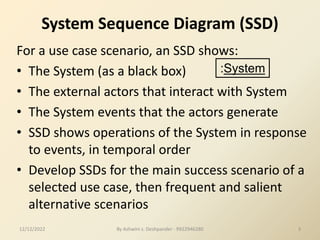
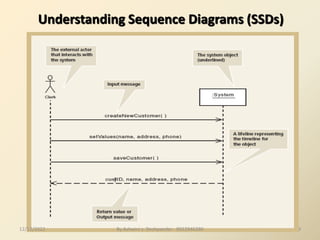
System Sequence Diagram (SSD)
For a use case scenario, an SSD shows:
• The System (as a black box)
• The external actors that interact with System
• The System events that the actors generate
• SSD shows operations of the System in response
to events, in temporal order
• Develop SSDs for the main success scenario of a
selected use case, then frequent and salient
alternative scenarios
:System
12/12/2022 3
By Ashwini s. Deshpander - 9922946280
12/12/2022 By Ashwini s. Deshpander - 9922946280
7
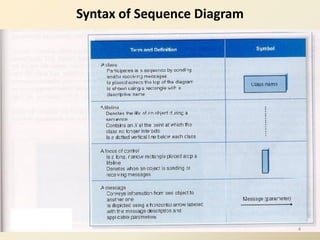
Syntax of Sequence Diagram
4
5
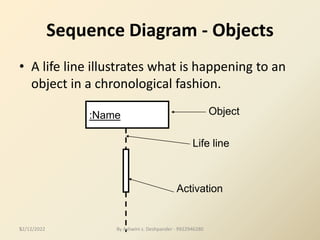
Sequence Diagram - Objects
• A life line illustrates what is happening to an
object in a chronological fashion.
:Name
Life line
Activation
Object
12/12/2022 By Ashwini s. Deshpander - 9922946280
6
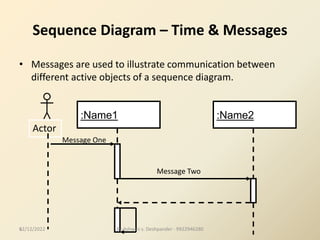
Sequence Diagram – Time & Messages
• Messages are used to illustrate communication between
different active objects of a sequence diagram.
:Name1 :Name2
Message Two
Actor
Message One
12/12/2022 By Ashwini s. Deshpander - 9922946280
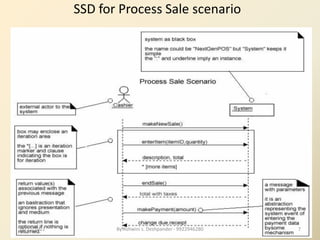
SSD for Process Sale scenario
12/12/2022 7
By Ashwini s. Deshpander - 9922946280
From Use Case to
Sequence System Diagram
How to construct an SSD from a use case:
1. Draw System as black box on right side
2. For each actor that directly operates on
the System, draw a stick figure and a lifeline.
3. For each System events that each actor
generates in use case, draw a message.
4. Optionally, include use case text to left of diagram.
12/12/2022 8
By Ashwini s. Deshpander - 9922946280
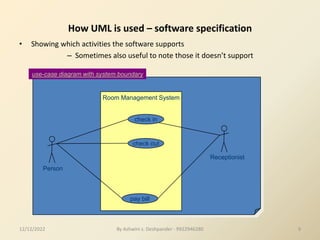
Room Management System
How UML is used – software specification
• Showing which activities the software supports
– Sometimes also useful to note those it doesn’t support
Person
check in
check out
Receptionist
pay bill
use-case diagram with system boundary
12/12/2022 9
By Ashwini s. Deshpander - 9922946280
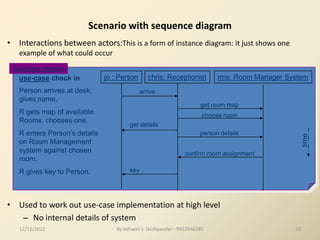
Scenario with sequence diagram
• Interactions between actors:This is a form of instance diagram: it just shows one
example of what could occur
• Used to work out use-case implementation at high level
– No internal details of system
Person arrives at desk,
gives name.
R gets map of available
Rooms, chooses one.
R enters Person’s details
on Room Management
system against chosen
room.
R gives key to Person.
jo : Person chris: Receptionist rms: Room Manager System
arrive
get room map
choose room
person details
get details
key
confirm room assignment
time
Sequence diagram
use-case check in
12/12/2022 10
By Ashwini s. Deshpander - 9922946280
11
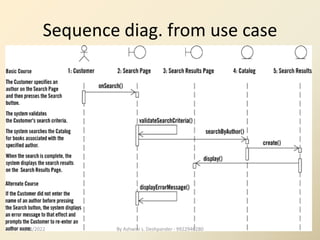
Sequence diag. from use case
12/12/2022 By Ashwini s. Deshpander - 9922946280
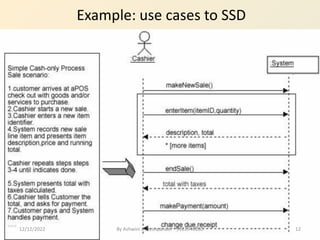
Example: use cases to SSD
12/12/2022 12
By Ashwini s. Deshpander - 9922946280
By Ashwini s. Deshpander - 9922946280 13
A Sequence Diagram
member:
LibraryMember
book:Book
:Book
Copy
borrow(book)
ok = mayBorrow()
[ok] borrow(member)
setTaken(member)
12/12/2022
By Ashwini s. Deshpander - 9922946280 14
A Sequence Diagram
member:
LibraryMember
book:Book
:Book
Copy
borrow(book)
ok = mayBorrow()
[ok] borrow(member)
setTaken(member)
X-Axis (objects)
Y-Axis
(time)
Object
Life Line
message
Activation box
condition
12/12/2022
By Ashwini s. Deshpander - 9922946280 15
Object
• Object naming:
– syntax: [instanceName][:className]
– Name classes consistently with your class
diagram (same classes).
– Include instance names when objects are
referred to in messages or when several
objects of the same type exist in the diagram.
• The Life-Line represents the object’s life
during the interaction
myBirthdy
:Date
12/12/2022
16
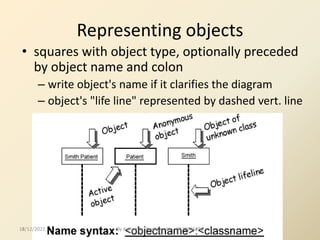
Representing objects
• squares with object type, optionally preceded
by object name and colon
– write object's name if it clarifies the diagram
– object's "life line" represented by dashed vert. line
12/12/2022 By Ashwini s. Deshpander - 9922946280
By Ashwini s. Deshpander - 9922946280 17
Messages
• An interaction between two objects is
performed as a message sent from one
object to another (simple operation call,
Signaling, RPC)
• If object obj1 sends a message to another
object obj2 some link must exist between
those two objects (dependency, same
objects)
12/12/2022
By Ashwini s. Deshpander - 9922946280 18
Messages (Cont.)
• A message is represented by an arrow between the
life lines of two objects.
– Self calls are also allowed
– The time required by the receiver object to process the
message is denoted by an activation-box.
• A message is labeled at minimum with the message
name.
– Arguments and control information (conditions, iteration)
may be included.
12/12/2022
By Ashwini s. Deshpander - 9922946280 19
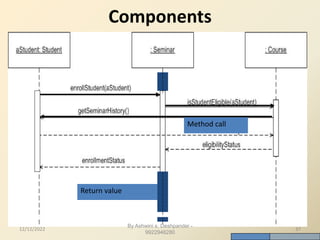
Return Values
• Optionally indicated using a dashed arrow
with a label indicating the return value.
– Don’t model a return value when it is obvious
what is being returned, e.g. getTotal()
– Model a return value only when you need to refer
to it elsewhere, e.g. as a parameter passed in
another message.
– Prefer modeling return values as part of a method
invocation, e.g. ok = isValid()
12/12/2022
20
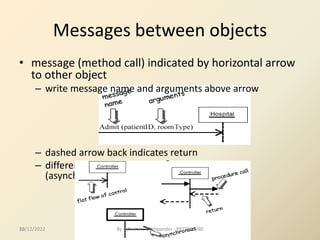
• message (method call) indicated by horizontal arrow
to other object
– write message name and arguments above arrow
– dashed arrow back indicates return
– different arrowheads for normal / concurrent
(asynchronous) methods
Messages between objects
12/12/2022 By Ashwini s. Deshpander - 9922946280
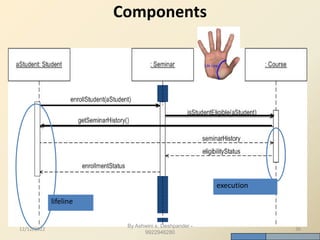
• Sequence diagrams have two features:
– Object lifeline
• Vertical dashed line that represents the existence of an object over
a period of time
– Focus of control
• A tall, thin rectangle that shows the period of time during which an
object is performing an action, either directly or through a
subordinate procedure
Sequence Diagrams
21
22
Lifetime of objects
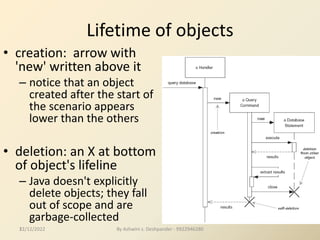
• creation: arrow with
'new' written above it
– notice that an object
created after the start of
the scenario appears
lower than the others
• deletion: an X at bottom
of object's lifeline
– Java doesn't explicitly
delete objects; they fall
out of scope and are
garbage-collected
12/12/2022 By Ashwini s. Deshpander - 9922946280
23
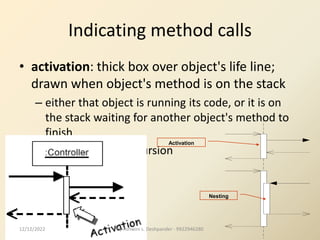
Indicating method calls
• activation: thick box over object's life line;
drawn when object's method is on the stack
– either that object is running its code, or it is on
the stack waiting for another object's method to
finish
– nest to indicate recursion
Activation
Nesting
12/12/2022 By Ashwini s. Deshpander - 9922946280
24
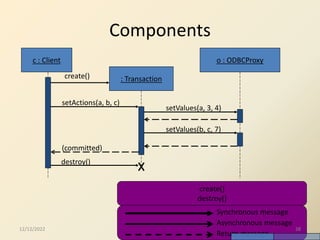
Types of Messages
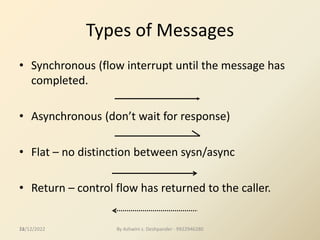
• Synchronous (flow interrupt until the message has
completed.
• Asynchronous (don’t wait for response)
• Flat – no distinction between sysn/async
• Return – control flow has returned to the caller.
12/12/2022 By Ashwini s. Deshpander - 9922946280
By Ashwini s. Deshpander - 9922946280 25
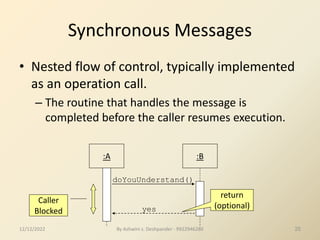
Synchronous Messages
• Nested flow of control, typically implemented
as an operation call.
– The routine that handles the message is
completed before the caller resumes execution.
:A :B
doYouUnderstand()
Caller
Blocked
return
(optional)
yes
12/12/2022
By Ashwini s. Deshpander - 9922946280 26
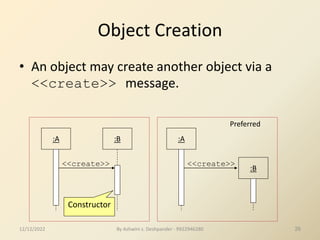
Object Creation
• An object may create another object via a
<<create>> message.
:A :B
<<create>>
Constructor
:A
<<create>>
:B
Preferred
12/12/2022
By Ashwini s. Deshpander - 9922946280 27
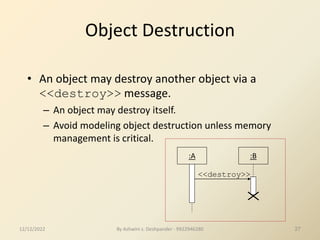
Object Destruction
• An object may destroy another object via a
<<destroy>> message.
– An object may destroy itself.
– Avoid modeling object destruction unless memory
management is critical.
:A :B
<<destroy>>
12/12/2022
By Ashwini s. Deshpander - 9922946280 28
Control information
• Condition
– syntax: ‘*‘ expression ’+’ message-label
– The message is sent only if the condition is true
– example:
• Iteration
– syntax: * * ‘*‘ expression ‘+’ + message-label
– The message is sent many times to possibly
multiple receiver objects.
[ok] borrow(member)
12/12/2022
By Ashwini s. Deshpander - 9922946280 29
Control Information (Cont.)
• Iteration examples:
:Driver
*[until full] insert()
:Bus
The syntax of
expressions is
not a standard
:CompoundShape :Shape
*draw()
draw()
12/12/2022
By Ashwini s. Deshpander - 9922946280 30
Control Information (Cont.)
• The control mechanisms of sequence
diagrams suffice only for modeling simple
alternatives.
– Consider drawing several diagrams for modeling
complex scenarios.
– Don’t use sequence diagrams for detailed
modeling of algorithms (this is better done using
activity diagrams, pseudo-code or state-charts).
12/12/2022
Identifying the right Actor
• In the process Sale example, does the customer
interact directly with the POS system?
• Who does?
• Cashier interacts with the system directly
• Cashier is the generator of the system events
• Why is this an important observation?
12/12/2022 31
By Ashwini s. Deshpander - 9922946280
Naming System events & operations
• System events and associated system operations
should be expressed at the level of intent
• Rather than physical input medium or UI widget
• Start operation names with verb (from use case)
• Which is better, scanBarCode or enterItem?
12/12/2022 32
By Ashwini s. Deshpander - 9922946280
By Ashwini s. Deshpander -
9922946280
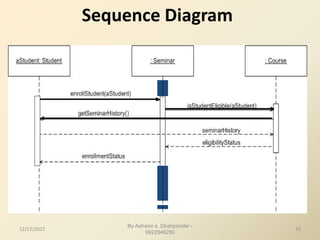
Sequence Diagram
12/12/2022 33
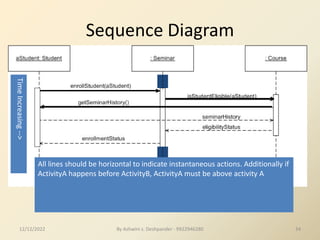
Sequence Diagram
Time
Increasing
-->
All lines should be horizontal to indicate instantaneous actions. Additionally if
ActivityA happens before ActivityB, ActivityA must be above activity A
12/12/2022 34
By Ashwini s. Deshpander - 9922946280
By Ashwini s. Deshpander -
9922946280
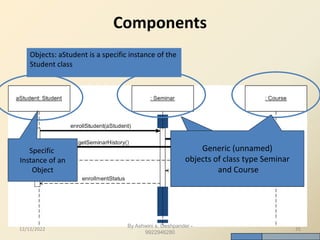
Components
Objects: aStudent is a specific instance of the
Student class
Specific
Instance of an
Object
Generic (unnamed)
objects
Generic (unnamed)
objects of class type Seminar
and Course
12/12/2022 35
By Ashwini s. Deshpander -
9922946280
Components
lifeline
execution
12/12/2022 36
By Ashwini s. Deshpander -
9922946280
Components
Return value
Method call
12/12/2022 37
By Ashwini s. Deshpander -
9922946280
Components
c : Client
: Transaction
o : ODBCProxy
create()
setActions(a, b, c)
setValues(a, 3, 4)
setValues(b, c, 7)
(committed)
destroy()
Synchronous message
Asynchronous message
create()
destroy()
Return message
12/12/2022 38
39
Understanding Sequence Diagrams (SSDs)
12/12/2022 By Ashwini s. Deshpander - 9922946280
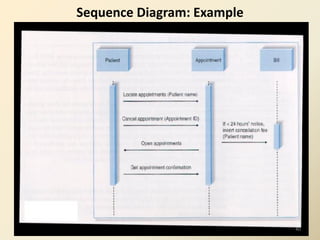
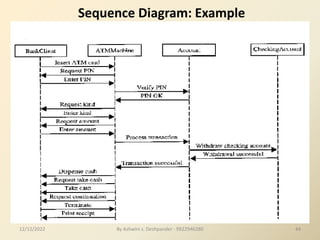
Sequence Diagram: Example
40
By Ashwini s. Deshpander - 9922946280 41
print(doc,client)
Example 2
Client
:PrintServer :Queue
:Printer
Proxy
enqueue(job)
status
Printing A
Document
job=dequeue()
[job]print(job.doc)
[job] done(status)
Repeated
forever with 1
min
interludes
Active
object
12/12/2022
42
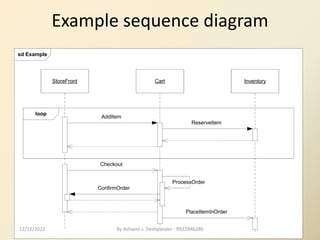
Example sequence diagram
sd Example
loop
StoreFront Cart Inventory
AddItem
ReserveItem
PlaceItemInOrder
Checkout
ProcessOrder
ConfirmOrder
12/12/2022 By Ashwini s. Deshpander - 9922946280
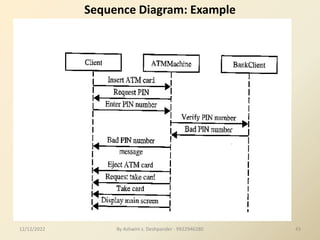
Sequence Diagram: Example
12/12/2022 43
By Ashwini s. Deshpander - 9922946280
Sequence Diagram: Example
12/12/2022 44
By Ashwini s. Deshpander - 9922946280
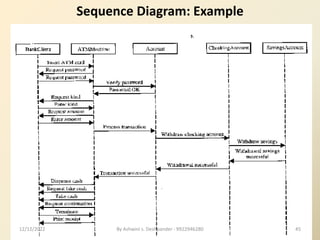
Sequence Diagram: Example
12/12/2022 45
By Ashwini s. Deshpander - 9922946280
46
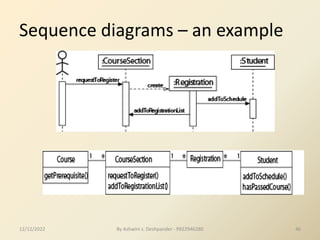
Sequence diagrams – an example
12/12/2022 By Ashwini s. Deshpander - 9922946280
47
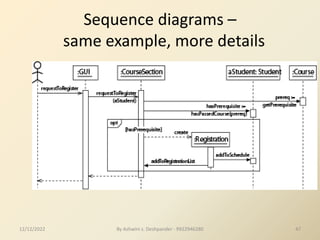
Sequence diagrams –
same example, more details
12/12/2022 By Ashwini s. Deshpander - 9922946280
48
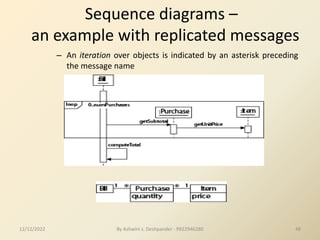
Sequence diagrams –
an example with replicated messages
– An iteration over objects is indicated by an asterisk preceding
the message name
12/12/2022 By Ashwini s. Deshpander - 9922946280
49
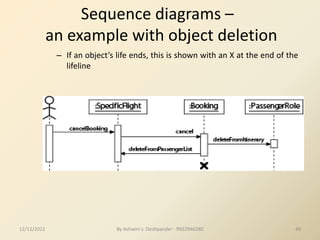
Sequence diagrams –
an example with object deletion
– If an object’s life ends, this is shown with an X at the end of the
lifeline
12/12/2022 By Ashwini s. Deshpander - 9922946280
50
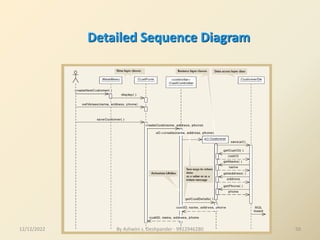
Detailed Sequence Diagram
12/12/2022 By Ashwini s. Deshpander - 9922946280
51
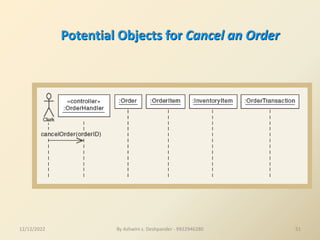
Potential Objects for Cancel an Order
12/12/2022 By Ashwini s. Deshpander - 9922946280
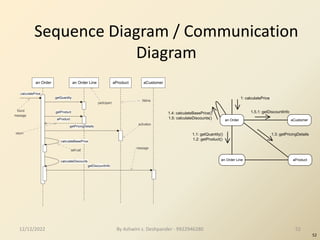
Sequence Diagram / Communication
Diagram
52
an Order an Order Line aProduct aCustomer
calculatePrice
getQuantity
getProduct
aProduct
getPricingDetails
calculateBasePrice
calculateDiscounts
getDiscountInfo
found
message
return
self-call
activation
lifeline
message
participant
an Order aCustomer
an Order Line aProduct
1: calculatePrice
1.5.1: getDiscountInfo
1.3: getPricingDetails
1.4: calculateBasePrice()
1.5: calculateDiscounts()
1.1: getQuantity()
1.2: getProduct()
12/12/2022 52
By Ashwini s. Deshpander - 9922946280
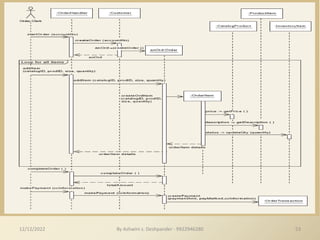
53
12/12/2022 By Ashwini s. Deshpander - 9922946280
System Sequence Diagram
for Deposit Money Use Case
Customer
Money Detection
Hardware
CRT Display
Vending Machine
Controller
Deposit Money
[Idle State]
Display Welcome
Message
Display Amount
Send Amount
Prompt for Selection
Start Timer
[If Timer > 30 seconds and Invalid or No Selection]
Return Money
Money
Dispenser
Stop
Timer
[Idle State]
Display Welcome
Message
12/12/2022 54
By Ashwini s. Deshpander - 9922946280

System Sequence Diagrams.pdf

  • 1.
    System Sequence Diagrams ByAshwini G. Munagekar 9922946280
  • 2.
    Sequence Diagram • Verticalline is called an object’s lifeline – Represents an object’s life during interaction • Object deletion denoted by X, ending a lifeline – Horizontal arrow is a message between two objects • Order of messages sequences top to bottom • Messages labeled with message name – Optionally arguments and control information • Control information may express conditions: – such as [hasStock], or iteration • Returns (dashed lines) are optional – Use them to add clarity 12/12/2022 2 By Ashwini s. Deshpander - 9922946280
  • 3.
    System Sequence Diagram(SSD) For a use case scenario, an SSD shows: • The System (as a black box) • The external actors that interact with System • The System events that the actors generate • SSD shows operations of the System in response to events, in temporal order • Develop SSDs for the main success scenario of a selected use case, then frequent and salient alternative scenarios :System 12/12/2022 3 By Ashwini s. Deshpander - 9922946280
  • 4.
    12/12/2022 By Ashwinis. Deshpander - 9922946280 7 Syntax of Sequence Diagram 4
  • 5.
    5 Sequence Diagram -Objects • A life line illustrates what is happening to an object in a chronological fashion. :Name Life line Activation Object 12/12/2022 By Ashwini s. Deshpander - 9922946280
  • 6.
    6 Sequence Diagram –Time & Messages • Messages are used to illustrate communication between different active objects of a sequence diagram. :Name1 :Name2 Message Two Actor Message One 12/12/2022 By Ashwini s. Deshpander - 9922946280
  • 7.
    SSD for ProcessSale scenario 12/12/2022 7 By Ashwini s. Deshpander - 9922946280
  • 8.
    From Use Caseto Sequence System Diagram How to construct an SSD from a use case: 1. Draw System as black box on right side 2. For each actor that directly operates on the System, draw a stick figure and a lifeline. 3. For each System events that each actor generates in use case, draw a message. 4. Optionally, include use case text to left of diagram. 12/12/2022 8 By Ashwini s. Deshpander - 9922946280
  • 9.
    Room Management System HowUML is used – software specification • Showing which activities the software supports – Sometimes also useful to note those it doesn’t support Person check in check out Receptionist pay bill use-case diagram with system boundary 12/12/2022 9 By Ashwini s. Deshpander - 9922946280
  • 10.
    Scenario with sequencediagram • Interactions between actors:This is a form of instance diagram: it just shows one example of what could occur • Used to work out use-case implementation at high level – No internal details of system Person arrives at desk, gives name. R gets map of available Rooms, chooses one. R enters Person’s details on Room Management system against chosen room. R gives key to Person. jo : Person chris: Receptionist rms: Room Manager System arrive get room map choose room person details get details key confirm room assignment time Sequence diagram use-case check in 12/12/2022 10 By Ashwini s. Deshpander - 9922946280
  • 11.
    11 Sequence diag. fromuse case 12/12/2022 By Ashwini s. Deshpander - 9922946280
  • 12.
    Example: use casesto SSD 12/12/2022 12 By Ashwini s. Deshpander - 9922946280
  • 13.
    By Ashwini s.Deshpander - 9922946280 13 A Sequence Diagram member: LibraryMember book:Book :Book Copy borrow(book) ok = mayBorrow() [ok] borrow(member) setTaken(member) 12/12/2022
  • 14.
    By Ashwini s.Deshpander - 9922946280 14 A Sequence Diagram member: LibraryMember book:Book :Book Copy borrow(book) ok = mayBorrow() [ok] borrow(member) setTaken(member) X-Axis (objects) Y-Axis (time) Object Life Line message Activation box condition 12/12/2022
  • 15.
    By Ashwini s.Deshpander - 9922946280 15 Object • Object naming: – syntax: [instanceName][:className] – Name classes consistently with your class diagram (same classes). – Include instance names when objects are referred to in messages or when several objects of the same type exist in the diagram. • The Life-Line represents the object’s life during the interaction myBirthdy :Date 12/12/2022
  • 16.
    16 Representing objects • squareswith object type, optionally preceded by object name and colon – write object's name if it clarifies the diagram – object's "life line" represented by dashed vert. line 12/12/2022 By Ashwini s. Deshpander - 9922946280
  • 17.
    By Ashwini s.Deshpander - 9922946280 17 Messages • An interaction between two objects is performed as a message sent from one object to another (simple operation call, Signaling, RPC) • If object obj1 sends a message to another object obj2 some link must exist between those two objects (dependency, same objects) 12/12/2022
  • 18.
    By Ashwini s.Deshpander - 9922946280 18 Messages (Cont.) • A message is represented by an arrow between the life lines of two objects. – Self calls are also allowed – The time required by the receiver object to process the message is denoted by an activation-box. • A message is labeled at minimum with the message name. – Arguments and control information (conditions, iteration) may be included. 12/12/2022
  • 19.
    By Ashwini s.Deshpander - 9922946280 19 Return Values • Optionally indicated using a dashed arrow with a label indicating the return value. – Don’t model a return value when it is obvious what is being returned, e.g. getTotal() – Model a return value only when you need to refer to it elsewhere, e.g. as a parameter passed in another message. – Prefer modeling return values as part of a method invocation, e.g. ok = isValid() 12/12/2022
  • 20.
    20 • message (methodcall) indicated by horizontal arrow to other object – write message name and arguments above arrow – dashed arrow back indicates return – different arrowheads for normal / concurrent (asynchronous) methods Messages between objects 12/12/2022 By Ashwini s. Deshpander - 9922946280
  • 21.
    12/12/2022 By Ashwinis. Deshpander - 9922946280 • Sequence diagrams have two features: – Object lifeline • Vertical dashed line that represents the existence of an object over a period of time – Focus of control • A tall, thin rectangle that shows the period of time during which an object is performing an action, either directly or through a subordinate procedure Sequence Diagrams 21
  • 22.
    22 Lifetime of objects •creation: arrow with 'new' written above it – notice that an object created after the start of the scenario appears lower than the others • deletion: an X at bottom of object's lifeline – Java doesn't explicitly delete objects; they fall out of scope and are garbage-collected 12/12/2022 By Ashwini s. Deshpander - 9922946280
  • 23.
    23 Indicating method calls •activation: thick box over object's life line; drawn when object's method is on the stack – either that object is running its code, or it is on the stack waiting for another object's method to finish – nest to indicate recursion Activation Nesting 12/12/2022 By Ashwini s. Deshpander - 9922946280
  • 24.
    24 Types of Messages •Synchronous (flow interrupt until the message has completed. • Asynchronous (don’t wait for response) • Flat – no distinction between sysn/async • Return – control flow has returned to the caller. 12/12/2022 By Ashwini s. Deshpander - 9922946280
  • 25.
    By Ashwini s.Deshpander - 9922946280 25 Synchronous Messages • Nested flow of control, typically implemented as an operation call. – The routine that handles the message is completed before the caller resumes execution. :A :B doYouUnderstand() Caller Blocked return (optional) yes 12/12/2022
  • 26.
    By Ashwini s.Deshpander - 9922946280 26 Object Creation • An object may create another object via a <<create>> message. :A :B <<create>> Constructor :A <<create>> :B Preferred 12/12/2022
  • 27.
    By Ashwini s.Deshpander - 9922946280 27 Object Destruction • An object may destroy another object via a <<destroy>> message. – An object may destroy itself. – Avoid modeling object destruction unless memory management is critical. :A :B <<destroy>> 12/12/2022
  • 28.
    By Ashwini s.Deshpander - 9922946280 28 Control information • Condition – syntax: ‘*‘ expression ’+’ message-label – The message is sent only if the condition is true – example: • Iteration – syntax: * * ‘*‘ expression ‘+’ + message-label – The message is sent many times to possibly multiple receiver objects. [ok] borrow(member) 12/12/2022
  • 29.
    By Ashwini s.Deshpander - 9922946280 29 Control Information (Cont.) • Iteration examples: :Driver *[until full] insert() :Bus The syntax of expressions is not a standard :CompoundShape :Shape *draw() draw() 12/12/2022
  • 30.
    By Ashwini s.Deshpander - 9922946280 30 Control Information (Cont.) • The control mechanisms of sequence diagrams suffice only for modeling simple alternatives. – Consider drawing several diagrams for modeling complex scenarios. – Don’t use sequence diagrams for detailed modeling of algorithms (this is better done using activity diagrams, pseudo-code or state-charts). 12/12/2022
  • 31.
    Identifying the rightActor • In the process Sale example, does the customer interact directly with the POS system? • Who does? • Cashier interacts with the system directly • Cashier is the generator of the system events • Why is this an important observation? 12/12/2022 31 By Ashwini s. Deshpander - 9922946280
  • 32.
    Naming System events& operations • System events and associated system operations should be expressed at the level of intent • Rather than physical input medium or UI widget • Start operation names with verb (from use case) • Which is better, scanBarCode or enterItem? 12/12/2022 32 By Ashwini s. Deshpander - 9922946280
  • 33.
    By Ashwini s.Deshpander - 9922946280 Sequence Diagram 12/12/2022 33
  • 34.
    Sequence Diagram Time Increasing --> All linesshould be horizontal to indicate instantaneous actions. Additionally if ActivityA happens before ActivityB, ActivityA must be above activity A 12/12/2022 34 By Ashwini s. Deshpander - 9922946280
  • 35.
    By Ashwini s.Deshpander - 9922946280 Components Objects: aStudent is a specific instance of the Student class Specific Instance of an Object Generic (unnamed) objects Generic (unnamed) objects of class type Seminar and Course 12/12/2022 35
  • 36.
    By Ashwini s.Deshpander - 9922946280 Components lifeline execution 12/12/2022 36
  • 37.
    By Ashwini s.Deshpander - 9922946280 Components Return value Method call 12/12/2022 37
  • 38.
    By Ashwini s.Deshpander - 9922946280 Components c : Client : Transaction o : ODBCProxy create() setActions(a, b, c) setValues(a, 3, 4) setValues(b, c, 7) (committed) destroy() Synchronous message Asynchronous message create() destroy() Return message 12/12/2022 38
  • 39.
    39 Understanding Sequence Diagrams(SSDs) 12/12/2022 By Ashwini s. Deshpander - 9922946280
  • 40.
    12/12/2022 By Ashwinis. Deshpander - 9922946280 Sequence Diagram: Example 40
  • 41.
    By Ashwini s.Deshpander - 9922946280 41 print(doc,client) Example 2 Client :PrintServer :Queue :Printer Proxy enqueue(job) status Printing A Document job=dequeue() [job]print(job.doc) [job] done(status) Repeated forever with 1 min interludes Active object 12/12/2022
  • 42.
    42 Example sequence diagram sdExample loop StoreFront Cart Inventory AddItem ReserveItem PlaceItemInOrder Checkout ProcessOrder ConfirmOrder 12/12/2022 By Ashwini s. Deshpander - 9922946280
  • 43.
    Sequence Diagram: Example 12/12/202243 By Ashwini s. Deshpander - 9922946280
  • 44.
    Sequence Diagram: Example 12/12/202244 By Ashwini s. Deshpander - 9922946280
  • 45.
    Sequence Diagram: Example 12/12/202245 By Ashwini s. Deshpander - 9922946280
  • 46.
    46 Sequence diagrams –an example 12/12/2022 By Ashwini s. Deshpander - 9922946280
  • 47.
    47 Sequence diagrams – sameexample, more details 12/12/2022 By Ashwini s. Deshpander - 9922946280
  • 48.
    48 Sequence diagrams – anexample with replicated messages – An iteration over objects is indicated by an asterisk preceding the message name 12/12/2022 By Ashwini s. Deshpander - 9922946280
  • 49.
    49 Sequence diagrams – anexample with object deletion – If an object’s life ends, this is shown with an X at the end of the lifeline 12/12/2022 By Ashwini s. Deshpander - 9922946280
  • 50.
    50 Detailed Sequence Diagram 12/12/2022By Ashwini s. Deshpander - 9922946280
  • 51.
    51 Potential Objects forCancel an Order 12/12/2022 By Ashwini s. Deshpander - 9922946280
  • 52.
    Sequence Diagram /Communication Diagram 52 an Order an Order Line aProduct aCustomer calculatePrice getQuantity getProduct aProduct getPricingDetails calculateBasePrice calculateDiscounts getDiscountInfo found message return self-call activation lifeline message participant an Order aCustomer an Order Line aProduct 1: calculatePrice 1.5.1: getDiscountInfo 1.3: getPricingDetails 1.4: calculateBasePrice() 1.5: calculateDiscounts() 1.1: getQuantity() 1.2: getProduct() 12/12/2022 52 By Ashwini s. Deshpander - 9922946280
  • 53.
    53 12/12/2022 By Ashwinis. Deshpander - 9922946280
  • 54.
    System Sequence Diagram forDeposit Money Use Case Customer Money Detection Hardware CRT Display Vending Machine Controller Deposit Money [Idle State] Display Welcome Message Display Amount Send Amount Prompt for Selection Start Timer [If Timer > 30 seconds and Invalid or No Selection] Return Money Money Dispenser Stop Timer [Idle State] Display Welcome Message 12/12/2022 54 By Ashwini s. Deshpander - 9922946280