Object Oriented Design,Part 2:
Object Interactions
Dr W.K. Chan
Department of Computer Science
Email: wkchan@cs.cityu.edu.hk
Web: http://www.cs.cityu.edu.hk/~wkchan
2.
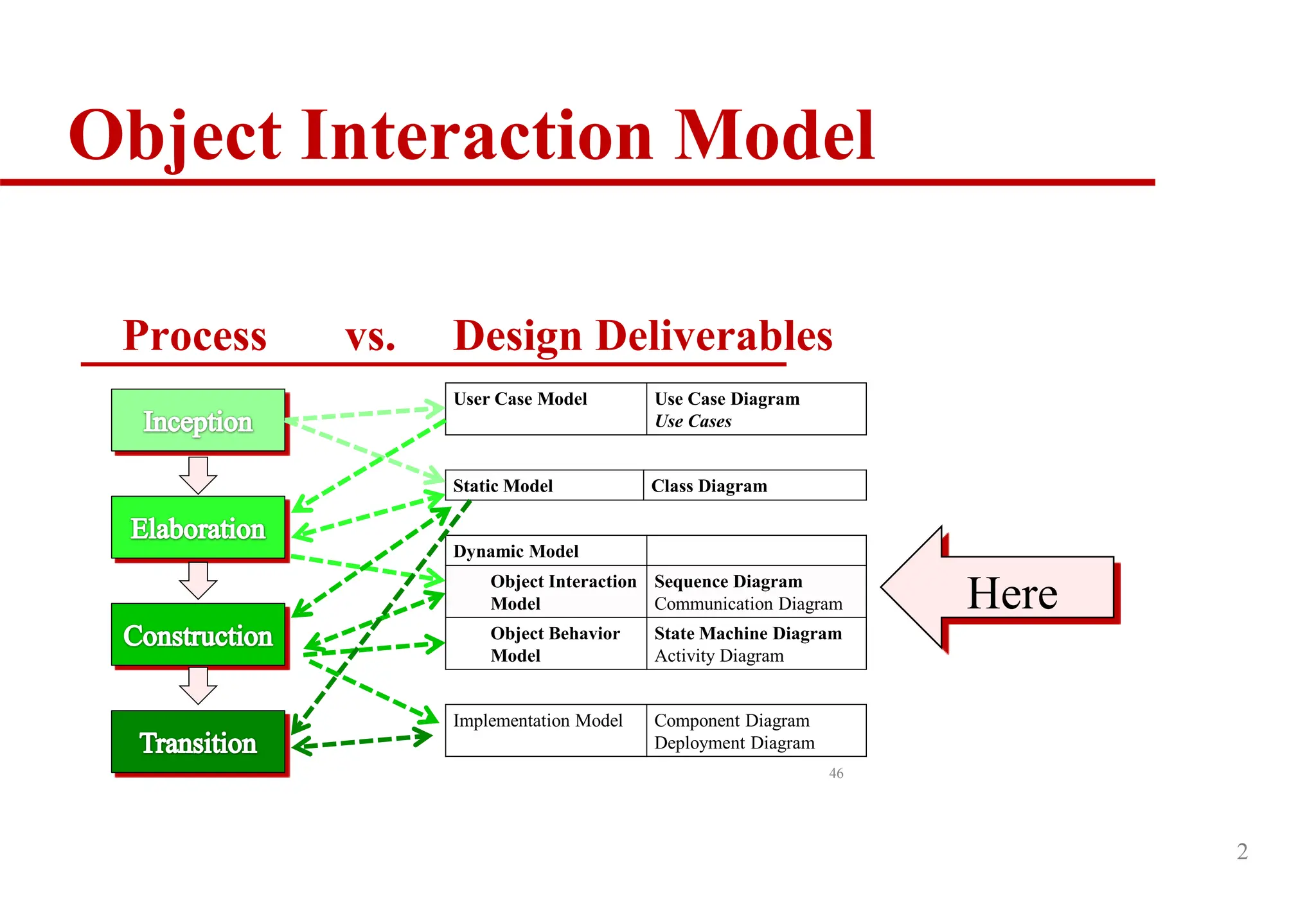
Object Interaction Model
2
Processvs. Design Deliverables
46
User Case Model Use Case Diagram
Use Cases
Static Model Class Diagram
Dynamic Model
Object Interaction
Model
Sequence Diagram
Communication Diagram
Object Behavior
Model
State Machine Diagram
Activity Diagram
Implementation Model Component Diagram
Deployment Diagram
Here
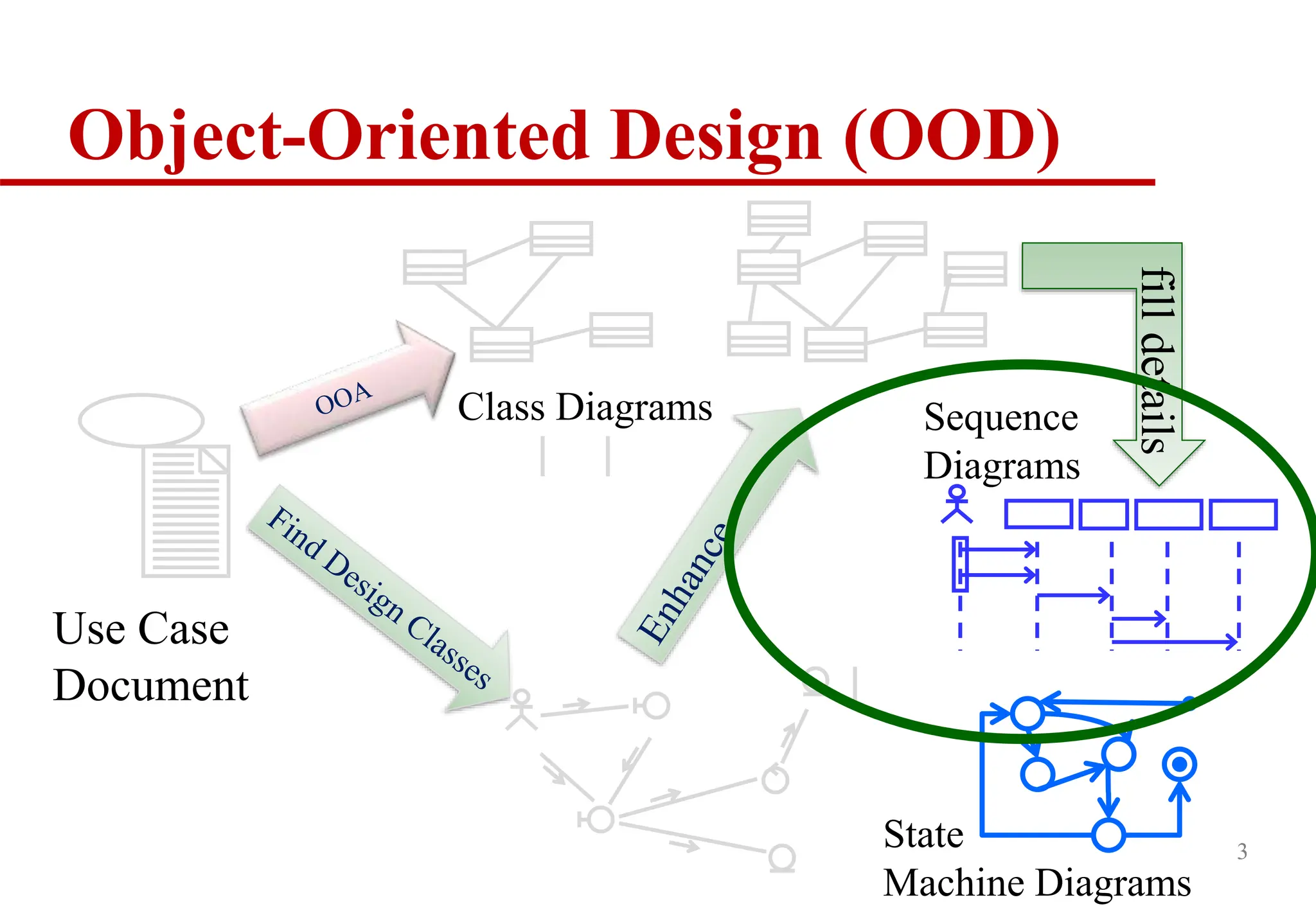
OOD Steps
Sketchother sequential diagrams (SD) for other
scenarios of the same use case
Do similar sketches for other use cases
Check whether SDs of the similar same kind (e.g.,
the purposes of two SDs are to generate a
document to an actor) follow similar sequence of
operations.
Revise our OOD Class Diagram
4
5.
Revisited: Design Model“so far”
We have translated the following from our domain
model and use case specifications
Design control
Design class diagram
Design-oriented use case specification
Or simply, design use case specification
Communication diagram
5
6.
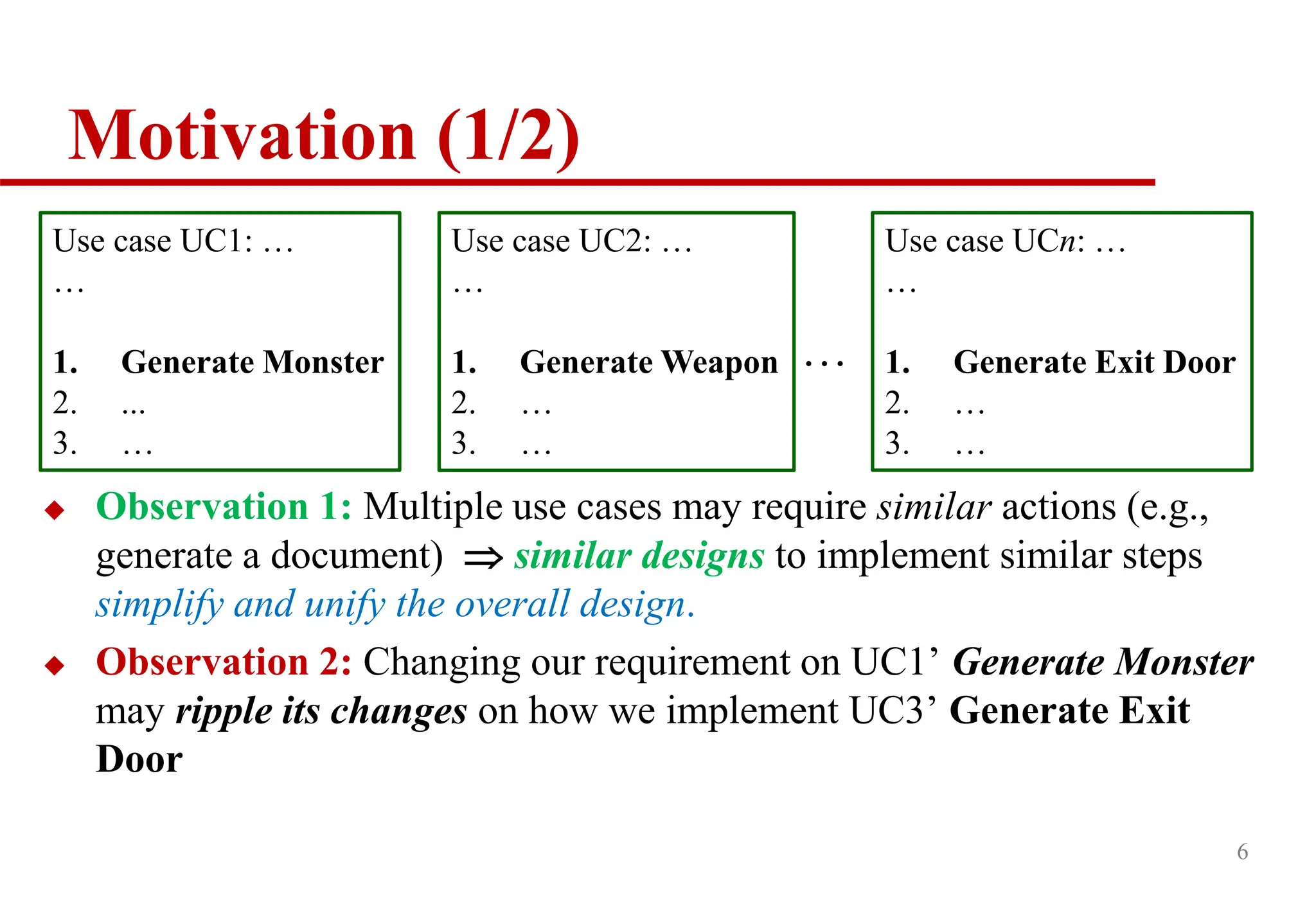
Motivation (1/2)
Observation1: Multiple use cases may require similar actions (e.g.,
generate a document) similar designs to implement similar steps
simplify and unify the overall design.
Observation 2: Changing our requirement on UC1’ Generate Monster
may ripple its changes on how we implement UC3’ Generate Exit
Door
6
Use case UC1: …
…
1. Generate Monster
2. ...
3. …
Use case UC2: …
…
1. Generate Weapon
2. …
3. …
Use case UCn: …
…
1. Generate Exit Door
2. …
3. …
…
7.
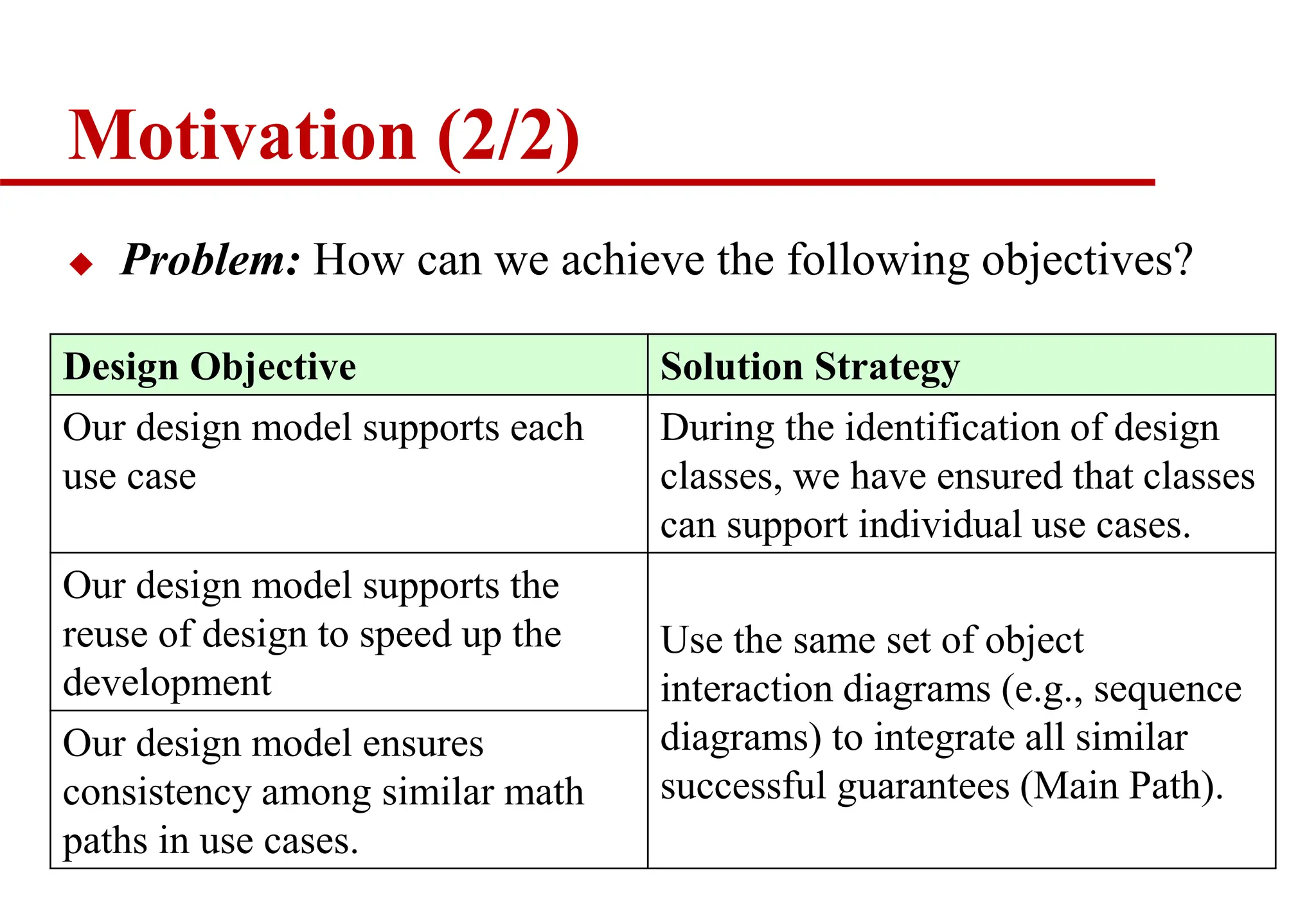
Motivation (2/2)
Problem:How can we achieve the following objectives?
7
Design Objective Solution Strategy
Our design model supports each
use case
During the identification of design
classes, we have ensured that classes
can support individual use cases.
Our design model supports the
reuse of design to speed up the
development
Use the same set of object
interaction diagrams (e.g., sequence
diagrams) to integrate all similar
successful guarantees (Main Path).
Our design model ensures
consistency among similar math
paths in use cases.
9
Dynamic Modeling:
Sequence Diagram
It shows:
objects or actors (not classes or the
system itself) as vertical dotted lines
events as horizontal arrows from the sender object to
the receiver object.
6
getViolation(id)
Lookup Traffic Violation
:Clerk
:Violations
Dialog
:Violations
Controller
:Violations
DBProxy
lookup viewDetail()
id=getID()
v:Traffic
Violation
display(v)
callback(v)
DB is queried
within the
object and the
result is
returned as a
new object v
dismiss
expire
Can you read this diagram? YES/NO --- Not a Problem.
10.
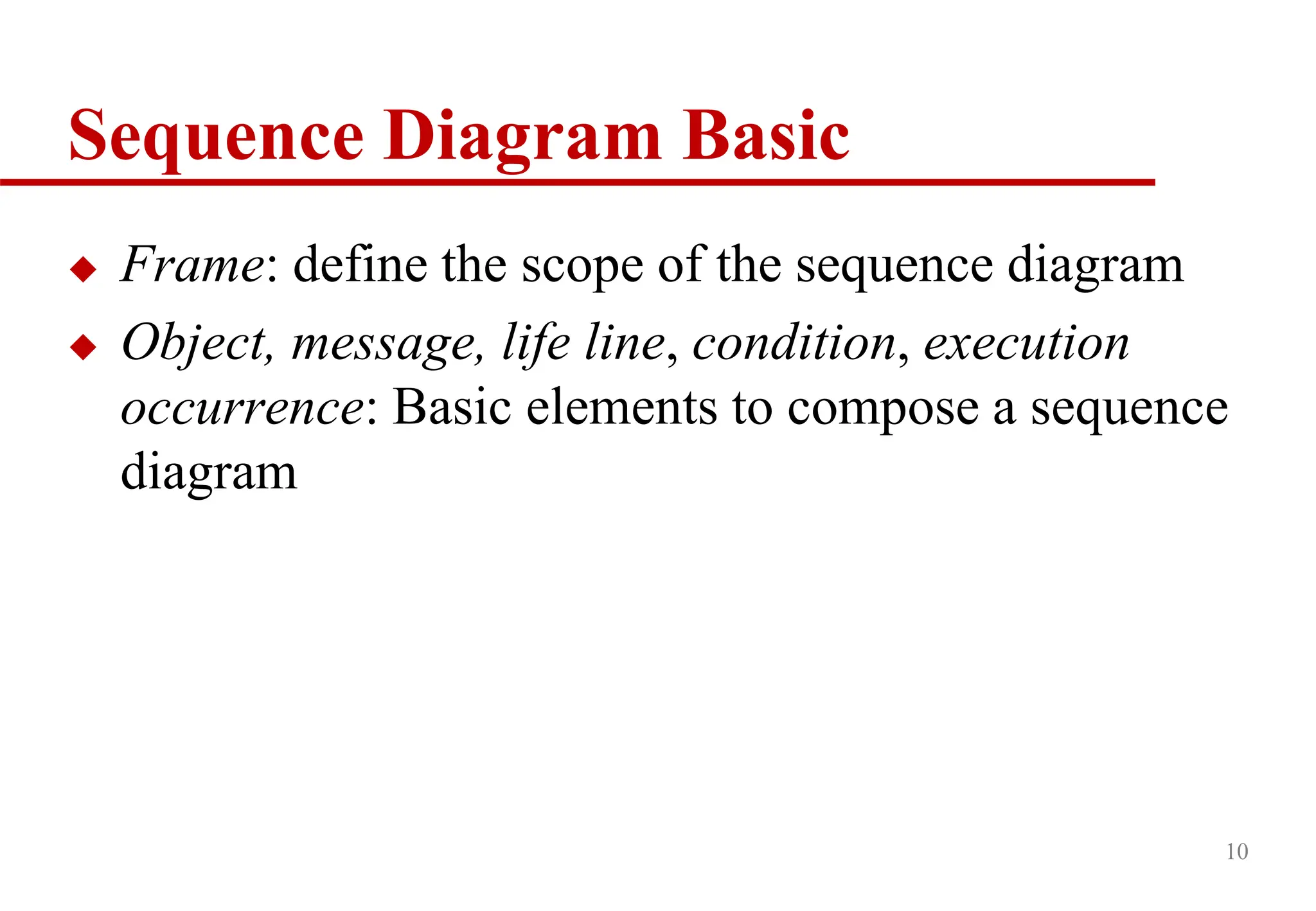
Sequence Diagram Basic
Frame: define the scope of the sequence diagram
Object, message, life line, condition, execution
occurrence: Basic elements to compose a sequence
diagram
10
11.
11
Sequence Diagrams
Frame
“sd” isthe
keyword to
stand for
sequence
diagram.
“EventOccurence”
is the name of the
sequence diagram.
e.g., GenerateDoc
12.
12
Sequence Diagrams
Main Syntax
self:
LibraryMember
:Book
Copy1:Book
Copy
loan(book)
ok= mayLoan()
[ok] reserve(member)
setTaken(member)
time
Object
Life line
Message.
Execution
occurrence
Condition
Actor
or
Class
name
The object marked as “self” owns the sequence diagram.
There is no limit on the number of actor objects or objects per sequence diagram
Object name
(optional)
Object name
(optional)
Object name before the
“:” (optional)
13.
Important Note onSlide 11
self: defines the object that owns the sequence
diagram. That is, the object will have a method
responsible for completing the sequences of object
interactions defined in the entire sequence diagram.
In C++/Java, the receiver of a message implements
a method using the message method.
E.g., setTaken is a method of BookCopy; reserve is a
method of Book
13
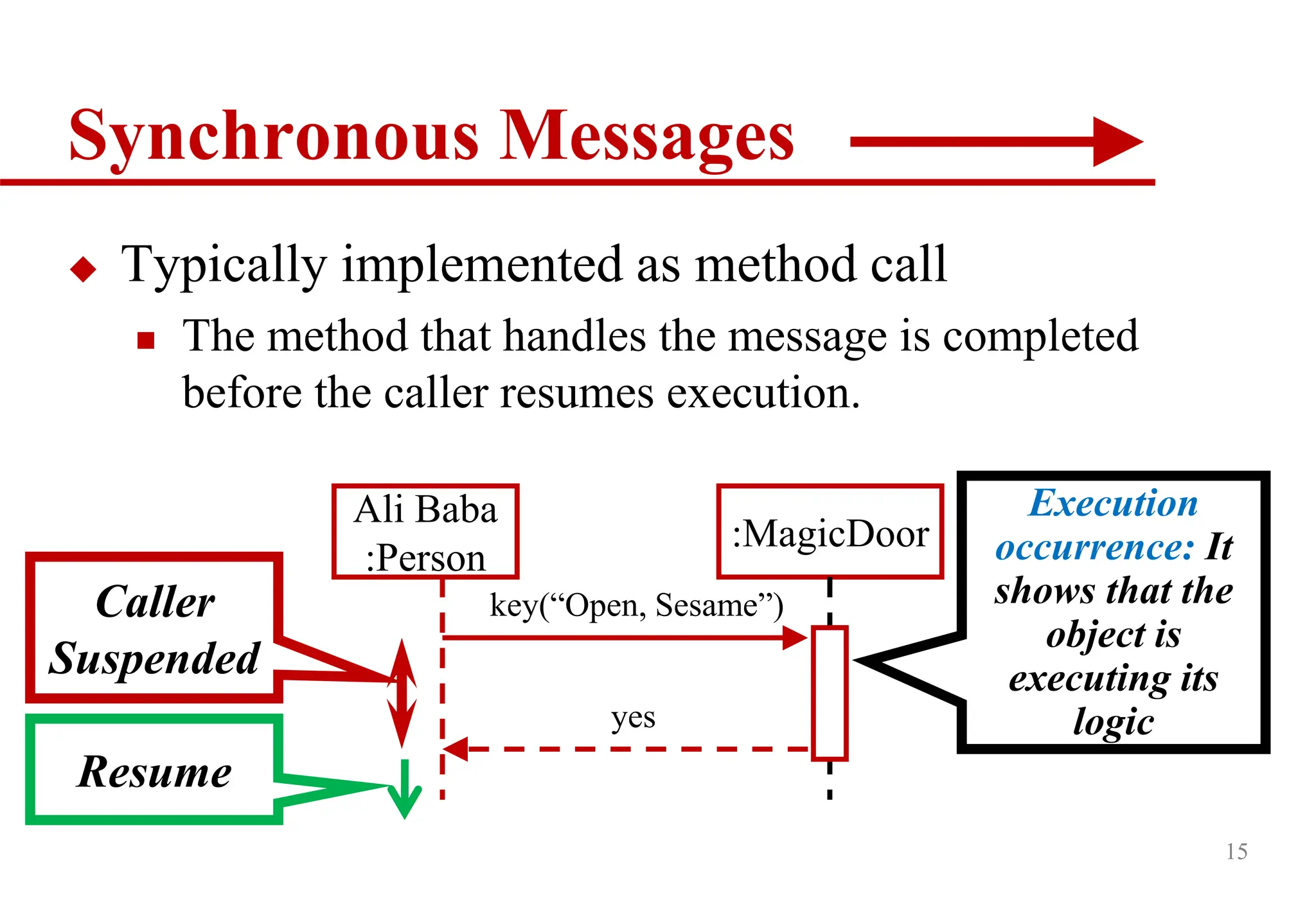
15
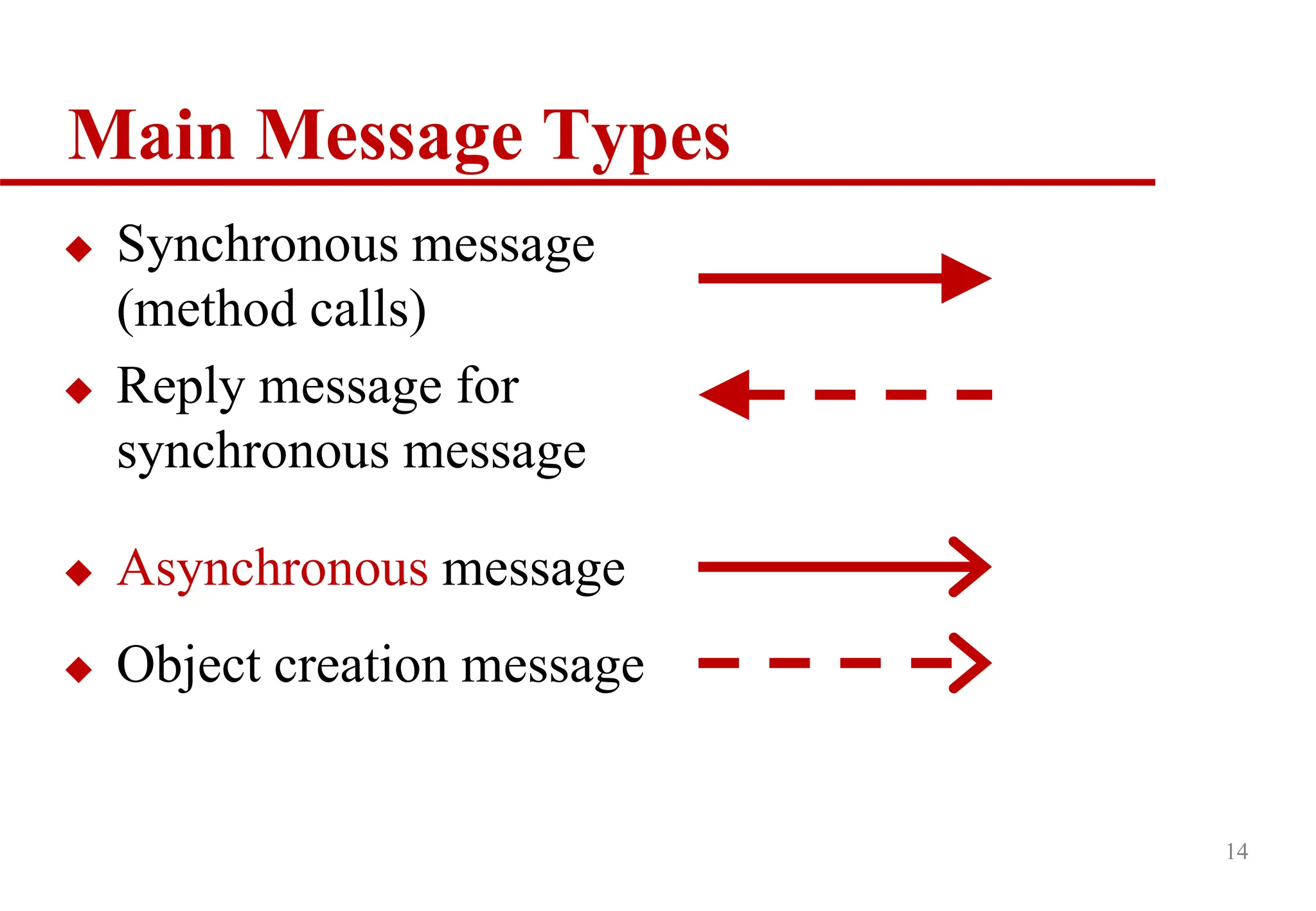
Synchronous Messages
Typicallyimplemented as method call
The method that handles the message is completed
before the caller resumes execution.
Ali Baba
:Person
:MagicDoor
key(“Open, Sesame”)
Execution
occurrence: It
shows that the
object is
executing its
logic
yes
Caller
Suspended
Resume
16.
16
Return Values
Optionallyindicated using a dashed arrow with a
label indicating the return value.
Do not model a return value when it is obvious what is
being returned, e.g., getTotal( )
Model a return value only when you need to refer to it
elsewhere, e.g., as a parameter passed in another
message.
e.g., On slide 13, the line “yes” can be omitted.
17.
17
Asynchronous Messages
Callerdoes not wait for the message to be handled
before it continues to execute.
Ali can talk to the thief during the magic door is
opening.
Ali Baba
:Person
:MagicDoor
key(“Open, Sesame”)
40th Thief
:Person
listen(“ok?”)
18.
18
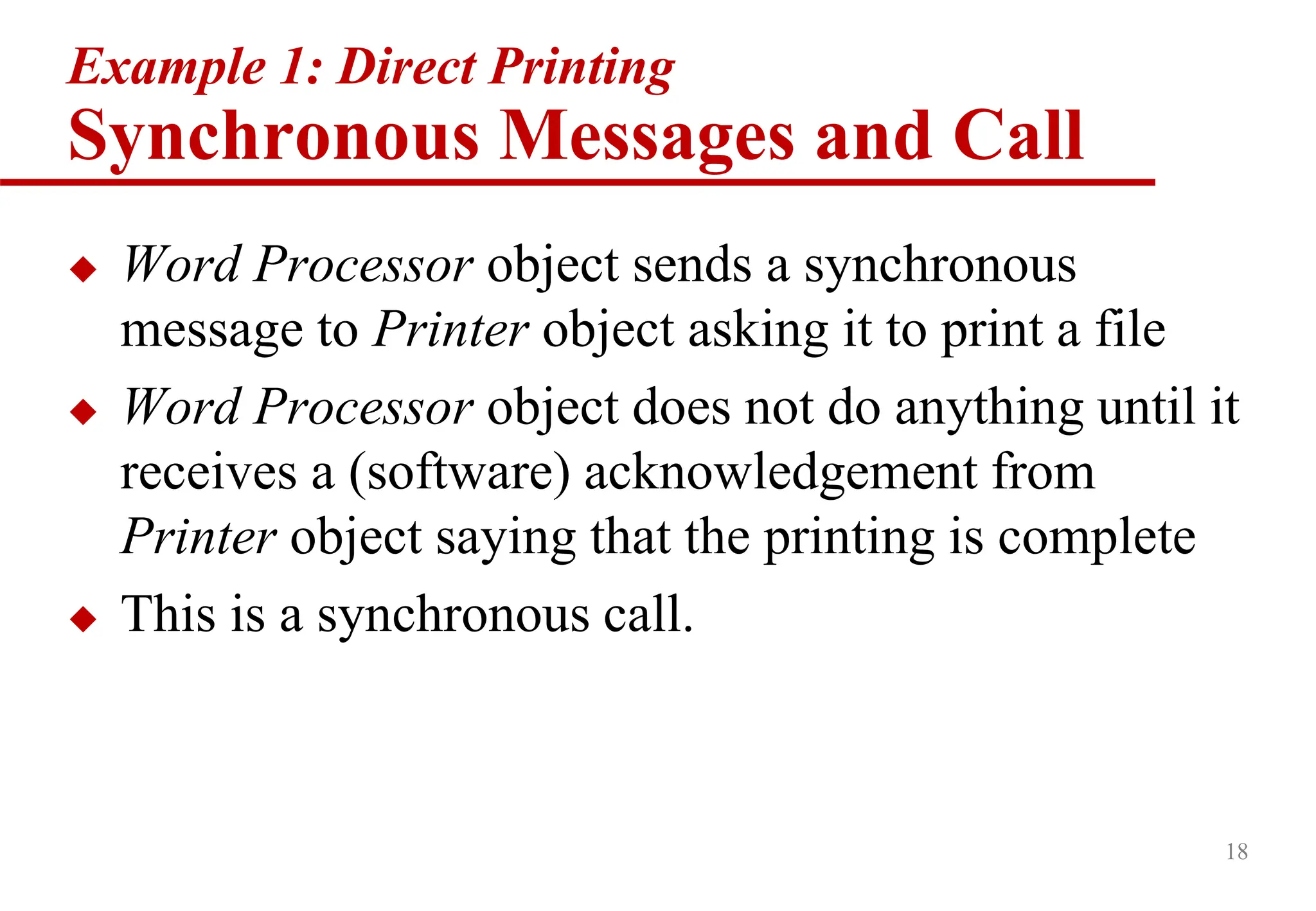
Example 1: DirectPrinting
Synchronous Messages and Call
Word Processor object sends a synchronous
message to Printer object asking it to print a file
Word Processor object does not do anything until it
receives a (software) acknowledgement from
Printer object saying that the printing is complete
This is a synchronous call.
20
Example 2: BackgroundPrinting
Asynchronous Messages and Call
Word Processor object sends an asynchronous
message to Printer object asking it to print a file
Word Processor object continues to format the
texts before it receives any acknowledgement from
Printer object saying that it is beginning to print
the file.
Note: unlike synchronous messages, asynchronous
messages do not pair with any return messages.
How to UseSuperClass in Sequence
Diagram?
23
printCompleted
print
ptr1:Printer
:Word
Processor
Word
Processor
Class Diagram
Printer
Laser
Printer
PDF
Printer
Word Processor uses the Printer,
which has been subclassed by
either the PDF Printer class or
Laser Printer class.
addPDFHeader
mynote:PDFFILE
ptr1:PDF
Printer
:PDFFILE
*
Use Separate Sequence Diagrams.
[Note the object name ptr1]
addPage
24.
24
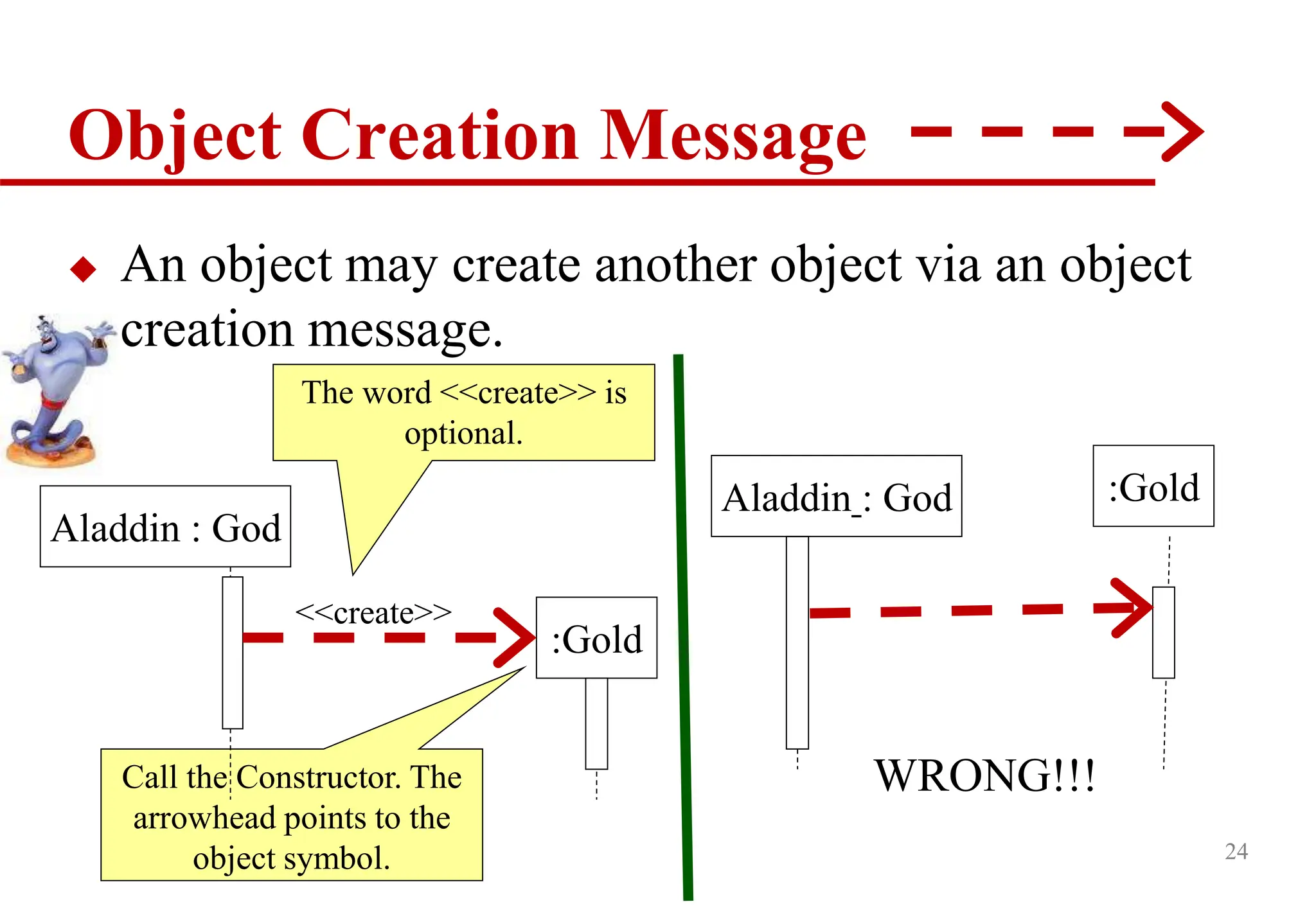
Object Creation Message
An object may create another object via an object
creation message.
Call the Constructor. The
arrowhead points to the
object symbol.
Aladdin : God
:Gold
The word <<create>> is
optional.
<<create>>
:Gold
WRONG!!!
Aladdin : God
25.
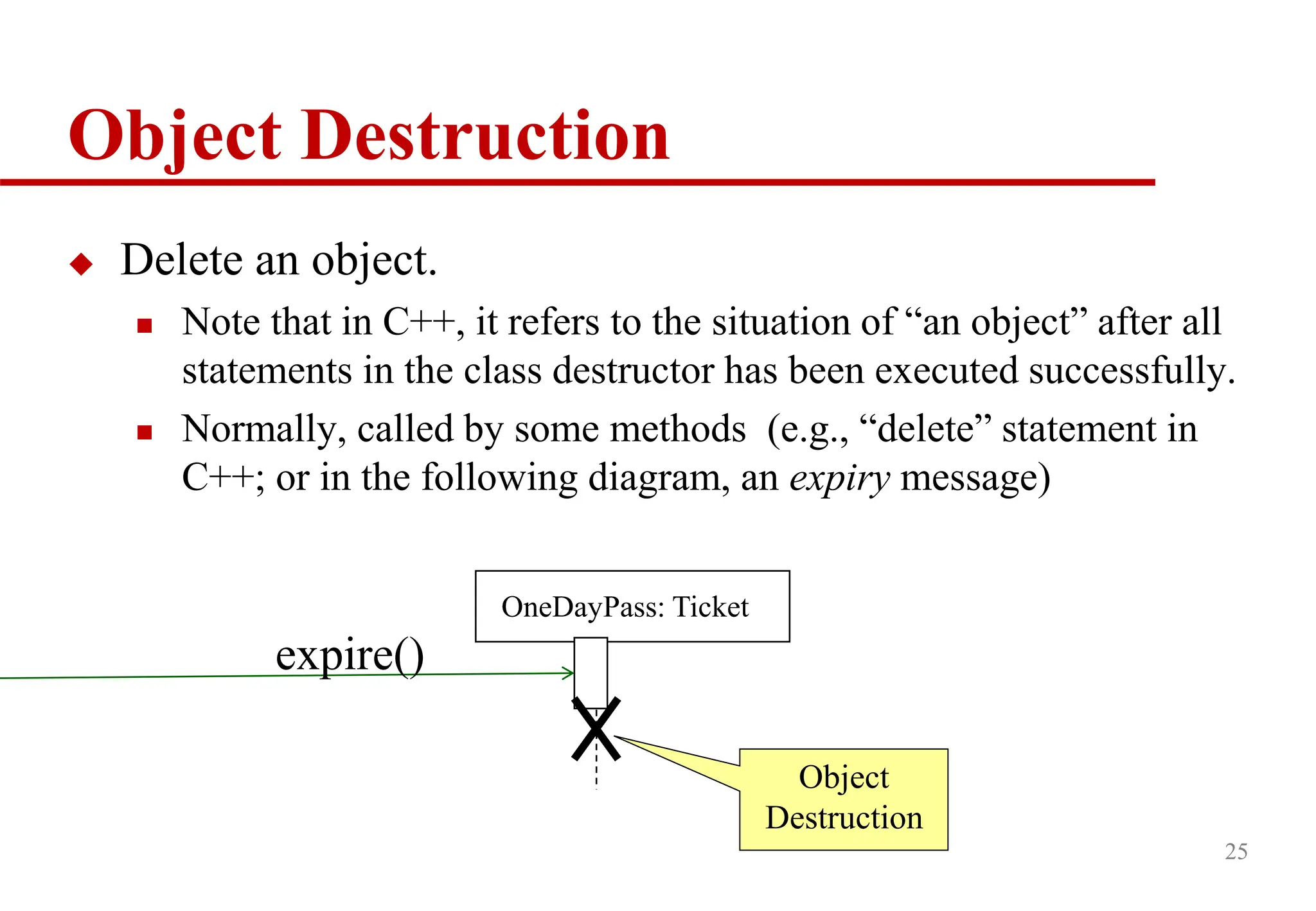
Object Destruction
Deletean object.
Note that in C++, it refers to the situation of “an object” after all
statements in the class destructor has been executed successfully.
Normally, called by some methods (e.g., “delete” statement in
C++; or in the following diagram, an expiry message)
25
OneDayPass: Ticket
Object
Destruction
expire()
26.
26
Condition
A conditionis an expression relating different
attributes of an object and/or values.
Example: [amount < balance] debit(amount)
Conditions are used as guards on transitions
A guarded transition fires when its event occurs and
satisfies the guard condition.
27.
27
getViolation(id)
Now we shouldbe able to understand this diagram.
Lookup Traffic Violation
:Clerk
:Violations
Dialog
:Violations
Controller
:Violations
DBProxy
lookup
viewDetail()
id=getID()
v:Traffic
Violation
display(v)
DB is queried
within the
object and the
result is
returned as a
new object v
dismiss
expire
callback(v)
We have repaired
a problem shown
on slide 8.
28.
Loss Message
28
Lost messagesare
those that are either
sent but do not arrive
at the intended
recipient, or which
go to a recipient not
shown on the current
diagram.
Can you “show” error
cases with them easily?
29.
Found Message
29
Found messagesare
those that arrive from
an unknown sender,
or from a sender not
shown on the current
diagram. They are
denoted going to or
coming from an
endpoint element.
31
getViolation(id)
Lookup Traffic Violation
[observehow to specify Errors]
:Clerk
:Violations
Dialog
:Violations
Controller
:Violations
DBProxy
lookup
viewDetail()
id=getID()
v:Traffic
Violation
Display
timeout(v2)
DB is queried
within the
object and the
result is
returned as a
new object v
dismiss
callback(v)
timeout
v2:Timeout
Message
expire
No one destructs
this object. Some
memory loss
here.
32.
32
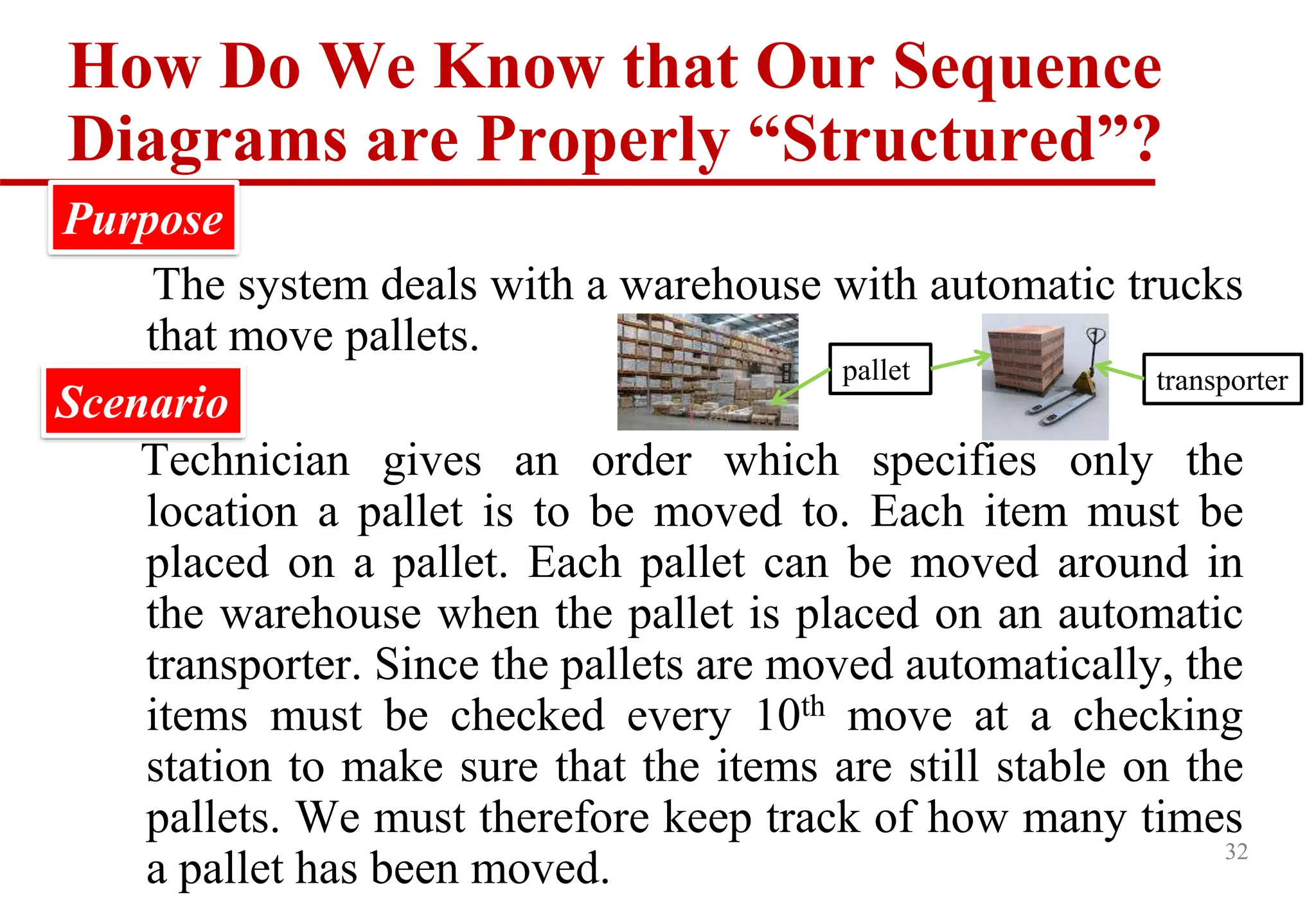
How Do WeKnow that Our Sequence
Diagrams are Properly “Structured”?
The system deals with a warehouse with automatic trucks
that move pallets.
Technician gives an order which specifies only the
location a pallet is to be moved to. Each item must be
placed on a pallet. Each pallet can be moved around in
the warehouse when the pallet is placed on an automatic
transporter. Since the pallets are moved automatically, the
items must be checked every 10th move at a checking
station to make sure that the items are still stable on the
pallets. We must therefore keep track of how many times
a pallet has been moved.
Scenario
Purpose
pallet transporter
33.
33
Structure of SequenceDiagrams
: Technician
The technician gives a
request to move
Check if the pallet can be
moved
IF #moved > MaxMove#
THEN check if move is to
checking station
IF checking station
THEN Move
ELSE Move not OK
ENDIF
ELSE
Move
ENDIF
: Pallet
: Transporter : Warehouse
ack = req(pallet,dest)
#moves?
is_checkingstation(dest)?
[ok] move(dest)
Implementation 1
34.
34
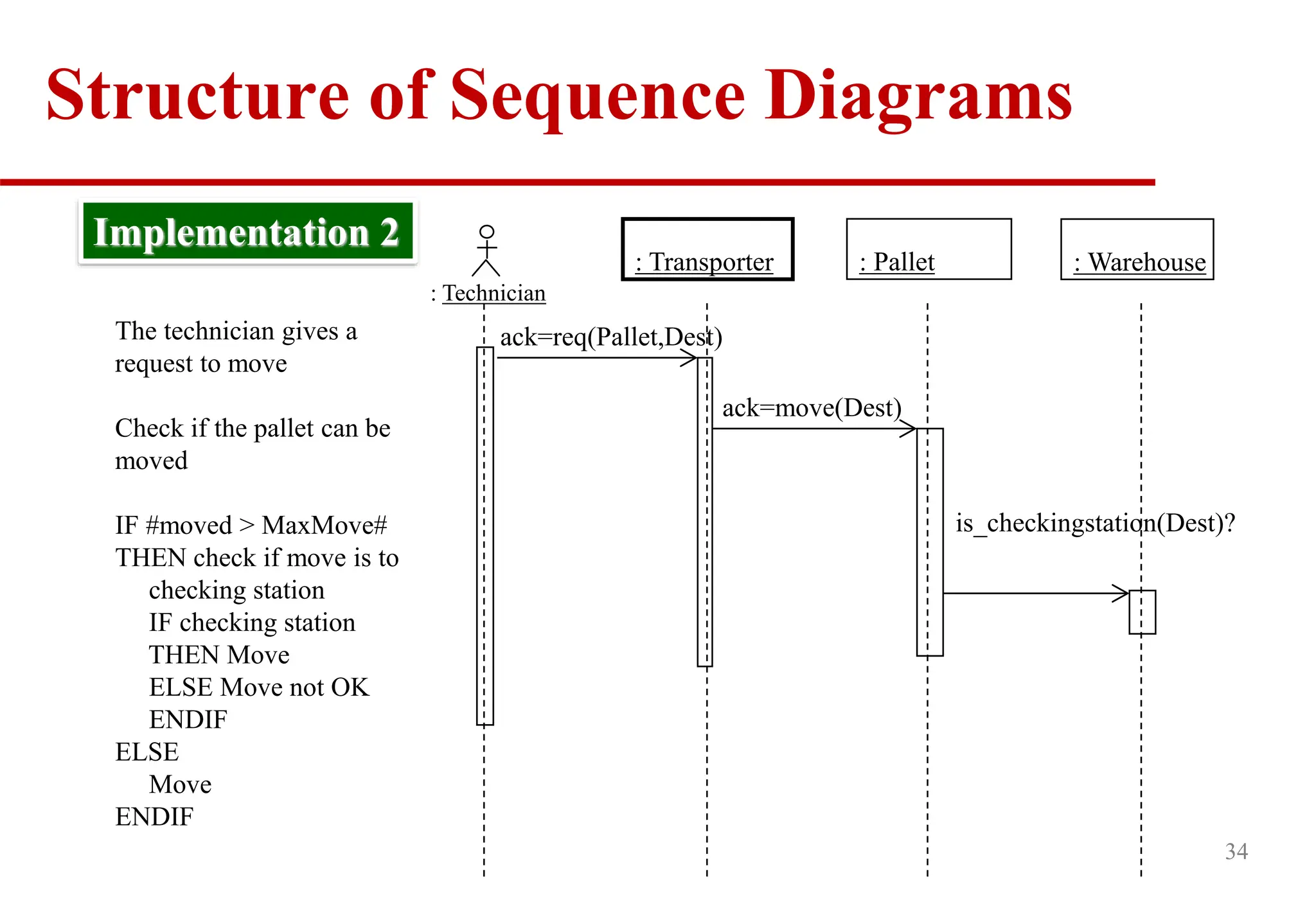
: Technician
The techniciangives a
request to move
Check if the pallet can be
moved
IF #moved > MaxMove#
THEN check if move is to
checking station
IF checking station
THEN Move
ELSE Move not OK
ENDIF
ELSE
Move
ENDIF
Implementation 2
: Pallet
: Transporter : Warehouse
ack=req(Pallet,Dest)
ack=move(Dest)
is_checkingstation(Dest)?
Structure of Sequence Diagrams
35.
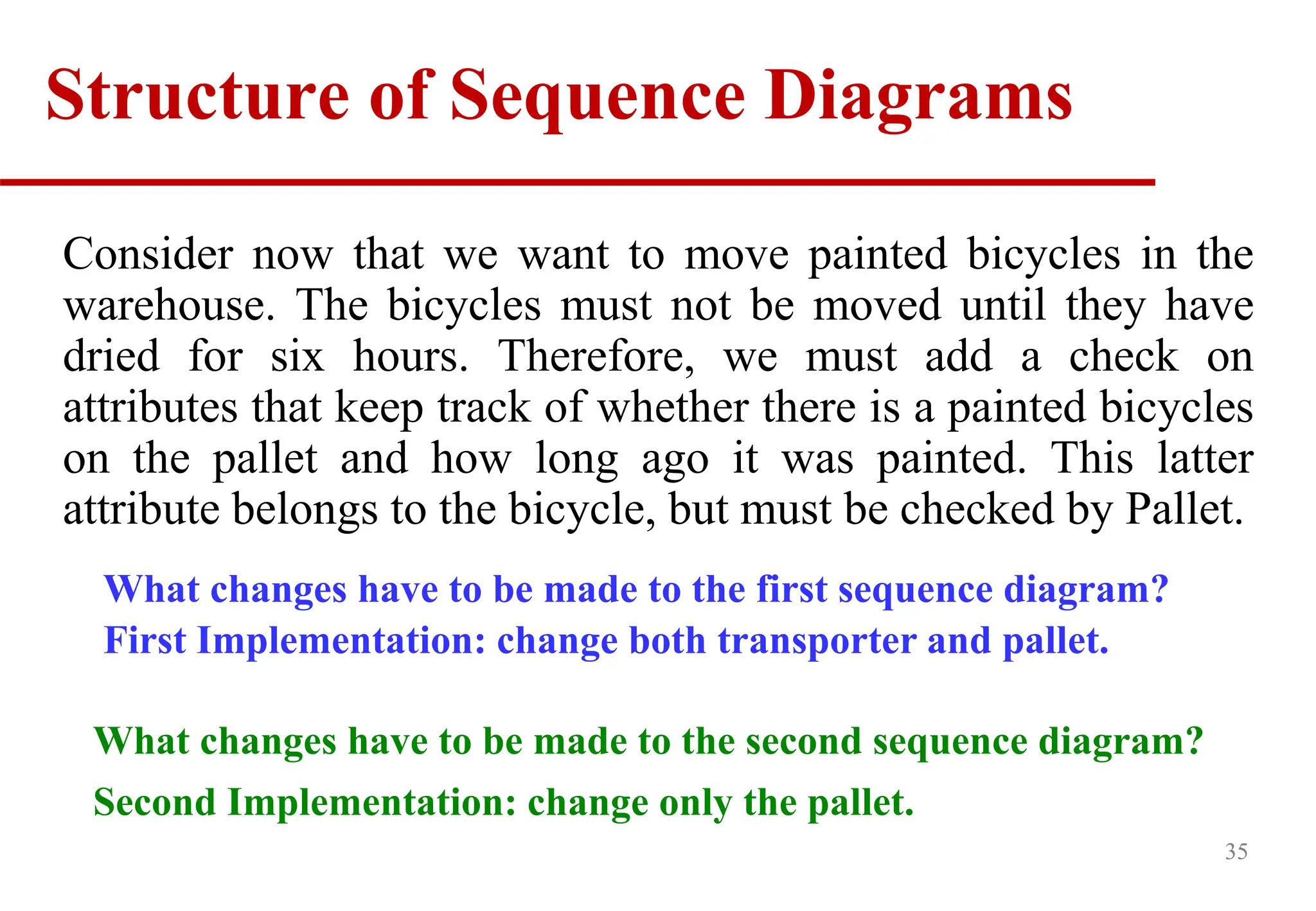
35
Consider now thatwe want to move painted bicycles in the
warehouse. The bicycles must not be moved until they have
dried for six hours. Therefore, we must add a check on
attributes that keep track of whether there is a painted bicycles
on the pallet and how long ago it was painted. This latter
attribute belongs to the bicycle, but must be checked by Pallet.
What changes have to be made to the first sequence diagram?
First Implementation: change both transporter and pallet.
Structure of Sequence Diagrams
What changes have to be made to the second sequence diagram?
Second Implementation: change only the pallet.
39
This structure isappropriate when:
the operations have a strong connection
the operations will always be performed in the same
order
Stair diagram
(decentralized
control)
Implementation 1 vs. Implementation 2
40.
40
A strongconnection exists among the operations if
the objects:
form a “consists-of” hierarchy, such as country-state-city
form an information hierarchy, such as document-chapter-
section-paragraph-character
represent a fixed procedural sequence such as
advertisement-order-invoice-delivery-payment
form a (conceptual) inheritance hierarchy, such as animal-
mammal-cat
Structure of Sequence Diagrams
41.
41
Example
Edit Contents ofShopping Cart
Basic Course
On the Shopping Cart Page, the Customer modifies the quantity of a Line Item
in the Shopping Cart and then presses the Update button. The system stores the
new quantity and then computes and displays the new cost for that Line Item.
The Customer presses the Continue Shopping button. The system returns
control to the use case from which it received control.
Alternate Courses
If the Customer changes the quantity of the Item to 0, the system deletes that
Item from the Shipping Cart.
If the Customer presses the Delete button, the system deletes that Item from the
Shopping Cart.
Refine it intoSequence Diagram
(Only the “Delete item” scenario is shown)
43
:Shopping
Cart Page
:Calculator Item 1: Item : Shopping
Cart
: Display
Item 2: Item
deleteSelected
Item( ) deleteItem
( ItemNo)
removeItem
(ItemNo)
refreshScreen()
getCartSummary()
getItemSummary()
showPage(CartInfo)
loop
Note: We have decided to merge the Item Eraser and Calculator as one object.
44.
Summary
In OOD,we may use sequence diagram to specify the
object interactions of our system.
Specifically, we use such diagrams to illustrate how objects
invoke the methods of the other objects one after another.
In dynamic modeling, we need to make decisions on
whether to use centralized control or decentralized control.
After sketching sequence diagrams, we should update our
OOD class diagrams to reflect our latest design decisions.
44
46
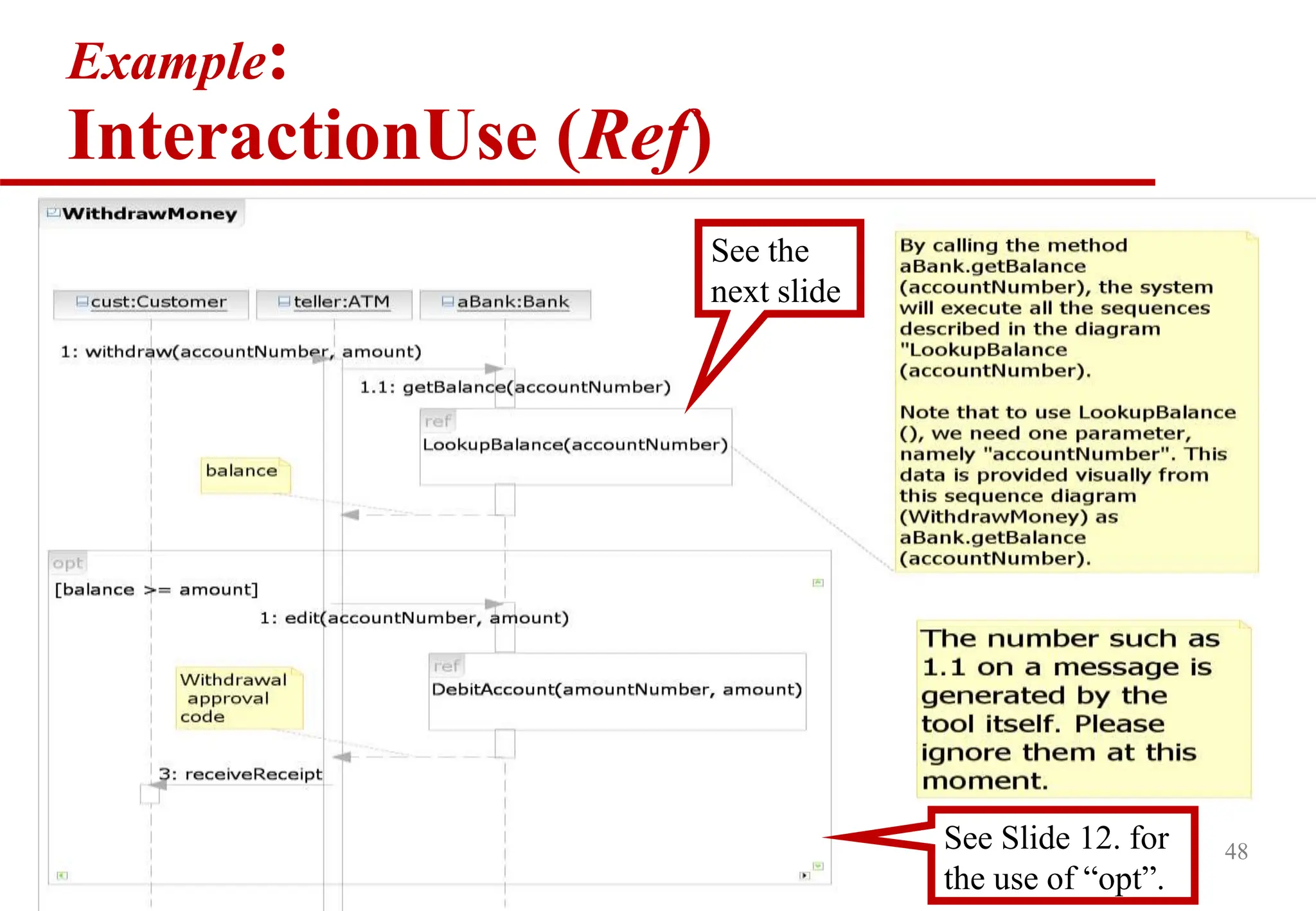
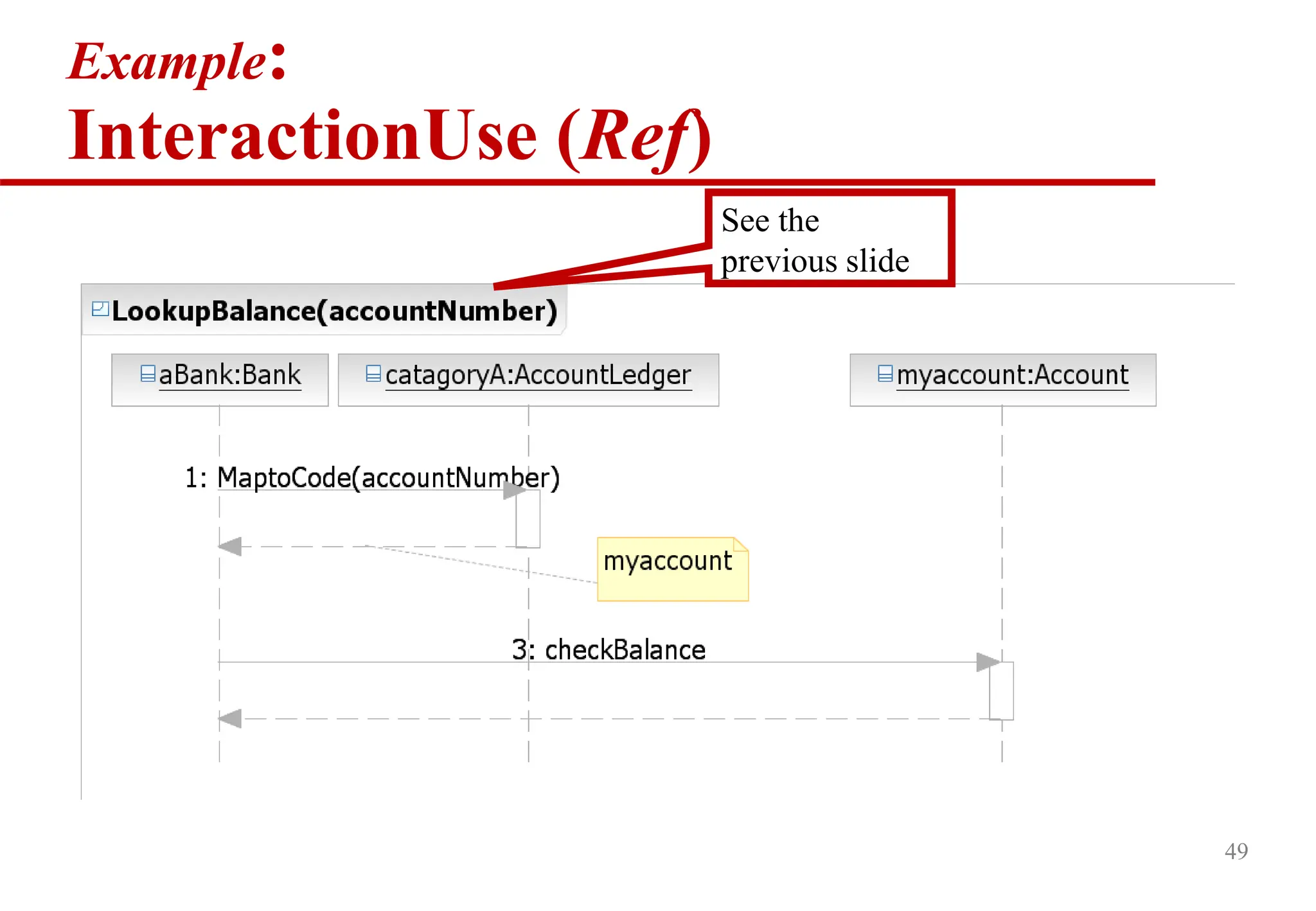
InteractionUse (ref )
An InteractionUse refers to an Interaction scenario
of objects
The InteractionUse is a shorthand for copying the
contents (similar to inlining in C++) of the referred
Interaction where the InteractionUse is
To be accurate the copying must take into account
substituting parameters with arguments and
connect the formal gates with the actual ones.
47.
47
InteractionUse (ref )
AnInteractionUse referring to an
Interaction :CheckSecurity.
The lifeline of “MaryAccount” is hidden
by the “:CheckSecurity” InteractionUse.
It means that the lifelines of this object
will be used in “:CheckSecurity”.
We see the lifeline of “MaryAccount”
here. So, “:OpenDoor” uses Mary and a
door, but not MaryAccount from this
diagram.
50
CombinedFragments
CombinedFragments areused to describe more
complicated control information in sequence
diagrams than those basic elements
They are only for modeling combinations of
scenarios.
51.
51
CombinedFragments
CombinedFragment Purpose (inC++)
Alternatives (alt) as the if-then-else or switch statements in C++.
Option (opt) As the if-then statements in C++. A special form
of “alt”.
Iteration (loop) As the while-loop and for-loop in C++. To
serve like a repeat-until loop, we need to use the
“break” CombinedFragment to check for the
condition and break the loop.
Break (break) As the “break” statement in C++.
53
CombinedFragments
Alternatives (alt)
Representsa choice of behavior
Similar to the “switch statements” or if-statement in
C++/C/Java
Require at most one of the operands will be chosen
The chosen operand must have an explicit or
implicit guard expression that evaluates to true
A guard expression is like the condition on a If-statement in C that
determine whether the execution will execute the “then” block or
the “else” block” of the if-statement.
Use “else” for the unnamed case.
54.
54
CombinedFragments
Option (opt)
Designatesthat the CombinedFragment represents a choice
of behavior where either the (sole) operand happens or
nothing happens
In meaning, an option is the same as an alternative
CombinedFragment where there is one operand with non-
empty content and the second operand is empty.
See the example on slide 6. Example:
InteractionUse (Ref)
See the
next slide
6
See Slide
12.
55.
55
CombinedFragments
Break (break)
If thecondition
“myaccount is invalid”
is met, only those events
within the “break”
CombinedFragment will
be executed. All other
events (e.g.,
checkBalance) are ignored
(i.e., will not be
executed).
56.
56
CombinedFragments
Break (break)
Abreak fragment is almost identical in every way
to the option fragment with 2 exceptions.
Exception 1: use the keyword “break” instead of
“option” to name the fragment.
Exception 2: when a break combined fragment's
message is to be executed, the enclosing interaction's
remainder messages will not be executed because the
sequence breaks out of the enclosing interaction. In this
way the break combined fragment is much like the
break keyword in a programming language like C++ or
Java.





![12
Sequence Diagrams
Main Syntax
self:
LibraryMember
:Book
Copy1:Book
Copy
loan(book)
ok = mayLoan()
[ok] reserve(member)
setTaken(member)
time
Object
Life line
Message.
Execution
occurrence
Condition
Actor
or
Class
name
The object marked as “self” owns the sequence diagram.
There is no limit on the number of actor objects or objects per sequence diagram
Object name
(optional)
Object name
(optional)
Object name before the
“:” (optional)](https://image.slidesharecdn.com/cs3347-07-objectinteractions-250907051046-392951b0/75/abcdefghijklmnksnbsubshvsvgsftscgsvhavhsvhsvhsv-12-2048.jpg)





![How to Use SuperClass in Sequence
Diagram?
23
printCompleted
print
ptr1:Printer
:Word
Processor
Word
Processor
Class Diagram
Printer
Laser
Printer
PDF
Printer
Word Processor uses the Printer,
which has been subclassed by
either the PDF Printer class or
Laser Printer class.
addPDFHeader
mynote:PDFFILE
ptr1:PDF
Printer
:PDFFILE
*
Use Separate Sequence Diagrams.
[Note the object name ptr1]
addPage](https://image.slidesharecdn.com/cs3347-07-objectinteractions-250907051046-392951b0/75/abcdefghijklmnksnbsubshvsvgsftscgsvhavhsvhsvhsv-23-2048.jpg)
![26
Condition
A condition is an expression relating different
attributes of an object and/or values.
Example: [amount < balance] debit(amount)
Conditions are used as guards on transitions
A guarded transition fires when its event occurs and
satisfies the guard condition.](https://image.slidesharecdn.com/cs3347-07-objectinteractions-250907051046-392951b0/75/abcdefghijklmnksnbsubshvsvgsftscgsvhavhsvhsvhsv-26-2048.jpg)


![31
getViolation(id)
Lookup Traffic Violation
[observe how to specify Errors]
:Clerk
:Violations
Dialog
:Violations
Controller
:Violations
DBProxy
lookup
viewDetail()
id=getID()
v:Traffic
Violation
Display
timeout(v2)
DB is queried
within the
object and the
result is
returned as a
new object v
dismiss
callback(v)
timeout
v2:Timeout
Message
expire
No one destructs
this object. Some
memory loss
here.](https://image.slidesharecdn.com/cs3347-07-objectinteractions-250907051046-392951b0/75/abcdefghijklmnksnbsubshvsvgsftscgsvhavhsvhsvhsv-31-2048.jpg)
![33
Structure of Sequence Diagrams
: Technician
The technician gives a
request to move
Check if the pallet can be
moved
IF #moved > MaxMove#
THEN check if move is to
checking station
IF checking station
THEN Move
ELSE Move not OK
ENDIF
ELSE
Move
ENDIF
: Pallet
: Transporter : Warehouse
ack = req(pallet,dest)
#moves?
is_checkingstation(dest)?
[ok] move(dest)
Implementation 1](https://image.slidesharecdn.com/cs3347-07-objectinteractions-250907051046-392951b0/75/abcdefghijklmnksnbsubshvsvgsftscgsvhavhsvhsvhsv-33-2048.jpg)


![42
Edit Contents of Shopping Cart
[High Level Interaction]
Customer
:Item Eraser
:Shopping Cart Page :Calculator
:Display :Shopping Cart
:Item](https://image.slidesharecdn.com/cs3347-07-objectinteractions-250907051046-392951b0/75/abcdefghijklmnksnbsubshvsvgsftscgsvhavhsvhsvhsv-42-2048.jpg)






![Refine it into Sequence Diagram
(Only the “Delete item” scenario is shown)
[sd06-ObjectInteraction.ppt slide 42]
58
:Shopping
Cart Page
:Calculator Item 1: Item : Shopping
Cart
: Display
Item 2: Item
deleteSelected
Item( ) deleteItem
( ItemNo)
removeItem
(ItemNo)
refreshScreen()
getCartSummary()
getItemSummary()
showPage(CartInfo)
loop
Note: We have decided to merge the Item Eraser and Calculator as one object.](https://image.slidesharecdn.com/cs3347-07-objectinteractions-250907051046-392951b0/75/abcdefghijklmnksnbsubshvsvgsftscgsvhavhsvhsvhsv-58-2048.jpg)


![[DSC Europe 25] Marija Vlajkovic & Andrea Radonjanin - Integration of AI tool...](https://cdn.slidesharecdn.com/ss_thumbnails/qf1jrglttoc3bm8s3aop-final-integration-of-ai-tools-251208151905-394f3a6a-thumbnail.jpg?width=640&height=640&fit=bounds)


![[DSC Europe 25] Dragan Vucic - Building the Learning Organization - How AI Tr...](https://cdn.slidesharecdn.com/ss_thumbnails/8brigo2sbu6qur6gxrra-7-251205085715-6ae07d24-thumbnail.jpg?width=640&height=640&fit=bounds)
![[DSC Europe 25] Andy Cotgreave - Nothing is new in analytics.pptx](https://cdn.slidesharecdn.com/ss_thumbnails/mba4vzcurvoh5lfrd5zw-6-251205194645-341bbbbe-thumbnail.jpg?width=640&height=640&fit=bounds)

![[DSC Europe 25] Bogdan Daniel Maruneac - AI - It starts with you.pptx](https://cdn.slidesharecdn.com/ss_thumbnails/odov3snhrcqs9hx5ny2n-4-251205085715-f1daacfe-thumbnail.jpg?width=640&height=640&fit=bounds)

