168
SWITCHING FROM LIBSYS TO KOHA WITH RFID INTEGRATION:
A Migratory Experiment in Central Library NIT Rourkela
Soumen Kumar Mondal
Biju Patnaik Central Library, NIT, Rourkela
E-mail: mondalsoumen68@gmail.com
Wasim Rahaman
Biju Patnaik Central Library, NIT, Rourkela
E-mail: 2wasimr@gmail.com
Sourav Patra
Learning Resource Centre, IIM, Ranchi
E-mail: sourav.vu.lisc@gmail.com
Abstract
In this paper one of the important library management software Koha has been discussed in
details together with its need, features, implementation, customisation, data migration from
Libsys to Koha, printer configuration in Koha and RFID integration with Koha.
Keywords- Open Source Software (OSS), Integrated Library Management Software (ILMS), Libsys
to Koha, Data Migration, Koha with RFID.
1 Introduction
Library and information centres are nowadays considering as one of the most valuable
services sectors in the society. Now library and information centres are turning into the digital
mechanism. Materials acquired by the libraries are also changing its forms to suit the modern
mechanism. But a library is not a library if it is not functioning as the easy search and retrieval
with the proper managing of resources. So many software is performing as a tool for providing
some tremendous services with its variable features. Integrated Library Management Software
(ILMS) are one of the most popular examples of those tools. A tool which turns every in-house
operations of libraries into an automated system like; acquisition, cataloguing, circulation,
serials, OPAC, reports, administration etc. Koha is a fully featured, scalable, open source ILMS
adopted by different types of libraries worldwide (Adamson, 2008).
2 Objectives of the Study
The objectives of the present study are as follows-
 To look at the existing tools for resource management and the need for new tool
169
Koha in the central library, NIT Rourkela.
 To aware about the implementation and customisation of Koha in NITR.
 To know the steps of data migration through export-import from Libsys to Koha.
 To aware the process of printer configuration.
 To integrate RFID with Koha over existing tags.
 To aware about the complications and present condition of post migration.
3 Literature Review
Moving towards one software from another is being very common nowadays. Some
related literature of this kind are given below-
Omeluzor and others have shown of implementing and data migration in Koha from X-
Lib at Babcock University Library, Nigeria (Omeluzor, 2012). Ping Fu and Julie Carmen
have illustrated the transformation of Millennium integrated library system to
Alma/Primo at Central Washington University Libraries (Fu & Carmen, 2015). Mukesh
Pund and Parul Jain explain the transformation and migration process from Libsys to
Koha (Pund & Jain, 2016). Vinod Kumar Mishra describes the process for migration of
existing data, implementation and customisation of Koha in Mahatma Gandhi Central
Library, IIT Roorkee (Mishra, 2015). Ram Kumar Matoria and P. K. Upadhyay shows the
migration of library data from Libsys to E-Granthalaya in Indian scenario (Matoria &
Upadhyay, 2005). Monirul Purkait and Anindita Bhowmick illustrated the process of data
migration from Libsys to Koha (Purkait & Bhowmick, 2017). A. C. Oinam and J. C. Nongbri
rectifies the choice of an ILMS and the post effect of the same in an academic library
(Oinam & Nongbri, 2016).
4 Methodology and Coverage of the Study
The whole process of migrating from Libsys to Koha is done through several steps. The
coverage of the present study is limited to the choosing of an integrated library
management software (Koha), implementing, customising transferring the full data from
Libsys database to Koha, integrating RFID with Koha over existing tags and systems.
These steps have been done several times on testing basis. Supports are taken from
many online groups/ forums/ communities, resources and some experts.
5 B. P. Central Library NIT Rourkela
The Central Library of NIT Rourkela functioning from 1965 to serve the user community
170
of NIT. The library acquired huge resources in print and electronic formats as well as
provides some useful services to cater the user need. The library website
(http://library.nitrkl.ac.in/) is performing as the connector between the users and
resources.
Library Resources Useful Services
Books, journals, full text/
abstract/ citation databases,
consortia, CD/ DVD materials,
standards, audio-video materials,
video lectures, e-thesis/
dissertation, NITR publications,
open access to old and rare odia
books, open access resources etc.
Library loan, user education, reserve-renewal,
information kiosk, self-issue return, new arrival, e-
newsletter, library catalogue, library blog, CAS, user
awareness workshop, ready reference service,
liaison program, students textbook exhibition, book
bank service, research support services, software
vault, Android app, quick links to other nationalise
institutes, e-newspaper, FAQ, ask a librarian etc.
Table 1: Resources and Services Provided by BPCL
5.1 Existing Tools in the Library
To manage and maintain these different kinds of resources and keep providing these
various services, the library has acquired some tools. Different types of tools are
selected for different types of services.
Software Purpose Year of
Implement
Libsys and
LsSmart
To automate the library housekeeping work and for RFID-related
issues especially in KIOSk to monitor self Issue, Return, Renew
etc.
2006
DSpace Institutional Repository of e-Papers published in Journals,
Conference Proceedings, Books etc. by NITR community.
2006
EPrints
E-Thesis
OAOB
For archiving the e-thesis/ dissertation by NITR students and Odia
Books Project (A special project in association with Pragati Utkal
Sangh, Rourkela and Srujanika, Bhubaneshwar for archiving the
cultural heritage of Odisha).
2008
Joomla To maintain the library website 2014
171
HTML & CSS Library Technical Manual is maintained with core HTML and CSS
to design and develop the technical manual of library routine
works.
2015
WordPress To maintain the library blog to keep updated about library
activities
DSpace The NITR Official documents are archived using DSpace as a
repository of NIT Rourkela which contains all the official
documents such as BOG, HOD meetings, Senate, BWC etc,
committee meetings.
2016
Subjects Plus To maintain the Subject Guide which covers the descriptive
information about the library services and resources.
2016
Table 2: List of Tools Available in NITR
Except all these, Koha was also used previously for managing the e-books (presently
merged with new Koha), Greenstone is used for managing different software (license/
freeware/ trialware/ CC training/ CD-ROM database and others) presently maintain by
the computer division, Turnitin, Grammarly, Mendeley, Style Guide etc. are also being
provided by the library.
5.2 Need for a New Automation Solution (Koha) in the Library
The major point may be raised from here, is there any need for another library
management tool over an existing tool? The perfect answer one can find out by
observing the comparative study between them (Madhusudan & Singh, 2016). A lot of
studies can also found over the internet. But choosing Koha among various ILMS is for
the varied remarkable features of different modules.
Libsys Koha
Number of simultaneous OPAC access is
restricted by vendor
There is no limited number of
simultaneous OPAC access
Pre customised OPAC, can’t add/ remove Fully customisable
More budget for more features/Modules Full package is free of cost as its OSS
AMC is a big problem Nothing required or minimum AMC
No external/ third party link Available RSS, Web 2.0 features
Update is less frequent and chargeable Update is more frequent and free of cost
172
No control due to proprietary Full control due to free and open source
Table 3: General Comparison Between Libsys and Koha
6 Implementation of Koha
The implementation of Koha is done using several tools. The following tools are taken
for the implementation-
OS- Debian OS was used version 8.8 JC server 32bit.
Koha- 16.11.07 version
7 Customisation of Koha
The customisation of Koha is done in two parts; one is the client end customisation and
the other one is OPAC.
7.1 Customisation in Client
In the client end, the main configured parts are followed-
E-Mail Configuration- this configuration is done through postfix. The patrons will receive
e-mails of registration of new patrons, issuing an item, returning an item, renewing an
item, hold item, collect of reserve item and overdue alerts (before and after). The
overdue alerts going 4 times as on, before 3 days of overdue, the day before overdue,
on the day and after overdue one time to aware the fine charges.
The Fine Rules- by default, the fine charges are 1 rupee/ day in Koha. But in NITR the fine
rules was always incremental. So the fine rules setup is configured to incremental by
changing some codes in ‘overdue.pl’ file and the fine rules are set as 1-21 days- nil, 22-
28 days- 1 rupee/ day, 29-42 days- 5 rupees/ day, 43 days onwards- 10 rupees/ day.
7.2 Customisation in OPAC
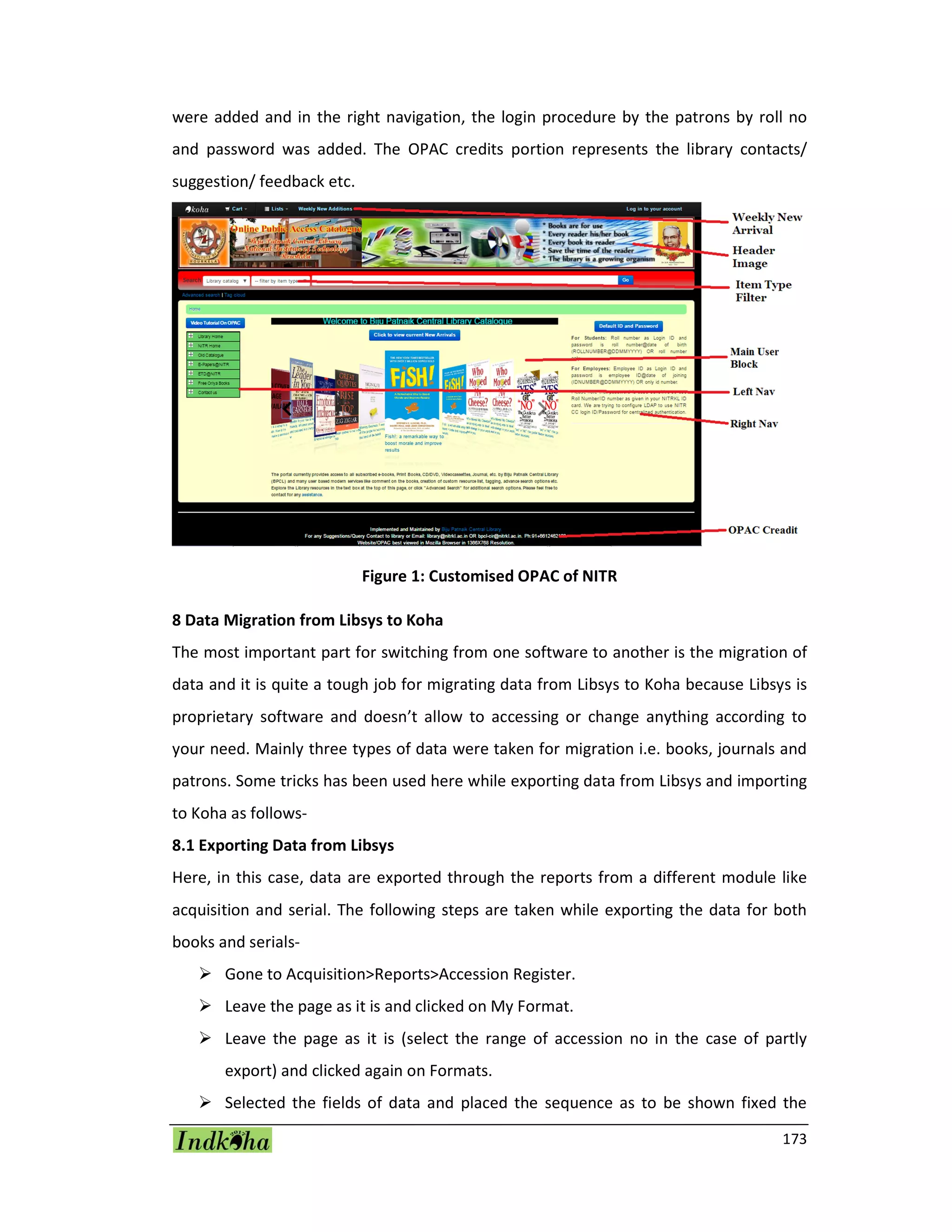
The OPAC is customised in different areas through using some codes. At the menu bar;
one new item added namely weekly new arrival which shows the new arrival items
acquired by the library every week. Next, to it, the header image is added to give it an
attractive look. In the main user block, the list of new arrival print journals are added
and a cover flow plugin is used to show the cover image of last 20 books added to the
collection. The auto cover image was fetched after enabling of the Amazon image check
box from Administration>System Preference>Enhanced Content>Amazon
AmazonCoverImage and OPACAmazonCoverImage. In the left navigation, several links
173
were added and in the right navigation, the login procedure by the patrons by roll no
and password was added. The OPAC credits portion represents the library contacts/
suggestion/ feedback etc.
Figure 1: Customised OPAC of NITR
8 Data Migration from Libsys to Koha
The most important part for switching from one software to another is the migration of
data and it is quite a tough job for migrating data from Libsys to Koha because Libsys is
proprietary software and doesn’t allow to accessing or change anything according to
your need. Mainly three types of data were taken for migration i.e. books, journals and
patrons. Some tricks has been used here while exporting data from Libsys and importing
to Koha as follows-
8.1 Exporting Data from Libsys
Here, in this case, data are exported through the reports from a different module like
acquisition and serial. The following steps are taken while exporting the data for both
books and serials-
 Gone to Acquisition>Reports>Accession Register.
 Leave the page as it is and clicked on My Format.
 Leave the page as it is (select the range of accession no in the case of partly
export) and clicked again on Formats.
 Selected the fields of data and placed the sequence as to be shown fixed the
174
character length of data and then clicked Ok.
 Chosen the information interchange code (ASCII).
 Noted the output file name and saved it.
 Opened the file in notepad and reviewed.
 Then opened the file by selecting all file type from Excel.
 Clicked on next and separated the fields by creating and adjusting lines by the
scale (irrelevant lines were removed upwards).
 After clicked on next the data will show in excel (corrections may be done).
 Chosen the No option while saving the data.
Similarly, in the case of serials gone to Serials>Reports>On Serials>List by Title and
choose the data fields will be taken and choose the information interchange code (ASCII)
and saved the file. The rest are same as above.
8.2 Importing Data into Koha
After successfully exporting of data it is needed to import the data in Koha. MarcEdit is a
tool taken for converting the data according to MARC tags. It is needed to refine the
data in a good manner before converting. The following steps are taken while importing
the data for both books and serials-
 Checked the data fields for refinement
o Copy status checking (on shelve/issued/lost/damaged/missing/binding)
o Splitting of class number and book number
 Added MARC tags for different fields
 Imported the file into MarcEdit
o Created a template for different tags
o Joined the same tags in different fields
o Converted into .mrk format
 Converted the caps letter and small letter into running letter
 Inserting of publication year and language in 008 fields of MARC
 Fetched the subject field from LOC database
 Converted the data into .mrc file
 Checked the duplicate copy through ISBN from MarcEdit>Tools>Find Duplicate
Records (the outputted data will divide into two folders, in one folder one unique
175
record is there and the other records are in another folder)
 Merged the duplicate data into one for retrieving one item with its substitute
copies instead of all copies from MarcEdit>Tools>Marge Records
 Imported the data into Koha through bulk importing by running commands
The importing of bound volumes is imported by following the same steps. But while
importing the serials, it is needed to check and process several times the data because
of the volumes no issue no and some other different fields are there in comparison to
the book. The patron data are imported into Koha taken from the NITR patron database.
9 Printer Configuration
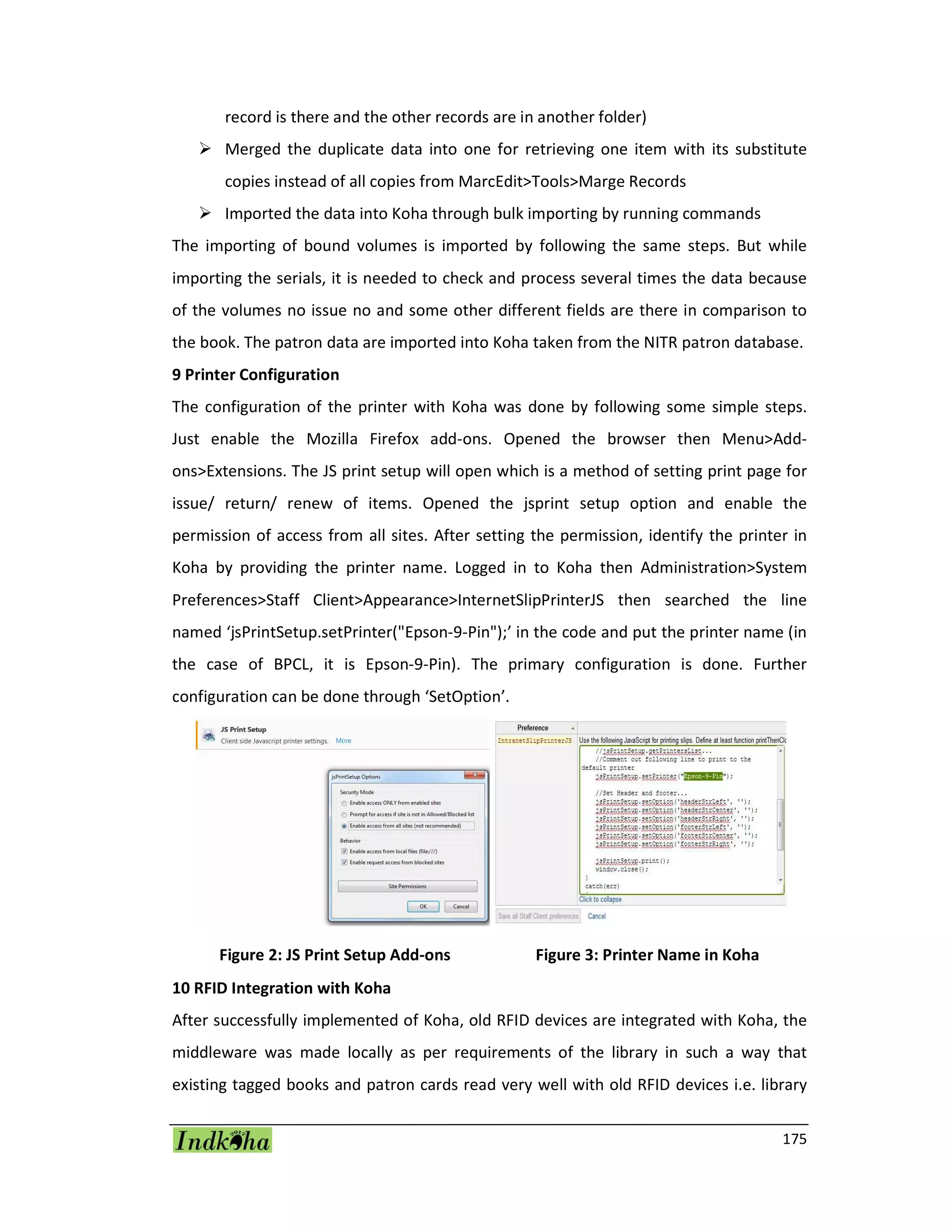
The configuration of the printer with Koha was done by following some simple steps.
Just enable the Mozilla Firefox add-ons. Opened the browser then Menu>Add-
ons>Extensions. The JS print setup will open which is a method of setting print page for
issue/ return/ renew of items. Opened the jsprint setup option and enable the
permission of access from all sites. After setting the permission, identify the printer in
Koha by providing the printer name. Logged in to Koha then Administration>System
Preferences>Staff Client>Appearance>InternetSlipPrinterJS then searched the line
named ‘jsPrintSetup.setPrinter("Epson-9-Pin");’ in the code and put the printer name (in
the case of BPCL, it is Epson-9-Pin). The primary configuration is done. Further
configuration can be done through ‘SetOption’.
Figure 2: JS Print Setup Add-ons Figure 3: Printer Name in Koha
10 RFID Integration with Koha
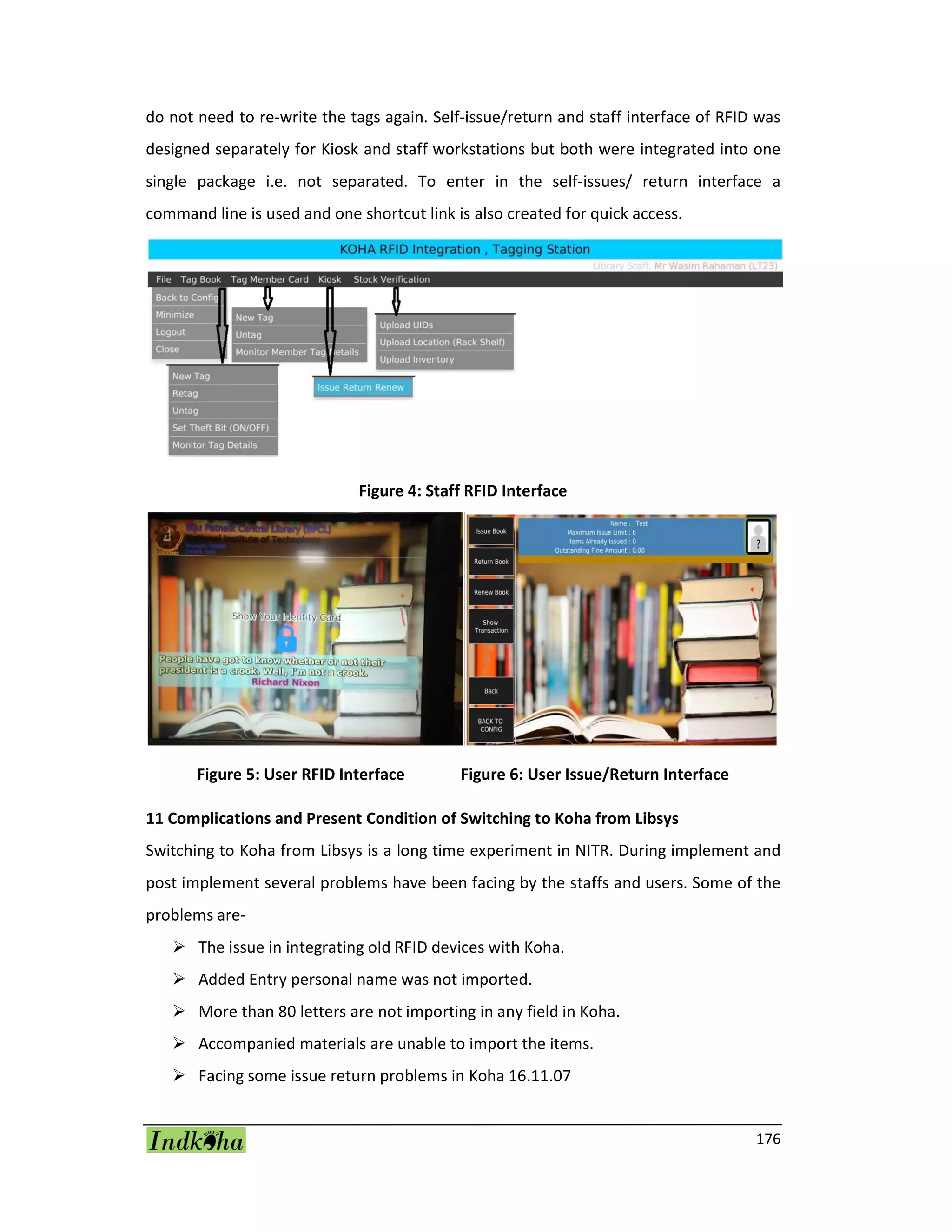
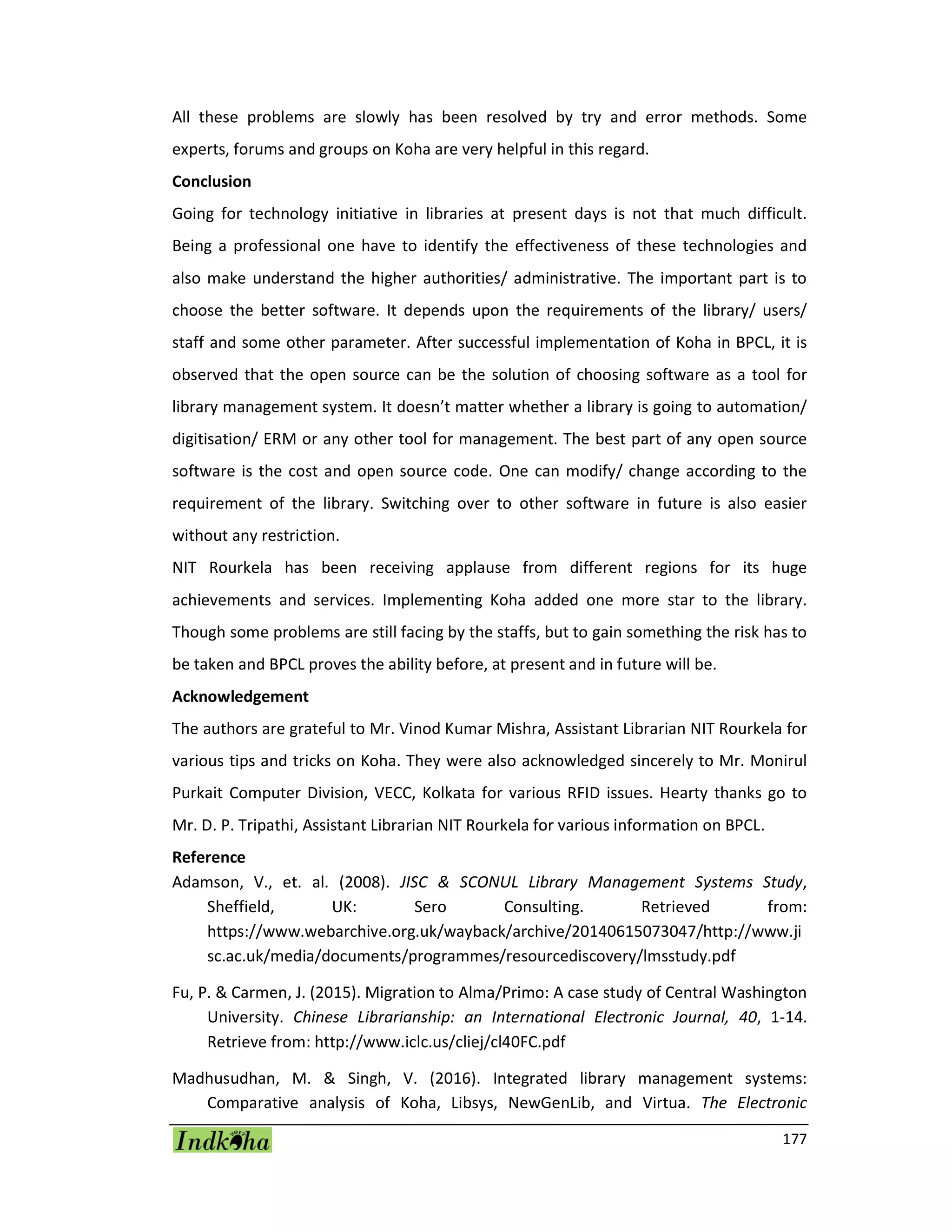
After successfully implemented of Koha, old RFID devices are integrated with Koha, the
middleware was made locally as per requirements of the library in such a way that
existing tagged books and patron cards read very well with old RFID devices i.e. library
176
do not need to re-write the tags again. Self-issue/return and staff interface of RFID was
designed separately for Kiosk and staff workstations but both were integrated into one
single package i.e. not separated. To enter in the self-issues/ return interface a
command line is used and one shortcut link is also created for quick access.
Figure 4: Staff RFID Interface
Figure 5: User RFID Interface Figure 6: User Issue/Return Interface
11 Complications and Present Condition of Switching to Koha from Libsys
Switching to Koha from Libsys is a long time experiment in NITR. During implement and
post implement several problems have been facing by the staffs and users. Some of the
problems are-
 The issue in integrating old RFID devices with Koha.
 Added Entry personal name was not imported.
 More than 80 letters are not importing in any field in Koha.
 Accompanied materials are unable to import the items.
 Facing some issue return problems in Koha 16.11.07
177
All these problems are slowly has been resolved by try and error methods. Some
experts, forums and groups on Koha are very helpful in this regard.
Conclusion
Going for technology initiative in libraries at present days is not that much difficult.
Being a professional one have to identify the effectiveness of these technologies and
also make understand the higher authorities/ administrative. The important part is to
choose the better software. It depends upon the requirements of the library/ users/
staff and some other parameter. After successful implementation of Koha in BPCL, it is
observed that the open source can be the solution of choosing software as a tool for
library management system. It doesn’t matter whether a library is going to automation/
digitisation/ ERM or any other tool for management. The best part of any open source
software is the cost and open source code. One can modify/ change according to the
requirement of the library. Switching over to other software in future is also easier
without any restriction.
NIT Rourkela has been receiving applause from different regions for its huge
achievements and services. Implementing Koha added one more star to the library.
Though some problems are still facing by the staffs, but to gain something the risk has to
be taken and BPCL proves the ability before, at present and in future will be.
Acknowledgement
The authors are grateful to Mr. Vinod Kumar Mishra, Assistant Librarian NIT Rourkela for
various tips and tricks on Koha. They were also acknowledged sincerely to Mr. Monirul
Purkait Computer Division, VECC, Kolkata for various RFID issues. Hearty thanks go to
Mr. D. P. Tripathi, Assistant Librarian NIT Rourkela for various information on BPCL.
Reference
Adamson, V., et. al. (2008). JISC & SCONUL Library Management Systems Study,
Sheffield, UK: Sero Consulting. Retrieved from:
https://www.webarchive.org.uk/wayback/archive/20140615073047/http://www.ji
sc.ac.uk/media/documents/programmes/resourcediscovery/lmsstudy.pdf
Fu, P. & Carmen, J. (2015). Migration to Alma/Primo: A case study of Central Washington
University. Chinese Librarianship: an International Electronic Journal, 40, 1-14.
Retrieve from: http://www.iclc.us/cliej/cl40FC.pdf
Madhusudhan, M. & Singh, V. (2016). Integrated library management systems:
Comparative analysis of Koha, Libsys, NewGenLib, and Virtua. The Electronic
178
Library, 34(2), 223-249 https://doi.org/10.1108/EL-08-2014-0127
Matoria, R. K. & Upadhyay, P. K. (2005). Migration of Data From One Library
Management System To Another: a Case Study in India. Electronic Library and
Information System, 39(2), 160-166.
Mishra, V. K. (2015). The Systematic approach to data migration, customization and
implementation of Koha : a case study of Saharanpur Campus Library, IIT Roorkee.
In S. Katariya, et. al. (Eds)Transforming libraries and librarianship: a festschrift
volume of late Dr. Harish Chandra. Dehradun, UK. KBD. Retrieved from:
http://dspace.nitrkl.ac.in/dspace/bitstream/2080/2261/1/koha_article_%20festsch
rift_Harish_Chandra.pdf
Omeluzor, S. U., et. al. (2012). Implementation of Koha Integrated Library Management
Software (ILMS): The Babcock University Experience. Canadian Social Science, 8(4),
211–221. Retrieve from http://doi.org/10.3968/j.css.1923669720120804.1860
Oinam, A. C. & Nongbri, J. P. (2016, November 9-11). Software Migration from LibSys 4.0
to Koha: Post Migration Scenario in a University Library of North-Eastern Hill
University, Shillong, Meghalaya, India. Paper presented at 10th Convention
PLANNER-2016, North-Eastern Hill University Shillong.
Pund, M. & Jain, P. (2016). System and Process for Data Transformation and Migration
from Libsys to Koha. International Research Journal of Engineering and Technology,
3(4), 690–702.
Purkait, M. & Bhowmick, A. (2014, January). Data Migration from LibSys to KOHA: Some
Issues and Challenges. Paper presented at International Seminar on Application of
Communication and Information Technology in Library, VECC, Kolkata. Retrieve
from:
https://www.researchgate.net/profile/Monirul_Purkait/publication/294025379_Da
ta_Migration_from_Libsys_to_KOHA_Some_Issues_and_Challenges/links/56bd561
c08ae9ca20a4d8a2c/Data-Migration-from-Libsys-to-KOHA-Some-Issues-and-
Challenges

Switching from Libsys to Koha with RFID Integration: A Migratory Experiment in Central Library NIT Rourkela

  • 1.
    168 SWITCHING FROM LIBSYSTO KOHA WITH RFID INTEGRATION: A Migratory Experiment in Central Library NIT Rourkela Soumen Kumar Mondal Biju Patnaik Central Library, NIT, Rourkela E-mail: mondalsoumen68@gmail.com Wasim Rahaman Biju Patnaik Central Library, NIT, Rourkela E-mail: 2wasimr@gmail.com Sourav Patra Learning Resource Centre, IIM, Ranchi E-mail: sourav.vu.lisc@gmail.com Abstract In this paper one of the important library management software Koha has been discussed in details together with its need, features, implementation, customisation, data migration from Libsys to Koha, printer configuration in Koha and RFID integration with Koha. Keywords- Open Source Software (OSS), Integrated Library Management Software (ILMS), Libsys to Koha, Data Migration, Koha with RFID. 1 Introduction Library and information centres are nowadays considering as one of the most valuable services sectors in the society. Now library and information centres are turning into the digital mechanism. Materials acquired by the libraries are also changing its forms to suit the modern mechanism. But a library is not a library if it is not functioning as the easy search and retrieval with the proper managing of resources. So many software is performing as a tool for providing some tremendous services with its variable features. Integrated Library Management Software (ILMS) are one of the most popular examples of those tools. A tool which turns every in-house operations of libraries into an automated system like; acquisition, cataloguing, circulation, serials, OPAC, reports, administration etc. Koha is a fully featured, scalable, open source ILMS adopted by different types of libraries worldwide (Adamson, 2008). 2 Objectives of the Study The objectives of the present study are as follows-  To look at the existing tools for resource management and the need for new tool
  • 2.
    169 Koha in thecentral library, NIT Rourkela.  To aware about the implementation and customisation of Koha in NITR.  To know the steps of data migration through export-import from Libsys to Koha.  To aware the process of printer configuration.  To integrate RFID with Koha over existing tags.  To aware about the complications and present condition of post migration. 3 Literature Review Moving towards one software from another is being very common nowadays. Some related literature of this kind are given below- Omeluzor and others have shown of implementing and data migration in Koha from X- Lib at Babcock University Library, Nigeria (Omeluzor, 2012). Ping Fu and Julie Carmen have illustrated the transformation of Millennium integrated library system to Alma/Primo at Central Washington University Libraries (Fu & Carmen, 2015). Mukesh Pund and Parul Jain explain the transformation and migration process from Libsys to Koha (Pund & Jain, 2016). Vinod Kumar Mishra describes the process for migration of existing data, implementation and customisation of Koha in Mahatma Gandhi Central Library, IIT Roorkee (Mishra, 2015). Ram Kumar Matoria and P. K. Upadhyay shows the migration of library data from Libsys to E-Granthalaya in Indian scenario (Matoria & Upadhyay, 2005). Monirul Purkait and Anindita Bhowmick illustrated the process of data migration from Libsys to Koha (Purkait & Bhowmick, 2017). A. C. Oinam and J. C. Nongbri rectifies the choice of an ILMS and the post effect of the same in an academic library (Oinam & Nongbri, 2016). 4 Methodology and Coverage of the Study The whole process of migrating from Libsys to Koha is done through several steps. The coverage of the present study is limited to the choosing of an integrated library management software (Koha), implementing, customising transferring the full data from Libsys database to Koha, integrating RFID with Koha over existing tags and systems. These steps have been done several times on testing basis. Supports are taken from many online groups/ forums/ communities, resources and some experts. 5 B. P. Central Library NIT Rourkela The Central Library of NIT Rourkela functioning from 1965 to serve the user community
  • 3.
    170 of NIT. Thelibrary acquired huge resources in print and electronic formats as well as provides some useful services to cater the user need. The library website (http://library.nitrkl.ac.in/) is performing as the connector between the users and resources. Library Resources Useful Services Books, journals, full text/ abstract/ citation databases, consortia, CD/ DVD materials, standards, audio-video materials, video lectures, e-thesis/ dissertation, NITR publications, open access to old and rare odia books, open access resources etc. Library loan, user education, reserve-renewal, information kiosk, self-issue return, new arrival, e- newsletter, library catalogue, library blog, CAS, user awareness workshop, ready reference service, liaison program, students textbook exhibition, book bank service, research support services, software vault, Android app, quick links to other nationalise institutes, e-newspaper, FAQ, ask a librarian etc. Table 1: Resources and Services Provided by BPCL 5.1 Existing Tools in the Library To manage and maintain these different kinds of resources and keep providing these various services, the library has acquired some tools. Different types of tools are selected for different types of services. Software Purpose Year of Implement Libsys and LsSmart To automate the library housekeeping work and for RFID-related issues especially in KIOSk to monitor self Issue, Return, Renew etc. 2006 DSpace Institutional Repository of e-Papers published in Journals, Conference Proceedings, Books etc. by NITR community. 2006 EPrints E-Thesis OAOB For archiving the e-thesis/ dissertation by NITR students and Odia Books Project (A special project in association with Pragati Utkal Sangh, Rourkela and Srujanika, Bhubaneshwar for archiving the cultural heritage of Odisha). 2008 Joomla To maintain the library website 2014
  • 4.
    171 HTML & CSSLibrary Technical Manual is maintained with core HTML and CSS to design and develop the technical manual of library routine works. 2015 WordPress To maintain the library blog to keep updated about library activities DSpace The NITR Official documents are archived using DSpace as a repository of NIT Rourkela which contains all the official documents such as BOG, HOD meetings, Senate, BWC etc, committee meetings. 2016 Subjects Plus To maintain the Subject Guide which covers the descriptive information about the library services and resources. 2016 Table 2: List of Tools Available in NITR Except all these, Koha was also used previously for managing the e-books (presently merged with new Koha), Greenstone is used for managing different software (license/ freeware/ trialware/ CC training/ CD-ROM database and others) presently maintain by the computer division, Turnitin, Grammarly, Mendeley, Style Guide etc. are also being provided by the library. 5.2 Need for a New Automation Solution (Koha) in the Library The major point may be raised from here, is there any need for another library management tool over an existing tool? The perfect answer one can find out by observing the comparative study between them (Madhusudan & Singh, 2016). A lot of studies can also found over the internet. But choosing Koha among various ILMS is for the varied remarkable features of different modules. Libsys Koha Number of simultaneous OPAC access is restricted by vendor There is no limited number of simultaneous OPAC access Pre customised OPAC, can’t add/ remove Fully customisable More budget for more features/Modules Full package is free of cost as its OSS AMC is a big problem Nothing required or minimum AMC No external/ third party link Available RSS, Web 2.0 features Update is less frequent and chargeable Update is more frequent and free of cost
  • 5.
    172 No control dueto proprietary Full control due to free and open source Table 3: General Comparison Between Libsys and Koha 6 Implementation of Koha The implementation of Koha is done using several tools. The following tools are taken for the implementation- OS- Debian OS was used version 8.8 JC server 32bit. Koha- 16.11.07 version 7 Customisation of Koha The customisation of Koha is done in two parts; one is the client end customisation and the other one is OPAC. 7.1 Customisation in Client In the client end, the main configured parts are followed- E-Mail Configuration- this configuration is done through postfix. The patrons will receive e-mails of registration of new patrons, issuing an item, returning an item, renewing an item, hold item, collect of reserve item and overdue alerts (before and after). The overdue alerts going 4 times as on, before 3 days of overdue, the day before overdue, on the day and after overdue one time to aware the fine charges. The Fine Rules- by default, the fine charges are 1 rupee/ day in Koha. But in NITR the fine rules was always incremental. So the fine rules setup is configured to incremental by changing some codes in ‘overdue.pl’ file and the fine rules are set as 1-21 days- nil, 22- 28 days- 1 rupee/ day, 29-42 days- 5 rupees/ day, 43 days onwards- 10 rupees/ day. 7.2 Customisation in OPAC The OPAC is customised in different areas through using some codes. At the menu bar; one new item added namely weekly new arrival which shows the new arrival items acquired by the library every week. Next, to it, the header image is added to give it an attractive look. In the main user block, the list of new arrival print journals are added and a cover flow plugin is used to show the cover image of last 20 books added to the collection. The auto cover image was fetched after enabling of the Amazon image check box from Administration>System Preference>Enhanced Content>Amazon AmazonCoverImage and OPACAmazonCoverImage. In the left navigation, several links
  • 6.
    173 were added andin the right navigation, the login procedure by the patrons by roll no and password was added. The OPAC credits portion represents the library contacts/ suggestion/ feedback etc. Figure 1: Customised OPAC of NITR 8 Data Migration from Libsys to Koha The most important part for switching from one software to another is the migration of data and it is quite a tough job for migrating data from Libsys to Koha because Libsys is proprietary software and doesn’t allow to accessing or change anything according to your need. Mainly three types of data were taken for migration i.e. books, journals and patrons. Some tricks has been used here while exporting data from Libsys and importing to Koha as follows- 8.1 Exporting Data from Libsys Here, in this case, data are exported through the reports from a different module like acquisition and serial. The following steps are taken while exporting the data for both books and serials-  Gone to Acquisition>Reports>Accession Register.  Leave the page as it is and clicked on My Format.  Leave the page as it is (select the range of accession no in the case of partly export) and clicked again on Formats.  Selected the fields of data and placed the sequence as to be shown fixed the
  • 7.
    174 character length ofdata and then clicked Ok.  Chosen the information interchange code (ASCII).  Noted the output file name and saved it.  Opened the file in notepad and reviewed.  Then opened the file by selecting all file type from Excel.  Clicked on next and separated the fields by creating and adjusting lines by the scale (irrelevant lines were removed upwards).  After clicked on next the data will show in excel (corrections may be done).  Chosen the No option while saving the data. Similarly, in the case of serials gone to Serials>Reports>On Serials>List by Title and choose the data fields will be taken and choose the information interchange code (ASCII) and saved the file. The rest are same as above. 8.2 Importing Data into Koha After successfully exporting of data it is needed to import the data in Koha. MarcEdit is a tool taken for converting the data according to MARC tags. It is needed to refine the data in a good manner before converting. The following steps are taken while importing the data for both books and serials-  Checked the data fields for refinement o Copy status checking (on shelve/issued/lost/damaged/missing/binding) o Splitting of class number and book number  Added MARC tags for different fields  Imported the file into MarcEdit o Created a template for different tags o Joined the same tags in different fields o Converted into .mrk format  Converted the caps letter and small letter into running letter  Inserting of publication year and language in 008 fields of MARC  Fetched the subject field from LOC database  Converted the data into .mrc file  Checked the duplicate copy through ISBN from MarcEdit>Tools>Find Duplicate Records (the outputted data will divide into two folders, in one folder one unique
  • 8.
    175 record is thereand the other records are in another folder)  Merged the duplicate data into one for retrieving one item with its substitute copies instead of all copies from MarcEdit>Tools>Marge Records  Imported the data into Koha through bulk importing by running commands The importing of bound volumes is imported by following the same steps. But while importing the serials, it is needed to check and process several times the data because of the volumes no issue no and some other different fields are there in comparison to the book. The patron data are imported into Koha taken from the NITR patron database. 9 Printer Configuration The configuration of the printer with Koha was done by following some simple steps. Just enable the Mozilla Firefox add-ons. Opened the browser then Menu>Add- ons>Extensions. The JS print setup will open which is a method of setting print page for issue/ return/ renew of items. Opened the jsprint setup option and enable the permission of access from all sites. After setting the permission, identify the printer in Koha by providing the printer name. Logged in to Koha then Administration>System Preferences>Staff Client>Appearance>InternetSlipPrinterJS then searched the line named ‘jsPrintSetup.setPrinter("Epson-9-Pin");’ in the code and put the printer name (in the case of BPCL, it is Epson-9-Pin). The primary configuration is done. Further configuration can be done through ‘SetOption’. Figure 2: JS Print Setup Add-ons Figure 3: Printer Name in Koha 10 RFID Integration with Koha After successfully implemented of Koha, old RFID devices are integrated with Koha, the middleware was made locally as per requirements of the library in such a way that existing tagged books and patron cards read very well with old RFID devices i.e. library
  • 9.
    176 do not needto re-write the tags again. Self-issue/return and staff interface of RFID was designed separately for Kiosk and staff workstations but both were integrated into one single package i.e. not separated. To enter in the self-issues/ return interface a command line is used and one shortcut link is also created for quick access. Figure 4: Staff RFID Interface Figure 5: User RFID Interface Figure 6: User Issue/Return Interface 11 Complications and Present Condition of Switching to Koha from Libsys Switching to Koha from Libsys is a long time experiment in NITR. During implement and post implement several problems have been facing by the staffs and users. Some of the problems are-  The issue in integrating old RFID devices with Koha.  Added Entry personal name was not imported.  More than 80 letters are not importing in any field in Koha.  Accompanied materials are unable to import the items.  Facing some issue return problems in Koha 16.11.07
  • 10.
    177 All these problemsare slowly has been resolved by try and error methods. Some experts, forums and groups on Koha are very helpful in this regard. Conclusion Going for technology initiative in libraries at present days is not that much difficult. Being a professional one have to identify the effectiveness of these technologies and also make understand the higher authorities/ administrative. The important part is to choose the better software. It depends upon the requirements of the library/ users/ staff and some other parameter. After successful implementation of Koha in BPCL, it is observed that the open source can be the solution of choosing software as a tool for library management system. It doesn’t matter whether a library is going to automation/ digitisation/ ERM or any other tool for management. The best part of any open source software is the cost and open source code. One can modify/ change according to the requirement of the library. Switching over to other software in future is also easier without any restriction. NIT Rourkela has been receiving applause from different regions for its huge achievements and services. Implementing Koha added one more star to the library. Though some problems are still facing by the staffs, but to gain something the risk has to be taken and BPCL proves the ability before, at present and in future will be. Acknowledgement The authors are grateful to Mr. Vinod Kumar Mishra, Assistant Librarian NIT Rourkela for various tips and tricks on Koha. They were also acknowledged sincerely to Mr. Monirul Purkait Computer Division, VECC, Kolkata for various RFID issues. Hearty thanks go to Mr. D. P. Tripathi, Assistant Librarian NIT Rourkela for various information on BPCL. Reference Adamson, V., et. al. (2008). JISC & SCONUL Library Management Systems Study, Sheffield, UK: Sero Consulting. Retrieved from: https://www.webarchive.org.uk/wayback/archive/20140615073047/http://www.ji sc.ac.uk/media/documents/programmes/resourcediscovery/lmsstudy.pdf Fu, P. & Carmen, J. (2015). Migration to Alma/Primo: A case study of Central Washington University. Chinese Librarianship: an International Electronic Journal, 40, 1-14. Retrieve from: http://www.iclc.us/cliej/cl40FC.pdf Madhusudhan, M. & Singh, V. (2016). Integrated library management systems: Comparative analysis of Koha, Libsys, NewGenLib, and Virtua. The Electronic
  • 11.
    178 Library, 34(2), 223-249https://doi.org/10.1108/EL-08-2014-0127 Matoria, R. K. & Upadhyay, P. K. (2005). Migration of Data From One Library Management System To Another: a Case Study in India. Electronic Library and Information System, 39(2), 160-166. Mishra, V. K. (2015). The Systematic approach to data migration, customization and implementation of Koha : a case study of Saharanpur Campus Library, IIT Roorkee. In S. Katariya, et. al. (Eds)Transforming libraries and librarianship: a festschrift volume of late Dr. Harish Chandra. Dehradun, UK. KBD. Retrieved from: http://dspace.nitrkl.ac.in/dspace/bitstream/2080/2261/1/koha_article_%20festsch rift_Harish_Chandra.pdf Omeluzor, S. U., et. al. (2012). Implementation of Koha Integrated Library Management Software (ILMS): The Babcock University Experience. Canadian Social Science, 8(4), 211–221. Retrieve from http://doi.org/10.3968/j.css.1923669720120804.1860 Oinam, A. C. & Nongbri, J. P. (2016, November 9-11). Software Migration from LibSys 4.0 to Koha: Post Migration Scenario in a University Library of North-Eastern Hill University, Shillong, Meghalaya, India. Paper presented at 10th Convention PLANNER-2016, North-Eastern Hill University Shillong. Pund, M. & Jain, P. (2016). System and Process for Data Transformation and Migration from Libsys to Koha. International Research Journal of Engineering and Technology, 3(4), 690–702. Purkait, M. & Bhowmick, A. (2014, January). Data Migration from LibSys to KOHA: Some Issues and Challenges. Paper presented at International Seminar on Application of Communication and Information Technology in Library, VECC, Kolkata. Retrieve from: https://www.researchgate.net/profile/Monirul_Purkait/publication/294025379_Da ta_Migration_from_Libsys_to_KOHA_Some_Issues_and_Challenges/links/56bd561 c08ae9ca20a4d8a2c/Data-Migration-from-Libsys-to-KOHA-Some-Issues-and- Challenges