SEMESTER-II
DL06 – Information Access and Services
ASSIGNMENT – B2
EXPLAIN REMOTE ACCESS TO LIBRARY RESOURCES? DESCRIBE
ANY ONE SOFTWARE AVAILABLE FOR THE SAME.
By Shweta Ravindra Bhavsar
Roll No - (2019PGDLIM020)
(2019-2020)
Centre for Library and Information Management Studies
Sir Dorabji Tata Memorial Library
Tata Institute of Social Sciences, Mumbai
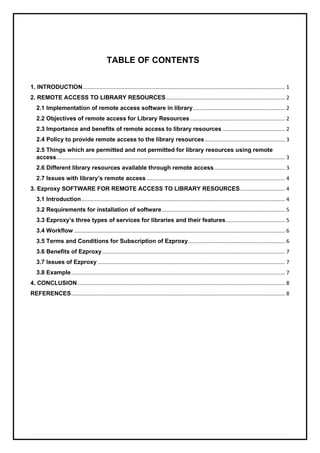
TABLE OF CONTENTS
1. INTRODUCTION........................................................................................................................................ 1
2. REMOTE ACCESS TO LIBRARY RESOURCES................................................................................ 2
2.1 Implementation of remote access software in library.............................................................. 2
2.2 Objectives of remote access for Library Resources................................................................ 2
2.3 Importance and benefits of remote access to library resources .......................................... 2
2.4 Policy to provide remote access to the library resources...................................................... 3
2.5 Things which are permitted and not permitted for library resources using remote
access.......................................................................................................................................................... 3
2.6 Different library resources available through remote access................................................ 3
2.7 Issues with library’s remote access ............................................................................................. 4
3. Ezproxy SOFTWARE FOR REMOTE ACCESS TO LIBRARY RESOURCES.............................. 4
3.1 Introduction......................................................................................................................................... 4
3.2 Requirements for installation of software................................................................................... 5
3.3 Ezproxy’s three types of services for libraries and their features........................................ 5
3.4 Workflow .............................................................................................................................................. 6
3.5 Terms and Conditions for Subscription of Ezproxy................................................................. 6
3.6 Benefits of Ezproxy........................................................................................................................... 7
3.7 Issues of Ezproxy .............................................................................................................................. 7
3.8 Example................................................................................................................................................ 7
4. CONCLUSION............................................................................................................................................ 8
REFERENCES................................................................................................................................................ 8
1 | P a g e
1. Explain remote access to library resources? Describe any one software available
for the same.
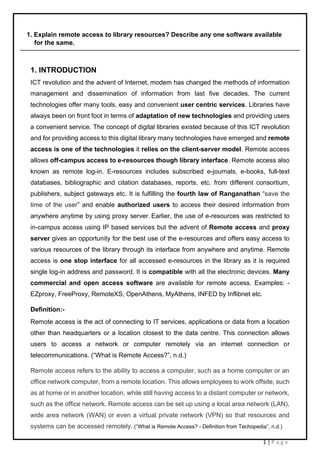
1. INTRODUCTION
ICT revolution and the advent of Internet, modem has changed the methods of information
management and dissemination of information from last five decades. The current
technologies offer many tools, easy and convenient user centric services. Libraries have
always been on front foot in terms of adaptation of new technologies and providing users
a convenient service. The concept of digital libraries existed because of this ICT revolution
and for providing access to this digital library many technologies have emerged and remote
access is one of the technologies it relies on the client-server model. Remote access
allows off-campus access to e-resources though library interface. Remote access also
known as remote log-in. E-resources includes subscribed e-journals, e-books, full-text
databases, bibliographic and citation databases, reports, etc. from different consortium,
publishers, subject gateways etc. It is fulfilling the fourth law of Ranganathan “save the
time of the user” and enable authorized users to access their desired information from
anywhere anytime by using proxy server. Earlier, the use of e-resources was restricted to
in-campus access using IP based services but the advent of Remote access and proxy
server gives an opportunity for the best use of the e-resources and offers easy access to
various resources of the library through its interface from anywhere and anytime. Remote
access is one stop interface for all accessed e-resources in the library as it is required
single log-in address and password. It is compatible with all the electronic devices. Many
commercial and open access software are available for remote access. Examples: -
EZproxy, FreeProxy, RemoteXS, OpenAthens, MyAthens, INFED by Inflibnet etc.
Definition:-
Remote access is the act of connecting to IT services, applications or data from a location
other than headquarters or a location closest to the data centre. This connection allows
users to access a network or computer remotely via an internet connection or
telecommunications. (“What is Remote Access?”, n.d.)
Remote access refers to the ability to access a computer, such as a home computer or an
office network computer, from a remote location. This allows employees to work offsite, such
as at home or in another location, while still having access to a distant computer or network,
such as the office network. Remote access can be set up using a local area network (LAN),
wide area network (WAN) or even a virtual private network (VPN) so that resources and
systems can be accessed remotely. (“What is Remote Access? - Definition from Techopedia”, n.d.)
2 | P a g e
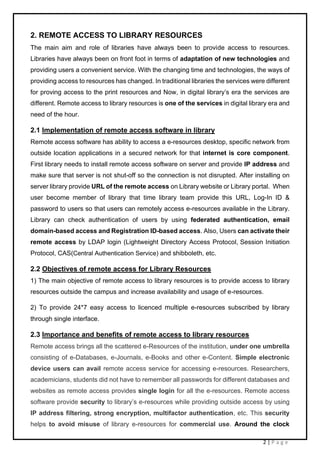
2. REMOTE ACCESS TO LIBRARY RESOURCES
The main aim and role of libraries have always been to provide access to resources.
Libraries have always been on front foot in terms of adaptation of new technologies and
providing users a convenient service. With the changing time and technologies, the ways of
providing access to resources has changed. In traditional libraries the services were different
for proving access to the print resources and Now, in digital library’s era the services are
different. Remote access to library resources is one of the services in digital library era and
need of the hour.
2.1 Implementation of remote access software in library
Remote access software has ability to access a e-resources desktop, specific network from
outside location applications in a secured network for that internet is core component.
First library needs to install remote access software on server and provide IP address and
make sure that server is not shut-off so the connection is not disrupted. After installing on
server library provide URL of the remote access on Library website or Library portal. When
user become member of library that time library team provide this URL, Log-In ID &
password to users so that users can remotely access e-resources available in the Library.
Library can check authentication of users by using federated authentication, email
domain-based access and Registration ID-based access. Also, Users can activate their
remote access by LDAP login (Lightweight Directory Access Protocol, Session Initiation
Protocol, CAS(Central Authentication Service) and shibboleth, etc.
2.2 Objectives of remote access for Library Resources
1) The main objective of remote access to library resources is to provide access to library
resources outside the campus and increase availability and usage of e-resources.
2) To provide 24*7 easy access to licenced multiple e-resources subscribed by library
through single interface.
2.3 Importance and benefits of remote access to library resources
Remote access brings all the scattered e-Resources of the institution, under one umbrella
consisting of e-Databases, e-Journals, e-Books and other e-Content. Simple electronic
device users can avail remote access service for accessing e-resources. Researchers,
academicians, students did not have to remember all passwords for different databases and
websites as remote access provides single login for all the e-resources. Remote access
software provide security to library’s e-resources while providing outside access by using
IP address filtering, strong encryption, multifactor authentication, etc. This security
helps to avoid misuse of library e-resources for commercial use. Around the clock
3 | P a g e
availability of licensed e-resources due to remote access has increased the efficient use
and usage of e-resources. Remote access helps LIS professionals to do administrative
work of library from home by using library resources as it generates usage of reports
which helps for identification of popular resources outside the library environment and
helps library to acquire similar resources of the most used e-resources. Remote
access is beneficial for physically challenged people as they can use this facility from their
home. Online courses/ Distance Education are increasing popularity because of remote
access to e-resources.
2.4 Policy to provide remote access to the library resources
Remote access policies for library resources provide guidelines to prevent data misuse or
mishandling. Policies also offer guidance to the remote user and set expectations that
identify issues such as anti-malware and operational system requirements, firewalls, and
password protection. Hardware and software configuration standards for remote access,
including anti-malware, firewalls, and antivirus. Libraries need to provide policies for
Connectivity guidelines, Physical and virtual device security, Information security,
confidentiality, and email policies, etc.
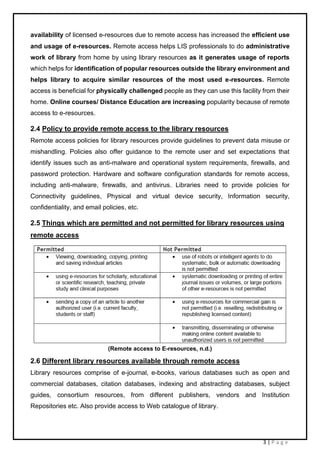
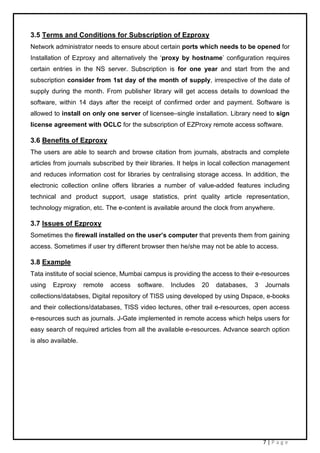
2.5 Things which are permitted and not permitted for library resources using
remote access
(Remote access to E-resources, n.d.)
2.6 Different library resources available through remote access
Library resources comprise of e-journal, e-books, various databases such as open and
commercial databases, citation databases, indexing and abstracting databases, subject
guides, consortium resources, from different publishers, vendors and Institution
Repositories etc. Also provide access to Web catalogue of library.
4 | P a g e
2.7 Issues with library’s remote access
Libraries that lack the infrastructure to provide security appliances and technology may
face the problem while giving remote access to resources. Misuse of Log-ID credentials
by systematic downloading or printing of entire journal issues e-books may cause problem
for library resources as publishers can cancel the access of resources. Sometimes the
firewall installed on the user’s computer that prevents them from gaining access. Also, it
can be a problem with the database vendor’s server or the link to the database interface
changed causing problems connecting.
Example: - In COVID-19 pandemic, LIS professionals could actually work without any
difficulties as they are able provide access to the e-resources and could give proper
guidance to the researchers, students, academicians to continue their study using remote
access. Continued updated their users about news, articles, etc.
3. Ezproxy SOFTWARE FOR REMOTE ACCESS TO LIBRARY RESOURCES
3.1 Introduction
Logo: -
Price: - Approximately US$ 400 (Baikady,2014)
There are different commercial and open access “remote access” software available for
libraries. Most widely used remote access software is Ezproxy. Ezproxy is a commercial
software. Ezproxy is a web proxy server which provide access to licenced library resources
from outside of the campus. It is also referred as “proxy referral” server. The purpose
of EZproxy is to create one set of webpages that can be used by both on-site and off-site
users to gain access to licensed databases. Allows library’s computer network to restricted
access websites that authenticate users by IP address. Authentic users can log in through
their library’s Ezproxy server and can access to resources. The software written by Chris
Zagar in 1999 later in 2008 OCLC acquire the product from Useful Utilities of Peoria,
Arizona. Harvard and MIT Universities were among the first to sign up for Ezproxy.
Ezproxy is a URL rewriting programme which works by dynamically altering the URLs
within the web pages provided by the database vendors. Ezproxy server is easy to access,
use, maintain and authenticate.
More than 2,400 institutions in over 60 countries have installed EZproxy software. In
2008 Ezproxy’s version 5.0 was released. In 2014, the Ezproxy server upgraded and moved
to Red Hat Linux. Ezproxy’s latest version 7.0.16 was released in April 2020 supports
Linux and Windows operating systems and moved to 64-bit. Cloud based version and
localhost version are available for hosting Ezproxy server.
5 | P a g e
Ezproxy uses proxy server and through a proxy server “EZproxy software” allows libraries
to manage, access and authentication of configurations. Therefore, library users do not have
to make any configuration changes to their personal Web browsers. Proxy server acts as
intermediary between the web browsers and server, and play vital role between the two
ends of a user server network connection. By working with commercial vendors to create
new connectors to authentication systems OCLC develop and support EZproxy and
online content resources to libraries.
3.2 Requirements for installation of software
EZproxy is support Linux, and Windows operating system. Permission needs to be
taken from authority and file structure, URL rewriting program, Authentication system, IP
proxy server needs to be understood. Library need to configure DNS and Firewall. IP
address needs to be provided. Authentication method by which database content provides
will access their resources such as IP address recognition. Support IPv6. Modems for
analog connections, ISDN terminal adapters for ISDN connections is required.
1) Linux requires x86-64 distribution of Linux running a 2.2 or later kernel. By using
“uname -a” one can check the version of Linux kernel. EZproxy for Linux server
recommend configuration are: a minimum of Pentium II 400 with 256 MB of RAM. For
installation 10 MB of disk space is required and user authentication files and server log
file needed extra space so that additional disk is required.
2) Ezproxy support versions of Windows and Windows server. WOW64 is required for
Ezproxy’s version prior to 7.0. For windows sever all the configuration are same as Linux
sever. * link to Install and update Ezproxy software*
https://help.oclc.org/Library_Management/EZproxy/Install_and_update_EZproxy
3.3 Ezproxy’s three types of services for libraries and their features
Ezproxy has three different services for libraries and each of this has different role and
functions to play. These are 1) Ezproxy hosted 2) Ezproxy hosted + Ezproxy Analytics
3) Ezproxy stand-alone.
Ezproxy hosted: A fully managed access and authentication service for libraries ensure to
be more agile and access with less requirements. Ensure seamless access by server
maintenance, software upgradation, stanza updates, and SSL certificate management.
Support variety of authentication methods such as LDAP, CAS, SIP, etc. Protect user privacy
and secure e-content. Easy migration from stand-alone. Real-time call out to a security API
that validates IP addresses. 24/7 reliability for e-content access and has responsive user
interface.
6 | P a g e
Ezproxy hosted + Ezproxy Analytics: EZproxy Analytics is currently only available for
the hosted service not for stand-alone service. In addition to Ezproxy host services,
Ezproxy Analytics service for libraries that calculate the statistics of e-resource usage. It
is Easy-to-read view of e-resource usage across all subscriptions and can create custom
reports and visualizations. Provide advanced search features, also has ability to create
custom reports and visualizations, also support features like share and export.
Dashboards with insights on collection development, research support, security.
Ezproxy stand-alone
The EZproxy stand-alone service is for libraries that want to run EZproxy on their own Linux
or Windows servers. It is used and trusted by thousands of libraries around the world. It
Connects to nearly all content providers. Integrates with a variety of library systems and
Provides the latest version of OpenSSL.
3.4 Workflow
Ezproxy is accessed using an HTTP request. For URL rewriting proxy servers EZproxy does
not require browser configuration. These proxy servers change the URLs in web pages so
that requests for web pages from licensed databases. URL rewriting by using this URL only
user can log-in to the library resources and this authenticate the authorized user. URL
rewriting proxy servers use strategies to map "real URLs" such as they prefixed real URLs
with “ezproxy”. Example : https://ezproxy.tiss.edu/login - TISS, Mumbai. In campus, library's
IP address checked against registered IP addresses that are allowed to access content. But
outside the user’s IP address is not the same as the library's and here EZproxy works as an
intermediary between your users and the databases. Ezproxy authenticate user’s Identity
by using log-In credentials. Then direct their request on to the content provider with
EZproxy's IP address then content provider matches the registered IP address and (Proxy
URL) EZproxy's IP address. And provide the content to the users.
Fig 3.1 Off-campus IP Authorization with Ezproxy (OCLC,n.d.)
7 | P a g e
3.5 Terms and Conditions for Subscription of Ezproxy
Network administrator needs to ensure about certain ports which needs to be opened for
Installation of Ezproxy and alternatively the ‘proxy by hostname’ configuration requires
certain entries in the NS server. Subscription is for one year and start from the and
subscription consider from 1st day of the month of supply, irrespective of the date of
supply during the month. From publisher library will get access details to download the
software, within 14 days after the receipt of confirmed order and payment. Software is
allowed to install on only one server of licensee–single installation. Library need to sign
license agreement with OCLC for the subscription of EZProxy remote access software.
3.6 Benefits of Ezproxy
The users are able to search and browse citation from journals, abstracts and complete
articles from journals subscribed by their libraries. It helps in local collection management
and reduces information cost for libraries by centralising storage access. In addition, the
electronic collection online offers libraries a number of value-added features including
technical and product support, usage statistics, print quality article representation,
technology migration, etc. The e-content is available around the clock from anywhere.
3.7 Issues of Ezproxy
Sometimes the firewall installed on the user’s computer that prevents them from gaining
access. Sometimes if user try different browser then he/she may not be able to access.
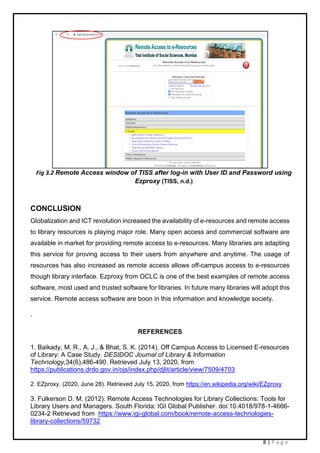
3.8 Example
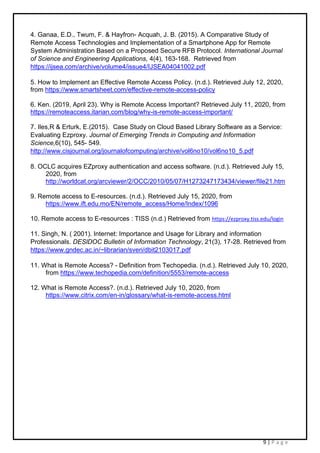
Tata institute of social science, Mumbai campus is providing the access to their e-resources
using Ezproxy remote access software. Includes 20 databases, 3 Journals
collections/databses, Digital repository of TISS using developed by using Dspace, e-books
and their collections/databases, TISS video lectures, other trail e-resources, open access
e-resources such as journals. J-Gate implemented in remote access which helps users for
easy search of required articles from all the available e-resources. Advance search option
is also available.
8 | P a g e
Fig 3.2 Remote Access window of TISS after log-in with User ID and Password using
Ezproxy (TISS, n.d.)
CONCLUSION
Globalization and ICT revolution increased the availability of e-resources and remote access
to library resources is playing major role. Many open access and commercial software are
available in market for providing remote access to e-resources. Many libraries are adapting
this service for proving access to their users from anywhere and anytime. The usage of
resources has also increased as remote access allows off-campus access to e-resources
though library interface. Ezproxy from OCLC is one of the best examples of remote access
software, most used and trusted software for libraries. In future many libraries will adopt this
service. Remote access software are boon in this information and knowledge society.
.
REFERENCES
1. Baikady, M. R., A, J., & Bhat, S. K. (2014). Off Campus Access to Licensed E-resources
of Library: A Case Study. DESIDOC Journal of Library & Information
Technology,34(6),486-490. Retrieved July 13, 2020, from
https://publications.drdo.gov.in/ojs/index.php/djlit/article/view/7509/4703
2. EZproxy. (2020, June 28). Retrieved July 15, 2020, from https://en.wikipedia.org/wiki/EZproxy
3. Fulkerson D. M. (2012). Remote Access Technologies for Library Collections: Tools for
Library Users and Managers. South Florida: IGI Global Publisher. doi:10.4018/978-1-4666-
0234-2 Retrieved from https://www.igi-global.com/book/remote-access-technologies-
library-collections/59732
9 | P a g e
4. Ganaa, E.D., Twum, F. & Hayfron- Acquah, J. B. (2015). A Comparative Study of
Remote Access Technologies and Implementation of a Smartphone App for Remote
System Administration Based on a Proposed Secure RFB Protocol. International Journal
of Science and Engineering Applications, 4(4), 163-168. Retrieved from
https://ijsea.com/archive/volume4/issue4/IJSEA04041002.pdf
5. How to Implement an Effective Remote Access Policy. (n.d.). Retrieved July 12, 2020,
from https://www.smartsheet.com/effective-remote-access-policy
6. Ken. (2019, April 23). Why is Remote Access Important? Retrieved July 11, 2020, from
https://remoteaccess.itarian.com/blog/why-is-remote-access-important/
7. Iles,R & Erturk, E.(2015). Case Study on Cloud Based Library Software as a Service:
Evaluating Ezproxy. Journal of Emerging Trends in Computing and Information
Science,6(10), 545- 549.
http://www.cisjournal.org/journalofcomputing/archive/vol6no10/vol6no10_5.pdf
8. OCLC acquires EZproxy authentication and access software. (n.d.). Retrieved July 15,
2020, from
http://worldcat.org/arcviewer/2/OCC/2010/05/07/H1273247173434/viewer/file21.htm
9. Remote access to E-resources. (n.d.). Retrieved July 15, 2020, from
https://www.ift.edu.mo/EN/remote_access/Home/Index/1096
10. Remote access to E-resources : TISS (n.d.) Retrieved from https://ezproxy.tiss.edu/login
11. Singh, N. ( 2001). Internet: Importance and Usage for Library and information
Professionals. DESlDOC Bulletin of Information Technology, 21(3), 17-28. Retrieved from
https://www.gndec.ac.in/~librarian/sveri/dbit2103017.pdf
11. What is Remote Access? - Definition from Techopedia. (n.d.). Retrieved July 10, 2020,
from https://www.techopedia.com/definition/5553/remote-access
12. What is Remote Access?. (n.d.). Retrieved July 10, 2020, from
https://www.citrix.com/en-in/glossary/what-is-remote-access.html

EXPLAIN REMOTE ACCESS TO LIBRARY RESOURCES? DESCRIBE ANY ONE SOFTWARE AVAILABLE FOR THE SAME.

  • 1.
    SEMESTER-II DL06 – InformationAccess and Services ASSIGNMENT – B2 EXPLAIN REMOTE ACCESS TO LIBRARY RESOURCES? DESCRIBE ANY ONE SOFTWARE AVAILABLE FOR THE SAME. By Shweta Ravindra Bhavsar Roll No - (2019PGDLIM020) (2019-2020) Centre for Library and Information Management Studies Sir Dorabji Tata Memorial Library Tata Institute of Social Sciences, Mumbai
  • 2.
    TABLE OF CONTENTS 1.INTRODUCTION........................................................................................................................................ 1 2. REMOTE ACCESS TO LIBRARY RESOURCES................................................................................ 2 2.1 Implementation of remote access software in library.............................................................. 2 2.2 Objectives of remote access for Library Resources................................................................ 2 2.3 Importance and benefits of remote access to library resources .......................................... 2 2.4 Policy to provide remote access to the library resources...................................................... 3 2.5 Things which are permitted and not permitted for library resources using remote access.......................................................................................................................................................... 3 2.6 Different library resources available through remote access................................................ 3 2.7 Issues with library’s remote access ............................................................................................. 4 3. Ezproxy SOFTWARE FOR REMOTE ACCESS TO LIBRARY RESOURCES.............................. 4 3.1 Introduction......................................................................................................................................... 4 3.2 Requirements for installation of software................................................................................... 5 3.3 Ezproxy’s three types of services for libraries and their features........................................ 5 3.4 Workflow .............................................................................................................................................. 6 3.5 Terms and Conditions for Subscription of Ezproxy................................................................. 6 3.6 Benefits of Ezproxy........................................................................................................................... 7 3.7 Issues of Ezproxy .............................................................................................................................. 7 3.8 Example................................................................................................................................................ 7 4. CONCLUSION............................................................................................................................................ 8 REFERENCES................................................................................................................................................ 8
  • 3.
    1 | Pa g e 1. Explain remote access to library resources? Describe any one software available for the same. 1. INTRODUCTION ICT revolution and the advent of Internet, modem has changed the methods of information management and dissemination of information from last five decades. The current technologies offer many tools, easy and convenient user centric services. Libraries have always been on front foot in terms of adaptation of new technologies and providing users a convenient service. The concept of digital libraries existed because of this ICT revolution and for providing access to this digital library many technologies have emerged and remote access is one of the technologies it relies on the client-server model. Remote access allows off-campus access to e-resources though library interface. Remote access also known as remote log-in. E-resources includes subscribed e-journals, e-books, full-text databases, bibliographic and citation databases, reports, etc. from different consortium, publishers, subject gateways etc. It is fulfilling the fourth law of Ranganathan “save the time of the user” and enable authorized users to access their desired information from anywhere anytime by using proxy server. Earlier, the use of e-resources was restricted to in-campus access using IP based services but the advent of Remote access and proxy server gives an opportunity for the best use of the e-resources and offers easy access to various resources of the library through its interface from anywhere and anytime. Remote access is one stop interface for all accessed e-resources in the library as it is required single log-in address and password. It is compatible with all the electronic devices. Many commercial and open access software are available for remote access. Examples: - EZproxy, FreeProxy, RemoteXS, OpenAthens, MyAthens, INFED by Inflibnet etc. Definition:- Remote access is the act of connecting to IT services, applications or data from a location other than headquarters or a location closest to the data centre. This connection allows users to access a network or computer remotely via an internet connection or telecommunications. (“What is Remote Access?”, n.d.) Remote access refers to the ability to access a computer, such as a home computer or an office network computer, from a remote location. This allows employees to work offsite, such as at home or in another location, while still having access to a distant computer or network, such as the office network. Remote access can be set up using a local area network (LAN), wide area network (WAN) or even a virtual private network (VPN) so that resources and systems can be accessed remotely. (“What is Remote Access? - Definition from Techopedia”, n.d.)
  • 4.
    2 | Pa g e 2. REMOTE ACCESS TO LIBRARY RESOURCES The main aim and role of libraries have always been to provide access to resources. Libraries have always been on front foot in terms of adaptation of new technologies and providing users a convenient service. With the changing time and technologies, the ways of providing access to resources has changed. In traditional libraries the services were different for proving access to the print resources and Now, in digital library’s era the services are different. Remote access to library resources is one of the services in digital library era and need of the hour. 2.1 Implementation of remote access software in library Remote access software has ability to access a e-resources desktop, specific network from outside location applications in a secured network for that internet is core component. First library needs to install remote access software on server and provide IP address and make sure that server is not shut-off so the connection is not disrupted. After installing on server library provide URL of the remote access on Library website or Library portal. When user become member of library that time library team provide this URL, Log-In ID & password to users so that users can remotely access e-resources available in the Library. Library can check authentication of users by using federated authentication, email domain-based access and Registration ID-based access. Also, Users can activate their remote access by LDAP login (Lightweight Directory Access Protocol, Session Initiation Protocol, CAS(Central Authentication Service) and shibboleth, etc. 2.2 Objectives of remote access for Library Resources 1) The main objective of remote access to library resources is to provide access to library resources outside the campus and increase availability and usage of e-resources. 2) To provide 24*7 easy access to licenced multiple e-resources subscribed by library through single interface. 2.3 Importance and benefits of remote access to library resources Remote access brings all the scattered e-Resources of the institution, under one umbrella consisting of e-Databases, e-Journals, e-Books and other e-Content. Simple electronic device users can avail remote access service for accessing e-resources. Researchers, academicians, students did not have to remember all passwords for different databases and websites as remote access provides single login for all the e-resources. Remote access software provide security to library’s e-resources while providing outside access by using IP address filtering, strong encryption, multifactor authentication, etc. This security helps to avoid misuse of library e-resources for commercial use. Around the clock
  • 5.
    3 | Pa g e availability of licensed e-resources due to remote access has increased the efficient use and usage of e-resources. Remote access helps LIS professionals to do administrative work of library from home by using library resources as it generates usage of reports which helps for identification of popular resources outside the library environment and helps library to acquire similar resources of the most used e-resources. Remote access is beneficial for physically challenged people as they can use this facility from their home. Online courses/ Distance Education are increasing popularity because of remote access to e-resources. 2.4 Policy to provide remote access to the library resources Remote access policies for library resources provide guidelines to prevent data misuse or mishandling. Policies also offer guidance to the remote user and set expectations that identify issues such as anti-malware and operational system requirements, firewalls, and password protection. Hardware and software configuration standards for remote access, including anti-malware, firewalls, and antivirus. Libraries need to provide policies for Connectivity guidelines, Physical and virtual device security, Information security, confidentiality, and email policies, etc. 2.5 Things which are permitted and not permitted for library resources using remote access (Remote access to E-resources, n.d.) 2.6 Different library resources available through remote access Library resources comprise of e-journal, e-books, various databases such as open and commercial databases, citation databases, indexing and abstracting databases, subject guides, consortium resources, from different publishers, vendors and Institution Repositories etc. Also provide access to Web catalogue of library.
  • 6.
    4 | Pa g e 2.7 Issues with library’s remote access Libraries that lack the infrastructure to provide security appliances and technology may face the problem while giving remote access to resources. Misuse of Log-ID credentials by systematic downloading or printing of entire journal issues e-books may cause problem for library resources as publishers can cancel the access of resources. Sometimes the firewall installed on the user’s computer that prevents them from gaining access. Also, it can be a problem with the database vendor’s server or the link to the database interface changed causing problems connecting. Example: - In COVID-19 pandemic, LIS professionals could actually work without any difficulties as they are able provide access to the e-resources and could give proper guidance to the researchers, students, academicians to continue their study using remote access. Continued updated their users about news, articles, etc. 3. Ezproxy SOFTWARE FOR REMOTE ACCESS TO LIBRARY RESOURCES 3.1 Introduction Logo: - Price: - Approximately US$ 400 (Baikady,2014) There are different commercial and open access “remote access” software available for libraries. Most widely used remote access software is Ezproxy. Ezproxy is a commercial software. Ezproxy is a web proxy server which provide access to licenced library resources from outside of the campus. It is also referred as “proxy referral” server. The purpose of EZproxy is to create one set of webpages that can be used by both on-site and off-site users to gain access to licensed databases. Allows library’s computer network to restricted access websites that authenticate users by IP address. Authentic users can log in through their library’s Ezproxy server and can access to resources. The software written by Chris Zagar in 1999 later in 2008 OCLC acquire the product from Useful Utilities of Peoria, Arizona. Harvard and MIT Universities were among the first to sign up for Ezproxy. Ezproxy is a URL rewriting programme which works by dynamically altering the URLs within the web pages provided by the database vendors. Ezproxy server is easy to access, use, maintain and authenticate. More than 2,400 institutions in over 60 countries have installed EZproxy software. In 2008 Ezproxy’s version 5.0 was released. In 2014, the Ezproxy server upgraded and moved to Red Hat Linux. Ezproxy’s latest version 7.0.16 was released in April 2020 supports Linux and Windows operating systems and moved to 64-bit. Cloud based version and localhost version are available for hosting Ezproxy server.
  • 7.
    5 | Pa g e Ezproxy uses proxy server and through a proxy server “EZproxy software” allows libraries to manage, access and authentication of configurations. Therefore, library users do not have to make any configuration changes to their personal Web browsers. Proxy server acts as intermediary between the web browsers and server, and play vital role between the two ends of a user server network connection. By working with commercial vendors to create new connectors to authentication systems OCLC develop and support EZproxy and online content resources to libraries. 3.2 Requirements for installation of software EZproxy is support Linux, and Windows operating system. Permission needs to be taken from authority and file structure, URL rewriting program, Authentication system, IP proxy server needs to be understood. Library need to configure DNS and Firewall. IP address needs to be provided. Authentication method by which database content provides will access their resources such as IP address recognition. Support IPv6. Modems for analog connections, ISDN terminal adapters for ISDN connections is required. 1) Linux requires x86-64 distribution of Linux running a 2.2 or later kernel. By using “uname -a” one can check the version of Linux kernel. EZproxy for Linux server recommend configuration are: a minimum of Pentium II 400 with 256 MB of RAM. For installation 10 MB of disk space is required and user authentication files and server log file needed extra space so that additional disk is required. 2) Ezproxy support versions of Windows and Windows server. WOW64 is required for Ezproxy’s version prior to 7.0. For windows sever all the configuration are same as Linux sever. * link to Install and update Ezproxy software* https://help.oclc.org/Library_Management/EZproxy/Install_and_update_EZproxy 3.3 Ezproxy’s three types of services for libraries and their features Ezproxy has three different services for libraries and each of this has different role and functions to play. These are 1) Ezproxy hosted 2) Ezproxy hosted + Ezproxy Analytics 3) Ezproxy stand-alone. Ezproxy hosted: A fully managed access and authentication service for libraries ensure to be more agile and access with less requirements. Ensure seamless access by server maintenance, software upgradation, stanza updates, and SSL certificate management. Support variety of authentication methods such as LDAP, CAS, SIP, etc. Protect user privacy and secure e-content. Easy migration from stand-alone. Real-time call out to a security API that validates IP addresses. 24/7 reliability for e-content access and has responsive user interface.
  • 8.
    6 | Pa g e Ezproxy hosted + Ezproxy Analytics: EZproxy Analytics is currently only available for the hosted service not for stand-alone service. In addition to Ezproxy host services, Ezproxy Analytics service for libraries that calculate the statistics of e-resource usage. It is Easy-to-read view of e-resource usage across all subscriptions and can create custom reports and visualizations. Provide advanced search features, also has ability to create custom reports and visualizations, also support features like share and export. Dashboards with insights on collection development, research support, security. Ezproxy stand-alone The EZproxy stand-alone service is for libraries that want to run EZproxy on their own Linux or Windows servers. It is used and trusted by thousands of libraries around the world. It Connects to nearly all content providers. Integrates with a variety of library systems and Provides the latest version of OpenSSL. 3.4 Workflow Ezproxy is accessed using an HTTP request. For URL rewriting proxy servers EZproxy does not require browser configuration. These proxy servers change the URLs in web pages so that requests for web pages from licensed databases. URL rewriting by using this URL only user can log-in to the library resources and this authenticate the authorized user. URL rewriting proxy servers use strategies to map "real URLs" such as they prefixed real URLs with “ezproxy”. Example : https://ezproxy.tiss.edu/login - TISS, Mumbai. In campus, library's IP address checked against registered IP addresses that are allowed to access content. But outside the user’s IP address is not the same as the library's and here EZproxy works as an intermediary between your users and the databases. Ezproxy authenticate user’s Identity by using log-In credentials. Then direct their request on to the content provider with EZproxy's IP address then content provider matches the registered IP address and (Proxy URL) EZproxy's IP address. And provide the content to the users. Fig 3.1 Off-campus IP Authorization with Ezproxy (OCLC,n.d.)
  • 9.
    7 | Pa g e 3.5 Terms and Conditions for Subscription of Ezproxy Network administrator needs to ensure about certain ports which needs to be opened for Installation of Ezproxy and alternatively the ‘proxy by hostname’ configuration requires certain entries in the NS server. Subscription is for one year and start from the and subscription consider from 1st day of the month of supply, irrespective of the date of supply during the month. From publisher library will get access details to download the software, within 14 days after the receipt of confirmed order and payment. Software is allowed to install on only one server of licensee–single installation. Library need to sign license agreement with OCLC for the subscription of EZProxy remote access software. 3.6 Benefits of Ezproxy The users are able to search and browse citation from journals, abstracts and complete articles from journals subscribed by their libraries. It helps in local collection management and reduces information cost for libraries by centralising storage access. In addition, the electronic collection online offers libraries a number of value-added features including technical and product support, usage statistics, print quality article representation, technology migration, etc. The e-content is available around the clock from anywhere. 3.7 Issues of Ezproxy Sometimes the firewall installed on the user’s computer that prevents them from gaining access. Sometimes if user try different browser then he/she may not be able to access. 3.8 Example Tata institute of social science, Mumbai campus is providing the access to their e-resources using Ezproxy remote access software. Includes 20 databases, 3 Journals collections/databses, Digital repository of TISS using developed by using Dspace, e-books and their collections/databases, TISS video lectures, other trail e-resources, open access e-resources such as journals. J-Gate implemented in remote access which helps users for easy search of required articles from all the available e-resources. Advance search option is also available.
  • 10.
    8 | Pa g e Fig 3.2 Remote Access window of TISS after log-in with User ID and Password using Ezproxy (TISS, n.d.) CONCLUSION Globalization and ICT revolution increased the availability of e-resources and remote access to library resources is playing major role. Many open access and commercial software are available in market for providing remote access to e-resources. Many libraries are adapting this service for proving access to their users from anywhere and anytime. The usage of resources has also increased as remote access allows off-campus access to e-resources though library interface. Ezproxy from OCLC is one of the best examples of remote access software, most used and trusted software for libraries. In future many libraries will adopt this service. Remote access software are boon in this information and knowledge society. . REFERENCES 1. Baikady, M. R., A, J., & Bhat, S. K. (2014). Off Campus Access to Licensed E-resources of Library: A Case Study. DESIDOC Journal of Library & Information Technology,34(6),486-490. Retrieved July 13, 2020, from https://publications.drdo.gov.in/ojs/index.php/djlit/article/view/7509/4703 2. EZproxy. (2020, June 28). Retrieved July 15, 2020, from https://en.wikipedia.org/wiki/EZproxy 3. Fulkerson D. M. (2012). Remote Access Technologies for Library Collections: Tools for Library Users and Managers. South Florida: IGI Global Publisher. doi:10.4018/978-1-4666- 0234-2 Retrieved from https://www.igi-global.com/book/remote-access-technologies- library-collections/59732
  • 11.
    9 | Pa g e 4. Ganaa, E.D., Twum, F. & Hayfron- Acquah, J. B. (2015). A Comparative Study of Remote Access Technologies and Implementation of a Smartphone App for Remote System Administration Based on a Proposed Secure RFB Protocol. International Journal of Science and Engineering Applications, 4(4), 163-168. Retrieved from https://ijsea.com/archive/volume4/issue4/IJSEA04041002.pdf 5. How to Implement an Effective Remote Access Policy. (n.d.). Retrieved July 12, 2020, from https://www.smartsheet.com/effective-remote-access-policy 6. Ken. (2019, April 23). Why is Remote Access Important? Retrieved July 11, 2020, from https://remoteaccess.itarian.com/blog/why-is-remote-access-important/ 7. Iles,R & Erturk, E.(2015). Case Study on Cloud Based Library Software as a Service: Evaluating Ezproxy. Journal of Emerging Trends in Computing and Information Science,6(10), 545- 549. http://www.cisjournal.org/journalofcomputing/archive/vol6no10/vol6no10_5.pdf 8. OCLC acquires EZproxy authentication and access software. (n.d.). Retrieved July 15, 2020, from http://worldcat.org/arcviewer/2/OCC/2010/05/07/H1273247173434/viewer/file21.htm 9. Remote access to E-resources. (n.d.). Retrieved July 15, 2020, from https://www.ift.edu.mo/EN/remote_access/Home/Index/1096 10. Remote access to E-resources : TISS (n.d.) Retrieved from https://ezproxy.tiss.edu/login 11. Singh, N. ( 2001). Internet: Importance and Usage for Library and information Professionals. DESlDOC Bulletin of Information Technology, 21(3), 17-28. Retrieved from https://www.gndec.ac.in/~librarian/sveri/dbit2103017.pdf 11. What is Remote Access? - Definition from Techopedia. (n.d.). Retrieved July 10, 2020, from https://www.techopedia.com/definition/5553/remote-access 12. What is Remote Access?. (n.d.). Retrieved July 10, 2020, from https://www.citrix.com/en-in/glossary/what-is-remote-access.html