Productivity


               by   Richard Diver
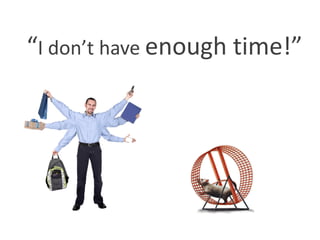
“I don’t have enough time!”
I got that done
                “just in time”
“I have an
understanding
family”
Lifestyle | Balance
Are these problems created by the person?
                  Or by the work culture?


Working longer hours = better results?
                  Or just a perception?
“Drinking from the Fire-Hose”
 There’s too much information
 coming at me too fast!
I don’t like Organisation, it’s too stiff – I’m Creative!
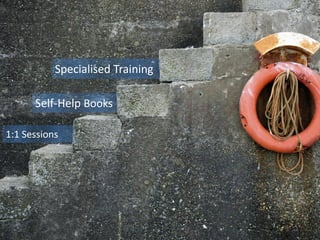
Specialised Training

      Self-Help Books

1:1 Sessions
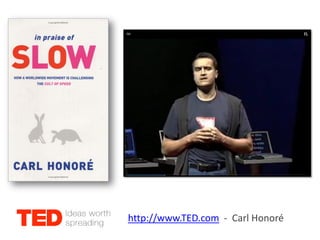
http://www.TED.com - Carl Honoré
Effective Email Management

Productive Time Management

Tracking Information
To Learn
 You Don’t Know what You Don’t Know.
    Unconscious    -    Incompetent

    Conscious      -    Incompetent

    Conscious      -    Competent

    Unconscious    -    Competent
A System of Productivity
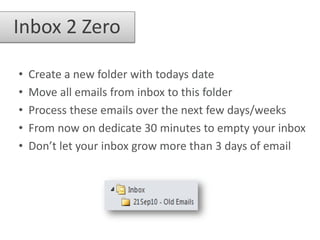
Inbox 2 Zero

•   Create a new folder with todays date
•   Move all emails from inbox to this folder
•   Process these emails over the next few days/weeks
•   From now on dedicate 30 minutes to empty your inbox
•   Don’t let your inbox grow more than 3 days of email
Reduce incoming flow

• Create a new folder called .Inbox-Other
• Create a rule to move all mail here, except if you are on
  the To. Or Cc. line
• Allows you to focus on important/actionable emails
• This folder should still be emptied each day
Big clean out
• If your rules have become unmanageable, delete them
  all and create this new one:
Email filter & rules
• Create new rules to automatically handle routine
  emails that come into .Inbox-Other

• Example: All emails sent To: WORKLIFE, move to a
  folder called “WLB Discussions”

• To prevent duplicate emails, ensure every rule
  includes:     “and stop processing more rules”

• Clean up your rules to ensure they process in the
  correct order and minimise the complexity
Process Information
 • To prevent missing important information, use favourites as
   a dashboard:


 • Add/Remove folders depending on current priorities

 • All Unread Mail should be kept low, less than 100 is good
Take Control
        Do it


                Defer it


                           Delegate it


                                     Delete it


                                                 File it
Reduce Distractions & Focus
Disable Notifications
   • Click on the Outlook Taskbar Icon:
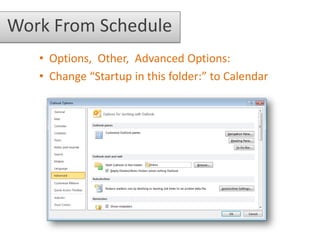
Work From Schedule
   • Options, Other, Advanced Options:
   • Change “Startup in this folder:” to Calendar
“Time is Money”


      …so spend it wisely!
Routine = Productivity

           Plan


Review

                  Action
Baseline Calendar

 Include regular activities such as:

    •   Travel, Expenses, Training
    •   Exercise: Yoga, Running, Gym
    •   Processing Email, Reading RSS Feeds
    •   Meetings: Email/Phone/In-Person
    •   Projects, Research, Documentation
    •   And don’t forget: LUNCH!
Baseline Calendar
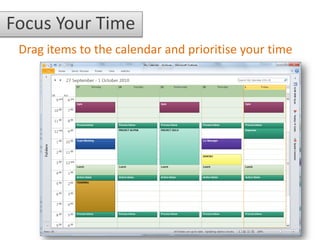
Focus Your Time
 Drag items to the calendar and prioritise your time
Remember the following:


  Divide your time into chunks

  Reduced Distractions

  Review your priorities & commitments

  Reschedule incomplete work
by   Richard Diver

If you would like further information or
       advice please get in touch:

      http://about.me/rdiver

Productivity Power User

  • 1.
    Productivity by Richard Diver
  • 2.
    “I don’t haveenough time!”
  • 3.
    I got thatdone “just in time” “I have an understanding family”
  • 4.
    Lifestyle | Balance Arethese problems created by the person? Or by the work culture? Working longer hours = better results? Or just a perception?
  • 5.
    “Drinking from theFire-Hose” There’s too much information coming at me too fast!
  • 6.
    I don’t likeOrganisation, it’s too stiff – I’m Creative!
  • 7.
    Specialised Training Self-Help Books 1:1 Sessions
  • 8.
  • 9.
    Effective Email Management ProductiveTime Management Tracking Information
  • 10.
    To Learn YouDon’t Know what You Don’t Know. Unconscious - Incompetent Conscious - Incompetent Conscious - Competent Unconscious - Competent
  • 11.
    A System ofProductivity
  • 12.
    Inbox 2 Zero • Create a new folder with todays date • Move all emails from inbox to this folder • Process these emails over the next few days/weeks • From now on dedicate 30 minutes to empty your inbox • Don’t let your inbox grow more than 3 days of email
  • 13.
    Reduce incoming flow •Create a new folder called .Inbox-Other • Create a rule to move all mail here, except if you are on the To. Or Cc. line • Allows you to focus on important/actionable emails • This folder should still be emptied each day
  • 14.
    Big clean out •If your rules have become unmanageable, delete them all and create this new one:
  • 15.
    Email filter &rules • Create new rules to automatically handle routine emails that come into .Inbox-Other • Example: All emails sent To: WORKLIFE, move to a folder called “WLB Discussions” • To prevent duplicate emails, ensure every rule includes: “and stop processing more rules” • Clean up your rules to ensure they process in the correct order and minimise the complexity
  • 16.
    Process Information •To prevent missing important information, use favourites as a dashboard: • Add/Remove folders depending on current priorities • All Unread Mail should be kept low, less than 100 is good
  • 17.
    Take Control Do it Defer it Delegate it Delete it File it
  • 18.
  • 19.
    Disable Notifications • Click on the Outlook Taskbar Icon:
  • 20.
    Work From Schedule • Options, Other, Advanced Options: • Change “Startup in this folder:” to Calendar
  • 21.
    “Time is Money” …so spend it wisely!
  • 22.
    Routine = Productivity Plan Review Action
  • 23.
    Baseline Calendar Includeregular activities such as: • Travel, Expenses, Training • Exercise: Yoga, Running, Gym • Processing Email, Reading RSS Feeds • Meetings: Email/Phone/In-Person • Projects, Research, Documentation • And don’t forget: LUNCH!
  • 24.
  • 25.
    Focus Your Time Drag items to the calendar and prioritise your time
  • 26.
    Remember the following: Divide your time into chunks Reduced Distractions Review your priorities & commitments Reschedule incomplete work
  • 27.
    by Richard Diver If you would like further information or advice please get in touch: http://about.me/rdiver