Avoid Overload –
Project Management for
    Your VA Business

 The tips and tools you need to stay focused and productive in
 your VA Business.


     Presented by:
My Story:
         Why I Became a Virtual Assistant


                     •Lived through overwhelm as an
                     executive director.
                     •Wanted to help small business get
                     as much work/life balance as
                     possible.
Christine Morris
•Started small with a few     •Became overwhelmed
projects.                     when life got in the way.
•Quickly got a major client   •Family illness.
and grew into being an        •Natural disasters.
“Online Business              •Death of a close friend.
Manager.”                     •Reinforced my need for
•Opportunities were           systems.
opening up!
•Working with peers and
mentors.

     VA Overload Almost Destroyed My Business!
How I Kept it Together in a Time of
         Massive Stress


     •Got Systems in Place
     •Supported by a Great Team
     •Relied on a Project Management
     System
     •Procedures

      As a result – I was able to take a
      vacation after that trying 3
      months…with no worries!
Causes of VA Overwhelm:
                                  Chaos often breeds life,
                                    when order breeds
•Taking on a new client                   habit.
•Poor time management
•Lack of boundaries                   -Henry Adams
•Lacking systems and procedures
•Poor expectations
•Personal stress
•Family events
•Natural disasters
•A much needed family vacation
You need to     Project Management:
  develop a mind
like water…being   The discipline of planning,
     ready and     organizing and managing
    responding     resources to bring about the
  appropriately.   successful completion of specific
                   project goals and objectives.


                       Your whole life is a project!
Setting Good Habits
Managing Your “Stuff”

We’re always collecting information:

•Mail in your Inbox
•Thoughts and Ideas
•Notes
•Business cards
•Paperwork

…the list goes on and on!

Finding the right tool is essential.
Managing Your Email Inbox

                          Don’t let email suck your day
                          away! Set a schedule and set up
                          tools to help you streamline
                          time.
Inbox Zero is Possible!
                                Tools to Use
                                •Folders and Filters –
                                reading folder/ unsubscribe
                                •Rapportive
                                •Wise Stamp
                                •Boomerang
                                •Canned Responses
Calendars and Tasks

 Your Tools Need To Be Available
 when and where you need them!

•Your Calendar is reserved for date
specific or time specific items.

•Your Task List is to get everything
out of your head.
Files and Paper Management

•Use a small accordion file.
•Tickler file for additional
paperwork.
•Dropbox for electronic files.
•Keep your files organized!
Overcoming Overload
How to Start Overcoming Overload

1. Collect.

2. Process.

3. Review and Do.


   No matter where you are now,
        you can get where
         you want to go.
Step 1 - Collect


   1. Collect all the stuff you
      need to focus on.

   2. Block out time to work
      through everything.

   3. Avoid distractions.
Step 2 – Process


Do

Delegate

Defer
Step 3 - Review and Do


     Your work now falls into one of
     three categories:

     •Pre-Defined Work
     •Work that shows up
     •Reviewing and defining your
     tasks
The Three Steps to
Successful Project
  Management
Project Management


There are three stages of successful
project management.

•Planning
•Organizing
•Managing
Planning

These questions help you
understand the project and your
client.

     •What is the project?
 •Why are we doing the project?
    •Who will be involved?
  •What is the timeline for the
            project?
Organizing

•Map out the project with all the
milestones and tasks.
•Check in with the team on
availability.
•Set expectations with the team
and client.
•Remember to be flexible.
•Set up your project management
system.
Managing

•Delegate clear objectives and
deadlines.
•Communicate clearly and often.
•Empower the person.
•Follow-up.
•Be a problem solver.
•Wrap up and lessons learned.
Where Projects Go Wrong

•Poor planning.
•Unrealistic expectations.
•Not enough resources.
•“Shiny Object Syndrome”

  This doesn’t have to be you!

  A project management
  system can save you from
  all of this – and keep you
  out from overwhelm.
Your Project
Management System
   is a Toolbox.
Your Project   What to look for:
Management
                  Online based.
Tool is Your
                  Easy to use.
Business          Inexpensive.
                  Ability to have multiple projects.
                  Ability to have multiple users.
                  Clients & team can login and update.
                  Ability to share & store files.
                  Ability to store passwords.
                  Calendar.
                  Recurring tasks.
                  Email notification.
                  Mobile access.
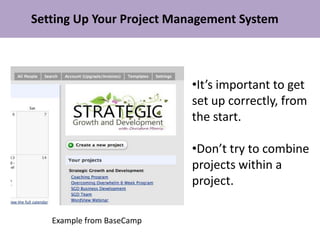
Setting Up Your Project Management System


                           •It’s important to get
                           set up correctly, from
                           the start.

                           •Don’t try to combine
                           projects within a
                           project.

   Example from BaseCamp
Other Project Management Options


Example from Central Desktop
Starting Your Project Plan


•Note any key dates on your calendar.
•Assign milestones
•Set task lists for each milestone.
Scheduling Your Project

•Assign dates and assign team members.
•Link tasks that are dependent on one another.
Tracking Your Project’s Progress


     Example from Central Desktop
Your Plan for Ending Overwhelm

Set Good Habits:
•Manage your email inbox.
•Use a separate calendar and task list.
•Create a system for your paper files.

Follow the Three Steps:
1. Collect.
2. Process.
3. Review and Do.
Your Plan for Ending Overwhelm

Manage Your Projects by:
•Planning
•Organizing
•Managing

 Find a Project Management System You Love – and
             Use it Each and Every Time.

Va overload-presentation- final

  • 1.
    Avoid Overload – ProjectManagement for Your VA Business The tips and tools you need to stay focused and productive in your VA Business. Presented by:
  • 2.
    My Story: Why I Became a Virtual Assistant •Lived through overwhelm as an executive director. •Wanted to help small business get as much work/life balance as possible. Christine Morris
  • 3.
    •Started small witha few •Became overwhelmed projects. when life got in the way. •Quickly got a major client •Family illness. and grew into being an •Natural disasters. “Online Business •Death of a close friend. Manager.” •Reinforced my need for •Opportunities were systems. opening up! •Working with peers and mentors. VA Overload Almost Destroyed My Business!
  • 4.
    How I Keptit Together in a Time of Massive Stress •Got Systems in Place •Supported by a Great Team •Relied on a Project Management System •Procedures As a result – I was able to take a vacation after that trying 3 months…with no worries!
  • 5.
    Causes of VAOverwhelm: Chaos often breeds life, when order breeds •Taking on a new client habit. •Poor time management •Lack of boundaries -Henry Adams •Lacking systems and procedures •Poor expectations •Personal stress •Family events •Natural disasters •A much needed family vacation
  • 6.
    You need to Project Management: develop a mind like water…being The discipline of planning, ready and organizing and managing responding resources to bring about the appropriately. successful completion of specific project goals and objectives. Your whole life is a project!
  • 7.
  • 8.
    Managing Your “Stuff” We’realways collecting information: •Mail in your Inbox •Thoughts and Ideas •Notes •Business cards •Paperwork …the list goes on and on! Finding the right tool is essential.
  • 9.
    Managing Your EmailInbox Don’t let email suck your day away! Set a schedule and set up tools to help you streamline time. Inbox Zero is Possible! Tools to Use •Folders and Filters – reading folder/ unsubscribe •Rapportive •Wise Stamp •Boomerang •Canned Responses
  • 10.
    Calendars and Tasks Your Tools Need To Be Available when and where you need them! •Your Calendar is reserved for date specific or time specific items. •Your Task List is to get everything out of your head.
  • 11.
    Files and PaperManagement •Use a small accordion file. •Tickler file for additional paperwork. •Dropbox for electronic files. •Keep your files organized!
  • 12.
  • 13.
    How to StartOvercoming Overload 1. Collect. 2. Process. 3. Review and Do. No matter where you are now, you can get where you want to go.
  • 14.
    Step 1 -Collect 1. Collect all the stuff you need to focus on. 2. Block out time to work through everything. 3. Avoid distractions.
  • 15.
    Step 2 –Process Do Delegate Defer
  • 16.
    Step 3 -Review and Do Your work now falls into one of three categories: •Pre-Defined Work •Work that shows up •Reviewing and defining your tasks
  • 17.
    The Three Stepsto Successful Project Management
  • 18.
    Project Management There arethree stages of successful project management. •Planning •Organizing •Managing
  • 19.
    Planning These questions helpyou understand the project and your client. •What is the project? •Why are we doing the project? •Who will be involved? •What is the timeline for the project?
  • 20.
    Organizing •Map out theproject with all the milestones and tasks. •Check in with the team on availability. •Set expectations with the team and client. •Remember to be flexible. •Set up your project management system.
  • 21.
    Managing •Delegate clear objectivesand deadlines. •Communicate clearly and often. •Empower the person. •Follow-up. •Be a problem solver. •Wrap up and lessons learned.
  • 22.
    Where Projects GoWrong •Poor planning. •Unrealistic expectations. •Not enough resources. •“Shiny Object Syndrome” This doesn’t have to be you! A project management system can save you from all of this – and keep you out from overwhelm.
  • 23.
  • 24.
    Your Project What to look for: Management  Online based. Tool is Your  Easy to use. Business  Inexpensive.  Ability to have multiple projects.  Ability to have multiple users.  Clients & team can login and update.  Ability to share & store files.  Ability to store passwords.  Calendar.  Recurring tasks.  Email notification.  Mobile access.
  • 25.
    Setting Up YourProject Management System •It’s important to get set up correctly, from the start. •Don’t try to combine projects within a project. Example from BaseCamp
  • 26.
    Other Project ManagementOptions Example from Central Desktop
  • 27.
    Starting Your ProjectPlan •Note any key dates on your calendar. •Assign milestones •Set task lists for each milestone.
  • 28.
    Scheduling Your Project •Assigndates and assign team members. •Link tasks that are dependent on one another.
  • 29.
    Tracking Your Project’sProgress Example from Central Desktop
  • 30.
    Your Plan forEnding Overwhelm Set Good Habits: •Manage your email inbox. •Use a separate calendar and task list. •Create a system for your paper files. Follow the Three Steps: 1. Collect. 2. Process. 3. Review and Do.
  • 31.
    Your Plan forEnding Overwhelm Manage Your Projects by: •Planning •Organizing •Managing Find a Project Management System You Love – and Use it Each and Every Time.

Editor's Notes

  • #26 My own personal project management system is in Basecamp. Two others I use regularly are Central Desktop and MyClientSpot.com. Find the right system for you. They both have their good points and their bad points. When setting up your project management system, it is important to set it up correctly, from the start. Often clients will try to combine projects within a project, because of limitations on their plan but this can lead to issues. Each major project should be recognized as such.