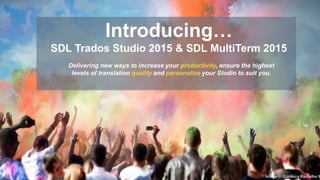




Introducing…
SDL Trados Studio 2015 & SDL MultiTerm 2015
Delivering new ways to increase your productivity, ensure the highest
levels of translation quality and personalize your Studio to suit you.
Image Š Gianluca Ramalho M
What Translators say about it?
What Translators
say about it
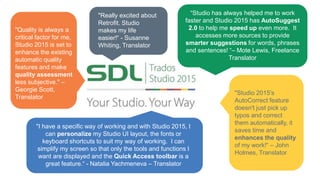
“Studio has always helped me to work
faster and Studio 2015 has AutoSuggest
2.0 to help me speed up even more. It
accesses more sources to provide
smarter suggestions for words, phrases
and sentences! “– Mote Lewis, Freelance
Translator
"I have a specific way of working and with Studio 2015, I
can personalize my Studio UI layout, the fonts or
keyboard shortcuts to suit my way of working. I can
simplify my screen so that only the tools and functions I
want are displayed and the Quick Access toolbar is a
great feature.“ - Natalia Yachmeneva – Translator
"Studio 2015's
AutoCorrect feature
doesn't just pick up
typos and correct
them automatically, it
saves time and
enhances the quality
of my work!“ – John
Holmes, Translator
"Really excited about
Retrofit. Studio
makes my life
easier!“ - Susanne
Whiting, Translator
"Quality is always a
critical factor for me,
Studio 2015 is set to
enhance the existing
automatic quality
features and make
quality assessment
less subjective." –
Georgie Scott,
Translator
What’s new
Your Productivity. Our Technology.
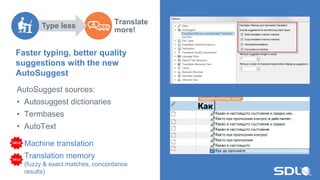
Faster typing, better quality
suggestions with the new
AutoSuggest
Translate
more!
AutoSuggest sources:
• Autosuggest dictionaries
• Termbases
• AutoText
Machine translation
Translation memory
(fuzzy & exact matches, concordance
results)
Type less
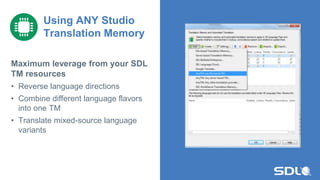
Maximum leverage from your SDL
TM resources
• Reverse language directions
• Combine different language flavors
into one TM
• Translate mixed-source language
variants
Using ANY Studio
Translation Memory
8
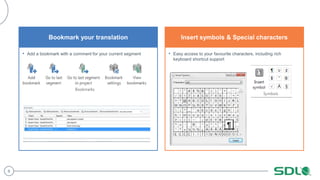
Bookmark your translation
• Add a bookmark with a comment for your current segment
Insert symbols & Special characters
• Easy access to your favourite characters, including rich
keyboard shortcut support
9
File types updates
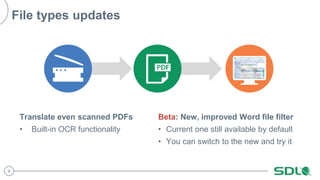
Translate even scanned PDFs
• Built-in OCR functionality
Beta: New, improved Word file filter
• Current one still available by default
• You can switch to the new and try it
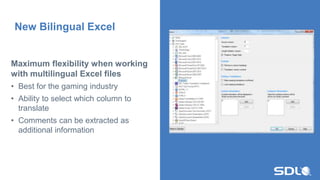
Maximum flexibility when working
with multilingual Excel files
• Best for the gaming industry
• Ability to select which column to
translate
• Comments can be extracted as
additional information
New Bilingual Excel
11
Your Quality. Our Design.
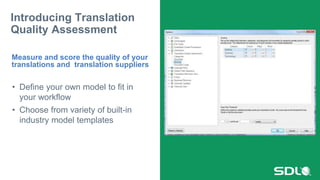
• Define your own model to fit in
your workflow
• Choose from variety of built-in
industry model templates
Introducing Translation
Quality Assessment
Measure and score the quality of your
translations and translation suppliers
13
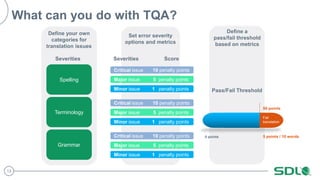
What can you do with TQA?
Set error severity
options and metrics
Critical issue 10 penalty points
Major issue 5 penalty points
Minor issue 1 penalty points
Critical issue 10 penalty points
Major issue 5 penalty points
Minor issue 1 penalty points
Critical issue 10 penalty points
Major issue 5 penalty points
Minor issue 1 penalty points
Severities Score
Define a
pass/fail threshold
based on metrics
5 points / 10 words
50 points
0 points
Pass/Fail Threshold
Fail
translation
Define your own
categories for
translation issues
SpellingSpelling
Terminology
Grammar
Severities
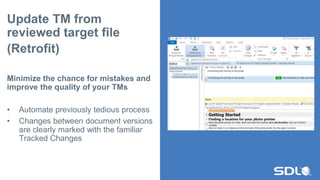
Update TM from
reviewed target file
(Retrofit)
Minimize the chance for mistakes and
improve the quality of your TMs
• Automate previously tedious process
• Changes between document versions
are clearly marked with the familiar
Tracked Changes
15
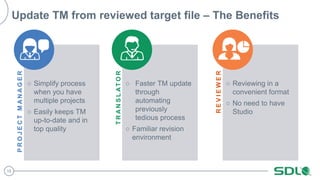
○ Simplify process
when you have
multiple projects
○ Easily keeps TM
up-to-date and in
top quality
PROJECTMANAGER
○ Faster TM update
through
automating
previously
tedious process
○ Familiar revision
environment
TRANSLATOR
○ Reviewing in a
convenient format
○ No need to have
Studio
REVIEWER
Update TM from reviewed target file – The Benefits
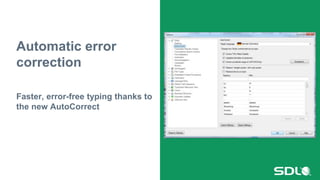
Automatic error
correction
Faster, error-free typing thanks to
the new AutoCorrect
17
Your Way.
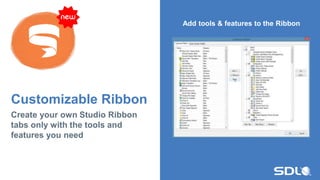
Customizable Ribbon
Create your own Studio Ribbon
tabs only with the tools and
features you need
Add tools & features to the Ribbon
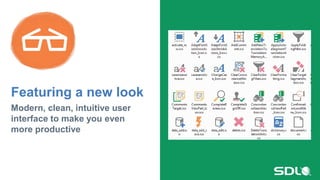
Featuring a new look
Modern, clean, intuitive user
interface to make you even
more productive
20
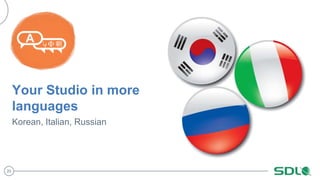
Your Studio in more
languages
Korean, Italian, Russian
21
Terminology Management
22
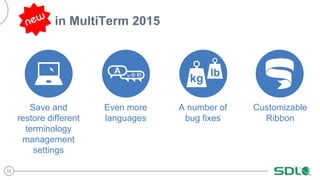
in MultiTerm 2015
Save and
restore different
terminology
management
settings
Even more
languages
A number of
bug fixes
Customizable
Ribbon
23
Need more info?
Translation agencies and freelance translators, please visit: www.translationzone.com/studio2015
Corporations, please visit: www.sdl.com/studio2015
Copyright Š 2008-2014 SDL plc. All rights reserved. All company names, brand names, trademarks,
service marks, images and logos are the property of their respective owners.
This presentation and its content are SDL confidential unless otherwise specified, and may not be
copied, used or distributed except as authorised by SDL.
Global Customer Experience Management

Introducing SDL Trados Studio 2015 & SDL MultiTerm 2015

  • 1.
    Introducing… SDL Trados Studio2015 & SDL MultiTerm 2015 Delivering new ways to increase your productivity, ensure the highest levels of translation quality and personalize your Studio to suit you. Image © Gianluca Ramalho M
  • 2.
    What Translators sayabout it? What Translators say about it
  • 3.
    “Studio has alwayshelped me to work faster and Studio 2015 has AutoSuggest 2.0 to help me speed up even more. It accesses more sources to provide smarter suggestions for words, phrases and sentences! “– Mote Lewis, Freelance Translator "I have a specific way of working and with Studio 2015, I can personalize my Studio UI layout, the fonts or keyboard shortcuts to suit my way of working. I can simplify my screen so that only the tools and functions I want are displayed and the Quick Access toolbar is a great feature.“ - Natalia Yachmeneva – Translator "Studio 2015's AutoCorrect feature doesn't just pick up typos and correct them automatically, it saves time and enhances the quality of my work!“ – John Holmes, Translator "Really excited about Retrofit. Studio makes my life easier!“ - Susanne Whiting, Translator "Quality is always a critical factor for me, Studio 2015 is set to enhance the existing automatic quality features and make quality assessment less subjective." – Georgie Scott, Translator
  • 4.
  • 5.
  • 6.
    Faster typing, betterquality suggestions with the new AutoSuggest Translate more! AutoSuggest sources: • Autosuggest dictionaries • Termbases • AutoText Machine translation Translation memory (fuzzy & exact matches, concordance results) Type less
  • 7.
    Maximum leverage fromyour SDL TM resources • Reverse language directions • Combine different language flavors into one TM • Translate mixed-source language variants Using ANY Studio Translation Memory
  • 8.
    8 Bookmark your translation •Add a bookmark with a comment for your current segment Insert symbols & Special characters • Easy access to your favourite characters, including rich keyboard shortcut support
  • 9.
    9 File types updates Translateeven scanned PDFs • Built-in OCR functionality Beta: New, improved Word file filter • Current one still available by default • You can switch to the new and try it
  • 10.
    Maximum flexibility whenworking with multilingual Excel files • Best for the gaming industry • Ability to select which column to translate • Comments can be extracted as additional information New Bilingual Excel
  • 11.
  • 12.
    • Define yourown model to fit in your workflow • Choose from variety of built-in industry model templates Introducing Translation Quality Assessment Measure and score the quality of your translations and translation suppliers
  • 13.
    13 What can youdo with TQA? Set error severity options and metrics Critical issue 10 penalty points Major issue 5 penalty points Minor issue 1 penalty points Critical issue 10 penalty points Major issue 5 penalty points Minor issue 1 penalty points Critical issue 10 penalty points Major issue 5 penalty points Minor issue 1 penalty points Severities Score Define a pass/fail threshold based on metrics 5 points / 10 words 50 points 0 points Pass/Fail Threshold Fail translation Define your own categories for translation issues SpellingSpelling Terminology Grammar Severities
  • 14.
    Update TM from reviewedtarget file (Retrofit) Minimize the chance for mistakes and improve the quality of your TMs • Automate previously tedious process • Changes between document versions are clearly marked with the familiar Tracked Changes
  • 15.
    15 ○ Simplify process whenyou have multiple projects ○ Easily keeps TM up-to-date and in top quality PROJECTMANAGER ○ Faster TM update through automating previously tedious process ○ Familiar revision environment TRANSLATOR ○ Reviewing in a convenient format ○ No need to have Studio REVIEWER Update TM from reviewed target file – The Benefits
  • 16.
    Automatic error correction Faster, error-freetyping thanks to the new AutoCorrect
  • 17.
  • 18.
    Customizable Ribbon Create yourown Studio Ribbon tabs only with the tools and features you need Add tools & features to the Ribbon
  • 19.
    Featuring a newlook Modern, clean, intuitive user interface to make you even more productive
  • 20.
    20 Your Studio inmore languages Korean, Italian, Russian
  • 21.
  • 22.
    22 in MultiTerm 2015 Saveand restore different terminology management settings Even more languages A number of bug fixes Customizable Ribbon
  • 23.
    23 Need more info? Translationagencies and freelance translators, please visit: www.translationzone.com/studio2015 Corporations, please visit: www.sdl.com/studio2015
  • 24.
    Copyright Š 2008-2014SDL plc. All rights reserved. All company names, brand names, trademarks, service marks, images and logos are the property of their respective owners. This presentation and its content are SDL confidential unless otherwise specified, and may not be copied, used or distributed except as authorised by SDL. Global Customer Experience Management

Editor's Notes

  • #20 In addition Studio 2015 and MultiTerm 2015 introduce a fresh Windows 10 and Office 2013/2016 look and feel. Enjoy a modern, refreshed user interface, with flat style icons and menus. Benefit: A clean, uncluttered UI helps users be more productive. Icons are a vital part of this.