

WORKSHOP: EVERYTHING YOU
EVER WANTED TO KNOW ABOUT
SDL TRADOS STUDIO
Paul Filkin pfilkin@sdl.com
March 2015
2
Image placeholder
Click on image icon
Browse to image you want
to add to slide
Agenda
○ There is no agenda!
○ Only questions…
… and hopefully answers too!
3
Question 1
From Núria
4
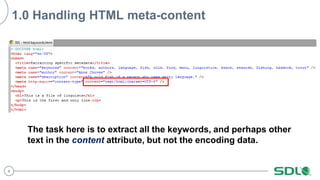
1.0 Handling HTML meta-content
The task here is to extract all the keywords, and perhaps other
text in the content attribute, but not the encoding data.
5
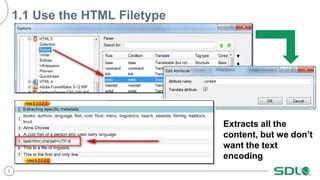
1.1 Use the HTML Filetype
Extracts all the
content, but we don’t
want the text
encoding
6
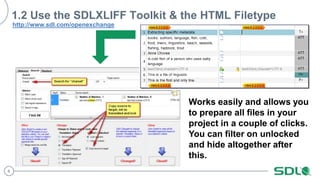
1.2 Use the SDLXLIFF Toolkit & the HTML Filetype
Works easily and allows you
to prepare all files in your
project in a couple of clicks.
You can filter on unlocked
and hide altogether after
this.
http://www.sdl.com/openexchange
7
1.3 Use an XML Filetype
You can be very specific
about what you extract
here, so this does carry
many advantages. But if
there is a lot of HTML code
to handle it becomes
messy.
//meta/@content[not(contains(., 'charset'))]
or maybe
//meta[@name="keywords"]/@content
XPATH
8
1.4 Use an XML Filetype & customised TM segmentation
//meta[@name="keywords"]/@content
So a single XPATH rule to only extract the keywords, a simple new
segmentation rule to break on a comma and now you could also use a
termbase more easily while making sure you don’t miss any.
9
Question 2
From Katarzyna
10
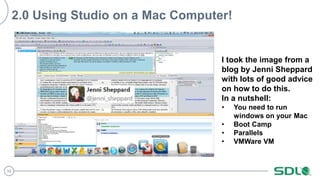
2.0 Using Studio on a Mac Computer!
I took the image from a
blog by Jenni Sheppard
with lots of good advice
on how to do this.
In a nutshell:
• You need to run
windows on your Mac
• Boot Camp
• Parallels
• VMWare VM
11
2.1 Useful resources
http://jennisheppard.com/installing-sdl-trados-studio-2011-on-a-mac/
http://www.translationzone.com/support/how-to-run-sdl-trados-studio-on-an-apple-mac.html
http://producthelp.sdl.com/kb/Articles/2830.html
12
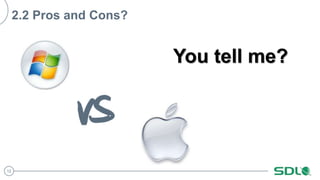
2.2 Pros and Cons?
You tell me?
13
Question 3
From Lucy
14
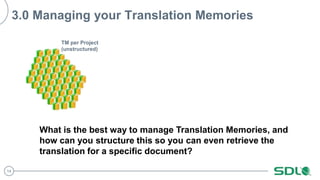
3.0 Managing your Translation Memories
TM per Project
(unstructured)
What is the best way to manage Translation Memories, and
how can you structure this so you can even retrieve the
translation for a specific document?
15
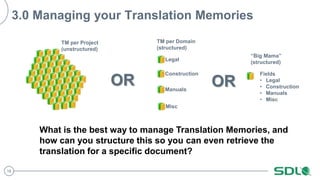
3.0 Managing your Translation Memories
TM per Project
(unstructured)
Legal
Construction
Manuals
Misc
OR
What is the best way to manage Translation Memories, and
how can you structure this so you can even retrieve the
translation for a specific document?
TM per Domain
(structured)
16
3.0 Managing your Translation Memories
TM per Project
(unstructured)
Legal
Construction
Manuals
Misc
Fields
• Legal
• Construction
• Manuals
• Misc
OR OR
What is the best way to manage Translation Memories, and
how can you structure this so you can even retrieve the
translation for a specific document?
TM per Domain
(structured)
“Big Mama”
(structured)
17
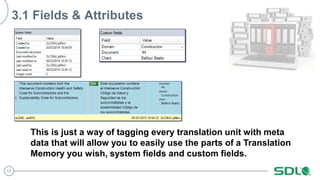
3.1 Fields & Attributes
This is just a way of tagging every translation unit with meta
data that will allow you to easily use the parts of a Translation
Memory you wish, system fields and custom fields.
18
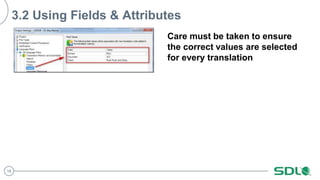
3.2 Using Fields & Attributes
Care must be taken to ensure
the correct values are selected
for every translation
19
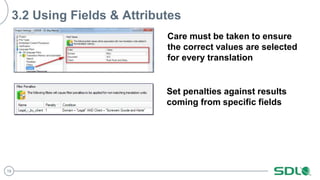
3.2 Using Fields & Attributes
Care must be taken to ensure
the correct values are selected
for every translation
Set penalties against results
coming from specific fields
20
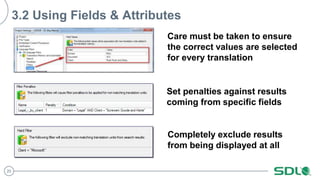
3.2 Using Fields & Attributes
Care must be taken to ensure
the correct values are selected
for every translation
Set penalties against results
coming from specific fields
Completely exclude results
from being displayed at all
21
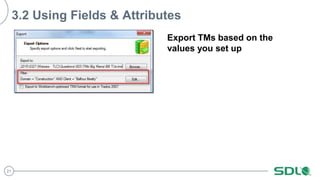
3.2 Using Fields & Attributes
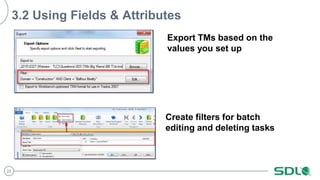
Export TMs based on the
values you set up
22
3.2 Using Fields & Attributes
Export TMs based on the
values you set up
Create filters for batch
editing and deleting tasks
23
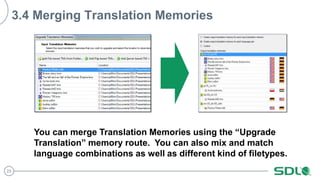
3.4 Merging Translation Memories
You can merge Translation Memories using the “Upgrade
Translation” memory route. You can also mix and match
language combinations as well as different kind of filetypes.
24
Question 4
From Arnaud
25
4.0 Updating and Navigating Translation Memories
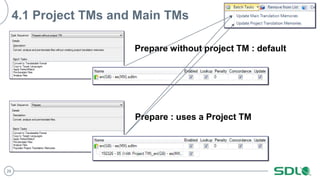
New project and a new TM, after translating
the TM only includes the translated
segments of the first file, but nothing from
the subsequent files. Checked the « update
TM » box in the Project Settings panel. I
know there are arrows in the upper right
hand corner of the TM window that let you
browse from one page to another, but again,
the arrows are not activated, only one page
appears with the translation of the first file.
26
4.1 Project TMs and Main TMs
Prepare : uses a Project TM
Prepare without project TM : default
27
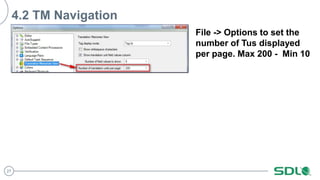
4.2 TM Navigation
File -> Options to set the
number of Tus displayed
per page. Max 200 - Min 10
28
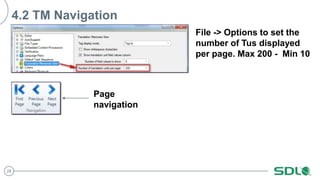
4.2 TM Navigation
File -> Options to set the
number of Tus displayed
per page. Max 200 - Min 10
Page
navigation
29
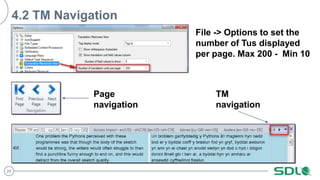
4.2 TM Navigation
File -> Options to set the
number of Tus displayed
per page. Max 200 - Min 10
Page
navigation
TM
navigation
30
A few things we also
covered on the day
31
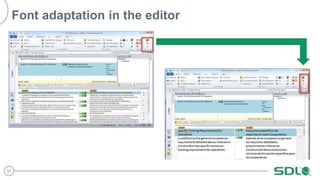
Font adaptation in the editor
32
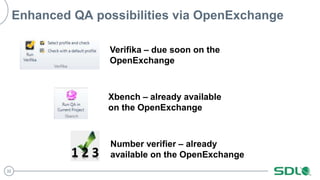
Enhanced QA possibilities via OpenExchange
Verifika – due soon on the
OpenExchange
Xbench – already available
on the OpenExchange
Number verifier – already
available on the OpenExchange
33
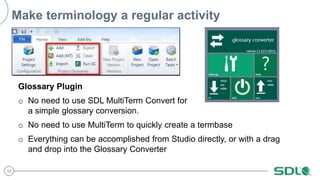
Make terminology a regular activity
Glossary Plugin
o No need to use SDL MultiTerm Convert for
a simple glossary conversion.
o No need to use MultiTerm to quickly create a termbase
o Everything can be accomplished from Studio directly, or with a drag
and drop into the Glossary Converter
34
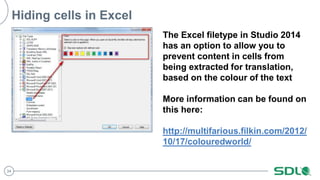
Hiding cells in Excel
The Excel filetype in Studio 2014
has an option to allow you to
prevent content in cells from
being extracted for translation,
based on the colour of the text
More information can be found on
this here:
http://multifarious.filkin.com/2012/
10/17/colouredworld/
35
Got any questions afterwards… try our new user
support community
http://community.sdl.com/
Login with your MySDL credentials
36
Copyright © 2008-2014 SDL plc. All rights reserved. All company names, brand names, trademarks,
service marks, images and logos are the property of their respective owners.
This presentation and its content are SDL confidential unless otherwise specified, and may not be
copied, used or distributed except as authorised by SDL.
Global Customer Experience Management

(150324) Everything you ever wanted to know about Studio!

  • 1.
    WORKSHOP: EVERYTHING YOU EVERWANTED TO KNOW ABOUT SDL TRADOS STUDIO Paul Filkin pfilkin@sdl.com March 2015
  • 2.
    2 Image placeholder Click onimage icon Browse to image you want to add to slide Agenda ○ There is no agenda! ○ Only questions… … and hopefully answers too!
  • 3.
  • 4.
    4 1.0 Handling HTMLmeta-content The task here is to extract all the keywords, and perhaps other text in the content attribute, but not the encoding data.
  • 5.
    5 1.1 Use theHTML Filetype Extracts all the content, but we don’t want the text encoding
  • 6.
    6 1.2 Use theSDLXLIFF Toolkit & the HTML Filetype Works easily and allows you to prepare all files in your project in a couple of clicks. You can filter on unlocked and hide altogether after this. http://www.sdl.com/openexchange
  • 7.
    7 1.3 Use anXML Filetype You can be very specific about what you extract here, so this does carry many advantages. But if there is a lot of HTML code to handle it becomes messy. //meta/@content[not(contains(., 'charset'))] or maybe //meta[@name="keywords"]/@content XPATH
  • 8.
    8 1.4 Use anXML Filetype & customised TM segmentation //meta[@name="keywords"]/@content So a single XPATH rule to only extract the keywords, a simple new segmentation rule to break on a comma and now you could also use a termbase more easily while making sure you don’t miss any.
  • 9.
  • 10.
    10 2.0 Using Studioon a Mac Computer! I took the image from a blog by Jenni Sheppard with lots of good advice on how to do this. In a nutshell: • You need to run windows on your Mac • Boot Camp • Parallels • VMWare VM
  • 11.
  • 12.
    12 2.2 Pros andCons? You tell me?
  • 13.
  • 14.
    14 3.0 Managing yourTranslation Memories TM per Project (unstructured) What is the best way to manage Translation Memories, and how can you structure this so you can even retrieve the translation for a specific document?
  • 15.
    15 3.0 Managing yourTranslation Memories TM per Project (unstructured) Legal Construction Manuals Misc OR What is the best way to manage Translation Memories, and how can you structure this so you can even retrieve the translation for a specific document? TM per Domain (structured)
  • 16.
    16 3.0 Managing yourTranslation Memories TM per Project (unstructured) Legal Construction Manuals Misc Fields • Legal • Construction • Manuals • Misc OR OR What is the best way to manage Translation Memories, and how can you structure this so you can even retrieve the translation for a specific document? TM per Domain (structured) “Big Mama” (structured)
  • 17.
    17 3.1 Fields &Attributes This is just a way of tagging every translation unit with meta data that will allow you to easily use the parts of a Translation Memory you wish, system fields and custom fields.
  • 18.
    18 3.2 Using Fields& Attributes Care must be taken to ensure the correct values are selected for every translation
  • 19.
    19 3.2 Using Fields& Attributes Care must be taken to ensure the correct values are selected for every translation Set penalties against results coming from specific fields
  • 20.
    20 3.2 Using Fields& Attributes Care must be taken to ensure the correct values are selected for every translation Set penalties against results coming from specific fields Completely exclude results from being displayed at all
  • 21.
    21 3.2 Using Fields& Attributes Export TMs based on the values you set up
  • 22.
    22 3.2 Using Fields& Attributes Export TMs based on the values you set up Create filters for batch editing and deleting tasks
  • 23.
    23 3.4 Merging TranslationMemories You can merge Translation Memories using the “Upgrade Translation” memory route. You can also mix and match language combinations as well as different kind of filetypes.
  • 24.
  • 25.
    25 4.0 Updating andNavigating Translation Memories New project and a new TM, after translating the TM only includes the translated segments of the first file, but nothing from the subsequent files. Checked the « update TM » box in the Project Settings panel. I know there are arrows in the upper right hand corner of the TM window that let you browse from one page to another, but again, the arrows are not activated, only one page appears with the translation of the first file.
  • 26.
    26 4.1 Project TMsand Main TMs Prepare : uses a Project TM Prepare without project TM : default
  • 27.
    27 4.2 TM Navigation File-> Options to set the number of Tus displayed per page. Max 200 - Min 10
  • 28.
    28 4.2 TM Navigation File-> Options to set the number of Tus displayed per page. Max 200 - Min 10 Page navigation
  • 29.
    29 4.2 TM Navigation File-> Options to set the number of Tus displayed per page. Max 200 - Min 10 Page navigation TM navigation
  • 30.
    30 A few thingswe also covered on the day
  • 31.
  • 32.
    32 Enhanced QA possibilitiesvia OpenExchange Verifika – due soon on the OpenExchange Xbench – already available on the OpenExchange Number verifier – already available on the OpenExchange
  • 33.
    33 Make terminology aregular activity Glossary Plugin o No need to use SDL MultiTerm Convert for a simple glossary conversion. o No need to use MultiTerm to quickly create a termbase o Everything can be accomplished from Studio directly, or with a drag and drop into the Glossary Converter
  • 34.
    34 Hiding cells inExcel The Excel filetype in Studio 2014 has an option to allow you to prevent content in cells from being extracted for translation, based on the colour of the text More information can be found on this here: http://multifarious.filkin.com/2012/ 10/17/colouredworld/
  • 35.
    35 Got any questionsafterwards… try our new user support community http://community.sdl.com/ Login with your MySDL credentials
  • 36.
  • 37.
    Copyright © 2008-2014SDL plc. All rights reserved. All company names, brand names, trademarks, service marks, images and logos are the property of their respective owners. This presentation and its content are SDL confidential unless otherwise specified, and may not be copied, used or distributed except as authorised by SDL. Global Customer Experience Management

Editor's Notes

  • #5 Dear Paul, I will be in your session and I would like to ask you a specific question on web localisation in SDL. I would like to know if it is possible to set up an ezParse rule so that SDL shows the keywords of a website as translatable segments but excludes the keywords related to the encoding of the website. Once you set up an ezParse rule for the keywords, it shows both the keywords of a website as well as the encoding, which is not translatable. Many thanks, Núria nuria.massot@gmail.com
  • #11 Hi Paul, I have recently purchased Trados studio, haven't installed it yet. I'd love to know what to do to use it on a Mac computer and what the pros and cons  (if there are any pros) are of using it on iOS.  Thank you in advance! Kasia Bondaruk-Augustyńczyk kasia.bondaruk@icloud.com
  • #12 Hi Paul, I have recently purchased Trados studio, haven't installed it yet. I'd love to know what to do to use it on a Mac computer and what the pros and cons  (if there are any pros) are of using it on iOS.  Thank you in advance! Kasia Bondaruk-Augustyńczyk kasia.bondaruk@icloud.com
  • #13 Hi Paul, I have recently purchased Trados studio, haven't installed it yet. I'd love to know what to do to use it on a Mac computer and what the pros and cons  (if there are any pros) are of using it on iOS.  Thank you in advance! Kasia Bondaruk-Augustyńczyk kasia.bondaruk@icloud.com
  • #15 Hi Paul,   Do you also provide solutions for older versions of SDL? I have SDL Trados Freelancer 2007 (upgraded from 2006) and SDL Trados Studio 2009 on my computer.   I would be interested in learning how to better manage my translation memories. Right now, I create a new memory for each project/memory, but am getting so many that it’s unhandy. Is it possible to manage my built-up memories in such a way that I have say two to four memories, splitting by the topic (i.e., legal, construction, manuals, etc.)?   Also, if I can actually accomplish this, how could I best extract the memory for one specific document from my larger, more general, memory if the client specifically asks for it?   Looking forward to your answer, if this is possible.   Greetings, Lucy   Owner/freelance translator Lucidity Translations www.luciditytranslations.eu info@luciditytranslations.eu
  • #16 Hi Paul,   Do you also provide solutions for older versions of SDL? I have SDL Trados Freelancer 2007 (upgraded from 2006) and SDL Trados Studio 2009 on my computer.   I would be interested in learning how to better manage my translation memories. Right now, I create a new memory for each project/memory, but am getting so many that it’s unhandy. Is it possible to manage my built-up memories in such a way that I have say two to four memories, splitting by the topic (i.e., legal, construction, manuals, etc.)?   Also, if I can actually accomplish this, how could I best extract the memory for one specific document from my larger, more general, memory if the client specifically asks for it?   Looking forward to your answer, if this is possible.   Greetings, Lucy   Owner/freelance translator Lucidity Translations www.luciditytranslations.eu info@luciditytranslations.eu
  • #17 Hi Paul,   Do you also provide solutions for older versions of SDL? I have SDL Trados Freelancer 2007 (upgraded from 2006) and SDL Trados Studio 2009 on my computer.   I would be interested in learning how to better manage my translation memories. Right now, I create a new memory for each project/memory, but am getting so many that it’s unhandy. Is it possible to manage my built-up memories in such a way that I have say two to four memories, splitting by the topic (i.e., legal, construction, manuals, etc.)?   Also, if I can actually accomplish this, how could I best extract the memory for one specific document from my larger, more general, memory if the client specifically asks for it?   Looking forward to your answer, if this is possible.   Greetings, Lucy   Owner/freelance translator Lucidity Translations www.luciditytranslations.eu info@luciditytranslations.eu
  • #26 Hello Paul, Thank you for your message and invitation to submit questions. I have a question regarding Trados Studio 2014. When I create a new project with several files, and a new TM, I noted that after translating, the TM only includes the translated segments of the first file, but nothing from the subsequent files. I do check the « update TM » box in the Project Settings panel, though. I know there are arrows in the upper right hand corner of the TM window that let you browse from one page to another, but again, the arrows are not activated in my case, only one page appears with the translation of the first file, and nothing else. I am certainly missing something, but more clarification would be welcome. Thank you in advance. Arnaud
  • #34 Glossary Converter is the most downloaded app on the store, with over 8000 downloads. You may work with clients that have sent you an excel glossary and to turn this into a termbase you can use can be quite a few steps in MultiTerm Convert. Without having to use MultiTerm Convert at all, you can quickly and simply convert an excel glossary into a MultiTerm termbase and vice versa with the Glossary Converter app. Just drag your excel file into the app and a termbase will be automatically created which you can open and use straight away in Studio and MultiTerm.