Project Id: 32
Implementation Planning
Chapter 6
IMPLEMENTATION PLANNING
________________________________________________
CCET (IT)
101
Project Id: 32
Implementation Planning
6.1 IMPLEMENTATION ENVIRONMENT
The implementation view of software requirement presents the real world
manifestation of processing functions and information structures. This computerized
system is specified in a manner that dictates accommodation of certain implementation
details.
The implementation environment of the developed system facilitates multiple users
to use this system simultaneously. The user interfaces are designed keeping in mind that
the users of this system are familiar to using GUI-based systems. Thus, we restricted
ourselves to developing a GUI-based system so that it becomes easier for the end user to
get acquainted to the developed system.
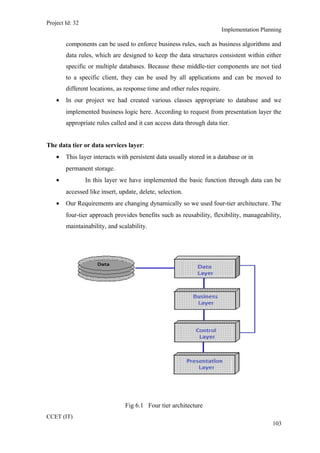
We have also followed the web based 4-tier architecture as the implementation
architecture which is as follows:
The presentation tier or user services layer:
• This layer gives a user access to the application. It contains all the web pages so it
is this interface through which user can access the application.
• This layer presents data to the user and optionally permits data manipulation and
data entry.
The control tier or control layer:
• This layer gives a well separation between code and its connectivity with database.
• This layer includes the code (VB.NET code) and JS. Mainly this layer includes the
replica of presentation layer pages and these pages are mainly control pages.
The business services layer:
• It consists of business and data rules. Also referred to as the business logic tier, the
middle tier is where we as developers can solve mission-critical business problems
and achieve major productivity advantages. The components that make up this
layer can exist on a server machine, to assist in resource sharing. These
CCET (IT)
102
Project Id: 32
Implementation Planning
components can be used to enforce business rules, such as business algorithms and
data rules, which are designed to keep the data structures consistent within either
specific or multiple databases. Because these middle-tier components are not tied
to a specific client, they can be used by all applications and can be moved to
different locations, as response time and other rules require.
• In our project we had created various classes appropriate to database and we
implemented business logic here. According to request from presentation layer the
appropriate rules called and it can access data through data tier.
The data tier or data services layer:
• This layer interacts with persistent data usually stored in a database or in
permanent storage.
• In this layer we have implemented the basic function through data can be
accessed like insert, update, delete, selection.
• Our Requirements are changing dynamically so we used four-tier architecture. The
four-tier approach provides benefits such as reusability, flexibility, manageability,
maintainability, and scalability.
Fig 6.1 Four tier architecture
CCET (IT)
103
Project Id: 32
Implementation Planning
6.2 CODING STANDARTS
• Objects
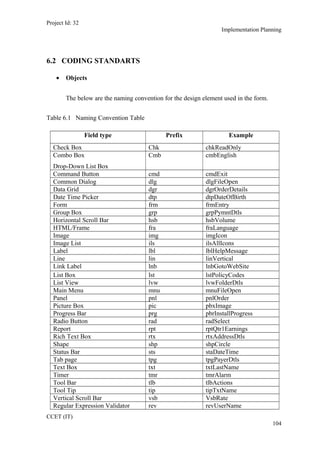
The below are the naming convention for the design element used in the form.
Table 6.1 Naming Convention Table
Field type Prefix Example
Check Box Chk chkReadOnly
Combo Box
Drop-Down List Box
Cmb cmbEnglish
Command Button cmd cmdExit
Common Dialog dlg dlgFileOpen
Data Grid dgr dgrOrderDetails
Date Time Picker dtp dtpDateOfBirth
Form frm frmEntry
Group Box grp grpPymntDtls
Horizontal Scroll Bar hsb hsbVolume
HTML/Frame fra fraLanguage
Image img imgIcon
Image List ils ilsAllIcons
Label lbl lblHelpMessage
Line lin linVertical
Link Label lnb lnbGotoWebSite
List Box lst lstPolicyCodes
List View lvw lvwFolderDtls
Main Menu mnu mnuFileOpen
Panel pnl pnlOrder
Picture Box pic pbxImage
Progress Bar prg pbrInstallProgress
Radio Button rad radSelect
Report rpt rptQtr1Earnings
Rich Text Box rtx rtxAddressDtls
Shape shp shpCircle
Status Bar sts staDateTime
Tab page tpg tpgPayerDtls
Text Box txt txtLastName
Timer tmr tmrAlarm
Tool Bar tlb tlbActions
Tool Tip tip tipTxtName
Vertical Scroll Bar vsb VsbRate
Regular Expression Validator rev revUserName
CCET (IT)
104
Project Id: 32
Implementation Planning
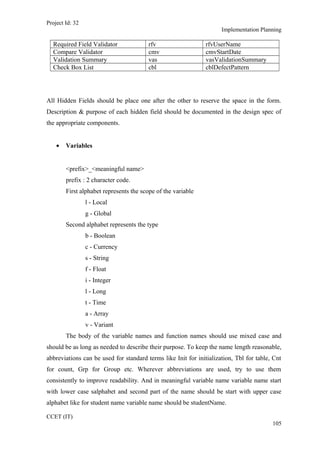
Required Field Validator rfv rfvUserName
Compare Validator cmv cmvStartDate
Validation Summary vas vasValidationSummary
Check Box List cbl cblDefectPattern
All Hidden Fields should be place one after the other to reserve the space in the form.
Description & purpose of each hidden field should be documented in the design spec of
the appropriate components.
• Variables
<prefix>_<meaningful name>
prefix : 2 character code.
First alphabet represents the scope of the variable
l - Local
g - Global
Second alphabet represents the type
b - Boolean
c - Currency
s - String
f - Float
i - Integer
l - Long
t - Time
a - Array
v - Variant
The body of the variable names and function names should use mixed case and
should be as long as needed to describe their purpose. To keep the name length reasonable,
abbreviations can be used for standard terms like Init for initialization, Tbl for table, Cnt
for count, Grp for Group etc. Wherever abbreviations are used, try to use them
consistently to improve readability. And in meaningful variable name variable name start
with lower case salphabet and second part of the name should be start with upper case
alphabet like for student name variable name should be studentName.
CCET (IT)
105
Project Id: 32
Implementation Planning
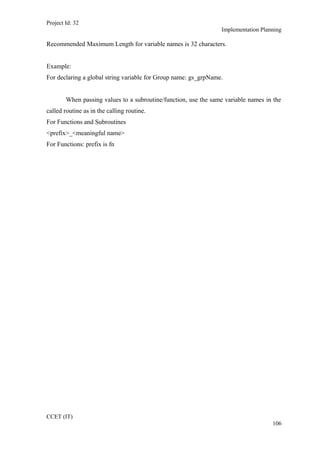
Recommended Maximum Length for variable names is 32 characters.
Example:
For declaring a global string variable for Group name: gs_grpName.
When passing values to a subroutine/function, use the same variable names in the
called routine as in the calling routine.
For Functions and Subroutines
<prefix>_<meaningful name>
For Functions: prefix is fn
CCET (IT)
106
Project Id: 32
Implementation Planning
Recommended Maximum Length for variable names is 32 characters.
Example:
For declaring a global string variable for Group name: gs_grpName.
When passing values to a subroutine/function, use the same variable names in the
called routine as in the calling routine.
For Functions and Subroutines
<prefix>_<meaningful name>
For Functions: prefix is fn
CCET (IT)
106

Chapter 6

  • 1.
    Project Id: 32 ImplementationPlanning Chapter 6 IMPLEMENTATION PLANNING ________________________________________________ CCET (IT) 101
  • 2.
    Project Id: 32 ImplementationPlanning 6.1 IMPLEMENTATION ENVIRONMENT The implementation view of software requirement presents the real world manifestation of processing functions and information structures. This computerized system is specified in a manner that dictates accommodation of certain implementation details. The implementation environment of the developed system facilitates multiple users to use this system simultaneously. The user interfaces are designed keeping in mind that the users of this system are familiar to using GUI-based systems. Thus, we restricted ourselves to developing a GUI-based system so that it becomes easier for the end user to get acquainted to the developed system. We have also followed the web based 4-tier architecture as the implementation architecture which is as follows: The presentation tier or user services layer: • This layer gives a user access to the application. It contains all the web pages so it is this interface through which user can access the application. • This layer presents data to the user and optionally permits data manipulation and data entry. The control tier or control layer: • This layer gives a well separation between code and its connectivity with database. • This layer includes the code (VB.NET code) and JS. Mainly this layer includes the replica of presentation layer pages and these pages are mainly control pages. The business services layer: • It consists of business and data rules. Also referred to as the business logic tier, the middle tier is where we as developers can solve mission-critical business problems and achieve major productivity advantages. The components that make up this layer can exist on a server machine, to assist in resource sharing. These CCET (IT) 102
  • 3.
    Project Id: 32 ImplementationPlanning components can be used to enforce business rules, such as business algorithms and data rules, which are designed to keep the data structures consistent within either specific or multiple databases. Because these middle-tier components are not tied to a specific client, they can be used by all applications and can be moved to different locations, as response time and other rules require. • In our project we had created various classes appropriate to database and we implemented business logic here. According to request from presentation layer the appropriate rules called and it can access data through data tier. The data tier or data services layer: • This layer interacts with persistent data usually stored in a database or in permanent storage. • In this layer we have implemented the basic function through data can be accessed like insert, update, delete, selection. • Our Requirements are changing dynamically so we used four-tier architecture. The four-tier approach provides benefits such as reusability, flexibility, manageability, maintainability, and scalability. Fig 6.1 Four tier architecture CCET (IT) 103
  • 4.
    Project Id: 32 ImplementationPlanning 6.2 CODING STANDARTS • Objects The below are the naming convention for the design element used in the form. Table 6.1 Naming Convention Table Field type Prefix Example Check Box Chk chkReadOnly Combo Box Drop-Down List Box Cmb cmbEnglish Command Button cmd cmdExit Common Dialog dlg dlgFileOpen Data Grid dgr dgrOrderDetails Date Time Picker dtp dtpDateOfBirth Form frm frmEntry Group Box grp grpPymntDtls Horizontal Scroll Bar hsb hsbVolume HTML/Frame fra fraLanguage Image img imgIcon Image List ils ilsAllIcons Label lbl lblHelpMessage Line lin linVertical Link Label lnb lnbGotoWebSite List Box lst lstPolicyCodes List View lvw lvwFolderDtls Main Menu mnu mnuFileOpen Panel pnl pnlOrder Picture Box pic pbxImage Progress Bar prg pbrInstallProgress Radio Button rad radSelect Report rpt rptQtr1Earnings Rich Text Box rtx rtxAddressDtls Shape shp shpCircle Status Bar sts staDateTime Tab page tpg tpgPayerDtls Text Box txt txtLastName Timer tmr tmrAlarm Tool Bar tlb tlbActions Tool Tip tip tipTxtName Vertical Scroll Bar vsb VsbRate Regular Expression Validator rev revUserName CCET (IT) 104
  • 5.
    Project Id: 32 ImplementationPlanning Required Field Validator rfv rfvUserName Compare Validator cmv cmvStartDate Validation Summary vas vasValidationSummary Check Box List cbl cblDefectPattern All Hidden Fields should be place one after the other to reserve the space in the form. Description & purpose of each hidden field should be documented in the design spec of the appropriate components. • Variables <prefix>_<meaningful name> prefix : 2 character code. First alphabet represents the scope of the variable l - Local g - Global Second alphabet represents the type b - Boolean c - Currency s - String f - Float i - Integer l - Long t - Time a - Array v - Variant The body of the variable names and function names should use mixed case and should be as long as needed to describe their purpose. To keep the name length reasonable, abbreviations can be used for standard terms like Init for initialization, Tbl for table, Cnt for count, Grp for Group etc. Wherever abbreviations are used, try to use them consistently to improve readability. And in meaningful variable name variable name start with lower case salphabet and second part of the name should be start with upper case alphabet like for student name variable name should be studentName. CCET (IT) 105
  • 6.
    Project Id: 32 ImplementationPlanning Recommended Maximum Length for variable names is 32 characters. Example: For declaring a global string variable for Group name: gs_grpName. When passing values to a subroutine/function, use the same variable names in the called routine as in the calling routine. For Functions and Subroutines <prefix>_<meaningful name> For Functions: prefix is fn CCET (IT) 106
  • 7.
    Project Id: 32 ImplementationPlanning Recommended Maximum Length for variable names is 32 characters. Example: For declaring a global string variable for Group name: gs_grpName. When passing values to a subroutine/function, use the same variable names in the called routine as in the calling routine. For Functions and Subroutines <prefix>_<meaningful name> For Functions: prefix is fn CCET (IT) 106