
Project Id: 32
System Analysis
Chapter 4
SYSTEM ANALYSIS
________________________________________________
CCET (IT)
33
Project Id: 32
System Analysis
4.1 STUDY OF CURRENT SYSTEM
The current system for the Student Management System deals with maintaining a
physical contact with the academy management dept. for filling all the details and the
documentation work. The management doesn’t needs to visit the academy management
dept. and collect the assignment and submitting his/her documents directly.
According to the current system, the management has to fill in the forms manually,
go to the account management dept., and submit him the form. The applicant needs to visit
the academy portal now and then in order to get his work accomplished. The admin also
has to manage all the users. He needs to maintain records of all the users, their activity
status, submission methods and installation details on paper. The Manual process is more
error prone and also slow. Moreover Students in the academy can interface his/her work
area only. But if an online application is available then they can communicate whole
system. Thus a simulation of this entire process can be a boon to the applicants as well as
the admin.
4.2 PROBLEMS AND WEAKNESSES OF CURRENT SYSTEM
• The present system has certain major disadvantages. A few to be listed can be
excessive paperwork, time consuming process flow, laborious work environment
for employees, difficulty to access historical data and all these problems lead to
inefficient working of government sector causing dissatisfaction in the general
public.
• Apart from the above stated problems there is lack of transparency in the existing
system. This being one of the major drawbacks in the system needs special
attention.
• The problem stated above have certain deep rooted problems like time consuming
process flow for which the government may need to change the structure of the
process flow in certain cases so that the system output can become faster.
• The following listed are the problems or weaknesses of the current system:
CCET (IT)
34
Project Id: 32
System Analysis
 So much time consume in preparing registers which is having replicated
data
 It is difficult to prepare report for decision making.
 Attendance related module is not there.
4.3 REQUIREMETNS OF NEW SYSTEM
4.3.1 User Requirements
• R1: login
Actor: Admin, Operator, Accountant
Pre Condition: None
Input: User Id and Password
Output: Home Page as per role
Flow:
(1) User Logs in with username and password.
(2) If correct then Home Page is displayed.
Alternate Flow:
(1) If the username is wrong then it is asked to login again.
(2) If the password is wrong then the user is asked to enter again.
• R2:Pay fees
Actor: Accountant
CCET (IT)
35
Project Id: 32
System Analysis
Pre Condition: User must be logged on
Input: Student ID
Output: Fees paid
Flow:
(1) Accountant enters student ID
(2) Details of student is shown with the status of fees paid or not.
(3) If fees not paid then Accountant collects the fees.
(4) student can get the print receipt of paid fees.
Alternate Flow:
(1) If the fields marked with ‘*’ are empty then alert is displayed.
(2) If student ID does not exist then the system alerts it.
• R3: Get admission
Actor: operator
Pre Condition: User must be logged on
Input: Complete Details of the student including personal, academic records.
Output: Student ID is generated and student is admitted.
Flow:
(1) Admin clicks on ‘New admission’ link
(2) New generated Student ID is displayed.
(3) Details of student is filled in the form by operator.
(4) Newly generated ID is given to student.
(5) The student is admitted to the particular course.
Alternate Flow:
(1) If the mandatory fields are not filled then alert is shown.
CCET (IT)
36
Project Id: 32
System Analysis
(2) If there is no available seat for the particular admission then alert is
shown.
• R4: Enrolment
Actor: operator
Pre Condition: User must be logged on and student has already got admission.
Input: Details for the enrolment of the student.
Output: student has got enrolment.
Flow:
(1) Admin selects the “enrolment” link.
(2) Then he enter the student ID.
(3) Details that is applicable to the student for the enrolment is shown.
(4) student is enrolled to the next year or semester.
Alternate Flow:
(1) If student has not passed last semester then system alerts.
• R5: Modify student Details
Actor: operator
Pre Condition: User must be logged on
Input: student ID
Output: The changes as per modification of the student details in DB
Flow:
(1) Operator selects the link from the list.
(2) Then he enters the ID of the student to be modified.
(3) Then he modifies the details as required.
CCET (IT)
37
Project Id: 32
System Analysis
(4) Then he submits to effect the changes.
Alternate Flow:
(1) If the user clicks the ‘Cancel’ button, then no changes are reflected in
the DB.
• R6: Search student
Actor: Admin, Operator
Pre Condition: User must be logged on
Input: Detail of student as per selected search criteria.
Output: Student with his/her complete details.
Flow:
(1) User selects the link from the list.
(2) Then he selects the search criteria.
(3) Then he enters the details as per search criteria.
(3) Then he deletes, adds or edits the roles from the list.
(4) Search result is displayed.
Alternate Flow:
(1) If the user clicks the ‘Cancel’ button, then no changes are reflected in
the DB.
(2) If there is no such student then appropriate message is shown.
• R7: Add board
Actor: Admin
Pre Condition: User must be logged on
Input: Board details that is to be added.
Output: The changes are reflected in the DB
Flow:
(1) Admin selects the link from the list.
CCET (IT)
38
Project Id: 32
System Analysis
(2) Then he enters the proper details of the board to be added.
(3) On clicking “Save” button, the board is added to the DB.
Alternate Flow:
(1) If the user clicks the ‘Cancel’ button, then no changes are reflected in
the DB.
(2) If the admin did not provided the mandatory fields then alert is shown.
• R8: Add quota
Actor: Admin
Pre Condition: User must be logged on
Input: Quota details that is to be added.
Output: The changes are reflected in the DB
Flow:
(1) Admin selects the link from the list.
(2) Then he enters the proper details of the Quota to be added.
(3) On clicking “Save” button, the Quota is added to the DB.
Alternate Flow:
(1)If the user clicks the ‘Cancel’ button, then no changes are reflected in
the DB.
(2)If the admin did not provided the mandatory fields then alert is shown.
• R9: Add Category
Actor: Admin
Pre Condition: User must be logged on
Input: Category details that is to be added.
Output: The changes are reflected in the DB
CCET (IT)
39
Project Id: 32
System Analysis
Flow:
(1) Admin selects the link from the list.
(2) Then he enters the proper details of the Category to be added.
(3) On clicking “Save” button, the Category is added to the DB.
Alternate Flow:
(1)If the user clicks the ‘Cancel’ button, then no changes are reflected in
the DB.
(2)If the admin did not provide the mandatory fields’ then alert is shown.
• R10:Set Fees Structures
Actor: Admin
Pre Condition: User must be logged on and he must be Admin
Input: fees details of the particular year, course and semester.
Output: The changes of the fees structure are reflected in the DB
Flow:
(1) Admin clicks on the ‘Fees Master’ link.
(2) He then selects the Course, Year and Semester.
(3) He then sets various fees for it.
(4) On clicking “save” button, the DB is saved for the fees structure.
Alternate Flow:
(1) If the admin clicks on ‘Cancel’ button then no changes should be
reflected.
(2) If mandatory fields are empty then alert is shown.
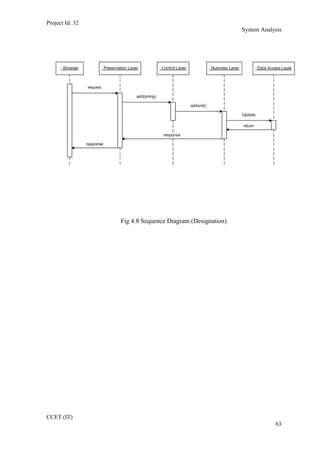
• R11: Add/update Designation
CCET (IT)
40
Project Id: 32
System Analysis
Actor: Admin
Pre Condition: User must be logged on
Input: Designation details that is to be added.
Output: The changes are reflected in the DB
Flow:
(1) Admin selects the link from the list.
(2) Then he enters/updates the proper details of the Designation.
(3) On clicking “Save” button, the data is saved to the DB.
Alternate Flow:
(1)If the user clicks the ‘Cancel’ button, then no changes are reflected in
the DB.
(2)If the admin did not provided the mandatory fields then alert is shown.
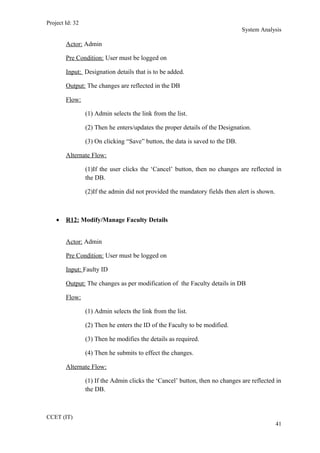
• R12: Modify/Manage Faculty Details
Actor: Admin
Pre Condition: User must be logged on
Input: Faulty ID
Output: The changes as per modification of the Faculty details in DB
Flow:
(1) Admin selects the link from the list.
(2) Then he enters the ID of the Faculty to be modified.
(3) Then he modifies the details as required.
(4) Then he submits to effect the changes.
Alternate Flow:
(1) If the Admin clicks the ‘Cancel’ button, then no changes are reflected in
the DB.
CCET (IT)
41
Project Id: 32
System Analysis
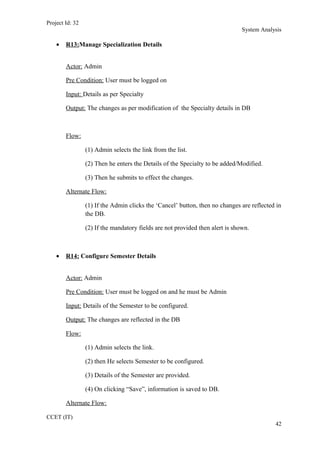
• R13:Manage Specialization Details
Actor: Admin
Pre Condition: User must be logged on
Input: Details as per Specialty
Output: The changes as per modification of the Specialty details in DB
Flow:
(1) Admin selects the link from the list.
(2) Then he enters the Details of the Specialty to be added/Modified.
(3) Then he submits to effect the changes.
Alternate Flow:
(1) If the Admin clicks the ‘Cancel’ button, then no changes are reflected in
the DB.
(2) If the mandatory fields are not provided then alert is shown.
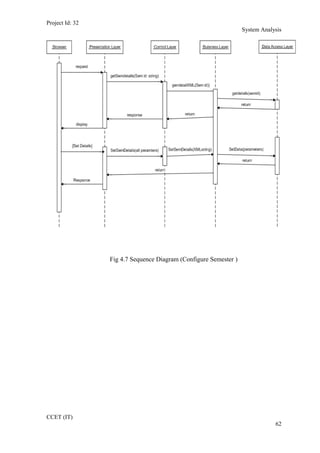
• R14: Configure Semester Details
Actor: Admin
Pre Condition: User must be logged on and he must be Admin
Input: Details of the Semester to be configured.
Output: The changes are reflected in the DB
Flow:
(1) Admin selects the link.
(2) then He selects Semester to be configured.
(3) Details of the Semester are provided.
(4) On clicking “Save”, information is saved to DB.
Alternate Flow:
CCET (IT)
42
Project Id: 32
System Analysis
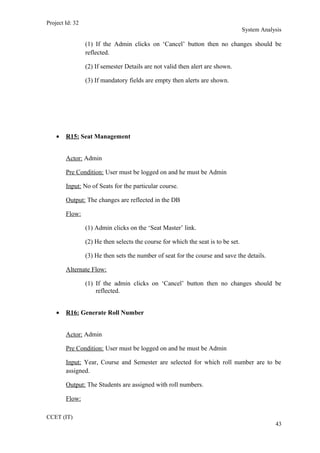
(1) If the Admin clicks on ‘Cancel’ button then no changes should be
reflected.
(2) If semester Details are not valid then alert are shown.
(3) If mandatory fields are empty then alerts are shown.
• R15: Seat Management
Actor: Admin
Pre Condition: User must be logged on and he must be Admin
Input: No of Seats for the particular course.
Output: The changes are reflected in the DB
Flow:
(1) Admin clicks on the ‘Seat Master’ link.
(2) He then selects the course for which the seat is to be set.
(3) He then sets the number of seat for the course and save the details.
Alternate Flow:
(1) If the admin clicks on ‘Cancel’ button then no changes should be
reflected.
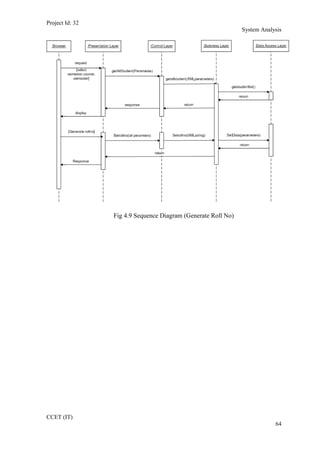
• R16: Generate Roll Number
Actor: Admin
Pre Condition: User must be logged on and he must be Admin
Input: Year, Course and Semester are selected for which roll number are to be
assigned.
Output: The Students are assigned with roll numbers.
Flow:
CCET (IT)
43
Project Id: 32
System Analysis
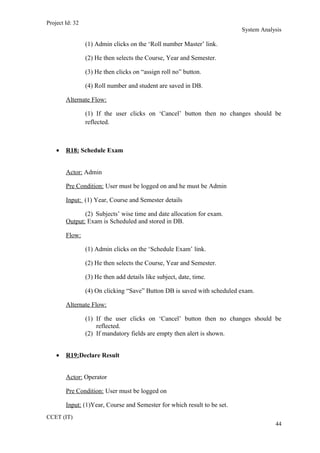
(1) Admin clicks on the ‘Roll number Master’ link.
(2) He then selects the Course, Year and Semester.
(3) He then clicks on “assign roll no” button.
(4) Roll number and student are saved in DB.
Alternate Flow:
(1) If the user clicks on ‘Cancel’ button then no changes should be
reflected.
• R18: Schedule Exam
Actor: Admin
Pre Condition: User must be logged on and he must be Admin
Input: (1) Year, Course and Semester details
(2) Subjects’ wise time and date allocation for exam.
Output: Exam is Scheduled and stored in DB.
Flow:
(1) Admin clicks on the ‘Schedule Exam’ link.
(2) He then selects the Course, Year and Semester.
(3) He then add details like subject, date, time.
(4) On clicking “Save” Button DB is saved with scheduled exam.
Alternate Flow:
(1) If the user clicks on ‘Cancel’ button then no changes should be
reflected.
(2) If mandatory fields are empty then alert is shown.
• R19:Declare Result
Actor: Operator
Pre Condition: User must be logged on
Input: (1)Year, Course and Semester for which result to be set.
CCET (IT)
44
Project Id: 32
System Analysis
(2)Exam type for which result is to be declared.
(3)Marks details of student as per subject.
Output: The Students marks and status of “pass” or “fail” is stored in DB.
Flow:
(1) Admin clicks on the ‘set result’ link.
(2) He then selects the Course, Year and Semester.
(3) He then selects type of the exam.
(4) He then add marks of each student as per subjects.
(5) Status of student is automatically set.
Alternate Flow:
(1) If the user clicks on ‘Cancel’ button then no changes should be
reflected.
(2) If mandatory fields are empty then alert is shown.
• R20: Configure subject for exam
Actor: Admin
Pre Condition: User must be logged on and he must be Admin
Input: Subjects and type of exam to be configured
Output: Database is saved as per configuration.
Flow:
(1) Admin clicks on the ‘Subject Exam master’ link.
(2) He then selects the Subjects.
(3) He then selects type of exam.
(4) He then set duration, passing marks and other details.
(5) Details are saved in DB.
Alternate Flow:
CCET (IT)
45
Project Id: 32
System Analysis
(1) If the user clicks on ‘Cancel’ button then no changes should be
reflected.
(2) If mandatory fields are empty then alert is shown.
(3) If entry is not found to be valid then alert is shown.
• R21: Add Subject
Actor: Admin
Pre Condition: User must be logged on
Input: Subject details that are to be added.
Output: The changes are reflected in the DB
Flow:
(1) Admin selects the link from the list.
(2) Then he enters the proper details of the Subject to be added.
(3) On clicking “Save” button, the Subject is added to the DB.
Alternate Flow:
(1)If the user clicks the ‘Cancel’ button, then no changes are reflected in
the DB.
(2)If the admin did not provided the mandatory fields then alert is shown.
• R22: Add Block
Actor: Admin
Pre Condition: User must be logged on
Input: Block details like block number, ID, floor, etc.
Output: The changes are reflected in the DB
Flow:
(1) Admin selects the link from the list.
CCET (IT)
46
Project Id: 32
System Analysis
(2) Then he enters the proper details of the Block to be added.
(3) On clicking “Save” button, the Block is added to the DB.
Alternate Flow:
(1)If the admin clicks the ‘Cancel’ button, then no changes are reflected in
the DB.
(2)If the admin did not provided the mandatory fields then alert is shown.
• R23: Subject Semester master
Actor: Admin
Pre Condition: User must be logged on
Input: Subject details that are to place in particular semester.
Output: The changes are reflected in the DB
Flow:
(1) Admin selects the link from the list.
(2) Then he selects the Semester for which subject are to allocated.
(3) Then he select of the Subject to be added.
(4) On clicking “Save” button, the Subject is added to the DB.
Alternate Flow:
(1)If the user clicks the ‘Cancel’ button, then no changes are reflected in
the DB.
(2)If the admin did not provided the mandatory fields then alert is shown.
• R23:block allocation master
Actor: Admin
Pre Condition: User must be logged on
Input: (1) Exam that to be conducted.
CCET (IT)
47
Project Id: 32
System Analysis
(2) Block to be allocated to exam.
Output: The changes are reflected in the DB
Flow:
(1) Admin selects the link from the list.
(2) Then he selects the exam type for which block is to be allocated.
(3) Then he select of the block to be added.
(4) On clicking “Save” button, the data is added to the DB.
Alternate Flow:
(1)If the admin clicks the ‘Cancel’ button, then no changes are reflected in
the DB.
(2)If the admin did not provided the mandatory fields then alert is shown.
(3)If block is not available then proper message is shown.
• R24: Examination report
Actor: Admin
Pre Condition: User must be logged on
Input: criteria by which report is to be generated.
Output: Generated report is shown.
Flow:
(1) Admin selects the link from the list.
(3) Then he selects the criteria.
(4) On clicking “show” button, the report is shown.
Alternate Flow:
(2)If the admin did not provided the mandatory fields then alert is shown.
CCET (IT)
48
Project Id: 32
System Analysis
4.3.2 System Requirements
• Registration details of the applicant.
• Login details of the applicant.
• Personal details of the applicant.
• Information of all the members of the applicant’s group.
• Information of all the friend list of the applicant’s
account.
• Educational and employment information
• All information and rules regarding the e-forms must
follow.
• Certain legal details of the applicant.
• Details regarding the purpose of user visit to academy.
• The statutory declaration of the applicant.
• Answers to the questionnaire for skill assessment of
visitor.
• Communication with whole system.
4.3.3 Non-Functional Requirements
• Usability
The interface should use terms and concepts, which are drawn from the
experience of the people who will make most of the system. For example,
map and date should be displayed in its traditional fashion.
• Efficiency
CCET (IT)
49
Project Id: 32
System Analysis
The system must provide easy and fast access without consuming more
cost.
• Reliability
User should never be surprised by the behaviour of the system and it should
also provide meaningful feedback when errors occur so that user can
recover from the errors.
4.4 FEASIBILITY STUDY
The aim of the feasibility study activity is to determine whether it would be
financially and technically feasible to develop the system or not. A feasibility study is
carried out from following different aspects:
Operational Feasibility:
The system has been developed for any user who wants to use this system. We have
given a demo of our project and the users found the system friendly and easy to use. The
interoperability with the existing system is also checked after uploading the website. So
they may face certain problems in using the user interface. So keeping this consideration
in mind we have provided field for each and every field on the forms. The administrator
also may be non-technical, so the user interface is designed in such a way that it gets
comfortable for the non-technical person to operate easily.
Technical Feasibility:
CCET (IT)
50
Project Id: 32
System Analysis
It determines if the system can be implemented using the current technology. This
system has been developed using asp.net (VB) as front end and SQL Server 2005 as
backend. Though the MVS 2008 technology was new to us it was not so difficult for us to
learn it. This was also new to us but it didn’t take much effort and time to get used to it.
We had earlier worked with Access and not SQL Server 2005 but getting familiar with it
was also easy.
Economical Feasibility:
The company being a well-to-do company didn’t have any problem in buying any
software that was required in developing the application. The software’s we used were
readily available. So as such we didn’t face any economical constrains.
Implementation Feasibility:
This project can easily be made available online without much consideration of the
hardware and software. The only required thing at the applicant’s side is the Internet
connection and a web browser, which are a no difficult issue these days. A database server
and application server are required to set up at the admin side. After setting up the project
online, even the administrator can access the system from anywhere.
4.5 REQUIREMENTS VALIDATION
Requirement Validation examines the specification to ensure that all system
requirements have been stated unambiguously; those inconsistencies, errors have been
detected and corrected and the work products conform to the standard.
CCET (IT)
51
Project Id: 32
System Analysis
• Source of the requirements are identified. Final
statement of requirement has been examined by original source.
• Requirements related to main requirements are found.
• Requirements are testable.
• Requirements are clearly stated and are not
misinterpreted.
• All sources of requirements are covered to get maximum
requirement.
• All methods of finding requirements are applied.
• Requirements are not duplicated and each of them gives
distinct idea of processes within project.
• Requirement associated with system performance,
behavioural and operational characteristics are clearly stated.
• Requirements are being discussed with the client in
order to remove the misinterpretations if they exist.
• Each requirement is being analyzed to prove its
feasibility for the current system.
4.6 FUNCTIONS OF SYSTEM
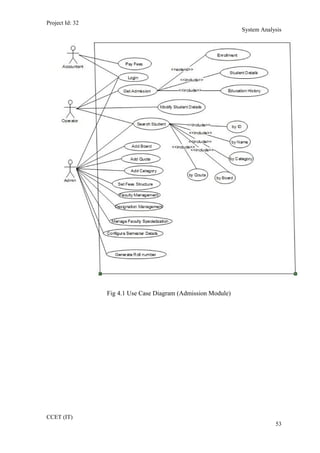
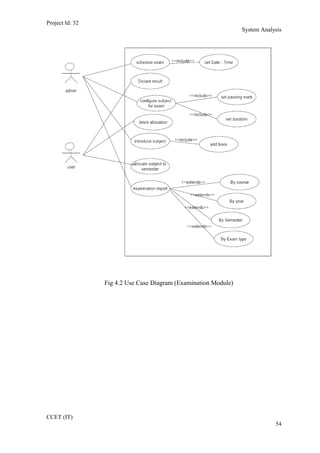
4.6.1 Use Case
The use case model for any system consists of a set if “use cases”. Intuitively, use
cases represent the different ways in which the users can use a system. Following is the
use case representation of the advantage immigration system.
CCET (IT)
52
Project Id: 32
System Analysis
Fig 4.1 Use Case Diagram (Admission Module)
CCET (IT)
53
Project Id: 32
System Analysis
Fig 4.2 Use Case Diagram (Examination Module)
CCET (IT)
54
Project Id: 32
System Analysis
4.7 DATA MODELING
4.7.1 Class Diagram
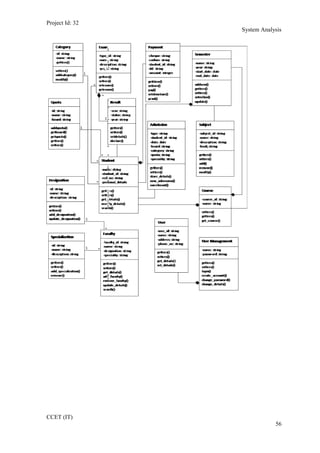
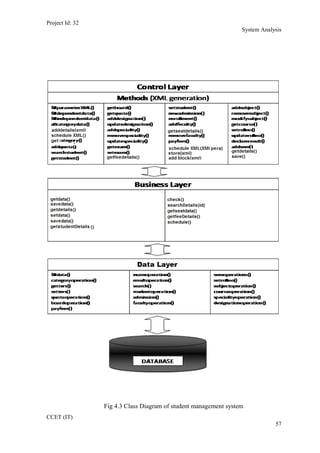
A class diagram describes the static structure of a system. It shows how a system is
structured rather than how it behaves. The static structure of a system consists of a number
of class diagrams and their dependencies. The main constituents of a class diagram are
classes and their relationships: generalization, aggregation, association, and various kinds
of dependencies.
Following diagram represents various classes of the system. The relations between
these classes are shown in the next diagram.
CCET (IT)
55
Project Id: 32
System Analysis
CCET (IT)
56
Project Id: 32
System Analysis
Fig 4.3 Class Diagram of student management system
CCET (IT)
57
Project Id: 32
System Analysis
4.7.2 Entity Relationship Diagram
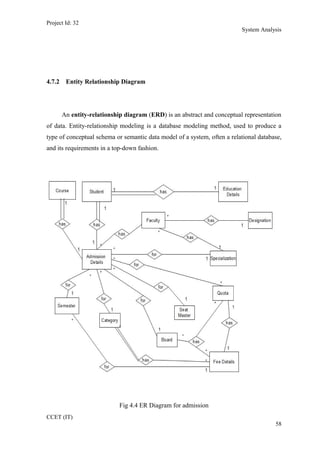
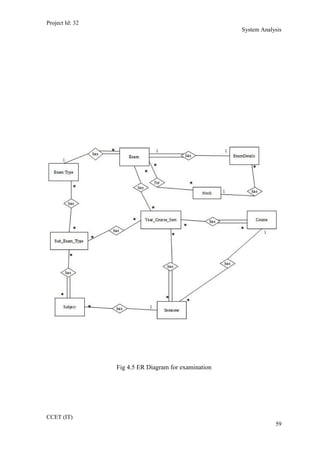
An entity-relationship diagram (ERD) is an abstract and conceptual representation
of data. Entity-relationship modeling is a database modeling method, used to produce a
type of conceptual schema or semantic data model of a system, often a relational database,
and its requirements in a top-down fashion.
Fig 4.4 ER Diagram for admission
CCET (IT)
58
Project Id: 32
System Analysis
Fig 4.5 ER Diagram for examination
CCET (IT)
59
Project Id: 32
System Analysis
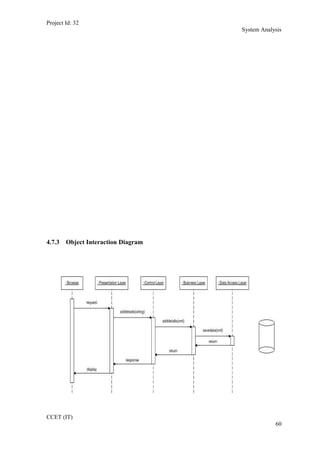
4.7.3 Object Interaction Diagram
CCET (IT)
60
Project Id: 32
System Analysis
Fig 4.6 Sequence Diagram (Add Board)
CCET (IT)
61
Project Id: 32
System Analysis
Fig 4.7 Sequence Diagram (Configure Semester )
CCET (IT)
62
Project Id: 32
System Analysis
Fig 4.8 Sequence Diagram (Designation)
CCET (IT)
63
Project Id: 32
System Analysis
Fig 4.9 Sequence Diagram (Generate Roll No)
CCET (IT)
64
Project Id: 32
System Analysis
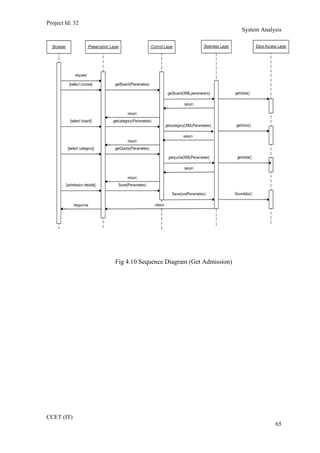
Fig 4.10 Sequence Diagram (Get Admission)
CCET (IT)
65
Project Id: 32
System Analysis
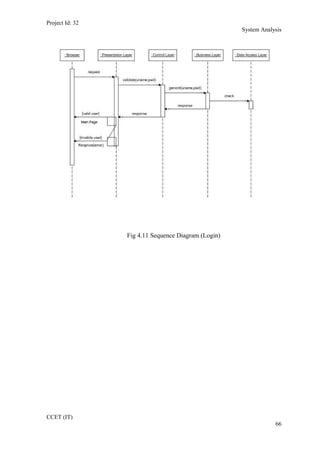
Fig 4.11 Sequence Diagram (Login)
CCET (IT)
66
Project Id: 32
System Analysis
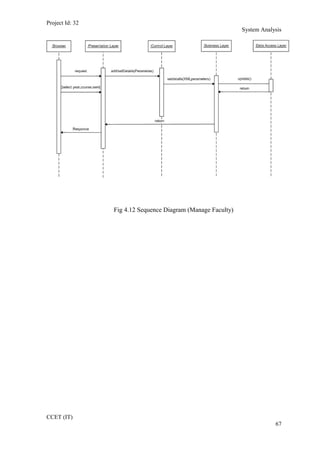
Fig 4.12 Sequence Diagram (Manage Faculty)
CCET (IT)
67
Project Id: 32
System Analysis
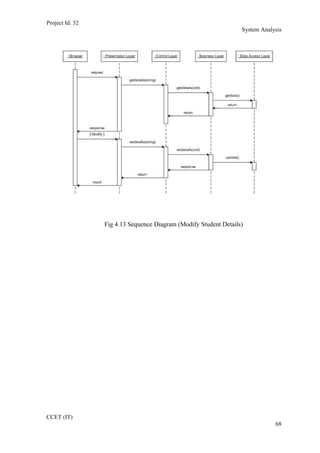
Fig 4.13 Sequence Diagram (Modify Student Details)
CCET (IT)
68
Project Id: 32
System Analysis
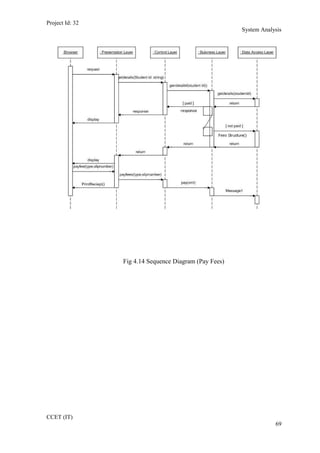
Fig 4.14 Sequence Diagram (Pay Fees)
CCET (IT)
69
Project Id: 32
System Analysis
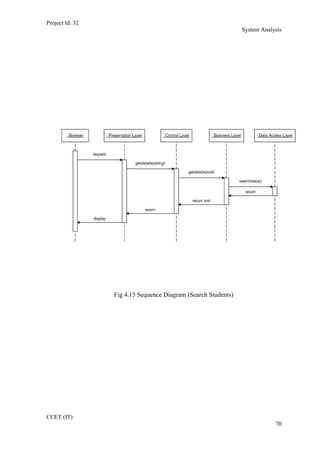
Fig 4.15 Sequence Diagram (Search Students)
CCET (IT)
70
Project Id: 32
System Analysis
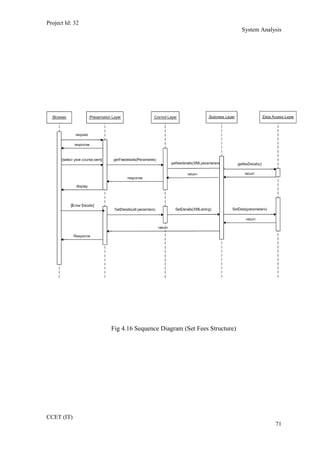
Fig 4.16 Sequence Diagram (Set Fees Structure)
CCET (IT)
71
Project Id: 32
System Analysis
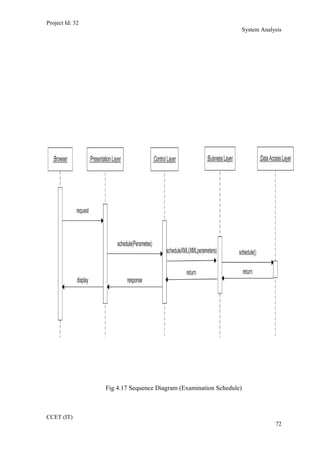
Fig 4.17 Sequence Diagram (Examination Schedule)
CCET (IT)
72
Project Id: 32
System Analysis
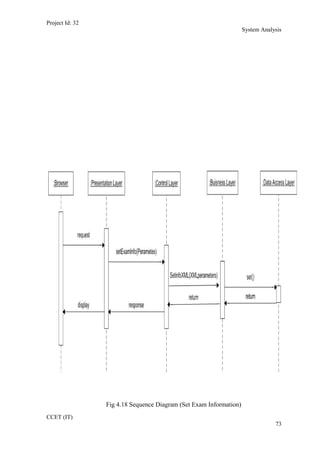
Fig 4.18 Sequence Diagram (Set Exam Information)
CCET (IT)
73
Project Id: 32
System Analysis
4.7.4 Data Dictionary
A data dictionary is a catalog --a repository-- of the elements in a system. It
includes list of all the elements composing the data flowing through a system. The major
elements are data flows, data stores, and processes. It store definitions and detailed
descriptions of the data used in an organization’s information system
It is important because –
• To manage the detail in large systems
• To communicate a common meaning for all system
elements
• To document the feature of the system
• To facilitate analysis of the details in order to evaluate
characteristics and determine where system changes should be made
• To locate error and omissions in the system
CCET (IT)
74
Project Id: 32
System Analysis
List of Data Tables:
1. Board Master
2. Category Master
3. Course Master
4. Exam Details
5. Exam Master
6. Exam Type Master
7. Faculty Designation
8. Faculty Details
9. Fees Details
10. Payment Master
11. Quota Master
12. Result Data
13. Semester Master
14. Specialty Master
15. Student Admission Details
16. Student Education Details
17. Student Personal Details
18. Subject Exam Type Details
19. Subject Master
20. Subject Semester Allocation
21. Year Course Semester
CCET (IT)
75
Project Id: 32
System Analysis
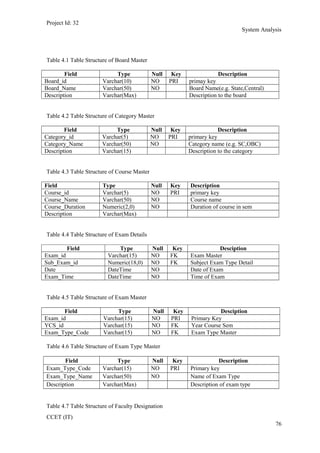
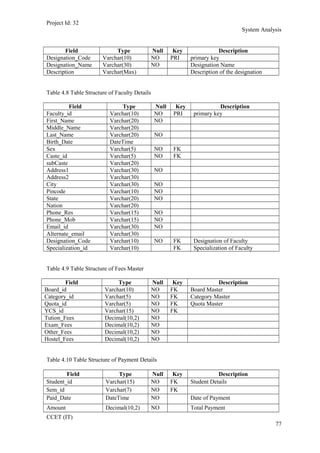
Table 4.1 Table Structure of Board Master
Field Type Null Key Description
Board_id Varchar(10) NO PRI primay key
Board_Name Varchar(50) NO Board Name(e.g. State,Central)
Description Varchar(Max) Description to the board
Table 4.2 Table Structure of Category Master
Field Type Null Key Description
Category_id Varchar(5) NO PRI primary key
Category_Name Varchar(50) NO Category name (e.g. SC,OBC)
Description Varchar(15) Description to the category
Table 4.3 Table Structure of Course Master
Field Type Null Key Description
Course_id Varchar(5) NO PRI primary key
Course_Name Varchar(50) NO Course name
Course_Duration Numeric(2,0) NO Duration of course in sem
Description Varchar(Max)
Table 4.4 Table Structure of Exam Details
Field Type Null Key Desciption
Exam_id Varchar(15) NO FK Exam Master
Sub_Exam_id Numeric(18,0) NO FK Subject Exam Type Detail
Date DateTime NO Date of Exam
Exam_Time DateTime NO Time of Exam
Table 4.5 Table Structure of Exam Master
Field Type Null Key Desciption
Exam_id Varchar(15) NO PRI Primary Key
YCS_id Varchar(15) NO FK Year Course Sem
Exam_Type_Code Varchar(15) NO FK Exam Type Master
Table 4.6 Table Structure of Exam Type Master
Field Type Null Key Description
Exam_Type_Code Varchar(15) NO PRI Primary key
Exam_Type_Name Varchar(50) NO Name of Exam Type
Description Varchar(Max) Description of exam type
Table 4.7 Table Structure of Faculty Designation
CCET (IT)
76
Project Id: 32
System Analysis
Field Type Null Key Description
Designation_Code Varchar(10) NO PRI primary key
Designation_Name Varchar(30) NO Designation Name
Description Varchar(Max) Description of the designation
Table 4.8 Table Structure of Faculty Details
Field Type Null Key Description
Faculty_id Varchar(10) NO PRI primary key
First_Name Varchar(20) NO
Middle_Name Varchar(20)
Last_Name Varchar(20) NO
Birth_Date DateTime
Sex Varchar(5) NO FK
Caste_id Varchar(5) NO FK
subCaste Varchar(20)
Address1 Varchar(30) NO
Address2 Varchar(30)
City Varchar(30) NO
Pincode Varchar(10) NO
State Varchar(20) NO
Nation Varchar(20)
Phone_Res Varchar(15) NO
Phone_Mob Varchar(15) NO
Email_id Varchar(30) NO
Alternate_email Varchar(30)
Designation_Code Varchar(10) NO FK Designation of Faculty
Specialization_id Varchar(10) FK Specialization of Faculty
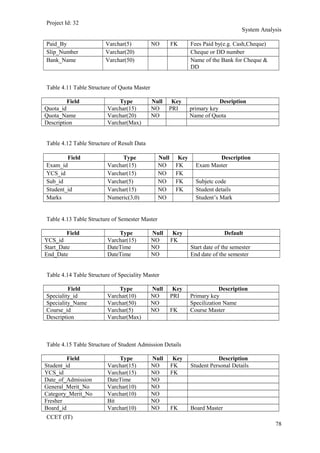
Table 4.9 Table Structure of Fees Master
Field Type Null Key Description
Board_id Varchar(10) NO FK Board Master
Category_id Varchar(5) NO FK Category Master
Quota_id Varchar(5) NO FK Quota Master
YCS_id Varchar(15) NO FK
Tution_Fees Decimal(10,2) NO
Exam_Fees Decimal(10,2) NO
Other_Fees Decimal(10,2) NO
Hostel_Fees Decimal(10,2) NO
Table 4.10 Table Structure of Payment Details
Field Type Null Key Description
Student_id Varchar(15) NO FK Student Details
Sem_id Varchar(7) NO FK
Paid_Date DateTime NO Date of Payment
Amount Decimal(10,2) NO Total Payment
CCET (IT)
77
Project Id: 32
System Analysis
Paid_By Varchar(5) NO FK Fees Paid by(e.g. Cash,Cheque)
Slip_Number Varchar(20) Cheque or DD number
Bank_Name Varchar(50) Name of the Bank for Cheque &
DD
Table 4.11 Table Structure of Quota Master
Field Type Null Key Desription
Quota_id Varchar(15) NO PRI primary key
Quota_Name Varchar(20) NO Name of Quota
Description Varchar(Max)
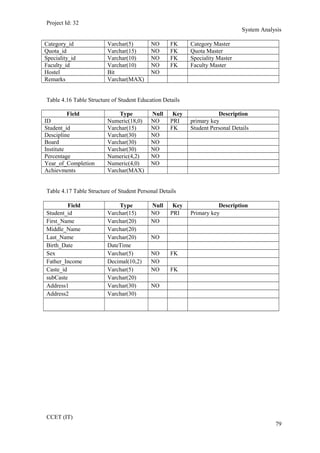
Table 4.12 Table Structure of Result Data
Field Type Null Key Description
Exam_id Varchar(15) NO FK Exam Master
YCS_id Varchar(15) NO FK
Sub_id Varchar(5) NO FK Subjetc code
Student_id Varchar(15) NO FK Student details
Marks Numeric(3,0) NO Student’s Mark
Table 4.13 Table Structure of Semester Master
Field Type Null Key Default
YCS_id Varchar(15) NO FK
Start_Date DateTime NO Start date of the semester
End_Date DateTime NO End date of the semester
Table 4.14 Table Structure of Speciality Master
Field Type Null Key Description
Speciality_id Varchar(10) NO PRI Primary key
Speciality_Name Varchar(50) NO Specilization Name
Course_id Varchar(5) NO FK Course Master
Description Varchar(Max)
Table 4.15 Table Structure of Student Admission Details
Field Type Null Key Description
Student_id Varchar(15) NO FK Student Personal Details
YCS_id Varchar(15) NO FK
Date_of_Admission DateTime NO
General_Merit_No Varchar(10) NO
Category_Merit_No Varchar(10) NO
Fresher Bit NO
Board_id Varchar(10) NO FK Board Master
CCET (IT)
78
Project Id: 32
System Analysis
Category_id Varchar(5) NO FK Category Master
Quota_id Varchar(15) NO FK Quota Master
Speciality_id Varchar(10) NO FK Speciality Master
Faculty_id Varchar(10) NO FK Faculty Master
Hostel Bit NO
Remarks Varchar(MAX)
Table 4.16 Table Structure of Student Education Details
Field Type Null Key Description
ID Numeric(18,0) NO PRI primary key
Student_id Varchar(15) NO FK Student Personal Details
Descipline Varchar(30) NO
Board Varchar(30) NO
Institute Varchar(30) NO
Percentage Numeric(4,2) NO
Year_of_Completion Numeric(4,0) NO
Achievments Varchar(MAX)
Table 4.17 Table Structure of Student Personal Details
Field Type Null Key Description
Student_id Varchar(15) NO PRI Primary key
First_Name Varchar(20) NO
Middle_Name Varchar(20)
Last_Name Varchar(20) NO
Birth_Date DateTime
Sex Varchar(5) NO FK
Father_Income Decimal(10,2) NO
Caste_id Varchar(5) NO FK
subCaste Varchar(20)
Address1 Varchar(30) NO
Address2 Varchar(30)
CCET (IT)
79
Project Id: 32
System Analysis
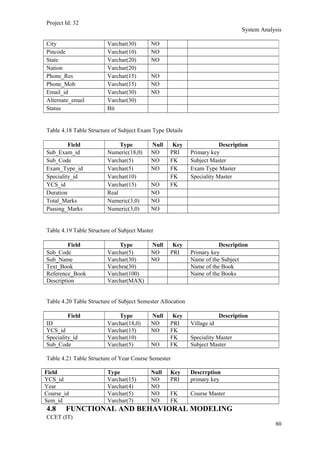
Table 4.18 Table Structure of Subject Exam Type Details
Field Type Null Key Description
Sub_Exam_id Numeric(18,0) NO PRI Primary key
Sub_Code Varchar(5) NO FK Subject Master
Exam_Type_id Varchar(5) NO FK Exam Type Master
Speciality_id Varchar(10) FK Speciality Master
YCS_id Varchar(15) NO FK
Duration Real NO
Total_Marks Numeric(3,0) NO
Passing_Marks Numeric(3,0) NO
Table 4.19 Table Structure of Subject Master
Field Type Null Key Description
Sub_Code Varchar(5) NO PRI Primary key
Sub_Name Varchar(30) NO Name of the Subject
Text_Book Varchra(30) Name of the Book
Reference_Book Varchar(100) Name of the Books
Description Varchar(MAX)
Table 4.20 Table Structure of Subject Semester Allocation
Field Type Null Key Description
ID Varchar(18,0) NO PRI Village id
YCS_id Varchar(15) NO FK
Speciality_id Varchar(10) FK Speciality Master
Sub_Code Varchar(5) NO FK Subject Master
Table 4.21 Table Structure of Year Course Semester
Field Type Null Key Descrrption
YCS_id Varchar(15) NO PRI primary key
Year Varchar(4) NO
Course_id Varchar(5) NO FK Course Master
Sem_id Varchar(7) NO FK
4.8 FUNCTIONAL AND BEHAVIORAL MODELING
CCET (IT)
80
City Varchar(30) NO
Pincode Varchar(10) NO
State Varchar(20) NO
Nation Varchar(20)
Phone_Res Varchar(15) NO
Phone_Mob Varchar(15) NO
Email_id Varchar(30) NO
Alternate_email Varchar(30)
Status Bit
Project Id: 32
System Analysis
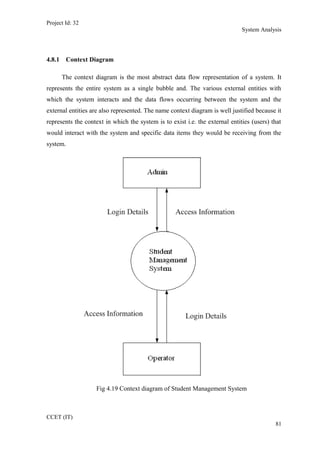
4.8.1 Context Diagram
The context diagram is the most abstract data flow representation of a system. It
represents the entire system as a single bubble and. The various external entities with
which the system interacts and the data flows occurring between the system and the
external entities are also represented. The name context diagram is well justified because it
represents the context in which the system is to exist i.e. the external entities (users) that
would interact with the system and specific data items they would be receiving from the
system.
Fig 4.19 Context diagram of Student Management System
CCET (IT)
81
Project Id: 32
System Analysis
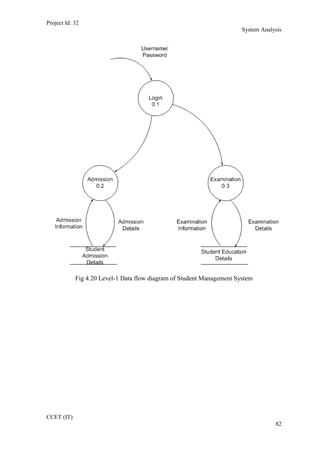
Fig 4.20 Level-1 Data flow diagram of Student Management System
CCET (IT)
82
Project Id: 32
System Analysis
Fig 4.21 Level-2 Data flow diagram of examination
CCET (IT)
83
Project Id: 32
System Analysis
Fig 4.22 Level-2 Data flow diagram of category
CCET (IT)
84
Project Id: 32
System Analysis
Fig 4.23 Level-2 Data flow diagram of fees structure
CCET (IT)
85
Project Id: 32
System Analysis
Fig 4.24 Level-2 data flow diagram of subject
CCET (IT)
86
Project Id: 32
System Analysis
4.9 MAIN MODULES OF NEW SYSTEM
• Admission Module
o Student Registration
o Semester Screen
o Category Screen
o Payment Screen
o Faculty Screen
o Seat Master
o Student Fees Screen
o Roll No. Generation Screen
o Student Report Generation Screen
• Examination Module
o Exam Type Screen
o Examination Scheduling Screen
o Subject Master Screen
o Subject Examination Marks Allocation Screen
o Subject Allocation Master
o Result Entry Screen
o Examination Scheduling Report
4.10 SELECTION OF HARDWARE AND SOFTWARE
JUSTIFICATION
The development of the system “STUDENT MANAGEMENT SYSTEM” is composed
of the following components:
• Java Script.
• ASP.NET
• XML (Extensible Markup Language).
CCET (IT)
87
Project Id: 32
System Analysis
• SQL Server 2005.
• PHOTSHOP
• AJAX
• AAA LOGO
1. JavaScript:
• JavaScript is the programming language of the web.
• Java Scripts can be inserted into HTML documents, to make the web pages
more dynamic and interactive
• JavaScript is a scripting language.
• JavaScript is supported by Major web browsers.
• When a JavaScript is inserted into an HTML document, the Internet browser
will read the HTML and interpret the JavaScript.
• JavaScript gives HTML designers a programming tool
• JavaScript is a very light programming language with very simple syntax.
• JavaScript can put dynamic text into an HTML page
2. ASP .NET:
• ASP.NET is Microsoft's new Internet and Web strategy
• ASP.NET is NOT a new operating system
• ASP.NET is a new Internet and Web based infrastructure
• ASP.NET delivers software as Web Services
• ASP.NET is a framework for universal services
• ASP.NET is a server centric computing model
• ASP.NET will run in any browser on any platform
• ASP.NET is based on the newest Web standards
CCET (IT)
88
Project Id: 32
System Analysis
3. .NET Framework 3.5
The .NET Framework is Microsoft's comprehensive and consistent programming
model for building applications that have visually stunning user experiences, seamless and
secure communication, and the ability to model a range of business processes.
The .NET Framework 3.5 introduces new features for the technologies in 2.0 and
3.0 and additional technologies in the form of new assemblies. The following technologies
are introduced with the .NET Framework 3.5:
• Language Integrated Query (LINQ).
• New compilers for C#, Visual Basic, and C++.
• ASP.NET AJAX.
4. Hyper Text Mark-Up Language (HTML)
• HTML = HyperText Mark-up Language
• Universal, non-proprietary, structured, text mark-up language
• Used to publish documents on the World Wide Web
• Used to define the structure of documents and links between documents
• An application of Standard Generalized Mark-up Language.
• Style sheets
• Scripting
• Internationalization
• Accessibility
5. Extensible Markup Language (XML)
• XML stands for Extensible Markup Language
• XML is a markup language much like HTML.
• XML was designed to describe data.
• XML tags are not predefined in XML. You must define your own tags.
CCET (IT)
89
Project Id: 32
System Analysis
• XML uses a DTD (Document Type Definition) to describe the data.
• XML with a DTD is designed to be self-describing.
CCET (IT)
90

Chapter 4

  • 1.
    Project Id: 32 SystemAnalysis Chapter 4 SYSTEM ANALYSIS ________________________________________________ CCET (IT) 33
  • 2.
    Project Id: 32 SystemAnalysis 4.1 STUDY OF CURRENT SYSTEM The current system for the Student Management System deals with maintaining a physical contact with the academy management dept. for filling all the details and the documentation work. The management doesn’t needs to visit the academy management dept. and collect the assignment and submitting his/her documents directly. According to the current system, the management has to fill in the forms manually, go to the account management dept., and submit him the form. The applicant needs to visit the academy portal now and then in order to get his work accomplished. The admin also has to manage all the users. He needs to maintain records of all the users, their activity status, submission methods and installation details on paper. The Manual process is more error prone and also slow. Moreover Students in the academy can interface his/her work area only. But if an online application is available then they can communicate whole system. Thus a simulation of this entire process can be a boon to the applicants as well as the admin. 4.2 PROBLEMS AND WEAKNESSES OF CURRENT SYSTEM • The present system has certain major disadvantages. A few to be listed can be excessive paperwork, time consuming process flow, laborious work environment for employees, difficulty to access historical data and all these problems lead to inefficient working of government sector causing dissatisfaction in the general public. • Apart from the above stated problems there is lack of transparency in the existing system. This being one of the major drawbacks in the system needs special attention. • The problem stated above have certain deep rooted problems like time consuming process flow for which the government may need to change the structure of the process flow in certain cases so that the system output can become faster. • The following listed are the problems or weaknesses of the current system: CCET (IT) 34
  • 3.
    Project Id: 32 SystemAnalysis  So much time consume in preparing registers which is having replicated data  It is difficult to prepare report for decision making.  Attendance related module is not there. 4.3 REQUIREMETNS OF NEW SYSTEM 4.3.1 User Requirements • R1: login Actor: Admin, Operator, Accountant Pre Condition: None Input: User Id and Password Output: Home Page as per role Flow: (1) User Logs in with username and password. (2) If correct then Home Page is displayed. Alternate Flow: (1) If the username is wrong then it is asked to login again. (2) If the password is wrong then the user is asked to enter again. • R2:Pay fees Actor: Accountant CCET (IT) 35
  • 4.
    Project Id: 32 SystemAnalysis Pre Condition: User must be logged on Input: Student ID Output: Fees paid Flow: (1) Accountant enters student ID (2) Details of student is shown with the status of fees paid or not. (3) If fees not paid then Accountant collects the fees. (4) student can get the print receipt of paid fees. Alternate Flow: (1) If the fields marked with ‘*’ are empty then alert is displayed. (2) If student ID does not exist then the system alerts it. • R3: Get admission Actor: operator Pre Condition: User must be logged on Input: Complete Details of the student including personal, academic records. Output: Student ID is generated and student is admitted. Flow: (1) Admin clicks on ‘New admission’ link (2) New generated Student ID is displayed. (3) Details of student is filled in the form by operator. (4) Newly generated ID is given to student. (5) The student is admitted to the particular course. Alternate Flow: (1) If the mandatory fields are not filled then alert is shown. CCET (IT) 36
  • 5.
    Project Id: 32 SystemAnalysis (2) If there is no available seat for the particular admission then alert is shown. • R4: Enrolment Actor: operator Pre Condition: User must be logged on and student has already got admission. Input: Details for the enrolment of the student. Output: student has got enrolment. Flow: (1) Admin selects the “enrolment” link. (2) Then he enter the student ID. (3) Details that is applicable to the student for the enrolment is shown. (4) student is enrolled to the next year or semester. Alternate Flow: (1) If student has not passed last semester then system alerts. • R5: Modify student Details Actor: operator Pre Condition: User must be logged on Input: student ID Output: The changes as per modification of the student details in DB Flow: (1) Operator selects the link from the list. (2) Then he enters the ID of the student to be modified. (3) Then he modifies the details as required. CCET (IT) 37
  • 6.
    Project Id: 32 SystemAnalysis (4) Then he submits to effect the changes. Alternate Flow: (1) If the user clicks the ‘Cancel’ button, then no changes are reflected in the DB. • R6: Search student Actor: Admin, Operator Pre Condition: User must be logged on Input: Detail of student as per selected search criteria. Output: Student with his/her complete details. Flow: (1) User selects the link from the list. (2) Then he selects the search criteria. (3) Then he enters the details as per search criteria. (3) Then he deletes, adds or edits the roles from the list. (4) Search result is displayed. Alternate Flow: (1) If the user clicks the ‘Cancel’ button, then no changes are reflected in the DB. (2) If there is no such student then appropriate message is shown. • R7: Add board Actor: Admin Pre Condition: User must be logged on Input: Board details that is to be added. Output: The changes are reflected in the DB Flow: (1) Admin selects the link from the list. CCET (IT) 38
  • 7.
    Project Id: 32 SystemAnalysis (2) Then he enters the proper details of the board to be added. (3) On clicking “Save” button, the board is added to the DB. Alternate Flow: (1) If the user clicks the ‘Cancel’ button, then no changes are reflected in the DB. (2) If the admin did not provided the mandatory fields then alert is shown. • R8: Add quota Actor: Admin Pre Condition: User must be logged on Input: Quota details that is to be added. Output: The changes are reflected in the DB Flow: (1) Admin selects the link from the list. (2) Then he enters the proper details of the Quota to be added. (3) On clicking “Save” button, the Quota is added to the DB. Alternate Flow: (1)If the user clicks the ‘Cancel’ button, then no changes are reflected in the DB. (2)If the admin did not provided the mandatory fields then alert is shown. • R9: Add Category Actor: Admin Pre Condition: User must be logged on Input: Category details that is to be added. Output: The changes are reflected in the DB CCET (IT) 39
  • 8.
    Project Id: 32 SystemAnalysis Flow: (1) Admin selects the link from the list. (2) Then he enters the proper details of the Category to be added. (3) On clicking “Save” button, the Category is added to the DB. Alternate Flow: (1)If the user clicks the ‘Cancel’ button, then no changes are reflected in the DB. (2)If the admin did not provide the mandatory fields’ then alert is shown. • R10:Set Fees Structures Actor: Admin Pre Condition: User must be logged on and he must be Admin Input: fees details of the particular year, course and semester. Output: The changes of the fees structure are reflected in the DB Flow: (1) Admin clicks on the ‘Fees Master’ link. (2) He then selects the Course, Year and Semester. (3) He then sets various fees for it. (4) On clicking “save” button, the DB is saved for the fees structure. Alternate Flow: (1) If the admin clicks on ‘Cancel’ button then no changes should be reflected. (2) If mandatory fields are empty then alert is shown. • R11: Add/update Designation CCET (IT) 40
  • 9.
    Project Id: 32 SystemAnalysis Actor: Admin Pre Condition: User must be logged on Input: Designation details that is to be added. Output: The changes are reflected in the DB Flow: (1) Admin selects the link from the list. (2) Then he enters/updates the proper details of the Designation. (3) On clicking “Save” button, the data is saved to the DB. Alternate Flow: (1)If the user clicks the ‘Cancel’ button, then no changes are reflected in the DB. (2)If the admin did not provided the mandatory fields then alert is shown. • R12: Modify/Manage Faculty Details Actor: Admin Pre Condition: User must be logged on Input: Faulty ID Output: The changes as per modification of the Faculty details in DB Flow: (1) Admin selects the link from the list. (2) Then he enters the ID of the Faculty to be modified. (3) Then he modifies the details as required. (4) Then he submits to effect the changes. Alternate Flow: (1) If the Admin clicks the ‘Cancel’ button, then no changes are reflected in the DB. CCET (IT) 41
  • 10.
    Project Id: 32 SystemAnalysis • R13:Manage Specialization Details Actor: Admin Pre Condition: User must be logged on Input: Details as per Specialty Output: The changes as per modification of the Specialty details in DB Flow: (1) Admin selects the link from the list. (2) Then he enters the Details of the Specialty to be added/Modified. (3) Then he submits to effect the changes. Alternate Flow: (1) If the Admin clicks the ‘Cancel’ button, then no changes are reflected in the DB. (2) If the mandatory fields are not provided then alert is shown. • R14: Configure Semester Details Actor: Admin Pre Condition: User must be logged on and he must be Admin Input: Details of the Semester to be configured. Output: The changes are reflected in the DB Flow: (1) Admin selects the link. (2) then He selects Semester to be configured. (3) Details of the Semester are provided. (4) On clicking “Save”, information is saved to DB. Alternate Flow: CCET (IT) 42
  • 11.
    Project Id: 32 SystemAnalysis (1) If the Admin clicks on ‘Cancel’ button then no changes should be reflected. (2) If semester Details are not valid then alert are shown. (3) If mandatory fields are empty then alerts are shown. • R15: Seat Management Actor: Admin Pre Condition: User must be logged on and he must be Admin Input: No of Seats for the particular course. Output: The changes are reflected in the DB Flow: (1) Admin clicks on the ‘Seat Master’ link. (2) He then selects the course for which the seat is to be set. (3) He then sets the number of seat for the course and save the details. Alternate Flow: (1) If the admin clicks on ‘Cancel’ button then no changes should be reflected. • R16: Generate Roll Number Actor: Admin Pre Condition: User must be logged on and he must be Admin Input: Year, Course and Semester are selected for which roll number are to be assigned. Output: The Students are assigned with roll numbers. Flow: CCET (IT) 43
  • 12.
    Project Id: 32 SystemAnalysis (1) Admin clicks on the ‘Roll number Master’ link. (2) He then selects the Course, Year and Semester. (3) He then clicks on “assign roll no” button. (4) Roll number and student are saved in DB. Alternate Flow: (1) If the user clicks on ‘Cancel’ button then no changes should be reflected. • R18: Schedule Exam Actor: Admin Pre Condition: User must be logged on and he must be Admin Input: (1) Year, Course and Semester details (2) Subjects’ wise time and date allocation for exam. Output: Exam is Scheduled and stored in DB. Flow: (1) Admin clicks on the ‘Schedule Exam’ link. (2) He then selects the Course, Year and Semester. (3) He then add details like subject, date, time. (4) On clicking “Save” Button DB is saved with scheduled exam. Alternate Flow: (1) If the user clicks on ‘Cancel’ button then no changes should be reflected. (2) If mandatory fields are empty then alert is shown. • R19:Declare Result Actor: Operator Pre Condition: User must be logged on Input: (1)Year, Course and Semester for which result to be set. CCET (IT) 44
  • 13.
    Project Id: 32 SystemAnalysis (2)Exam type for which result is to be declared. (3)Marks details of student as per subject. Output: The Students marks and status of “pass” or “fail” is stored in DB. Flow: (1) Admin clicks on the ‘set result’ link. (2) He then selects the Course, Year and Semester. (3) He then selects type of the exam. (4) He then add marks of each student as per subjects. (5) Status of student is automatically set. Alternate Flow: (1) If the user clicks on ‘Cancel’ button then no changes should be reflected. (2) If mandatory fields are empty then alert is shown. • R20: Configure subject for exam Actor: Admin Pre Condition: User must be logged on and he must be Admin Input: Subjects and type of exam to be configured Output: Database is saved as per configuration. Flow: (1) Admin clicks on the ‘Subject Exam master’ link. (2) He then selects the Subjects. (3) He then selects type of exam. (4) He then set duration, passing marks and other details. (5) Details are saved in DB. Alternate Flow: CCET (IT) 45
  • 14.
    Project Id: 32 SystemAnalysis (1) If the user clicks on ‘Cancel’ button then no changes should be reflected. (2) If mandatory fields are empty then alert is shown. (3) If entry is not found to be valid then alert is shown. • R21: Add Subject Actor: Admin Pre Condition: User must be logged on Input: Subject details that are to be added. Output: The changes are reflected in the DB Flow: (1) Admin selects the link from the list. (2) Then he enters the proper details of the Subject to be added. (3) On clicking “Save” button, the Subject is added to the DB. Alternate Flow: (1)If the user clicks the ‘Cancel’ button, then no changes are reflected in the DB. (2)If the admin did not provided the mandatory fields then alert is shown. • R22: Add Block Actor: Admin Pre Condition: User must be logged on Input: Block details like block number, ID, floor, etc. Output: The changes are reflected in the DB Flow: (1) Admin selects the link from the list. CCET (IT) 46
  • 15.
    Project Id: 32 SystemAnalysis (2) Then he enters the proper details of the Block to be added. (3) On clicking “Save” button, the Block is added to the DB. Alternate Flow: (1)If the admin clicks the ‘Cancel’ button, then no changes are reflected in the DB. (2)If the admin did not provided the mandatory fields then alert is shown. • R23: Subject Semester master Actor: Admin Pre Condition: User must be logged on Input: Subject details that are to place in particular semester. Output: The changes are reflected in the DB Flow: (1) Admin selects the link from the list. (2) Then he selects the Semester for which subject are to allocated. (3) Then he select of the Subject to be added. (4) On clicking “Save” button, the Subject is added to the DB. Alternate Flow: (1)If the user clicks the ‘Cancel’ button, then no changes are reflected in the DB. (2)If the admin did not provided the mandatory fields then alert is shown. • R23:block allocation master Actor: Admin Pre Condition: User must be logged on Input: (1) Exam that to be conducted. CCET (IT) 47
  • 16.
    Project Id: 32 SystemAnalysis (2) Block to be allocated to exam. Output: The changes are reflected in the DB Flow: (1) Admin selects the link from the list. (2) Then he selects the exam type for which block is to be allocated. (3) Then he select of the block to be added. (4) On clicking “Save” button, the data is added to the DB. Alternate Flow: (1)If the admin clicks the ‘Cancel’ button, then no changes are reflected in the DB. (2)If the admin did not provided the mandatory fields then alert is shown. (3)If block is not available then proper message is shown. • R24: Examination report Actor: Admin Pre Condition: User must be logged on Input: criteria by which report is to be generated. Output: Generated report is shown. Flow: (1) Admin selects the link from the list. (3) Then he selects the criteria. (4) On clicking “show” button, the report is shown. Alternate Flow: (2)If the admin did not provided the mandatory fields then alert is shown. CCET (IT) 48
  • 17.
    Project Id: 32 SystemAnalysis 4.3.2 System Requirements • Registration details of the applicant. • Login details of the applicant. • Personal details of the applicant. • Information of all the members of the applicant’s group. • Information of all the friend list of the applicant’s account. • Educational and employment information • All information and rules regarding the e-forms must follow. • Certain legal details of the applicant. • Details regarding the purpose of user visit to academy. • The statutory declaration of the applicant. • Answers to the questionnaire for skill assessment of visitor. • Communication with whole system. 4.3.3 Non-Functional Requirements • Usability The interface should use terms and concepts, which are drawn from the experience of the people who will make most of the system. For example, map and date should be displayed in its traditional fashion. • Efficiency CCET (IT) 49
  • 18.
    Project Id: 32 SystemAnalysis The system must provide easy and fast access without consuming more cost. • Reliability User should never be surprised by the behaviour of the system and it should also provide meaningful feedback when errors occur so that user can recover from the errors. 4.4 FEASIBILITY STUDY The aim of the feasibility study activity is to determine whether it would be financially and technically feasible to develop the system or not. A feasibility study is carried out from following different aspects: Operational Feasibility: The system has been developed for any user who wants to use this system. We have given a demo of our project and the users found the system friendly and easy to use. The interoperability with the existing system is also checked after uploading the website. So they may face certain problems in using the user interface. So keeping this consideration in mind we have provided field for each and every field on the forms. The administrator also may be non-technical, so the user interface is designed in such a way that it gets comfortable for the non-technical person to operate easily. Technical Feasibility: CCET (IT) 50
  • 19.
    Project Id: 32 SystemAnalysis It determines if the system can be implemented using the current technology. This system has been developed using asp.net (VB) as front end and SQL Server 2005 as backend. Though the MVS 2008 technology was new to us it was not so difficult for us to learn it. This was also new to us but it didn’t take much effort and time to get used to it. We had earlier worked with Access and not SQL Server 2005 but getting familiar with it was also easy. Economical Feasibility: The company being a well-to-do company didn’t have any problem in buying any software that was required in developing the application. The software’s we used were readily available. So as such we didn’t face any economical constrains. Implementation Feasibility: This project can easily be made available online without much consideration of the hardware and software. The only required thing at the applicant’s side is the Internet connection and a web browser, which are a no difficult issue these days. A database server and application server are required to set up at the admin side. After setting up the project online, even the administrator can access the system from anywhere. 4.5 REQUIREMENTS VALIDATION Requirement Validation examines the specification to ensure that all system requirements have been stated unambiguously; those inconsistencies, errors have been detected and corrected and the work products conform to the standard. CCET (IT) 51
  • 20.
    Project Id: 32 SystemAnalysis • Source of the requirements are identified. Final statement of requirement has been examined by original source. • Requirements related to main requirements are found. • Requirements are testable. • Requirements are clearly stated and are not misinterpreted. • All sources of requirements are covered to get maximum requirement. • All methods of finding requirements are applied. • Requirements are not duplicated and each of them gives distinct idea of processes within project. • Requirement associated with system performance, behavioural and operational characteristics are clearly stated. • Requirements are being discussed with the client in order to remove the misinterpretations if they exist. • Each requirement is being analyzed to prove its feasibility for the current system. 4.6 FUNCTIONS OF SYSTEM 4.6.1 Use Case The use case model for any system consists of a set if “use cases”. Intuitively, use cases represent the different ways in which the users can use a system. Following is the use case representation of the advantage immigration system. CCET (IT) 52
  • 21.
    Project Id: 32 SystemAnalysis Fig 4.1 Use Case Diagram (Admission Module) CCET (IT) 53
  • 22.
    Project Id: 32 SystemAnalysis Fig 4.2 Use Case Diagram (Examination Module) CCET (IT) 54
  • 23.
    Project Id: 32 SystemAnalysis 4.7 DATA MODELING 4.7.1 Class Diagram A class diagram describes the static structure of a system. It shows how a system is structured rather than how it behaves. The static structure of a system consists of a number of class diagrams and their dependencies. The main constituents of a class diagram are classes and their relationships: generalization, aggregation, association, and various kinds of dependencies. Following diagram represents various classes of the system. The relations between these classes are shown in the next diagram. CCET (IT) 55
  • 24.
    Project Id: 32 SystemAnalysis CCET (IT) 56
  • 25.
    Project Id: 32 SystemAnalysis Fig 4.3 Class Diagram of student management system CCET (IT) 57
  • 26.
    Project Id: 32 SystemAnalysis 4.7.2 Entity Relationship Diagram An entity-relationship diagram (ERD) is an abstract and conceptual representation of data. Entity-relationship modeling is a database modeling method, used to produce a type of conceptual schema or semantic data model of a system, often a relational database, and its requirements in a top-down fashion. Fig 4.4 ER Diagram for admission CCET (IT) 58
  • 27.
    Project Id: 32 SystemAnalysis Fig 4.5 ER Diagram for examination CCET (IT) 59
  • 28.
    Project Id: 32 SystemAnalysis 4.7.3 Object Interaction Diagram CCET (IT) 60
  • 29.
    Project Id: 32 SystemAnalysis Fig 4.6 Sequence Diagram (Add Board) CCET (IT) 61
  • 30.
    Project Id: 32 SystemAnalysis Fig 4.7 Sequence Diagram (Configure Semester ) CCET (IT) 62
  • 31.
    Project Id: 32 SystemAnalysis Fig 4.8 Sequence Diagram (Designation) CCET (IT) 63
  • 32.
    Project Id: 32 SystemAnalysis Fig 4.9 Sequence Diagram (Generate Roll No) CCET (IT) 64
  • 33.
    Project Id: 32 SystemAnalysis Fig 4.10 Sequence Diagram (Get Admission) CCET (IT) 65
  • 34.
    Project Id: 32 SystemAnalysis Fig 4.11 Sequence Diagram (Login) CCET (IT) 66
  • 35.
    Project Id: 32 SystemAnalysis Fig 4.12 Sequence Diagram (Manage Faculty) CCET (IT) 67
  • 36.
    Project Id: 32 SystemAnalysis Fig 4.13 Sequence Diagram (Modify Student Details) CCET (IT) 68
  • 37.
    Project Id: 32 SystemAnalysis Fig 4.14 Sequence Diagram (Pay Fees) CCET (IT) 69
  • 38.
    Project Id: 32 SystemAnalysis Fig 4.15 Sequence Diagram (Search Students) CCET (IT) 70
  • 39.
    Project Id: 32 SystemAnalysis Fig 4.16 Sequence Diagram (Set Fees Structure) CCET (IT) 71
  • 40.
    Project Id: 32 SystemAnalysis Fig 4.17 Sequence Diagram (Examination Schedule) CCET (IT) 72
  • 41.
    Project Id: 32 SystemAnalysis Fig 4.18 Sequence Diagram (Set Exam Information) CCET (IT) 73
  • 42.
    Project Id: 32 SystemAnalysis 4.7.4 Data Dictionary A data dictionary is a catalog --a repository-- of the elements in a system. It includes list of all the elements composing the data flowing through a system. The major elements are data flows, data stores, and processes. It store definitions and detailed descriptions of the data used in an organization’s information system It is important because – • To manage the detail in large systems • To communicate a common meaning for all system elements • To document the feature of the system • To facilitate analysis of the details in order to evaluate characteristics and determine where system changes should be made • To locate error and omissions in the system CCET (IT) 74
  • 43.
    Project Id: 32 SystemAnalysis List of Data Tables: 1. Board Master 2. Category Master 3. Course Master 4. Exam Details 5. Exam Master 6. Exam Type Master 7. Faculty Designation 8. Faculty Details 9. Fees Details 10. Payment Master 11. Quota Master 12. Result Data 13. Semester Master 14. Specialty Master 15. Student Admission Details 16. Student Education Details 17. Student Personal Details 18. Subject Exam Type Details 19. Subject Master 20. Subject Semester Allocation 21. Year Course Semester CCET (IT) 75
  • 44.
    Project Id: 32 SystemAnalysis Table 4.1 Table Structure of Board Master Field Type Null Key Description Board_id Varchar(10) NO PRI primay key Board_Name Varchar(50) NO Board Name(e.g. State,Central) Description Varchar(Max) Description to the board Table 4.2 Table Structure of Category Master Field Type Null Key Description Category_id Varchar(5) NO PRI primary key Category_Name Varchar(50) NO Category name (e.g. SC,OBC) Description Varchar(15) Description to the category Table 4.3 Table Structure of Course Master Field Type Null Key Description Course_id Varchar(5) NO PRI primary key Course_Name Varchar(50) NO Course name Course_Duration Numeric(2,0) NO Duration of course in sem Description Varchar(Max) Table 4.4 Table Structure of Exam Details Field Type Null Key Desciption Exam_id Varchar(15) NO FK Exam Master Sub_Exam_id Numeric(18,0) NO FK Subject Exam Type Detail Date DateTime NO Date of Exam Exam_Time DateTime NO Time of Exam Table 4.5 Table Structure of Exam Master Field Type Null Key Desciption Exam_id Varchar(15) NO PRI Primary Key YCS_id Varchar(15) NO FK Year Course Sem Exam_Type_Code Varchar(15) NO FK Exam Type Master Table 4.6 Table Structure of Exam Type Master Field Type Null Key Description Exam_Type_Code Varchar(15) NO PRI Primary key Exam_Type_Name Varchar(50) NO Name of Exam Type Description Varchar(Max) Description of exam type Table 4.7 Table Structure of Faculty Designation CCET (IT) 76
  • 45.
    Project Id: 32 SystemAnalysis Field Type Null Key Description Designation_Code Varchar(10) NO PRI primary key Designation_Name Varchar(30) NO Designation Name Description Varchar(Max) Description of the designation Table 4.8 Table Structure of Faculty Details Field Type Null Key Description Faculty_id Varchar(10) NO PRI primary key First_Name Varchar(20) NO Middle_Name Varchar(20) Last_Name Varchar(20) NO Birth_Date DateTime Sex Varchar(5) NO FK Caste_id Varchar(5) NO FK subCaste Varchar(20) Address1 Varchar(30) NO Address2 Varchar(30) City Varchar(30) NO Pincode Varchar(10) NO State Varchar(20) NO Nation Varchar(20) Phone_Res Varchar(15) NO Phone_Mob Varchar(15) NO Email_id Varchar(30) NO Alternate_email Varchar(30) Designation_Code Varchar(10) NO FK Designation of Faculty Specialization_id Varchar(10) FK Specialization of Faculty Table 4.9 Table Structure of Fees Master Field Type Null Key Description Board_id Varchar(10) NO FK Board Master Category_id Varchar(5) NO FK Category Master Quota_id Varchar(5) NO FK Quota Master YCS_id Varchar(15) NO FK Tution_Fees Decimal(10,2) NO Exam_Fees Decimal(10,2) NO Other_Fees Decimal(10,2) NO Hostel_Fees Decimal(10,2) NO Table 4.10 Table Structure of Payment Details Field Type Null Key Description Student_id Varchar(15) NO FK Student Details Sem_id Varchar(7) NO FK Paid_Date DateTime NO Date of Payment Amount Decimal(10,2) NO Total Payment CCET (IT) 77
  • 46.
    Project Id: 32 SystemAnalysis Paid_By Varchar(5) NO FK Fees Paid by(e.g. Cash,Cheque) Slip_Number Varchar(20) Cheque or DD number Bank_Name Varchar(50) Name of the Bank for Cheque & DD Table 4.11 Table Structure of Quota Master Field Type Null Key Desription Quota_id Varchar(15) NO PRI primary key Quota_Name Varchar(20) NO Name of Quota Description Varchar(Max) Table 4.12 Table Structure of Result Data Field Type Null Key Description Exam_id Varchar(15) NO FK Exam Master YCS_id Varchar(15) NO FK Sub_id Varchar(5) NO FK Subjetc code Student_id Varchar(15) NO FK Student details Marks Numeric(3,0) NO Student’s Mark Table 4.13 Table Structure of Semester Master Field Type Null Key Default YCS_id Varchar(15) NO FK Start_Date DateTime NO Start date of the semester End_Date DateTime NO End date of the semester Table 4.14 Table Structure of Speciality Master Field Type Null Key Description Speciality_id Varchar(10) NO PRI Primary key Speciality_Name Varchar(50) NO Specilization Name Course_id Varchar(5) NO FK Course Master Description Varchar(Max) Table 4.15 Table Structure of Student Admission Details Field Type Null Key Description Student_id Varchar(15) NO FK Student Personal Details YCS_id Varchar(15) NO FK Date_of_Admission DateTime NO General_Merit_No Varchar(10) NO Category_Merit_No Varchar(10) NO Fresher Bit NO Board_id Varchar(10) NO FK Board Master CCET (IT) 78
  • 47.
    Project Id: 32 SystemAnalysis Category_id Varchar(5) NO FK Category Master Quota_id Varchar(15) NO FK Quota Master Speciality_id Varchar(10) NO FK Speciality Master Faculty_id Varchar(10) NO FK Faculty Master Hostel Bit NO Remarks Varchar(MAX) Table 4.16 Table Structure of Student Education Details Field Type Null Key Description ID Numeric(18,0) NO PRI primary key Student_id Varchar(15) NO FK Student Personal Details Descipline Varchar(30) NO Board Varchar(30) NO Institute Varchar(30) NO Percentage Numeric(4,2) NO Year_of_Completion Numeric(4,0) NO Achievments Varchar(MAX) Table 4.17 Table Structure of Student Personal Details Field Type Null Key Description Student_id Varchar(15) NO PRI Primary key First_Name Varchar(20) NO Middle_Name Varchar(20) Last_Name Varchar(20) NO Birth_Date DateTime Sex Varchar(5) NO FK Father_Income Decimal(10,2) NO Caste_id Varchar(5) NO FK subCaste Varchar(20) Address1 Varchar(30) NO Address2 Varchar(30) CCET (IT) 79
  • 48.
    Project Id: 32 SystemAnalysis Table 4.18 Table Structure of Subject Exam Type Details Field Type Null Key Description Sub_Exam_id Numeric(18,0) NO PRI Primary key Sub_Code Varchar(5) NO FK Subject Master Exam_Type_id Varchar(5) NO FK Exam Type Master Speciality_id Varchar(10) FK Speciality Master YCS_id Varchar(15) NO FK Duration Real NO Total_Marks Numeric(3,0) NO Passing_Marks Numeric(3,0) NO Table 4.19 Table Structure of Subject Master Field Type Null Key Description Sub_Code Varchar(5) NO PRI Primary key Sub_Name Varchar(30) NO Name of the Subject Text_Book Varchra(30) Name of the Book Reference_Book Varchar(100) Name of the Books Description Varchar(MAX) Table 4.20 Table Structure of Subject Semester Allocation Field Type Null Key Description ID Varchar(18,0) NO PRI Village id YCS_id Varchar(15) NO FK Speciality_id Varchar(10) FK Speciality Master Sub_Code Varchar(5) NO FK Subject Master Table 4.21 Table Structure of Year Course Semester Field Type Null Key Descrrption YCS_id Varchar(15) NO PRI primary key Year Varchar(4) NO Course_id Varchar(5) NO FK Course Master Sem_id Varchar(7) NO FK 4.8 FUNCTIONAL AND BEHAVIORAL MODELING CCET (IT) 80 City Varchar(30) NO Pincode Varchar(10) NO State Varchar(20) NO Nation Varchar(20) Phone_Res Varchar(15) NO Phone_Mob Varchar(15) NO Email_id Varchar(30) NO Alternate_email Varchar(30) Status Bit
  • 49.
    Project Id: 32 SystemAnalysis 4.8.1 Context Diagram The context diagram is the most abstract data flow representation of a system. It represents the entire system as a single bubble and. The various external entities with which the system interacts and the data flows occurring between the system and the external entities are also represented. The name context diagram is well justified because it represents the context in which the system is to exist i.e. the external entities (users) that would interact with the system and specific data items they would be receiving from the system. Fig 4.19 Context diagram of Student Management System CCET (IT) 81
  • 50.
    Project Id: 32 SystemAnalysis Fig 4.20 Level-1 Data flow diagram of Student Management System CCET (IT) 82
  • 51.
    Project Id: 32 SystemAnalysis Fig 4.21 Level-2 Data flow diagram of examination CCET (IT) 83
  • 52.
    Project Id: 32 SystemAnalysis Fig 4.22 Level-2 Data flow diagram of category CCET (IT) 84
  • 53.
    Project Id: 32 SystemAnalysis Fig 4.23 Level-2 Data flow diagram of fees structure CCET (IT) 85
  • 54.
    Project Id: 32 SystemAnalysis Fig 4.24 Level-2 data flow diagram of subject CCET (IT) 86
  • 55.
    Project Id: 32 SystemAnalysis 4.9 MAIN MODULES OF NEW SYSTEM • Admission Module o Student Registration o Semester Screen o Category Screen o Payment Screen o Faculty Screen o Seat Master o Student Fees Screen o Roll No. Generation Screen o Student Report Generation Screen • Examination Module o Exam Type Screen o Examination Scheduling Screen o Subject Master Screen o Subject Examination Marks Allocation Screen o Subject Allocation Master o Result Entry Screen o Examination Scheduling Report 4.10 SELECTION OF HARDWARE AND SOFTWARE JUSTIFICATION The development of the system “STUDENT MANAGEMENT SYSTEM” is composed of the following components: • Java Script. • ASP.NET • XML (Extensible Markup Language). CCET (IT) 87
  • 56.
    Project Id: 32 SystemAnalysis • SQL Server 2005. • PHOTSHOP • AJAX • AAA LOGO 1. JavaScript: • JavaScript is the programming language of the web. • Java Scripts can be inserted into HTML documents, to make the web pages more dynamic and interactive • JavaScript is a scripting language. • JavaScript is supported by Major web browsers. • When a JavaScript is inserted into an HTML document, the Internet browser will read the HTML and interpret the JavaScript. • JavaScript gives HTML designers a programming tool • JavaScript is a very light programming language with very simple syntax. • JavaScript can put dynamic text into an HTML page 2. ASP .NET: • ASP.NET is Microsoft's new Internet and Web strategy • ASP.NET is NOT a new operating system • ASP.NET is a new Internet and Web based infrastructure • ASP.NET delivers software as Web Services • ASP.NET is a framework for universal services • ASP.NET is a server centric computing model • ASP.NET will run in any browser on any platform • ASP.NET is based on the newest Web standards CCET (IT) 88
  • 57.
    Project Id: 32 SystemAnalysis 3. .NET Framework 3.5 The .NET Framework is Microsoft's comprehensive and consistent programming model for building applications that have visually stunning user experiences, seamless and secure communication, and the ability to model a range of business processes. The .NET Framework 3.5 introduces new features for the technologies in 2.0 and 3.0 and additional technologies in the form of new assemblies. The following technologies are introduced with the .NET Framework 3.5: • Language Integrated Query (LINQ). • New compilers for C#, Visual Basic, and C++. • ASP.NET AJAX. 4. Hyper Text Mark-Up Language (HTML) • HTML = HyperText Mark-up Language • Universal, non-proprietary, structured, text mark-up language • Used to publish documents on the World Wide Web • Used to define the structure of documents and links between documents • An application of Standard Generalized Mark-up Language. • Style sheets • Scripting • Internationalization • Accessibility 5. Extensible Markup Language (XML) • XML stands for Extensible Markup Language • XML is a markup language much like HTML. • XML was designed to describe data. • XML tags are not predefined in XML. You must define your own tags. CCET (IT) 89
  • 58.
    Project Id: 32 SystemAnalysis • XML uses a DTD (Document Type Definition) to describe the data. • XML with a DTD is designed to be self-describing. CCET (IT) 90