
1Samsung Open Source Group
Stefan Schmidt
Samsung Open Source Group
stefan@osg.samsung.com
Static Analysis of Your OSS Project
with Coverity
LinuxCon EU 2015
2Samsung Open Source Group
●
Introduction
●
Survey of Available Analysers
●
Coverity Scan Service
●
Hooking it Up in Your Project
●
Fine Tuning
●
Work Flows & Examples
●
Summary
Agenda
3Samsung Open Source Group
Introduction
4Samsung Open Source Group
Static Analysers
● What is Static Analysis?
– Analysis of the soure code without execution
– Usage of algorithms and techniques to find bugs in source code
● What is it not?
– A formal verification of your code
– A proof that your code is bug free
● Why is it useful for us?
– Allows to find many types of defects early in the development process
– Resource leaks, NULL pointer dereferences, memory corruptions, buffer
overflows, etc.
– Supplements things like unit testing, runtime testing, Valgrind, etc.
5Samsung Open Source Group
Survey of Available Analysers
6Samsung Open Source Group
Static Analysers
● Sparse
● Clang Static Analyzer
● CodeChecker based on Clang Static Analyzer
● Klocwork (proprietary)
● Coverity (proprietary, free as in beer service for OSS projects)
● A list with more analysers can be found at [1]
● My personal experience started with
– Clang Static Analyzer
– Klocwork used internally (not allowed to share results)
– finally settled for Coverity Scan service
7Samsung Open Source Group
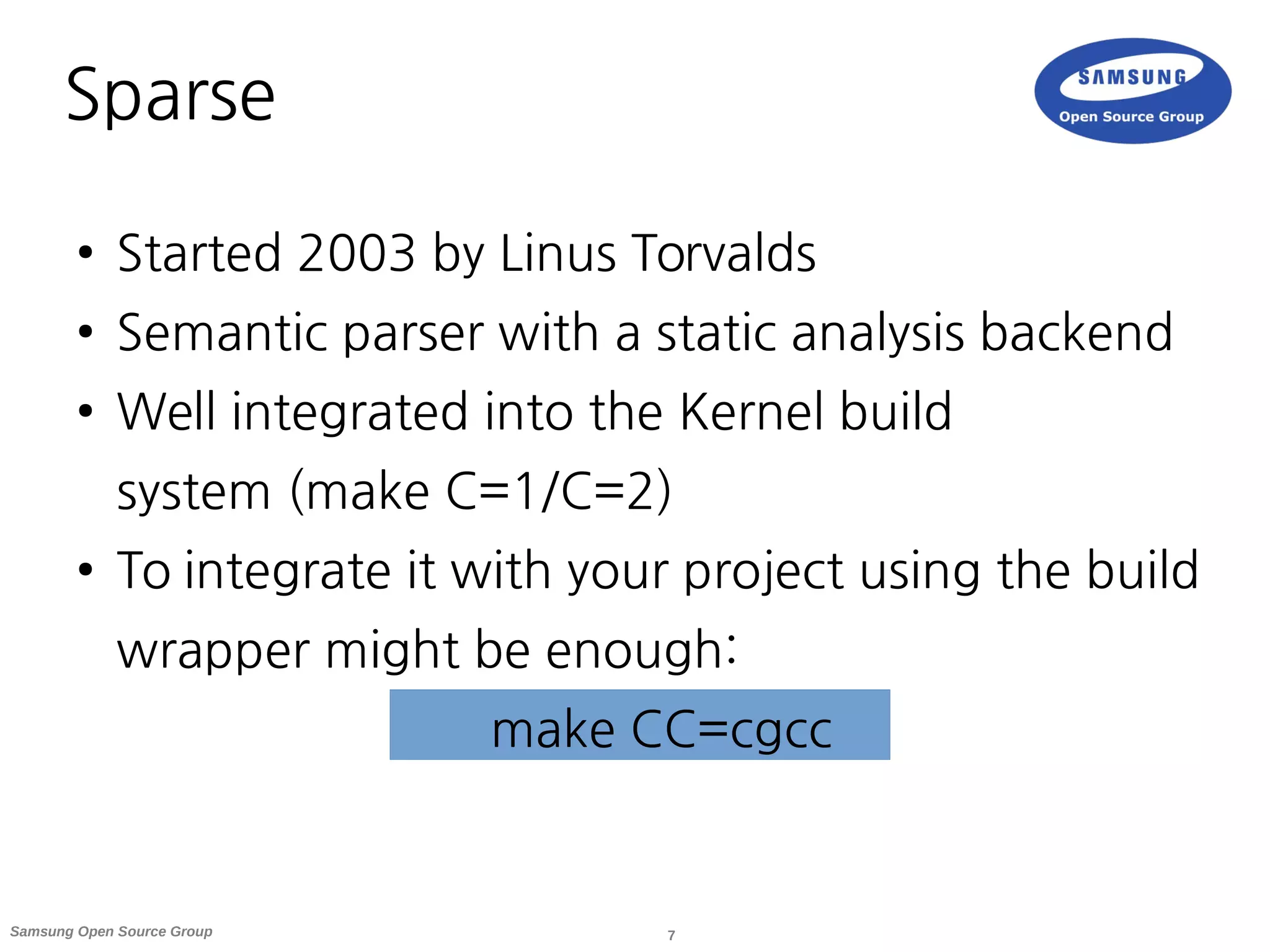
Sparse
● Started 2003 by Linus Torvalds
● Semantic parser with a static analysis backend
● Well integrated into the Kernel build
system (make C=1/C=2)
● To integrate it with your project using the build
wrapper might be enough:
make CC=cgcc
8Samsung Open Source Group
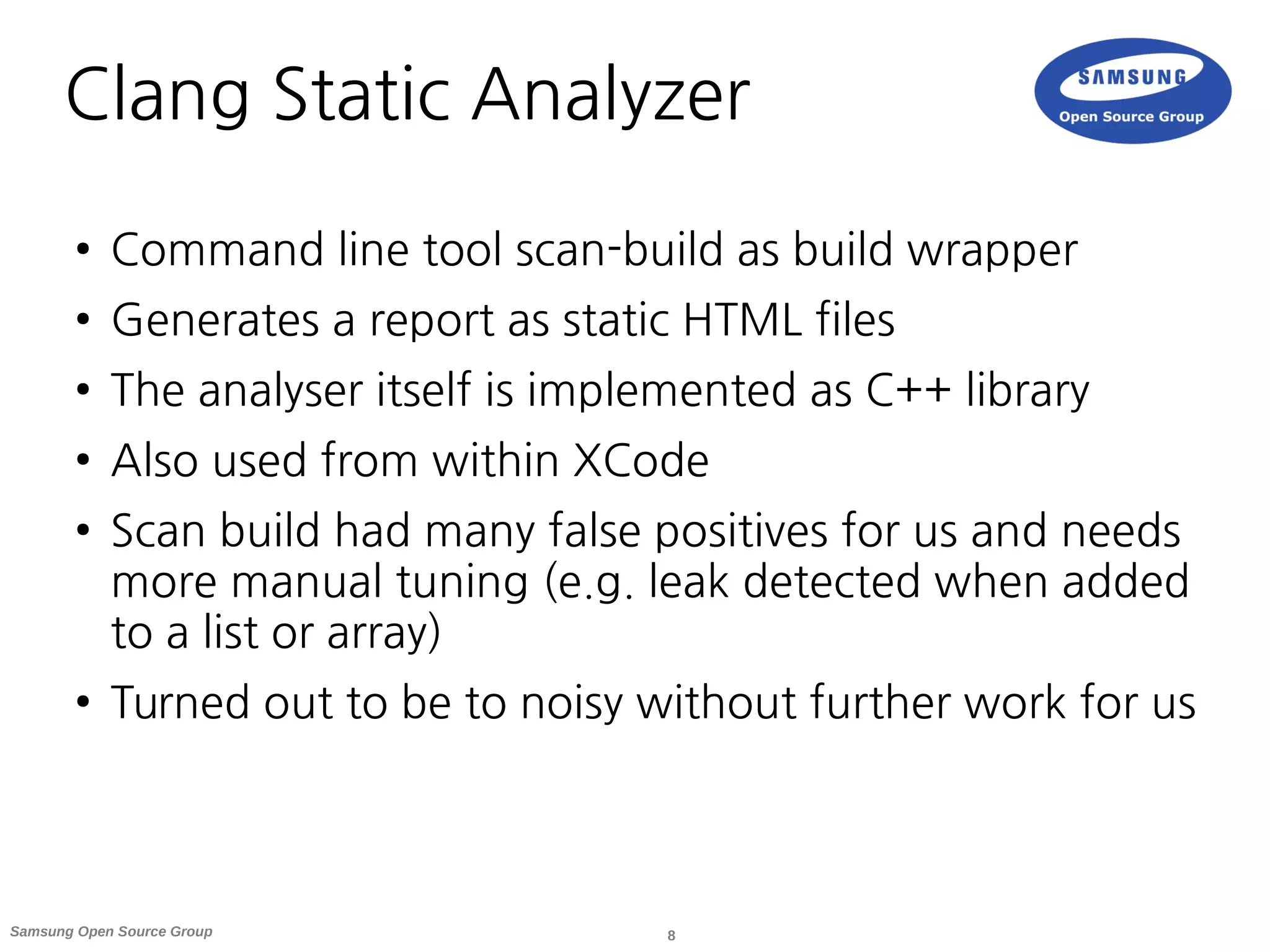
Clang Static Analyzer
● Command line tool scan-build as build wrapper
● Generates a report as static HTML files
● The analyser itself is implemented as C++ library
● Also used from within XCode
● Scan build had many false positives for us and needs
more manual tuning (e.g. leak detected when added
to a list or array)
● Turned out to be to noisy without further work for us
9Samsung Open Source Group
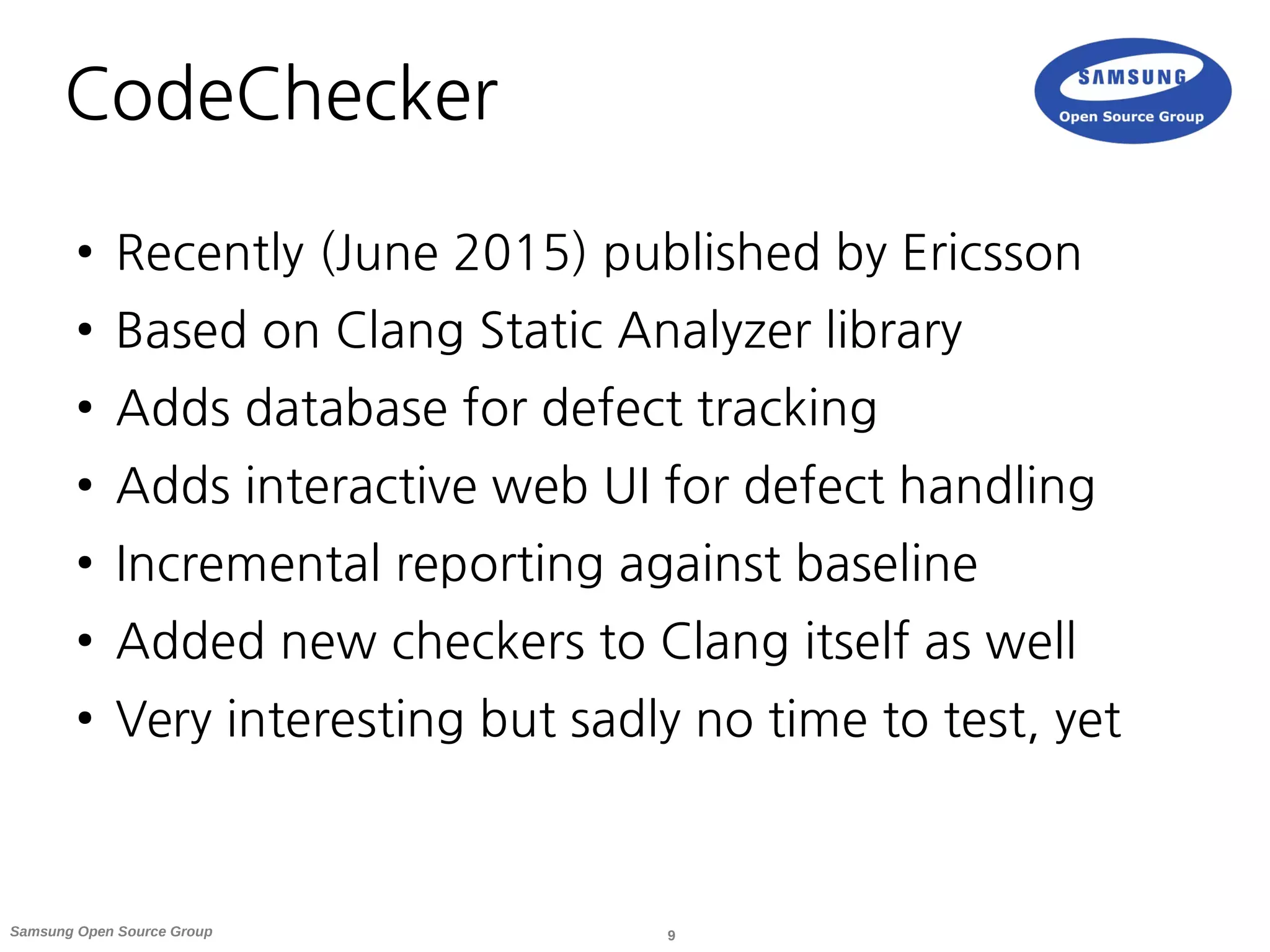
CodeChecker
● Recently (June 2015) published by Ericsson
● Based on Clang Static Analyzer library
● Adds database for defect tracking
● Adds interactive web UI for defect handling
● Incremental reporting against baseline
● Added new checkers to Clang itself as well
● Very interesting but sadly no time to test, yet
10Samsung Open Source Group
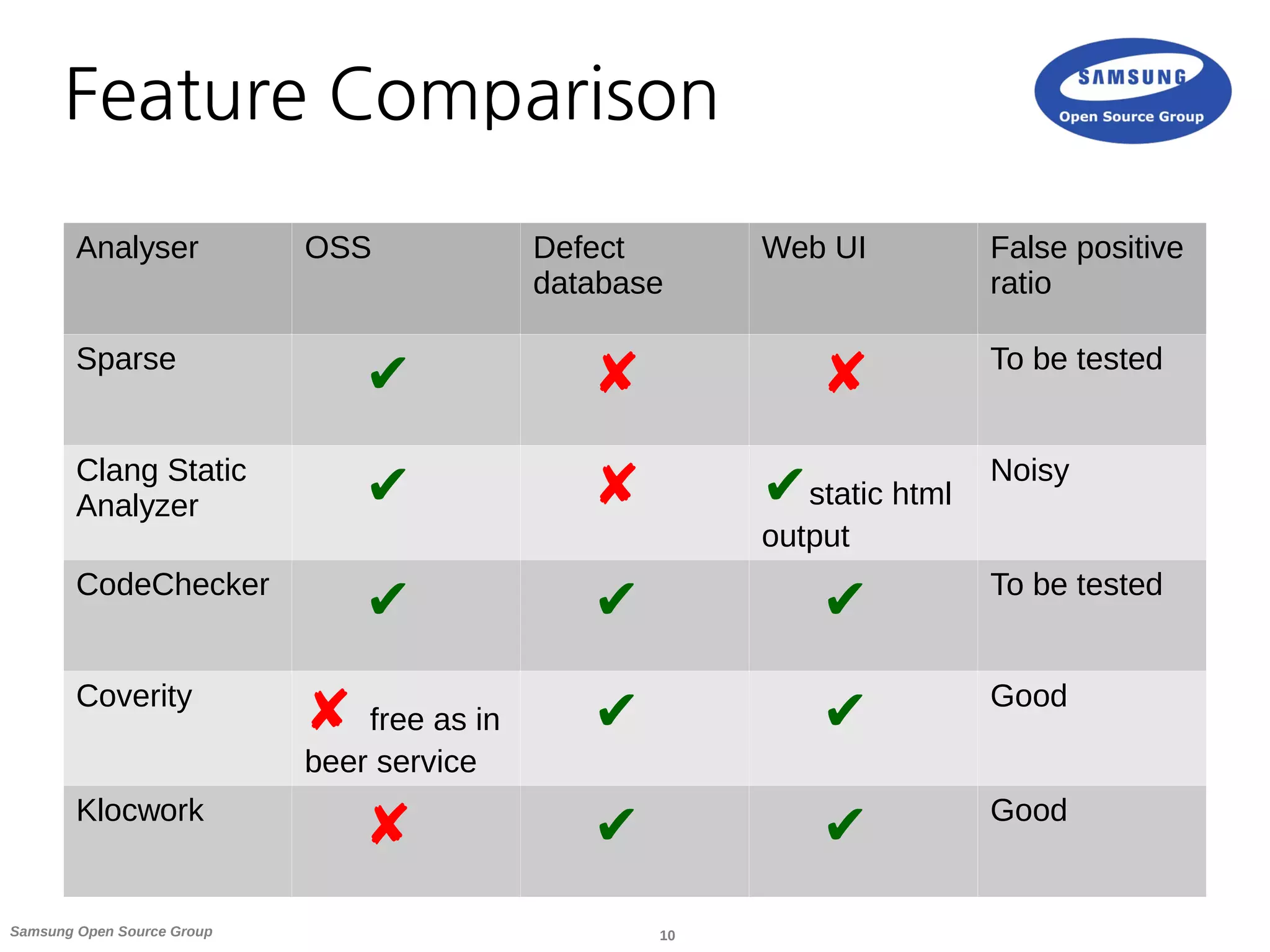
Feature Comparison
Analyser OSS Defect
database
Web UI False positive
ratio
Sparse
✔ ✘ ✘ To be tested
Clang Static
Analyzer ✔ ✘ ✔static html
output
Noisy
CodeChecker
✔ ✔ ✔ To be tested
Coverity
✘ free as in
beer service
✔ ✔ Good
Klocwork
✘ ✔ ✔ Good
11Samsung Open Source Group
Coverity Scan Service
12Samsung Open Source Group
Coverity Scan Service Overview
● Started 2006 with 50 projects and now runs for
5700
● Many big projects already make use of it: Linux,
Firefox, LibreOffice, FreeBSD, ...
● Scans projects written in C, C++, Java, C# and
JavaScript
● Defect density is defined as defects per 1000
lines of code (1 per 1000 as industry standard)
13Samsung Open Source Group
Coverity Scan Service Parts
1) Build wrapper cov-build to gather data on
your system and package it into a tgz file
2) Upload the tgz on the website or via curl
to web API to trigger analysis
3) Receive a mail once the analysis is completed
4) Web UI for dashboard and to triage defect
reports
14Samsung Open Source Group
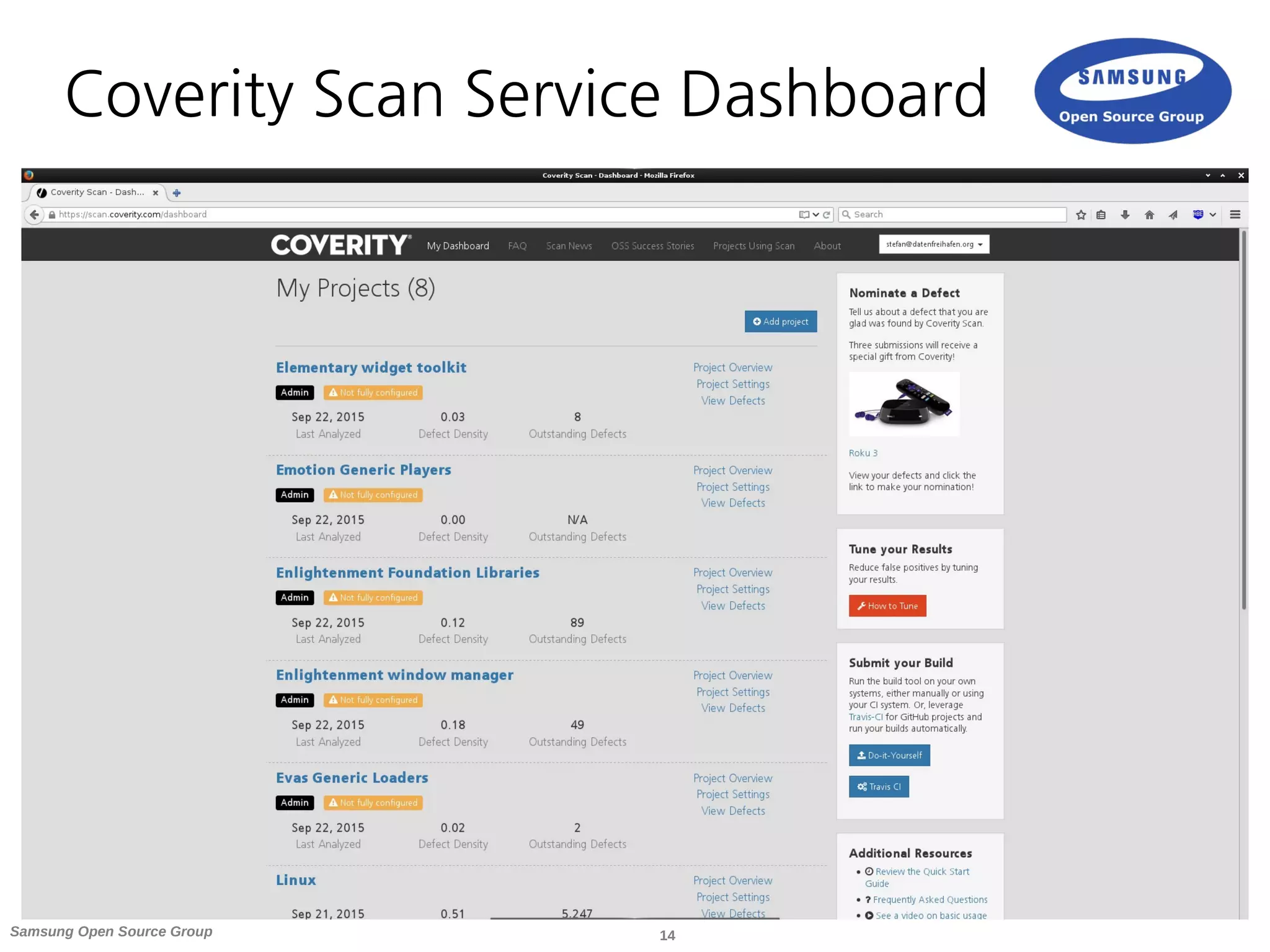
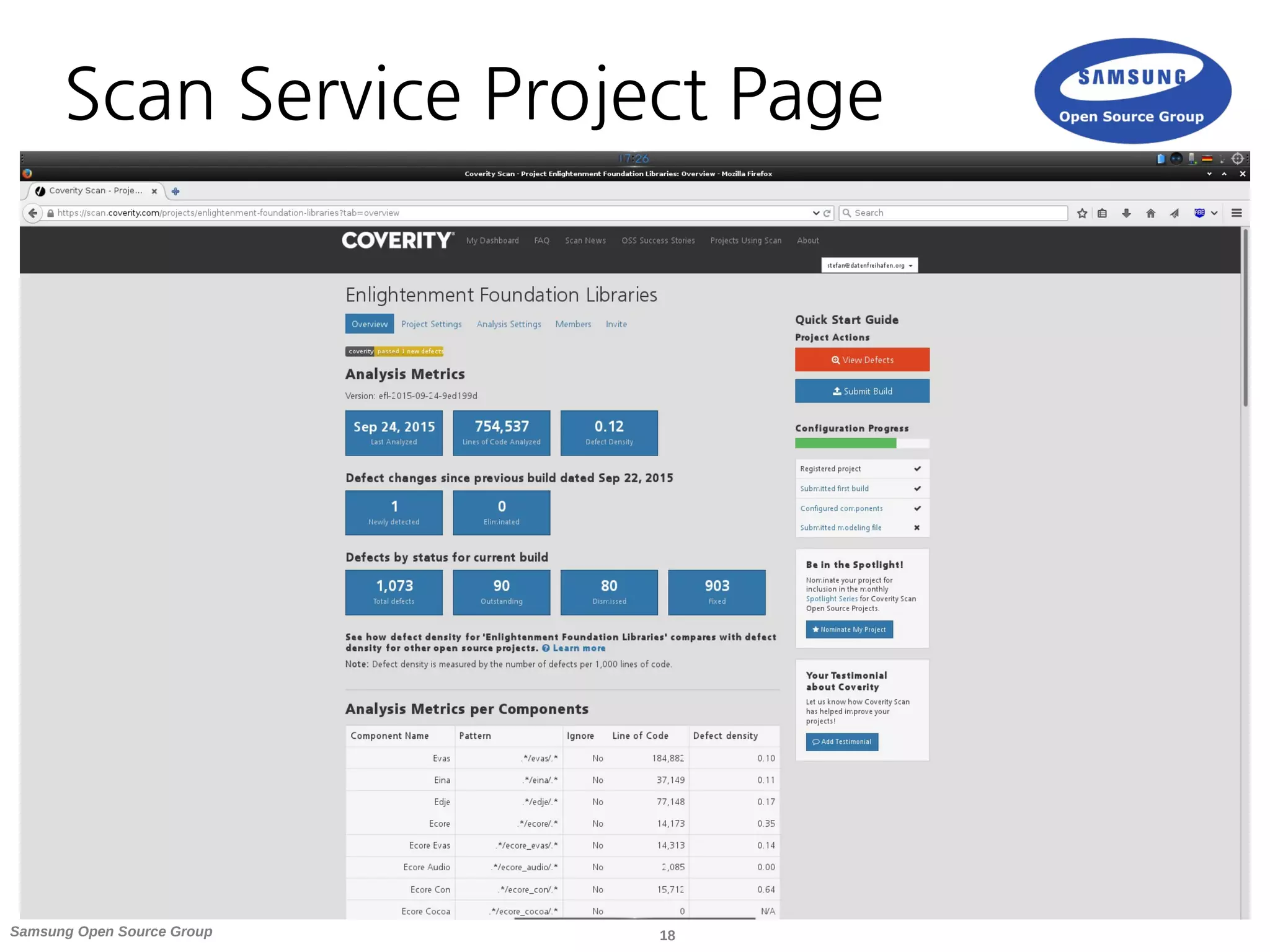
Coverity Scan Service Dashboard
15Samsung Open Source Group
Join a Project
● The simplest way to participate is when the project
already uses Coverity Scan
● A good chance as over 5700 projects are registered
already
● A searchable list with participating projects can be
found at [2]
● Request access, which the project admin might need
to approve (depends on project settings)
16Samsung Open Source Group
Register a New Project
● If your project is not yet using Coverity Scan you need to
register it as a new project at [3]
● Registering is easy (only needs project URL's and license
selection)
● It might take a few days until a newly registered project
is ready to be analysed
● Once the project has been approved you can submit
builds to it
17Samsung Open Source Group
Scan Service Improvements
● Over my 2 years usage of Coverity Scan there have been
several improvements hardware and software wise
● Hardware upgrades which results in faster analysis
results without long queues
● Improved scanners and heuristics (server side as well as in
new cov-build releases) for less false positives
● Graphs in your project view
● Metrics based on defined components
● CWE Top 25 defects
18Samsung Open Source Group
Scan Service Project Page
19Samsung Open Source Group
Hooking it Up in Your Project
20Samsung Open Source Group
Gather Build Data
● To gather the data needed by the analyser
Coverity provides a build wrapper
● Cov-build needs to be run with your normal build
tools as parameter
● If you project uses make it should be as easy as:
cov-build --dir cov-int make
● It is updated twice a year and recommended to keep
your version up to date [4]
21Samsung Open Source Group
Manually Submit Builds
● You can submit builds manually through the
web interface
● Just upload it from the Submit Build form from
your project overview page
● This make sense for your first builds or if you want
to test something
● In general the process should better be automated
22Samsung Open Source Group
Submit Builds with Travis CI
● Travis CI build system integrated with GitHub
● Very useful if you use GitHub and/or Travis
● You need to setup your project in Coverity Scan as GitHub
project to have the Travis option available
● Operates on a per-branch basis (default name
coverity_scan)
● Once you push your code to this branch on GitHub Travis
will trigger the Coverity Scan run on it
● A full guideline with .travis.yml template can be found at [5]
23Samsung Open Source Group
Submit Builds from Jenkins
● There exists a Coverity Plugin for Jenkins [6]
● At the time I tried it, I was not able to use
the free Scan Service as Integrity Manager
instance
● Seems it was only capable of integrating
with a commercial license on your setup
24Samsung Open Source Group
Submit Builds from Jenkins
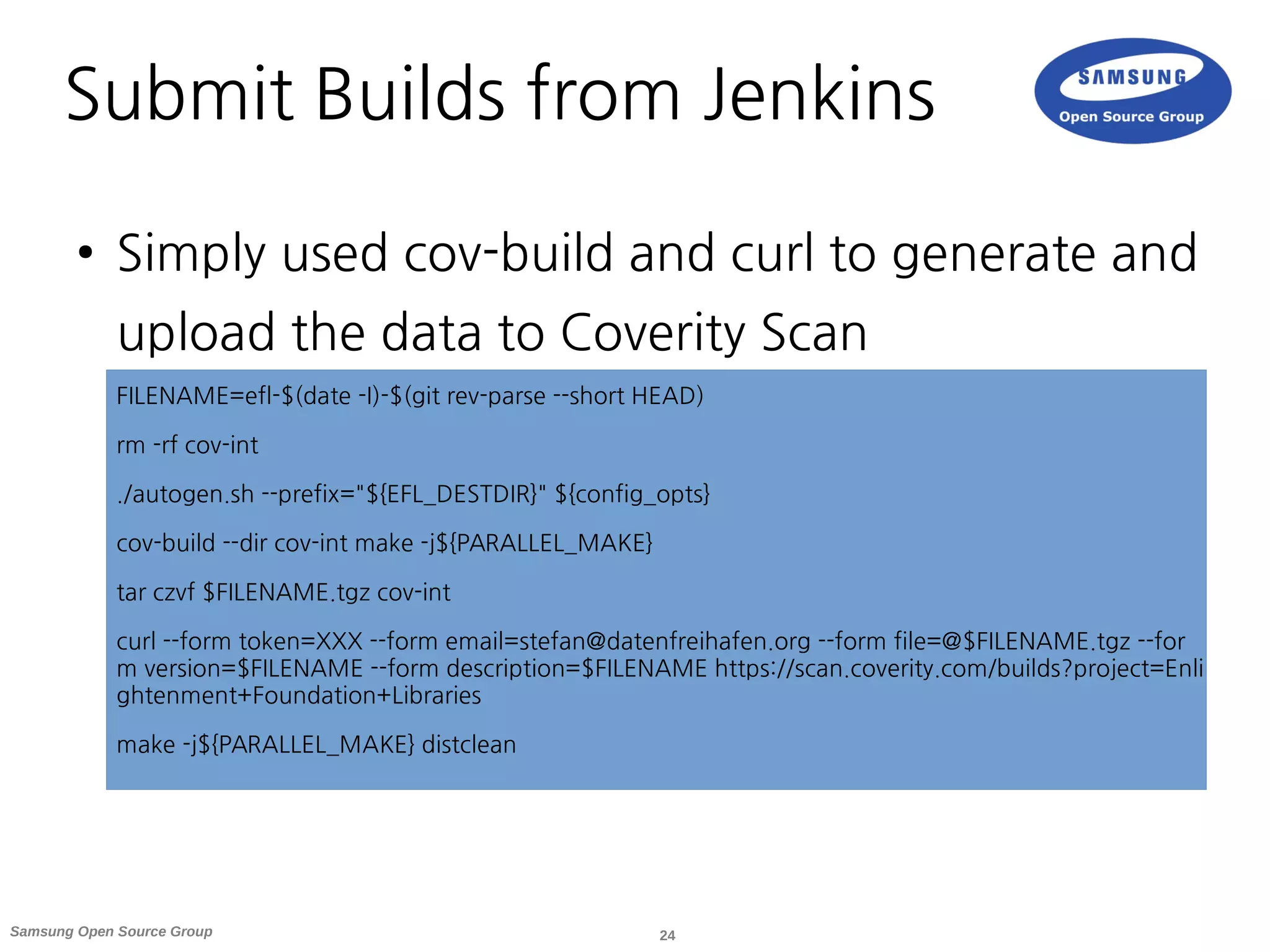
● Simply used cov-build and curl to generate and
upload the data to Coverity Scan
FILENAME=efl-$(date -I)-$(git rev-parse --short HEAD)
rm -rf cov-int
./autogen.sh --prefix="${EFL_DESTDIR}" ${config_opts}
cov-build --dir cov-int make -j${PARALLEL_MAKE}
tar czvf $FILENAME.tgz cov-int
curl --form token=XXX --form email=stefan@datenfreihafen.org --form file=@$FILENAME.tgz --for
m version=$FILENAME --form description=$FILENAME https://scan.coverity.com/builds?project=Enli
ghtenment+Foundation+Libraries
make -j${PARALLEL_MAKE} distclean
25Samsung Open Source Group
Fine Tuning
26Samsung Open Source Group
Fine Tuning on the Server
● Create project components
– Simple regex patterns to sort files into categories
– Useful for large code bases
– Useful for projects with many maintainers
● You can create a modeling file to adjust
– Helps to tune down the false positive rate
– Upload a file to annotate functions without implementation
for things like abort, free or alloc
– I had no need for it until now
27Samsung Open Source Group
Fine Tuning in the Code
● Annotations in code
– Better use the modeling file (keeps code clean)
– +kill (always aborts), +alloc (allocates memory), +free (frees argument)
/* coverity[+free : arg-0] */
void local_free(void *to_be_freed) {
…
}
● Mention the unique CID's in commit messages for credit
and backreferencing
28Samsung Open Source Group
Work Flows & Examples
29Samsung Open Source Group
Work Flow – EFL
●
Started to use it in July 2013 with the Enlightenment
Foundation Libraries
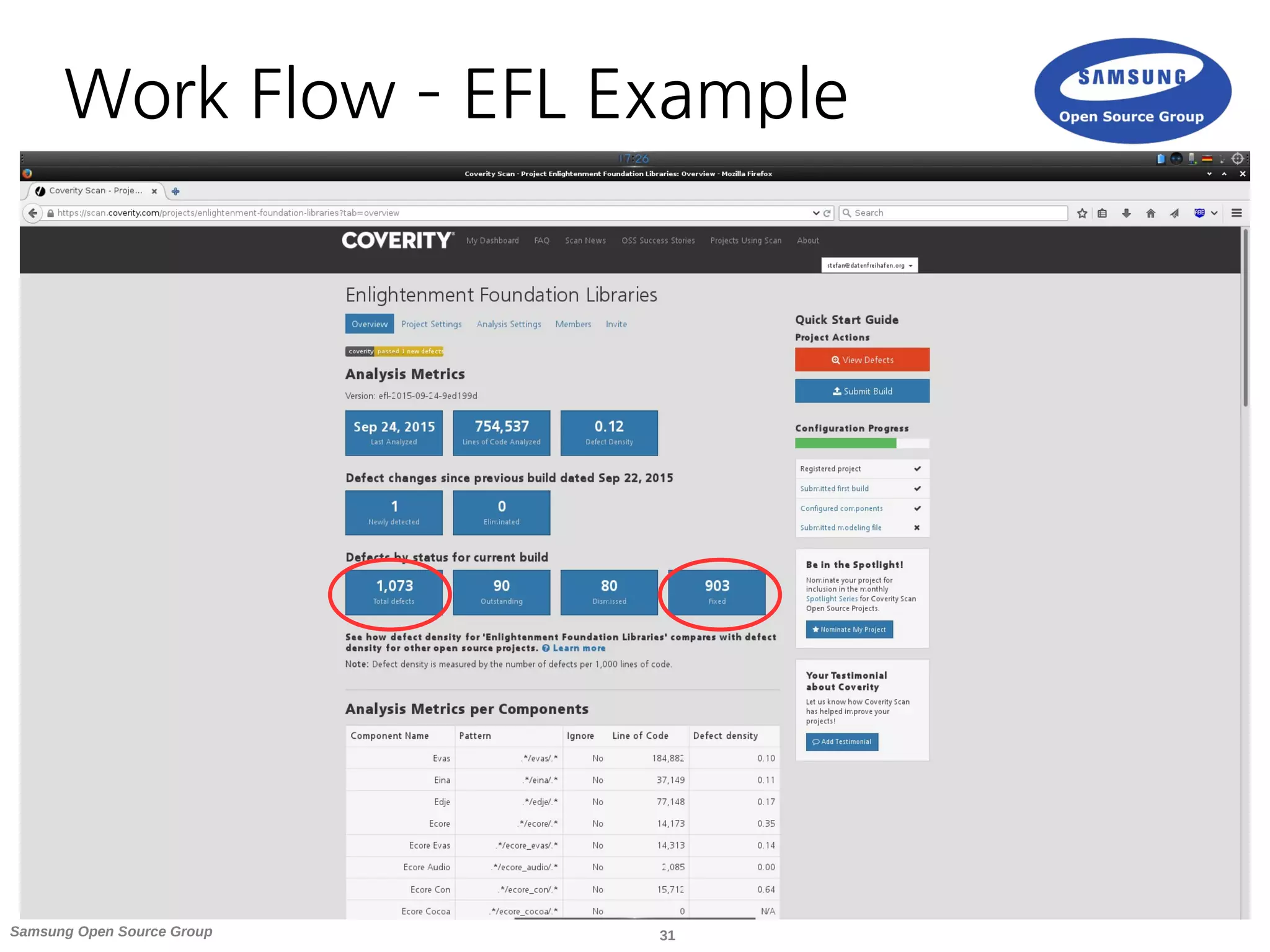
● 7 projects from 32k to 750k lines of code
● 3 of them reached a 0 defect rate the rest ranges from 0.02
to 0.18
●
Submitted every night from our Jenkins CI setup (one project is to
big > 500k LOC and thus can only run 4 times a week)
● Mail with scan results is send to a mailing list
●
Normally new reports get fixed quickly as they are in areas
which are actively being worked on
30Samsung Open Source Group
Work Flow – EFL
● During the stabilization phase of our
development cycle I go through the list and
dispatch defects with high impact
● Would love to run new patch submissions
through the scan during review
– To much load towards the scan service
– Incremental checks would be interesting as well
31Samsung Open Source Group
Work Flow – EFL Example
32Samsung Open Source Group
Work Flow - Linux
● Huge code base with ~10M lines of code
(after C preprocessor)
● Build submitted once a week by Dave Jones
● Many maintainers and developers accessing
it directly and looking at their components
● Fixes come through the normal dev channels
33Samsung Open Source Group
Work Flow - Linux
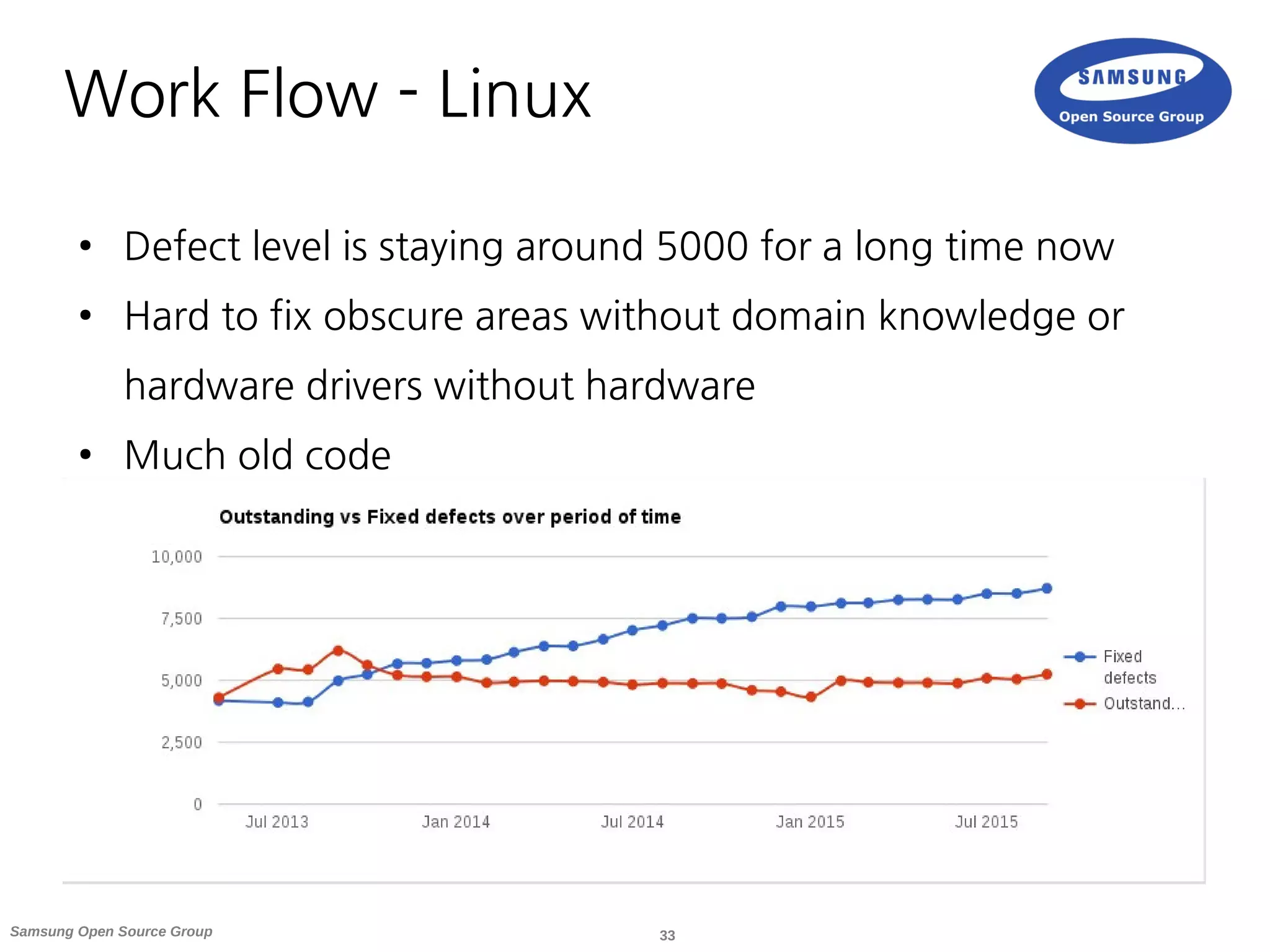
● Defect level is staying around 5000 for a long time now
● Hard to fix obscure areas without domain knowledge or
hardware drivers without hardware
● Much old code
34Samsung Open Source Group
Work Flow - Alternatives
● Run every commit through it
– Most likely overkill and will not really work well with
the free Scan Service
● Dedicated git branches to be checked
– Only works with git
– The way the Travis CI plugin works
– Maybe interesting for testing review branches
35Samsung Open Source Group
Striving for 0
● Striving for defect rate of 0
● Gamification
● We have reached this in three of the smaller projects
● Harder to reach in large and old code bases
● Once reached, higher motivation to look at new
defects to maintain the 0 defect rate
● This can obviously only cover problems found by
Coverity Scan. You surely have more. :-)
36Samsung Open Source Group
Defect Areas
● In my experience the majority of defects are in seldomly
used code paths or new code
● Which explains why they are still there
● An example would be resource leaks on error paths and
during shutdown
● On every 10 or 20 of those defects though there comes
one which makes you really wonder how it could be in
your code at all :-)
● Some stories at [7]
37Samsung Open Source Group
Examples
● Classic resource leaks
– Not seen to often if you regularly run your code
under Valgrind
● Buffer overruns and memory corruptions
– Good to find those early-on instead of having to go
through a lengthy debug session
● Copy and paste defects which result in logic
flaws
38Samsung Open Source Group
Summary
39Samsung Open Source Group
Summary
● Using a static analyser is a good addition to your QA
toolset
● The setup and usage is easy enough and gives you a
quick and direct benefit
● Finds defects early in the process instead of during
deployment
● Various alternatives to Coverity Scan if they fit you better
● Recommended to run regularly
40Samsung Open Source Group
References
● [1]: https://en.wikipedia.org/wiki/List_of_tools_for_static_code_analysis
● Sparse: https://sparse.wiki.kernel.org/index.php/Main_Page
● Clang Static Analyzer: http://clang-analyzer.llvm.org
● CodeChecker: https://github.com/Ericsson/codechecker
● Coverity Scan: https://scan.coverity.com
● [2]: https://scan.coverity.com/projects
● [3]: https://scan.coverity.com/projects/new
● [4]: https://scan.coverity.com/download?tab=cxx
● [5]: https://scan.coverity.com/travis_ci
● [6]: https://wiki.jenkins-ci.org/display/JENKINS/Coverity+Plugin
● [7]: https://scan.coverity.com/o/oss_success_stories
41Samsung Open Source Group
Thank you.

Static Analysis of Your OSS Project with Coverity

  • 1.
    1Samsung Open SourceGroup Stefan Schmidt Samsung Open Source Group stefan@osg.samsung.com Static Analysis of Your OSS Project with Coverity LinuxCon EU 2015
  • 2.
    2Samsung Open SourceGroup ● Introduction ● Survey of Available Analysers ● Coverity Scan Service ● Hooking it Up in Your Project ● Fine Tuning ● Work Flows & Examples ● Summary Agenda
  • 3.
    3Samsung Open SourceGroup Introduction
  • 4.
    4Samsung Open SourceGroup Static Analysers ● What is Static Analysis? – Analysis of the soure code without execution – Usage of algorithms and techniques to find bugs in source code ● What is it not? – A formal verification of your code – A proof that your code is bug free ● Why is it useful for us? – Allows to find many types of defects early in the development process – Resource leaks, NULL pointer dereferences, memory corruptions, buffer overflows, etc. – Supplements things like unit testing, runtime testing, Valgrind, etc.
  • 5.
    5Samsung Open SourceGroup Survey of Available Analysers
  • 6.
    6Samsung Open SourceGroup Static Analysers ● Sparse ● Clang Static Analyzer ● CodeChecker based on Clang Static Analyzer ● Klocwork (proprietary) ● Coverity (proprietary, free as in beer service for OSS projects) ● A list with more analysers can be found at [1] ● My personal experience started with – Clang Static Analyzer – Klocwork used internally (not allowed to share results) – finally settled for Coverity Scan service
  • 7.
    7Samsung Open SourceGroup Sparse ● Started 2003 by Linus Torvalds ● Semantic parser with a static analysis backend ● Well integrated into the Kernel build system (make C=1/C=2) ● To integrate it with your project using the build wrapper might be enough: make CC=cgcc
  • 8.
    8Samsung Open SourceGroup Clang Static Analyzer ● Command line tool scan-build as build wrapper ● Generates a report as static HTML files ● The analyser itself is implemented as C++ library ● Also used from within XCode ● Scan build had many false positives for us and needs more manual tuning (e.g. leak detected when added to a list or array) ● Turned out to be to noisy without further work for us
  • 9.
    9Samsung Open SourceGroup CodeChecker ● Recently (June 2015) published by Ericsson ● Based on Clang Static Analyzer library ● Adds database for defect tracking ● Adds interactive web UI for defect handling ● Incremental reporting against baseline ● Added new checkers to Clang itself as well ● Very interesting but sadly no time to test, yet
  • 10.
    10Samsung Open SourceGroup Feature Comparison Analyser OSS Defect database Web UI False positive ratio Sparse ✔ ✘ ✘ To be tested Clang Static Analyzer ✔ ✘ ✔static html output Noisy CodeChecker ✔ ✔ ✔ To be tested Coverity ✘ free as in beer service ✔ ✔ Good Klocwork ✘ ✔ ✔ Good
  • 11.
    11Samsung Open SourceGroup Coverity Scan Service
  • 12.
    12Samsung Open SourceGroup Coverity Scan Service Overview ● Started 2006 with 50 projects and now runs for 5700 ● Many big projects already make use of it: Linux, Firefox, LibreOffice, FreeBSD, ... ● Scans projects written in C, C++, Java, C# and JavaScript ● Defect density is defined as defects per 1000 lines of code (1 per 1000 as industry standard)
  • 13.
    13Samsung Open SourceGroup Coverity Scan Service Parts 1) Build wrapper cov-build to gather data on your system and package it into a tgz file 2) Upload the tgz on the website or via curl to web API to trigger analysis 3) Receive a mail once the analysis is completed 4) Web UI for dashboard and to triage defect reports
  • 14.
    14Samsung Open SourceGroup Coverity Scan Service Dashboard
  • 15.
    15Samsung Open SourceGroup Join a Project ● The simplest way to participate is when the project already uses Coverity Scan ● A good chance as over 5700 projects are registered already ● A searchable list with participating projects can be found at [2] ● Request access, which the project admin might need to approve (depends on project settings)
  • 16.
    16Samsung Open SourceGroup Register a New Project ● If your project is not yet using Coverity Scan you need to register it as a new project at [3] ● Registering is easy (only needs project URL's and license selection) ● It might take a few days until a newly registered project is ready to be analysed ● Once the project has been approved you can submit builds to it
  • 17.
    17Samsung Open SourceGroup Scan Service Improvements ● Over my 2 years usage of Coverity Scan there have been several improvements hardware and software wise ● Hardware upgrades which results in faster analysis results without long queues ● Improved scanners and heuristics (server side as well as in new cov-build releases) for less false positives ● Graphs in your project view ● Metrics based on defined components ● CWE Top 25 defects
  • 18.
    18Samsung Open SourceGroup Scan Service Project Page
  • 19.
    19Samsung Open SourceGroup Hooking it Up in Your Project
  • 20.
    20Samsung Open SourceGroup Gather Build Data ● To gather the data needed by the analyser Coverity provides a build wrapper ● Cov-build needs to be run with your normal build tools as parameter ● If you project uses make it should be as easy as: cov-build --dir cov-int make ● It is updated twice a year and recommended to keep your version up to date [4]
  • 21.
    21Samsung Open SourceGroup Manually Submit Builds ● You can submit builds manually through the web interface ● Just upload it from the Submit Build form from your project overview page ● This make sense for your first builds or if you want to test something ● In general the process should better be automated
  • 22.
    22Samsung Open SourceGroup Submit Builds with Travis CI ● Travis CI build system integrated with GitHub ● Very useful if you use GitHub and/or Travis ● You need to setup your project in Coverity Scan as GitHub project to have the Travis option available ● Operates on a per-branch basis (default name coverity_scan) ● Once you push your code to this branch on GitHub Travis will trigger the Coverity Scan run on it ● A full guideline with .travis.yml template can be found at [5]
  • 23.
    23Samsung Open SourceGroup Submit Builds from Jenkins ● There exists a Coverity Plugin for Jenkins [6] ● At the time I tried it, I was not able to use the free Scan Service as Integrity Manager instance ● Seems it was only capable of integrating with a commercial license on your setup
  • 24.
    24Samsung Open SourceGroup Submit Builds from Jenkins ● Simply used cov-build and curl to generate and upload the data to Coverity Scan FILENAME=efl-$(date -I)-$(git rev-parse --short HEAD) rm -rf cov-int ./autogen.sh --prefix="${EFL_DESTDIR}" ${config_opts} cov-build --dir cov-int make -j${PARALLEL_MAKE} tar czvf $FILENAME.tgz cov-int curl --form token=XXX --form email=stefan@datenfreihafen.org --form file=@$FILENAME.tgz --for m version=$FILENAME --form description=$FILENAME https://scan.coverity.com/builds?project=Enli ghtenment+Foundation+Libraries make -j${PARALLEL_MAKE} distclean
  • 25.
    25Samsung Open SourceGroup Fine Tuning
  • 26.
    26Samsung Open SourceGroup Fine Tuning on the Server ● Create project components – Simple regex patterns to sort files into categories – Useful for large code bases – Useful for projects with many maintainers ● You can create a modeling file to adjust – Helps to tune down the false positive rate – Upload a file to annotate functions without implementation for things like abort, free or alloc – I had no need for it until now
  • 27.
    27Samsung Open SourceGroup Fine Tuning in the Code ● Annotations in code – Better use the modeling file (keeps code clean) – +kill (always aborts), +alloc (allocates memory), +free (frees argument) /* coverity[+free : arg-0] */ void local_free(void *to_be_freed) { … } ● Mention the unique CID's in commit messages for credit and backreferencing
  • 28.
    28Samsung Open SourceGroup Work Flows & Examples
  • 29.
    29Samsung Open SourceGroup Work Flow – EFL ● Started to use it in July 2013 with the Enlightenment Foundation Libraries ● 7 projects from 32k to 750k lines of code ● 3 of them reached a 0 defect rate the rest ranges from 0.02 to 0.18 ● Submitted every night from our Jenkins CI setup (one project is to big > 500k LOC and thus can only run 4 times a week) ● Mail with scan results is send to a mailing list ● Normally new reports get fixed quickly as they are in areas which are actively being worked on
  • 30.
    30Samsung Open SourceGroup Work Flow – EFL ● During the stabilization phase of our development cycle I go through the list and dispatch defects with high impact ● Would love to run new patch submissions through the scan during review – To much load towards the scan service – Incremental checks would be interesting as well
  • 31.
    31Samsung Open SourceGroup Work Flow – EFL Example
  • 32.
    32Samsung Open SourceGroup Work Flow - Linux ● Huge code base with ~10M lines of code (after C preprocessor) ● Build submitted once a week by Dave Jones ● Many maintainers and developers accessing it directly and looking at their components ● Fixes come through the normal dev channels
  • 33.
    33Samsung Open SourceGroup Work Flow - Linux ● Defect level is staying around 5000 for a long time now ● Hard to fix obscure areas without domain knowledge or hardware drivers without hardware ● Much old code
  • 34.
    34Samsung Open SourceGroup Work Flow - Alternatives ● Run every commit through it – Most likely overkill and will not really work well with the free Scan Service ● Dedicated git branches to be checked – Only works with git – The way the Travis CI plugin works – Maybe interesting for testing review branches
  • 35.
    35Samsung Open SourceGroup Striving for 0 ● Striving for defect rate of 0 ● Gamification ● We have reached this in three of the smaller projects ● Harder to reach in large and old code bases ● Once reached, higher motivation to look at new defects to maintain the 0 defect rate ● This can obviously only cover problems found by Coverity Scan. You surely have more. :-)
  • 36.
    36Samsung Open SourceGroup Defect Areas ● In my experience the majority of defects are in seldomly used code paths or new code ● Which explains why they are still there ● An example would be resource leaks on error paths and during shutdown ● On every 10 or 20 of those defects though there comes one which makes you really wonder how it could be in your code at all :-) ● Some stories at [7]
  • 37.
    37Samsung Open SourceGroup Examples ● Classic resource leaks – Not seen to often if you regularly run your code under Valgrind ● Buffer overruns and memory corruptions – Good to find those early-on instead of having to go through a lengthy debug session ● Copy and paste defects which result in logic flaws
  • 38.
    38Samsung Open SourceGroup Summary
  • 39.
    39Samsung Open SourceGroup Summary ● Using a static analyser is a good addition to your QA toolset ● The setup and usage is easy enough and gives you a quick and direct benefit ● Finds defects early in the process instead of during deployment ● Various alternatives to Coverity Scan if they fit you better ● Recommended to run regularly
  • 40.
    40Samsung Open SourceGroup References ● [1]: https://en.wikipedia.org/wiki/List_of_tools_for_static_code_analysis ● Sparse: https://sparse.wiki.kernel.org/index.php/Main_Page ● Clang Static Analyzer: http://clang-analyzer.llvm.org ● CodeChecker: https://github.com/Ericsson/codechecker ● Coverity Scan: https://scan.coverity.com ● [2]: https://scan.coverity.com/projects ● [3]: https://scan.coverity.com/projects/new ● [4]: https://scan.coverity.com/download?tab=cxx ● [5]: https://scan.coverity.com/travis_ci ● [6]: https://wiki.jenkins-ci.org/display/JENKINS/Coverity+Plugin ● [7]: https://scan.coverity.com/o/oss_success_stories
  • 41.
    41Samsung Open SourceGroup Thank you.