Continuous Integration with Jenkins CI
Jan Riemann und Niklas Lochschmidt
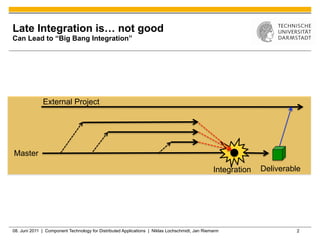
Late Integration is… not good
Can Lead to “Big Bang Integration”


              External Project


Master

                                                                                                Integration   Deliverable


08. Juni 2011 | Component Technology for Distributed Applications | Niklas Lochschmidt, Jan Riemann                    2
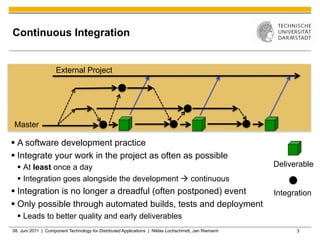
Continuous Integration


                    External Project


Master

§  A software development practice
§  Integrate your work in the project as often as possible
  §  At least once a day                                                                             Deliverable
  §  Integration goes alongside the development à continuous
§  Integration is no longer a dreadful (often postponed) event                                       Integration
§  Only possible through automated builds, tests and deployment
  §  Leads to better quality and early deliverables
08. Juni 2011 | Component Technology for Distributed Applications | Niklas Lochschmidt, Jan Riemann         3
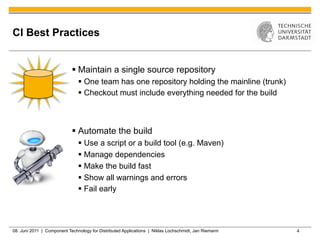
CI Best Practices


                            §  Maintain a single source repository
                               §  One team has one repository holding the mainline (trunk)
                               §  Checkout must include everything needed for the build


                            §  Automate the build
                               §  Use a script or a build tool (e.g. Maven)
                               §  Manage dependencies
                               §  Make the build fast
                               §  Show all warnings and errors
                               §  Fail early


08. Juni 2011 | Component Technology for Distributed Applications | Niklas Lochschmidt, Jan Riemann   4
CI Best Practices

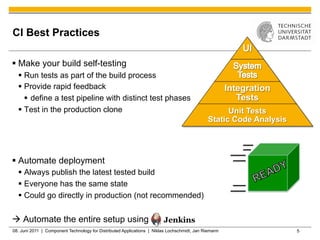
§  Make your build self-testing
  §  Run tests as part of the build process
  §  Provide rapid feedback                                                                          Integration
      §  define a test pipeline with distinct test phases                                               Tests
  §  Test in the production clone                                                                 Unit Tests
                                                                                             Static Code Analysis


§  Automate deployment
  §  Always publish the latest tested build
  §  Everyone has the same state
  §  Could go directly in production (not recommended)


à Automate the entire setup using
08. Juni 2011 | Component Technology for Distributed Applications | Niklas Lochschmidt, Jan Riemann                 5
What is Jenkins CI?

§  Jenkins is a central build server
  §  Written in Java
  §  Runs as Servlet in Tomcat or standalone (e.g. Windows Service)


§  Performs „jobs“
  §  Configurable
  §  Does all the tedious work (checkout, build, test, package, deploy)


§  Adapts to your workflow
  §  More than 350 plugins available


§  Jenkins forked from Hudson (Oracle) in January 2011
  §  Most Hudson developers switched to Jenkins
  §  Oracle donated Hudson to the Eclipse Foundation in May 2011
08. Juni 2011 | Component Technology for Distributed Applications | Niklas Lochschmidt, Jan Riemann   6
Repository Contains Everything Needed to
Build the Project

§  CI: Repository contains:
  §  Code, Resources
  §  NO build products
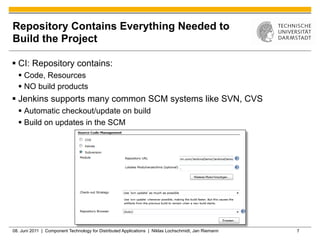
§  Jenkins supports many common SCM systems like SVN, CVS
  §  Automatic checkout/update on build
  §  Build on updates in the SCM


08. Juni 2011 | Component Technology for Distributed Applications | Niklas Lochschmidt, Jan Riemann   7
Building the Project Relies on External Build
Tools

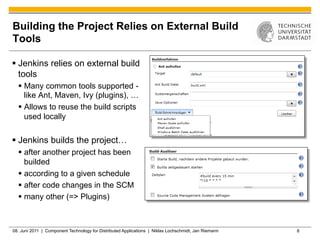
§  Jenkins relies on external build
    tools
  §  Many common tools supported -
      like Ant, Maven, Ivy (plugins), …
  §  Allows to reuse the build scripts
      used locally

§  Jenkins builds the project…
  §  after another project has been
      builded
  §  according to a given schedule
  §  after code changes in the SCM
  §  many other (=> Plugins)


08. Juni 2011 | Component Technology for Distributed Applications | Niklas Lochschmidt, Jan Riemann   8
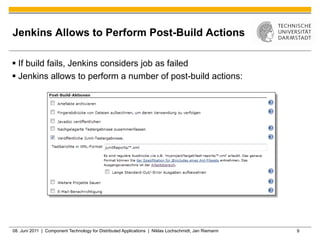
Jenkins Allows to Perform Post-Build Actions

§  If build fails, Jenkins considers job as failed
§  Jenkins allows to perform a number of post-build actions:


08. Juni 2011 | Component Technology for Distributed Applications | Niklas Lochschmidt, Jan Riemann   9
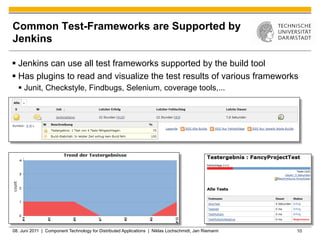
Common Test-Frameworks are Supported by
Jenkins

§  Jenkins can use all test frameworks supported by the build tool
§  Has plugins to read and visualize the test results of various frameworks
  §  Junit, Checkstyle, Findbugs, Selenium, coverage tools,...


08. Juni 2011 | Component Technology for Distributed Applications | Niklas Lochschmidt, Jan Riemann   10
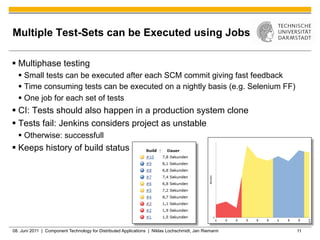
Multiple Test-Sets can be Executed using Jobs

§  Multiphase testing
  §  Small tests can be executed after each SCM commit giving fast feedback
  §  Time consuming tests can be executed on a nightly basis (e.g. Selenium FF)
  §  One job for each set of tests
§  CI: Tests should also happen in a production system clone
§  Tests fail: Jenkins considers project as unstable
  §  Otherwise: successfull
§  Keeps history of build status


08. Juni 2011 | Component Technology for Distributed Applications | Niklas Lochschmidt, Jan Riemann   11
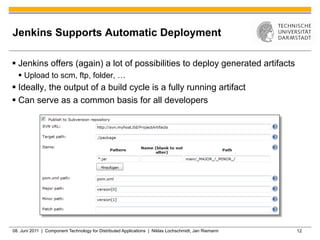
Jenkins Supports Automatic Deployment

§  Jenkins offers (again) a lot of possibilities to deploy generated artifacts
  §  Upload to scm, ftp, folder, …
§  Ideally, the output of a build cycle is a fully running artifact
§  Can serve as a common basis for all developers


08. Juni 2011 | Component Technology for Distributed Applications | Niklas Lochschmidt, Jan Riemann   12
Sources

§  Continuous Integration
  §  http://martinfowler.com/articles/continuousIntegration.html
  §  http://www.se-radio.net/?s=133


§  Jenkins
  §  Homepage http://www.jenkins-ci.org
  §  Wiki http://wiki.jenkins-ci.org
  §  Plugin-List https://wiki.jenkins-ci.org/display/JENKINS/Plugins
  §  Github https://github.com/jenkinsci/jenkins
  §  Jenkins CI Server http://ci.jenkins-ci.org/
  §  Fork from Hudson http://jenkins-ci.org/content/hudsons-future


08. Juni 2011 | Component Technology for Distributed Applications | Niklas Lochschmidt, Jan Riemann   13
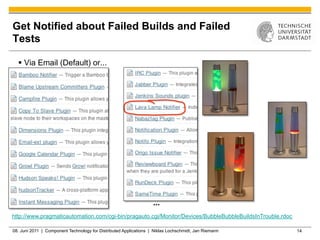
Get Notified about Failed Builds and Failed
Tests

  §  Via Email (Default) or...


                                                                   ...
http://www.pragmaticautomation.com/cgi-bin/pragauto.cgi/Monitor/Devices/BubbleBubbleBuildsInTrouble.rdoc

08. Juni 2011 | Component Technology for Distributed Applications | Niklas Lochschmidt, Jan Riemann        14
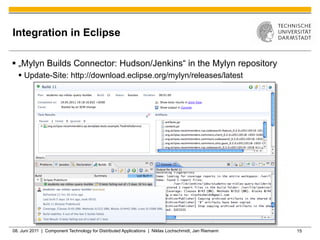
Integration in Eclipse

§  „Mylyn Builds Connector: Hudson/Jenkins“ in the Mylyn repository
  §  Update-Site: http://download.eclipse.org/mylyn/releases/latest


08. Juni 2011 | Component Technology for Distributed Applications | Niklas Lochschmidt, Jan Riemann   15
Jenkins Supports Multi-Environment Builds

§  Multi-environment builds
  §  Easy to automatically build (and test) the project on many platforms using
      slaves
§  Multiplatform testing
  §  Jenkins slaves can execute the testsuite on different platforms


08. Juni 2011 | Component Technology for Distributed Applications | Niklas Lochschmidt, Jan Riemann   16

Jenkins

  • 1.
    Continuous Integration withJenkins CI Jan Riemann und Niklas Lochschmidt
  • 2.
    Late Integration is…not good Can Lead to “Big Bang Integration” External Project Master Integration Deliverable 08. Juni 2011 | Component Technology for Distributed Applications | Niklas Lochschmidt, Jan Riemann 2
  • 3.
    Continuous Integration External Project Master §  A software development practice §  Integrate your work in the project as often as possible §  At least once a day Deliverable §  Integration goes alongside the development à continuous §  Integration is no longer a dreadful (often postponed) event Integration §  Only possible through automated builds, tests and deployment §  Leads to better quality and early deliverables 08. Juni 2011 | Component Technology for Distributed Applications | Niklas Lochschmidt, Jan Riemann 3
  • 4.
    CI Best Practices §  Maintain a single source repository §  One team has one repository holding the mainline (trunk) §  Checkout must include everything needed for the build §  Automate the build §  Use a script or a build tool (e.g. Maven) §  Manage dependencies §  Make the build fast §  Show all warnings and errors §  Fail early 08. Juni 2011 | Component Technology for Distributed Applications | Niklas Lochschmidt, Jan Riemann 4
  • 5.
    CI Best Practices § Make your build self-testing §  Run tests as part of the build process §  Provide rapid feedback Integration §  define a test pipeline with distinct test phases Tests §  Test in the production clone Unit Tests Static Code Analysis §  Automate deployment §  Always publish the latest tested build §  Everyone has the same state §  Could go directly in production (not recommended) à Automate the entire setup using 08. Juni 2011 | Component Technology for Distributed Applications | Niklas Lochschmidt, Jan Riemann 5
  • 6.
    What is JenkinsCI? §  Jenkins is a central build server §  Written in Java §  Runs as Servlet in Tomcat or standalone (e.g. Windows Service) §  Performs „jobs“ §  Configurable §  Does all the tedious work (checkout, build, test, package, deploy) §  Adapts to your workflow §  More than 350 plugins available §  Jenkins forked from Hudson (Oracle) in January 2011 §  Most Hudson developers switched to Jenkins §  Oracle donated Hudson to the Eclipse Foundation in May 2011 08. Juni 2011 | Component Technology for Distributed Applications | Niklas Lochschmidt, Jan Riemann 6
  • 7.
    Repository Contains EverythingNeeded to Build the Project §  CI: Repository contains: §  Code, Resources §  NO build products §  Jenkins supports many common SCM systems like SVN, CVS §  Automatic checkout/update on build §  Build on updates in the SCM 08. Juni 2011 | Component Technology for Distributed Applications | Niklas Lochschmidt, Jan Riemann 7
  • 8.
    Building the ProjectRelies on External Build Tools §  Jenkins relies on external build tools §  Many common tools supported - like Ant, Maven, Ivy (plugins), … §  Allows to reuse the build scripts used locally §  Jenkins builds the project… §  after another project has been builded §  according to a given schedule §  after code changes in the SCM §  many other (=> Plugins) 08. Juni 2011 | Component Technology for Distributed Applications | Niklas Lochschmidt, Jan Riemann 8
  • 9.
    Jenkins Allows toPerform Post-Build Actions §  If build fails, Jenkins considers job as failed §  Jenkins allows to perform a number of post-build actions: 08. Juni 2011 | Component Technology for Distributed Applications | Niklas Lochschmidt, Jan Riemann 9
  • 10.
    Common Test-Frameworks areSupported by Jenkins §  Jenkins can use all test frameworks supported by the build tool §  Has plugins to read and visualize the test results of various frameworks §  Junit, Checkstyle, Findbugs, Selenium, coverage tools,... 08. Juni 2011 | Component Technology for Distributed Applications | Niklas Lochschmidt, Jan Riemann 10
  • 11.
    Multiple Test-Sets canbe Executed using Jobs §  Multiphase testing §  Small tests can be executed after each SCM commit giving fast feedback §  Time consuming tests can be executed on a nightly basis (e.g. Selenium FF) §  One job for each set of tests §  CI: Tests should also happen in a production system clone §  Tests fail: Jenkins considers project as unstable §  Otherwise: successfull §  Keeps history of build status 08. Juni 2011 | Component Technology for Distributed Applications | Niklas Lochschmidt, Jan Riemann 11
  • 12.
    Jenkins Supports AutomaticDeployment §  Jenkins offers (again) a lot of possibilities to deploy generated artifacts §  Upload to scm, ftp, folder, … §  Ideally, the output of a build cycle is a fully running artifact §  Can serve as a common basis for all developers 08. Juni 2011 | Component Technology for Distributed Applications | Niklas Lochschmidt, Jan Riemann 12
  • 13.
    Sources §  Continuous Integration §  http://martinfowler.com/articles/continuousIntegration.html §  http://www.se-radio.net/?s=133 §  Jenkins §  Homepage http://www.jenkins-ci.org §  Wiki http://wiki.jenkins-ci.org §  Plugin-List https://wiki.jenkins-ci.org/display/JENKINS/Plugins §  Github https://github.com/jenkinsci/jenkins §  Jenkins CI Server http://ci.jenkins-ci.org/ §  Fork from Hudson http://jenkins-ci.org/content/hudsons-future 08. Juni 2011 | Component Technology for Distributed Applications | Niklas Lochschmidt, Jan Riemann 13
  • 14.
    Get Notified aboutFailed Builds and Failed Tests §  Via Email (Default) or... ... http://www.pragmaticautomation.com/cgi-bin/pragauto.cgi/Monitor/Devices/BubbleBubbleBuildsInTrouble.rdoc 08. Juni 2011 | Component Technology for Distributed Applications | Niklas Lochschmidt, Jan Riemann 14
  • 15.
    Integration in Eclipse § „Mylyn Builds Connector: Hudson/Jenkins“ in the Mylyn repository §  Update-Site: http://download.eclipse.org/mylyn/releases/latest 08. Juni 2011 | Component Technology for Distributed Applications | Niklas Lochschmidt, Jan Riemann 15
  • 16.
    Jenkins Supports Multi-EnvironmentBuilds §  Multi-environment builds §  Easy to automatically build (and test) the project on many platforms using slaves §  Multiplatform testing §  Jenkins slaves can execute the testsuite on different platforms 08. Juni 2011 | Component Technology for Distributed Applications | Niklas Lochschmidt, Jan Riemann 16